Alarms and Events
This chapter describes the type of events and alarms reported, how to view alarms and events by product or entity and severity, and how to view IDS signature attacks. It contains these sections:
• Alarm Dashboard, page 14-2
• Setting Search Filters for Alarms, page 14-4 • Alarm and Event Dictionary, page 14-8 • Configuring Alarm Severity, page 14-54 • Viewing MFP Events and Alarms, page 14-55 • Viewing IDS Signature Attacks, page 14-56
An event is an occurrence or detection of some condition in and around the network. For example, it can be a report about radio interference crossing a threshold, the detection of a new rogue access point, a controller rebooting.
Events are not generated by a controller for each and every occurrence of a pattern match. Some pattern matches must occur a certain number of times per reporting interval before they are considered a potential attack. The threshold of these pattern matches is set in the signature file.Events can then generate alarms which further can generate email notifications if configured as such.
An alarm is a WCS response to one or more related events. If an event is considered of high enough severity (critical, major, minor, or warning), the WCS raises an alarm until the condition which resulted is judged to be no longer occurring. For example, an alarm may be raised while a rogue access point is detected, but the alarm will terminate after the rogue has not been detected for several hours.
One or more events can result in a single alarm being raised. The mapping of events to alarms is their correlation function. For example, some IDS events are considered to be network wide so all events of that type (regardless of which access point the event is reported from) maps to a single alarm. On the other hand, other IDS events are client-specific. For these, all events of that type for a specific client MAC address will map to an alarm which is also specific for that client MAC address, regardless of whether multiple access points report the same IDS violation. If the same kind of IDS violation takes place for a different client, then a different alarm is raised.
A WCS administrator currently has no control over which events generate alarms or when they time out. On the controller, individual types of events can be enabled or disabled (such as management, SNMP, trap controls, etc.).
Alarm Dashboard
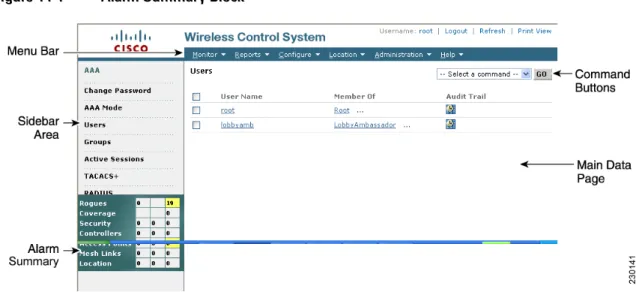
The number of active alarms for controllers, access points, location, and rogue elements as well as alarms associated with entities such as coverage, mesh, and severity are actively displayed on the left-side of most WCS windows (see Figure 14-1).
Critical (red), Major (orange) and Minor (yellow) alarms are shown in the alarm dashboard, left -to-right. Figure 14-1 Alarm Summary Block
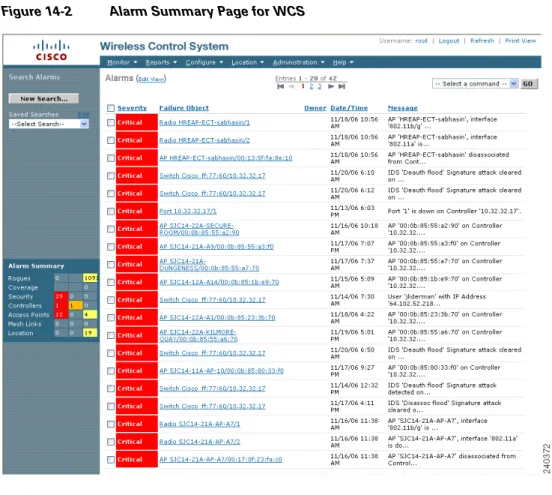
To view a listing of a specific type of alarm (critical, major, or minor) for a specific product or entity (such as coverage), click on the appropriate box within the alarm dashboard and a window displaying details for that alarm type and product or entity appears (see Figure 14-2).
Note You can also view alarm details for a specific product or entity by choosing Monitor > Alarms and then selecting the desired alarm level from the Severity drop-down menu and the product or entity type from the Alarm Category drop-down menu.
Note To search for additional alarms, click New Search... on the left panel of the page. For more details on conducting a search, refer to the “Setting Search Filters for Alarms” section on page 14-4.
Figure 14-2 Alarm Summary Page for WCS
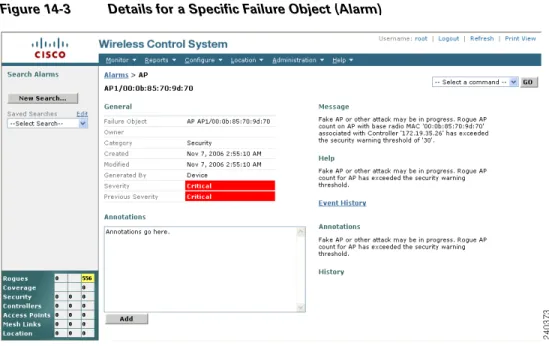
Note You can click a box in the alarm dashboard to display alarm events for the entity and alarm type selected. For example, if you click on the minor alarms box for location, the Alarms page for that specific item appears (see Figure 14-2). For more details on a specific alarm listed on the Alarms page, click on the
Figure 14-3 Details for a Specific Failure Object (Alarm)
The most recent 802.11 channel where a rogue access point was observed is provided by clicking the
Rogue Clients link on the bottom right or choosing Rogue Clients from the Select a command drop-down menu.
Note You can use the drop-down menu at the upper-right of the Alarms page to assign, unassign, delete or clear the alarm. The event history of the alarm is also accessible from this menu.
Setting Search Filters for Alarms
From the Monitor > Alarms page you can search for filters based on severity, category, and date range. Step 1 Choose Monitor > Alarms. The Alarms window appears (see Figure 14-2). In the left-hand column, the
saved searches that have been performed are listed.
Step 2 Use the controls in the left sidebar to create and save custom searches:
• New Search drop-down menu: Opens the Search Alarms window. Use the Search Alarms window to configure, run, and save searches.
• Saved Searches drop-down menu: Lists the saved custom searches. To open a saved search, choose it from the Saved Searches list.
• Edit link: Opens the Edit Saved Searches window. You can delete saved searches in the Edit Saved Searches window.
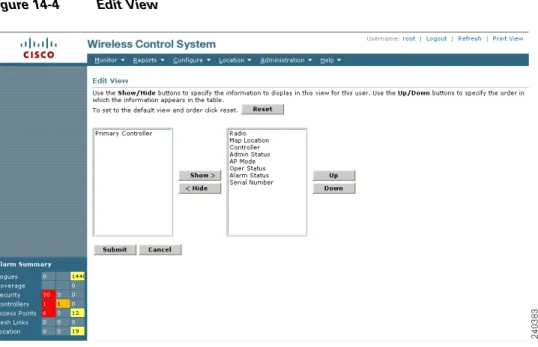
Step 3 (optional) If you want to change how the alarm search results are displayed, click Edit View. The Edit View window appears (see Figure 14-4). In the left-hand window, highlight which areas you want to view and click Show to move them to the right-hand window. You can then highlight the areas in the right-hand menu and click Up or Down to rearrange the order.
Figure 14-4 Edit View
Step 4 If you want to run a new search, click the New Search link. A Search Alarms menu appears (see Figure 14-5.
Step 5 Use the Severity drop-down menu to choose which level of severity to search for.
Note A user can modify the severities assigned to various system conditions, but the following definitions are general guidelines that will be used as the default.
• All Severities: Selects severities of every type.
• Critical: The system requires immediate attention and correction. • Major: An error occurred and will require attention.
• Minor: A condition is noted and recorded, but it may not be an error.
• Warning: A warning message indicates a potential error condition. Warnings are not displayed in the alarm summary dashboard.
• Informational: An information message provides routine information on normal events, but an alarm is not generated.
• Clear: The existing alarm is cleared.
Step 6 Use the Alarm Category drop-down menu to choose which devices you want to limit in the search. The choices are all, access point, controller, WCS, severity, coverage, rogue access point, mesh links, location servers, and location notifications.
Step 7 In the Rogue AP State drop-down menu, determine which rogue access point states you want to search. The choices are all, alert, known, acknowledged, contained, threat, contained pending, trusted missing, and removed.
Step 8 In the Rogue Type drop-down menu, specify which type of rogue to search for. The choices are all, access point, ad hoc, infrastructure rogues, IBSS rogues, or all rogues.
Step 9 Specify how you want the rogue access point search displayed. From the Search for Rogue APs by drop-down menu, you can choose all access points, access point name, access point MAC address, rogue MAC address, floor area, or outdoor area.
Step 10 Specify the amount of time you want the search to cover. The choices in the Time Period drop-down menu are any, last 5 minutes, last 15 minutes, last 30 minutes, last hour, last 8 hours, last 24 hours, or last 7 days.
Step 11 Click the Save Search check box if you want to save this search. You can then assign a name to this search.
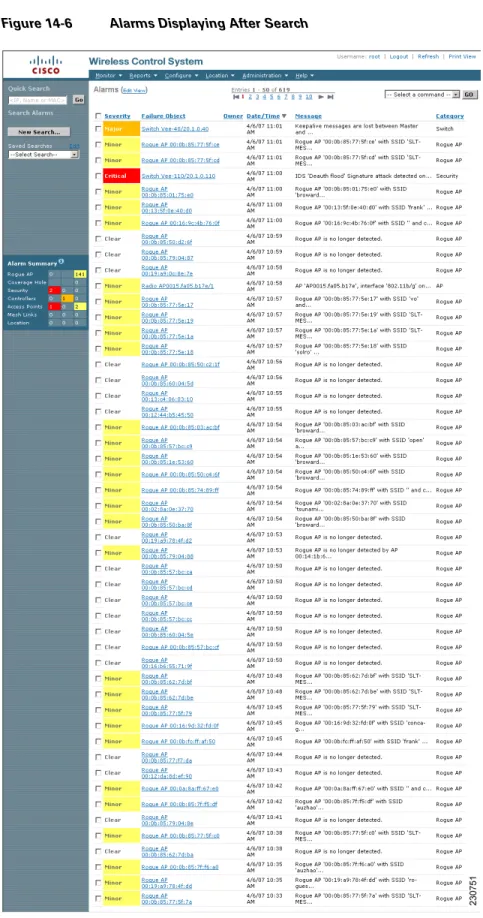
Step 12 Choose how many failure objects should display per page. The choices are 10, 20, 30, 50, or 100. Step 13 Click GO. The search begins and the list of failed objects display (see Figure 14-6). The date and time
Step 14 The alarm search results reveal the following:
• Severity—Either Critical, Major, Minor, Warning, Clear, or Info.
• Failure Object—Clicking the title toggles between the name and the object in the message column. • WCS—WCS name where alarm was detected.
• Owner—Name of person to whom this alarm is assigned or blank. Clicking the title toggles between ascending and descending order.
• Date/Time—When the alarm occurred. Clicking the title toggles between ascending and descending order.
• Message—Message explaining why the alarm occurred. Clicking the title toggles between ascending and descending order.
Step 15 Click the failure object link to get more in depth information on this particular alarm.
Alarm and Event Dictionary
This section describes the event and alarm notifications that the wireless LAN controller, access points, and location appliances can receive. In addition, specific actions an administrator can do to address these alarms and events are described.
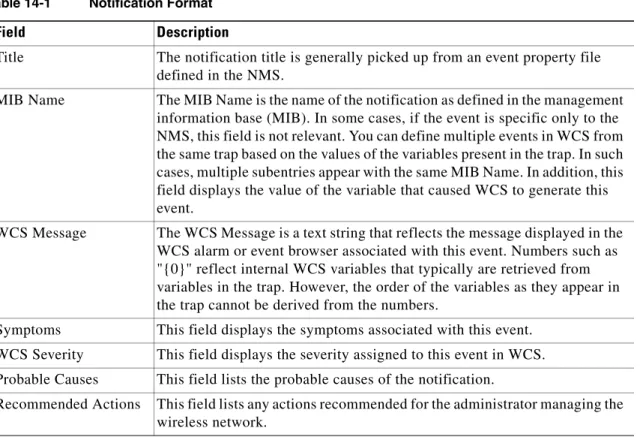
Notification Format
For each alarm and event notification, the following information is provided: Table 14-1 Notification Format
Field Description
Title The notification title is generally picked up from an event property file defined in the NMS.
MIB Name The MIB Name is the name of the notification as defined in the management information base (MIB). In some cases, if the event is specific only to the NMS, this field is not relevant. You can define multiple events in WCS from the same trap based on the values of the variables present in the trap. In such cases, multiple subentries appear with the same MIB Name. In addition, this field displays the value of the variable that caused WCS to generate this event.
WCS Message The WCS Message is a text string that reflects the message displayed in the WCS alarm or event browser associated with this event. Numbers such as "{0}" reflect internal WCS variables that typically are retrieved from variables in the trap. However, the order of the variables as they appear in the trap cannot be derived from the numbers.
Symptoms This field displays the symptoms associated with this event. WCS Severity This field displays the severity assigned to this event in WCS. Probable Causes This field lists the probable causes of the notification.
Traps Added in Release 2.0
AP_BIG_NAV_DOS_ATTACK
AP_CONTAINED_AS_ROGUE
AP_DETECTED_DUPLICATE_IP
AP_HAS_NO_RADIOS
MIB Name bsnApBigNavDosAttack.
WCS Message The AP ''{0}'' with protocol ''{1}'' receives a message with a large NAV field and all traffic on the channel is suspended. This is most likely a malicious denial of service attack.
Symptoms The system detected a possible denial of service attack and suspended all traffic to the affected channel.
WCS Severity Critical.
Probable Causes A malicious denial of service attack is underway.
Recommended Actions Identify the source of the attack in the network and take the appropriate action immediately.
MIB Name bsnAPContainedAsARogue.
WCS Message AP ''{0}'' with protocol ''{1}'' on Switch ''{2}'' is contained as a Rogue preventing service.
Symptoms An access point is reporting that it is being contained as a rouge.
WCS Severity Critical.
Probable Causes Another system is containing this access point.
Recommended Actions Identify the system containing this access point. You may need to use a wireless sniffer.
MIB Name bsnDuplicateIpAddressReported.
WCS Message AP ''{0}'' on Switch ''{3}'' detected duplicate IP address ''{2}'' being used by machine with mac address ''{1}."
Symptoms The system detects a duplicate IP address in the network that matches that assigned to an access point.
WCS Severity Critical.
Probable Causes Another device in the network is configured with the same IP address as an access point.
Recommended Actions Correct the misconfiguration of IP addresses in the network.
AP_MAX_ROGUE_COUNT_CLEAR
AP_MAX_ROGUE_COUNT_EXCEEDED
Symptoms An access point is reporting that it has no radio cards.
WCS Severity N/A.
Probable Causes Manufacturing fault or damage to the system during shipping. Recommended Actions Call customer support.
MIB Name bsnApMaxRogueCountClear.
WCS Message Fake AP or other attack on AP with MAC address ''{0}'' associated with Switch ''{2}'' is cleared now. Rogue AP count is within the threshold of ''{1}'."
Symptoms The number of rogues detected by a switch (controller) is within acceptable limits.
WCS Severity Informational.
Probable Causes N/A.
Recommended Actions None.
MIB Name bsnApMaxRogueCountExceeded.
WCS Message Fake AP or other attack may be in progress. Rogue AP count on AP with MAC address ''{0}'' associated with Switch ''{2}'' has exceeded the severity warning threshold of ''{1}."
Symptoms The number of rogues detected by a switch (controller) exceeds the internal threshold.
WCS Severity Critical.
Probable Causes • There may be too many rogue access points in the network. • A fake access point attack may be in progress.
AUTHENTICATION_FAILURE (From MIB-II standard)
BSN_AUTHENTICATION_FAILURE
COLD_START (FROM MIB-II STANDARD)
CONFIG_SAVED
MIB Name AuthenticationFailure.
WCS Message Switch ''{0}''. Authentication failure reported.
Symptoms There was an SNMP authentication failure on the switch (controller).
WCS Severity Informational.
Probable Causes An incorrect community string is in use by a management application. Recommended Actions Identify the source of the incorrect community string and correct the string
within the management application.
MIB Name bsnAuthenticationFailure.
WCS Message Switch ''{0}." User authentication from Switch ''{0}'' failed for user name ''{1}'' and user type ''{2}."
Symptoms A user authentication failure is reported for a local management user or a MAC filter is configured on the controller.
WCS Severity Minor.
Probable Causes Incorrect login attempt by an admin user from the controller CLI or controller GUI, or a client accessing the WLAN system.
Recommended Actions If the user has forgotten the password, the superuser may need to reset it.
MIB Name coldStart.
WCS Message Switch ''{0}." Cold start.
Symptoms The switch (controller) went through a reboot.
WCS Severity Informational.
Probable Causes • The switch (controller) has power-cycled.
• The switch (controller) went through a hard reset. • The switch (controller) went through a software restart. Recommended Actions None.
MIB Name bsnConfigSaved.
WCS Message Switch ''{0}''. Configuration saved in flash.
Symptoms A configuration save to flash is performed on the switch (controller).
IPSEC_IKE_NEG_FAILURE
IPSEC_INVALID_COOKIE
LINK_DOWN (FROM MIB-II STANDARD)
LINK_UP (FROM MIB-II STANDARD)
Probable Causes The switch (controller) saves the configuration to the flash via a CLI command or entry via the controller GUI or WCS.
Recommended Actions If you change the configuration using the controller CLI or controller GUI, you may need to refresh the configuration.
MIB Name bsnIpsecIkeNegFailure.
WCS Message IPsec IKE Negotiation failure from remote IP address ''{0}."
Symptoms Unable to establish an IPsec tunnel between a client and a WLAN appliance.
WCS Severity Minor.
Probable Causes Configuration mismatch.
Recommended Actions Validate configuration, verify that authentication credentials match (preshared keys or certificates); and verify that encryption algorithms and strengths match.
MIB Name bsnIpsecInvalidCookieTrap.
WCS Message IPsec Invalid cookie from remote IP address ''{0}." Symptoms Cannot successfully negotiate an IPsec session.
WCS Severity Minor.
Probable Causes Synchronization problem. The client believes a tunnel exists while the WLAN appliance does not. This problem often happens when the IPsec client does not detect a disassociation event.
Recommended Actions Reset the IPsec client, then restart tunnel establishment.
MIB Name linkDown.
WCS Message Port ''{0}'' is down on Switch ''{1}."
Symptoms The physical link on one of the switch (controller) ports is down.
WCS Severity Critical.
Probable Causes • An access point or a port was manually disconnected from the network. • A port failure.
Recommended Actions Troubleshoot physical network connectivity to the affected port.
MIB Name linkUp.
LRAD_ASSOCIATED
LRAD_DISASSOCIATED
LRADIF_COVERAGE_PROFILE_FAILED
WCS Severity Informational.
Probable Causes A physical link to the switch (controller) is restored. Recommended Actions None.
MIB Name bsnAPAssociated.
WCS Message AP ''{0}'' associated with Switch ''{2}'' on Port number ''{1}.'' Symptoms An access point has associated with a switch (controller).
WCS Severity Informational.
Probable Causes • A new access point has joined the network.
• An access point has associated with a standby switch (controller) due to a failover.
• An access point rebooted and reassociated with a switch (controller). Recommended Actions None.
MIB Name bsnAPDisassociated.
WCS Message AP ''{0}'' disassociated from Switch ''{1}.''
Symptoms The switch (controller) is no longer detecting an access point.
WCS Severity Informational.
Probable Causes • A failure in the access point.
• An access point is no longer on the network.
Recommended Actions Check if the access point is powered up and has network connectivity to the switch (controller).
MIB Name bsnAPCoverageProfileFailed.
WCS Message AP ''{0}'', interface ''{1}." Coverage threshold of ''{3}'' is violated. Total no. of clients is ''{5}'' and no. failed clients is ''{4}.''
Symptoms Number of clients experiencing suboptimal performance has crossed the configured threshold.
LRADIF_COVERAGE_PROFILE_PASSED
LRADIF_CURRENT_CHANNEL_CHANGED
LRADIF_CURRENT_TXPOWER_CHANGED
Probable Causes Many clients are wandering to the remote parts of the coverage area of this radio interface with no handoff alternative.
Recommended Actions • If the configured threshold is too low, you may need to readjust it to a more optimal value.
• If the coverage profile occurs on a more frequent basis, you may need to provide additional radio coverage.
• If the power level of this radio can be manually controlled, you may need to boost it to increase the coverage area.
MIB Name bsnAPCoverageProfileUpdatedToPass.
WCS Message AP ''{0}'', interface ''{1}." Coverage changed to acceptable.
Symptoms A radio interface that was reporting coverage profile failure has reverted to an acceptable level.
WCS Severity Informational.
Probable Causes The number of clients on this radio interface with suboptimal performance has dropped below the configured threshold.
Recommended Actions None.
MIB Name bsnAPCurrentChannelChanged.
WCS Message AP ''{0}'', interface ''{1}." Channel changed to ''{2}." Interference Energy before update was ''{3}'' and after update is ''{4}.''
Symptoms The current channel assigned to a radio interface has automatically changed.
WCS Severity Informational.
Probable Causes Possible interference on a channel has caused the radio management software on the controller to change the channel.
Recommended Actions None.
MIB Name bsnAPCurrentTxPowerChanged.
WCS Message AP ''{0}'', interface ''{1}." Transmit Power Level changed to ''{2}.'' Symptoms The power level has automatically changed on a radio interface.
WCS Severity Informational.
Probable Causes The radio management software on the controller has modified the power level for optimal performance.
LRADIF_DOWN
LRADF_INTERFERENCE_PROFILE_FAILED
LRADIF_INTERFERENCE_PROFILE_PASSED
MIB Name bsnAPIfDown.
WCS Message AP ''{0}'', interface ''{1}'' is down. Symptoms A radio interface is out of service.
WCS Severity Critical if not disabled, otherwise Informational. Probable Causes • A radio interface has failed.
• An administrator has disabled a radio interface.
• An access point has failed and is no longer detected by the controller. Recommended Actions If the access point is not administratively disabled, call customer support.
MIB Name bsnAPInterferenceProfileFailed.
WCS Message AP ''{0}'', interface ''{1}''. Interference threshold violated. Symptoms The interference detected on one or more channels is violated.
WCS Severity Minor.
Probable Causes There are other 802.11 devices in the same band that are causing interference on channels used by this system.
Recommended Actions • If the interference threshold is configured to be too low, you may need to readjust it to a more optimum value.
• Investigate interference sources such as other 802.11 devices in the vicinity of this radio interface.
A possible workaround is adding one or more access points to distribute the current load or slightly increasing the threshold of the access point which is displaying this message. To perform this workaround, follow the steps below:
1. Choose Configure > Controllers.
2. Click on any IP address in that column of the All Controllers page. 3. From the left sidebar menu, choose 802.11a or 802.11b/g and then RRM
Thresholds.
4. Adjust the Interference Threshold (%) in the Other Thresholds section.
MIB Name bsnAPInterferenceProfileUpdatedToPass.
WCS Message AP ''{0}'', interface ''{1}." Interference changed to acceptable.
Symptoms A radio interface reporting interference profile failure has reverted to an acceptable level.
LRADIF_LOAD_PROFILE_FAILED
LRADIF_LOAD_PROFILE_PASSED
LRADIF_NOISE_PROFILE_FAILED
Probable Causes The interference on this radio interface has dropped below the configured threshold.
Recommended Actions None.
MIB Name bsnAPLoadProfileFailed.
WCS Message AP ''{0}'', interface ''{1}." Load threshold violated.
Symptoms A radio interface of an access point is reporting that the client load has crossed a configured threshold.
WCS Severity Minor.
Probable Causes There are too many clients associated with this radio interface.
Recommended Actions • Verify the client count on this radio interface. If the threshold for this trap is too low, you may need to readjust it.
• Add new capacity to the physical location if the client count is a frequent issue on this radio.
MIB Name bsnAPLoadProfileUpdatedToPass.
WCS Message AP ''{0}'', interface ''{1}." Load changed to acceptable.
Symptoms A radio interface that was reporting load profile failure has reverted to an acceptable level.
WCS Severity Informational.
Probable Causes The load on this radio interface has dropped below the configured threshold. Recommended Actions None.
MIB Name bsnAPNoiseProfileFailed.
WCS Message AP ''{0}'', interface ''{1}''. Noise threshold violated.
Symptoms The monitored noise level on this radio has crossed the configured threshold.
WCS Severity Minor.
Probable Causes Noise sources that adversely affect the frequencies on which the radio interface operates.
Recommended Actions • If the noise threshold is too low, you may need to readjust it to a more optimal value.
• Investigate noise sources in the vicinity of the radio interface (for example, microwave oven).
LRADIF_NOISE_PROFILE_PASSED
LRADIF_UP
MAX_ROGUE_COUNT_CLEAR
MIB Name bsnAPNoiseProfileUpdatedToPass.
WCS Message AP ''{0}'', interface ''{1}." Noise changed to acceptable.
Symptoms A radio interface that was reporting noise profile failure has reverted to an acceptable level.
WCS Severity Informational.
Probable Causes The noise on this radio interface has dropped below the configured threshold.
Recommended Actions None.
MIB Name bsnAPIfUp.
WCS Message AP ''{0}'', interface ''{1}'' is up. Symptoms A radio interface is back up.
WCS Severity Informational.
Probable Causes • An administrator has enabled a radio interface. • An access point has turned on.
• A new access point has joined the network. Recommended Actions None.
MIB Name bsnMaxRogueCountClear.
WCS Message Fake AP or other attack is cleared now. Rogue AP count on system ''{0}'' is within the threshold of ''{1}''.
Symptoms The number of rogues detected by a controller is within acceptable limits.
WCS Severity Informational.
Probable Causes N/A.
MAX_ROGUE_COUNT_EXCEEDED
MULTIPLE_USERS
NETWORK_DISABLED
NO_ACTIVITY_FOR_ROGUE_AP
MIB Name bsnMaxRogueCountExceeded.
WCS Message Fake AP or other attack may be in progress. Rogue AP count on system ''{0}'' has exceeded the severity warning threshold of ''{1}''.
Symptoms The number of rogues detected by a controller exceeds the internal threshold.
WCS Severity Critical.
Probable Causes • There are too many rogue access points in the network. • A fake access point attack is in progress.
Recommended Actions Identify the source of the rogue access points.
MIB Name multipleUsersTrap.
WCS Message Switch ''{0}''. Multiple users logged in.
Symptoms Multiple users with the same login ID are logged in through the CLI.
WCS Severity Informational.
Probable Causes The same user has logged in multiple times through the CLI interface. Recommended Actions Verify that the expected login sessions for the same user are valid.
MIB Name bsnNetworkStateChanged (bsnNetworkState set to disabled).
WCS Message Global ''{1}'' network status disabled on Switch with IP Address ''{0}." Symptoms An administrator has disabled the global network for 802.11a and 802.11b/g.
WCS Severity Informational.
Probable Causes Administrative command. Recommended Actions None.
MIB Name This is a WCS-only event generated when no rogue activity is seen for a specific duration.
WCS Message Rogue AP ''{0}'' is cleared explicitly. It is not detected anymore. Symptoms A rogue access point is cleared from the management system due to
inactivity.
WCS Severity Informational.
Probable Causes A rogue access point is not located on any managed controller for a specified duration.
POE_CONTROLLER_FAILURE
RADIOS_EXCEEDED
RADIUS_SERVERS_FAILED
MIB Name bsnPOEControllerFailure.
WCS Message The POE controller has failed on the Switch ''{0}.''
SYMPTOMS A failure in the Power Over Ethernet (POE) unit is detected.
WCS Severity Critical.
Probable Causes The power of the Ethernet unit has failed.
Recommended Actions Call customer support. The unit may need to be repaired.
MIB Name bsnRadiosExceedLicenseCount.
WCS Message The Radios associated with Switch ''{0}'' exceeded license count ''{1}'' The current number of radios on this switch is ''{2}''.
Symptoms The number of supported radios for a switch (controller) has exceeded the licensing limit.
WCS Severity Major.
Probable Causes The number of access points associated with the switch (controller) has exceeded the licensing limits.
Recommended Actions Upgrade the license for the switch (controller) to support a higher number of access points.
MIB Name bsnRADIUSServerNotResponding.
WCS Message Switch ''{0}''. RADIUS server(s) are not responding to authentication requests.
Symptoms The switch (controller) is unable to reach any RADIUS server for authentication.
WCS Severity Critical.
Probable Causes Network connectivity to the RADIUS server is lost or the RADIUS server is down.
Recommended Actions Verify the status of all configured RADIUS servers and their network connectivity.
ROGUE_AP_DETECTED
ROGUE_AP_NOT_ON_NETWORK
MIB Name bsnRogueAPDetected.
WCS Message Rogue AP ''{0}'' with SSID ''{3}'' and channel number ''{4}'' is detected by AP ''{1}'' Radio type ''{2}'' with RSSI ''{5}'' and SNR ''{6}''.
Symptoms The system has detected a rogue access point.
WCS Severity Minor if not on a wired network, Critical if on a wired network. Probable Causes • An illegal access point is connected to the network.
• A known internal or external access point unknown to this system is detected as rogue.
Recommended Actions • Verify the nature of the rogue access point by tracing it using its MAC address or the SSID, or by using location features to locate it physically. • If the access point is a known internal or external access point,
acknowledge it or mark it as a known access point. Consider adding it to the known access point template within WCS.
• If the access point is deemed to be a severity threat, contain it using the management interface.
MIB Name bsnRogueAPDetectedOnWiredNetwork (bsnRogueAPOnWiredNetwork is set to false).
WCS Message Rogue AP ''{0}'' is not able to connect to the wired network. Symptoms A rogue access point is no longer on the wired network.
WCS Severity Informational.
Probable Causes The rogue access point is no longer reachable on the wired network. Recommended Actions None.
ROGUE_AP_ON_NETWORK
ROGUE_AP_REMOVED
RRM_DOT11_A_GROUPING_DONE
MIB Name bsnRogueAPDetectedOnWiredNetwork.
WCS Message Rogue AP ''{0}'' is on wired network.
Symptoms The system has detected a rogue access point on the wired network.
WCS Severity Critical.
Probable Causes The system has detected an illegal access point on the wired network. Recommended Actions • Determine if this is a known or valid access point in the system. If so,
place it in the known access point list.
• Contain the rogue access point using the system to prevent anyone from accessing it until the access point is traced using location or other features.
MIB Name bsnRogueAPRemoved.
WCS Message Rogue AP ''{0}'' is removed; it was detected as Rogue AP by AP ''{1}'' Radio type ''{2}''.
Symptoms The system is no longer detecting a rogue access point.
WCS Severity Informational.
Probable Causes A rogue access point has powered off or moved away and therefore the system no longer detects it.
Recommended Actions None.
MIB Name bsnRrmDot11aGroupingDone.
WCS Message RRM 802.11a grouping done; the new group leader’s MAC address is ''{0}.'' Symptoms The radio resource module is finished grouping for the A band and a new
group leader is chosen.
WCS Severity Informational.
Probable Causes The older RRM group leader may have gone down. Recommended Actions None.
RRM_DOT11_B_GROUPING_DONE
SENSED_TEMPERATURE_HIGH
SENSED_TEMPERATURE_LOW
MIB Name bsnRrmDot11bGroupingDone.
WCS Message RRM 802.11b/g grouping done; the new group leader’s MAC address is ''{0}.''
Symptoms The radio resource module finished its grouping for the B band and chose a new group leader.
WCS Severity Informational.
Probable Causes The older RRM group leader may have gone down. Recommended Actions None.
MIB Name bsnSensedTemperatureTooHigh.
WCS Message The sensed temperature on the Switch ''{0}'' is too high. The current sensed temperature is ''{1}''.
Symptoms The system’s internal temperature has crossed the configured thresholds.
WCS Severity Major.
Probable Causes • Fan failure. • Fault in the device.
Recommended Actions • Verify the configured thresholds and increase the value if it is too low. • Call customer support.
MIB Name bsnSensedTemperatureTooLow.
WCS Message The sensed temperature on the Switch ''{0}'' is too low. The current sensed temperature is ''{1}''.
Symptoms The internal temperature of the device is below the configured limit in the system.
WCS Severity Major.
Probable Causes • Operating environment. • Hardware fault.
Recommended Actions • Verify the configured thresholds and ensure that the limit is appropriate. • Call customer support.
STATION_ASSOCIATE
STATION_ASSOCIATE_FAIL
STATION_AUTHENTICATE
STATION_AUTHENTICATION_FAIL
MIB Name bsnDot11StationAssociate.
WCS Message Client ''{0}'' is associated with AP ''{1}'', interface ''{2}''. Symptoms A client has associated with an access point.
WCS Severity Informational.
Probable Causes A client has associated with an access point. Recommended Actions None.
MIB Name bsnDot11StationAssociateFail.
WCS Message Client ''{0}'' failed to associate with AP ''{1}'', interface ''{2}''. The reason code is ''{3}''.
Symptoms A client station failed to associate with the system.
WCS Severity Informational.
Probable Causes The access point was busy.
Recommended Actions Check whether the access point is busy and reporting load profile failures.
MIB Name bsnDot11StationAssociate (bsnStationUserName is set).
WCS Message Client ''{0}'' with user name ''{3}'' is authenticated with AP ''{1}'', interface ''{2}''.
Symptoms A client has successfully authenticated with the system.
WCS Severity Informational.
Probable Causes A client has successfully authenticated with the system. Recommended Actions None.
MIB Name bsnDot11StationAuthenticateFail.
WCS Message Client ''{0}'' has failed authenticating with AP ''{1}'', interface ''{2}''. The reason code is ''{3}''.
Symptoms The system failed to authenticate a client.
WCS Severity Informational.
Probable Causes Failed client authentication.
STATION_BLACKLISTED
STATION_DEAUTHENTICATE
STATION_DISASSOCIATE
MIB Name bsnDot11StationBlacklisted.
WCS Message Client ''{0}'' which was associated with AP ''{1}'', interface ''{2}'' is excluded. The reason code is ''{3}''.
Symptoms A client is in the exclusion list and is not allowed to authenticate for a configured interval.
WCS Severity Minor.
Probable Causes • Repeated authentication or association failures from the client station. • A client is attempting to use an IP address assigned to another device. Recommended Actions • Verify the configuration or the client along with its credentials.
• Remove the client from the exclusion list by using the management interface if the client needs to be allowed back into the network.
MIB Name bsnDot11StationDeauthenticate.
WCS Message Client ''{0}'' is deauthenticated from AP ''{1}'', interface ''{2}'' with reason code ''{3}''.
Symptoms A client is no longer authenticated by the system.
WCS Severity Informational.
Probable Causes A client is no longer authenticated by the system. Recommended Actions None.
MIB Name bsnDot11StationDisassociate.
WCS Message Client ''{0}'' is disassociated from AP ''{1}'', interface ''{2}'' with reason code ''{3}''.
Symptoms A client has disassociated with an access point in the system.
WCS Severity Informational.
Probable Causes A station may disassociate due to various reasons such as inactivity timeout, or a forced action from the management interface.
STATION_WEP_KEY_DECRYPT_ERROR
STATION_WPA_MIC_ERROR_COUNTER_ACTIVATED
SWITCH_DETECTED_DUPLICATE_IP
MIB Name bsnWepKeyDecryptError.
WCS Message The WEP Key configured at the station may be wrong. Station MAC Address is ''{0}'', AP MAC is ''{1}'' and Slot ID is ''{2}''.
Symptoms A client station seems to have the wrong WEP key.
WCS Severity Minor.
Probable Causes A client has an incorrectly configured WEP key.
Recommended Actions Identify the client and correct the WEP key configuration.
MIB Name bsnWpaMicErrorCounterActivated.
WCS Message The AP ''{1}'' received a WPA MIC error on protocol ''{2}'' from Station ''{0}." Counter measures have been activated and traffic has been suspended for 60 seconds.
Symptoms A client station has detected a WPA MIC error.
WCS Severity Critical.
Probable Causes A possible hacking attempt is underway.
Recommended Actions Identify the station that is the source of this threat.
MIB Name bsnDuplicateIpAddressReported.
WCS Message Switch ''{0}'' detected duplicate IP address ''{0}'' being used by machine with mac address ''{1}''.
Symptoms The system has detected a duplicate IP address in the network that is assigned to the switch (controller).
WCS Severity Critical.
Probable Causes Another device in the network is configured with the same IP address as that of the switch (controller).
SWITCH_DOWN
SWITCH_UP
TEMPERATURE_SENSOR_CLEAR
MIB Name This is a WCS-only event.
WCS Message Switch ''{0}'' is unreachable.
Symptoms A switch (controller) is unreachable from the management system.
WCS Severity Critical.
Probable Causes • The switch (controller) has encountered hardware or software failure. • There are network connectivity issues between the management station
and the switch (controller).
• The configured SNMP community strings on the management station or the switch (controller) are incorrect.
Recommended Actions • Check if the switch (controller) is powered up and reachable through the web interface.
• Ping the switch (controller) from the management station to verify if there is IP connectivity.
• Check the community strings configured on the management station.
MIB Name This is a WCS-only event.
WCS Message Switch ''{0}'' is reachable.
Symptoms A switch (controller) is now reachable from the management station.
WCS Severity Informational.
Probable Causes A switch (controller) is reachable from the management station. Recommended Actions None.
MIB Name bsnTemperatureSensorClear.
WCS Message The temperature sensor is working now on the switch "{0}". The sensed temperature is "{1}".
Symptoms The temperature sensor is operational.
WCS Severity Informational.
Probable Causes The system is detecting the temperature sensor to be operational now. Recommended Actions None.
TEMPERATURE_SENSOR_FAILURE
TOO_MANY_USER_UNSUCCESSFUL_LOGINS
MIB Name bsnTemperatureSensorFailure.
WCS Message The temperature sensor failed on the Switch ''{0}''. Temperature is unknown. Symptoms The system is reporting that a temperature sensor has failed and the system
is unable to report accurate temperature.
WCS Severity Major.
Probable Causes The temperature sensor has failed due to hardware failure. Recommended Actions Call customer support.
MIB Name bsnTooManyUnsuccessLoginAttempts.
WCS Message User ''{1}'' with IP Address ''{0}'' has made too many unsuccessful login attempts.
Symptoms A management user has made too many login attempts.
WCS Severity Critical.
Probable Causes • An admin user has made too many login attempts.
• An attempt to break into the administration account of the management system.
Recommended Actions • Identify the source of the login attempts and take the appropriate action. • Increase the value of the login attempt threshold if it is too low.
Traps Added in Release 2.1
ADHOC_ROGUE_AUTO_CONTAINED
ADHOC_ROGUE_AUTO_CONTAINED_CLEAR
NETWORK_ENABLED
MIB Name bsnAdhocRogueAutoContained.
WCS Message Adhoc Rogue ''{0}'' was found and is auto contained as per WPS policy. Symptoms The system detected an adhoc rogue and automatically contained it.
WCS Severity Major.
Probable Causes The system detected an adhoc rogue and automatically contained it as configured in the system’s wireless prevention policy.
Recommended Actions Identify the adhoc rogue through the location application and take the appropriate action.
MIB Name bsnAdhocRogueAutoContained (bsnClearTrapVariable set to true). WCS Message Adhoc Rogue ''{0}'' was found and was auto contained. The alert state is
clear now.
Symptoms An adhoc rogue that the system has detected earlier is now clear.
WCS Severity Informational.
Probable Causes The system no longer detects an adhoc rogue. Recommended Actions None.
MIB Name bsnNetworkStateChanged (bsnNetworkState set to enabled).
WCS Message Global ''{1}'' network status enabled on Switch with IP Address ''{0}." Symptoms An administrator has enabled the global network for 802.11a or 802.11b/g.
WCS Severity Informational.
Probable Causes Administrative command. Recommended Actions None.
ROGUE_AP_AUTO_CONTAINED
ROGUE_AP_AUTO_CONTAINED_CLEAR
TRUSTED_AP_INVALID_ENCRYPTION
MIB Name bsnRogueApAutoContained.
WCS Message Rogue AP ''{0}'' is advertising our SSID and is auto contained as per WPS policy.
Symptoms The system has automatically contained a rogue access point.
WCS Severity Major.
Probable Causes The system detected an adhoc rogue and automatically contained it as configured in the system’s wireless prevention policy.
Recommended Actions • Track the location of the rogue and take the appropriate action. • If this is a known valid access point, clear the rogue from containment.
MIB Name bsnRogueApAutoContained (bsnClearTrapVariable set to true).
Message Rogue AP ''{0}'' was advertising our SSID and was auto contained. The alert state is clear now.
Symptoms The system has cleared a previously contained rogue.
WCS Severity Informational.
Probable Causes The system has cleared a previously contained rogue. Recommended Actions None.
MIB Name bsnTrustedApHasInvalidEncryption.
WCS Message Trusted AP ''{0}'' is invalid encryption. It is using ''{1}'' instead of ''{2}." It is auto contained as per WPS policy.
Symptoms The system automatically contained a trusted access point that has invalid encryption.
WCS Severity Major.
Probable Causes The system automatically contained a trusted access point that violated the configured encryption policy.
TRUSTED_AP_INVALID_ENCRYPTION_CLEAR
TRUSTED_AP_INVALID_RADIO_POLICY
TRUSTED_AP_INVALID_RADIO_POLICY_CLEAR
TRUSTED_AP_INVALID_SSID
MIB Name bsnTrustedApHasInvalidEncryption (bsnClearTrapVariable set to true). WCS Message Trusted AP ''{0}'' had invalid encryption. The alert state is clear now. Symptoms The system has cleared a previous alert about a trusted access point.
WCS Severity Informational.
Probable Causes The trusted access point has now conformed to the configured encryption policy.
Recommended Actions None.
MIB Name bsnTrustedApHasInvalidRadioPolicy.
WCS Message Trusted AP ''{0}'' has invalid radio policy. It is using ''{1}'' instead of ''{2}." It has been auto contained as per WPS policy.
Symptoms The system has contained a trusted access point with an invalid radio policy.
WCS Severity Major.
Probable Causes The system has contained a trusted access point connected to the wireless system for violating the configured radio policy.
Recommended Actions Identify the trusted access point and take the appropriate action.
MIB Name bsnTrustedApHasInvalidRadioPolicy (bsnClearTrapVariable set to true). WCS Message Trusted AP ''{0}'' had invalid radio policy. The alert state is clear now. Symptoms The system has cleared a previous alert about a trusted access point.
WCS Severity Informational.
Probable Causes The trusted access point has now conformed to the configured encryption policy.
Recommended Actions None.
MIB Name bsnTrustedApHasInvalidSsid.
WCS Message Trusted AP ''{0}'' has invalid SSID. It was auto contained as per WPS policy. Symptoms The system has automatically contained a trusted access point for
advertising an invalid SSID.
WCS Severity Major.
Probable Causes The system has automatically contained a trusted access point for violating the configured SSID policy.
TRUSTED_AP_INVALID_SSID_CLEAR
TRUSTED_AP_MISSING
TRUSTED_AP_MISSING_CLEAR
Traps Added in Release 2.2
AP_IMPERSONATION_DETECTED
MIB Name bsnTrustedApHasInvalidSsid (bsnClearTrapVariable set to true). WCS Message Trusted AP ''{0}'' had invalid SSID. The alert state is clear now. Symptoms The system has cleared a previous alert about a trusted access point.
WCS Severity Informational.
Probable Causes The trusted access point has now conformed to the configured policy. Recommended Actions None.
MIB Name bsnTrustedApIsMissing.
WCS Message Trusted AP ''{0}'' is missing or has failed.
Symptoms The wireless system no longer detects a trusted access point.
WCS Severity Major.
Probable Causes A trusted access point has left the network or has failed.
Recommended Actions Track down the trusted access point and take the appropriate action.
MIB Name bsnTrustedApIsMissing (bsnClearTrapVariable set to true).
WCS Message Trusted AP ''{0}'' is missing or has failed. The alert state is clear now. Symptoms The system has found a trusted access point again.
WCS Severity Informational.
Probable Causes The system has detected a previously missing trusted access point. Recommended Actions None.
MIB Name bsnAPImpersonationDetected.
WCS Message AP Impersonation with MAC ''{0}'' is detected by authenticated AP ''{1}'' on ''{2}'' radio and Slot ID ''{3}''.
Symptoms A radio of an authenticated access point has heard from another access point whose MAC Address neither matches that of a rogue nor is it an
authenticated neighbor of the detecting access point.
WCS Severity Critical.
AP_RADIO_CARD_RX_FAILURE
AP_RADIO_CARD_RX_FAILURE_CLEAR
AP_RADIO_CARD_TX_FAILURE
AP_RADIO_CARD_TX_FAILURE_CLEAR
MIB Name bsnAPRadioCardRxFailure.
WCS Message Receiver failure detected on the ''{0}'' radio of AP ''{1}'' on Switch ''{2}." Symptoms A radio card is unable to receive data.
WCS Severity Critical.
Probable Causes • A radio card is experiencing reception failure. • The antenna of the radio may be disconnected. Recommended Actions • Check the access point’s antenna connection.
• Call customer support.
MIB Name bsnAPRadioCardRxFailureClear.
WCS Message Receiver failure cleared on the ''{0}'' radio of AP ''{1}'' on Switch ''{2}." Symptoms A radio is no longer experiencing reception failure.
WCS Severity Informational.
Probable Causes A malfunction in the access point has been corrected. Recommended Actions None.
MIB Name bsnAPRadioCardTxFailure.
WCS Message Transmitter failure detected on the ''{0}'' radio of AP ''{1}'' on Switch ''{2}." Symptoms A radio card is unable to transmit.
WCS Severity Critical.
Probable Causes • A radio card is experiencing transmission failure. • The antenna of the radio may be disconnected. Recommended Actions • Check the antenna of the access point.
• Call customer support.
MIB Name bsnAPRadioCardTxFailureClear.
WCS Message Transmitter failure cleared on the ''{0}'' radio of AP ''{1}'' on Switch ''{2}." Symptoms A radio is no longer experiencing transmission failure.
WCS Severity Informational.
Probable Causes A malfunction in the access point has been corrected. Recommended Actions None.
SIGNATURE_ATTACK_CLEARED
SIGNATURE_ATTACK_DETECTED
TRUSTED_AP_HAS_INVALID_PREAMBLE
MIB Name bsnSignatureAttackDetected (bsnClearTrapVariable is set to True).
WCS Message Switch ''{0}'' is cleared from IDS signature attack. The wireless system is no longer detecting the intrusion.
Symptoms The switch (controller) no longer detects a signature attack.
WCS Severity Informational.
Probable Causes The signature attack that the system previously detected has stopped. Recommended Actions None.
MIB Name bsnSignatureAttackDetected
WCS Message IDS Signature attack detected on Switch ''{0}." The Signature Type is ''{1}," Signature Name is ''{2},'' and Signature description is ''{3}."
Symptoms The switch (controller) is detecting a signature attack. The switch (controller) has a list of signatures that it monitors. When it detects a signature, it provides the name of the signature attack in the alert it generates.
WCS Severity Critical.
Probable Causes Someone is mounting a malevolent signature attack.
Recommended Actions Track down the source of the signature attack in the wireless network and take the appropriate action.
MIB Name bsnTrustedApHasInvalidPreamble.
WCS Message Trusted AP ''{0}'' on Switch ''{3}'' has invalid preamble. It is using ''{1}'' instead of ''{2}." It has been auto contained as per WPS policy.
Symptoms The system has contained a trusted rogue access point for using an invalid preamble.
WCS Severity Major.
Probable Causes The system has detected a possible severity breach because a rogue is transmitting an invalid preamble.
Recommended Actions Locate the rogue access point using location features or the access point detecting it and take the appropriate actions.
TRUSTED_HAS_INVALID_PREAMBLE_CLEARED
Traps Added in Release 3.0
AP_FUNCTIONALITY_DISABLED
AP_IP_ADDRESS_FALLBACK
MIB Name bsnTrustedApHasInvalidPreamble (bsnClearTrapVariable is set to true). WCS Message Trusted AP ''{0}'' on Switch ''{3}'' had invalid preamble. The alert state is
clear now.
Symptoms The system has cleared a previous alert about a trusted access point.
WCS Severity Informational.
Probable Causes The system has cleared a previous alert about a trusted access point. Recommended Actions None.
MIB Name bsnAPFunctionalityDisabled.
WCS Message AP functionality has been disabled for key ''{0}," reason being ''{1}'' for feature-set ''{2}."
Symptoms The system sends this trap out when the controller disables access point functionality because the license key has expired.
WCS Severity Critical.
Probable Causes When the controller boots up, it checks whether the feature license key matches the controller’s software image. If it does not, the controller disables access point functionality.
Recommended Actions Configure the correct license key on the controller and reboot it to restore access point functionality.
MIB Name bsnAPIPAddressFallback.
WCS Message AP ''{0}'' with static-ip configured as ''{2}'' has fallen back to the working DHCP address ''{1}."
Symptoms This trap is sent out when an access point, with the configured static ip-address, fails to establish connection with the outside world and starts using DHCP as a fallback option.
WCS Severity Minor.
Probable Causes If the configured IP address on the access point is incorrect or obsolete, and if the AP Fallback option is enabled on the switch (controller), the access point starts using DHCP.
AP_REGULATORY_DOMAIN_MISMATCH
RX_MULTICAST_QUEUE_FULL
MIB Name bsnAPRegulatoryDomainMismatch.
WCS Message AP ''{1}'' is unable to associate. The Regulatory Domain configured on it ''{3}'' does not match the Controller ''{0}'' country code ''{2}."
Symptoms The system generates this trap when an access point’s regulatory domain does not match the country code configured on the controller. Due to the country code mismatch, the access point will fail to associate with the controller.
WCS Severity Critical.
Probable Causes • If someone changes the controller’s country code configuration and some of the existing access points support a different country code, these access points fail to associate.
• An access point on the controller’s network sends join requests to the controller but the regulatory domain is outside the domain in which the controller is operating.
Recommended Actions Either remove the access points that are not meant for inclusion in the controller’s domain or correct the controller’s country code setting.
MIB Name bsnRxMulticastQueueFull.
WCS Message CPU Receive Multicast Queue is full on Controller ''{0}."
Symptoms This trap indicates that the CPU’s Receive Multicast queue is full.
WCS Severity Critical.
Probable Causes An ARP storm. Recommended Actions None.
Traps Added in Release 3.1
AP_AUTHORIZATION_FAILURE
HEARTBEAT_LOSS_TRAP
MIB Name bsnAPAuthorizationFailure
WCS Message • Failed to authorize AP “{0}." Authorization entry does not exist in Controllers “{1}” AP Authorization List.
• Failed to authorize AP “{0}." AP’s authorization key does not match with SHA1 key in Controllers “{1}” AP Authorization List.
• Failed to authorize AP “{0}." Controller “{1}” could not verify the Self Signed Certificate from the AP.
• Failed to authorize AP “{0}." AP has a self signed certificate where as the Controllers “{1}” AP authorization list has Manufactured Installed Certificate for this AP.
Symptoms An alert is generated when an access point fails to associate with a controller due to authorization issues.
WCS Severity Critical.
Probable Causes • The access point is not on the controller's access point authorization list. • The key entry in the controller's access point authorization list does not
match the SHA1 key received from the access point. • The access point self-signed certificate is not valid.
• The access point has a self-signed certificate and the controller’s access point authorization list (for the given access point) references a manufactured installed certificate.
Recommended Actions • Add the access point to the controller’s authorization list.
• Update the access point’s authorization key to match the controller’s access point key.
• Check the accuracy of the access point’s self-signed certificate. • Check the certificate type of the access point in the controller’s access
point authorization list.
MIB Name heartbeatLossTrap.
WCS Message Keepalive messages are lost between Master and Controller''{0}.” Symptoms This trap will be generated when the controller loses connection with the
Supervisor Switch (in which it is physically embedded) and the controller cannot hear the heartbeat (keepalives) from the Supervisor.
WCS Severity Major.
Probable Causes • Port on the WiSM controller could be down. • Loss of connection with the Supervisor Switch. Recommended Actions None.
INVALID_RADIO_INTERFACE
RADAR_CLEARED
RADAR_DETECTED
MIB Name invalidRadioTrap.
WCS Message Radio with MAC address “{0}” and protocol “{1}” that has joined controller “{2}” has invalid interface. The reason is “{3}.
”
Symptoms When the controller detects that a Cisco access point that has joined has unsupported radios, the controller generates a trap and it is propagated as an alert in WCS.
WCS Severity Critical.
Probable Causes The radio hardware is not supported by the controller. Recommended Actions None.
MIB Name bsnRadarChannelCleared
WCS Message Radar has been cleared on channel ''{1}'' which was detected by AP base radio MAC ''{0}'' on radio 802.11a.
Symptoms Trap is generated after the expiry of a non-occupancy period for a channel that previously generated a radar trap.
WCS Severity Informational.
Probable Causes Trap is cleared on a channel. Recommended Actions None.
MIB Name bsnRadarChannelDetected
WCS Message Radar has been detected on channel ''{1}'' by AP base radio MAC ''{0}'' on radio 802.11a.
Symptoms This trap is generated when radar is detected on the channel on which an access point is currently operating.
WCS Severity Informational.
Probable Causes Radar is detected on a channel. Recommended Actions None.
RADIO_CORE_DUMP
RADIO_INTERFACE_DOWN
RADIO_INTERFACE_UP
MIB Name radioCoreDumpTrap
WCS Message Radio with MAC address “{0}” and protocol “{1}” has core dump on controller “{2}."
Symptoms When a Cisco radio fails and a core dump occurs, the controller generates a trap and WCS generates an event for this trap.
WCS Severity Informational.
Probable Causes Radio failure.
Recommended Actions Capture the core dump file using the controller’s command line interface and send to TAC support.
MIB Name bsnAPIfDown.
WCS Message Radio with MAC address “{0}” and protocol “{1}” is down. The reason is “{2}.”
Symptoms When a radio interface is down, WCS generates an alert. Reason for the radio outage is also noted.
WCS Severity Critical if not manually disabled. Informational if radio interface was manually disabled.
Probable Causes • The radio interface has failed.
• The access point is not able to draw enough power.
• The maximum number of transmissions for the access point is reached. • The access point has lost connection with the controller heart beat. • The admin status of the access point admin is disabled.
• The admin status of the radio is disabled. Recommended Actions None.
MIB Name bsnAPIfUp.
WCS Message Radio with MAC address “{0}” and protocol “{1}” is up. The reason is “{2}.”
Symptoms When a radio interface is operational again, WCS clears the previous alert. Reason for the radio being up again is also noted.
WCS Severity Informational.
Probable Causes • Admin status of access point is enabled. • Admin status of radio is enabled. • Global network admin status is enabled. Recommended Actions None.
UNSUPPORTED_AP
Traps Added in Release 3.2
LOCATION_NOTIFY_TRAP
MIB Name unsupportedAPTrap.
WCS Message AP “{0}” tried to join controller “{1}” and failed. The controller does not support this kind of AP.
Symptoms When unsupported access points try to join 40xx/410x controllers or 3500 controller with 64 MB flash, these controllers generate a trap and the trap is propagated as an event in WCS.
WCS Severity Informational.
Probable Causes Access point is not supported by the controller. Recommended Actions None.
MIB Name locationNotifyTrap.
WCS Message Depending on the notification condition reported, the trap is sent out in an XML format and is reflected in WCS with the following alert messages:
• Absence of <Element> with MAC <macAddress>, last seen at <timestamp>.
• <Element> with MAC <macAddress> is <In | Out> the Area <campus | building | floor | coverageArea>.
• <Element> with MAC <macAddress> has moved beyond
<specifiedDistance> ft. of marker <MarkerName>, located at a range of <foundDistance> ft.
For detailed info on the XML format for the trap content, consult the 2700 Location Appliance Configuration Guide.
Symptoms A 2700 location appliance sends this trap out when the defined location notification conditions are met (such at element outside area, elements missing, and elements exceeded specified distance). WCS uses this trap to display alarms about location notification conditions.
WCS Severity Minor (under the Location Notification dashboard).
Probable Causes The location notification conditions configured for a 2700 location appliance are met for certain elements on the network.
Traps Added In Release 4.0
CISCO_LWAPP_MESH_POOR_SNR
CISCO_LWAPP_MESH_PARENT_CHANGE
CISCO_LWAPP_MESH_CHILD_MOVED
MIB Name ciscoLwappMeshPoorSNR
WCS Message Poor SNR.
Symptoms SNR (signal-to-noise) ratio is important because high signal strength is not enough to ensure good receiver performance. The incoming signal must be stronger than any noise or interference that is present. For example, you can have high signal strength and still have poor wireless performance if there is strong interference or a high noise level.
WCS Severity Major.
Probable Causes The link SNR fell below 12 db. The threshold level cannot be changed. If poor SNR is detected on the backhaul link for a child or parent, the trap is generated and contains SNR values and MAC addresses.
Recommended Actions None.
MIB Name ciscoLwappMeshParentChange
WCS Message Parent changed.
Symptoms When the parent is lost, the child joins with another parent, and the child sends traps containing both old parent and new parent’s MAC addresses.
WCS Severity Info.
Probable Causes The child moved to another parent. Recommended Actions None.
MIB Name ciscoLwappMeshChildMoved
WCS Message Child moved.
Symptoms When the parent access point detects a child being lost and communication is halted, the child lost trap is sent to WCS, along with the child MAC address.
WCS Severity Info.
Probable Causes The child moved from the parent. Recommended Actions None.
CISCO_LWAPP_MESH_CONSOLE_LOGIN
CISCO_LWAPP_MESH_AUTHORIZATION_FAILURE
CISCO_LWAPP_MESH_CHILD_EXCLUDED_PARENT
MIB Name ciscoLwappMeshConsoleLogin
WCS Message Console login successful or failed.
Symptoms The console port provides the ability for the customer to change the user name and password to recover the stranded outdoor access point. To prevent any unauthorized user access to the access point, WCS sends an alarm when someone tries to log in. This alarm is required to provide protection because the access point is physically vulnerable being located outdoors.
WCS Severity A login is of critical severity.
Probable Causes You have successfully logged in to the access point console port or failed on three consecutive tries.
Recommended Actions None.
MIB Name ciscoLwappMeshAuthorizationFailure
WCS Message Fails to authenticate with controller.
Symptoms WCS receives a trap from the controller. The trap contains the MAC addresses of those access points that failed authorization.
WCS Severity Minor.
Probable Causes The access point tried to join the MESH but failed to authenticate because the MESH node MAC address was not on the MAC filter list.
Recommended Actions None.
MIB Name ciscoLwappMeshChildExcludedParent
WCS Message Parent AP being excluded by child AP.
Symptoms When a child fails authentication at the controller after a fixed number of attempts, the child can exclude that parent. The child remembers the excluded parent so that when it joins the network, it sends the trap which contains the excluded parent MAC address and the duration of the exclusion period.
WCS Severity Info.
Probable Causes A child marked a parent for exclusion. Recommended Actions None.
CISCO_LWAPP_MESH_EXCESSIVE_PARENT_CHANGE
IDS_SHUN_CLIENT_TRAP
IDS_SHUN_CLIENT_CLEAR_TRAP
MIB Name ciscoLwappMeshExcessiveParentChange
WCS Message Parent changed frequently.
Symptoms When MAP parent-change-counter exceeds the threshold within a given duration, it sends a trap to WCS. The trap contains the number of times the MAP changes and the duration of the time. The threshold is user
configurable.
WCS Severity Major.
Probable Causes The MESH access point changed its parent frequently. Recommended Actions None.
MIB Name CISCO-LWAPP-IDS-MIB. CLIdsNewShunClient.
WCS Message The Cisco Intrusion Detection System "{0}" has detected a possible intrusion attack by the wireless client "{1}."
Symptoms This trap is generated in response to a shun client clear alert originated from a Cisco IDS/IPs appliance ("{0}") installed in the data path between the wireless client ("{1}") and the site’s intranet.
WCS Severity Critical.
Probable Causes The designated client is generating a packet-traffic pattern which shares properties with a well-known form of attack on the customer’s network. Recommended Actions Investigate the designated client and determine if it is an intruder, a virus, or
a false alarm.
MIB Name CISCO-LWAPP-IDS-MIB. cLIdsNewShunClientClear.
WCS Message The Cisco Intrusion Detection System "{0}" has cleared the wireless client "{1}" from possibly having generated an intrusion attack.
Symptoms This trap is generated is response to one of two things: 1) a shun client clear alert originated from a Cisco IDS/IPS appliance ("{0}") installed in the data path between the wireless client ("{1"}) and the site’s intranet, or 2) a scheduled timeout of the original IDS_SHUN_CLIENT_TRAP for the wireless client.
WCS Severity Clear.
Probable Causes The designated client is no longer generating a suspicious packet-traffic pattern.
MFP_TIMEBASE_STATUS_TRAP
MFP_ANOMALY_DETECTED_TRAP
GUEST_USER_REMOVED_TRAP
MIB Name CISCO-LWAPP-MFP-MIB. ciscoLwappMfpTimebaseStatus.
WCS Message Controller "{0}" is "{1}" with the Central time server.
Symptoms This notification is sent by the agent to indicate when the synchronization of the controller’s time base with the Central time base last occurred.
WCS Severity Critical (not in sync trap) and clear (sync trap).
Probable Causes The controller’s time base is not in sync with the Central time base. Recommended Actions None.
MIB Name CISCO-LWAPP-MFP-MIB. ciscoLwappMfpAnomalyDetected.
WCS Message MFP configuration of the WLAN was violated by the radio interface "{0}" and detected by the radio interface "{1}" of the access point with MAC address "{2}." The violation is "{3}."
Symptoms This notification is sent by the agent when the MFP configuration of the WLAN was violated by the radio interface cLApIfSmtDot11Bssid and detected by the radio interface cLApDot11IfSlotId of the access point cLA-pSysMacAddress. This violation is indicated by cLMfpEventType.
When observing the management frame(s) given by cLMfpEventFrames for the last cLMfpEventPeriod time units, the controller reports the occurrence of a total of cLMfpEventTotal violation events of type cLMfpEventType. When the cLMfpEventTotal is 0, no further anomalies have recently been detected, and the NMS should clear any alarm raised about the MFP errors. Note This notification is generated by the controller only if MFP was
configured as the protection mechanism through cLMfpProtectType.
WCS Severity Critical.
Probable Causes The MFP configuration of the WLAN was violated. Various types of viola-tions are invalidMic, invalidSeq, noMic, and unexpectedMic.
Recommended Actions None.
MIB Name CISCO-LWAPP-WEBAUTH-MIB. cLWAGuestUserRemoved.
WCS Message Guest user "{1}" deleted on controller "{0}."
Symptoms This notification is generated when the lifetime of the guest user {1} expires and the guest user’s accounts are removed from the controller "{0}."
WCS Severity Critical.
Probable Causes GuestUserAccountLifetime expired. Recommended Actions None.
Traps Added/Updated in Release 4.0.96.0
AP_IMPERSONATION_DETECTED
RADIUS_SERVER_DEACTIVATED
RADIUS_SERVER_ACTIVATED
MIB Name bsnAPImpersonationDetected.
WCS Message AP Impersonation with MAC "{0}" using source MAC "{1}" is detected by authenticated AP "{2}" on "{3}" radio and slot ID "{4}."
Symptoms A radio of an authenticated access point had communication with another access point whose MAC address neither matches that of a rogue nor is an authenticated neighbor of the detecting access point.
WCS Severity Critical.
Probable Causes A security breach related to access point impersonation may be occurring.. Recommended Actions Track down the MAC address of the impersonating access point and contain
it.
MIB Name ciscoLwappAAARadiusServerGlobalDeactivated. WCS Message RADIUS server "{0}" (port {1}) is deactivated.
Symptoms The controller detects that the RADIUS server is deactivated in the global list.
WCS Severity Major.
Probable Causes RADIUS server is deactivated in the global list. Recommended Actions None.
MIB Name ciscoLwappAAARadiusServerGlobalDeactivated. WCS Message RADIUS server "{0}" (port {1}) is activated.
Symptoms The controller detects that the RADIUS server is deactivated in the global list.
WCS Severity Major.
Probable Causes RADIUS server is deactivated in the global list. Recommended Actions None.