M. Kurosu (Ed.): Human-Computer Interaction, Part IV, HCII 2013, LNCS 8007, pp. 378–387, 2013. © Springer-Verlag Berlin Heidelberg 2013
Communication Analysis of Remote Collaboration
System with Arm Scaling Function
Nobuchika Sakata, Tomoyuki Kobayashi, and Shogo Nishida
Division of Systems Science and Applied Informatics Graduate School of Engineering Science, Osaka University 1-3, Machikaneyama-cho, Toyonaka-city, Osaka, 560-8531 Japan
{sakata,kobayashi,nishida}@sys.es.osaka-u.ac.jp
Abstract. This research focuses on the remote collaboration in which a local worker works with real objects by a remote instructor. In this research area, there are some systems which consist of the ProCam system consisting of a camera and a projector at the work environment and the tabletop system consisting of a display, a depth sensor and a camera at remote instructor envi-ronment. As the function enhancement, the system using the scaling method of the embodiment exists. The system makes it possible for instructor to instruct smoothly even to small objects and has an effect on task completion time in the user study of putting smaller block clusters than the size of fingers. We first analyzed the movie of previous experiment again, and then find out the problems the previous work could not solve, and proposed their solution.
Keywords: Remote collaboration, Scaling Method and Video Analysis.
1
Introduction
Work conducted by a local worker under the instructions of a remote instructor is called remote collaboration. Using a telecommunication terminal, the remote instruc-tor and the local worker transmit and receive sounds and videos to accomplish their work since they cannot share voices and views directly. On the other hand, a worker and an instructor sometimes communicate regarding objects and places in real work spaces in local collaborative works [1][2][3]. To conduct such communication smoothly, a support system sends the remote instructor’s instructions including the place of the work tithe local worker.
Especially, some studies focus on the situation in which a remote instructor provides an instruction to a local worker with real objects, for example, repairing machinery. In these studies, a tabletop display is adopted to capture the gesture of the instructor and a projector is adopted to project the gesture image to the real-world directly. With these devices, it becomes easy that a local worker realizes an instruction intuitively with watching the projected image of instruction gesture on the work environment.
Uemura[4] proposed and developed the remote collaborative work system with the scaling method of the body image as an instruction image. Then, it studied and confirmed the efficiency of his proposed method in terms of the task completion time
and the result of questionnaire by conducting the user study of putting block clusters. However, resulting from the re-discussion of previous work, we found some issues about the rate of system utilization and questionnaires. Therefore, we first analyzed the movie of experiment of previous work particularly and cleared the issues of pre-vious work. In parallel, we picked up the scenes when a worker did not work smooth-ly even when the scaling system was used and picked up the difference between with and without the scaling method. We discussed the problems we found in the movies and proposed the solutions for them. After that, we implemented the function that instructor’s device could save the image of worker environment as instructor liked and could display it blended with the current condition of worker environment. Last-ly, we conducted the user study to examine the effectively of the proposal method.
2
Related Work
Some research studies the support of the instruction to the local worker by the remote instructor as a remote collaboration. Some of these research focus on the remote col-laboration with real-world objects. The tele-operated laser pointer is adopted in some research as a pointing tool for remote collaboration[5][6][7]. Cterm[5] and Gesture-Laser[6] are device placed in a work space, and WACL[7] is a wearable device. Each of these is compact size and consists of a camera, a microphone, a speaker and a laser pointer which are remotely controlled. The instructor can pan and tilt the laser pointer on the camera to point at real-world objects. GestureMan[8] is a system equipped with not only a tele-operated laser pointer but also a robot head and a robot arm. The robot head and the robot arm trace the motion of the remote instructor.
Kondo[9] develops view sharing system between an instructor and a worker for remote collaboration. This system is constructed from the video-see-through Head Mounted Displays(HMD) and motion trackers. The system allows two users in re-mote places to share their first-person views each other. To achieve the instruction considering embodiment in the remote collaboration, some research display the image or the shadow of the instructor on the work environment[10][11][12][13].
These research show the remote communication becomes smooth by considering embodiment and transmitting the awareness information or gestures. Therefore, the instruction via instruction images is effective for the remote collaboration with real world objects. Moreover, considering embodiment and transmitting gesture or aware-ness information is important in the instruction with real-world objects. However, above systems focus on the system placed on the work environment. There has been some researches which propose the system and the remote interaction for the instructor.
3
Previous Work
As the base of this research, the remote collaborative work system has been developed by our colleague. Uemura[4] proposed with the scaling method of the body image as an instruction image. In this chapter, we introduce the system and the user study of its work.
3.1 System Overview and Method of Instruction
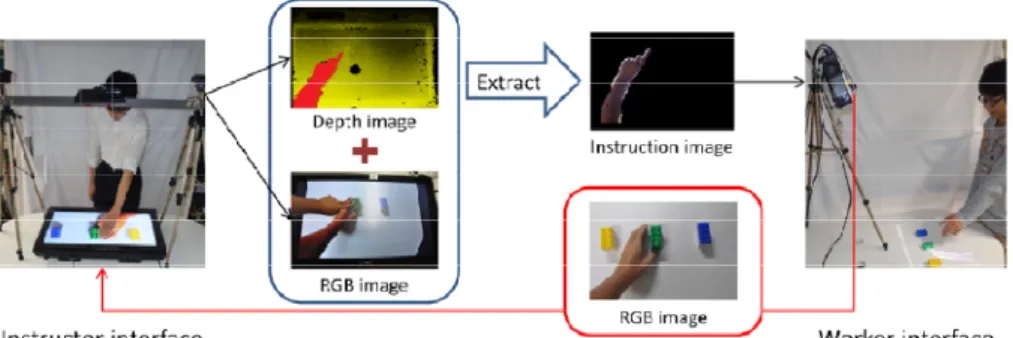
System of previous work has two interfaces. One is the instructor interface for remote place as shown in left side of Figure 1. The other is the worker interface using by local worker as shown in right side of Figure 1. The instructor interface consists of tabletop display (byd:sign, d:3232GJC3 32Inch) as an output device, RGB camera and depth sensor (Microsoft, Kinect) as an input device. The worker interface consists of a micro projector (MITSUBISHI, LVP-XD95) as an output device and a cam-era(Point Grey Inc., Firefly FMVU-03MTC-CS) as an input device. Next, we state the instruction sequence using the hardware.
At first, the camera of worker interface captures the work area including work object and worker’s arms. The captured images are sent to the instructor interface. At that time, the system corrects the work area image to overhead view for the tabletop display of instructor interface. Next, the instructor interface receives and the image displays it in the tabletop display. Instructors can make instructs such as gestures and pointing by fingers to the objects appeared on the display. RGB camera and depth sensor set above the tabletop display captures the instructions and sends them to the worker interface. Finally, projector of worker interface projects the image of instruc-tion to the work area with the offset, which enables worker to work with interacinstruc-tion at hand. Now, RGB camera and depth sensor captures not only the instructions but also the image of work area indicated in the tabletop display because the camera and sensor are set downwards. Because of this, this system is like coupled mirror. To avoid it, instructor interface sends part of captured image upper to the tabletop display by using the depth information.
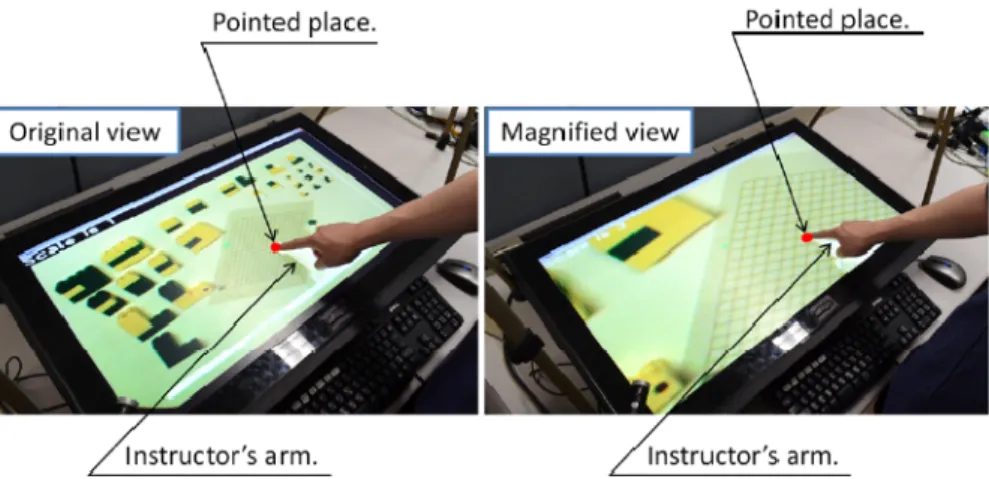
The previous work system adopted the method to display the image of instructor's arm. Hence it may be difficult to instruct finely when objects are small. The previous work proposed and implemented the scaling method of embodiment to solve that. When an instructor wants to instruct or see the work area finely, magnified image of the work area can be displayed in the display of the instructor interface.(Figure 2) This method makes an instructor see the work area in detail and instruct finely even to the small objects. When this method is used in the instructor interface, the instruction image is scaled down by the inverse scale of instructor's and projected to the work area. In addition, display range also moves to fit the interaction with real objects.
Fig. 2. Tabletop display in instructor interface (left: original view, right: magnified view)
Fig. 3. Projected instructor’s arm in worker interface (left: original view, right: diminished view)
3.2 User Study
This section describes a user experiment which was conducted to evaluate the effec-tiveness of the proposal method described in 3.1.
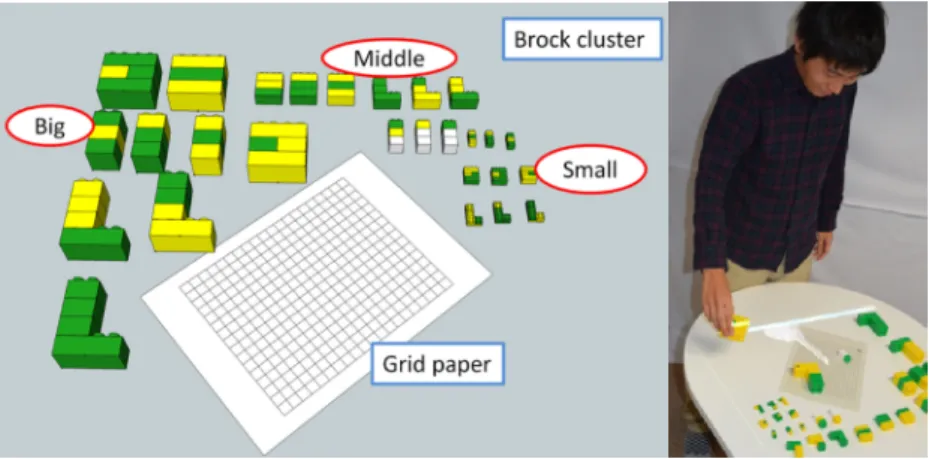
Instructor and worker interface were set on each remote place. Worker interface was set on the desk in the worker environment as shown in Figure 4. There were a grid paper including 16 x 20 cell which is 11.0 mm and 27 block cluster made of several three different sizes of blocks on the desk. Block cluster were placed around
Fig. 4. The brock clusters in the worker environment and appearance of the worker experiment
the grid paper. Worker put the block cluster at the place indicated by instructor in the grid paper. In this experiment, worker place a block cluster on a grid paper by instruc-tor layout plan. Six block clusters were used in a task. Several three different sizes of blocks were used. Each size of block cluster was used at least one block in a task. Block cluster was put on the grid paper to overlap a grid point with either edge of block cluster. Instructor provided direction according to the layout plan in order. In-structor provided direction watching the work environment displayed on the tabletop surface. Instruction was conducted by transmitting gestures and their voice.
1. Selecting a block cluster from the layout plan, and instruct the selected block cluster.
2. Indicating the angle of the block cluster on the grid paper.
3. Indicating the position of the either edge of block cluster and grid point by “pointing”.
4. Watching the position of the block cluster, replacing the right point.
After six block clusters were put on the grid paper, instructor makes sure of the put point. When the put point was correct, one task was completed. Instruction conditions were “scalable view condition” which was a proposal method and only original view. In “scalable view condition” condition, instructor could use the function magnifying image displayed on the tabletop display. In “Original view condition ”, the function magnifying image was disabled during the experiment.
Subjects were able to select the scaling center by mouse click. Also, subjects were able to select the magnification percentage from x2.0 to x3.5 by keyboard. As well, keyboard and mouse are placed near the instructor interface. First, subjects conducted training tasks three times in “Scalable view condition” as a practice. After that, they conducted the actual tasks in “Scalable view condition” and “Original view condi-tion” each three times. The order of instruction conditions was different for each sub-ject to prevent the order effect. This experiment was conducted with twelve subsub-jects (gender: twelve male; age: 22 to 28) who are not experienced this task as instructors
and one subject who has a good skill for this task as a worker (gender: male; age: 24). In this experiment, we measured the task completion time. After their tasks were ended, subjects answered the seven-level rating questionnaire whose contents were described below. Also, we let subject evaluate each size of blocks in “Scalable view condition” and “Original view condition”.
Q1. Which condition do you transmit the instruction easier?
Q2. Which condition do you think that worker can realize your direction easier? Q3. Which condition do you communicate to worker smoother?
3.3 Result
Figure 5 shows result of task completion time and questionnaire. ”Scalable view con-dition” marks higher performances than original view concon-dition”. Using the Wilcoxon signed rank test, there was significantly difference between “Scalable view condition” and original view condition (p<0.01).
Using T-test (one-sample, test value=4), there were significant differences in all questions between “Scalable view condition” and original view condition (p<0.01).
Fig. 5. Task completion time and result of questionnaire
4
Discussion of Previous Work
In previous work, result of user study just consists of task completion time and 3 items of questionnaires. Therefore, previous discussion [4] is not enough to argue the efficiency of the proposed method. For example, other criteria such as number of times of using scaling method are needed to argue that proposed method contributes to reducing task completion time because subjects were not forced to use the method. In addition, we also find some issues in questionnaire. In “Q1. the ease to instruct”, it is not appropriate to think the instruction of word and of gestures together. In ”Q2. the
intelligibility of worker”, it is not appropriate for the instructor to judge it because it owes to only worker. To clear these issues, we observed closely the movie of user study and researched the behavior of instructor and worker with or without the scaling method.
In the result, all subjects instructed the right point with the scaling method of the embodiment. In addition, most subjects instructed the right point using the scaling method more times than not using the method. When subjects did not use the method, the right point is near the edge of the work area hence it is easy to instruct the right point even without the scaling method. Therefore, we confirmed that the proposed method contributed to the reducing task completion time. We discuss ”Q1. the ease to instruct”. We found the differences of the way of instruction between with and with-out scaling method only in the instruction of the right point It is difficult to point just one vertex precisely without the scaling method because the size of instructor's finger is bigger than the size of square. Therefore, without the scaling method worker asked instructor to repeat the precise point to put the block cluster more times than with the scaling method, that affected the answer.
It is impossible to measure the ”Q2. the intelligibility of worker” precisely because it has been passing long after the experiment. Therefore, we judge it from the smoothness of communication between the instructor and the worker. It is reasonable to think that the intelligibility of worker is proportional to the smoothness of commu-nication between the instructor and the worker and that the smoothness of communi-cation between the instructor and the worker is proportional to the shortness of task completion time. Therefore, it is reasonable to think that the intelligibility of worker is proportional to the shortness of task completion time. With that, all the doubts of previous work are cleared.
However, by obtaining on the analyses of the movies, some problems appeared which previous work could not solve.
1. A block cluster put already hides the right point. 2. The block cluster putting now hides the right point.
3. Block clusters put already are moved incidentally, and instructor cannot make a smooth instruction.
4. It is hard to enlarge the image as the instructor supposes to put. 5. It is a fatigue to use the proposed method.
We discuss these problems. Problems (1) and (2) attributes to the occlusion of block clusters. In the user study, instructor cannot see areas just before block clusters and worker cannot see areas deployed block clusters because the camera of the worker interface faces the opposite direction of the instructor. View of the worker and the instructor are same if setting the camera of worker interface on the worker’s side, but they cannot see areas deployed block clusters, either. If we try to avoid any occlusion, we should set more cameras or set a camera to the above the work area. However, this idea also has problems such that spaces to set cameras do not always exist and it force
worker to take more equipment. It is difficult to regard occlusion problems as the typical problems of this task because the more cubic task gets the more occlusion happen. Therefore, solution of this problem can be the guide for remote collaborative dealing with the cubic task.
Another problem of failure of communication can be seen at the same time of problem (2). We tell it in particular. Instructor sees the display to confirm if the block cluster is put on the right point because the cluster putting now hides the point. Instructor says nothing during confirming, that makes worker think that he put it at the wrong point and move it to the point that seems right. After moving it, instructor says that it was wrong and tells worker to move back to the right point. Failures of communication like this owe to the shortage of communications in some part, and owes to the impossibility of conjugate gaze in some part.
Problem (3) also happens when worker repeats the same job. We do not discuss this problem deeply because this scene is seen only without the scaling system and because remote collaborative work is not needed when repeating the same job because machine can take that place.
The one cause of problem (4) is that instructor cannot easily foresee the result of changing scale because scaling center and scale factor are needed to decide the display range. Higher scale factor makes it possible to instruct finely and makes it narrow the range of view. To satisfy fine instruction and wide range of view, scale factor should be taken continuous value different from this system that scale factor is chosen in the discrete 6 values.
Problem (5) is similar to problem (4), but we regard them as different issues. Problem (5) owes to the hardness of using the implemented scaling method. Instructor provides instruction by his own arms and hands, but he must use the keyboard and mouse which he does not use in normal instruction when using the scaling system Moreover, he must move the scaling center to appropriate point in changing the point of focus. Therefore, it is necessary for instructor to move the scaling center by using scaling system that makes implemented method difficult to use. We propose the solution for problem (1) and (2) in this research.
4.1 Solution
When dealing with three-dimensional objects, problems (1)(2) which described in the previous section are commonly encountered. So, in remote collaborative work which deals with real object, the proposed method is implemented without additional equipment. Concretely speaking, save the image of process or initial state, by overlay-ing the current image and it, the area gotten behind can be checked.(Figure 5) It is considered that the proposed method is effective in situations such as the work area is hidden by the new installed objects. And, in order to examine the validity of the proposed method, perform the following experiments.
Fig. 6. Example of alpha-blending
5
Conclusion
We analyzed the movie of experiment of previous work again, then complemented the previous work and found some problems. Next, we proposed the method saving the past images and overlaying the past image to the current image and evaluated it. We suppose to conduct user study to verify the efficiency of proposed method in a cubic task and improve the system by reference to the result of user study.
References
1. Spatial workpace collaboration: A sharedview video support system for remote collaboration capability. In: Proc. CHI 1992, pp. 533–540 (1992)
2. Fussell, Setlock, L.D., Kraut, R.E.: Effects of head-mounted and scene-oriented video systems on remote collaboration on physical tasks. In: Proc. CHI 2003, pp. 513–520 (2003)
3. Kraut, R.E., Miller, M.D., Siegal, J.: Collaboration in performance of physical tasks: Effects on outcomes and communication. In: Proc. CSCW 1996, pp. 57–66 (1996)
4. Uemura, K., Sakata, N., Nishida, S.: Improving Visibility of Gesture Image with Scaling Function for Tabletop Interface in Remote Collaboration. Transactions of the Virtual Reality Society of Japan 17(3) (2012) (in Japanese)
5. Mikawa, M., Matsumoto, M.: Smooth and easy telecommunication using CTerm. In: Proceedings of IEEE SMC 1999, pp. 732–737 (1999)
6. Yamazaki, K., Yamazaki, A., Kuzuoka, H., Oyama, S., Kato, H., Suzuki, H., Miki, H.: In: Proceedings of the Sixth Conference on European Conference on Computer Supported Cooperative Work, pp. 239–258 (1999)
7. Sakata, N., Kurata, T., Kato, T., Kourogi, M., Kuzuoka, H.: WACL: Supporting telecom-munications using wearable active camera with laser pointer. In: 2003 Proceedings. Seventh IEEE International Symposium on Wearable Computers, pp. 53–56 (2003)
8. Kuzuoka, H., Furusawa, Y., Kobayashi, N., Yamazaki, K.: Effect on Displaying a Remote Operator’s Face on a Media Robot. In: Proceedings of ICCAS 2007, pp. 758–761 (2007) 9. Yamamoto, Xu, H., Sato, K.: Palmbit-silhouette: Desktop accessing by superimposed
silhouette of the palm. In: Interaction 2008, pp. 109–116 (March 2008) (in Japanese) 10. Kondo, Kurosaki, K., Iizuka, H., Ando, H., Maeda, T.: View sharing system for motion
transmission. In: Proceedings of the 2nd Augmented Human International Conference (March 2011)
11. Kirk, D., Crabtree, A., Rodden, T.: Ways of the hands. In: Proc. 9th European Conference on Computer-Supported Cooperative Work, France, pp. 1–21 (September 2005)
12. Tang, A., Pahud, M., Inkpen, K., Benko, H., Tang, J.C., Buxton, B.: Three’s company: understanding communication channels in three-way distributed collaboration. In: Proc. ACM Conference on Computer Supported Cooperative Work, Savannah, USA, pp. 271–280 (February 2010)
13. Yamashita, Kuzuoka, H., Hirata, K., Aoyagi, S., Shirai, Y.: Supporting fluid tabletop collaboration across distances. In: Proc. Annual Conference on Human Factors in Computing Systems, Vancouver, Canada, pp. 2827–2836 (May 2011)
14. Izadi, A., Agarwal, A., Criminisi, J., Winn, A., Blake, A., Fitzgibbon, A.: C-Slate: A Multi-Touch and Object Recognition System for Remote Collaboration using Horizontal Surfaces. In: IEEE Workshop on Horizontal Interactive Human Computer Systems, Rhode Island, USA, pp. 3–10 (October 2007)