33
Efficient API Migration across Environments
J. A. D. C. A. Jayakody
Department of Software
Engineering and Department of
Information System
Engineering
Faculty of Computing
Sri Lankan institute of
Information Technology,
Malabe, Sri Lanka
A. K. A. Perera
Department of Software
Engineering and Department of
Information System
Engineering
Faculty of Computing
Sri Lankan institute of
Information Technology,
Malabe, Sri Lanka
G. L. A. K. N. Perera
Department of Software
Engineering and Department of
Information System
Engineering
Faculty of Computing
Sri Lankan institute of
Information Technology,
Malabe, Sri Lanka
V. P. Wijayaweera
Department of Software Engineering and
Department of Information System Engineering
Faculty of Computing
Sri Lankan institute of Information Technology,
Malabe, Sri Lanka
M. A. M. Asbar Ali
Department of Software Engineering and
Department of Information System Engineering
Faculty of Computing
Sri Lankan institute of Information Technology,
Malabe, Sri Lanka
ABSTRACT
Development organization maintain separate environments for development, quality assurance and production etc. These environments execute independently and have their deployments, and own methods of traffics controlling that are handled locally. Under such a process Application programming interface (API) artifacts allowed to be created only at development environment, tested in QA (Quality Assurance) environment and then would promote to the production environment prior releasing to the market. When moving API management products from one environment to another, all the created APIs need to migrate across different environments to test the exact functionality and behavior of the application. Purpose of this implemented tool is to minimize the effort and time in recreating APIs and facilitate the accurate and efficient migration across different environments without any major post migration changes and additional effort. Most of the API managing products as well as API publishers engaging with API imports and exports of APIs will be the beneficiary parties of this product. Firm analysis of the current migration techniques uses by trending API Management products reveled major sieve point that needed to be address.
Final tool will be an executable file which can be plug and play via the command line interface. This tool can be used by any REST (Representational state transfer) based API managing applications without major configuration changes. Other than import and export functionality, tool equipped with built-in authentication mechanism to ensure the security of the publisher proprietary of the APIs, API subscription and single cluster deployment via minikube and Google cloud
Keywords
API migration, CLI tool, minikube, kubernetes
1.
INTRODUCTION
Application Programming Interfaces(APIs) are essentials commodity in most of all the software industries today. Developers use API for a variety of purposes including integrating third party functionalities in to websites or applications, to share community data, to expose functionalities to outside and to integrates maps with applications etc. APIs are use in large scale in software industry to deliver above mentioned tasks. API management applications are the software that facilitate all the activities related to APIs including API creating, publishing, monitoring and life cycle management of the APIs. As a typical software product before API managing application product is released into the market, it traverses through different environments in the organization such as Development (Dev), QA to verify the product is ready to release. Particular set of APIs need to be created in each of these environments to examine the expected functionality uniquely across these environments. Hundreds of API may need to create too check the behavior of the application at high traffic conditions. Manual creation of APIs lead in to several problems. Automated API migration process will save the developer productive time, effort and lead in to rapid faultless development.
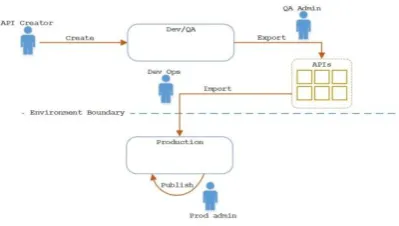
34 Figure 1: Migration process of APIs across different
environments
The purpose of this project is to forward a CLI (Command Line Interface) tool that will perform the API migration across environments efficiently while addressing the issues and inefficiencies.
This article is divided in to # sections. In section 2, discuss the defects and drawbacks of the current existing API migration mechanisms. Section 3 will discuss on the
2.
BACKGROUND
In order to test the API manager product during each stage of the pre-marketing process, consistent background environments needed to be maintained. Therefore, developers try to recreate these APIs in a new environment. When there‟s no defined mechanism to export and import the APIs created in the past environments, Developers have to set up and publish these APIs in the new environment through a manual procedure. Manual creation of APIs causes several identified issues[1] which are described in brief below.
2.1
Unnecessary effort in recreating APIs
Creating an API with minimal features in single given environment cost average of 2 minutes. A number of such APIs are created in the process of developing some API management products as WSO2 API manager, Apigee etc. recreating these APIs in several other environments is a wastage of developer productive time.
2.2
Extra time spends on recreating APIs
Time taken in manual API recreation will drag the test schedules and thereby extend the final release days of the product. Further, it is a waste of productive time that can be used in any feature development tasks. As well as this is critical considered to the product‟s time-to-market. Gradually credibility of the product will reduce implicitly.
2.3
Loss of actual functionality and
features.
Even though the developers somehow manage to create the APIs in the new environments, some of the functionalities and the features need to be tested can be missed due to the lack of knowledge about the functionalities exposed by the application or due to human errors. In that case, developers must recreate a similar API with missed functionalities to edit the existing before proceeding.
2.4
Why Individual components should be
deployed separately?
Single API consists of many components as API definitions, swagger definitions, API thumbnails, documentation, WSDL and any migration policy sequences. In most of the migration tools each of these components needed to be deployed
separately during the process of importing API to a new environment. This has a considerable effect on the performance of the migration process. In the process of bulk import and export this manual work increase in multiple times as per to a single API import and export. Ultimately, it is a waste of productive developer effort and time.
2.5
Poor authentication mechanisms lead
to unauthorized access
Authentication mechanism of most of the tools does not have a better built in mechanism for the authentication. In a developing organization, the information should be in more secured since the data should not be accessible by unauthorized users. The authentication process of most of the currently available tools relies on third party integrations and simultaneously need to contact the third party each time an authentication request occurs. It will lead to unauthorized accesses.
2.6
Absence of the functionality of API
Subscription causes leak to the confidential
information
When invoking APIs to an application the invocation should also authenticate to prevent unauthorized access and to avoid leaking of the information unauthorized persons. Otherwise the chance of accessing confidential information in the application by intruders is high.
Taking above facts into account came up with a tooling support for API managing applications which will be execute via command line interface, having capability to migrate a single or bundle of APIs across different environments within the development organizations. The CLI tool will minimize the effort and time in recreating APIs when product moves between environments as Dev to QA or QA to production. This can minimize the additional effort and time required in regenerating the APIs in a different environment during APIM(API Managing) product migration cycle. Final software product will be an executable file that can be run via the command line interface together with the arguments including the details of the API/APIs need to export/export. This tool is a generalized CLI tool, such that it can be used by number of APIM products with lesser pre- deploy configurations, that can be used in different API management application by different vendors. Another main benefit of the proposed tool is, the tool will be a platform independent tool which can be used in different operating systems. Implemented CLI tool will be run on any environment and within any API Managing applications.
3.
LITERATURE SURVEY
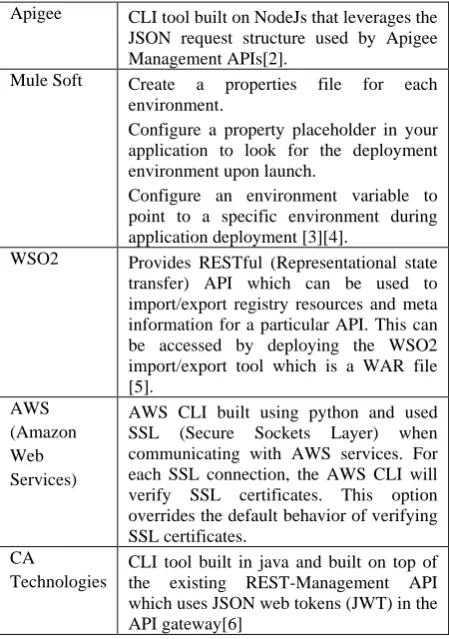
35 documentation and mediation policies etc. Some tools use
[image:3.595.49.274.166.486.2]message formats as JSON(JavaScript Object Notation) and XML (EXtensible Markup Language) to store the content of API components. Table 1 below represent the API migration methodologies followed by few such trending products in the market.
Table 1. API migration mechanisms followed by different API managing products
Apigee CLI tool built on NodeJs that leverages the JSON request structure used by Apigee Management APIs[2].
Mule Soft Create a properties file for each environment.
Configure a property placeholder in your application to look for the deployment environment upon launch.
Configure an environment variable to point to a specific environment during application deployment [3][4].
WSO2 Provides RESTful (Representational state transfer) API which can be used to import/export registry resources and meta information for a particular API. This can be accessed by deploying the WSO2 import/export tool which is a WAR file [5].
AWS (Amazon Web Services)
AWS CLI built using python and used SSL (Secure Sockets Layer) when communicating with AWS services. For each SSL connection, the AWS CLI will verify SSL certificates. This option overrides the default behavior of verifying SSL certificates.
CA
Technologies CLI tool built in java and built on top of the existing REST-Management API which uses JSON web tokens (JWT) in the API gateway[6]
After in-depth analysis done by these different mechanisms of API, migration revealed a diverse set of drawbacks that are shown by the majority of the products commonly.
3.1
Drawbacks in current API migration
mechanisms.
3.1.1
A delegation of key security functions to
third parties.
Most of the current API migration tools rely on third party service providing applications to quire the key security functionalities. This is completely depending on the trust relationship between third party application and the API migration tool.
3.1.2
Individual components should be deployed
separately.
Typical API composed of different components as API definition, swagger definitions, mediation policies, thumbnails, documents etc. In most of all the existing tools, these components need to be export or import as individual extractions. This requires a considerable human involvement and hence led to wastage of productive time and effort.
3.1.3
Limited developer portal functionality
Existing API migration tools confined to a set of identifiedfunctionalities that are limited to single API import and export. However, according to the conducted survey, identified that these tools could be an uplift to an improved version by expanding the functionality to perform bulk API export and import.
3.1.4
Developer portals lack automation features.
Majority of the current API migration tools required for much manual involvement. The user should execute every single command to export an API and import it to a new environment.Considering issues exists in the current API migration mechanisms, conducted an in depth literature survey on following criteria.
3.2
OAuth 2.0 in Authentication
During the literature review found that this is the based authentication technology use by most of the API managing applications. One of the potential benefits of OAuth (Open Authorization) 2.0 is the ability for users to share verifiable assertions about themselves without having to release any personally identifiable information.
As shown in the Table 2 most of the currently available tools contain OAuth 2.0 endpoints. Therefore, the introduced authentication mechanism in the proposed CLI tool can be used for many APIM application by different vendors. As a result, using a single authentication mechanism leads to make the proposed CLI Tool a generalized tool which can be used by different APIM applications.
Table 2. API managing applications support OAuth 2.0 APIM
vendor
Available CLI Tool
Available CLI Tool
for API
Migration
Available
OAuth 2.0
authentication endpoint
WSO2 Yes Yes (Must
recreate)
Yes
Azure No No Yes
IBM Yes No Yes
3scale No No Yes
Apigee Yes Yes (Must recreate)
Yes
3.3
API export functionality in current
tools
Since there is no any API export in API manager, does not have a way to migrate the APIs to another environment. Nowadays most of the popular companies such as Facebook, amazon and twitter provides access to expose their APIs into different sources.
[image:3.595.316.542.406.587.2]36 However, currently available API managers including WSO2
API Manager does not provide developers to export the created APIs to relevant source in a more efficient way. As a result, the whole API need to create in another environment again. Some of the API migration tools has such capability, but they are depended on their API manager.
3.4
API import functionality in current
tools
[image:4.595.48.279.312.575.2]API import is the major functionality expected from a tool created for API migration. Typical API import consists of several HTTP (Hyper Text Transfer Protocol) requests targeted at endpoints that deal with the conversion and import of the sent files. Often this HTTP request accepts json or xml as payload. Most of the API managing applications only has defined certain set of endpoints which can be invoked to create an imported API file. The user can run the following cURL commands with all the registry and database resources exported from the source environment. Table 3 shows an example cURL command issued by most of the migration tool to import a given API to a new environment.
Table 3. Example of cURL command to import an API Parameter Description
URI
https://<host>:9443/api-import-export- <product-version>-<tool-version>/import-api
Query parameters
preserveProvider=<true|false>
HTTP method
POST
Example Imports the API with the original provider
preserved: curl -H "Authorization:Basic YWRtaW46YWRtaW4=" -F
file=@"full/path/to/the/zip/file" -k -X POST "https://<host>:9443/api-import- export-<product-version>-<tool-version>/import-api"
Imports the API with the provider set to the current user: curl -H "Authorization:Basic YWRtaW46YWRtaW4=" -F
file=@"full/path/to/the/zip/file" -k -X POST "https://<host>:9443/api-import- export-<product-version>-<tool-
version>/import-api?preserveProvider=false"
3.5
Availability of API Subscription
functionality on currently available tools
API subscription also another main feature which can be provided to secure the invocations of the APIs in the environment. Before a consumer invokes an API, s/he should subscribe the API to obtain the keys for the invocation of the API. Therefore, the consumer should be able to subscribe an API to an application and generate keys. After that process, only s/he can use the API in the application. Most of the currently available CLI tools do not support this functionality. The few tools which have the subscription option contains limited functionalities. Following table 1.2 shows API vendors who have included CLI tool in their API management applications with the built-on technology and the availability of the API subscription functionality.
4.
METHODOLOGY
4.1
Authentication mechanism
APIs are proprietary resources. Therefore, initially, CLI tool should be able to validate the user before continuing with the functionalities provided by the tool. The CLI tool equipped with a built-in authentication mechanism is to ensure a strong secure authentication process. Therefore, it has minimized the dependencies with external third-party authentication mechanisms. This will be achieved through basic authentication mechanism. Basic auth used because it is the simplest mechanism that can be used to enforce access controls to web resources.
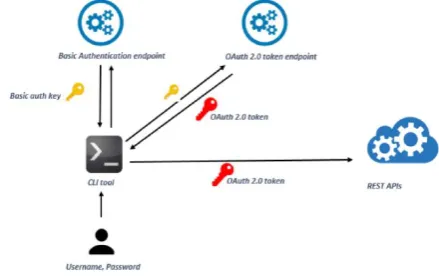
Furthermore, REST API calls should secure with authentication headers. OAuth 2.0 will be used as authorization protocol [12]. Since most of the available APIM applications use OAuth 2.0 as the authentication process, OAuth 2.0 tokens were used to generate the access tokens. To generate access token the retrieved client ID and the client secrete keys from the authentication endpoint after validating the user are required. The tool will set one string contains clientID and the client secret separated by a colon (clientID:clientsecret). Then the tool will encode the string into a Base64 string since it is required to send to OAuth 2.0 authentication endpoint to generate an access token. Moreover, this access token from the OAuth 2.0 has a scope, which delimits what the access token can do and what resources it can be accessed [13][14]. Therefore, the relevant OAuth scope also required sending into the OAuth 2.0 authentication endpoint. After sending the string into to the endpoint, it will validate the string and if it is a valid one the generated access token can be retrieved from the authentication endpoint. This access token required for the REST calls which are for the further functionalities in the CLI Tool. Figure 2 shows the API invocations take place between CLI tool and the endpoints to validate the logged in user.
Figure 2: Overview of the authentication mechanism followed by the CLI tool
[image:4.595.317.537.461.599.2]37 components can then be bundled and sent to the next
[image:5.595.58.278.104.301.2]environment.
Figure 3: Authentication mechanism followed in the implemented the CLI tool
4.2
API export
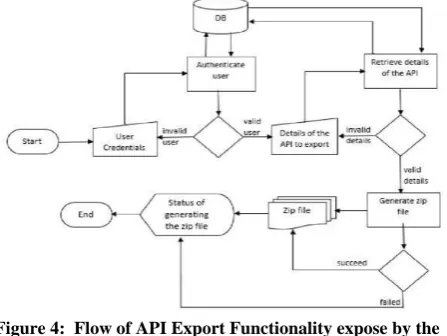
[image:5.595.326.533.270.446.2]API is a collection of related resources. These resources include API definition, swagger definition, thumbnail, documentation, WSDLs and mediation sequences. In API export Component, need to retrieve all the artifacts related to an API such as API definition, swagger definition, documentation and then bundle them up to a transportable file is referred to as API export. Figure 4 illustrates the process followed by the CLI tool which performs the above functionality.
Figure 4: Flow of API Export Functionality expose by the CLI tool
At the initial, User can execute the tool with the credentials of the API details. API details can either be the Universally Unique Identifier (UUID) of the API or combination of API name, version and the owner of the API. Once the request has been sent, CLI tool search for the API in the API store. If it is a valid API, the CLI tool will retrieve all the artifacts related to the API separately, from the persistent data source and write them in a folder component belonging to API includes API definition,
Swagger definition, thumbnail images, mediation policies, documentation and any WSDLs if available. Finally, the created API will be compressed and converted into a
transportable file, which can be used in the API import process at the receiving end.
Upon exporting an API, all these resources should move to the new environment. These resources are residing inside data sources and at times in registries. Upon export, these components need to be retrieved from the original data source and copied into the exporting folder. As described in section 3.1, these components can only be retrieved via REST API invocations.
API calls to resource endpoints will return the requested resources as attached to the response payload. This response can be in different formats as binary, json or xml etc. Those payloads are expected to convert into the required file formats and written in to a new folder. After all the resource files been written into the exporting folder, finalized folder will be compressed in to archive format. Overview of the process of resource retrieval is shown in Figure 5.
Figure 5: Overview of API export functionality followed in the CLI tool
After the user sends the request all the information required for the requested API will be retrieved through REST API invocations from the data sources. After executing the relevant command, it will generate a portable zip file which includes all the entities bundled together and which can be downloaded. In the .zip file the Meta information which contains all the basic information required for an API to be imported in another environment and the API swagger definition,so documents which contains the summary of all the documents available for the API, thumbnail image of the API, WSDL file of the API and the sequences available for the API will be available.
API export functionality retrieves the information required for the requested API from the registry and databases and generates a ZIP file, which the exporter can download. This exported ZIP file has the following structure shown in figure 6.
[image:5.595.58.282.450.618.2]38 Table 4. Archive folder entries
Meta Information
Swagger.json : contain the API swagger definition
Api json: contain all the basic information required for an API to be imported to another environment.
Documents docs.json: contain the summary of all the documents available for the API.
Add the uploaded files for API documentation
Image Thumbnail image of the API
WSDL WSDL file of the API
Sequences The Sequences available for the API
Figure 6: File structure of the API archive created during API export process
4.3
API import
API import is the process of recreating a set of APIs that were in a different environment to a new environment. This includes all the activities starting from receiving imported API file to the new environment up to publishing the imported APIs in the publisher portal of destinations environment. None of the components should be dropped during the import process. APIs in the new environment should be exact to the original APIs in the previous development environment. Figure 7 shows the flow chart of the API import functionality.
Figure 6: Flow of the activities related to API import functionality
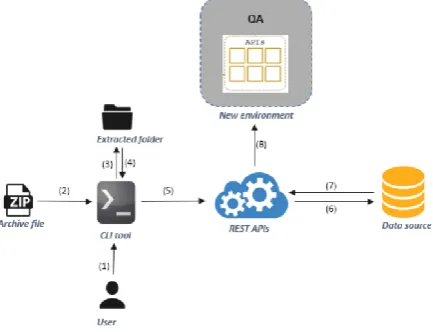
Figure 8 shows how the interior data flow and API invocations take place upon API import. The flow of the activities according to the order is as follows.
Figure 7: Workflow of the API import functionality expose by the CLI tool
1. The user executes the tool with valid user
credentials. If valid shows set of the option through which use can select the option to perform API import.
2. User feeds the file path to the imported archive file. 3. The tool itself extract the content of the archive file
in to a local temporary folder.
4. The tool will retrieve those content including API thumbnails, documentation, WSDLs, mediation policies.
5. Then it invokes the REST API endpoints with these components as the payload to save the API contents into the persistent data storage of the new
environment
6. Data have been saved in to the database. 7. REST API invocations retrieve the data related to
each API from database
8. Create and publish the APIs in the publisher portal of the new environment.
[image:6.595.50.275.92.566.2] [image:6.595.323.540.308.474.2]39 the compressed folder and copied to a temporary local
location. After that CLI tool will invoke the token generation endpoints to generate valid access tokens for the session. REST APIs invoke with extracted content as payloads to create the API/APIs in the new environments and to upload the contents as thumbnails, WSDLs, mediation policies and documentation. As a result, exported APIs will be published in the API store of the imported environment.
4.4
API subscription
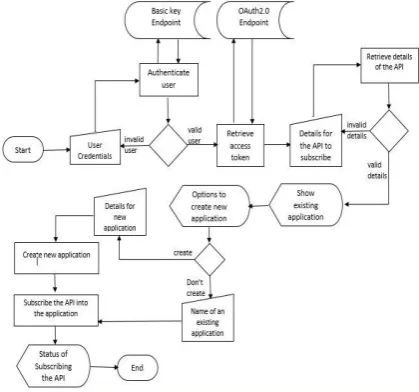
[image:7.595.320.535.73.249.2]Subscription enables to generate access tokens and to be authenticated to invoke the APIs. Therefore, the subscriber should subscribe to the API, before invoking it to an application since after subscribing to the API only, an access token can be generated to invoke the API to provide a valid authentication process. Therefore, in this functionality proposed tool facilitate subscriber to add new subscription and tool will provide the functionality to create a new application. Moreover, sub functionalities related to API subscription will also provide to the user by the CLI Tool. Figure 9 shows the flow chart of the API subscription functionality.
Figure 8: Flow of activities followed in the API subscription functionality
Figure 10 shows the basic mechanism of the generate access token and add new API Subscription functionality. The component mainly divided into three processes; authenticate the user, generate an access token and subscribe an API. To invoke an API into an application user has to subscribe the API to the application. To proceed into API subscription functionalities, an access token is required in subscribe scope. After a valid user logged into the CLI Tool, a client ID and client secrete can be retrieved by the basic authentication endpoint. The string should be encoded into Base64 string after preparing those two keys into a single string separated by a colon. When user select the option as API subscription, the encoded string will send to OAuth 2.0 authentication endpoint with the scope of subscribe. If the client credentials are valid it will generate an access token for subscription functionalities
in the scope of subscribing.
Figure 9: Overview of API subscription functionality expose by the CLI tool
To subscribe an API first user has to provide the details of the API (API name, version, and provider) then the tool will arrange the API Identifier of the user selected API and send it to an endpoint which has the details of the APIs. If the selected API is a valid one, the tiers available for that API can be retrieved from the endpoint. Then the Tool will display the available tiers for the API.
The user must select a tier to continue. Then the tool will show the existing applications for that user. CLI Tool will provide the functionality of creating a new application as per the user‟s requirement.
If the user required to create a new application, the CLI Tool will facilitate that functionality as well. To create a new application user only need to provide a name for the application and to select a tier for the application. Then it will be sent through REST calls with the generated access token and will be created in the application. After selects an application the API will be subscribed into the selected application. The request is sent to the endpoint with the relevant API details, with generated access token with subscription scope. If the request successfully executes then subscription has been done in the API store. After that only user can invoke the API and use it in the application.
4.5
Deploying APIs through kubernetes
Kubernetes is an open source orchestration system which provides for docker containers. There are some alternate docker orchestroms such as Docker Sworm and Mesus. Kubernetes, let to scheduled containers on a machine which make their cluster. Main task of container scheduler is to connect those containers on the appropriate host after starting the first container.
It allows to run several containers on a machine, and those machines make their cluster [15]. No matter whether they are long running services like web applications. Kubernetes services provide logical set of pods which can able to access them and called this as micro service too [7]. Kubernetes will manage the state of containers as follows,
[image:7.595.62.272.306.502.2]40 (These containers are prepared to die at any time
where can able to kill, stop and destroy them quickly).
2. Let move containers from one node to another node.
4.5.1
Why Kubernetes to the CLI tool?
The purpose of Kubernetes is to make it easier to organize and schedule your application across a fleet of machines. At a high level, it is an operating system for your cluster. It allows you to not worry about what specific machine in your datacenter each application runs on. Additionally, it provides generic primitives for health checking and replicating your application across these machines, as well as services for wiring your application into micro-services so that each layer in your application is decoupled from other layers so that you can scale/update/maintain them independently. While it is possible to do many of these things in the application layer, such solutions tend to be one-off and brittle, it is much better to have separation of concerns, where an orchestration system worries about how to run your application, and you worry about the code that makes up your application.
4.6
Automation of migration with docker
Docker makes easier to deploy CLI tool in several isolated environments. Always there may minor variation between development environments unless having own repository environment. By using docker, fulfil that gap by keeping consistent environment because docker containers are configured to keep dependencies internally. Then it is easier to use same container and developer can ensure that they do not need an identical production environment [16][17]. It means, no any restricts to run on amazon E2 instance and allow to use the same container in the virtual box too. This will be more important to use the CLI tool in a different environment by using the same container.
Docker VM includes docker container where able to share the kernel and shared application libraries. It has layered file-system to share the OS in docker VM and hosted OS. Compared to VM, docker containers can be faster and fewer resources need to a single platform provide the shared OS [18]. Then After Add the docker file which has line between five to thirty lines to the machine. It is a small file, but it is responsible for building docker image in docker VM. Then create the docker image using docker file to the project. Docker file contains several commands and instructions where execute in sequential order to build the docker image in docker virtual machine [19].
Docker image contains all project codes and any installments of the program regarding building the project such as Golang and IntelliJ installations. This image is set on the top of the machine and can able to create any number of docker containers and scale up those containers as needed. Then push the created docker image to docker hub, and it includes whatever need to build the CLI tool. It is a cloud-based registry service and link to code repositories. Once receive the image to the hub, build, test and stores pushed images which link to the docker cloud. Then it can be deployed in private hosts where provides centralized resources for team collaboration, Container image discovery and work flow automation using development pipeline [20]. Docker hub provide following features,
Add the hub and docker image to own workflows where GitHub or Bitbucket integration
Provides to create work group to access the repository which includes docker image
Docker image will renew automatically after making change the code of the CLI tool.
Pull images from docker hub and manage, push to, and pull to the own repository which is accessed by us.
[image:8.595.320.535.191.351.2] [image:8.595.320.541.617.703.2]Now any other users can run the CLI tool without need any installation of their computers. It means, no need to install Golang or intellij idea and work it as a VM. The overall architecture of docker where involve the project as shown in Figure 11.
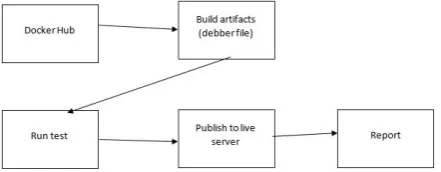
Figure 10: Basic flow of creating docker image. When push and commit the project in to the docker hub time to time, Jenkins grab the latest code as soon as possible. If any build error occurred in the project, trigger immediately to the Jenkins and reverse the commit before last without finding the error in the code. Once the build is successful, the project is tested on several tests such as integration test, unit test and the performance test automatically and send back it as report. If exceptions occurred while testing, can easily troubleshoot the issue. However, this is the continuous integration involve with the project.
To monitoring the basic services such as containers, nodes and topology, need to install Cockpit to PC. It is a free open source system monitory application and checks work perfectly.
It can monitor the services using one of both web interface and command line. However, it was expected to use the web interface which provides more easy access and manage. If any services error occurred, can find easily. Work flow of the docker in CLI tool is shown in figure 3.15. Then after install kubernetes and kubernetes API server which is managing related distributed the docker containers.
41
5.
FINDINGS
The final product of this research project on implementing „Efficient and Platform Independent CLI Tool for API Migration is an executable jar file which can be executed via the command line interface on top of any platform. This is a single tool with multi-functionalities including,
5.1
Functionalities expose by the CLI tool.
5.1.1
Single/multiple API imports
Single or multiple imports of APIs can be performed via the tool by just executing it with the path to the imported folder. Either it is a single API or bulk set of APIs tool will extract all the content in the imported folder and publish the corresponding APIs in the publisher portal.
5.1.2
Single/ multiple API exports
Tool includes a single plug and play mechanism for export of APIs. To export APIs, the tool can be run with API information that needs to execute. Required API information may include API name, version and author of the API. In single API export API credentials can give as a simple CLI command and perform bulk API export, credentials of the required API set need to be given in a CSV (Comma-Separated values) file.
5.1.3
API subscription
APIs are useless without any subscribers that access the services exposed by the APIs. Subscribers subscribe to APIs to utilize the services provided by the APIs in their applications. Users can execute the tool with API identifiers of the APIs need to subscribe and the application details to subscribe to an API.
5.1.4
Single cluster deployment via minikube
To deploy on the minikube cluster. First, the user has to start the cluster and connect to it through the proxy given by them to access the cluster.After that proceed with the given batch file with the related docker image for the related API that needs to be tested and make sure to replace the docker images in the given deployment batch file. After this, the minikube will deploy the given docker image and the endpoint will be available for testing
5.1.5
Google cloud deployment
To deploy in gke (Google Container Engine) first specifically identify the requirement. Moreover, create a cluster as per the requirement in the testing phase used a basic cluster with 1 CPU and 3.75GB memory. After the creation connects to the cluster through the proxy by using Google sdk cli and just run the batch file given by us to deploy the API and return an endpoint with a high scalability.
5.2
Key benefits of the application
5.2.1
Platform independency
The tool is built using java where the application can execute on different platforms and users can get the experience of using it in many OS without any difficulties.
5.2.2
Higher efficiency though optimal resource
utilization
Resources used in the tool is minimized. Therefore, unnecessary waste of resources has been reduced and because of that performance and efficiency of the tool is increased.
5.2.3
Enhance security functionalities along
migration
Providing built in authentication using basic auth and further validate the user and API invocations using OAuth 2.0 authentication and API subscription functionality.
5.2.4
More automated features
Minimized the user‟s actions through the CLI tool by avoiding the unnecessary steps and the tool will handle them.
5.2.5
Plug and play solution
Any of configurations will not be required to execute the tool. The functionalities of the CLI Tool can be experienced by just executing the jar file.
6.
TESTING AND VALIDATION
6.1
Performance Test with GKE
Executed a performance test to validate the GKE WSO2 API Manager deployment by configuring a backend REST service http://jsonplaceholder.typicode.com/ with API-Manager and executing a JMeter load test with different numbers of concurrent users. Executed the same load test with the direct backend service as well as with the con d API proxy in API-Manager to compare the performance results.
Used a single node for the deployment, and The VM specification for the node is N1-standard-1: Standard machine type with one virtual CPU and 3.75 GB of memory.
The performance metrics which used to evaluate the system are latency and throughput.
Latency: the time taken to handle a request
Throughput: the number of requests handled by the server for a specific time interval (e.g.: per second). Following are the test results.
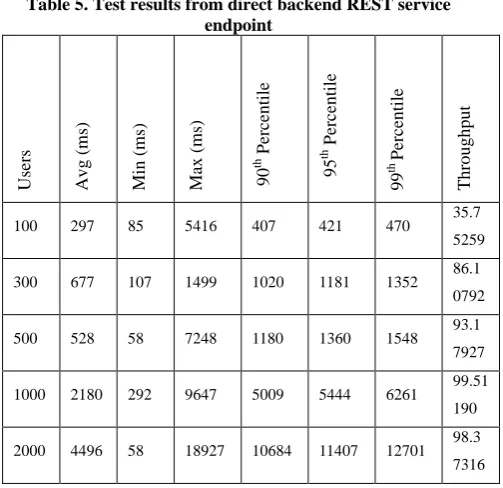
Table 5 shows the test results gained from load test performed with the direst backend services with a predefined number of concurrent users.
[image:9.595.309.561.520.764.2]Avg in the above table 5 stands for the average time taken to response a request from the client side to the direct endpoint. This is given in milliseconds.
Table 5. Test results from direct backend REST service endpoint
Us
ers
Avg (m
s)
Min (
ms)
Max
(ms)
90
th Per
ce
nt
ile
95
th Per
ce
nt
ile
99
th Perc
entil
e
Throughput
100 297 85 5416 407 421 470 35.7
5259
300 677 107 1499 1020 1181 1352 86.1
0792
500 528 58 7248 1180 1360 1548 93.1
7927
1000 2180 292 9647 5009 5444 6261 99.51
190
2000 4496 58 18927 10684 11407 12701 98.3
42 Table 6 gives the test results gained from the load test
[image:10.595.312.542.68.302.2]performed on API-Manager REST service endpoint with the same number of concurrent users used in the previous test.
Table 6. Test results from API-Manager REST service endpoint
Us
ers
Avg (m
s)
Min (
ms)
Max
(ms)
90
th Per
ce
nt
ile
95
th Per
ce
nt
ile
99
th
Perc
entil
e
Throughput
100 1352 1263 1967 1394 1409 1914 41.75
365
300 2322 1709 3653 3066 3280 3594 78.80
220
500 3522 2711 4807 4386 4646 4756 98.05
844
1000 8453 5933 10319 9604 9884 10133 93.69
436
2000 14320 0 19675 16781 17079 18839 97.73
737
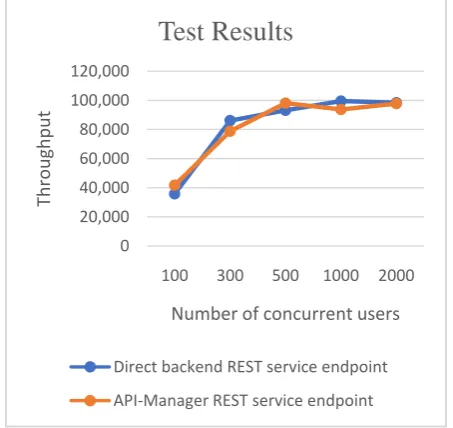
[image:10.595.49.291.112.370.2]In the above table, 6 Avg refers to the average time taken for a request from the client side to the kubernetes deployed API manager end point. This is also given in milliseconds. Line chart in figure 13 indicates a comparison between the throughputs obtained for the load tests on direct backend REST service endpoint and API-Manager REST service endpoint.
Figure 12: Comparison of the throughput from direct backend REST service endpoint and API-Manager REST
service endpoint for the load test.
The line chart 14 below shows the comparison of average time taken to address a client request by direct backend REST service endpoint and kubernetes deployed API manager end point.
Figure 13: Comparison between direct backend REST service endpoint and API-Manager REST service endpoint on average time is taken to respond to a client
request.
7.
DISCUSSION AND COMPARISON.
Nowadays, APIs are important to a developing organization since APIs will help to improve the efficiency, automation, personalization aspects of services expose by the organization [21][22][23][24][25]. When there‟s a requirement to move the created APIs in one environment into another environment, users must recreate those in the new environment manually. Time, resources and cost are wastage is common because of the redundant processes. There are only a few tools that support for API migration and those tools still haven‟t address drawbacks as;
Individual components should be deployed separately. Required to create the component one by one and lot of redundant processes will be occurred. Therefore, a lot of time, developer effort and resources will be wasted.
Limited developer portal functionalities will cause to reduce the performance.
An unnecessary amount of resources will be wasted, and network traffic will be occurred because of the wastage of bandwidth.
No built-in support for strong authentication. Since a lot of mechanisms relies on third party authentication applications and it always requires to connect with the 3rd party applications will help intruders to access the private information easily. The lack of functionality. Ex. Most of the CLI tools
does not support API Subscription.
If anyone can address drawbacks, it can increase the accuracy rate, performance and security of the migration process. Proposed tool was primarily developed targeting above mentioned problems and introduced new functionalities targeting the fore coming marketing trends. Following are such specific features expose by the CLI tool for API migration [26].
0 20,000 40,000 60,000 80,000 100,000 120,000
100 300 500 1000 2000
Through
pu
t
Number of concurrent users
Test Results
Direct backend REST service endpoint
API-Manager REST service endpoint
0 5000 10000 15000 20000
100 300 500 1000 2000
Ti
me
in mi
llis
econ
ds
Number of concurrent users
Average time taken to
response to a client request
Direct backend REST service endpoint
[image:10.595.51.278.464.678.2]43 A tool is a generic tool where many APIM
application by different vendors can be used for their APIM applications.
The tool can execute on different platforms such as windows, Linux to achieve platform independency. Introduced a strong authentication mechanism using
Basic auth and OAuth 2.0 authentication mechanisms to provide a better authentication throughout the functionalities of the CLI Tool. The proposed tool contains new functionalities such
as API subscription which most of the CLI tools does not contain.
Moreover, reduced user‟s manual steps through the tool by Enhancing automate feature and do not require any additional configurations to use the tool. As a result, a lot of time, resources, developer effort and cost can be saved while having a better performance, accuracy rate and an efficiency level by using this CLI tool.
Even though API migration tool is very easy to use for everyone, complete documentation and guidelines on usage of the system will be provided. It ensures the relevant users to the access the accessibility tools of the operating system, without affecting the API migration tool‟s functionality. Furthermore, it includes instructions in simple languages with screenshots and provides accessible support materials, training and documentation.
7.1
System Performance
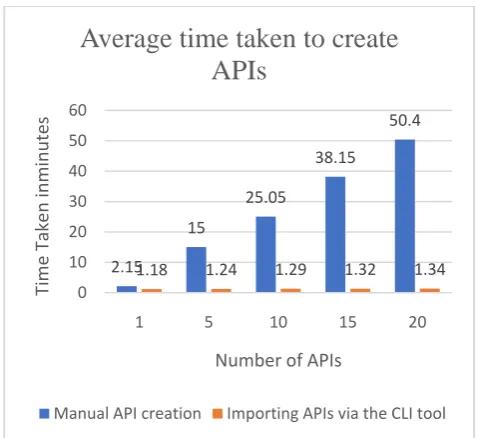
Creating an API with minimalistic features, without any WSDLs, median policies, and documentation cost u approximately 2minutes and 30 seconds in any typical API managing product. If a user needs to create 20 of such APIs in a new environment, it takes around 90 minutes to create the whole set of APIs. API import is the process where users rebuild the API using the received API resources in a new environment. Performance, the API migration tool, is commendable such that it can create whole set of this 20 APIs within less than 1minute and 40 seconds.
[image:11.595.315.554.69.288.2]Figure 5.1 below shows the time taken to create defined number of APIs manually by a API managing application and the time taken by the implemented CLI tool to create the imported APIs in the new environment. It is observed that the time taken by the implemented tool to create APIs fluctuate around a fixed rate this is because the time taken to execute the tool remains constant and the time difference cause due the number of APIs been import is just few seconds.
Figure 14: Comparison between API managing application and implemented CLI tool to create APIs in
the publisher portal.
Following calculations explain about the performance gain can acquire through the implemented CLI tool.
𝐴𝑣𝑒𝑟𝑎𝑔𝑒 𝑡𝑖𝑚𝑒 𝑡𝑎𝑘𝑒𝑛 𝑡𝑜 𝑐𝑟𝑒𝑎𝑡𝑒 𝑎 𝑠𝑖𝑚𝑝𝑙𝑒 𝐴𝑃𝐼 = 150𝑠
𝐴𝑣𝑔. 𝑡𝑖𝑚𝑒 𝑡𝑎𝑘𝑒𝑛 𝑡𝑜 𝑐𝑟𝑒𝑎𝑡𝑒 20 𝑠𝑖𝑚𝑝𝑙𝑒 𝐴𝑃𝐼𝑠 = 150𝑠 × 20 = 3000𝑠
𝐴𝑝𝑝𝑟𝑜𝑥. 𝑡𝑖𝑚𝑒 𝑡𝑎𝑘𝑒𝑛 𝑏𝑦 𝑡𝑜𝑜𝑙 𝑡𝑜 𝑐𝑟𝑒𝑎𝑡𝑒 20 𝐴𝑃𝐼𝑠 = 100𝑠
𝑃𝑒𝑟𝑓𝑜𝑟𝑚𝑎𝑛𝑐𝑒 𝑔𝑎𝑖𝑛 = 3000𝑠 − 100𝑠
3000𝑠 × 100%
= 96.66%
8.
CONCLUSION
API migration is becoming an essential functionality need support by API managing products which will allow developers to migrate the created APIs from one development environment to another as well for the API publishers to exchange their created APIs with other API publishers. Current mechanisms provided by several API management products have identified problems like delegation of key security functionalities to third parties, individual components need to be deployed separately, limited developer portal functionalities, and limited automated features, which are not addressed yet. Therefore, a requirement for a powerful, platform independent and efficient tooling supporting for this domain is still at a growing stage. In this research project, presented a CLI tool which could overcome those identified issues in current existing tools and can address the performance issues currently undergoing. Main functionalities expose out migration tool can be split in to four as API export, API import, API subscription and application deployment. To perform all these activities, the tool should be executed by a valid user. Access to the tool is verified and validated by two key security mechanisms. Basic level authentication is done through the Basic Authentication technology, and REST API invocations are secured by the access tokens generated via OAuth 2.0.
2.15 15
25.05
38.15 50.4
1.18 1.24 1.29 1.32 1.34
0 10 20 30 40 50 60
1 5 10 15 20
Ti
me
Taken
inm
inutes
Number of APIs
Average time taken to create
APIs
44 API export functionality allows the user to retrieve all the
components related to API/APIs as API definition, swagger definition, thumbnails, mediation policies and bundle them up to a single transportable archive file which can be transferred to any environment. The user just has to execute the tool with API identifiers or the required APIs.
Since the API import users has to trigger the CLI tool with the local folder path to the imported archive file. Users do not have to deploy each component separately. Once the tool is triggered, it will extract all the content of the imported folder to a temporary local folder. The tool then retrieves those content to create and publish the imported APIs in the new environment by invoking the available REST APIs.
None of the existing migration tools has introduced the functionality to perform API subscription. API subscription allows the user to create applications with required tier levels and subscribe to any API identified by the API identification via that application or any other applications available in the API store. The entire process is handled via the CLI tool. This makes developer portal functions fast and easy.
Using two virtual or physical machine on creating the kubernetes cluster will help on maintain the traffic and update the product with a zero downtime and efficient replica allocation other than using a minikube cluster with a one worker node.
All these functionalities collectively will address most of the drawbacks that haven‟t been addressed in current API migration tools. This tool will facilitate the developer effort in developing API manager applications and enhance the developer productivity by eliminating unnecessary time, and effort wastage arise during API migration across different environments.
9.
FUTURE WORKS
The basic requirement of the project was to introduce a tooling support for API managing applications to perform API migration. To full fill, this requirement identified a set of requirements include retrieving and packaging API components to a transportable file type to export in to a new environment. Extracting the components in the imported compressed file and deploying imported APIs in a new environment is another requirement. Surrounding those main requirement sub requirements as authentication, and deployment of APIs in minikube and Google cloud also were included in the current version of the API migration tool. All these steps involved in the API migration are based on the RESR API invocations where bandwidth is critical in handling bulk API import and bulk export. As future development plan, it is noted to have any algorithm or mechanism to reduce this bandwidth utilization or to divide the bandwidth usage in to a time scaled slots enabling asynchronous data flow between the back and forth.
Currently, tool accepts the API identifiers for bulk export of APIs only via the CSV file at the location specified in the config file. It is possible to broaden this functionality by enabling the tool to accept inputs from various input sources as json files, xml or even with another program code.
All the users are authorised and authenticated when accessing the tool. Still, the exporting file is transported across environment via third party applications as Gmail. At an instance, this can create a security sieve for intruders to get the access to API resources. As the future development plan, planned to implement a secured channel between exporting
party and the importing party for secured API file transportation.
The observed efficiency of the current tool is 96.66%, this can be further increase if could find a mechanism to bundle up the HTTP requests, responses pass between client and the server. Anyone whose interest in continuing this research into the higher level can pay attention to optimizing bandwidth utilization, achieving language neutrality, enhancing the security of transportation process and deployment of APIs in Amazon web services.
10.
REFERENCES
[1] Alexie Balaganski, “API Security Management”, KuppingerCole Report No: 70958, LEADERSHIP COMPASS pp 20-27, July 2015.
[2] G. P., "APIgee_environment_Migration tool," 07 2016.
[Online]. Available:
https://www.npmjs.com/package/APIgee_environment_ migrationtool. [Accessed 27 02 2017].
[3] MuleSoft.com, "Deploying to Multiple Environments," MuleSoft.com, [Online]. Available:
https://docs.mulesoft.com/mule-user-guide/v/3.6/deploying-to-multipleenvironments. [Accessed 27 02 2017].
[4] "Secret of great API," MuleSoft, [Online]. Available: https://www.mulesoft.com/ty/wp/secrets-great-api. [Accessed 24 03 2017].
[5] D. Stevenovic, "WSO2TORIAL: Migrating the APIs to a Different Environment," WSO2, 11 09 2015. [Online]. Available: https://www.yenlo.com/blog/wso2torial-migrating-theAPIs-to-a-different-environment.
[Accessed 28 02 2017].
[6] fliaa01, "CA API Gateway 8.3.00 released," CA, 17 03
2015. [Online]. Available:
https://communities.ca.com/thread/241725934. [Accessed 15 03 2017].
[7] MuleSoft, "The Top Six Microservice Patterns," MuleSoft. [Online].
[8] D. Burg, "Using Google OAuth 2.0 authorization server in Azure API Management," 2017, 25 07. [Online]. Available: https://support.3scale.net/docs/api-authentication/oauth2. [Accessed 02 10 2017].
[9] Azure, "Code flow of the OAuth 2 specification," Azure, 21 09 2014. [Online]. Available: https://dzimchuk.azureedge.net/blog-content/OAuth2-Authorization-Code-Grantupdated2.png . [Accessed 18 03 2017].
[10]"Export API," Facebook, 2017. [Online]. Available: https://developers.facebook.com/docs/analytics/export/. [Accessed 06 06 2017].
[11]"Export an API from API Gateway," Amazon Web Services, Inc., 2017. [Online]. Available: http://docs.aws.amazon.com/apigateway/latest/developer guide/api-gateway-export-api.html. [Accessed 08 06 2017].
[12]WSO2, "Building an Ecosystem for API Security,"
WSO2, [Online]. Available:
45 03 2017].
[13]AWS, "OAuth2 Role‟s to be identified," AWS, 2015.
[Online]. Available:
https://s3.amazonaws.com/dfcwiki/en/images/6/6f. [Accessed 18 03 2017].
[14]WSO2, "Authorization code grant type with WSO2 API manager," WSO2, [Online]. Available: https://docs.wso2.com/download/attachments/29922435. [Accessed 18 03 2017].
[15]Google, "Large-scale cluster management at Google,"
Google, [Online]. Available:
https://research.google.com/pubs/pub43438.html. [Accessed 26 03 2017].
[16]T. Vase, "ADVANTAGES OF DOCKER," University of Jyväskylä, 2015. [Online]. Available: https://jyx.jyu.fi/dspace/bitstream/handle/123456789/480
29/URN%3ANBN%3Afi%3Ajyu-201512093942.pdf?sequence=1. [Accessed 25 05 2017]. [17]N. D. Loof, "Docker Hub 2.0 Integration with the
CloudBees Jenkins Platform," 21 09 2015. [Online]. Available: https://dzone.com/articles/docker-hub-20integration-with-the-cloudbees-jenki. [Accessed 17 04 2017].
[18]S. Sheshachala, "Docker vs VMs," 24 11 2014. [Online]. Available: ://devops.com/docker-vsvms. [Accessed 15 03 2017].
[19]M. Arul, "How to create Docker Images with a Dockerfile," [Online]. Available:
https://www.howtoforge.com/tutorial/how-to-createdocker-images-with-dockerfile/. [Accessed 17 03 2017].
[20]D. Doc, "Overview of Docker Hub," Docker, [Online]. Available: https://docs.docker.com/docker-hub/. [Accessed 17 03 2017].
[21]A. B. Steve Danielson, "How to import the definition of an API with operations in Azure API Management," 23
01 2017. [Online]. Available:
https://docs.microsoft.com/enus/azure/api-management/api-management-howto-import-api. [Accessed 11 04 2017].
[22]M. Rouse, "API economy (application programming interface economy)," [Online]. Available: http://searchmicroservices.techtarget.com/definition/API-economyapplicationprogramming-interface-economy . [Accessed 14 03 2017].
[23]M. S. Bala Iyer, "The Strategic Value of APIs," 07 01 2015. [Online]. Available: https://hbr.org/2015/01/the-strategic-value-of-apis. [Accessed 17 03 2017].
[24]J. Musser, "Open APIs:State of the Market," 06 12 2010. [Online]. Available: https://qconsf.com/sf2010/dl/qcon-sanfran-
2008/slides_/JohnMusser_Web_As_Platform.pdf. [Accessed 14 03 2017].
[25]G. C. D. Sisk, "API Economy," 2015. [Online]. Available:
https://www2.deloitte.com/content/dam/Deloitte/us/Docu ments/financialservices/us-fsi-api-economy.pdf. [Accessed 24 03 2017].
[26]A. Jayakody, A.K.A. Perera, G.L.A.K.N. Perera, V. P. Wijayaweera and M.A.M. Asbar Ali, " Efficient and Platform Independent CLI Tool for API Migration" in 24th Annual Technical Conference of IET Sri Lanka Network, Colombo, IET, 2017, pp. 63-67.