Smart Mobile Application Calling for Visual
Impairment's People Using Gestures
K. Tenu Anand S. Venkat
IV Year IV Year
Department of Information Technology Department of Information Technology
K.C.G College of Technology K.C.G College of Technology
N. Sri Ram Mr. N. Bhaskar
IV Year Assistant Professor
Department of Information Technology Department of Information Technology
K.C.G College of Technology K.C.G College of Technology
Abstract
Technology as it finds its wide range of application in every field not exception even the Mobile technology. One of the technologies which aid the blind person to call in android mobile is Virtual Reality. Even though virtual reality is employed to carry out operations the blind person attention is one of the most important parameter. If they commit any mistakes to use apps it leads to a wrong call. So, one may think of a technology that reduces the burdens of a blind person by using apps. Now dream came be reality by means of a technology called “HAPTIC TECHNOLOGY”. Haptic is the “science of apply tactile sensation to human interaction with computers. In the document we have discussed the basic concept behind haptic along with haptic device and how those devices are interacted to produce sense of touch also force feedback mechanism. Also the implementation of this mechanism means of haptic rendering and contact detection were discussed. We mainly focus on the ‘Application of Haptic Technology in Surgical Simulation and Medical Training’. Further we explain a storage and retrieval haptic data while working with haptic devices. Also the necessity of haptic data compression is illustrated.
Keywords: Haptic Technology, Virtual reality, Surgical Simulation
________________________________________________________________________________________________________
I. INTRODUCTION
People with low vision or who are blind are often disadvantaged when information is presented in the regular classroom. Detailed visual information can take on many forms from preferred book pictures to computer simulations. These visual presentation methods are not readily accessible to people with visual impairments and can lead to a lack of understanding and weak concept development. The people not understand what they are missing and the staff may not know how to sufficiently convey the information. This is especially true for math and science, which often rely on visuals to deliver key aspects of content. There are a number of excellent methods that provide accessibility to people with visual impairments readily available due to many factors, one of which is cost. The use of a low-cost computer-based technology could provide an affordable supplement or alternative to current assistive techniques. Though there are thousands of computer programs for education of sighted children, there are very few for people with vision problems. One reason is that computer based educational software relies heavily on graphics. Computer haptics, coupled with audio and high contrast graphics, can allow who are blind or have low vision to take advantage of multimodal learning experience
Background
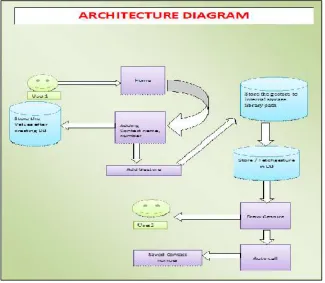
Fig. 1: Architecture Diagram II. PROPOSED DESIGN
Haptic innovative technology and software can integrate information through the sense of touch to add to the information being provided through auditory and visual. Blind persons will call in android mobile with help of applications. Calling done by drawing patterns i.e., gesture. To achieve this, contacts should be in Application memory. Search based algorithm. The algorithms perform disabilities to use android mobile for call, different design pattern applied for each contacts in application contact list. This put demands on the haptic algorithm. Not search based algorithm.
Algorithm: Haptic Algorithms
Used by interaction designers.
Haptic algorithms that the time to acquire a
target is a function of the distance and Size of the target. T- Indexes of difficulty
D– Distances from target W – Size of target
Defines an index of difficulty
For a haptic virtual environment or telescope rated system, haptic feedback can minimize the difficulty
III. IMPLEMENTATION
Hardware Implementation and Requirements
The hardware requirements of this application are android Smart phone having a touch a processor of minimum 600 MHz. processor Android Smart phone should have Volume Up and Volume Down button.
Software Implementation And Design
IV. MODULES
Binarization Module
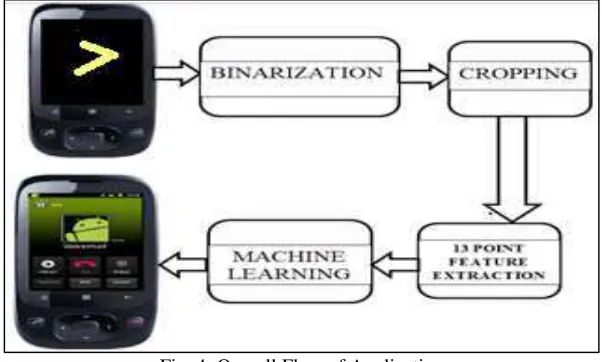
The system uses online processing to process the pattern drawn by the user as the user draws the pattern the co-ordinate values are extracted and the respective position in the array is set to zero, The size of the array is decided dynamically by retrieving the screen resolution The number of rows are equal to the maximum X co-ordinate and the number of columns are equal to the Y Co-ordinate. Initially all the values are the array are set to one. As soon as the user leaves the screen after drawing the pattern the array is saved and further processing is carried out. Thus the output of the binarization module is a binary value array.
Cropping Module
The array obtained after binarization is an input to the cropping module. This array needs to be cropped because there are very high chances that the user while drawing the pattern has not used the entire screen but the array contains information about the entire screen. The user being visually challenged is unaware of the screen size and may either tend to draw the pattern somewhere in a corner or may tend to draw the image either too small or too large. These conditions can be handled by cropping the array Rows and columns where no value is set to zero are cropped from the existing array, thus a new array is obtained. The reason to crop rows and columns where no value is set to zero is that these rows and columns were not used when the pattern was drawn and hence contain no useful information.
Fig. 2: Cropping Module
V. 13 POINT FEATURE EXTRACTION AND FEATURE MATCHING MODULE
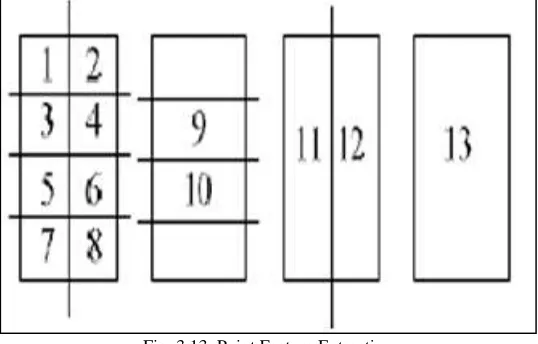
In the feature extraction module the cropped array is divided into 13- point as shown in fig. 3. The number of rows is divided by four and the number of columns is divided by two thus we obtain the parts one to eight. Part nine is part three and four take n together and part ten is part five and six taken together. All the parts of the first column together form part eleven and the second column forms part twelve. The entire array taken together is part thirteen. We count the bit set to zero in each part of the array and store these values in a separate 1*13 array. We use this array for comparison with the database.
Fig. 3.13: Point Feature Extraction
VI. LEARNING MODULE
There is also a module which keeps an account of the commonly used numbers by the user and based on which it updates itself every time the user makes a pattern. This module makes use of the concept of caching that is the numbers which are most frequently used their arrays are stored in the cache. When an array needs to be compared it is first compared with the entries in the cache. If no match is found having the deviation within set limits then the array is compared with the entries in the database. This will not only ensure faster response but greater efficiency. In general cases the hit ratio is much higher than the miss ratio. Thus using the concept of caching the learning module is implemented.
Fig. 4: Overall Flow of Application
Home
Adding Contact Name and Number will be added in Database with pattern. “Reload” button to refresh the content.“Quick call” button will re-direct you to the blank space.“Exit” button to exit our application.
Add Name And Mobile Number
If you click button the “Add Name and Mobile no.button from home page then “Save Name and Contact Number” screen will appear. After entering Name and Mobile number click the “Save” button and it will display a confirmation dialog box if you click “Yes” button it will save the details in the database and it will ask you to draw a pattern for the user.
If you select “No” in the dialog box the data will not be saved and you can alter it again
Draw Pattern
After clicking “Yes” button in dialog box a Message dialog box will appear as “Draw a pattern for saved name”.At the same a Toast message will be displayed that “Contact saved successfully!!!” After clicking “Draw Pattern” button in the dialog box navigate to a “Create a gesture” screen. In this screen draw any pattern for the contact person for whom you have saved the contact details. After drawing any pattern for the contact person. That person's name will be appear on the Edit Text box once you clicked the done button.The done button will highlight only when pattern drawn on the specified area.
Database Creation
Contact name and number has been stored after Add details. Android used SQLite Database for storing and fetching contact details.
View List
After saving some contacts and pattern for them. The Home page will display the pattern along with the Contact name in the list after saving.
Reload
After saving contacts and pattern if any contacts not displaying in the list means click the “Reload” button to refresh the content. It will display the pattern along with the Contact name in the list after saving.
After drawing pattern respective person name will be announced (e.g., calling to xxx) and vibration started for confirmation call.Our pattern need not to be 100% perfect but it somewhat need to match with the saved pattern.But the directions of drawing pattern is very important (i.e., If saved pattern drawn from left to right, this pattern also must drawn from left to right in direction) else our recognizer will not identify our pattern. After ending call it will come back to Quick call page where you can make any number of calls consecutively. In our home page contact list you can easily delete your pattern
Exit
When you need to quit application simply click “Home” button and it will go directly to the home page where you click “Exit” button to exit our application.
VII. RESULT AND DISCUSSION
Haptic innovative technology and software can integrate through the sense of touch to add to the information being provided through auditory and visual means. Blind person also call in android mobile with help of applications. Calling done by drawing patterns i.e., gesture. The algorithms perform disabilities to use android mobile for call, different design pattern applied for each contacts in contact list. The contacts put demands on the haptic algorithm. Not search based algorithm.
VIII. CONCLUSION
Innovative technology and software can integrate rich information through the sense of touch to add to the information being provided through auditory and visual means. Blind person also call in android mobile with help of applications. Calling done by drawing patterns i.e., gesture Haptic devices and haptic-based software can be a useful tool for blind persons. The algorithms perform disabilities to use android mobile for call, different design pattern applied for each contacts in contact list. This put demands on the haptic algorithm. Not search based algorithm. This innovative technology and software can integrate rich information through the sense of touch to add to the information being provided through auditory and visual means. This can be a new tool for blind persons to add to their tool box.
REFERENCES
[1] Darrah, M., “Using Haptic Technology to Teach Math and Science,” presented at American Council of the Blind 2013 Conference and Convention, Columbus,
OH, July 4-12, 2013.
[2] M.G. Jones, G. Childers, B. Emig, J. Chevrier, H. Tan, V. Stevens, and J. List, “The Efficacy of Haptic Simulations to Teach People with Visual Impairments
About Temperature and Pressure,” Journal of Visual Im-pairment & Blindness, vol. 108, no. 1, pp. 55-61, 2014.
[3] M. Darrah, K. Murphy, K. Speranski, and B. DeRoos, “Framework for K-12 Education Haptic Applications,” Proc. 2014 IEEE Haptics Symposi-um
(HAPTICS), pp. 409-414, 2014.
[4] Sonal R. Pampattiwar, Prof. Anil Z. Chhangani. “Smartphone Accessibility Application for Visually Impaired” International Journal of Research in Advent