16
ICT EnVIronmEnT for InTEraCTIVE
lEarnIng of musIC In ThE fIrsT
gradEs of prImary sChool
Bogdana Borota, Andrej Brodnik university of primorska, slovenia E-mail: [email protected]; [email protected]
Abstract
Modern technology is an important factor influencing the strategies of learning and teaching music. In Slovenia the information-communication environment Musical Image Format, Rhythm created by the authors represents the first example of the transfer of image format of music into the computer environment. There are two important elements of successful learning in this environment, i.e., properly conceived system architecture and graphic user interface, which enables simple and transparent as well as creative and problem based learning in the virtual community. At the same time the elaborated computer environment proved to be an adequate didactic tool in the establishment of the conditions for blended learning. The pedagogical evaluation of the prototype has shown that pupils have achieved the highest difference in their average marks before and after the research in the area of the use and the understanding of image music format. Significant results are achieved also in the field of recording and performing music format.
Key words: ICT, music education, interactive learning, Musical Image Format, Rhythm.
Introduction
Modern technology is an important factor influencing the strategies of learning and teaching music (Rudolph, 2004). In order to benefit from the opportunities offered by the modern technology the experts are intensively studying learning processes and creativity (Papert, 1993; Rudolph, Richmond, Mash & Williams, 2005; Bamberger, 2000). In the area of musical education great results have been achieved at the Massachusetts Institute of Technology1. Bamberger and
Hernandez (2007) developed the interactive computer programme Impromptu2, which was
conceived on the basis of findings on the intuitive musical thinking of children in early childhood (Bamberger, 2000).
The above mentioned approach was the challenge for the development of the Musical Image Format, Rhythm3, which in Slovenia represents the first attempt to create an information-communication environment providing the opportunity also to less skilled users (pupils of the first grades of primary school) to use creatively the musical image recording in the period of early musical literacy. ICT (Information and communication technology) environment enables also the creation of virtual community supporting cooperative learning and broadening the learning environment even outside schools.
1 For more information see projects of the research group Music, Mimd and Machine available on http://sound.
media.mit.edu/projects.php.
2 Retrieved June 20, 2009, from http://tuneblocks.com/downloadimp.jsp
17
in the 21st century Volume 17, 2009
The technical implementation is based on the idea of microword which makes it possible to link and deepen the experiences from real and virtual world (Papert, 1993). This environment fosters problem conceived learning in design space which helps us realise the modern paradigm of socio-constructivist learning and teaching (Kagan, 1994; Glasersfeld, 1995). The concept of the contents includes musical image format which represents an effective intermediate stage between the enactive and symbolic phase of concept development (Bruner, 1968).
In the continuation the following items are presented: system architecture and graphical user interface of the ICT environment of the Musical Image Format, Rhythm as well as the results of the evaluation of the prototype introduction into the instruction of music.
The ICT Environment Musical Image Format, Rhythm
Here we give a brief description of the implemented ICT environment, while for details see System architecture (Mezgec, 2008). In setting the architecture of the ICT environment the following principles have been considered:
• focusing the attention on the specific element of music (e.g., tempo, rhythm) and the selected problem (e.g., image format of the musical rhythm);
• the use of intuitive thinking;
• researching, creating and individual construction of knowledge; • simple implementation and transparency of work.
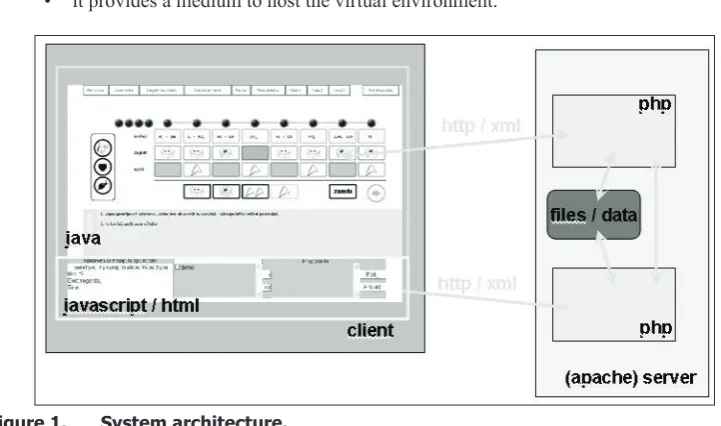
One of the preconditions for the realisation of the above stated principles is an adequate system architecture (see Figure 1). We decided to use traditional server-client architecture. The server has a three-way function:
• it provides teaching materials through the software components (learning objects); • it saves user’s and sessions’ data and
• it provides a medium to host the virtual environment.
Figure 1. System architecture.
The communication between the client and the server takes place exclusively through the http protocol to avoid difficulties in setting the firewalls. On top of the http protocol is added a meta-protocol which permits simple localisation. To support extendibility and data structurization and to simplify management and coding, the protocol is XML and Unicode based. For the particular implementation we used FreeBSD operating system and Apache http server.
18 the virtual community is asynchronous. For the implementation of the virtual community we used the server on which functionality similar to mailing system was implemented. Through the cooperation of applet and JavaScript programme it is possible to send mails, as well as to check and read them. The mail is defined in a strictly structured way by the use of XML and MIME standards. This permits us to compose mail of textual message and attach in a standardized way an arbitrary content – including music scores etc.
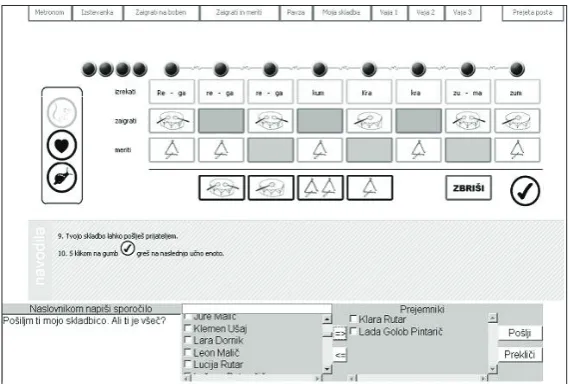
As mentioned above, individually learning objects were implemented as Java applets. The choice of applets was based on the complexity of multimedia presentation at the client’s side and on a versatility demand of an individual learning object. An important element of a learning object influencing the efficient use and interaction between the user, computer and learning contents are adequately organized human-computer interface (HCI). HCI for educational systems allows users to gain an overview on the structure of the learning space, the learning methods, and the learning procedures (Adelsberger, Collis, & Pawlowski, 2002). In our case, we used the graphical user interface with icons to provide a choice of menus by clicking the mouse.
Figure 2. Graphical user interface.
An example of HCI is given in Figure 2 and consists of the following parts.
1. Programme window, which is split into two permanent parts: activity takes place in the upper part (3 and 4), while the virtual community communication takes place in the lower part (5).
2. The menu of learning units, which operates through tabs and offers a choice and switching between different learning units.
3. Working area with the content of each separate learning unit.
4. Instructions are provided for each step to support independent and/or cooperative partnership learning. For better understanding the text contains button images.
5. Virtual community environment provides partnership cooperation among the members of the virtual community.
19
in the 21st century Volume 17, 2009
Figure 3. An example of realistic and symbolic images used as a buttons in HCI.
Problems of the research
Experts ascertain that learning music takes place in the same way as learning languages. The phases of listening, repeating and practising are followed by the phase of writing and reading music. For the latter it is in terms of music literacy from the point of view of epistemology very important to link it to and establish an interaction between the sonic and written image (Gordon, 1997). For the articulation of such skills the use of multimedia and the use of computer environments proved to be effective (Berz & Bowman, 1994).
There are a number of improved notator programmes as for example Finale1 4and
Sibe-lius25. However, such programmes are based on the use of notes and note lines, which require
form the user to understand the standard music format. While working with children we noticed the need for the establishment of a computer environment which would support the intermediate phase in the development of music literacy by using image music format which would at the same time support the strategies of creative learning of music.
Methodology of Research
First we established a prototype ICT environment as presented in the previous chapter. Using the set up environment we proceeded with an evaluation case study. We have implemented the descriptive and causal-explicative method of pedagogical research. The research questions are related to the areas of the strategy of the introduction of the established environment into the instruction, its evaluation of instruction as well as evaluation of virtual learning environment.
Three teachers were involved in the research as well as 40 pupils of the third grade, from which there were 23 boys (57.5%) and 17 girls (42.4%). The research lasted over the period of
eight months.
For data collection we used the questionnaires for pupils and teachers, assessment sheets, checking lists, interviews, observations, teaching preparation analyses and teachers’ reflections. We used the descriptive statistical methodology for the data elaboration. For the verification of statistically significant differences among arithmetic mean of the independent sample (gender) assessment we used the so called t-test. We verified the homogeneity of the variances by Levene’s and F-test. In order to verify the statistically significant differences among arithmetic mean of the dependent samples (assessments before and after the research) we used the t-test. The correlation was calculated with Pearson’s correlation coefficient. Statistically significant connections were verified by the Chi-Square test of the hypothesis of equal probability and by Chi-Square test of
independence hypothesis.
Evaluation of the HCI
The objective of the evaluation was to verify the applicability and friendliness of the HCI and to establish a tentative theory on the elements of efficiency influencing learning.
The adequacy of the HCI is estimated with 5 grade scale. The average estimation is 4.62. The results show the efficiency of the commonly conceived interface for all teaching units. In a relatively short period of time participants mastered the sequence of activities and ceased to use written instructions (see item 4 on Figure 1). Furthermore, the results show that the icons successfully replaced the standard buttons to reproduce music. The users are, on the basis of
4 Retrieved April 20, 2009, from http://www.finalemusic.com/Finale/.
20 recognising images, able to successfully foresee their function, content and their use.
However in the evaluation of the usefulness of directions offering help in the following learning path some help was needed. Some help was also needed likewise when using keyboard as well as when using the image music notes.
On the basis of the results of the evaluation we can assume that skilled and experienced pupils and teachers would be able to use ICT environment independently without additional help. However, less experienced users would need more help, above all at the initial stages of the independent learning with the help of computer, as well as at the beginning of writing and changing music notes. Furthermore, we established that the understanding of instructions and recording text messages depend on the level of ICT and language literacy of the user.
The above mentioned results of the evaluation are of great help to teachers in their planning of teaching differentiation and individualisation. Both, the level of music capabilities and knowledge as well as the level of ICT literacy are to be respected. The results have also confirmed the findings of experts that when learning in the computer environment it is necessary to respect the level of friendliness and usefulness of graphic interface through which pupils establish interaction with teaching contents (Berz & Bowman, 1994).
Results of the Innovative Music Instruction by the Musical Image Format, Rhythm
Besides the results acquired with the questionnaire we also analysed 21 learning situations which involved ICT environment. The results have shown that the most frequent objective of the use (44.2%) of the implemented computer environment is the interaction at the level of the user and computer (e.g., selecting learning units for independent learning, music creativity and recording musical ideas, participation in the virtual community). The second most important objective of the use is clarity (32.6%), which by multi-sense detection of basic musical parameters influences the formation of the concepts of musical knowledge. The clarity also has very strong motivation significance since pupils are quite successful in establishing connections among experiences acquired in different learning situations (Paper, 1993).
Thus, the implemented environment has proved to be an adequate didactic tool for blended learning. Bonk and Graham (2006) determine it as a way of learning where direct teaching ( face-to-face) is combined with computer supported teaching (computer assisted learning). It has also been found out that an effective learning transfer – i.e., the transfer of the learning impact from the previous to the following learning – is possible in case the use of computer is continuous and frequent enough.
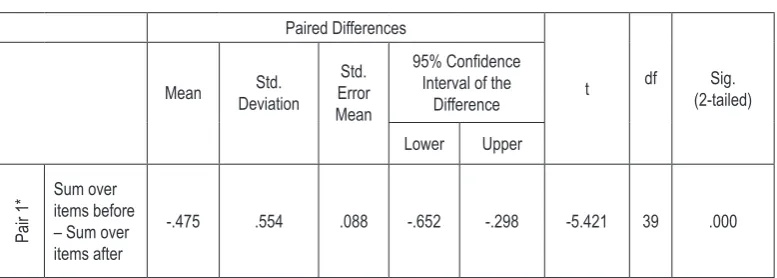
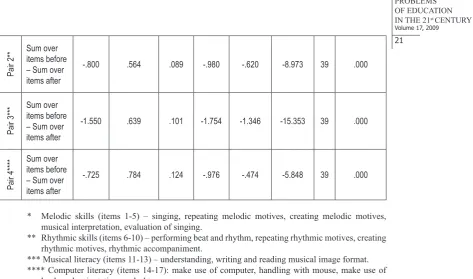
Table 1. Paired Samples Test of Means of results before and after blended
learning with focus to Musical Image Format, Rhythm.
Paired Differences
t df (2-tailed)Sig. Mean DeviationStd. Error Std.
Mean
95% Confidence Interval of the
Difference Lower Upper
Pair 1*
Sum over items before – Sum over items after
21
in the 21st century Volume 17, 2009
Pair 2**
Sum over items before – Sum over items after
-.800 .564 .089 -.980 -.620 -8.973 39 .000
Pair 3***
Sum over items before – Sum over items after
-1.550 .639 .101 -1.754 -1.346 -15.353 39 .000
Pair 4****
Sum over items before – Sum over items after
-.725 .784 .124 -.976 -.474 -5.848 39 .000
* Melodic skills (items 1-5) – singing, repeating melodic motives, creating melodic motives, musical interpretation, evaluation of singing.
** Rhythmic skills (items 6-10) – performing beat and rhythm, repeating rhythmic motives, creating rhythmic motives, rhythmic accompaniment.
*** Musical literacy (items 11-13) – understanding, writing and reading musical image format. **** Computer literacy (items 14-17): make use of computer, handling with mouse, make use of
keyboard, orientation on desktop.
According to the research pupils achieve better results in all the categories of assessment. The comparison of average marks before and after the research has shown that pupils made the biggest progress in the area of the use and understanding of music image format (see Table 1, Pair 3) as well as recording and performing musical rhythm (see Table 1, Pair 2). Pupils have significantly improved their orientation and understanding of image format as well as their recognition of metrum (beat). We can assume that the problem based and multi-sense learning in the computer environment has a positive influence on the understanding and the use of music image format as well as on the development of the abilities for a balanced musical performance.
Table 2. Correlations, Means, and Standard Deviations of Musical skills,
Computer literacy and gender.
1 2 3 4 5
1. Singing and melodic creativity 1.00
2. Performing and creating rhythm .814(**) 1.00
3. Understanding and make use of musical image format .809(**) .742(**) 1.00
4. Computer literacy .374(*) .338(*) .293 1.00
5. Gender .453(**) .336(*) .253 .212 1.00
Mean 2.90 3.38 3.28 3.08 1.43
Standard Deviations .871 .705 .877 .417 .501
* Correlation is significant at the 0.05 level (2-tailed). ** Correlation is significant at the 0.01 level (2-tailed).
22 and computer literacy. A medium correlation exists between the achievements in the area of singing as well as singing creativity and different genders. Girls achieve slightly better results in singing and music creativity which is probably due to cultural heritage. It was also interesting to find out that there is no statistically significant correlation between the gender as well as the computer literacy and the understanding of music format. The results have confirmed the findings of experts about the specific development of individual abilities (Gardner, 1983) and connections between individual aspects of music abilities (Sloboda, 2007; Hargraves, 2001).
Table 3. Chi-Square Tests – comparison of results of computer literacy
according to the pupils’ gender.
Statements Value df Asymp. Sig. (2-sided)
1. Computer at home 0.101 1 0.750
2. Computer at home with internet access 0.175 1 0.676
3. Generally not interested in work with computers 0.753 1 0.385
4. Generally likes using computer 0.048 1 0.827
5. Wishes to have more knowledge on work with computers 0.228 1 0.633
Regarding gender there are also no statistically significant differences in computer literacy and the accessibility as well as relation towards computers. The majority of boys (91.3%) and girls (88.2%) have a computer at home. Approximately half of boys (52.2%) and girls (58.8%) have also internet access. Boys are slightly more interested (60.9%) in work with computers than girls (47.0%). Both like working on computers. Boys (82.6%) and girls (76.5) wish to have more knowledge on the work with computers.
Conclusions
The development and the implementation of modern technology in the education area are moving towards the support to the epistemology of learning (Papert, 1993; Berz et al., 1994). Computer and information-communication supported environment based on interaction between sound and fine arts’ picture of image music format are a big acquirement. Image music formats give a support to intuitive and figurative musical thinking. They represent an important intermediate stage between music performance and the use of conventional notes format (Bamberger, 2000).
In Slovenia the information-communication environment Musical Image Format, Rhythm (Borota & Brodnik, 2007) represents the first example of the transfer of image format of music into the computer environment. There are two important elements of successful learning in this environment, i.e., properly conceived system architecture and graphic user interface, which enables simple and transparent as well as creative and problem based learning in the virtual community. The results of the user interface give help to teachers when planning learning differentiation and individualisation. The latter is not necessary in regard to gender. However, it depends on the level of computer and music literacy. There is no significant statistical correlation between them which has been confirmed by the findings of Gardner (1983) about the existence of more independent intelligences. At the same time the elaborated computer environment proved to be an adequate didactic tool in the establishment of the conditions for blended learning, which is defined by Bonk and Graham (2006) as the type of learning where direct teaching (face-to-face) is combined with the computer assisted learning.
23
in the 21st century Volume 17, 2009
understanding of image music format. The mean was -1.550, t (39) = -15.353, p = .000. Significant results are achieved also in the area of recording and performing music format. The mean was -.800, t (39) = -8.973, p = .000 (see Table 1).
The results of the research have contributed to the development and the inclusion of modern technology into learning and teaching. However, scientists have found out that modern technology cannot solve learning problems by itself. A competent teacher still remains a very important factor of successful teaching (Papert, 1993; Williams & Webster, 2006).
References
Adelsberger, H. H., Collis, B., & Pawlowski, J. M. (Eds.). (2002). Handbook on Information Technologies
for Education and Training. berlin: springer.
Bamberger, J. (2000). Developing Musical Intuitions (1st ed.). New York, Oxford: Oxford University Press.
Bamberger, J., & Hernandez, A. (2007). Tuneblocks. Retrieved March 20, 2007, from http://tuneblocks.com/
downloadimp.jsp
Berz, W., & Bowman, J. (1994). Applications of Research in Music Technology (1st ed.). Reston: MENC.
Bonk, C. J., & Graham, C. R. (2006). The Hadbook of Blended Learning. Global Perspectives, Local Designs
(1st ed.). san francisco: pfeiffer.
Borota, B., & Brodnik, A. (2006). Učenje glasbe podprto z IKT tehnologijo. Organizacija, 8, 532-539.
Borota, B. (2007). Vpliv sodobne informacijsko-komunikacijske tehnologije na pouk glasbene vzgoje (Doctoral dissertation, University of Ljubljana, 2007).
Borota, B., & Brodnik, A. (2007). Glasbeni slikovni zapis, Ritem. Retrieved April 2, 2007, from http://
iktglasba.pef.upr.si
Bruner, J. S. (1968). Toward a Theoriy of Instruction (1st ed.). New York: W.W. Norton & Company.
Gardner, H. (1983). The Frames of Mind. The theory of multiple intelligences (1st ed.). New York: Basis
books.
Glasersfeld, E. V. (1995). A Constructivist Approach to Teaching. In Steffe, L. P. & Gale, J. (Eds).
Constructivism in Education, 3-16. New Jersey: Lawrence Erlbaum Associates Publishers.
Gordon, E. E. (1997). A Music Learning Theory for Newborn and Young Children (2nd ed.). Chicago: G.I.A
Publications.
Hargreaves, D. J. (2001). The Developmental Psychology of Music (7th ed.). Cambridge: Cambridge
university press.
Kagan, S. (1994). Cooperative Learning (2nd ed.). San Clemente, CA.
Mezgec, T. (2008). Arhitektura sistema za okolje s podporo sodelovalnemu učenju in multimedijskim vsebinam. (BA thesis, University of Primorska, 2008).
Papert, S. (1993). Mindstorms. Children, computers and powerful ideas (2nd ed.). New York: Basic Books.
Roblyer, M. D. (2006). Integrating Educational Technology into Teaching (4th ed.). Upper Saddle River:
24 Rudolph, T. E. (2004). Teaching Music with Technology (2nd ed.). Chicago: GIA Publications.
Rudolph, T. E., Richmond, F., Mash, D., & Williams, D. (2005). Technology Strategies for Music Education
(2nd ed.). Wyncote: TI:ME.
Sloboda, J. A. (2007). The Musical Mind. The Cognitive PSychology of Music (16th ed.). Oxford, Oxford
university press.
Williams, D. B., & Webster, P. R. (2006): Experiencing Music Technology (3rd ed.). Belmont: Thomson
schirmer.
Adviced by Jože Rugelj, University of Ljubljana, Slovenia
Bogdana Borota Assistant professor, University of Primorska, Cankarjeva 5, 6000 Koper, Slovenia. Phone: 00386 5 66 31 275.
E-mail: [email protected] Website: http://www.upr.si
Andrej Brodnik Professor, University of Primorska, Cankarjeva 5, 6000 Koper, Slovenia. E-mail: [email protected]