Detecting malicious network activity using
flow data and learning automata
By
Christian Auby
Torbjørn Skagestad
Kristian Tveiten
Thesis submitted in Partial Fulfillment of the requirements for the
Degree Master of Technology in Information and Communication
Technology
Faculty of Engineering and Science University of Agder
Grimstad
Table of Contents
1 Introduction...9
1.1 Background and motivation...10
1.2 Proposed solution...13
1.3 Limitations ...14
1.4 Assumptions...15
2 Related work ...16
2.1 DDoS detection based on traffic profiles...17
2.1.1 Goal and results...17
2.1.2 Relevance...17
2.1.3 Differences...17
2.2 An intelligent IDS for anomaly and misuse detection in computer networks ...19
2.2.1 Goal and results...19
2.2.2 Relevance...19
2.2.3 Differences...19
2.3 Visualizing netflow data ...21
2.3.1 Goal and results...21
2.3.2 Relevance...21
2.3.3 Differences...21
2.4 An efficient intrusion detection model based on fast inductive learning...22
2.4.1 Goal and results...22
2.4.2 Relevance...22 2.4.3 Differences...22 2.5 Argus...24 2.5.1 argus...24 2.5.2 ra ...24 2.5.3 rasplit...24 2.5.4 racluster...24 2.6 Snort...25 3 Experimental setup...26 3.1 Malware selection ...27 3.2 Malware analysis ...29 3.2.1 Router...32 3.2.2 Firewall/ bridge...32 3.2.3 Client network...32 3.2.4 Operation...33 3.3 Test sets...34
3.3.1 Test set 1 - Initial research ...34
3.3.2 Test set 2 - Mass infection ...35
3.3.3 Test set 3 - Large client network...35
3.4 Automata implementation...36
3.5 Automata testing ...37
3.5.1 Detection ...38
3.5.2 Performance ...38
4.1.1 Network behavior...42 4.1.2 Client behavior...43 4.1.3 Spreading ...43 4.1.4 Lab testing...43 4.2 Conficker...44 4.2.1 Conficker.A...44 4.2.2 Conficker.B...44 4.2.3 Conficker.C...45 4.2.4 Network behavior...45 4.2.5 Client behavior...45 4.2.6 Spreading ...45 4.2.7 Protection features ...46 4.2.8 Lab testing...46 4.3 Danmec ...47 4.3.1 Network behavior...47 4.3.2 Client behavior...47 4.3.3 Spreading ...48 4.3.4 Lab testing...48 4.4 Waledac...50 4.4.1 Network behavior...50 4.4.2 Client behavior...50 4.4.3 Spreading ...50 4.4.4 Lab testing...51
5 Proposed flow based LRPI and SWE IDS...52
5.1 Class structure...53
5.1.1 Main application ...53
5.1.2 AutomataController ...54
5.1.3 Automaton discarding...56
5.1.4 Automaton...57
5.1.5 Implement based on rules ...59
5.2 Specific automaton...62 5.2.1 BlackEnergy...62 5.2.2 Conficker...63 5.2.3 Danmec ...63 5.2.4 Waledac...64 5.2.5 Blacklist ...64 5.2.6 Timecheck...65 5.3 Learning algorithms ...68
5.3.1 Linear reward / penalty inaction (LRPI)...68
5.3.2 Stochastic weak estimator (SWE)...69
5.4 Operating mode...70
5.4.1 Directory mode ...70
5.4.2 Live mode ...70
5.5 Data analysis ...71
6.2 Detection results...76 6.2.1 Snort detection ...76 6.2.2 Automata detection ...78 6.2.3 Algorithm configuration ...87 6.3 Resource results ...90 6.3.1 Memory Usage...90 6.3.2 CPU load...95 7 Analysis of results...98 7.1 Resources ...99 7.1.1 CPU...99 7.1.2 Memory...100 7.1.3 Storage ...101 7.2 Detection ...102 7.2.1 Samples ...102 7.2.2 False positives...107 7.2.3 Detection time...108 7.2.4 Algorithm comparison ...109 7.2.5 Algorithm configuration ...110
7.2.6 Signatures and rules ...110
7.2.7 Behavior based detection ...111
8 Summary and conclusions ...112
8.1 Areas of deployment ...113 8.2 Algorithms ...114 8.3 Resource limitations...115 8.4 Success rate...116 8.5 Further work...117 9 Glossary ...118 10 References...120
Table of Figures
Figure 1 - Malware lab...29
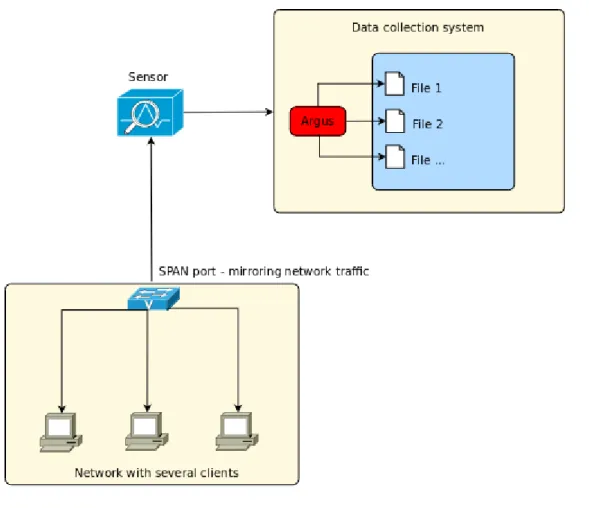
Figure 2 - Collection of flow data...37
Figure 3 - Commands for gathering snort statistics ...39
Figure 4 - Commands for gathering radump statistics...39
Figure 5 - Commands for gathering python statistics...39
Figure 6 - Timing of the automata execution...40
Figure 7 - CPU usage calculation ...40
Figure 8 - The default BlackEnergy HTTP POST. Can be modified by the user...42
Figure 9 - The HTTP header of the packet sent to the control server...48
Figure 10 - Snort detects Danmec by looking at the line "POST /forum.php"...48
Figure 11 - An HTTP POST sent from a Waledac infected client to one of its peers .51 Figure 12 - Automata class hierarchy ...53
Figure 13 - Argus data import code ...53
Figure 14 - Application passing data to the automata controller ...54
Figure 15 - Argus data class...55
Figure 16 - Automata controller passing data to Automaton...55
Figure 17 - Automata removal code ...56
Figure 18 - Automata flowchart...58
Figure 19 - Malware X automaton implementation...60
Figure 20 - Blacklist class implementation...65
Figure 21 - TimeCheck formulas...66
Figure 22 - TimeCheck class implementation ...66
Figure 23 - Linear reward/ penalty inaction ...68
Figure 24 - LRPI guess function...68
Figure 25 - Stochastic weak estimator ...69
Figure 26 - Automata data flow during analysis...71
Figure 27 - Command for counting source IPs...74
Figure 28 - Network traffic 24h work day ...74
Figure 29 - Network traffic 4h work day ...75
Figure 30 - BlackEnergy detection over time, LRPI (0.05) and SWE (20), test set 2.80 Figure 31 - Conficker detection, LRPI (0.05) and SWE (20), test set 2...81
Figure 32 - Danmec detection, LRPI (0.05) and SWE (20), test set 2...82
Figure 33 - Waledac detection, LRPI (0.05) and SWE (20), test set 2...83
Figure 34 - TimeCheck Danmec detection, LRPI (0.05) and SWE (20), test set 2 ...84
Figure 35 - TimeCheck BlackEnergy detection, LRPI (0.05) and SWE (20), test set 2...85
Figure 36 - Comparison of memory usage, test set 3 ...91
Figure 37 - Snort CPU load, test set 3 ...95
Figure 38 - Python and radump avg CPU load, test set 3 ...96
Table of Tables
Table 1 - Lab network setup ...31
Table 2 - Test matrix...38
Table 3 - BlackEnergy description ...42
Table 4 - Conficker description ...44
Table 5 - Danmec description ...47
Table 6 - Waledac description ...50
Table 7 - Member functions of Automaton class...57
Table 8 - Malware X detection rules...60
Table 9 - BlackEnergy detection rules...62
Table 10 - Conficker detection rules...63
Table 11 - Danmec detection rules ...63
Table 12 - Waledac detection rules...64
Table 13 - Detection and false positive rate in test set 2 ...76
Table 14 - Automata detection results, test set 2 ...79
Table 15 - LRPI (0.05) false positives overview, test set 3 ...86
Table 16 - SWE (20) false positives overview, test set 3 ...86
Table 17 - SWE detection comparison, test set 2 ...87
Table 18 - LRPI detection comparison, test set 2 ...88
Table 19 - LRPI false positives comparison, test set 3 ...89
Table 20 - SWE false positives comparison, test set 3 ...89
Table 21 - Memory usage comparison between automata, 100 000 instances ...93
Table 22 - Memory usage comparison for different automata count...93
Abstract
Malicious software has become an increasing problem for both businesses and home users. The traditional antivirus solutions are not always enough to detect an infection. As a result of this a lot of businesses are deploying Intrusion Detection Systems, so that they may have an extra level of protection by analyzing the network traffic. Intrusion Detection Systems are resource hungry, and may in some cases require more resources than what is available. This means that some of the traffic will not be analyzed, and malicious software may be able to avoid detection.
In some cases, laws and regulations may prevent you from inspecting the content of the network traffic, making it difficult to detect infected clients. In these types of scenarios a solution not dependent on traffic content is a viable alternative.
In this paper we will propose a solution to detect malicious software in a network with less resource demands than a traditional Intrusion Detection System. The method will only use flow data when determining whether a client is infected or not. The decision will be made using both learning automata and stochastic weak estimators.
We have shown that it is possible to detect malicious software in a network without inspecting the content of the packets, and that it is achievable by the use of both learning automata and stochastic weak estimators.
Preface
This thesis is submitted to University of Agder, Faculty of Engineering and Science in partial fulfillment of the degree of Master of Science in Information and Communication Technology.
This work has been carried out in collaboration with Telenor Security Operation Centre in Arendal, under the supervision of associate professor Ole-Christoffer Granmo at Agder University, and Morten Kråkvik at Telenor Security Operation Centre.
We would like to thank our supervisors for valuable suggestions and insight in the problem at hand. Their help has been most appreciated during the research. Morten Kråkvik has provided help and suggestions regarding implementation and testing, and was essential in the malware selection and analysis. Ole-Christoffer Granmo has been of great help in the planning of the research and in the selection of the algorithms used. His feedback regarding our research has been invaluable.
Grimstad, May 2009
________________________________________________________ Christian Auby, Torbjørn Skagestad and Kristian Tveiten
1 Introduction
An Intrusion detection system (IDS) is a way to combat the increasing dangers related to computer security. Some IDSes can prevent malicious activities by blocking or shutting down a connection, but in many cases this will be too intrusive. If the IDS is wrong and blocks important traffic pure detection might be a better choice.
Detection can be done by inspecting the content of the network traffic, called Deep Packet Inspection (DPI). This can be expensive in terms of computing resources. Our solution will combat this by looking at traffic patterns instead of content.
The problem at hand is to detect computers infected by malicious software at decreased resource requirements. This has been done using machine learning algorithms to analyze the traffic patterns and give feedback regarding suspicious clients.
Malicious software is used by criminals to control computers connected to the internet, usually without the owner's knowledge. These applications are often used to collect sensitive information or perform illegal activities. Having such an application installed is a risk to home users as well as businesses.
Our solution only uses information regarding the traffic, making detection difficult compared to existing DPI systems. We will take one such existing solution and compare it to the solution we create. Comparison will be made on detection and performance.
This thesis documents one approach to this problem and presents our research and results regarding the implementation and testing of one such solution.
1.1 Background and motivation
There are several forms of IDS, but some of the common ones are deep packet inspection systems (DPI) and firewalls. They can also be configured to work together. A DPI system works by monitoring a network connection, usually a mirror port on a switch to be able to monitor an entire network, and analyzing all the traffic that passes on this port.
This allows for complex rules that define malicious behavior, and allows detection of many types of malware, but it comes at a price; computing resources. More bandwidth requires more computing resources, and computing resources requires faster hardware through upgrades or load balancing using more than one IDS.
Finding some solution to this ever increasing problem would save both investments and energy. A lot of malicious software developers are aware of the IDSes detection capabilities and can program their software to be harder to detect. This leads up to a never ending race between the authors of malicious software and IDS researchers. In computer security the word malware is used to describe a computer program containing functionalities to harm you either by stealing sensitive information or by using your computer to perform tasks without your consent. The word is created by blending the words malicious and software.
Malware exhibits a wild variety of behaviors such as spreading through network connections, “rootkit” functionality to hide the code in memory, heuristic self modifying code, ability to disable local antivirus and firewalls and “connect-back” functionality giving the author an ability to remotely control the computer.
Connect back functionality usually implies that the malware connects to a Command and Control Center (C&C). A C&C is a computer or network node connecting infected computers to a botnet. A C&C can tell the botnet it is controlling to spread spam, install rogue applications or to perform Denial of Service attacks (DDoS). Certain malware always connect the infected client to a botnet. Some use peer to peer connectivity instead of a central C&C server. Others only report sensitive information, displays ads or similar. There are many variations.
According to the security firm Trend Micro's annual threat report approximately 700.000 new malware were identified each month comprising a total number of 16.495.000 unique threats in 2008. [1].
The number of new malware is not only increasing, the malware itself is also becoming more sophisticated by adding information stealing techniques. One such functionality are keyloggers.
Keyloggers are programs used to pick up keystrokes input by the user and sending these to a predetermined destination. Logging keystrokes would make it easy to pick up all usernames and passwords typed by the user. Getting login information to these types of services may in many cases expose the users social security number, bank account number or other sensitive information. Information stealing impose a new threat to today's computer users and can harm people in ways that they did not think were possible. [2][3]
It is common knowledge that keyloggers are frequently used, and most internet banks have therefore applied countermeasures like a requirement to authenticate by using security certificates and single use passwords. A username and static password will in this case not be enough to successfully log in as the password expires after use.
To avoid these additional encryption and authentication techniques several keyloggers have lately been developed as specialized browser plugins used to extract both login information and security certificates. Such information could then be sold by the underground businesses to competitors giving them an unfair, and illegal, advantage over other legal businesses. [4][5]
In order to notify of a successful installation the trojans often send some type of data back to the creator. This is usually done by connecting to an IRC server or by sending a HTTP request. The latter is called a check in request.
Some malware sends these types of requests at regular intervals, in order to inform that the malware still has its victim under control. In most cases it is hard for a user to notice when first infected, giving the malware a possibility to secretly exchange private information to its control server.
Larger networks can often have a lot of variations in traffic load, giving Snort trouble at peak hours. When Snort (an existing IDS) exhausts the resources available it usually starts to drop packets, ignoring a lot of the traffic that would otherwise have been analyzed. In these situations a more resource friendly solution would be preferred.
connections and the data that passes through them, but not about content. A real life analogy would be the postal system, where flow data would be the addresses on the mail and the size of the packet, etc. This makes it irrelevant whether the traffic is encrypted or not since the content is not inspected anyway.
In many countries internet service providers (ISP) are not allowed to inspect the content of their customers traffic. Even so they wish to have control of infected clients in their network. In this type of situation an effective flow based detection technique could be a solution.
1.2 Proposed solution
Our proposed solution is a flow based analysis tool, implemented as a component to Telenor Security Operation Centre's (TSOC) existing IDS system. These systems are passive sensors located in customers' networks, giving TSOC the ability to analyze the network traffic that passes through. The solution we create will be added to one of these sensors, giving it new analysis functionality in addition to DPI with Snort. We wish to develop this sensor addon as a set of learning automata that detects malware using flow data. Learning automata will allow us to do detection over time, developing the threat value based on traffic information that spans hours or days. Flow data is smaller than traffic captures because it does not contain the packet contents. It does contain information such as IP and port information, number of bytes and number of packets transmitted in each direction. This information will be collected using the Argus tool. Argus can also be configured to store small amounts of packet content in addition to the flow data. We have chosen not to use this information since this would violate one of our requirements.
Snort is dependent on the packet contents to be able to function, while our solution does not need this at all. Argus has been configured to not capture any packet content to save valuable storage space on the sensor. This will give our solution two main advantages. Saved storage space can be used to store data over a longer period of time. The time spent on disk writes will be shorter as the amount of data written is less than a full packet capture.
This implies that we will have less data to work with, and force us to use an out of the ordinary approach to detect malware; behavioral analysis. We believe that it should be possible to detect at least some sorts of malware by using this type of approach. We believe that we can find a recognizable pattern by studying the external communication the malware creates.
Another possibility could be to use behavioral analysis to detect patterns that are common to many malware. Such an approach could possibly detect new malware that traditional IDSes does not yet have signatures for. Snort must have signatures to detect suspicious traffic, which can make it overlook unknown threats. We believe that a general rule used for behavioral detection in our automata can be useful in these types of situations.
1.3 Limitations
No deep packet inspection
The automaton will not look at what the packets going on the network contains. The process of deciding whether malicious activities have occurred or not will be based only on information from data gathered by the flow data collection tool Argus. This tool will be more thoroughly explained under theRelated workchapter.
Even if the flow data contains small amounts of packet contents these will not be used.
No DDoS or brute force detection
The automaton will not detect attacks such as distributed denial of service or brute force attacks. These types of attacks are easy to detect using existing solutions. It might also be possible to detect them using our automaton, but we will not focus on exploring this possibility in our research.
Limited set of rules
We will only write detection rules for the malware samples we will select. Writing a rule will require analysis that takes some time, and it is not achievable to replace a Snort signature set. Spending time on this is not a priority, nor is this important for the results of our research. This means that our proof of concept will not be a replacement for existing solutions.
No traffic interference
The automaton will only listen to traffic. It will not actively block traffic it considers malicious. All suspect events detected by the automaton will only be reported. It is up to an administrator to decide whether action is needed.
1.4 Assumptions
Linear reward / penalty inaction will work with network traffic
We wish to use the linear reward / penalty inaction algorithm used by Morten Kråkvik in his thesis onDDoS detection based on traffic profiles. This thesis indicates that this is a good algorithm to use for analysis of DDoS traffic, and we assume that it should work in an acceptable manner on other types of network traffic as well.
Noise limited to a per connection basis
The design and implementation of the automaton will not use any non-malicious traffic. Non-malicious traffic is legal traffic generated by clients and servers on a given network. Malicious traffic is what we call traffic generated by malware, or clients that have malicious intentions.
Real traffic has a high amount of legal traffic and small amounts of malicious traffic. Our automata will be designed to listen on a per connection basis, establishing a new automaton when a host opens a new connection.
We therefore assume that this will limit the amount of noise to each separate connection. Each automaton will be defined to detect a specific behavior related to an application with malicious intentions. Snort does this also by using different signatures to define the traffic.
Malware samples suitable for detection exists
Since our research relies on traffic generated from malware we must assume that we can be able to get hold of samples that produce enough traffic to generate a distinguishable pattern in a reasonable amount of time.
2 Related work
There are several types of related work relevant for our research. Existing solutions such as Snort provides ready to use intrusion detection, while papers touch upon the learning aspects. In addition to this there are several tools suitable for certain parts of our task.
In this chapter we will give an overview of previous work we found useful in our research. A brief description of software relevant to our research will also be added. This will consist of both external software used in our proposed solution, and software we have chosen as a reference point for our comparisons.
2.1 DDoS detection based on traffic profiles
By Morten Kråkvik. Agder University College, Faculty of Engineering and Science, Grimstad, Norway, May 2006.
2.1.1 Goal and results
In this paper Morten Kråkvik propose a method for detecting and identifying the sources of DDoS attacks. The detection is based on research in the field of network traffic and IP address monitoring. A learning automaton is responsible for the tracking of source-IPs and subnets.
Kråkvik manages to show that by using a specific reinforcement algorithm for the automaton, it is possible to identify participants in a DDoS attack. The solution is also robust against attacks which incorporates IP spoofing.
2.1.2 Relevance
Morten Kråkvik uses a learning automaton with the linear reward penalty algorithm. This is relevant, as we intend to use the same algorithm in our research. The research done by Morten Kråkvik shows that this type of automaton is able to handle network traffic in a suitable manner.
2.1.3 Differences
In this paper Morten Kråkvik only focuses on DDoS traffic. The main goal of performing a DDoS attack is to stop or slow down a service or host in another network. To be able to do this an attacker would in most cases have to generate a lot of traffic. Or in other words, more traffic than the victim can handle. This can be done by using multiple machines and configure them to for instance send multiple SYN packets towards one target at the same time.
From an IDSes point of view, if properly configured, such an approach will generate a lot of SYN flooding alarms and would eventually distinguish themselves from the other alarms generated by other network traffic. A properly configured IDS should be able to detect a two minute ping sweep from one attacker just by logging the numbers of the packets sent from this host.
attack can last for hours and even days, or in other cases until the people responsible for the target machines are able to block the attackers.
In our research we will not go into DDoS at all. Our focus will be on the detection of malicious traffic generated by malware. Since the main objective for malware authors in most cases are to earn money they often configure it to avoid detection, either by using encryption techniques or by only generate traffic that is required for operation. Or even both. While a typical DDoS attack can be detected in seconds, properly configured malware can take several minutes or hours, or completely avoid detection. Morten created a network traffic collector to generate the flow data and present it for the automaton. We will use the network collection tool Argus, which is already integrated into Telenors systems, for this job.
2.2 An intelligent IDS for anomaly and misuse
detection in computer networks
By Ozgur Depren, Murat Topallar, Emin Anarim, M. Kemal Ciliz Bogazici University, Electrical and Electronics Engineering Department, Information and Communications Security (BUICS) Lab, Bebek, Istanbul, Turkey.
In this paper the authors propose an Intrusion Detection System (IDS) utilizing anomaly, and misuse detection. Their solution consists of two modules, one for anomaly detection, and one for detecting misuse. A decision support system (DSS) is used to combine the results of the two modules.
2.2.1 Goal and results
The main goal for this paper was to benchmark the performance of the proposed hybrid IDS. This was done by using KDD Cup 99 Data Set. A rule based DSS then compares the results of the two modules, to see how they perform. The results shows that the hybrid IDS have a higher detection rate than individual approaches.
2.2.2 Relevance
The anomaly detection module consist of a pre-processing module, several anomaly analyzer modules and a communication module. The analyzer modules utilizes self organizing maps (SOM). SOM is a neural network. This means that the modules uses machine learning, and thus needs to be trained. This is interesting as we also will be using machine learning, but not neural nets. Other methods of machine learning may yield different results.
The data used to train and test the IDS in this paper is from the KDD Cup challenge of 1999. As malicious traffic changes rapidly this dataset is completely uninteresting today. The process of training software to detect malicious activities from network traffic is however relevant. The solution proposed in this paper detects both misuse and anomalies.
2.2.3 Differences
The proposed solution in this paper uses deep packet inspection and signatures to detect misuse. We however will use information about the flow data, and machine
automaton analyzes will be a little different than for the proposed neural net, as it was only detecting anomalies.
The dataset used in this paper was a known set. The same set was used for both training and benchmarking. We will use data collected from a live network for our research. The benchmarking will be carried out using data from the this same network. This way we will have a more interesting view on how our solution performs, as it is tested in a real world environment, with real traffic.
In the paper the solution proposed were compared to the individual parts of the solution. We will compare our solution and results to the performance of Snort. Snort is a signature based IDS. The comparison will give interesting information on whether a flow data based solution could eventually replace a signature based IDS, or should be considered an addon to the existing solutions.
2.3 Visualizing netflow data
By Zhihua Jin, Department of Telematics, The Norwegian University of Science and Technology (NTNU), Trondheim, Norway
2.3.1 Goal and results
This thesis was written by Zhihua Jin at NTNU. The primary goal was to create a different method of analyzing large amounts of network traffic. By using netflow data gathered from the traffic seen in a live network, the author has developed a system that represents this data in a visual manner.
An analyst will then look at the produced graphs and can from that detect anomalies in the network. There are many different views, and the analyst can dig deeper and look closer at specific things of interest. The end product is a set of tools that lets you explore data visually.
2.3.2 Relevance
This thesis is very interesting to us, as it is, from what we can find, the only one in the field of intrusion detection that uses netflow data. It touches upon detecting infected clients, botnet traffic and Distributed Denial of Service.
It is also very recent (July 2008), and is thus in no way outdated, with problems that are seen today.
2.3.3 Differences
The main focus of this thesis is how to visually represent the data. Our focus will be analyzing the data automatically, and then present the end results to an analyst. We will do this using machine learning techniques, which the NTNU thesis only mentions briefly.
Areas such as distributed denial of service and port scanning will not be a part of our research, as it is in the thesis from NTNU.
2.4 An efficient intrusion detection model based on
fast inductive learning
By Wu Yang, Wei Wan , Lin Guo, Le-Jun Zhang, Information Security Research Center, Harbin Engineering University, Harbin 150001, China
2.4.1 Goal and results
The paper describes how fast inductive learning could be used to detect malicious traffic in an Intrusion Detection System. The goal of this research is to use the four different learning methods clustering, C4.5Rules, RIPPER and their own optimized algorithm called FILMID to be able to categorize the traffic into several classes. These classes consists of normal traffic, Denial of Service (DOS) attacks, Remote to Local (R2L) attacks, User to Root (U2R) attacks, and Probing attacks (Probe).
The authors use a dataset from the 1998 Intrusion Detection Evaluation Program created by DARPA which consists of a training set and a test set. When the traffic is categorized using the different methods above, the results are measured up against each other by their detection rate (DR) and false positive rate (FPR). The results are good, providing a DR of around 90 percent and a FPR around 2 percent for all of the methods except the clustering.
2.4.2 Relevance
This thesis is directly related to our work since it uses different methods of machine learning to detect and categorize network traffic. The dataset analyzed consists of different connections which is fairly related to flow data analysis in Argus. And this also confirms that our goals for this project should be feasible.
2.4.3 Differences
The test data used in this thesis is taken from a dataset created by DARPA in 1998, which is considered very old. We will use datasets created by Argus from a network consisting of thousands of clients, using data that reflect today's threats. Having such a large test network available will also give us the opportunity to use our learning algorithms on live traffic.
Another difference is the fact that this thesis focused on testing the accuracy of different learning algorithms. We find their results very interesting since it shows that they actually does not differ that much. This gives us the opportunity to focus more on
optimizing our code for use with Argus and on creating more rules based on different kinds of malware. A larger set of rules will give us a better foundation for testing our solution up against snort.
2.5 Argus
Argus is a flow monitor tool package for network traffic. [6] It can be used to collect flow data on a live network. Argus comes with a set of separate tools that each perform a specific function, such as capture, grouping and splitting of data.
2.5.1 argus
The tool named after the package is used to capture flow data on a network connection, or from a file with existing network captures, such as pcap files from Wireshark or tcpdump. The output is an Argus specific binary format that can be written to disk or sent to stdout. Working with this binary format directly is not recommended, but rather use other Argus tools to extract the data you want.
2.5.2 ra
Ra stands for "read argus", and is used to extract information from data captured by Argus. It can read from file, or directly from Argus using stdin. Ra allows you to select what fields to extract, such as addresses and ports, and print them out in a human readable way. You can also ask for other output methods that are easy to use in applications.
2.5.3 rasplit
rasplit is used to split Argus-data based on time, such as individual files containing five minutes of data. This is very useful for live analysis, as you can process data in chunks of five minutes.
2.5.4 racluster
racluster is suitable for statistics, by allowing you to group information based on certain fields, e.g. total source bytes and destination bytes count between two IP-addresses regardless of ports.
2.6 Snort
Snort is an intrusion detection and prevention system that uses a signature based approach. [7] It allows you to monitor a network interface and detect certain types of traffic, defined by the Snort rule set. Snort rules are often referred to as signatures. We will be using this naming, as we have chosen rules to describe our own specialized automata.
If the network environment has specific detection needs the set of signatures can be modified to accommodate this. New signatures may be added when needed. As a result of this snort loads all the selected signatures before it starts analyzing. The number of signatures, and the total size of the set is therefore an easy way to predict how much memory Snort will be using when doing live analysis.
Signatures can be written to detect many different types of activities, such as syn-floods, which are unusually many connection attempts, but can also be used to inspect the actual content of data.
Deep packet inspection can be very powerful and in many cases makes detection easy, depending on how predictable the data is. Signatures can define source IP/net and port, as well as destination ip/net and port.
When a rule is triggered Snort has several actions available, such as sending an alert, or depending on configuration, dropping / blocking the traffic. When using Snort as a pure detection mechanism, which is less disruptive as there's no chance of erroneously blocking legit traffic, an administrator or operator must analyze the alerts from Snort and take action from there.
3 Experimental setup
In this chapter we will describe how our work was organized. We will give a detailed description of the experimental setup, and what methods we used to get our results. The first part will give reasons for our malware selection, and how the testing of it took place. This includes information about our test network, and its parts.
There were a total of three test sets used in our research. Each of these will be described here.
3.1 Malware selection
There are many types of malware and trojans, and not all might be suitable for detection by a learning automaton. Because of this we will initially select a set of samples to study further.
It is important that the sample has some sort of network activity that is recognizable to us, so we can build an automaton that also knows of this behavior. Most malware has some way of reporting to a command and control center, and we will be focusing on this.
The samples will be provided to us by Telenor, acquired through automatic gathering systems at Telenor SOC, or from private research related websites. The selection of samples that are to be used is however decided by us. The set of samples we have selected represents a small amount of actual malware that is currently active threats seen in the wild by Telenor SOC.
Some malware are auto generated with random values making for thousands and millions of different permutations (versions), however their underlying idea remains the same. In addition to randomize data that isn't used for anything inside the binary to make sure it can't be detected by simply comparing it to known versions, different configurations also make for different binaries.
To give an example the BlackEnergy sample we selected was created by us using a botnet kit. These types of kits are sold at underground websites and used by many different people. All these users configure their botnet differently, resulting in many versions of essentially the exact same malware. C&C control server adresses would be different, reporting intervals, what binaries to download after first infection, and many more.
A packer is often used to reduce code size and make it difficult to detect what type of malware, if any, a binary contains. Using a different packer would result in a different file, but with the exact same malware contained inside.
The samples are thus representative for malware not in the sample set. The malware we have selected are:
• BlackEnergy • Conficker • Danmec • Waledac
Details for each of these malware samples will be documented in the malware chapter.
3.2 Malware analysis
To get a foundation to design the automata around, we have to do an analysis of the selected malware. This will be done in a closed environment which we control entirely. Preventing outside factors such as additional network traffic not related to the sample meddling with the test will ensure that the data we extract is valid for this particular sample and make the job analyzing this data easier.
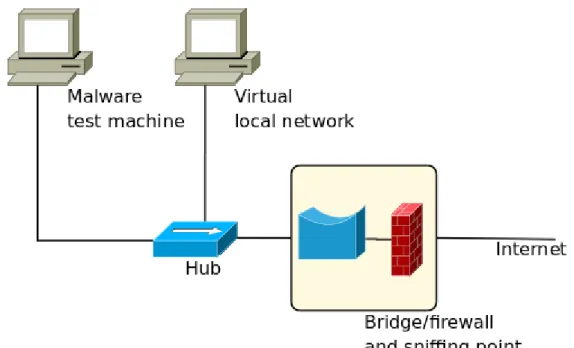
The malware lab consists of three main parts. A client where we run malware, a bridge and firewall, which act as the sniffing point, and a server running virtual clients to simulate a local network.
Figure 1:Malware lab
Figure 1 displays the design of our malware lab. The network is isolated from other networks including the internet in the bridge/firewall, preventing unwanted incoming connections. Note that the firewall has rules to allow some outgoing traffic since the samples require this connectivity.
The client used to run malware is essential, as some malware act differently on virtual clients. Among our selected samples only Conficker is aware of virtualization.
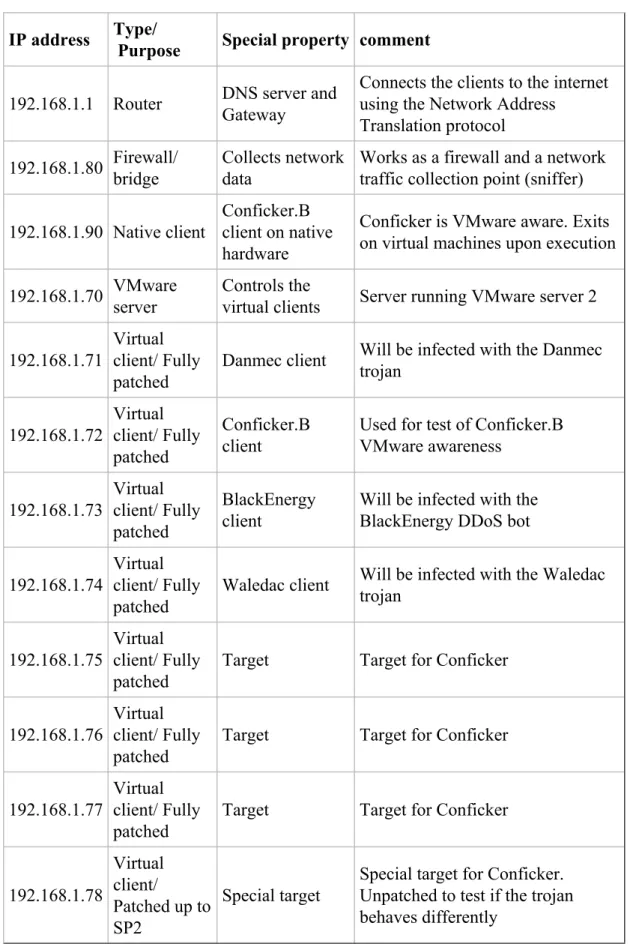
There will be a total of eight virtual clients available. A complete list of the clients, and their roles are described in Table 1. The hardware used in addition to the virtual clients are also included.
IP address Type/
Purpose Special property comment
192.168.1.1 Router DNS server andGateway
Connects the clients to the internet using the Network Address
Translation protocol
192.168.1.80 Firewall/bridge Collects networkdata Works as a firewall and a networktraffic collection point (sniffer) 192.168.1.90 Native client
Conficker.B client on native hardware
Conficker is VMware aware. Exits on virtual machines upon execution 192.168.1.70 VMware
server
Controls the
virtual clients Server running VMware server 2 192.168.1.71
Virtual client/ Fully patched
Danmec client Will be infected with the Danmec trojan 192.168.1.72 Virtual client/ Fully patched Conficker.B client
Used for test of Conficker.B VMware awareness 192.168.1.73 Virtual client/ Fully patched BlackEnergy client
Will be infected with the BlackEnergy DDoS bot 192.168.1.74
Virtual client/ Fully patched
Waledac client Will be infected with the Waledac trojan
192.168.1.75
Virtual client/ Fully patched
Target Target for Conficker
192.168.1.76
Virtual client/ Fully patched
Target Target for Conficker
192.168.1.77
Virtual client/ Fully patched
Target Target for Conficker
192.168.1.78 Virtual client/ Patched up to SP2 Special target
Special target for Conficker. Unpatched to test if the trojan behaves differently
3.2.1 Router
The router is used as a DNS server and gateway that provides us with a connection between our local network and the internet. Network address translation is used for this purpose. A DHCP service, which is a service that automatically provides clients in a local network with IP addresses, is unnecessary here since all the clients are statically configured.
3.2.2 Firewall/ bridge
The firewall/ bridge is the central sniffing point we will use to collect network data generated by the malware.
The firewall/ bridge consists of a standard desktop computer with two ethernet interfaces. The interfaces are bridged. This means that all traffic received on one interface will be transmitted on the other. A firewall is also in place so that we are able to restrict traffic going through the bridge. This is important as we do not want the infected client to attack, and infect clients on the Internet.
Initially when testing malware the firewall will always be set at a very strict level. If the infected client seems to generate interesting traffic, but is limited by the firewall we can easily adjust the firewall and have another try.
The Bridge/firewall is running Ubuntu 8.10 desktop i386. The only changes made to the standard install is that network manager have been removed, and Wireshark, tcpflow and ngrep have been installed. The removal of network manager is due to the configuration of the network bridge.
3.2.3 Client network
Native client
The client that is running the malware is set up to represent a typical home computer. The hardware itself is not of much importance except that it is a x86-compatible CPU, which is a requirement to be able to run most malware.
It is running Windows XP with Service Pack 3 installed, as well as all hot patches released by February 2009. The reason we need a physical computer is simple; make sure that VMware aware malware like Conficker can be tested in our network. Certain malware checks the memory for VMware related processes upon execution and exits
if these are detected. This is a feature used to confuse malware analysts and delay the analysis process.
To be able to quickly restore the client after running a test we use an application called Moonscape. It allows you to set a harddrive restore point and return to this later. This saves us a lot of time as we do not need to reinstall the operating system to get a clean system.
Virtual local network
The virtual local network consist of a server running VMware Server 2 on top of a clean Debian Lenny install. There are seven virtual clients, all running Windows XP. The clients will have different levels of patching depending on the tests we are performing. For each test the patch level of the virtual local network will be described separately. After a test have been performed, the clients will be reverted to their initial state.
3.2.4 Operation
Each malware sample will be tested in the lab under the same conditions. This means that the infected host(s) will be reset for each sample, and thus provide grounds for comparison. As we want to make sure we have enough data, each sample will be executed and the network traffic captured for a minimum of three hours. Samples that do not behave regularly or have small amounts of network traffic will require more. This will be taken on a case by case basis.
Although the automata will use flow data only, we still wish to capture the contents as this will help in the manual analysis. Because of this we execute tcpdump / Wireshark (same output data) before the samples are run, and the traffic dumped in it's entirety. A fresh capture will be started for each sample.
Flow data will later on be generated from these data captures using Argus for use in the automata.
3.3 Test sets
In many papers regarding IDS, you will see the use of KDD Cup 1998 Data set. This is a data set released by DARPA to challenge, and test how well an IDS works. [8] This set was a good measurement for your IDS when the set was released, but not so much today. The way people use the Internet, and what types of attack you might observe is profoundly different.
Most types of attacks you might have seen in the late nineties that you still see today is fairly easy to detect. Attacks like brute forcing a service is avoidable in most software, and easily detected.
Because of this we have chosen to generate our own test sets. They will be based on both lab environments, and live traffic from a network consisting of thousands of clients. This means that our results will be comparable to other client networks within a typical work environment. It also means that our tests are relevant in today's network environment, and not a relic from the nineties.
Each of our test sets are files consisting of the Argus data for the network traffic that was captured during execution. Test set 1 and test set 2 will also contain the actual traffic data in the form of a pcap file, but will only be used in manual analysis, not by the automata. Content will not be captured for test set 3 as it would require far too much disk space, as well as needing far too much time to transfer back to Telenor. Test set 3 will thus consist purely of Argus data.
3.3.1 Test set 1 - Initial research
This test set will be created in the malware lab, by running each sample separately. There will only be one sample running at once, which results in a test set comprised of one smaller test for each malware. Each sample will be executed long enough to allow us to capture enough data, typically a few hours, up to twelve hours.
The data collected in this set will only be used for research and development of the automata and not in any of the tests that will be run once development is finished. There is no sensitive data in this test set.
3.3.2 Test set 2 - Mass infection
Test set 2 will be created using the entire lab network as described inTable 1. All the infected clients will be running at the same time, simulating a network with infected clients. The capture will run for approximately 24 hours.
This set will be used in tests that require infected clients to be present, such as detection. It will also be used to see if there are any overlapping detection between the different samples. Snort events from this test run will also be collected.
There is no sensitive data in this test set.
3.3.3 Test set 3 - Large client network
Set 3 will by far be the largest test set, and for this reason we will only store Argus data. This is also the only test set that won't be created in our lab at Telenor. Argus data will be collected on an undisclosed network with thousands of workstations, and the data transferred back to Telenor for analysis. Due to the sensitivity of the data we are not allowed to bring this set outside of the secure zone at Telenor, Arendal.
Argus data from this set will be used in performance analysis and documentation of false positives.
3.4 Automata implementation
The automata implementation will be written using information gathered during malware research, usingtest set 1. Once we see what type of activity we need to focus on to detect the malware samples, it will be clear what type of functionality the automata needs.
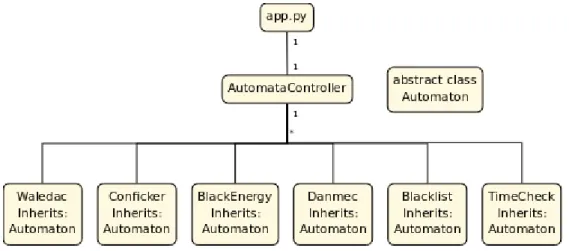
Overall, there will be an automata controller that receives Argus data, which then parses this, and sends the parsed data to every automata it controls. Each of these automata will detect one type of malware each.
The base functionality will be written in a base class, and each specific automaton will inherit this base class. All of this will be written in Python to fulfill the requirement set by Telenor.
3.5 Automata testing
The testing of the automata will be done in two parts. The first part consists of a detection test. Here we will see if the automata are able to detect the malware samples we have selected.
In the second test we will gather data regarding performance. The interesting parts here will be the memory demands, and how much CPU time the proposed solution needs.
To ensure that all test results are valid and comparable there will be no further development once the testing is started. If there were any development done after testing, all test would have to be redone.
The tests will be run on the i386 platform, ensuring that the platform requirement is fulfilled.
bandwidth to low bandwidth and so on. Statistics on resource usage will be stored during execution. The test will give us data to fill in the test matrix, as described in
Table 2
Detection CPU Memory Snort n/a n/a n/a
Automata n/a n/a n/a Table 2:Test matrix
The results of each of these tests will be presented and discussed in later chapters.
3.5.1 Detection
Detection results will be used to judge effectiveness and decide usage scenarios. Snort and our automata have different modes of operation thus require separate methods of gathering statistics.
All detection tests will usetest set 2.
Snort
Snort detection results will be gathered by looking at the feedback from existing Telenor systems which make use of Snort. This will give us the Snort signature that triggered, the IP-addresses of the clients that are involved and the time of the incident.
Automata
The Automata will print detection to the console once the threat level of a specific automaton is higher than the set threshold. Information includes IP-addresses, which automaton type that triggered and how many pieces of Argus data it took to reach the threat threshold, in addition to the run time since the first data arrived.
3.5.2 Performance
Performance analysis will tell us how the two methods compare in regards to CPU and memory usage.
To log resource usage the processes for the automata and for Snort will be monitored. Once a second the following will be extracted and stored:
• CPU Usage • RAM Usage
The time spent by the automata will also be measured.
Snort
Snort runs continuously and the CPU usage might vary depending on current used bandwidth. Statistics will be collected using standard Linux tools using the following commands:
while true; do DATE=$(date "+%Y-%m-%d %H:%M:%S");
LINE=$(top -b -n1 -p $(pidof snort) -p $(pidof argus) | egrep "snort|argus" | awk '{print $9 " " $10}' | tr '\n' ' '); echo "$DATE: $LINE";
sleep 5;
done > performance.snort.log
Figure 3:Commands for gathering snort statistics
Our automata uses the scripting language python and the tool radump for file processing. This implies that these two processes will run together when we run our automata. We collected this data and combined them using the following two commands:
while true; do DATE=$(date "+%Y-%m-%d-%H:%M:%S"); PID=$(pidof radump); if [ -z $PID ];
then echo "$DATE: 0 0";
else LINE=$(top -b -n1 -p $(pidof radump) | egrep "radump" | awk '{print $9 " " $5}' | tr '\n' ' '); echo "$DATE: $LINE";
fi; sleep 1;
done > performance.radump.log
Figure 4:Commands for gathering radump statistics
while true;
do DATE=$(date "+%Y-%m-%d-%H:%M:%S");
LINE=$(top -b -n1 -p $(pidof python) | egrep "python" | awk '{print $9 " " $5}' | tr '\n' ' '); echo "$DATE: $LINE";
sleep 1;
done > performance.python.log
It is important to note that we did not run the snort and the automata performance tests at the same time since this would make them interfere with each other. Sensor statistics show that Snort has a constant CPU usage of 100% and would be forced to share the CPU with our automata, forcing it and our automata to analyze the dataset at a slower pace.
From personal experience we have seen that when Snort is under heavy load it has a tendency to drop traffic, which means that it does not analyze these packets at all. When sharing CPU time Snort would eventually be forced to do this, resulting in it not giving us a complete analysis of the dataset.
Automata
Since the automata processes Argus data in five minute chunks it will use 100% CPU when it is active. To get numbers that are comparable to Snort the execution of the automata will be timed:
time python app.py
Figure 6:Timing of the automata execution
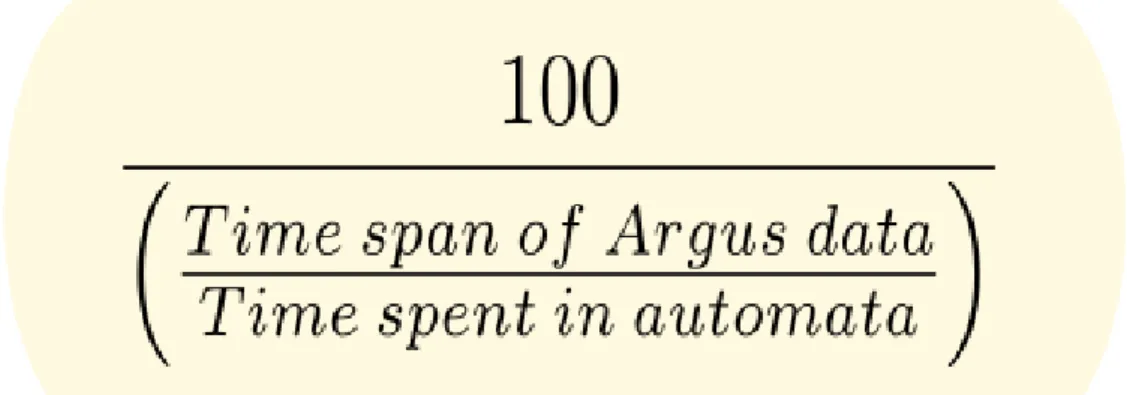
This will give us the total amount of time spent, running at 100% CPU. The automata processes faster than real time, so the average CPU usage will be calculated like this:
Figure 7:CPU usage calculation
4 Malware
There are many terms related to computer security, many of which change over time. We have selected the term malware as the basic term for a computer application that have bad intentions, or rather, is used by a person or a group of people with bad intentions.
Infected computers can be used for criminal activities such as the collection of sensitive information and attacks on infrastructure, both of which can be sold to third parties. [9] Two of the more prevalent types of malware are trojans and worms. Some also exhibit behavior of both. The samples we have selected fit in these categories. In this chapter we will present the samples we have selected and the information we have found regarding them. Behavior will be described in detail, but also areas such as purpose and method of infection.
All of the malware selected target the Windows platform, and although there are malware and trojan threats for other platforms as well [10], they more or less drown in the amount of Windows malware that exists. [11]
The techniques in this paper only use network traffic for detection and could thus be used to detect malware on other platforms as well. It would also be possible to detect other behavioral traits, such as legal services, or specific applications, as long as they generate network traffic.
The following chapters contain a table with file specs for each malware type. These specs can be used to identify them using file size and checksum, and be of interest to other researchers working on the same samples.
The tables include results from VirusTotal. VirusTotal is a free web service that accepts files and scans these with a wide range of antivirus software. [12] Numbers indicate the number of software that considered the particular sample as suspicious and the total number of software used.
4.1 BlackEnergy
BlackEnergy is a HTTP based DDoS botnet from 2007, which consist of clients mainly in Russia and Malaysia. [13] It was used to perform DDoS attacks, mostly against Russian web servers.
This botnet was configured and set up by us, and will serve as the control sample. The botnet consists of one client that reports to an HTTP location we decide on set intervals. This will prevent us from relying on outside factors such as existing command and control servers.
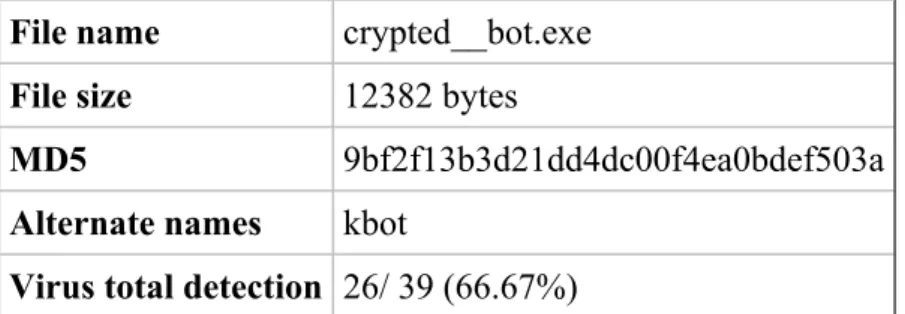
File name crypted__bot.exe
File size 12382 bytes
MD5 9bf2f13b3d21dd4dc00f4ea0bdef503a
Alternate names kbot
Virus total detection 26/ 39 (66.67%) Table 3:BlackEnergy description
BlackEnergy uses a packer called "Stalin" to hide its program file. It was the packed file that was submitted to virustotal.com.
4.1.1 Network behavior
Clients report to C&C servers on regular intervals, such as every 10 minutes. This is done using a HTTP post:
POST /stat.php HTTP/1.1
Content-Type: application/x-www-form-urlencoded
User-Agent: Mozilla/4.0 (compatible; MSIE 6.0; Windows NT 5.1; SV1; .NET CLR 1.1.4322) Host: www.somehost.net
Content-Length: 43 Cache-Control: no-cache
Figure 8:The default BlackEnergy HTTP POST. Can be modified by the user
If the client is asked to participate in a DDoS attack a wide range of DNS floods can be seen, depending on the command. Supported floods are: [14]
• ICMP • SYN • UDP • HTTP • DATA • DNS
The bot will only perform these if asked to by the C&C server.
4.1.2 Client behavior
Clients can be asked to download and execute a file [14], but what is actually downloaded depends on the person running the C&C server. If no extra malware (such as fake antivirus) is installed, there will be no visual indication that the client is part of a botnet.
4.1.3 Spreading
The kit does not provide a method of spreading, instead it relies on the user to do this. It's up to the user to spread the exe file that is generated, e.g. by using publicly available exploit code for various vulnerabilities.
4.1.4 Lab testing
Our client was configured to connect externally every ten minutes. This was reflected in the traffic that we observed. We did not ask our single client to perform any DDoS attacks, which would have been illegal even if it's only one bot, and thus observed no such traffic.
4.2 Conficker
Conficker / Downadup is a worm that was first discovered in late 2008. [15] It is currently very active with over 8 million infections based on f-secure's estimations. [16] It is however impossible to say how accurate this number is; if the method is wrong the chances are there are less infected clients, if it's right the number of infections is probably higher. The botnet and the malware associated with it are still evolving and are likely to change.
There are currently several versions of Conficker, among those Conficker.A, Conficker.B and Conficker.C.
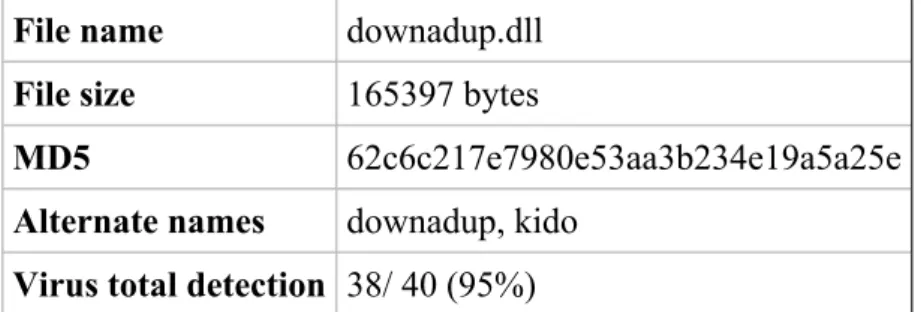
File name downadup.dll
File size 165397 bytes
MD5 62c6c217e7980e53aa3b234e19a5a25e
Alternate names downadup, kido
Virus total detection 38/ 40 (95%)
Table 4:Conficker description
The sample we have selected is of the Conficker.B type.
4.2.1 Conficker.A
Rather easy to detect, Conficker.A contacts trafficconverter.biz, from which it got it's name. Can easily be detected using existing solutions, such as DNS blacklisting. Information later in this thesis regarding domain generation and spreading is not valid to Conficker.A.
4.2.2 Conficker.B
Conficker.B adds more methods of spreading, as well as a few other changes. [17] Instead of a static domain it automatically generates domain names based on time, 250 each day. [18] Conficker.B uses whatismyip.com to retrieve its external IP address. This is a characteristic that has been used in some degree to detect possible infected clients.
4.2.3 Conficker.C
This variant increases the amount of domain names generated each day from 1st of April, selecting 250 domains out of a pool of 50000. [19] There have also been reports of this version installing fake antivirus and other malware, such as the Waledac trojan. [20]
4.2.4 Network behavior
In addition to the spreading behavior, the worm can also connect externally to download additional files. To be able to do this the Conficker worm uses dynamically created domain names. In the first step of this process the worm contacts either Yahoo or Google to get the current system date, which again is used to randomly create domain names using a secret algorithm.
This algorithm have already been cracked, and a group consisting of several security firms are using the algorithm to pre-register these domains, thus being able to halt the worms update functionality. This task becomes virtually impossible as the amount of domains generated increases. [21]
4.2.5 Client behavior
Currently Conficker.A and Conficker.B does not do anything that gives a direct visual result such as installing rogue software, but they do make changes to the system, such as prevent access to a list of security related websites, create scheduled tasks, add registry keys and add files to USB drives.
Conficker.C might exhibit visual behavior, but only if the optional fake antivirus products are installed.
4.2.6 Spreading
The worm currently spreads through various ways, but gets it's worm nature by exploiting a bug in Windows Server Service. [22] This bug was patched by Microsoft in the MS08-067 patch, but as the infections show there are still many that have not updated.
It also spreads by attacking network shares, trying different passwords to get access. If successful it copies itself to the administrator share and starts itself on the remote
USB Drives that are plugged into an infected system can also be used as carriers by adding a trojan as an autorun file. This also makes it possible for hosts without internet to be infected.
4.2.7 Protection features
When installed it disables several security related applications and services to protect itself. [24]
4.2.8 Lab testing
Conficker.B and .C was seen scanning for other clients, using layer two ARP broadcasts. If a client was found a login request was sent to the client using the local username and passwords from a dictionary. Several other usernames are also used and we have also seen the Windows Server Service exploit being executed towards the client. It was also seen connecting to randomly connected domains and sending information to them.
4.3 Danmec
Danmec is a trojan that was first introduced in 2005. Since then it has evolved and added more components, and it is still active today. It consists of several different modules that each serve a specific purpose. [25]. One of its most commonly known modules are called Asprox.
After installation of this module the client becomes a member of the Asprox botnet. The infected client also sends information about itself to the controller. Currently the Asprox botnet has somewhere around 300 000 nodes. [25]
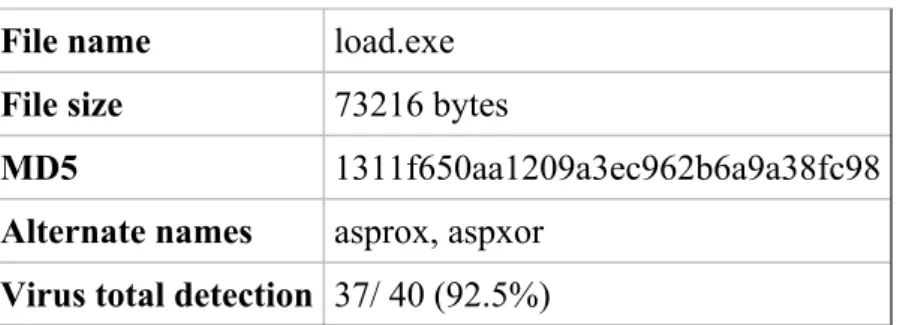
File name load.exe
File size 73216 bytes
MD5 1311f650aa1209a3ec962b6a9a38fc98
Alternate names asprox, aspxor
Virus total detection 37/ 40 (92.5%) Table 5:Danmec description
Asprox is a module that Danmec uses to add functions like spreading via SQL injection attacks towards ASP sites. This functionality has given Danmec a lot of publicity, and in many cases characterized its behavior.
Many antivirus companies choose to name the Danmec trojan after the asprox module, likely because Danmec is almost always instructed to download this module. They are however separate and should not be seen as the same malware.
4.3.1 Network behavior
Infected hosts can be seen performing a number of actions, of which phoning home to get updates and performing SQL injection attacks are easiest to see. These two behaviors are network behaviors and thus of interest to us.
4.3.2 Client behavior
The infected client is often loaded with a fake antivirus program, which informs the computer user that the computer is infected with some virus, but that you are required to purchase an upgrade/full version to get rid of it.
This scam technique is also in use by many other trojans and is of interest to users because it makes it easy to spot an infected computer as long as they know what sort of software they have installed themselves.
4.3.3 Spreading
The SQL Injection component is used to spread to new hosts. It uses Google to find ASP pages, and tries to SQL inject a JavaScript that uses various exploits on visitors to that page. [26] If successful the visitor will then in turn be a part of the Danmec botnet.
4.3.4 Lab testing
The Danmec trojan was tested in our malware lab using the procedures specified in the experimental setup. Upon execution the trojan contacted www.yahoo.com and www.web.de by sending SYN packets. When the sites answered the SYN, the client (trojan) closed the connection. This was probably done to check if the client had internet access, and by contacting "legal sites" this procedure would not raise any suspicion.
After successfully being able to verify its internet access the trojan started reporting to the C&C server. The control server IP address is 203.174.83.75 which is in an address pool belonging to NewMedia Express located in Singapore. The trojan contacts this server by sending an HTTP POST packet containing 1810 bytes of data.
POST /forum.php HTTP/1.1 Host: 203.174.83.75:80
User-Agent: Mozilla/4.0 (compatible; MSIE 6.0; Windows NT 5.1; SV1; .NET CLR 1.1.4322) Accept: */*
Accept-Language: en-gb Accept-Encoding: deflate Cache-Control: no-cache
Content-Type: multipart/form-data; boundary=1BEF0A57BE110FD467A Content-Length: 1085
Figure 9:The HTTP header of the packet sent to the control server
alert tcp $HOME_NET any -> $EXTERNAL_NET $HTTP_PORTS ( msg:"HTTP POST request boundary matching to Trojan.Asprox detected"; flow:established,from_client; content:"POST|20 2F|forum|2E|php"; nocase; offset:0; depth:15; content:"boundary|3D| 1BEF0A57BE110FD467A"; nocase; distance:0; sid:2003179; rev:1; )
The interesting thing about this HTTP POST is that it is sent with fairly equal time intervals with some slight derogations. The time interval is ten minutes, with a few skipped updates averaging to twelve minutes between updates.
4.4 Waledac
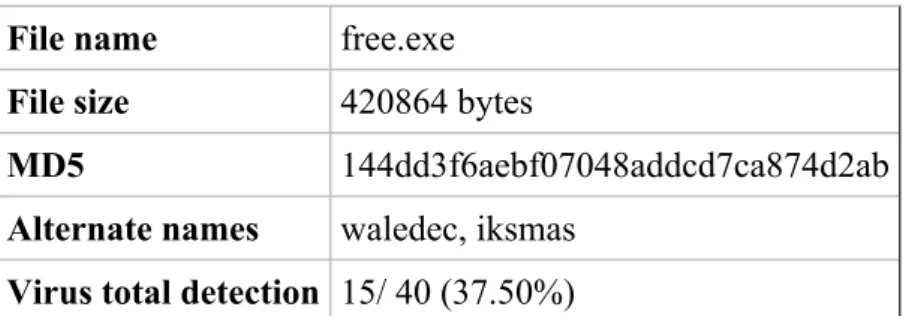
File name free.exe
File size 420864 bytes
MD5 144dd3f6aebf07048addcd7ca874d2ab
Alternate names waledec, iksmas
Virus total detection 15/ 40 (37.50%) Table 6:Waledac description
4.4.1 Network behavior
This worm communicates with other nodes over port 80 using standard HTTP traffic with an encrypted payload. These nodes forward the traffic to other nodes which in turn forward to other nodes generating a P2P like botnet over HTTP. The IP-addresses of these nodes are hardcoded into the trojan binary. [27]
4.4.2 Client behavior
Upon installation Waledac scans through all of the local systems files in search for email addresses for use as spam targets. The data gathered is also sent to one of its control servers. [28]
4.4.3 Spreading
The Waledac trojan mainly spreads through spammed e-mail. It also utilizes social engineering by tricking people to execute the malicious file. This was seen during the last US president election. Fake Obama web sites tempted the visitors with spectacular news. To access the news you would need to execute a program. This was of course the Waledac trojan. [29]
In march 2009 Waledac spammed users with reports of terror attacks in the receivers local area. The e-mail contained a link to a site posing as a Reuters news article. The site used the visitors IP-address to find a locations nearby, and then use that name as the target of the terror bombing. A video of the bombing was available if you downloaded and installed an executable file. Again this was the Waledac trojan. [30] A typical strategy for Waledac is to spam e-cards during holidays. The e-mail promises that the e-card contains a greeting of some kind related to the holiday. To
see the e-card you have to follow a link. The link points you to the Waledac trojan. [31]
4.4.4 Lab testing
The client communicates with the other servers over HTTP. The payload of the post is not very readable and seems to be encrypted with some sort of strong encryption technique. Please take note of the HTTP parameters "a=" and "b=" in the payload, since these parameters are used by several other trojans.
POST /dawww.htm HTTP/1.1 Referer: Mozilla Accept: */* Content-Type: application/x-www-form-urlencoded User-Agent: Mozilla Host: 24.175.141.95 Content-Length: 957 Cache-Control: no-cache a=_wAAArmlulT2zuigy47e8KufXAkDvcFRujUV4KdeizQlggnAEtChW9jZP5qt0Bq8[...]& b=AAAAAA
Figure 11:An HTTP POST sent from a Waledac infected client to one of its peers
The trojan was also seen contacting one of its fast flux domains which in this case was usabreakingnews.com. The TTL value of this domain is 0 which implies that each time someone queries it a new IP address is returned.
5 Proposed flow based LRPI and SWE
IDS
All the code written by us is written in Python. It's designed to work independently of what operating system it runs on, and although the target hardware runs Linux only thus there's no actual need for this it's useful during development as not all the developers are using Linux on their workstations. It also opens up for better code reuse. Python looks in itself like a pseudo code language and should be easy to understand.
The target platform is an existing platform created by Telenor, which dictates what sort of software and hardware is available:
Debian Linux with: • Python 2.4 • Argus 3.0
This will also serve as the test platform.
5.1 Class structure
Logical parts of the implementation are split in classes. There are two main classes, AutomataController and Automaton, as well as a helper class called ArgusData which is used to pass data around.
Figure 12:Automata class hierarchy
This chapter will describe the various parts in more detail. If you feel lost refer back to this chart to get an overview.
5.1.1 Main application
The main app is not a class but the application entry point, implemented in app.py. It has the following responsibilities:
• Create an instance of the AutomataController class • Execute radump to retrieve Argus data
• Pass this data to the AutomataController
To understand how the data is analyzed it is important to understand what the data looks like and what it contains. We have mentioned previously that Argus stores flow data in an Argus specific file format. This file format is of little interest to us, as it is much easier to call Argus tools from Python to extract the data we need. This is done in app.py, like this:
def getArgusData(argusFile):
command = "radump -r " + argusFile + " " + "-n -s saddr daddr sport dport sbytes dbytes stime -c ," process = os.popen(command)
This function is called with an Argus data file as argument, and returns the Argus data as comma separated values, in a list of strings. It parses the Argus file by calling radump, specifying which Argus fields to retrieve, using the -s option. The -c option tells radump that we want the data comma separated. Python automatically waits for this process to finish, and reads all the lines in the buffer to an array. This array is then returned.
lines = getArgusData(watchFolder + "/" + fileName) for line in lines:
ac.parse(line.replace("\n", ""))
Figure 14:Application passing data to the automata controller
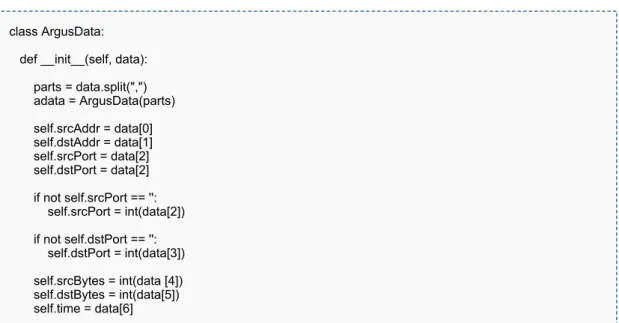
Each of the lines in the returned array will be passed to the automata controller, as seen in Figure 14. The controller then processes these values further into the final data format.
5.1.2 AutomataController
The app only has one AutomataController, and this controller is responsible for all the automata that that are running, if any. When the application is first launched there will be no automata, as the controller hasn't received any data yet. Once data is received, the controller will determine what source-IP / destination-IP pair this data belongs to. If automata for this pair does not exist, create it, then pass the data it received to these automata. For every IP pair there will be a set of automata, as there is one specific autom