Solutions for a New Enterprise Information System
Applying Mobile Computing Technology
Junji Moriyama Overview: Along with the general availability of low-cost, high-performance mobile data equipment, data is readily available at the individual level, communications using portable data equipment has taken root, network technologies built around security and authentication techniques have seen dramatic progress, and use of the Internet and intranets has become commonplace. These developments make it possible to construct strategic information systems that integrate corporate data processing systems and informational activities at the individual level much closer than ever before. Yet there is still a gap between enterprise information systems and the data activities of field salespeople. While certainly there is a great demand for shared access to corporate data, there is also a justifiable concern that valuable private data might be leaked through the illegal accessing of files by an outside intruder. Restrictions are therefore imposed on individual access to information, and a diverse array of systems have evolved that allow different degrees of access for different levels of users. Back-end support for valuable data that is input also presents problems regarding the proliferation of mobile computing. This situation motivated Hitachi to develop a diverse array of mobile products meeting the needs of clients, and to provide a wide range of mobile computing solutions including sales force automation (SFA) for restructuring sales organizations toward building effective enterprise systems.
INTRODUCTION
REMARKABLE progress has been made in the deployment of mobile-ready infrastructure facilities capable of accommodating expanded portable phone and Personal Handyphone System (PHS) service areas and high-speed data transmissions. Meanwhile in the business community, e-mail has been introduced as a means of communication and the collection of wide ranging information via Internet access has become firmly established. Of course from the standpoint of mobile users, the improvement and expansion of robust data equipment and software offerings also cannot be overlooked. Hitachi has always been a leader in offering viable solutions for implementing mobile computing systems ranging from the underlying infrastructure to the hard ware and software components.
This article describes some of the key issues involved in implementing mobile computing systems and how to cope with those issues. It then suggests how we anticipate mobile computing systems will
evolve in the years ahead.
USE OF MOBILE COMPUTING: CURRENT CONDITIONS AND ISSUES
Use of Mobile Computing: Current Conditions
As one of the primary motives for using mobile computing, one frequently hears that people want to be able to send and receive e-mail in the field. E-mail culture has thus evolved to the point where people take it for granted almost as if it is a right. Today, one commonly observes salespeople in the field or anywhere who are efficiently managing their business activities using Personal Digital Assistants (PDAs) to keep track of their schedules, phone numbers, addresses, memos, and other personal information almost as if they have a personal secretary along with them.
At the same time, more and more companies are introducing sales support systems such as exemplified by sales force automation (SFA). These systems basically involve the common use or sharing of
Fig. 2—Relationship Between Business Activity Cycle and Enterprise Support Systems.
Various kinds of information are obtained at every phase of customer contact from advanced preparation to call on the client, during negotiations, and during followup activity. Activities repeat by a fixed cycle.
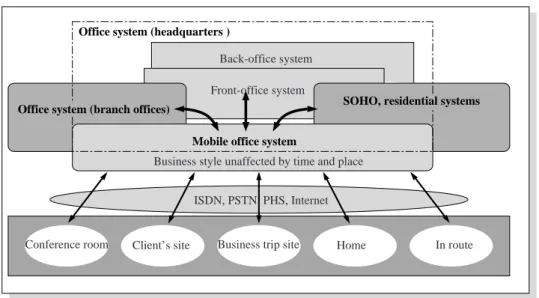
Fig. 1—Mobile Office System Configuration.
A new business style in which work is not controlled by the dictates of place and time can be realized by synchronizing between the enterprise’s front-office system and back-front-office system and by making effective use of the communication infrastructure including ISDN, PSTN, PHS, and the Internet. information, but the primary aims are to use
information more effectively and to improve customer satisfaction. The core capabilities making up a typical system include (1) transmitting daily business reports, (2) transmitting sales vouchers and sales orders, (3) retrieving customer data, and (4) retrieving sales performance data.
Fig. 2 illustrates how business support systems relate to the typical business activity cycle. One of the primary benefits is that salespeople in the field can keep their supervisors informed by sending in daily business reports. The supervisor is then able to directly intercede or make a determination by e-mail if a problem arises with the client. Moreover, the
Customer data, new product data, claims data, etc.
• Gather industry data • Gather customer data • Visitation planning
• Client negotiation memos
• Activity results • Client data
Industry trend data
WWW
Visit activity history data
Estimate data Delivery data
WWW: world wide web Selecting prospective clients Scheduling client visits Client visits Activity planning Followup Advanced preparation for client visits
Results data Presentations Order contract Business strategic planning Database server Gateway server
Office system (headquarters )
Mobile office system
Office system (branch offices) SOHO, residential systems
In route Home
Business trip site Client’s site
Conference room
ISDN, PSTN, PHS, Internet Business style unaffected by time and place
Front-office system Back-office system
SOHO: small office home office ISDN: integrated services digital network
PHS: personal handyphone system PSTN: public switched telephone network
information that is gained on the front line of contact with clients is invaluable in developing business strategies and new products.
Use of Mobile Computing: Issues
Of course there are individual differences in mobile computing usage, but the emergence of integrated phone/data terminals optimized for e-mail and low-cost ten-yen-per-transmission rates again coupled with the rapid spread of cell phones and PHS has fueled the use of mobile equipment, and indeed has led to the growing expectation that e-mail is a right.
A fair number of businesses have implemented mobile computing, yet there haven’t been more than a handful of dynamic success stories that have been written up extensively in the news media. The majority of these involve directly linking an individual’s PC that is used for business to the company’s main data processing system. Although business applications may be installed on the mobile equipment, the PCs are generally not directly connected to the office system via an on-line connection. Rather, information is uploaded to the office system by batch processing
after the sales report returns to the office.
The primary drawback of connecting a portable computer directly to the main office system is that not enough consideration has been given to the security aspect. There is always the latent threat of illegal access to valuab le corporate data from the outside. Consideration of authentication by access servers, firewall filtering, and other protective measures are driven by necessity to make sure unauthorized outsiders cannot view documents they shouldn’t, eavesdrop, tamper with corporate data, or pretend they are someone they are not (Fig. 3). Reinforcing security also adds an additional layer of operational complexity for the user. This means that, although we are building some excellent systems, they are often underutilized as a result of these security-related issues.
PREPARATIONS FOR MOBILE COMPUTING SUCCESS
Fostering an Information Mentality
It is crucial that users develop an information-oriented mentality in order to closely integrate mobile computing into a company’s business operations. Take Fig. 3—Mobile Security Overview.
Illegal access from the outside is prevented through a combination of security measures including secure access servers and firewalls.
Mobile users
Client sites, business trip sites, home In route Internet PHS network ISDN, PSTN Office mobile
ISDN: integrated services digital network ID: identification
Main business host computer Groupware server Intra-WWW server Firewall Router ID, password authentication Public WWW server
In-house information system
Wireless LAN
the example of client negotiation status reports. If these progress reports are simply submitted in text form, then someone back at the office has to go to a lot of trouble to analyze and arrange the data for inclusion in a shared corporate client database. For this reason, it is critically important for data to be arranged in
meaningful categories from the start: who met with whom? when? for what purpose? what was discussed (delivery date, a claim, new product data, industry trends, etc.)?
It is also important to foster the will and desire to input this type of data on a daily basis. If a salesperson in the field doesn’t get any feedback from his supervisor even though he faithfully enters the data, then he begins to wonder just why he is going to all the trouble to enter the data in the first place. Providing positive feedback and back-end support for people in the field who are providing valuable data is an extremely important factor for establishing mobile computing in the company.
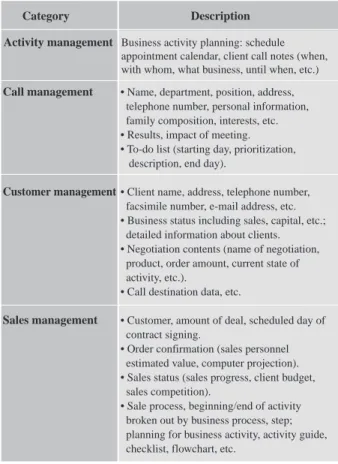
Table 1 lists the essential items that should be maintained in a client management database if it is to achieve its intended purpose. Note that a wide range of different types of data should be collected and managed that are tailored to different forms of business activity.
System Building Approach
Once a framework for organizing marketing and sales data is in place, the next step in deploying a mobile computing system is to consider how the data is to be used. The data is used for a wide range of purposes inc luding integ rated management of customer data, to improve customer satisfaction and competitiveness, and for total support of sales and marketing systems. Here we will focus on the subject at hand and discuss how the data is used in implementing sales force automation (SFA) systems. Since most mobile computing systems have been TABLE 1. Database items essential for customer management
Essential data tailored to the form of business is stored and managed
Fig. 4—Steps in Constructing an SFA System.
Without losing sight of the purpose and effects, the system is implemented by a step phase moving from the individual level toward the company-wide level. Critical look at
investment effects
Investment
Investment Larger scale system
Time Smaller scale
system
Individual level SFA • PCs and data link • R/C/D
• Activity planning, management Department level SFA
• Share data
• Extended back-end support system
Company-wide level SFA • LAN connectivity • Groupware sychronization • Use of Internet/intranets
Stepwise progress by easy stages
R/C/D: report, contact, discuss
Investment Description Activity management Call management Customer management Sales management
Business activity planning: schedule appointment calendar, client call notes (when, with whom, what business, until when, etc.) • Name, department, position, address, telephone number, personal information, family composition, interests, etc. • Results, impact of meeting. • To-do list (starting day, prioritization, description, end day).
• Client name, address, telephone number, facsimile number, e-mail address, etc. • Business status including sales, capital, etc.; detailed information about clients. • Negotiation contents (name of negotiation, product, order amount, current state of activity, etc.).
• Call destination data, etc.
• Customer, amount of deal, scheduled day of contract signing.
• Order confirmation (sales personnel estimated value, computer projection). • Sales status (sales progress, client budget, sales competition).
• Sale process, beginning/end of activity broken out by business process, step; planning for business activity, activity guide, checklist, flowchart, etc.
deployed to implement sales support systems, in this section we will concentrate on SFA solutions and describe how this approach is implemented. Fig. 4 shows the steps involved in constructing an SFA system. Here we will consider three different forms of SFA systems.
(1) Individual-Level SFA
This form of SFA is used to expand ordering activities based on the knowledge and experience of individual field salespeople. Because the desired information is taken down on location with the client, this permits faster responsiveness to customers and better planned more rational business activities. Currently this is the most common pattern of SFA using mobile computers.
(2) General SFA
This f orm of SFA is implemented a t the departmental level, and is used to expand ordering activities when there is fierce competition or little qualitative difference among products. The beneficial effects of implementing this approach are to improve productivity of the entire department and to inspire all personnel in the department to seize sales initiatives. (3) Complex, Large, Long-Term SFA
This form of SFA is implemented across multiple departments, and is used to expand ordering activities when the nature of the product is more complex or diverse, or when negotiations are larger in scale or take place over a longer time frame. The effects of implementing this approach are to realize customer-centered team sales, to improve customer satisfaction and loyalty, to lower the cost of sales and support, and to increase sales and profitability.
It is often the case that when initially applying SFA across multiple departments that different information is needed by different organizations and that barriers exist between organizations. SFA at this level thus often falls short of achieving it full potential effectiveness. We advocate not deploying SFA at this level from the beginning, but rather to adopt a phased implementation starting at the individual level. It is desirable to hold down investment costs and to determine the effectiveness of SFA at each level.
SFA Development Scenario
The objective of SFA is not simply to improve the efficiency of sales activities, but to restructure how the activities themselves are conducted. For example, by analyzing customer data with an eye toward improving customer satisfaction, we can increase the probability of successful orders from prospects and
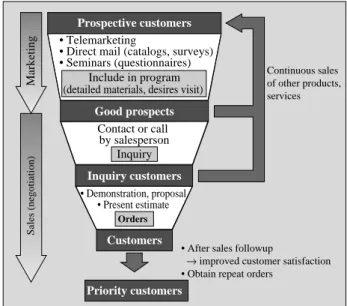
thereby increase sales. Fig. 5 illustrates the SFA development process from marketing to identification of good prospects.
It is essential to identify good prospective target customers in order to achieve efficient and effective ordering activity. The first step is to narrow down to a short list of good prospects by analyzing the results of telemarketing, direct sales materials such as catalogs and questionnaire, and seminar surveys. After narrowing down to the best prospects, advance preparation is to be made to call on these customers and the inquiries that have been received are assembled. Then the final order is pursued by making appropriate proposals and/or demonstrations tailored to the customer’s inquiry and by presenting an estimate that is in line with the customer’s budget.
ENTERPRISE INFORMATION SYSTEM FOR IMPROVING CUSTOMER SATISFACTION
Techniques for Improving Customer Satisfaction
To date, Hitachi has supported the construction of a diverse range of systems toward making SFA a practical reality including mobile computing systems. Fig. 6 shows an example of an SFA system that was implemented to achieve the SFA-based process described earlier.
This system makes effective use of Vantive Sales with the support capabilities of the comprehensive Fig. 5—SFA System Development Process.
Improves order performance by analyzing customer data and identifying the best prospects
* Vantive is a registered trademarks of Vantive Corporation.
Priority customers Customers Orders Inquiry Inquiry customers Good prospects Prospective customers Include in program (detailed materials, desires visit)
• After sales followup
→ improved customer satisfaction • Obtain repeat orders
Continuous sales of other products, services • Demonstration, proposal • Present estimate Contact or call by salesperson • Telemarketing
• Direct mail (catalogs, surveys) • Seminars (questionnaires)
Marketing
customer information system Vantive*. Vantive Sales offers an application that automates contact man-agement and telemarketing activities including campaign management. This implementation supports the entire sequence of marketing and sales activity including the management of activity history from the identification of likely prospects through telemarketing and direct mailing to negotiations, the management
of daily customer negotiations, and so on. In this scheme, mobile computing is used to retrieve customer data, and to produce sales activity status reports (e.g., inquiry status reports, negotiation progress reports).
Next-Generation Enterprise Information System
Enterprise information systems have undergone a transformation from an efficiency-seeking approach
Fig. 6—SFA System Configuration. Realizes team sales by making effective use of cumulative customer data.
Fig. 7—Next-generation Office System Implementing SFA.
Increase customer satisfaction by streamlining comprehensive customer data system from initial inquiry to negotiation and followup.
CTI: computer-telephony integration Customer Inquiry Prospect Negotiation Order Retrieve data
Interview Internet (WWW) Provide product information Maintenance
department
Sales Department (SFA) Help desk
• Presentation support • Contact management • Action planning support
Call center Front-office system Comprehensive customer data system Customer information Negotiation database Order database Product information Technology information Combination with host computer Corporate data processing system Back-office system • Telemarketing • Customer support Mobile computing Field service CTI Sales Prospects Good prospects Telemarketing Sales Salesperson Sales manager Trend seminar, mini seminar
Customer list, results Q1.
Q2.
1. Telemarketing (interview, needs survey and hearing address to send sales materials) 2. Survey by direct mail, seminar and overview mailing
3. Returned surveys Seminar followup
Daily operation
“Vantive Sales” database 7. Input contents of activity
8. Verify, followup activity 6. Sales activities
(Telephone, visits, receive client)
• Verify, followup salesperson’s activity status • Responses made by salesperson
• Report inquiry status
40,000 personnel/company • Loop up customer company, person in charge • Look up existing system
• Verify telemarketing, direct mail, and seminar status
• Retrieve, look up negotiation, inquiry status • Input salesperson activity contents, history management
4. Assign salesperson, input to database 5. Retrieve, look up sales cases
to an information market approach. It is no exag-geration to say that he who controls the information will survive the competition. It is thus necessary to employ computers not so much as tools for improving productivity, but rather as strategic devices for enhancing sales. Of course mobile devices constitute one class of equipment serving the same goal.
Rather than selecting equipment that is limited to a particular form of use, it is already becoming increasingly important to use different types of equipment that are optimized for different tasks and contexts. Indeed, there are already some professionals who employ three different PCs at the office, each optimized for a different range of tasks.
Fig. 7 shows a schematic overview of the office system we envision in near-term future. As shown in the figure, we will see the emergence of a front-office system that is positioned right at the point of contact with the customer, and this will have far-reaching importance in the years ahead.
All sorts of customer information will be collected by diverse equipment having different intended purposes in widely scattered locations. This information will then be stored in consolidated customer information database systems and used to identify prime prospects offering the greatest assurance of firm orders. Historical data produced in response to inquiries and claims will also provide valuable input for improving customer satisfaction.
CONCLUSIONS
Today, a diverse array of applications make use of mobile computing. In this article we have outlined the contours of enterprise information systems, focusing especially on the deployment of sales force automation (SFA) systems. We can be certain that the range of applications for mobile PCs in implementing strategic information systems will only continue to expand, particularly as mobile systems evolve from largely individual use to company-wide applications.
Up to this point, not many mobile systems have been deployed. Hitachi intends to change this by continuing to play a leadership role in promoting more widespread use of mobile computing systems, and by proposing a diverse range of innovative enterprise information systems.
REFERENCE
(1) J. Moriyama, et al., “Business Support Systems Using Mobile Computing,” Magazine for Electric & Mechanical Engineers, 78, pp. 643–648 (No. 9, 1996).
ABOUT THE AUTHOR Junji Moriyama
Joined Hitachi, Ltd. in 1973, and now works at the Planning Office of the Network System Department of the Information Systems Div. He is currently engaged in the planning of Internet-related business systems. Mr. Moriyama can be reached by e-mail at [email protected]