Estimation of Query Execution Time in Milli Seconds,
Micro Seconds and Nano Seconds for Oracle, MsSQL
and MsAccess Relational Databases
Voore Subba Rao
Student, M.Tech.(CSE)Ganapathy
Engg.College,Warangal(AP)
V. Chandra Shekar Rao
Assoc.Professor KITS Engg.CollegeWarangal(AP)
Porika .Sammulal,
PhD. Asst.Prof.in JNTUH College ofEngg
Nachupally, Karimnagar (AP)
ABSTRACT
In this paper an attempt is made to develop a user friendly software to evaluate the query estimation time in milli seconds (10-3 sec.), micro seconds (10-6 sec.) and nano seconds (10-9 sec.) for Oracle, Ms-SQL and Ms-Access Relational Databases. Most of the relational database application programs are written in high-level languages integrating a relational language. The Relational Languages offer generally a declarative interface (or declarative language like SQL) to access the data stored in a database. To execute the query in relational databases, the user interact with structural query language (SQL). For that, the user should aware the knowledge about the schema management, vocabulary of the SQL commands, entities and attributes of the database. The IT people have the knowledge about query of the Relational Databases and get the information. But normal users are not aware of querying the Relational Databases but like to know the calculation of query execution time in mill Seconds(10-3 sec.), micro Seconds (10-6 sec.) and nano Seconds (10-9 sec.) in a user friendly way.
General Terms
Query execution, Relational database, Structural Query Language.
Keywords
Execution time, Query execution, User friendly query, Time estimation, application.
1. INTRODUCTION
In order to managing and calculating query execution time for Relational Database Management System (RDBMS), one must be fluent in Structured Query Language (SQL). The relational languages offer generally a declarative interface (or declarative language like SQL) to access the data stored in a database. Most of the relational database application programs are written in high-level languages integrating a relational language. The important concept considered in SQL are (entities, relationships, attributes) and the data schema while using SQL. The user has to remember the syntax of Query to maintain database management which is very difficult. However, normal users are not familiar with query languages and database structures, but would like to know the execution time of queries of various RDBMS languages and access data in a more user friendly way. [2]
In this module, the software create a window based Application where the user will calculate the query execution time in user friendly. The main motive is to calculate execution time of the different RDBMS queries in user friendly format. The main novelty of this project is that it allows people with limited IT-skills to explore and query one (or multiple) data sources without prior knowledge about the schema, structure, vocabulary, or any technical details of these In SQL, customer has to remember the syntax of Query to maintain Database Management which is very difficult. So, to maintain Database in SQL in user friendly format is our main motive of project. Customer were given SQL in user friendly format, where customer asked for every specification of Query in select and click
sources. The aim of this tool is to present a query formulation using a Window based application tool that allows casual users to easily build
a query and retrieve the data using an almost natural language, on a step by step basis, guided by the tool.[3]
This paper focus on calculating the query execution time for various relational databases like ORACLE, MSSQL SERVER2000 and MS-ACCESS.
In this paper the software are ORACLE, MSSQL SERVER 2000 and MSACCESS for Databases and VB.NET used Front-end for Application Development.
1.1
Estimating and monitoring query processing
time
The present work related to database to managing query execution by estimating and monitoring query processing time. Regardless of the particular architecture of RDBMS, a requesting entity (eg. an application or the operating system) in a DBMS requests access to a specified database by issuing a database access request. Such may include, for instance, simple catalog lookup requests or transactions and combination of transactions that operate to read, change and specified records in the database. These requests (i.e. queries) are often made using high-level languages such as the structured query language(SQL). Upon receiving such a results, the DBMS may execute the request against a corresponding database, and return any result of the execution to the requesting entity. As databases grow in size and workload, particular queries may take a substantial amount of time and resources to execute.
The system or computer program i.e.VB.NET code is a product for managing the execution of a query. This type of method and the code include receiving a query to be executed. This software method and computer program include the processing of calculating an initial execution time for the received query. The code also include upon determining the calculated initial execution time and estimating the execution of query start-time and end-time of the query execution time.[1]
2. EXISTING SYSTEM
Before formulating a query, one has to knowledge about the structure of the data and the attribute labels (i.e., the schema). End-users are not expected to investigate “what is the schema” each time they search or filter information. In many cases, a data schema might be even dynamic, i.e., many kinds of items with different attributes are often being added and dropped. Other sources might be schema-free, or if it exists.[2]
source=.;initial catalog=sqldb;integrated security=true")
Dim sqlcom AsNew SqlCommand("select * from myemp where empno=106", sqlcon)
format. We have placed data onto web, MS SQL SERVER 2000 for Database and ASP.NET with VB.NET in frontend for Application development.
2.1 Related work
Visual Query Systems (VQSs) is defined as query systems essentially based on the use of visual representations and the user can directly interact with the Relational Databases for querying while using the user friendly Window Based Visual Query Systems. This provides user-friendly query interfaces for accessing a database. It includes materializing query result, distributing queries, publishing, and system design and development.[4].
3 PROPOSED SYSTEM
A user friendly estimation of query execution time of various databases is schema free. The importance of this module is it will creates a window based Application that make SQL user friendly. The main novelty of this system is that, it allows people with limited IT-skills to explore and query one (or multiple) data sources without prior knowledge about the schema, structure, vocabulary, or any technical details of these sources.
3.1 Experiment for Performance Testing on
Calculating of query processing time in various
Relational Databases
The experiment conducted for the performance testing, executing the queries for calculating the query processing time in various RDBMS databases. The code using for calculate the query. The software used are MSSQL SERVER 2000 for Database and VB.NET frontend and code for Application Development
3.2 Experiment 1
Code for Performance Testing on SELECT
command for Calculating of query processing
time in ORACLE, MSSQL 2000 and
MS-ACCESS.
Dim stime, etime AsLong Dim sdtime, edtime AsDate Dim found AsBoolean
PrivateSub Button1_Click(ByVal sender As System.Object, ByVal e As System.EventArgs) Handles Button1.Click
Dim dbproduct AsString = ListBox1.SelectedItem If dbproduct = "SqlServer"Then
sdtime = Now
'MsgBox(stime)
'Data Source=.;Initial Catalog=sqldb;Integrated Security=True
Dim sqlst AsString = ListBox2.SelectedItem If sqlst = "Select"Then stime = Now.Ticks
Dim sqlcon As SqlConnection = New SqlConnection("data
3.3 Experiment 2
Code for Performance Testing on INSERT
command for Calculating of query processing
time in ORACLE,MSSQL2000 and MS-ACCESS.
Dim sqlcon1 As SqlConnection = New SqlConnection("data source=.;initial catalog=sqldb;integrated security=true")
Dim sqlcom As New SqlCommand("insert into myemp values('kiran',106,6000)", sqlcon1)
Dim sqldr As SqlDataReader = sqlcom.ExecuteReader() If sqldr.Read() Then
found = True Else
found = False sqlcon.Close()
etime = Now.Ticks edtime = Now 'MsgBox(etime)
Label4.Text = (((etime - stime) / 10) / 1000) Label6.Text = (((etime - stime) / 10))
' Label7.Text = (((etime - stime / 10) / 1000) / 1000/1000) & " seconds"
End Sub
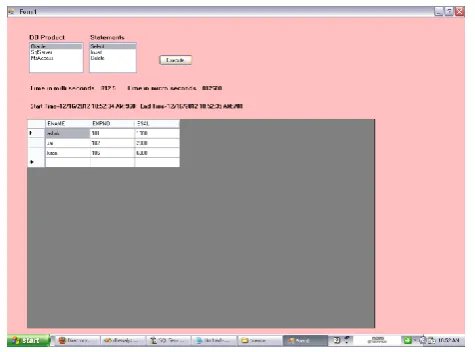
The following spanshots are the results displayed using the VB.NET for application development. These results displayed the calculation of query execution time for SELECT command for ORACLE,MSSQL SERVER 2000 and MSACCESS.
Fig1: Using ORACLE database querying the SELECT command for executing the calculating the query executing time.
[image:2.595.313.551.273.449.2]Comparative analysis of execution time of SELECT query
Table 1: Calculation of SELECT query execution time by using ORACLE,MSSQL SERVER and MSACCESS relational
databases.
Comparative analysis of execution time of INSERT query
Data- bases
Start time
End time
Milli seconds (10-3 sec)
Micro seconds (10-6 sec)
Nano Seconds (10-9 sec) Oracle 12.16.12
10:52:34 AM:968
12.16.12 10:52:35 AM:781
812.5 812500 812500000
SQL SERVER
12.16.12 10:55:28 AM:437
12.16.12 10:55:29 AM:812
137.5 137500 137500000
Ms-Access
12.16.12 10:59:03 AM:406
12.16.12 10:59:07 AM:812
sqlcon1.Open()
Dim n As Integer = sqlcom.ExecuteNonQuery() edtime = Now
'MsgBox(etime)
Label4.Text = (((etime - stime) / 10) / 1000) Label6.Text = (((etime - stime) / 10))
'Label7.Text = (((etime - stime / 10) / 1000) / 1000) / 1000) & " seconds"
Dim sqlcon1 As OleDbConnection = New
OleDbConnection("Provider=Microsoft.ACE.OLEDB.12.0;Data Source=c:\accessdb.accdb")
Dim sqlcom1 As New OleDbCommand("insert into myemp values('kiran',106,6000)", sqlcon1)
sqlcon1.Open()
Dim n As Integer = sqlcom1.ExecuteNonQuery() sqlcon1.Close()
etime = Now.Ticks edtime = Now
The following spanshots are the results displayed using the VB.NET for application development. These results displayed the calculation of query execution time for INSERT command for ORACLE,MSSQL SERVER 2000 and MSACCESS.
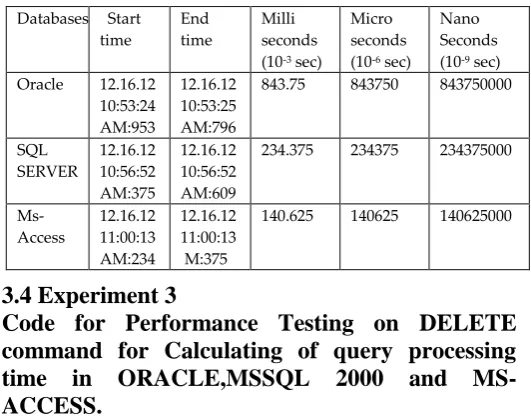
Table 2: Calculation of INSERT query execution time by using ORACLE,MSSQL SERVER and MSACCESS relational databases.
3.4 Experiment 3
Code for Performance Testing on DELETE
command for Calculating of query processing
time in ORACLE,MSSQL 2000 and
MS-ACCESS.
Dim sqlcom As New SqlCommand("Delete from myemp WHERE empno=106", sqlcon1)
Dim sqlcon1 As OleDbConnection = New OleDbConnection("Provider=Microsoft.ACE.OLEDB.12.0;Data Source=c:\accessdb.accdb")
Dim sqlcom1 As New OleDbCommand("Delete from myemp where empno=106", sqlcon1)
sqlcon1.Open()
Dim n As Integer = sqlcom1.ExecuteNonQuery() sqlcon1.Close()
etime = Now.Ticks edtime = Now 'MsgBox(etime) sqlcon1.Close() etime = Now.Ticks edtime = Now 'MsgBox(etime)
Label4.Text = (((etime - stime) / 10) / 1000) Label6.Text = (((etime - stime) / 10))
'Label7.Text = (((etime - stime / 10) / 1000) / 1000) / 1000) & " seconds"
Label7.Text = "Start Time=" & sdtime.ToString() & ":" & sdtime.Millisecond & ":" & " End Time=" & edtime.ToString() & ":" & edtime.Millisecond '(((etime - stime / 10) / 1000) / 1000/1000) & " seconds"
End Sub
LoadOdbcRecords(sqlcon1) sqlcon1 = Nothing System.GC.Collect() End If
End If
limited IT-skills to explore and query one (or multiple) data sources without prior knowledge schema, structure of the database.
Customer will be given SQL in user friendly format, where customer will be asked every specification of Query in click format
4. CONCLUSION
The experiment mainly concerned analysis of the database while conducting experiment for calculating the query execution time by
Databases Start time
End time
Milli seconds (10-3 sec)
Micro seconds (10-6 sec)
Nano Seconds (10-9 sec) Oracle 12.16.12
10:53:24 AM:953
12.16.12 10:53:25 AM:796
843.75 843750 843750000
SQL SERVER
12.16.12 10:56:52 AM:375
12.16.12 10:56:52 AM:609
234.375 234375 234375000
Ms- Access
12.16.12 11:00:13 AM:234
12.16.12 11:00:13 M:375
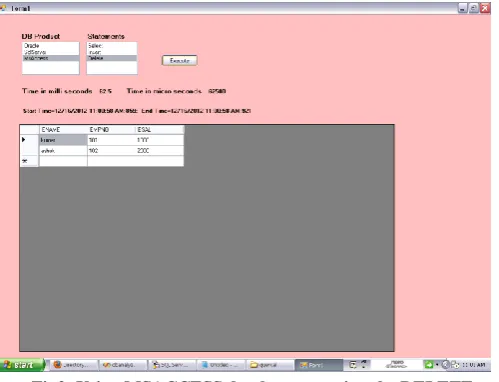
[image:3.595.310.576.104.312.2]The following spanshots are the results displayed using the VB.NET for application development. These results displayed the calculation of query execution time for DELETE command for ORACLE,MSSQL SERVER 2000 and MSACCESS.
Fig3: Using MSACCESS database querying the DELETE command for executing the calculating the query executing time
[image:4.595.30.280.132.323.2]Comparative analysis of execution time of DELETE query
Table 3: Calculation of DELETE query execution time by using ORACLE,MSSQL SERVER and MSACCESS relational
databases.
The performances measured with the number of resolved queries of each type and the time calculation of query perfect execution of calculation of execution time for SELECT,INSERT,DELETE queries of while using different query languages like ORCLE,MSSQL and MSACCESS.
Above table shows executing the SELECT,INSERT,DELTE queries while using three different Relational Database Languages ORACLE,MSSQL and MSACCESS for calculating the query execution time. The execution time vary time to time.
The work we have describes a visual query language based on a Window Based Application Select & Click as per user choice. The user perceives the database.
Advantages
The data to be schema-free is one of the key challenges addressed in the context of this project design and development.
The main novelty of this system is that it allows people with
using user friendly window based tool. This window based application allows users to easily query and calculate the query execution time and also retrieve the data.
The user can select the particular database and execute the query as per user choice. The user utilizing this user friendly Window based Application for calculating the query execution time.
It is worth noting that the iconic approach is a valid support to improve the understanding of SQL, as most student improved their performances on SQL exercises after the use of Visual Query Tool. This user friendly window based calculating query execution time for various databases can be used on LAN using Client -Server Technology. Through the LAN the queries are executed and user can estimate the query execution time. The scope of the paper is for optimization of queries for minimum execution of queries. The user analyze the query execution time and utilizing this user friendly Window based Application. This experiment can be used in Semantic Web Pipes. This framework extends ORACLE and MSSQL and allows caching remote sources for querying the database.
5. ACKNOWLEDGEMENT
Our thanks to Department of Computer Science and Engineering, Ganapathy Engineering College, Warangal, (A.P.) affiliated to Jawaharlal Nehru Technological University, Hyderabad, (A.P.),India for providing necessary facilities to carryout the research work.
6. REFERENCES
[1]. Eric L.Barsness, Pine Islad,MN, John M.Santosuesso, Rochester “Estimating and Monitoring query Processing Time” IEEE 2012. [2]. Mustafa Jarrar, Marios D. Dikaiakos, “A Query Formulation
Language for the Data Web” Journal of IEEE 2011.
[3]. Lerina Aversano, Gerardo Canfora, Andrea De Lucia, Silvio Stefanucci, “Understanding SQL through Iconic Interfaces” Journal of IEEE.
[4]. Mustafa Jarrar, Marios D. Dikaiakos “MashQL: A Query-by-Diagram Topping SPARQL -Towards Semantic Data Mashups”, ONISW’08, October 30, 2008, Napa Valley, California, USA,1-15.
[6]. M. Angelaccio, T. Catarci, and G.Santucci, “QBD: A Fully Visual Query System”, Journal on Visual Languages and Computing, vol. 1,no. 2, 1990, pp 255-273.
[7]. M. Angelaccio, T. Catarci, and G.Santucci, “QBD: A Graphical Query Language with Recursion”, IEEETransactions on Software Engineering, vol. 16, no.10, 1990, pp 1150-1163.
[8]. ]M.M. Zloof, “Query-by-Example: A Database Language”, IBM Systems Journal, vol. 16, no. 4, 1977, pp. 324-343.
[9]. P. Reisner, “Query Languages”, M. Helander ed. Handbook of Human- Computer Interaction, Elsevier Science Publ.,1988, pp 257-280.
[10].P. Reisner, “Query Languages”, M. Helander ed. Handbook of Human- Computer Interaction, Elsevier Science Publ., 1988, pp 257-280.
[11].G. Ozsoyoglu, V. Mates, and Z.M. Ozsoyoglu, “Query Processing Techniques in the Summary-Table-by-example Database Query Language”, ACM TODS, vol. 14, no. 4, Dec. 1989, pp. 526-573 [12].Catarci, M.F. Costabile, S. Levialdi, C. Batini, “Visual Query
Systems for Databases: A Survey”, Technical Report SI/RR-95/17 of Dipartimentodi Scienze dell’ Informazione,University of Rome “La Sapienza”, 1995.
Databases Start time
End time
Milli -seconds (10-3 sec)
Micro seconds (10-6 sec)
Nano seconds (10-9 sec)
Oracle 12.16.12
10:54:18 AM:500
12.16.12 10:54:19 AM:359
859.375 859375 859375000
SQL SERVER
12.16.12 10:57:58 AM:171
12.16.12 10:57:58 AM:250
78.125 78125 78125000
Ms- Access
12.16.12 11:00:58 AM:859
12.16.12 11:00:58 AM:921