2546
A SMOOTH TEXTUAL PASSWORD AUTHENTICATION
SCHEME AGAINST SHOULDER SURFING ATTACK
MOHAMMED A. FADHIL AL-HUSAINY*, DIAA MOHAMMED ULIYAN
Department of Computer Science, Faculty of Information Technology, Middle East University, Amman, Jordan
Emails: *[email protected], *[email protected], [email protected], [email protected]
ABSTRACT
Authentication is a common approach to protect user information in the online information systems such as ATMs. One of the easiest ways for user authentication uses Personal Identification Number (PIN). PINs are vulnerable to malicious attacks. The tendency of users to select easy passwords or short password makes the passwords vulnerable to many attacks like camera recording attack and adversary shoulder attacks. In this paper, the proposed textual password authentication scheme is introduced as an alternative to graphical password schemes. In this technique, no need to use the traditional keyboard or even pressing the keys that represent the password characters. This technique gives the user a more secure session to enter the password and solves most of the defects exist in the authentication systems that depend on the use of the textual or graphical passwords.
Keywords: Shoulder surfing attack, textual password authentication, information security, Matrix Transpose
1. INTRODUCTION
User authentication is a censorious element in information security. Many online information systems have widely used password based mechanisms to keep services secured from illegal access [1]. A user has to be authenticated using his own password before performing any transaction or open safely his personal information. The password is defined as a pre-arranged textual, graphical or numerical inputs through the user log in interface . A conventional password should fulfil the fundamental requirements to be more secure: a) Password needs to be easy to recall, and the user authentication mechanism should run swiftly. (b) Passwords should be hard to guess by attackers.
Therefore, it is mandatory to lock and unlock online applications or mobile terminals based on a password authentication method like Personal Identification Numbers (PINs). If unauthorized access is given to a wrong person, the entire security of one system will crumble. This issue could happen when the users tend to use weak passwords and forget to follow the guidelines of the creation of secured passwords. Furthermore, password submission process is vulnerable to direct
observational attacks. For instance, the entry of password can be observed easily by nearby attackers in the crowded places . This type of attack is defined as shoulder surfing. There are four types
of attacks considered for designing an
authentication scheme to protect users from illegal access [2].
(1) Shoulder surfing attack: A passive adversary who attempts to obtain the user’s PIN during user login process. In a good password authentication scheme, it should be extremely difficult to catch the user’s password by recording or watching to encumber the shoulder surfers [3].
(2) Dictionary attacks: tried to recognize user’s password that will be most probably selected and employing them to defraud the system. These threats could be more effective if ordered entries are applied to inspect the most probable passwords [4].
2547 power, except if the location of online threat is found and halted before exhausting. But due to large password spaces, it may not be possible to be found all over the space [5]. (4) Spyware Attack: some spyware tools are
installed on the computer of the user and sensitive information is logged. This malware saved any mouse or key movement. Then, the recorded information without the user’s awareness is conveyed out of the computer [6].
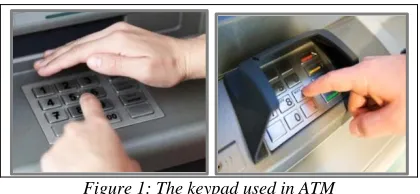
Recently, the Automated Teller Machines (ATMs) are usually designed to include a keypad that is mainly used to enter the password of the card (see figure 1). This keypad adds more cost to the total cost of production of these machines. One of the threats facing the user while using an ATM, especially when entering the password is the shoulder surfing. Furthermore, companies that produced ATMs are constantly trying to redesign the keypad in a new form or add more tools (ATM keypad protector as walls that surround the keypad). All that in order to give the user adequate level of security against the shoulder surfing . The key challenge is to protect user’s password from being stolen by shoulder surfing attackers. The shoulder surfing attack is categorized into two classes:
(1) Direct observation attack, which
authentication password is determined by an adversary who is directly monitoring the login interface.
(2) Recording attacks, which the authentication
password has been recorded by a camera device for later analysis.
[image:2.612.311.514.365.518.2]
Figure 1: The keypad used in ATM
Based on the type of the password, the user password authentication schemes are classified into: textual passwords and graphical passwords. Traditional textual passwords are applied in information systems due to ease of use and remember, but some researchers tried another direction by proposing graphical password techniques [7, 8] as an alternative to textual password methods [9, 10]. This password includes the use of images or shapes to determine the user's
password. The user selects points or regions in the image, determines specific shape or arranges the displayed shapes (see figure 2). The use of graphical passwords, adds more operations to the information systems to deal with the images used and the determination of the selected region by the users or to manage and record the steps that the user performed to choose the correct sequence of the specified shapes.
Based on the selected points or regions in the image, there are two types of graphical password schemes [11]: 1) Picture based password and 2) Android password pattern. Some picture based password methods [12], struggle against dictionary attacks and shoulder surfing attacks. For instance, instead of attempting to guess the authentication password, a dedicated attacker may try to identify it by observing the legitimate user over his/her shoulder during login into the system. Hence, the main weakness of Android password pattern is that commonly vulnerable to shoulder surfing attacks .
Figure 2: Different types of graphical passwords
[image:2.612.90.300.517.614.2]2548 try to reduce this threat by requiring users to enter their passwords indirectly [13]. This can be done by performing certain mental tasks to derive the indirect password. Thus, the main goal of textual based methods is concealing the user’s actual password.
In this paper, a textual based user authentication method has been proposed that employs a new technique to enter the password in order to achieve a high level of immunity to the password against shoulder-surfing attack. The password characters are chosen by the users during the login phase from a set of columns to determine the password. In details, for the login session (i.e., the session for entering the textual password) that uses a new keyboard instead of the traditional
keyboard. Using the new (66) keyboard, the user
does not need to press the key itself when entering the password characters; this will prevent the people who use shoulder surfing from knowing the password characters. And giving the user a more secure session to enter his own password.
The remainder of this paper is organized as follows. Section 2 presents the related works. Section 3 describes the proposed method. Experimental results are discussed in Sections 4. A conclusion is drawn at the end of the paper to summarize the deliverables of the proposed method.
2. RELATED WORKS
There have been many user authentication schemes proposed over recent years [14, 15] according to the type of password. Studies of user password authentication methods are classified into two categories:
(1) Graphical password techniques: This approach mapped the set of character that compose the password into image regions in the password space based on a set of criteria [16]. The main advantage of this approach is resilient to dictionary attacks. However, few graphical password schemes are developed in practice. The weakness of this approach is that struggles to protect password against shoulder attacks and spyware attacks .
(2) Textual password techniques: This approach was implemented to examine the problem associated with a conventional and secured password using alphanumeric and symbols in order to recall it easier. The main challenge is
how to keep it secret and protected from certain attacks like shoulder surfing and spyware attacks [17]. Devi et al. [18] proposed text-based authentication scheme using pair based and color based methods. First, password is divided into pairs of two characters and the orders of these pairs are changed for every login session. Second, some colors are assigned to each character. Those colors have rate and should be memorize by the user. The weakness of this method is hard to remember the colors for each pair of characters in password.
The shoulder surfing is one of the major attacks that is facing the users during entering their passwords in the login session. Several shoulder surfing resistant techniques have been proposed in [14, 15, 19, 20].
Lee et al. [21] proposed a new framework for PIN-entry method against human shoulder surfing attack. The login session for entering PIN has two rounds: the first round is session key decision where the legitimate user enters the right symbol to recognize him and move to the next session. The remaining round is PIN-entry step, in which the PIN is entered.
Istyaq et al. [22] presented a new authentication technique based on using one-time password scheme. This technique is already used by governments and banks to enhance the security and privacy. The user does not need to remember the password because the technique sends the user password to the user's email at login time. The login session in the technique usually takes more time and the probability of stealing the password is proportionally higher.
Nurul Kholisatul et al. [23] proposed a graphical text-based password scheme to avoid shoulder surfing attack. The scheme uses colors, in the authentication, and combines between characters and images that represent the user password. The proposed scheme seems more complicated in use by the user and the user needs to remember three different things (colors, characters, and images).
2549 the user. Although the scheme is proportionally resistant against shoulder surfing, the user in this scheme needs to click many times to determine all the password's characters.
Manu Kumar et al. [25] presented an Eye Password authentication system that reduces the effect of shoulder surfing attack. In this system, the user selects the password's characters from the displayed keyboard on the screen using his eyes. And the system determines the right or wrong of the user's selection depending on the orientation of the user's eyes. As the researchers said, the system succeeded in reducing the shoulder surfing impact, but it takes a lot of time to complete the login session.
Aakansha et al. [26] developed an authentication system against shoulder surfing attack. The proposed system is a modification of the existing system in order to overcome its limitation. In this system, the user should select a set of 6 images minimum and select three different questions for each image and determine the answer for each question. Although that the modification adds more immunity against the shoulder surfing attack, but it makes the system more complex to use by the user and takes a long time in the login session.
Ramandeep Kaur et al. [27] proposed a multi-factors authentication technique in cloud platforms for mobile devices. This technique seems suitable to protect against shoulder surfing attack. But still, adds more load on the user in remembering two different forms of password for authentication.
It can be notice in [28] that, graphical password methods struggle to protect user passwords from shoulder surfing, when it uses more password images. It may increase the chance of producing a large area in the user interface to be used. As a result, it will increase the vulnerability to guessing attack.
To solve these challenging problems, this paper aims to develop a method that has the ability to hide the user passwords during the login session. It also prevents the adversary that has knowledge of a subset of the password from log in session. The following section introduces the proposed technique in detail.
3. PROPOSED TECHNIQUE
Shoulder surfing is one of the most common attacks facing a user while entering the password. Many recent authentication techniques use a graphical password as an alternative to the textual password. These techniques have sought to give a high-level of immunity for the user login session against the shoulder surfing attack. But this has added more difficulties in entering and remembering passwords by users; furthermore, the authentication system became need more time to process the password and large size to store the passwords. The real challenge here is the ability to develop a technique to enter a password that is: resistant to this type of attack, reduce the complexity of entering a password, reduce the time needed to process a password, reduce the size required to store a password.
To design a good authentication system comes from the need to address the following set of key points:
(1) Most users still prefer using the textual
password and not the graphical password.
(2) To enter the user's password, most current
authentication systems still ask the user: Press the keys themselves on the keyboard, click on specific images, objects or shapes, determine the specific pattern displayed on the screen, or draw a specific shape on the screen. All these behaviors give shoulder surfing attackers important information about the user's password.
(3) The attempts of most proposed authentication
systems to add more immunity to the password through merging between textual and graphical passwords led to: Increase the complexity of system use, spend a relatively long time to complete the login session, and increase the burden on the user to remember the compound password.
In order to treat the above issues and to overcome the shortcomings in most existing authentication systems, the proposed authentication technique is designed to achieve the following goals: 1) keep using the textual password for authentication as most users prefer. 2) Keep users away from: Pressing the keys themselves on the keyboard.
2550 size grid to select alphanumeric characters during the login phase. For resistance, transpose operation for columns is applied for every character selected during login sessions to prevent from guessing attack.
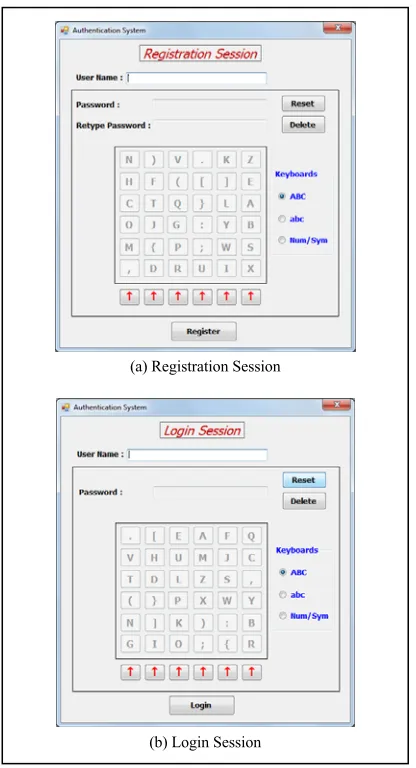
[image:5.612.90.298.278.662.2]The registration and login sessions of the proposed authentication technique are designed to be simple and as easy to use as possible by the user. And the two sessions look similar to each other. The screen shot of the registration and login sessions are depicted in figure 3. As can be seen in figure 3, the only difference between the two sessions is that in the registration session, the user should enter his password twice to confirm the password.
Figure. 3: Screen shot of: (a) Registration session (b) Login session
In both sessions, after the user writes his/her username, the user should enter the password
characters using the (66) square keyboard (2D
square matrix) that is displayed on the screen. The system provides the user with three types of keyboards on the right side of the screen and as shown in figure 4. The user can switch between these three keyboards easily by selecting the desired radio button. Each keyboard randomly
displays a set of non-repeated 36 characters:
ABC: consists of alphabet characters
(Uppercase) 'A'...'Z' and '.', ',', ';', ':', '(', ')', '{', '}', '[', ']'
abc: consists of alphabet characters
(Lowercase) 'a'...'z' and '.', ',', ';', ':', '(', ')', '{', '}', '[', ']'
Num/Sym: consists of decimal digits '1', '2', '3', '4', '5', '6', '7', '8', '9', '0' and '!', '@', '#', '$', '%', '^', '&', '*', '-', '+', '=', '/', '?', '~', '<', '>', '\"', '\'', '|', '_', '(', ')', '{', '}', '[', ']'
[image:5.612.313.516.362.682.2]The button "Reset" is used to delete all the password characters and enter a new password and the button "Delete" is used to delete only the last character typed in the password.
Figure 4: The three different keyboards used by the proposed authentication system.
(a) Registration Session
2551 It should be mentioned here that the size of the keyboard that is adopted by the proposed
technique (i.e., (66)) has been chosen to be
suitable enough for the users to locate the desired character on the keyboard quickly and simply. And
it can make larger or smaller than (66) according
to the desire. In the following paragraphs, we use a
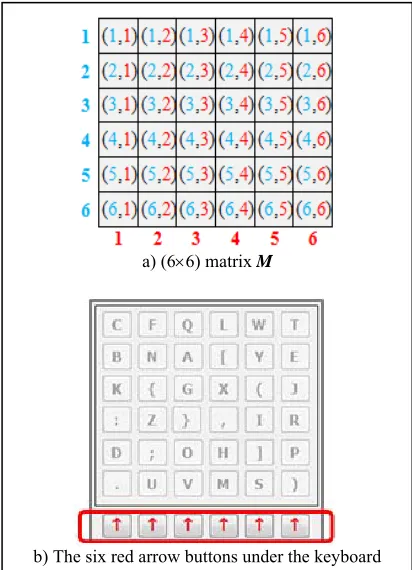
matrix M of (66) elements (see figure 5(a)) to
refer to the keyboards used by the proposed technique, each location contains a specific character from 36 characters mentioned above that
are used by the authentication system. Where M(x,
y) is an element of the matrix M at row x (in Blue
color) and column y (in Red color).
To enter the password characters, the user should use the six buttons (red arrow buttons) under the keyboard (see figure 5(b)); each button is related to one column of the keyboard. The user does not need to click on the characters themselves in the keyboard.
Figure 5: (66) matrix M that represents the keyboard
used by the proposed authentication system.
The proposed mechanism for entering any character in the password passes through the following steps:
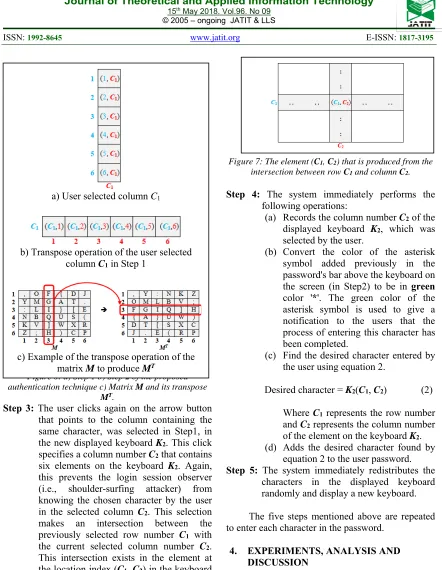
Step 1: The user clicks on the arrow button that point to the column containing the desired
character in the displayed keyboard K1.
This click specifies a column number C1
that contains six elements on the keyboard
K1. This prevents the login session
observer (i.e., shoulder-surfing attacker) from knowing the chosen character by the
user in the selected column C1 (See figure
6(a)).
Step 2: The system immediately performs the following operations:
(a) Records the column number C1 of the
displayed keyboard K1, which was
selected by the user.
(b) Adds an asterisk symbol '*' (in red
color) to the password in the password's bar above the keyboard on the screen. The red color of the asterisk symbol is used to give a notification to the users that the current character still needs another click to complete the process of entering this character.
(c) Performs a matrix transpose
operation on the current keyboard K1
to produce a new keyboard K2. The
transpose of the keyboard (matrix) is an operation that flips the keyboard over its diagonal. In other words, each row becomes a column and vice versa. This means that the selected
column number C1 by the user on the
keyboard K1 becomes refers to the
row number C1 in the new keyboard
K2 (See figure 6(b)).
The matrix transpose of a (66) square matrix
M is denoted as MT. The element at the location (x,
y) in the matrix M, where x represents the row
number of the element in the matrix M and y
represents the column number of the element in the
matrix M, become at the new location (y, x) in the
matrix transpose MT using the equation 1:
M(x, y) MT(y, x) (1)
An example of a matrix transpose operation is
performed on the matrix M to produce MT is shown
in figure 6(c). The programming code used to
perform the transpose operation on the keyboard K1
to produce a new keyboard K2 is:
1: forx=1,…, 6 do
2: for y=1,…, 6 do 3: K2(y, x) = K1(x, y);
4: end for 5: end for a) (66) matrix M
[image:6.612.91.297.333.618.2]2552
Figure 6: a) Step 1 b) Step 2 of the proposed authentication technique c) Matrix M and its transpose
MT.
Step 3: The user clicks again on the arrow button that points to the column containing the same character, was selected in Step1, in
the new displayed keyboard K2. This click
specifies a column number C2 that contains
six elements on the keyboard K2. Again,
this prevents the login session observer (i.e., shoulder-surfing attacker) from knowing the chosen character by the user
in the selected column C2. This selection
makes an intersection between the
previously selected row number C1 with
the current selected column number C2.
This intersection exists in the element at
the location index (C1, C2) in the keyboard
[image:7.612.87.529.41.611.2]K2 (See figure 7).
Figure 7: The element (C1, C2) that is produced from the
intersection between row C1 and column C2.
Step 4: The system immediately performs the following operations:
(a) Records the column number C2 of the
displayed keyboard K2, which was
selected by the user.
(b) Convert the color of the asterisk
symbol added previously in the password's bar above the keyboard on
the screen (in Step2) to be in green
color '*'. The green color of the
asterisk symbol is used to give a notification to the users that the process of entering this character has been completed.
(c) Find the desired character entered by
the user using equation 2.
Desired character = K2(C1, C2) (2)
Where C1 represents the row number
and C2 represents the column number
of the element on the keyboard K2.
(d) Adds the desired character found by
equation 2 to the user password. Step 5: The system immediately redistributes the
characters in the displayed keyboard randomly and display a new keyboard.
The five steps mentioned above are repeated to enter each character in the password.
4. EXPERIMENTS, ANALYSIS AND DISCUSSION
4.1 Experiments
For a deeper look at the mechanism proposed, an example to enter the fourth character of the
password (which is the character 'B' for example),
will be stated here. After the login session of the system started and the user enters the user name ("Omer" for example). The five steps listed above are implemented for each character, we assumed here that the user entered three characters of the password and now he wants to enter the fourth
a) User selected column C1
b) Transpose operation of the user selected
column C1 in Step 1
c) Example of the transpose operation of the
2553 character. Figure 8 shows the implementation the five steps.
4.2 Analysis and Discussion
As in many other security systems, the proposed authentication system needs to strike a
balance between security, usability, and ease
implementation and improvement of the work
procedures. While security is an important factor to achieve the immunity for the user accounts against attackers and increasing system reliability; the usability refers to another important factor affecting users' acceptance of the authentication system; at the same time ease of implementation and the improvement of work procedures play a key role in the successful adoption of the proposed authentication system in certain areas of information technology.
a) Security Issue
According to the design of the proposed
authentication system, a (66) keyboard displayed
[image:8.612.312.525.58.598.2]on the screen in the login session and use only the six arrow keys to select the desired column of the keyboard allows achieving a high level of security against shoulder surfing attack. Where the user does not need to press the character key on the keyboard to enter the desired character. This will not allow shoulder surfing attackers know the password characters. Thus, it becomes difficult to steal the password by the shoulder surfing attackers and gives a secure login session for users without having to worry about shoulder surfing attack.
Figure 8: Steps of entering the fourth character 'B' of the password in the login session.
From another security point of view, the total number of characters used by the proposed system
is 96 and has been classified into three
types/keyboards (ABC, abc, and Num/Sym). This means that the system uses sufficiently large
passwords space which is 96N, where N is the
number of password characters. Brute force attacks
need to perform 96 attempts per each character in
the password based on trial and error. But, we must (a) Step 1
(b) Step 2 and 3
2554 mention here that it can add more types of characters to the system and classify them into additional new categories [18]. Therefore, the number of possible combinations of choosing a
password of length N is calculated using equation
3:
C = 96N (3)
Where C is the total possible combinations
and L may be ranged from 6 (as a minimum) to 20
(as a maximum). Thus, when the user chooses a
password of length N=6, then the total choices
equal 967 and for password of length N=20, then
the total choices equal9620.
b) Usability Issue
In any new authentication system, the user satisfaction based mainly on the simplicity of using the system and speed of learning to deal with the system. Usually, the rejection of the system by users probably comes from the existence of many innovative changes between the current system and the new system. This is because that the user will need more time and effort to adapt to the new system.
c) Implementation Issue
One of the success points for the adoption of an authentication system is based on minimizing the time and cost of implementation of the authentication system in a certain computerized system. In addition, the authentication system should improve working procedures. We can summarize the advantages of implementing and the improvement in the work procedure when using the proposed authentication technique.
(1) The proposed keyboard used can be
implemented and used easily on various authentication systems that use a mouse or a touch screen (such as ATM, Smartphone, Tablet, and PC).
(2) The use of the proposed keyboard reduces the
cost and the time of designing, manufacturing and embedding the actual keypad/keyboard in some authentication systems such as ATM. Where the proposed authentication system used an alternative visual keyboard displayed on a touch screen.
(3) Time to complete registration and login
sessions is relatively short when compared with the current authentication techniques that use a graphical or compound password.
(4) It is easy to use any of the famous encryption
methods to protect the users' passwords and the database of passwords within the system.
5. CONCLUSIONS
The proposed authentication technique used a new suggested mechanism for entering the user password. This mechanism provides good immunity to the user password against the shoulder-surfing attack by excluding pressing any key refers explicitly to any one of the password characters on the (6x6) keyboard used. Moreover, the mechanism keeps the user use the same type of password that he/she preferred (i.e., textual password). The proposed technique has an ability to use a password of different length and contains different types of characters. This increases the difficulty of guessing the user password by attackers. All the above advantages and the ease of implementation of this technique makes this technique a good solution instead of the existing
traditional techniques used in different
authentication systems.
ACKNOWLEDGMENT
The authors are grateful to the Middle East University, Amman, Jordan for the financial support granted to cover the publication fee of this research article.
REFERENCES
[1] F. Schaub, R. Deyhle, and M. Weber,
"Password entry usability and shoulder
surfing susceptibility on different
smartphone platforms," in Proceedings of
the 11th international conference on mobile and ubiquitous multimedia, 2012, p. 13.
[2] T. Khodadadi, A. M. Islam, S. Baharun,
and S. Komaki, "Evaluation of
Recognition-Based Graphical Password Schemes in Terms of Usability and
Security Attributes," Int J Electr Comput
Eng, vol. 6, pp. 2939-2948, 2016.
[3] T. Kwon and J. Hong, "Analysis and
improvement of a pin-entry method resilient to shoulder-surfing and recording
attacks," IEEE Transactions on
Information Forensics and Security, vol. 10, pp. 278-292, 2015.
[4] X. Suo, Y. Zhu, and G. S. Owen,
2555 annual Computer security applications conference, , 2005.
[5] A. Narayanan and V. Shmatikov, "Fast
dictionary attacks on passwords using
time-space tradeoff," in Proceedings of the
12th ACM conference on Computer and communications security, 2005, pp. 364-372.
[6] D. Weinshall, "Cognitive authentication
schemes safe against spyware," in IEEE
Symposium on Security and Privacy 2006, pp. 1-6.
[7] A. L. C. Yeung, B. L. W. Wai, C. H. Fung,
F. Mughal, and V. Iranmanesh, "Graphical password: Shoulder-surfing resistant using
falsification," in 9th Malaysian Software
Engineering Conference (MySEC) 2015,
pp. 145-148.
[8] H.-M. Sun, S.-T. Chen, J.-H. Yeh, and
C.-Y. Cheng, "A shoulder surfing resistant
graphical authentication system," IEEE
Transactions on Dependable and Secure Computing, vol. PP, 2016.
[9] E. Von Zezschwitz, A. De Luca, and H.
Hussmann, "Honey, I shrunk the keys: influences of mobile devices on password
composition and authentication
performance," in Proceedings of the 8th
nordic conference on human-computer interaction: fun, fast, foundational, 2014, pp. 461-470.
[10] A. Bianchi, I. Oakley, and D. S. Kwon,
"The secure haptic keypad: a tactile
password system," in Proceedings of the
SIGCHI Conference on Human Factors in Computing Systems, 2010, pp. 1089-1092.
[11] Y. Kita, F. Sugai, M. Park, and N.
Okazaki, "Proposal and its evaluation of a
shoulder-surfing attack resistant
authentication method: Secret tap with
double shift," International Journal of
Cyber-Security and Digital Forensics (IJCSDF), vol. 2, pp. 48-55, 2013.
[12] R. G. Rittenhouse, J. A. Chaudry, and M.
Lee, "Security in graphical
authentication," International Journal of
Security and Its Applications, vol. 7, pp. 347-356, 2013.
[13] P. Waghmare, R. Longadge, and D.
Kapgate, "A Review on Shoulder Surfing Attack in Authentication Technique."
[14] N. Alomar, M. Alsaleh, and A. Alarifi,
"Someone in Your Contact List: Cued
Recall-Based Textual Passwords," IEEE
Transactions on Information Forensics and Security, 2017.
[15] B. Ur, P. G. Kelley, S. Komanduri, J. Lee,
M. Maass, M. L. Mazurek, et al., "How
does your password measure up? The effect of strength meters on password
creation," in USENIX Security Symposium,
2012, pp. 65-80.
[16] M. A. F. Al-Husainy and R. A. Malih,
"Using Emoji Pictures To Strengthen The
Immunity Of Passwords Against
Attackers," Eur Sci J, vol. 11, 2015.
[17] A. Bianchi, I. Oakley, V. Kostakos, and D.
S. Kwon, "The phone lock: audio and haptic shoulder-surfing resistant PIN entry
methods for mobile devices," in
Proceedings of the fifth international conference on Tangible, embedded, and embodied interaction, 2011, pp. 197-200.
[18] D. S. Devi, M. T. Selvi, T. Sowmiya, M.
Pavithra, and J. J. Emilyn, "Generating Session Password Using Text and Colorto
Prevent Shoulder Surfing," Procedia
Engineering, vol. 38, pp. 1309-1317, 2012.
[19] Z. Erlich and M. Zviran, "Authentication
Practices from Passwords to Biometrics,"
in Encyclopedia of Information Science
and Technology, Third Edition, ed: IGI Global, 2015, pp. 4248-4257.
[20] K. Rao and S. Yalamanchili, "Novel
shoulder-surfing resistant authentication schemes using text-graphical passwords," International Journal of Information and Network Security, vol. 1, p. 163, 2012.
[21] M.-K. Lee, "Security notions and
advanced method for human
shoulder-surfing resistant PIN-entry," IEEE
Transactions on Information Forensics and Security, vol. 9, pp. 695-708, 2014.
[22] S. Istyaq and L. Agrawal, "A New
Technique For User Authentication Using Numeric One Time Password Scheme," International Journal of Computer Sciences and Engineering, vol. 4, pp. 163-165, 2016.
[23] L. E. Nugroho, D. Adhipta, and N. K.
Ulya, "Shoulder Surfing Resistant Text Based Graphical Password Schemes Using Color," 2015.
[24] P. Vachaspati, A. Chakravarthy, and P.
Avadhani, "A Novel Soft Computing Authentication Scheme for Textual and
2556 Journal of Computer Applications, vol. 71, 2013.
[25] M. Kumar, T. Garfinkel, D. Boneh, and T.
Winograd, "Reducing shoulder-surfing by using gaze-based password entry," in Proceedings of the 3rd symposium on Usable privacy and security, 2007, pp. 13-19.
[26] M. A. S. Gokhale and V. S. Waghmare,
"The shoulder surfing resistant graphical
password authentication technique,"
Procedia Computer Science, vol. 79, pp. 490-498, 2016.
[27] R. Kaur and A. Kaur, "Multi-Factor
Graphical Password for Cloud Interface
Authentication Security," International
Journal of Computer Applications, vol.
125, 2015.
[28] R. Biddle, S. Chiasson, and P. C. Van
Oorschot, "Graphical passwords: Learning
from the first twelve years," ACM Comput