Access Manager™
Access
ManagerTM
Productivity Tool
Programmer's Guide
for the
CP/M®
Family
of Operating Systems
Copyr ight
©
1983
Digital Research
P.O. Box 579
160 Central Avenue
Pacific Grove, CA 93950
COPYRIGHT
Copyright
~1983 by Digital Research.
All rights
reserved.
No part of this publication may be
reproduced, transmitted, transcribed, stored in a
retrieval system, or translated into any language or
compu ter language, in any form or by any means,
electronic, mechanical, magnetic, optical, chemical,
manual or otherwise, without the prior written
permission of Digital Research, Post Office Box 579,
Pacific Grove, California, 93950.
This manual is, however, tutorial in nature. Thus,
the reader is granted permission to include the
example programs, either in whole or in part, in his
own programs.
DISCLAIMER
Digital Research makes no representations or
warranties with respect to the contents hereof and
specifically disclaims any implied warranties of
merchantabil i ty or fitness for any particular
purpose.
Further, Dig i tal Research reserves the
right to revise this publication and to make changes
from time to time-in the content hereof without
obligation of Digital Research to notify any person
of such revision or changes.
TRADEMARKS
CBASIC and CP/M are registered trademarks of Digital
Research.
Access
Manager,
CB80,
LK80,' MP/M,
MP/M II, RMAC,
PL/I-80, and Pascal/MT+ are
trademarks of Digital Research.
Foreword
This programmer's guide contains information and instructions
for implementing your application programs with Access Manager
N •It is specifically directed at implementations using the CP/M®
family of operating systems.
The Access Manager Programmer's Guide was designed and written
as the
co~panionmanual to the Access Manager Reference Manual.
Please note that there are two separate versions of the programmer's
guide, an 8080 and an 8086 version.
Table of Contents
1
Implementation Guide1ines
1.1 Main Access Manager Components
1.2 Memory Requirements for Access Manager Code •
1.3 Access Manager Design Constraints •
1.4 Multiuser Module under MP/M II
1.4.1
1.4.2
1.4.3
1.4.4
1.
4.5
Creating Access Manager Queues • • • • •
Invoking Shared Routines •
. • • • •
Cancelling Shared Routines
• • • • •
Creating Custom Background Servers
Data and Index Files
• • • •
1.5 Configuring the Single-user Buffer Area •
2
Using Access Manager with CB80 Applications
1-1
1-3
1-4
1-5
1-5
1-6
1-7
1-7
1-8
1-8
2.1 Linking Access Manager to Your Application Program
2-1
2.1.1
2.1.2
Linking Single-user CB80 Applications
Linking Multiuser CB80 Applications
2-1
2-1
2.2
External Declaration of Access Manager Routines
2-2
2.3
Coding Numeric Key Values • • • • • • •
2-2
2.4
Using the RECREATE.BAS Utility Program
2-2
2.5
CB80 Data File Example Listing
2-4
2.6
2.7
CB80 DATABASE Source Code • • • •
CB80 Source Code Data File Routines •
2.7.1
OPEN.DATA.FILE%(DATA.FILE$,FILE.NO%,RECORD
2-7
2-24
Table of Contents
(continued)
3.1.1 Linking Single-user PL/I-80 Applications
3-1
3.1.2 Linking Multiuser PL/I-80 Applications. • •
3-1
3.2 External Declaration of Access Manager Routines • •
3-2
3.3 Coding Numeric Key Values • • • • • • • • •
3.4 Using the RECREATE.PLI Utility Program
3.5 PL/I-80 Data File Example • •
3.6 PL/I-80 DATABASE Source Code
4
Using Access Manager with Pascal/MT+ Applications
3-3
3-4
3-5
3-9
4.1 Linking Access Manager to Your Application Program
4-1
4.1.1 Linking Single-user Pascal/MT+ Applications
4-1
4.1.2 Linking Multiuser Pascal/MT+ Applications
4-2
4.2 External Declaration of Access Manager Routines
4-2
4.3 Coding Numeric Key Values • • • • • • •
4-2
4.4
Using the RECREATE.SRC Utility Program
4-3
4.5
Pascal/MT+ Data File Example
4.6
Pascal/MT+ DATABASE Source Code •
4-5
Tables
1-1.
1-2.
1-3.
1-4.
2-1.
2-2.
3-1.
4-1.
Listings
2-1.
2-2.
3-1.
3-2.
4-1.
4-2.
Tables and Listings
Access Manager Code Requirements • •
CP/M and MP/M II Design Constraints • •
Queue Space Requirements. • • • • •
Suggested Index File Record Lengths • •
Example CBSO Recreate Parameter File. •
Data Record Field • • • • • • • • • • •
Example PL/I-SO Recreate Parameter File .
Example Pascal/MT+ Recreate Parameter File.
CBSO Data File Example. •
DATABASE. BAS Source Code • • •
PL/I':'SO Data File Example •
DAT~AlE.BAS
Source Code.
Pascal/MT+ Data File Example.
DATABASE.SRC
S~~rceCode • • •
1-4
1-5
1-6
l-S
2-3
2-25
3-5
4-4
2-4
2-S
Section 1
Implementation Guidelines
1.1 Main Access Manager Components
Your Access Manager distribution disk contains the following
files:
• Single-user subroutine libraries
AM80CB80.IRL
AM80PLI.IRL
AM80PASC.ERL
A complete, binary-reloca table, indexed
library of index and data file routines for
CB80 application programs.
A complete, binary-reloca table, indexed
library of index and data file routines for
PL/I-80 application programs.
A complete, binary-rel'ocatable library of
index and data file routines for Pascal/MT+
application programs.
• Single-user buffer modules
AM80BUF.IRL
AM80BUF.ERL
AM80BUF.ASM
A relocatable object module containing a
prespecified buffer area of 3,560 (decimal)
bytes for CB80 and PL/I-80 application
programs.
A relocatable object module containing a
prespecified buffer area of 3,560 (decimal)
bytes for Pascal/MT+ application programs.
Access Manager Programmer's Guide
1.1 Main Components
AM80EXTR.PSC
External procedure declarations for
Pascal/MT+ application programs.
• Multiuser application interfaces
AMQ8CB80.IRL
AMQ8PLI • IRL
AMQIPASC.ERL
Relocatable interface module to coordinate
compiled CB80 application programs and the
shared Access Manager routines (AM80.PRL).
Relocatable interface module to coordinate
compiled PL/I-80 application programs and
the shared Access Manager routines
(AM80.PRL).
Relocatable interface module to coordinate
compiled Pascal/MT+ application programs
and the shared Access Manager routines
(AM80.PRL) •
• Background server routines
AM80.PRL
STOPAM80.PRL
AM80x.RSP
A page relocatable progiam containing all
multiuser routines.
AM80.PRL runs in its
own memory segment as a shared, background
server.
A page relocatable utility program that
closes all open index and data files,
terminates AM80.PRL, and releases its
memory segment.
Resident System Processes to include in the
MP/M™operating system at system generation
time (when GENSYS is run).
It sets up the
interprocess queues for a mul tiuser system.
For example, AM803.RSP reserves queues for
up to three users.
• Background server customization routines
Access Manager Programmer's Guide
1.1 Main Components
AM80B.IRL
Contains the Access Manager routines for a
multiuser environment •
• Host language data file routines
CDATA.BAS
• utility programs
RECREATE
DATABASE
These routines are similar to the data file
functions described in Section 3 of your
Reference Manual, except they are written
in CB80 source code.
(See Section 2, of
the CBASIC Compiler
(CB80)
Language
Programming Guide.)
A general purpose program for rebuilding
index and data files.
Source versions of
the program are provided in CB80, PL/I-80,
and Pascal/MT+.
Section 5 of your
Reference Manual contains a complete
description of the RECREATE utility
program.
A complete data base example for single-user
or multiuser environments. Source code is
provided in CB80, PL/I-80, and Pascal/MT+.
1.2 Memory Requirements for Access Manager Code
[SINGLE)
The Access Manager modular design ensures that your
application program uses only those parts of Access Manager that are
actually required.
The calls to Access Manager embedded in the
application program determine which modules the linking loader
brings into the final file.
[MULTI)
Only a small interface module combines wi th your
application program.
The actual Access Manager code resides in a
separate memory segment.
Access Manager Programmer's Guide
1.2 Memory Requirements
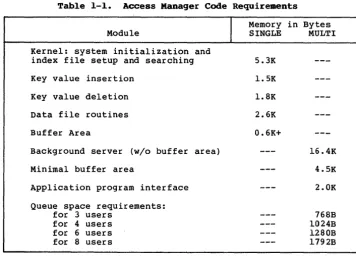
Table 1-1. Access Manager Code Requirements
Module
Kernel: system initialization and
index file setup and searching
Key value insertion
Key value deletion
Data file routines
Buffer Area
Background server
(w/o
buffer area)
Minimal buffer area
Application program interface
Queue space requirements:
for 3 users
for 4 users
for 6 users
for 8 users
1.3 Access Manager Design Constraints
I
Memory in
SINGLE
5.3K
1.5K
1.8K
2.6K
0.6K+
Bytes
MULTI
l6.4K
4.5K
2.0K
768B
1024B
l280B
l792B
When using Access Manager, the following design constraints
apply in both single-user and multiuser environments:
• Data records in a data file must all be the same length.
• Data records must be a minimum of four bytes in length.
• Access Manager reserves the first 128 bytes of every data file
for recording status information.
• Key values must not exceed a length of 48 bytes.
[image:13.473.43.400.59.320.2]Access Manager Programmer's Guide
1.3 Design Constraints
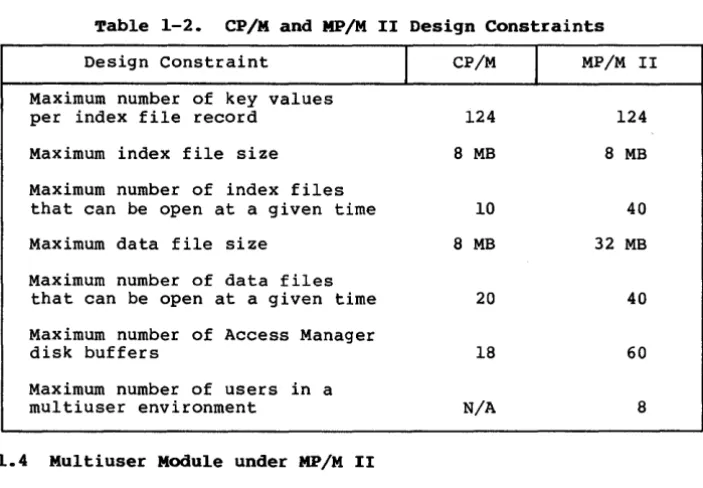
If your application program runs under CP/M or MP/M IITM ,
observe the design constraints shown in Table 1-2.
In the table
megabyte is abbreviated as MB.
Table 1-2. CP/M and MP/M II Design Constraints
Design Constraint
Maximum number of key values
per index file record
Maximum index file size
Maximum number of index files
that can be open at a given time
Maximum data file size
Maximum number of data files
that can be open at a given time
Maximum number of Access Manager
disk buffers
Maximum number of users in a
multiuser environment
1.4 Multiuser Module under MP/M II
I
CP/M
124
8 MB
10
8 MB
20
18
N/A
I
MP/M II
124
8 MB
40
32 MB
40
60
8
Correct implementation of Access Manager under MP/M II requires
proper use of the following components:
AM80x.RSP
AM80.PRL
creates the Access Manager queues.
contains the shared index file, data file, and
buffer area.
[image:14.471.70.422.107.351.2]Access Manager Programmer's Guide
1.4 Multiuser Module
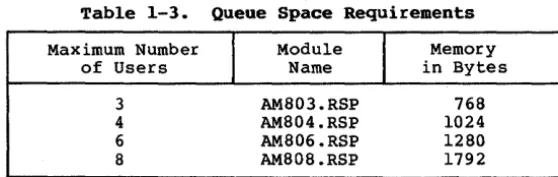
Table 1-3. Queue Space Requirements
Maximum Number
I
Module
I
Memory
of Users
Name
in Bytes
3
AM803.RSP
768
4
AM804.RSP
1024
6
AM806.RSP
1280
8
AM808.RSP
1792
For a given. number of users, the task of reserving queue space
need only be performed once during MP/M system generation. The MP/M
utili ty program GENSYS • COM automatically prompts you to determine if
a Resident System Process (any file wi th a .RSP extension) should be
included in the operating system. To set up a three-user system for
Access Manager, respond with Y, for Yes, when GENSYS prompts you
about AM803.RSP.
Respond with N, for No, when prompted about the
other AM80x.RSP files. GENSYS prompts you about an RSP file only if
such a file is on the GENSYS disk.
After you complete the GENSYS procedure, a new MP/M system is
written to a disk file (MPM.SYS).
The next time you boot the
system, the new version of MP/M resides on disk.
If there in not enough common memory for the Access Manager
queue space and any other optional components of your operating
system, GENSYS tells you and requests a retry.
1.4.2 Invoking Shared Routines
AM80.PRL contains the shared Access Manager code designed to
run in its own memory segment under MP/M.
As distributed, it
requires less than 32K bytes of memory (although the AM80.PRL file
is somewhat larger because it contains a byte relocation map),
supports up to forty index files and forty data files, and uses
twenty buffers with a node size of 512 bytes (NNSEC%=4).
Instructions for changing this configuration can be found under
"Creating Custom Background Servers" in Section 1.4.4.
To start AM80.PRL under MP/M, type
AM80
[image:15.474.86.365.55.143.2]Access Manager Programmer's Guide
1.4 Multiuser Module
Access Manager then detaches from the console and AM80.PRL is
waiting in the background to service multiuser application programs.
If Access Manager encounters a problem at start-up, one of the
following messages appear on the console:
Access Manager could not open queues. Has an Access Manager
RSP been included at GENSYS?
Access Manager Background Server (AM80. PRL) has illegal
SETUP parameters.
Check AM80MBUF.ASM for proper setup.
Access Manager could not open lock file.
and/or directory full?
Are the disk
Access Manager could not initialize lock file.
Digital Research.
Call
1.4.3 Cancelling Shared Routines
To close all open index and data files and free the memory
segment occupied by AM80.PRL, type the command:
STOPAM80
If successful, the following message appears on the console:
Access Manager (tm) Terminated
If AM80.PRL is not running when you attempt to start STOPAM80,
this message appears on the console:
Be sure that Access Manager is operational. Run MPMSTAT to
see.
1.4.4 Creating Custom Background Servers
Access Manager Programmer's Guide
1.4 Multiuser Module
Once you enter the appropriate values for the preceding
parameters, you must change the amount of storage reserved by
AM80MBUF.
The storage is reserved with a DS statement. The amount
of storage required is given by this expression:
2504
+
(NBUFS% * «12S * NNSEC%)
+
52»
After AMSOMBUF.ASM is assembled, you can create a new AMSO.PRL with
the following command line:
LINK AMSO=AMSOSERV[A,OP] ,AMSOMBUF,AMSOB.IRL[S]
1.4.5
Data and Index Files
When Access Manager runs in a multiuser environment, index and
data files are opened in the locked mode. This places total control
of these files under AMSO.PRL.
Further, the files are in the
directory of the MP/M user area from which AMSO.PRL is started. In
most environments, AMSO.PRL is started from user area zero.
1.5
Configuring the Single-user Buffer Area
The primarr parameters affecting the buffer area size are
NNSEC% (the number of sectors per index file record) and NBUFS% (the
number of index file buffers).
NNSEC% should be set to four if
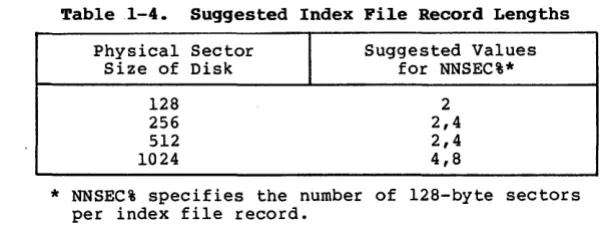
compatibility of your application program with other software is a
factor. However, if response time is a more critical issue, refer
to Table 1-4 for suggested NNSEC% values.
Note that NNSEC% determines the length of the records in the
index file.
For example, if NNSEC% is four, the resulting index
file record length is 512 bytes, regardless of the physical sector
size of the disk.
Table
1-4.
Suggested Index File Record Lengths
Physical Sector
Size of Disk
l2S
256
512
I
Suggested Values
for NNSEC%*
2
[image:17.469.66.367.389.503.2]Access Manager Programmer's Guide
1.5 Single-user Buffer Area
For any specified value of NNSEC%, the more buffers (larger
NBUFS%) there are, the fewer node accesses you need to retrieve a
key value. However, when processing one index file at a time, the
payoff from adding buffers diminishes rapidly when five or six
buffers are already in use.
If more than one index file is in use
at a time, increase the number of buffers beyond six.
Provided
memory space is available, three buffers per index file (in active
use at one time) is a reasonable guideline.
Buffers are not
assigned to individual index files. They are shared according to a
least-recently-used priority scheme, which ensures the active index
files make full use of the buffers.
The amount of available memory determines the size of the
buffer area. If there is very little memory available for buffers,
you can reduce NBUFS% to the minimum level of three.
The required buffer size for any given specification of the
maximum number of index files (NKEYS%), the node size (NNSEC%), the
number of buffers (NBUFS%), and the number of data files (NDATF%),
can be calculated like this:
«NKEYS%
+
NDATF%)
*
44)
+
(NBUFS%
*
«NNSEC%
*
128)
+
52»
For example, if NKEYS%=3, NBUFS%=6, NDATF%=l, and NNSEC%=4, a
buffer size of 3,560 (decimal) bytes is required. Once this buffer
space is reserved, any combination of the four determining
parameters that stays within 3,560 bytes can be passed to the SETUP
routine, which sets up the way the buffer area is used.
If you have the RMACTM assembler, which generates relocatable
object files (REL files), you can change AM80BUF.ASM, then
reassemble it to create a new AM80BUF.REL.
Or, you can run the
program SETAMBUF .COM, which is on your distr ibution disk. Just make
sure AM80BUF.IRL and AM80BUF.ERL are on the same disk as
SETAMBUF.COM.
SETAMBUF modifies the buffer modules according to
your specifications.
Section 2
Using Access Manager
with CBASIC Compiler (CBSO) Applications
This section contains instructions for implementing Access
Manager with application programs coded in CB80.
There are two examples provided in this section.
The first
shows the use of many Access Manager functions described in Section
3 of your Reference Manual, and how to use CB80 strings for data
file buffer areas.
The second example, DATABASE.BAS, illustrates
the use of multiple index and data files.
2.1 Linking Access Manager to Your Application Program
This section discusses a CB80 application program call MYPROG
that you write and compile to produce a binary relocatable file.
2.1.1 Linking Single-user CB80 Applications
You must link your compiled application program to the
appropriate Access Manager subroutine library and index file buffer
module.
The following command line can be used to create an
executable version of MYPROG:
LK80 MYPROG,AM80CB80.IRL,AM80BUF.IRL
AM80BUF contains the buffer area beginning with entry point AM8FCB
and ending with AM8END.
Because AM80CB80 and AM80BUF are indexed, relocatable
librar ies, LK80
™
places them in the root module in case CB80
overlay structures are used.
Before linking, be sure AM80BUF is
large enough to contain your buffers (as specified in the SETUP
function). You can use SETAMBUF to create a correctly sized buffer
module.
Access Manager Programmer's Guide
2.1 Linking CB80 Applications
To create a COM file that calls the Access Manager background
server, use the following command line:
LK80 MYPROG,AMQ8CB80.IRL
To create a PRL file that calls the Access Manager background
server, use LINK.COM (which comes with MP/M II) as follows:
LINK MYPROG[OP,A],AMQ8CB80.IRL
Note that if you use LINK.COM, your application program cannot
use the CB80 overlay facility.
No buffer area module (such as AM80BUF) is permitted in the
multiuser link statement.
Whereas AM80CB80 contains the actual
Access Manager code, AMQ8CB80 simply contains the message handler
necessary to get the shared Access Manager code (contained in
AM80.PRL) to perform the necessary actions.
2.2 External Dec1aration of Access Manager Routines
CB80 requires that external routines (those not coded in the
program module but referenced by it) be explicitly declared.
The
file AM80EXTR.BAS contains the external function declarations for
the entire set of Access Manager functions.
Use the %INCLUDE
feature of CB80 to make these external declarations a part of your
application program.
2.3 Coding Numeric Key Values
Refer to the discussion of "Coding Numeric Key Values" under
the ADDKEY function descr iption in Section 3 of your Reference
Manual.
2.4 Using the RECREATE.BAS Uti1ity Program
RECREATE.BAS contains the CB80 source code for the RECREATE
utili ty program. You can change the source code in whatever way you
want.
Access Manager Programmer's Guide
2.4
RECREATE.BAS Utility
Note that only one data file and one index file are open at the same
time RECREATE is running.
Use SETAMBUF to configure AM80BUF.IRL.
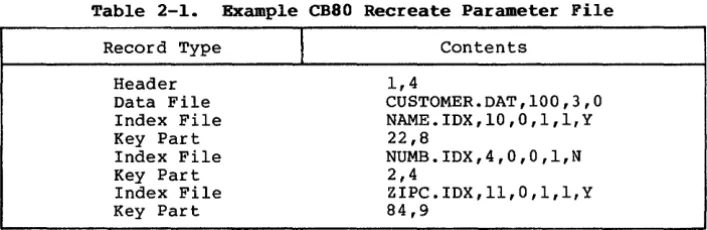
Table 2-1 shows the layout and content of records in a Recreate
Par ameter File.
This particular example file can be used to
reconstruct DATABASE.BAS (see Listing 2-2).
Table 2-1.
Example CB80 Recreate Parameter File
Record Type
Header
Data File
Index File
Key Part
Index File
Key Part
Index File
Key Part
I
Contents
1,4
CUSTOMER.DAT,lOO,3,O
NAME.IDX,lO,O,l,l,Y
22,8
NUMB.IDX,4,O,O,1,N
2,4
ZIPC.IDX,ll,O,l,l,Y
84,9
If you want to change the capacity of the RECREATE program, and
hence its memory requirements, note the following parameters and
associated DIMension statements:
• MAX.NO.KEYS% and MAX.NO.KEY.PARTS% specify the maximum number
of index files associated with a data file and the maximum
number of fields comprising a key value, respectively.
If the
value for either of these parameters is increased in
RECREATE. BAS,
the following dimension statements must be
modified to reflect the changes:
DIM INDEX.NAME$( •••
DIM AUTO.SUFFIX%( •••
• MAX. SORT% determines the maximum number of key values that will
be buffered by RECREATE.BAS before being sorted and added to
the index file being recreated. If MAX.SORT% is increased, the
following dimension statement must be changed.
[image:21.471.68.422.143.258.2]Access Manager Programmer's Guide
2.5 CB80 Data File Listing
2.5 CB80 Data File Example Listing
In the f'ollowing listing the CB80 SADD function determines the
value of the buffer pointer (Access Manager parameter BUFFER%) for
the READAT and WRTDAT routines. The result of SADD is increased by
two because each string variable in CB80 has a two-byte header
containing the length of the string.
When Access Manager fills in the input buffer INP • BUFFERS
dur ing the READAT function, the two-byte length header is not
affected. Therefore, you can use one such string input buffer for
all the data files if it is long enough to accommodate the longest
record length.
However, the output buffer OUT.BUFFER$ is constantly adjusted
because it is reconstructed for each WRTDAT function. Therefore, it
is not advisable to use the input buffer for output.
Reserve the
input buffer for input only; create the output buffer strings as
needed.
REM
---REM ~80 External Declarations
REM
---%INCLUDE AMSOEXTR.BAS
REM
---REM Exception Processing RoutinesREM
---DEF ERRQR.HANDLER(LOCALB) INTEGER LOCALE
PRINT "ERROR at· ";LOCALE;" with code ";ERRCOD STOP
FEND
DEF LOCK.CONFLICT(LOCALE) INTEGER LOCALE
PRINT "LOCK Conflict at ";LOCALE;" with code ";LOKCOD FEND
Access Manager Programmer's Guide
2.5
CB80 Data File Listing
REM ---REM Lock Parameter Setup
REM
---N.LOCK% 0 REM No lock request S.LOCK% 1 REM Shared record lock X.LOCK% 2 REM Exclusive record lock S.FILE% 3 REM Shared file lock X.FILE% 4 REM Exclusive file lock
REM ---REM System Initialization Parameters
REM
---3 buffers 1 index file NBUF%
=
3NKEYS%
= 1
NNSEC%= 4
NDATF%= 1
ERROPT% 1 PROGID% -1 TIMOUT%=
3REM REM REM REM REM REM REM
512-byte index file record length 1 data file
Trap user errors
Program ID assigned to MP/M console no. Background server time-out delay
REM ---REM Initialize System
REM
---PROGID%
=
INTUSR(PROGID%,ERROPT%,TIMOUT%) IF ERRCOD <> 0 THEN \CALL ERROR. HANDLER (1)
IF SETUP(NBUF%,NKEYS%,NNSEC%,NDATF%) <> 0 THEN \ CALL ERROR.HANDLER(2)
REM ---REM Open Files
REM
---FILE.NO%
= -1
REM Automatic file number assignment RECORD.LEN%= 32
FILE.NAME$ = "K:PART.DAT"
FILE.NO%
= OPNDAT(FILE.NO%,S.FILE%,FILE.NAME$,RECORD.LEN%)
IF ERRCOD <> 0 THEN \CALL ERROR. HANDLER (3) IF LOKCOD <> 0 THEN \
CALL LOCK.CONFLICT(3)
REM ---REM Create input buffer area and buffer pointer. The buffer REM pointer
=
SADD + 2 because SADD points to the two-byte REM length header which precedes the actual string. REM---REM INP. BUFFER$ BUFFER.PTR%
1 2 3
"12345678901234567890123456789012" SADD(INP.BUFFER$) + 2
Access Manager Programmer's Guide
2.5
CB80 Data File Listing
REM ---REM Set exclusive lock on data record no. 65686
REM
---DRN2% = 1
CALL SETDAT(DRN2%) REM Set high-order bytes to 1 REM which implies a base of 65536. DRN% = 150 REM 65686 65536 + 150
IF SETLOK(FILE.NO%,X.LOCK%,DRN%) <> 0 THEN \ CALL LOCK.CONFLICT(4)
REM ---REM Read data record
REM
---CALL SETDAT(DRN2%)
IF READAT(FILE.NO%,DRN%,BUFFER.PTR%) <> 0 THEN \ CALL ERROR. HANDLER (4)
REM ---REM Parse buffer into working variables
REM
---PART.NO$
= LEFT$(INP.BUFFER$,4)
PART.NAME$ = MID$(INP.BUFFER$,5,20) PART.QUAN= VAL(RIGHT$(INP.BUFFER$,8»
REM ---REM Update data record
REM
---PART.QUAN
= PART.QUAN -
100.REM ---REM Create output buffer
REM
---OUT.BUFFER$
=
PART.NO$ + PART.NAME$ + \LEFT$(STR$(PART.QUAN),8) BUFFER.PTR% = SADD(OUT.BUFFER$) + 2
REM ---REM Write updated record
REM
---CALL SETDAT(DRN2%)
IF WRTDAT(FILE.NO%,DRN%,BUFFER.PTR%) <> 0 THEN \ CALL ERROR.HANDLER(5)
REM ---REM Release record lock
REM
---CALL SETDAT(DRN2%)
IF FRELOK(FILE.NO%,X.LOCK%,DRN%) <> 0 THEN \ CALL LOCK.CONFLICT(6)
Access Manager Programmer's Guide
2.5 CB80 Data File Listing
REM ---REM Close data file and release file lock
REM
---IF CLSDAT(FILE.NO%) <> 0 THEN \ CALL ERROR.HANDLER(7)
IF FRELOK(FILE.NO%,S.FILE%,O) <> 0 THEN \ CALL LOCK.CONFLICT(7)
STOP
Listing 2-1.
(continued)
2.6
CB80 DATABASE Source Code
Your Access Manager distribution disk contains sample code for
building and maintaining a data base in CB80. The code is designed
so you can add or substitute your own key attributes as required.
The sample code is on your distribution disk in a file named
DATABASE.BAS.
DATABASE.BAS demonstrates the integration of Access Manager
with CB80 applications. It builds a name and address data base and
provides facilities
~orexamining, updating, and/or listing the
information contained therein. You might also want to use routines
from DATABASE.BAS directly in your application programs.
[SINGLE]
To create DATABASE.COM, compile DATABASE.BAS with
CB80.COM and link as follows:
LK80 DATABASE,AM80CB80.IRL,AM80BUF.IRL
[MUL'!'I]
In the multiuser environment, your link statement
should be entered as follows:
Access Manager
Programmer's Guide
2.6
CB80 DATABASE Code
Note that Listing 2-2 of DATABASE.BAS might not include recent
changes. You should always treat the copy on your distr ibutiondisk
as the definitive version.
REM
REM REM
REM REM REM REM REM
REM
REM REM
REM
::::::::::::::::::::::::::::::::::::::::::::::::::::::::::::::
DATABASE EXAMPLE VERSION 1.05 4/17/82 1411
::::::::::::::::::::::::::::::::::::::::::::::::::::::::::::::
INTERFACE TO AM80(tm)
AM80EXTR.BAS CONTAINS THE EXTERNAL DEFINITIONS OF THE AM80 ROUTINES
%INCLUDE AM80EXTR.BAS
REM
REM : : : : : : : : : : : : : : : : : : : : : : : : : : : : : : : : : : : : : : : : : : : : : : : : : : : : : : : : : : : : : : REM
REM SET-UP DATABASE FIELD & KEY DESCRIPTORS REM
REM ::::::: :::::::::: :::: ::::: : : : : : : : : : : : : : : : : : : : : : : : : : :::::::: ::: DIM FLD.NAME$(7),FLD.LEN%(7),NEW.FLD$(7),OLD.FLD$(7)
DIM FLD.PTR% (7)
MAX.FIELD%
= 7:NO.FIELDS%
= MAX.FIELD%
+ 1 YES%=
1 : NO%=
0Access Manager Programmer's Guide
2.6
CB80 DATABASE Code
FLD.NAME$(O) "Customer Number" : FLO. LEN % (0) 4 FLD.NAME$(l) "First Name" :FLD.LEN%(l) 16 FLO. NAME $ (2) "Last Name" :FLD.LEN% (2) 20 FLD.NAME$(3) "Street Address" :FLD.LEN%(3) 20 FLO. NAME $ (4) "City" :FLD.LEN%(4) 20 FLO. NAME $ (5) "State" :FLD.LEN%(5) 2 FLO. NAME $ (6) "Zipcode" :FLD.LEN%(6) 9
FLO.NAME$(7) "customer Status" :FLD.LEN%(7) 8
DIM KEY.NAME$(2),KEY.LEN%(2),KEY.MAP%(2),KEY.TYPE%(2),KEY.NUM%(2),KEY.DUP%(2) MAX.KEY% = 2
KEY.LEN%(0)=10:KEY.TYPE%(0)=0:KEY.MAP%(O)=2 REM KEY.LEN%(1)=11:KEY.TYPE%(1)=0:KEY.MAP%(1)=6 REM KEY.LEN%(2)=4 :KEY.TYPE%(2)=0:KEY.MAP%(2)=O REM
UNIQ.KEY% = 2 REM USED IN TEST OF UNIQUENESS
FOR KEY%
=
0 TO MAX.KEY%IF KEY%
=
UNIQ.KEY% THEN \ KEY.DUP%(KEY%)=
NO% \ ELSE \KEY • DU·P% (KEY%) = YES%
KEY. NAME $ (KEY%)
=
FLD.NAME$(KEY.MAP%(KEY%» NEXT KEY%DIM INDEX.NAME$(2)
INDEX. NAME $ (0) "NAME. lOX" INDEX.NAME$(l) = "ZIPC.IDX" INDEX.NAME$(2) = "NUMB.IDX"
NLOCK% 0 REM IGNORE LOCKS SLOCK% 1 REM SHARED RECORD LOCK XLOCK% 2 REM EXCLUSIVE RECORD LOCK SFILE% 3 REM SHARED FILE LOCK XFILE% 4 REM EXCLUSIVE FILE LOCK RLOCK% 5 REM RELEASE SLOCK% OR XLOCK%
REM
KEY 0 KEY 1 KEY 2
LAST NAME ZIPCODE CUST NUMBER
REM +++++++++++++++++++++++++++++++++++++++++++++++++++++++++++++ REM
REM BEGINNING OF UTILITY FUNCTIONS REM
REM
REM :::: :::::::::: :::: ::::: :::: ::::: ::::: ::::::::::: ::::: I : : : : : : :
REM
REM CLEAR SCREEN ROUTINE REM
REM ::::::::::::::::::::::::: :.::::::::::: ::::::::::::::::::::::::
DEF CLEAR.SCREEN%
FOR DUMMY% = 1 TO 24 PRINT NEXT DUMMY%
Access Manager Programmer's Guide
2.6
CB80 DATABASE Code
RETURN FEND
REM : : : : : : : : : : : : : : : : : : : : : : : : : : : : : : : : : : : : : : : : : : : : : : : : : : : : : : : : : : : : : REM
REM MAIN MENU ROUTINE REM
REM : : : : : : : : : : : : : : : : : : : : : : : : : : : : : : : : : : : : : : : : : : : : : : : : : : : : : : : : : : : : :
DEF MAIN.MENU%
PRINT TAB(2l);" AM80(tm) DEMONSTRATION" :PRINT PRINT TAB(20);"Customer Database Operations" PRINT TAB(20);" Terminal ";TERMINAL%
PRINT TAB(20);"****************************":PRINT :PRINT PRINT TAB(5);"10 Enter New Customers"
PRINT TAB(5);"2. Scan/Update/Delete Customer Records" PRINT TAB(5);"3. List CustoJ1ler Records"
PRINT TAB(5);"4. Database Statistics"
PRINT TAB(5) ;"5. Save All Files & Restart Operations" PRINT TAB(5);"6. Terminate Operations":PRINT :PRINT 1000 INPUT "Enter desired operation number»";OP%
IF OP%<l OR OP%>6 THEN PRINT :PRINT :GOTO 1000 MAIN.MENU%
=
oPtRETURN FEND
REM : : : : : : : : : : : : : : : : : : : : : : : : : : : : : : : : : : : : : : : : : : : : : : : : : : : : : : : : : : : : : REM
REM SELECT SEARCH KEY ROUTINE REM
REM : : : : : : : : : : : : : : : : : : : : : : : : : : : : : : : : : : : : : : : : : : : : : : : : : : : : : : : : : : : : :
DEF SEARCH.KEY%
DUMMY%
=
CLEAR.SCREEN%PRINT TAB(25);"Customer Database Search Keys":PRINT :PRINT FOR KEY%'= 0 TO MAX.KEY%
KEY.NO% = KEY% + 1
PRINT_TAB(5);KEY.NO%;"- ";KEY.NAME$(KEY%) NEXT KEY%
1040 PRINT :PRINT
FEND
INPUT "Enter desired key number»";OP% IF OP%<l OR OP%>NO.KEYS% THEN 1040 SEARCH.KEY% = OP%-l
RETURN
REM : : : : : : : : : : : : : : : : : : : : : : : : : : : : : : : : : : : : : : : : : : : : : : : : : : : : : : : : : : : : : : REM
REM ERROR HANDLING REM
REM : : : : : : : : : : : : : : : : : : : : : : : : : : : : : : : : : : : : : : : : : : : : : : : : : : : : : : : : : : : : : :
DEF ERROR.TYPE%(TYPE%) PRINT
Access Manager Programmer's Guide
2.6
CB80 DATABASE Code
"User 9210 9230 9250 9290 930Q 9320 9330 9340 9350 9360 9370 9380 9390 9400 9410 9420 9500 9600 9700 FENDError '"IERRCODI" occurred while trying to "I ON TYPE% GOTO 9210,9230,9250,9290,9300,9320,9330, \
9340,9350,9360,9370,9380,9390,9400,9410,9420 PRINT "open "IINDEX.NAME$(KEY%) GOTO 9700
PRINT "search "IKEY.NAME$(KEY%)I" Index File" : GOTO 9500 PRINT "save ",INDEX.NAME$(KEY%1 GOTO 9600
PRINT "remove old key from "lINDEX.NAME$(KEY%) : GOTO 9500 PRINT "enter key into ";INDEX.NAME$(KEY%) :GOTO 9500 PRINT "delete key from ",INDEX.NAME$(KEY%) :GOTO 9?00 PRINT "save" ,FILE·.NAME$ :KEY% = -l:GOTO 9600
PRINT "get a new data record";" (",FILE.NO%;")" :GOTO 9700 PRINT "delete data record '"iDRN% :GOTO 9700
PRINT "open "iFILE.NAME$," (",FILE.NO%i")" :GOTO 9700 PRINT "read data record t",DRN%:GOTO 9700
PRINT "write data record.":GOTO 9700
PRINT "release shared file lock on "iFILE.NAME$:GOTO 9700 PRINT "initialize user.": STOP
PRINT "close "iFILE.NAME$ :KEY% = -l:GOTO 9600 PRINT "close ",INDEX.NAME$(KEY%) : GOTO 9600 CALL CLSDAT(FILE.NO%)
FOR T.KEY% = 0 TO MAX.KEY%
IF T.KEY% <> KEY% THEN CALL CLSIDX(KEY.NUM%(T.KEY%» NEXT T.KEYi
GOTO 9700 REM STOP ERROR MESSAGE T.KEY%
= KEY%
+ 1IF T.KEY%>MAX.KEY% THEN STOP FOR KEY%
=
T.KEY% TO MAX.KEY%CALL CLSIDX(KEY.NUM%(KEY%» NEXT KEY%
PRINT "DEMONSTRATION TERMINATING WITH ERROR CODE t"iERRCOD STOP
DEF LOCK.TYPE%(TYPE%)
FEND
PRINT "Lock Type: "iTYPE%i" Lock Code:",LOKCOD CALL CLSDAT(FILE.NO%)
FOR T.KEY%
= 0 TO MAX.KEY%
CALL CLSIDX(KEY.NUM%(T.KEY%» NEXT T.KEY%
STOP
REM : : : : : : : : : : : : : : : : : : : : : : : : : : : : : : : : : : : : : : : : : : : : : : : : : : : : : : : : : : : : : REM
REM STRIP TRAILING BLANKS REM
REM : : : : : : : : : : : : : : : : : : : : : : : : : : : : : : : : : : : : : : : : : : : : : : : : : : : : : : : : : : : : :
DEF STRIP.BLANKS$(OLD.VAL$,FLD%)
FOR TEST%
= FLD.LEN%(FLD%) TO
1 STEP -1IF MID$(OLD.VAL$,TEST%,l) <> " " THEN \
STRIP.BLANKS$
= LEFT$(OLD.VAL$,TEST%) : \
RETURNNEXT TEST% STRIP.BLANKS$
Access Manager Programmer's Guide
2.6 CB80 DATABASE Code
RETURN FEND
REM : : : : : : : : : : : : : : : : : : : : : : : : : : : : : : : : : : : : : : : : : : : : : : : : : : : : : : : : : : : : :
REM
REM READ DATA RECORD ROUTINE
REM
REM : : : : : : : : : : : : : : : : : : : : : : : : : : : : : : : : : : : : : : : : : : : : : : : : : : . : : : : : : : : : : :
DEF READ.CUST%(DRN%)
FEND
IF READAT(FILE.NO%,DRN%,INPBUF.PTR%) <> 0 THEN \ DUMMY% = ERROR.TYPE%(ll)
OFFSET%
=
2 REM SKIP DELETE FLAG FIELD FOR D.FLD%=
0 TO MAX.FIELD%OLD.FLD.VAL$
=
MID$(INPBUF$,OFFSET%,FLD.LEN%(D.FLD%» OLD.FLD$(D.FLD%)= \
STRIP.BLANKS$(OLD.FLD.VAL$,D.FLD%) OFFSET%
= OFFSET%
+ FLD.LEN%(D.FLD%) NEXT D.FLD%RETURN
REM :::: :::::::::::::::: :::::: ::::::::::::::::::::::::::::::::::: REM
REM LIST CUSTOMER RECORD ROUTINE REM
REM I : : I : : : : : : : : : : : : : : : : : : : : : : : : : : : : : : : : : : : : : : : : : : : : : : : : : : : : : : : : :
DEF PRINT.CUST%
FEND
IF ROUTE$
=
"y" THEN \ LPRINTER PRINTPRINT TAB(5);OLD.FLD$(O);TAB(15);OLD.FLD$(7) PRINT, TAB(25);OLD.FLD$(1);" ";OLD.FLD$(2) PRINT TAB(25);OLD.FLD$(3)
PRINT TAB(25);OLD.FLD$(4);", ";OLD.FLD$(5);" PRINT
CONSOLE RETURN
";OLD.FLD$(6)
REM : : : : : : : : : : : : : : : : : : : : : : : : : : : : : : : : : : : : : : : : : : : : : : : : : : : : : : : : : : : : : REM
REM PAUSE ROUTINE
REM
REM :::: I : : : : : : : : : : : : : : I : : : : : : : : : : : : : : : : : : : : : : : : : : I : : I : : : : : : : : : : :
DEF PAUSE% PRINT
INPUT "Press 'RETURN' to continue ---";LINE PAUSE$ RETURN
FEND
REM : :::: ::::: ::: I : : : I:: I : : : : : : : : I : : : : : : : : : : : : : : : : : : : I : : : : I : : : : : :
Access Manager Programmer's Guide
2.6
CB80 DATABASE Code
REM CONVERT TARGET VALUE TO KEY FORMAT ROUTINE REM
REM I : : : : : : : : : : : : : : : : : : : I : : I : : : : : : : : : : : : : : : : : : : : : : : : I : : : : : : : : : : : :
DEF KEY.FORMAT$(KEY%,TARGET$)
FEND
IF UNIQ.KEY%
= KEY% THEN \
KEY.FORMAT$ = TARGET$ : \ RETURNKL% = KEY.LEN%(KEY%)
KEY.FORMAT$
= LEFT$(TARGET$
+ SPACE$,KL%-2) + \ CHR$(O) + CHR$(O)RETURN
REM :: I:: I : : : : : : : : : : : I : : : : : : : : : : : : : : : : : : : : I : : : : : : : : : I : : : : : : : : : : : :
REM
REM COMPARE INDEX.KEY & U.VALUE ROUTINE REM
REM : : : : : : : : : : : : : : : : : : : : : : : : : : : : I : : : : : : : : : : : : : : : : : : : : : : : : : : : : : : : :
DEF COMPARE%
FEND
IF KEY%
= UNIQ.KEY% THEN \
KL%=
KEY.LEN%(KEY%) \ ELSE \KL%
= KEY.LEN%(KEy%)-2
Cl$ = LEFT$(INDEX.KEY$ + SPACE$,KL%)
C2$
= LEFT$(U.VALUE$
+ SPACE$,KL%)IF Cl$<C2$ THEN \ COMPARE%
=
-1 : \RETURN IF Cl$>C2$ THEN \
COMPARE % 1 \
ELSE \
COMPARE%
=
0 RETURNREM:::::::::::::::::::::::::!:::::::::::::::::::::::::::::::::: :
REM
REM CHECK LOCK· ROUTINES REM
REM :::: I : : : : : : : : : : : : : : : : : : I : : : : I : : : : : I:: I : : : : : : : : : : I : : : : : : I : : : : :
;
DEF SKIP.LOCK%
WHILE DRN% <> 0 AND LOKCOD <> 0
FEND WEND RETURN
DEF· CHECK.LOCK% PRINT INPUT \
L.VALUE$
=
LEFT$(INDEX.KEY$,KEY.LEN%(KEY%» INDEX.KEY$= SET.LENGTH$
DRN% = AFTKEY(KEY.NUM%(KEY%),FILE.NO%,SLOCK%, \ L.VALUE$,INDEX.KEY$)
Access Manager Programmer's Guide
2.6
CB80 DATABASE Code
"Enter a
'w'
if you want to wait for locked record(s»>"; \ LINE DUMMY$FEND
IF UCASE$(DUMMY$)
= "W" THEN \
CHECK.LOCK% = YES% : \ RETURN .WHILE DRN% <>
°
AND LOKCOD <>°
WEND
CONV.TARGET$ = LEFT$(INDEX.KEY$,KEY.LEN%(KEY%» INDEX.KEY$
=
SET.tENGTH$IF OLD.ACTION$ = oCONTo THEN \
ELSE \
DRN% AFTKEY(KEY.NUM%(KEY%),FILE.NO%, \ SLOCK%, CONV.TARGET$,INDEX.KEY$) \
DRN% BEFKEY(KEY.NUM%(KEY%),FILE.NO%, \ SLOCK%, CONV.TARGET$,INDEX.KEY$)
CHECK.LOCK% NO% RETURN
DEF SET.XLOCK$(OP$)
30010 IF SETLOK(FILE.NO%,XLOCK%,DRN%) <>
°
THEN \ PRINT : \PRINT "Cu!'!tomer update on hold due to record lock" : \ INPUT \
"Enter
'w'
if you want to wait or press 'RET' to cancel update»"; \ LINE DUMMY$:\FEND
DUMMY$
= UCASE$(DUMMY$) \
ELSE \DUMMY$
=
"ok" IF DUMMY$ = "W" THEN 30010IF DUMMY$
=
"ok" AND OP$= "S" THEN \
SET.XLOCK$= "SAVE"
IF DUMMY$ = "ok" AND OP$ = "D" THEN \ SET.XLOCK$ = "DELT"
IF DUMMY$ <> "ok" THEN \ SET.XLOCK$
=
OLD.ACTION$ RETURNREM : : : : : : : : : : : : : : : : : : : : : : : : : : : : : : : : : : : : : : : : : : : : : : : : : : : : : : : : : : : : : REM
REM CUST i UNIQUENESS TEST ROUTINE
REM
REM ::: :::: :::::: :::::: ::: ::: ::::: :::: : : : : : : : : ::::::: ::::: :::::::
DEF TEST.UNIQUENESS%
TEST$ = NEW.FLD$(KEY.MAP%(UNIQ.KEY%» TEST%
= GETKEY(UNIQ.KEY%,O,NLOCK%,TEST$)
IF LOKCOD <>°
THEN \DUMMY%
= LOCK.TYPE%(12)
IF TEST%= 0 THEN \
TEST.UNIQUENESS% YES% \ ELSE \
TEST.UNIQUENESS% NO%: \ PRINT : \
Access Manager Programmer's
Guide
2.6
CBBO DATABASE Code
PRINT RETURN FEND
REM : ::::::: : : : : : : : : : : : :::: : : : : : : : : : : : ::: ::: ::::::: ::::::: ::::::: REM
REM UPDATE DATA FIELD ROUTINE REM
REM : : : : : : : : : : : : : : : : : : : : : : : : : : : : : : : : : : : : : : : : : : : : : : : : : : : : : : : : : : : : :
DEF UPDATE.FIELD% (FIELD.NO·%) FIELD.NO%
= FIELD.NO%-l
1050 PRINTFEND
PRINT "Input new ";FLD.NAME$(FIELD.NO%); INPUT "»";LINE NEW.FLD$ (FIELD.NO%)
IF FIELD.NO%
=
KEY.MAP%(UNIQ.KEY%) THEN \ELSE \
NEW.FLD$(FIELD.NO%)
= RIGHT$("OOOO"+NEW.FLD$(FIELD.NO%), \
FLD.LEN%(FIELD.NO%» \NEW.FLD$(FIELD.NO%)
= LEFT$(NEW.FLD$(FIELD.NO%), \
FLD.LEN%(FIELD.NO%»IF FIELD.NO% <> 0 OR ~EW.FLD$(FIELD.NO%)
= \
OLD.FLD$(FIELD.NO%) THEN RETURN UNIQUE%= TEST.UNIQUENESS%
IF NOT UNIQUE% THEN 1050 RETURN
REM : : : : : : : : : : : : : : : : : : : : : : : : : : : : : : : : : : : : : : : : : : : : : : : : : : : : : : : : : : : : : : REM
REM WARNING MESSAGES REM
REM : : : : : : : : : : : : : : : . : : : : : : : : : : : : : : : : : : : : : : : : : : : : : : : : : : : : : : : : : : : : : : :
DEF WARNING.TYPE%(TYPE%,RET.CODE%) PRINT
PRINT "WARNING ••• Return Code 1I";RET.CODE%; \ " occurred while trying to "; ON TYPE% GOTO 9930,9940,9950
9930 PRINT "remove old key from ";INDEX.NAME$(KEY%) DUMMY%
=
PAUSE% :RETURN9940 PRINT "enter key into ";INDEX.NAME$(KEY%) DUMMY%
= PAUSE% :RETURN
9950 PRINT "delete key from ";INDEX.NAME$(KEY%) DUMMY% = PAUSE% :RETURN
FEND
REM : : : : : : : : : : : : : : : : : : : : : : : : : : : : : : : : : : : : : : : : : : : : : : : : : : : : : : : : : : : : : REM
REM ADD NEW KEY VALUE ROUTINE REM
REM :::: :::: : : : : : : : : : : : : : : : : : : : : : : : : : : : : : : : : : : : : : : : : : :.:::: ::: ::::
Access Manager Programmer's Guide
DEF ADD.KEY%(KEY%,DRN%)
REM
K.FLD%
= KEY.MAP%(KEY%)
OLD.KEY$= OLD.FLD$(K.FLD%)
NEW.KEY$= NEW.FLD$(K.FLD%)
REM REMOVE OLD KEY VALUE REM
REM
RET.CODE%
=
DELKEY(KEY.NUM%(KEY%),FILE.NO%, \ XLOCK%,OLD.KEY$,DRN%)IF ERRCOD <> 0 THEN \
DUMMY%
= ERROR.TYPE%(4)
IF LOKCOD <> 0 THEN \DUMMY%
= LOCK.TYPE%(6)
IF RET.CODE% <> 1 THEN \DUMMY% = WARNING.TYPE%(l,RET.CODE%)
REM ADD NEW KEY VALUE REM
FEND
RET.CODE%
= ADD KEY (KEY.NUM% (KEY%) ,FILE.NO%, \
XLOCK%,NEW'. KEY$ ,DRN%)IF ERRCOD <> 0 THEN \
DUMMY%
= ERROR.TYPE%(5)
IF LOKCOD <> 0 THEN \DUMMY%
=
LOCK.TYPE%(7) IF RET.CODE% <> 1 THEN \DUMMY%
= WARNING.TYPE%(2,RET.CODE%)
RETURN2.6
CBSO DATABASE Code
REM : : : : : : : : : : : : : : : : : : : : : : : : : : : : : : : i : : : : : : : : : : : : : : : : : : : : : : : : : : : : :
REM
REM WRITE NEW DATA RECORD ROUTINE REM
REM : : : : : : : : : : : : : : : : : : : : : : : : : : : : : : : : : : : : : : : : : : : : : : : : : : : : : : : : : : : : :
DEF WRITE.CUST%(DRN%)
FEND
OUTBUF$
=
CHR$(O) REM CLEAR DELETE FLAG FOR D.FLD%=
0 TO'MAX.FIELD%OUTBUF$ = OUTBUF$ + LEFT$(NEW.FLD$(D.FLD%) + \ FLD.SPC$, FLD.LEN%(D.FLD%»
NEXT D.FLD%
OUTBUF.PTR%
= SADD(OUTBUF$)
+ 2IF WRTDAT(FILE.NO%,DRN%,OUTBUF.PTR%) <> 0 THEN \ DUMMY%
= ERROR.TYPE%(12)
RETURN
R E M : : : : : : : : : : : : : : : : : : : : : : : : : : : : : : : : : : : : : : : : : : : : : : : : : : : : : : : : : : : : : REM
REM DELETE KEY VALUE FROM INDEX ROUTINE REM
R E M : : : : : : : : : : : : : : : : : : : : : : : : : : : : : : : : : : : : : : : : : : : : : : : : : : : : : : : : : : : : :
Access Manager Programmer's Guide
2.6
CB80 DATABASE Code
FEND
OLD.KEY$
= OLD.FLD$(K.FLD%)
RET.CODE%
= DELKEY(KEY.NUM%(KEY%),FILE.NO%, \
XLOCK%,OLD.KEY$,DRN%)IF ERRCOD <> 0 THEN \
DUMMY%
= ERROR.TYPE%(6)
IF LOKCOD <> 0 THEN \DUMMY%
= LOCK.TYPE%(10)
IF RET.CODE% <> 1 THEN \DUMMY% = WARNING.TYPE%(3,RET.CODE%) RETURN
REM : : : : : : : : : : : : : : : : : : : : : : : : : : : : : : : : : : : : : : : : : : : : : : : : : : : : : : : : : : : : : REM
REM DATA ENTRY ROUTINE REM
REM ::::: ::: : : : : : : : : : :::::::: ::: :::::: :::: :::::::::: :::::::: :::::
DEF ENTER.DATA$(ENTER.MODE$)
IF ENTER.MODE$
=
"NEW" THEN \FOR FLD%
= 0 TO MAX.FIELD%
\ OLD.FLD$(FLD%)=""
\
NEXT FLD%IF ENTER.MODE$
= "OLD" THEN \
FOR FLD%
= 0 TO MAX.FIELD%
: \ NEW.FLD$(FLD%) = OLD.FLD$(FLD%) \ NEXT FLD% .DUMMY%
= CLEAR.SCREEN%
WHILE ENTER.MODE$=
"NEW"PRINT TAB(20)1"Enter New Customer Information" PRINT TAB(20)1"
******************************"
PRINT :PRINTPRINT TAB (5) 1 \
"[Press 'RETURN' for customer It to see main menu.]" PRINT
FOR FLD%
= 0 TOMAX.FIELD%
FLD.NO%= FLD% + 1
1010 PRINT TAB(4)lFLD.NO%1"- "lFLD.NAME$(FLD%)1 \ TAB(30)1"("lFLD.LEN%(FLD%)1")"lTAB(38)1 INPUT "»"lLINE NEW.FLD$ (FLD%)
IF FLD%
= 0 AND NEW.FLD$(FLD%)
"" THEN \ ENTER.DATA$ = "STOP" : \RETURN
IF FLD%
= KEY.MAP%(UNIQ.KEY%) THEN \
ELSE \
NEW.FLD$(FLD%)
= RIGHT$("OOOO"+NEW.FLD$(FLD%),\
FLD.LEN%(FLD%» :\UNIQUE%
= TEST.UNIQUENESS% \
NEW.FLD$(FLD%) = LEFT$(NEW.FLD$(FLD%), \ FLD.LEN%(FLD%» : \
UNIQUE%
=
YES%IF NOT UNIQUE% THEN GOTO 1010 NEXT FLD%
Access Manager Programmer's Guide
2.6
CB80 DATABASE Code
ENTER.MODE$ = "NEWMOD" WEND
1015 PRINT :PRINT :PRINT
PRINT TAB(20)~"Current customer information" : PRINT FOR FLD% = 0 TO MAX.FIELD%
FLD.NO% = FLD% + 1
PRINT TAB(4) ~FLD.NO%~ "- "~FLD.NAME$ (FLD%) ~TAB(30) ~ \ NEW.FLD$ (FLD%)
NEXT FLD%
REM NEW DATA HAS FEWER OPTIONS
1020 IF ENTER.MODE$ = "NEWMOD" THEN 1030 PRINT :PRINT PRINT \
"Press 'RETURN' to continue scan, enter Field it to change data," PRINT \
"s
to save changes, 0 to delete data, B for back scan, or E"~ \1030
" to end scan" ~ INPUT "»"~LINE OP$ OP$ = UCASE$(OP$) IF OP$ "" THEN IF OP$ "S" THEN IF OP$ = "0" THEN IF OP$ = "B" THEN IF OP$ = "E" THEN OP% = VAL(OP$)
ENTER.DATA$ ENTER.DATA$ ENTER.DATA$ ENTER.DATA$ ENTER.DATA$
"CONT" : RETURN
SET.XLOCK$(OP$):RETURN SET.XLOCK$(OP$):RETURN "BACK" : RETURN
"STOP":RETURN
IF OP%<l OR OP%>NO.FIELDS% THEN 1020 DUMMY% =UPDATE.FIELD%(OP%)
GOTO 1015 REM DISPLAY INFO PRINT :PRINT
PRINT \
"Press 'RETURN' to save data, enter Field it to change data," INPUT "0 to delete data, or E to end input»"~LINE OP$ OP$ = UCASE$(OP$)
FEND
IF OP$ = "" OR OP$ =
"s"
THEN ENTER.DATA$ = "SAVE":RETURN IF OP$ = "0" THEN ENTER.DATA$ "DELT":RETURNIF OP$ = "E" THEN ENTER.DATA$ "STOP":RETURN OP% = VAL(OP$)
IF OP%<l OR OP%>NO.FIELDS% THEN 1030 DUMMY% = UPDATE.FIELD%(OPi)
GOTO 1015
REM : : : : : : : : : : : : : : : : : : : : : : : : : : : : : : : : : : : : : : : : : : : : : : : : : : : : : : : : : : : : : REM
REM UPDATE INDICES & DATA FILE ROUTINE REM
REM : : : : : : : : : : : : : : : : : : : : : : : : : : . : : : : : : : : : : : : : : : : : : : : : : : : : : : : : : : : : : :
DEF UPDATE%(DATA.RECORD%)
IF DATA.RECORD% = 0 THEN \
DATA.RECORD%
= NEWREC(FILE.NO%,XLOCK%)
UPDATE% = DATA.RECORD%IF ERRCOD <> 0 THEN \
Access Manager Programmer's Guide
2.6
CBSO DATABASE Code
FEND
DUMMY% = LOCK.TYPE%(3) FOR KEY%
=
0 TO MAX.KEY%FLD%
=
KEY.MAP%(KEY%)IF OLD.FLD$(FLD%) <> NEW.FLD$(FLD%) THEN \ DUMMY%
= ADD.KEY%(KEY%,DATA.RECORD%)
NEXT KEY%FOR FLD%
=
0 TO MAX.FIELD%IF OLD.FLD$(FLD%) <> NEW.FLD$(FLD%) THEN \ DUMMY% = WRITE.CUST%(DATA.RECORD%) : \ RETURN
NEXT FLD% RETURN
REM : : : : : : : : : : : : : : : : : : : : ? : : : : : : : : : : : : : : : : : : : : : : : : : : : : : : : : : : : : : : : :
REM
REM DELETE INDEX & DATA FILE ENTRY ROUTINE
REM
REM : : : : : : : : : : : : : : : : : : : : : : : : : : : : : : : : : : : : : : : : : : : : : : : : : : : : : : : : : : : : :
DEF DELETE%(DATA.RECORD%)
FEND
FOR KEY%
= 0 TO MAX.KEY%
FLD%= KEY.MAP%(KEY%)
IF OLD.FLD$(FLD%) <> "" THEN \
DUMMY%
= DEL.KEY%(KEY%,DATA.RECORD%)
NEXT KEY%IF RETREC(FILE.NO%,XLOCK%,DATA.RECORD%) <> 0 THEN \ DUMMY%
= ERROR.TYPE%(9)
IF LOKCOD <> 0 THEN \
DUMMY% = LOCK.TYPE%(9) RETURN
REM END OF UTILITY FUNCTIONS REM
REM ++++++++++++++++++++++++++++++++++++++++++++++++++++++++++++++ REM
REM :::::::::: ::::::: ::: :::: : : : : : : : : : : : : : :::::: :::::: :::::::: ::::: REM
REM INITIALIZE INDEX FILES REM
REM:::::::::::::::::::::::::::: : : : : : : : : : : : : : : : : : : : : : : : : : : : :.:::::: 2000
REM
SET.LENGTH$
= "12345678901"
INDEX.KEY$= SET.LENGTH$
SPACE$=
"
REM SET TERMINAL TO -1 FOR AUTOMATIC ASSIGNMENT BY AM80 REM
TERMINAL%
= -1
TRAP.ERRORS%= YES%
TIME.OUT.TEST.DELAY%
= i
REM APPRO~IMATELY 2 SECONDSTERMINAL%
=
INTUSR(TERMINAL%,TRAP.ERRORS%,TIME.OUT.TEST.DELAY%) IF ERRCOD <> 0 THEN \DUMMY%
= ERROR.TYPE%(14)
Access Manager Programmer's Guide
NO.BUFFERS% = 5 NO.NODE.SECTORS%
=
4 NO.DATA.FILES%= 1
NO.KEYS%= MAX.KEY% + 1
2.6
CB80 DATABASE Code
IF SETUP(NO.BUFFERS%,NO.KEYS%,NO.NODE.SECTORS%, \ NO.DATA.FILES%) <> 0 THEN \
REM
PRINT "Illegal SETUP Parameters" :\ STOP
FOR KEY% = 0 TO MAX.KEY%
KEY.NUM%(KEY%) = OPNIDX(-l,INDEX.NAME$(KEY%), \ KEY.LEN%(KEY%), KEY.TYPE%(KEY%),KEY.DUP%(KEY%» IF ERRCOD <> 0 THEN \
DUMMY%
= ERROR.TYPE%(l)
NEXT KEY%REM : : : : : : : : : : : : : : : : : : : : : : : : : : : : : I : : : : : I:: : : : : : : : : : : : : : : : ::: : : : : : :
REM
REM INITIALIZE DATA FILE REM
REM : : : : : : : : : : : : : : : : : : : : : : : : : : : : : : : : : : : : : : : : : : : : : : : : : : : : : : : : : : : : : : FILE.NO%
= -1
RECORD.LENGTH%
= 100
FILE.NAME$=
"CUSTOMER.DAT"FILE.NO%
=
OPNDAT(FILE.NO%,SFILE%,FILE.NAME$,RECORD.LENGTH%) IF ERRCOD <> 0 THEN \DUMMY%
= ERROR.TYPE%(10)
IF LOKCOD <> 0 THEN \DUMMY%
= LOCK.TYPE%(l)
4990 REM INITIALIZE STRING UTILITIESTMPBUF$
= "1234567890123456789012345(j789012345678901234567890"
INPBUF$
=
TMPBUF$ + TMPBUF$ REMREM INPBUF IS THE BUFFER AREA FOR THE READAT ROUTINE
REM
INPBUF.PTR%
=
SADD(INPBUF$) + 2REM: 123456789012345678901234567890123456 FLD.SPC$ = "
REM:
REM: : : : : : : : : : : : : : : : : : : : : : : : : : : : : : : : : : : : : : : : : : : : : : : : : : : : : : : : : : : : : : : REM:
REM: BEGIN DATABASE OPERATION REM:
REM: : : : : : : : : : : : : : : : : : : : : : : : : : : : : : : : : : : : : : : : : : : : : : : : : : : : : : : . : : : : : : : 5000 DUMMY%
= CLEAR.SCREEN%
CHOICE%
= MAIN.MENU%
ON CHOICE% GOTO 5100,5300,5500,5700,5900,6100 REM
REM : : : : : : : : : : : : : : : : : . : : : : : : : : : : : : : : : : : : : : : : : : : : : : : : : : : : : : : : : : : : : : : REM
REM: ENTER NEW CUSTOMERS
Access Manager Programmer's Guide
2.6
CB80 DATABASE Code
REM
REM : :::::::::: :::: :::::: ::::: :::::::: ::: ::::::: : : : : : : : : : : : : : ::::: 5100 ACTION$
= ENTER.DATA$("NEW")
LOCK.CODE%
= 0
REM
IF ACTION$
= "SAVE" THEN \
NDRN%
= UPDATE%(O): \ UPDATE INDICES
& DATA FILE LOCK.CODE%= FRELOK(FILE.NO%,XLOCK%,NDRN%)
IF LOCK.CODE% ~> 0 THEN \DUMMY%
= LOCK.TYPE%(8)
IF ACTION$=
"SAVE" THEN \GOTO 5100 \ ELSE \
GOTO 5000 REM RETURN TO MENU
REM : : : : : : : : : : : : : : : : : : : : : : : : : : : : : : : : : : : : : ::::::: :::::: : : : : : : : : : : : : REM
REM SCAN/UPDATE/DELETE CUSTOMERS REM
REM : : : : : : : : : : : : : : : : : : : : : : : : : : : : : : : : : : : : : : : : : : : : : : : : : : : : : : : : : : : : : : 5300 KEY%
= SEARCH.KEY% REM
DETERMINE SEARCH KEYPRINT "Enter target value for ":KEY.NAME$(KEY%):"," INPUT" or press 'RETURN' to see main menu»": \
LINE TARGET$ IF TARGET$
= ""
THEN 5000CONV.TARGET$
=
KEY.FORMAT$(KEY%,TARGET$) 5345 DRN%= SERKEY(KEY.NUM%(KEY%),FILE.NO%,SLOCK%, \
CONV.TARGET$,INDEX.KEY$) IF ERRCOD <> 0 THEN \
DUMMY%
=
ERROR.TYPE%(2) IF LOKCOD <> 0 THEN \STAYPUT%
= CHECK.LOCK% \
ELSE \STAYPUT%
= NO%
IF STAYPUT% THEN 5345 OLD.ACTION$= "CONT"
CONTINUE%= YES%
WHILE CONTINUE% AND DRN% <> 0
LDRN%
= DRN%
REM save drn for lock release DUMMY% = READ.CUST%(DRN%)ACTION$ = ENTER.DATA$ ("OLD") SAVE.KEY%
= KEY%
IF ACTION$
= "SAVE" THEN \
DUMMY%= UPDATE%(DRN%)
IF ACTION$ = "DELT" \THEN DUMMY%
= DELETE%(DRN%)
IF ACTION$ <> "DELT" AND FRELOK(FILE.NO%,RLOCK%,LDRN%) <> 0 \ THEN DUMMY%
= LOCK.TYPE%(2)
IF ACTION$
= "SAVE" OR ACTION$
=
"DELT" THEN \ KEY%= SAVE.KEY% : \ RESET SEARCH KEY
ACTION$=
OLD.ACTION$ REM reset direction OLD.ACTION$= ACTION$
CONV.TARGET$
= LEFT$(INDEX.KEY$,KEY.LEN%(KEY%»
INDEX.KEY$ SET.LENGTH$LOCK.CODE% = 0
Access Manager Programmer's Guide
2.6
CB80 DATABASE Code
5390
REM
WEND PRINT
IF ACTION$
=
"CONT" THEN \DRN%
= AFT KEY (KEY.NUM% (KEY%) ,FILE.NO%, \
SLOCK%, CONV.TARGET$,INDEX.KEY$) : \ LOCK.CODE% = LOKCODIF ACTION$
=
"BACK" THEN \DRN%
= BEFKEY(KEY.NUM%(KEY%),FILE.NO%, \
SLOCK%, CONV.TARGET$,INDEX.KEY$):\ LOCK.CODE% = LOKCODIF LOCK.CODE% <> 0 THEN \ STAYPUT%
= CHECK.LOCK% \
ELSE \STAYPUT%
= NO%
IF STAYPUT% THEN 5390 IF ACTION$= "STOP" THEN \
CONTINUE%
= NO%
PRINT "SCAN ENDED" DUMMY%
= PAUSE%
GOTO 5000 REM RETURN TO MAIN MENU
REM ::: ::: ::: ::: : : : : : : : : : : : ::::::: ::::: :::::: ::: : : : : : : : : : : : : : : : ::: REM
REM LIST CUSTOMERS
REM
REM:::::::::::::::::::::::::::::::::::::::::::::::::::::: ::: ::::: 5500 KEY%
= SEARCH.KEY%
PRINT INPUT \
"Do you want listing routed to printer (YIN) »" :LINE ROUTE$ ROUTE$ = UCASE$ (ROUTE$)
PRINT PRINT \
"Enter lower and upper limits for ":KEY.NAME$(KEY%):" listing:" INPUT \
separate values with a comma »":L.VALUE$,U.VALUE$ L.VALUE$
= KEY.FORMAT$(KEY%,L.VALUE$)
U.VAIiUE$ = KEY.FORMAT$(KEY%,U.VALUE$)
DRN%
= SERKEY(KEY.NUM%(KEY%),FILE.NO%,SLOCK%, \
L.VALUE$,INDEX.KEY$)IF LOKCOD <> 0 THEN \ DUMMY%
= SKIP.LOCK%
NO.LISTED%=
0WHILE DRN% <> 0 AND COMPARE%<
= 0
DUMMY%= READ.CUST%(DRN%)
DUMMY%=
PRINT.CUST% NO.LISTED%= NO.LISTED%
+ 1IF FRELOK(FILE.NO%,SLOCK%,DRN%) <> 0 THEN \ DUMMY%
= LOCK.TYPE%(4)
L.VALUE$
= LEFT$(INDEX.KEY$,KEY.LEN%(KEY%»
INDEX.KEY$= SET.LENGTH$
DRN%
= AFTKEY(KEY.NUM%(KEY%),FILE.NO%,SLOCK%, \
L.VALUE$,INDEX.KEY$)IF LOKCOD <> 0 THEN \ DUMMY%