IOT Based College Automation with Smart
Classroom Integration Using Raspberry Pi
V. Hemanthraj1, N. Dhamodharan2, V. Mohankumar3 1Student, Akshaya college of Engineering and Technology, Coimbatore 2,3Assit Professor, Akshaya college of Engineering and Technology, Coimbatore
Abstract: this project focuses on achieving college automation along with smart classroom integration. In today’s world automation, gaining a lot of importance and iot is becoming more popular day by day; this project focuses on smart class rooms in college by installing small internet connected devices in each classroom. Raspberry pi, is used as the brain of the whole controlling system. An embedded linux is used as the operating system and allows us to make the classroom smart, offering various software and teaching tools to be easily installed. Python, a high-level programming language is used to fetch data from cloud and implement the control logic for controlling the appliances in the classroom. Flask, a micro web framework is used to develop the backend server application. Sqlite3 is used to manage the data on cloud. The ui to control the appliances in the classroom is developed with materialize, a framework allowing to develop responsive material design.
Keyword: Automation, Raspberry Pi, Linux, Python, Iot,
I. INTRODUCTION
A. Iot (Internet Of Things)
IoT (Internet of Things) is inter-networking of physical devices, embedded systems, buildings, sensors, actuators and other similar devices to stay connected and exchange data. The IoT allows objects to be sensed or controlled remotely across existing network infrastructure, creating opportunities for more direct integration of the physical world into computer-based systems, and resulting in improved efficiency, accuracy and economic benefit in addition to reduced human intervention.
B. Introduction To Raspberry Pi
Raspberry pi is a on its own board computer that finds its application in a wide range of IoT based and teaching applications. This tiny piece of electronic device is capable of stuff that a PC does, like opening spreadsheets, PowerPoint presentations, playing games and much more. At the same time it is also has 40 GPIO pins, which offers to connect various sensors and actuators and work around controlling physical things. The raspberry pi 3 features a Broadcom system on a chip (SoC), which includes an ARM compatible central processing unit (CPU) and an on-chip graphics processing unit (GPU, a Video Core IV). CPU of 1.2 and on board of 1 GB RAM.
1) Existing Methods: Shekhar H. et al discussed about the concept of eliminating the black board and replacing them with the smart electric board is discussed[1]. Dong-oh Kang et al has clearly pointed the applying SoD (System on-Demand) technology to the smart class by resilient usage of smart devices like smart phones and smart pads, which adopts I/O virtualization, system virtualization and application virtualization techniques[2]. M. Kim and N. Y. Chong focuses on implementation on electric board by eliminating the black boards[3]. G. Tanganelli C et al has defined the use CoAPthon, an open-source Python-based CoAP library, which aims at simplifying the development of CoAP-enabled IoT applications[4].
2) Smart classrooms: Existing smart classrooms system more focuses on providing digital forms of teaching and learning experience at the same time being a little rich to afford as it consists of a PC integrated with the classrooms. The smart classroom system does not allow controlling physical appliances inside the classroom through software.
3) College Automation: PLC’s are widely used for such large automation applications. PLC can be Used to automate the college. PLC based systems are costly and It merely offers only automation, no smart teaching aids can be implemented.
good UI to access the physical appliances from anywhere in the world through IoT. Thus the proposed system offers all smart classroom facilities along with classroom automation. This kind of module installed in each classroom and connected to internet will expose the whole college to internet offering college automation in low cost comparing to the existing systems. This system also offers installation of various kinds of programming languages, allowing the professors to teach various programming languages.
II. PROJECT DESCRIPTION
A. About the Project
The main objective of this project is to propose a system that is capable of providing a smart classroom along with automation of a classroom interconnected to achieve college automation. An IoT backend is built using Flask, a python web framework that exposes an API for the device to communicate with cloud and also provides a good web UI which can be used to control the physical appliances in the classroom from anywhere in the world. SQLite3, a lite weight structure database is used for handling, storing and retrieving the data. The UI for the user is built using materializecss, a material UI framework.
The Raspberry pi communicates to the cloud through the internet using the API exposed and fetches the state of all the appliances in the classrooms. This state data of all the appliances is used to control the appliances. Relay, an electromechanical switch is connected to the appliances of the classroom. This relay module receives signal from the Raspberry pi and operates the physical appliances. Apart from these, the Raspberry pi is running an embedded linux operating system offering a good GUI for the smart classroom and also allows running various applications, like office tools, programming languages, Graphing tools and much more.
The web UI has a login system that allows only the users with access to the classroom to control the classroom. It offers only the administrator to provide access to the users of classroom, similarly only admin has the access to remove any user from accessing the classroom.
B. System Hardware & Software Requirements
The system consists of the following hardware and software used.
1) Hardware a) Raspberry Pi
b) Relay
c) Projector/Display
d) Keyboard
e) Mouse
f) Hdmi to vga connector
g) Sd card
h) 5v 2a adapter
i) Female to female connectors
j) Usb cable
k) 12v 1a adapter
2) Software
a) Operating system:
i) Ubuntu mate
b) Programming language:
i) Python
ii) Shell scripting
iii) Javascript
c) Web languages:
i) Html
ii) Css
d) Frameworks:
i) Flask
III. SYSTEM COMPONENTS DESCRIPTION
[image:4.612.52.515.133.408.2]The Raspberry Pi is a series of small single-board computers developed in the United Kingdom by the Raspberry Pi Foundation to promote the teaching of basic computer science in schools and in developing countries. However one key aspect that makes the Raspberry Pi so brilliant for schools is its ability to execute “Python” Coded programs. control anything.
Fig.2 Raspberry Pi
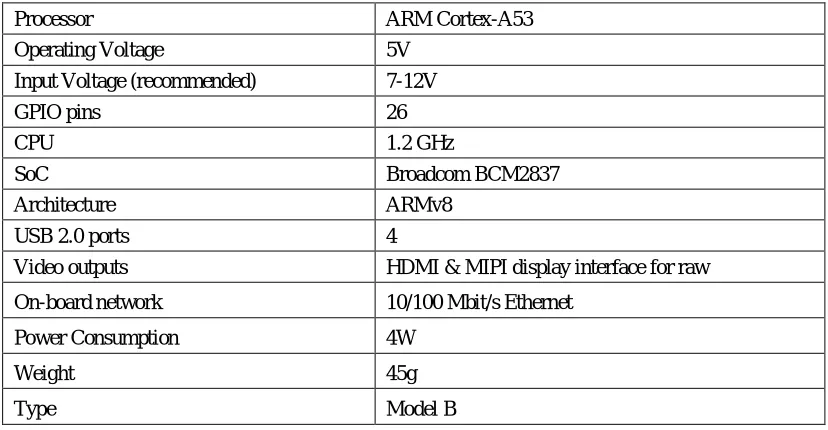
TABLE .1 TECHNICAL DESCRIPTION OF RASPBERRY PI
The Raspberry Pi 3 uses a Broadcom BCM2837 SoC with a 1.2 GHz 64-bit quad-core ARM Cortex-A53 processor, with 512 KB shared L2 cache. It has a RAM of 1 GB. The Raspberry Pi Model A and B boards have a 26-pin 2.54 mm expansion header, marked as P1, arranged in a 2x13 strip. They provide 8 GPIO pins plus access
Processor ARM Cortex-A53 Operating Voltage 5V
Input Voltage (recommended) 7-12V GPIO pins 26
CPU 1.2 GHz
SoC Broadcom BCM2837 Architecture ARMv8
USB 2.0 ports 4
Video outputs HDMI & MIPI display interface for raw On-board network 10/100 Mbit/s Ethernet
Power Consumption 4W
Weight 45g
[image:4.612.99.513.438.653.2]A. Relay
A relay is an electrically operated switch. Many relays use an electromagnet to mechanically operate a switch, but other operating principles are also used, such as solid-state relays.
1) Hdmi To Vga Cable:Hdmi (High-Definition Multimedia Interface) is a proprietary audio/video interface for transmitting uncompressed video data and compressed or uncompressed digital audio data from an HDMI-compliant source device, such as a display controller, to a compatible computer monitor, video projector, digital television, or digital audio device.
2) Adapter: use of an external power supply allows portability of equipment powered either by mains or battery without the added bulk of internal power components, and makes it unnecessary to produce equipment for use only with a specified power source; the same device can be powered from 120 vac or 230 vac mains, vehicle or aircraft battery by using a different adapter.
3) Relay drive :a driver is an electrical circuit used to control another circuit such as liquid crystal display and numerous others. They are usually used to regulate current flowing through a circuit.
4) Keyboard: in computing, a computer keyboard is a typewriter-style device which uses an arrangement of buttons or keys to act as a mechanical lever or electronic switch. Following the decline of punch cards and paper tape, interaction via teleprinter-style keyboards became the main input device for computers. Figure 5.10 shows a picture of a keyboard.
B. Programming Languages
1) Python: Python is a widely used high-level programming language for general-purpose programming, created by Guido van Rossum and first released in 1991. An interpreted language, Python has a design philosophy which emphasizes code readability (notably using whitespace indentation to delimit code blocks rather than curly braces or keywords), and a syntax which allows programmers to express concepts in fewer lines of code than possible in languages such as C++ or Java. The language provides constructs intended to enable writing clear programs on both a small and large scale.Python features a dynamic type system and automatic memory management and supports multiple programming paradigms, including object-oriented, imperative, functional programming, and procedural styles. It has a large and comprehensive standard library. Python interpreters are available for many operating systems, allowing Python code to run on a wide variety of systems. CPython, the reference implementation of Python, is open source software and has a community-based development model, as do nearly all of its variant implementations. CPython is managed by the non-profit Python Software Foundation.
2) Shell Scripting: A shell script is a computer program designed to be run by the Unix shell, a command-line interpreter. The various dialects of shell scripts are considered to be scripting languages. Typical operations performed by shell scripts include file manipulation, program execution, and printing text. A script which sets up the environment, runs the program, and does any necessary cleanup, logging, etc. is called a wrapper. The term is also used more generally to mean the automated mode of running an operating system shell; in specific operating systems they are called other things such as batch files (MSDos-Win95 stream, OS/2), command procedures , and shell scripts (Windows NT stream and third-party derivatives like 4NT—article is at cmd.exe), and mainframe operating systems are associated with a number of terms.
3) JavaScript: JavaScript is a high-level, dynamic, untyped, and interpreted programming language. It has been standardized in the Script language specification. Alongside HTML and CSS, JavaScript is one of the three core technologies of World Wide Web content production; the majority of websites employ it, and all modern Web browsers support it without the need for plug-ins. JavaScript is prototype-based with first-class functions, making it a multi-paradigm language, supporting object-oriented, imperative, and functional programming styles. It has an API for working with text, arrays, dates and regular expressions, but does not include any I/O, such as networking, storage, or graphics facilities, relying for these upon the host environment in which it is embedded. Although there are strong outward similarities between JavaScript and Java, including language name, syntax, and respective standard libraries, the two are distinct languages and differ greatly in their design. JavaScript was influenced by programming languages such as Self and Scheme.
C. Operating system
Ubuntu MATE is a free and open-source Linux distribution and an official derivative of Ubuntu. Its main differentiation from Ubuntu is that it uses the MATE desktop environment as its default user interface, based on GNOME 2 which was used for Ubuntu versions prior to 11.04, instead of the Unity graphical shell that is the default user interface for the Ubuntu desktop.
D. Web Languages
1) Html: Hypertext Markup Language (HTML) is the standard markup language for creating web pages and web applications. With Cascading Style Sheets (CSS) and JavaScript it forms a triad of cornerstone technologies for the World Wide Web. Web browsers receive HTML documents from a web server or from local storage and render them into multimedia web pages.
2) CSS :Cascading Style Sheets (CSS) is a style sheet language used for describing the presentation of a document written in a markup language. Although most often used to set the visual style of web pages and user interfaces written in HTML and XHTML, the language can be applied to any XML document, including plain XML, and is applicable to rendering in speech, or on other media. Along with HTML and JavaScript, CSS is a cornerstone technology used by most websites to create visually engaging webpages, user interfaces for web applications, and user interfaces for many mobile applications.
E. Frameworks Used
1) Flask : Flask is a micro web framework written in Python and based on the Werkzeug toolkit and Jinja2 template engine. Applications that use the Flask framework include Pinterest, LinkedIn, and the community web page for Flask itself. Flask is called a micro framework because it does not require particular tools or libraries. It has no database abstraction layer, form validation, or any other components where pre-existing third-party libraries provide common functions.
2) Materialize: Materialize is a responsive front-end design framework based on Material Design that you can use in your application just like Bootstrap. This is undoubtedly one of the most impressive Material Design frameworks. It provides both CSS and SCSS files along with JavaScript, material design icons and Roboto font. Google's Material Design has taken the internet UI world by storm. Since it's arrival on Google's Inbox and then progressive across Google’s network sites, many web applications like Telegram have begun deploying the framework.
F. Autostart Script
#!/bin/sh #launch.sh cd / cd control python control.py cd /
1) User Script: from flask_login import UserMixin class User(UserMixin): def __init__(self, user_name): self.user_name = user_name def is_authenticated(self): return True
def is_active(self): return True def is_anonymous(self): return True def get_id(self):
return self.user_name
IV. ADVANTAGES
A. The classroom appliances can be accessed from any internet connected device
B. Offers smart classroom environment
C. Offers exposure about embedded systems to students
D. Allows various programming languages to be installed
E. Allows plotting digital graphs
F. Allows interfacing sensors directly
G. Cost is low compared to existing systems
V. LIMITATIONS
A. Low system configurations compared to PC or Laptops
B. Low storage space
Technology (IJRASET)
VI. TYPICAL APPLICATIONS OF THE SYSTEM
A. Can be used in colleges
B. Installing in schools
C. Smart classrooms
D. Tutorial centers
E. Homes
VII. CONCLUSION
The primary goal of the project is to provide a system that offers smart teaching aids for classroom and also offer control over the appliances inside the classroom. The implementation of the system in educational institutions will have a great impact on students and also will improve the teaching and learning process. The system strives in minimizing the usage of black board and promotes usage of digital media for teaching and learning. India walking towards digitalization, this would be a great start right from the classrooms.
REFERENCES
[1] Shekhar H. Bodake, V. G. Puranik, “Design of Wireless Electric Board for Writing and Sketching Using ARM Based Embedded System”, in the International Conference for Convergence of Technology – 2014.
[2] Dong-oh Kang, Kyuchang Kang , Hyungjik Lee, Joonyoung Jung, Changseok Bae , Jeunwoo Lee, “A Smart Class System based _on SoD(System on [3] M. Kim and N. Y. Chong, “Wireless Electric Board Based on an ARM-based Embedded System”.
[4] G. Tanganelli, C. Vallati, E. Mingozzi, “ CoAPthon: Easy Development of CoAP-based IoT Applications with Python” [5] Rebecca Bruce, Dean Brock, Susan Reiser, “Teaching Programming Using Embedded Systems”.
[6] Qihao He, Dr. Bruce Segee, Dr. Vincent Weaver, “Raspberry Pi 2 B+ GPU
Power, Performance, and Energy Implications”, in International Conference on Computational Science and Computational Intelligence-2016. [7] Rebecca F. Bruce, J. Dean Brock, Susan L. Reiser, “Make Space for the Pi”, in Proceedings of the IEEE SoutheastCon 2015.
[8] Anurag Jaiswal , Shridhar Domanal and G Ram Mohana Reddy, “Enhanced Framework for IoT applications on Python based Cloud Simulator (PCS)”, in IEEE International Conference on Cloud Computing in Emerging Markets-2015.
[9] Mashrura Tasnim, Farhana Zaman, Hasan Shahid Ferdous, Sharif Md. Saad Galib, “Towards Ubiquitous Learning Tools for Computer Aided Classroom in Developing Regions”, in 16th Int'l Conf. Computer and Information Technology, March 2014