MySQL and Java
Developer’s Guide
Book Producer: Ryan Publishing Group, Inc.
Designations used by companies to distinguish their products are often claimed as trademarks. In all instances where Wiley Publishing, Inc., is aware of a claim, the product names appear in initial capital or ALL CAPITAL LETTERS. Readers, however, should contact the appropriate companies for more complete information regarding trademarks and registration.
This book is printed on acid-free paper. ∞
Copyright © 2003 by Wiley Publishing, Inc. All rights reserved.
Published by Wiley Publishing, Inc., Indianapolis, Indiana Published simultaneously in Canada.
No part of this publication may be reproduced, stored in a retrieval system, or transmitted in any form or by any means, electronic, mechanical, photocopying, recording, scanning, or otherwise, except as permitted under Section 107 or 108 of the 1976 United States Copyright Act, without either the prior written permission of the Publisher, or authorization through payment of the appropriate per-copy fee to the Copyright Clearance Center, Inc., 222 Rosewood Drive, Danvers, MA 01923, (978) 750-8400, fax (978) 750-4470. Requests to the Publisher for permission should be addressed to the Legal Department, Wiley Publishing, Inc., 10475 Crosspoint Blvd., Indianapolis, IN 46256, (317) 572-3447, fax (317) 572-4447, E-mail: [email protected].
Limit of Liability/Disclaimer of Warranty: While the publisher and author have used their best efforts in preparing this book, they make no representations or warranties with respect to the accuracy or completeness of the contents of this book and specifically disclaim any implied warranties of merchantability or fitness for a particu-lar purpose. No warranty may be created or extended by sales representatives or written sales materials. The advice and strategies contained herein may not be suitable for your situation. You should consult with a profes-sional where appropriate. Neither the publisher nor author shall be liable for any loss of profit or any other commercial damages, including but not limited to special, incidental, consequential, or other damages.
For general information on our other products and services please contact our Customer Care Department within the United States at (800) 762-2974, outside the United States at (317) 572-3993 or fax (317) 572-4002.
Trademarks: Wiley, the Wiley Publishing logo and related trade dress are trademarks or registered trademarks of Wiley Publishing, Inc., in the United States and other countries, and may not be used without written permis-sion. All other trademarks are the property of their respective owners. Wiley Publishing, Inc., is not associated with any product or vendor mentioned in this book.
Wiley also publishes its books in a variety of electronic formats. Some content that appears in print may not be available in electronic books.
Library of Congress Cataloging-in-Publication Data: Matthews, Mark.
MySQLand Javadeveloper’s guide / Mark Matthews. p. cm.
ISBN 0-471-26923-9 (PAPER/WEBSITE)
1. SQL (Computer program language) 2. Java (Computer program language) I. Title.
A76.3.S67M38 2003 005.75’65—dc21
2002155887
Printed in the United States of America
Acknowledgments xi
About the Authors xiii
Introduction xv
Chapter 1 An Overview of MySQL 1
Why Use an RDBMS? 2
Multiuser Access 2
Storage Transparency 2
Transactions 3
Searching, Modifying, and Analyzing Data 4
Ad Hoc Queries 5
Why Choose MySQL? 5
MySQL and JDBC 7
What’s Next 8
Chapter 2 JDBC and Connector/J 9
What Is JDBC? 9
What about ODBC? 10
Modeling Database Applications with JDBC 11
JDBC Versions 13
JDBC Driver Types 13
SQL Standards 14
Examining the JDBC Interface 15
The java.sql Package 15
The javax.sql Package 18
Understanding Connector/J 21
JDBC Support within 3.0.1 22
Obtaining JDBC Drivers 24
What’s Next 24
Chapter 3 Working with MySQL SQL 25
What Is a Database? 25
Database Models 27
Data Types 29
Designing a Database 29
Introducing MySQL SQL 32
Overview of MySQL 33
Creating Databases 34
Creating Tables 35
Inserts 39 Selects 40
SELECT Statement Extensions 42
Updates 47 Deletes 50
Using SHOW 51
More on Tables 53
Transactions 55 Functions/Operators 56 Joins 56 NULL 59
What’s Next 59
Chapter 4 Installing MySQL, Java, and Connector/J 61
Installing MySQL 61
Linux Installation 62
Windows Installation 63
All Other Installations 63
Installing Java 64
Testing the Java Installation 64
Installing Connector/J 65
Testing the Connector/J Installation 66
What’s Next 66
Chapter 5 Using JDBC with Java Applications and Applets 67
Hello World 67
Loading the Connector/J Driver 69
Using DriverManager to Connect to a Database 69 Executing Queries Through Statement Objects 75
Using the ResultSet Object 78
Determining the Cursor Position 79
Moving the Cursor 79
Getter Methods 80
Primitive Getters 82
Closing the Objects 85
Making It Real 85
Our Main Function 88
The init() Method 89
The buildGUI() Method 89
Executing a Query with No Results 91
Deleting Database Rows 97
Updating Database Rows 99
CREATE TABLE 101
DROP TABLE 101
Disconnecting from the Database 103
Advanced ResultSet Manipulation 104
One Step Forward 113
One Step Back 114
Rewind to the Beginning 114
Goto Record 114
Freehand Query 115
Batches 115
Limiting Results 116
Database Warnings and Exceptions 117
What’s Next 118
Chapter 6 Achieving Advanced Connector/J Functionality with Servlets 119
Servlets 119
DataSource Connections 122
Execution Environment 123
Databases 123 PreparedStatements 124
Connecting to the Database 129
Determining the Submit Type 129
Displaying Data 130
Updating Data 132
Using Placeholders in a Loop 133
Using Placeholders in PreparedStatement 134
Using setObject/setBytes 136
Getting BLOBs 139
Joins 141
Updatable ResultSets 142
The Update Button Code 149
The Insert Button Code 150
Update Methods 152
Manipulating Date/Time Types 154
Methods for Retrieving a Value as a Date Type 155 Methods for Retrieving a Value as a Time Type 155 Methods for Retrieving a Value as a Timestamp Type 155
Handling BLOB and CLOB 156
Using Streams to Pull Data 158
Handling ENUM 159
Using Connector/J with JavaScript 161
What’s Next 163
Chapter 7 MySQL Type Mapping 165
Character Column Types 166
BLOB 168 MEDIUMBLOB 168 LONGBLOB 169 SET 169 ENUM 169
Using Character Types 169
Date and Time Column Types 171
DATE 172 TIME 172 DATETIME 172 YEAR 173 TIMESTAMP 173
Using Date and Time Types 173
Numeric Column Types 175
TINYINT 176 SMALLINT 176 MEDIUMINT 176 INT 177 BIGINT 177 FLOAT 177 DOUBLE 177 DECIMAL 178
Using Numeric Types 178
What’s Next 180
Chapter 8 Transactions and Table Locking with Connector/J 181
Understanding the Problem 181
MySQL's Transaction Table Types 182
The InnoDB Table Type 182
The BDB Table Type 184
Converting to Transactional from Nontransactional 184
Performing Transactions in MySQL 185
Using the autocommit Variable 185
Update Transactions 187
The SELECT/INSERT Transaction 190
Multiple Table Transactions 191
Foreign Key Integrity on Deletes 192
Ending a Transaction 192
Transaction Isolation 192
Dirty Reads 193
Phantom Reads 194
Nonrepeatable Reads 194
Table Locking 195
Chapter 9 Using Metadata 197
Using Database Metadata 197
Getting the Object 200
General Source Information 202
Feature Support 203
Data Source Limits 204
SQL Object Available 204
Transaction Support 204
The ResultSet Metadata 205
Getting Column Information 205
Other ResultSet Metadata 208
What’s Next 210
Chapter 10 Connection Pooling with Connector/J 211
What Is a Connection Pool? 212
Pooling with DataSource 213
Pooling with the DriverManager 218
DDConnectionBroker 219
What’s Next 221
Chapter 11 EJBs with MySQL 223
Multi-tier Architecture 223
Using Beans 225
EJB Types 225
The EJB Environment 226
Application Server Configuration 229
The Role of the Servlet 230
Entity Beans 230
Session Beans 234
Using the Beans 236
Adding a Query 238
Bean-Managed Persistence 240
ejbCreate() 241 ejbLoad() 242 ejbStore() 243 ejbRemove() 243 ejbFindByPrimaryKey() 244
Setter/Getter Methods 245
What’s Next 245
Chapter 12 Building a General Interface for MySQL 247
Tasks 248
SQL Exceptions 252
MySQL Connections 253
The Task Manager 255
Task Results 264
The Database Information Task 268
User Input for Tasks 270
The SQL Query Task 272
The Show Columns Task 275
The Insert Row Task 280
What’s Next 286
Chapter 13 Database Administration 287
Using the mysql Administration Application 287
Managing Users and Permissions 289
Changing Root 289
Adding Users 290
Limiting Resources 292
Configuring the Query Cache 293
Forcing a Cache 294
Understanding Log Files 294
Error Logs 295
General Logs 295
Binary Logs 296
Slow Query Logs 296
Maintaining Your Tables 296
Repairing Tables 297
Backing Up and Restoring Your Database 298
Restoring Data 301
InnoDB Table Types 302
DBD Table Types 302
What’s Next 303
Chapter 14 Performance and Tuning 305
Connector/J 3.0 Performance 305
Database Tuning 308
Server Options 308
Using RAID 309
Optimizing Tables 309
The MySQL Query Optimizer 310
Table Indexes 312
JDBC Tuning 313
Minimizing Data Requests 313
Keeping Consistent Connections 314
Handling Statements 315
Batching 316
Using Transactions and Locking 316
Defining the Architecture 317
Getting Data 317
Appendix A MySQL Development and Test Environments 319
Test Architecture #1 319
Test Architecture #2 320
Servlet Architecture 321
The EJB Architecture 323
Appendix B Databases and Tables 325
The accounts Database and Tables 325
The identification Database and Tables 326
Test Databases 327
Database Products 327
The Database Test 327
Appendix C The JDBC API and Connector/J 329
The java.sql Package 330
The javax.sql Package 358 ConnectionEvent 359 ConnectionEventListener 359 ConnectionPoolDataSource 359 DataSource 360 PooledConnection 360 RowSet 360 RowSetEvent 362 RowSetInternal 362 RowSetListener 363 RowSetMetaData 363 RowSetReader 363 RowSetWriter 364 XAConnection 364 XADataSource 364
Appendix D MySQL Functions and Operators 367
Arithmetic Functions/Operators 369
Comparison Functions/Operators 372
Logical Operators 375
Control Functions 377
String Functions/Operators 379
Grouping Functions 384
Date and Time Functions 386
Other Functions 394
Appendix E Connector/J Late-Breaking Additions 397
Failover Support 397
Windows Named Pipes 398
Batch Processing Error Continuation 398
Strict Updates 399
Profile SQL 399
SSL 399
xi xi
Dedication
To my wife Diane, for all her support in my "geeky" endeavors, and to our new daughter Lauren.
I would also like to dedicate this work to Monty, David, and the rest of the fine group of developers at MySQL AB. Without their contribution to the software community and dedication to free software and open source ideals, this book would not have been possible.
--Mark Matthews
I would like to dedicate this book to my parents. Their ever-present love and encouragement have made so many things possible.
—Jim Cole
This book is dedicated to the trinity: God, Jesus Christ, and the Holy Spirit.
—Joseph D. Gradecki
Acknowledgments
xiii
Mark Matthews is the creator of Connector/J and its predecessor MM.MySQL, the Java JDBC driver for MySQL. Last year, he joined MySQL AB to further develop Java support in MySQL. Mark specializes in Java, MySQL, XML, and DHTML solutions and has architected major Web applications projects, includ-ing a GIS-based retail analytics package. Mark has also taught classes in both Java and UML.
Jim Coleis a senior software engineer specializing in Internet and knowledge management systems. He is an active developer working in Java, C++, Perl, and PHP. He also serves as a system administrator for several Web-based projects, where his duties include custom software development, database management, and security maintenance.
Joseph D. Gradeckiis a software engineer at Comprehensive Software Solu-tions, where he works on their SABIL product, an enterprise-level securities processing system. He has built numerous dynamic, enterprise applications using Java, AspectJ, servlets, JSPs, Resin, MySQL, BroadVision, XML, and more. He has also built P2P distributed computing systems in a variety of lan-guages including Java/JXTA, C/C++, and Linda. He holds Bachelors and Mas-ters degrees in Computer Science and is currently obtaining his PhD.
H
ave you ever been assigned a project and realized that you had no idea how you were going to accomplish it? Many developers have experi-enced this feeling when asked to interface their code with a database. With a few exceptions, most developers were busy learning Lisp, linked lists, and big-O notation during their formal education instead of learning the funda-mentals of relationship database management systems. When the time comes to interface their code with a database, they turn to a book like the one you are holding.Your challenge might be to write a Web-based system using servlets and Enter-prise JavaBeans (EJBs) to transfer shipping records from the home office in Bend, Oregon, to a satellite shipper in New Jersey. Or perhaps your father just opened his new medical office and you volunteered to create a scheduling sys-tem over the weekend.
Whatever the situation, interfacing an application to a database is one of the most fundamental tasks a developer is required to perform. This book is designed for developers who either have a pressing task ahead of them or who are curious about how to read database information into their application.
What’s in This Book
The primary goal of MySQL and Java Developer’s Guideis to provide a com-prehensive approach to writing code from a Java application to a MySQL data-base using the industry standard: JDBC. As you will see later in this Introduction, the chapter titles indicate what area of database connectivity and manipulation they cover. The chapters are ordered to reflect the JDBC specifi-cation, but we aren’t here to simply describe the specification.
We wrote all of the material in the book to highlight how MySQL’s Connector/J JDBC driver achieves the interfacing of MySQL with Java while maintaining the spirit of the specification. With this in mind, we provide example code using all major forms of Java development, including
■■
Applications
■■
Applets
■■
Servlets
■■
JSPs
■■
EJBs
As you work in Java and JDBC, you will see the true power of the specification. You can write database access code in a Java application and move the code to a servlet with little if any changes. In the case of EJBs and container-managed persistence, we devoted a full chapter to dealing with database access without the cumbersome details of SQL.
We designed the layout of the book to move you through the entire process of writing Java code needed to access a back-end database. Developing the data-base is one of the first things that you must accomplish in this process. While we don’t delve deeply into the theory of database development, you learn how to create databases in MySQL, administer those databases, and handle such details as granting access permissions. From there, we take you into an exami-nation of the MySQL Connector/J driver and how it accomplishes its goal of portable database access. The remainder of the book steps you through Java code that highlights how to accomplish database tasks such as the following:
■■
Querying and updating
■■
Handling ResultSets
■■
Using transactions
■■
Handling typing issues between JDBC and MySQL
■■
Working with metadata
Once you’re familiar with these concepts, we present a complete application that pulls it all together. Our application illustrates how you can create to a sim-ple authorization service. Using a combination of JSP, servlets, and EJBs, the service allows new users to create accounts, recall the account, and verify a username/password combination. The system is designed to be interactive using JSP pages, which are handled on the server using servlets. The JSPs can be bypassed using the servlets directly. All of the critical information is kept on the database for persistence and management needs.
After reading this book, you should know how to interface Java to MySQL and be able to use the many examples for reference.
NOTE
All the code and examples in this book can be found on the the support Web site at www.wiley.com/compbooks/matthews.
Who Should Read This Book
This book is written for Java developers who need to interface their code to a back-end database. The book’s specifics deal with MySQL and Connector/J, but this doesn’t limit the information because JDBC is designed to be portable against many databases. If you aren’t using MySQL, you still find valuable infor-mation.
You don’t need to know much about databases—we have included several chapters that provide all of the basics necessary to create databases and make sure they are operational. Keep in mind that we didn’t intend these chapters to replace a good reference on MySQL, though.
We do expect that you are an experienced Java developer who is comfortable with the language. This book explains a combination of Java delivery methods, including applications, applets, beans, and EJBs; you may want to begin with what you know best and expand from there.
The Technology Used
Two different versions of MySQL are used throughout this book: 4.0.4 and 3.23.52. JDBC connectivity is handled using MySQL’s Connector/J driver, and we cover both versions 2.0.14 and development 3.0.1.
Book Organization
The first four chapters of this book provide an overview of databases, JDBC, and installation of the tools you will be using. The remainder of the book is an in-depth guide to building database applications with MySQL, Connector/J, JDBC, and Java.
Chapter 1: An Overview of MySQL
MySQL is one of the most popular open source database systems available today, and it is used as the back-end data storage device for many personal and corporate Web sites. Java is the most portable language in use today and continues to be improved with each new release. In this chapter, we provide a brief overview of each product and begin the discussion of how to interface the two and thus allow Java applications to have access to a vast array of information.
Chapter 2: JDBC and Connector/J
As shown in Chapter 1, JDBC facilitates the interface between Java and MySQL. The JDBC specification defines the interfaces and classes necessary for any Java application, applet, servlet, and so forth to make calls to an under-lying database. Because the JDBC specification isn’t specific to any one data-base system, manufacturers create JDBC drivers for their specific datadata-base. In this chapter, we discuss the history of JDBC, how it started, and its progress into a version 3.0 specification. We examine in depth the MySQL JDBC driver called Connector/J, and look at its history as the MM.MySQL JDBC driver as well as its future.
Chapter 3: Working with MySQL SQL
Before we delve into the concepts surrounding the interface between Java and MySQL, this chapter provides a basic overview of databases and SQL. Topics include basic concepts behind databases, simple database design, database normalization, and data manipulation.
All of the coding examples in this book are built using MySQL as the primary database, Java as our coding language, and Connector/J, MySQL’s JDBC dri-ver. Although the installation of these components isn’t overly difficult, this chapter provides comprehensive instructions for obtaining all of the neces-sary components and performing a step-by-step installation. We also provide simple examples for testing the installation.
Chapter 5: Using JDBC with Java Applications and
Applets
This chapter is the first in a series on the use of Java to access a MySQL data-base using JDBC. Some of the basic functionality discussed includes loading the JDBC driver, connecting to a local or remote database, building JDBC statements in preparation for queries, executing queries against the MySQL database, working with ResultSets, and accessing MySQL-specific functional-ity through JDBC.
Chapter 6: Achieving Advanced Connector/J Functionality
with Servlets
At this point, you’ve learned the basics, and it’s time to expand into the more advanced topics. This chapter is designed to expand your understanding of SQL, MySQL, and JDBC. The topics include updatable ResultSets, Prepared-Statements, date/time types, BLOBs and CLOBs, and joins.
Chapter 7: MySQL Type Mapping
One of the fundamental issues associated with databases and programming language is determining the correct mapping from one to the other. While programming languages have a large variety of types, including simple ones like integer, they also allow more complex ones, like classes. Databases, on the other hand, are limited in their choices for the types of data that can be stored. In the middle of this situation is the JDBC driver. This chapter dis-cusses the types available on the MySQL database, how JDBC interprets those types, and the resulting Java type produced by the mapping.
Chapter 8: Transactions and Table Locking with Connector/J
queries instead of one. This chapter looks at inserting multiple pieces of infor-mation into multiple tables, what problems can arise, and how transactions can be used to solve these problems.
Chapter 9: Using Metadata
After a query is performed against a MySQL database, the information is returned in a ResultSet object. This object includes all of the rows and columns specific to the query performed. In many cases, additional information is needed about the data, including the name of the columns in the result, the pre-cision of the data in a float column, the maximum length of a column, and maybe even information about the server from which the data was returned. In this chapter, we discuss pulling metadata about both the database and a Result-Set that contains information from a query.
Chapter 10: Connection Pooling with Connector/J
In many cases, a JDBC driver requires between 4 and 10 different communica-tions with a database application before a connection can be established and returned to the requesting application. If an application is constantly creating connections, doing its business, and then closing the connection, the applica-tion suffers in its potential performance. To overcome the connecapplica-tion perfor-mance problem, you can use a connection pool. This chapter provides a comprehensive introduction to connection pools, presents valuable statistics for creating database connections, and demonstrates how to use the connec-tion pooling mechanisms within JDBC.
Chapter 11: EJBs with MySQL
Enterprise JavaBeans (EJBs) provide the framework for building applications that can handle the rigors of enterprise-level applications. In addition, EJBs can be distributed across a network or a farm of servers. In this chapter, we cover the basic EJB programming model, using DataSources and JNDI, and building session beans to access MySQL. We also discuss container-managed persis-tence and bean-managed entity beans.
Chapter 12: Building a General Interface for MySQL
all together using a Certificate Authority application. Using JSP, servlets, and EJB, the application shows how to create new accounts, request certificates, and enable the verification of certificates. All of the information, including the binary certificate, is stored in a MySQL database with multiple tables.
Chapter 13: Database
Administration
Once you have a good knowledge of the MySQL database system as well as the fundamentals described in the previous chapters for accessing the data from Java, you must learn some database administration basics. In this chap-ter, we examine many of the functions within MySQL that benefit administra-tors, such as granting/revoking permissions, providing security within the server, and recovering from disasters.
Chapter 14: Performance and Tuning
Once the application is written and the information is safely sitting in a data-base, the users get the final say on whether or not the application meets their performance requirements. If the application isn’t running at an appropriate level, you have a couple of options. First, you can profile the Java code to determine where the application is spending the most time and then rework the code associated with the problem areas. Second, you can tune the MySQL server and create indexes for the database tables. In this chapter, we provide the necessary information on performing these two options.
Appendix A: MySQL Development and Test Environments
We developed and tested all of the code in this book on several different test architectures in order to provide a representative reference. This appendix briefly describes those environments and lists the installed software. In addi-tion, we offer some notes for reproducing the configuration.
Appendix B: Databases and Tables
In this appendix, we list all databases and tables used in the examples throughout this book.
Appendix C: The JDBC API and Connector/J
Appendix D: MySQL Functions and Operators
The list of MySQL functions and operators in this appendix will help you deter-mine when the database should handle computations versus the application. Each function and operator is described, and an example of its use is given.
Appendix E: Connector/J Late-Breaking Additions
I
n this chapter, we explain why you might choose to use a database system with your software. We also provide an overview of the MySQL database server and the Connector/J JDBC driver.For many years, large corporations have enjoyed the ability to deploy relational database management systems (RDBMSs) across their enterprise. Companies have used these systems to collect vast amounts of data that serve as the “fuel” for numerous applications that create useful business information.
Until recently, RDBMS technology has been out of reach for small businesses and individuals. Widely used RDBMS systems such as Oracle and DB2 require complex, expensive hardware. License fees for these systems are in the tens to hundreds of thousands of dollars for each installation. Businesses must also hire and retain staff with specialized skill sets to maintain and develop these systems. Smaller enterprises have relied on systems like Microsoft Access and FoxPro to maintain their corporate data.
Early on, during the explosive growth of the Internet, open source database systems like mSQL, Postgres (now PostgreSQL), and MySQL became available for use. Over a relatively short amount of time, the developers of these systems have provided a large subset of the functionality provided by the expensive commercial database systems. These open source database systems also run on less-expensive commodity hardware, and have proven in many cases to be easier to develop for and maintain than their commercial counterparts.
An Overview of MySQL
1
Finally, smaller businesses and individuals have access to the same powerful level of software tools that large corporations have had access to for over a decade.
Why Use an RDBMS?
Almost every piece of software that has been developed needs to persist or store data. Once data has been persisted, it is natural to assume that this data needs to be retrieved, changed, searched, and analyzed.
You have many options for data persistence in your software, from rolling your own code, to creating libraries that access flat files, to using full-blown RDBMS systems. Factors to consider when choosing a persistence strategy include whether you need multiuser access, how you will manage storage require-ments, whether you need transactional integrity, and whether the users of your software need ad hoc query capability. RDBMSs offer all of this functionality.
Multiuser Access
Many programs use flat files to store data. Flat files are simple to create and change. The files can be used by many tools, especially if they are in comma- or tab-delimited formats. A large selection of built-in and third-party libraries is available for dealing with flat files in Java. The java.util.Properties class included with the Java Development Kit is one example.
Flat file systems can quickly become untenable when multiple users require simultaneous access to the data. To prevent corrupting the data in your file, you must lock the file during changes, and perhaps even during reads. While a file is locked, it cannot be accessed by other users. When the file becomes larger and the number of users increases, this leads to a large bottleneck because the file remains locked most of the time—your users are forced to wait until they can have exclusive access to the data.
RDBMSs avoid this situation by employing a number of locking strategies at varying granularities. Rather than using a single lock, the database system can lock an individual table, an individual page (a unit of storage in the database, usually covering more than one row), or an individual row. This increases throughput when multiple users are attempting to access your data, which is a common requirement in Web-based or enterprise-wide applications.
Storage Transparency
every time the location or layout of the files changes, you are required to change your software. Once the datasets your software is storing become numerous or large, the storage management process becomes cumbersome.
Using a database system gives you “storage transparency.” Your software does not care where and how the data is stored. The data can even be stored on some other computer and accessed via networking protocols.
Transactions
When you have more than one user accessing and changing your data, you want to make these changes transactional. Transactions group operations on your data into units of work that meet the ACIDtest. The ACID test concept is best illustrated with a commonly used example from the banking industry.
Jack and Jill share a joint checking account with a balance of $1000. They are both performing various operations, such as deposits, withdrawals, and transfers, on the account. Let’s see how the four aspects of the ACID test come into play:
■■ Atomicity: All changes made during a transaction are made successfully, or in the case of failure, none are made. If any operation fails during the transaction, then the entire transaction is rolled back, leaving your data in the state it was before the transaction was started. For example, suppose Jack is making a transfer of $500 from his checking account to a savings account. Sometime between the withdrawal of the $500 from the checking account and the deposit of $500 to the savings account, the software run-ning the banking system crashes. Jack’s $500 has disappeared! With atom-icity, either the entire transfer would have happened, or none of it would have happened, leaving Jack a much happier customer than he is now.
■■ Consistency: All operations transform the database from one consistent state to another consistent state. Consistency is defined by how the data-base schema is designed and whether integrity constraints such as foreign keys are used. The database management system is responsible for ensur-ing that transactions do not violate the database schema or integrity con-straints. For example, the bank’s database developers have declared in the database schema that the balance of an account cannot be empty, or “null.” If any transaction attempts to set the balance to an empty value, the trans-action will be aborted and any changes rolled back.
monthly statement. Without isolation, the monthly statement might show the withdrawal from the checking account but not the deposit into the sav-ings account. This discrepancy would make it impossible for Jack or the bank to balance their books.
■■ Durability: Once completed, a transaction’s changes are never lost through system or hardware crashes. If Jill has paid for $50 worth of gro-ceries with her debit card at the grocery store and the transaction suc-ceeds, even if the database software crashes immediately after the
transaction competes, it won’t forget that her checking account balance is $50 lower.
Until recently, MySQL did not comply with all components of the ACID test. However, with the new BDB and InnoDB table types (supported in MySQL 3.23 and MySQL 4.0), MySQL can now pass the ACID test.
Not all software requires the robustness (or the associated overhead) of trans-action semantics. MySQL is one of the only databases that enable you to decide what level of robustness you need on a table-by-table basis. This becomes important when you are trying to maximize performance, especially when much of the data is read-only (such as in a product catalog).
Searching, Modifying, and Analyzing Data
Any time you store a significant amount of data with your software, your users want to search, modify, and analyze the data you have stored. If you are using flat files, you most likely have to develop this functionality yourself.
As your data stored in flat files takes up more and more space, it takes longer and longer to search. A common solution to this problem is to create an index for your data. Indexes are basically shortcuts to finding a particular piece of data, usually using some sort of key. If you need to develop indexing function-ality yourself, you have to learn about data structures, such as hashes and B-trees, and how to store these indexes alongside your data. In addition, you must learn how to implement the index in your software. If you use an RDBMS, you can tell the database system what data you think people will search on, and it does all of the fancy indexing for you.
Ad Hoc Queries
It is likely that your software will need to retrieve stored data using arbitrary parameters, otherwise known as ad hoc queries. This becomes difficult with flat files because they are not self-describing, and every file layout is different. You also need to consider how you are going to read the data for these queries from your persistent storage mechanism.
Many RDBMSs use SQL (Structured Query Language) for manipulating data. SQL is a declarative language in that you declare whatdata you want, not the procedure for howto get it. SQL is also an accepted and widely used standard, so a large set of tools are available (JDBC and Enterprise Java Beans, among them) to help you work with it.
After outlining all of the benefits of an RDBMS, I hope you are ready to consider using one for your software projects. The next question to ask is “Why choose MySQL?”
Why Choose MySQL?
As was the case with many other open source projects, MySQL was first cre-ated by someone who needed a better tool to get a specific job done. Monty Widenius and David Axmark started out with another open source project (MSQL), but found that it lacked some features that they needed. They decided to develop their own database system that met their specific requirements. They started building MySQL by using some low-level database storage code they had already developed for other projects and layered a multithreaded server, SQL parser, and client-server protocol on top. They also structured the API for MySQL to appear very similar to MSQL in order to make it easier for developers to port their MSQL-based software to MySQL.
MySQL was eventually released in source-code form, under a proprietary license. Eventually, this license was changed to the GNU General Public License (GPL), which in most cases allows the software to be used without license cost. How-ever, in certain situations you must purchase a commercial license. The exact terms of the license are available in the documentation that ships with MySQL or on the Web at www.mysql.com. Commercial support is also available for those who need it from MySQL-AB, the company that was created by Monty and David to support the continued development of the MySQL software.
requirements, and are implemented only when and if the original requirements can be met as much as possible.
Over the years, MySQL has evolved into an RDBMS that has the following core features:
■■ Portability:MySQL runs on almost every flavor of Unix, as well as Win-dows and MacOS X. You can obtain binaries or source code for the MySQL server as well as the tools that access it. More ports of the software become available every day. It is almost a given that MySQL will run on whatever operating system you have available.
■■ Speed:Using techniques such as efficient indexing mechanisms, in-memory temporary tables, and highly optimized join algorithms, MySQL executes most queries much faster than most other database systems. ■■ Scalability:Because of its modularity and its flexibility in configuration,
MySQL can run in systems varying in size from embedded systems to large multiprocessor Unix servers hosting databases with tens of millions of records. This scalability also allows you to run a copy of MySQL on a developer-class machine, and later use the same database system on a larger machine in production. Because it is multithreaded, MySQL effi-ciently utilizes resources for multiple users, compared to other database servers that start full-fledged processes for each user. It is not uncommon to hear of MySQL installations supporting thousands of concurrent users. ■■ Flexibility:MySQL lets you choose the table types you need to meet your
software’s requirements, ranging from in-memory heap tables, fast on-disk MyISAM tables, merge tables that group together other sets of tables to form larger “virtual” tables, and transaction-safe tables such as InnoDB. MySQL is also very tunable and includes many parameters that can be changed to increase performance for a given solution. However, MySQL comes with sensible defaults for these parameters, and many users never have to tune MySQL to reach a performance they are happy with.
■■ Ease of use:MySQL is easy to install and administer. While other data-base systems require special knowledge and training, not to mention spe-cial operating system configurations, MySQL can be installed in less than 10 minutes if you’ve done it before. Even if you are a newcomer, you should be able to install MySQL in under an hour. Once it’s installed, MySQL requires little maintenance and administration other than adding or changing user permissions and creating or removing databases.
■■ Access from other languages/systems:There are libraries and APIs for connecting to MySQL from Java (the focus of this book), C/C++, Perl, PHP, ODBC (Microsoft Windows applications), TCL, Eiffel, and Lisp. Because of this, a whole set of tools has appeared surrounding the use of MySQL from these languages and systems.
As you can see, MySQL is a flexible and capable RDBMS that has a rich feature set, performs well on the majority of queries, and has a large support base for access from many different languages. This book focuses on using MySQL with JDBC, which is what we talk about next.
MySQL and JDBC
Many developers choose to implement software using Sun’s Java technology because of the support Java has for standard Internet concepts such as Web sites, e-mail, and networking. This is the very reason I started to investigate using Java with MySQL in 1994.
Sun created a standardized interface to databases from Java called Java Data-base Connectivity (JDBC). Early in 1994, I was interested in connecting a Java application I was about to develop with the then-new MySQL database system using JDBC.
At the time, a rudimentary JDBC driver developed by GWE Technologies existed for MySQL. However, it was missing many features that I required for my project. Because many of the features that I needed would have been diffi-cult to implement in the original MySQL driver, I decided to see if I could imple-ment one myself, more as a tutorial than anything else.
After a few weeks of work, I had something that met most of my needs. Through correspondence with other Java developers on the MySQL mailing list, I found that others had a need for a JDBC driver to use with MySQL, and that they required many of the features I had just implemented. Not knowing what would happen, I wrote about the driver I had developed and allowed people to use it. From that small project, the JDBC driver known as MM.MySQL was born.
Monty and David of MySQL AB eventually became aware of the size of the Java developer community wanting to use MySQL, and extended an offer for me to join their team. In June 2002, I did just that, and MM.MySQL became the official JDBC driver for MySQL. It was subsequently renamed Connector/J.
What’s Next
I
n the previous chapter, we discussed how a database can aid in the devel-opment of both Web sites and applications. One of the most popular data-bases is MySQL. Of course, a language is also needed, and our choice for this book is Java. By itself, Java doesn’t have any way of directly accessing a database. To allow us to achieve the necessary interface between Java and a database, the developers at Sun created a specification called JDBC. In this chapter, we take a comprehensive look at the following:■■ The history of JDBC
■■ JDBC driver types
■■ Standards and how they affect JDBC
■■ The JDBC class
■■ MySQL’s Connector/J driver
What Is JDBC?
In this section, we provide a brief overview of what JDBC is and how it came about. Although many believe that JDBC is an acronym for Java Database Con-nectivity, the JDBC documentation itself states that JDBC isn’t an acronym but actually a trademarked name (you can find more information about JDBC at Sun’s Web site: http://java.sun.com/products/jdbc/).
With that said, JDBC is simply an application programming interface (API) for manipulating a database. The manipulation includes everything from
JDBC and Connector/J
2
connecting to the database, to executing SQL statements, to returning results. JDBC is middleware, or an intermediary between the Java language and a data-base. Fundamentally, JDBC is a specification that provides a complete set of interfaces that allows for portable access to an underlying database. The issue of portability is one of the key aspects of JDBC. Can you imagine using a lan-guage like Java—which provides the absolute best mechanism for writing an application once and executing it on a large number of platforms—and then having to change the code when your organization switches from Microsoft SQL Server to MySQL? That wouldn’t be a very portable language in the area of database manipulation.
Fortunately, JDBC provides the standard API, and individual database vendors produce the drivers necessary to perform the actual interface between your Java application and the database. This means that Oracle, MySQL, Microsoft, and many other database vendors have taken the time to write all of the code behind the scenes. Since all of the vendors are writing to a common API, you can be relatively certain that the idea of write once, execute often and any-where is still intact. Because most of the vendor JDBC drivers are also written in Java (more on this in the next section), the drivers can be used on different platforms as well. Not only can you change the platform on which your appli-cation runs or where the database itself resides, but you can also change the platform where the database executes. In the case of MySQL, the database sys-tem executes on most flavors of Unix and Linux, Windows, and the Macintosh platforms.
As you know, Java can be used to write different types of executables, such as
■■ Applications
■■ Applets
■■ Servlets
■■ Java ServerPages (JSPs)
■■ Enterprise JavaBeans (EJBs)
All of these different executables are able to use a JDBC driver to access a data-base and take advantage of the stored data. Throughout this book, we use a combination of these applications to illustrate using the MySQL JDBC driver to extract data from a database. For the most part, we use the term Java applica-tion to refer to any of the executable types we’ve listed, with the possible exception of EJBs.
What about ODBC?
Database Connectivity, is an API developed by Microsoft to allow access to databases. The API and subsequent interface code allow access to a wide range of databases on many platforms using a variety of languages. This all sounds wonderful for a middleware product. Surely we could use ODBC as an interface between Java and MySQL. Why don’t we?
The answer isn’t as simple as not wanting to use a Microsoft product in our development. It is possible to use ODBC from Java using a product called the JDBC-ODBC Bridge, supplied by Sun. This bridge takes Java com-mands based on the JDBC API and sends them to an installed ODBC driver, which subsequently accesses the database. Any results work through the soft-ware in reverse. The bridge was supplied with Java 1.2 and 2.0 as a stopgap for developers who needed quick access to a database from their Java code. At the time, the JDBC specification wasn’t mature; there weren’t many vendor drivers available that used JDBC, but many were available for ODBC. Now that all major database vendors have pure Java solutions, use of the bridge isn’t encouraged.
There are drawbacks to using ODBC in the process of accessing a database through Java. The primary drawback is that the code that implements ODBC is based on the C language and uses a large number of generic pointers. A number of problems occur with interfacing Java to C code, not to mention performance issues. It is much better to have a Java solution to database interfacing in order to provide a seamless solution.
Modeling Database Applications with JDBC
Before we start to look at the specifics of JDBC, let’s take a moment and con-sider how it is used to interface a Java application with MySQL. Figure 2.1 shows a simple two-tier deployment model.
Client Java Applet Java Application
JDBC
Server MySQL Database
In the two-tier deployment model, commonly called client/server, the client application communicates directly to the database through a JDBC driver. The JDBC API supports both two-tier and three-tier models for database access. The model supports the database being on the same machine as the client appli-cation or on a remote machine, with all communiappli-cation being handled by JDBC. While the two-tier model is effective and has been in use for many years, there are problems with it, including a lack of security for updates occurring on the database, performance issues, and a lack of scalability.
Modern systems use a three-tier deployment model, as shown in Figure 2.2.
Business Servlet Other business app
Client Java Applet Java Application
Java JSP
JDBC
Server MySQL Database
Figure 2.2 A three-tier deployment model.
As shown in the three-tier model, the client doesn’t have direct access to the database. Instead, the client sends all its requests to a middle, or business, tier. This tier is responsible for implementing all business rules relating to the appli-cation and the data that is received from both the client and the database. Using a third tier has many advantages, the least of which is the ability of the business tier to handle security issues with the client application. The business tier is able to determine what a client is allowed to request and to filter data as needed when it is returned from the database.
JDBC Versions
Throughout the history of JDBC, Sun has introduced several different versions, beginning with version 1.0 in January of 1997. This initial specification defined the interfaces necessary to create an instance of the driver in a Java applica-tion, building SQL statements to execute against the underlying database, return results through a ResultSet object, and obtain various pieces of metadata about the database as well as the ResultSet.
Next, the 2.0/2.1 specification was released; this broke the original 1.0 specifi-cation into two parts. The Core API for 2.0 didn’t add much to the original 1.0 specification but instead concentrated on performance and SQL 99 data types. The added functionality included programmatic SQL statements, scrollable ResultSets, streams, and other small updates. The second part of the 2.0/2.1 specification is called the JDBC 2.0 Optional Package. This package includes interfaces for data source interfaces, connection pooling, distributed transac-tions, and RowSets.
Recently, version 3.0 of the JDBC specification was released. Supported in the 1.4.x version of Java, the new specification includes many enhancements to ResultSets, data types, connection pools, and basic SQL statements. New func-tionality includes savepoint support (for checkpointing within transactions) and support for ParameterMetaData. You can find a complete discussion of the 3.0 specification at http://java.sun.com/products/jdbc/download.html#core-spec30.
In the section “JDBC Support within 3.0.1” later in this chapter, we provide a complete overview of MySQL Connector/J’s support of the functionality found in the specification. Appendix C, “JDBC API and Connector/J” also contains a detailed review of the complete specification and Connector/J support.
JDBC Driver Types
This section discusses the basic programming model of the JDBC driver itself. There are four different ways a JDBC driver can be created by vendors to sup-port their database:
■■ Type 1: JDBC-ODBC Bridge
■■ Type 2: Native-API partly Java
■■ Type 3: JDBC-Net pure Java
In a Type 1 driver, a JDBC bridge is used to access ODBC drivers installed on each client machine. (This is the JDBC-ODBC Bridge we discussed earlier.) From the standpoint of Java, this is merely a stopgap solution until a Java-based JDBC driver can be obtained.
In a Type 2 driver, JDBC API calls are converted and supplied to a vendor-specific driver. Used in the same manner as the JDBC-ODBC Bridge, the vendor-specific driver must be installed on each client machine. These drivers suffer the same problems found in a bridge situation.
In a Type 3 driver, a pure Java-based driver translates API calls into a DBMS-independent network protocol, which is further translated by a server to a vendor-specific protocol.
In a Type 4 driver, a pure Java-based driver translates API calls directly into the protocol needed by a vendor’s database. This is the highest performance driver available for the database and is usually provided by the vendor itself. MySQL’s Connector/J driver is a Type 4 driver.
SQL Standards
The standardization of access to a database has been a hot topic in recent years. The standard is called Structured Query Language, or SQL. Although the idea of a standard is appealing, not all database vendors follow the standard, and some cannot because of the feature set of the database itself. SQL92 used to be the defining specification for SQL, but recently a new standard called SQL99 has been adopted. The JDBC version 3.0 specification is designed to support SQL99.
When working with different database systems through JDBC, you can be rela-tively sure that basic functionality like SELECT, INSERT, UPDATE, and DELETE will work without much change. Beyond the basics, though, getting SQL working from one database to another requires some effort on your part.
By far the most important issue facing standardization is data typing. As you have probably already experienced in your development history, data types between C, C++, Java, PHP, and others can be quite different, especially in the area of data and time. Combine these differences with the various data types that can be stored in a database and you have the makings of a problem. In Chapter 7, “MySQL Type Mapping,” we cover the JDBC data types and how they are represented in MySQL and subsequently with a Java application.
A developer can also work with standardization by using metadata supplied from the database. Many times, a database will return information in the form of metadata, indicating whether it supports specific features.
Examining the JDBC Interface
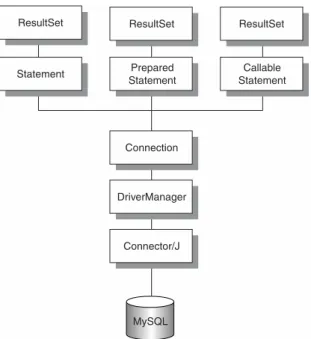
Now that we know what JDBC is, where it came from, and its place in a typical system, let’s turn our attention to the interfaces used to create the driver. Figure 2.3 shows how all of the core interfaces in the specification are designed to work together.
Statement Prepared Statement
Callable Statement ResultSet ResultSet ResultSet
Connection
DriverManager
Connector/J
MySQL
Figure 2.3 The Core JDBC API structure.
As we mentioned earlier, the specification is broken up into two different pack-ages: the Core API and the Optional API. The Core API is implemented in the java.sql package. In this section, we look at the interfaces available in the spec-ification (although we don’t indicate here whether Connector/J supports the functionality—that can be found in Appendix C).
The java.sql Package
in version 3.0 of the specification are shown in italics. The full Javadoc can be found at http://java.sun.com/j2se/1.4/docs/api/java/sql/package-summary.html.
java.sql.Array:The Array interface is a mapping between the Java lan-guage and the SQL ARRAY type. The interface includes methods for bring-ing an ARRAY value to a client as a Java array or in a ResultSet.
java.sql.BatchUpdateException:The BatchUpdateException is thrown when a batch update operation has failed. The exception includes all of the successful update commands that executed before the failure.
java.sql.Blob:The Blob Java interface is a mapping to the SQL BLOB value.
java.sql.CallableStatement:The CallableStatement interface is used to execute stored procedures if supported on the database. Parameters are allowed with the interface as well as escape syntax.
java.sql.Clob:Clob is a mapping from the Java programming language to the SQL CLOB type. A CLOB is a Character Large Object.
java.sql.Connection:The Connection interface provides a method for cre-ating a connection to a specific database. All SQL is executed in the context of a Connection object.
java.sql.DataTruncation:The DataTruncaction exception is thrown when data will be truncated. On a write, the exception is an error, but on a read, the exception is a warning.
java.sql.DatabaseMetaData:The DatabaseMetaData interface is designed to provide information about the remote database that a connection has been made to previously. The information available to the DatabaseMeta-Data object will be different based on the database vendor and the informa-tion it wants to provide.
java.sql.Date:The Date class is a wrapper for JDBC to use as a map to the SQL DATE value. The value of Date is the number of milliseconds since Jan-uary 1, 1970, 00:00:00:000 GMT.
A thin wrapper around a millisecond value that allows JDBC to identify this as an SQL DATE value. A milliseconds value represents the number of mil-liseconds that have passed since January 1, 1970, 00:00:00.000 GMT.
java.sql.Driver:The Driver interface is implemented by all vendor drivers so that they can be loaded by a static class called DriverManager. The Dri-ver object will automatically create an instance of itself and register with DriverManager.
java.sql.DriverPropertyInfo:The DriverPropertyInfo class provides information for advanced developers who need to set specific properties for loading a Driver object.
java.sql.ParameterMetaData:The ParameterMetaData interface provides information about the parameters in a PreparedStatement object.
java.sql.PreparedStatement:The PreparedStatement interface provides an object for executing precompiled SQL statements against the connected database.
java.sql.Ref:The Ref interface is a mapping between Java and an SQL REF value. A REF value is a reference to an SQL structured type value.
java.sql.ResultSet:A ResultSet interface is designed to represent a Result-Set produced from a query of the database. An internal cursor points to the current row of data, and it can be pointed before and after the data. Meth-ods are used to move the cursor to different rows in the ResultSet. By default, the ResultSet isn't updatable, but can be made both scrollable and updatable.
java.sql.ResultSetMetaData:The ResultSetMetaData interface is used to return specific information about the data within a ResultSet object. The information could include the number of columns, column names, float col-umn precision, and total colcol-umn size, among other data.
java.sql.Savepoint:The Savepoint interface is used along with transac-tions to provide rollback points. This allows for the completion of large transactions even when an error occurs.
java.sql.SQLData:The SQLData interface is used to map the SQL user-defined type to the Java language.
java.sql.SQLException:The SQLException exception will be thrown when an error occurs during an attempt to access a database or when the database itself returns an error.
java.sql.SQLInput:The SQLInput interface is used by the developer of a JDBC driver to stream values from the database results. The interface isn’t designed to be instantiated by the application developer.
java.sql.SQLOutput:The SQLOutput interface is used by the developer of a JDBC driver to stream data to the database. The interface isn’t designed to be instantiated by the application developer.
java.sql.SQLPermission:The SQLPermission interface is designed to allow the driver to determine its permission when an applet calls the Driver-Manager.setLogWriter or setLogStream methods.
java.sql.Statement:The Statement interface is probably one of the most important interfaces in the JDBC specification. All SQL statements are exe-cuted through a Statement object. Each Statement object returns single ResultSet objects.
java.sql.Struct:The Struct interface is a mapping from a SQL structured type to the Java language.
java.sql.Time:The Time class is a wrapper around java.util.Date to sup-port the mapping from SQL TIME to Java.
java.sql.Timestamp:The Timestamp class is a wrapper around java.util.Date to support the mapping from SQL TIMESTAMP to Java.
java.sql.Types:The Types class is an internal class used to identify generic SQL types or JDBC types.
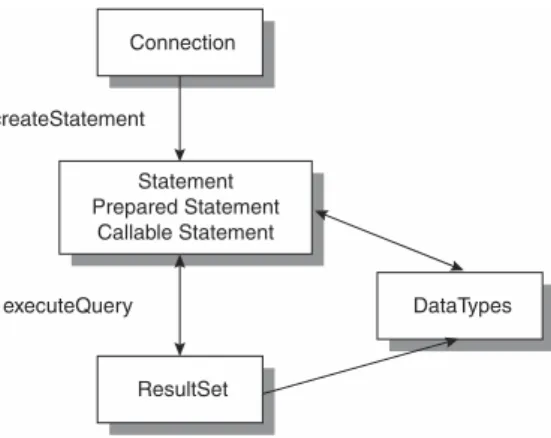
The classes and interfaces within the Core API are linked together, as shown in Figure 2.4. There is a natural progression from a Connection object to a Result-Set. The path from one to the other occurs using a Statement, PreparedState-ment, or CallableStatement; and the Statement class is a parent to both of the others. All of the Statement classes will eventually execute SQL to produce a ResultSet.
ResultSet Connection
DataTypes Statement
Prepared Statement Callable Statement createStatement
executeQuery
Figure 2.4 JDBC Core API class/interface links.
The javax.sql Package
javax.sql.ConnectionEvent:The ConnectionEvent class is used to signal a closed pooled connection and an error.
javax.sql.ConnectionEventListener:The ConnectionEventListener interface is used by applications that want to be notified when a Pooled-Connection object generates an event.
javax.sql.ConnectionPoolDataSource:The ConnectionPoolDataSource is a factor for PooledConnection objects. The object implementing the interface can be registered using Java Naming and Directory Interface (JNDI).
javax.sql.DataSource:The DataSource is a factory for connections. The object implementing the interface can be registered using JNDI.
javax.sql.PooledConnection:The PooledConnection interface provides a connection to the database, but is part of a larger pool. The application developer doesn’t use the interface directly.
javax.sql.RowSet:The RowSet is a JavaBeans component that is created and configured at design time and executed at runtime. The RowSet can be configured to connect to a JDBC source and to read data.
javax.sql.RowSetEvent:The RowSetEvent is created when a single row in a RowSet is changed, the internal cursor moves to a different location, or the entire RowSet has changed.
javax.sql.RowSetInternal:The RowSetInternal interface is implemented to allow the RowSetReader and RowSetWriter objects access to the inter-nals of a RowSet.
javax.sql.RowSetListener:The RowSetListener interface is implemented by a component that wants to be notified when an event occurs in a RowSet object. The component calls the addRowSetListener() method of the
RowSet in which it is interested.
javax.sql.RowSetMetaData:The RowSetMetaData interface provides information about a RowSet. The information centers around the columns returned from a result.
javax.sql.RowSetReader:The RowSetReader interface is used by a RowSet to obtain results from the database.
javax.sql.RowSetWriter:The RowSetWriter interface is used to write changed data back to the database.
java.sql.Connection javax.sql.DataSource
Instantiates a
Figure 2.5 DataSource/Connection classes.
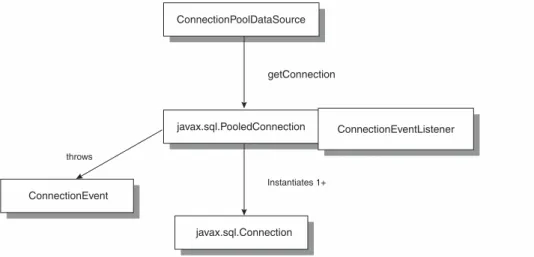
Figure 2.6 shows how a PooledConnection class will also use the Connection class to obtain a link to the database. Note the ConnectionEventListener asso-ciated with PooledConnection. Any events created by PooledConnection will be sent to those objects that register with the ConnectionEventListener.
javax.sql.Connection ConnectionEvent
javax.sql.PooledConnection ConnectionEventListener ConnectionPoolDataSource
Instantiates 1+ throws
getConnection
Figure 2.6 PooledConnection/Connection classes.
javax.sql.XADataSource:The XADataSource interface is an internal fac-tory for DataSource connections using JNDI.
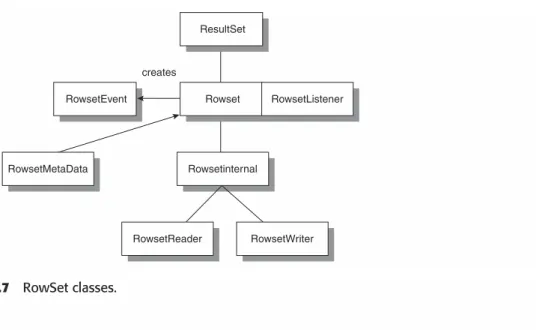
The classes and interfaces within the Optional API are linked together, as shown in Figures 2.5, 2.6, 2.7, and 2.8, which are referenced within the version 3.0 specification.
Figure 2.7 RowSet classes.
Understanding Connector/J
Up to this point, our discussion has centered on the general JDBC specification and its related interfaces and classes. In this section, we turn our attention to MySQL’s JDBC driver, Connector/J. At the time of this writing, there are two versions of the driver: 2.0.14 and 3.0.1. The drivers can be found at www.mysql.com/downloads/api-jdbc-stable.html and www.mysql.com/down-loads/api-jdbc-dev.html, respectively.
The Connector/J driver started as MM.MySQL (written by Mark Matthews) and has been the primary JDBC driver for MySQL. During 2002, Mark joined the MySQL team and subsequently updated the driver and renamed it to Connec-tor/J. The 2.0.14 version is basically the last MM.MySQL version made available on the mmmysql.sourceforge.net Web site. The 3.0.1 version contains numer-ous changes to the original code. These features will be discussed shortly.
Connector/J is designed specifically for MySQL and attempts to adhere to the JDBC API as much as possible. However, in order for a driver to adhere to the full JDBC specification, the underlying database must support all of the fea-tures supported in the latest 3.0 version. For MySQL and Connector/J, strict adherence is impossible because MySQL currently doesn’t support stored pro-cedures, savepoints, references, and various other small pieces of functionality. These differences with the specification are noted in Appendix C. For the remainder of this book, we use the latest 3.0 version of Connector/J.
ResultSet
Rowset RowsetEvent
Rowsetinternal RowsetMetaData
RowsetWriter RowsetListener
RowsetReader creates
JDBC Support within 3.0.1
As we mentioned earlier, the Connector/J JDBC driver is able to support only those features of the specification that the underlying MySQL database supports. Instead of explaining what is supported from the specification, we document here what currently is notsupported. From a class standpoint, the following classes have some functionality not supported:
■■ Blob
■■ Clob
■■ Connection
■■ PreparedStatement
■■ ResultSet
■■ UpdatableResultSet
■■ CallableStatement
Next we list each of the major interfaces with the individual methods not sup-ported in the current version. As the MySQL database begins to support the underlying functionality needed for each of the classes and methods, the list will get shorter. For example, stored procedures are planned for a future release of the database and thus the CallableResultSet interface could then be implemented.
Blob
Blob.setBinaryStream()
Blob.setBytes()
Blob.truncate()
Clob
setAsciiStream()
setCharacterStream()
setString()
truncate()
Connection
Connection.setSavePoint()
Connection.setTypeMap()
Connection.prepareCall()
Connection.releaseSavepoint()
Connection.rollback()
PreparedStatement
PreparedStatement.setArray()
PreparedStatement.setBlob()
PreparedStatement.getMetaData()
PreparedStatement.setRef()
PreparedStatement.getParameterMetaData()
ResultSet
ResultSet.getArray()
ResultSet.getObject()
ResultSet.getRef(int)
ResultSet.getRef(String)
ResultSet.rowDeleted()
ResultSet.rowInserted()
ResultSet.rowUpdated()
ResultSet.updateArray(,)
ResultSet.updateClob()
ResultSet.updateRef()
UpdatableResultSet
rowDeleted()
rowInserted()
rowUpdated()
updateBlob()
CallableStatement
All methods
Obtaining JDBC Drivers
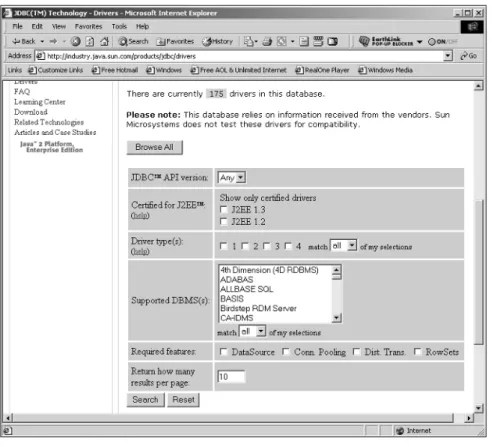
While our book concentrates on MySQL’s JDBC Connector/J driver, numerous drivers are available for all types of databases. One of the most comprehensive collections can be found on Sun’s site at http://industry.java.sun.com/prod-ucts/jdbc/drivers.
Figure 2.8 shows that there are currently 165 drivers available and growing.
Figure 2.8 The Sun JDBC driver search screen.
What’s Next
I
f you’ve used the MySQL database system or any other relational database system, this section of the chapter will be a review for you. Our goal is to present the very basics of database systems, tables, design, queries, and other topics of importance to developers who want to start using a database with their application code. It should be noted that we have space to cover only the basics and not all of the details associated with a database system. We present more advanced topics throughout the book as we discuss JDBC and MySQL. For those who already know this information, skip to the section called “Introduction to MySQL SQL,” where we cover some of the MySQL specifics.What Is a Database?
As we discussed in the opening paragraphs, the most efficient way to store large amounts of data is a database system. The term databaseis generally used as a common identifier of the entire system that constitutes this particular type of storage system. However, a database is actually part of the database man-agement system. A database management system (DBMS)is the term given to the entire application that supports a database and includes all server and client components.
In a typical setup, a large machine with plenty of disk space is allocated as a database server. The DBMS is installed on the machine, and a server applica-tion executed to handle requests to store and retrieve informaapplica-tion. In addiapplica-tion, a database administrator uses the DBMS to administer the server and keep the database stored on the server in order.
Working with MySQL SQL
3
The database administrator, who can also be the developer, creates databases by using the DBMS to hold specific data. For instance, an application might include general data such as accounts, addresses, and other forms of basic information. In addition to the account information, the application scans documents into the database from a scanner. This binary data has a much greater space need than the account information, so it is given a separate database. By separating the data into different databases, the DBMS generally allows them to be assigned different disk drive locations. The image data might be stored on a large array of disks, while the account information is stored on smaller disks but configured as a redundant array of independent disks (RAID). Figure 3.1 shows how this might look.
Server running MySQL
Raid Level 1
Large image data
MySQL Database
Account Information
acc_account table MySQL Account Database
acc_address table
Figure 3.1 A multiple-database system.
Once the databases for the application have been laid out, tables are introduced to each of the databases. While all of the data could be thrown together into the database, it is usually better to group the data into logical bunches. In an account database, you might have a table for account numbers and some iden-tifying information. Another table in the account database could contain address information. Figure 3.2 shows an example.
Each of the tables is further broken down into columns where individual pieces of information are stored. The address table has columns for information such as city, state, and zip. As data is