Parental Control System for Mobile Devices
Ahmed M. Elmogy
Assistant Professor
Prince Sattam Bin AbdelAziz Univ., KSA Computers and Control Eng. Dept., Tanta Univ.,
Egypt
Khawater Elkhowiter
Research Assistant Arab East Colleges, Riyadh, KSA
ABSTRACT
Using electronic devices is not limited to adults or to specific time or place. Children use different types of mobile devices with no constrains. Parents concern about the effect of the technical explosion on their children development. Controlling, monitoring, and managing approaches are in need to help in overcoming some of these worries. This paper presents a privacy monitoring sytem called Times Up. The proposed system will help parents to control and evaluate their kids use of mobile devices. The analysis, design, and implementation of the proposed system are discussed. The paper also introduced a survey on the developed systems and approaches to control, manage, and monitor the use of different electronic devices. Accordingly, the paper summarized some of the main research challenges facing researchers working in this area.
General Terms
Privacy monitoring, Mobile device management, Server-Clients approach, Android
Keywords
Privacy monitoring, Mobile device management
1.
INTRODUCTION
On the digital century where technology reaches kids' hands, parents may worry about the effect of this very open world on their kids’ development. They may worry about the detrimental effect of this technology on their educational, emotional and social developments [14][15][16]. To help overcome some of these worries, parents may need to have some controlling technology to check and track their children usage for the personal devices. As tablet devices are one of the most used devices by children on our world, parents will need to have some automated technologies to observe and supervise the time and quality of their children’s usage of these tablets.
Monitoring and controlling methodologies and approaches have been developed [1][2][3][9][10][11]. As human being, there are some concerns when using emerging technology. These concerns push developers to innovate ways to test, control, and manage new technologies. One of the most known approaches is based on the use of distributed architecture for the monitoring and controlling connected devices [1][2][3][9][10][11]. This distributed design allows for central controlling component over the connected devices either using client server approach, or mobile data management approach.
Monitoring and controlling system can be used for different purposes. The main application is to control the children access to mobile devices. Another application is for schools and universities to manage the usage of computers or any other electronic devices at the schools’ labs. Teachers and professors can use controlling systems to set policies and
define permission to access specific software. Researchers, also, may use monitoring systems to study the way students utilize their lab time. Furthermore, employers can use managing and controlling systems to evaluate electronic devices usage during work. The usage evaluation, either for students or employees, can not only affect productivity using electronic devices, but also affect overall performance. It may also lead to enhance the choices for software and applications needed in schools or work devices.
Monitoring and controlling electronic devices and systems have been developed as technology over the years. Under the security sciences, the concepts of monitoring and controlling devices focus on possible threats and polices. Mobile Device Management MDM [12] is the terminology referring to the use of management systems to maintain the required level of security. The aim of MDM is to optimize the use of systems or applications available on mobile devices such as smartphones, tablets and laptops. Managing mobile devices requires the base phase of threats modeling. The authors in [12] concluded that thread modeling includes analyzing technical platform, assets identification, and threats definition. Server-clients approach is one of the widely used methodologies for controlling electronic devices [9][10][11]. Server-Clients approach is a distributed architecture modeled for building compatible systems on two different platforms; servers and clients. The central component of the architecture is the server. Servers handle complex functions and store databases. Clients can be any type of devices connected through a network to the server to be allowed to access data or to utilize services provided by the server.
Over the air programming (OTAP) is also used to access mobile services such as wireless application protocol (WAP), or multimedia and short messaging services (MMS and SMS). OTAP is the use of wireless networks to perform transmission and reception functions on the wireless communication systems [13]. OTAP, also, utilizes different transmission protocols and technologies over the wireless connection such as trivial file transfer protocol (TFTP) for file transmission, and framework over the air (FOTA) when dealing with remote phone framework.
and mobile devices manufacturers, but also gives developers a real base for mobile devices environment that supports their innovations [17].
This paper proposes a children monitoring system that will help parents to monitor and control their children use of mobile devices. The paper also includes an overview of the related research efforts that allow parents to manage and monitor data, applications, or services available in kids’ mobile devices. The main challenge is to balance privacy and flexibility with the ease of use.
2.
RELATED WORK
Monitoring mobile devices has been a concern for not only individual users, but also for organizations, communities, and scientific researchers. Although developing monitoring application has been the focus of many researchers during the last two decades, many challenges of using monitoring applications still need much attention. These challenges include but not restricted to how the collected data will be handled and how to build a macroscopic patterns from the collected data. In this section, a summary of the research efforts related to monitoring mobile devices is presented. In [1], the importance of having mobile phone sensing to develop micro and macro views of mobile usage is discussed. A framework architecture is built upon mobile phone sensing and the cloud computing. The importance of using mobile phone sensing increases as the mobile devices have become the main computing and communication devices. Therefore, research areas such as data collection, data analysis and patterns learning are becoming rich discussion areas. The authors in [1] also discussed the different challenges with gathering data techniques using mobile and unexpected environment (mobile context), as well as, the privacy issues on gathering personal information from a third party applications.
The main focus of the introduced work in [2] is understanding how personal data travels through selected third-party applications. The authors raised the issue of violating privacy barriers when applications access the personal information by only ask for users permissions to access the data with no explanation of how the data will be used. The authors in [2] proposed a monitoring platform based on Android mobile phone to track the data flow through 30 selected applications. The results of proposed the platform, the authors concluded that 20 apps miss used the users’ private data and 15 apps used users’ locations to support marketing services. The main challenges in monitoring the use of mobile applications include the shortage of smartphone used data as a resource constrained, as well as, the dynamic nature of data flow using mobile devices. This dynamicity causes another context-based challenge because data could be sent at any time and to any place. Further, mobile apps allow for across sharing data and information among different apps, which increase the difficulty in monitoring single flow between an app and the operating system. The proposed platform in [2] tracks only data flows but does not control data flows. Data flows are the explicit flowing of data through the apps. Control flows are the implicit flowing of data that require analytical analysis.
In [3], a cloud service application is proposed to track and monitor Android programs called Sandbox. The proposed application performs also static and dynamic analysis. The goal of using the Sandbox application is to maintain smartphones security by detecting any malicious patterns or
malware. The authors in [3] also discussed the challenges and issues related to security and smartphones control. Furthermore, in [4], a proposed a tool to monitor software behaviour that also creates models for current and past system behavior is introduced. The proposed tool offers visualized analysis for the monitored software without affecting system performance, which makes it more appropriate for the continuous monitoring process. Developing such tool is important to use for continuous program comprehension and analysis.
Although, there are many research efforts on dealing with static computing environment, the mobile environment requires dynamic tracking of what, why, when and how data is used on the mobile context. In [5], four challenges in working with mobile technology usage are explained. These challenges are coverage, situated, scale, and robustness. Also in [5], authors indicated the different approaches researchers use to study the usage of the mobile phone. These four approaches include the direct monitoring, the evaluation through the lab environment, the self-report, and the automated logging approach. Yet, all these approaches lack the evaluation of users experiences.
Researchers in [6] proposed a framework to monitor the software requirements while execution. The framework does the checking and assertion processes, as well as, allows for automated support. The software requirements are subject to change under different cases including the rare and unpredicted events and the limitation or recovery of hardware failure. The proposed framework in [6] has four main phases including high level requirements, analysis and design, implementation and instrumenting, and monitoring. The monitoring stage has cases in viewing activities and their meanings including the case of violating requirements, going to violate requirements, or there is a chance to violation. In the patent in [8], the authors present a novel method that can be used as a controlling tool in parents’ hands over their kids devices. The proposed method includes three models; the permission model, the controlling model, and the monitoring model. The permission model allows parents to set the access level for each connected device. This access level is the base for the controlling model where each connected device can only access content within the access level defined earlier. The monitoring model allows parents to evaluate the history of usage foe the controlled devices.
Another patent is presented in [9] by developing a computer entertainment tracker application for limiting usage of specific computer application. The software allows guardians to control different computers games by locks. The children can only unlock the preferred games using earned credits. The children can earn credits by doing predefined tasks. Parents can set many tasks and associated each task to specific credits. The authors in [9] pointed out that the purpose of using such application is to help children to have meaningful time using electronic devices, as well as, minimizing the affect to be addicted to computer games without defining any limitations or controlling method.
application or services through the deep inspection application control server.
The main three challenges that would face researchers in this area include the balance between security and the ease of use, the uncertainty of testing data used through mobile context, and violating personal privacy boundaries [1,6].
Most of the monitoring and controlling approaches [2,3,4,6,9,10,11] require adding more system layers or components. Examples for added layers or components would be presented as permissions, passwords, policy, or verifications. The more the system use these security activities the more is difficult to maintain flexibility and ease of use. Balancing security and smooth usage is hard to maintain especially with using other layers such as networking or mobile devices.
The research challenge associated with the mobile context elements on the mobile devices, such as mobile phone and tablets, is based on the changing circumstance of using such portable devices [1]. The unexpected and unstable background environment may cause the lack of pure and correct data gathering (noisy data) that would affect the effectiveness of the data analysis and the persuasion stage [1]. The most difficult challenge to overcome is handling personal data when monitoring and controlling systems. Users may hesitate to share their personal information or may provide incorrect data, especially most systems only ask for permission to access data without explaining how the data is going to be used. Providing personal data for longtime using mobile devices for examination purposes is a hard task to maintain [6].
3.
THE PROPOSED SYSTEM
The proposed system is a mobile application titled as “Times Up". Times Up will be mainly used by parents or guardians to control the kids' usage of mobile devices. The proposed application will allow users to set policy and restrictions for other applications, as well as to time out the usage duration for application or for over the entire device. The application will allow the users not only to control their kids’ usage, but also to evaluate the time their children spent on using mobile device. The application will also allow users to have an overview of the usage based on the restrictions by displaying diagrams to compare and evaluate the device usage for certain time.
3.1
System Analysis
The system analysis and design process is the essential step to build systems. The need for this analysis and design is to determine the requirements of the system and to understand the operations. The following section includes Data Flow Diagrams (DFD) that explain the analysis and design for the system features and operations. The first DFD (figure 1) gives the over view of the Time's Up application and shows the connections with external entities.
[image:3.595.315.560.128.326.2]Figure 1 represents the Time's Up application as one process labeled by number 0, and shows the data flows in and out the system that flows from and to the application and Parents.
[image:3.595.327.560.366.568.2]Fig 1: Times Up- context diagram
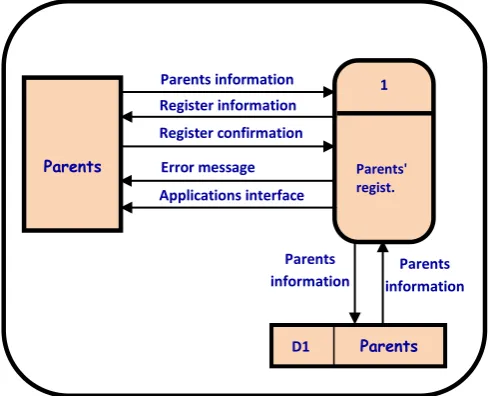
Fig 2: Parents registration (Level 0 DFD)
The level 0 DFD diagrams show all the processes at the first level and how each process is connected to the data stores and external entities. Figure 2 represents the Parents Registration process, which is labeled by number 1 and shows the data flows from and to the parents' database and the external entity parents.
0
Time's Up Parents' information
Registerinformation
Registerconfirmation
Parents password
Applications choice
Parents choice (lock device)
Parents choice (all applications)
Application diagram Forget password
Parents password (recovery) Parents choice (view
diagram) Parents
1
Parents' regist.
Parents information Registerinformation Registerconfirmation
Error message Parents
Applications interface
D1 Parents ase
Parents information Parents
Fig 3: Times Up-Restriction choices (Level 0 DFD)
Figure 3 represents the Restriction choices process, which is labeled by number 2 and shows the data flows from and to applications database and the external entity Parents.
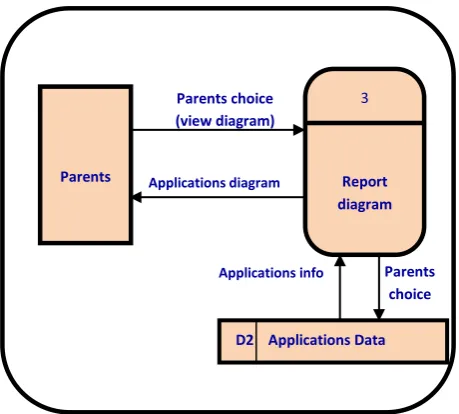
Figure 4 represents the Report Diagram process, which is labeled by number 3 and shows the data flows from and to applications database and the external entity Parents.
Fig 4: Times Up- Report diagram (Level 0 DFD)
[image:4.595.276.549.69.332.2]Figure 5 represents the Recovery Password process, which is labeled by number 4 and shows the data flows from and to the Parents Database and the external entity Parents.
Fig 5: Password recovery (Level 0 DFD)
[image:4.595.54.284.416.623.2]The diagrams in level 1 show details about each process in level 0 by dividing each process to its main functions. Figure 6 represents the main functions of Parents Registration process, which include insert parents information, view register information, registration confirmation, check entry, and show interface. Figure 7 represents the main functions of Restriction choices process, which include show interface, set lock restriction choice, and set all applications restriction choice. Figure 8 shows the main functions of Report Diagram process, which include select type of diagram and view report.
Fig 6: Parents registration (Level 1 DFD) Parents
information
Register information
Register confirmation Parents
Error message Applications
interface
D1 Parents Data Base 1.1
Insert parents information
1.2
View register information
Parents information
1.3
Registration confirmation
Parents information 1.4
Check entry 1.5
Show interface
Parents choice Parents
password Parents password
(recovery)
4
Password Recovery Parents
D2 Parents Data
Forget password
Applications info Applications diagram
3
Report diagram Parents
D2 Applications Data Parents choice
(view diagram)
Parents choice Applications interface
Parents choice Lock
info Parents
choice Applications interface
Applications restriction All applications choice
2
Restriction choices Lock device choice
Lock Restriction
Parents
Applications interface
D2 Applications Data Restriction
[image:4.595.318.551.474.713.2]Fig 7: Times Up -Restriction choices (Level 1 DFD)
Fig 8: Times Up- report diagram (Level 1 DFD)
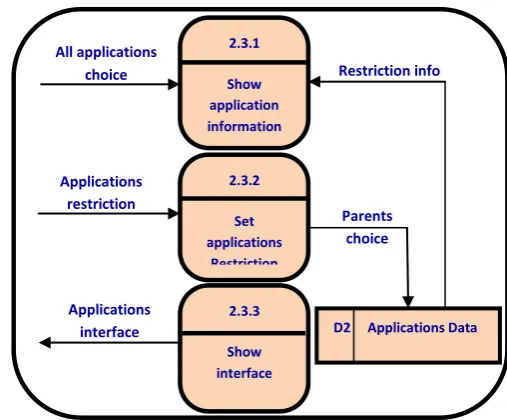
Figure 9 represents more details about the sub functions of the process set lock restriction choice, which include show lock information, set timer lock (at or from to), and show the interface. Figure 10 shows more details about the sub functions of the process set all applications restriction choice, which include show application information, set applications restriction, and show the interface.
Entity Relationship Diagram
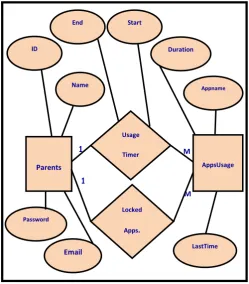
The discussion in [19] defines the Entity Relationship Diagram (ERD) as a snapshot of arranging information used, moved and stored by the system. For the proposed application, the ERD in Figure 11 shows the relation between entities. The Parents entity has attributes Name, ID, Password
and Email, and it is connected to the Applications entity by the relationship UsageTimer. The relation UsageTimer has two attributes Start Time and End Time, and has one-to-many cardinality (1:M). The other relationship is Locked Apps and it has one-to-many cardinality (1:M) also. The AppUsage entity has many attributes including appname, Duration and last Time Used.
[image:5.595.54.292.362.588.2]Fig 9: Times Up- set lock restriction choice (Level 2 DFD)
Fig 10: Times Up- restriction choices- set all applications restriction choice (Level 2 DFD)
3.2
System Design
The Android Studio is used to build the proposed framework. The Android Studio is the official programming environment that allows developers to build Android apps. The studio is an integrated development environment (IDE) based on Intelligent IDEA and offers useful features to Android platform developers. These features include project structure, gradle build system, debug and profile tools, memory and CPU monitor, data file access, code inspections, annotations in Android studio, and log messages [22].
Parents choice Restriction info
Applications restriction
Applications interface
2.3.2
Set applications
Restriction
D2 Applications Data 2.3.1
Show application information
2.3.3
Show interface
All applications choice
Parents choice Restriction info
Lock restriction
Applications interface
2.2.2
Set timer lock (at or from-to)
D2 Applications Data 2.2.1
Show lock information
2.2.3
Show interface Lock device
choice
Applications info Parents choice (view
diagram)
Applications diagram Parents
D2 Application data 3.1
Select type of diagram
3.2
View report
Parents choice
2.3
Set All applications
Restriction choice Parents
D2 Applications Data
Parents choice Lock info
Restriction info Parents
choice Applications
interface
Applications Restriction
All applications choice
Applications interface
Lock Restrictio
n Lock device choice
Applications interface
2.2
Set Lock Restriction
choice
2.1
[image:5.595.310.564.397.607.2]The Project Structure provides developers with an organized view to their projects’ files. A project in Android Studio may include one or many modules that contain resource and source code files. This feature usefully supports developers with a direct and quick access to source files of their projects. Gradle Build System is used in Android Studio as the base of the build system. Gradle is an integrated tool that can be used from the Android Studio menu, yet it is used independently from the source file of command line.
Fig 11: ERD diagram for the Times Up application
The importance of using this feature is the ability to manipulate the building code without affecting the app's core source files [22].
Besides organizing the developed projects, Android Studio offers full control to app developers. The other features available at Android studio to control and analyze the work include the Debug and Profile Tools and Memory and CPU monitor. These two features offer to programmers the assistance to analyze and test code performance with monitoring the memory and CPU usage. Also, the Data file access features allows developers to have all the needed data to exam and analyze the app performance. Furthermore, the Code inspections and Annotations in Android Studio automatically inspects apps during the compile time to catch bugs or mistaken resource allocation. Developers may also have more control by viewing device log messages, the logcat, when developing and running apps in Android Studio [22].
3.2.1 SDK
A Software Development Kit (SDK) that assists in the development of Android apps. The SDK includes the development tools, as well as, the libraries and all of the different packages needed to build, develop, and test the apps
[17][18]. The SDK offers developers a variety of useful features [17][18] including:
1. The libraries dedicated for media to enables developers to play and record many different audio, video and image formats
2. The integration map controls 3. Different application framework 4. The libraries for 2D and 3D graphics
3.2.2 Emulator
The Emulator is one of the used tools within the Android SDK. The importance of having such tool is to provide developers with a virtual mobile device showing on the screen. The Emulator uses the virtual mobile device for testing developed applications with no need to have actual mobile devices [18].
Genymotion is one of the best-used emulators for Android apps for the testing and presentation. Developers use Genymotion as a third party emulator instead of using the default Android emulator for the available features. Genymotion allows developers to simulate the perfect Android environment for testing and presentation. Developers can also change the environment thought the testing by using any of the mobility environment for any actual device including location, network quality, and battery charge level, as well as, simulating phone calls or text [23].
3.2.3 Database design
The database of TimesUp application is designed to have the following four main tables:
1. Parents (name, email,password,ID) 2. LockedApps (ID ,Appname) 3. AppsUsage
(ID,appname,Duration,lastTimeUsed) 4. UsageTimer (ID,StartTime,EndTime)
3.3
Implementation
This section explains the details of the proposed TimesUp application including the languages to be used, functions, and screens. The following languages are used to develop the proposed Times UP application:
Java: Class-based, Object-oriented language
XML: Defines rules for encoding documents that can be readable by human and machine and using it across the Internet.
PHP: Server scripting language between Java and database to generate the pages automatically.
SQL: A special purpose programming language designed for managing data stored in a relational database management system.
Times Up application is hosted on a web server with cPanel feature from GoDaddy.com. cPanel features include using phpMyAdmin, and MySQL databases. The steps of how the TimesUP application works can be summarized as follows:
End Start
ID Duration
LastTime
Password
1
1
M Parents
Name
Locked
Apps.
Usage
Timer
AppsUsage
M
1.
The user registers to use the application using the screen interface in figure 12. After that the user ability to login to the application.2.
Java Code interacts with the interface and perform http calls to the server side.3.
The server side uses PHP language to interact with the database and mail functionality.The user has the ability to lock, unlock, and monitor any application using the interface shown in figure 13. Any application can be locked or unlocked using the screen interface shown in figure 14.
Fig 12: Times Up registration screen
[image:7.595.314.547.73.204.2]Fig 13: Times Up action bar
[image:7.595.55.283.218.401.2]Figure 15 shows Times Up monitor settings interface screen.
Fig 14: Times Up lock interface
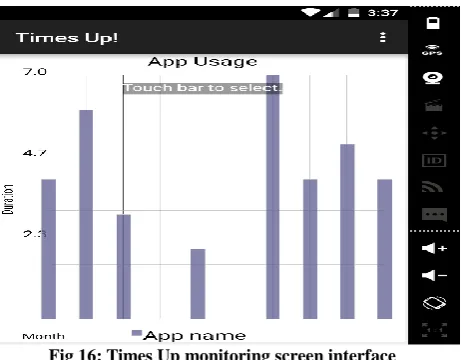
Fig 15: Times Up monitoring screen interface
[image:7.595.317.548.437.617.2]Figure 16 shows Times Up reporting diagram option screen. AndroidPlot library is used to implement the bat chart.
Fig 16: Times Up monitoring screen interface
4.
IMPLEMENTATION CHALLENGES
This section explains the challenges that occur during the implementation of the proposed system. They can be listed as follows:
HTTP problem: The Protocol exception (java.net.ProtocolException) method does not support a request (body: GET/POST). This challenge is handled by adding the (conn.setDoOutput(true);) before calling the (getOutputStream).
System permission issue: after allowing the usage statuses
[image:7.595.55.282.445.621.2]android:name="android.permission.PACKAGE_USAGE_ST ATS"/>), this error accrued. Permission is only granted to system apps. This issue is handled by disabling the Using system app permission as shown on the Figure 54.
Maintain login session: This problem is solved by adding Volley library for login and session management.
ListView and items issue: Creating separate layout for items solved this issue.
Background tasks not working: Creating a sync class to handle background tasks solved this issue.
Same menu in each activity: This issue is addressed by creating a separate class for the menu and extending it in each class.
5.
CONCLUSION
This paper presented a privacy monitoring system which can be used to help parents to control and evaluate their kids use of mobile devices. The analysis, design, and implementation of the proposed system are discussed.
The paper also introduced a survey on the developed systems and approaches to control, manage, and monitor the use of different electronic devices. A summarizion of some of the main research challenges facing researchers working in this area is provided. The future work is to consider extending the proposed system to work with IOS platform and then parents would use it regardless of the used platforms, IOS or Android.
REFERENCES
[1] Lane, Nicholas D., et al. "A survey of mobile phone sensing." Communications Magazine, IEEE 48.9 (2010): 140-150.
[2] Enck, William, et al. "TaintDroid: an information-flow tracking system for realtime privacy monitoring on smartphones." ACM Transactions on Computer Systems (TOCS) 32.2 (2014): 5.
[3] Bläsing, Thomas, et al. "An android application sandbox system for suspicious software detection." Malicious and unwanted software (MALWARE), 2010 5th international conference on. IEEE, 2010.
[4] Rohr, Matthias, et al. "Kieker: Continuous monitoring and on demand visualization of Java software behavior." (2008): 80-85.
[5] Froehlich, Jon, et al. "MyExperience: a system for in situ tracing and capturing of user feedback on mobile phones." Proceedings of the 5th international conference on Mobile systems, applications and services. ACM, 2007.
[6] Robinson, William N. "Monitoring software requirements using instrumented code." System Sciences, 2002. HICSS. Proceedings of the 35th Annual Hawaii International Conference on. IEEE, 2002. [7] Ofcom, October. "Children and Parents: Media Use and
Attitudes Report." (2014).
[8] Kuhn, Roland, Philippe Morin, and Brian Hanson. "Method and parental control and monitoring of usage of
devices connected to home network." U.S. Patent No. 7,046,139. 16 May 2006.
[9] Corrallo, Charles Shane. "Computer Entertainment Tracker Application for Limiting Use of Specific Computer Applications and Method of Use." U.S. Patent Application 13/031,032.
[10] Gatz, Scott, et al. "Parental control system for use in connection with account-based internet access server." U.S. Patent Application 09/858,855.
[11] Balia, Hinal K. "Systems and methods for managing and monitoring mobile data, content, access, and usage." U.S. Patent No. 8,095,124. 10 Jan. 2012.
[12] Rhee, Keunwoo, et al. "Threat modeling of a mobile device management system for secure smart work." Electronic Commerce Research 13.3 (2013): 243-256.
[13] Quadri, A. S. A., and B. Othman Sidek. "An Introduction to Over-the-Air Programming in Wireless Sensor Networks."
[14] Ayaz Nanji, MarketingProfs. "75% of American Children Under 8 Have Access to a Smartphone or Tablet". 8 November, 2013.
[15] Kelly Wallace, CNN. "Forget TV! iPhones and iPads dazzle babies".7 October, 2014.
[16] Joanna Walters, The Guardian. "Tablets and smartphones may affect social and emotional development, scientists speculate". 2 February, 2015.
[17] "The Android Source Code." The Android Source Code. Web. 21 Dec. 2015.
[18] Bhatia, Randeep, ed. "Introduction of Android Programming." 16 Feb. 2012.
[19] Dennis, Alan, Barbara Haley Wixom, and Roberta M. Roth. Systems analysis and design. John wiley & sons, 2014.
[20] Android.com.(2016). Android. [online] Available at: https://www.android.com [Accessed 25 Apr. 2016]. [21] Adroid.Developers.[online]Developer.android.com.Avail
able.at:
http://developer.android.com/distribute/tools/open-distribution.html [Accessed 25 Apr. 2016].
[22] AndroidStudioOverview|AndroidDevelopers.[online]Dev eloper.android.com.Availableat:
http://developer.android.com/tools/studio/index.html [Accessed 25 Apr. 2016].
[23] Genymotion – Fast And Easy Android Emulation. [online] Available at: https://www.genymotion.com [Accessed 25 A