HACKING EXPOSED:
NETWORK SECURITY
SECRETS AND SOLUTIONS,
THIRD EDITION
STUART
McCLURE
JOEL
SCAMBRAY
GEORGE
KURTZ
STUART
McCLURE
JOEL
SCAMBRAY
GEORGE
KURTZ
Osborne/McGraw-Hill 2600 Tenth Street
Berkeley, California 94710 U.S.A.
To arrange bulk purchase discounts for sales promotions, premiums, or fund-raisers, please contact Osborne/McGraw-Hill at the above address. For information on transla-tions or book distributors outside the U.S.A., please see the International Contact Infor-mation page immediately following the index of this book.
Hacking Exposed: Network Security Secrets and Solutions, Third Edition
Copyright ?? 2001 by The McGraw-Hill Companies. All rights reserved. Printed in the United States of America. Except as permitted under the Copyright Act of 1976, no part of this publication may be reproduced or distributed in any form or by any means, or stored in a database or retrieval system, without the prior written permission of the publisher, with the exception that the program listings may be entered, stored, and executed in a computer system, but they may not be reproduced for publication.
1234567890 CUS CUS 01987654321
Book p/n 0-07-219382-4 and CD p/n 0-07-219383-2 parts of
ISBN 0-07-219381-6
Publisher
Brandon A. Nordin
Vice President & Associate Publisher
Scott Rogers
Acquisitions Editor
Jane K. Brownlow
Project Editor
LeeAnn Pickrell
Acquisitions Coordinator
Emma Acker
Technical Editors
Tom Lee, Eric Schultze
Copy Editor
Janice A. Jue
Proofreaders
Stefany Otis, Linda Medoff, Paul Medoff
Indexer
Karin Arrigoni
Computer Designers
Carie Abrew, Elizabeth Jang, Melinda Lytle
Illustrators
Michael Mueller, Lyssa Wald
Series Design
Dick Schwartz, Peter F. Hancik
Cover Design
Dodie Shoemaker
This book was composed with Corel VENTURA??? Publisher.
CHAPTER
1
B
efore the real fun for the hacker begins, three essential steps must be performed. This chapter will discuss the first one???footprinting???the fine art of gathering target information. For example, when thieves decide to rob a bank, they don???t just walk in and start demanding money (not the smart ones, anyway). Instead, they take great pains in gathering information about the bank???the armored car routes and delivery times, the video cameras, and the number of tellers, escape exits, and anything else that will help in a successful misadventure.The same requirement applies to successful attackers. They must harvest a wealth of information to execute a focused and surgical attack (one that won???t be readily caught). As a result, attackers will gather as much information as possible about all aspects of an organization???s security posture. Hackers end up with a unique footprint or profile of their Internet, remote access, and intranet/extranet presence. By following a structured meth-odology, attackers can systematically glean information from a multitude of sources to compile this critical footprint on any organization.
WHAT IS FOOTPRINTING?
The systematic footprinting of an organization enables attackers to create a complete pro-file of an organization???s security posture. By using a combination of tools and techniques, attackers can take an unknown quantity (Widget Company???s Internet connection) and re-duce it to a specific range of domain names, network blocks, and individual IP addresses of systems directly connected to the Internet. While there are many types of footprinting techniques, they are primarily aimed at discovering information related to the following environments: Internet, intranet, remote access, and extranet. Table 1-1 depicts these en-vironments and the critical information an attacker will try to identify.
Why Is Footprinting Necessary?
Footprinting is necessary to systematically and methodically ensure that all pieces of in-formation related to the aforementioned technologies are identified. Without a sound methodology for performing this type of reconnaissance, you are likely to miss key pieces of information related to a specific technology or organization. Footprinting is often the most arduous task of trying to determine the security posture of an entity; however, it is one of the most important. Footprinting must be performed accurately and in a con-trolled fashion.
INTERNET FOOTPRINTING
It is difficult to provide a step-by-step guide on footprinting because it is an activity that may lead you down several paths. However, this chapter delineates basic steps that should allow you to complete a thorough footprint analysis. Many of these techniques can be applied to the other technologies mentioned earlier.
Technology Identifies
Internet Domain name
Network blocks
Specific IP addresses of systems reachable via the Internet TCP and UDP services running on each system identified System architecture (for example, SPARC vs. X86)
Access control mechanisms and related access control lists (ACLs) Intrusion detection systems (IDSes)
System enumeration (user and group names, system banners, routing tables, SNMP information)
Intranet Networking protocols in use (for example, IP, IPX, DecNET, and so on)
Internal domain names Network blocks
Specific IP addresses of systems reachable via intranet TCP and UDP services running on each system identified System architecture (for example, SPARC vs. X86)
Access control mechanisms and related access control lists (ACLs) Intrusion detection systems
System enumeration (user and group names, system banners, routing tables, SNMP information)
Remote access
Analog/digital telephone numbers Remote system type
Authentication mechanisms
VPNs and related protocols (IPSEC, PPTP) Extranet Connection origination and destination
Type of connection Access control mechanism
Step 1. Determine the Scope of Your Activities
The first item to address is to determine the scope of your footprinting activities. Are you going to footprint an entire organization, or are you going to limit your activities to cer-tain locations (for example, corporate vs. subsidiaries)? In some cases, it may be a daunt-ing task to determine all the entities associated with a target organization. Luckily, the Internet provides a vast pool of resources you can use to help narrow the scope of activi-ties and also provides some insight as to the types and amount of information publicly available about your organization and its employees.
M
Open Source Search
Popularity: 9
Simplicity: 9
Impact: 2
Risk Rating: 7
As a starting point, peruse the target organization???s web page if they have one. Many times an organization???s web page provides a ridiculous amount of information that can aid attackers. We have actually seen organizations list security configuration options for their firewall system directly on their Internet web server. Other items of interest include
??? Locations
??? Related companies or entities
??? Merger or acquisition news
??? Phone numbers
??? Contact names and email addresses
??? Privacy or security policies indicating the types of security mechanisms in place
??? Links to other web servers related to the organization
wget/wget.html) for UNIX and Teleport Pro (http://www.tenmax.com/teleport/home .htm) for Windows are great utilities to mirror entire web sites.
After studying web pages, you can perform open source searches for information re-lating to the target organization. News articles, press releases, and so on, may provide ad-ditional clues about the state of the organization and their security posture. Web sites such as finance.yahoo.com or http://www.companysleuth.com provide a plethora of in-formation. If you are profiling a company that is mostly Internet based, you may find by searching for related news stories that they have had numerous security incidents. Using your web search engine of choice will suffice for this activity. However, there are more advanced searching tools and criteria you can use to uncover additional information.
The FerretPRO suite of search tools from FerretSoft (http://www.ferretsoft.com) is one of our favorites. WebFerretPRO enables you to search many different search engines simultaneously. In addition, other tools in the suite allow you to search IRC, USENET, email, and file databases looking for clues. Also, if you???re looking for a free solution to search multiple search engines, check out http://www.dogpile.com.
Searching USENET for postings related to @example.com often reveals useful infor-mation. In one case, we saw a posting from a system administrator???s work account re-garding his new PBX system. He said this switch was new to him, and he didn???t know how to turn off the default accounts and passwords. We???d hate to guess how many phone phreaks were salivating over the prospect of making free calls at that organization. Need-less to say, you can gain additional insight into the organization and the technical prowess of its staff just by reviewing their postings.
Lastly, you can use the advanced searching capabilities of some of the major search engines like AltaVista or Hotbot. These search engines provide a handy facility that allows you to search for all sites that have links back to the target organization???s domain. This may not seem significant at first, but let???s explore the implications. Suppose someone in an organization decides to put up a rogue web site at home or on the target network???s site. This web server may not be secure or sanctioned by the organization. So we can begin to look for potential rogue web sites just by determining which sites actually link to the target organization???s web server, as shown in Figure 1-1.
You can see that the search returned all sites that link back to http://www.l0pht.com and that contain the word ???hacking.??? So you could easily use this search facility to find sites linked to your target domain.
The last example, depicted in Figure 1-2, allows you to limit your search to a particu-lar site. In our example, we searched http://www.l0pht.com for all occurrences of ???mudge.??? This query could easily be modified to search for other items of interest.
EDGAR Search
For targets that are publicly traded companies, you can consult the Securities and Exchange Commission (SEC) EDGAR database at http://www.sec.gov, as shown in Figure 1-3.
One of the biggest problems organizations have is managing their Internet connec-tions, especially when they are actively acquiring or merging with other entities. So it is important to focus on newly acquired entities. Two of the best SEC publications to review are the 10-Q and 10-K. The 10-Q is a quick snapshot of what the organization has done over the last quarter. This update includes the purchase or disposition of other entities. The 10-K is a yearly update of what the company has done and may not be as timely as the 10-Q. It is a good idea to peruse these documents by searching for ???subsidiary??? or ???subse-quent events.??? This may provide you with information on a newly acquired entity. Often organizations will scramble to connect the acquired entities to their corporate network with little regard for security. So it is likely that you may be able to find security weaknesses
in the acquired entity that would allow you to leapfrog into the parent company. At-tackers are opportunistic and are likely to take advantage of the chaos that normally comes with combining networks.
With an EDGAR search, keep in mind that you are looking for entity names that are different from the parent company. This will become critical in subsequent steps when you perform organizational queries from the various whois databases available (see ???Step 2. Network Enumeration???).
U
Countermeasure: Public Database Security
Much of the information discussed earlier must be made publicly available; this is espe-cially true for publicly traded companies. However, it is important to evaluate and classify the type of information that is publicly disseminated. The Site Security Handbook (RFC 2196) can be found at http://www.ietf.org/rfc/rfc2196.txt and is a wonderful resource
for many policy-related issues. Finally, remove any unnecessary information from your web pages that may aid an attacker in gaining access to your network.
Step 2. Network Enumeration
Popularity: 9
Simplicity: 9
Impact: 5
Risk Rating: 8
[image:10.612.74.460.67.397.2]The first step in the network enumeration process is to identify domain names and associated networks related to a particular organization. Domain names represent the
company???s presence on the Internet and are the Internet equivalent to your company???s name, such as ???AAAApainting.com??? and ???moetavern.com.???
To enumerate these domains and begin to discover the networks attached to them, you must scour the Internet. There are multiple whois databases you can query that will provide a wealth of information about each entity we are trying to footprint. Before the end of 1999, Network Solutions had a monopoly as the main registrar for domain names (com, net, edu, and org) and maintained this information on their whois servers. This monopoly was dissolved and currently there is a multitude of accredited registrars (http://www.internic.net/alpha.html). Having new registrars available adds steps in finding our targets (see ???Registrar Query??? later in this step). We will need to query the correct registrar for the information we are looking for.
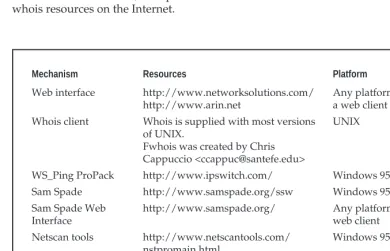
There are many different mechanisms (see Table 1-2) to query the various whois data-bases. Regardless of the mechanism, you should still receive the same information. Users should consult Table 1-3 for other whois servers when looking for domains other than com, net, edu, or org. Another valuable resource, especially for finding whois servers out-side of the United States, is http://www.allwhois.com. This is one of the most complete whois resources on the Internet.
Mechanism Resources Platform
Web interface http://www.networksolutions.com/ http://www.arin.net
Any platform with a web client Whois client Whois is supplied with most versions
of UNIX.
Fwhois was created by Chris Cappuccio <[email protected]>
UNIX
WS_Ping ProPack http://www.ipswitch.com/ Windows 95/NT/2000 Sam Spade http://www.samspade.org/ssw Windows 95/NT/2000 Sam Spade Web
Interface
http://www.samspade.org/ Any platform with a web client
Netscan tools http://www.netscantools.com/ nstpromain.html
Windows 95/NT/2000 Xwhois http://c64.org/~nr/xwhois/ UNIX with X and
[image:11.612.72.463.298.549.2]GTK+ GUI toolkit
Different information can be gleaned with each query. The following query types provide the majority of information hackers use to begin their attack:
??? Registrar Displays specific registrar information and associated whois servers ??? Organizational Displays all information related to a particular organization ??? Domain Displays all information related to a particular domain
??? Network Displays all information related to a particular network or a single IP address
??? Point of contact (POC) Displays all information related to a specific person, typically the administrative contact
Registrar Query
With the advent of the shared registry system (that is, multiple registrars), we must con-sult the whois.crsnic.net server to obtain a listing of potential domains that match our target and their associated registrar information. We need to determine the correct regis-trar so that we can submit detailed queries to the correct database in subsequent steps. For our example, we will use ???Acme Networks??? as our target organization and perform our query from a UNIX (Red Hat 6.2) command shell. In the version ofwhoiswe are us-ing, the @ option allows you to specify an alternate database. In some BSD-derived whoisclients (for example, OpenBSD or FreeBSD), it is possible to use the???aoption to specify an alternate database. You shouldman whoisfor more information on how to sub-mit whois queries with yourwhoisclient.
It is advantageous to use a wildcard when performing this search because it will provide additional search results. Using a ???.??? after ???acme??? will list all occurrences of domains that begin with ???acme??? rather than domains that simply match ???acme??? exactly. In addition, consult http://www.networksolutions.com/en_US/help/whoishelp.html for additional information on submitting advanced searches. Many of the hints contained in this document can help you dial-in your search with much more precision.
Whois Server Addresses
European IP Address Allocations http://www.ripe.net/ Asia Pacific IP Address Allocations http://whois.apnic.net
U.S. military http://whois.nic.mil
U.S. government http://whois.nic.gov
[bash]$ whois "acme."@whois.crsnic.net [whois.crsnic.net]
Whois Server Version 1.1
Domain names in the .com, .net, and .org domains can now be registered with many different competing registrars. Go to http://www.internic.net for detailed information.
ACMETRAVEL.COM ACMETECH.COM ACMES.COM ACMERACE.NET ACMEINC.COM ACMECOSMETICS.COM ACME.ORG
ACME.NET ACME.COM ACME-INC.COM
If we are interested in obtaining more information on acme.net, we can continue to drill down further to determine the correct registrar.
[[bash]$ whois "acme.net"@whois.crsnic.net Whois Server Version 1.1
Domain names in the .com, .net, and .org domains can now be registered with many different competing registrars. Go to http://www.internic.net for detailed information.
Domain Name: ACME.NET
Registrar: NETWORK SOLUTIONS, INC. Whois Server: whois.networksolutions.com Referral URL: www.networksolutions.com Name Server: DNS1.ACME.NET
Name Server: DNS2.ACME.NET
We can see that Network Solutions is the registrar for this organization, which is quite common for any organization on the Internet before adoption of the shared registry sys-tem. For subsequent queries, we must query the respective registrar???s database because they maintain the detailed information we want.
Organizational Query
than looking for just a domain name. We must use the keyword ???name??? and submit the query to Network Solutions.
[bash]$ whois "name Acme Networks"@whois.networksolutions.com Acme Networks (NAUTILUS-AZ-DOM) NAUTILUS-NJ.COM
Acme Networks (WINDOWS4-DOM) WINDOWS.NET Acme Networks (BURNER-DOM) BURNER.COM Acme Networks (ACME2-DOM) ACME.NET Acme Networks (RIGHTBABE-DOM) RIGHTBABE.COM Acme Networks (ARTS2-DOM) ARTS.ORG
Acme Networks (HR-DEVELOPMENT-DOM) HR-DEVELOPMENT.COM Acme Networks (NTSOURCE-DOM) NTSOURCE.COM Acme Networks (LOCALNUMBER-DOM) LOCALNUMBER.NET Acme Networks (LOCALNUMBERS2-DOM) LOCALNUMBERS.NET Acme Networks (Y2MAN-DOM) Y2MAN.COM
Acme Networks (Y2MAN2-DOM) Y2MAN.NET Acme Networks for Christ Hospital (CHOSPITAL-DOM) CHOSPITAL.ORG ...
From this, we can see many different domains are associated with Acme Networks. However, are they real networks associated with those domains, or have they been regis-tered for future use or to protect a trademark? We need to continue drilling down until we find a live network.
When you are performing an organizational query for a large organization, there may be hundreds or thousands of records associated with it. Before spamming became so popular, it was possible to download the entire com domain from Network Solutions. Knowing this, Network Solutions whois servers will truncate the results and only display the first 50 records.
Domain Query
Based on our organizational query, the most likely candidate to start with is the Acme.net domain since the entity is Acme Networks. (Of course, all real names and references have been changed.)
[bash]$ whois [email protected] [whois.networksolutions.com]
Registrant:
Administrative Contact, Technical Contact, Zone Contact: Boyd, Woody [Network Engineer] (WB9201) [email protected] 201-555-9011 (201)555-3338 (FAX) 201-555-1212
Record last updated on 13-Sep-95. Record created on 30-May-95.
Database last updated on 14-Apr-99 13:20:47 EDT. Domain servers in listed order:
DNS.ACME.NET 10.10.10.1 DNS2.ACME.NET 10.10.10.2
This type of query provides you with information related to the following:
??? The registrant
??? The domain name
??? The administrative contact
??? When the record was created and updated
??? The primary and secondary DNS servers
At this point, you need to become a bit of a cybersleuth. Analyze the information for clues that will provide you with more information. We commonly refer to excess infor-mation or inforinfor-mation leakage as ???enticements.??? That is, they may entice an attacker into mounting a more focused attack. Let us review this information in detail.
By inspecting the registrant information, we can ascertain if this domain belongs to the entity that we are trying to footprint. We know that Acme Networks is located in Ari-zona, so it is safe to assume this information is relevant to our footprint analysis. Keep in mind, the registrant???s locale doesn???t necessarily have to correlate to the physical locale of the entity. Many entities have multiple geographic locations, each with its own Internet connections; however, they may all be registered under one common entity. For your do-main, it would be necessary to review the location and determine if it was related to your organization. The domain name is the same domain name that we used for our query, so this is nothing new to us.
The record creation and modification dates indicate how accurate the information is. If the record was created five years ago but hasn???t been updated since, it is a good bet some of the information (for example, Administrative Contact) may be out of date.
The last piece of information provides you with the authoritative DNS servers. The first one listed is the primary DNS server, and subsequent DNS servers will be secondary, tertiary, and so on. We will need this information for our DNS interrogation discussed later in this chapter. Additionally, we can try to use the network range listed as a starting point for our network query of the ARIN database.
Using aserverdirective with the HST record gained from a whois query, you can discover the other domains for which a given DNS server is authoritative. The following steps show you how.
1. Execute a domain query as detailed earlier. 2. Locate the first DNS server.
3. Execute a whois query on that DNS server:
whois "HOST 10.10.10.1"@whois.networksolutions.com
4. Locate the HST record for the DNS server.
5. Execute a whois query with the server directive usingwhoisand the respective HST record:
whois "SERVER NS9999-HST"@whois.networksolutions.com
Network Query
The American Registry for Internet Numbers (ARIN) is another database that we can use to determine networks associated with our target domain. This database maintains spe-cific network blocks that an organization owns. It is particularly important to perform this search to determine if a system is actually owned by the target organization or if it is being co-located or hosted by another organization such as an ISP.
In our example, we can try to determine all the networks that ???Acme Networks??? owns. Querying the ARIN database is a particularly handy query because it is not subject to the 50-record limit implemented by Network Solutions. Note the use of the ???.??? wildcard.
[bash]$ whois "Acme Net."@whois.arin.net [whois.arin.net]
Acme Networks (ASN-XXXX) XXXX 99999 Acme Networks (NETBLK) 10.10.10.0 ??? 10.20.129.255
A more specific query can be submitted based upon a particular net block (10.10.10.0).
Major ISP USA (NETBLK-MI-05BLK) MI-05BLK 10.10.0.0 - 10.30.255.255 ACME NETWORKS, INC. (NETBLK-MI-10-10-10) CW-10-10-10
10.10.10.0 - 10.20.129.255
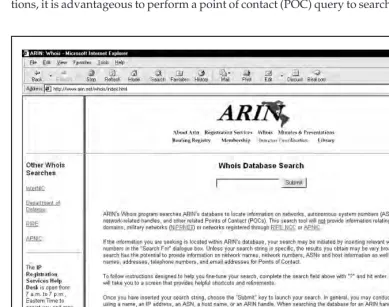
ARIN provides a handy web-based query mechanism, as shown in Figure 1-4. By re-viewing the output, we can see that ???Major ISP USA??? is the main backbone provider and has assigned a class A network (see TCP/IP Illustrated Volume 1 by Richard Stevens for a com-plete discussion of TCP/IP) to Acme Networks. Thus, we can conclude that this is a valid network owned by Acme Networks.
POC Query
[image:17.612.73.463.245.552.2]Since the administrative contact may be the administrative contact for multiple organiza-tions, it is advantageous to perform a point of contact (POC) query to search by the user???s
database handle. The handle we are searching for is ???WB9201,??? derived from the preced-ing domain query. You may uncover a domain that you were unaware of.
[bash]$ whois "HANDLE WB9201"@whois.networksolutions.com
Boyd, Woody [Network Engineer] (WB9201) [email protected] BIG ENTERPRISES
11 TOWN CENTER AVE EINSTEIN, AZ 20198
201-555-1212 (201)555-1212 (FAX) 201-555-1212
We could also search for @Acme.net to obtain a listing of all mail addresses for a given domain. We have truncated the following results for brevity:
[bash]$ whois "@acme.net"@whois.networksolutions.net
Smith, Janet (JS9999) [email protected] (201)555-9211 (FAX) (201)555-3643 Benson, Bob (BB9999) [email protected] (201)555-0988
Manual, Eric(EM9999) [email protected] (201)555-8484 (FAX) (201)555-8485 Bixon, Rob (RB9999) [email protected] (201)555-8072
U
Countermeasure: Public Database Security
Much of the information contained in the various databases discussed thus far is geared at public disclosure. Administrative contacts, registered net blocks, and authoritative name server information is required when an organization registers a domain on the Internet. However, security considerations should be employed to make the job of attack-ers much more difficult.
Many times an administrative contact will leave an organization and still be able to change the organization???s domain information. Thus, first ensure that the information listed in the database is accurate. Update the administrative, technical, and billing contact infor-mation as necessary. Furthermore, consider the phone numbers and addresses listed. These can be used as a starting point for a dial-in attack or for social engineering purposes. Con-sider using a toll-free number or a number that is not in your organization???s phone ex-change. In addition, we have seen several organizations list a fictitious administrative contact, hoping to trip up a would-be social engineer. If any employee receives an email or calls to or from the fictitious contact, it may tip off the information security department that there is a potential problem.
directed to autonete.net. AOL recovered quickly from this incident, but it underscores the fragility of an organization???s presence on the Internet. It is important to choose a more secure solution like password or PGP authentication to change domain information. Moreover, the administrative or technical contact is required to establish the authentication mechanism via Contact Form from Network Solutions.
Step 3. DNS Interrogation
After identifying all the associated domains, you can begin to query the DNS. DNS is a distributed database used to map IP addresses to hostnames and vice versa. If DNS is configured insecurely, it is possible to obtain revealing information about the organization.
M
Zone Transfers
Popularity: 9
Simplicity: 9
Impact: 3
Risk Rating: 7
One of the most serious misconfigurations a system administrator can make is allowing untrusted Internet users to perform a DNS zone transfer.
A zone transfer allows a secondary master server to update its zone database from the primary master. This provides for redundancy when running DNS, should the primary name server become unavailable. Generally, a DNS zone transfer only needs to be per-formed by secondary master DNS servers. Many DNS servers, however, are misconfigured and provide a copy of the zone to anyone who asks. This isn???t necessarily bad if the only in-formation provided is related to systems that are connected to the Internet and have valid hostnames, although it makes it that much easier for attackers to find potential targets. The real problem occurs when an organization does not use a public/private DNS mechanism to segregate their external DNS information (which is public) from its internal, private DNS information. In this case, internal hostnames and IP addresses are disclosed to the attacker. Providing internal IP address information to an untrusted user over the Internet is akin to providing a complete blueprint, or roadmap, of an organization???s internal network.
Let???s take a look at several methods we can use to perform zone transfers and the types of information that can be gleaned. While there are many different tools to perform zone transfers, we are going to limit the discussion to several common types.
A simple way to perform a zone transfer is to use thenslookupclient that is usually provided with most UNIX and NT implementations. We can usenslookupin interac-tive mode as follows:
[bash]$ nslookup
>> server 10.10.10.2
Default Server: [10.10.10.2] Address: 10.10.10.2
>> set type=any
>> ls -d Acme.net. >> /tmp/zone_out
We first runnslookupin interactive mode. Once started, it will tell you the default name server that it is using, which is normally your organization???s DNS server or a DNS server provided by your Internet service provider (ISP). However, our DNS server (10.10.20.2) is not authoritative for our target domain, so it will not have all the DNS records we are looking for. Thus, we need to manually tell nslookup which DNS server to query. In our example, we want to use the primary DNS server for Acme Networks (10.10.10.2). Recall that we found this information from our domain whois lookup per-formed earlier.
Next we set the record type to any. This will allow you to pull any DNS records avail-able (man nslookup) for a complete list.
Finally, we use thelsoption to list all the associated records for the domain. The???d switch is used to list all records for the domain. We append a ???.??? to the end to signify the fully qualified domain name???however, you can leave this off most times. In addition, we redirect our output to the file/tmp/zone_outso that we can manipulate the output later.
After completing the zone transfer, we can view the file to see if there is any interesting information that will allow us to target specific systems. Let???s review the output:
[bash]$ more zone_out
acct18 1D IN A 192.168.230.3
1D IN HINFO "Gateway2000" "WinWKGRPS" 1D IN MX 0 acmeadmin-smtp
1D IN RP bsmith.rci bsmith.who 1D IN TXT "Location:Telephone Room" ce 1D IN CNAME aesop
au 1D IN A 192.168.230.4 1D IN HINFO "Aspect" "MS-DOS" 1D IN MX 0 andromeda
1D IN RP jcoy.erebus jcoy.who 1D IN TXT "Location: Library" acct21 1D IN A 192.168.230.5
1D IN HINFO "Gateway2000" "WinWKGRPS" 1D IN MX 0 acmeadmin-smtp
1D IN RP bsmith.rci bsmith.who 1D IN TXT "Location:Accounting"
not needed, but provide a wealth of information to attackers. Since we saved the results of the zone transfer to an output file, we can easily manipulate the results with UNIX pro-grams likegrep,sed,awk, orperl.
Suppose we are experts in SunOS or Solaris. We could programmatically find out the IP addresses that had an HINFO record associated with SPARC, Sun, or Solaris.
[bash]$ grep -i solaris zone_out |wc ???l 388
We can see that we have 388 potential records that reference the word ???Solaris.??? Obvi-ously, we have plenty of targets.
Suppose we wanted to find test systems, which happen to be a favorite choice for at-tackers. Why? Simple???they normally don???t have many security features enabled, often have easily guessed passwords, and administrators tend not to notice or care who logs in to them. They???re a perfect home for any interloper. Thus, we can search for test systems as follows:
[bash]$ grep -i test /tmp/zone_out |wc ???l 96
So we have approximately 96 entries in the zone file that contain the word ???test.??? This should equate to a fair number of actual test systems. These are just a few simple exam-ples. Most intruders will slice and dice this data to zero-in on specific system types with known vulnerabilities.
Keep a few points in mind. The aforementioned method only queries one nameserver at a time. This means that you would have to perform the same tasks for all nameservers that are authoritative for the target domain. In addition, we only queried the Acme.net domain. If there were subdomains, we would have to perform the same type of query for each subdomain (for example, greenhouse.Acme.net). Finally, you may receive a message stat-ing that you can???t list the domain or that the query was refused. This usually indicates that the server has been configured to disallow zone transfers from unauthorized users. Thus, you will not be able to perform a zone transfer from this server. However, if there are multi-ple DNS servers, you may be able to find one that will allow zone transfers.
Now that we have shown you the manual method, there are plenty of tools that speed the process, including,host, Sam Spade,axfr, anddig.
Thehostcommand comes with many flavors of UNIX. Some simple ways of using hostare as follows:
host -l Acme.net
or
host -l -v -t any Acme.net
If you need just the IP addresses to feed into a shell script, you can justcutout the IP addresses from thehostcommand:
Not all footprinting functions must be performed through UNIX commands. A num-ber of Windows products provide the same information, as shown in Figure 1-5.
[image:22.612.72.458.140.582.2]Finally, you can use one of the best tools for performing zone transfers,axfr(http:// ftp.cdit.edu.cn/pub/linux/www.trinux.org/src/netmap/axfr-0.5.2.tar.gz) by Gaius. This
utility will recursively transfer zone information and create a compressed database of zone and host files for each domain queried. In addition, you can even pass top-level do-mains like com and edu to get all the dodo-mains associated withcomandedu, respectively. However, this is not recommended. To runaxfr, you would type the following:
[bash]$ axfr Acme.net
axfr: Using default directory: /root/axfrdb Found 2 name servers for domain 'Acme.net.': Text deleted.
Received XXX answers (XXX records).
To query theaxfrdatabase for the information you just obtained, you would type the following:
[bash]$ axfrcat Acme.net
Determine Mail Exchange (MX) Records
Determining where mail is handled is a great starting place to locate the target organiza-tion???s firewall network. Often in a commercial environment, mail is handled on the same system as the firewall, or at least on the same network. So we can usehostto help harvest even more information.
[bash]$ host Acme.net
Acme.net has address 10.10.10.1
Acme.net mail is handled (pri=20) by smtp-forward.Acme.net Acme.net mail is handled (pri=10) by gate.Acme.net
Ifhostis used without any parameters on just a domain name, it will try to resolve A records first, then MX records. The preceding information appears to cross-reference with thewhoisARIN search we previously performed. Thus, we can feel comfortable that this is a network we should be investigating.
U
Countermeasure: DNS Security
DNS information provides a plethora of information to attackers, so it is important to reduce the amount of information available to the Internet. From a host configuration perspec-tive, you should restrict zone transfers to only authorized servers. For modern versions of BIND, the allow-transfer directive in the named.conf file can be used to enforce the restric-tion. To restrict zone transfers in Microsoft???s DNS, you can use the Notify oprestric-tion. (See http://support.microsoft.com/support/kb/articles/q193/8/37.asp for more information.) For other nameservers, you should consult the documentation to determine what steps are necessary to restrict or disable zone transfers.
queries greater than 512 bytes will be sent via TCP. In most cases, DNS queries will easily fit within 512 bytes. A better solution would be to implement cryptographic Transaction Signatures (TSIGs) to allow only ???trusted??? hosts to transfer zone information. For a step-by-step example of how to implement TSIG security, see http://romana.ucd.ie/ james/tsig.html.
Restricting zone transfers will increase the time necessary for attackers to probe for IP addresses and hostnames. However, since name lookups are still allowed, attackers could manually perform lookups against all IP addresses for a given net block. There-fore, configure external name servers to provide information only about systems di-rectly connected to the Internet. External nameservers should never be configured to divulge internal network information. This may seem like a trivial point, but we have seen misconfigured nameservers that allowed us to pull back more than 16,000 internal IP addresses and associated hostnames. Finally, we discourage the use of HINFO records. As you will see in later chapters, you can identify the target system???s operating system with fine precision. However, HINFO records make it that much easier to programmatically cull potentially vulnerable systems.
Step 4. Network Reconnaissance
Now that we have identified potential networks, we can attempt to determine their net-work topology as well as potential access paths into the netnet-work.
M
Tracerouting
Popularity: 9
Simplicity: 9
Impact: 2
Risk Rating: 7
To accomplish this task, we can use the traceroute (ftp://ftp.ee.lbl.gov/ traceroute.tar.gz) program that comes with most flavors of UNIX and is provided in Win-dows NT. In WinWin-dows NT, it is spelledtracertdue to the 8.3 legacy filename issues.
Tracerouteis a diagnostic tool originally written by Van Jacobson that lets you view the route that an IP packet follows from one host to the next.Tracerouteuses the time-to-live (TTL) option in the IP packet to elicit an ICMP TIME_EXCEEDED message from each router. Each router that handles the packet is required to decrement the TTL field. Thus, the TTL field effectively becomes a hop counter. We can use the functionality oftracerouteto determine the exact path that our packets are taking. As mentioned previously,traceroutemay allow you to discover the network topology employed by the target network, in addition to identifying access control devices (application-based firewall or packet-filtering routers) that may be filtering our traffic.
[bash]$ traceroute Acme.net
traceroute to Acme.net (10.10.10.1), 30 hops max, 40 byte packets 1 gate2 (192.168.10.1) 5.391 ms 5.107 ms 5.559 ms
2 rtr1.bigisp.net (10.10.12.13) 33.374 ms 33.443 ms 33.137 ms 3 rtr2.bigisp.net (10.10.12.14) 35.100 ms 34.427 ms 34.813 ms 4 hssitrt.bigisp.net (10.11.31.14) 43.030 ms 43.941 ms 43.244 ms 5 gate.Acme.net (10.10.10.1) 43.803 ms 44.041 ms 47.835 ms
We can see the path of the packets leaving the router (gate) and traveling three hops (2???4) to the final destination. The packets go through the various hops without being blocked. From our earlier work, we know that the MX record for Acme.net points to gate.acme.net. Thus, we can assume this is a live host and that the hop before it (4) is the border router for the organization. Hop 4 could be a dedicated application-based firewall, or it could be a simple packet-filtering device???we are not sure yet. Generally, once you hit a live system on a network, the system before it is a device performing rout-ing functions (for example, a router or a firewall).
This is a very simplistic example. But in a complex environment, there may be multiple routing paths, that is, routing devices with multiple interfaces (for example, a Cisco 7500 se-ries router). Moreover, each interface may have different access control lists (ACLs) applied. In many cases, some interfaces will pass yourtracerouterequests, while others will deny it because of the ACL applied. Thus, it is important to map your entire network using traceroute. After youtracerouteto multiple systems on the network, you can begin to create a network diagram that depicts the architecture of the Internet gateway and the loca-tion of devices that are providing access control funcloca-tionality. We refer to this as an access
path diagram.
It is important to note that most flavors oftraceroutein UNIX default to sending User Datagram Protocol (UDP) packets, with the option of using Internet Control Messaging Protocol (ICMP) packets with the???Iswitch. In Windows NT, however, the default behavior is to use ICMP echo request packets. Thus, your mileage may vary using each tool if the site blocks UDP vs. ICMP and vice versa. Another interesting option of tracerouteincludes the???goption that allows the user to specify loose source routing. Thus, if you believe the target gateway will accept source-routed packets (which is a car-dinal sin), you might try to enable this option with the appropriate hop pointers (seeman traceroutein UNIX for more information).
would be UDP port 53 (DNS queries). Since many sites allow inbound DNS queries, there is a high probability that the access control device will allow our probes through.
[bash]$ traceroute 10.10.10.2
traceroute to (10.10.10.2), 30 hops max, 40 byte packets 1 gate (192.168.10.1) 11.993 ms 10.217 ms 9.023 ms
2 rtr1.bigisp.net (10.10.12.13)37.442 ms 35.183 ms 38.202 ms 3 rtr2.bigisp.net (10.10.12.14) 73.945 ms 36.336 ms 40.146 ms 4 hssitrt.bigisp.net (10.11.31.14) 54.094 ms 66.162 ms 50.873 ms 5 * * *
6 * * *
We can see here that ourtracerouteprobes, which by default send out UDP pack-ets, were blocked by the firewall.
Now let???s send a probe with a fixed port of UDP 53, DNS queries:
[bash]$ traceroute -S -p53 10.10.10.2
traceroute to (10.10.10.2), 30 hops max, 40 byte packets 1 gate (192.168.10.1) 10.029 ms 10.027 ms 8.494 ms 2 rtr1.bigisp.net (10.10.12.13) 36.673 ms 39.141 ms 37.872 ms 3 rtr2.bigisp.net (10.10.12.14) 36.739 ms 39.516 ms 37.226 ms 4 hssitrt.bigisp.net (10.11.31.14)47.352 ms 47.363 ms 45.914 ms 5 10.10.10.2 (10.10.10.2) 50.449 ms 56.213 ms 65.627 ms
Because our packets are now acceptable to the access control devices (hop 4), they are happily passed. Thus, we can probe systems behind the access control device just by sending out probes with a destination port of UDP 53. Additionally, if you send a probe to a system that has UDP port 53 listening, you will not receive a normal ICMP unreach-able message back. Thus, you will not see a host displayed when the packet reaches its ul-timate destination.
Most of what we have done up to this point with traceroute has been com-mand-line oriented. For the graphically inclined, you can use VisualRoute (http://www .visualroute.com) or NeoTrace (http://www.neotrace.com/) to perform your tracerouting. VisualRoute provides a graphical depiction of each network hop and integrates this with whoisqueries. VisualRoute, depicted in Figure 1-6, is appealing to the eye, but does not scale well for large-scale network reconnaissance.
U
Countermeasure: Thwarting Network Reconnaissance
[image:27.612.75.460.70.363.2]In this chapter, we only touched upon network reconnaissance techniques. We shall see more intrusive techniques in the following chapters. There are, however, several counter-measures that can be employed to thwart and identify the network reconnaissance probes discussed thus far. Many of the commercial network intrusion detection systems (NIDSes) will detect this type of network reconnaissance. In addition, one of the best free NIDS pro-grams, snort (http://www.snort.org/) by Marty Roesch, can detect this activity. If you are interested in taking the offensive when someone traceroutes to you, Humble from Rhino9 developed a program called RotoRouter (http://packetstorm.securify.com/UNIX/loggers/ rr-1.0.tgz). This utility is used to log incomingtracerouterequests and generate fake
responses. Finally, depending on your site???s security paradigm, you may be able to config-ure your border routers to limit ICMP and UDP traffic to specific systems, thus minimizing your exposure.
SUMMARY
CHAPTER
8
S
ome feel drugs are about the only thing more addicting than obtaining root access on a UNIX system. The pursuit of root access dates back to the early days of UNIX, so we need to provide some historical background on its evolution.THE QUEST FOR ROOT
In 1969, Ken Thompson, and later Dennis Ritchie, of AT&T decided that the MULTICS (Multiplexed Information and Computing System) project wasn???t progressing as fast as they would have liked. Their decision to ???hack up??? a new operating system called UNIX forever changed the landscape of computing. UNIX was intended to be a powerful, ro-bust, multiuser operating system that excelled at running programs, specifically, small programs called tools. Security was not one of UNIX???s primary design characteristics, al-though UNIX does have a great deal of security if implemented properly. UNIX???s pro-miscuity was a result of the open nature of developing and enhancing the operating system kernel, as well as the small tools that made this operating system so powerful. The early UNIX environments were usually located inside Bell Labs or in a university setting where security was controlled primarily by physical means. Thus, any user who had physical access to a UNIX system was considered authorized. In many cases, implement-ing root-level passwords was considered a hindrance and dismissed.
While UNIX and UNIX-derived operating systems have evolved considerably over the past 30 years, the passion for UNIX and UNIX security has not subsided. Many ardent developers and code hackers scour source code for potential vulnerabilities. Further-more, it is a badge of honor to post newly discovered vulnerabilities to security mailing lists such as Bugtraq. In this chapter, we will explore this fervor to determine how and why the coveted root access is obtained. Throughout this chapter, remember that in UNIX there are two levels of access: the all-powerful root and everything else. There is no substitute for root!
A Brief Review
Vulnerability Mapping
Vulnerability mapping is the process of mapping specific security attributes of a system to
an associated vulnerability or potential vulnerability. This is a critical phase in the actual exploitation of a target system that should not be overlooked. It is necessary for attackers to map attributes such as listening services, specific version numbers of running servers (for example, Apache 1.3.9 being used for HTTP andsendmail8.9.10 being used for SMTP), system architecture, and username information to potential security holes. There are several methods attackers can use to accomplish this task:
??? Manually map specific system attributes against publicly available sources of vulnerability information such as Bugtraq, Computer Emergency Response Team advisories (www.cert.org), and vendor security alerts. Although this is tedious, it can provide a thorough analysis of potential vulnerabilities without actually exploiting the target system.
??? Use public exploit code posted to various security mailing lists and any number of web sites, or write your own code. This will determine the existence of a real vulnerability with a high degree of certainty.
??? Use automated vulnerability scanning tools to identify true vulnerabilities. Respected commercial tools include the Internet Scanner from Internet Security Systems (www.iss.net) or CyberCop Scanner from Network Associates
(www.nai.com). On the freeware side, Nessus (www.nessus.org) and SAINT (http://www.wwdsi.com/saint/) show promise.
All these methods have their pros and cons; however, it is important to remember that only uneducated attackers known as ???script kiddies??? will skip the vulnerability mapping stage by throwing everything and the kitchen sink at a system to get in without knowing how and why an exploit works. We have witnessed many real-life attacks where the perpetrators were trying to use UNIX exploits against a Windows NT system. Needless to say, these attackers were inexpert and unsuccessful. The following list sum-marizes key points to consider when performing vulnerability mapping:
??? Perform network reconnaissance against the target system.
??? Map attributes such as operating system, architecture, and specific versions of listening services to known vulnerabilities and exploits.
??? Perform target acquisition by identifying and selecting key systems.
??? Enumerate and prioritize potential points of entry.
REMOTE ACCESS VERSUS LOCAL ACCESS
The remainder of this chapter is broken into two major sections, remote and local access.
Remote access is defined as gaining access via the network (for example, a listening
command shell or login to the system. Local access attacks are also referred to as privilege
escalation attacks. It is important to understand the relationship between remote and local
access. There is a logical progression where attackers remotely exploit a vulnerability in a listening service and then gain local shell access. Once shell access is obtained, the attack-ers are considered to be local on the system. We try to logically break out the types of at-tacks that are used to gain remote access and provide relevant examples. Once remote access is obtained, we explain common ways attackers escalate their local privileges to root. Finally, we explain information-gathering techniques that allow attackers to garner information about the local system so that it can be used as a staging point for additional attacks. It is important to remember that this chapter is not a comprehensive book on UNIX security; for that we refer you to Practical UNIX & Internet Security by Simson Garfinkel and Gene Spafford. Additionally, this chapter cannot cover every conceivable UNIX exploit and flavor of UNIX???that would be a book in itself. Rather, we aim to cate-gorize these attacks and to explain the theory behind them. Thus, when a new attack is discovered, it will be easy to understand how it works, though it was not specifically cov-ered. We take the ???teach a man to fish and feed him for life??? approach rather than the ???feed him for a day??? approach.
REMOTE ACCESS
As mentioned previously, remote access involves network access or access to another communications channel, such as a dial-in modem attached to a UNIX system. We find that analog/ISDN remote access security at most organizations is abysmal. We are limit-ing our discussion, however, to accesslimit-ing a UNIX system from the network via TCP/IP. After all, TCP/IP is the cornerstone of the Internet, and it is most relevant to our discus-sion on UNIX security.
The media would like everyone to believe that there is some sort of magic involved with compromising the security of a UNIX system. In reality, there are three primary methods to remotely circumventing the security of a UNIX system:
1. Exploiting a listening service (for example, TCP/UDP)
2. Routing through a UNIX system that is providing security between two or more networks
3. User-initiated remote execution attacks (for example, hostile web site, Trojan horse email, and so on)
Let???s take a look at a few examples to understand how different types of attacks fit into the preceding categories.
the latest wuftp vulnerability of the week is discovered? Are your systems vulnerable? Potentially, but attackers would have to exploit a listening service, wuftp, to gain access. It is imperative to remember that a service must be listening to gain access. If a service is not listening, it cannot be broken into remotely.
??? Route Through a UNIX System Your UNIX firewall was circumvented by attackers. How is this possible? you ask. We don???t allow any inbound services, you say. In many instances attackers circumvent UNIX firewalls by source routing packets through the firewall to internal systems. This feat is possible because the UNIX kernel had IP forwarding enabled when the firewall application should have been performing this function. In most of these cases, the attackers never actually broke into the firewall per se; they simply used it as a router.
??? User-Initiated Remote Execution Are you safe because you disabled all services on your UNIX system? Maybe not. What if you surf to
www.evilhacker.org and your web browser executes malicious code that connects back to the evil site? This may allow evilhacker.org to access your system. Think of the implications of this if you were logged in with root privileges while web surfing. What if your sniffer is susceptible to a buffer overflow attack (http://www.w00w00.org/advisories/snoop.html)?
Throughout this section, we will address specific remote attacks that fall under one of the preceding three categories. If you have any doubt about how a remote attack is possi-ble, just ask yourself three questions:
1. Is there a listening service involved? 2. Does the system perform routing?
3. Did a user or a user???s software execute commands that jeopardized the security of the host system?
You are likely to answer yes to at least one question.
]
Brute Force Attacks
Popularity: 8
Simplicity: 7
Impact: 7
Risk Rating: 7
nothing more than guessing a user ID / password combination on a service that attempts to authenticate the user before access is granted. The most common types of service that can be brute forced include the following:
??? telnet
??? File Transfer Protocol (FTP)
??? The ???R??? commands (rlogin,rsh, and so on)
??? Secure Shell (ssh)
??? SNMP community names
??? Post Office Protocol (POP)
??? HyperText Transport Protocol (HTTP/HTTPS)
Recall from our network discovery and enumeration discussion the importance of identifying potential system user IDs. Services likefinger,rusers, andsendmail were used to identify user accounts on a target system. Once attackers have a list of user accounts, they can begin trying to gain shell access to the target system by guessing the password associated with one of the IDs. Unfortunately, many user accounts have either a weak password or no password at all. The best illustration of this axiom is the ???Joe??? ac-count, where the user ID and password are identical. Given enough users, most systems will have at least one Joe account. To our amazement, we have seen thousands of Joe ac-counts over the course of performing our security reviews. Why are poorly chosen pass-words so common? Plain and simple: people don???t know how to choose strong passwords and are not forced to do so.
While it is entirely possible to guess passwords by hand, most passwords are guessed via an automated brute force utility. There are several tools that attackers can use to auto-mate brute forcing, including the following:
??? Brutus http://www.hoobie.net/brutus/
??? brute_web.c http://packetstorm.securify.com/Exploit_Code_Archive/ brute_web.c
??? pop.c http://packetstorm.securify.com/groups/ADM/ADM-pop.c ??? middlefinger http://www.njh.com/latest/9709/970916-05.html ??? TeeNet http://www.phenoelit.de/tn/
U
Brute Force Countermeasure
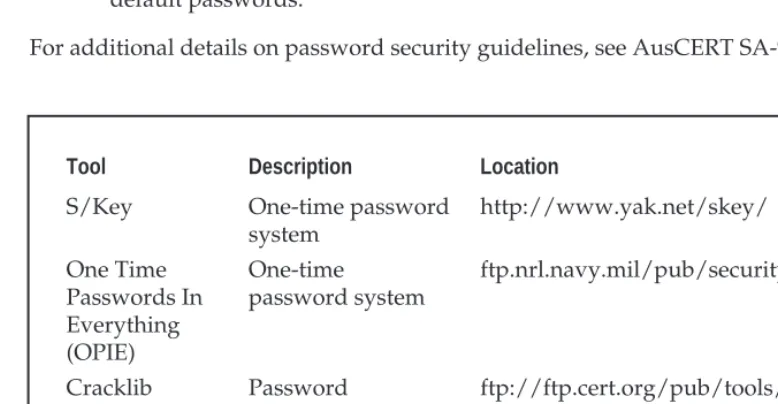
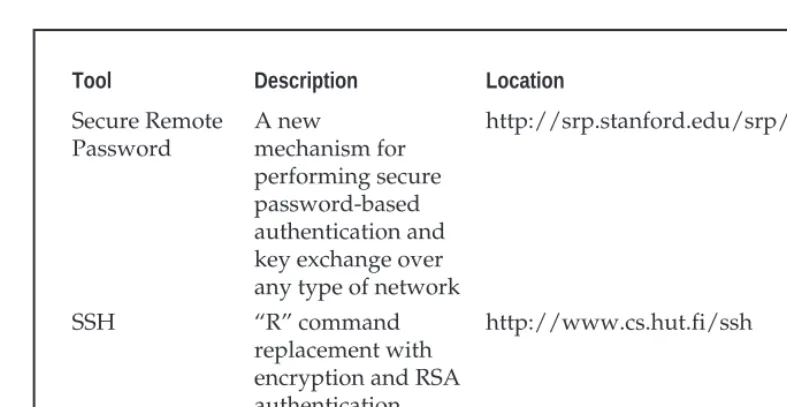
The best defense for brute force guessing is to use strong passwords that are not easily guessed. A one-time password mechanism would be most desirable. Some freeware utili-ties that will help make brute forcing harder are listed in Table 8-1.
??? Ensure all users have a valid password.
??? Force a password change every 30 days for privileged accounts and every 60 days for normal users.
??? Implement a minimum-length password length of six alphanumeric characters, preferably eight.
??? Log multiple authentication failures.
??? Configure services to disconnect after three invalid login attempts.
??? Implement account lockout where possible (be aware of potential denial of service issues of accounts being locked out intentionally by an attacker). ??? Disable services that are not used.
??? Implement password composition tools that prohibit the user from choosing a poor password.
??? Don???t use the same password for every system you log in to.
??? Don???t write down your password.
??? Don???t tell your password to others.
??? Use one-time passwords when possible.
??? Ensure that default accounts such as ???setup??? and ???admin??? do not have default passwords.
For additional details on password security guidelines, see AusCERT SA-93:04.
Tool Description Location
S/Key One-time password
system
http://www.yak.net/skey/
One Time Passwords In Everything (OPIE)
One-time
password system
ftp.nrl.navy.mil/pub/security/opie
Cracklib Password
composition tool
ftp://ftp.cert.org/pub/tools/cracklib/
Npasswd A replacement for
thepasswd command
[image:35.612.69.458.377.579.2]http://www.utexas.edu/cc/unix/ software/npasswd/
Data Driven Attacks
Now that we???ve dispensed with the seemingly mundane password guessing attacks, we can explain the de facto standard in gaining remote access???data driven attacks. A data
driven attack is executed by sending data to an active service that causes unintended or
undesirable results. Of course, ???unintended and undesirable results??? is subjective and depends on whether you are the attacker or the person who programmed the service. From the attacker???s perspective, the results are desirable because they permit access to the target system. From the programmer???s perspective, his or her program received unex-pected data that caused undesirable results. Data driven attacks are categorized as either buffer overflow attacks or input validation attacks. Each attack is described in detail next.
]
Buffer Overflow Attacks
Popularity: 8
Simplicity: 8
Impact: 10
Risk Rating: 9
In November 1996, the landscape of computing security was forever altered. The mod-erator of the Bugtraq mailing list, Aleph One, wrote an article for the security publication
Phrack Magazine (issue 49) titled ???Smashing the Stack for Fun and Profit.??? This article had a
profound effect on the state of security as it popularized how poor programming practices can lead to security compromises via buffer overflow attacks. Buffer overflow attacks date as far back as 1988 and the infamous Robert Morris Worm incident; however, useful infor-mation about specific details of this attack was scant until 1996.
Tool Description Location
Secure Remote Password
A new
mechanism for performing secure password-based authentication and key exchange over any type of network
http://srp.stanford.edu/srp/
SSH ???R??? command
replacement with encryption and RSA authentication
[image:36.612.67.461.65.268.2]http://www.cs.hut.fi/ssh
A buffer overflow condition occurs when a user or process attempts to place more data into a buffer (or fixed array) than was originally allocated. This type of behavior is associ-ated with specific C functions likestrcpy(),strcat(), andsprintf(), among oth-ers. A buffer overflow condition would normally cause a segmentation violation to occur. However, this type of behavior can be exploited to gain access to the target system. Al-though we are discussing remote buffer overflow attacks, buffer overflow conditions oc-cur via local programs as well and will be discussed in more detail later. To understand how a buffer overflow occurs, let???s examine a very simplistic example.
We have a fixed-length buffer of 128 bytes. Let???s assume this buffer defines the amount of data that can be stored as input to the VRFY command ofsendmail. Recall from Chapter 3 that we used VRFY to help us identify potential users on the target system by trying to verify their email address. Let us also assume thatsendmailis set user ID (SUID) to root and running with root privileges, which may or may not be true for every system. What happens if attackers connect to thesendmaildaemon and send a block of data consisting of 1,000 ???a???s to the VRFY command rather than a short username?
echo "vrfy 'perl -e 'print "a" x 1000''" |nc www.targetsystem.com 25
The VRFY buffer is overrun, as it was only designed to hold 128 bytes. Stuffing 1,000 bytes into the VRFY buffer could cause a denial of service and crash thesendmail dae-mon; however, it is even more dangerous to have the target system execute code of your choosing. This is exactly how a successful buffer overflow attack works.
Instead of sending 1,000 letter ???a???s to the VRFY command, the attackers will send specific code that will overflow the buffer and execute the command/bin/sh. Recall thatsendmailis running as root, so when/bin/shis executed, the attackers will have instant root access. You may be wondering how sendmail knew that the attackers wanted to execute/bin/sh. It???s simple. When the attack is executed, special assembly code known as the egg is sent to the VFRY command as part of the actual string used to overflow the buffer. When the VFRY buffer is overrun, attackers can set the return ad-dress of the offending function, allowing the attackers to alter the flow of the program. In-stead of the function returning to its proper memory location, the attackers execute the nefarious assembly code that was sent as part of the buffer overflow data, which will run /bin/shwith root privileges. Game over.
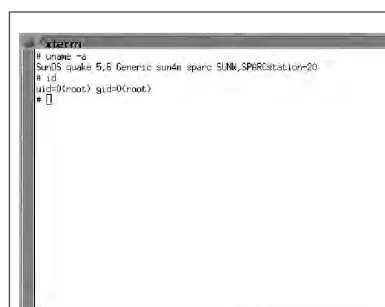
It is imperative to remember that the assembly code is architecture and operating sys-tem dependent. A buffer overflow for Solaris X86 running on Intel CPUs is completely different from one for Solaris running on SPARC systems. The following listing illus-trates what an egg, or assembly code specific to Linux X86, looks like:
char shellcode[] =
"\xeb\x1f\x5e\x89\x76\x08\x31\xc0\x88\x46\x07\x89\x46\x0c\xb0\x0b" "\x89\xf3\x8d\x4e\x08\x8d\x56\x0c\xcd\x80\x31\xdb\x89\xd8\x40\xcd" "\x80\xe8\xdc\xff\xff\xff/bin/sh";
already been created and are available via the Internet. The process of actually creating an egg is beyond the scope of this text, and the reader is advised to review Aleph One???s arti-cle in Phrack Magazine (49) at http://www.2600.net/phrack/p49-14.html. To beef up your assembly skills, consult Panic???UNIX System Crash and Dump Analysis by Chris Drake and Kimberley Brown. In addition, the friendly Teso folks have created some tools that will automatically generate shellcode. Hellkit, among other shellcode creation tools, can be found at http://teso.scene.at/releases.php3.
U
Buffer Overflow Attack Countermeasures
Secure Coding Practices The best countermeasure for buffer overflow is secure program-ming practices. Although it is impossible to design and code a program that is completely free of bugs, there are steps that help minimize buffer overflow conditions. These recom-mendations include the following:
??? Design the program from the outset with security in mind. All too often, programs are coded hastily in an effort to meet some program manager???s deadline. Security is the last item to be addressed and falls by the wayside. Vendors border on being negligent with some of the code that has been released recently. Many vendors are well aware of such slipshod security coding practices, but do not take the time to address such issues. Consult the Secure UNIX Program FAQ at http://www.whitefang.com/sup/index.html for more information.
??? Consider the use of ???safer??? compilers such as StackGuard from Immunix (http://www.cse.ogi.edu/DISC/projects/immunix/StackGuard/). Their approach is to immunize the programs at compile time to help minimize the impact of buffer overflow. Additionally, proof-of-concept defense mechanisms include Libsafe (http://www.bell-labs.com/org/11356/html/security.html), which aims to intercept calls to vulnerable functions on a systemwide basis. For a complete description of Libsafe???s capabilities and gory detail on exactly how buffer overflows work, see (http://www.bell-labs.com/org/11356/docs/ libsafe.pdf ). Keep in mind that these mechanisms are not a silver bullet, and users should not be lulled into a false sense of security.
??? Arguments should be validated when received from a user or program. This may slow down some programs, but tends to increase the security of each application. This includes bounds checking each variable, especially environment variables.
??? Use secure routines such asfget(),strncpy(), andstrncat(), and check the return codes from system calls.
??? Reduce the amount of code that runs with root privileges. This includes minimizing the use of SUID root programs where possible. Even if a buffer overflow attack were executed, users would still have to escalate their privileges to root.
Test and Audit Each Program It is important to test and audit each program. Many times programmers are unaware of a potential buffer overflow condition; however, a third party can easily detect such defects. One of the best examples of testing and auditing UNIX code is the OpenBSD (www.openbsd.org) project run by Theo de Raadt. The OpenBSD camp continually audits their source code and has fixed hundreds of buffer overflow conditions, not to mention many other types of security-related problems. It is this type of thorough auditing that has given OpenBSD a reputation for being one of the most secure free versions of UNIX available.
Disable Unused or Dangerous Services We will continue to address this point throughout the chapter. Disable unused or dangerous services if they are not essential to the opera-tion of the UNIX system. Intruders can???t break into a service that is not running. In addi-tion, we highly recommend the use of TCP Wrappers (tcpd) and xinetd (http://www.synack.net/xinetd/) to selectively apply an access control list on a per-ser-vice basis with enhanced logging features. Not every serper-ser-vice is capable of being wrapped. However, those that are will greatly enhance your security posture. In addition to wrap-ping each service, consider using kernel-level packet filtering that comes standard with most free UNIX operating systems (for example,ipchainsornetfilterfor Linux and ipf for BSD). For a good primer on using ipchains to secure your system, see
http://www.linuxdoc.org/HOWTO/IPCHAINS-HOWTO.html. Ipf from Darren
Reed is one of the better packages and can be added to many different flavors of UNIX. See http://www.obfuscation.org/ipf/ipf-howto.html for more information.
Disable Stack Execution Some purists may frown on disabling stack execution in favor of ensuring each program is buffer-overflow free. It has few side effects, however, and pro-tects many systems from some canned exploits. In Linux there is a no-stack execution patch available for the 2.0.x and 2.2.x series kernels. This patch can be found at http://www.openwall.com/linux/ and is primarily the work of the programmer extraordinaire, Solar Designer.
For Solaris 2.6 and 7, we highly recommend enabling the ???no-stack execution??? set-tings. This will prevent many Solaris-related buffer overflows from working. Although the SPARC and Intel application binary interface (ABI) mandate that the stack has exe-cute permission, most programs can function correctly with stack execution disabled. By default, stack execution is enabled in Solaris 2.6 and 7. To disable stack execution, add the following entry to the/etc/system file:
set noexec_user_stack=1 set noexec_user_stack_log =1
Keep in mind that disabling stack execution is not foolproof. Disabling stack execu-tion will normally log any program that tries to execute code on the stack and tends to thwart most script kiddies. However, experienced attackers are quite capable of writing (and distributing) code that exploits a buffer overflow condition on a system with stack execution disabled.
attention, heap-based overflows are just as dangerous. Heap-based overflows are based on overrunning memory that has been dynamically allocated by an application. This dif-fers from stack-based overflows, which depend on overflowing a fixed-length buffer. Un-fortunately, vendors do not have equivalent ???no heap execution??? settings. Thus, you should not become lulled into a false sense of security by just disabling stack execution. While not covered in detail here, more information on heap-based overflows can be found from the research the w00w00 team has performed at http://www.w00w00.org/ files/heaptut/heaptut.txt.
]
Input Validation Attacks
Popularity: 8
Simplicity: 9
Impact: 8
Risk Rating: 9
In 1996, Jennifer Myers identified and reported the infamous PHF vulnerability. Al-though this attack is rather dated, it provides an excellent example of an input validation attack. To reiterate, if you understand how this attack works, your understanding can be applied to many other attacks of the same genre even thought it is an older attack. We will not spend an inordinate amount of time on this subject, as it is covered in additional detail in Chapter 15. Our purpose is to explain what an input validation attack is, and how it may allow attackers to gain access to a UNIX system.
An input validation attack occurs when
??? A program fails to recognize syntactically incorrect input.
??? A module accepts extraneous input.
??? A module fails to handle missing input fields.
??? A field-value correlation error occurs.
PHF is a Common Gateway Interface (CGI) script that came standard with early ver-sions of Apache web server and NCSA HTTPD. Unfortunately, this program did not properly parse and validate the input it received. The original version of the PHF script accepted the newline character (%0a) and executed any subsequent commands with the privileges of the user ID running the web server. The original PHF exploit was as follows:
/cgi-bin/phf?Qalias=x%0a/bin/cat%20/etc/passwd
this chapter. Keep in mind that this vulnerability allowed attackers to execute any com-mands with the privileges of the user ID running the web server. In most cases, the user ID was ???nobody,??? but there were many unfortunate sites that committed the cardinal sin of running their web server with root privileges.
PHF was a very popular attack in 1996 and 1997, and many sites were compromised as a result of this simple but effective exploit. It is important to understand how the vulnera-bility was exploited so that this concept can be applied to other input validation attacks, as there are dozens of these attacks in the wild. In UNIX, there are metacharacters that are re-served for special purposes. These metacharacters include but are not limited to
\ / < > ! $ % ^ & * | { } [ ] ??? ??? ?????? ~ ;
If a program or CGI script were to accept user-supplied input and not properly vali-date this data, the program could be tricked into executing arbitrary code. This is typi-cally referred to as ???escaping out??? to a shell and usually involves passing one of the UNIX metacharacters as user-supplied input. This is a very common attack and by no means is limited to just PHF. There are many examples of insecure CGI programs that were sup-plied as part of a default web server installation. Worse, many vulnerable programs are written by web site developers who have little experience in writing secure programs. Unf