Beginning
JavaScript
®
Third Edition
Beginning
JavaScript
®
Beginning
JavaScript
®
Third Edition
Beginning JavaScript
®
, Third Edition
Published by
Wiley Publishing, Inc. 10475 Crosspoint Boulevard Indianapolis, IN 46256
www.wiley.com
Copyright © 2007 by Wiley Publishing, Inc., Indianapolis, Indiana Published simultaneously in Canada
ISBN: 978-0-470-05151-1
Manufactured in the United States of America 10 9 8 7 6 5 4 3 2 1
Library of Congress Cataloging-in-Publication Data:
Wilton, Paul, 1969–
Beginning JavaScript / Paul Wilton, Jeremy McPeak.—3rd ed. p. cm.
ISBN 978-0-470-05151-1 (paper/website)
1. JavaScript (Computer program language) 2. World Wide Web. 3. Web servers. I. McPeak, Jeremy, 1979– II. Title. QA76.73.J39W55 2007
005.13'3—dc22
2007008102
No part of this publication may be reproduced, stored in a retrieval system or transmitted in any form or by any means, electronic, mechanical, photocopying, recording, scanning or otherwise, except as permitted under Sections 107 or 108 of the 1976 United States Copyright Act, without either the prior written permission of the Publisher, or authorization through payment of the appropriate per-copy fee to the Copyright Clearance Center, 222 Rosewood Drive, Danvers, MA 01923, (978) 750-8400, fax (978) 646-8600. Requests to the Publisher for permission should be addressed to the Legal Department, Wiley Publishing, Inc., 10475 Crosspoint Blvd., Indianapolis, IN 46256, (317) 572-3447, fax (317) 572-4355, or online at http://www.wiley.com/go/permissions.
LIMIT OF LIABILITY/DISCLAIMER OF WARRANTY: THE PUBLISHER AND THE AUTHOR MAKE NO REPRESEN-TATIONS OR WARRANTIES WITH RESPECT TO THE ACCURACY OR COMPLETENESS OF THE CONTENTS OF THIS WORK AND SPECIFICALLY DISCLAIM ALL WARRANTIES, INCLUDING WITHOUT LIMITATION WAR-RANTIES OF FITNESS FOR A PARTICULAR PURPOSE. NO WARRANTY MAY BE CREATED OR EXTENDED BY SALES OR PROMOTIONAL MATERIALS. THE ADVICE AND STRATEGIES CONTAINED HEREIN MAY NOT BE SUITABLE FOR EVERY SITUATION. THIS WORK IS SOLD WITH THE UNDERSTANDING THAT THE PUBLISHER IS NOT ENGAGED IN RENDERING LEGAL, ACCOUNTING, OR OTHER PROFESSIONAL SERVICES. IF PROFES-SIONAL ASSISTANCE IS REQUIRED, THE SERVICES OF A COMPETENT PROFESPROFES-SIONAL PERSON SHOULD BE SOUGHT. NEITHER THE PUBLISHER NOR THE AUTHOR SHALL BE LIABLE FOR DAMAGES ARISING HERE-FROM. THE FACT THAT AN ORGANIZATION OR WEBSITE IS REFERRED TO IN THIS WORK AS A CITATION AND/OR A POTENTIAL SOURCE OF FURTHER INFORMATION DOES NOT MEAN THAT THE AUTHOR OR THE PUBLISHER ENDORSES THE INFORMATION THE ORGANIZATION OR WEBSITE MAY PROVIDE OR RECOM-MENDATIONS IT MAY MAKE. FURTHER, READERS SHOULD BE AWARE THAT INTERNET WEBSITES LISTED IN THIS WORK MAY HAVE CHANGED OR DISAPPEARED BETWEEN WHEN THIS WORK WAS WRITTEN AND WHEN IT IS READ.
For general information on our other products and services please contact our Customer Care Department within the United States at (800) 762-2974, outside the United States at (317) 572-3993 or fax (317) 572-4002.
Trademarks:Wiley, the Wiley logo, Wrox, the Wrox logo, Programmer to Programmer, and related trade dress are trade-marks or registered tradetrade-marks of John Wiley & Sons, Inc. and/or its affiliates, in the United States and other countries, and may not be used without written permission. JavaScript is a registered trademark of Sun Microsystems Incorporated. All other trademarks are the property of their respective owners. Wiley Publishing, Inc., is not associated with any prod-uct or vendor mentioned in this book.
In memory of my mum, June Wilton, who in 2006 lost her brave battle against cancer. She was always very proud of me and my books and showed my books to anyone and everyone she happened to meet however briefly and
whether they wanted to see them or not! She’s very much missed.
—Paul Wilton
To my parents, Jerry and Judy, for their love and support.
About the Authors
Paul Wiltonstarted as a Visual Basic applications programmer at the Ministry of Defence in the UK, then found himself pulled into the Net. Having joined an Internet development company, he spent three years helping create Internet solutions. He’s now running his own successful and rapidly growing com-pany developing online holiday property reservation systems.
Acknowledgments
Firstly a big thank-you for her support to my partner Beci, who, now that the book’s finished, will get to see me for more than 10 minutes a week.
I’d also like to say a very big thank you to Tom Dinse, who has been a great editor to work with and has done amazing work on the book.
Thanks also to Jim Minatel for making this book happen, and also his support in what has for me been yet another challenging and difficult year.
Many thanks to everyone who’s supported and encouraged me over my many years of writing books. Your help will always be remembered.
Finally, pats and treats to my German shepherd Katie, who does an excellent job of warding off distur-bances from door-to-door salespeople.
Credits
Senior Acquisitions Editor Jim Minatel
Senior Development Editor Tom Dinse
Technical Editor Alexei Gorkov
Production Editor Travis Henderson
Copy Editor S. B. Kleinman
Editorial Manager Mary Beth Wakefield
Production Manager Tim Tate
Vice President and Executive Group Publisher Richard Swadley
Vice President and Executive Publisher Joseph B. Wikert
Graphics and Production Specialists Joyce Haughey
Jennifer Mayberry Alicia B. South
Quality Control Technician Melanie Hoffman
Project Coordinator Erin Smith
Proofreading and Indexing Laura L. Bowman
Slivoskey Indexing Services
Contents
Acknowledgments
ix
Introduction
xix
Chapter 1: Introduction to JavaScript and the Web
1
Introduction to JavaScript
1
What Is JavaScript?
1
JavaScript and the Web
2
Why Choose JavaScript?
3
What Can JavaScript Do for Me?
4
Tools Needed to Create JavaScript Web Applications
4
The <script> Tag and Your First Simple JavaScript Program
6
A Brief Look at Browsers and Compatibility Problems
12
Introducing the “Who Wants To Be A Billionaire” Trivia Quiz
13
Ideas Behind the Coding of the Trivia Quiz
16
What Functionality to Add and Where?
18
Summary
18
Chapter 2: Data Types and Variables
21
Types of Data in JavaScript
21
Numerical Data
22
Text Data
22
Boolean Data
24
Variables — Storing Data in Memory
24
Declaring Variables and Giving Them Values
25
Assigning Variables with the Value of Other Variables
28
Setting Up Your Browser for Errors
30
Displaying Errors in Firefox
30
Displaying Errors in Internet Explorer
31
What Happens When You Get an Error
32
Using Data — Calculations and Basic String Manipulation
35
Numerical Calculations
35
Operator Precedence
39
Arrays
49
A Multi-Dimensional Array
54
The “Who Wants To Be A Billionaire” Trivia Quiz — Storing the Questions Using
Arrays
58
Summary
61
Exercise Questions
62
Question 1
62
Question 2
62
Chapter 3: Decisions, Loops, and Functions
63
Decision Making — The if and switch Statements
64
Comparison Operators
64
The if Statement
66
Logical Operators
70
Multiple Conditions Inside an if Statement
73
else and else if
77
Comparing Strings
78
The switch Statement
79
Looping — The for and while Statements
84
The for Loop
84
The for...in Loop
87
The while Loop
88
The do...while loop
90
The break and continue Statements
91
Functions
92
Creating Your Own Functions
92
Variable Scope and Lifetime
96
The Trivia Quiz — Building One of the Basic Functions
97
Summary
100
Exercise Questions
102
Question 1
102
Question 2
102
Question 3
103
Question 4
103
Chapter 4: JavaScript — An Object-Based Language
105
Object-Based Programming
105
A Brief Introduction to Objects
105
Objects in JavaScript
106
Using JavaScript Objects
107
The JavaScript Native Objects
111
String Objects
111
The Math Object
122
Number Object
129
Array Objects
130
Date Objects
137
JavaScript Classes
146
Summary
156
Exercise Questions
157
Question 1
157
Question 2
157
Question 3
157
Chapter 5: Programming the Browser
159
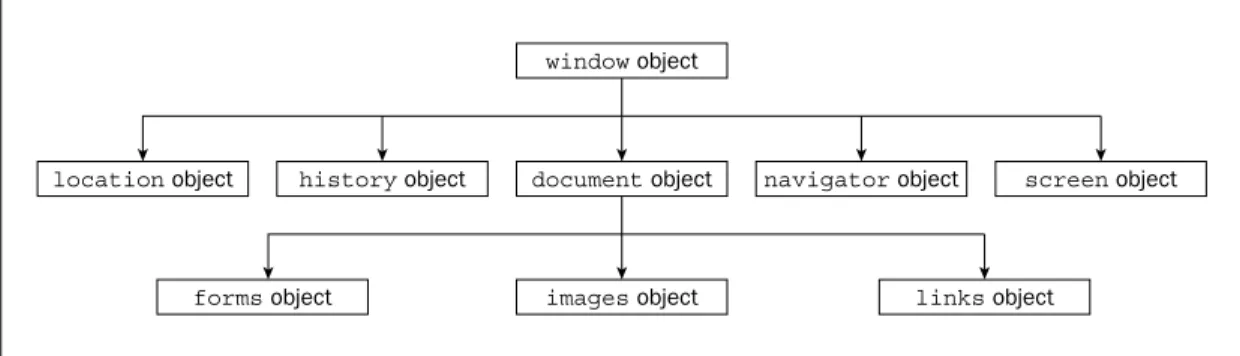
Introduction to the Browser Objects
160
The window Object — Our Window onto the Page
161
The history Object
163
The location Object
163
The navigator Object
164
The screen Object
164
The document Object — The Page Itself
165
Connecting Code to Web Page Events
169
Browser Version Checking Examples
175
Summary
185
Exercise Questions
186
Question 1
186
Question 2
186
Question 3
186
Chapter 6: HTML Forms — Interacting with the User
187
HTML Forms
188
Other Form Object Properties and Methods
190
HTML Elements in Forms
191
Common Properties and Methods
193
Button Form Elements
194
Text Elements
197
textarea Element
204
Check Boxes and Radio Buttons
207
The Trivia Quiz
227
Creating the Form
228
Creating the Answer Radio Buttons
229
Summary
233
Exercises
235
Question 1
235
Question2
235
Chapter 7: Windows and Frames
237
Frames and the window Object
238
Coding Between Frames
241
Code Access Between Frames
247
Opening New Windows
257
Opening a New Browser Window
257
Scripting Between Windows
264
Moving and Resizing Windows
269
Security
270
Trivia Quiz
271
Creating the New Trivia Quiz
272
Summary
287
Exercise Questions
289
Question 1
289
Question 2
289
Chapter 8: String Manipulation
291
Additional String Methods
292
The split() Method
292
The replace() Method
295
The search() Method
296
The match() Method
296
Regular Expressions
297
Simple Regular Expressions
297
Regular Expressions: Special Characters
300
Covering All Eventualities
308
Grouping Regular Expressions
308
The String Object — split(), replace(), search(), and match() Methods
312
The split() Method
312
The replace() Method
314
The search() Method
318
The match() Method
318
The Trivia Quiz
322
Summary
329
Exercise Questions
330
Question 1
330
Question 2
331
Question 3
331
Chapter 9: Date, Time, and Timers
333
World Time
334
Setting and Getting a Date Object’s UTC Date and Time
339
Timers in a Web Page
347
One-Shot Timer
348
Setting a Timer that Fires at Regular Intervals
352
The Trivia Quiz
354
Summary
360
Exercise Questions
360
Question 1
360
Question 2
360
Chapter 10: Common Mistakes, Debugging, and Error Handling
361
I Can’t Believe I Just Did That: Some Common Mistakes
361
1: Undefined Variables
362
2: Case Sensitivity
363
3: Incorrect Number of Closing Braces
364
4: Missing Plus Signs During Concatenation
364
5: Equals Rather than Is Equal To
365
6: Incorrect Number of Closing Parentheses
365
7: Using a Method as a Property and Vice Versa
366
Microsoft Script Debugger
367
Obtaining the Script Debugger
367
Installing the Script Debugger
368
Using the Script Debugger
370
Firefox Debugging with Venkman
388
Error Handling
393
Preventing Errors
393
The try...catch Statements
394
Summary
404
Exercise Questions
405
Chapter 11: Storing Information: Cookies
407
Baking Your First Cookie
407
A Fresh-Baked Cookie
408
The Cookie String
415
Creating a Cookie
418
Getting a Cookie’s Value
422
Cookie Limitations
428
Cookie Security and IE6 and IE7
429
Summary
434
Exercise Questions
435
Question 1
435
Question 2
435
Chapter 12: Introduction to Dynamic HTML
437
Cross-Browser Issues
437
Events
438
CSS: A Primer
458
Adding Some Style to HTML
459
Dynamic HTML
470
Accessing Elements
470
Changing Appearances
470
Positioning and Moving Content
478
Example: Animated Advertisement
483
Summary
488
Exercise Questions
488
Question 1
488
Question 2
488
Chapter 13: Dynamic HTML in Modern Browsers
489
Why Do We Need Web Standards?
490
The Web Standards
492
HTML
492
ECMAScript
492
XML
493
XHTML
494
The Document Object Model
495
The DOM Standard
496
Differences Between the DOM and the BOM
497
Representing the HTML Document as a Tree Structure
497
DOM Properties and Methods
502
The DOM Event Model
521
DHTML Example: Internet Explorer 5+
526
The IE Event Model
526
Building a DHTML Toolbar
528
DHTML Example: The Toolbar in Firefox and Opera
540
Creating Cross-Browser DHTML
544
Summary
548
Exercise Questions
548
Question 1
548
Question 2
549
Chapter 14: JavaScript and XML
551
What Can XML Do for Me?
551
The Basics of XML
552
Understanding XML Syntax
552
Creating an XML Document
557
Document Type Definition
559
Creating the First DTD File
559
Bring on the Data
561
Altering the Look of XML
566
Style Sheets and XML
566
Extensible Stylesheet Language
568
Manipulating XML with JavaScript
576
Retrieving an XML File in IE
577
Determining When the XML File Has Loaded
579
Retrieving an XML File in Firefox and Opera
580
Determining When the File is Loaded
580
Cross-Browser XML File Retrieval
581
Displaying a Daily Message
582
Summary
592
Exercise Questions
593
Question 1
593
Question 2
593
Chapter 15: Using ActiveX and Plug-Ins with JavaScript
595
Checking for and Embedding Plug-ins in Firefox
596
Adding a Plug-in to the Page
596
Checking for and Embedding ActiveX Controls on Internet Explorer
601
Adding an ActiveX Control to the Page
602
Installing an ActiveX Control
606
Using Plug-ins and ActiveX Controls
607
Testing Your “No Plug-in or ActiveX Control” Redirection Script
614
Potential Problems
614
Summary
617
Exercise Question
618
Question 1
618
Chapter 16: Ajax and Remote Scripting
619
What Is Remote Scripting?
619
What Can It Do?
619
Ajax
621
Browser Support
621
Ajax with JavaScript: The XMLHttpRequest Object
622
Cross-Browser Issues
622
Using the XMLHttpRequest Object
626
Asynchronous Requests
627
Creating a Remote Scripting Class
629
The HttpRequest Constructor
629
Creating the Methods
631
The Full Code
632
Creating a Smarter Form with XMLHttpRequest
634
Requesting Information
634
The Received Data
635
Before You Begin
635
Creating a Smarter Form with an IFrame
644
The Server Response
645
Things to Watch Out For
652
The Same-Origin Policy
652
ActiveX
652
Usability Concerns
653
Summary
654
Exercise Questions
655
Question 1
655
Question 2
655
Appendix A: Exercise Solutions
657
Introduction
JavaScript is a scripting language that enables you to enhance static web applications by providing dynamic, personalized, and interactive content. This improves the experience of visitors to your site and makes it more likely that they will visit again. You must have seen the flashy drop-down menus, moving text, and changing content that are now widespread on web sites—they are enabled through JavaScript. Supported by all the major browsers, JavaScript is the language of choice on the Web. It can even be used outside web applications—to automate administrative tasks, for example.
This book aims to teach you all you need to know to start experimenting with JavaScript: what it is, how it works, and what you can do with it. Starting from the basic syntax, you’ll move on to learn how to cre-ate powerful web applications. Don’t worry if you’ve never programmed before—this book will teach you all you need to know, step by step. You’ll find that JavaScript can be a great introduction to the world of programming: with the knowledge and understanding that you’ll gain from this book, you’ll be able to move on to learn newer and more advanced technologies in the world of computing.
Whom This Book Is For
In order to get the most out of this book, you’ll need to have an understanding of HTML and how to cre-ate a static web page. You don’t need to have any programming experience.
This book will also suit you if you have some programming experience already, and would like to turn your hand to web programming. You will know a fair amount about computing concepts, but maybe not as much about web technologies.
Alternatively, you may have a design background and know relatively little about the Web and comput-ing concepts. For you, JavaScript will be a cheap and relatively easy introduction to the world of pro-gramming and web application development.
Whoever you are, we hope that this book lives up to your expectations.
What This Book Covers
You’ll begin by looking at exactly what JavaScript is, and taking your first steps with the underlying lan-guage and syntax. You’ll learn all the fundamental programming concepts, including data and data types, and structuring your code to make decisions in your programs or to loop over the same piece of code many times.
your programs. Next, you’ll see how you can use JavaScript to manipulate objects made available to you in the browser, such as forms, windows, and other controls. Using this knowledge, you can start to cre-ate truly professional-looking applications that enable you to interact with the user.
Long pieces of code are very hard to get right every time—even for the experienced programmer—and JavaScript code is no exception. You look at common syntax and logical errors, how you can spot them, and how to use the Microsoft Script Debugger to aid you with this task. Also, you need to examine how to handle the errors that slip through the net, and ensure that these do not detract from the experience of the end user of your application.
From here, you’ll move on to more advanced topics, such as using cookies and jazzing up your web pages with dynamic HTML and XML. Finally, you’ll be looking at a relatively new and exciting technol-ogy, remote scripting. This allows your JavaScript in a HTML page to communicate directly with a server, and useful for, say, looking up information on a database sitting on your server. If you have the Google toolbar you’ll have seen something like this in action already. When you type a search word in the Google toolbar, it comes up with suggestions, which it gets via the Google search database.
All the new concepts introduced in this book will be illustrated with practical examples, which enable you to experiment with JavaScript and build on the theory that you have just learned. The appendix pro-vides solutions to the exercises included at the end of most chapters throughout the book.
During the first half of the book, you’ll also be building up a more complex sample application—an online trivia quiz—which will show you how JavaScript is used in action in a real-world situation.
What You Need to Use This Book
Because JavaScript is a text-based technology, all you really need to create documents containing JavaScript is Notepad (or your equivalent text editor).
Also, in order to try out the code in this book, you will need a web browser that supports a modern ver-sion of JavaScript. Ideally, this means Internet Explorer 6 or later and Firefox 1.5 or later. The book has been extensively tested with these two browsers. However, the code should work in most modern web browsers, although some of the code in later chapters, where you examine dynamic HTML and scripting the DOM, is specific to particular browsers; but the majority of the code presented is cross-browser. Where there are exceptions, they will be clearly noted.
Conventions
Try It Out
The Try It Out is an exercise you should work through, following the text in the book.
1.
They usually consist of a set of steps.2.
Each step has a number.3.
Follow the steps with your copy of the database.How It Works
After each Try It Out, the code you’ve typed will be explained in detail.
Tips, hints, tricks, and asides to the current discussion are offset and placed in italics like this.
As for styles in the text:
❑ We highlight in italic type new terms and important words when we introduce them. ❑ We show keyboard strokes like this: Ctrl+A.
❑ We show file names, URLs, and code within the text like so: persistence.properties. ❑ We present code in two different ways:
In code examples we highlight new and important code with a gray background.
The gray highlighting is not used for code that’s less important in the present context, or that has been shown before.
Source Code
As you work through the examples in this book, you may choose either to type in all the code manually or to use the source-code files that accompany the book. All of the source code used in this book is avail-able for download at www.wrox.com. Once at the site, simply locate the book’s title (either by using the Search box or by using one of the title lists) and click the Download Code link on the book’s detail page to obtain all the source code for the book.
Because many books have similar titles, you may find it easiest to search by ISBN; this book’s ISBN is 978-0-470-05151-1.
Once you download the code, just decompress it with your favorite compression tool. Alternately, you can go to the main Wrox code download page at www.wrox.com/dynamic/books/download.aspxto
Errata
We make every effort to ensure that there are no errors in the text or in the code. However, no one is per-fect, and mistakes do occur. If you find an error in one of our books, like a spelling mistake or faulty piece of code, we would be very grateful for your feedback. By sending in errata you may save another reader hours of frustration, and at the same time you will be helping us provide even higher-quality information.
To find the errata page for this book, go to www.wrox.comand locate the title using the Search box or one of the title lists. Then, on the book details page, click the Book Errata link. On this page you can view all errata that have been submitted for this book and posted by Wrox editors. A complete book list, including links to each book’s errata, is also available at www.wrox.com/misc-pages/booklist.shtml.
If you don’t spot “your” error on the Book Errata page, go to www.wrox.com/contact/techsupport .shtmland complete the form there to send us the error you have found. We’ll check the information and, if appropriate, post a message to the book’s errata page and fix the problem in subsequent editions of the book.
p2p.wrox.com
For author and peer discussion, join the P2P forums at p2p.wrox.com. The forums are a Web-based sys-tem on which you can post messages relating to Wrox books and related technologies and interact with other readers and technology users. The forums offer a subscription feature to e-mail you topics of inter-est of your choosing when new posts are made to the forums. Wrox authors, editors, other industry experts, and your fellow readers are present on these forums.
At http://p2p.wrox.comyou will find a number of different forums that will help you not only as you read this book, but also as you develop your own applications. To join the forums, just follow these steps:
1.
Go to p2p.wrox.comand click the Register link.2.
Read the terms of use and click Agree.3.
Complete the required information to join as well as any optional information you wish to pro-vide, and click Submit.4.
You will receive an e-mail with information describing how to verify your account and com-plete the joining process.You can read messages in the forums without joining P2P, but in order to post your own messages, you must join.
Once you join, you can post new messages and respond to messages other users post. You can read mes-sages at any time on the Web. If you would like to have new mesmes-sages from a particular forum e-mailed to you, click the Subscribe to this Forum icon by the forum name in the forum listing.
1
Introduction to JavaScript
and the Web
In this introductory chapter, you look at what JavaScript is, what it can do for you, and what you need in order to use it. With these foundations in place, you will see throughout the rest of the book how JavaScript can help you to create powerful web applications for your web site.
The easiest way to learn something is by actually doing it, so throughout the book you’ll create a number of useful example programs using JavaScript. This process starts in this chapter, by the end of which you will have created your first piece of JavaScript code.
Additionally, over the course of the book you’ll develop a complete JavaScript web application: an online trivia quiz. By seeing it develop, step by step, you’ll get a good understanding of how to create your own web applications. At the end of this chapter, you’ll look at the finished trivia quiz and consider the ideas behind its design.
Introduction to JavaScript
In this section you take a brief look at what JavaScript is, where it came from, how it works, and what sorts of useful things you can do with it.
What Is JavaScript?
In natural English, here are instructions, or code, you might write to make a cup of instant coffee:
1.
Put coffee crystals in cup.2.
Fill kettle with water.3.
Put kettle on to boil.4.
Has the kettle boiled? If so, then pour water into cup; otherwise, continue to wait.5.
Drink coffee.You’d start running this code from the first line (instruction 1), and then continue to the next (instruction 2), then the next, and so on until you came to the end. This is pretty much how most computer lan-guages work, JavaScript included. However, there are occasions when you might change the flow of exe-cution, or even skip over some code, but you’ll see more of this in Chapter 3.
JavaScript is an interpreted language, rather than a compiled language. What is meant by the terms interpreted and compiled?
Well, to let you in on a secret, your computer doesn’t really understand JavaScript at all. It needs some-thing to interpret the JavaScript code and convert it into somesome-thing that it understands; hence it is an interpreted language. Computers understand only machine code, which is essentially a string of binary numbers (that is, a string of zeros and ones). As the browser goes through the JavaScript, it passes it to a special program called an interpreter, which converts the JavaScript to the machine code your computer understands. It’s a bit like having a translator to translate English into Spanish, for example. The impor-tant point to note is that the conversion of the JavaScript happens at the time the code is run; it has to be repeated every time this happens. JavaScript is not the only interpreted language; there are others, including VBScript.
The alternative compiled language is one in which the program code is converted to machine code before it’s actually run, and this conversion only has to be done once. The programmer uses a compiler to con-vert the code that he wrote to machine code, and it is this machine code that is run by the program’s user. Compiled languages include Visual Basic and C++. Using a real-world analogy, it’s like having someone translate your English document into Spanish. Unless you change the document, you can use it without retranslation as much as you like.
Perhaps this is a good point to dispel a widespread myth: JavaScript is not the script version of the Java language. In fact, although they share the same name, that’s virtually all they do share. Particularly good news is that JavaScript is much, much easier to learn and use than Java. In fact, languages like JavaScript are the easiest of all languages to learn, but they are still surprisingly powerful.
JavaScript and the Web
For most of this book you’ll look at JavaScript code that runs inside a web page loaded into a browser. All you need in order to create these web pages is a text editor — for example, Windows Notepad — and a web browser, such as Firefox or Internet Explorer, with which you can view your pages. These browsers come equipped with JavaScript interpreters.
that JavaScript sounded more exciting. When JavaScript really took off, Microsoft decided to add its own brand of JavaScript, called JScript, to Internet Explorer. Since then, Netscape, Microsoft, and others have released improved versions and included them in their latest browsers. Although these different brands and versions of JavaScript have much in common, there are enough differences to cause problems if you’re not careful. Initially you’ll be creating code that’ll work with most browsers, whether Firefox, Internet Explorer, or Netscape. Later chapters look at features available only to Firefox 1.5 or later and Internet Explorer 6 and 7. You’ll look into the problems with different browsers and versions of JavaScript later in this chapter, and see how to deal with them.
The majority of the web pages containing JavaScript that you create in this book can be stored on your hard drive and loaded directly into your browser from the hard drive itself, just as you’d load any nor-mal file (such as a text file). However, this is not how web pages are loaded when you browse web sites on the Internet. The Internet is really just one great big network connecting computers. Access to web sites is a special service provided by particular computers on the Internet; the computers providing this service are known as web servers.
Basically the job of a web server is to hold lots of web pages on its hard drive. When a browser, usually on a different computer, requests a web page contained on that web server, the web server loads it from its own hard drive and then passes the page back to the requesting computer via a special communi-cations protocol called Hypertext Transfer Protocol (HTTP). The computer running the web browser that makes the request is known as the client. Think of the client/server relationship as a bit like a customer/shopkeeper relationship. The customer goes into a shop and says, “Give me one of those.” The shopkeeper serves the customer by reaching for the item requested and passing it back to the customer. In a web situation, the client machine running the web browser is like the customer, and the web server providing the page requested is like the shopkeeper.
When you type an address into the web browser, how does it know which web server to get the page from? Well, just as shops have addresses, say, 45 Central Avenue, Sometownsville, so do web servers. Web servers don’t have street names; instead they have Internet protocol (IP) addresses, which uniquely identify them on the Internet. These consist of four sets of numbers, separated by dots; for example, 127.0.0.1.
If you’ve ever surfed the net, you’re probably wondering what on earth I’m talking about. Surely web servers have nice www.somewebsite.comnames, not IP addresses? In fact, the www.somewebsite.com name is the “friendly” name for the actual IP address; it’s a whole lot easier for us humans to remember. On the Internet, the friendly name is converted to the actual IP address by computers called domain name servers, which your Internet service provider will have set up for you.
Toward the end of the book, you’ll go through the process of setting up your own web server in a step-by-step guide. You’ll see that web servers are not just dumb machines that pass pages back to clients, but in fact can do a bit of processing themselves using JavaScript. You’ll look at this later in the book as well.
One last thing: Throughout this book we’ll be referring to the Internet Explorer browser as IE.
Why Choose JavaScript?
The main reason for choosing JavaScript is its widespread use and availability. Both of the most com-monly used browsers, IE and Firefox, support JavaScript, as do almost all of the less comcom-monly used browsers. So you can assume that most people browsing your web site will have a version of JavaScript installed, though it is possible to use a browser’s options to disable it.
Of the other scripting languages we mentioned, VBScript, which can be used for the same purposes as JavaScript, is supported only by Internet Explorer running on the Windows operating system, and Perl is not used at all in web browsers.
JavaScript is also very versatile and not just limited to use within a web page. For example, it can be used in Windows to automate computer-administration tasks and inside Adobe Acrobat .pdf files to con-trol the display of the page just as in web pages, although Acrobat uses a more limited version of JavaScript. However, the question of which scripting language is the most powerful and useful has no real answer. Pretty much everything that can be done in JavaScript can be done in VBScript, and vice versa.
What Can JavaScript Do for Me?
The most common uses of JavaScript are interacting with users, getting information from them, and vali-dating their actions. For example, say you want to put a drop-down menu on the page so that users can choose where they want to go to on your web site. The drop-down menu might be plain old HTML, but it needs JavaScript behind it to actually do something with the user’s input. Other examples of using JavaScript for interactions are given by forms, which are used for getting information from the user. Again, these may be plain HTML, but you might want to check the validity of the information that the user is entering. For example, if you had a form taking a user’s credit card details in preparation for the online purchase of goods, you’d want to make sure he had actually filled in those details before you sent the goods. You might also want to check that the data being entered are of the correct type, such as a number for his age rather than text.
JavaScript can also be used for various tricks. One example is switching an image in a page for a differ-ent one when the user rolls her mouse over it, something often seen in web page menus. Also, if you’ve ever seen scrolling messages in the browser’s status bar (usually at the bottom of the browser window) or inside the page itself and wondered how that works, this is another JavaScript trick that you’ll learn about later in the book. You’ll also see how to create expanding menus that display a list of choices when a user rolls his or her mouse over them, another commonly seen JavaScript-driven trick.
Tricks are okay up to a point, but even more useful are small applications that provide a real service. For example, a mortgage seller’s web site with a JavaScript-driven mortgage calculator, or a web site about financial planning that includes a calculator that works out your tax bill for you. With a little inventive-ness, you’ll be amazed at what can be achieved.
Tools Needed to Create JavaScript
Web Applications
number of very good tools specifically aimed at developing web-based applications, such as the excel-lent Dreamweaver 8 from Adobe, are also available. However, this book concentrates on JavaScript, rather than any specific development tool. When it comes to learning the basics, it’s often best to write the code by hand rather than relying on a tool to do it for you. This helps you to understand the funda-mentals of the language before you attempt the more advanced logic that is beyond a tool’s capability. When you have a good understanding of the basics, you can use tools as timesavers so that you can spend more time on the more advanced and more interesting coding.
You’ll also need a browser to view your web pages in. It’s best to develop your JavaScript code on the sort of browsers you expect visitors to use to access your web site. You’ll see later in the chapter that there are different versions of JavaScript, each supported by different versions of the web browsers. Each of these JavaScript versions, while having a common core, also contains various extensions to the lan-guage. All the examples that we give in this book have been tested on Firefox version 1.5, and IE ver-sions 6 and 7. Wherever a piece of code does not work on any of these browsers, a note to this effect has been made in the text.
If you’re running Windows, you’ll almost certainly have IE installed. If not, a trip to www.microsoft .com/windows/ie/default.mspxwill get you the latest version.
Firefox can be found at www.mozilla.com/firefox/all.html. When installing Firefox it’s worth going for the custom setup. This will give you the option later on of choosing which bits to install. In particular it’s worth selecting the Developer Tools component. While not essential, it’s an extra that’s nice to have.
Even if your browser supports JavaScript, it is possible to disable this functionality in the browser. So before you start on your first JavaScript examples in the next section, you should check to make sure JavaScript is enabled in your browser.
It is harder to turn off scripting in Internet Explorer. Choose Internet Options from the Tools menu on the browser, click the Security tab, and check whether the Internet or Local intranet options have custom security settings. If either of them does, click the Custom Level button and scroll down to the Scripting section. Check that Active Scripting is set to Enable.
A final point to note is how to open the code examples in your browser. For this book, you simply need to open the file on your hard drive in which an example is stored. You can do this in a number of ways. One way in IE6 is to choose Open from the File menu, and click the Browse button to browse to where you stored the code. Similarly, in Firefox choose Open File from the File menu, browse to the file you want, and click the Choose File button.
IE7, however, has a new menu structure and this doesn’t include an Open File option. You can get around this by typing the drive letter of your hard drive followed by a colon in the address bar, for example, C:for your C drive. Alternatively you can switch back to the Classic menu of earlier versions of IE (see Figure 1-2). To do this you need to go to the Tools menu, select the Toolbars menu option, then ensure the Classic Menu option is selected.
Figure 1-2
The <script> Tag and Your F irst Simple
JavaScript Program
Enough talk about the subject of JavaScript; it’s time to look at how to put it into your web page. In this section, you write your first piece of JavaScript code.
Inserting JavaScript into a web page is much like inserting any other HTML content; you use tags to mark the start and end of your script code. The tag used to do this is the <script>tag. This tells the browser that the following chunk of text, bounded by the closing </script>tag, is not HTML to be dis-played, but rather script code to be processed. The chunk of code surrounded by the <script>and </script>tags is called a script block.
You can put the <script>tags inside the header (between the <head>and </head>tags), or inside the body (between the <body>and </body>tags) of the HTML page. However, although you can put them outside these areas — for example, before the <html>tag or after the </html>tag — this is not permit-ted in the web standards and so is considered bad practice.
The <script>tag has a number of attributes, but the most important one is the typeattribute. As you saw earlier, JavaScript is not the only scripting language available, and different scripting languages need to be processed in different ways. You need to tell the browser which scripting language to expect so that it knows how to process that language. Your opening script tag will look like this:
<script type=”text/javascript”>
Including the typeattribute is good practice, but within a web page it can be left off. Browsers such as IE and Firefox use JavaScript as their default script language. This means that if the browser encounters a <script>tag with no typeattribute set, it assumes that the script block is written in JavaScript. However, use of the typeattribute is specified as mandatory by W3C (the World Wide Web Consortium), which sets the standards for HTML.
Okay, let’s take a look at the first page containing JavaScript code.
Try It Out
Painting the Document Red
This is a simple example of using JavaScript to change the background color of the browser. In your text editor (I’m using Windows Notepad), type the following:
<html>
<body BGCOLOR=”WHITE”> <p>Paragraph 1</p>
<script type=”text/javascript”> document.bgColor = “RED”; </script>
</body> </html>
Save the page as ch1_examp1.htmto a convenient place on your hard drive. Now load it into your web browser. You should see a red web page with the text Paragraph 1in the top-left corner. But wait — didn’t you set the <body>tag’s BGCOLORattribute to white? Okay, let’s look at what’s going on here.
How It Works
The page is contained within <html>and </html>tags. This block contains a <body>element. When you define the opening <body>tag, you use HTML to set the page’s background color to white.
<BODY BGCOLOR=”WHITE”>
Then you let the browser know that your next lines of code are JavaScript code by using the <script> start tag.
Everything from here until the close tag, </script>, is JavaScript and is treated as such by the browser. Within this script block, you use JavaScript to set the document’s background color to red.
document.bgColor = “RED”;
What you might call the page is known as the document for the purpose of scripting in a web page. The document has lots of properties, including its background color, bgColor. You can reference properties of the documentby writing document, followed by a dot, followed by the property name. Don’t worry about the use of documentat the moment; you look at it in depth later in the book.
Note that the preceding line of code is an example of a JavaScript statement. Every line of code between the <script>and </script>tags is called a statement, although some statements may run on to more than one line.
You’ll also see that there’s a semicolon (;) at the end of the line. You use a semicolon in JavaScript to indicate the end of a statement. In practice, JavaScript is very relaxed about the need for semicolons, and when you start a new line, JavaScript will usually be able to work out whether you mean to start a new line of code. However, for good coding practice, you should use a semicolon at the end of statements of code, and a single JavaScript statement should fit onto one line rather than continue on to two or more lines. Moreover, you’ll find there are times when you must include a semicolon, which you’ll come to later in the book.
Finally, to tell the browser to stop interpreting your text as JavaScript and start interpreting it as HTML, you use the script close tag:
</script>
You’ve now looked at how the code works, but you haven’t looked at the order in which it works. When the browser loads in the web page, the browser goes through it, rendering it tag by tag from top to bot-tom of the page. This process is called parsing. The web browser starts at the top of the page and works its way down to the bottom of the page. The browser comes to the <body>tag first and sets the docu-ment’s background to white. Then it continues parsing the page. When it comes to the JavaScript code, it is instructed to change the document’s background to red.
Try It Out
The Way Things Flow
Let’s extend the previous example to demonstrate the parsing of a web page in action. Type the follow-ing into your text editor:
<html>
<body bgcolor=”WHITE”> <p>Paragraph 1</p>
<script type=”text/javascript”> // Script block 1
alert(“First Script Block”); </script>
<p>Paragraph 2</p>
document.bgColor = “RED”; alert(“Second Script Block”); </script>
<p>Paragraph 3</p> </body>
</html>
Save the file to your hard drive as ch1_examp2.htmand then load it into your browser. When you load the page you should see the first paragraph, Paragraph 1, followed by a message box displayed by the first script block. The browser halts its parsing until you click the OK button. As you can see in Figure 1-3, the page background is white, as set in the <body>tag, and only the first paragraph is currently dis-played.
Figure 1-3
Click the OK button, and the parsing continues. The browser displays the second paragraph, and the second script block is reached, which changes the background color to red. Another message box is dis-played by the second script block, as shown in Figure 1-4.
Figure 1-4
How It Works
The first part of the page is the same as in our earlier example. The background color for the page is set to white in the definition of the <body>tag, and then a paragraph is written to the page.
<html>
<body BGCOLOR=”WHITE”> <p>Paragraph 1</p>
The first new section is contained in the first script block.
<script type=”text/javascript”> // Script block 1
alert(“First Script Block”); </script>
This script block contains two lines, both of which are new to you. The first line —
// Script block 1
is just a comment, solely for your benefit. The browser recognizes anything on a line after a double for-ward slash (//) to be a comment and does not do anything with it. It is useful for you as a programmer because you can add explanations to your code that make it easier to remember what you were doing when you come back to your code later.
The alert()function in the second line of code is also new to you. Before learning what it does, you need to know what a function is.
Functions are defined more fully in Chapter 3, but for now you need only to think of them as pieces of JavaScript code that you can use to do certain tasks. If you have a background in math, you may already have some idea of what a function is: A function takes some information, processes it, and gives you a result. A function makes life easier for you as a programmer because you don’t have to think about how the function does the task — you can just concentrate on when you want the task done.
In particular, the alert()function enables you to alert or inform the user about something by display-ing a message box. The message to be given in the message box is specified inside the parentheses of the alert()function and is known as the function’s parameter.
The message box displayed by the alert()function is modal. This is an important concept, which you’ll come across again. It simply means that the message box won’t go away until the user closes it by click-ing the OK button. In fact, parsclick-ing of the page stops at the line where the alert()function is used and doesn’t restart until the user closes the message box. This is quite useful for this example, because it enables you to demonstrate the results of what has been parsed so far: The page color has been set to white, and the first paragraph has been displayed.
When you click OK, the browser carries on parsing down the page through the following lines:
<p>Paragraph 2</p>
The second paragraph is displayed, and the second block of JavaScript is run. The first line of the script block code is another comment, so the browser ignores this. You saw the second line of the script code in the previous example — it changes the background color of the page to red. The third line of code is the alert()function, which displays the second message box. Parsing is brought to a halt until you close the message box by clicking OK.
When you close the message box, the browser moves on to the next lines of code in the page, displaying the third paragraph and finally ending the web page.
<p>Paragraph 3</p> </body>
</html>
Another important point raised by this example is the difference between setting properties of the page, such as background color, via HTML and doing the same thing using JavaScript. The method of setting properties using HTML is static: A value can be set only once and never changed again by means of HTML. Setting properties using JavaScript enables you to dynamically change their values. By the term dynamic, we are referring to something that can be changed and whose value or appearance is not set in stone.
This example is just that, an example. In practice if you wanted the page’s background to be red, you would set the <body>tag’s BGCOLORattribute to “RED”, and not use JavaScript at all. Where you would want to use JavaScript is where you want to add some sort of intelligence or logic to the page. For exam-ple, if the user’s screen resolution is particularly low, you might want to change what’s displayed on the page; with JavaScript, you can do this. Another reason for using JavaScript to change properties might be for special effects — for example, making a page fade in from white to its final color.
A Brief Look at Browsers and Compatibility
Problems
You’ve seen in the preceding example that by using JavaScript you can change a web page’s document background color using the bgColorproperty of the document. The example worked whether you used a Netscape or Microsoft browser, because both types of browsers support a documentwith a bgColor property. You can say that the example is cross-browser compatible. However, it’s not always the case that the property or language feature available in one browser will be available in another browser. This is even sometimes the case between versions of the same browser.
One of the main headaches involved in creating web-based JavaScript is the differences between differ-ent web browsers, the level of HTML they support, and the functionality their JavaScript interpreters can handle. You’ll find that in one browser you can move an image using just a couple of lines of code, but that in another it’ll take a whole page of code, or even prove impossible. One version of JavaScript will contain a method to change text to uppercase, and another won’t. Each new release of IE or Firefox browsers sees new and exciting features added to their HTML and JavaScript support. The good news is that to a much greater extent than ever before, browser creators are complying with standards set by organizations such as the W3C. Also, with a little ingenuity, you can write JavaScript that will work with both IE and Firefox browsers.
Which browsers you want to support really comes down to the browsers you think the majority of your web site’s visitors, that is, your user base, will be using. This book is aimed at both IE6 and later and Firefox 1.5 and later.
If you want your web site to be professional, you need to somehow deal with older browsers. You could make sure your code is backward compatible — that is, it only uses features available in older browsers. However, you may decide that it’s simply not worth limiting yourself to the features of older browsers. In this case you need to make sure your pages degrade gracefully. In other words, make sure that although your pages won’t work in older browsers, they will fail in a way that means the user is either never aware of the failure or is alerted to the fact that certain features on the web site are not compatible with his or her browser. The alternative to degrading gracefully is for your code to raise lots of error messages, cause strange results to be displayed on the page, and generally make you look like an idiot who doesn’t know what you’re doing!
So how do you make your web pages degrade gracefully? You can do this by using JavaScript to deter-mine which browser the web page is running in after it has been partially or completely loaded. You can use this information to determine what scripts to run or even to redirect the user to another page written to make best use of her particular browser. In later chapters, you see how to find out what features the browser supports and take appropriate action so that your pages work acceptably on as many browsers as possible.
Introducing the “Who Wants To Be A
Billionaire” Trivia Quiz
Over the course of the first nine chapters of this book, you’ll be developing a full web-based application, namely a trivia quiz. The trivia quiz works with both Firefox and IE6+ web browsers, making full use of their JavaScript capabilities.
Figure 1-6
Figure 1-7
Figure 1-8
Finally, after the questions have all been answered, the final page of the quiz displays how much the user has won.
Ideas Behind the Coding of the Trivia Quiz
You’ve taken a brief look at the final version of the trivia quiz in action and will be looking at the actual code in later chapters, but it’s worthwhile to consider the guiding principles behind its design and pro-gramming.
The same goes for any data you use. For example, in the trivia quiz you keep track of the number of questions that have been answered, and update this information in as few places as possible.
Sometimes you have no choice but to put important code in more than one place — for example, when you need information that can only be obtained in a particular circumstance. However, if you can keep it in one place, you’ll find doing so makes coding more efficient.
In the trivia quiz, I’ve also tried to split the code into specific functions. You will be looking at JavaScript functions in detail in Chapter 3. In the trivia quiz, the function that provides a randomly selected ques-tion for your web page to display is in one place, regardless of whether this is a multiple-choice quesques-tion or a purely text-based question. By doing this, you’re not only writing code just once, you’re also mak-ing life easier for yourself by keepmak-ing code that provides the same service or function in one place. As you’ll see later in the book, the code for creating these different question types is very different, but at least putting it in the same logical place makes it easy to find.
When creating your own web-based applications, you might find it useful to break the larger concept, here a trivia quiz, into smaller ideas. Breaking it down makes writing the code a lot easier. Rather than sitting down with a blank screen and thinking, “Right, now I must write a trivia quiz,” you can think, “Right, now I must write some code to create a question.” We find this technique makes coding a lot less scary and easier to get started on. This method of splitting the requirements of a piece of code into smaller and more manageable parts is often referred to as “divide and conquer.”
Let’s use the trivia quiz as an example. The trivia quiz application needs to do the following things:
❑ Ask a question.
❑ Retrieve and check the answer provided by the user to see if it’s correct. ❑ Keep track of how many questions have been asked.
❑ Keep track of how many questions the user has answered correctly.
❑ If it’s a timed quiz, keep track of the time remaining, and stop the quiz when the time is up. ❑ Show a final summary of the number of correct answers given out of the number answered.
These are the core ingredients for the trivia quiz. You may want to do other things, such as keep track of the number of user visits, but these are really external to the functionality of the trivia quiz.
After you’ve broken the whole concept into various logical areas, it’s sometimes worth using the divide-and-conquer technique again to break the areas down into even smaller chunks, particularly if an area is quite complex or involved. As an example, let’s take the first item from the preceding list.
Asking a question will involve the following:
❑ Retrieving the question data from where they’re stored, for example from a database.
As you build up the trivia quiz over the course of the book, you’ll look at its design and some of the tricks and tactics that go into that design in more depth. You’ll also break down each function as you come to it, to make it clear what needs to be done.
What Functionality to Add and Where?
How do you build up the functionality needed in the trivia quiz? The following list should give you an idea of what you add and in which chapter.
In Chapter 2, you start the quiz off by defining the multiple-choice questions that will be asked. You do this using something called an array, which is also introduced in that chapter.
In Chapter 3, where you learn about functions in more detail, you add a function to the code that will check to see whether the user has entered the correct answer.
After a couple of chapters of theory, in Chapter 6 you get the quiz into its first “usable” state. You dis-play the questions to the user, and allow the user to answer those questions.
In Chapter 7, you enhance the quiz by turning it into what is called a multi-frame application. You add a button that the user can click to start the quiz, and specify that the quiz must finish after all the ques-tions have been asked, repeating them indefinitely.
In Chapter 8, you add the text-based questions to the quiz. These must be treated slightly differently from multiple-choice questions, both in how they are displayed to the user and in how the user’s answers are checked. As you saw earlier, the quiz will accept a number of different correct answers for these questions.
In Chapter 9, you allow the user to choose whether he or she wants to have a time limit for the quiz. If users choose to impose a time limit upon themselves, you count down the time in the status bar of the window and inform them when their time is up.
In Chapter 11, you complete the quiz by storing information about the user’s previous results, using cookies, which are introduced in that chapter. This enables us to give the user a running average score at the end of the quiz.
Summar y
At this point you should have a feel for what JavaScript is and what it can do. In particular, this brief introduction covered the following:
❑ You looked into the process the browser follows when interpreting your web page. It goes through the page element by element (parsing), and acts upon your HTML tags and JavaScript code as it comes to them.
❑ Unlike many programming languages, JavaScript requires just a text editor to start creating code. Something like Windows Notepad is fine for getting started, though more extensive tools will prove valuable once you get more experience.
❑ JavaScript code is embedded into the web page itself along with the HTML. Its existence is marked out by the use of <script>tags. As with HTML, script executes from the top of the page and works down to the bottom, interpreting and executing the code statement by state-ment.
2
Data Types and Variables
One of the main uses of computers is to process and display information. By processing, we mean that the information is modified, interpreted, or filtered in some way by the computer. For exam-ple, on an online banking web site, a customer may request details of all moneys paid out from his account in the last month. Here the computer would retrieve the information, filter out any infor-mation not related to payments made in the last month, and then display what’s left in a web page. In some situations, information is processed without being displayed, and at other times, information is obtained directly without being processed. For example, in a banking environment, regular payments may be processed and transferred electronically without any human interaction or display.
In computing we refer to information as data. Data come in all sorts of forms, such as numbers, text, dates, and times, to mention just a few. In this chapter, you look specifically at how JavaScript handles data such as numbers and text. An understanding of how data are handled is fundamen-tal to any programming language.
The chapter starts by looking at the various types of data JavaScript can process. Then you look at how you can store these data in the computer’s memory so you can use them again and again in the code. Finally, you see how to use JavaScript to manipulate and process the data.
Types of Data in JavaScript
Data can come in many different forms, or types. You’ll recognize some of the data types that JavaScript handles from the world outside programming — for example, numbers and text. Other data types are a little more abstract and are used to make programming easier; one example is the object data type, which you won’t see in detail until Chapter 4.
JavaScript, on the other hand, is a weakly typed language and a lot more forgiving about how you use different types of data. When you deal with data, you often don’t need to specify type; JavaScript will work that out for itself. Furthermore, when you are using different types of data at the same time, JavaScript will work out behind the scenes what it is you’re trying to do.
Given how easygoing JavaScript is about data, why talk about data types at all? Why not just cut to the chase and start using data without worrying about their type?
First of all, while JavaScript is very good at working out what data it’s dealing with, there are occasions when it’ll get things wrong, or at least not do what you want it to do. In these situations, you need to make it explicit to JavaScript what sort of data type you intended and how it should be used. To do that, you first need to know a little bit about data types.
A second reason is that data types enable you to use data effectively in your code. The things that can be done with data and the results you’ll get depend on the type of data being used, even if you don’t spec-ify explicitly what type it is. For example, although trying to multiply two numbers together makes sense, doing the same thing with text doesn’t. Also, the result of adding numbers is very different from the result of adding text. With numbers you get the sum, but with text you get one big piece of text con-sisting of the other pieces joined together.
Let’s take a brief look at some of the more commonly used data types: numerical, text, and Boolean. You will see how to use them later in the chapter.
Numerical Data
Numerical data come in two forms:
❑ Whole numbers, such as 145, which are also known as integers. These numbers can be positive or negative and can span a very wide range in JavaScript: –253to 253.
❑ Fractional numbers, such as 1.234, which are also known as floating-point numbers. Like inte-gers, they can be positive or negative, and they also have a massive range.
In simple terms, unless you’re writing specialized scientific applications, you’re not going to face prob-lems with the size of numbers available in JavaScript. Also, although you can treat integers and floating-point numbers differently when it comes to storing them, JavaScript actually treats them both as
floating-point numbers. It kindly hides the detail from you so you generally don’t need to worry about it. One exception is when you want an integer but you have a floating-point number, in which case you’ll round the number to make it an integer. You’ll take a look at rounding numbers later in this chapter.
Text Data
What if you want a string with a single quote mark in the middle, say a string like Peter O’Toole? If you enclose it in double quotes, you’ll be fine, so “Peter O’Toole”is recognized by JavaScript.
However, ‘Peter O’Toole’will produce an error. This is because JavaScript thinks that your text string is Peter O(that is, it treats the middle single quote as marking the end of the string) and falls over won-dering what the Toole’is.
Another way around this is to tell JavaScript that the middle ‘is part of the text and is not indicating the end of the string. You do this by using the backslash character (\), which has special meaning in
JavaScript and is referred to as an escape character. The backslash tells the browser that the next character is not the end of the string, but part of the text. So ‘Peter O\’Toole’will work as planned.
What if you want to use a double quote inside a string enclosed in double quotes? Well, everything just said about the single quote still applies. So ‘Hello “Paul”’works, but “Hello “Paul””won’t. However, “Hello \”Paul\””will also work.
JavaScript has a lot of other special characters, which can’t be typed in but can be represented using the escape character in conjunction with other characters to create escape sequences. These work much the same as in HTML. For example, more than one space in a row is ignored in HTML, so a space is repre-sented by the term . Similarly, in JavaScript there are instances where you can’t use a character directly but must use an escape sequence. The following table details some of the more useful escape sequences.
Escape Sequences Character Represented
\b Backspace
\f Form feed
\n New line
\r Carriage return
\t Tab
\’ Single quote
\” Double quote
\\ Backslash
\xNN NN is a hexadecimal number that identifies a character in the Latin-1 character set.
The least obvious of these is the last, which represents individual characters by their character number in the Latin-1 character set rather than by their normal appearance. Let’s pick an example: Say you wanted to include the copyright symbol (©) in our string. What would your string need to look like? The answer is “\xA9 Paul Wilton”.
copy-Boolean Data
The use of yes or no, positive or negative, and true or false is commonplace in the physical world. The idea of true and false is also fundamental to digital computers; they don’t understand maybes, only true and false. In fact, the concept of “yes or no” is so useful it has its own data type in JavaScript: the Boolean data type. The Boolean type has two possible values: truefor yes and falsefor no.
The purpose of Boolean data in JavaScript is just the same as in the world outside programming: They enable us to answer questions and make decisions based on the answer. For example, if you are asked, “Is this book about JavaScript?” you would hopefully answer, “Yes it is,” or you might also say, “That’s true.” Similarly you might say, “If it’s false that the subject of the book is JavaScript, then put it down.” Here you have a Boolean logic statement (