Android Based Business Card Scanner: An OCR
Based Approach
Prof.
Kaushal Patel
1,
Prof.
Amit Choksi
2Department of Electronics & Telecommunication Engineering, Birla Vishvakarma Mahavidyalaya engineering College,
Vallabh Vidyanagar, Gujarat, India
Abstract— This paper focuses on an application that performs
scanning of paper based Business card using optical character recognition. The objective is to make use of the visual capabilities of the built in camera of Android devices to extract name, address & contact information given on paper based business card . Day by day escalation of science & technology and quick living wage of human beings, business card are now becoming very much popular. Business cards have fix fonts and its style as per the universal standard. There are established types of papered visiting cards. There is possibility that paper based business card will become obsolete. This paper describes the issues in developing the E- Business card. It says how to process on business card through android phone using OCR, when the user wants to select proper or desired user. We can share image through android phone. It utilizes GPS System to find user location as well as it can store user information on smart phone. Here in this paper wide Range of experiments demonstrates efficiency and strength of our application.
Keywords —Android, System Work flow, User Case Diagram,
Activity Diagram, OCR, NDK, SDK
I. INTRODUCTION
The Business men and employee use business card most often. They increase their contacts through paper based business card. Hence Day by day handling the paper based business card is now out of control. In the world almost every country uses English Language, so we are considering English as an international language. Most of the visiting cards & legal documents have fix font size & font style in order to follow universal standard. In earlier days paper based business card used to lose or damage so this disadvantage can be defeat in new electronic business card. An E-Cardis created using digital media instead of paper or other traditional materials. E-Business card considered environment friendly & much more versatile. This older system can be automated using ‘optical character recognition’ technology. Business card scanning application use smart phone's camera and put it to work as a scanner. This application typically takes a photo of the paper based card and performs optical character recognition (OCR) on the image to translate the contents to editable text. It then adds that info like name, cell number, email address etc. to the app's own database, to your smartphone's contacts listing or both. The scope of Text data extraction from business card application is to provide business card
to convert image to text, single card pattern, multiple card pattern, QR code card pattern on the smart phone. Optical character recognition (OCR) performs electronic conversion of images of typewritten or printed text into machine-encoded text.
II. OPERATING SYSTEM
Android is well-liked with technology companies which require a handy, low-cost and customizable operating system for smart devices. Android is an open source [1],[2] & licence free mobile operating system based on the Linux kernel developed by Google peresently.Android's open nature has encouraged a large number of developers to develop smart applications .Everyday millions of developers searches for android java code & fixes the errors .Survey says that Android’s graphical user interface is more effective & modern than other Platforms. The latest version of Android is Android 5.1, codenamed Lollipop.Google’s Android is secured against malicious behaviour.Android has better stability, security and performance than Apple ios. As of JULY 2015, Android users were able to choose between 1.5 million apps whereas Apple’s App Store remained the second-largest app store with 1.4 million available applications. Following hardware and software are required for our applications:
2.1 Hardware Requirement
Development
Intel(R) Core™ 3.00 GB RAM Instrument
Android compatible Camera minimum
2.2 Software Requirement
Client Side
Android SDK
Android NDK
Eclipse IDE Operating System
Windows 7
Windows XP Programming Language
Java Android Back End Tool
SQLite Database
Ndk
OCR LIB
This Project is developed in Java Programming Language by using the Eclipse Helios Integrated Development Environment (IDE). We have used the Android Software Development Kit (SDK) [7],[8],[9],[10] and Android Native Development Kit (NDK) which includes a variety of custom tools that helps us to developing mobile application on the android platform. The most important of these are the Android Emulator and the Android Development Tools (ADT) [9],[11] plug-in for Eclipse. The most important of the third party lib use. The most important these applications are OCR Concept [3] using and QR code scan are ZBar lib use.
III. SYSTEM DESIGN
Here below steps have to follow to get proper system working model.
3.1 Functional Requirements
Splash screen
:
Splash screen load data after going to dashboard screen.Business Logic:
Splash screen display the company logo.
Splash screen waits for 2000 ms display and after it goes to dashboard.
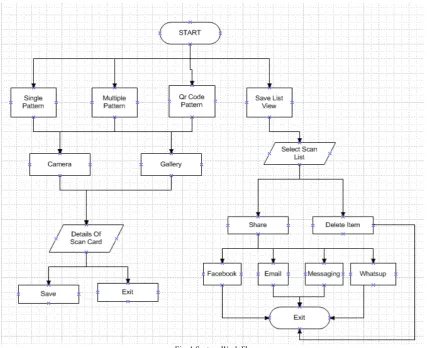
Dashboard: Dashboard screen will be the four button display.
Single pattern scan, multiple pattern scan, qr code pattern scan and save list button display the screen.
3.2 Single Pattern Scanning:
Single pattern scanning page scan the single pattern detail. Name, address, mobile no and email id are scan in the card.
Business Logic:
Camera, gallery, save and exit are four option.
Camera option click event open camera and catch the card image and crop the image.
Image is scan. After the detail are displays in different edit box.
Gallery options directly get image and display the detail. Save options are the name, address, mobile no, email id, those are save in the database.
Exit options are use to exit the application.
3.3 Multiple Patterns Scanning:
Multiple pattern scanning pages scan the all type of card patterns.
This page scan single card and hence single items are scan.
Business Logic:
Shows Camera, gallery, save and exit four options.
Camera option click event open the camera, catch the card image and crop the image.
Image is scan but edit text box long click event scan single items and display in edit text box.
Gallery options directly gets image and display the detail. Save options - the name, address, mobile no, email id are save the database.
Exit options are use to exit the application.
3.4 QR code Pattern Scanning:
QR code pattern page scan the QR code type card and display details in edit text box.
Business Logic:
Shows scanner, save and exit three options.
Scanner option click event opens camera, scans QR code type card and return the detail display the QR code pattern page.
Save options - the name, address, mobile no, email id are save in the database.
Exit options are use to exit the application.
3.5 Save Data View:
Save data view list page scans page detail & save in display list view. It is use for social media sharing. Save data view list
page display one option share. This option is share the detail social media.
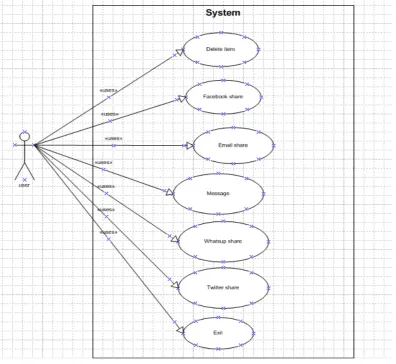
Business Logic: Share option are use to share detail on face
book, message, email, twitter and others.
Delete Detail: Save data view list page display one option
delete. This option is use to delete the detail list view. Above
whole process is explained graphically which is shown in figure.1 as system flow work.
IV.SYSTEM ANALYSIS 4.1 UML Diagrams:
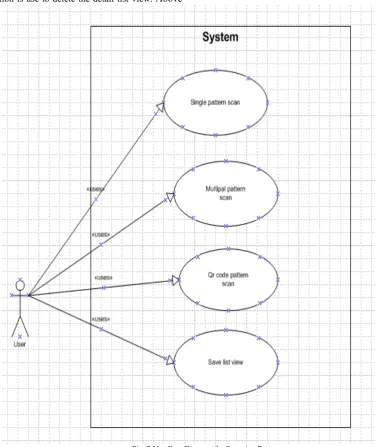
A use case diagram in the Unified Modeling Language (UML) [16] is a type of behavioral diagram defined by and created from a use-case analysis. Its purpose is to present a graphical overview of the functionality provided by a system in terms of actors, their goals (represented as use cases), and any dependencies between those use cases. The main purpose of a use case diagram is to show what system functions are performed for which actor. Roles of the actors in the system can be depicted. Use case diagrams are formally included in
two modeling languages 1) Unified Modeling Language
(UML) 2) Systems Modeling Language (SysML). The following use case diagram [4],[5] show the full functionality of this application. This figure 2 shows that what functionality the mobile user can perform for this application.
Fig. 3 Use Case Diagram for Sharing Data
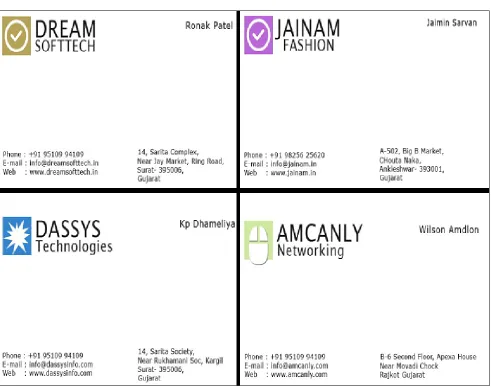
V. APPLICATION SCREEN LAYOUT In this application visiting card will be divided into four segments.
1) first segment top of left 2) second segment top of right 3) third segment bottom of left 4) bottom of right.
Fig. 5 Visiting Card Pattern
VI.RESULT ANALYSIS
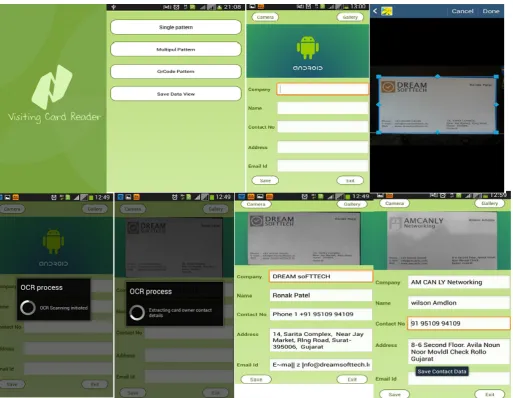
The text result of figure 5 is shown in figure 6 application. First screen is a splash screen this screen is display in 4 second. Then go to next screen. This screen page has four buttons. First is use for single pattern, second is use for multiple patterns, third is use for QR code pattern, Forth is use for save data view.
Click on Listener is applied on this four buttons. Click on Single pattern then this page will be giving information page. Then click on camera option and capture the image as card also you have image in gallery. In a gallery given
image is last captured card. Click on camera option and capture image as design card. This image will save and crop the image. Then give input as OCR. In OCR [3] there will be four steps: 1) Pre-Processing 2) Segmentation 3) Recognition 4) Post Processing.
Text data extract using OCR process. This text data will be display on the screen. This text data are as Company name, Person name, Contact no, Address and Email-id. Click exit button to display back page.
Fig. 6 Snap Shot Results of Business Card Scanner Application
VII.CONCLUSION
Fundamental goal of developing the application was to create business card and visiting card scan detail, social networking and platform for technical subject.As we were comfortable with android and java,it was choosen as programming language. Application was tested successfully on Android Compatible phone, platforms and the internet environment, but it is still in its development stage as user wants more comprehensibility and ease of usage. The implementation process of the system was described to recognize the text data in the business card using the camera screen. Card Image scan by by a smart phone and the text data as Company name, Person name, Contact no., Address and Email-id were display on the screen trough OCR extraction process. Using this android application user can be easily recognized and track for validation. This application is much user friendly. User can save time by avoiding typing of customer information. User can easily share contact information to other user through different sharing applications in internet.
REFERENCES
[1] Amit choksi, Mayur Sevak, Darshan Dalwadi, Ronak
Vashi: Innovation and development of business finder application using an android, IFRSA’s IIJC, 4(1):412-418, Jan-2014.
[2] Choksi, A. H., Sarvan, J. J., & Vashi, R. R.
Implementation and Direct Accessing of Android Authority Application in Smart Phones.
[3] Amit Choksi, Shital Thakkar:“Recognition of Similar
Appearing Gujarati Characters using FKNN Algorithm”, International Journal of Computer Application. (OCT-2012), Vol. 55, No. 6.
[4] Android Open Source Project. Android Security
Overview. http://source.android.com/tech/security/. [5] Android Open Source Project. Publishing on Google Play.
http://developer.android.com/guide/publishing/publishing. html.
[6] S. Bugiel, L. Davi, A. Dmitrienko, T. Fischer,
[7] S. Bugiel, L. Davi, A. Dmitrienko, S. Heuser, A.-R. Sadeghi, and B. Shastry. Practical and Lightweight Domain Isolation on Android. In 1st ACM CCS Workshop on Security and Privacy in Mobile Devices (SPSM’11), October 2011.
[8] C. PeBenito, F. Mayer, and K. MacMillan. Reference
Policy for Security Enhanced Linux. In 2nd Annual SELinux Symposium, pages 25–30, March 2006.
[9] M. Ongtang, K. Butler, and P. McDaniel. Porscha: policy oriented secure content handling in Android. In 26th Annual Computer Security Applications Conference (ACSAC’10), December 2010.
[10] M. Ongtang, S. McLaughlin, W. Enck, and P. McDaniel.
Semantically Rich Application-Centric Security in Android. In 25th Annual Computer Security Applications Conference (ACSAC’09), December 2009.
[11] P. Hornyack, S. Han, J. Jung, S. Schechter, and D.
Wetherall.These Aren’t the Droid You’re Looking For: Retrofitting Android to Protect Data from Imperious Applications. In 18th ACM Conference on Computer and Communications Security (CCS’11), October 2011. [12] A. P. Felt, H. J.Wang, A. Moshchuk, S. Hanna, and E.
Chin.Permission Re-Delegation: Attacks and Defenses. In 20th USENIX Security Symposium, August 2011.
[13] W. Enck, M. Ongtang, and P. McDaniel. On Lightweight
Mobile Phone Application Certification. In 16th ACM Conference on Computer and Communications Security (CCS’09), November 2009.
[14] W. Enck, P. Gilbert, B. gon Chun, L. P. Cox, J. Jung, P. Mc-Daniel, and A. N. Sheth. TaintDroid: An Information-Flow Tracking System for Realtime Privacy Monitoring on Smartphones. In 9th USENIX Symposium on Operating Systems Design and Implementation (OSDI’10), October 2010.
[15] M. Dietz, S. Shekhar, Y. Pisetsky, A. Shu, and D.
S.Wallach. QUIRE: Lightweight Provenance for Smart Phone Operating Systems. In 20th USENIX Security Symposium, August 2011.
[16] J. Carter. Using GConf as an Example of How to Create
an Userspace Object Manager. In 3rd Annual SELinux Symposium, pages 25–32, March 2007.
[17] S. Bugiel, L. Davi, A. Dmitrienko, S. Heuser, A.-R.
Sadeghi, and B. Shastry. Practical and Lightweight Domain Isolation on Android. In 1st ACM CCS Workshop on Security and Privacy in Mobile Devices (SPSM’11), October 2011.
[18] Y. Zhou, Z. Wang, W. Zhou, and X. Jiang. Hey, You, Get Off of My Market: Detecting Malicious Apps in Official and Alternative Android Markets. In Proceedings of the 19th Annual Network and Distributed System Security Symposium, 2012.
[19] T. Vidas, D. Votipka, and N. Christin. All Your Droid Are Belong To Us: A Survey Of Current Android Attacks. In Proceedings of the 5th USENIX Workshop on Offensive Technologies, pages 10-10, 2011.
[20] A. Porter Felt, E. Ha, S. Egelman, A. Haney, E. Chin,and D. Wagner. Android Permissions: User Attention, Comprehension, and Behavior. In Proceedings of the 8th Symposium on Usable Privacy and Security, 2012. [21] A. Shabtai, Y. Fledel, U. Kanonov, Y. Elovici, S. Dolev,