BROWSER SECURITY COMPARATIVE ANALYSIS
Privacy Settings
2013 – Randy Abrams, Jayendra Pathak
Tested Vendors
Apple, Google, Microsoft, Mozilla
Overview
Privacy is an issue on the front lines of the browser wars. Both Apple and Microsoft have taken steps to improve privacy, with the most notable action being Microsoft’s effective enabling of Do Not Track by default in Internet Explorer 10. Third-‐party cookies have been disabled by default in Apple’s Safari for some time now. Google and Mozilla, which is heavily subsidized by Google, have actively avoided providing privacy protections to consumers, with Google going so far as to bypass Safari’s cookie blocking mechanism, an action that led to a $22.5 million USD fine.
In this comparative analysis, NSS Labs examines the privacy mechanisms built into the browsers and assesses their implications for user privacy.
Product Do Not Track Third-‐Party Cookies Geo Location Tracking Protection List
Chrome Not Set Allow Prompt No
Firefox Not Set Allow Prompt No
Internet Explorer On Partial Block Prompt Built-‐In Option
Safari Not Set Block Prompt No
Figure 1 -‐ Summary Of Results
All of the major browsers warn a user before allowing a website to access geo-‐location information, so this is not a differentiating feature. IE and Safari are generally close in terms of default settings for privacy. Apple does block all third-‐party cookies by default, but this can cause compatibility problems with some websites. Microsoft blocks third-‐party cookies that do not contain a compact privacy policy, and it also limits certain first-‐party cookies. The end result is that IE provides higher compatibility while blocking the worst of the third-‐party cookies by default. IE’s pre-‐defined privacy settings choices and available TPL feature add to its inherent privacy protections.
The choice to enable Do Not Track by default is a positive statement of intent to respect user privacy; this is apparently not a philosophy that is shared by other browser vendors. Based upon the privacy features and default settings, IE provides the best privacy out of the leading browsers. Safari is next, followed by Firefox, and then Chrome.
NSS Labs Findings
• Default privacy settings vary significantly between browsers. • Private browsing modes do not eliminate tracking.
• Do Not Track is currently ineffective as a privacy mechanism.
NSS Labs Recommendations
• Support legislation, such as Do Not Track, to enhance privacy rights. • Check browser configurations to ensure proper privacy settings. • Use third-‐party add-‐ons to curtail third-‐party tracking.
Table of Contents
NSS Labs Findings ... 2
NSS Labs Recommendations ... 2
Analysis ... 4
Do Not Track ... 4
Third-‐Party Cookies ... 5
Geo Location ... 5
Private Browsing ... 6
Tracking Protection Lists ... 6
Overall Configurability ... 7
Third-‐Party Add-‐ons ... 7
Contact Information ... 9
Table of Figures
Figure 1 -‐ Summary Of Results ... 1
Figure 2 -‐Default Do Not Track Setting ... 4
Figure 3 -‐ Default Third-‐Party Setting ... 5
Figure 4 -‐ Default Geo Location Request Response ... 6
Analysis
Privacy is an issue on the frontlines of the browser wars. Both Apple and Microsoft have taken steps to improve privacy, with the most notable action being Microsoft’s enabling of Do Not Track by default in IE 10. If Safari had a significant market share, Apple’s decision to disable third-‐party cookies by default would likely have aggravated the advertising industry. Google and Firefox, which is primarily subsidized by Google, have trailed the industry in providing privacy protections for consumers, with Google even bypassing Safari’s cookie blocking and incurring a $22.5 million USD fine. Google has also circumvented third-‐party cookie blocking in IE in the past.
In this comparative report, NSS examines the privacy mechanisms built into the browsers and assesses their implications for user privacy. While none of the browsers are configured for maximum privacy by default, Apple and Microsoft have reasonably good default privacy settings. Third-‐party add-‐ons are still required to augment tracking protection, however.
Based on recent testing by NSS engineers, it has been determined that Microsoft’s Internet Explorer (IE) performs best with regard to out-‐of-‐the-‐box privacy configuration, with Apple’s Safari a close second. Firefox has indicated that it intends to block third-‐party cookies and enable Do Not Track by default but, since it has yet to implement these changes, the browser currently trails IE and Safari. Google’s Chrome places a distant fourth, not only because of its default configuration and its obscure placement of privacy options, but also because Google’s history of evading privacy protections in other browsers.
Do Not Track
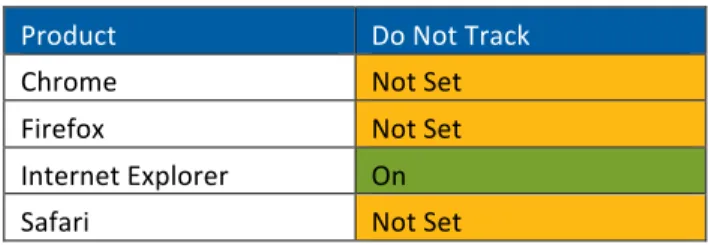
Currently, the most-‐discussed browser privacy setting is Do Not Track. The reality of Do Not Track in the browser is that the default setting is a statement of vendor position on privacy. The technology today actually does nothing to protect privacy; however, if proposed legislation prevails and requires honest compliance with the Do Not Track header, IE 10 users will be far better protected by default than will the users of any other current browser. Multiple studies have indicated that consumers desire control over whether or not they are tracked; yet IE is the only browser to ship with Do Not Track effectively enabled on installation. 1 2
Product Do Not Track
Chrome Not Set
Firefox Not Set
Internet Explorer On
Safari Not Set
Figure 2 -‐Default Do Not Track Setting
Chrome was the last major browser to add Do Not Track as a feature, but it does not make the configuration setting easily accessible to users. To enable Do Not Track in Chrome, a user must go to the Settings menu, scroll down and expand Advanced Settings, and then select or deselect the feature.
1 http://www.gallup.com/poll/145337/internet-‐users-‐ready-‐limit-‐onlinetracking-‐ads.aspx
Firefox has the most intuitive placement for tracking control. Users can locate the Do Not Track setting in the Tracking section of the Privacy pane, which is located under the Preferences menu. Despite IE 10 enabling Do Not Track by default, and despite the browser offering the setting as a choice during Windows 8 set up, Microsoft makes Do Not Track exceptionally difficult to find. In order to change the Do Not Track setting in IE 10, a user must first select Internet Options from the Tools menu, and then select the Advanced tab. Next, the user must choose the Do Not Track setting from a long list of advanced options; the setting is found in the security section of the Advanced Options menu.
Of all the browsers, Apple’s Safari has the most obscure Do Not Track setting. Here, a user must first select Preferences from the Edit menu, then enable the Develop menu located under the Advanced pane, and then enable tracking protection. The setting is more prominently placed for Safari on the Mac.
Until legislation is passed that will mandate compliance with the user intent of Do Not Track, the feature will remain a polite request that will be ignored by the advertising industry. Exactly what is encompassed by Do Not Track has not yet been determined, and there are no legal or industry mandates to respect a choice when the scope is defined. The refusal to enable Do Not Track by default is an indicator of the vendor’s philosophical views of consumer privacy.
Third-‐Party Cookies
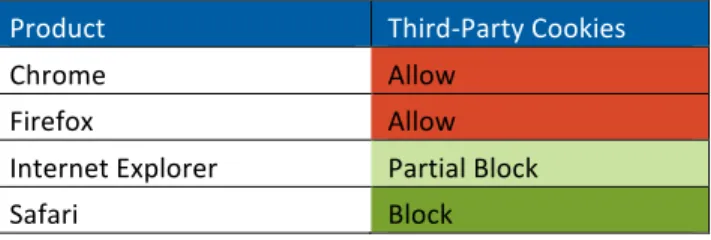
Third-‐party cookies are primarily used by advertising and consumer profiling companies that are not related to a website. Currently, the blocking of third-‐party cookies is the most effective built-‐in anti-‐tracking mechanism that is available in all of the leading browsers. Apple and Microsoft lead the market for this privacy setting, with Safari being the only browser to block all third-‐party cookies by default. IE is not set to block all third-‐party cookies by default; however, those third-‐party cookies that do not have a compact privacy policy, or that save information that can be used to contact the user without explicit consent, are blocked by default. IE also restricts first-‐party cookies that save information that can be used to contact the user without their implicit consent. The third-‐party cookie setting controls in Safari and in Firefox are intuitively placed. The process for the complete disabling of third-‐party cookies in Chrome and in IE is less intuitive and requires users to traverse deeper menu levels.
Product Third-‐Party Cookies
Chrome Allow
Firefox Allow
Internet Explorer Partial Block
Safari Block
Figure 3 -‐ Default Third-‐Party Setting
Geo Location
Modern browsers include functionality to provide websites and applications with a user’s geographical location (geo location). In reality, the IP address of the computer can generally be used to obtain such information; however, the user’s true location can be masked with the use of VPNs, anonymizers, and proxies.
Chrome prompts users by default if a site is requesting geo location. The settings to “always allow” or “always deny” are found under the Advanced Settings menu, which is located in the Privacy section, under Content Settings.
Firefox does not have a menu item to control geo location tracking; the browser prompts a user by default. In order to disable geo location in Firefox, a user must use about:config to locate and then disable or re-‐enable the geo location setting; however, when a user visits the about:config page, they are warned that such actions may void the warranty. While the warning is not strictly true, the settings are not for the novice user. IE has enabled geo location by default; however, it will prompt the user if a website attempts to retrieve such information. The control to completely disable geo location services is intuitively located on the Privacy pane of the Internet Options screen, which is accessed from the Tools menu. Safari enables geo location services by default, and its users are prompted when a site requests location services. The control to disable geo location services is intuitively located in the Privacy pane of Safari’s Security & Privacy preferences.
Product Geo Location
Chrome Prompt
Firefox Prompt
Internet Explorer Prompt
Safari Prompt
Figure 4 -‐ Default Geo Location Request Response
Private Browsing
Private browsing does not prevent tracking, but rather it is designed to erase the history of a user’s actions when the browser is closed. For example, a user who is searching for a gift can use the private browsing mode to ensure that the intended recipient of the gift will not deliberately or inadvertently encounter relics such as history items, auto-‐complete fields, temporary files, or other local indicators of browsing activity. Different vendors use different terms for the same feature; Apple and Mozilla use the term “Private Browsing,” Google prefers “Incognito,” and Microsoft uses the term “InPrivate Browsing.”
Although none of the browsers have specific settings for persistent private browsing, Firefox and IE have
approximations. When using the Firefox browser, the history can be set to “never remember history.” According to Mozilla, this setting achieves the same result as persistent private browsing. When using IE, users may select an option on the General tab to delete the browsing history on exit. When a Chrome user is clearing history, the browser will recommend the “Incognito” mode for future browsing, but it does not offer an opportunity to permanently invoke the mode. There is no setting to open Safari in private browsing mode when using Safari on Windows.
Tracking Protection Lists
IE has a unique privacy feature called “Tracking Protection.” Not to be confused with Do Not Track, the option is easier to find, and it allows users to select one or more tracking protection lists (TPLs) that have been created by Microsoft or by third-‐party vendors, such as Abine.3 In theory, users can create their own TPLs; however, these lists are challenging to implement and involve obscure documentation, making their creation almost impossible for most users.
Accessed from the Tools menu as Tracking Protection, or from Manage Add-‐Ons under the Programs tab of Internet Options, the link to online TPLs provides users with several choices of TPLs on the Internet Explorer Gallery4 website. Of note, IE is the only leading browser with a TPL that is specifically designed to block Google from circumventing privacy protections.
Multiple TPLs can be used; however, if one TPL blocks a site, while another TPL allows the same site, the site will be allowed. While Microsoft advises users to carefully review the lists they download, information about what users should look for, or even information on how users should interpret the lists is too obscure for most users to find. If a user does find the details on the MSDN5 site, the user learns that if a single undesired site is whitelisted on a tracking protection list, the only way to block the site is to remove the entire list. The TRUSTe list specifically allows several advertisers. At one point, the TRUSTe tracking protection provided no protection at all, since it whitelisted advertisers and blacklisted none at all.6 Although it is possible to create a personalized Tracking Protection List, updating and maintaining the list may be beyond most users. Users are not able to manually create entries, and populating a list from which to select sites may result in unwanted tracking before the sites can be added to a block list.
There are extensions or add-‐ons for the major browsers that incorporate the same protections, but provide the ability for users to blacklist sites that the vendor may have whitelisted by default. While the intent of the TPLs in IE is admirable, the current implementation makes certain add-‐ons, such as those provided by Abine7 and
Disconnect,8 a superior choice for privacy.
Overall Configurability
Of all the major browsers, IE stands out for the granularity of its privacy configuration options. The Privacy pane in Internet Options provides six pre-‐defined templates that are accessed via a slider bar and range from “accept all cookies” to “block all cookies,” with reasonable choices between. The advanced privacy options allow users to block and allow sites as well as classes of cookies. Chrome, Firefox, and Safari all have privacy configuration options, however the pre-‐defined templates that are provided by IE offer significant flexibility for standard users and superior control for advanced users.
Third-‐Party Add-‐ons
There are multiple third-‐party add-‐ons for browsers that can increase user privacy significantly. Proponents of a variety of browsers will point out that their browser offers just as much, or more privacy than another browser when a specific add-‐on, or set of add-‐ons, is used. It is important to note that while add-‐ons to browsers add features, it is at a cost; in addition to increasing browser load-‐time, add-‐ons also increase the attack surface of the
4 http://www.iegallery.com/en-‐us/trackingprotectionlists
5 http://msdn.microsoft.com/en-‐us/library/hh273399(v=VS.85).aspx
6 http://www.zdnet.com/blog/bott/privacy-‐protection-‐and-‐ie9-‐who-‐can-‐you-‐trust/3014
7 https://www.abine.com
browsers. There is a trade-‐off between add-‐ons and security that should not be dismissed when comparing browsers with add-‐ons to browsers without add-‐ons.
© 2013 NSS Labs, Inc. All rights reserved. No part of this publication may be reproduced, photocopied, stored on a retrieval system, or transmitted without the express written consent of the authors.
Please note that access to or use of this report is conditioned on the following: 1. The information in this report is subject to change by NSS Labs without notice.
2. The information in this report is believed by NSS Labs to be accurate and reliable at the time of publication, but is not guaranteed. All use of and reliance on this report are at the reader’s sole risk. NSS Labs is not liable or responsible for any damages, losses, or expenses arising from any error or omission in this report.
3. NO WARRANTIES, EXPRESS OR IMPLIED ARE GIVEN BY NSS LABS. ALL IMPLIED WARRANTIES, INCLUDING IMPLIED
WARRANTIES OF MERCHANTABILITY, FITNESS FOR A PARTICULAR PURPOSE, AND NON-‐INFRINGEMENT ARE DISCLAIMED AND EXCLUDED BY NSS LABS. IN NO EVENT SHALL NSS LABS BE LIABLE FOR ANY CONSEQUENTIAL, INCIDENTAL OR INDIRECT
DAMAGES, OR FOR ANY LOSS OF PROFIT, REVENUE, DATA, COMPUTER PROGRAMS, OR OTHER ASSETS, EVEN IF ADVISED OF THE POSSIBILITY THEREOF.
4. This report does not constitute an endorsement, recommendation, or guarantee of any of the products (hardware or software) tested or the hardware and software used in testing the products. The testing does not guarantee that there are no errors or defects in the products or that the products will meet the reader’s expectations, requirements, needs, or
specifications, or that they will operate without interruption.
5. This report does not imply any endorsement, sponsorship, affiliation, or verification by or with any organizations mentioned in this report.
6. All trademarks, service marks, and trade names used in this report are the trademarks, service marks, and trade names of their respective owners.
Contact Information
NSS Labs, Inc. 206 Wild Basin Road Building A, Suite 200 Austin, TX 78746 USA +1 (512) 961-‐5300 [email protected] www.nsslabs.com
This and other related documents available at: www.nsslabs.com. To receive a licensed copy or report misuse, please contact NSS Labs at +1 (512) 961-‐5300 or [email protected].