R70
Ethernet to CAN interface
Software reference manual
(1.3 EN)
R70 Ethernet to CAN interface Software reference manual
Version 1.3 EN, 06/2008, DOC01816
Contents
1. R70 Ethernet to CAN interface...4
1.1. Advanced functionality...4
1.2. LAN Parameters Advanced...4
1.2.1. Device Settings...4
1.2.2. Connection settings for Socket [1-4]...5
1.2.3. Possible Communication Modes...5
1.3. CAN Parameters Advanced...6
1.3.1. General...6
1.3.2. Object settings - Enable 11-Bit CAN-ID Mask...6
1.3.3. dbCAN protocol extract...9
2. Ethernet tools...10
2.1. ipconfig (Windows)/ifconfig (MAC OS X)...10
2.2. Ping...10
R70 Ethernet to CAN interface, Software reference manual (1.3 EN)
1. R70 Ethernet to CAN interface
1.1. Advanced functionality
NOTICE: The "Advanced" pages for the LAN and CAN parameters are only intended for users with advanced experience and knowledge. Wrong adjustments or settings can lead to malfunction.
Due to the multiple functionality of the R70 it is not possible to describe every conceivable application in this manual. If there are any questions beyond the provided information, please contact d&b support at [email protected].
1.2. LAN Parameters Advanced
Advanced page
1.2.1. Device Settings
The settings Host Name, IP Address, Subnet Mask and Obtain a IP Address are set in the Standard page of the LAN Parameters.
Note: It is possible to access R70 with R1 using a WAN (Internet). In this case the automatic device detection does not work and manual adjustments have to be made. For further information, please contact d&b support at [email protected].
Gateway Address:
IP address of the LAN gateway for connection to different LANs or to the WAN.
DNS1 / DNS2: IP address of Dynamic Name Servers.
Block Time: The time between two Ethernet messages can be set to reduce LAN traffic. If the data buffer is full prior to the set time the message is transmitted.
d&b audiotechnik GmbH R70 Ethernet to CAN interface
1.2.2. Connection settings for Socket [1-4]
The R70 offers four Sockets to be connected by four clients (e.g. R1, R10...) which can be set individually. The following parameters can be set for each Socket.
Socket Mode
server: waits for clients. client
(auto connect):
connecting to the defined server after boot up. ("Remote IP Address","Remote Port Number") disabled: socket is disabled
TCP / UDP: set the desired transport protocol: Port Number of the socket.
Remote IP Address of the server to which the client is connected (in client mode).
Remote Port Number to which the client is connected (in client mode).
Connection inactive timer (s): Time after which the socket is closed if no TCP message is received (0 = timer off).
1.2.3. Possible Communication Modes
PC with R1/R10
R70 R70 Remark Application
TCP TCP
server
--- Reliable Ethernet communication
Standard use together with R1/R10 on a LAN or WLAN. UDP_SERV ER UDP client UDP client Non-reliable Ethernet communication to broadcast with one or more R70s or between two or more R70s.
Special cases with more than one master (R1 and a media control or PLC on the CAN bus).
--- TCP client TCP server Reliable Ethernet communication between two R70s.
Special case to bridge two CAN networks.
1.3. CAN Parameters Advanced
1.3.1. General
CAN Baud Rate:
The Baud Rate of the dbCAN network is 100 kBps and can not be changed.
Disable: Disabled by default as this is for service purposes only.
Online Timestamp:
To determine the actual time of a received CAN message, even if more than one CAN message is combined to form one Ethernet message, a time stamp can be added to each CAN message.
1.3.2. Object settings - Enable 11-Bit CAN-ID Mask The Mask and Arbitration register values (hexadecimal) allow for specific filtering of CAN messages. The following setting can be specified:
• which CAN messages are transmitted from the CAN-Bus to the Ethernet ⇒ Receive Object Settings
• which CAN messages are transmitted from the Ethernet to the CAN-Bus ⇒ Send Object Settings
Note: For both the Receive and the Send Objects, the Mask and Arbitration values are set to 0x000 by default. As a result, all incoming CAN messages are transmitted to the Ethernet or all CAN messages transmitted via the Ethernet are passed on to the CAN-Bus.
The "dbCAN-ID Structure and Object-Classes" are detailed in the following section 1.3.3.
d&b audiotechnik GmbH R70 Ethernet to CAN interface
How the filtering works Example:
Only CAN messages from an amplifier (Process data from device) should be sent from the R70 via Ethernet to a computer.
The Mask and Arbitration values have to be set.
Determine the relevant bits from the 11 Bit CAN ID (refer to the extract of the dbCAN protocol as detailed in section 1.3.3 on page 9).
Mask value
Bit 10 9 8 7 6 5 4 3 2 1 0 Hex
Logic state 1 1 0 0 0 0 0 0 0 0 0 0x600
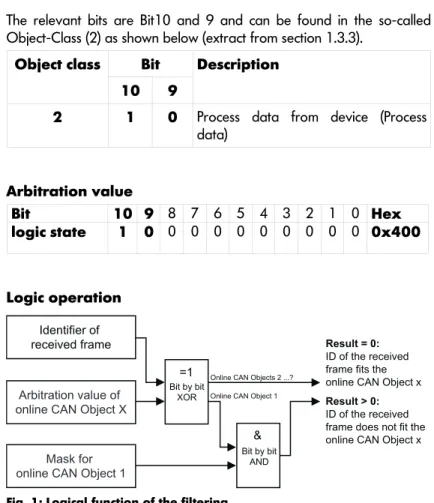
The relevant bits are Bit10 and 9 and can be found in the so-called Object-Class (2) as shown below (extract from section 1.3.3).
Object class Bit
10 9
Description
2 1 0 Process data from device (Process data)
Arbitration value
Bit 10 9 8 7 6 5 4 3 2 1 0 Hex
logic state 1 0 0 0 0 0 0 0 0 0 0 0x400
Logic operation
=1
&
Bit by bit XOR
Bit by bit AND
Result = 0: ID of the received frame fits the online CAN Object x Result > 0: ID of the received frame does not fit the online CAN Object x
Arbitration value of online CAN Object X
Mask for online CAN Object 1
Identifier of received frame
Online CAN Objects 2 ...? Online CAN Object 1
Fig. 1: Logical function of the filtering
Received Frame 1:
Primary master telegram to device with dbCAN-ID 0.01
Bit 10 9 8 7 6 5 4 3 2 1 0 Hex
Received Frame1 (Identifier of received frame) 0 0 0 0 0 0 0 0 0 0 1 0x001 Arbitration value of online CAN Object X 1 0 0 0 0 0 0 0 0 0 0 0x400
XOR 1 0 0 0 0 0 0 0 0 0 1 0x601
Mask for online CAN Object 1 1 1 0 0 0 0 0 0 0 0 0 0x600
AND 1 0 0 0 0 0 0 0 0 0 0 0x400
Result > 0 ⇒ Telegram blocked
Received Frame1:
Telegram from device with dbCAN-ID 0.01
Bit 10 9 8 7 6 5 4 3 2 1 0 Hex
Received Frame1 (Identifier of received frame) 1 0 0 0 0 0 0 0 0 0 1 0x401 Arbitration value of online CAN Object X 1 0 0 0 0 0 0 0 0 0 0 0x400
XOR 0 0 0 0 0 0 0 0 0 0 1 0x001
Mask for online CAN Object 1 1 1 0 0 0 0 0 0 0 0 0 0x600
AND 0 0 0 0 0 0 0 0 0 0 0 0x000
d&b audiotechnik GmbH R70 Ethernet to CAN interface
1.3.3. dbCAN protocol extract
dbCAN is based on CAN Layer 2 with 11 bit CAN-Identifier.
Structure of the11 Bit CAN-Identifier for dbCAN Bit 10-9 Object class 2 bit ⇒ 4 Object-Classes Bit 8-6 Subnet 3 bit ⇒ 8 Subnets (0 to 7) Bit 5-0 Device-Id 6 bit ⇒ 63 Devices
"Device-Id 0 is for broadcast"
The priority of the Object-Class is higher than the Device-Id.
Object classes
Object class Bit 10 9
Description
0 0 0 Primary Master (Process data) 1 0 1 Secondary Master (Process data) 2 1 0 Process data from device (Process data)
3 1 1 Stream objects
Subnet-Id
Subnet Bits 8 7 6
Description
0 0 0 0 Subnet 0
to : : :
7 1 1 1 Subnet 7
Device-Id
Device-Id Bits 5 4 3 2 1 0
Description
0 0 0 0 0 0 0 Broadcast into the Subnet 1 0 0 0 0 0 1 Lowest Device-Id to : : : : : :
63 1 1 1 1 1 1 Highest Device-Id
2. Ethernet tools
2.1. ipconfig (Windows)/ifconfig (MAC OS X)
In Windows, the command line tool "ipconfig" can be used to display all current TCP/IP network configuration values of the computer. This tool also refreshes the DHCP and DNS settings.
Open the DOS prompt and type in "ipconfig".
For MAC OS X, the tool "ifconfig" can be used.
2.2. Ping
"ping" is a computer network tool used to test whether a particular host can be accessed across an IP network.
d&b audiotechnik GmbH Ethernet tools
D
OC
0
1
8
1
6
, 0
6
/2
0
0
8
©
d
&
b
a
ud
io
te
ch
ni