71
Designing User Interaction using Gesture and Speech
for Mixed Reality Interface
Mohamad Yahya Fekri Aladin, Ajune Wanis Ismail
Mixed and Virtual Reality Research Lab, Vicubelab School of Computing, Universiti Teknologi Malaysia81310 UTM Johor Bahru, Johor, Malaysia Email: [email protected], [email protected]
Submitted: 5/08/2019. Revised edition: 26/10/2019. Accepted: 29/10/2019. Published online: 28/11/2019 DOI: https://doi.org/10.11113/ijic.v9n2.243
Abstract—Mixed Reality (MR) is the next evolution of humans interacting with computer as MR can combine the physical environment and digital environment and making them coexist with each other [1]. Interaction is still a valid research area in MR, and this paper focuses on interaction rather than other research areas such as tracking, calibration, and display [2] because the current interaction technique still not intuitive enough to let the user interact with the computer. This paper explores the user interaction using gesture and speech interaction for 3D object manipulation in mixed reality environment. The paper explains the design stage that involves interaction using gesture and speech inputs to enhance user experience in MR workspace. After acquiring gesture input and speech commands, MR prototype is proposed to integrate the interaction technique using gesture and speech. The paper concludes with results and discussion.
Keywords—Mixed Reality, Gesture Recognition, Speech Recognition, User Interaction, Multimodal Interaction
I.INTRODUCTION
Mixed Reality (MR) – a technology where the digital world coexists with our physical world [1]. Digital information can understand our physical world, making a virtual 3D robot can hide behind a physical couch and play hide and seek with us. Differs from Augmented Reality (AR) where virtual content can only be overlaid onto the physical world through video stream. MR term originates from [3]. Since then, MR has grown so much more than just for display but covering environment understanding and interaction metaphor. MR, no longer fiction or computer-generated imaginary is made possible by the advancement of graphics processor, central
processor, computer vision, and input systems. Intuitive and real interaction need to be implemented to enhance the user experience when interacting with the virtual content [4] in MR. There are many input systems based on the human form, such as gaze, facial expressions, gesture, and speech. There is also user interaction using gesture and speech in a handheld interface [5]. This paper will explain about designing user interaction for MR using speech and gesture for MR interface.
II.RELATED WORK
72 User Interaction (TUI). The system uses a low-cost android tablet, a mirror, a holder to hold the tablet, and a set of rectangle wooden blocks that acts as the tangible interface. MIAR [9] is an application that adopts multimodal interaction using gesture and speech input modalities in AR. Leap Motion device is used to capture the gesture recognition, and a speech recognition system is build to accommodate gesture interface for multimodal interaction. The two inputs undergo multimodal fusion stage to decide the multimodal interaction can be performed or not. G-SIAR [10] is also another application developed for multimodal interaction using gesture and speech for AR. The application produced two techniques: G-Shell for gesture only interaction and G-Speech for multimodal interaction. Three tasks are constructed to test the two interaction techniques: single object relocation, multiple object relocation, and uniform object scaling. The techniques are compared based on task completion time and usability ratings. The results are in favor of G-Speech for uniform scaling and G-Shell for single object manipulation and multiple object manipulation. Based on the related works, the potential gesture inputs to be used for this research are presented in Table 1.
TABLE I. Gesture inputs
Input Gesture Definition
Hover This gesture can be useful in object selection task as the user only need to hover near the virtual object to interact with it.
Grasp Grasp occur when user close their finger as if they were grasping the virtual object. As the collider of the object detects the collision with the hand, the grasping gesture is enabled. And the combination of hand orientation and grasp can make more complex interactions such as user can move the virtual content as if to imitate the click and drag action.
Manipulatio n
Manipulation gestures can be used to alter the virtual object’s properties, such as its color, texture, or even changing the 3D model entirely.
Navigation Navigation gestures are commonly used to browse UI or menu, and useful gesture for this task is air tap where user need to tap on the menu or UI to invoke a task.
Pointing A pointing gesture can be useful in performing object selection for the 3D object that is far away from the user. It also a suitable gesture for object creation; for example, the user moves their finger in mid-air to produce a silhouette for the 3D mesh that they would like to create.
Pinch Pinching can be an alternative gesture for grasp as not all user use grasp gesture to grab an object
Palm The face of the palm can also be used as a gesture. The suitable interaction would be to
Input Gesture Definition
Up/Down open and close a UI menu.
Tap A tap gesture can be performed for confirming the selection of a UI menu. Tap is also suitable to be used for object selection.
Table 1 presents the potential gesture inputs with the definition that can be applied in this research. To perform the 3D object manipulation, hand position needs to reach a certain distance threshold before the manipulation can be performed.
III.DESIGNING USER INTERACTION IN MR
There are three phases that have been carried out to design the MR interface that covers the areas as described in the following subsections.
A.Phase 1: Setting up MR workspace
This section discusses the stages of developing an MR environment. The following subsections explained the methodology in developing a multimodal MR interface. Next, this section will discuss the sources of 3D objects that will be used. Then the specification of software and hardware will be described to set up the system architecture for the AR environment.
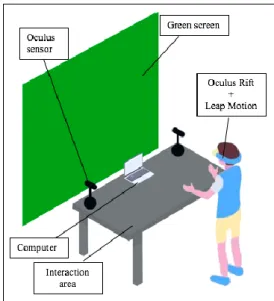
The structure to set up the MR environment is discussed in Fig. 1. MR interfaces involve gesture inputs and speech inputs, and it is a basic modality input to enable multimodal interaction.
Fig. 1. Setting up the Mixed Reality environment
73 space. There are two input data needed to build MR environment. First is a virtual element, and second is a real element. The virtual element consists of 3D objects, while the real element is the real-time projections images of MR views. For the prototype, the primitive data such as cube, cone, and sphere are used. The hand skeleton will be in fbx format, so it is acceptable for the game engine platform, and the user interface element will be delivered in 2D images.
In the common MR workspace setting, the head-mounted display (HMD) technology such as HoloLens can perform hand recognition process. It is capable of recognizing the user’s both hands and reproduces the motion data such as the coordinates of hands, the positions, and orientations. In this research, a Leap Motion controller is used to capture the user’s hands. When the user moves the hands, the Leap Motion will track the movement in real-time. When hands are in specific space and range, the user is hovering their hands on the Leap Motion controller; and then the recognition process will give the system access to its position with the orientation. Like the hand inside the real-time gesture frame, the motion data is provided with a direction vector to its gesture input definitions. A gesture inputs may have numerous components such as pointing, pinch, grab, and stretch by using both hands. The pinch gesture input, for example, will imply the movements several times and other gestures, approximating stretch or shrink is in different axis and rotation, which can either use a single hand or both.
B.Phase 2: Acquiring Gesture Inputs
This study adopts the Leap Motion device to take advantage of the powerful hand tracking. The device works by having two cameras and three infrared light-emitting diodes (LED) that track infrared light that is outside the visible light spectrum. The sensor reads the data and later streamed via universal serial bus (USB) to Leap Motion software. Then the calculation takes place in the software to compute the finger positions and orientation. Then the prototype will take advantage of this information to be used as a gesture interaction. The interaction features in the prototype support two kinds of gesture – hover and grasp:
With hover, the user can touch the 3D content, and a visual cue was projected to the user to show that the user’s hands are occluded with the 3D content.
With grasp, users can pick the 3D object and manipulate it. Users can translate and rotate the 3D object seamlessly as if the user holds a real physical object.
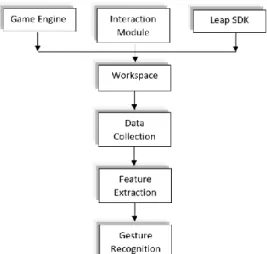
Fig. 2. Hand gesture recognition method
As shown in Fig. 2, there are three modules consists of a game engine, interaction module, and sensor-based tracker module by Leap Software Development Kit (SDK). The interaction module is prepared to provide users with several options based on preference input devices. The sensor-based tracker is equipped to acquire motion data to enable the gaze-driven function for virtual object manipulation. The game engine, however, is used to implement the basic physic and support for object representation with the device controllers in a workspace. Once these three modules have been applied in the workspace, the gaze-driven produce list of poses to each interaction source, and then the gesture inputs and its definition have been analyzed and collected. Pose estimation will represent the location of hand detection, and the motion data are collected. The features have been extracted, and each motion data are captured by the sensor-based tracker in real-time during the gesture recognition process.
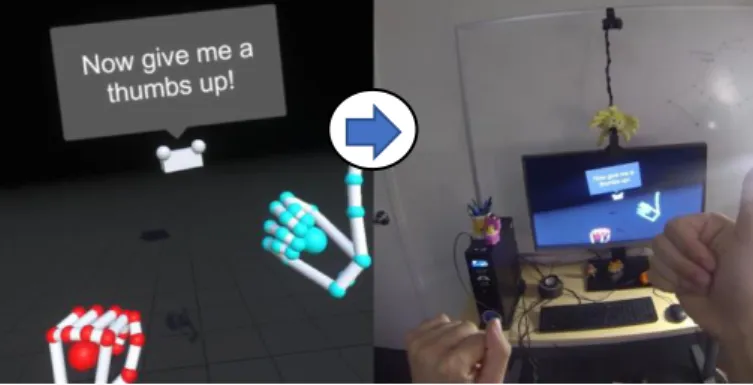
Fig. 3 shows the initial result of user interaction using gesture input. User virtual hand avatar will be rendered in real-time according to the finger positions and orientations.
74 (c) Gesture in virtual space (d) Gesture in real space
Fig. 3. Gesture input tracking in the virtual and real world
The notification appears when gesture is performed, as shown in Fig. 3 (c) where a user was demonstrating the virtual hand upward or downward, and the message shows, “Now give me a thumb up!” Based on Fig. 3 (d), the gesture is tracked by sensor-based tracking technique where hand gesture features are being tracked by the gesture tracking devices.
C.Phase 3: Acquiring speech inputs
This phase focuses on acquiring speech input for the user to interact with MR. Speech Recognition system is constructed in this research to combine with gesture interaction and response to the multimodal interaction. The speech will compliment gesture on producing user interaction in MR. In this research, the speech recognition process will analyze the maximum of four words. It will execute the speech commands with gesture interaction to actualize multimodal interaction. As shown in Fig. 4, by considering the input data is obtained from a microphone that has attached to the computer, the window form application is executed. Speech Recognizer will give direct commands to the system.
Fig. 4. Speech recognition process
The Microsoft Speech API is used to synthesize the speech input, and the process will prompt the user’s input from the window application. The speech synthesizer will send the input to be recognized by the application. The process ends with producing speech output. Further research is continuing to indicate the efficient speech output that can be improved multimodal interaction. The research also concerns the cues or user’s turn to respond to the inputs provided by more than one input modality, gesture, and speech.
IV.PROPOSED MIXED REALITY PROTOTYPE
The section explains the multimodal interaction using gesture, and speech for MR is implemented. This proposed MR workspace and a simple application are developed to implement the proposed interaction techniques. Below are the phases in the proposed technique:
A.MR capture and projection
A simple application is developed to test a fascinating and interactive virtual space that lets users virtually explore the assembly of a car. The application allows users to grasp and manipulate the virtual contents with simple hand movements that are easy to learn. The objects tested are several parts of a car, which are windows, wheels, seats, and body.
Furthermore, to enable MR application, a gesture controller has to set as a virtual hand gesture, which will act as an anchor of the camera transform properties from the real world into the virtual environment. Then, the camera needs to be calibrated using head tracking by Oculus. The process of camera calibration captures several frames of the marker provided to produce a virtual camera depth in the VR environment. The calibration will then be saved as a file and be loaded whenever the MR is real-time running in the application. Thus, this will enable the camera in the virtual environment to move accordingly to the VR object, which is the external camera attached to Oculus. The MR workspace is shown in Fig. 5.
75 In this phase, the camera, HMD, and HD webcam are used, while enabling the interaction in the MR environment, Oculus Rift is used throughout the application. Display technology, Oculus is significant in this research, and a useful MR tracker is using a sensor tracking work setup. To set up MR interface, an HMD is used as the display technique; in the context of sensor tracking technique, the basic procedures start with capturing the environment by using the attached HMDs with the configuration MR setting. Oculus acts as a display device and a speech input device as it has a microphone build in the headset. Typical joystick the oculus touch is used for development purposes, and Leap Motion is attached to Oculus as a hand tracking module for handling gesture tracking.
B.User interaction using gesture and speech in MR
There are several types of interaction can be performed in this application, including 3D object manipulation and texture manipulation. The 3D object manipulation involves selection, rotation, and translation of the virtual object. Thus, Fig. 6 illustrates how interaction techniques can be performed in the MR environment.
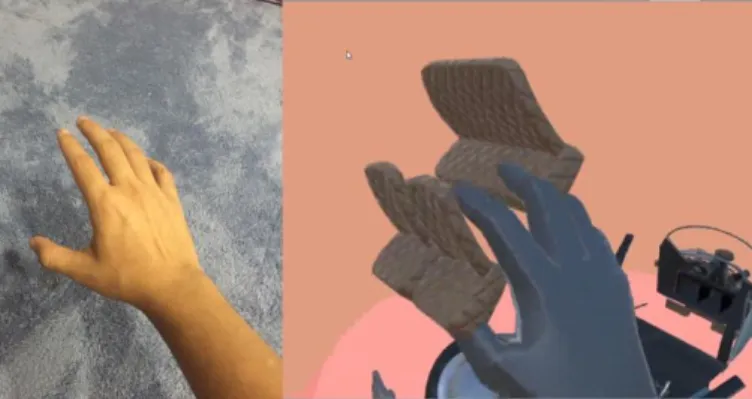
The 3D object used in this application consists of several parts of a car, such as doors, roofs, windows, and seaters. The VR object can only be manipulated if and only if the virtual hand is hit the virtual content to perform selection, as shown in Fig. 7.
Fig. 6. Flow Chart for Performing Interaction
As illustrated in Fig. 6, raycasting is generated from touch controller (user’s hand), and if the ray hit an object collider, object selection is performed, and the user can perform any interactions such as scale or rotate, and the interaction will end once the ray no longer collide with the virtual object.
Fig. 7. User performing grasping interaction.
MR capture also needs to be enabled using direct composition to stream the real world environment into the virtual environment in real-time. After that, users can interact with the object intuitively through the Oculus Rift with the Leap Motion controller. Therefore, the user will feel immersive when interacting with the 3D object in the MR environment.
Fig. 8. A user performing Multimodal interaction
In initial result to test a fascinating and interactive virtual space that lets users virtually explore the assembly of a car. This transformative technology allows users to grasp and manipulate the virtual contents with simple hand movements that are easy to learn. The objects tested are several parts of a car, which are windows, tires, seat, and body. As illustrated in Fig. 8, the user can explore the VR car model using point gaze through gesture and using speech to invoke a task to change the parts of the car. To perform the task, the user needs to grasp the desired car parts, and the user needs to speak out the right command (“change this”) for the prototype to recognize the command.
V.RESULT
76 Fig. 9. A user performing multimodal interaction using gesture and speech in MR
VI.CONCLUSION
The paper discusses the interaction technique using gesture and speech that designs for the proposed MR interface prototype. The intuitive multiple objects manipulation with gestures was also involved in MR. The gesture data was captured by Leap Motion has been integrated to produce a hand tracking technique. Gesture is combined with speech inputs in MR to perform spatial object manipulations for MR. For future work, the use of a green screen can be replaced with the depth camera data. By obtaining the depth data from the depth camera, a 3D object can be anchored in the real world and interact with. Currently, the prototype is done with the user in a sitting position, and it would be great if the user can walk and move around to interact with the prototype, as this can increase the experience for the MR environment. The occlusion issue also needs to be addressed in future research to achieve a robust MR environment.
ACKNOWLEDGMENT
We want to express our appreciation to Mixed and Virtual Reality Laboratory (mivielab) at Universiti Teknologi Malaysia (UTM). This work was funded by UTM-GUP Funding Research Grants Scheme (Q.J130000.2628.14J85).
REFERENCES
[1] Farshid, M., Paschen, J., Eriksson, T., & Kietzmann, J. (2018). Go Boldly!: Explore Augmented Reality (AR), Virtual Reality (VR), and Mixed Reality (MR) for Business. Business Horizons, 61(5), 657-663.
[2] Zhou, F., Duh, H. B. L., & Billinghurst, M. (2008, September). Trends in Augmented Reality Tracking, Interaction, and Display: A Review of Ten Years of ISMAR.
Proceedings of the 7th IEEE/ACM International Symposium
on Mixed and Augmented Reality, IEEE Computer Society,
193-202.
[3] Milgram, P., & Kishino, F. (1994). A Taxonomy of Mixed
Reality Visual Displays. IEICE TRANSACTIONS on
Information and Systems, 77(12), 1321-1329.
[4] Ismail, A. W., & Sunar, M. S. (2013). Intuitiveness 3D Objects Interaction in Augmented Reality Using S-PI Algorithm. Indonesian Journal of Electrical Engineering and
Computer Science, 11(7), 3561-3567.
[5] Samini, A., Palmerius, K. L. (2016). A Study on Improving Close and Distant Device Movement Pose Manipulation for Hand-held Augmented Reality. Proceedings of the 22nd ACM Conference on Virtual Reality Software and
Technology, 121-128
[6] Xiao, R., Schwarz, J., Throm, N., Wilson, A. D., & Benko, H. (2018). MRTouch: Adding Touch Input to Head-mounted Mixed Reality. IEEE Transactions on Visualization and
Computer Graphics, 24(4), 1653-1660.
[7] Meegahapola, L., & Perera, I. (2017, September). Enhanced In-store Shopping Experience through Smart Phone Based Mixed Reality Application. 2017 Seventeenth International Conference on Advances in ICT for Emerging Regions
(ICTer), IEEE, 1-8.
[8] Marichal, S., Rosales, A., Perilli, F. G., Pires, A. C., Bakala, E., Sansone, G., & Blat, J. (2017, September). CETA: Designing Mixed-reality Tangible Interaction to Enhance
Mathematical Learning. Proceedings of the 19th
International Conference on Human-computer Interaction
with Mobile Devices and Service, ACM, 29.
[9] Ismail, A. W., &Sunar, M. S. (2014, November). Multimodal Fusion: Gesture and Speech Input in Augmented Reality Environment. Computational Intelligence in Information Systems: Proceedings of the Fourth INNS Symposia Series on Computational Intelligence in Information Systems
(INNS-CIIS 2014), Springer, 331, 245.
[10] Piumsomboon, T., Altimira, D., Kim, H., Clark, A., Lee, G., &Billinghurst, M. (2014). Grasp-Shell vs Gesture-speech: A Comparison of Direct and Indirect Natural Interaction Techniques in Augmented Reality. ISMAR 2014 - IEEE International Symposium on Mixed and Augmented Reality -
Science and Technology 2014, Proceedings, 73-82.
[11] Katragadda, S., Mondal, B. A., & Deane, A. (2019). Stereoscopic Mixed Reality in Unmanned Aerial Vehicle Search and Rescue. AIAA Scitech 2019 Forum, 0154. (a) User performing object
selection
(b) User performing object
translation and rotation
(c) Before performing scale using speech command
(d) After performing scale using speech command
(e) Before performing change
property using speech
command
(f) After performing change
property using speech
command
(g) User finish assembling the car parts
77 [12] Kim, D. H., Go, Y. G., & Choi, S. M. (2018, December).
First-person-view Drone Flying in Mixed Reality.