Lisa D. Crenshaw
Master's paper submitted to the faculty of the School of Information and Library Science of the University of North Carolina at Chapel Hill in partial fulfillment of the requirements for the degree of
Master of Science in Information Science.
Chapel Hill, North Carolina April 1999
Approved by:
Abstract
Lisa Crenshaw. Database performance monitoring: use of software tools and traditional practices. A Master's paper for the M.S. in I.S. degree. April, 1999. 31 pages. Advisor: Stephanie W. Haas
A database must perform quickly and accurately to be useful to an organization. To monitor database performance, a database administrator (DBA) analyzes many types of data. As the complexity of database systems increases, so does the amount of required information. Recently available software tools facilitate this information gathering process for the DBA. This study describes a survey of database professionals that used Internet newsgroups and discussion forums to determine DBAs' use of traditional performance management practices, such as system tweaking and benchmarking, and these software tools.
Although survey response was small, examination of responses uncovered some common themes. Traditional practices were still used. DBAs overall did not use many tools, for many reasons, but agreed that the generated information would have been useful and necessary. To construct this data, they used scripts or functions built into the database. The study provides a basis for future research into database performance management.
Headings:
Introduction
A database system holds information of value to an organization. If a database is to be useful, it must respond to requests for information appropriately—usually quickly and accurately. While a smaller scale database can easily be managed by the database administrator, or even a particularly knowledgeable end user, larger database systems can involve clients and data in multiple locations, more than one database software package or operating system, frequent updates and queries, network bandwidth between data and users, years worth of mission critical data, and the constant attention of database
professionals.
From a practical perspective, the "performance" of an information system
describes how well the system stands up to the demands of the user— "response time and throughput" according to Nixon (1998, p. 131). A database system that performs well responds quickly and accurately to queries or updates, and should be available on demand (not down due to lack of storage space, network problems, or even planned database maintenance) A low-performing system will be infrequently or inefficiently utilized, and the database will have failed the organization. Measurements of performance can be as broad as the number of transactions per second as determined by a benchmark (Dietrich, Brown, Cortes-Rello & Wunderlin, 1992) , or as specific as the number of disk
organization's database professional holds the database to this standard. Some ways the database administrator (DBA) can achieve or maintain this level include looking for lock contention, optimizing frequently used queries, anticipating data storage needs,
defragmentation, and index reorganization. These tasks must be performed on an ongoing basis.
Database performance monitoring is far from simple. It requires attention to the hardware, operating system, database structure, data storage needs, regular and ad hoc queries, and user administration. Database performance management has become more complex over time. While database systems used to run on one computer with a few users, database management systems, or DBMSs, now span multiple data sources and clients due to distributed computing. In this new architecture, performance problems in the network or the clients' operating system can also affect database performance. Software tools can help database professionals manage these complex systems. Most current database software vendors sell tools to automate database performance monitoring. These are offered by database vendors as add-ons to their systems, or by third party companies that specialize in tools for a few popular systems.
This paper will examine whether these automated tools have gained acceptance by database professionals, and whether more traditional database performance
a survey written to discover which methods are currently in use by database professionals, and their opinions of these tools and practices.
History of Performance Monitoring and Literature Review
The TPC benchmarks showed the performance of a hardware /operating system /database combination under ideal conditions, and "required companies to run the benchmark tests [on] commercially available software" (Shanly, 1998). The TPC
benchmark assumes that, since all combinations must be tested on the same database data and queries, the results can then be compared. However, these tests (and the TPC) have been criticized for allowing database vendors to create hooks in commercial software whose only purpose was to improve performance on the benchmark (Hoffman, 1997). These "benchmark specials" would improve the software's performance on the
benchmark, but would never be used in a real database. Less deceptive, but equally misleading, are claims by vendors of upholding the letter of the benchmark when violating its spirit. For example, a benchmark may attempt to time the uploading of the standard database data, but a vendor may report only the length of time needed to load the data, and not that required by the subsequent referential integrity check (Hoffman, 1997). Due to these conflicts, benchmarking has sometimes been called
“benchmarketing” (Dyck, 1997b).
Organizations may choose to use custom benchmarks created for their own
the fit between a database package and the operating system/hardware (Hagmann & Ferrari, 1986) and making sure that the database performs at the highest level possible.
Benchmarking and tweaking work best when comparing a database system's main three elements—operating system, hardware, and DBMS. With the advent of distributed database systems, however, more components must be monitored in order to maintain the performance of a database system. Multiple databases (DBMS systems from different vendors) within organizations are common. One source mentions a Gartner Group estimate of 5 database sources (on average) in every Fortune 1000 company (Nance, 1998, p. 96). Another indicates that "85% of all organizations have more than one database from more than one vendor," and describes the current complex state of database systems as "quantum mechanics" compared to the simpler, understandable "Newtonian physics" of the centralized database (Tucker, 1996). DBAs now need information on who connects to the database, from where, and what data stores and queries they use. Data stores must be accessible quickly to those who need them, but must retain their integrity in the event of a system failure. Furthermore, analysis in the trends of this information may lead the DBA to make changes or additions to the system. For example, if many users always execute the same few queries, those should be
According to the marketing literature, performance management tools can track, report, react to, and analyze almost any facet of the performance of a database, predict future performance based on past trends, and suggest new ways of performing old tasks. User connectivity, network traffic, contention for resources at a locking level—the busy database professional could monitor all of these using performance management tools. These tools were mentioned and reviewed frequently in database and computing trade publications like Datamation and Database Programming and Design, (Some reviews include Caruso, 1998; Fosdick, 1998; Tucker, 1997; Tucker, 1996; Mullins, 1998), but rarely in scholarly journals. One article (Chaudhuri and Narasayya, 1997) was published in SIGMOD'98. Recent academic literature seems to focus more on the design or
theoretical aspects of database systems, not the newer means of performance management.
Traditional performance management methods—benchmarking and tweaking— are still popular in the literature. Both scholarly (Dietrich et al, 1992; Bitton, DeWitt, & Turbyfill, 1983; Doppelhamer et al, 1997; Hagman & Ferrari, 1986) and trade (Dyck 1997b, Packer 1998) publications mention these methods, and book length treatments of tweaking are available to assist DBAs with most platform and database combinations (Shasha, 1992).
Methods
list. However, due to low response rate, completed surveys were then treated as case studies, and coded for common themes.
The professional status of the respondent was ascertained by asking the length of time the respondent had performed a list of tasks common to database professional. These were compiled by looking at current database administrators' job descriptions. If a
respondent had not worked in the area of "performance monitoring and tuning" at all, their response was not used in the study. Respondents were also asked the size of systems they worked with—examples included number of users, clients, gigabytes of data, and number of data stores. Greater numbers would indicate more complex systems, which might influence a DBA's need for an automated tool.
Performance management software tools were identified through reviews printed in trade publications, by reading online descriptions published by both database vendors and third party software manufacturers, and by scanning online resources geared towards database professionals. Tools designed primarily for use in creating or designing a database were omitted, as were tools aimed toward data warehouse management. Twenty-four tools were identified as particularly suited to (or explicitly designed for) performance management of an existing database. Performance management
Evaluation of these descriptions tracked patterns in the software’s function, as that function related to performance management. For example, a tool would claim to
improve the SQL of a query, or would count the number of users logged on at one time. Some unspecific claims (“improve hardware performance”) were ignored, and some (“view object trees”) were left out because they would not appreciably affect
performance from the user perspective.
Based on these descriptions, five broad categories were defined to describe the performance management functions of these applicable tools. The study aimed to evaluate the database professional’s response to these categories, not only to specific tools within these categories. Tools may well exist that fall into these categories, but were not encountered in the literature review, have fallen out of use, or were written by the database professionals themselves. The five categories allowed for generalization within the survey, to make the survey applicable to more of the database professional
Tool Category Information or Service that tool provides
Consoles Real time reporting of operations of the database (and operating system), such as the number of users connected, and the
percentage of memory and disk I/O in use.
Contextual Performance of (and DBMS interaction with) other elements of system, like network or webserver. Information reported would include network throughput or collision rate, webserver page views per day or webserver errors.
Predictors Predict data growth and user demand of resources. Would use current and historical data, of users connected at given times, for example, to determine when maximum system load could be reached.
Monitors Perform an action whenever a condition is met. Can trigger action or notification. If a log entry indicated a problem, such as a full tempfile location, a trigger could email the DBA, or could fix the problem (allocate more disk space, for example).
Rewriters Change SQL in queries or modify index for better performance. These tools would improve the run time of frequently used SQL queries or index accesses, to improve performance on the database as a whole.
The original 24 tools were then allocated to the most appropriate category, and presented on the survey as an example of that category. Many examples were listed for each category to assist respondents in understanding the category, and because
recognition of a familiar tool may have sparked an opinion. It was also desirable to avoid any appearance of bias toward one system or another within each category. For example, using one Oracle specific tool example to define “Console” would potentially have misled a Sybase DBA. Many performance management tools are actually suites that have many differing functions. When a tool could perform more than one function, it was assigned to the category that needed the most clarification. Because the categories (with the possible exception of Console and Contextual) were distinct enough in their
to anyone who had experience with it. Presumably, the listing would not have confused a respondent who was not familiar with it.
A sixth category was added to reflect a traditional method of performance management—tweaking. Tweaking was defined as "the manipulation of the operating system and hardware to work better with the database," and examples were listed as noted on the attached survey. Although tweaking is not a software category, and made the generalization of use/non use frequency and reasons more difficult, it was included to measure use of the "old way" of performance management. The use of its sometime partner, benchmarking, was addressed in a qualitative question since benchmarking can be associated with a database's design phase.
Respondents were asked if they used tools or processes of each of the six categories. "Use" respondents then were asked the frequency of use, and "Don't Use" respondents were asked reason(s) why not. Asking why a DBA did use a given tool, would have been interesting, but would have changed the focus of the survey. Reasons why not to use a tool were chosen from a few sources. In a study of rapid technology change, Benamati, Lederer, and Singh (1997), list "Training Demands" as the top complaint of users of new technology. From this finding, and to test the theory of growing DBA workload posed by computing publications, the researcher created the reason "No time to learn or use system". Other reasons were created from what were assumed to be plausible reasons not to use software ("Cost", "Unfamiliar with software"). Finally, reasons pertaining to quality of system or tool, quality of information, and
these generalizations were created to categorize the dependant variable of many studies of information systems (DeLoane and McLean, 1992), they conveniently clarified reasons why an information system might not have been used. Benamati, Lederer, and Singh (1997) also listed "Errors" or system bugs as the second most cited problem with new technology. While only the Console, Contextual, and Predictor categories described information systems, these reasons were used in the other software categories with minor changes to the wording. The Tweaking category had its own list of reasons for non-use, since the procedure is neither an information system nor a software tool, but still included the Cost and Time options.
The respondents opinions were solicited on tools in each category and in general, and the survey concluded with two open questions. The use of benchmarking, particularly in conjunction with tweaking, on an existing database would indicate use of traditional performance management methods. The question on vendor claim accuracy reflects another concern of adopters of new technology, Vendor Oversell, (Benamati, Lederer, and Singh, 1997) and the researcher's concern with relying on vendor descriptions when categorizing tools.
comp.databases.sybase, comp.databases.informix, comp.databases.ms-sqlserver— were also included, since it was presumed that professionals that deal with one DBMS might only follow the newsgroup for that vendor, and because performance management tools exist that can monitor software from each of these vendors. The dm-discuss mailing list was chosen because its subscribers actively discussed database issues, generating an average of 20 emails a day. Other email discussion lists were rejected because they were not very active.
Unfortunately, the response rate was low (6 surveys returned), and so the completed surveys were treated as case studies, and were coded for common themes. Open coding was used to categorize the opinions expressed in the open ended questions, and the commentary on each tool category. Axial and selective coding helped determine which themes were common to all responses.
Results
While the surveys will be used as case studies, the results of the survey questions are presented here. Major themes discovered in analysis of the surveys will be discussed in the next section, along with the unique characteristics of certain respondents.
Table 1
Reported Use or Non – Use of Tool categories (including Benchmarking)
Tool category Total Use responses Total Non Use responses
Console 6 0
Contextual 1 5
Predictor 0 6
Monitor 4 2
Tweaking 5 1
Rewriters 1 5
Benchmarking
(1 response unknown)
2 3
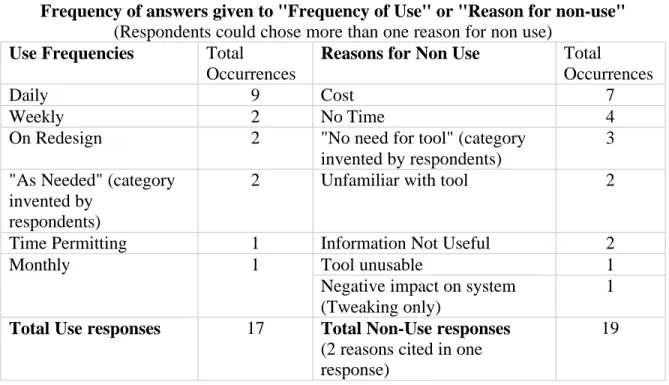
Table 2 shows the frequency of use or the reason or reasons cited for non-use. This information is expanded in Tables 3 and 4.
Table 2
Frequency of answers given to "Frequency of Use" or "Reason for non-use"
(Respondents could chose more than one reason for non use)
Use Frequencies Total
Occurrences
Reasons for Non Use Total
Occurrences
Daily 9 Cost 7
Weekly 2 No Time 4
On Redesign 2 "No need for tool" (category invented by respondents)
3 "As Needed" (category
invented by respondents)
2 Unfamiliar with tool 2
Time Permitting 1 Information Not Useful 2
Tool unusable 1
Monthly 1
Negative impact on system (Tweaking only)
1
Total Use responses 17 Total Non-Use responses
(2 reasons cited in one response)
19
given for each tool category. Frequencies and reasons in quotation marks are those written in by respondents. Blank cells indicate that no respondents chose this freqency or reason for the given tool.
Table 3
Frequencies of Use
Daily Weekly Monthly On Redesign
When I have Time
"As Needed"
Console 5 1
Contextual 1
Predictor
Monitor 2 2
Tweaking 2 1 2
Rewriters 1
Table 4
Reasons for Non-Use
Respondents could choose more than one reason per tool
Tool Category
SysQa Unusabb Not Usec
Cost Timed Unfame Impactf "No Need" Console
Contextual 1 1 1 1 1
Predictor 1 2 2 1
Monitor 1 2
Tweaking 1
Rewriters 2 1 1 1
Notes:
a
"poor system/software quality" b
"Information is unusable" c
"Information is not useful to me" d
"No time to learn or use system/software" e
"Unfamiliar with tools of this type" f
" Would impact other functions of system negatively"—applicable only to Tweaking category
Discussion
Many themes appeared in examination of opinions and responses in the surveys. Two related themes are the importance of performance information, and the near
unanimity with which the respondents reported gathering this information from means other than the studied tools. DBAs need and use this information, but they usually do not use performance management tools to get it, and instead rely on built in functions of the database or their own scripts.
All respondents indicated that they used performance information to keep their systems in line. General comments on some of the categories include: "Definite need for these tools" (Contextual), and "Very useful for catching potential failures" (Monitors). Most important was the information generated by a Console, which were used daily by 5 of the 6 respondents. Respondents called Console tools "essential", kept up a "constant session" to the interface, and said they provided "useful information", but others indicated that the tools needed to be tweaked, and were often "insufficiently flexible". One
respondent termed Console tools "nice for people who don't know what they are doing because they [are not] familiar with the tools they are using." This comment illustrates the general opinion that even the useful Console information can already be generated by other means, without the use of specialized software. One respondent states "Native SQL tools enable me to [monitor the database], no third party software is used."
to day monitoring of this database system was achieved, in this case, by "running standardized performance monitoring scripts, and reading the alert logs on a frequent basis." This respondent also deemed Contextual tools "redundant. The data they report on is either directly available from the public domain tools… or can be derived from the hard data provided by [these tools]." In the general comments, this respondent states that he or she "prefer[s] to use [scripts gathered from Oracle professional associations and newsgroups] to off the shelf packages because I can modify the scripts to examine or change specific items."
Other surveys echo this respondent's self-reliance. One respondent writes his/her own Monitoring tools "when necessary", and another respondent uses his or her "own home grown procedures to trap for problems and notify appropriate personnel". A third believes their system not large enough to "warrant" use of a Predictor or a Monitor tool (the system was the smallest of all the respondents), and instead uses "information
gathered myself" and "[my] own scripts, not a purchased tool." A fourth respondent listed "standard commands provided with the system to display bufferpools, database
information, communications connections, etc." as other tools used to gather performance management information. All respondents indicated that they would rather use data they constructed themselves than an off the shelf package.
Cost of off the shelf software may contribute to this self-reliance. The respondent who mentioned the usefulness of Contextual tool information also wrote that
"implementation is sometime cost prohibitive." Another respondent termed all
also the most frequently cited reason for non-use of these tools, and was mentioned by 4 of the 6 respondents.
Another theme common to most respondents, and possibly another reason for the reliance on self constructed data, was the general agreement that the quality of these tools varies widely. Some mentioned that they had used performance management tools in the past, but that they found the tools "disappointing", while others praised frequently used tools sold by certain vendors. SQL Server Enterprise, and Oracle's Enterprise Manager were listed as often used but "clumsy" by one respondent, who also wrote that "most tools from Oracle don't work well or are unreliable," and "Embarcadero's tools have lots of problems," but that "Microsoft's tools are coming along". This respondent also
mentioned that "Platinum makes the best tools on the market, period," and used Platinum DBA Artisan daily. Another respondent had uninstalled the disappointing Omegamon II for DB2, and was evaluating new tools. While some tools were not liked, there was no agreement that the vendors had specifically oversold or misrepresented the product. One respondent mentioned difficulty of evaluation of these products, and another mentioned (while claiming that a tool was not needed) that "consultants have done a wonderful job in brainwashing management."
stable platform, I find the idea of making daily, weekly, and even monthly changes to a production database to be repugnant." This respondent benchmarked frequently, although he/she did wish for a "better alternative." Of other respondents, one did not tweak
because of potential negative impact (and also did not benchmark), and two tweaked daily—one indicating that benchmarking was always used afterwards to ensure that the system had not been negatively affected. (The other did not mention his or her use of benchmarking.) While respondents cited widely different attitudes to the traditional performance management strategies of tweaking and benchmarking (one called
benchmarking "almost useless" due to time constraints), tweaking was the second most common tool or process used by the respondents. Most respondents commented on the potential impact of tweaking a system, and many followed up tweaking with
benchmarking as a quality test. All respondents who mentioned that they benchmarked, also tweaked. Perhaps, when benchmarking was used, it was seen as a necessary follow-up to tweaking the system.
newcomers to database management. Still, it was one of these more inexperienced DBAs, who had one year of performance management experience, who mentioned using the most performance management software packages.
While there were no real correlations between the database size or complexity and tool use, a few tendencies could be mentioned. Two of 3 respondents who worked currently or previously with large or complex database systems (30 GB of data, 250 users, and 10-105 GB data, 10-40 users, 1-2 DBMSs) never mentioned "Cost" as a reason to not use a tool. However, that third participant cited "Cost" four times as the reason for not using the given tool, and managed the most complex system of all respondents, with 60 GB data, 100 users, and 2 DBMSs. Perhaps budget and database complexity cannot be expected to be proportional. While Contextual tools (that monitor the relationship
between the database and related systems like network and webserver) were only used by one respondent, those who managed smaller systems gave "Not Useful" and "Unfamiliar" as reasons for their non-use. Respondents who managed the larger, more complex
systems either used the tool, or cited "Cost", "No Time—definite need for these tools", or the fact that this information could be obtained elsewhere as their reasons for non-use. But these reasons indicate that this information would certainly be useful. Perhaps these respondents' more complex systems involve more of these contextual elements—a situation described frequently in the database trade literature.
One respondent believed strongly that performance management tools were a "crutch for the uninformed" and should be used only by those who were "totally ignorant of statistics" or who want information "intelligible to personnel who know nothing about databases, and who don't want to learn anything beyond the Technical Support phone number." This respondent felt strongly that the data gathered with performance
management tools could be constructed by the database professional – that this work was essential to being a database professional. This was the respondent who created the reason "No Need for Tool", and had over 20 years of experience in the database field on medium to large systems. This respondent apparently has a thorough working knowledge of database management, and so has no need for performance management software.
Another respondent described a smaller "not complicated" database with few users and a stable environment. This DBA had less than two years of experience, and did not tweak or benchmark, as these actions were seen as unneeded. While the 6 user
database was the smallest of those sampled, it had 4 gigabytes of data and 2 data stores— seemingly not a negligible system. (Perhaps the constructs used to measure database complexity were not working as they should.) The respondent claimed difficulty in finding tools appropriate for the smaller system's needs—there were "lots of 'package deals' for larger databases"—and was self reliant in gathering performance data. This respondent also may not be a typical performance management software user, because the simplicity of the system would already be well served by the self reliant data gathering.
(1997). This respondent twice cited "Time constraints" as a reason for non-use (half of all total citations of this reason), and also claimed to use Contextual tools "when I have time." These tools were used "for troubleshooting … not proactively (as they should be)"—indicating that they would be more useful if the DBA had time to use them more often. This respondent also noted that "the time demands on DBAs do not permit them to benchmark systems, change one parameter, and benchmark again." This opinion is the opposite of Dietrich, et al.'s 1992 description of traditional database performance management technique, but supports more recent speculation that DBAs must do more work in less time.
A fourth respondent was working with a volatile larger systems, and had less than 2 years of database experience. Since the systems "change too quickly," this respondent was not concerned with "making [the database] run perfectly," and could not use prediction data. This respondent tweaked daily, and benchmarked to test the results, but mentioned that tweaking was needed to "match a db-suite to a real world problem." However, this comment indicates that this respondent may have been defining Tweaking as changes made to the database system, and not hardware and operating system
manipulation, as the survey describes it.
This potential for misunderstanding in definitions was only one problem with this study. The tool categories themselves may have been difficult to understand, as some had very subtle differences from either another category or an area of performance
Additionally, respondents were limited to a selection of answers when giving frequency and reasons of use or non-use. As many respondents decided to write in answers, while others gave answers without commentary, it might have been more informative to have prompted the respondent for reasons and frequencies in their own words, and not have attempted to predict their answers for them. While the study attempted to use reasons with some history in Information Science research, these were not clearly explained, and most of the results did not conform to previous findings. There was no consensus on "vendor oversell", and reasons constructed from Deloan and
McLean were only cited 3 of 19 times. As the study was the first of its kind, an initial qualitative examination would probably have brought a better perspective of performance management tool use, and would have provided data to inform a subsequent survey.
The survey generated a low response rate, perhaps due to length or
unintelligibility. This topic was difficult to explain fully without lengthening the survey. It was also very difficult to encourage participation via the Internet. Perhaps the response rate would have been higher if the researcher had been a member of that online
community, i.e., had answered a few of others' questions, and posed interesting topics for discussion. Members of that community might have been more likely to invest the time needed to answer the long survey.
database profession. These tools seem to be the ones that intrigue database professionals, and could be the tools that DBAs use.
Conclusion
This study has attempted to determine which performance management tools are in use by database professionals, and what those professionals think of those tools. Given the more complex databases in use by organizations, the researcher wished to see if these tools made the DBA's job any easier, if traditional means of database performance
Appendix
Survey emailed to newsgroups and email list:
Please email any responses directly to me. I greatly appreciate your time and comments, and will post a summary of my findings to the group.
Database performance management
----As the database computing environment has become more complex, more tools have evolved for database performance measurement. These tools assist in the prediction, monitoring, and measurement of demand on the database system.
I wish to see if these performance monitoring tools are actually used by database administrators, and why or why not. Following are questions designed to measure the use of database performance management tools.
I have created categories of tools (and processes) used to measure the performance of a database. They may be purchased programs/software, homegrown programs and scripts, or information gathered by the DBA through whatever means, on a regular basis. These categories are not all inclusive-- some tools and certainly many processes exist that perform other necessary functions.
1. How many years and/or months have you performed the following functions of a DBA?
Months Years
______ ______ installations & upgrades, ______ ______ backup/recovery,
______ ______ performance monitoring and tuning, ______ ______ physical database design,
______ ______ user administration
______ ______ database applications administration or authoring ______ ______ capacity planning
______ ______ new product/ release evaluation
2. How large are the systems you have worked with in the past 5 years?
Current other other
System system system
_____ _____ _____ users
_____ _____ _____ software clients
_____ _____ _____ DBMS platforms
_____ _____ _____ Gigabytes of data in database(s)
_____ _____ _____ data stores
Please rate your use of the following kinds of tools. You will see the general category name and description, and examples of tools of this type that have been mentioned in computing magazines and journals.
Please indicate whether you use tools of the given type, or not. If you do use tools of this type, please indicate how often. If you do *not* use tools of this type, please indicate reason(s) why not. If there is a particular tool you have in mind when making your choice, please feel free to list it in the "opinions" box. Also give any opinions you have of tools of this type, or of this categorization.
3. Consoles
Programs that provide information on immediate operation of the database(s) in real time. Examples:
Tivoli systems TME 10
Platinum Enterprise Performance Management Suite DB2 Performance monitor
Oracle Enterprise Manager
Softtree Technologies' Oracle Monitor Suite Candle OMEGAMON II for DB2
___ Use
please indicate how often __ Daily
__ Weekly __ Monthly __ On redesign __ When I have time ___ Don't Use
please indicate reason or reasons why not. __ poor system quality
__ information is unusable
__ information is not useful to me __ Cost
__ Unfamiliar with tools of this type Your opinion of tools of this type (optional):
4. Contextual
While Consoles provide information about the operating system and the DBMS, Contextual tools should monitor the performance of (or the DBMS's interaction with) other related elements like the network or the web server. Many of the examples listed are tool suites. Tools of this type claim to integrate context management with database performance management.
Examples:
Platinum Wiretap
Patrol KM for Internet Servers Compuware's EcoTools
Landmark's PerformanceWorks ___ Use
please indicate how often __ Daily
__ Weekly __ Monthly __ On redesign __ When I have time ___ Don't Use
please indicate reason or reasons why not. __ poor system quality
__ information is unusable
__ information is not useful to me __ Cost
__ No time (to learn or use system) __ Unfamiliar with tools of this type Your opinion of tools of this type (optional):
5. Predictors
Tools that predict data growth and user demand of system resources. Examples:
DB2 estimator,
Oracle tuning pack
BMC Patrol Knowledge Modules ___ Use
please indicate how often __ Daily
__ Weekly __ Monthly __ On redesign __ When I have time ___ Don't Use
please indicate reason or reasons why not. __ poor system quality
__ information is unusable
__ information is not useful to me __ Cost
__ No time (to learn or use system) __ Unfamiliar with tools of this type Your opinion of tools of this type (optional):
6. Tweaking
Describes the manipulation of the operating system and hardware to better work with the database.
Examples:
increasing disk space
increase amount of disk space allotted to swapping installing higher throughput network cards.
___ Use
please indicate how often __ Daily
__ Weekly __ Monthly __ On redesign __ When I have time ___ Don't Use
please indicate reason or reasons why not. __ Cost
__ No time (to learn or perform work) __ Insufficient security level
Your opinion of tools of this type (optional):
7. Monitors
Tools that perform an action whenever a condition is met. These tools could trigger an action without human intervention or could notify the DBA.
Examples:
Platinum Database Analyzer (DB2)
Bradmark DBGeneral performance activity monitor Platinum DBVision
Candle OMEGAMON Monitoring Agent for Sybase, Oracle, Informix, Microsoft SQL Server
___ Use
please indicate how often __ Daily
__ Weekly __ Monthly __ On redesign __ When I have time ___ Don't Use
please indicate reason or reasons why not. __ poor software quality
__ results are unusable
__ results are not useful to me __ Cost
__ No time (to learn or use software) __ Unfamiliar with tools of this type Your opinion of tools of this type (optional) :
8. Rewriters
Tools that optimize SQL or indexes to improve performance. Examples:
BMC Patrol DB-Alter Sylvain Faust SQL optimizer PLATINUM Detector (DB2) PLATINUM Index Expert (DB2)
___ Use
please indicate how often __ Daily
__ Weekly __ Monthly __ On redesign __ When I have time ___ Don't Use
please indicate reason or reasons why not. __ poor software quality
__ results are unusable
__ results are not useful to me __ Cost
__ No time (to learn or use software) __ Unfamiliar with tools of this type Your opinion of tools of this type (optional):
9. What other performance management tool(s) are there, and do you use them? Your comments could include names of tools, or other suggestions for categories, like multi-platform or security administration tools.
10. What do you think of benchmarking? Have you ever used an industry or custom benchmark to evaluate your DBMS? Does the traditional cycle of benchmark-> tweak -> benchmark reflect your procedure?
11. The examples for the above categories were chosen based on descriptions in trade magazines and the software developers' marketing material. If you used any of these tools, how well did they live up to the vendor's description?
12. Any other comments on performance management tools, or this survey?
References
Benamati, J., Lederer, A., Singh, M. (1997). The problems of rapid information technology change. Proceedings of the 1997 Conference on Computer Personnel Research, pp.204-208.
Bitton, D., DeWitt, D., Turbyfill, C. (1983) Benchmarking database systems, a systematic approach. Proceedings of the Conference on Very Large Data Bases, pp.8-19
Caruso, J., (1998, November). Software to ease Oracle database management. Network World, p. 14.
Chadhuri, S., and Narasayya, V. (1998). Microsoft index tuning wizard for SQL server 7.0 Proceedings of ACM SIGMOD International Conference on Management of Data, pp.553-554.
Deloan, W.H., and McLean, E.R., (1992). Information systems success: the quest for the dependent variable. Information Systems Research, 3, pp.61-93.
Dietrich, S.W., Brown, M., Cortes-Rello, E., and Wunderlin, S. (1992). A practitioner's introduction to database performance benchmarks and measurements. The Computer Journal, 35(4), pp. 322-331.
Doppelhammer, J., Höppler, T., Kemper, A., Kossmann, D. (1997). Database
performance in the real world. Proceedings of the 1997 ACM SIGMOD International Conference on Management of Data, 26(2), pp. 123-134.
Dyck, T. (1997a, February 24). Synthetic vs. natural testing. PC Week, p.67. Dyck, T. (1997b, March 17). TPC-C a guide, not a gauge. PC Week, p.74.
Fosdick, H. (1998, May) Performance monitoring's cutting edge. Database Programming and Design, pp. 50-55.
Fried, K. (1998, July). Benchmarking OLTP systems. DBMS, Retrieved January 11, 1999 from the World Wide Web: http:// www.dbmsmag.com/9807d15.html .
Hagmann, B., & Ferrari, D. (1986). Performance analysis of several back-end database architectures. ACM Transactions on Database Systems, 11, pp.1-26.
Hoffman, T. (1997, April 21). Industry divided over vendor-backed specs. Computerworld, pp. 71-72.
Nance, B. (1998, April 15). Platinum, BMC & Tivoli bring Enterprise Management down to earth. Network Computing, p.96.
Nixon, B. (1998) Managing performance requirements for information systems.
Proceedings of the First International Workshop on Software & Performance. Santa Fe, New Mexico. pp.131-143.
Packer, A. (1998, September). TPC benchmark secrets. Database Programming and Design, pp. 30-37.
Shanly, K. (1998, February) History and Overview of the TPC. Retrieved January 11, 1999 from the World Wide Web: http://www.tpc.org/articles/tpc.overview.history.1.html. Shasha, D. (1992). Database tuning: a principled approach. Englewood Cliffs, N.J.: Prentice Hall PTR .
Tucker, M. J. (1996, November) Managing your database just got tougher. Datamation. Retrieved February 14, 1999 from the World Wide Web: http://
www.datamation.com/PlugIn/workbench/databases/stories/tough.htm .