Tracy M Jackson.I Want To See It: A Usability Study of Digital Content Integrated into Finding Aids.A Master’s Paper for the M.S. in L.S degree. July, 2011.102pages. Advisor: Jacqueline Dean.
This paper presents the findings of a usability study conducted on finding aids from the North Carolina Collection Photographic Archives at UNC-Chapel Hill. The study focused on digital content from archival collections that is made available through these finding aids using CONTENTdm; sought to explore how users accessed and understood this digital content; and followed up on several aspects of a similar usability study conducted at the Southern Historical Collection in 2009. Findings indicated that the digital content integrated into finding aids was largely intuitive but that it could be made more consistently usable; advanced users and users with archival experience found the finding aids easy to use; novice users may need additional assistance to understand the finding aid and would prefer to access digital content through the CONTENTdm interface; and the search capabilities in CONTENTdm are very important to users but could be improved for usability.
Headings:
Archives/Automation Digitization
Finding aids Usability User needs
by
Tracy M Jackson
A Master’s paper submitted to the faculty of the School of Information and Library Science of the University of North Carolina at Chapel Hill
in partial fulfillment of the requirements for the degree of Master of Science in
Library Science.
Chapel Hill, North Carolina July 2011
Approved by
Table of Contents
TABLE OF FIGURES ... 2
INTRODUCTION ... 3
THE SOUTHERN HISTORICAL COLLECTION AND DIGITAL CONTENT AT UNC-CH... 6
LITERATURE REVIEW ... 13
METHODOLOGY ... 30
RESULTS ... 33
Participant Characteristics ... 35
Tasks ... 38
Task 1 ... 38
Task 2 ... 40
Task 3 ... 41
Task 4 ... 45
Task 5 ... 45
Task 6 ... 49
Task 7 ... 51
Task 8 ... 59
Participant Feedback ... 60
Web 2.0... 63
Limitations ... 65
DISCUSSION ... 67
Integration of Digital Content ... 67
Control Find (Ctrl+F) ... 71
Subject Headings and Restrictions ... 72
CONTENTdm and the Digital Interface ... 75
General Navigation Issues and the Finding Aid verses CONTENTdm ... 79
Areas for Future Research ... 84
CONCLUSION ... 87
BIBLIOGRAPHY ... 88
APPENDIX A: DEMOGRAPHICS QUESTIONNAIRE ... 93
APPENDIX B: STUDY TASKS ... 95
APPENDIX C: POST-TEST QUESTIONNAIRE ... 97
APPENDIX D: POST-TEST INTERVIEW QUESTIONS ... 99
Table of Figures
Figure 1: Record in Finding Aid ... 9
Figure 2: Filename of Digitized Content ... 9
Figure 3: Image in CONTENTdm Client ... 9
Figure 4: A Finding Aid with Purple Box for Digitized Content ... 10
Figure 5: CONTENTdm page with all digitized content for collection P0032 ... 11
Figure 6: CONTENTdm page with digitized content for one record ... 11
Figure 7: Participant Demographic Responses ... 36
Figure 8: Link to Digital Content ... 41
Figure 9: Screen at Low Resolution ... 43
Figure 10: Screen at Adjusted Resolution... 44
Figure 11: Results of OPAC Search for Terry Sanford as a Subject Heading search. ... 48
Figure 12: Restrictions Indicated at Top of Page ... 50
Figure 13: Restrictions in Information for Users ... 50
Figure 14: Series Quick Links for P0031... 54
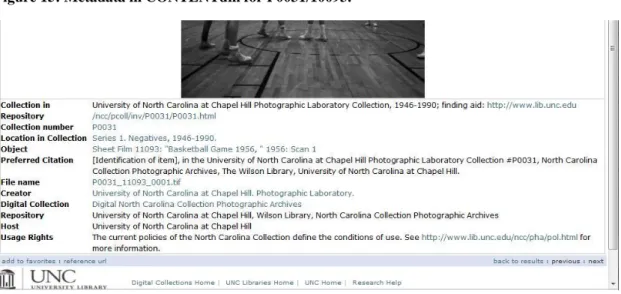
Figure 15: Metadata in CONTENTdm for P0031/10093. ... 57
Figure 16: Finding Aid Load Times ... 69
Introduction
Users of primary source materials are increasingly expecting that such materials are available or at least findable on the web. Many internet users, regardless of situation or intent, subscribe to the axiom that “if it‟s not online, it doesn‟t exist.” As part of the archival response to the technological changes that have both caused and accompanied these changing expectations, institutions are digitizing materials and collections as well as making finding aids available online. By presenting digitized content and descriptions of archival collections on the internet, archives and special collections institutions seek to connect users or potential users with relevant holdings, making archival materials more accessible.
Special Collections have been presenting digital content linked directly from the finding aid since January of 2010.
The Southern Historical Collection and Digital Content at
UNC-CH
Special Collections at the University of North Carolina at Chapel Hill (UNC-CH) are housed in Wilson Library. The Southern Historical Collection is the largest archival collection at UNC, including over 4,600 individual collections. The North Carolina Collection Photographic Archives, University Archives, and Southern Folklife Collection are also housed in Wilson Library and contain hundreds of additional collections
described by finding aids or collection guides.
In 2007 the Southern Historical Collection (SHC) was awarded a Mellon Foundation grant to explore options for the large-scale digitization of its many collections. According to Laura Clark Brown, Coordinator of the Digital SHC, the goal was to implement
programmatic procedures flexible enough to expand or narrow as resources allowed (Brown interview). SHC staff talked to scholars and colleagues, investigating options for delivery of digital materials being developed and utilized at other archival institutions and taking into account current professional thinking about how best to make materials
available to researchers. Numerous considerations such as technical, financial, legal, privacy, processing, and conservation concerns were taken into account during the process. Ultimately, the SHC sought to make large amounts of digitized material
and hierarchical information would be available to the researcher without requiring extra metadata input or additional curation (SHC pg. 4-5).
In 2008, the SHC also began a project to redesign its finding aid template. The redesign was intended to improve usability, with goals “to improve display, add useful navigation
features, lower terminology barriers, and include new help features for both novice and advanced users” (Chapman pg. 13). An additional benefit to the new design was that it
allowed other special collections housed in Wilson Library to later adopt a standardized finding aid template with a uniform look and brand (Brown interview). While there was no usability test conducted on the finding aids before the redesign, a study conducted post-redesign indicated that the new design rated as highly useable compared to the results of published studies from other institutions (Chapman pg. 57-61). As a result of this study, the finding aid template was modified slightly to include language advising users to use the browser‟s Ctrl+F search feature within the finding aid to assist in
searching for specific elements, a brief explanation of the purpose and function of subject headings, and additional small changes to terminology and help features (Chapman interview).
unique needs of the NCCPA and its multiple special format materials led to further development of and revision of the procedures that allow digital content to be linked to the finding aid (Shearer interview). Since the NCCPA has been scanning images for a variety of purposes over the last ten years, the adoption of the standardized finding aid template and digital collection functionality established by the SHC has allowed a great deal of digitized content to become available through the finding aids.
The basic process that allows a user to look at a finding aid and get to digitized content starts with EAD-tagged1 finding aids written in XML2, then transformed into HTML3 files with an XSLT4 stylesheet before being uploaded to the web. As part of this
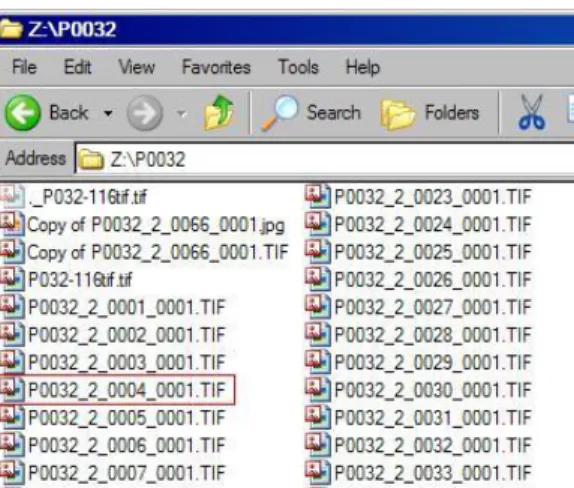
transformation, a javascript function is included in the final HTML version of the finding aid that will perform a search for digital content each time the finding aid is loaded. Each collection has a unique identifier, and smaller divisions of materials, such as a folder or box of manuscripts, a roll of film, or an entire subseries, are also given unique identifiers. Digitized items are given filenames corresponding to these identifiers. For example, a digital scan of a color slide from the Frank Clodfelter Collection (P0032) that is listed in the finding aid as P0032/2_0004 will have a filename beginning with P0032_2_0004 (Figures 1 and 2).
1
Encoded Archival Description (EAD). More information on EAD can be found on the EAD Library of Congress website, http://www.loc.gov/ead/
2 eXtensible Markup Language (XML). More information on XML can be found on the World Wide Web
Consortium website, http://www.w3.org/XML/
3
HyperText Markup Language (HTML). More information on HTML can be found on the World Wide Web Consortium website, http://www.w3.org/html/
4
Figure 1: Record in Finding Aid
Figure 2: Filename of Digitized Content
Digital items are uploaded to CONTENTdm (Figure 3) along with metadata that has been taken directly from the finding aid via a process using another XSLT transformation developed by library systems and special collection staff.
Figure 3: Image in CONTENTdm Client
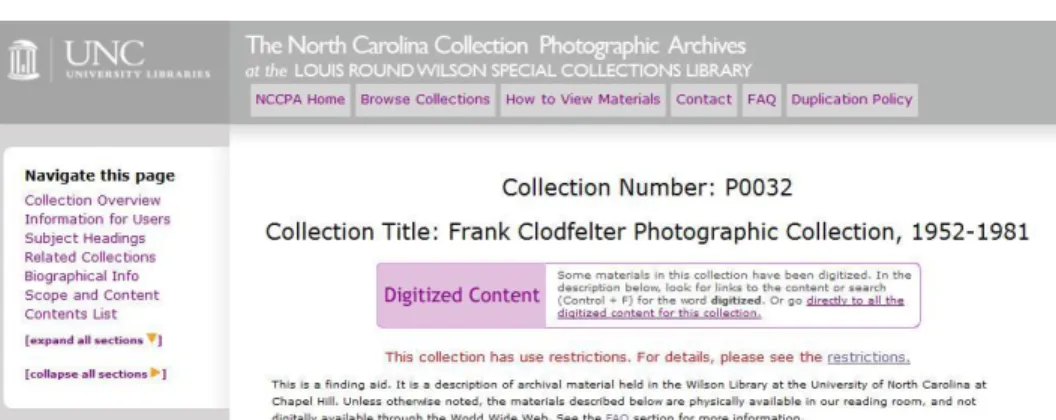
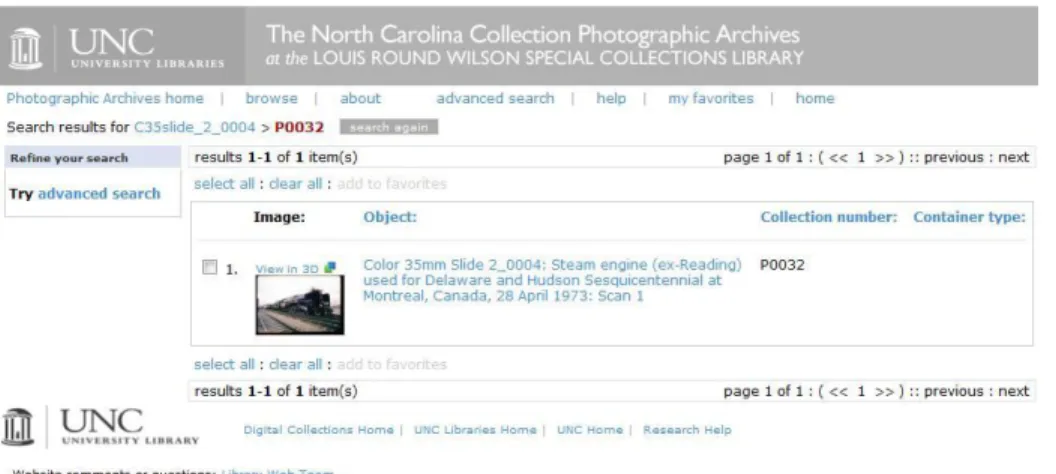
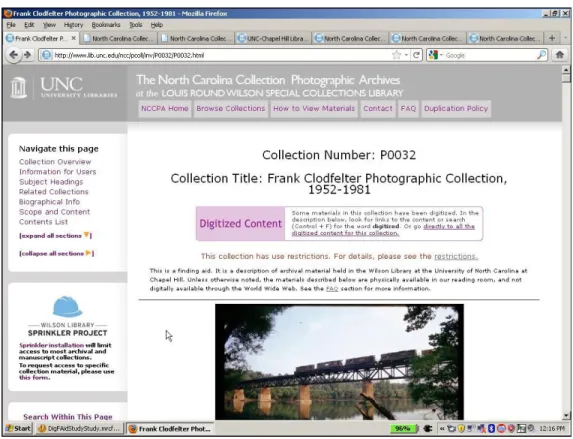
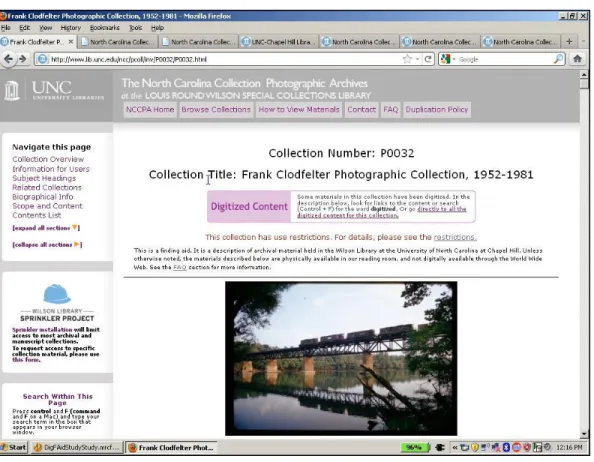
collection (identified by the unique collection number), CONTENTdm returns the names of the digital files, which the script then uses to create links within the finding aid directly to that content (Shearer interview).The stylesheet used for the finding aids renders these links purple and adds the text “(digitized)” to the identifier, as shown in Figure 1. A purple box is also added just below the collection number and title at the top of the finding aid, indicating that the collection includes digitized content. The box at the top of the page, as shown in Figure 4, contains a link which takes the user to all of the digitized content available for that collection in the CONTENTdm interface (Figure 5), while the link created for each item or container with digital content will take the user to just that digitized content (Figure 6).
Figure 5: CONTENTdm page with all digitized content for collection P0032
Figure 6: CONTENTdm page with digitized content for one record
This process allows newly digitized content to be automatically linked to the finding aid without processors needing to change the finding aid each time. The redesigned finding aid template and XSLT transformation process mean that every single finding aid can include this function regardless of its level of processing, and the XSLT generation of metadata is a workflow that can be used by all processing archivists and graduate
digital content need to be maintained, and all online digital items can be managed within CONTENTdm.
Literature Review
In recent years, the increasing number of usability studies of online archival finding aids has reflected the growing interest of many archivists and archival institutions in making their materials, including collections and collection guides, as accessible as possible to as many users as possible. This interest is certainly not limited to finding aids; it has been demonstrated and debated in articles on methods of processing, user studies, analyses of digital collections, and the evolving theoretical discussion on the role and impact of the archivist on collections and the historical record. While the number of usability studies has grown, the authors of these studies generally lament that the total number is still small, and the problems found are still persistent. Many of the usability studies of online finding aids, as well as the design and usability literature they cite, point to what seem to be fundamental difficulties between archivists and users as successive falters on the path to the truly accessible archive. Nevertheless, finding aids and the opportunities they give for greater access to materials continue to evolve apace with the professional desire to connect with users, and a new segment of the literature is emerging to describe the integration of digital content with the descriptive information traditionally given in finding aids.
is an inventory that may be expanded upon “depending on the intended audience, the nature of the records, or the institutional goals” (Roe, pg. 86). It includes such essential
information about a group of records as collection or grouping title, the name of the holding repository, biographical or historical information about the creation of the records, a description of the materials, information on accessing the records, a container or folder list, the name of the person who created the finding aid, and the date the finding aid was created (Roe, pg. 87).
In the past 20 years, finding aids have gone online in increasing numbers and in a variety of forms. As early as 1997, institutions and archivists were beginning to question the effectiveness of simply uploading traditional finding aids to the internet. Dennis Meissner‟s article “First Things First: Reengineering Finding Aids for the
Implementation of EAD” addresses the realization that traditional finding aids required
extensive mediation by archival staff and a fundamental re-thinking of the structure, order, and presentation of information could vastly improve use.
In 2004, Christina Hostetter conducted a survey of university archives and archivists, and found that most had 10% or less of their finding aids online. Practices varied widely and there were problematic perceptions of the utility and function of online finding aids. While all surveyed agreed that online finding aids were valuable, some thought they were no more valuable than paper and that they may even be “a luxury [that] should not take
away from the importance of paper finding aids” (Hostetter, pg. 135). The majority of respondents, however, agreed “that access was the key function of finding aids on the web” (Hostetter, pg. 135). Some archivists were even more clear-eyed than this about the
on. One respondent suggested that “an institution‟s web interface and the absence of jargon were determining factors in evaluating its usefulness” (Hostetter, pg. 137). Given
this comment and another respondent‟s recognition that “the generation of online finding aids has removed archivists as mediators, so we need to remain cognizant of that fact and ensure that our description can stand for itself” (Hostetter, pg. 139), it is clear that many
archivists value the construction of online finding aids as the access points by which our users will learn about, use, and evaluate both our resources and our institutions.
These attitudes and practices, among other issues, are addressed by Richard Cox in his 2008 article, “Revisiting the Archival Finding Aid.” Cox had a number of critiques for
current thinking and practice surrounding the generation of finding aids, mainly centering around the lack of focus on and understanding of the actual needs of researchers. He maintains that “archivists need to muse about whether the language of finding aids is the
same as the language of most of the web browsers and potential audience for, and users of, archival records […] wondering if a finding aid as traditionally conceived of (from
inventories and registers to EAD documents) is anything like what someone on the web might be expecting.” (Cox, pg. 17).
particularly the earliest ones, emphasize user disappointment, confusion, and unmet expectations, particularly with the nature of the materials and the lack of immediate access to them. However, some later studies that have included extensive user analysis or close attention to design guidelines have had more positive user feedback.
The first major finding aid study to appear was conducted by Wendy Duff and Penka Stoyanova, published as “Transforming the Crazy Quilt” in 1998. Done in the very early
days of online finding aids, this study used mock-ups of potential finding aid designs to get feedback from users. Technically a study using focus groups rather than a usability study, this article is nevertheless the first acknowledged instance of archival focus on user feedback for finding aids, and it presents quantitative and qualitative results. The
researchers had small groups of archival users examine several different display mock-ups of finding aids, then engage in a structured group discussion as well as answer an individual questionnaire and rank elements in order of importance. Important findings of the study included user complaints of too much information presented, hindering use of the finding aid (Duff and Stoyanova, pg. 52); difficulties with labels and terminology (pg. 52); user preference for “an archival display created according to design guidelines” over traditional presentation (pg. 61); and finally, recommendations for “a short narrative overview accompanied by a list of series” (pg. 65).
Burt Altman and John R. Nemmers produced the next major study of user feedback regarding online finding aids, “The Usability of On-line Archival Resources: The Polaris Project Finding Aid,” in 2001. A case study of one set of finding aids assessed after they
article does not present any statistics or systematic analysis. Users, who were likely to be experienced users of this archive in particular, were generally positive about online finding aids, but made a number of suggestions about the importance of understanding the hierarchy of a collection and the ability to get assistance while viewing an online finding aid.
In 2004 two major studies were published that conducted quantitative analysis of finding aid usability. The first, performed by Christopher Prom and published as “User
Interactions with Electronic Finding Aids in a Controlled Setting,” compared finding aids across eight institutions. The research involved a preliminary survey to gather
demographic information and user performance of eight controlled tasks; task completion and correctness, time taken, and some qualitative feedback were measured. Users
included archival experts, computer experts, and novices, with some overlap between the first two groups. The results of this study directly relate to the design of the finding aids involved, and Prom is able to make a number of concrete recommendations on design. Users had difficulties with extraneous information or search options, archival
terminology, and overall design of the sites, prompting the researcher to advise that
“self-apparent layout and visual clues are as important as using simple terminology” (Prom, pg. 262) and “interfaces should not wittingly or unwittingly undermine context” (pg.
261).
The second study from 2004 is Elizabeth Yakel‟s “Encoded Archival Description: Are
Finding Aids Boundary Spanners of Barriers for Users?” Similar to Prom‟s study, Yakel‟s involved a preliminary information-gathering survey and a test with a series of
however, Yakel conducted an exit interview specifically addressing the interface used, and the finding aids included were from one institution and utilized one design. The study participants were graduate students of information and library science assumed to have high computer and search expertise, but were screened to eliminate those with high archival expertise. The primary difficulties users identified in this study were with “archival jargon” and differentiating between “contextual information” and “content information” (Yakel, pg. 74). Yakel is also the first to suggest the use of expanding information, as “something between the full text and outline view” such as a drop-down
or explode-able view of finding aid contents (pg. 75).
In 2006, Wendy Schier published “First Entry: Report on a Qualitative Exploratory Study of Novice User Experience with Online Finding Aids.” The first study to focus
specifically on novice users, who are likely to have more difficulty using finding aids than archival experts, Scheir explicitly stated her goal of examining terminology, navigation, display, and structure (Scheir, pg. 52). Similar to Prom‟s study, task
completion, correctness and time were measured, qualitative feedback invited, and finding aids from a variety of institutions were used. In this case, participants were remote and self-paced, contributing to the study via email and entirely self-reporting. The interesting results of this study included the “desire among participants to obtain
immediate answers, with little patience” for either hierarchical/contextual information or “dense blocks of text” (pg. 60) and the intermingling of navigation, display, and structure
of this study was that “two users of equally minimal experience with archives, with
equivalent educational backgrounds and facility with computers, had very different experiences with the same site” (pg. 76), echoing the subjectivity of assessment found in
the design literature.
Another study published in 2008 performed similar analyses. A UNC-Chapel Hill SILS master‟s paper by Rita D. Johnston entitled “A Qualitative Study of the Experiences of Novice Undergraduate Students with Online Finding Aids,” is very similar to Scheir‟s
study in structure and results, building upon the previous study to further emphasize novice users‟ difficulties with archival terminology and confusingly dense finding aid displays. Johnston‟s study differs from Scheir‟s in that participants performed the study
in a controlled setting, allowing for more structured analysis of user processes, but she only briefly addressed design issues with finding aids at various institutions, emphasizing again user dissatisfaction with “dense paragraphs of text” (Johnston, pg. 41).
appear to be site workarounds (such as using browser search functions rather than site search functions) to complete the tasks of the studies, which seems to indicate problems with the presentation of finding aid contents. Two other interesting themes Walters mentions are that users learn throughout study participation and archival expertise and computer expertise may actually indicate search expertise, which “relieves some of the onus on online finding aid creators and instead places that burden on users of the system” (pg. 35). Ultimately, she suggests that in every case, “subjects are able to succeed despite poorly designed systems” (pg. 34).
While this last conclusion may seem like censure of the finding aid‟s inability to become
a completely intuitive web interface for representing archival materials, it could also point to the success of the online finding aid in proving itself useful to participants in spite of its complex nature, large amounts of contextual information, and relative newness to many study participants. Literature on user-centered design emphasizes design principles and how they are used to make a system that is efficient, effective, and satisfactory, but it also emphasizes that usability is “context dependent” (Hornbaek, pg.
79). While it is easy to fixate on the frustrations and failures of online finding aids, it is useful to keep in mind some issues of system design and evaluation when assessing the purpose of the online finding aid and how this purpose is realized.
well-designed tool is one that is easy to interpret and satisfying to use” (Head, pg. 4). Head asserts that all users of a system “bring certain expectations” and “[w]hen those expectations are not met, then the design begins to fail” (Head, pg. 6). The concept of design language, as Head explains it, “describes how interfaces communicate what objects are to users, what they might do, and how they should be used,” based on three
components: elements, organizing principles, and qualifying principles (Head, pg. 7).
According to the text Interaction Design, usability testing is an evaluation of the site rather than the user, conducted in a controlled environment with the goal of deciding “whether the product being developed is usable by the intended user population to achieve the tasks for which it was designed” (Sharp et.al., pg. 646). A plethora of guides
on conducting usability testing echo what Steve Krug sums up eloquently in Don’t Make Me Think: “if you want to know whether your […] web site […] is easy enough to use, watch some people while they try to use it and note where they run into trouble” (Krug, pg. 135). The scale for usability testing can vary widely, but current thinking suggests that even small, informal tests with as few as five people of any level of domain experience are valuable for informing design decisions (Sharp et. al., Krug, Head). As Krug asserts, “the point of testing is not to prove or disprove something. It‟s to inform your judgment” (Krug, pg. 135).
However, scholarly research into usability testing suggests that problems exist with many usability studies, calling into question the applicability of some testing measures. Kasper Hornbaek, in his article “Current practice in measuring usability: Challenges to usability studies and research,” reviewed a large number of usability studies and found multiple
confusion between subjective and objective assessments, and inconsistent use of
standardized and expert assessment allowing for research to build upon itself (Hornbaek, pg. 97). He gives structured suggestions for incorporating subjective and objective evaluation, both essential for obtaining a complete picture of usability and of the three central usability measures of effectiveness, efficiency, and satisfaction (Hornbaek, pg. 96). Alshamari and Mayhew discuss a number of issues in the usability testing literature, including questions about the validity of using a small number of participants and
limitations of controlled testing to assess web sites (Alshamari and Mayhew, pg. 403-405). Thus, while any amount of usability testing may be useful in informing design decisions, attempts must be made to ensure the validity of results for the specific user community.
This concentration on the user and how they might best be served is reflected in the archival literature by a number of studies focusing on particular groups, including Helen Tibbo‟s “Primarily History: Historians and the Search for Primary Materials,” Ian
Anderson‟s British counterpart study “Are You Being Served? Historians and the Search for Primary Sources,” two articles by Wendy Duff entitled “Where Is the List with All
the Names? Information-Seeking Behavior of Genealogists” and “Archival Orientation for Undergraduate Students: An Exploratory Study of Impact,” and Elizabeth Yakel‟s “AI: Archival Intelligence and User Expertise.” These studies examine a particular subset
of users, their characteristics, expectations, expertise, and search habits, and taken together, they reveal that archives and finding aids are not understood or accessed in a universal way. As addressed in the design literature and in Wendy Scheir‟s 2006 study,
same way, and what‟s more, the very process of research into archival materials makes
the intuitiveness so highly sought in usability studies incredibly elusive.
In spite of this, at least two recent usability studies of finding aids have found positive reactions to some problem areas specified in previous studies. These studies address the design process and user input, as well as hinting at future possibilities addressed in successor articles on digital content and streamlined processes for making materials available.
A 2008 article by Cory Nimer and J. Gordon Daines called “What Do You Mean It Doesn‟t Make Sense? Redesigning Finding Aids from the User‟s Perspective” is the first
usability study discussed here to display some form of iterative testing. As part of a project to redesign finding aids at a single institution, the authors engaged in a multi-step process of attempting to analyze user needs through the creation of user profiles, analysis of other institutions‟ finding aids, gathering user preferences through usability testing of
other institutions‟ finding aids, and through usability testing of a design informed by the first three stages. While this process appears to conform well to guidelines on usability testing and on the recommendations of archival literature to take the needs of an
institution‟s users into account when testing finding aids, the results of these tests are not
completely conveyed in this article and the project discussed was still in process.
However, initial tests indicated that users appreciated a display that indicated location in a collection‟s hierarchy and that both more experienced and less experienced users were
commenting and RSS feeds, based on positive feedback from users questioned (Nimer & Daines, pg. 229).
The second study was conducted at the University of North Carolina at Chapel Hill‟s
Southern Historical Collection by a master‟s student at the School of Information and Library Science (SILS), Joyce Chapman, who in 2009 presented the results in her master‟s paper “What Would Users Do? An Empirical Analysis of User Interaction with
Online Finding Aids.” Chapman‟s study tested a new design of the SHC‟s finding aid display, a design that was created with specific goals “to improve display, add useful
navigation features, lower terminology barriers, and include new help features for both novice and advanced users” (pg. 13). The new features included hyperlinks to different parts of the finding aid, expandable/collapsible sections, a FAQs page, and hover
captions to inform a user of their location in the collection hierarchy (pg. 13). Participants of the study included novice and advanced users, who were asked to locate materials and navigate the finding aids through a series of eight tasks; time taken, ability to locate items, search strategies, and qualitative feedback were measured. Results indicate that novice users were able to self-educate, and users as a whole reported much less confusion and frustration with location and understanding than in previous studies. Chapman
as commenting or tagging, although there was some interest in the ability to share or bookmark finding aids.
These studies are just a small part of a rising tide of publications describing innovative uses of the finding aid, theoretical and practical. Michelle Light and Tom Hyry stirred a vibrant discussion of post-modernism in archival description as a whole with their 2002 article “Colophons and Annotations: New Directions for the Finding Aid,” while the
effective use of Web 2.0 features to add value to a finding aid was explored in Yakel et. al.‟s article on the Polar Bear Expedition Digital Collection, “Creating the Next
Generation of Archival Finding Aids.” The former suggested additions to the finding aid that describe the subjective impact and perspective of the processing archivist, while the latter invited the addition of information to the finding aid from an interested community of users through commenting, collaborative filtering, and bookmarking. While these innovations would add value to finding aids by adding greater detail, another discussion centers around streamlining arrangement and description, best embodied in the pivotal 2005 article by Mark Greene and Dennis Meissner, “More Product, Less Process.”
The need for archivists to restructure their processing to incorporate more collections and a broader range of activities has been more recently, and for the purpose of this paper more pointedly, addressed in Max Evans‟ 2007 article “Archives of the People, by the People, for the People.” Evans, in his excellent discussion of inventive ways archivists can strive to meet the “growing public expectation that every page in every document is online and indexed” (pg. 387), was one of the first to suggest that the finding aid be used
finding aid entry for a file unit will open a virtual folder, beginning with the first page of the first item. Navigation buttons and menus allow movement among pages and items. There is no description of each item; like researching among the originals in the reading room, what you see, in the context of the whole, is what you get” (Evans, pg. 391). Mark
Greene similarly proposes mimicking the physical context of materials in the digital world in his discussion of applying MPLP to mass digitization. Greene argues that although many institutions may be reluctant to rush headlong into making every collection digital, “we must acknowledge that these expectations will be an increasing reality” (Greene, pg. 194) and suggests that the most direct way to organize digital content is “by linking folders of material to their place in online finding aids; [which] provides the most and best context for the material” (pg. 194).
Several institutions are exploring this method of making digital content accessible, but as yet there is little published material detailing the experiences of incorporating or linking digital or digitized material to online finding aids.
A study called “Finding Aid as Interface?” was conducted in 2003 by researchers at
UCLA, testing elementary and high school students‟ ability to retrieve images from both a finding aid-based interface and a “prototype user-centered” interface (Besser et. al., pg 511). These researchers found that students were more successful at retrieving items from the prototype interface, but found it lacking in context (pg. 512). This early study
Brian Dietz and Jason Ronallo describe a new workflow designed for preparing large-scale digitized content for finding aid integration at North Carolina State University in the article “Automating a Digital Special Collections Workflow Through Iterative Development.” Although NCSU does not yet display digitized content via finding aid
links, Dietz and Ronallo precisely articulate the convergent forces driving the need for such an approach. They describe past “tools and workflows that were created to facilitate an „exhibit‟ approach to digital projects” that needed to be replaced due to a new “focus on getting materials online in the aggregate” (Dietz and Ronallo, pg. 44). In order to
accommodate large-scale digitization of materials as both a better method of researcher access and as called for by professional ideas about efficiency (pg. 44), Dietz and Ronallo describe a method of harvesting the existing description and organization present in finding aids and re-purposing it for digital objects in preparation for display (pg. 47-49).
In 2009 the Northwest Digital Archives conducted a user study of a variety of user groups aimed at answering the question “Why digitize, and for whom?” (Allison-Bunnell
et. al., pg. 2). The study conducted interviews with nineteen users of archival materials (including digitized) and came to several interesting conclusions. On the whole, users “vastly preferred keywords as a search entry method over browsing” and “wanted
contextual material for digitized objects and collections and expressed some preference for the type of information presented in finding aids over that presented in digital asset management systems even though they disliked the presentation of finding aids” (pgs.
2-3).
“Leveraging EAD for Low-Cost Access to Digitized Content” describes a National Historical Publications and Records‟ grant-funded project to devise the technologies and workflow capable of “recreat[ing] the patron experience in the reading room via the Web” (pg. 45). DeRidder outlines the methods, including file-naming conventions and
software applications, by which the UA Libraries began integrating digitized content to their finding aids, starting with one particular collection and moving to include all collections with digital content.
A usability study of the new finding aid interface with digital content was conducted and Jody DeRidder kindly forwarded a copy of the article describing the results prior to its publication in the American Archivist. The study used 20 participants and had them perform eight known-item searches, half on a finding aid incorporating digital content and the other half using a digital collection interface with item-level description and searchability.
This study uncovered some fascinating differences between use of the finding aid to discover digital content and use of the searchable “item-level described collection”
(DeRidder et. al., pg. 15). Generally, the study concluded, participants found the item-interface more efficient in performing known-item searches and were also more satisfied with that than with the finding aid interface. Users with greater levels of special
suitable for scholars than for students” (pg. 19). However, in their conclusion the authors
make some extremely salient points about the advisability of continuing to pursue the finding aid as the primary delivery method for digitized content. They point out that this method “is extremely cost-effective” and “provides a solution to digitization of large manuscript collections that may never otherwise see the light of day online” (DeRidder
et. al., pgs. 18-19). Their concluding paragraph on page 19 eloquently sums up this entire approach:
“Although it is apparent that it takes more time and steps to use the finding aid interface, this must be weighed against savings in cost. Does more time and effort necessarily hamper usability? The finding aid provides
much more context, which requires time to peruse. For this reason, perhaps interface efficiency is not a useful comparison. By increasing the
ease of use and verifying the learnability of the finding aid interface, we will be better positioned to leverage this low-cost digitization method to
Methodology
This study sought to explore how users of archives navigate finding aids that have links to digitized content, how users access that content, and how satisfied users are with the experience of using a finding aid to locate and view archival content, analog and digital. The study examined the finding aid design currently in use by the University of North Carolina at Chapel Hill‟s Wilson Library Special Collections, which includes links to any
content that may be digitized and uploaded into the archival digital collection. This was designed as a usability study to provide quantitative data on participants‟ ability to use
and satisfaction with the finding aids, and qualitative data on user perception of and satisfaction with the finding aids.
Study participants, or users, were solicited via email. Several potential study participants were identified by staff members of the Southern Historical Collection‟s Research and
The study was conducted on the UNC-CH campus, in Davis Library. Seven sessions were conducted in a computer lab on a desktop computer equipped with Morae screen-capture software5. The other two sessions were conducted in a conference room on a laptop computer also equipped with Morae. The primary researcher attended all nine sessions, observing the study and conducting the post-test interview; for two of the sessions, faculty advisor Jackie Dean was also present and participated in the post-test interview.
Users were first given a short questionnaire (Appendix A) to determine their age, gender, level of education, affiliation with the University, experience with archives and finding aids, experience with using the internet, and experience specifically using finding aids and archival materials from Wilson Library Special Collections. After completing this questionnaire, users‟ answers to questions about archival finding aid experience at
Wilson Library were used to determine their status as novice or advanced users. Users who indicated they had used these finding aids more than five times were classified as advanced users and instructed to skip the first task. Otherwise, regardless of their
response as to their level of experience with archives, users were instructed to begin with the first task. This was intended to find out how users acclimated to this finding aid design.
The written part of the study (Appendix B) included eight tasks, some of which had several sub-tasks, that participants were asked to perform on finding aids from the North Carolina Collection Photographic Archives. The computer being used for the study had
5
the web browser Mozilla Firefox open to a page with the list of NCCPA finding aids listed in order by collection number; task questions then directed users to a specific collection finding aid or asked them to choose one they had previously used during the study. Study tasks presented participants with a general scenario and asked them to answer questions about a collection or find a group of items or a specific item. Participants were given space on the study paper to write answers such as what they found, where, and why they have answered as they have. Participants were encouraged at the beginning of the study to think aloud and indicate verbally when they were beginning a new task, so that researchers could calculate the time taken for each task. Six of the participants spoke their thought processes to some extent.
After completing these tasks, users were asked to fill out a post-test questionnaire (Appendix C) asking them about their experience and perception of the finding aids and digital content pages. These questions used Likert scales to determine each user‟s level of satisfaction with aspects of the finding aid and digital content design, as well as their overall experience. Participants were also asked if they would be interested in the
Results
The study pointed to three different groups of users instead of the anticipated two groups, and indicated that some aspects of the digital content inclusion in the finding aid were intuitive, while others were not. Novice users of archives and finding aids demonstrated some confusion over the nature of the finding aid and the difference between it and the digital content interface, although they were able to complete the tasks of the study. Interestingly, users who claimed familiarity with archives and finding aids fell into two distinct groups in their search behaviors, and this depended on their level of familiarity with using online finding aids in general and using this institution‟s finding aids in particular. Those users who were nominally familiar with online finding aids clearly preferred to use the digital interface to find items and had some difficulties navigating the finding aid, although they showed more willingness to use the finding aid page to search for items and a greater understanding of its nature than the novice users. Users who indicated advanced experience with finding aids in general and UNC-CH‟s Wilson Special Collections (WSC) finding aids in particular navigated the finding aid pages quickly using the Control Find (Ctrl+F) function, but also relied on the search box function in the CONTENTdm interface from time to time.
One study participant was never able to access the digital content due to technical
aid design and navigability is included, but this session was excluded from the discussion of the integration of digital content and the CONTENTdm interface.
Usability results showed that many people did not find the purple box at the top of the page, indicating that a finding aid included digital content, unless they knew about it or specifically looked for it. Many people did not see or notice the purple box even after it appeared; others noticed it but did not think it was important. All participants noticed the links at the container level, however, and used them with no hesitation. All users noticed the red text describing access and use restrictions and indicated understanding of what these restrictions meant. Overall reaction to the finding aid design was positive, while reaction to the digital content display was mixed. Most participants mentioned that the order of information in the finding aid was good, giving them necessary information for using the finding aid and materials at the top of the page. Novice participants reacted to the CONTENTdm interface more positively than advanced archival users, with the intermediate archival user group demonstrating mixed reactions. All users who were able to access the digital content tried the “advanced search” feature in CONTENTdm and most users expressed some dissatisfaction with it. This dissatisfaction primarily related to the list of collections available for search, which confused users by not listing all
collections used in this study by name and will be discussed in greater depth below.
Participant Characteristics
Participants in this study were mostly students at UNC-CH. Two were undergraduate students (22%), six were graduate students (67%), and one was a recent graduate of a master‟s program (11%). Five participants (56%) listed History as their main area of
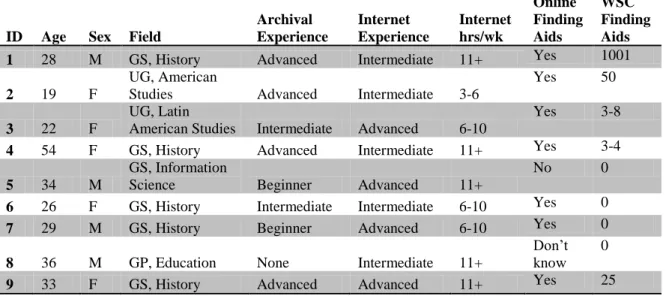
study, with an additional person indicating a History minor. Other areas of study were American Studies, Latin American Studies, and Information Science. The recent graduate listed his area of work as Education. The average age of participants was 31, and all participant responses to the demographics questionnaire (reproduced in Appendix A) can be seen in Figure 7 below.
Four people (44%) described their level of archival experience as Advanced, three
History majors and one American Studies major. Three of these people also indicated that they had used online finding aids from Wilson Special Collections many times, with responses ranging from 25 to 1001. The fourth had used WSC finding aids three to four times before. Two more people described their level of archival experience as
Intermediate (22%), one History major and one History minor. One of these people described using WSC finding aids 3-8 times, while the other had never used WSC finding aids. The last History major described her level of archival experience as Beginner, although she indicated previous use of online finding aids. The Information Science student also indicated his level of archival experience as Beginner, with no experience using online finding aids, and the recent graduate checked None as his experience level and indicated he wasn‟t sure if he had used online finding aids. A total of seven people
WSC finding aids (56% of total, 71% of those who had used online finding aids), while two people indicated no previous experience with finding aids.
All participants rated themselves either Intermediate or Advanced on experience using computers and the internet. Five people (56%) rated themselves Intermediate and four people (44%) rated themselves Advanced. Two of the self-described Advanced
computer/internet users indicated they spent more than ten hours per week on the internet (50%), while the other half indicated six to ten hours per week on the internet. Of the self-described Intermediate computer/internet users, three indicated more than ten hours per week on the internet (60%), one indicated six to ten hours per week (20%), and one indicated three to five hours per week (20%).
Figure 7: Participant Demographic Responses
Observation led the researcher to conclude that these characteristics provided incomplete predictors of how participants used the finding aid pages. The three participants (33% of total) who described themselves as Advanced users of archival materials and indicated ID Age Sex Field
Archival Experience Internet Experience Internet hrs/wk Online Finding Aids WSC Finding Aids
1 28 M GS, History Advanced Intermediate 11+ Yes 1001
2 19 F
UG, American
Studies Advanced Intermediate 3-6
Yes 50
3 22 F
UG, Latin
American Studies Intermediate Advanced 6-10
Yes 3-8
4 54 F GS, History Advanced Intermediate 11+ Yes 3-4
5 34 M
GS, Information
Science Beginner Advanced 11+
No 0
6 26 F GS, History Intermediate Intermediate 6-10 Yes 0
7 29 M GS, History Beginner Advanced 6-10 Yes 0
8 36 M GP, Education None Intermediate 11+
Don‟t know
0
extensive use of WSC finding aids demonstrated the greatest ease with and understanding of the finding aid overall. They relied on that page as their main source of information, used Ctrl+F to search within the page for different combinations of keywords, and demonstrated an understanding of the distinction between the finding aid as a description of the entire collection, and the CONTENTdm interface as a way to view the digitized portions of the collections. The researcher, therefore, describes just this group as the advanced archival users. The two people who had never used online finding aids before demonstrated some confusion over the nature of the finding aids, as well as the reasons for the differences between the finding aid pages and the CONTENTdm interface. These users displayed a distinct preference for the CONTENTdm interface and the ability to use a search box; they also displayed a general lack of interest in using the finding aid page. The researcher describes this group as the novice archival users.
The four people who did not clearly fall into either of these groups represent a portion of users who have some understanding of and experience with archives and finding aids, but display a wide range of preferences and search patterns. Their self-identification
Tasks
Task 1
This task was specifically for novice users and was intended to check understanding of the purpose and function of the finding aid as a description of and guide to archival materials. Participants were directed to the Portrait Collection finding aid and asked what kind of materials they thought the page described, where the materials were physically located, how they could view the materials in person, and if they could view any of the materials online. This question was largely the same as in Chapman‟s study, with slight changes to reflect focus on users‟ understanding of the inclusion of digital content.
Participants were directed to complete this task if they indicated that they had used online finding aids from Wilson Special Collections less than five times, regardless of how often they had used finding aids from other institutions.
Five participants completed this task, two who had never used archival finding aids before and three who had used finding aids at other institutions. Average time to
complete this task was 5:23 minutes, with times ranging from 2:24 to 8:04 minutes. All participants gave essentially the same answers for the first three parts of this task,
more than five minutes on this task, searching in multiple places for answers and expressing some frustration at what they perceived as a lack of clear explanation of the nature of this page. No user ever gave any indication that they read the small print under the collection number and title that describes the nature of the page, although one user clicked on the FAQs link without reading the text surrounding it.
The fourth part of this task asked users if they could view any of the materials described online. Three users gave the correct answer that they could, one by using the purple box at the top and the other two by using links to digitized content in the Contents List. One of the two people who decided that they could not view material online was experiencing the technical difficulties mentioned previously and never saw the links to the digitized material. The other person who answered negatively to this question later found and used the purple box, but apparently did not see it at this time.
These results differ somewhat from Chapman‟s results in 2009, which can be attributed
to two main differences: the significant change in size of the explanatory statement at the top of the page and the addition of the purple box and red restriction text. Changing the size of the text explaining the nature of the page clearly made it much less likely that users would read it, and adding two additional colored features just above it seems to have distracted users. In addition, novice users in both studies clicked on the FAQs or How to View Materials links at some point in the study, but participants in Chapman‟s
appearance and content than the SHC‟s, and users who clicked on these pages expressed a lack of interest in reading the “dense blocks of text.”
Task 2
This task was intended to see how users would begin to navigate a finding aid page, as well as how well they understand cues regarding digital content. Participants were asked to use the Portrait Collection (P0002) to see if someone named Thomas Wilson was included in the collection and if they could see a picture of him.
All users answered this question correctly, finding at least one Thomas Wilson. Average time to complete this task was 1:52 minutes, with times ranging from 0:55 to 2:38
minutes. The three advanced users plus one of the intermediate users found the answer by searching for the name using Ctrl+F within the finding aid, usually trying “Thomas Wilson” before realizing that folders were listed by surname and correcting to “Wilson,
Thomas.” Four users found the answer by scrolling down the page to the name listed alphabetically, which usually took much less time than using Ctrl+F. One of the novice participants spent considerable time at first looking around the site for a search function, eventually asking “Where‟s the search box?” in surprise before deciding “Well, I‟ll search the hard way.” One user found the answer from the CONTENTdm interface,
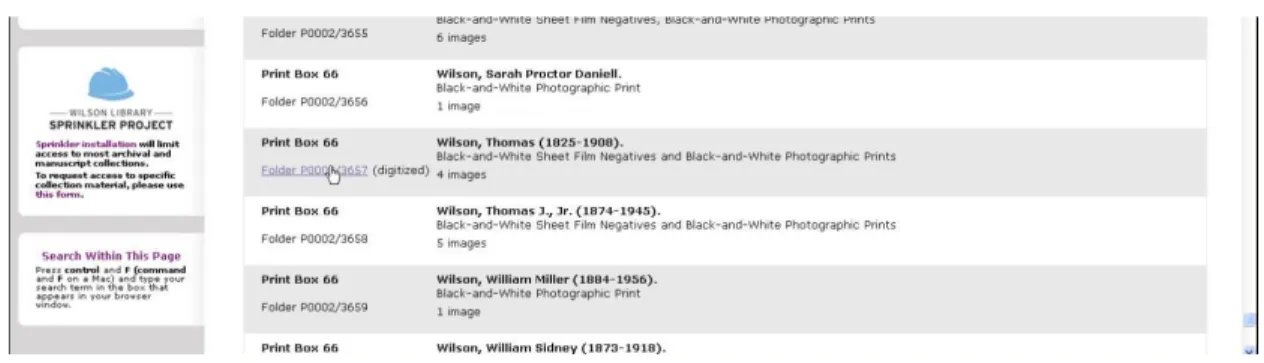
Six users correctly answered the second part of this task by seeing and clicking on the link to the digitized content in the entry for Thomas Wilson, as shown in Figure 8.
Figure 8: Link to Digital Content
One user apparently did not see this link (although she saw others throughout the study), one user did not see the link because it never appeared, and one user found the digital content directly without using the finding aid. Three of the people who found the digital content via the finding aid (two advanced and one novice user) noticed aloud that only two of the six images listed in the finding aid were available online.
Task 3
This task sought to test how users find basic information about what is included in a collection by asking users to look for picture formats and subject matter included. Participants were directed to the Frank Clodfelter Photographic Collection (P0032) and asked what picture formats were in the collection, how many there were of each, where they found this information, and the collection included images of steam engines.
Links). The other two users (22%) indicated the Scope and Content as their primary source of this information, with one also citing the Series Quick Links.
Participants all found steam engines within the collection, although search methods varied. All of the advanced users immediately used Ctrl+F within the finding aid to answer this question. Three of the intermediate users found the answer by scrolling through the finding aid and scanning scope and content notes and item descriptions, spotting the words “steam engine” near the top of both series‟ contents lists. The other
intermediate user and one of the novice users navigated to the entire digital portion of the collection by going directly to the CONTENTdm interface via the purple box at the top of the finding aid. Both of these participants then saw the words “steam engine” in item titles in the result list and based their answers on this.
The other novice user looked for a search function within the finding aid again, noticing that there was an area of the page titled “Search within this Page” that was not entirely
Figure 9: Screen at Low Resolution
Figure 10: Screen at Adjusted Resolution
The text in this box that instructs users to use the Ctrl+F function was specifically added to the finding aid templates as a result of Chapman‟s study in 2009. Usually, this box
Task 4
This task was specifically designed to prompt users to find the link in the purple box at the top of the finding aid to all digital content for that collection in the CONTENTdm interface, by asking if there was a way for users to view all digital images for this collection. This task was also performed on the Frank Clodfelter finding aid (P0032)
As previously mentioned, one participant never saw the purple box because it did not appear during her session. Five people (62.5% of those who had the purple box available) answered this question correctly using the anticipated method. However, three
participants (two advanced and one novice) who had the purple box appear during their session never clicked on the link within it, though all three found their way into the digital content through links within the Contents List. One of the advanced users
interpreted Task 4 to be still referring to steam engines and used advanced search within CONTENTdm, after having clicked on a link within the Contents List during Task 3. She did find all fourteen digital images of steam engines in this collection using this method and responded “Yes” to this question. Of the two participants who did not click on the purple box, one wrote “I don‟t see a way besides clicking each link individually”, while
the other expressed frustration that he did not find what he was sure existed, saying “I would ask for help at this point.”
Task 5
would have images of former North Carolina governor Terry Sanford, why they thought so, and if they could view any such images.
The Edward J. McCauley Photographic Materials were partially digitized and presented as a special digital collection several years ago. This was done before the decision to include digitized material in the finding aid as it is now done at the NCCPA. As a result, there is a separate CONTENTdm collection and the link to the digital content at the top of the page takes the user to a CONTENTdm page allowing them to search or browse digital content within just this collection. The purple box containing this link does not rely on the javascript and is instead a permanent link that appears on the page as it is loaded, without any lag time. Digital content included within the Contents List also behaves differently than in other finding aids, with links underneath the container description that redirect the current page rather than opening a new tab. However, this finding aid uses the same template and stylesheet, and therefore still includes the script that searches for digital materials and takes time to fully load, even though the links to digital content are already present.
This task demonstrated the distinct advantage of using Ctrl+F to search a large finding aid. Every participant found Terry Sanford‟s name in this finding aid, but only those who
used Ctrl+F actually found him within the Contents List. The three advanced users and the novice user who had just learned to use Ctrl+F (44%) began their search with this function and found instances of Terry Sanford‟s name immediately, both in the subject headings and within the Contents List. Three of the intermediate users noticed Sanford‟s
collection (she was the only user who answered “No” to this question), while the other two concluded that there must be pictures of Sanford included, due to the subject heading. The other intermediate and novice users found pictures of Sanford via the CONTENTdm collection without searching in the finding aid.
When prompted to view these pictures and asked how many they could see, five users (56%) eventually used the search function in the CONTENTdm collection to find 101 scanned images that have Terry Sanford‟s name in the description, which they wrote as
their answer. Two of these were advanced users who had first found his name via Ctrl+F, two had started with the CONTENTdm interface, and the fifth had first found Sanford‟s name in the subject headings and only searched in the CONTENTdm collection after scrolling through the finding aid for several minutes with no luck. The third advanced user estimated how many times Sanford‟s name could be found in the Contents List with Ctrl+F to give an answer of “about 20” while the novice user who used Ctr+F simply said “several” after getting frustrated trying to navigate back and forth between the finding aid
and the digitized content in CONTENTdm. In his case, the laptop being used for the study ran more slowly than the desktop used by most others, and each time he clicked on a link within this collection‟s finding aid, it redirected the page; when he hit the
browser‟s back button to return to his place in the finding aid, the page had to reload and
did not immediately return him to where he was in the Contents List (which was more than halfway down a very long page) nor did it continue to display the highlighted results of his Ctrl+F search.
various subseries that seemed promising. One participant who knew that Sanford had been the president of Duke University tried a number of different ways of searching for him based on that knowledge (looking in schools, news and events, etc.) before giving up in frustration. The other intermediate user, who appeared to be scrolling randomly, came extremely close to the first appearance of Sanford‟s name within the collection before giving up. After getting frustrated by searching within the Contents List, these
participants also clicked on the link within the subject headings list, sometimes more than once, to confirm that it did not take them to Sanford‟s appearances in the collection.
In these finding aids, subject headings for topics included in the collection are
hyperlinked as subject searches within the entire library catalog. Clicking on the Terry Sanford subject heading link takes users to a new tab displaying all instances of his name used as a subject heading throughout the UNC-CH library system, as shown in Figure 11.
Figure 11: Results of OPAC Search for Terry Sanford as a Subject Heading search.
within the collection was added as a result of Chapman‟s earlier study; however, users
who clicked on these links generally did not read that text until after they had discovered that the OPAC result list was not what they wanted and had returned to the finding aid. While a total of six participants clicked on a subject heading at some point during this study (three people did so more than once), only the two participants who did not find pictures of Terry Sanford (despite seeing his subject heading) mentioned this as a source of frustration in the post-test interview. The rest appeared to find it a minor irritation, since none of them expressed any appreciation of this feature and mostly closed the tab immediately after it opened.
Task 6
This task was meant to see if users would find and understand the restriction information about a collection, and is a follow-up to Chapman‟s similar question. Participants were directed to continue using the McCauley finding aid (P0082) and were asked if there were any restrictions on this collection, and if so, what they were.
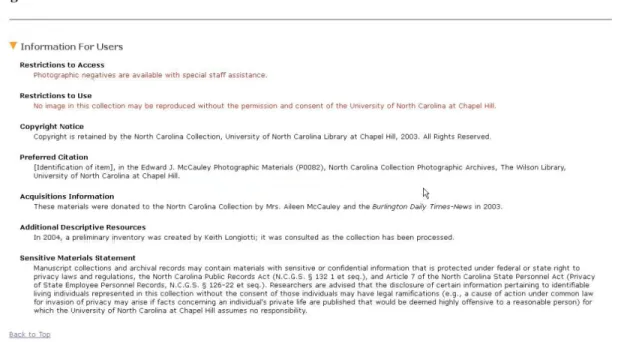
Since Chapman‟s study was conducted in 2009, the “Information for Users” section has been revised due to her findings. Chapman‟s participants showed some hesitation about
collection title and purple box that indicates the presence of restrictions (Figure 12); the template also includes a link to the Information for Users section where the restrictions are spelled out (Figure 13).
Figure 12: Restrictions Indicated at Top of Page
Figure 13: Restrictions in Information for Users
Every participant answered this question correctly and demonstrated a good
on the links in that text to view the restrictions. One novice user (11%) who was still in the CONTENTdm interface from the previous task searched there first before eventually returning to the finding aid page and seeing the red text at the top, at which point he clicked on that link to see the full restriction descriptions. One advanced user and the other novice user both engaged the navigation menu on the left side of the page to get to the restriction information, one by going directly to the Information for Users section (11%) and the other by going to Collection Overview (11%), from which point the restriction information was mostly visible. Another intermediate user went directly to the top of the page, but did not click on the link in the restriction notification, instead
scrolling down until he saw it in the Information for Users section.
All participants then correctly identified the restrictions as allowing access but limiting use, with some users simply indicating that they could access materials and some also mentioning that they would need some staff assistance; all users indicated that they understood they would need permission to reproduce materials. The average time taken on Task 6 was 1:36 minutes, with times ranging from 0:48 to 2:42 minutes.
Task 7
This task was broken into four parts and was intended to see how users would navigate a very large collection, which includes digitized content sporadically throughout, to find materials that are not easily keyword searchable. The last part of the question was
specifically intended to see how users would navigate within the CONTENTdm interface, although some information about this was observed in other tasks. Participants were told to use the University of North Carolina at Chapel Hill Photographic Laboratory
basketball teams or games, why they thought so, if there was a digital image of the 1947 men‟s basketball team, if there were any pictures of women‟s basketball and how they
could be viewed. In the last part of the task, participants were directed to a specific image, told to view the digital version, and asked how they might look for more digital images of basketball from that page.
Participants generally answered the first part very quickly, and most (7 of the 9, or 78%) used the Abstract and/or Subject Headings from the beginning. Only one user, a novice user, bypassed the information in the finding aid almost entirely; he glanced at the Abstract and said “My gut says yes, but I kinda want to search…” and then went directly to CONTENTdm to conduct an advanced search for “basketball.” He was dissatisfied by the results due to the fact that he was now searching all digitized content of the NCCPA, rather than just the UNC Photo Lab collection, as was directed. When he went back to the advanced search page, he attempted to narrow his search to the Photographical
Laboratory collection only, but was unable to find this title in the list of searchable
collections. After going back and forth between the results list and advanced search pages to ensure he wasn‟t missing something, he went back to the finding aid and searched via
Ctrl+F to find the subject heading and an item described as basketball.
The second part of this task asked users to find a digital image, but used terms that differed slightly from item descriptions in how they were ordered. Search patterns were similar to Task 5, with the three advanced users and the same novice user engaging Ctrl+F from the beginning and the same intermediate user and novice users, who had success with searching the digital content immediately, using that approach here as well. The other three intermediate users began by scrolling through the collection, clicking on the subject headings, and trying various subseries in the Series Quick Links section, before the two who knew there was digital content available used the purple box at the top to access all digital content in the CONTENTdm interface.
The four users who began with Ctrl+F quickly found that they needed to experiment with different word order and term usage to find relevant results. Two of these users actually found the two digitized items entitled “Men‟s Athletics: Basketball Team, 1947” while searching for pictures of women‟s basketball (the next task); one user found one of these
items by spotting it after Ctrl+F landed her on a nearby item; and the fourth user found items titled “Men's Athletics: Basketball team portrait, circa 1946-1947” that had not been digitized as well as the items titled “Men‟s Athletics: Basketball Team, 1947” that
had been digitized (depicting a basketball game in progress), which led him to answer this question in the negative. Another novice user, who had first searched for basketball in the digital collections and now appeared to miss that this question was specifically asking for a digital image, continued using Ctrl+F, and decided that the first result he found with the word basketball and the year 1947 in it (an item entitled “Basketball
The intermediate user who began the search for this item in the CONTENTdm advanced search was automatically searching only the Digital North Carolina Collection
Photographic Archives, because the researcher neglected to clear the browser cookies and that collection was still selected from a previous study participant. She searched first for “basketball 1947” and found three results, the two images of a basketball game
mentioned above and another image of two men holding a trophy. She based her answer on this results page, and revised her earlier assumption that this collection would not have basketball pictures.
The other three users were intermediates who did not know about Ctrl+F. All three of these users found basketball mentioned in the subject headings and clicked on those hyperlinks, even though all of them had also done this in previous tasks with no success. Also, these users all went to the Series Quick Links (as shown in Figure 14) to begin exploring possible places where basketball pictures might be listed.
Figure 14: Series Quick Links for P0031
Prints of basketball images in this collection are included in subseries 2.5 “Departments,