Lucy T. VanderKamp. Document Retrieval on Personal Computers. A Master’s Paper for the M.S. in L.S. degree. April 2014. 32 pages. Advisor: Robert Capra
This study examines users’ choice of navigation or search to locate documents on their personal computer and the effects of elicitation method on the retrieval process. Nineteen students from UNC Chapel Hill were prompted to find documents created between 1.5 and 4 months ago with three prompts: the first page of the document, the file name, and the participant’s description of an item. Analysis found the majority of participants used navigation for retrieval and there were effects from the different elicitation methods. The first page of the document prompt resulted in the longest and most difficult retrievals; the file name prompt resulted in quicker and easier retrievals and the most use of search; and the description prompt resulted in the easiest and nearly the quickest retrievals.
Implications from this study are that file location memory may be primed by description and that users may not use search effectively for re-finding files.
Headings:
Electronic filing systems
Human-computer interaction
Information-seeking strategies
Personal information management
DOCUMENT RETRIEVAL ON PERSONAL COMPUTERS
by
Lucy T. VanderKamp
A Master’s paper submitted to the faculty of the School of Information and Library Science of the University of North Carolina at Chapel Hill
in partial fulfillment of the requirements for the degree of Master of Science
in Library Science.
Chapel Hill, North Carolina April 2014
Approved by
Table of Contents
Introduction ... 2
Literature Review... 3
Methodology ... 7
Analysis... 10
Results ... 16
Limitations ... 23
Future Work ... 24
Conclusions ... 25
Appendix 1 - Participant Questionnaire ... 27
Appendix 2 - Task Response Questionnaire ... 28
Introduction
Previous studies of Personal Information Management (PIM) have reported that when
locating personal digital files, users prefer navigation through folder hierarchies instead
of search tools (Barreau, 1995; Barreau & Nardi, 1995; Bergman, Beyth-Marom,
Nachmias, Gradovitch, & Whittaker, 2008; Bergman, Tene-Rubinstein, & Shalom, 2013;
Dourish, Edwards, & LaMarca, 2000; Ravasio, Schar, & Krueger, 2004). With today’s
improved desktop search and increased use of search for retrieval of email and Web
pages, users may be more likely to use search for personal digital files and do so more
efficiently as compared to previous studies. Consideration of the methods used to prompt
document retrieval tasks may also shed light on users’ method of and ease with retrieval.
Prior work has found that navigation is preferred for many reasons: it provides a visual
representation of the information and surrounding documents (Barreau & Nardi, 1995;
Ravasio et al., 2004), clues for the next step in locating (Ravasio et al., 2004; Teevan,
Alvarado, Ackerman, & Karger, 2004), and a reorientation to the users’ conception of the
information (Barreau, Capra, Dumais, Jones, Pérez-Quiñones, 2008; Jones,
Phuwanartnurak, Gill, & Bruce, 2005; Teevan et al., 2004). Many argue that managing
folder hierarchies is inefficient and that searching using keywords or other metadata
would be faster and eliminate the need for these complex storage systems (Barreau, 1995;
This study examines the percent of retrievals done with search or navigation and whether
altering the method used to prompt the retrieval affects the process. Three different
prompts were used and appeared to create differences in the method, time, and ease of
retrieval execution.
Literature Review
Folder hierarchies are the dominant file organization mechanism on personal desktop
computers. Folders and files on our computers represent physical organization of
materials, they provide a sense of location (Barreau & Nardi, 1995; Teevan et al., 2004),
that location is consistent (Bergman et al., 2008), and navigating becomes automated
(Barreau & Nardi, 1995; Bergman et al., 2008; Teevan et al., 2004). In 2008, Barreau et
al. noted that users create memories of these locations and that “recalling the context of
initial information encounter is a powerful facilitator for refinding” (Barreau et al., 2008,
p.18:1). Navigating through folders provides a visual representation of the resource and
its surrounding documents and users can "brush up on general organization of materials"
(Ravasio et al., 2004, p.173). Folder organization illustrates relationships between items;
through navigating folder hierarchies, the user can determine whether the materials share
the same context, task, topic, time or format (Barreau, 1995; Henderson, 2005).
In a 2004 study, Teevan et al. used the term “orienteering” to refer to a style of
navigation that relies on using cues along the way about what steps should be taken next,
allowing for “incremental locating” (p.417). Teeven et al. contrasts this to the type of
teleporting. This style of searching tries to jump directly to the information need, it offers
little context or sense of surrounding structure for the items returned. Today’s search
engines do support incremental search, the search “begins as soon as the user types the
first character of the query” (Bergman et al., 2008, p.20:5). And there are an increasing
number of projects which seek to create search tools that search metadata (any attribute
or property of the resource, i.e. author, location, duration of access) and across formats –
documents, pictures, emails, web pages, etc. (Bergman et al., 2008; Dourish et al., 2000;
Dumais et al., 2003).
In 2008, Bergman et al. explored whether improved search tools would affect users
retrieval behavior. This study had three parts: a preliminary study of retrieval preferences,
a longitudinal study (7 months) of a new windows search engine (Google desktop, a 2005
program that allows for cross format searching), and a between-subjects examination of
two Mac search engines (Sherlock and Spotlight). Bergman et al. concluded that the
effect was “limited and inconsistent” (p.20:1) and that participants used search for about
4-15% of retrievals. This study relies on self-reporting, though measures were taken to
prove the validity of these estimates. It is interesting to note that the results showed a
significant increased use of search after 3 weeks (from 7% to 15%) but after 7 months
search use had dropped back to 10%. This final average reflects the lack of use from 16
of the 43 participants who uninstalled the program; for the remaining participants, search
In 1995, Barreau & Nardi posited that navigation uses motor memory and that these
pathways through our documents become habitual (p. 40). Bergman et al. expanded this
idea and used the term “cognitive automation” in 2008; to find files using navigation
“users typically don’t need to take their mind off the work they are doing” (p.20:20). To
create a search query, on the other hand, the user needs to recall information and provide
specific search terms (Bergman, 2008, p.20:19).
Bergman et al. conducted a study to further explore “cognitive automation” in 2012.
Participants were asked to complete a cognitive task while either searching for or
navigating to a specified file. The participants heard a list of words before the retrieval,
after which they were asked to supply as many words as possible from the list. The
average number of words remembered was 6.15 after navigation retrievals and 5.47 after
search retrievals. The researchers accounted for the fact that search took three times
longer and sought averages from participants whose navigation and search times were
similar. From this set of participants the average words remembered was 6.48 after
navigation and 5.74 after search. From these results, Bergman et al. concluded that
navigation retrievals require less cognitive attention than search retrievals. Though this
study was fascinating and very recent, a constraint on search retrieval may have affected
times and ease: the participants were told the title of the document to retrieve but were
not allowed to use the title to search. Bergman et al. noted that this may have added to the
difficulties seen in search (p.587-588). Search retrievals took three times longer and
issue by using three different types of retrieval prompts and no restrictions on retrieval
methods.
Teevan et al. (2004) studied search behaviors by interrupting participants twice a day for
two weeks and asking them about their recent search activity. This study examined search
across many electronic formats – email, files, and the Web. Teevan et al. determined that
there were two distinct types of retrieval being used by their participants: orienteering
and teleporting. Orienteering uses “both prior and contextual information to narrow in on
the actual information target, often in a series of steps, without specifying the entire
information need up front” (p. 417). Teleporting is similar to keyword searching wherein
the participant enters search terms and finds the information. This study found that
keyword searching was used for 39% of the participant’s searches. Teevan et al. point out
that orienteering decreased the cognitive load and preserved a sense of location (p. 418).
The (15) participants were all computer science majors at MIT, so the results may not be
generalizable, but it is interesting that even in this highly computer-literate population,
there was a “surprising lack of search tool use” (p. 416).
Hierarchical file systems were instituted for the convenience of the computer system
rather than the user (Dourish et al., 2000, p.167). They allow each item to be stored in
only one place – a place which is hidden from view. Hierarchies also force the user to
classify items at conception, anticipating future use and imagining a logical location
(Bergman et al., 2008, p.20:3). In studies of personal information retrieval over the past
study, a goal was to examine whether users’ increased comfort with search and the
integration of improved search tools into operating systems might influence the use of
search versus navigation to re-find files.
Previous research has used various prompt s to elicit retrieval: file name, recent
documents print-out, the participant’s description of documents, associates of the
participant’s description of documents; researchers have relied upon analysis of log files,
self-reporting of behavior and direct observation. The study presented here tested
different methods to prompt retrieval: showing the participant the first “open page” of the
document, showing the participant the “file name” of the document, and asking for the
description of assignments related to a previous semester’s course and choosing one of
those documents. The second goal of this study was to examine whether the prompt
method affected the method, time and ease of retrieval.
Methodology
Participants were recruited by sending an email to the University of North Carolina at
Chapel Hill mass email opt-in system. Email requests were also sent to lists in the School
of Information and Library Science, the School of Journalism, and the School of Public
Health. Participants responded through email and meeting times were arranged. The
informed consent form was sent via email so that the participant could review the
procedures and requirements before the session. Interview sessions were conducted in the
Participants were 19 UNC Chapel Hill students, 5 men and 14 women, ages ranged from
20 to 37. Nine participants were graduate students and 6 seniors, there were a few 2nd and
3rd year and 2 PhD students. Five participants were associated with the School of
Information and Library Science with which the researcher is affiliated. All participants
had to have owned their computer for more than 6 months, most answered that they had
owned their computer for between 1 and 2 or 2 and 3 years, with 5 having owned their
computer for longer than 3 years.
Each participant was greeted and the procedure explained, including that there would be a
search performed that s/he could not watch. If the participant agreed to participate s/he
signed the informed consent form and the completed the background questionnaire. This
questionnaire (see Appendix 2) asked for the participant’s age, gender, year in school and
length of ownership of their computer.
In order to capture the participant’s actions on his/her computer, a screen recording
device was used (Epiphan Capture Tool). The device was connected with a cable to the
video output port of the participant’s laptop. The device mirrored the display from the
participant’s laptop screen onto the lab computer and recorded all screen output to a file
on the lab computer. The researcher then ran a test recording.
To begin gathering files for retrieval, the researcher asked the participant to think of a
class they had taken during the previous semester and name documents for that class that
retrieval. The researcher then conducted a search using Windows’ built-in search feature
on the participant’s computer in the C:\users folder for Word documents created more
than six weeks and less than four months ago. Two files were chosen from the results list.
With the first participant, the 5th and 10th items were chosen, with the second participant,
the 10th and 15th items were chosen, etc. This pattern was continued until a participant’s
search results list did not extend as high as the next number in the pattern (i.e., the next
numbers to be chosen were 35th and 40th but the search of their users folder only resulted
in 36 items). The researcher then started the pattern over with 5th and 10th. On two
occasions the researcher needed to select the next item on the list (6th instead of 5th)
because the file appeared to be the same as the file identified through listing assignments
for a class.
Three prompts were used to motivate the participants’ document retrieval: the description
of the third assignment mentioned by the participant, showing the participant the open
first page of the document with the file name concealed, and showing the participant the
file name of the document. Prompt order was rotated with each participant: the first
participant executed the retrievals in the above order, the second participant did the “open
page” retrieval first, then the “file name,” and then the description or “context” retrieval.
After exhausting this rotation, the order was flipped: “file name,” “open page,” “context”
and then that order was rotated.
For the “open page” prompt, the researcher opened the document and covered the file
document was opened and dragged toward the bottom of the screen so that only the file
name was visible. For these two prompts, the participant was shown the item for ten
seconds and then asked if s/he recognized the document. Many participants vocalized that
they recognized the document before the allotted time was up. If the answer was no, the
researcher re-opened the users folder search and chose the next file on the results list. If
the answer was yes, the researcher closed the file (removed the sticky-note) and the
participant was instructed to find that file. The participant was told to let the researcher
know when they found the document or if they could not find it.
Participants were given up to five minutes to look for each target file, there was only one
search that was stopped after 5 minutes and was recorded as a failure-to-find. After each
search, the participant completed the Task Response Questionnaire (see Appendix 2).
Analysis
Table 1 presents the data captured from the screen recording. The researcher coded
prompt method, number of files found from the users folder search, item number chosen,
number of items on the desktop, retrieval method chosen, location of first step (desktop
shortcut, start button, or taskbar), folder depth, number of steps, number of backtracks,
Data coded from screen recording
Prompt The prompt provided by the researcher to begin file retrieval: the first "open page" of the document, the "file name" or the "context"
Number of results
The number of documents found when the researcher performed the search of the participant's users folder
Item number chosen
From the results of the users folder search, the researcher noted which items were chosen for retrieval (5th and 10th, etc.)
Items on desktop Items on the desktop were counted, included all icons - documents,
programs and shortcuts
Process Whether the participant chose to use navigation or search for the
retrieval
Start from Where the participant's first mouse click was: taskbar, start button, or desktop shortcut
Folder depth When the document was found, how deep within folders it was nested
Steps Mouse clicks needed to retrieve, each navigation maneuver and search
iteration (includes backtracks)
Observed backtracks
How many times the participant moved backward in his/her
navigation or searches. Included using the back button, clicking on a folder in the directory path, starting over, using different search terms, opening and then closing a document, or switching from search to navigation or vice versa
Time in seconds Timing began when cursor movement began and ended when
movement ended
Comments Any notes made by the researcher including failures
The participant questionnaire and the task response questionnaire (see Appendices 1 and
2) data were coded and linked to the screen capture data. Each refinding task included the
participant’s record of his/her perception of success, difficulty, amount of time taken, and
number of backtracks and was linked to the demographic data from the participant
questionnaire.
The researcher’s search of the user’s folder was recorded and could be examined during
video playback. These searches resulted in between 8 and 149 documents with one outlier
returning 332. The length of the results list determined if the researcher could continue
with the pattern outlined above (select 5th and 10th with the first participant, 10th and 15th
for the second, etc.). If the list was not long enough to continue the pattern, the researcher
started over with 5th and 10th. The item numbers chosen were noted and ranged from the
5th to the 40th.
The number of items on the participant’s desktop was counted during video playback.
This included folders, shortcuts, programs, and files. The researcher thought to note this
information in case it correlated to retrieval times or ease. Number of desktop items
ranged from 3 to 49 with one participant who had 96.
To analyze trends, retrievals that began with search and then used navigation were coded
as “search.” This occurred 4 times. This decision may have affected the results for time,
as will be discussed in the results section. Retrievals that began with navigation and then
retrievals coded as a “failures.” The data from these failures was excluded from our
analysis.
The location of the first mouse click was noted. Originally, locations were: taskbar, start
button, desktop shortcut, folder pinned to taskbar, search programs and files, search
libraries, and search folder. During analysis, these locations were consolidated. The 5
instances of “folder pinned to taskbar” became “taskbar,” the 8 instances of “search
programs and files” became “start button,” the 2 instances of “search libraries” and 1
instance of “search folder” became taskbar. The researcher did later examine search
locations more specifically, but for general comparisons these 3 categories seemed to
suffice (taskbar, start button, or desktop shortcut).
The researcher noted folder depths from 1 to 7. When the item was in the top level folder
(“Libraries”) it was counted as folder depth of 1 – this occurred twice with the same
participant. Every drill-down from Libraries or Desktop was counted as a level deeper.
The folder depth of 7 occurred once. Overall average folder depth was 4.
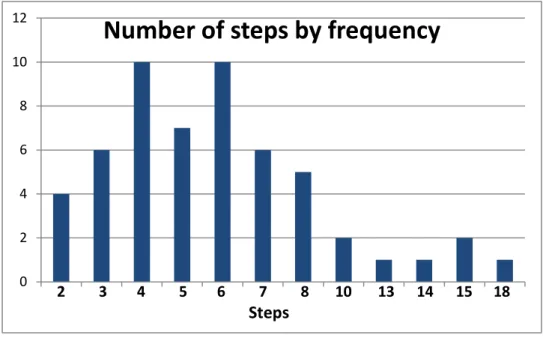
Every maneuver to retrieve was counted as a step. The researcher observed steps from 2
to 18. Figure 1 illustrates the number of steps taken for retrieval; the X axis shows the
number of steps and the Y axis shows the number of occurrences. The majority of
retrieval tasks took from 2 to 8 steps. There were 10 occurrences of 4 steps and 10
Figure 2 illustrates the occurrences of backtracking. Most retrievals (36) did not
necessitate backtracking; those which did backtracked from 1 to 7 times. Nine retrievals
used 1 backtrack and 4 used 2 backtracks. Backtracks were noted during video playback
when the participant used the back button, clicked on a higher folder level in the directory
path, started over, used different search terms, opened a document and then closed it, or
switched from search to navigation or vice versa.
Figure 1
0 2 4 6 8 10 12
Number of steps by frequency
2 3 4 5 6 7 8 10 13 14 15 18
Timing began when the participant began moving the cursor and ended when they ceased
moving the cursor. Often, the retrieval included the opening of documents, but it was
apparent from continued cursor movement that the participant was still retrieving.
There were two retrieval tasks that resulted in failure. One task resulted in the participant
failing to find the selected item. After 5 minutes s/he was informed that s/he could stop
looking. Another participant was unable to find the document selected for retrieval; s/he
did find a PDF with the same file name but could not locate the word document. This
participant gave up after 70 seconds of searching. In both of these instances, the
document that they were to find was in their downloads folder. The data from these failed
retrievals has been removed from the data set. It will be included in the later discussion of
the techniques participants used when employing search.
0 5 10 15 20 25 30 35 40
Number of observed backtracks
by frequency
0 1 2 3 4 5 6 7 Backtracks
Results
This study had two main questions: (1) what percentage of retrieval is done with search
and what percentage is done with navigation, and (2) did the prompt method effect
retrieval method chosen, timing, number of steps, number of backtracks, and/or the
participant’s perceptions?
Each of the 19 participants completed 3 retrieval tasks. Two retrievals were excluded
from our data because they were failures. From the remaining 55 retrievals, 44 used
navigation and 11 used search (80% navigation and 20% search). This represents a
significant increase from Bergman et al.’s 2008 study (pre-test self-reported preferences
of 7% search use). There was not enough data to make robust comparisons between the
search and navigation retrievals but it can be noted that search retrievals took an average
of 41 seconds and navigation retrievals took an average of 29 seconds. These numbers
may have been affected by an outlier and a data coding choice which will be discussed
below.
Figure 3 shows the number of retrieval tasks that used navigation and the number that
used search broken down by prompt type. When prompted with the “open page,”
participants used navigation 15 times and search 4 times; when prompted with the “file
name” participants used navigation 11 times and search 6 times; and when prompted with
the “context” participants used navigation 18 times and search 1 time. For each prompt
affected the method chosen: search was used for 21% of the “open page” prompts, 35%
of the “file name” prompts and 5% of the “context” prompts.
This suggests that if the file name is known, search may be used more than in other
circumstances. It is also of interest that in the “context” prompt, navigation was the
overwhelming choice. This may relate to the idea that files and folders act as a memory
tool that was primed by asking the participants to remember a class from last semester.
Since all participants were students it is inevitable that they would have some sort of
organization system that reflects semesters and classes and this prompt allowed them to
exploit that system.
Figure 4 shows the time taken for each retrieval, both search and navigation. The X axis
numbers the retrievals and the Y axis notes the time in seconds. The average retrieval
time was 31 seconds with 40 retrievals taking less than 30 seconds, but variation was
vast: from 8 seconds to 2.5 minutes. The “file name” line is missing the two failures. The
0 2 4 6 8 10 12 14 16 18 20
Open page File name Context
Navigation Search
distributions of retrieval times were similar across the different prompt methods but the
“open page” method took the most time. Average number of seconds taken for the “open
page” prompt was 44, for “file name” 21 and for “context” 28. From the time taken, it
appears that the “open page” prompt was the most difficult.
Though the quickest retrievals were from the “file name” prompt, this prompt also
produced the two failures mentioned above. If the times for the failures are factored in,
the average time taken for the “file name” prompt would be 40 seconds (“open page” and
“context” would be unchanged at 44 and 28 seconds). Examined in this manner, the
“context” prompt would have resulted in the fastest retrievals.
There were two participants who may have skewed the results for retrieval method and
time. One participant had a very slow computer. The time taken for retrievals for this
0 20 40 60 80 100 120 140 160 180
0 5 10 15 20
t i m e i n s e c o n d s
Retreival task number
Retrieval times in seconds
open page filename context
participant was 153, 133, and 26 seconds. By the last task (the “file name” prompt), the
computer had warmed up a bit and was faster. If the times for this participant are
excluded, the “context” and “open page” lines on figure 4 would lack the last data point
(see Figure 5). Additionally, the average times for each prompt type would change
slightly: “open page” 38 seconds, “file name” 21 seconds, and “context” 22 seconds.
With this exclusion, it may be noted that the “file name” prompt and the “context”
prompt are closer in average time and the “context” prompt did not create any retrievals
which took longer than 44 seconds.
Another participant’s retrieval tactics created difficulties for analysis. This participant
was the outlier who had 96 items on his/her desktop. In order to retrieve, s/he used search
to locate the folder which was on the desktop and then navigated from that folder. As
mentioned previously, retrievals which began with search were coded as search. This
0 20 40 60 80 100 120 140 160 180
0 5 10 15 20
t i m e i n s e c o n d s
Retreival task number
Retrieval times in seconds
(excluding outlier)
open page filename context
participant did not use search other than to locate the file from which to navigate. If the
retrievals for this participant are excluded in addition to the participant mentioned above,
average times for each prompt would change even more: “open page” 32 seconds, “file
name” 16 seconds, and “context” 22 seconds (excluding this participant only yields
averages of 39, 16, and 28). The average times for each retrieval method change as well:
24 seconds for navigation and 13 seconds for search (excluding this participant only
creates averages of 29 for navigation and 23 for search).
Techniques for using search varied. Of the 13 retrievals which used search, including the
2 failures, in 4 of them the participant searched at the folder level, but in 9 of them the
participant searched in “programs and files” – the default search box from the start menu.
This technique provides an exhaustive search of all items on the computer and is often
slower than searching at the folder level. In all but one instance, when the participant
searched “programs and files” they ended up giving up on this search and returning to
navigation. This method of searching at the “programs and files” level influenced the
search times and number of steps taken. The average number of steps when the
participant searched a folder was 3, the average number of steps when s/he search
“programs and files” was 6.4. The average time for retrieval when s/he searched a folder
was 9.5 seconds, when s/he searched “programs and files” it was 47.6 seconds. This
illustrates a variance in participants’ knowledge of how to search efficiently and presents
Average number of steps, backtracks, and the participant’s perception of their success
and difficulty were all affected by the prompt type. Figure 6 shows the average number of
steps and backtracks for each prompt type. The “open page” prompt resulted in the most
average steps and the “context” the least, though the difference is not considerable. The
same trend is noticeable for number of backtracks.
The participant’s perception of difficulty was higher and success lower with the “open
page” prompt (see Figure 7). This corresponds to more time taken for the retrieval. The
“open page” prompt, which took the most time, steps, backtracks, and was perceived as
least successful and most difficult, was used in an effort to avoid the file name of the
document and to create a visual representation to use for prompting retrieval. Versioning
was an issue in these retrievals. Often the participant would have to open a few (or
several) versions of the document before they found the one that looked exactly like the
prompt. Several times the documents were from collaborative projects. Having multiple
versions and drafts would be an issue with any subject population but appears to be
especially contentious with students.
The “context” prompt seems to outline a direct path to a known document more than the
other prompts. When navigating to the file from this prompt, the number of steps
corresponds more closely to the folder depth. Figure 8 shows the difference between the
number of steps needed to retrieve and the eventual folder depth navigated to. For the
“open page” prompt an average folder depth of 4 took an average7.4 steps (difference of
3.4), for the “file name” prompt an average folder depth of 4.5 took an average 6.5 steps
(difference of 2), but for the “context” prompt an average folder depth of 3.9 took an
average 5.5 steps (difference of 1.6). This seems to indicate that each step was more
directed and correct when working from the “context” prompt. This prompt method
might exploit the similarities between mental navigation through one’s memory and
digital navigation through one’s files.
0 0.5 1 1.5 2 2.5
0 0.5 1 1.5 2
open page file name context
Figure 7
Perceived difficulty
Limitations
There might have been some self-selection bias in participants because of the necessity
that the researcher be allowed to access the participant’s personal files. The researcher
encountered difficulties with finding enough participants who use the Windows 7
Operating System. Though this system is the norm for most Windows users, many
students at UNC had computers with Windows 8 and at the time of the study.
While the study of PIM is most generalizable when research is conducted longitudinally
and within the users’ daily life, this study will be useful as a snapshot of search or
navigation preference for one’s own documents. The three prompt methods offer insight
into different methods used for different tasks and in different settings. open page
folder depth
open page steps file name
folder depth
file name steps context
folder depth
context steps
0 1 2 3 4 5 6 7 8
Steps and folder depth correlation
difference of 1.6
difference of 2
difference of 3.4
Future Work
If similar studies are run in the future, several recommendations can be made based on
observations during this study. People save their documents in various places and in
various ways; this study encountered partitioned hard drives so that most documents were
stored on the D: drive and extensive use of zipped folders. The users folder search
included the downloads folder and it became apparent that people were often not familiar
with the files there. There were two participants who didn’t use Microsoft Word – one
used Open Office and the other used Word Perfect. After a few participants, it was
determined that all files and applications need to be closed before beginning a new task.
For the “file name” retrieval task, the researcher pulled the open document window down
on the screen so that only the file name was showing. If the window was closed without
pulling it back up onto the screen, the next document opened would open in the same
manner (low on the screen so that the contents were not visible). This added time to the
retrieval task because the participant would then have to pull the window up onto the
screen in order to examine the contents and feel confident that the document was correct.
From analysis of retrievals it was noted that participants used the opening and
examination of documents as part of the retrieval process, often opening and closing
several documents before finding the right one. It was not until the document had been
opened and examined that participants would declare that they had found the item they
In an effort to randomize the items chosen for retrieval, the researcher chose set numbers
from the users folder search: for the first participant, the 5th and 10th items were chosen,
for the second participant, the 10th and 15th items were chosen, etc. This often resulted in
both items being from the same time period or occasionally from the same project. It
would have been better to use a pattern that would gather more disparate items – newer
and older. Perhaps even something more like first and last item would glean more
temporal variation.
Another area that may warrant further study is the variation observed between
participants who search “programs and files” and those who search at the folder level.
Would instructing participants to search at the folder level affect their efficiency and ease
with search?
Conclusions
From these results it appears that the “open page” prompt presented difficulties because
of versioning, the “file name” prompt resulted in quicker and easier retrievals along with
2 failures, and the “context” prompt allowed participants to conceive of their information
before retrieving, resulting in the easiest and nearly quickest retrievals.
The search function was used the most for the “file name” prompt and the least for the
“context” prompt. Unexpectedly, searching took more time than navigating, perhaps due
the researcher’s choice to code retrievals which began with search as search. Another
of folders. The participant’s perception of difficulty and success for each process – search
and navigation – was essentially the same.
The number of steps needed for retrieval did not clearly equate to more time taken; in
fact, one retrieval had 14 steps in 14 seconds. Many of the participants were clearly very
familiar with the patterns needed to negotiate their files, supporting Barreau’s (1995)
motor memory concept and Bergman’s (2008) findings about “cognitive automation.”
The “context” prompt may have allowed participants to exploit the reminding functions
of navigation. It appears that these different types of prompts affected the method and
Appendix 1 - Participant Questionnaire
Age: _________
Gender: _________________
Year in school: (circle one)
1 Freshman 2 Sophmore 3 Junior 4 Senior 5 Other
How long have you owned this computer?
(circle one)
1 6 months to 1
year
2 1 to 2 years 3 2 to 3 years 4 Longer than 3
Appendix 2 - Task Response Questionnaire
RETRIEVAL TASK #1
On a scale of 1 to 5, rate the difficulty of this retrieval task. (circle one)
Very easy Very
difficult
1 2 3 4 5
On a scale of 1 to 5, rate your level of success at finding the item you were looking for. (circle one)
Successful Not successful
1 2 3 4 5
Did this task take less time, more time, or about the amount of time that you expected? (circle one)
Less time than expected
About the amount of time expected
More time than expected
Did you have to backtrack at any point during this retrieval task? (circle one) Yes No
References
Barreau, D.K (1995). Context as a factor in personal information management systems.
Journal of the American Society for Information Science, 46(5), 327-339.
Barreau, D., Capra, R., Dumais, S., Jones, W., & Pérez-Quiñones, M. (2008).
Introduction to keeping, refinding and sharing personal information. ACM
Transactions on Information Systems, 26(4), Article 18.
Barreau, D. & Nardi, B.A. (1995, July). Finding and reminding: File organization from
the desktop. SIGCHI Bulletin, 27(3), 39-43.
Bergman, O., Beyth-Marom, R., Nachmias, R., Gradovitch, N. & Whittaker, S. (2008,
September). Improved search engines and navigation preference in personal
information management. ACM Transactions on Information Systems, 26(4),
Article 20.
Bergman, O., Tene-Rubinstein, M., & Shalom, J. (2013). The use of attention resources
in navigation versus search. Personal and Ubiquitous Computing,17(3), 583-590.
Bergman, O., Whittaker, S., Sanderson, M., Nachmias, R., & Ramamoorthy, A. (2010).
The effect of folder structure on personal file navigation. Journal of the American
Society for Information Science and Technology, 61(12), 2426-2441.
doi:10.1002/asi.21415
management systems with user-specific active properties. ACM Transactions on
Information Systems, 18(2), 140–170.
Dumais, S., Cutrell, E., Cadiz, J. J., Jancke, G., Sarin, R., & Robbins, D. C. (2003, July).
Stuff I've seen: A system for personal information retrieval and re-use.
Proceedings of the 26th annual international ACM SIGIR conference on Research
and development in information retrieval, 72-79.
Henderson, S. (2005, July). Genre, task, topic and time: facets of personal digital
document management. In Proceedings of the 6th ACM SIGCHI New Zealand
chapter's international conference on Computer-human interaction: making CHI
natural, 75-82.
Jones, W., Phuwanartnurak, A. J., Gill, R., & Bruce, H. (2005, April). Don't take my
folders away!: Organizing personal information to get things done. CHI'05
extended abstracts on Human factors in computing systems, 1505-1508.
Ravasio, P., Schar, H.K., & Krueger, H. (2004, June). In pursuit of desktop evolution:
User problems and practices with modern desktop systems. ACM Transactions on
Computer-Human Interaction, 11(2), 156–180.
Teevan, J., Alvarado, C., Ackerman, M. S., & Karger, D. R. (2004, April). The perfect
search engine is not enough: a study of orienteering behavior in directed search.
Proceedings of the SIGCHI conference on Human factors in computing systems,