Rational Rose 2000e
Using Rose
Part Number: 800-023324-000
Revision 2.5, March 2000, (Software Release 2000e) This document is subject to change without notice.
GOVERNMENT RIGHTS LEGEND: Use, duplication, or disclosure by the U.S. Government is subject to restrictions set forth in the applicable Rational Software Corporation license agreement and as provided in DFARS 227.7202-1(a) and 227.7202-3(a) (1995), DFARS 252.227-7013(c)(1)(ii) (Oct 1988), FAR 12.212(a) (1995), FAR 52.227-19, or FAR 52.227-14, as applicable.
Rational, the Rational logo, and Rational Rose are trademarks or registered trademarks of Rational Software Corporation in the United States and in other countries. All other names are used for identification purposes only and are trademarks or registered trademarks of their respective companies.
List of Figures
xi
List of Tables
xv
Preface
xvii
How this Manual Is Organized xvii Terminology xviii
Related Documentation xix Online Help and Manuals xix
Chapter 1
Introduction to the Visual Basic Language Support Add-In
1
Chapter 2
Mapping UML to Visual Basic
3
Overview 3
Component View to Visual Basic Mapping 4 Components 4
Component Packages 8 Dependency Relationships 8
Logical View to Visual Basic Mapping 9 Classes 9
Interfaces 15
Class Utilities 22
Enum and Type Declarations 24 Web Classes 24 Logical Packages 24 Properties (Attributes) 25 Association Relationships 27 Aggregation Relationships 31 Dependency Relationships 31 Generalization Relationships 32 Realize Relationships 35
Advanced Association Relationship Mappings 37 Navigability 37
Containment Adornment 37 Cardinality/Multiplicity 38 Link Properties (Attributes) 39 Qualifiers 41
Methods (Operations) 42 User-Defined Methods 43 Method Stereotypes 44
Method Parameter Passing 45 Property Get/Set/Let Procedures 46 Declare Methods 46
Events 47
Use-Case View to Visual Basic Mapping 48 Deployment View to Visual Basic Mapping 48 Visual Basic to UML Mapping 48
Visual Basic Projects 48 Project Items 49
Modules 50
Project References 51 Code Comments 51 Compiler Directives 52
The Visual Basic Round-Trip Engineering Tools 53 Round-Trip Engineering—Starting with a Model 54
Round-Trip Engineering—Starting with a Visual Basic Project 55 Synchronization 56
Model IDs 57
Chapter 4
Generating Visual Basic Code
59
The Code Update Tool 59Starting the Code Update Tool 60 The Code Update Tool Pages 60
Welcome Page 60
Select Components and Classes Page 61 Finish Page 62
Progress Page 62 Synchronize Page 62 Summary Page 63
Generating Visual Basic Code 63
Generating a New Visual Basic Project from a Model 63
Updating an Existing Visual Basic Project with Model Changes 64 Synchronizing Code and Model During Code Update 66
Reviewing the Generated Code 67 Evolving the Generated Code 67 Customizing the Code Generation 68
Customizing the Code Update Tool 68
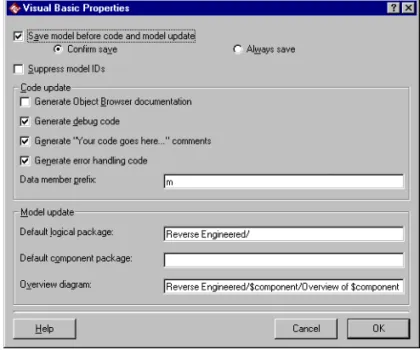
Save model before code and model update 69 Supress model IDS 69
Generate Object Browser documentation 69 Other options 69
Customizing the Code Generation of a Specific Component 69 Previewing and Customizing the Code to Generate for a Specific Class 70
Chapter 5
Reverse Engineering Visual Basic Code
71
The Model Update Tool 71Starting the Model Update Tool 72 The Model Update Tool Pages 72
Welcome Page 72
Select Components and Classes Page 73 Finish Page 74
Progress Page 74 Synchronize Page 74 Summary Page 74
Updating a Model from Visual Basic Projects 75
Reverse Engineering a Visual Basic Project Into a New Component 75
Updating a Component in the Model from Code Changes 76 Synchronizing Model and Code During Model Update 77 Evolving the Updated Model 78
Customizing the Model Update 80
Customizing the Model Update Tool 80
Save model before code and model update 81 Suppress model IDS 81
Default logical package 81 Default component package 82 Overview diagram 82
Customizing the Type Library Importer 83
Customizing the Model Update of a Specific Component 83 Customizing the Model Update of a Specific Class 84
Chapter 6
Modeling a Visual Basic Project
85
The Component Assignment Tool 86 Creating a New Model 87
Creating Components and Assigning Classes 89 Creating New Components in the Model 89
Should be updated from code 91 Project File 91
Stereotype 91 Documentation 91 Import all references 92 Quick import 92
Import the compiled VB binary 92
Associating a Component with a Visual Basic Project File 92 Assigning Classes to Existing Components 94
Assigning Unassigned Classes to a Component 94 Assigning a Class to Several Components of the Same Language 95
Moving a Class to Another Component 95
Moving a Class to Another Component with the Same Language 95
Moving a Class to a Component with Another Language 96 Removing a Class from a Component 96
Removing a Class from One Component 96
Removing a Class from All Assigned Components 96 Changing the Implementation Language of a Component 97 Importing Type Libraries Into the Model 97
Importing the Type Library of Project References 98
Importing the Binary Component Compiled from a Project in the Model 100
Importing any COM Component 101 Example of an Imported Type Library 102 Using an Imported Type Library 104
Using the Data Types Defined by a Type Library 104 Realizing the Interface of a COM Component 105 Using Property Procedures of Type Library Items 106 Browsing the Model and Code 107
Opening the Visual Basic Item that Corresponds to a Model Element 107
Opening a Model that Corresponds to the Open Visual Basic Project 107
Chapter 7
Modeling Visual Basic Classes
109
The Model Assistant 109Templates 111
What templates are provided in Rational Rose? 112 Creating Visual Basic Classes in the Model 113
Applying a Template to a Class in the Model 116
Applying Another Template to a Class BEFORE Generating Code 117
Applying Another Template to a Class AFTER Code Has Been Generated 118
Inserting Debug Code for All New Classes 118 Modeling Visual Basic Forms 120
Modeling Visual Basic Web Classes 121 Creating User -Defined Collection Classes 122
Creating a New User -Defined Collection Class as a Collection of an Existing Class 122
Transforming an Existing Class into a Collection Class 124 Deleting a User-Defined Collection Class 124
Specifying Implements Constructs 124 Creating Declare Statements 126 Creating Event Statements 128 Subscribing to Events 128 Creating Enums and Types 130 Creating Constants 132
Creating Properties (Attributes) 133
Creating Property Get, Let, and Set Procedures 136 Creating a Get, Set, or Let Procedure for a Property 136 Modifying the Default Data Member Prefix 137
Creating Method Parameters 139 Adding Error-Handling Code 141
Adding "Your Code Goes Here..." Comments 142 Using Friend Methods in Sequence Diagrams 142 Modifying the Default Body of Methods 143
The Default Body 143
Modifying the Default Body of a Method 145
Changing the Value of a Template Parameter for a Class 146 Customizing the Default Behavior of the Model Assistant 148
The Visual Basic Properties Dialog Box 148 Generate debug code 149
Generate “Your code goes here...” comments 149 Generate error handling code 149
Data member prefix 150
Appendix A
Model Properties Reference
151
Model Properties for Components 152 ImportBinary (Component Property) 152 ImportReferences (Component Property) 152 ProjectFile (Component Property) 153
QuickImport (Component Property) 154 UpdateCode (Component Property) 155 UpdateModel (Component Property) 155 Model Properties for Classes 156
Instancing (Class Property) 156 OptionBase (Class Property) 157 OptionCompare (Class Property) 158 OptionExplicit (Class Property) 158 UpdateCode (Class Property) 159 UpdateModel (Class Property) 160
Model Properties for Roles and Properties (Attributes) 160 FullName (Role Property) 161
New (Property or Role Property) 161
ProcedureID (Property or Role Property) 162 PropertyName (Property or Role Property) 162 Subscript (Property or Role Property) 162 UpdateCode (Role Property) 163
WithEvents (Property or Role Property) 163 Model Properties for Methods (Operations) 164
AliasName (Method Property) 164 DefaultBody (Method Property) 164 IsStatic (Method Property) 165 LibraryName (Method Property) 166 ProcedureID (Method Property) 166
ReplaceExistingBody (Method Property) 167 Model Properties for Generalization Relationship 167
FullName (Generalization Property) 167
ImplementsDelegation (Generalization Property) 168
Appendix B
UML to Visual Basic Mapping Quick Reference
171
UML to Visual Basic Mapping 171 Visual Basic to UML Mapping 173
Index
175
Figure 1 Components Map the Classes in the Model to Source Code Projects 5 Figure 2 Example of Imported COM Components 6
Figure 3 Example of a Class 14
Figure 4 The GeneralReporter Interface 16
Figure 5 The Reporter ActiveX DLL Component 17
Figure 6 The Reporter DLL Has Been Imported into the Model of MyApplication 18 Figure 7 The MyReporter Class Realizes the Imported GeneralReporter Interface 18 Figure 8 The Article Class Has the Standard Collection Assigned to It 20
Figure 9 A Collection of Orderrow Objects 21 Figure 10 Example of a Class Utility 23
Figure 11 Example of a Diagram Showing Dependencies Between Logical Packages 25
Figure 12 Example of an Association with Unbounded Multiplicity 28 Figure 13 Example of Association Relationships 30
Figure 14 Generalization Relationship 32
Figure 15 Example of Generalization Relationship 34 Figure 16 Generalization Relationship 35
Figure 17 Example of Realize Relationship 36 Figure 18 Example of a Navigable Association 37 Figure 19 Example of Cardinality 38
Figure 20 Example of a Link Property 40
Figure 21 Example of a Qualified Association Relationship 41
Figure 22 Dlg_Order Subscribes to the btn_cancel_KeyPress Event Defined in CommandButton 47
Figure 24 Code Update Tool—Select Components and Classes Page 61 Figure 25 Visual Basic Component Properties Dialog Box—Code Update 65 Figure 26 Code Update Tool—Synchronize Page 66
Figure 27 Visual Basic Properties Dialog Box—Code Update Properties 68 Figure 28 Model Update Tool—Select Components and Classes Page 73 Figure 29 Select Visual Basic Project Dialog Box 75
Figure 30 Model Update Tool—Synchronize Page 77
Figure 31 Use Drag and Drop to Combine Properties with Different Data Member Prefix 79
Figure 32 Visual Basic Properties Dialog Box—Model Update Tool 80 Figure 33 The Component Assignment Tool 86
Figure 34 Select Visual Basic Project Dialog Box 89
Figure 35 Visual Basic Component Properties Dialog Box 90 Figure 36 Visual Basic Component Properties Dialog Box 93 Figure 37 Select Visual Basic Project Dialog Box 94
Figure 38 The References Dialog Box in Visual Basic 98
Figure 39 The References Tab of the Component Properties Dialog Box 99
Figure 40 The Microsoft Scripting Runtime Component Has Been Imported into the Model 102
Figure 41 The Object Browser in Visual Basic Displays the Microsoft Scripting Runtime Component 103
Figure 42 The Appearance of Interfaces on a Component Diagram 104 Figure 43 NewClass Has a Relationship with the Coclass Dictionary 105
Figure 44 NewClass Has a Relationship with IDictionary—the Default Interface of the coclass Dictionary 105
Figure 45 My_Class Realizes the Interface of ObjectControl 106
Figure 46 The Browse Source Code Command Displays Code for a Selected Class 107
Figure 47 The Model Assistant Shows a Visual Basic View of a Class 110 Figure 48 The Form Template 112
Figure 49 Model Assistant—Class Tab 114
Figure 50 Model Assistant—Class Options Tab 115
Figure 51 A Dependency Is Created when Creating a Collection Class 123
Figure 52 Associations with Unbounded Multiplicity Are Moved to the New Collection Class 123
Figure 55 Model Assistant—Enum and Type Tab 131
Figure 56 Enum and Type Classes Are Shown on the Nested Tab of the Enclosing Class’s Specification 132
Figure 57 Model Assistant—Constant Tab 133
Figure 58 OrderId Corresponds to a Data Member, mOrderId, and Two Property Procedures 134
Figure 59 Model Assistant—Data Member Tab 134
Figure 60 Creating a Property Procedure Adds an “m” to the Data Member Name 137 Figure 61 Model Assistant—Method Tab 138
Figure 62 Model Assistant—Method Parameters Tab 140
Table 1 Terminology Differences in UML and Visual Basic xix Table 2 Visual Basic Component Stereotypes 7
Table 3 Visual Basic Class Stereotypes 10 Table 4 Property Stereotypes 27
Table 5 Cardinality Values 39
Table 6 Visual Basic Method Stereotypes 44
Table 7 Controlling the Declaration of Method Parameters 46 Table 8 Mapping of Visual Basic Project Items to Model Element 49 Table 9 Mapping of Visual Basic Modules to Model Elements 50 Table 10 Mapping of Project References to Model Elements 51 Table 11 Property Procedures on COM Interfaces 106
Table 12 Rational Rose Tool Window Commands 108 Table 13 Model Assistant—Folder Contents 110 Table 14 Default Body Variables 147
Table 15 ImportBinary Model Property Values 152 Table 16 ImportReferences Model Property Values 153 Table 17 ProjectFile Model Property Values 153
Table 18 QuickImport Model Property Values 154 Table 19 UpdateCode Model Property Values 155 Table 20 UpdateModel Model Property Values 155 Table 21 Instancing Model Property Values 157 Table 22 OptionBase Model Property Values 158 Table 23 OptionCompare Model Property Values 158 Table 24 OptionExplicit Model Property Values 159 Table 25 UpdateCode Model Property Values 159
Table 26 UpdateModel Model Property Values 160 Table 27 FullName Model Property Values 161 Table 28 New Model Property Values 161
Table 29 ProcedureID Model Property Values 162 Table 30 Subscript Model Property Values 163 Table 31 UpdateCode Model Property Values 163 Table 32 WithEvents Model Property Values 163 Table 33 DefaultBody Model Property Values 165 Table 34 IsStatic Model Property Values 166 Table 35 ProcedureID Model Property Values 166
Table 36 ReplaceExistingBody Model Property Values 167 Table 37 FullName Model Property Values 168
Table 38 ImplementsDelegation Model Property Values 169 Table 39 UML to Visual Basic Mapping 171
This manual:
■ Describes the features of the Visual Basic Language Support add-in in Rational Rose
■ Provides information and procedures for round-trip engineering———— that is, Visual Basic code generation and reverse engineering ■ Provides complete information on mapping UML to Visual Basic
and Visual Basic to UML, as implemented by the Visual Basic Language Support add-in
This manual assumes that you are familiar with the Visual Basic programming language, the Windows operating system, object-oriented-design concepts, and how to use Rational Rose.
How this Manual Is Organized
This manual contains the following chapters and appendices: ■ Chapter 1Chapter 1Chapter 1Chapter 1—Introduction
Provides an overview of features and the basic round-trip
engineering concepts as they apply to Rational Rose Visual Basic. ■ Chapter 2Chapter 2Chapter 2Chapter 2—Mapping UML to Visual Basic
Provides a detailed mapping between Visual Basic and UML constructs in both directions (Visual Basic <-> UML) as implemented in Rational Rose Visual Basic.
■ Chapter 3Chapter 3Chapter 3Chapter 3—Round-Trip Engineering a Visual Basic Application Provides detailed procedures for generating or updating a Visual Basic project from a Rational Rose model, and how to update the model from, or reverse engineer, a Visual Basic project.
■ Chapter 4Chapter 4Chapter 4Chapter 4—Generating Visual Basic Code
Describes how to generate Visual Basic source code from elements in a Rational Rose model, using the Code Update Tool.
■ Chapter 5Chapter 5Chapter 5Chapter 5—Reverse Engineering Visual Basic Code
Describes how to update a Rational Rose model from changes in the Visual Basic source code, using the Model Update Tool. ■ Chapter 6Chapter 6Chapter 6Chapter 6—Modeling a Visual Basic Project
Explains the need for the component view in a model. This chapter also describes how to create Visual Basic components in a model, using the Component Assignment Tool, and how to assign classes to components. You can also find information about how to import and use type libraries in Rational Rose.
■ Chapter 7Chapter 7Chapter 7Chapter 7—Modeling Visual Basic Classes
Explains how to create and specify Visual Basic classes in a model, using the Model Assistant.
■ Appendix A—Appendix A—Appendix A—Appendix A—Model Properties Reference
Describes all model properties provided by the Visual Basic Language Support add-in in Rational Rose. The model properties are used by the Visual Basic code generator to determine what code to generate for each model element.
■ Appendix BAppendix BAppendix BAppendix B—UML to Visual Basic Mapping Quick Reference Provides quick reference tables that show the mapping between Visual Basic and UML constructs for code generation or reverse engineering.
Terminology
The Unified Modeling Language (UML) and the Visual Basic language refer to the same elements by different names. The user interface and documentation of the Visual Basic Language Support add-in tools uses the same terminology as Visual Basic—referred to as Component
Object Model (COM) terminology. In the rest of the Rational Rose user interface, you can choose between the UML or COM terminology. The following table summarizes these terminology differences:
To customize Rational Rose to use COM terminology in the user interface:
1. Exit Rational Rose.
2. Open rose.ini, which is located in the Rational Rose installation folder.
3. Search for “UseCOMTerminology” and set it to “Yes.”
When you restart Rational Rose, the COM terminology is used in all specifications, dialog boxes, and menu items.
Related Documentation
The Visual Basic Language Support add-in provides comprehensive online help with hypertext links and a search index. To display an overview of the online help, clickHelp > Rational Rose Help Topics. The Visual Basic Language Support add-in online help is found in the Rose Visual Basiconline book. Information about the basic features of Rational Rose can be found in theRational Roseonline book, as well as in the Using Rosemanual.
Online Help and Manuals
Rational Rose includes comprehensive online help with hypertext links and a two-level search index.
In addition, you can find all the user manuals online. Please refer to the Readme.txt file (found in the Rational Rose installation directory) for more information.
Table 1 Terminology Differences in UML and Visual Basic
UML COM Rational Rose
Operation Method Operation or Method Attribute Property Attribute or Property
Introduction to the Visual Basic
Language Support Add-In
This chapter provides an introduction to the main features of the Visual Basic Language Support add-in in Rational Rose.
The Visual Basic Language Support add-in enables Rational Rose to model, generate, and reverse engineer code for applications written in Microsoft Visual Basic.
The Visual Basic Language Support add-in tools in Rational Rose are tightly integrated with the Microsoft Visual Basic environment, allowing you to seamlessly progress through the round-trip engineering process. The tools are:
■ Class Wizard————helps you create and specify a new Visual Basic class in the model.
■ Model Assistant———enables you to specify a Visual Basic class in— your model with all the necessary code-specific semantics for complete and robust code generation.
See the sectionThe Model Assistantin chapter 7.
■ Component Assignment Tool———provides you with an easy-to-use— interface to create new components in the model, associate components with source code projects, and assign classes to components.
See the sectionThe Component Assignment Toolin chapter 6. ■ Code Update Tool————generates and updates the Visual Basic source
code from the information contained in a model, and preserves existing user-supplied definitions and declarations from the previous iteration's source code.
■ Model Update Tool———extracts design information from the Visual— Basic code and updates the application’s design model.
See the sectionThe Model Update Toolin chapter 5.
All these tools, except the Model Assistant, are provided by the Visual Studio add-in in Rational Rose, which means that these tools may be shared by other language support add-ins as well.
Mapping UML to Visual Basic
This chapter explains the mapping between the different elements of a Rational Rose model and the Visual Basic programming language, and vice versa. InAppendix Byou can also find quick reference tables that show these mappings.
Overview
The code generated from each element in your model is determined by that element’s specification and model properties. These properties provide the language-specific information required to transform your model into Visual Basic code.
For each class in a Rational Rose model, the code generator produces a corresponding Visual Basic project item. Class relationships—those representing aggregations and associations—are translated to data members, constants, class properties, or module variables, depending on the desired implementation strategy. Also, Rational Rose Visual Basic produces skeletal function procedures, or property procedures for the class methods (operations) in the model.
Stereotypes and Model Properties
The notations provided by Rational Rose Visual Basic are more abstract than the Visual Basic programming language. Some types of model elements do not have any correspondences in Visual Basic at all, but many of them result in several lines of Visual Basic code when generated.
There is a default mapping for each model element, but you can also control what code to generate by changing the stereotype and model properties for the model element using the Model Assistant (see chapter 7). When a model element is created, Rational Rose assigns each model property a default value, which you can optionally modify. By modifying the model properties, you can control the code that is generated for the model element.
The model properties for a model element are also available on the
Visual Basictab of the element’s specification (seeAppendix A). Note, however, when editing the model properties on theVisual Basictab, no consistency checks are being made. Therefore, it is recommended that you use the Model Assistant to modify the model properties.
Component View to Visual Basic Mapping
The component view is used to map the logical view to Visual Basic projects. This section explains the need for components and how they are related to Visual Basic projects.
Please refer to theUsing Rosemanual for general information about the component view.
Components
A Visual Basic project is represented by a component in the component view of a Rational Rose model. The components are needed to map each class in the logical view to the appropriate implementation language and source code project (as illustrated in Figure 1). You cannot generate Visual Basic code for a class until it has been assigned to one or several Visual Basic components in the model. The implementation language of a component is assigned in its Component Specification.
To reverse engineer or update a model from a Visual Basic project, a component corresponding to that project must exist in the model. For information on how to create components, see the sectionCreating Components and Assigning Classesin chapter 6.
Figure 1 Components Map the Classes in the Model to Source Code Projects
A Component Is Associated with a Project
A component with the Visual Basic language assigned to it corresponds to a Visual Basic project. The physical instantiation of a component is the .exe, .dll, .tlb, or .ocx file that is produced from the associated project. The type of a component—for example, Standard EXE or ActiveX DLL—is specified by its stereotype. The component type corresponds to the type of the associated Visual Basic project. The name and path to the component’s project file is available in the
Visual Basic Component Propertiesdialog box for the component. A component can only be related to one project, and the name of a component is the same as the name of the corresponding Visual Basic project. See the sectionAssociating a Component with a Visual Basic Project Filein chapter 6.
Components May Represent Referenced COM Components Components are also used to represent COM components that the modeled system is using. (See the sectionUsing an Imported Type Libraryin chapter 6.)
The components referenced by a Visual Basic project are automatically imported into the model when updating the model from the project. You can also import any COM component containing type information
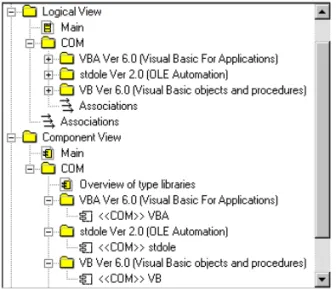
into Rational Rose (see sectionImporting Type Libraries into the Model in chapter 6.) A component representing the selected file is then created in the model, and the contents of the component’s type library is inserted into a package in the logical view, as illustrated in Figure 2.
Figure 2 Example of Imported COM Components
By establishing relationships between classes in the model and the imported type library items, you can show how classes and
components depend on the imported COM components (see section Using an Imported Type Library in chapter 6.)
An association between a class and a type library item becomes a project reference to the corresponding COM component in the generated Visual Basic project. Also, a dependency relationship between a Visual Basic component in the model and COM component (or its interface) becomes a reference in the Visual Basic component’s project.
Note: No code will be generated for imported type libraries when you generate code from the model.
A Component May Represent the Compiled Visual Basic Project The type library of a COM component that has been compiled from a Visual Basic project can also be imported into the model. This allows you to show how other components (projects) in the model use this project. Because Standard EXE projects do not have a public interface, you can only import the type library of compiled ActiveX projects. You can either import a project’s type library automatically, when updating the model from the project, or manually; see Importing the Binary Component Compiled from a Project in the Modelin chapter 6. The type library of the compiled COM component is represented and used in the model the same way as any COM component; seeImporting Type Libraries into the ModelandUsing an Imported Type Library in chapter 6.
Component Stereotypes
The stereotype and language of a component indicates to what kind of software module the component corresponds. To generate a Visual Basic project from a component, the language of the component must be set to “Visual Basic”, and the stereotype must be set to one of the values in Table 2.
The following component stereotypes can be used when generating or reverse engineering Visual Basic code:
Table 2 Visual Basic Component Stereotypes Stereotype Visual Basic Mapping
none When generating code for a Visual Basic component without a stereotype, the code generator creates an ActiveX DLL project and sets the stereotype to ActiveX DLL.
ActiveX When generating code for a Visual Basic component with the stereotype ActiveX, the code generator creates an ActiveX DLL project and changes the stereotype to ActiveX DLL.
ActiveX Control Represents a Visual Basic project of the type ActiveX Control.
ActiveX DLL Represents a Visual Basic project of the type ActiveX DLL.
Note that Rational Rose Visual Basic understands all the component stereotypes above, even though some of them may not be available by default in theStereotypebox in the Component Specification.
Component Packages
Component packages have no direct mapping to Visual Basic code.
Dependency Relationships
A dependency relationship between a Visual Basic component in the model and an imported COM component (or its interface) generates a reference in the Visual Basic component’s project.
ActiveX EXE Represents a Visual Basic project of the type ActiveX EXE.
COM Represents a COM component (.exe,.ocx,.olb, .dll, or.tlbfile) that has been imported into the model. Thus, such a component corresponds to an external software module, and not to a Visual Basic project. However, for ActiveX projects, the type library of the compiled COM component can be imported into the model.
DLL When generating code for a Visual Basic component with the stereotype DLL, the code generator creates an ActiveX DLL project and changes the stereotype to ActiveX DLL.
EXE When generating code for a Visual Basic component with the stereotype EXE, the code generator creates a Standard EXE project and changes the stereotype to Standard EXE.
Standard EXE Represents a Visual Basic project of the type Standard EXE.
any other value When generating code for a Visual Basic component with any other stereotype value, the code generator creates an ActiveX DLL project and sets the stereotype to ActiveX DLL.
Table 2 Visual Basic Component Stereotypes Stereotype Visual Basic Mapping
Logical View to Visual Basic Mapping
This section describes the purpose and mapping of the logical view in UML to the Microsoft Visual Basic language for each type of model element. That is, for:
■ Classes, interfaces, class utilities, and logical packages ■ Properties (attributes)
■ Relationships
■ Methods (operations)
Please refer to theUsing Rosemanual for general information about the model elements in the logical view.
Classes
A class is a set of objects that share a common structure—properties (attributes) and relationships—as well as a common behavior— methods (operations). A class is by default generated as a Visual Basic class module.
The Stereotype of a Class Defines Its Implementation Type The stereotype of a class corresponds to a template. The template defines to what kind of Visual Basic project item a class corresponds— for example, a class module or a form. The template initializes the class with the members that are typical for that kind of project item. You assign the stereotype of a class in the Model Assistant or on the General tab in the Class Specification.
Table 3 shows the most important and fundamental stereotypes (templates) for Visual Basic classes in the model. For information about other templates, refer to the description of each template, which is displayed on the Template tab in the Model Assistant.
If the stereotype value is empty or unknown to the Visual Basic code generator (that is, not any of the values in Table 3) Rational Rose generates a class module for the class, and a module definition for a class utility. If you want a class to be generated into some other type of Visual Basic element, you have to change its stereotype. Note that once you have generated a class, Visual Basic will not let you alter its implementation type.
Table 3 Visual Basic Class Stereotypes Stereotype Project Item Type Usage
AddinDesigner Addin Designer For generation and reverse engineering of Addin Designers in Visual Basic.
Class Module Class Module For generation and reverse engineering of Class Modules in Visual Basic.
Collection Collection For generation of user-defined collection classes. Note that when reverse engineering a collection class, Rose creates a class with the stereotype Class Module in the model.
Custom WebItem Custom Web Item in Web Class
For code generation and reverse engineering of web items in a web class in Visual Basic. A class with this stereotype must be nested within the web class where it belongs. That is, it appears on the Nested tab of the web class’s Class Specification.
DataEnvironment Data Environment For generation and reverse
engineering of Data Environments in Visual Basic.
DataReport Data Report For generation and reverse engineering of Data Reports in Visual Basic.
Debug.
ClassIdGenerator
Debug.
ClassIdGenerator
Represents a class identifier generator module which is used by the debug code that is automatically generated by Rose Visual Basic if the Generate debug code option is selected. Debug. ErrorHandling Debug. ErrorHandling Represents an error-handling module which is used by the error-handling code that is automatically generated by Rose Visual Basic if the Generate error handling code option
DTHMLPage DHTML Page For generation and reverse engineering of DHTML Pages in Visual Basic.
Enum Enum For generation and reverse
engineering of enum declarations. A class with the stereotype Enum must be nested within another class. That is, it is defined on the Nested tab of the parent class’s Class Specification.
Form Form For generation and reverse
engineering of Forms in Visual Basic.
Interface Public Class Module in the modeled Visual Basic project or Interface or dispinterface of an imported COM component
When generating code for a class with the stereotype Interface, which is assigned to a Visual Basic component, Rose creates a class module with the instancing property Public in the generated project (if the project is not a Standard EXE project.)
When reverse engineering a project, Rose automatically creates interface classes for the interfaces and dispinterfaces of the project’s references.
Module Module For generation and reverse engineering of Modules in Visual Basic.
MDI Form MDI Form For generation and reverse engineering of Modules in Visual Basic.
Property Page Property Page For generation and reverse engineering of Property Pages in Visual Basic.
Table 3 Visual Basic Class Stereotypes Stereotype Project Item Type Usage
Classes Must Be Assigned to Components
To generate Visual Basic code for a class, the class must be assigned to a component with Visual Basic as the implementation language of that component. A class can be assigned to, and included in, several Visual Basic components. See the sectionCreating Components and Assigning Classes in chapter 6.
Template WebItem HTML Template Web Item in Web Class
For code generation and reverse engineering of web items in a web class in Visual Basic. A class with this stereotype must be nested within the web class where it belongs. That is, it appears on the Nested tab of the web class’s Class Specification.
Type Data type
declaration
For generation and reverse engineering of data type declarations. A class with the stereotype Type must be nested within another class. That is, it appears on the Nested tab of the parent class’s Class Specification. UserConnection User Connection For generation and reverse
engineering of User Connections in Visual Basic.
User Control User Control For generation and reverse engineering of User Controls in Visual Basic.
User Document User Document For generation and reverse engineering of User Documents in Visual Basic.
WebClass Web Class For generation and reverse
engineering of web classes in Visual Basic. The web items are
represented in the model as classes nested within the web class. Table 3 Visual Basic Class Stereotypes
Code Generated for Classes
For each class using the default mapping as a class module, Rational Rose produces the following code constructs:
■ A class definition taken from the name and model properties of the class
■ A code comment extracted from the Documentation box of the Class Specification
■ Module variables generated from the class’s properties and relationships
■ Method declarations, including skeletal method bodies, for all user -defined methods and property procedures
■ Debug code for class modules
Visual Basic supports public and private access control and visibility forms. Therefore, each property, relationship, and method in the model will be mapped appropriately to the corresponding visibility tag in Visual Basic. Protected methods in Rational Rose are mapped as friend methods in Visual Basic.
Caution: Caution: Caution:
Caution: For each generated member, type, type field, and method, Rational Rose adds an identifier (a Model ID) as a code comment—for example “ModelID=3237F8CE0053”—which identifies the
corresponding class, property, role, or method in the model. Do not edit or copy those identifiers!
Naming of Classes
When naming a class, it is recommended that you use only class names that are accepted by Visual Basic. However, the Model Assistant and the Visual Basic code generator check for invalid characters or length of class names and transform them into valid characters. Abstract Classes
You can define a class (interface) to be abstract on the Class tab in the Model Assistant or the Detail tab of the Class Specification. The Visual Basic code generator creates empty method bodies for abstract classes. Also, the code generator does not generate delegation code for a generalize relationship between a class and an abstract class.
Example of Code Generated for a Class
The following example illustrates the Order class, a typical class from the Business Service layer, and the supporting Visual Basic class module definition:
Public Orderrows As Collection 'of OrderRow Private mPurchaser As Customer
Private mOrder_Id As Variant
' Stores the order, initiates shipping and invoice. Public Sub Register( )
... End Sub
' Calculates the total sum of the order. Public Property Get Sum( ) As Currency
Dim tempSum As Currency Dim thisOrderRow As OrderRow 'Initilize the sum
temp_sum = 0
'Iterate over the order rows and calculate the sum For Each thisOrderRow In Orderrows
tempSum = tempSum + thisOrderRow.Sum Next
'Return the calculated sum Sum = tempSum
End Property
' Adds an order row to the order.
Public Sub Add_OrderRow( new_order_row As OrderRow) Orderrows.Add new_order_row
End Sub
Public Property Get Purchaser( ) As Customer Set Purchaser = mPurchaser
End Property
Public Property Set Purchaser( Value As Customer) Set mPurchaser = Value
End Property
Interfaces
An interface in Rational Rose is a class with the stereotype Interface. Interfaces in a model of a Visual Basic application are used for two different purposes:
■ An interface that is assigned to a Visual Basic component
represents a public class module in the corresponding Visual Basic project. This kind of interface is used to model the interface of an
ActiveX project. (It is not meaningful to model interfaces of
Standard EXE projects, as those projects cannot have public class modules.)
Note that these are UML interfaces rather than COM Interfaces. In fact, a public class module in Visual Basic corresponds to both a coclass and a default interface in COM.
■ An interface that is assigned to an imported COM component represents a COM interface in the type library of that component (see sectionImporting Type Libraries into the Modelin chapter 6). Note that these kind of interfaces are pure COM Interfaces, which are always abstract.
For detailed information about COM, refer to:
■ Ted Pattison,Programming Distributed Applications with COM and Microsoft Visual Basic 6.0, Microsoft Press, ISBN 1-57231-961-5 ■ Don Box,Essential COM, Addison-Wesley Pub Co, ISBN
0201634465
■ The MSDN Online Library, which can be found at
http://msdn.microsoft.com/library—for example, theInside OLE in theBookssection
Example of a Modeled Public Class Module
The following example shows an interface class that is defined in a model and generated as a public class module in a Visual Basic project. The example is a shared Reporter component that provides a general reporter interface, which can be further specialized by other
components and applications. The GeneralReporter interface in Figure 4 is defined in a model called MyComponentModel.
The GeneralReporter interface is assigned to the Reporter component, as illustrated in Figure 5. The Reporter component has the stereotype ActiveX DLL and the implementation language Visual Basic, which means that the component corresponds to an ActiveX DLL project in Visual Basic.
Figure 5 The Reporter ActiveX DLL Component
When generating code for the Reporter component, the code generator creates an ActiveX DLL project with a public class module,
GeneralReporter.
When the developer compiles the project, Visual Basic creates a DLL, called Reporter.dll, which can be referenced from other Visual Basic projects and imported as COM components into other models, which is examplified below.
Example of an Imported Type Library
A Standard EXE application, for example MyApplication, that needs a reporter can reference and use the reporter DLL that was created from the Reporter project. The type library of the Reporter.dll component can then be imported and used in the model of MyApplication (which can be the same model as where the Reporter component is modeled.) The component diagram in Figure 6 illustrates how the DLL has been imported into the model of MyApplication. The dependency
relationship shows that the MyApplication component (and project) depends on the imported Reporter component.
Figure 6 The Reporter DLL Has Been Imported into the Model of MyApplication
The public class module, GeneralReporter, has been imported as both a COM interface, _GeneralReporter, and a coclass, GeneralReporter, in the new model.
MyApplication provides its own implementation of the reporter, which is defined by a class called MyReporter. The realize relationship should be used to specify that a class realizes a certain interface. Therefore, the MyReporter class should have a realize relationship with the imported _GeneralReporter interface. However, because Visual Basic assumes the default interface when implementing a class, and the code generated for a realize relationship with a coclass or its default interface, gives the same compiled result, it is recommended that you create the realize relationship with the coclass. Thus, the MyReporter class has a realize relationship with the imported GeneralReporter coclass, and not the default interface, as illustrated in Figure 7.
Figure 7 The MyReporter Class Realizes the Imported GeneralReporter Interface
As you can see in Figure 7, the realized method, Log, has automatically been added to the MyReporter class.
Collection Classes
Collections provide methods for adding and removing objects in a collection. They also provide behavior for processing the entire
collection, such as behavior for iterating the entire collection using the For Each...Next statement in Visual Basic. A collection object in Visual Basic is created in the same way as an ordinary object. For example:
Dim myDatabases As New Databases
Visual Basic provides a pre-defined standard collection object,
Collection, which can be used to create simple collections. However, for collections with more complex behavior, the methods provided by the standard collection are not sufficient. For example, an order
administrator may need to know how many orders were received during a specified period. In that case, it is natural to let a collection object, Orders, provide the behavior needed to collect that information. Collection Classes in Rational Rose
A collection object is modeled as a class with the stereotype Collection in Rational Rose. The class template for a collection class contains the standard collection methods—add, item, remove, count, and enum.
Each Class Has a Collection Class Assigned to It
To each Visual Basic class in the model, there is a collection class assigned—either a user-defined collection class or the standard collection, which is called Collection. The collection class currently assigned to a class is determined by theCollection Classoption on the
Classtab in theModel Assistantdialog box (Figure 8.)
Figure 8 The Article Class Has the Standard Collection Assigned to It Rational Rose uses the name of the collection class when generating code for an association with unbounded multiplicity. See the
Association Relationshipssection in this chapter.
By default, Rational Rose assigns the standard collection class, Collection, to new classes in the model, but you can assign any class with the stereotype Collection to a class.
Note: The standard collection, Collection, is not explicitly represented in the model. Only user-defined collection classes are represented in the model.
Collection Classes Can Be Automatically Created
The Model Assistant automatically creates a user-defined collection class when you type a new name in theCollection Classoption for a class. See the sectionCreating User-Defined Collection Classesin chapter 7.
The created collection class gets the stereotype and class template Collection. A dependency relationship with the stereotype Collection is also created between the two classes.
Code Generated for Collection Classes
The following code is generated by default for the collection class, Orderrows, in Figure 9.
Figure 9 A Collection of Orderrow Objects Private mCol As Collection
Public Property Get Item(vntIndexKey As Variant) As Orderrow Set Item = mCol(vntIndexKey)
End Property
Public Sub Remove(vntIndexKey As Variant) mCol.Remove vntIndexKey
End Sub
Public Sub Add(Item As Variant, Optional Key As Variant, Optional Before As Variant, Optional After As Variant)
If IsMissing(Key) Then mCol.Add Item
Else
mCol.Add Item, Key
End If End Sub
Public Property Get Count() As Long Count = mCol.Count
End Property
Set NewEnum = mCol.[_NewEnum] End Property
Private Sub Class_Initialize() Set mCol = New Collection End Sub
Private Sub Class_Terminate() Set mCol = Nothing
End Sub
Class Utilities
A class utility denotes a set of services provided by a module in the application under construction. A class utility can therefore be used to collect a set of free methods and data types. For instance, consider a collection of subprograms from Window 3.1 kernel, (for example, GetProfileString and WriteProfileString) that manipulate thewin.ini
configuration file. These can be gathered together into a class utility. A class utility is mapped as a module in Visual Basic. Its properties (attributes) are mapped as public or private module variables, and the methods (operations) are mapped as public or private module methods. Code Generated for Class Utilities
For each class utility, Rational Rose Visual Basic produces the following code constructs:
■ Class annotations extracted from the class specification. ■ Module variable declarations that are generated from the class
properties and association relationships.
■ User-defined function procedure declarations that are defined in the class specification, and skeletal function procedure bodies.
The following example shows the mapping of utilities to Visual Basic code.
Figure 10 Example of a Class Utility Const SWP_NOMOVE = 2
Const SWP_NOSIZE = 1
Const FLAGS = SWP_NOMOVE Or SWP_NOSIZE Const HWND_TOPMOST = -1
Const HWND_NOTOPMOST = -2
Declare Function GetProfileInt% Lib "Kernel" _
(ByVal lpAppName$, ByVal lpKeyName$, ByVal nDefault%)
Declare Function GetProfileString% Lib "Kernel" _
(ByVal lpAppName$, ByVal lpKeyName$, ByVal lpDefault$, ByVal lpReturnedString$, ByVal nSize%)
Declare Function WriteProfileString% Lib "Kernel" _ (ByVal lpAppName$, ByVal lpKeyName$, ByVal lpString$)
Declare Function GetPrivateProfileInt% Lib "Kernel" _ (ByVal lpAppName$, ByVal lpKeyName$, ByVal nDefault%, ByVal lpFileName$)
Declare Function GetPrivateProfileString% Lib "Kernel" _ (ByVal lpAppName$, ByVal lpKeyName$, ByVal lpDefault$, _ ByVal lpReturnedString$, ByVal nSize%, ByVal lpFileName$)
Declare Function WritePrivateProfileString% Lib "Kernel" _(ByVal lpAppName$, ByVal lpKeyName$, ByVal lpString$, ByVal lpFileName$)
Declare Function SetWindowPos$ Lib "user"
(ByVal h%, ByVal hb%, ByVal x%, ByVal y%, ByVal cx%, ByVal cy%, ByVal f%)
Enum and Type Declarations
A class with the stereotype Enum or Type, which is nested within another class in the model, corresponds to an Enum or Type declaration in the other class.
The Enums and Types for a class can be displayed in several places in Rose. The Enums and Types are shown:
■ On the Nested tab of the parent class’s Class Specification ■ In the browser under the parent class
■ Under the Enums and Types folders in the Model Assistant
For more information about enums and types, see the sectionCreating Enums and Typesin chapter 7.
Web Classes
A web class is modeled as class with the stereotype WebClass. The web class’s web items are modeled as nested classes with the stereotype Custom WebItem or Template WebItem. You can view these nested classes from several places in Rose. The web items are shown: ■ On the Nested tab of the web class’s Class Specification ■ In the browser under the web class
■ Under the Web Items folder in the Model Assistant
Rational Rose generates Visual Basic code for web classes and web items. However, when generating a web class, Rational Rose does not generate any code for any members on the web class and its web items, except for the web items’ events. Thus, properties (attributes),
relationships, non-event methods, and non-event nested classes are ignored by the Visual Basic code generator.
For information on how to create web classes and web items, see the sectionModeling Web Classesin chapter 7.
Logical Packages
A logical package is a group of strongly related classes. Each package represents a chunk of the logical architecture of the system, and declares its dependencies to other packages using a dependency diagram as shown below.
The dependency relationships indicate that the classes contained by the BO_ORDER package use the classes exported by the
BO_CUSTOMER and BO_ARTICLE packages. The classes exported by the RDO and VB5 packages are visible to all classes in the model, because these packages are declared as global (by clickingGlobalon the Package Specification’sDetailtab.) Violations to the visibility rules, that is the system architecture, are checked by Rational Rose Visual Basic.
Figure 11 Example of a Diagram Showing Dependencies Between Logical Packages
Logical packages have no direct mapping to Visual Basic code, but they are used to represent imported COM components in the model. See the sectionComponentsin this chapter.
Properties (Attributes)
A property (attribute) is a data member of a programming-language type that is not a class. If a “property” is an object, it should be modeled as an association to the corresponding object class. For information on how to create properties, see the sectionCreating Properties (Attributes) in chapter 7.
The properties of a class in the model are usually translated into data members in the code. However, a derived property—that is, a property with the Derived option selected—corresponds to a Property Get method instead of a data member. Also, a property in the model may
correspond to a constant in Visual Basic. Such a property has the stereotype Const. For information on how to create constants, see the sectionCreating Constantsin chapter 7.
Property Procedures may be Associated to Properties Private properties may have Property Get and Set procedures associated to them. In the Model Assistant you can select the appropriate Property Get or Set procedures for each property. The Model Assistant maintains the relation between a property and its property procedures. Thus, the Model Assistant lets you manage the property and its property procedures together. For example, if you remove a property in the Model Assistant, Rational Rose automatically removes the associated property procedures. For information on how to associate property procedures with properties, see the section Creating Property Get, Let, and Set Procedures in chapter 7. Code Generated for Properties
For a private property, Name, on a class Customer, the following code is generated into the Customer class module:
Private Name As Variant
If a property Get procedure is associated to the property in the model, the following code is generated:
Private mName As Variant
Public Property Get Name() As Variant Name = mName
End Property
Note that the Model Assistant and code generator automatically changes the name of the property to mName to avoid a name collision with the property procedure.
Also, in each generated data member, Rational Rose adds a unique identifier—a Model ID—to be able to identify the corresponding property in the model.
Property Stereotypes
The stereotype of a property controls the Visual Basic code that Rational Rose produces for the class. You can assign a stereotype to a
Table 4 shows which stereotypes of properties are used in Rational Rose when generating or reverse engineering Visual Basic code. Table 4 Property Stereotypes
Association Relationships
An association is a bi-directional class relationship that denotes a semantic dependency between two classes. Associations map to pairs of data members in Visual Basic. The name for each data member is taken from its association role name.
Associations can be described in detail by assigning a variety of adornments and properties. These adornments include for example: association direction, roles, multiplicity, navigability, aggregate, access, containment, role documentation, and qualifiers. All these adornments are used by the Visual Basic code generator to determine what code to generate.
Property Procedures may be Associated with Roles
Private roles may have Property Get and Set procedures associated with them. In the Model Assistant you can select the appropriate Property Get or Set procedures for each role. The Model Assistant maintains the relationship between a role and its property procedures. Thus, if you remove an association in the Model Assistant, Rational Rose automatically removes any associated property procedures. For information on how to associate property procedures with roles, see the sectionCreating Property Get, Let, and Set Procedures in chapter 7.
Code Generated for Association Roles
For the private role Purchaser, on an association between an Order and Customer class, the following code is generated into the Order class module:
Private Purchaser As Customer Stereotype Visual Basic Mapping none Represents a data member.
Const Represents a Visual Basic constant. This stereotype is only relevant for properties with an initial value assigned.
If a property Set procedure is associated to the Purchaser role in the model, the following code is generated:
Private mPurchaser As Customer
Public Property Set Purchaser(value As Customer) End Property
Note that Rational Rose automatically changes the name of the role to mPurchaser to avoid a name collision with the property procedure. For more information, see the sectionModifying the Default Data Member Prefixin chapter 7.
If the name of the referenced class is not unique, you may need to use both the class name and the reference name. The FullName model property for roles is used to instruct the code generator to include the component name in the generated declaration. For example, if the Customer class is assigned to the OrderSys component, Rational Rose Visual Basic generates the following code if FullName is set to TRUE:
Private Purchaser As OrderSys.Customer
Moreover, in each generated data member, Rational Rose adds an identifier—a Model ID—to be able to identify the corresponding role in the model.
Code Generated for an Association with Unbounded Multiplicity When generating code for an association with unbounded multiplicity, as the Orderrows role in Figure 12, Rational Rose generates the following code by default for the Orderrows role into the class module of Order:
Public Orderrows As Collection
Figure 12 Example of an Association with Unbounded Multiplicity If there is a user-defined collection class to handle collections of Orderrow objects, the name of that class is used in the declaration instead of the standard collection, for example:
Code Generated for Associations with Imported Interfaces An association relationship between a class in the model and an imported interface results in a reference to the corresponding ActiveX component in the generated Visual Basic project.
Referenced Component
If the name of the referenced class is not unique, you may need to use both the class name and the component name. This may happen, for example, if two classes with the same name are defined in two different components.
TheFull Nameoption on the Data Membertab in theModel Assistant
dialog box (or on theVisual Basictab of theAssociation Specification) is used to instruct the code generator to include the component name in the generated declaration. For example, if the Customer class is assigned to the OrderSys component, Rational Rose generates the following code ifFull Nameis selected:
Private Purchaser As OrderSys.Customer
Example of Code Generated for an Association
The following example shows the mapping of associations into Visual Basic code. Code has been generated with Get and Set property procedures associated to the mOrders and mPurchaser roles.
Figure 13 Example of Association Relationships ORDER.CLS class module.
…
Public Orderrows As Collection 'of OrderRow Private mPurchaser As Customer
Private mOrder_Id As Variant …
Public Property Get Purchaser( ) As Customer … Public Property Set Purchaser( Value As Customer) … …
CUSTOMER.CLS class module. …
Private mOrders As Collection 'of Order Private mCustomer_Id As Variant
Private mName As Variant Private mAddress As Variant Private Storage As Persistence …
Public Property Get Orders _
(Index As Variant) As Customer …
Public Property Set Orders _
Aggregation Relationships
An aggregate relationship is conceptually the same as an association with the aggregate adornment set. The aggregate association
adornment denotes a whole or part relationship. Aggregate adornments are purely conceptual and have no effect on code generation, nor reverse engineering. Thus, the code generated for an aggregate relationship is the same as for an association relationship. The aggregate association may be navigable on both ends, and data members are generated for the associated classes on the navigable side(s).
Note: Rational Rose Visual Basic does not generate code for
aggregation relationships in user interface items, such as forms, but you can subscribe to the events that are defined by an associated controls. See the section Subscribing to Events in chapter 7.
Dependency Relationships
The dependency relationship in the logical view denotes a client/supplier relationship in which the client object invokes a method on the supplier. Typically this means that the client is dependent on the interface of the supplier, but does not contain an instance of the supplier.
Because Visual Basic does not support the visibility declaration, a dependency relationship between two classes belonging to the same component has no code mapping. However, if a class is dependent upon a module (class utility), the module is automatically added to the same project as the class. Also, if a class is dependent upon a class that belongs to another component, a project reference to that component is added to the project.
The stereotype of a dependency relationship is only relevant if the relationship appears between a class and its collection class. A dependency relationship with the stereotype Collection is
automatically created when you assign a new user-defined collection class to a class in the Model Assistant, or when you reverse engineer a collection class into the model. The Visual Basic code generator needs a dependency relationship to automatically generate the appropriate Add, Remove, etc. methods into the collection class. For more information, please refer to theCollection Classessection in this chapter.
Generalization Relationships
A generalization relationship between two Visual Basic classes exists when the client class inherits the behavior of the supplier class.
Figure 14 Generalization Relationship
Thus, the generalization relationship means that the client class inherits both the interface of the supplier class and the implementation of the inherited methods. This is also called implementation
inheritance.
If the supplier class is abstract—for example, if it is an interface in a COM component— or if the client class is supposed to provide its own variants of the implemented methods, the realize relationship should be used.
Code Generated for Generalization Relationships
In Visual Basic, the closest correspondence to the generalization relationship is the Implements construct and delegation code in the implemented methods. Thus, for a generalization relationship between a class B and a supplier class A, Rational Rose generates the following code into B’s class module:
■ An Implements A statement
■ An object of class A—the delegation object
■ Copies of A's public methods, including default dispatching implementations that delegate to class A
■ Private Get, Let, and Set procedures for A’s public properties and roles
Note: Generalization relationships between class utilities do not result in any special syntax Visual Basic code. Also, when reverse engineering a class with an Implements statement, a realize relationship is created in the model.
Referenced Component
If the name of the implemented class is not unique, you may need to use both the class name and the component name. This may happen, for example, if two classes with the same name are defined in two different components.
TheFull Nameoption on the Implements Classtab in theModel Assistantdialog box (or on theVisual Basictab of theGeneralization Specification) is used to instruct the code generator to include the component name in the generated declaration. For example, if an implemented class Customer is assigned to the OrderSys component, Rational Rose generates the following code ifFull Nameis selected:
Implements OrderSys.Customer
Abstract Classes
The Visual Basic code generator automatically excludes the delegation object and the dispatching method implementations from the
generated code if A is an abstract class. That is, the code generator generates the same code for a generalize relationship between a class and an abstract class as for a realize relationship between two classes.
Example of Code Generated for a Generalization Relationship The following example shows the mapping of the generalization relationship into Visual Basic code:
Figure 15 Example of Generalization Relationship CLASSA.CLS class module.
Public Sub PublicMethod() End Sub
Private Sub PrivateMethod() End Sub
CLASSB.CLS class module. Implements A
Private mAObject As New A
Private Sub A_PublicMethod() mAObject.PublicMethod End Sub
CLASSC.CLS class module. Implements B
Private mBObject As New B
As you can see, Implements means conformance only to the public interface. For example, B inherits A’s public method and gets a private Sub A_PublicMethod(). C implements the public interface of B, but A_PublicMethod() is not public in B. Therefore, according to the Visual Basic programming language, there is no Sub B_A_PublicMethod in C.
Realize Relationships
A realize relationship between a Visual Basic class and another class exists when the client class conforms to the interface defined by the supplier class (usually an interface).
Figure 16 Generalization Relationship
Thus, the realize relationship means that the client class will implement the interface of the supplier class, and provide an
implementation of the realized interface’s properties and methods. This is also called interface inheritance. Interface inheritance is used if the supplier class or interface is defined in a type library without code— that is, if it is an abstract class or an interface—or if the client class is supposed to provide its own variants of the implemented methods. To inherit also the implementation of the methods in the supplier class—that is, to delegate the implementation of the inherited methods to the supplier class—the generalization relationship should be used. Code Generated for Realize Relationships
The realize relationship corresponds to the Implements construct in Visual Basic. Thus, for a realize relationship between a class B and class A, Rational Rose generates the following code into B’s class module:
■ An Implements A statement
■ Copies of A's public methods with empty method bodies
■ Private Get, Let, and Set procedures for A’s public properties and roles with empty bodies
When reverse engineering a class with an Implements statement, a realize relationship is created in the model.
Referenced Component
If the name of the realized class is not unique, you may need to use both the class name and the component name. This may happen, for example, if two classes with the same name are defined in two different components.
TheFull Nameoption on the Implements Classtab in theModel Assistantdialog box is used to instruct the code generator to include the component name in the generated declaration. For example, if a realized class Customer is assigned to the OrderSys component, Rational Rose generates the following code ifFull Nameis selected:
Implements OrderSys.Customer
Example of Code Generated for a Realize Relationship
The following example shows the mapping of the realize relationship into Visual Basic code:
Figure 17 Example of Realize Relationship CLASSA.CLS class module.
Public Sub PublicMethod() End Sub
Private Sub PrivateMethod() End Sub
CLASSB.CLS class module. Implements A
Private Sub A_PublicMethod() End Sub