Information Technology: E-mail and eBoard
Registration
Please walk through each step of this process to ensure that all Roberts Technology will work for you. Call 585.594.6898 if you need any help or e-mail the Information Technology Support team at [email protected].Step-by-Step Guide to Using Roberts/NES Technology Resources
Contents (check when complete):1)
Creating/changing your password
2)
Log into the Intranet website (your NES home page)
3)
Check Your NES e-mail
4)
Check your class schedule in R-Serve and then check your grades once your class finishes
5)
Log into your class web area (also known as CMS or Moodle)
6)
Accessing the Library Resources
(Step 1): Changing Your Password
1. Type this web address into your web browser:http://acc.roberts.edu/changepw
2. Fill in the information requested (your student ID number is located on your Roberts/NES student photo ID directly below your picture or is available by calling IT or NES)
3. Click on VALIDATE
4. Enter what you would like to use for your password twice
**Please use 5 characters or more, and store your password in a safe place or use something you can remember.
5. Click CHANGE PASSWORD
**This will set up your password for all Roberts/NES intranet networks: INTRANET, R-Serve, NES eBoard, and CMS/Moodle for online courses
6. Click on the RWC intranet link and try your password
Your Username is: Lastname_Firstname Your Email is: [email protected]
Your Student ID Number is: located on your student ID card Or, contact IT for assistance at 585.594.6898
NES Student Technology Guide 2 | P a g e www.roberts.edu/its
(Step 2): Log onto the NES/RWC Intranet
1. Open your web browser (Internet Explorer 7 is recommended) and type in the following address: http://eboard.nes.edu/
2. Type in your username: [email protected] 3. Type in your password created in Step 1 and click OK
This site is your NES home page. Click on the places with the arrows below to access student e-mail, course syllabi, course registration
information, grades, schedules, and MUCH more.
Familiarize yourself with this information and where it is located because it is a resource to assist you during your entire seminary
(Step 3): Log into Roberts E-mail
The Roberts Wesleyan College/Northeastern Seminary assigned e-mail account is an official means of electronic communication within the College and Seminary communities. Students are responsible for all information sent to them via their College or Seminary assigned e-mail account from faculty, administrative offices, and academic departments.
1. Open your web browser and go to the NES intranet http://eboard.nes.edu
2. Log into the intranet (Step 2)
3. Click on Email (left side of the screen, see the final screenshot in Step 2 above)
4. Log into your Email (Outlook Web Access) using the username and password created in Step 1
NES Student Technology Guide 4 | P a g e www.roberts.edu/its
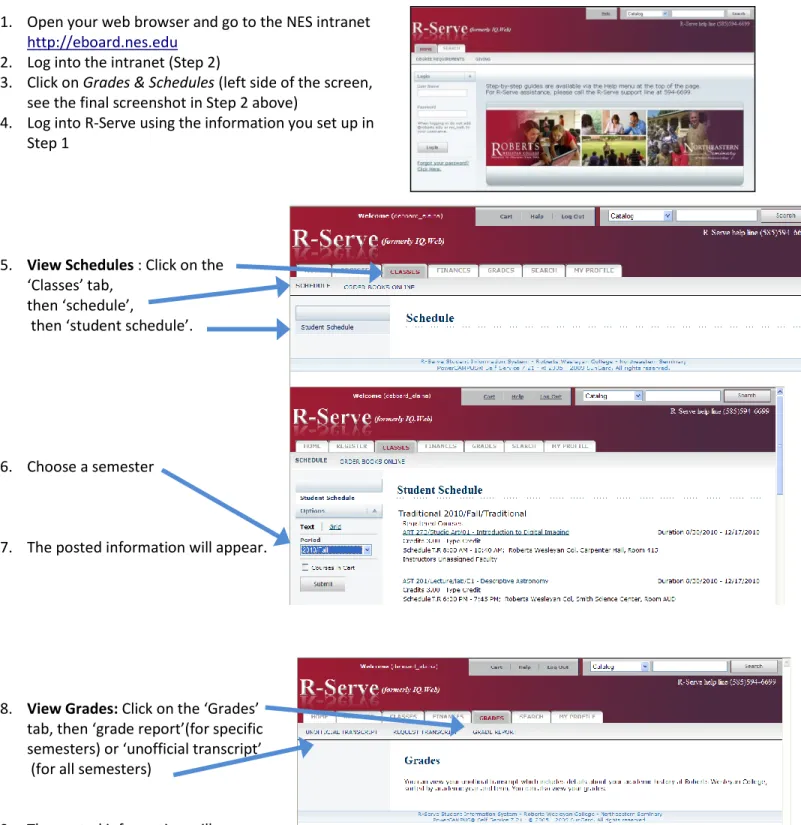
(Step 4): Log into R-Serve
1. Open your web browser and go to the NES intranet http://eboard.nes.edu
2. Log into the intranet (Step 2)
3. Click on Grades & Schedules (left side of the screen, see the final screenshot in Step 2 above)
4. Log into R-Serve using the information you set up in Step 1
5. View Schedules : Click on the ‘Classes’ tab,
then ‘schedule’,
then ‘student schedule’.
6. Choose a semester
7. The posted information will appear.
8. View Grades: Click on the ‘Grades’ tab, then ‘grade report’(for specific semesters) or ‘unofficial transcript’ (for all semesters)
(Step 5): Log into Course Area (CMS/Moodle)
CMS, the online-based program otherwise known as Course Management System, is the source for online courses, class discussions, assignments, and to view class participants once you are registered for a class. Sometimes, professors will post syllabi for non-online courses here as an extra resource.
1. Open your web browser and go to the NES intranet http://eboard.nes.edu
2. Log into the intranet
3. Click on Courses (bottom right side of the screen, see the final screenshot in Step 2 above)
4. Log into CMS/Moodle (the course) using the information and password you set up in “Changing Your Password”
NES Student Technology Guide 6 | P a g e www.roberts.edu/its
(Step 6): Accessing the B. Thomas Golisano Library Resources
Visit
http://www.roberts.edu/library/
Start the search by selecting from the Article or Subject Guide options. You can also search journal articles available in full text.
You will enter into our vast database of journals, articles, books and many other resources.
For additional training and
support, please contact the
Technology Resource Center
at
585.594.6789 or
[email protected].
Need Assistance?Contact a library representative by: Stopping into the library E-mail