Journal of Education in Black Sea Region Vol. 3, Issue 2, 2018
34 | P a g e
Examining Students’ Performance Using Multiple Mouse Presentation in the
Classroom: The Case of Microsoft Mouse Mischief
Oluwakemi Olurinola
Tayo Omoniyi
Abstract
With the quest for technology integration in the classroom, it becomes imperative for low resource schools to look to developing innovative ways of designing and delivering instruction using low-cost technology. This study examined whether the use of the interactive Multiple Mouse presentation had more effect on students learning outcomes than the conventional method of teaching, using visual art as a subject of choice. This study was undertaken with the goal of strengthening the integration of technology in the classroom, especially for developing countries like Nigeria. The research design was a pre-test, post-test, control group quasi-experiment; the population consisted of Junior Secondary School three visual art students (JSS3) in Ogun state. Purposive sampling technique was used in selection of the schools and intact classes of students were used in each of the selected schools. The postulated hypotheses were tested using the Analysis of Covariance.
The results revealed mean gains across the treatment groups. The Multiple Mouse group recorded the higher post-test mean achievement score of 17.67, while the Conventional Method group recorded a post-test mean achievement score of 15.16. The findings revealed a significant main effect of treatment on students’ achievement (F (2, 91) = 3.758, P < 0.05). The study, therefore, concluded that Multiple Mouse Presentations could be an effective
strategy in presenting instructions. It is recommended that schools which lack sufficient resources can take advantage of this type of presentation to increase more students’ access to technology- enhanced learning.
Keywords: single display groupware,powerpoint, microsoft mouse mischief, multiple mouse presentation, multimedia, students’ performance
Introduction
The prescriptions and learning competencies defined in the 9-Year Basic Education Curriculum in Nigeria (Nigerian Education Research and Development Council) (Ajagun, 2006) encouraged the integration of ICT in the teaching and learning process. In spite of this policy, we still find that computers are in short supply in most secondary schools in Nigeria, the challenge is how best the few available can be effectively used for instruction. According to
Ph.D. Olabisi Onabanjo University, Ago-iwoye, Nigeria
E-mail: [email protected]
Ph.D. Olabisi Onabanjo University, Ago-iwoye, Nigeria
35 | P a g e Ajagun (2006), there is a need to begin to explore programmes for expanding the use of this technology and others in our schools. It has also become necessary to find adequate media and technology solutions that would improve the use of ICT in the teaching and learning process. The adoption of low-cost computing and technological skills in the classroom can help to advance the knowledge of the students, improve access to information, and bridge the digital gap between schools in rural and urban areas of the country. In the light of these, the question of how these low-cost technologies can be accessed and most effectively utilized in education is what must be answered.
There are free to download and use freeware, and open source software is available to support the activity and content requirements of instruction. Microsoft and some other educational bodies offer free tools to help engage students in a variety of subject areas. Today, most schools in Nigeria are faced with budget challenges. Having tools available of required quality and quantity that promote interactivity is a great challenge, yet there are untapped resources for teachers. Teachers can use these free interactive tools to engage the class in productive learning activities, whether they are used in art, music or science classes, and these tools have something to offer to students in nearly every grade. Some of these free tools also help with collaboration in class or online and one of such free tools is the Microsoft Mouse Mischief. Mouse Mischief integrates into Microsoft PowerPoint, letting students actively participate in lessons by using their own mice to click, circle, cross out, or draw answers on the screen. Most teachers will subscribe to the opinion that the most difficult part of their profession is to engage and excite each student in their classrooms. By using a variety of materials such as interesting examples and engaging activities teachers try to make their lessons interesting so that each student can get involved in and benefit from these lessons. Microsoft Mouse Mischief is one of these simple but engaging tools that will help teachers get more out of the plan to be covered in lessons (Kiliçkaya, 2011). It is the researcher’s belief that the possibilities provided by single display group wares and presentation media like Microsoft Mouse Mischief may proffer a solution to low-cost technology integration in the classroom.
Single Display Groupware
Single-display groupware systems enable students to concurrently share and interact with a computer via mouses and on-screen cursors. Such setups have recently received attention from researchers and educators in developing regions’ classrooms because of their potential to increase student motivation, engagement, and social interaction during learning while dramatically reducing the per-student cost of computing (Moraveji, 2008; Moraveji et al., 2009; Pawar et al., 2007). Single-display, multiple mouse systems are less expensive in overall cost of ownership, maintenance, and administration.
Journal of Education in Black Sea Region Vol. 3, Issue 2, 2018
36 | P a g e but mostly in small group settings. These studies have shown that providing groups of two and five students with their own mice and cursors positively impact their motivation and engagement, compared to a single mouse shared amongst a group (Pawar et al, 2007). Over the past two decades there have been several studies on multi-mouse SDG setups, with a few more recent efforts mostly concerned with supporting education in developing regions (Moraveji, 2008; Patra et al, 2007). Inkpen (2001; Inkpen et al., 1995; 1997) conducted much of the early research on multi-mouse SDG setups, looking for the ways to support synchronous collaboration as well as give-and-take protocols. Stanton and Neale (2003) studied the use of KidPad and found advantages in the distribution of interaction and dialogue when each child got their own mouse instead of having to share one. Pawar et al.’s (2007) work is another example of multi-mouse SDG being used for educational purposes in developing regions. The more recent example of mouse SDG is Mischief (Moraveji, 2008; Moraveji, et al, 2009, Astuti 2010). It takes multi-mouse SDG to greater scales by having dozens of multi-mouses connected to one computer. Mischief system was designed for classroom-wide use (i.e., 10-30 students), each with a mouse and cursor, and a shared, projected display (Moraveji, 2008). The low cost of single-display groupware systems makes them promising for further research.
Microsoft Mouse Mischief
Microsoft Mouse Mischief is free and can be easily downloaded as an ‘add in’ for Microsoft Power Point, which allows teachers to create interactive Power Point presentations that engage students in the classroom. It is easy to use because it integrates into familiar Power Point technology, so one does not have to spend time learning new skills to use it. Power Point, one of the most widely used presentation software applications has evolved over the past years to the point where it has many desirable features as a course-authoring system (Keller, 2003). In Robnolt et al. (2012) study findings on what are faculty and students’ expectations of digital media for educational use, revealed that the majority of students expected the use of PowerPoint presentations in the classroom. In addition, the open-ended response results (n=677) showed that only 3 students mentioned Power Point as a technology they did not want to see used.
37 | P a g e Compared to other interactive classroom technologies such as smart boards, interactive white boards, etc., Mouse Mischief is very affordable; making it is easy on the classroom budget. A classroom can be set up to play multiple mouse presentation lessons without purchasing expensive hardware, it enables multiple people to use a single computer simultaneously by using common computer peripherals like mouses, equipping teachers with technology teaching tools at an affordable cost. By combining conventional teaching techniques with the interactive benefits of Mouse Mischief teachers are able to present a more engaging classroom experience. A pilot study of Mouse Mischief at a secondary school in West Jakarta, Indonesia, revealed that teachers found that the use of the interactive tool keeps students focused on lessons, makes teaching more rewarding, helps teachers cover 25% more material, and improves student learning (Astuti, 2010). The result of this case and others case studies that have reported positive outcomes has influenced the choice of the use of this form of presentation for this study.
Classroom Response System
The improvement in the teaching and learning process can be facilitated by teaching methods that give immediate feedback on students’ comprehension of the subject taught, this immediate feedback can be provided with the use of Multiple Mouse presentation such as Microsoft Mouse Mischief. Classroom Response System (CRS), also known as Student Response System (SRS) is a technological way to assess students. The SRS-empowered classroom provides the quantitative tools to influence the processing of questions and formulation of answers by students. The multiple mouse presentation also provides feedback through its student response system. The instructor is able to ask questions to each student and the questions which come from a computer are displayed for each student to view. Each student can answer the test questions at his/her own pace and respond with a device (in this case, a computer mouse). A Bluetooth or infrared transmitter picks up the student's response and sends it to the computer, which stores the responses and can provide the detailed reports. This system allows instructors to obtain immediate feedback from each student. Feedback is an important part of the learning process, and it is important to provide learners with clear feedback about their progress on an ongoing basis (Gee, 2005). Multimedia applications like the Microsoft multiple mouse add-ons that provide opportunities for student self-assessment offer a particularly valuable opportunity for feedback.
Journal of Education in Black Sea Region Vol. 3, Issue 2, 2018
38 | P a g e
Multimedia and Learning Styles
The multimedia learning tools used in this study (Power Point and Multiple Mouse Mischief) accommodate three types of learning styles and these three types are effective in the ways of learning. The fundamental principle behind multimedia learning is best described by Mayer (2005): people learn better from words and pictures than from words alone. In this context, the Power Point presentation uses words, which include written and spoken texts, and pictures include static graphic images and animation. Research tells us that the use of both words and pictures allows the brain to process more information in working memory (Sweller and Sweller, 2006). By using multiple channels of working memory, multimedia content can increase the likelihood that information will be effectively integrated into long-term memory and not lost. Mayer (2003) also states that Multimedia presentations are more effective when the learner has the ability to interact with the presentation and when the content and format actively engage the learner. Active engagement helps the student construct knowledge and organize information into meaningful schema (Mayer, 2003). The Microsoft mouse mischief add-on allows for multiple mouse presentation, which enables the learners to interact with the Power Point presentation and thus lead to active engagement of the learners.
It must also be emphasized that regardless of individual learning style, degree of talent or creative ability, effective and interesting teaching techniques have potential of encouraging young learners to study even unpopular subjects like Visual Arts. It is possible that the positive outcomes achieved with the integration of these types of technologies in teaching other school subjects may also be replicated in teaching Visual Arts. The study examined whether the use of Multiple Mouse (MM) presentation media would contribute positively to the teaching and learning process. Specifically, the study set out to examine whether the use of the Multiple Mouse presentation is in anyway more effective than the conventional method used in teaching Visual Arts.
Hypothesis
HO 1: There is no significant main effect of treatment (Microsoft Mouse Mischief and Conventional Method) on
students’ achievement in Visual Arts.
Methodology
The research design for the study was a pre-test, post-test, control group quasi-experiment. The variables in the study are: the dependent variable being the students’ learning outcomes with respect to achievement in Visual Art and the independent variable being the presentation media strategy at 2 levels; (1) Multiple Mouse presentation (MM) – treatment group and (2) Conventional Method (CM) - control group.
39 | P a g e a computer laboratory and students with the basic knowledge of computer application. This was because prior familiarity with the computer would help reduce the time required for training and the effect of novelty of the technology on the students. It was also to ensure the possible continuity of the use of the technology after the end of the treatment. Junior Secondary Schools that satisfied the criteria were purposively selected. In each of the schools, intact classes of JSS3 were used.
The Procedural instrument used was the Multiple Mouse Presentation (MMP). The multiple mouse presentation package was designed and administered on the experimental group. The learning materials were the topics adopted from the National Curriculum for Creative and Cultural Art (NERDC, 2006). A Power Point add-in called Mouse Mischief was used to create and play interactive, multiple-mouse presentations. The Power Point slides, with the interactive dimension enabled by Mouse Mischief application, allowed the students to point and click or pick and drag on the Power Point presentations. Questions requiring ‘yes’ or ‘no’ answers, multiple choice questions, and drawing activities were included in the slides. The Measurement instrument was the Visual Art Achievement Test (VAAT). This was used to generate data for analysis to determine if any statistically significant differences exist among the groups at the beginning of the study and its shuffled version was later used as post-test.
Experimental group. Multiple Mouse Presentation (MM)
The students received their instruction through Power Point presentation. The slides developed for the experimental group were projected to the class, to accompany teaching alongside discussions and demonstrations. Students participated in the presentations at the same time by using their own mouses. Each student remained at his/her desk and was provided a mouse that was connected to the instructor’s system using a USB hub. Each student had a different mouse pointer with its own character. Using different characters per cursor was intended to allow each user to identify quickly their cursor. Students interacted individuallyon each slide, responding to the same questions at the same time.
Control Group: Conventional method (CM)
Teaching of the same content was done using the conventional method of teaching. The media used to aid the teaching were illustrations, pictures and graphics sourced from Creative Art textbooks.
Journal of Education in Black Sea Region Vol. 3, Issue 2, 2018
40 | P a g e formulated hypothesis was tested using the Analysis of Covariance (ANCOVA), with the pre-test scores as covariates.
Results
Table 1. Descriptive Results of Students’ Achievement in Visual Arts
Presentation Media N Mean S.D. Minimum Maximum Range
Mouse Mischief Pre-test (MM) Post-test
45 14.67 17.67 3.58 3.59 5 8 23 23 18 15 Conventional Pre-test
(CM) Post-test
37 13.30 15.16 3.30 2.50 8 11 19 21 11 10
Total Pre-test
Post-test
82 14.08 16.56 3.66 3.40 5 8 23 23 18 15
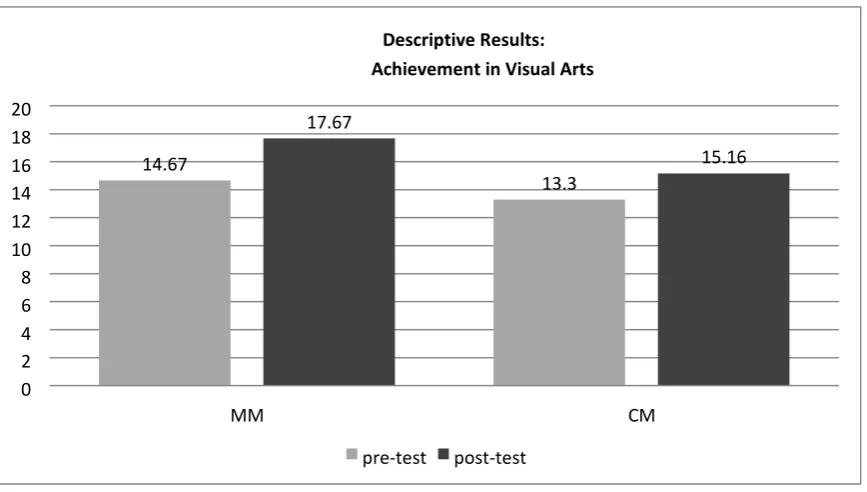
The results in Table 1 revealed the participants’ pre-test and post-test mean achievement scores in Visual Arts before and after exposure to the presentation media. At the end of the treatment period, the group of participants taught using the multiple mouse presentation recorded the higher post-test mean achievement score of 17.67 (S.D. = 3.59); while the participants taught using the conventional method recorded post-test mean achievement score of 15.16 (S.D. = 2.50).
Figure 1. Students’ Pre-and Post-test Achievement Scores According to Presentation Media 14.67 13.3 17.67 15.16 0 2 4 6 8 10 12 14 16 18 20 MM CM Descriptive Results: Achievement in Visual Arts
41 | P a g e
Table 2. Analysis of Covariance of Students’ Achievement Scores
Source of Variation Sum of Squares df Mean Square F Sig. of F
Main Effects 800.819 1 800.819 93.045 .000
Covariates (pre-test) 142.744 1 142.744 16.585 .000
Treatment (MM, CM) 64.683 2 32.342 3.758 .027*
* indicate significant F at .05 level
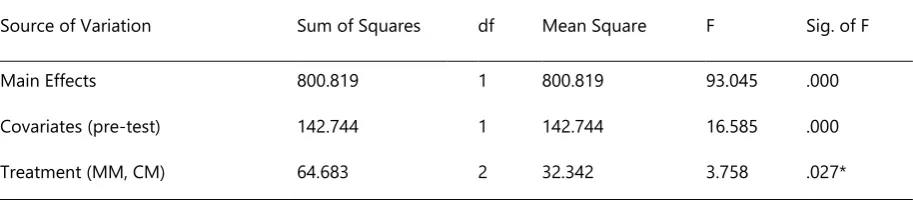
The results in Table 2 show the main effect of presentation media on the students’ achievement scores in Visual Arts. The results revealed a statistically significant outcome (F (2, 91) = 3.758, P < 0.05), that is, the post-test mean
scores of the students exposed to the presentation media were significantly different from those of the students not exposed to them. As a result, the null hypothesis one that states that there is no significant main effect of treatment Multiple Mouse (MM), and Conventional Method (CM) on students’ achievement in Visual Arts is rejected.
This result shows that the Multiple Mouse presentations had more superior potency in enhancing learning than the conventional method. The students exposed to multiple mouse presentation strategy recorded a higher adjusted post-test mean achievement score. This can be attributed to the interactivity enabled by the Microsoft mouse mischief add-on, the students were not mere passive recipients of information, but were able to interact with the Power Point presentation, which lead to active participation and more engagement in the learning process which equally led to greater effect on learning. This finding is supported by the multimedia principle which states that Multimedia presentations are more effective when the learner has the ability to interact with the presentation and that Multimedia is most effective when the content and format actively engage the learner. Active engagement helps the student construct knowledge and organize information into meaningful schema (Mayer, 2003). This is also corroborated by Astuti, (2010) who found that the use of the interactive tool (Microsoft Mouse mischief) kept students focused on lessons and improved their learning.
Conclusion
Journal of Education in Black Sea Region Vol. 3, Issue 2, 2018
42 | P a g e The use of add-ons (Mouse Mischief) to already familiar packages (Power Point) makes it easier for teachers to learn to use the programmes, thus reducing their perceived difficulty of use and increasing the chances of implementation. The use of these presentation media will expand their use of computer in the classroom to teach Visual Art and extend its application to any subject. This will help increase students interaction with ICT in the classroom on a low budget thus developing their ICT skills and will allow interaction and collaboration, helping them to acquire skills needed for entrance into the knowledge economy of the 21st century.
Recommendations
Based on these findings, the following recommendation can be given to educational institutions’ administrators: Multiple Mouse presentations as a low-cost technology integration should be used alongside conventional method in the teaching and learning in our secondary schools. Schools that lack sufficient resources can take advantage of this type of presentation media to increase more students’ access to technology.
It is also recommended that further studies be conducted on the use of Multiple Mouse Presentation (MMP) in other school subjects. Since the multiple mouse presentation allows either group or individual interaction, the effect of group interactions versus individual interaction should be examined. Researchers may also be interested in the extent to which teachers are willing to integrate this technology.
References:
Ajagun G. (2009) ICTin education: making a difference in teaching and learning. A contribution to the symposium on ICT and Education. Nigerian Educational Research and Development Council (NERDC).
Anulobi, J.C. (2012) Effectiveness of PowerPoint slides and chalkboard instructional delivery methods on academic performance of Junior Secondary School Fine Art students in Owerri. Proceedings of the 33rd Annual Convention and International Conference of the National Association for Educational Media and Technology. 8th -12th October 2012. Oyo
Astuti, D. (2010). Jakarta teachers cover 25 percent more material by putting mice in students’ hands. Microsoft
Success Stories Solutions for Education. Retrieved March 1, 2018 from
http://www.microsoft.com/casestudies/microsoft-mouse-mischief
Boury, M. (2010) Norwegian school improves instruction and student interest with interactive tool. Retrieved March 1, 2018 from www.microsoft.com/casestudies
Gee, J.P. (2005). Learning by design: Good video games as learning machines. E-Learning. 2, 5-16.
43 | P a g e Inkpen, K. M., Booth, K. S., Klawe, M., & McGrenere, J. (1997). Turn-taking protocols for mouse driven collaborative
environments. Proceedings of Graphic Interface 97, 138-145. Retrieved March 1, 2018 from http://scholar.google.com/citation?view_op
Inkpen, K. M., Klawe, M., & Booth K. S. (1995). Give and take: Children collaborating on one computer. Conference Companion on Human Factors in Computing Systems, 1995 ACM. 258-259.
Keller, J. (2003). Killing me Microsoftly with Powerpoint. Chicago Tribune, Retrieved October 9, 2011 from http://learning.blogs.nytimes.com/
Kiliçkaya, F. (2011) Technology & language learning. AATSEEL NEWSLETTER, 54, (I, p. 4-5, 7, and 13). Retrieved March 1, 2018 from http://www.aatseel.org/100111/pdf/aatseelapril11nl.pdf
Mayer, R.E. (2003). Learning and Instruction. Upper Saddle River, NJ: Prentice Hall.
Mayer, R.E. (ed.) (2005). The Cambridge Handbook of Multimedia Learning. New York: Cambridge University Press. Moraveji, N. (2008). Mischief: Mouse on each desk. Retrieved May 23, 2013 from
www.moraveji.org/projects-med.html
Moraveji, N., Inkpen, K., Cutrell, E. and Balackrishnan, R. (2009). A Mischief of mice: Examining children’s performance
in single display groupware systems with 1 to 32 mice. In Proceedings Of The 27th International Conference On
Human Factors In Computing Systems (Boston, MA, USA, April 4-9, 2009). CHI ’09. ACM, New York, NY, 2157 - 2166. Retrieved March 1, 2018 from www.moraveji.org/projects-med.html.
Patra, R., Pal, J., Nedevschi, S., Plauche, M., & Pawar, U. (2007). Usage models of classroom computing In developing regions. Information and Communication Technologies and Development. ICTD 2007 International Conference, Bangalore, 15-16 December 2007, 1-10. Retrieved March1, 2018 from Ieeexplore.ieee.org/xpl/login.jsp?tp=&arnumber=493740
Pawar, U.S., Pal, J., Gupta, R., & Toyama, K. (2007). Multiple mice for retention task in disadvantaged schools.
Proceedings of the SIGCHI Conference on Human Factors In Computing Systems (California, USA, April 28 – May 03, 2007) CHI ’07. ACM, New York, NY, 1581-1590.
Robnolt V. J., Mazzeo, S., Watwood, B., Lawal, I., & Hassell, A. (2011). Openness to integrating technology: assessing faculty and student perceptions and attitudes. Proceedings of the ELI 2011 Annual Conference February 16, 2011 Virginia Commonwealth University.
Journal of Education in Black Sea Region Vol. 3, Issue 2, 2018
44 | P a g e Sweller, J. and Sweller, S. (2006). Natural Information Processing Systems. Evolutionary Psychology, 4, 1. Retrieved
march 10, 2018 from