Some basic concepts
•
Maximum size of the Main Memory
•
byte-addressable
•
CPU-Main Memory Connection
Up to 2 k addressab le MD R MA R k-bi t address bus n-bi t data bus Control lines
Some basic concepts
◼
Measures for the speed of a memory:
▪
memory access time.
▪
memory cycle time.
◼
An important design issue is to
provide a
computer system with as large and fast a
memory as possible, within a given cost
target.
◼
Several techniques to increase the effective
size and speed of the memory:
▪
Cache memory (to increase the effective speed).
The Memory System
Internal organization of memory chips
•
Each memory cell can hold one bit of information.
•
Memory cells are organized in the form of an array.
•
One row is one memory word.
•
All cells of a row are connected to a common line, known as the
“word line”.
•
Word line is connected to the address decoder.
Internal organization of memory chips
(Contd.,)
F F circui t Sense / Write Addres s decod er F F C S cell s Memor y circui t Sense / Write Sense / Writecircui t Data input /output lines: A0 A1 A2 A3 W0 W1 W1 57 1 0
W R /
7 1 0
b7 b1 b0
SRAM Cell
•
Two transistor inverters are cross connected to implement a basic flip-flop.
•
The cell is connected to one word line and two bits lines by transistors T1 and T2
•
When word line is at ground level, the transistors are turned off and the latch
retains its state
•
Read operation: In order to read state of SRAM cell, the word line is activated to
close switches T1 and T2. Sense/Write circuits at the bottom monitor the state of b
and b’
Y X
Word line Bit
lines
b
T2
T1
Asynchronous DRAMs
•
Static RAMs (SRAMs):
–
Consist of circuits that are capable of retaining their state as long as the power
is applied.
–
Volatile memories, because their contents are lost when power is interrupted.
–
Access times of static RAMs are in the range of few nanoseconds.
–
However, the cost is usually high.
•
Dynamic RAMs (DRAMs):
–
Do not retain their state indefinitely.
–
Contents must be periodically refreshed.
Asynchronous DRAMs
•
Each row can store 512 bytes.
12 bits to select a row, and 9
bits to select a group in a row.
Total of 21 bits.
•
First apply the row address,
RAS signal latches the row
address. Then apply the
column address, CAS signal
latches the address.
•
Timing of the memory unit is
controlled by a specialized unit
which generates RAS and CAS.
•
This is asynchronous DRAM
ColumnCS Sense / Write
circuits cell array latch address Row Column latch decoderRow decoder address
4096 512 8×( × )
R/ W A20 9- ⁄A8 0
-D0 D7
RAS
Fast Page Mode
◼
Suppose if we want to access the consecutive bytes in
the selected row.
◼
This can be done without having to reselect the row.
▪ Add a latch at the output of the sense circuits in each row.
▪ All the latches are loaded when the row is selected.
▪ Different column addresses can be applied to select and place different bytes on the data lines.
◼
Consecutive sequence of column addresses can be
applied under the control signal CAS
, without reselecting
the row.
▪ Allows a block of data to be transferred at a much faster rate than random accesses.
▪ A small collection/group of bytes is usually referred to as a block.
Synchronous DRAMs
R/ W RA S CA S CS Cloc k Cell array latc h addre ss Ro w decod er R o w decod er C o lum n Read/Writ e circuits & latches count er addre ss Colum n Row/Colum n addre ss Data inputregist er Data outputregist er Dat a Refres hcount er Mode registeran d timing control•Operation is directly synchronized with processor clock signal.
•The outputs of the sense circuits are connected to a latch.
•During a Read operation, the contents of the cells in a row are loaded onto the latches.
•During a refresh operation, the contents of the cells are refreshed without changing the contents of the latches.
•Data held in the latches correspond to the selected columns are transferred to the output.
•For a burst mode of operation,
successive columns are selected using column address counter and clock. CAS signal need not be generated
Latency, Bandwidth, and DDRSDRAMs
•
Memory latency is the time it takes to transfer
a word of data to or from memory
•
Memory bandwidth is the number of bits or
bytes that can be transferred in one second.
•
DDRSDRAMs
Static memories
19-bit internal chip address
decod er 2-bi t address es 21-bi t A0 A1 A1 9 memory chip A2 0 D31-2 4 D 7-0 D23-1 6 D 15-8 51 2
K×8
Chip select memory chip 19-bi t addre ss 51 2
K×8
8-bit data input/outp ut
Implement a memory unit of 2M words of 32 bits each.
Use 512x8 static memory chips. Each column consists of 4 chips. Each chip implements one byte position.
A chip is selected by setting its chip select control line to 1.
Selected chip places its data on the data output line, outputs of other chips are in high impedance state. 21 bits to address a 32-bit word. High order 2 bits are needed to select the row, by activating the four Chip Select signals.
Dynamic memories
◼
Large dynamic memory systems can be implemented
using DRAM chips in a similar way to static memory
systems.
◼
Placing large memory systems directly on the
motherboard will occupy a large amount of space.
▪ Also, this arrangement is inflexible since the memory system cannot be expanded easily.
◼
Packaging considerations have led to the
development of larger memory units known as
SIMMs (Single In-line Memory Modules) and DIMMs
(Dual In-line Memory Modules).
◼
Memory modules are an assembly of memory chips
on a small board that plugs vertically onto a single
socket on the motherboard.
▪ Occupy less space on the motherboard.
Memory controller
◼
Recall that in a dynamic memory chip, to reduce the
number of pins, multiplexed addresses are used.
◼
Address is divided into two parts:
▪
High-order address bits select a row in the array.
▪
They are provided first, and latched using RAS signal.
▪
Low-order address bits select a column in the row.
▪
They are provided later, and latched using CAS signal.
◼
However, a
processor issues all address bits at the same
time.
◼
In order to
achieve the multiplexing, memory
16
Memory controller (contd..)
Process or
RAS
CAS
R/ W
Cloc k Addres
s
Row/Colum n addre
ss
Memor y
controlle r
R/ W
Cloc k Reque
st CS
Dat a
The Memory System
Read-Only Memories (ROMs)
◼
SRAM and SDRAM chips are volatile:
▪
Lose the contents when the power is turned off.
◼
Many applications need memory devices to retain contents after
the power is turned off.
▪
For example, computer is turned on, the operating system must be
loaded from the disk into the memory.
▪
Store instructions which would load the OS from the disk.
▪
Need to store these instructions so that they will not be lost after the
power is turned off.
▪
We need to store the instructions into a non-volatile memory.
◼
Non-volatile memory is read in the same manner as volatile
memory.
▪
Separate writing process is needed to place information in this memory.
▪
Normal operation involves only reading of data, this type
Read-Only Memories (Contd.,)
◼
Read-Only Memory:
▪ Data are written into a ROM when it is manufactured.
◼
Programmable Read-Only Memory (PROM):
▪ Allow the data to be loaded by a user.
▪ Process of inserting the data is irreversible.
▪ Storing information specific to a user in a ROM is expensive.
▪ Providing programming capability to a user may be better.
◼
Erasable Programmable Read-Only Memory
(EPROM):
▪ Stored data to be erased and new data to be loaded.
▪ Flexibility, useful during the development phase of digital systems.
▪ Erasable, reprogrammable ROM.
Read-Only Memories (Contd.,)
◼
Electrically Erasable Programmable Read-Only Memory
(EEPROM):
▪ To erase the contents of EPROMs, they have to be exposed to ultraviolet light.
▪ Physically removed from the circuit.
▪ EEPROMs the contents can be stored and erased electrically.
◼
Flash memory:
▪
Has similar approach to EEPROM
.
▪
Read the contents of a single cell, but write the contents of an
entire block
of cells.
▪
Flash devices have
greater density
.
▪ Higher capacity and low storage cost per bit.
▪
Power consumption of flash memory is very low
, making it
attractive for use in equipment that is battery-driven.
▪
Single flash chips are not sufficiently large, so
Speed, Size, and Cost
◼
A big challenge in the design of a computer system is
to provide a sufficiently large memory, with a
reasonable speed at an affordable cost.
◼
Static RAM:
▪ Very fast, but expensive, because a basic SRAM cell has a complex circuit making it impossible to pack a large number of cells onto a single chip.
◼
Dynamic RAM:
▪ Simpler basic cell circuit, hence are much less expensive, but significantly slower than SRAMs.
◼
Magnetic disks:
▪ Storage provided by DRAMs is higher than SRAMs, but is still less than what is necessary.
Memory Hierarchy
P r ocess or Primar ycach e Mai n memor y Increasin g siz e Increasin g spee d Magnetic diskseconda rymemor y Increasin g cost per bit R e gister s L 1 Seconda ry cach e L 2•Fastest access is to the data held in processor registers. Registers are at the top of the memory hierarchy.
•Relatively small amount of memory that can be implemented on the processor chip. This is processor cache.
•Two levels of cache. Level 1 (L1) cache is on the processor chip. Level 2 (L2) cache is in between main memory and processor.
•Next level is main memory, implemented as SIMMs. Much larger, but much slower than cache memory.
•Next level is magnetic disks. Huge amount of inexepensive storage.
The Memory System
Cache Memories
◼
Processor is much faster than the main memory.
▪ As a result, the processor has to spend much of its time waiting while instructions and data are being fetched from the main memory.
▪ Major obstacle towards achieving good performance.
◼
Speed of the main memory cannot be increased
beyond a certain point.
◼
Cache memory is an architectural arrangement
which makes the main memory appear faster to
the processor than it really is.
Locality of Reference
◼
Analysis of programs indicates that many
instructions in localized areas of a program are
executed repeatedly during some period of time,
while the others are accessed relatively less
frequently.
▪ These instructions may be the ones in a loop, nested loop or few procedures calling each other repeatedly.
▪ This is called “locality of reference”.
◼
Temporal locality of reference:
▪ Recently executed instruction is likely to be executed again very soon.
◼
Spatial locality of reference:
Cache memories
• Processor issues a Read request, a block of words is transferred from the
main memory to the cache, one word at a time.
• Subsequent references to the data in this block of words are found in the
cache.
• At any given time, only some blocks in the main memory are held in the
cache. Which blocks in the main memory are in the cache is determined
by a “mapping function”.
• When the cache is full, and a block of words needs to be transferred
from the main memory, some block of words in the cache must be
replaced. This is determined by a “replacement algorithm”.
Cac
he
Mai
n
memo
ry
Cache hit
• Existence of a cache is transparent to the processor. The processor issues
Read and
Write requests in the same manner.
• If the data is in the cache it is called a Read or Write hit.
• Read hit:
▪
The data is obtained from the cache.
• Write hit:
▪
Cache has a replica of the contents of the main memory.
▪
Contents of the cache and the main memory may be updated simultaneously.
This is the write-through protocol.
Cache miss
• If the data is not present in the cache, then a Read miss or Write miss occurs.
• Read miss:
▪
Block of words containing this requested word is transferred from the memory.
▪
After the block is transferred, the desired word is forwarded to the processor.
▪
The desired word may also be forwarded to the processor as soon as it is transferred
without waiting for the entire block to be transferred. This is called load-through or
early-restart.
• Write-miss:
▪
Write-through protocol is used, then the contents of the main memory are updated
directly.
▪
If write-back protocol is used, the block containing the
Cache Coherence Problem
• A bit called as “valid bit” is provided for each block.
• If the block contains valid data, then the bit is set to 1, else it is 0.
• Valid bits are set to 0, when the power is just turned on.
• When a block is loaded into the cache for the first time, the valid bit is set to 1.
• Data transfers between main memory and disk occur directly bypassing the cache.
• When the data on a disk changes, the main memory block is also updated.
• However, if the data is also resident in the cache, then the valid bit is set to 0.
• What happens if the data in the disk and main memory changes and the write-back
protocol is being used?
• In this case, the data in the cache may also have changed and is indicated by the
dirty bit.
• The copies of the data in the cache, and the main memory are different. This is
called the cache coherence problem.
Mapping functions
◼
Mapping functions determine how memory
blocks are placed in the cache.
◼
A simple processor example:
▪
Cache consisting of 128 blocks of 16 words each.
▪
Total size of cache is 2048 (2K) words.
▪
Main memory is addressable by a 16-bit address.
▪
Main memory has 64K words.
▪
Main memory has 4K blocks of 16 words each.
◼
Three mapping functions:
▪
Direct mapping
▪
Associative mapping
Direct mapping
Mai n memor y Block 0 Block 1 Block 127 Block 128 Block 129 Block 255 Block 256 Block257 Block 4095 7 4 Main memory address Ta g Bloc k Wor d 5 ta g ta g ta g Cach e Block 0 Block 1 Block 127•Block j of the main memory maps to j modulo 128 of the cache. 0 maps to 0, 129 maps to 1.
•More than one memory block is mapped onto the same position in the cache.
•May lead to contention for cache blocks even if the cache is not full.
•Resolve the contention by allowing new block to
replace the old block, leading to a trivial replacement algorithm.
•Memory address is divided into three fields: - Low order 4 bits determine one of the 16 words in a block.
- When a new block is brought into the cache, the the next 7 bits determine which cache block this new block is placed in.
- High order 5 bits determine which of the possible 32 blocks is currently present in the cache. These are tag bits.
Associative mapping
•Main memory block can be placed into any cache position.
•Memory address is divided into two fields:
- Low order 4 bits identify the word within a block. - High order 12 bits or tag bits identify a memory block when it is resident in the cache.
•Flexible, and uses cache space efficiently.
•Replacement algorithms can be used to replace an existing block in the cache when the cache is full. •Cost is higher than direct-mapped cache because of
the need to search all 128 patterns to determine whether a given block is in the cache.
Set-Associative mapping
Blocks of cache are grouped into sets.
Mapping function allows a block of the main memory to reside in any block of a specific set.
Divide the cache into 64 sets, with two blocks per set. Memory block 0, 64, 128 etc. map to block 0, and they can occupy either of the two positions.
Memory address is divided into three fields: - 6 bit field determines the set number.
- High order 6 bit fields are compared to the tag fields of the two blocks in a set.
Set-associative mapping combination of direct and associative mapping.
Number of blocks per set is a design parameter. - One extreme is to have all the blocks in one set, requiring no set bits (fully associative mapping). - Other extreme is to have one block per set, is the same as direct mapping.
Mai n memor y Block 0 Block 1 Block 63 Block 64 Block 65 Block 127 Block 128 Block129 Block 4095 7 4 Main memory address Ta g Bloc k Wor d 5 ta g ta g ta g Cach e Block 1 Block 2 Block 126 Block 127
The Memory System
Performance considerations
•
A key design objective of a computer system is to achieve the
best possible performance at the lowest possible cost.
–
Price/performance ratio is a common measure of success
.
•
Performance of a processor depends on:
–
How fast machine instructions can be brought into the processor for
execution.
Interleaving
◼
Divides the memory system into a number of
memory modules.
Each module has its own address buffer register (ABR) and data buffer register (DBR).◼
Arranges addressing so that successive words in
the address space are placed in different
modules.
◼
When requests for memory access involve
consecutive addresses, the access will be to
different modules.
◼
Since parallel access to these modules is
Methods of address layouts
◼ Consecutive words are placed in a module.
◼ High-order k bits of a memory address determine the module.
◼ Low-order m bits of a memory address determine the word within a module.
◼ When a block of words is transferred from main memory to cache, only one module is busy at a time.
m bits Address in module MM address i k bits Modul e Modul e Modul e Modul e DB R AB R DB R AB R AB R DB R
0 n- 1 i
k bit s 0 Modul e Modul e Modul e Modul e MM address DB R AB R AB R DB R AB R DB R
Address in module
2k- 1
m
bit s
•Consecutive words are located in consecutive modules.
•Consecutive addresses can be located in consecutive modules.
Hit Rate and Miss Penalty
•
Hit rate
•
Miss penalty
•
Hit rate can be improved by increasing block size, while
keeping cache size constant
•
Block sizes that are neither very small nor very large give best
results.
Caches on the processor chip
•
In high performance processors 2 levels of
caches are normally used.
•
Avg access time in a system with 2 levels of
caches is
Other Performance Enhancements
Write buffer
◼
Write-through:
• Each write operation involves writing to the main memory.
• If the processor has to wait for the write operation to be complete, it
slows down the processor.
• Processor does not depend on the results of the write operation.
• Write buffer can be included for temporary storage of write requests.
• Processor places each write request into the buffer and continues
execution.
• If a subsequent Read request references data which is still in the write
buffer, then this data is referenced in the write buffer.
◼
Write-back:
• Block is written back to the main memory when it is replaced.
• If the processor waits for this write to complete, before reading the new
block, it is slowed down.
Other Performance Enhancements
(Contd.,)
Prefetching
• New data are brought into the processor when they are
first needed.
• Processor has to wait before the data transfer is complete.
• Prefetch the data into the cache before they are actually
needed, or a before a Read miss occurs.
• Prefetching can be accomplished through software by
including a special instruction in the machine language of
the processor.
▪
Inclusion of prefetch instructions increases the length of the
programs
.
• Prefetching can also be accomplished using hardware:
▪
Circuitry that attempts to discover patterns in
Other Performance Enhancements
(Contd.,)
Lockup-Free Cache
• Prefetching scheme does not work if it stops other
accesses to the cache until the prefetch is completed.
• A cache of this type is said to be “locked” while it services
a miss.
• Cache structure which supports multiple outstanding
misses is called a lockup free cache.
• Since only one miss can be serviced at a time, a lockup
free cache must include circuits that keep track of all the
outstanding misses.
The Memory System
44
Virtual memories
◼
an important challenge in the design of a
computer system is to provide a large, fast
memory system at an affordable cost.
◼
Architectural solutions to increase the effective
speed and size of the memory system.
◼
Cache memories were developed to increase the
effective speed of the memory system.
◼
Virtual memory is an architectural solution to
45
Virtual memories
◼
addressable memory space depends on the number
of address bits in a computer.
▪ For example, if a computer issues 32-bit addresses, the addressable memory space is 4G bytes.
◼
Physical main memory in a computer is generally not
as large as the entire possible addressable space.
▪ Physical memory typically ranges from a few hundred megabytes to 1G bytes.◼
Large programs that cannot fit completely into the
main memory have their parts stored on secondary
storage devices such as magnetic disks.
46
Virtual memories (contd..)
◼
When a new piece of a program is to be
transferred to the main memory, and the
main memory is full, then some other piece in
the main memory must be replaced.
▪
Recall this is very similar to what we studied in case of cache memories.
◼
Operating system automatically transfers
data between the main memory and
secondary storage.
▪
Application programmer need not be concerned with this transfer.
47
Virtual memories
◼
Techniques that automatically move program and data
between main memory and secondary storage when they
are required for execution are called virtual-memory
techniques.
◼
Programs and processors reference an instruction or data
independent of the size of the main memory.
◼
Processor issues binary addresses for instructions and data.
▪ These binary addresses are called logical or virtual addresses.
◼
Virtual addresses are translated into physical addresses
by
a combination of hardware and software subsystems.
▪ If virtual address refers to a part of the program that is currently in the main memory, it is accessed immediately.
48
Virtual memory organization
Dat a Dat a DMA transfer Physical address Physical address Virtual address Disk storage Main memory Cach e MMU Process
or
•Memory management unit (MMU) translates
virtual addresses into physical addresses.
•If the desired data or instructions are in the
main memory they are fetched as described
previously.
•If the desired data or instructions are not in
the main memory, they must be transferred
from secondary storage to the main memory.
•MMU causes the operating system to bring
49
Address translation
◼
Assume that
program and data are composed of
fixed-length units called pages.
◼
A page consists of a block of words that occupy
contiguous locations in the main memory
.
◼
Page is a basic unit of information that is
transferred between secondary storage and main
memory.
◼
Size of a page commonly ranges from 2K to 16K
bytes.
▪ Pages should not be too small, because the access time of a secondary storage device is much larger than the main memory.
50
Address translation (contd..)
•
Concepts of virtual memory are similar to the
concepts of cache memory.
•
Cache memory:
–
Introduced to bridge the speed gap between the processor and the main
memory.
–
Implemented in hardware.
•
Virtual memory:
–
Introduced to bridge the speed gap between the main memory and secondary
storage.
51
Address translation (contd..)
◼
Each virtual or logical address generated by a
processor is interpreted as a virtual page number
(high-order bits) plus an offset (low-order bits) that
specifies the location of a particular byte within that
page.
◼
Information about the main memory location of each
page is kept in the page table.
▪ Main memory address where the page is stored.▪ Current status of the page.
◼
Area of the main memory that can hold a page is
called as page frame.
◼
Starting address of the page table is kept in a page
52
Address translation (contd..)
•
Virtual page number generated by the
processor is added to the contents of the page
table base register.
–
This provides the address of the corresponding entry in the page table.
•
The contents of this location in the page table
53
Address translation (contd..)
Page frame
Virtual address from processor in memory Offse t Offse t Virtual page number Page table address Page table base register
Contro l bit
s
Physical address in main memory PAGE TABLE Page frame +
Virtual address is interpreted as page number and offset.
Page table holds information about each page. This includes the starting address of the page in the main memory.
PTBR holds the address of the page table.
PTBR + virtual
page number provide the entry of the page
54
Address translation (contd..)
◼
Page table entry for a page also includes some
control bits
which describe the status of the page
while it is in the main memory.
◼
One bit indicates the validity of the page
.
▪ Indicates whether the page is actually loaded into the main memory.
▪ Allows the operating system to invalidate the page without actually removing it.
◼
One bit indicates whether the page has been
modified during its residency in the main
memory
.▪ This bit determines whether the page should be written back to the disk when it is removed from the main memory.
55
Address translation (contd..)
•
Other control bits for various other types of
restrictions that may be imposed.
56
Address translation (contd..)
◼
Where should the page table be located?
◼
Recall that the page table is used by the MMU for
every read and write access to the memory.
▪ Ideal location for the page table is within the MMU.◼
Page table is quite
large
.
◼
MMU is implemented as part of the processor chip.
◼
Impossible to include a complete page table on the
chip.
◼
Page table is kept in the main memory.
◼
A copy of a small portion of the page table can be
accommodated within the MMU.
57
Address translation (contd..)
◼
A small cache called as Translation Lookaside
Buffer (TLB) is included in the MMU.
▪ TLB holds page table entries of the most recently accessed pages.
◼
Recall that cache memory holds most recently
accessed blocks from the main memory.
▪ Operation of the TLB and page table in the main memory is similar to the operation of the cache and main memory.
◼
Page table entry for a page includes:
▪ Address of the page frame where the page resides in the main memory.
▪ Some control bits.
58
Address translation (contd..)
N o Ye s Hit Mis s
Virtual address from processor TLB Offse t Virtual page number numbe r Virtual page Page framein memory Contro l bit s Offse t Page frame = ?
Physical address in main memory
Associative-mapped TLB
High-order bits of the virtual address
generated by the processor select the
virtual page.
These bits are compared to the virtual
page numbers in the TLB.
If there is a match, a hit occurs and
the corresponding address of the page
frame is read.
If there is no match, a miss occurs
and the page table within the main
memory must be consulted.
59
Address translation (contd..)
◼
How to keep the entries of the TLB coherent with
the contents of the page table in the main
memory?
◼
Operating system may change the contents of
the page table in the main memory.
▪ Simultaneously it must also invalidate the corresponding entries in the TLB.
◼
A control bit is provided in the TLB to invalidate
an entry.
◼
If
an entry is invalidated, then the TLB gets the
information for that entry from the page table.
60
Address translation (contd..)
◼
What happens if a program generates an
access to a page that is not in the main
memory?
◼
In this case, a page fault is said to occur.
▪
Whole page must be brought into the main memory from the disk, before
the execution can proceed.
◼
Upon detecting a page fault by the MMU,
following actions occur:
▪
MMU asks the operating system to intervene by raising an exception.
▪
Processing of the active task which caused the page fault is interrupted.
▪
Control is transferred to the operating system.
▪
Operating system copies the requested page from secondary storage to
the main memory.
61
Address translation (contd..)
•
Servicing of a page fault requires transferring
the requested page from secondary storage to
the main memory.
•
This transfer may incur a long delay.
•
While the page is being transferred the
operating system may:
–
Suspend the execution of the task that caused the page fault.
–
Begin execution of another task whose pages are in the main memory.
62
Address translation (contd..)
•
How to ensure that the interrupted task can
continue correctly when it resumes
execution?
•
There are two possibilities:
–
Execution of the interrupted task must continue from the point where it was
interrupted.
–
The instruction must be restarted.
•
Which specific option is followed depends on
63
Address translation (contd..)
◼
When a new page is to be brought into the main
memory from secondary storage, the main memory
may be full.
▪ Some page from the main memory must be replaced with this new page.
◼
How to choose which page to replace?
▪ This is similar to the replacement that occurs when the cache is full.
▪ The principle of locality of reference (?) can also be applied here.
▪ A replacement strategy similar to LRU can be applied.
◼
Since the size of the main memory is relatively larger
compared to cache, a relatively large amount of
programs and data can be held in the main memory.
64
Address translation (contd..)
◼
A page may be modified during its residency in
the main memory.
◼
When should the page be written back to the
secondary storage?
◼
Recall that we encountered a similar problem in
the context of cache and main memory:
▪ Write-through protocol(?)
▪ Write-back protocol(?)
The Memory System
Memory management
•
Operating system is concerned with transferring programs
and data between secondary storage and main memory.
•
Operating system needs memory routines in addition to the
other routines.
•
Operating system routines are assembled into a virtual
address space called system space.
•
System space is separate from the space in which user
application programs reside.
–
This is user space.
Memory management (contd..)
◼
Recall that the Memory Management Unit (MMU) translates
logical or virtual addresses into physical addresses.
◼
MMU uses the contents of the page table base register to
determine the address of the page table to be used in the
translation.
▪
Changing the contents of the page table base register can enable us to
use a different page table, and switch from one space to another.
◼
At any given time, the page table base register can point to
one page table.
▪
Thus, only one page table can be used in the translation process at a
given time.
Memory management (contd..)
◼
When multiple, independent user programs coexist in the
main memory, how to ensure that one program does not
modify/destroy the contents of the other?
◼
Processor usually has two states of operation:
▪
Supervisor state.
▪
User state.
◼
Supervisor state:
▪
Operating system routines are executed
.◼
User state:
▪
User programs are executed.
▪
Certain privileged instructions cannot be executed in user state.
▪
These privileged instructions include the ones which change page
table base register.
Magnetic Hard Disks
Disk
Disk drive
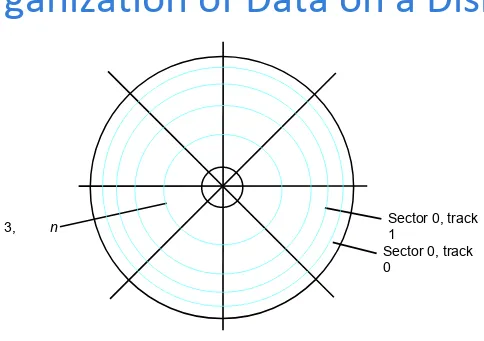
Organization of Data on a Disk
Sector 0, track 0
Sector 3, track
[image:71.720.130.614.71.412.2]n
Figure 5.30. Organization of one surface of a disk.
Access Data on a Disk
•
Sector header
•
Following the data, there is an
error-correction code (ECC).
•
Formatting process
•
Difference between inner tracks and outer
tracks
•
Access time – seek time / rotational delay
(latency time)
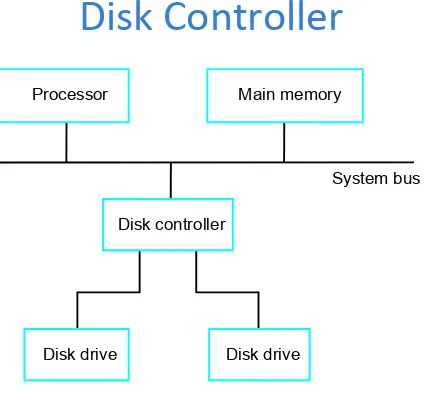
Disk Controller
Processor Main memory
[image:73.720.149.578.53.470.2]System bus
Figure 5.31. Disks connected to the system
bus.
Disk controller
Disk Controller
•
Seek
•
Read
•
Write
RAID Disk Arrays
•
Redundant Array of Inexpensive Disks
•
Using multiple disks makes it cheaper for huge
storage, and also possible to improve the
reliability of the overall system.
•
RAID0 – data striping
•
RAID1 – identical copies of data on two disks
•
RAID2, 3, 4 – increased reliability
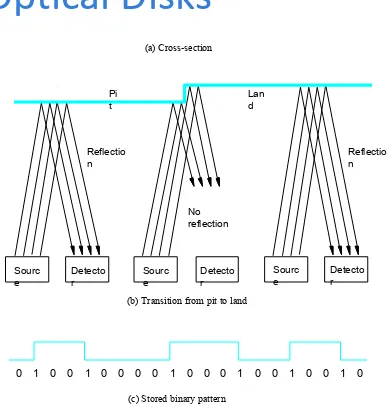
Optical Disks
(a) Cross-section Sourc e Detecto r Sourc e Detecto r Sourc e Detecto r No reflection Reflectio n Reflectio n Pi t Lan d0 0 0 1 0 0 0 0 1 0 0 0 1 0 0 1 0 0 1 0
[image:76.720.262.651.74.492.2](c) Stored binary pattern
Figure 5.32. Optical disk.
1