Vol.8 (2018) No. 4-2
ISSN: 2088-5334
Development of a Mind Map System Integrating Full Moodle Function
Won Ho
1, Khang N. Pham
2, Diem L. Bui
31
Division of Electrical, Electronics, and Control Engineering, Kongju National University, Chungcheongnam-do, Korea E-mail: [email protected]
2
Computer Science Department, CAN THO University, Viet Nam E-mail: [email protected]
3
AI Lab, Computer Science Department, Gyeongsang National University, Korea E-mail: [email protected]
Abstract— An LMS is the most basic infrastructure used in e learning. Various types of LMSs are used, covering open source and commercial software. Moodle is one of the most widely used LMSs today. Moodle has many features that are educationally useful because of its long history and contributions of community. Moodle’s wide variety of functions is sometimes criticized as being too complicated to use. It is necessary to develop an LMS with various functions inside a simple and user-friendly GUI. In this paper, a Moodle GUI has been improved by mapping the main functions of a Moodle course to OKMindmap, which is an open service that runs on the Web, so that learners and teachers can use LMS services in a simple and convenient way. The developed results are demonstrated by applying actual class scenarios with which course activities, supplementary resources, and additional guide information were successfully integrated into a mind map.
Keywords— LMS; Moodle; OKMindmap; Mindmap
I. INTRODUCTION
Recently, terminologies like blended learning flipped learning, and MOOC has become hot issues [1]. E-learning in education has drawn more attention and is increasing in importance. To provide these various methods of education and educational services, it is necessary to use a Learning Management System (LMS). It is the most important infrastructure of e learning. LMSs have been used as a platform for e learning for a long time, and various types of LMSs are being used in institutions and services nowadays. These LMSs are largely divided into commercial LMSs (Blackboard) and open source LMSs (Moodle and Canvas) [2]. Among them, Moodle has a comparatively long history, many features that are educationally useful, and many users around the world [3].
The main feature of an open source LMS is that the source is open and free to use. It even can be customized to implement desired functions according to the user's needs. Likewise, Moodle can be used as it is or it can be customized for the user's needs with additional cost. While Moodle has been developed over many years, resulting in various new functions, there is some criticism that it is relatively inconvenient to use. There is increasing demand from Moodle users who want easier and more intuitive GUI.
If this need is satisfied, it will be an optimal LMS that can support various education methods with learning activities and resources, which already exist in the form of Moodle plugins.
Moodle allows users to choose from a variety of themes, which provides some flexibility in the GUI. It is also possible to provide the course format of a Moodle course as different views of learning activities and resources. For this purpose, we developed a course format called the “OKMindmap Course Format [4]” to be used as a plug-in. However, it was also insufficient for Moodle interface enhancement, because it consists of learning activity or resource url links as nodes exclusively as in Fig. 2.
Fig. 2 OKMindmap Moodle Course Format
On the other hand, including Moodle activity or resource URL link nodes as a part of a normal mind map is a better method. In this way, original mind map nodes are maintained, not just learning activities and resources of Moodle as nodes. In this paper, we added learning activities, resources, and the official functions of Moodle as OKMindmap nodes on top of the original OKMindmap function. OKMindmap is currently a free service on the Internet, and it can be optimally integrated with Moodle.
After a brief explanation of Moodle and OKMindmap, the design, development, and implementation process of this approach will be described along with the final application scenario for real class management.
II. MATERIAL AND METHODS
A. What is LMS
LMS stands for Learning Management System. It manages all learning-related information in e-learning. A teacher can create, manage, and delete various learning activities, learning resources, learners, and learning-related data. LMSs have a very long history in e-learning, and the market has undergone many changes as Fig. 3 shows. One of the noteworthy features is the breakthrough of open source LMSs. The use of open source LMSs, like Moodle and Canvas, has dramatically increased compared to commercial LMSs like Blackboard. Particularly, Moodle has become very popular in the United States.
Fig. 3 LMS Market Share
Moodle has a long history, and it supports many kinds of learning activities and resources. Ironically, these multiple features confuse both teachers and learners. If Moodle can solve its GUI complexity, it will become the best e-learning infrastructure.
Moodle provides more than 30 learning activities and resources, and there are 1454 plug-ins currently available for learning activities, resources, and functions that can be installed. Most of the functional elements provided by the LMS can be classified as follows:
• Learning activities and learning resources
• Management functions for course management
• Data on learners and learning activities
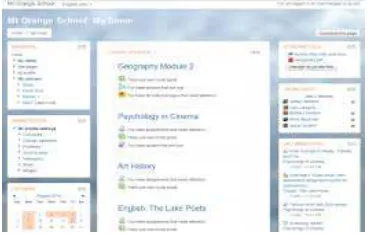
Fig. 1 shows a typical Moodle course screen structure which consists of three columns. The middle column contains learning activities and resources, and the left and right columns contain convenient functions for course utilization units called “blocks.” These various components and links of functional processes need to be rearranged to improve the GUI. However, because of Moodle’s unique operating and development framework, it is difficult to relocate them in a non-contextualized manner. This contextualization of function means that Moodle remembers the component and process path, so we cannot simply relocate the GUI components. If we can offer a way to overcome this barrier of Moodle, it becomes an easy-to-use e-learning platform boasting a variety of features.
B. What is Mindmap
Initially developed by Tony Buzan [5], the mind map is a handwriting technique used for brainstorming, task planning, business planning, thinking, and taking notes. From the center of the map, an object is described using keywords, images, and various colors on a branch-shaped structure that spreads radially around the core concept. Recently, various software programs have been developed to create mind maps digitally.
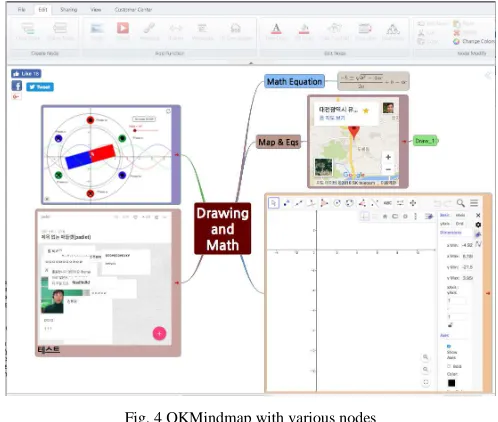
Fig. 4 OKMindmap with various nodes
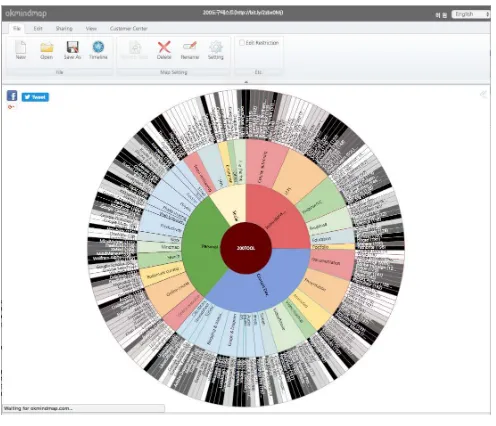
browsers, and it is possible to insert various kinds of nodes. OKMindmap nodes can be text, images, web links, videos, web pages, and iframes. Also, the visually-displayed mind map can be transformed into other shapes, such as web-based presentations, sunburst charts, organizational diagrams, fishbone, square charts, etc. The contents of Fig. 4 and 5 show a mind map containing various types of nodes and the mind map converted into a different visual format.
Fig. 5 OKMindmap with sunburst view
By adding Moodle’s learning activities, resources, and functions as additional nodes, learners and teachers can access Moodle courses through a very simple and convenient interface. We will explain how it is designed and developed to integrate these two services.
C. Analysis and Design
To integrate OKMindmap with Moodle, the following items are featured.
• As one-to-one mapping of open source software, Moodle and OKMindmap should provide authentication methods to access each system for users. On the Moodle side, install the OKMindmap authentication plugin for Moodle to implement this functionality. On the OKMindmap side, the Moodle system URL and password must be provided.
• One mind map is mapped to one Moodle course. Moodle users can use their account to access OKMindmap and vice versa.
• The teacher’s role in the Moodle course automatically synchronizes to the map owner of OKMinmdap and vice versa.
• You can create special nodes for Moodle's learning activities and resources, and important functions. Once added, it works the same as the link node of OKMindmap and invokes Moodle's service when the link is clicked. If you want to associate a Moodle course with a mind map, you can either create a new Moodle course or provide an existing Moodle course’s URL. This Moodle course allows teachers to manipulate Moodle’s learning activities and resources independently on the Moodle site. These modifications can be synchronized by
clicking the “Synchronize button” on the OKMindmap side.
• OKMindmap provides a minimum set of Moodle activities and resources, as well as other useful functions. These include:
- Learning activities and resources: Url, assignment, chatting, web page, wiki, fire, forum, and folder. - Moodle functions: Edit course setting, Enrolment of
users, Log view, Activity completion, Grades, and Badges.
• All the additional features used in OKMindmap are still available for the course mind map.
III.RESULT AND DISCUSSIONS
The integrated service of OKMindmap and Moodle is designed and developed. The implementation and an in-class use scenario are presented.
A. Implementation of the Service
Fig. 6 OKMindmap authentication using a Moodle account
Authentication for both OKMindmap and Moodle is provided as in Fig.s 6 and 7. In each case, the other system’s account can be used. For example, a Moodle user can sign in to the OKMindmap system by clicking the “Login with Moodle ID” button on the “Sign-in” screen. An OKMindmap user can sign in to the Moodle system by clicking the “OKMindmap” link provided at the sign in the stage of Moodle.
Fig. 7 Moodle authentication using an OKMindmap account
the “File” menu will bring up a dialog box, which will create a map and corresponding Moodle course. If a user enters “Title” name and clicks the “Apply” button, a map with the title name and a Moodle course with the title name will be created and synchronized. This map works just like any other ordinary map except that it can also create a Moodle activity, resource, and function node on OKMindmap and those nodes creations are reflected in the corresponding Moodle course internally. For example, Fig. 9 shows that a Moodle course named “FirstMoodleCourse” is automatically generated on the Moodle site.
Fig. 8 Process to create a Moodle course mind map
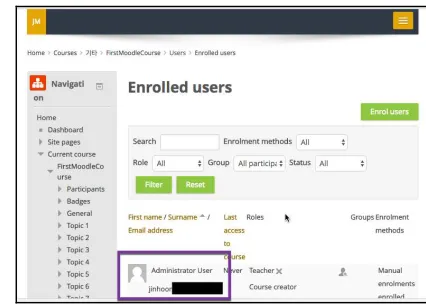
Fig. 9 A Moodle course created with the mind map
The Moodle activities, resources, and functions can be added as nodes for the mind map. Fig. 10 shows how those nodes can be created.
Fig. 10 Process to create Moodle nodes
Clicking the “Add Moodle activity” button in the “Edit” menu will bring up a dialog box, in which a user can select a mindmap node. Those are selected sets of Moodle activities and resources. For example, if a forum is selected and saved
with a forum name, it will be represented as a link node. The “My First Forum” node is the Moodle forum node created. By clicking this node, members can access the Moodle forum and participate for the forum activity.
Fig. 11 A forum node is created
Also, more useful functions are also included. “Edit settings” is a link to edit a course. This link will provide convenient access for teachers to edit the settings of the Moodle course. “Enrolled users” is a link to the Moodle enrolled user page, where teachers can add and delete student members. “Log view”, “Activity completion”, “Grades”, and “Badges” are frequently-used functions in Moodle, both for teachers and students. These functions can be provided as a node for convenient access to a Moodle utility.
The participants for both the OKMindmap and the Moodle course should be same. They should be synchronized all the time. Fig. 12 shows how Moodle course participants can be managed. It is important that the teacher of the Moodle course should have editing authority for the corresponding mind map.
Fig. 12 Participant management on OKMindmap
The participants list is exactly the same as the “Enrolled users” of the corresponding Moodle course as shown in Fig. 13.
Even though the purpose of this project is using the mind map interface for the LMS, it is also possible to directly access and use the corresponding Moodle course. So, a teacher can create Moodle activities and resources and they appear in the corresponding mindmap. In Fig. 14, “Second forum” is created on “Topic 2”, H5P01 is created on “Topic 3”, and “Quiz A” is created on “Topic 4”.
Fig. 14 Add activities on Moodle
Those activities are found in OKMindmap if a user clicks the “Sync Moodle” button in the “Edit” menu. The result will be as shown in Fig.15.
Fig. 15 Synchronizing to OKMindmap
The multiple view transformation function of OKMindmap will be very useful when it is used for the visualization of leaner performance. A possible demonstration is shown in Fig. 16.
Fig. 16 Visualizing the learners’ learning performance
Colour, size, and brightness can be used to visualize student data like score, outcome, learning progress, etc.
In-Class Use Case Scenario
The usage of the mind map LMS is recommended mostly in the OKMindmap environment. The use case is composed of three steps; course creation, course preparation, and course action process.
1) Course Creation: Teachers or admins create the courses. A mind map course can be created on the OKMindmap side by creating a corresponding Moodle course. It is expected that all of the course related actions are initiated on the OKMindmap side.
2) Course Preparation: The mind map can include either Moodle activity and function nodes or normal OKMindmap nodes. The original OKMindmap nodes can be useful information describing knowledge representation for the course, course description, and course-related links. Even external services like Google docs [6], Padlet [7], and eLearning services can be linked as nodes. For the Moodle nodes, Moodle activities, resources, and functions can be selected. Teachers can add more of them by adding activities or resources to the corresponding Moodle course. Teachers can go directly to the Moodle course (by clicking any Moodle node, and it will bring them to the Moodle course component), and add activities and resources there. The modified course will be reflected in the corresponding mind map by clicking the synchronizing button.
3) Course Action: Now participants can access the mind map course. They click the Moodle nodes, which will bring them to the Moodle activity or resource. Of course, the interface of the Moodle page will be different according to the role of the participant. For teachers, they can edit, view, and control with Moodle. For students, they can usually edit and view some elements with Moodle. For Moodle functions, teachers see all participants’ information, but students only see their information.
IV.CONCLUSIONS
provide diverse activities and resources with a simple and user-friendly GUI.
Currently, the OKMindmap service can be accessed for free at http://okmdindmap.com. For pairing with the Moodle system, we use the http://moodle.co.kr service. These two services will be provided soon. Because Moodle is open source software, it can be freely downloaded and installed, and the authentication plug-in for OKMindmap can be installed likewise. If a user wants to use OKMindmap internally, they can install and run an OKMindmap server independently. For OKMindmap, the address of the Moodle server for pairing should be provided.
Because of the useful capabilities of OKMindmap, many advantages can be obtained by running a course with the mind map LMS system.
• Accessibility is increased. Even though Moodle support has responsive web technology, OKMindmap has better accessibility. It was developed to support multiple devices originally, and its multiple view transformation capability also provides much better accessibility to the course materials.
• Learning performance is well monitored. The color of the node can be changed according to the individual learner’s learning performance. Rectangle chart view transformation can provide even better learner performance. For teachers, learning analytics will be visualized with these capabilities. These functions need more study and further development.
• Courses can be co-authored. With the collaboration capability OKMindmap, the course mind map can be produced through multiple teachers’ collaboration.
• Activities, resources, and information are fully integrated. The concepts of those three components are unified as nodes of OKMindmap. Learners can naturally understand course objectives well, just by watching or clicking the nodes of the course mind map.
REFERENCES
[1] H. Carmen, G. Gabriela, C. Vladimir, N. Antoanela, "INTEGRATING MOOCs IN BLENDED COURSES," The International Scientific Conference eLearning and Software, vol.4, pp.243-250, 2014.
[2] J. Williams, N. Li, J. Kim, J, Whitehill, S. Maldonado, M. Pechenizkiy, L. Chu, N. Heffernan, "The MOOClet Framework: Improving Online Education through Experimentation and Personalization of Modules," papers.ssrn.com, 2014.
[3] J. Cole, H Foster, "Using Moodle: Teaching with the popular open source course management system," books.google.com, 2007. [4] T. Buzan, B. Buzan, "The Mind Map Book: How to Use Radiant
Thinking to Maximize Your Brain's Untapped Potential," www.siteulike.org, 1996.
[5] W. Ho, "Innovative Collaborating Environment Building using OKMindmap Embedding Node Capability," vol. 8 S.9, pp.208-2012, 2015.
[6] Zhou, Wenyi; Simpson, Elizabeth; Domizi, Denise Pinette, "Google Docs in an Out-of-Class Collaborative Writing Activity," International Journal of Teaching and Learning in Higher Education, vol.24 no3, pp.359-375, 2012.
[7] B. Fuchs, "The Writing is on the Wall: Using Padlet for Whole-Class Engagement," LOEX Quarterly, vol. 40, no.4, pp.. 7-9, 2014. [8] Hooshyar, D., Yousefi, M., & Lim, H. (2018). Data-Driven
Approaches to Game Player Modeling: A Systematic Literature Review. ACM Computing Surveys (CSUR), 50(6), 90.
[9] Hooshyar, D., Yousefi, M., & Lim, H. (2017). A systematic review of data-driven approaches in the player modeling of educational games. Artificial Intelligence Review, 1-21.
[10] Hooshyar, D., Ahmad, R. B., Yousefi, M., Fathi, M., Horng, S. J., & Lim, H. (2016). Applying an online game-based formative assessment in a flowchart-based intelligent tutoring system for improving problem-solving skills. Computers & Education, 94, 18-36.
[11] Hooshyar, D., Yousefi, M., & Lim, H. (2017). A procedural content generation-based framework for educational games: Toward a tailored data-driven game for developing early English reading skills. Journal of Educational Computing Research, 0735633117706909.
[12] Hooshyar, D., Binti Ahmad, R., Wang, M., Yousefi, M., Fathi, M., & Lim, H. (2017). Development and Evaluation of a Game-Based Bayesian Intelligent Tutoring System for Teaching Programming. Journal of Educational Computing Research, 0735633117731872.
ACKNOWLEDGMENT