“Designing
applications to
decrease finding and
development costs
and improve prospect
efficiency”
E&P Software
Usability
Summary
If you supply the technology that supports your company’s E&P
operations, you are never satisfied with average performance. The science of exploration and production is evolving, and your software tools have to keep up if you hope to meet the industry’s rising standards for prospect efficiency. Innovation is critical to your company’s strategic objectives, but as methods become increasingly complex, your technology must suit your needs not only in function, but also in power and scale. A game-changing algorithm or method can pave the way for years of success, but often in the rush to capitalize on a new discovery, key usability features are neglected. Careless implementation can prevent your company from benefitting from the full power of the technology you worked so hard to acquire. By rigorously pursuing usability as well as functionality, you multiply the effectiveness of your software. Deploying high-usability software within your company empowers your exploration teams to leverage their existing data more effectively, reduce your company’s finding and development costs, and magnify your company’s unique competitive advantage.
The Problem
The upstream oil and gas software industry exists at the intersection of science, technology, and data management. Each of these disciplines presents its own optimization challenges, but taken together these challenges represent an often-overlooked opportunity for operational efficiency. Whether your users work with off-the-shelf commercial systems, in-house custom solutions, or (more often) a combination of the two, the biggest problems typically exist at points of interaction. Every application comes with its own unique demands: huge variation in input and output formats, displays, accessibility, and level of documentation are often the price for working on the cutting edge.
Additionally, the cores of several commercial packages were written many years ago for the way prospects were evaluated at that time. If new features are added too slowly or implemented poorly, users may incorporate manual workarounds in order to meet their needs. While these workarounds allow work to continue, they are often cumbersome and limited.
Wrestling with unwieldy applications and interfaces distracts scientists from the real work of analysis, and estimates suffer as a result. Hours and days saved by efficient or automated workflows can be redirected into the activities that drive your business. Exploration teams can devote their time to replacing reserves instead of manually adjusting visualizations, and engineers can focus on production targets instead of data formatting. Seismic processing and 3D renderings that can take days to complete compound these human-computer interaction issues. Older hardware and applications are incapable of effectively handling the enormous amounts of information coming in from the field, and the resulting explosion of data can cause crippling bottlenecks in the exploration process. An institutional focus on usability can prevent these bottlenecks and reliably improve ROI for your company’s exploration operations.
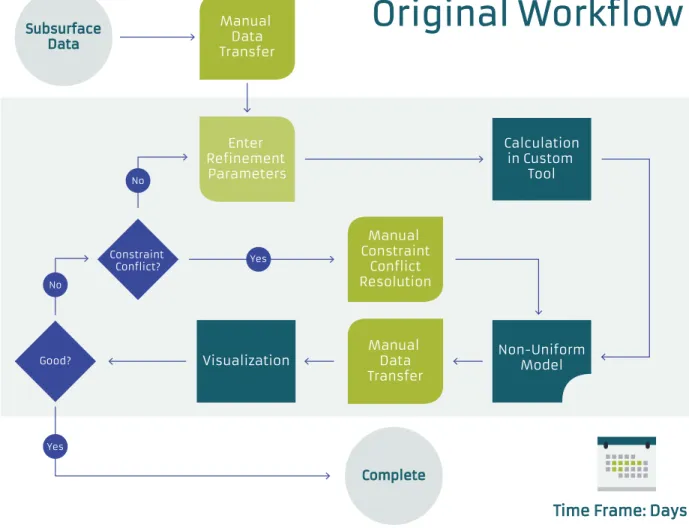
Figure 1: A low-usability workflow for subsurface visualization
What Is Usability?
Usability is relative and can be difficult to quantify, but it becomes conspicuous when it is absent. The critical elements of usability are effectiveness, efficiency, and user satisfaction. Figure 1, above, could be any high-value, high-frustration task – the kind of necessary but repetitive grind that many businesses regard as normal. In this particular case it shows a workflow for deploying custom, non-uniform visualizations. The exploration company using the workflow partnered with Bluware to improve the application’s usability, because despite adding valuable functionality, the workflow took days to complete, and so could only be applied to a small number of visualizations.
Bluware created and implemented an improved workflow shown below in Figure 2, but before analyzing the high-usability version, it is helpful to examine some of the key principles of usability in more detail:
Subsurface Data
Original Workflow
Time Frame: Days
Complete Manual Data Transfer Manual Constraint Conflict Resolution Manual Data Transfer Enter Refinement Parameters Calculation in Custom Tool Non-Uniform Model Visualization Good? Constraint Conflict? No No Yes Yes
Designing a User Experience
Instruction tables will have to be made up by mathematicians with computing experience and perhaps a certain puzzle-solving ability…There need be no real danger of it ever becoming a drudge, for any processes that are quite mechanical may be turned over to the machine itself. -Alan Turing, “Proposed Electronic Calculator”, 1946
User experience (UX) is more than just the user interface. When Bluware began its redesign of the workflow in Figure 1 the lengthy manual data migration processes were quickly identified as key opportunities for UX improvement. A well-designed user experience is an intuitive and logical workflow that minimizes frustrating or repetitive elements. It instantly communicates to users that they are working in a robust, complete platform, not a bootstrapped work-around.
If you have ever interfaced online with a customer service bot to help choose a product or handle a return, you probably know what poor usability is like. On the other hand if you’ve worked with a bot with a well-designed user experience, you probably mistook it for a person. Advances in user experience design make it increasingly possible to create intuitive software that works with users in a seamless, logical way.
Increasing Efficiency and Reducing Compute Time
Where a calculator on the ENIAC is equipped with 18,000 vacuum tubes and weighs 30 tons, computers in the future may only have 1,000 vacuum tubes and perhaps weigh 1.5 tons. -Popular Mechanics, 1949Software efficiency improvements multiply the effectiveness of your exploration teams, either by improving turnaround time or increasing model resolution. These benefits may be measured in percentages or orders of magnitude, but even small improvements are worth pursuing in data-heavy applications that can take a week or more to process.
Advances in hardware also provide opportunities to increase efficiency and ease of use. The move from 32 to 64bit architecture, innovations in parallel processing, and other powerful technologies like CUDA/GPGPU computing, if fully utilized, can produce substantial efficiency gains. Efficiency can also be improved on the user side through automation of tasks and standardization of inputs. In the case of Figure 1, Bluware was able to automate the constraint conflict resolution process, eliminating another tedious manual task. Minimizing manual input into workflows produces direct savings in time and frustration, limits opportunities for human error, and reduces man-hours spent on quality control. With faster, more automated workflows, geoscientists and engineers can focus more of their efforts on adding value and insight.
Scheduled system upgrades are a perfect opportunity to assess hardware and software usability and implement improvements while minimizing downtime and costs. With planning and coordination, simultaneous hardware and software upgrades can seamlessly yield huge reductions in compute time and order-of-magnitude boosts to productivity.
Improving Transfer of Knowledge
The most important benefit of workflow automation is transfer of
knowledge. Automated workflows allow a geoscientist’s “secret sauce” to benefit exploration teams throughout the company, rather than staying locked in his or her head. This does more than just improve performance in E&P operations – it frees up your researchers to continue pursuing the innovations that maintain your competitive advantage. Preserving your scientists’ knowledge in a plug-in also allows your company to retain valuable expertise for years to come.
In the workflow in Figure 1, constraint conflict resolution could only be performed by the company’s senior geophysicist. Now that his expertise is duplicated within the application, it can enhance the estimation techniques of every user in the company, and he can pursue his research instead of personally creating every single visualization.
Transfer of knowledge also relies on excellent documentation. If users are given a black box with no means to understand the raw algorithms they apply, their output will be unpredictable at best and catastrophic at worst. By documenting applications and implementing transparent algorithms new users can quickly internalize and build upon the knowledge of their predecessors.
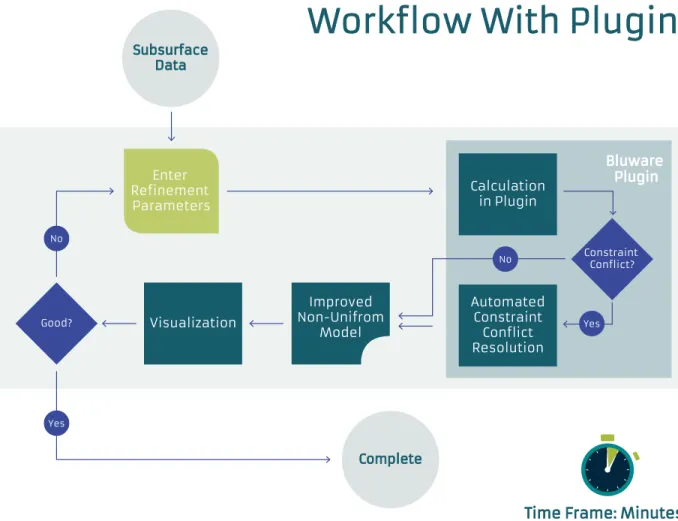
Figure 2: Bluware’s high-usability solution
Subsurface Data
Workflow With Plugin
Time Frame: Minutes
Complete Enter Refinement Parameters Visualization Good? Yes Improved Non-Unifrom Model No Bluware Plugin Constraint Conflict? Calculation in Plugin Automated Constraint Conflict Resolution Yes No
Bluware applied these principles to a redesign of the multi-step
workflow from Figure 1, and built the high-usability plugin diagrammed in Figure 2, above. User experience improved through the elimination of manual data migration, efficiency increased through the automation of the constraint conflict resolution process, and other users now see the senior geophysicist’s method laid out in the workflow. One brilliant scientist’s insight now benefits every exploration team in the company, and visualizations are now produced over one hundred times faster through the plugin. Drilling decisions now use more accurate models and more comprehensive sensitivity analysis, increasing prospect efficiency. Also, the massive reduction in man-hours needed per visualization has significantly reduced finding and development costs.
Usability is the real-world effectiveness of an application, encompassing both qualitative and quantitative measures. It is the final arbiter of an application’s effectiveness, because software is useless if it is never used. The exploration and production process is, at every stage, iterative, and each iteration improves estimate accuracy and provides opportunities for interdisciplinary cooperation. Tools that prioritize usability as well as raw capability maximize these iterations and provide both immediate and long-term benefit to exploration teams: they are adopted and mastered quickly, and stay relevant as demands evolve.
Build or Buy With Usability in Mind
For the overwhelming majority of the bankrupt projects we studied, there was not a single technological issue to explain the failure.
-Peopleware, 1987
An E&P company’s application support organization uses software to connect strategic business goals to user needs. The technology you use will determine whether your solution is viable, but the people who deploy it will determine its success. Whether you are building an application from scratch or evaluating a new tool for purchase, you are not supplying technology; you are supplying a solution that serves your company’s overall strategic goals.
Whether you buy or build the applications you need is highly dependent on your company’s resources and expertise. When buying, the intuitive choice is to select the platform that comes closest to delivering the functionality you need, but your software needs will always be evolving, and your purchase decision is just a step along the path in your company’s development. Even when using fully developed commercial software, there is almost always an extra tweak that your company will use to gain an edge, so it is often better in the long term to select highly extensible software, even at the expense of functionality. With a flexible platform, you can augment your capability at will, and can address any usability issues that may arise as the software is deployed.
When adding custom components to your workflow, here are some factors to consider:
A Multidisciplinary Team
Whether you need a plug-in or an entire platform, producing software that will deliver for both users and executives requires expertise in a variety of fields. From software architecture and design all the way through testing and training, the right development team makes all the difference, and a crucial element of any team is industry knowledge. Software developed in a vacuum does not work. The code may run, but it will invariably fall short in application if it was not developed with the domain in mind.
Industry knowledge is especially critical for a software architect. A software architect’s task is monumental: designing a software suite before its construction requires the foresight to allow for changes to the code, implementation, and language without alterations to the foundational design. Software architecture is the most enduring aspect of a project, and its longevity is determined by its designer. An effective architecture requires wide vision and deep insight into both geophysics and technology, and developers with domain expertise can provide
solutions with the flexibility to evolve along with your company’s exploration methods.
Developers cannot rely solely on their architect’s expertise, however. Every team member must be familiar with the problems their product will solve. UI/UX developers need to come into a project with specific knowledge of how the application will be used, and the whole team needs to understand the underlying algorithms and science before the project starts.
As important as it is to ensure that code-writers and architects are experts in programming for the oil and gas space, a true user perspective is invaluable throughout the development process. Collaborating with a super user (geoscientist, petrophysicist, reservoir engineer, etc.) gives developers powerful insight into users’ needs and ensures that work remains focused on the most value-added aspects of applications. Teams incorporating experienced geophysicists and domain experts can leverage their diverse experience to solve geology and geophysics problems faster than an elite team of coders alone.
The role of a super user in a software development team can vary widely. From R&D algorithm development to increasing adoption rates and ensuring smooth implementations, super users can give unique insight into the industry that is not available from software experts, and can guide coders and designers toward logical layouts that speed up workflows and ensure that the program will stay relevant.
Human-Computer Interaction
Once a diverse and experienced team is engaged, development can proceed with a focus on crafting a user experience. Requirements and definitions are often in flux at the start of a project, especially in early-stage oil & gas software, so it is critical that developers test internally in an iterative fashion. Many developers still only confer with users at the end of development, when the most helpful feedback on architecture and interface cannot be incorporated without overrunning the project budget and schedule. By testing early and often, developers can create an outstanding user experience, and problems can be identified and addressed before implementation. Poorly designed human-computer interactions are more than an inconvenience for the exploration team: they are money left on the table.
Documentation and Training
Software development does not end when the code is finalized: before release the software must be documented. Effective documentation of algorithms provides users with opportunities to understand what is going on behind the scenes, ensuring proper usage and accurate results. It also fosters openness in software that allows new users to gain a deep understanding of their workflow and produce more consistent output. Documentation can help exploration teams make better choices in routines and ultimately improve the quality of decisions.
After release, users need to be informed of improvements and taught to use new features. This is also a valuable opportunity to review the underlying science. Without training, exploration teams may fall back on old methods, making the new tool irrelevant. Continuous training keeps communication open between the exploration and technical support divisions, allowing new breakthroughs on both sides to be quickly and effectively exchanged.
Conclusion
Using complex software is somewhat like climbing into the cockpit of a commercial airliner. You would not survive it without an intense training program and years of familiarity. -Rick Jones, Bluware CEO and avid pilot
The E&P software landscape is constantly changing, and it may seem inefficient to devote time and resources to usability when you already have a working algorithm ready to go. However, even if your new method delivers an order-of-magnitude benefit, without a high-quality design it is like a 747 that forces the pilot to climb out on the wing to adjust the flaps. The software you deploy for your exploration teams is complex and powerful, and by making the extra effort to deliver a robust and usable application you will maximize its value and position yourself to build off of your success. With planning and awareness, opportunities can be captured with little or no additional cost or down time, and you will ensure that your most critical applications are used to their full potential.
However your company measures success, a focus on usability will deliver a demonstrable benefit – efficiency at the finding and development stage resonates along the entire value chain. As a technology support manager you often find yourself torn between satisfying users and meeting business goals, but high-usability software serves the interests of the CEO and the reservoir engineer at the same time.