Jan Gulliksen, Bengt Göransson and Magnus Lif
CID, CENTRE FOR USER ORIENTED IT DESIGN
A User Centred Approach to Object Oriented UI Design.
Report number:
CID-122ISSN number: ISSN
1403-0721(print)
1403-073X(Web/PDF)
Publication date:
2001E-mail of author: [email protected]
URL of author: http://cid.nada.kth.se
Reports can be ordered from:
CID, Centre for User Oriented IT Design
NADA, Deptartment of Numerical Analysis and Computer Science KTH (Royal Institute of Technology)
SE-100 44Stockhom, Sweden Telephone: +46 (0) 8 790 91 00
Fax: +46 (0) 8 790 90 99
E-mail: [email protected] URL: http://cid.nada.kth.se
A User-Centered
Approach to Object-Oriented
User Interface Design
Jan Gulliksen
Bengt Göransson
Magnus Lif
Abstract
This chapter emphasizes user-centered design as the essential process for devel-oping usable systems. User-centered design tries to strengthen the creative aspects of user interface design. However, this does not fit very well with the more structured, architecture-centered nature of object-oriented development method-ologies. Several problems associated with object-oriented techniques have been observed in development projects in practice. In this chapter, realizing the increas-ing commercial market share of such software development processes, we set out to strengthen the user-centered design aspects of the Rational Unified Process (RUP) and the Dynamic Systems Development Method (DSDM). We describe the method of User Interface Modeling (UIM), which is based on object-oriented use cases, and establish task requirements that are specific to the user interface design process. We also introduce the role of the usability designer in vouching for the usability throughout the system development process. Finally, we describe our experiences in promoting user-centered design with object-oriented interface design techniques at the Swedish National Tax Board.
8.1 Introduction
8.1.1 Usability and User-Centered Design
The major goal of every professional involved in user interface development is, presum-ably, to develop systems that are usable. This should be especially important for user
interface designers, because their efforts have the most immediate effect on system usabil-ity. We use the term usabilityas defined in the ISO 9241 standards Software ergonomics for office work with visual display terminals, Part 11 Guidance on Usability:
Usability is the extent to which a product can be used by specified users to achieve specified goals with effectiveness, efficiency, and satisfaction in a specified context of use. [ISO 1998]
In order to reach these goals, a user-centered design and development process is a necessity, as argued by, for instance, Gould and Lewis [1983, 1985] and Gould et al. [1997]. In these reports, the authors claim that to be able to design usable systems, one needs to (a) have early and continuous focus on the users, (b) do empirical redesign, (c) do iterative design, and (d) do integrated design.
It is also well known that system development projects face a high risk of having their development plans thwarted, or even of being canceled. The CHAOS Report[Standish Group 1995] showed that out of 8,380 investigated projects in the United States, only 16.2 percent were completed successfully—that is, on time and on budget, with all fea-tures and functions as initially specified. There is no reason whatsoever to believe that this should be different now, five years later, or that the conditions should be different in other areas, such as Europe. For the successfully completed projects, the major success factor was active user involvement in the development process [Standish Group 1995].
This is why we feel that it is important to focus on aiding system development projects to produce better (more usable) results within the time and budget limits. To do this, we propose a user-centered design framework that promotes both active user involvement and greater focus on usability in the development process. Although a user-centered de-sign approach is no guarantee of usable systems, we argue that without a user-centered design approach, genuine usability is usually nothing more than a coincidence.
Today, many companies are becoming aware of the advantages of user-centered design. However, it is extremely rare for a company to adopt a fully integrated user-centered design approach in one strategic shift. Rather, companies tend to adopt practices and methods in stages, or to adopt a particular method or practice only when a complex set of factors become aligned in a way that creates readiness [Dray and Siegel 1998]. There is a big market for companies that sell usability methods, but poor usability of sys-tems and products is still very common, with vendors blaming it on factors outside their immediate influence. This is why we need to implement a user-centered design attitude as a major strategy in system and product development processes. Donald Norman argues for inclusion of usability professionals as peers in development organizations rather than the currently common practice of introducing usability resources only when they are deemed appropriate (and usually very late in the development process) [Norman 1998].
The problems of achieving an effective user-centered development approach are influ-enced by factors outside the actual system development project. It has been known for several decades that aspects of information technology (IT) cannot be changed without affecting the organization, work activities, and human beings and their skills [Leavitt 1958]. In fact, all of these factors influence one another, and thus a change in any one of them will inevitably result in a need to change one or more others. It is important to be aware of these effects in advance in order to meet them with appropriate actions in devel-opment projects. Such effects can include bad organizational structure, unclear work goals, lack of skills among workers performing new tasks, and so on. It is usually during IT development projects that these effects are brought to everyone’s attention. These shortcomings are often blamed on the IT project itself. Working simultaneously with all four areas of development (IT, work, organization, and competence) is a formidable task for which few projects can find the required skills, time, and knowledge. We believe that user-centered design, in a context in which management commitment, user commitment and objectives, and goals are clearly specified, can make an important contribution to the success of such an undertaking.
This chapter will pursue a user-centered design approach to object-oriented design and development of usable user interfaces. It will describe various approaches to the design process; various aspects of object orientation, use cases, and scenarios; and how all these factors fit in with a user-centered system development process in a given context. It will then move on to describe the role of the usability designer and the method of User Interface Modeling (UIM) before finally describing the experiences we have had in an attempt to apply user-centered design at the Swedish National Tax Board.
8.1.2 Design Methods and Tools
The implementation of the user interface usually accounts for about 40 to 50 percent of the total amount of code in an interactive application [Nielsen 1993], but the time spent on this part of the code is much less than 40 to 50 percent. This is one of the reasons why we believe that usability and user interface design should receive much greater attention. In practical systems development today, a number of methods exist for systems analysis and evaluation with a human-computer interaction (HCI) focus. There are fewer methods or techniques that focus on the actual design work—that is, on producing the layout, style, and form of the user interface. Design is regarded as a creative process that does not need to be sup-ported by methods and tools. Different approaches to HCI design exist; they all emphasize rather different views on how to analyze, develop, and maintain computer systems. We have found the following way of grouping the various approaches to user interface design appro-priate in illuminating both the background sciences that have influenced these approaches and the methodological aids that have been developed [Wallace and Anderson 1993].
The craft approachviews each design project as unique, in which software evolves under the guidance of a skilled human factors expert. Supporters of this approach tend to believe that a structured approach to interface design is impossible, because the esthet-ics of interface design cannot be achieved through analytical techniques. It focuses on the designer’s need for talent rather than for method. The artistic aspects of user interface design are undoubtedly important, but using this craft view as an argument against methodologies or methodological aids for user interface design is clearly inappropriate.
The enhanced software engineering approach attempts to introduce HCI techniques
into the repertoire of traditional systems engineering by various methods of task analysis. HCI aspects then become issues for the software engineers. Our experience (based on sev-eral observation interviews1with software engineers in their own work environments) is that the knowledge demands for efficient use of HCI techniques do not match the skills and knowledge of the software engineers. HCI issues will inevitably receive a lower prior-ity. In order for a software engineer to apply HCI knowledge in the development process, that knowledge needs to be included in the development tool. The role of experience across projects is also central, but software development projects tend to be too time-consuming (it is not unusual for development time to be measured in years), and therefore it is often difficult for individuals to gain experience from a variety of projects.
To achieve “optimal” design, the cognitive engineering approachaims at applying theories from cognitive psychology to the problems facing the user interface designer. Cognitive metrics models, such as the keystroke-level model [Card et al. 1983], measure the user’s performance and indirectly estimate the memory load for unit tasks to help predict the efficiencies of different design solutions. The grammar models, with formal grammatical notations, describe the mental models and their incorporation into the com-puter dialogue design. The knowledge methods try to make explicit the mental processes of the user when performing tasks. The user modeling methods describe not only what the user must know to perform a task but also how that knowledge is acquired and manipulated during the execution of a task. The problems of the cognitive engineering approach lie in its failure to be applicable in real-life development projects owing to the highly complex application of cognitive theories.
The technologist approachattempts to solve the problems of interface design by
pro-viding appropriate tools—especially the User Interface Management System (UIMS), which is both an interface development tool and an interface artifact. The UIMS consists of a special design environment, a linkage module, and a management function. It is useful for
1An observation interview is a semiformal interview with the purpose of interviewing a user in his own work environment as he performs work. The advantage of this technique is that tacit aspects and pro-cedures that the user might not be aware of can be captured, such as the use of Post-it notes beside the screen display and the use of informal communication with peers.
prototyping and possibly even for interpretation of formal specifications. It is, however, no real design support, because design begins long before the first prototype is constructed; it is merely a tool that allows bad interfaces to be developed more rapidly.
Nevertheless, regardless of the selected approach, the result is far too often a user interface design solution that suffers from severe usability problems. Why?
The actual design of the user interface is, in practice, a phase of development that has a very unstructured nature. It is not uncommon for this phase to get little or no attention in the development work in practice. One of the reasons for this is that it is difficult to separate the creative design work from the programming. User interface design merely occurs as the result of a programming task without any specific individual taking respon-sibility for it. What we need to do is to visualize interface design as one important phase of the development process.
Should a well-functioning user interface design process follow a structured engineer-ing model that identifies successive methodological steps, or do we intend to promote a shifting attitude in which the user interface evolves through the productive and creative efforts of a team? We want to arrive at a user-centered design and development process that bears similarities with the craft approach that emphasizes the creative abilities of the team. However, today’s development teams consist mainly of engineers who, by tradi-tion, require a structured development model. What we want to achieve in this chapter is the promotion of a user-centered design view into an engineering model such as the Rational Unified Process (RUP). This in itself is a very different approach compared with the four approaches listed above.
8.1.3 Learning Object-Oriented Design
Object-oriented techniques have become a fashion in development approaches and supply us with methods for analysis and design [Booch 1991, Rumbaugh et al. 1991]. Unfortu-nately, these techniques do not give enough support to the user interface design process. Object-oriented user interface design can be very appropriate for producing user inter-faces for specific work activities, because objects in the user interface can correspond to objects in the real work environment, and have clear meanings for the users. However, our observation is that organizations that are adopting object-oriented techniques do not fully use them, or they produce design solutions that are not of an object-oriented nature, which then can be reflected in information systems with a low degree of usability. There is no support for object-oriented user interface design, which is treated in the same manner as oriented design in general. Usability requirements are not considered in object-oriented design.
The object-oriented way of thinking is not easy to acquire. It takes years for developers to switch from thinking in functional ways to thinking about objects, attributes, and methods
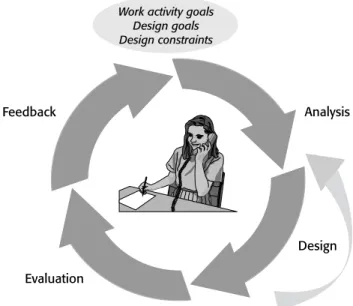
[Nielsen 1995]. Teaching developers to perform iterative design is equally difficult. The major obstacle to this process is time. To produce deliverable results, all people involved in the process tend to require more time than is allocated for analysis and design. Shortening the iterative life cycle could prevent delays in this process. RUP recommends less than six months as a turnaround time for the iterative development process [Kruchten 1998]. The Swedish National Tax Board (see Section 8.4) has decided on eight weeks for the iterative cycle. We believe that the development process can be significantly improved by employing a shorter iterative cycle in which more usable products can be manufactured. It could be reasonable to have a five-day iterative cycle—two days for analysis, two days for design, and one day for evaluation. If more time than this is allowed for the subprocesses, there is a great risk of what we call the “my baby syndrome,”2which involves excessively stubborn defense of a proposed solution. Therefore, we believe that the greatest challenge facing usability specialists is to teach and promote effective iterative user interface design (see Figure 8.1).
2The “my baby syndrome” describes the situation in which a parent cannot see the faults and irregular-ities in his or her own baby. This phenomenon can be observed in the systems development process when project members spend a great deal of time and effort on a particular problem and tend to ignore critiques and comments from others.
FIGURE 8.1 Teaching, or learning to adopt, a fully iterative user interface design and development activity has proven to be difficult. The darker arrows are the development phases. The lighter arrow indicates the small, informal design activities that are so important in the design phase.
Work activity goals Design goals Design constraints
Feedback Analysis
Evaluation
8.1.4 Prototyping and Iterative Design
Prototyping can be used as an effective technique for determining whether or not a pro-posed solution is adequate, but this is only part of what prototyping is about. As a start, we can distinguish among the following different types of prototypes and their respective purposes [Preece et al. 1994]:
■ Requirements animationdemonstrates possible requirements to be assessed by
users.
■ Rapid prototyping collects requirements and the adequacy of possible
solu-tions, “throw-it-away.”
■ Evolutionary prototypingstrikes a compromise between production and
proto-typing, thus allowing the system to “grow” and change wherever necessary.
■ Incremental prototypingbuilds the system incrementally, one section at a time.
It is important to define why a prototype is developed and to what purpose. In the computer software industry, we use the word “prototype” in a very broad and vague sense, whereas other disciplines, such as industrial design, have a very distinct interpreta-tion of a prototype as the first fully funcinterpreta-tional version of a product. When we talk about prototyping, we actually mean anything from a rough paper mock-up to a fully func-tional product.
8.2 System Development Processes
In our experience, the system development process is central to the success of the final product. Various methods or techniques can always be applied to improve the final result of the product, but it is only when we view the entire process that we can predict where and when problems may occur. Today, when organizations decide to improve their sys-tem development processes, they often adopt a commercial syssys-tem development process, such as RUP or DSDM, in the belief that every problem will be solved by the selected process. Unfortunately, not everything is specified in these processes, and these organiza-tions do not see the need to specify complementary steps (it is a common strategy to ignore any issues that cannot be solved with the chosen method). They tend to avoid activities that are not explicitly specified in the new process, even if performing these steps was an established routine in their previous strategies. This is why we think that successful adoption of user-centered design with any of these commercial system devel-opment processes requires that the system develdevel-opment process be modified to meet the needs of the organization or even of individual projects. The organization needs to spec-ify its own user-centered development process, based on the commercial processes, and it
must specify which complementary activities are needed. In doing this, it can be advan-tageous to reuse the old methods or techniques previously established within the organi-zation. A basis for the specification of an organizational system development process could be the ISO 13407 human-centered design processes for interactive systems.
8.2.1 ISO 13407: Human-Centered Design Processes for Interactive Systems
A successful user-centered development process should be based on a fairly well-defined and controlled iterative system development model. This is one of the key principles behind fully integrating a user-centered approach into an existing development framework. One aid in doing user-centered design is to use the international standard ISO 13407,
Human-Centered Design Processes for Interactive Systems[ISO 1999]. ISO 13407 is an approach to
human-centered software and hardware development that identifies four basic principles:
■ Appropriate allocation of functions between users and system
■ Active involvement of users
■ Iterations of design solutions
■ Interdisciplinary design groups
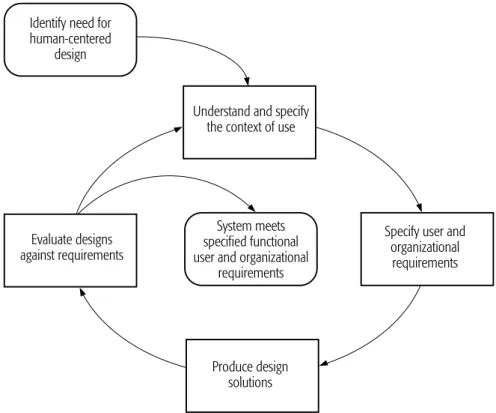
Human-centered design according to ISO 13407 involves (a) identifying the need for a human-centered design process, (b) understanding and specifying the context of use, (c) specifying organizational and user requirements, (d) producing design proto-types, and (e) evaluating the design prototypes according to the user and organizational requirements to determine how to further pursue the development (see Figure 8.2).
ISO 13407 states that the user-centered activities can be applied to any existing model, but we think that it is mandatory for this model to have a mature iterative process.
The traditional waterfall development model, or life cycle plan (for example, see [Boehm 1976]), describes the process of developing software as pure engineering work. This model was developed as an ideal strategy for project management, and the focus was on managing the different development phases one at a time in a logical sequence. This approach might have its advantages if we were limited to solving rather technical and well-defined engineering problems, but it doesn’t take into account such things as the impos-sibility of a complete and permanently correct description of the system, formal and nonexecutable specifications that are largely unintelligible to users and developers, the need for user participation, and so on [Budde et al. 1992]. These are all aspects that are addressed in the ISO 13407 process, and the basic software development approach that will ensure this is to make the process iterative. This iterative process must still be predictable in the sense that we need controlled iterations to “ensure that we are not wandering aimlessly from iteration to iteration but are actually converging toward a product” [Kruchten 1998].
8.2.2 The Rational Unified Process
The Rational Unified Process (RUP) [Kruchten 1998] and the Dynamic Systems Develop-ment Method (DSDM) [Stapleton 1997] represent two controlled iterative developDevelop-ment processes. They have both emerged from what their inventors call “best practices.” RUP grounds its iterative approach in the classic spiral model [Boehm 1988]. This model focuses on avoiding risks in the project by exploring the risks at an early stage.
RUP is an established commercial system development model. It is based on an object-oriented engineering view with a strong emphasis on system architecture as an “architecture-centric process” [Kruchten 1998]. RUP is based on what are known as “best practices.” These are good habits that the developers/authors of RUP have acquired dur-ing decades of experience with object-oriented system development [Kruchten 1998]:
1. Develop software iteratively. 2. Manage requirements.
FIGURE 8.2 The principle behind a human-centered design process for interactive systems according to ISO 13407
System meets specified functional user and organizational
requirements
Produce design solutions Evaluate designs
against requirements
Specify user and organizational
requirements Identify need for
human-centered design
Understand and specify the context of use
3. Use component-based architectures. 4. Visually model software.
5. Verify software quality. 6. Control changes in software.
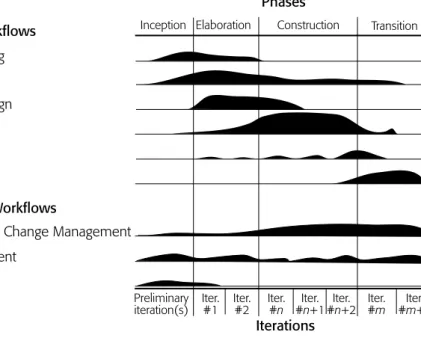
RUP is divided into phases with workflows/activities and iterations (see Figure 8.3). There are four phases in the development process: inception, elaboration, construc-tion, and transition. These phases are oriented in time, and each of them contains itera-tions. The work within each phase is performed in workflows and subdivided into activities. The relative emphases on these different activities vary as time passes. For example, from Figure 8.3 we can tell that business modeling occurs mainly during the inception and elaboration phases.
8.2.2.1 RUP and Prototyping
It is interesting to study what the different development methods have to say about proto-typing. Among other things, it will give us insight in what the different models empha-size. RUP defines four different types of prototypes:
■ Behavioral prototypes are used to evaluate the behavior of a system from a
user’s perspective.
FIGURE 8.3 Nine workflows from RUP Core Process Workflows
Business Modeling Requirements Analysis and Design Implementation Testing
Deployment
Core Supporting Workflows
Configuration and Change Management
Inception Elaboration Construction Transition Phases
Project Management Environment
Preliminary
iteration(s) Iter.#1 Iter.#2 Iter.#n #Iter.n+1#Iter.n+2 Iter.#m #Iter.m+1 Iterations
■ Structural prototypesare used to explore a system architecture or technique.
■ Exploratory prototypes are used for experimentation and then are thrown
away.
■ Evolutionary prototypesare used to introduce stepwise development into the
actual product.
From the perspective of RUP, the most important prototype is the structural prototype, which evaluates the system architecture. The purpose of this prototype is to verify that the proposed solution can be realized. Prototyping of the user interface is regarded as merely one activity in the requirements workflow, with the purpose of finding the requirements.
It is emphasized that the development of the system or product is supposed to be based on evolutionary prototyping. The other prototypes are used during shorter periods of development.
8.2.2.2 Studies of the Use of RUP in Practice
We have studied the use of RUP for user interface design in the context of user-centered design in several large in-house development organizations through observation interviews conducted with stakeholders at these organizations. Our findings have also been supported by experience reported by several consulting companies that were promoting user interface design with RUP. The in-house development organizations decided to purchase RUP—not for user-centered design reasons, but for other reasons, such as the following:
■ Because of widespread use of Rational Unified Process, it has become a de facto standard.
■ RUP makes it easier to hire external consultants.
■ RUP is supported technically.
■ RUP is based on object-oriented techniques, which are desirable for several reasons.
■ Tool support and education are available.
We have seen organizations that have had problems discovering any explicit method-ological support for performing user-centered design with RUP. RUP 2000 contains a concept paper that explains the foundations of user-centered design. This concept paper presents a good introduction to user-centered design, but its results are not fully inte-grated with RUP, which might explain why it does not give any real support in the actual performance of the user-centered design activities that use RUP. What evolves during development are the system architecture and the different classes and objects that form the basis for the object-oriented view. Usability, user interfaces, and users’ ability to influ-ence the system functionality and design are treated in the early phases of development.
From the user-centered perspective, we see a need to keep a continuous focus on users and users’ tasks and to emphasize user participation in RUP.
Our experience, based on observations of several projects applying RUP in the user interface design process, is that successful adoption of user-centered design with RUP is the result of the participation of a person with high skills and experience in human-computer interaction. All projects with less-experienced staff using RUP in the user interface design process resulted in user interfaces with severe usability problems that could be related to the lack of support from the process itself.
RUP has its strengths in the controlled and iterative work processes. However, based on our studies of several organizations using RUP, we see several weaknesses in terms of how the usability aspects are taken care of and to what extent user-centered design can be performed. Examples of these weaknesses are as follows:
■ The person responsible for applying RUP to user interface design thought that the model contained answers to all problems and stopped acting as a thinking person.
■ In a user-centered design fashion, we want a development process that is focused more on usability. Usability must be regarded as a measurable entity containing both functional and nonfunctional demands and therefore must be supported in the entire development process and not only in relation to user interface design. There is little or no support for continuous, in-depth focus on usability beyond capturing requirements in RUP.
■ User participation is vaguely expressed in terms of end users and domain experts. We know that users who are heavily involved in a project soon become biased in favor of the project; this is a danger for RUP’s user participation.
■ The only project role that has any relation to usability is called the user interface designer. This role has the responsibility of visually shaping the user interface (see Chapter 5) but does not necessarily provide any competence in usability.
■ There is little support for the analysis of the user tasks or for the groups of users in the sense of context of use analysis. Context of use is fundamental in ISO 13407, because it gives invaluable information about users, tasks, equipment, and the users’ physical and social environment [ISO 1999].
■ There is an obvious risk that the users are introduced only at the beginning of the project and will be forgotten as the focus turns more and more to the system architecture.
8.2.3 The Dynamic Systems Development Method
The Dynamic Systems Development Method (DSDM) is a model (even though its name suggests that it is a method) that has been primarily developed in the United Kingdom by
a consortium of several companies and individuals. There is an obvious trend among organizations and companies to show an interest in, and to use, DSDM. This is why it is interesting to examine DSDM together with RUP in terms of user centeredness. DSDM is also discussed in Chapters 1 and 10.
DSDM has nine principles that constitute the basis for the model:
1. Active user involvement is imperative.
2. DSDM teams must be empowered to make decisions. 3. The focus is on frequent delivery of products.
4. Fitness for business purpose is the essential criterion for acceptance of deliverables.
5. Iterative and incremental development is necessary to converge on an accurate business solution.
6. All changes during development are reversible. 7. Requirements are baselined (or frozen) at a high level. 8. Testing is integrated throughout the life cycle.
9. A collaborative and cooperative approach involving all stakeholders is essential.
The five phases of the model (see Figure 8.4) are as follows:
1. Feasibility study 2. Business study
3. Functional model iteration 4. Design and build iteration 5. Implementation
DSDM is to a great extent based on user participation. The users have also been cate-gorized on the basis of the roles they have in the project. This shows insight regarding the ways that different user categories can contribute to the development work.
8.2.3.1 DSDM and Prototyping
DSDM argues for the following prototypes [Stapleton 1997]:
■ Business prototypestest the functionality.
■ Usability prototypesexplore the user interface without influencing the
func-tionality.
■ Performance and capacity prototypesensure the system’s ability to handle
dif-ferent types of loads and so on.
The development of the system can be seen as incremental prototyping. Prototypes are important building blocks in the development work. The tight focus on the development time, the so-called “time boxing,” is also important. The system can be divided into differ-ent deliverables, which often forces the developmdiffer-ent project to attempt to retain the devel-opment times rather than controlling them with the functionality. The effect of this is that, when the development team runs out of time, they often will start to “cut out” functional-ity instead of expanding the time box. DSDM is not at all as detailed and developed as RUP. Whereas RUP is based on the Unified Modeling Language (UML) and on develop-ment tools (such as Rational Rose), DSDM is a rapid application developdevelop-ment framework
FIGURE 8.4 Phases and main processes in DSDM [Stapleton 1997] Create design prototype
Functional Model Iteration Create functional proto-type Identify functional proto-type Agree schedule
User approval and user guidelines Implementation Review business Train Users Implement
Create design prototype Design and Build Iteration Agree schedule Review design prototype Identify design prototype
Feasibility Business Study
which accommodates different development methods. There are, however, several activities within the consortium developing tools to support the process.
8.2.3.2 DSDM and User Participation
DSDM is based on user participation, and three user roles have been defined: ambas-sador user, visionary user, and advisor user. Each role has its own set of responsibilities and requires certain skills. The ambassador user can be considered to be the domain expert. The responsibility of this role is to represent the entire user community and supply the project with knowledge from the targeted business area. The visionary user is defined as having a high-level view of the overall goal and vision of the project. The advi-sor users are selected from the so-called end users. They are typically brought into the project whenever specific questions arise or when testing a prototype. Defining these dif-ferent user roles is in itself a good idea, but merely using these roles does not constitute a representative sample of users. A representative sample is mandatory in order to cover all targeted user groups, including the users’ backgrounds, experience, and knowledge. The DSDM user roles are defined with the purpose of creating effective work, especially through workshops.
Large parts of the development work in a DSDM project are based on so-called Joint Application Development (JAD) workshops [Stapleton 1997, p. 52]. These workshops are central to DSDM and can be seen as the most important methodological step in the DSDM process. According to DSDM, JAD workshops can be applied in almost any problem area. A workshop is considered an efficient tool for quickly arriving at results and decisions. However, there is an obvious risk that JAD workshops may be the only methods used. There is definitely a need for more analytical and structured methods, especially when it comes to analyzing users and tasks and specifying usability goals. Our observation is that it is very common that user representatives who have participated in the workshops no longer have strong connections with the work activity. You also miss a very important source of information gathering and analysis if you choose to bring in some defined user representatives and work with them exclusively without going out into the field and studying users firsthand.
When analyzing DSDM, we can see some shortcomings in the theoretical background and the practical application of the method. DSDM is based on experiences from several projects and companies, but it has no “modern” basis in usability or user-centered design. The full breadth of usability and user-centered design has not been fully realized or under-stood. The focus is much more on “time boxing” and JAD workshops and less on several of the important aspects of usability, such as the need to measure usability, the need to gather and visualize the requirements of all user groups, and the need for fully integrated design. We can also raise several doubts in relation to the user roles that have been specified—or perhaps, rather, in relation to the roles that are not there. We see a risk that the roles specified
in the projects are expected to deliver all the answers to questions on the users’ require-ments, independent of the characteristics of the users in the target work domain.
Both RUP and DSDM have shortcomings in relation to the general notion of usability and user-centered design (as described in [ISO 1998] and [ISO 1999]). Nevertheless, we see the possibility that RUP and DSDM could be strengthened by adding activities (processes and methods) as well as roles within the models that could encourage the devel-opment of a usable product.
8.3 Design in Context
The user involvement and participation is often defined as bringing users, or user repre-sentatives, into the project. This is important, but it is equally important to make an effort to bring the developers closer to the users’ working environments or situations. It is crit-ical that the developers responsible for the design of the user interface actually spend time at the users’ workplaces to discover the nature of the users’ work environments and work activities, and especially the work activities and procedures that the users perform without being aware of them. This is true not only for the analysis phases of a project but also for the design and evaluation phases. The context of the users and their work situations is irreplaceable and must be experienced on-site. We recommend setting up a project with a “door-to-door” communication between the users and the developers. This means that parts of the developer organization, to some extent, “move in” to the users’ workplaces and, whenever possible, run their portions of the development project in that context.
8.3.1 The Usability Designer
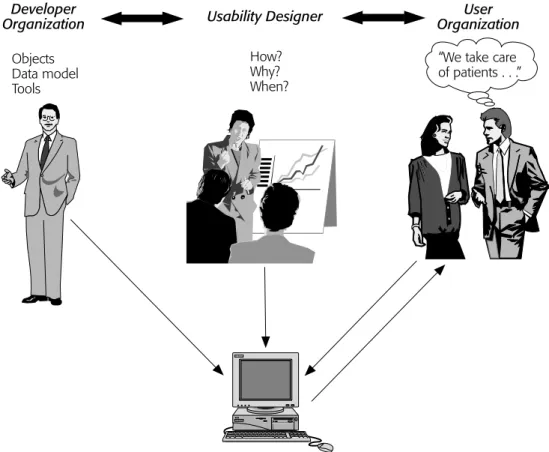
Usability is far too complicated to be left without giving anybody specific responsibility for it. It needs a specific caretaker in every systems development project. We have there-fore found it necessary to define a specific role for usability—that is, the “usability designer.” The usability designer is responsible for keeping the development process user-centered by focusing on usability aspects. It is crucial for the usability designer to take an active part in the design and development process and thus avoid becoming just another project manager. We emphasize the importance of one role player participating in all the user-centered activities in order to avoid losing valuable information in the transitions between the activities. The usability designer works closely with the user organization and participates in different analyses related to usability. The usability designer then transfers the results of these analyses into the design activities. The continuation is main-tained as the usability designer participates in designing the prototypes. When the designer takes part in the succeeding evaluation activities, the iterative design cycle is closed. This
role may specify usability goals and design criteria; conduct user and task analyses; elicit the user needs and requirements; design the user interface; or, in a large project, lead the design team and participate in the evaluation (see Figure 8.5).
A specific role for usability has the advantage of making sure that usability is explicitly brought to the agenda in the development work. The usability designer needs to be a human-computer interaction specialist capable of understanding system development tech-niques and tools. Interdisciplinary characteristics are absolutely necessary for this role. If feasible, the usability designer should work in conjunction with a graphical designer or other user interface designers who are skilled in visual and interaction design. Depending on the requirements for the visualization and the size of the project, the usability designer and the graphical designers will merge their activities. If the project is rather large, the usability designer will most likely focus more on the usability of the system, and the other designers will focus more on how to make the user interface attractive to the users.
FIGURE 8.5 The usability designer as a new work role that manages and facilitates the user-centered design process Usability Designer Objects Data model Tools How? Why? When?
“We take care of patients . . .” Developer
In summary:
■ The usability designer is responsible for keeping the development process user-centered and focused on usability aspects. Planning and performing activities related to usability and making sure that the results of usability activities are fur-ther used in the development process are very important for the usability designer.
■ It is crucial for the usability designer to take an active part in the design and development process and not to become just another project manager.
■ We emphasize the importance of a person participating in all the user-centered activities to prevent valuable information from being lost in the transitions between the activities.
The role of the usability designer can to some extent be seen as a “discount” usability role, because it combines several skills in one role and manages the usability process in an efficient manner.
8.3.1.1 The Usability Designer in RUP
RUP defines different project roles called workers or “hats.” We see a need to introduce the usability designer into RUP with the specific purpose of vouching for the usability of the resulting system. This role should support the roles of the use case specifier and the user interface designer in some of their tasks, but above all works as a usability authority throughout the development process. By moving some of the development tasks from the user interface designer to the usability designer, the remaining tasks for the user interface designer are best supported if they can be performed by a graphical designer. To be able to fulfill the goal of designing usable systems, the usability designer needs to take part in the specification of all aspects that contribute to the design from the very outset of the project when the business requirements are defined. This includes having an active role in the specification of the different artifacts that are produced in the early phases, such as the vision or use case model.
The usability designer does not necessarily have to produce any new artifacts. The major contribution is as a communication link between developers and users in the development process. This includes the responsibility for improving the use case story-boards and the user interface prototypes (see Chapter 5).
8.3.1.2 The Usability Designer in DSDM
DSDM is based on the best practices from several of the participating organizations in the DSDM consortium, and although it has realized the importance of the users in the process, DSDM has failed to realize the need to consider the entire mass of knowledge
contained in the field of human-computer interaction.3The usability designer might be able to complement the development work in the sense of including human-computer interaction knowledge. Focusing on usability throughout the process is as essential for DSDM as it is for RUP.
8.3.2 User Interface Modeling
One of the goals of this book is to bridge the gap between object-oriented designers and user interface designers. However, the gap between object-oriented designers and users is bigger still. Use cases, scenarios, and user-centered system development models that focus on the definitions of object models that are close to the users’ domain are very use-ful in the design of more usable systems. Every application domain has, however, its spe-cific characteristics. This is why these methods and the user-centered development framework need to be adapted to the domain in question. In the following section, we will describe the method of User Interface Modeling that was originally developed in cooperation with the Swedish National Tax Board. This method has been further gener-alized during its application to other cases in other organizations. Then we will describe our experiences in the case of the Swedish National Tax Board as a way of showing how a user-centered design framework can be adapted to suit a specific organization.
Traditional systems development projects usually perform some kind of structured analysis and design in which the users’ work is described with dataflow diagrams that show how data is processed within an organization and with data models that show objects and their relations [DeMarco 1978]. Such methods do not provide suitable sup-port for developing the user interface, as observed by Floyd [1986]. Today it is becoming more common to use object-oriented modeling techniques such as RUP where the design of the system is driven by use cases: “A use case is a complete course of events in the sys-tem, seen from the user’s perspective” [ Jacobson et al. 1995, p. 157]. Use cases establish the requirements of the functionality of the system. Each use case is a description of how actors (groups of users, for example) interact with the application. It is a sequence of related transactions performed by an actor in dialogue with the system. The sum of all use cases defines the functionality of the entire system. RUP states that the inception phase produces an initial use case model covering about 10 to 20 percent of the expected total volume. We believe that user participation is critical in the inception phase.
In Chapter 7, Constantine and Lockwood claim that the concept of use case is not defined clearly enough. Because of this, there are huge variations in style for writing the narratives that describe use cases. They also emphasize that use cases can cause problems
in user interface design if they are describing the interaction between the user and a par-ticular interface. Instead, essential use cases are introduced when the focus is on the intention of the user rather than on the interaction, making essential use cases interface-independent. However, use cases as the only means of communication can be insuffi-cient. Specifying the use cases together with users in workshops can be very useful, but there is a risk that these workshops will become too formal and less comprehensible for the users. Even though the use cases are expressed in natural language, they very soon become too complex to give the users a truly clear picture of what they can expect from the forthcoming system. We believe that it is absolutely necessary to complement the use cases with some sort of user interface prototype to illustrate how the system can support the users in their work.
Nonetheless, use cases are undoubtedly useful for communicating both internally and with clients and users about requirements. However, an object-oriented method employ-ing use case modelemploy-ing does not guarantee a usable information system. Such methods are suitable for developing software components of the information system, but they do not provide sufficient support for the design of the user interface. Instead, these methods invite the designer to create an interface in which each function or use case is represented by one window in the screen. Typically, the user has to interact with several such win-dows to complete a work task, which results in a fragmented interface with a large num-ber of windows. This may affect the efficiency in performing the task and may also cause a potential increase in the mental workload [Lif et al. 2000]. During our research at the Swedish National Tax Board and in other projects, we have seen several examples of this. One could argue that this would not be a problem if the use cases were large enough to cover users’ work tasks. However, according to our observations, many software engi-neers prefer smaller use cases because they are easier to handle when designing the soft-ware components.
User Interface Modeling (UIM) is basically a method for gathering user requirements that are directly applicable to user interface design for an information system [Lif 1999]. UIM is intended to be used as a complement to use case modeling in the system develop-ment process [ Jacobson et al. 1995].
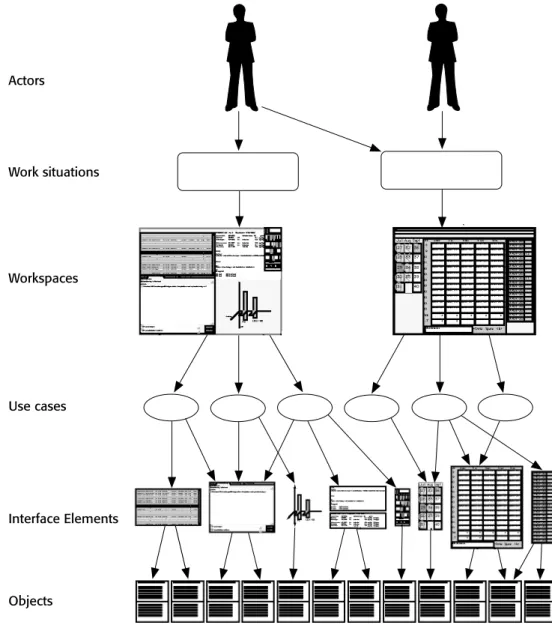
UIM specifies an actor model,a goal model,and a work modelin sessions in which end users cooperate with software engineers and user interface designers. The actor model is a description of characteristics for each category of users that are important for the user interface design process. The goal model is a list of high-level goals that users want to achieve in order for the system to be usable. The work model is a specification of work situations, information objects and actions, and properties of attributes and opera-tions that are suitable for the design. Each actor may handle one or more work situaopera-tions (see Figure 8.6). There is a one-to-one mapping between a work situation and a work-space in the user interface [Lif et al. 2000]. In a typical workwork-space, the actor has access to
all information and all tools needed in one work situation—that is, when communicating with a set of related use cases. The same use case can sometimes be accessed from more than one workspace. In a banking application, for example, it should be possible to search for a customer’s bank account from any workspace. On the screen, tools and information are parts of different interface elements.
FIGURE 8.6 Illustration of how UIM relates actors, work situations, workspaces, use cases, interface elements, and objects that are useful for the process of user interface design
Interface Elements Actors Work situations Workspaces Use cases Objects
UIM does not describe a step-by-step procedure for creating usable interfaces. Inter-face design is partially a creative process that cannot be completely described with a method. However, the design process can be facilitated if the design decisions are based on a substantial model that defines the user requirements for the interface. This model is created during UIM sessions.
8.4 Experiences in Promoting User-Centered Design at the
Swedish National Tax Board
To be able to incorporate work, process, and task analysis into industrial object-oriented system design in practice, it is important to focus on all the factors that influence the development work. Such factors include the simultaneous development of information technology, users and their skills and experiences, the organization of the work, the work activity, and the physical work environment.
During the last five years, we have been performing action research in cooperation with the Swedish National Tax Board, which is an organization with about 15,000 end users and almost 400 different applications that run simultaneously. The organization used a variety of the commercially available techniques, such as mainframe systems, GUIs, and network-based applications. The development context is mainly in-house, but the organization has relatively ambitious development plans and a high degree of usabil-ity maturusabil-ity.
Initially, our role was to serve as user interface consultants helping to improve the usability of systems that were undergoing revision. As time passed, however, our role became more strategic; we began adapting methods, introducing specific user interface design aids, and focusing on user-centered design in an object-oriented design environ-ment. The specific tasks that we performed were as follows:
1. We established a methodological framework for the incorporation of domain knowledge into a user-centered development process.
2. We extended object-oriented use case modeling techniques with aspects rele-vant for user interface design.
3. We supported the user interface design process with domain knowledge by introducing a corporate style guide.
4. We enhanced the possibilities for designing systems that efficiently support the users’ work through the workspace metaphor.
Currently, the focus of our research cooperation is improvement of the possibilities for efficient user participation in the development process.
8.4.1 Methods of Enhancing the User Interface Design Process
Six ways of enhancing the user interface design process are discussed here. All of these have been used (sometimes in a further elaborated form) at the Swedish National Tax Board discussed in Section 8.4.2.
One of the consequences of object-oriented design is the decline of the concept of applications in favor of reusable business objects with a mapping to the computerized information objects. As a prerequisite for achieving consistent and reusable system mod-ules, we developed business processes of a general corporate nature and introduced them into the organization [Gulliksen 1996]. These business processes contained process descriptions, conceptual models, data models, and so on, for the work activity in general. The purpose was to establish a basis for the development of general modules for spe-cific tasks such as data-entry handling, data transmission, case handling, evaluation, work distribution, and administration. Such a case-handling framework is, according to our view, a prerequisite for the design of general business objects. It is therefore an appropriate division of the work procedures to be able to divide the work activities into objects. The organization has recognized the need for such a case-handling frame-work without being fully aware of it as a necessity for user interface design. The organi-zation has had difficulty in formally making the necessary decisions about such a framework, but it has more or less adopted such an object-oriented view of the business objects anyway.
Analysis of Information Utilization (AIU) [Gulliksen et al. 1997] and User Interface Modeling (UIM) [Lif 1999] address the problem of how to extract requirements on an appropriate level for the designof the user interface. AIU differs from traditional task analysis methods in that it reveals aspects of the use situation that the user might not be explicitly aware of. It covers not only the information entities that are used in each situa-tion but also the way in which each informasitua-tion object is treated and manipulated. The observation is that users tend to be unaware of several of the operations they perform during their work as it becomes automated. AIU uses observation interviews to capture these aspects as they are performed. UIM focuses more on aspects relating to the user interface, and the extension of use case modeling [ Jacobson et al. 1995], which focuses more on aspects relating to the user interface. UIM is a further elaboration of AIU that is specifically constructed to fit into an object-oriented development methodology, which is to be used in the types of modeling sessions that are typical of the development tradi-tion of the Swedish Natradi-tional Tax Board.
The workspace metaphor [Lif et al. 2000] describes a new way of structuring the user interface in a work-oriented fashion. Instead of working with applications, the user has a number of workspaces that are carefully designed and customized computer screens to support the user in the performance of the different work situations. These workspaces
become interface objects on a top level containing all the information objects needed in a specific work task.
A corporate style guide [Gulliksen and Sandblad 1995, Olsson and Gulliksen 1999] has proved to be an essential support in the design process, both as a documentation of domain-specific design guidelines and as a container for reusable interface objects. The style guide has been implemented as an interactive online document with the possibility of having electronic communication between the style guide users (that is, user represen-tatives, system engineers, and system modeling experts) and the design experts in the organization.
Domain-specific evaluation [Lif and Sandblad 1996] is a method of evaluating the usability of interactive systems. This method consists of two parts: an expert evaluation and a cooperative evaluation. A user interface designer using a set of general heuristics forms the expert evaluation. The cooperative evaluation is done together with users per-forming a set of predefined scenarios. In the cooperative evaluation, the process is guided by a list of heuristics related to the users’ domain.
All of these methods were developed before RUP and DSDM were available. How-ever, these methods, in one form or another, could be used to enhance the system devel-opment process and to take usability and user-centered design into consideration when using RUP or DSDM.
8.4.2 Introducing User-Centered Design
A user-oriented perspective on development is undoubtedly important. Current research is forming a user-oriented view on the establishment of visions of the development of information technology, users and their competence, the organization, work activities, and the physical work environment. In the case of the Swedish National Tax Board, we pursued the notion that domain adaptation of the development models is very important to make them fit into the existing standard procedures within the organization.
To be able to justify efficiently a user-centered development process within the devel-opment organization, we decided to model the process using the current techniques that were well known to the participants at the organization. In short, these techniques meant modeling the current development processes and, based on these processes, establishing the future processes. This was performed in close cooperation with the user representa-tives that by Scandinavian tradition have a very important role in all development work. The participants in these modeling sessions included two representatives of skilled domain experts (professional user representatives), one skilled development project manager from the organization, one senior modeling leader from the organization, one usability analyst from the organization, and two usability designers who were also academic researchers.
The work was performed in eight full-day meetings with a considerable amount of report and documentation work performed in relation to and after these modeling sessions. The development methods used were the organization’s own methods that were adapted to the specific conditions of work. This work was complemented with observation inter-views of the user interface developers within the organization.
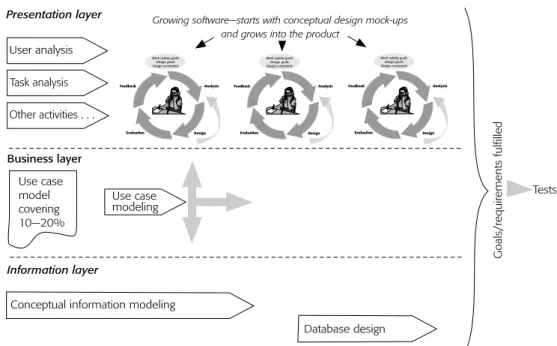
The current status of the development process proved to be a very waterfall-like development method with clearly defined steps specifying the object model (data model) and business processes and subsequently engineering the user interface (rather than designing it). The future model (see Figure 8.7) describes only the user interface design process, although we observed the need to focus more on the steps taking place before this process, such as the development of the new work situations and the new business processes.
Listed below are some of the important requirements for an efficient and effective user centered design and development process at the Swedish National Tax Board.
■ Contextual aspects. Emphasize the need to visit the workers in their own
work environment rather than always bringing the users to the development organization.
FIGURE 8.7 Results of the modeling of the user-centered design processes for user interface design as they turned out in our case at the Swedish National Tax Board
Work activity goals Design goals Design constraints Feedback Analysis
Evaluation Design
Work activity goals Design goals Design constraints Feedback Analysis
Evaluation Design
Work activity goals Design goals Design constraints Feedback Analysis Evaluation Design User analysis Task analysis Other activities . . .
Conceptual information modeling
Database design
Presentation layer
Business layer
Information layer
Growing software—starts with conceptual design mock-ups and grows into the product
Use case modeling Goals/requirements fulfilled Tests Use case model covering 10—20%
■ Prototypes.Use prototyping to design and develop new interfaces.
■ Iterative cycle. Reduce the duration of an iterative cycle to prevent the “my
baby syndrome” and to minimize the risk of delays in the development project.
■ Prevent waterfalls.Emphasize the need to teach the organization not to finalize
every step before initializing the next step.
■ Integrated development.Simultaneously develop the business layer, the
infor-mation layer, and the presentation layer in the three-level client-server structure of the system.
Although there is much more to be achieved, at this stage the important result is to make the organization aware of the need to develop the procedures to make them more user-centered. When introducing object-oriented development tools and procedures, this is a good way of teaching the staff how to adapt these new tools to the specific character-istics of their organization.
8.4.3 Obstacles to the Development Work
One of the advantages of object-oriented design is the modularity that promotes reusabil-ity of screen objects. It is therefore necessary for interface objects to be directly mapped to information objects in the work tasks and to software objects in the computer system. This has several effects on the development work: the concept of applications becomes irrelevant and is replaced by objects that can be more easily developed and maintained, and the structure of development projects changes. This is why the introduction of an object-oriented view on information systems requires an object-oriented view on the work activity models and on the organizational structure.
Several lessons can be learned from the case of the Swedish National Tax Board. As an example of general work models that can be effectively used in the user interface design process, case-handling models were shown to be a necessary basis for deriving general, reusable work activity objects. UIM and AIU help to provide the basis for designing these objects. With a corporate style guide that has a library of reusable interface objects attached, the necessary support for a more efficient design process is available. In our case, the workspace metaphor became a substantial part of the corporate style guide.
However, incorporating user-centered design methods in an organization is not always a simple task. One of the main obstacles to doing this at the Swedish National Tax Board was a lack of support within the organization for working with user-centered design. Even though there is a supportive attitude higher up in the organization, it is not always evident among the people who are responsible for the user interface design process. This is illustrated by the following results that we received from an analysis of user interface design work within the organization.
■ User interface programming is considered to be a problem-solving task. The developers want to have a programming task that can be solved within a couple of days and as a result deliver a piece of code that in some sense is the optimal solution to the task. However, developers seldom have the requisite ability, skill, or even interest to perform specific interface design prior to programming.
■ For the programmers, design is not a conscious, esthetic activity for which they are responsible, but rather is the result of an engineering task. By writing the program code that was specified in the preceding item, they can solve their problem. The fact that the specific program code that they produce corresponds to a specific design of a user interface is not the result of a conscious activity; it just occurs. Programmers typically have a fear of doing user interface design.
■ Interface prototyping could be performed very early in the development pro-cess, but this is very seldom done. Very often, a waterfall development model is used, which means that one activity must be finished before the next one can be pursued. This is a big mistake. A lot of work could be done using only 80 per-cent of the results of the previous activities. In order to be able to do truly itera-tive design, one must be prepared for frequent production of “deliverables” that are appropriate for user evaluation, according to some plan.
■ A lack of development competence and/or experience is one of the biggest threats to the usability efforts in the process of designing user interfaces. One reason for this is that, as a low-wage government organization, the Swedish National Tax Board does not pay its employees competitive wages and therefore the hired developers may not always have the best available competency. First, the development organization relies heavily on the use of external consultants for most of the advanced development work. Second, external consultants have no incentive to support usability-related work, because this might lead to increased development times. Moreover, when the advanced development work is done solely by external consultants, there is no enhancement of the competence of the development organization.
■ While frequent reorganizations aggravate attempts to achieve well-functioning procedures, performing a reorganization is a good way for a manager to prove results in an organization that has not yet achieved according to plans. Unfortu-nately, performing a reorganization does not always fulfill the goals that were anticipated.
The major problems that need to be solved at the Swedish National Tax Board include (a) the lack of organizational support for usability-related work and develop-ment tool dependencies and (b) the difficulty of maintaining work of a more general character in a constantly changing work environment.
8.5 Discussion
This chapter has focused on the need to create systems that have a high degree of usability. Object orientation is in itself no guarantee that usable systems will be designed. In fact, the tendency to design systems with severe usability defects is just as great when object-oriented techniques are used as when other techniques are employed. Even though the RUP and DSDM frameworks have managed to solve some of the difficulties of promoting itera-tive design in practice, there still is a need to complement these frameworks with specific methods and roles for the user-centered design process. As do many system development frameworks, the RUP framework ignores some of the most difficult problems inherent in the process of conducting a user-centered design project. Two such problems are as follows.
■ Communication with users.Today, UML is the main communication language
and is often complemented with use case storyboards. This is perhaps good for communication between system developers, but other representations are needed for communication with users. Educating users in the formal notation of UML and in use case modeling is a convenient and widely used solution, but this is not the right way to solve the problem.
■ Specific focus on usability.Promoting user participation throughout the entire
system development process and giving users the power to understand and influence the development of their working tools early in the development process will make the process more efficient and could improve the end result. Thus, there definitely is a need for a framework for incorporating work, process, and task analysis into object-oriented design in real-life development settings [van Harmelen et al. 1997]. However, for such a framework to be effective in practice, it needs to put a certain emphasis on aspects that are relevant to the creative user interface design process. At the same time, users need to be efficiently introduced as active participants in the development work. Because the world of users is a world of objects, the mapping of such objects in the user interface should become fairly simple, and users should have greater opportunities to contribute while acting in a terminology that is familiar to them.
It is important to maintain a critical eye when deploying a commercial development process, particularly with respect to usability and user-centered concerns. However, in our experience, organizations do not critically evaluate such processes and do not per-form the necessary process modifications to address their specific concerns. More gener-ally we note that usability and user-centered design can of course be added when the commercial system development package is being customized, but we see no reason why these issues cannot be properly introduced into the general development models. Later, during projects, important aspects that are not properly introduced into a development model face a high risk of being ignored.
8.6 References
[Artim et al. 1998] J. M. Artim, M. van Harmelen, K. Butler, J. Gulliksen, A. Henderson, S. Kovace-vic, S. Lu, S. Overmeyer, R. Reaux, D. Roberts, J.-C. Tarby, and K. Vander Linden. Incorporating Work, Process and Task Analysis into Commercial and Industrial Object-Oriented Systems Development. SIGCHI Bulletin,30 (4), 1998, 100–101.
[Boehm 1976] B. Boehm. Software Engineering. IEEE Transactions on Computers, C25(12), 1976, 1226–1241.
[Boehm 1988] B. Boehm. The Spiral Model of Software Development and Enhancement. IEEE Computer,21(5), 1988, 61–72.
[Booch 1991] G. Booch. Object-Oriented Design with Applications.Redwood City, CA: Benjamin Cummings, 1991.
[Booch et al. 1997] G. Booch, I. Jacobson, and J. Rumbaugh. The Unified Modelling Language. Version 1.0, found at http://www.rational.com,1997.
[Budde et al. 1992] R. Budde, K. Kautz, K. Kuhlenkamp, and H. Züllighoven. Prototyping—An Approach to Evolutionary System Development.Berlin: Springer-Verlag, 1992.
[Card et al. 1983] S. K. Card, T. P. Moran, and A. Newell. The Psychology of Human-Computer Interaction.Hillsdale, NJ: Lawrence Erlbaum Associates, 1983.
[DeMarco 1978] T. DeMarco. Structured Analysis and System Specification.New York: Yourdan Press, 1978.
[Dray and Siegel 1998] S. M. Dray and D. A. Siegel. User-Centered Design and the “Vision Thing”. Interactions,5(2), 1998, 16–20.
[Floyd 1986] C. Floyd. A Comparative Evaluation of System Development Methods. In T. W. Olle, H. G. Sol, and A. A. Verrijn-Stuart, eds. Information Systems Design Methodologies: Improving the Practice.Amsterdam: Elsevier Science, 1986, 19–55.
[Gould and Lewis 1983] J. D. Gould and C. H. Lewis. Designing for Usability—Key Principles and What Designers Think. Proceedings of the 1983 Computer-Human Interaction Conference, 1983, 50–53.
[Gould and Lewis 1985] J. D. Gould and C. H. Lewis. Designing for Usability: Key Principles and What Designers Think. Communications of the ACM,28(3), 1985, 300–311.
[Gould et al. 1997] J. D. Gould, S. J. Boies, and J. Ukelson. How to Design Usable Systems. In M. G. Helander, T. K. Landauer, and V. P. Prasad, eds. Handbook of Human-Computer Inter-action.Amsterdam: Elsevier Science, 1997.
[Gulliksen 1996] J. Gulliksen. Case Handling Models as a Basis for Information System Design. In C. A. Ntuen and E. H. Park, eds. Human Interaction with Complex Systems—II.Norwell, MA: Kluwer Academic, 1996.
[Gulliksen and Sandblad 1995] J. Gulliksen, and B. Sandblad. Domain-Specific Design of User Interfaces. International Journal of Human-Computer Interaction,7(2), 1995, 135–151. [Gulliksen et al. 1997] J. Gulliksen, M. Lif, M. Lind, E. Nygren, and B. Sandblad. Analysis
of Information Utilisation. International Journal of Human-Computer Interaction, 9(3), 1997.
![FIGURE 8.4 Phases and main processes in DSDM [Stapleton 1997]](https://thumb-us.123doks.com/thumbv2/123dok_us/1797485.2757548/16.796.116.673.94.643/figure-phases-main-processes-dsdm-stapleton.webp)