The goal of ESG Lab reports is to educate IT professionals about data center technology products for companies of all types and sizes. ESG Lab reports are not meant to replace the evaluation process that should be conducted before making purchasing decisions, but rather to provide insight into these emerging technologies. Our objective is to go over some of the more valuable feature/functions of products, show how they can be used to solve real customer problems and identify any areas needing improvement. ESG Lab’s expert third-party perspective is based on our own hands-on testing as well as on interviews with customers who use these products in production environments. This ESG Lab report was sponsored by EMC.
The Challenges
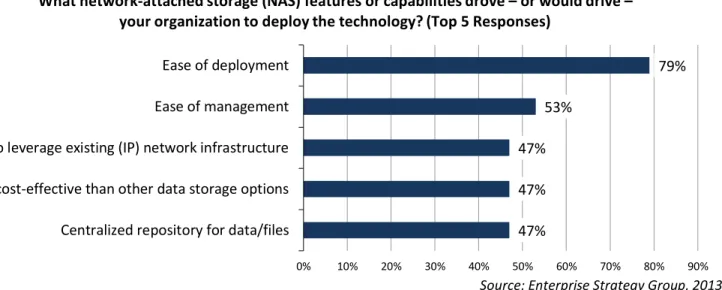
When it comes to virtualized environments, the use of network-attached storage (NAS) has become increasingly popular. In a recent ESG research survey, IT professionals at small and small midmarket organizations cited ease of deployment and ease of management as two of the features or capabilities that would drive their organizations to deploy a NAS environment (see Figure 1).1 While this survey focused on generic NAS values, the same benefits apply to NAS-attached virtualized environments, where organizations of all sizes are looking to improve performance with transaction-oriented workloads like OLTP. In addition, greater mobility of VMs between physical servers can be achieved for improved high availability, load balancing, and maximum utilization of resources.
Figure 1. Top-five NAS Capabilities Driving Deployment
Source: Enterprise Strategy Group, 2013. While using network-attached storage offers many clear advantages, deploying NAS in virtualized environments has also been met with some trepidation; many people still believe that SAN environments are the only real option for
transactional workloads. In recent years however, the introduction of 10GbE networks and improvements to file-based protocols have started bridging the gap between NAS and SAN performance. Vendors are now focused on delivering the operational efficiency of configuring and deploying NAS in virtual environments, while not suffering the previously realized performance limitations.
1 Source: ESG Research Report, SMB Storage Market Trends, April 2013.
47% 47% 47% 53% 79% 0% 10% 20% 30% 40% 50% 60% 70% 80% 90%
Centralized repository for data/files More cost-effective than other data storage options Ability to leverage existing (IP) network infrastructure Ease of management Ease of deployment
What network-attached storage (NAS) features or capabilities drove – or would drive – your organization to deploy the technology? (Top 5 Responses)
ESG Lab Review
New VNX2: Real World Benefits for Virtualized NAS
Workloads
Date: November 2013 Author: Aviv Kaufmann, ESG Lab Analyst and Michael Leone, ESG Lab Analyst Abstract: This ESG Lab review documents hands-on testing of the improved NAS operations in virtualized environments on the next-generation VNX system.
The Solution: Next-generation VNX Systems for Virtual Server NAS Workloads
The new EMC VNX family builds off of its existing success with a next-generation platform that promises greater return on investment (ROI) and lower total cost of ownership (TCO) for increased consolidation and savings in virtual
environments. Organizations can expect multiple areas of improvements and benefits including:
Improved performance: faster file access and quicker response times in NAS-attached virtual environments with newer, faster Intel Sandy Bridge processors and the powerful new EMC MCx multicore optimization architecture.
Easier management: improved productivity in virtual server environments with deeply integrated VMware and Microsoft virtual server management plug-ins in addition to the VMware aware Unisphere Management Suite.
Greater efficiency and mobility: reduced costs and the ability to consolidate more virtual servers with a flash-optimized architecture, fully automated storage tiering for virtual pools, cost-effective MLC flash technology, and Virtual Data Movers for faster online file migrations.
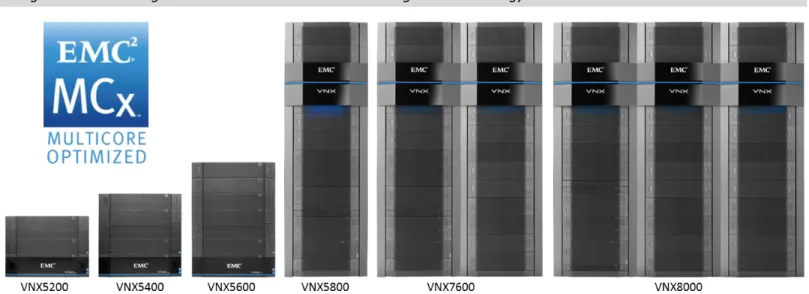
Figure 2. EMC Next-generation VNX Product Line Featuring MCx Technology
In addition to the Unisphere Management Suite, the new VNX family offers a number of free and licensed software tools that make using NAS storage in a virtual environment easier, faster, and safer.
EMC Virtual Storage Integrator (VSI): a free vCenter plug-in available to EMC storage customers that simplifies management, mapping, and provisioning of EMC storage from VMware vCenter.
EMC Storage Integrator (ESI): a set of tools for Microsoft Windows administrators that simplifies
management, monitoring, and provisioning of EMC storage from Microsoft Windows. An ESI management pack is also available for System Center 2012 (SCO, SCOM, and SCVMM) as well as a Powershell toolkit. EMC AppSync: a simple, self-service data protection application for EMC VNX that is service-level-agreement
(SLA) driven. Single-click data protection for administrators and end-users of supported applications. EMC Storage Analytics (ESA): a powerful management tool based on VMware vCenter Operations Manager
that can be used by VMware and storage administrators to access real-time intelligent analytics for VNX and VMAX storage systems. Administrators can create customized performance dashboards and FAST Cache heat maps, as well as simplify troubleshooting by viewing relevant alerts and proactively addressing potential issues before they impact the configuration.
Simplifying Virtual Server Storage Management
ESG Lab tested the next-generation VNX with a goal of showing how easy virtualized file environments were to provision and deploy in both ESX and Hyper-V environments.
Provisioning and Deploying NAS with VMware
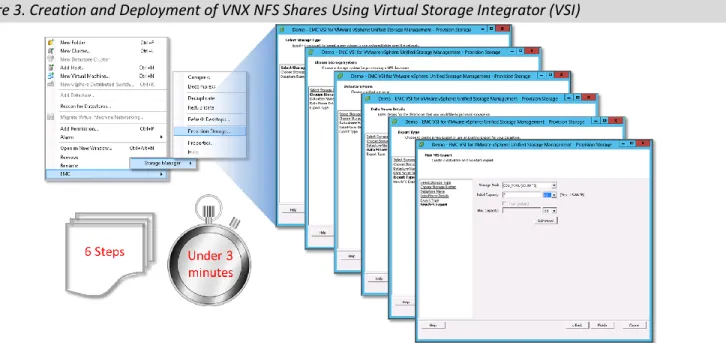
The first phase of deployment testing focused on provisioning file shares and deploying a virtualized environment in VMware. ESG Lab used EMC’s Virtual Storage Integrator (VSI) vCenter plug-in to easily provision and mount NFS datastores. Through the integrated “EMC” management options, ESG Lab provisioned the NFS storage using a six-step provisioning wizard. The process of creating and deploying an NFS share is shown in Figure 3.
Figure 3. Creation and Deployment of VNX NFS Shares Using Virtual Storage Integrator (VSI)
The entire provisioning process was completed inside the vCenter management interface in just a few minutes. This process eliminates many manual steps that are required in other systems. NAS datastores were created for multiple ESX hosts in a single step, saving the administrator the work of performing the repetitive task for each host. ESG Lab
monitored the status of the creation of the NFS file system and NAS datastores for each ESX host from within the Task window in the vCenter interface. Once the creation process was completed, ESG Lab verified that each of the ESX hosts had connectivity to the new datastores.
ESG Lab was then ready to quickly deploy VMs from a template using EMC’s FastClone technology. VSI was used to create FastClones of virtual machines (at the individual “.vmdk” level) on the previously provisioned NFS storage. From within vCenter, ESG Lab selected a 27GB VM and used a simple two-step wizard to configure and deploy ten clones. In just seconds, ten new clones were created and initially consumed only 41KB of physical capacity (shown in Figure 4).
Provisioning and Deploying NAS with Hyper-V
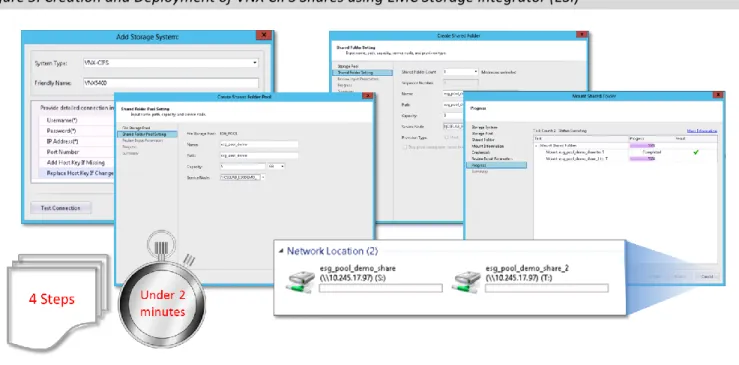
The second phase of deployment testing focused on using EMC Storage Integrator (ESI) to test the ease of deploying Hyper-V VMs in a Microsoft virtualized environment. ESI provides simple, built-in wizards and a powerful management interface that is familiar to Microsoft administrators. ESG Lab added and managed a VNX5400 storage system containing a NAS file pool to the ESI environment. A new shared file pool was created by selecting the file pool, providing a share name, allocating capacity, and selecting a CIFS server. Two SMB 3.0 shares were created from the pool in a single step. Finally, ESG Lab mounted multiple file shares and specified drive letters to a host without leaving the ESI interface. All steps, from the initial storage system management through the mapping of the shares, are shown in Figure 5. It should be mentioned that although ESI can be used to greatly simplify VM deployment, administrators who prefer to use Microsoft’s SCVMM have the exact same level of integration and use native SMI-S to interact with the array.
Figure 5. Creation and Deployment of VNX CIFS Shares using EMC Storage Integrator (ESI)
Why This Matters
It’s no secret that deploying NAS storage in virtualized environments is complex. In fact, ESG research has shown that one of the key factors preventing organizations from deploying NAS storage in virtualized environments is increased complexity.2 Historically, IT administrators have put up with the increased deployment and provisioning complexities to realize other benefits of NAS, like availability and mobility. The tradeoff is by no means a solid one because ultimately, the increased complexity could lead to a loss of productivity and higher operational expenses.
ESG Lab verified that the next-generation VNX is designed to make NAS deployments in virtualized environments less complex through deployment and provisioning models that extend the user experience of the native virtualization management tools. ESG Lab validated that NFS datastores can be quickly and easily created by a VMware administrator in just a few steps using the vCenter VMware management interface with the EMC VSI plug-in. Using FastClones, ESG Lab was able to make ten clones of a 27GB VM in under a minute while only consuming 41KB of physical storage space. ESG Lab also provisioned Hyper-V VMs in a virtualized Microsoft environment quickly and easily with ESI, which provided an interface that Microsoft administrators would find very familiar.
Improved Performance
Through the introduction of MCx technologies, EMC has greatly improved overall system performance and made large improvements in lowering latencies in virtualized NAS environments. In some cases, a latency reduction up to 60% has been achieved when compared with the previous generation VNX. ESG Lab audited the results of internal performance testing of NAS storage in virtualized environments with a goal of validating linear performance scalability while
maintaining manageably low latencies. Performance Scalability Testing
The VNX FLASH 1st strategy, which comprises FAST Cache and FAST VP, utilizes flash capacity selectively for the active portion of all workloads on the VNX system to deliver a lower transaction cost ($/IOPS). For this testing, a VNX5400 storage system that included SAS HDDs and SSDs to utilize EMC FAST Cache was used. ESXi servers housing 24 CentOS virtual machines were configured and stored on the VNX5400 storage system using NFS mounts. Each virtual machine was presented an NFS mount and accessed 10GB of the available storage for a total storage capacity tested of 240GB. The industry-standard benchmarking tool, Iometer, was used to generate a workload consisting of random 8KB read and write requests. Sixty six percent of the workload was made up of read requests and 33% was made up of write requests on each VM. The VMs were configured to perform the same number of IOPS that represented a relatively heavy
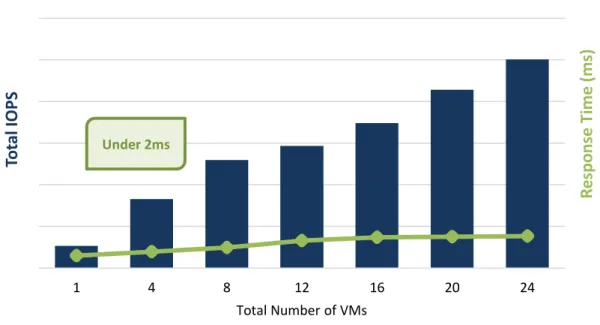
workload for production VMs. An initial baseline was performed on four VMs and scaled up to 24 VMs under test with a four VM granularity. The results of the performance scalability testing are shown in Figure 6.
Figure 6. Performance Scalability in Virtualized Environments
The VNX5400, a storage system positioned in the middle of the VNX product line, easily met the performance demands of the heavily simulated workload. The virtualized environment used NFS-attached storage to achieve linear
performance scalability while continuing to provide low latencies under 2ms at each test point. It should be noted that testing was not intended to show “hero” numbers from an IOPS or latency standpoint. It was designed to highlight the scalability potential of NAS-attached storage on a VNX system configured to meet demanding mixed workloads’ performance requirements of virtualized environments.
While our testing did not extend to CIFS (SMB 3.0) testing with Hyper-V, internally audited tests indicate that CIFS performance closely matches that seen with VMware and NFS.
1 4 8 12 16 20 24
R
esp
o
n
se
T
ime
(ms)
To
ta
l IO
PS
Total Number of VMsPerformance Scalability in Virtualized Environments
Performance Monitoring
The EMC Storage Analytics (ESA) software is used to gather performance statistics, key metrics, and relevant information about the storage system. It can also be used to monitor anomalies and perform root-cause analysis based on
performance falling outside of expected guidelines.
ESG Lab used vCenter Operations Manager in conjunction with ESA to view the details of the VNX storage topology by clicking on “EMC Storage Topology.” Next, ESG Lab clicked on the “EMC Storage Metrics” tab and was able to right-click on storage objects to view real-time performance metrics about any available object in a graphical format. The “EMC Performance at a Glance” tab showed a general performance overview of the system. This ranged from basic metrics like storage processor CPU utilization and capacity utilization to detailed FAST Cache heat maps and various other high-level performance statistics for the file system. The information collected by ESA was used to create custom
performance dashboards at the storage system, datastore, and VM level. This can enable organizations to easily monitor statistics that were most important and relevant to their particular environments.
ESG Lab also witnessed how ESA can be used to identify potential areas of trouble. Following the removal of some ESX servers connected to a datastore, the interface showed the particular datastore in a non-optimal state by indicating a low health score. The item was also turned red in the interface. Once the servers were powered back on, the item turned back to green, indicating a higher score and therefore a healthy configuration. EMC demonstrated to ESG that ESA can be used to monitor and identify outliers in anomaly trends over time as well as perform root-cause analysis on alerts and identify the affected relationships. Figure 7 shows the functionality of the monitoring and alerting capabilities of the ESA Interface.
Figure 7. ESA Monitoring and Alerting Capabilities
Why This Matters
Respondents to ESG research indicate that one of the top deterrents to using a NAS storage system is the fear that higher latencies will negatively affect application performance.3 Poor application performance can result in lost sales and lower productivity, and in some cases, can permanently damage the credibility of the company.
ESG Lab validated that the next-generation VNX delivers scalable, low latency performance using NAS-attached storage in virtualized environments. A single VNX5400 was more than capable of delivering low response times of less than 2ms as VMs were scaled on the storage system while performing an aggressive read/write mix. Using ESA, ESG Lab also saw the power of performance monitoring through easy anomaly detection and root-cause analysis.
Better Protection
New availability and protection features support the next-generation VNX, like AppSync, were tested by ESG Lab with a goal of learning the benefits and efficiencies such features can bring to virtualized environments deployed on NAS storage.
Recovering VMware Instance of SQL
ESG Lab examined AppSync and its application-level data protection capabilities by testing the recoverability of a virtualized instance of a SQL Server database. ESG Lab mounted two SMB3.0 shares: one 933GB and one 640GB to store the database and log files of a virtual server running SQL Server 2012. An existing 16GB customer database and 5GB log file were copied to the shares and attached to the SQL Server instance. ESG Lab verified the functionality of the database by successfully issuing a database query that selected a customer with the account number “AW00028267.” ESG Lab assigned the default Bronze data protection subscription plan to the SQL Server instance and took a new snapshot of the database and log once per hour while retaining the previous five copies. Testing continued after a full snapshot was taken of the database.
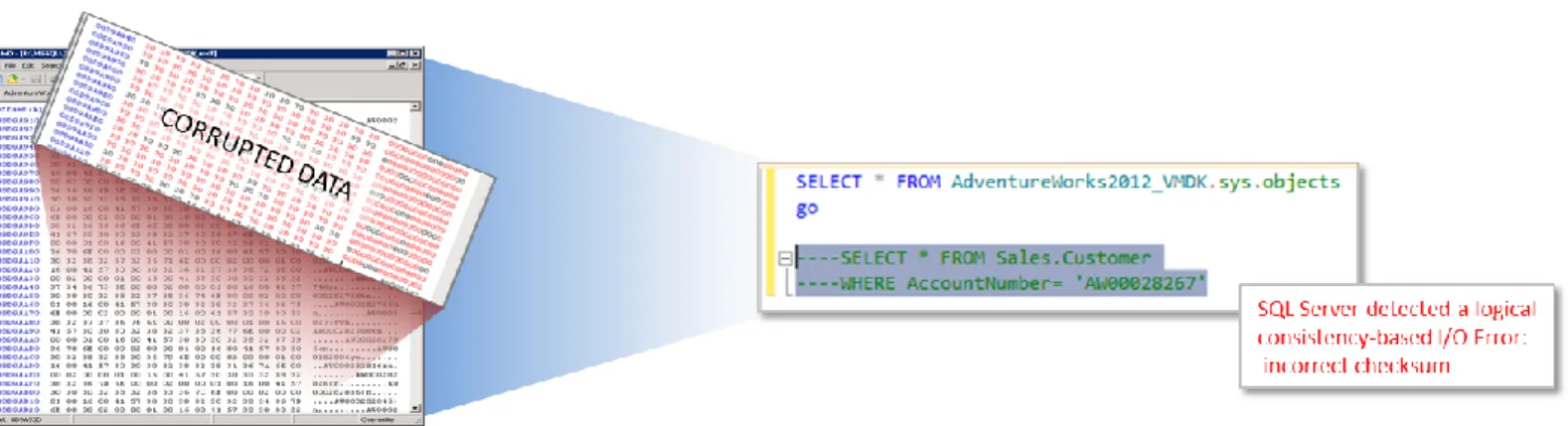
Next, a simulated corruption was injected into the database to test the recoverability of AppSync data protection. The SQL database was placed offline and a Hex editor (HxD) was used to modify the contents of the database file in and around where the string “AW00028267” was found. All of the existing data in 15 offsets were set to zeros so that the database entries would now be detected as corrupt. The database was then brought online and the same SQL query was performed to verify the corruption. The query returned an I/O error message that indicated an incorrect checksum and warned of threatened database integrity. A view of the Hex editor and SQL query are shown in Figure 8.
Figure 8. Corrupting an SQL Server Database
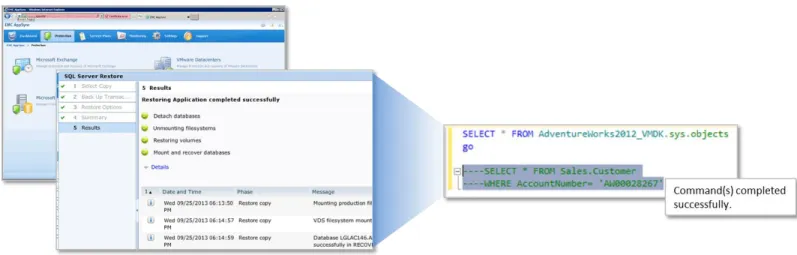
ESG Lab then used the EMC AppSync interface to restore the database from a snapshot that was taken prior to the injected corruption. By navigating to the Microsoft SQL Server service plans, selecting the SQL database instance, and clicking on the “restore” button at the bottom of the screen, a SQL Server Restore wizard was presented. ESG Lab navigated the simple wizard by selecting the desired snapshot, choosing whether to back up the transaction log file, and selecting other recovery options. ESG Lab opted to perform a restore with recovery, which overwrote the existing database and left the database ready to use rather than placing it in a non-operational or read-only state.
AppSync automatically detached the database, unmounted the file systems, restored the volumes, re-mounted the databases, and recovered the databases. ESG Lab was impressed with how seamlessly AppSync automated all of the manual SQL Server, Windows, and VMware functionality. The entire process was completed in less than five minutes. Once the database was online, ESG Lab confirmed the corruption no longer existed by performing the original SQL query—this time returning a successful result. Part of the recovery process is shown in Figure 9.
Figure 9. Restoration of a SQL Server Database with AppSync
File Migration Efficiencies
Virtual Data Movers (VDMs) are virtual containers used to group CIFS and NFS file systems into multiple virtual servers within the same physical Data Mover (DM). The technology improves data migration efficiencies, making them easier and faster. This enables organizations to meet SLAs with strict RTOs, as well as enable faster RTOs. ESG Lab learned that VDM technology has laid the groundwork for what is still to come. VDM technology could eventually be leveraged to help with the recoverability of system failures by speeding up failover and making the recovery transparent to the hosts. This methodology could allow the user to fail over only the shares housed on a single VDM rather than the entire physical Data Mover. VDMs could also be moved between physical Data Movers for HA failover and load balancing without loss of host access.
Why This Matters
One of the key strengths of using a NAS storage device in a virtualized environment is the ability to protect data at the file level and the block level. The ability to make copies of individual files rather than entire containers in a virtualized environment gives the administrator a wider variety of choices for protecting individual files, folders, databases, or VMs. Data protection operations can be achieved quicker while using less capacity, which ultimately saves the organization both operational and capital expenditures.
ESG Lab validated that the next-generation VNX storage system provides greater flexibility to IT administrators by offering a number of improved file-level data protection options. ESG Lab also used AppSync to easily protect a virtualized NAS-attached SQL Server database and quickly restore a corrupted database using a single interface in under five minutes. Existing VDM technology helps improve data migration efficiencies and ESG Lab is excited to see where EMC’s VDM technology goes next.
The Bigger Truth
While we do not expect users to rush to switch their existing SAN-based virtual infrastructure to NAS, users should consider where NAS might be applied in order to reduce the overall TCO of their virtual infrastructure. In any case, regardless of that choice, ESG believes the EMC VNX is well suited to deliver optimal cost/performance within its unified file and block storage offering.
EMC has made dramatic improvements that make using NAS-attached VNX storage in virtualized environments much more appealing. The new generation VNX makes deploying, managing, and protecting NAS storage quicker and simpler, while easily meeting the performance scalability demands of today’s most complex virtual environments. When it comes to using NAS in virtualized environments, EMC views the latest VNX as more of a technology redefinition than simply a technology refresh.
ESG Lab validated that the next-generation VNX made provisioning NAS storage much easier. ESG Lab used the VSI plug-in to quickly and efficiently provision NAS datastores to multiple ESX hosts usplug-ing a simple wizard from withplug-in the vCenter console. Then, through the use of EMC FastClones, ESG Lab made ten clones of a 27GB VM in under a minute while initially only consuming 41KB of additional storage. For Microsoft environments, ESG Lab found the experience of provisioning Hyper-V VMs to also be quick and easy through the use of ESI, which offered a Windows-like interface familiar to existing Microsoft IT administrators.
By using EMC AppSync, ESG Lab verified the high levels of data protection offered by the latest VNX release. ESG Lab used AppSync to easily protect a SQL Server database, in which a simulated corruption was easily restored in less than five minutes.
Lastly, ESG Lab verified the ability of the next-generation VNX to meet the high-performance demands of mixed
workloads on NAS storage in virtualized environments. ESG Lab witnessed linear performance scalability as the number of VMs increased from four to 24, while latency remained under 2ms. Through the use of EMC’s ESA tool, performance was easily monitored and ESG Lab was impressed with the powerful anomaly detection and root-cause analysis
capabilities.
It was harder and took longer than expected, but EMC has taken a giant leap forward with a multicore-optimized architecture that turbo charges the performance and scalability of the VNX family. ESG Lab has discovered through its testing that not only can the next-generation VNX be used to reduce cost and improve performance in highly virtualized environments today, but it is also a great foundation for adding more intelligence and value in the future.
All trademark names are property of their respective companies. Information contained in this publication has been obtained by sources The Enterprise Strategy Group (ESG) considers to be reliable but is not warranted by ESG. This publication may contain opinions of ESG, which are subject to change from time to time. This publication is copyrighted by The Enterprise Strategy Group, Inc. Any reproduction or redistribution of this publication, in whole or in part, whether in hard-copy format, electronically, or otherwise to persons not authorized to receive it, without the express consent of The Enterprise Strategy Group, Inc., is in violation of U.S. copyright law and will be subject to an action for civil damages and, if applicable, criminal prosecution. Should you have any questions, please contact ESG Client Relations at 508.482.0188.