Locations Service
FedEx Web Services
2015
Legal and Copyright Notices
Payment
You must remit payment in accordance with the FedEx Service Guide, tariff, service agreement or other terms or instructions provided to you by FedEx from time to time. You may not withhold payment on any shipments because of equipment failure or for the failure of FedEx to repair or replace any equipment.
Inaccurate Invoices
If you generate an inaccurate invoice, FedEx ® may bill or refund to you the difference according to the FedEx Service Guide, tariff service agreement or other terms or instructions provided to you by FedEx from time to time. A request for refund on a FedEx shipment must be made in accordance with the applicable Service Guide or terms or instructions provided by FedEx from time to time. A shipment given to FedEx with incorrect
information is not eligible for refund under any FedEx money-back guarantee. FedEx may suspend any applicable money-back guarantee in the event of equipment failure or if it becomes inoperative.
Confidential and Proprietary
The information contained in this guide is confidential and proprietary to FedEx Corporate Services, Inc. and its affiliates (collectively “FedEx”). No part of this guide may be distributed or disclosed in any form to any third party without written permission of FedEx. This guide is provided to you and its use is subject to the terms and conditions of the FedEx Automation Agreement. The information in this document may be changed at any time without notice. Any conflict between this guide, the FedEx Automation Agreement and the FedEx Service Guide shall be governed by the FedEx Automation Agreement and the FedEx Service Guide, in that order.
© 2014 - 2015 FedEx. FedEx and the FedEx logo are registered service marks. All rights reserved. Unpublished.
Disclaimer
About This Guide
This guide describes how to integrate with FedEx Web Services.
It is written for the application developer who uses web services to design and deploy applications enabled by FedEx. It describes how to get started with application development and how to use the Application
Programming Interface (API). It also describes each available service in addition to the business logic that drives each FedEx process.
Document Organization
Each web service provides access to FedEx features. The service description includes service details and a full schema listing to facilitate application development.
Resources
x
FedEx Developer Resource Center: fedex.com/developerx
FedEx Services At-a-Glance: fedex.com/us/servicesx
FedEx Service Guide available at fedex.com/us/service-guidex
Microsoft Web Services: msdn.microsoft.com/en-us/library/ms950421.aspxx
O’Reilly XML.com: www.xml.comx
Secure Socket Layer Certificates: fedex.com/us/developer/downloads/dev_cert.zipx
Web Services organization home page: www.web-services .orgSupport
x
Contact FedEx Web Services technical support at [email protected] .x
Regional contact email addresses are:o
EMEA - [email protected]o
APAC - [email protected]x
For technical support, call 1.877.339.2774 and state “API” at the voice prompt.x
Support hours are Monday through Friday, 7:00 a.m. to 9:00 p.m. CST, and Saturday, 9:00 a.m. to 3:00p.m. CST.
x
For FedEx Customer Service, call1.800.GoFedEx 1.800.463.3339.x
Customers using a FedEx® Compatible Solutions Program automation solution should contact their1.
Introduction
FedEx Web Services gives you the tools to build custom platform- and interface-independent applications that access FedEx features. You can use FedEx Web Services in a variety of ways to create customized integration solutions for your specific shipping needs. Here are just a few of the ways a company can use web services to streamline operations, improve visibility, and provide more choices to clients:
x
Give Customers More Options: Help customers learn about all the available shipping options and rates with Ship Service WSDL, OpenShip WSDL, and Rate Services WSDL. You can also extend this service to your shopping cart and website, allowing customers to access money-saving information firsthand.x
More Convenience: Use the Locations Service WSDL to find the FedEx pickup location nearest your customer. Or, send an email to your customers with a link to this service as part of your standard order-receipt process.x
Offer Global Shipping Options: Create shipping labels for worldwide locations. Improve customer service by offering more shipping options to customers in more countries with the consolidated Ship Service WSDL.x
Reduce Customer Service Costs: Decrease phone traffic from customers checking the status of their shipments and cut customer service costs. FedEx provides online Tracking and Visibility Services that allow you to provide customers with the status of shipments, Signature Proof of Delivery (SPOD), and Shipment Notification in the Ship Request.x
Simplify Processes and Improve Satisfaction: In addition to ExpressTagAvailability, provide a simple way to allow customers to return an order with Email Labels. This service sends an email with the address (URL) of a website where the recipient can log in and print a return label.Why should developers be interested in web services?
x
Interoperability: Any web service can interact with any other web service and can be written in anyprogramming language.
x
Ubiquity: Web services communicate using HTTP and XML. Any connected device that supports these technologies can both host and access web services.x
Low Barrier to Entry: The concepts behind web services are easy to understand, and developers can quickly create and deploy them using many toolkits available on the web.x
Industry Support: Major content providers and vendors support the web services movement.Any application running on any platform can interact with a web service by using the Simple Object Access Protocol (SOAP) and Web Services Description Language (WSDL) standards for message transfer and service discovery. By following the standards, applications can seamlessly communicate with platform services.
1.1
Document Overview
This guide provides instructions for coding the functions you need to develop FedEx supported applications. The following chapters make up this guide:
x
Introduction (this chapter):o
Documentation overview and guidelines, including how to use the Help application and how to printthis guide.
o
Overview information about web services, including a high-level description of FedEx WebServices methods.
o
Coding basics.o
Overview information about testing and certifying your application.Each chapter covering FedEx Web Services coding includes:
x
Service Details: Business rules for using the FedEx service.x
Coding Details: Best practices information, basic request and reply elements, and a link to errormessages.
x
XML Schema: A link to the layout for the service. This layout provides coding requirements for allelements in the schema.
1.2
Printing All or Part of This Guide
You can print all or part of this guide from the PDF version.
1.2.1
Printing from the PDF Version
From the PDF version you can print the complete document or a page range of the document. 1) Open the PDF file and click the printer icon or click File > Print.
2) From the Print dialog box, print the complete document, specify a page range, or choose from any of the
available print options.
1.3
Web Services, WSDL, and SOAP Overview
This section describes the standard coding technologies used in FedEx Web Services.
1.3.1
Web Services
Web services are a collection of programming technologies, including XML, Web Services Description Language (WSDL), and SOAP, which allow you to build programming solutions for specific messaging and application integration.
Web services are, by definition, platform independent. FedEx Web Services allow developers to build custom applications that are independent of changes to the FedEx interface.
Web Services are consumed by many different applications across many platforms. It is based on the basic principles that govern XML standards, one of which is how Namespaces can be declared and applied.
Namespaces are declared as an attribute of an element. It is not mandatory to declare namespaces only at the root element; rather it could be declared at any element in the XML document. The scope of a declared
namespace begins at the element where it is declared and applies to the entire content of that element, unless overridden by another namespace declaration with the same prefix name, the content of an element is the content between the <opening-tag> and </closing-tag> of that element. So essentially, XML namespace declarations are scoped, meaning that the declared prefix (or default namespace) is in force for the element on which the declaration occurs (as well as its descendant elements). A namespace declared as follows:
<v12:RateReply xmlns:v12="http:// is semantically same as
<RateReply xmlns="http://fedex.com/ws/rate/v12"> or even (hypothetically) same as
<foo:RateReply xmlns:foo="http://fedex.com/ws/rate/v12">
1.3.2
WSDL
A SOAP request to, or response from, a service is generated according to the service’s WSDL definition. A WSDL document describes a service. It is an XML document that provides information about what the service does, the methods that are available, their parameters, and parameter types. It describes how to communicate with the service in order to generate a request to, or decipher a response from, the service.
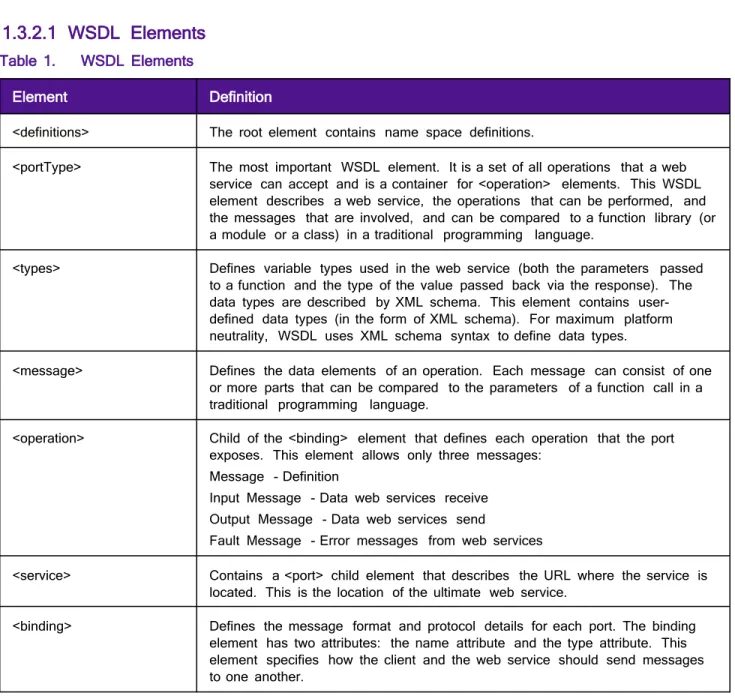
The purpose of a WSDL is to completely describe a web service to a client. A WSDL defines where the service is available and what communications protocol is used to talk to the service. It defines everything required to write a program to work with an XML web service. A WSDL document describes a web service using seven major elements. Elements can be abstract or concrete.
Abstract XML elements describe the web service: <types>, <message>, <operation>, <portType>. Concrete XML elements provide connection details: <service>, <port>, <binding>.
1.3.2.1
WSDL Elements
Table 1. WSDL Elements
Element Definition
<definitions> The root element contains name space definitions.
<portType> The most important WSDL element. It is a set of all operations that a web service can accept and is a container for <operation> elements. This WSDL element describes a web service, the operations that can be performed, and the messages that are involved, and can be compared to a function library (or a module or a class) in a traditional programming language.
<types> Defines variable types used in the web service (both the parameters passed to a function and the type of the value passed back via the response). The data types are described by XML schema. This element contains user-defined data types (in the form of XML schema). For maximum platform neutrality, WSDL uses XML schema syntax to define data types.
<message> Defines the data elements of an operation. Each message can consist of one or more parts that can be compared to the parameters of a function call in a traditional programming language.
<operation> Child of the <binding> element that defines each operation that the port exposes. This element allows only three messages:
Message - Definition
Input Message - Data web services receive Output Message - Data web services send
Fault Message - Error messages from web services
<service> Contains a <port> child element that describes the URL where the service is located. This is the location of the ultimate web service.
<binding> Defines the message format and protocol details for each port. The binding element has two attributes: the name attribute and the type attribute. This element specifies how the client and the web service should send messages to one another.
Note: For more information about the WSDL standard, refer to the World Wide Web Consortium (W3C) Website at w3.org/TR/wsdl
1.3.3
SOAP
x
Is a simple XML-based protocol that allows applications to exchange information over HTTP.x
Is built on open standards supported by numerous development tools on various platforms.x
Is a request interface object in your application programming language.x
Provides a way to communicate between applications running on different operating systems, withdifferent technologies and programming languages.
x
Enables the data to pass through layers of intermediaries and arrive at the ultimate receiver the way itwas intended.
Note: You may not need to actually construct the SOAP messages yourself — many development tools available today construct SOAP behind the scenes.
1.3.3.1
SOAP Message
A SOAP message is an XML document that can be a request for a web service from a client or a “reply” from a web service to a client.
x
Required <SOAP:Envelope>x
Optional <SOAP:Header>x
Required <SOAP:Body>1.3.3.1.1 Example: Delete Tag Request (SOAP Message)
<SOAP-ENV:Envelope xmlns:SOAP-ENV="http://schemas.xmlsoap.org/soap/envelope/" xmlns:SOAP-ENC="http://schemas.xmlsoap.org/soap/encoding/" xmlns:xsi="http://www.w3.org/2001/XMLSchema-instance" xmlns:xsd="http://www.w3.org/2001/XMLSchema" xmlns="http://fedex.com/ws/ship/v13"> <SOAP-ENV:Body> <DeleteTagRequest> <WebAuthenticationDetail> <UserCredential> <Key> User Key </Key> <Password> User Password </Password> </UserCredential> </WebAuthenticationDetail> <Client detail> <AccountNumber>xxxxxxxxx</Account number> <MeterNumber>xxxxxx</MeterNumber> </ClientDetail> <Version> <ServiceId>ship</ServiceId> <Major>12</Major> <Intermediate>0</Intermediate> <Minor>0</Minor> </Version> <DispatchLocationId>MQYA</DispatchLocationId> <DispatchDate>2012-06-01</DispatchDate> <Payment> <PaymentType>shipper</PaymentType> <Payor> <AccountNumber>xxxxxxxxx</AccountNumber> <CountryCode>US</CountryCode> </Payor> </Payment> <ConfirmationNumber>997037200019454</ConfirmationNumber> </DeleteTagRequest> </SOAP-ENV:Body> </SOAP-ENV:Envelope>
1.3.4
Non-SOAP Web Services
FedEx offers a non-SOAP web services solution that you can use to send transactions without having to use tools that provide SOAP protocol support for web services. This may be convenient for developers using environments that do not provide support for SOAP. With this interface, XML documents are sent directly to the FedEx servers via the HTTP POST command. FedEx provides a set of specifications and examples to help with the development of this type of communications method.
To use the non-SOAP web service solution, you must have a working knowledge of HTTPS and Secure Socket Layering (SSL) encryption, the ability to provide a secure SSL connection to FedEx and the ability to code to an
operation interface using XML.
The interfaces used in the SOAP and non-SOAP web services are defined in WSDL files. The WSDL files contain schemas that define the layout of the operations. The same WSDL file is used for both the SOAP and non-SOAP web service users.
Non-SOAP users are concerned only with the schema definitions and not the other WSDL components that are SOAP-specific. The XML data that is sent via the non-SOAP interface looks almost identical to the data that is sent via the SOAP interface. The only difference is that the data sent via the non-SOAP interface does not contain the wrapping Envelope and Body tags that are specific to SOAP. The following is an example of a TrackRequest using the non-SOAP interface.
1.3.4.1
Example Track Request
<soapenv:Envelope xmlns:soapenv="http://schemas.xmlsoap.org/soap/envelope/" xmlns:v9="http://fedex.com/ws/track/v9"> <soapenv:Header/> <soapenv:Body> <v9:TrackRequest> <v9:WebAuthenticationDetail> <v9:UserCredential> <v9:Key>xxxxxx</v9:Key> <v9:Password/> </v9:UserCredential> </v9:WebAuthenticationDetail> <v9:ClientDetail> <v9:AccountNumber>XXXX</v9:AccountNumber> <v9:MeterNumber>XXXX</v9:MeterNumber> <v9:Localization> <v9:LanguageCode>EN</v9:LanguageCode> <v9:LocaleCode>US</v9:LocaleCode> </v9:Localization> </v9:ClientDetail> <v9:TransactionDetail> <v9:CustomerTransactionId>Track By Number_v9</v9:CustomerTransactionId> <v9:Localization> <v9:LanguageCode>EN</v9:LanguageCode> <v9:LocaleCode>US</v9:LocaleCode> </v9:Localization> </v9:TransactionDetail> <v9:Version> <v9:ServiceId>trck</v9:ServiceId> <v9:Major>9</v9:Major> <v9:Intermediate>1</v9:Intermediate> <v9:Minor>0</v9:Minor> </v9:Version> <v9:SelectionDetails> <v9:CarrierCode>FDXE</v9:CarrierCode> <v9:PackageIdentifier> <v9:Type>TRACKING_NUMBER_OR_DOORTAG</v9:Type> <v9:Value>XXXX</v9:Value> </v9:PackageIdentifier> <v9:ShipmentAccountNumber/> <v9:SecureSpodAccount/> <v9:Destination> <v9:StreetLines>Address_Line</v9:StreetLines> <v9:City>City</v9:City> <v9:StateOrProvinceCode>XX</v9:StateOrProvinceCode> <v9:PostalCode>XXXXX</v9:PostalCode> <v9:CountryCode>XX</v9:CountryCode> </v9:Destination> </v9:SelectionDetails> </v9:TrackRequest> </soapenv:Body> </soapenv:Envelope>
1.3.4.2
Error Handling
Error handling for non-SOAP operations is different from error handling for SOAP operations. The SOAP specification provides an error handling mechanism that is not present for non-SOAP operations. For a SOAP operation, a fault is returned as a SOAP exception. For a non-SOAP request, the contents of the SOAP fault are returned as an XML document. These SOAP fault documents are returned in situations such as schema
validation failures or when operation types are unrecognized. In the following example, a SOAP fault document is returned from a schema validation failure in which the AccountNumber element was incorrectly sent as the AccountNumberx element:
<soapenv:Fault xmlns:soapenv="http://schemas.xmlsoap.org/soap/envelope/"> <faultcode>soapenv:Server</faultcode>
<faultstring>5: Schema validation failed for request.</faultstring> <detail>
<con:fault xmlns:con="http://www.bea.com/wli/sb/context"> <con:errorCode>5</con:errorCode>
<con:reason>Schema validation failed for request.</con:reason> <con:details>
<con1:ValidationFailureDetail
xmlns:con1="http://www.bea.com/wli/sb/stages/transform/config">
<con1:message>Expected element 'AccountNumber@http://fedex.com/ws/ship/v8' instead of 'AccountNumberx@http://fedex.com/ws/ship/v8' here in element
ClientDetail@http://fedex.com/ws/ship/v8</con1:message> <con1:xmlLocation>
<ship:AccountNumberx
xmlns:ship="http://fedex.com/ws/ship/v8">000000000</ship:AccountNumberx> </con1:xmlLocation>
<con1:message>Expected element 'AccountNumber@http://fedex.com/ws/ship/v1' before the
end of the content in element ClientDetail@http://fedex.com/ws/ship/v8</con1:message> <con1:xmlLocation> <ship:ClientDetail xmlns:ship="http://fedex.com/ws/ship/8"> <ship:AccountNumberx>000000000000000000</ship:AccountNumberx> <ship:MeterNumber>0000000</ship:MeterNumber> </ship:ClientDetail> </con1:xmlLocation> </con1:ValidationFailureDetail> </con:details> <con:location> <con:node>Validate</con:node> <con:pipeline>Validate_request</con:pipeline> <con:stage>ValidateRequest</con:stage> <con:path>request-pipeline</con:path> </con:location> </con:fault> </detail> </soapenv:Fault>
Each reply should be checked for the Fault element to indicate failure in processing the message.
Note: Normal error processing still applies; this is an additional error check for incorrect syntax in XML documents.
Keep in mind that if you use either the SOAP or non-SOAP version of FedEx Web Services, labels are returned as Base64 encoded. To print shipping labels, you must decode labels before sending them to your printer.
1.3.4.3
Non-SOAP HTTP POST Example
The following HTTPS POST example is a valid working example, but is not guaranteed to work for all programming languages, applications, and host systems:
POST /xml HTTP/1.0
Referrer: YourCompanyNameGoesHere Host: ws.fedex.com
Port: 443
Accept: image/gif, image/jpeg, image/pjpeg, text/plain, text/html, */* Content-Type: text/xml
Content-length: %d Your FedEx Transaction
Each line is followed by one new line character except Content-length and the FedEx transaction. Two new line characters follow the Content-length line. The FedEx transaction has no extra characters. The Content-length line should have the length of the FedEx transaction in place of the %d variable.
Note: Port 443 must be opened for bi-directional communication on your firewall.
After formatting your non-SOAP transaction and placing it in a HTTP POST request, you will need to open an SSL connection to the FedEx test server and send the request through FedEx by using your SSL connection. Next, parse the HTTPS response to determine if there were any errors. Examine the HTTP header to determine if any HTTP or Web Server errors were encountered. If you received a 200 status code, parse the reply to determine if there were any processing problems.
1.3.5
Visual Basic Project Error
You may receive an error indicating that an element is not set, even after setting it in the code. When you set a Boolean type element to true, you may also need to set the specified element to true.
1.4
Implementing FedEx Web Services
Before you begin implementing FedEx Web Services, note the following guidelines:
x
FedEx Web Services are designed for use by skilled developers who are familiar with thecommunication standards SOAP and Web Services Description Language (WSDL).
x
Unlike traditional client/server models, such as a web server or web page system, web services do notprovide the user with a graphical user interface (GUI). Instead, web services share business logic, data, and processes through a programmatic interface across a network.
x
To perform a particular FedEx task such as tracking a package, you need to use a class, module, orfunction that creates your request, sends it to the FedEx platform, and handles the response.
x
FedEx Web Services are designed to support any operating system and coding language.Downloadable sample code is available in Java, C#, VB, .Net and PHP languages from the FedEx Developer Resource Center Technical Resources.
x
Transactions submitted to FedEx using FedEx Web Services are required to have a minimum of 128-bitencryption to complete the request.
1.5
Understanding the XML Schema
The XML schema defines the messages that you can use to access the FedEx services. You create a request that contains business data and other instructions and you send it to FedEx. FedEx replies with a response that contains the data resulting from the instructions you sent in.
Note: The schema diagrams are conveniently linked to help you find information and child values.
The XML schema provides a means for defining the structure, content, and semantics of XML documents. An XML schema defines:
x
Elements and attributes that can appear in a documentx
Elements that are child elementsx
Order and number of child elementsx
Whether an element is empty or can include textx
Data types, default values, and fixed values for elements and attributesSome important facts about the XML schema:
x
Elements that contain sub-elements or carry attributes have complex types.x
Elements that contain numbers (and strings, and dates, etc.), but do not contain any sub-elements, havesimple types. Some elements have attributes. Attributes always have simple types.
associated with a FedEx Web Service. Other simple types are defined as part of XML schema's repertoire of built-in simple types.
x
XML schema built-in simple types are prefixed by "xs:", which is associated with the XML schemanamespace through the declaration xmlns:xs="http://www.w3.org/2001// XMLSchema", displayed in the schema element.
x
The same prefix, and the same association, are also part of the names of built-in simple types, such asxs:string. This association identifies the elements and simple types as belonging to the vocabulary of the XML schema language, rather than the vocabulary of the schema author.
1.5.1
Guide to the XML Schema
The XML schema for each WSDL provides details about the structure, content, and semantics of the request XML document sent to a FedEx Web Service and the XML document returned by that FedEx Web Service. The top of each service schema includes:
x
Schema location and schema file name that ends in an ".xsd" suffix.x
Alphabetical listing of complex types for the documented service.x
Alphabetical listing of schema simple types for the documented service.x
Input or request data type for the documented service.x
Output or reply data type for the documented service.The remainder of the service schema contains tables of information about each element, complex type, and simple type.
Each table consists of some or all of the following sections: diagram, namespace, children, type, properties, used by, facets, and source.
1.6
Implementation Process
Planning your integration and organizing your application data to address your shipping needs can sometimes take more time than the actual implementation of the integration. FedEx Web Services conform to industry standards and are compatible with a comprehensive array of developers’ tools. This ensures the fastest time-to-market with maximum flexibility to integrate FedEx transactions and information into your applications. FedEx WSDLs are fully interoperable with any product or developer’s tool that also conforms to the WS-I Basic Profile. For details, see ws-i.org/Profiles/BasicProfile-1.1-2004-08-24 .
To obtain FedEx Web Services and begin integrating with an application, you need to access documentation, sample code, and sample service requests and replies with the WSDLs from the FedEx Developer Resource Center Technical Resources. Also, obtain a test meter number to engage in real-time online testing in the FedEx hosted test environment.
Note: Not all services are available outside the U.S.
1.6.1
Testing
FedEx supplies a complete online operating environment with which to test your applications against live FedEx servers. To execute test interactions, you must first include a test account number, test meter number,
authentication key, and password in your code. These credentials are provided to registered developers at the FedEx Developer Resource Center at www.fedex.com/developer .
Production credentials can be obtained prior to the certification process. Advanced services are not enabled, but standard services are enabled. Refer to Preproduction Assistance for more information on support from FedEx.
1.6.1.1
Preproduction Assistance
Preproduction assistance is available via the FedEx Web Integrated Solutions Consultation (WISC) team. If you are in the preproduction stages of implementing a FedEx web integrated solution and would like to speak with a FedEx integration consultant who can assist you in understanding FedEx Web Services, contact your FedEx sales executive or technical support at 1.877.339.2774 Monday thru Friday, 7 a.m. to 9 p.m. and Saturday 9 a.m. to 3 p.m. (CST). Both your FedEx sales executive and technical support can request a WISC team member to contact you within 3 business days.
Corporate developers may find that solutions to their needs have already been implemented by a software vendor that is FedEx ® Compatible. If improved time-to-market, cost containment, or specialized knowledge is needed, corporate development planners may want to review the available third-party solutions. To see a list of the solutions provided by the FedEx ® Compatible providers, go to the Available FedEx ® Compatible Solutions page at http://www.fedex.com/us/compatible/ .
1.6.2
Certification
Certification is the process of ensuring that your implementation meets a number of requirements for safe, secure, and effective operation of your solution in the FedEx production environment. Certification requirements differ based on whether you are a corporate or commercial developer, and whether you are implementing using the advanced or standard services. Certification is not required for rating and tracking in production.
1.6.3
Go To Production
Once an application has passed certification, the developer must replace the test credentials with the production credentials issued by FedEx. The application connection is then directed to the production servers, and the application is live.
1.6.3.1
Requirements for Corporate and Non-Commercial Developers
There are some differences in how support is provided and in the approvals required to go into production that depend on whether you are creating an application for use by your own company or if you are planning to resell your solution to others.
1.6.3.2
Requirements and Resources for Corporate Developers
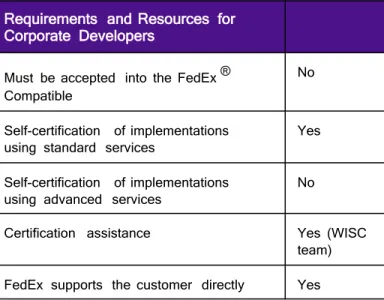
Corporate developers are typically part of a dedicated development team at a single company. This category also includes third-party developers (consultants) hired by the company to work on its behalf. In all cases, the integration will be used by the company itself and will not be resold or distributed outside of its own footprint. In this situation, FedEx can support the customer directly.
Table 2. Requirements and Resources for Corporate Developers
Requirements and Resources for Corporate Developers
Must be accepted into the FedEx ® Compatible
No
Self-certification of implementations
using standard services Yes Self-certification of implementations
using advanced services No
Certification assistance Yes (WISC team) FedEx supports the customer directly Yes
1.6.3.2.1 Requirements for Consultants
Consultants developing on behalf of a corporate customer must ensure that their client provides their account information and a signed End User License Agreement (EULA) to FedEx to obtain a production test meter.
1.6.3.2.2 Requirements and Resources for Commercial Developers
Commercial developers create solutions with the intent of distributing and/or reselling them to their customers. Because they are deployed in a variety of situations, commercial integrations generally require a higher order of
“fit and finish.” Commercial developers are responsible for supporting their products for their customers. FedEx has a dedicated team of professionals to help developers commercialize their products and to coordinate the three-way interplay between the developer, the end customer, and FedEx.
If you are a commercial developer interested in becoming a FedEx Compatible provider, go to http://www.fedex.com/us/compatible/ for more information about the FedEx Compatible Program.
1.6.3.3
URL Errors
If a VB.NET or C# project still sends transactions to the test server after changing the URL in the WSDLs to print to production, perform the following:
x
Make sure permissions are already activated in the production environment.x
Copy the WSDL files to a different folder.x
Follow the directions on changing the new WSDL files to point to production, as described in the FedExDeveloper Resource Center in the “Move to Production” topic.
x
Remove existing web services references from your project that point to old WSDLs containing theURLs to the test environment.
x
Create new web references that point to the modified WSDLs. Use the same names as the oldreferences.
x
Compile and test the project. Your new production credentials should work for standard web services,such as rating or tracking without extra permissions. Advanced web services require permissions to be active before they will work. Old test key values will now return an error message. Test keys will no longerwork with production server addresses.
5.
Locations Service
The Locations Service WSDL searches for, and returns, the addresses of the nearest FedEx package drop-off locations, including FedEx Office ® Print and Ship Center locations.
5.1
Locations Service
Use the Locations Service WSDL to request FedEx locations available for FedEx Express® and FedEx Ground® package drop-off. This transaction searches for and returns the addresses of the nearest FedEx location. You can also use the Locations service to find FedEx locations that provide Hold at FedEx Location service.
5.1.1
Locations Service Details
The Locations Service lets you search for FedEx drop-off locations by address, geographic coordinates or phone number.
You can also narrow your search by type of location. One, multiple, or all types of the FedEx locations listed may be specified in the search request:
x
FedEx Authorized ShipCenter ® locations: Access the FedEx transportation network at over 5,800independently owned and operated pack and ship locations across the U.S. Stores participating in the FedEx Authorized ShipCenter program also provide other business services. FedEx Authorized ShipCenter locations may apply additional charges to the FedEx published rates.
x
Express Stationx
Office Locationx
Self Service Location: Drop off FedEx Express packages (up to 20" x 12" x 6") at a FedEx Express ®Drop Box. Drop boxes cannot be used for FedEx Ground packages or dangerous goods shipments.
x
The following Hold-At-Location location types are supported:o
Drop Box – For FedEx Express packageso
Ship and Get Lockers – FedEx Ground and Express packageso
Office – FedEx Express and Ground packageso
Express Stations – Only Express packagesAdditionally, the search request supports an attribute to specify that the locations support FedEx Express or FedEx Ground Redirect to Hold capability and attributes to specify specific capabilities at the location such as Accepts Cash, Dangerous Goods Service, Ground Dropoff Service, Home Delivery Dropoff Service, Open 24 Hours, Returns Services, Same Day City Dropoffs and so on.
The Search Locations Request will also provide a map URL for the locations returned. In addition to the locations address, the search reply will also return normal hours of operation, exception hours of operation, location contact information (when available: phone number, fax number, email address), accepted currency and location holidays for the locations that met the criteria specified in the request.
You may also narrow your search by the following:
x
Saturday Service availablex
Packing Service available (most FedEx Office locations): FedEx will pack your shipment for you (at anextra charge).
x
Packing Supplies available (anywhere FedEx Express packing materials are supplied; does not includex
Latest Express drop-off locations: Returns locations with the latest drop-off time near you.x
Express drop-off after: Drop a package off after a specific time, such as 5 p.m. Use this element tosearch for drop-off locations open after 5 p.m.
Note: The Locations Service WSDL returns up to 25 locations within a 50-mile radius of your address.
5.1.1.1
UK/GB Locations Support
Customers can identify if UK/GB locations support domestic and/or international shipping using the following attributes:
x
INTERNATIONAL_SHIPPING_SERVICESx
DOMESTIC_SHIPPING_SERVICESNote: The above attributes are supported only for UK/GB, but will be expanded to other countries in the future. These attributes, are ignored if received on a SearchLocations request for any countries other than UK/GB.
If a SearchLocation is requested for any other countries, the error “The location attributes (attr 1 - attrN) are invalid for {COUNTRY_NAME}” will be returned.
If domestic and/or international cutoff times exist for a UK location, both sets of cutoff times will be returned in the SearchLocations Reply. They will be differentiated by CarrierDetail/CountryRelationshipType = DOMESTIC or INTERNATIONAL.
Definitions for reply elements:
x
NormalLatestDropOffDetails means ordinary/normalx
ExceptionalLatestDropOffDetails means an exception to the ordinary/normalx
EffectiveLatestDropOffDetails takes precedence and reflects current hoursFor more detailed information about the services offered by FedEx, see the electronic FedEx Service Guide.
5.1.2
Location Request Coding Details
In addition to the basic request elements required for all transactions as described in the Introduction, the following elements are available when coding a FedExSearchLocationsRequest:
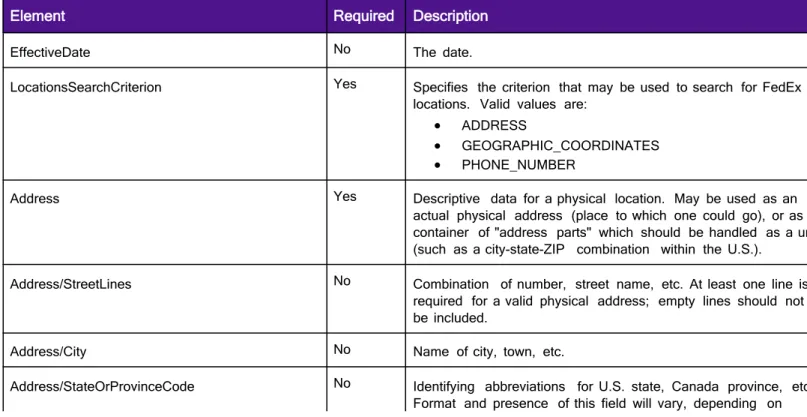
Table 33. SearchLocationsRequest Coding Elements
Element Required Description
EffectiveDate No The date.
LocationsSearchCriterion Yes Specifies the criterion that may be used to search for FedEx locations. Valid values are:
x ADDRESS
x GEOGRAPHIC_COORDINATES
x PHONE_NUMBER
Address Yes Descriptive data for a physical location. May be used as an actual physical address (place to which one could go), or as a container of "address parts" which should be handled as a unit (such as a city-state-ZIP combination within the U.S.).
Address/StreetLines No Combination of number, street name, etc. At least one line is required for a valid physical address; empty lines should not be included.
Address/City No Name of city, town, etc.
Address/StateOrProvinceCode No Identifying abbreviations for U.S. state, Canada province, etc. Format and presence of this field will vary, depending on
country.
Address/PostalCode No Identification of a region (usually small) for mail/package delivery. Format and presence of this field will vary, depending on country.
Address/UrbanizationCode No Relevant only to addresses in Puerto Rico.
Address/CountryCode Yes The two-letter code used to identify a country. Required when searching by any of the LocationsSearchCriterion, even PhoneNumber and GeographicCoordinates.
Address/CountryName No the fully spelled out name of a country.
Address/Residential No Indicates whether this address is residential (as opposed to commercial).
PhoneNumber No Identifies the phone number associated with this contact if the search criterion is PHONE_NUMBER. Numeric value only, for example 9015551234. Mobile numbers will not return results. GeographicCoordinates No Geographic coordinates if the search criterion is
GEOGRAPHIC_COORDINATES. ISO 6709 format, for example +40.75-074.00/
MultipleMatchesAction No Specifies the criterion to be used to return location results when there are multiple matches. Valid values are:
x RETURN_ALL
x RETURN_ERROR
x RETURN_FIRST
SortDetail No Specifies the details on how the location search results will be sorted in the reply.
SortDetail/Criterion No Specifies the criterion to be used to sort the location details. Valid values are:
x DISTANCE
x LATEST_EXPRESS_DROPOFF_TIME
x LATEST_GROUND_DROPOFF_TIME
x LOCATION_TYPE
SortDetail/Order No Specifies the sort order of the location details. Valid values are:
x HIGHEST_TO_LOWEST
x LOWEST_TO_HIGHEST
RequestedReservationDetail You can check for Ship and Get locker availability for redirect to Hold of the tracking number identified in the reservation detail.
RequestedReservationDetail/
UniqueTrackingNumber/TrackingNumber
Search for RTH to a Ship and Get Locker can be requested by populating this element.
Note: You should populate this element in the
ReservationDetail in order to correctly identify the shipment. Constraints No Constraints to be applied to location attributes.
Constraints/RadiusDistance No Specifies the value and units of the radius around the address to search for FedEx locations.
Constraints/RadiusDistance/Value No Identifies the maximum distance to return locations for. Constraints/RadiusDistance/Units No Identifies the unit of measure for the distance value. Valid
values are: x KM x MI
Constraints/ExpressDropOffTimeNeeded No The latest time at which the customer can drop off a package for being shipped using an Express service.
Constraints/ResultsFilters No Specifies the criteria used to filter the results of locations searched. The only valid value is
EXCLUDE_LOCATIONS_OUTSIDE_STATE_OR_PROVINCE Constraints/SupportedRedirectToHoldServices No Specifies the types of services supported by a FedEx location
for redirect to hold. Valid values are: x FEDEX_EXPRESS
x FEDEX_GROUND
x FEDEX_GROUND_HOME_DELIVERY
Note: Ship and Get locations can support any of these 3 redirect –to-hold services (as defined in the FedEx enterprise).
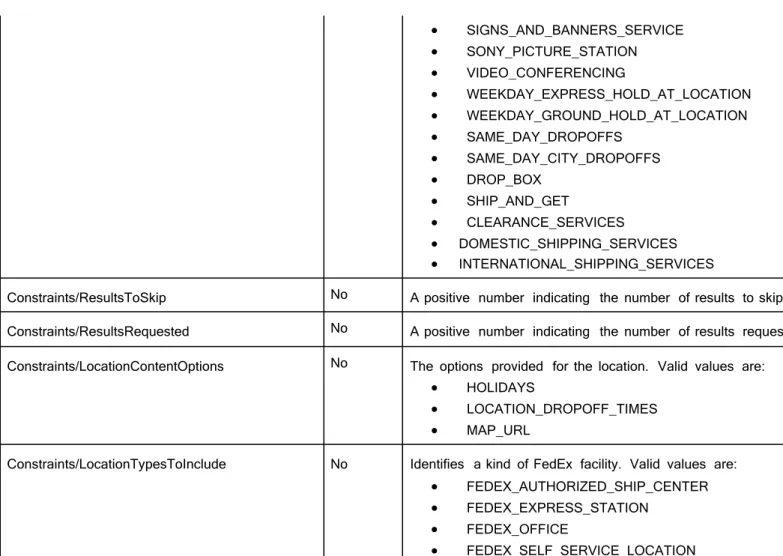
Constraints/RequiredLocationAttributes No The location attributes Locations Service uses to filter by. If more than one value is specified, only those locations that have all the specified attributes will be returned. The attributes are: x ACCEPTS_CASH x ALREADY_OPEN x COPY_AND_PRINT_SERVICES x DANGEROUS_GOODS_SERVICES x DIRECT_MAIL_SERVICES x EXPRESS_FREIGHT_DROPOFFS x EXPRESS_PARCEL_DROPOFFS x FEDEX_FREIGHT_DROPOFFS x GROUND_DROPOFFS x GROUND_HOME_DELIVERY_DROPOFFS x LOCATION_IS_IN_AIRPORT x NOTARY_SERVICES x OBSERVES_DAY_LIGHT_SAVING_TIMES x OPEN_TWENTY_FOUR_HOURS x PACKAGING_SUPPLIES x PACK_AND_SHIP x PASSPORT_PHOTO_SERVICES x RETURNS_SERVICES x SATURDAY_DROPOFFS x SATURDAY_EXPRESS_HOLD_AT_LOCATION
x SIGNS_AND_BANNERS_SERVICE x SONY_PICTURE_STATION x VIDEO_CONFERENCING x WEEKDAY_EXPRESS_HOLD_AT_LOCATION x WEEKDAY_GROUND_HOLD_AT_LOCATION x SAME_DAY_DROPOFFS x SAME_DAY_CITY_DROPOFFS x DROP_BOX x SHIP_AND_GET x CLEARANCE_SERVICES x DOMESTIC_SHIPPING_SERVICES x INTERNATIONAL_SHIPPING_SERVICES
Constraints/ResultsToSkip No A positive number indicating the number of results to skip. Constraints/ResultsRequested No A positive number indicating the number of results requested. Constraints/LocationContentOptions No The options provided for the location. Valid values are:
x HOLIDAYS
x LOCATION_DROPOFF_TIMES
x MAP_URL
Constraints/LocationTypesToInclude No Identifies a kind of FedEx facility. Valid values are:
x FEDEX_AUTHORIZED_SHIP_CENTER
x FEDEX_EXPRESS_STATION
x FEDEX_OFFICE
x FEDEX_SELF_SERVICE_LOCATION
Successful reply data (based on your search criteria) are returned in a SearchLocationsReply:
Table 34. SearchLocationsReply Elements
Element Description
TotalResultsAvailable Specifies total number of location results that are available.
ResultsReturned Specifies the number of location results returned in this reply.
FormattedAddress Specifies the address formatted to have correct postal code per USPS standards.
AddressToLocationRelationship The details about the relationship between the address requested and the locations returned.
AddressToLocationRelationship/MatchedAddress Address as provided in the request. AddressToLocationRelationship/
MatchedAddressGeographicCoordinates
Specifies the geographic coordinates for the matched address.
AddressToLocationRelationship/ DistanceAndLocationDetails
Specifies the distance between the matched address and the addresses of matched FedEx locations. Also specifies
the details of the FedEx locations. AddressToLocationRelationship/
DistanceAndLocationDetails/
LocationDetail/ClearanceLocationDetail
Provides Details about the clearance location. Valid values are: x servicesSupported x consolidationType x clearanceLocationType x specialServicesSupported x clearanceCountries x clearanceRoutingCode AddressToLocationRelationship/ DistanceAndLocationDetails/LocationDetail/ ClearanceLocationDetail/DistributionClearanceType
Specifies the point of clearance details:
DESTINATION_COUNTRY_CLEARANCE - Specifies that the point of clearance is only for the destination country.
SINGLE_POINT_OF_CLEARANCE - Specifies that there is single point of clearance.
AddressToLocationRelationship/
DistanceAndLocationDetails/LocationDetail/ ClearanceCountryDetail
Specifies the special services supported at the clearance location for an individual destination country. Valid values are:
x clearanceCountry x specialServicesSupported AddressToLocationRelationship/ DistanceAndLocationDetails/ LocationDetail/ClearanceCountryDetail/ PackageSpecialServiceType
Package Special Service types. Valid values are: x ALCOHOL x APPOINTMENT_DELIVERY x COD x DANGEROUS_GOODS x DRY_ICE x NON_STANDARD_CONTAINER x PIECE_COUNT_VERIFICATION x PRIORITY_ALERT x SIGNATURE_OPTION AddressToLocationRelationships/ DistanceAndLocationDetails/ LocationDetail/Attributes
The location attributes Locations Service uses to filter by. If more than one value is specified, only those locations that have all the specified attributes will be returned. The attributes are:
x ACCEPTS_CASH x ALREADY_OPEN x CLEARANCE_SERVICES x COPY_AND_PRINT_SERVICES x DANGEROUS_GOODS_SERVICES x DIRECT_MAIL_SERVICES x DOMESTIC_SHIPPING_SERVICES x DROP_BOX x EXPRESS_FREIGHT_DROPOFFS x EXPRESS_PARCEL_DROPOFFS x FEDEX_FREIGHT_DROPOFFS x GROUND_DROPOFFS x GROUND_HOME_DELIVERY_DROPOFFS
x INTERNATIONAL_SHIPPING_SERVICES x LOCATION_IS_IN_AIRPORT x NOTARY_SERVICES x OBSERVES_DAY_LIGHT_SAVING_TIMES x OPEN_TWENTY_FOUR_HOURS x PACKAGING_SUPPLIES x PACK_AND_SHIP x PASSPORT_PHOTO_SERVICES x RETURNS_SERVICES x SAME_DAY_CITY_DROPOFFS x SAME_DAY_DROPOFFS x SATURDAY_DROPOFFS x SATURDAY_EXPRESS_HOLD_AT_LOCATION x SHIP_AND_GET x SIGNS_AND_BANNERS_SERVICE x SONY_PICTURE_STATION x VIDEO_CONFERENCING x WEEKDAY_EXPRESS_HOLD_AT_LOCATION x WEEKDAY_GROUND_HOLD_AT_LOCATION AddressToLocationRelationships/ DistanceAndLocationDetails/ LocationDetail/CarrierDetails
New ServiceType supports the following values: SAME_DAY and SAME_DAY
SearchLocationsReply/AddressToLocationRelationships/ DistanceAndLocationDetails/LocationDetail/CarrierDetails/ NormalLatestDropOffDetails/Overlays/Type US_WEST_COAST SearchLocationsReply/AddressToLocationRelationships/ DistanceAndLocationDetails/LocationDetail/CarrierDetails/ ExceptionalLatestDropOffDetails/Overlays/Type US_WEST_COAST SearchLocationsReply/AddressToLocationRelationships/ DistanceAndLocationDetails/LocationDetail/CarrierDetails/ EffectiveLatestDropOffDetails/Overlays/Type US_WEST_COAST SearchLocationsReply/AddressToLocationRelationships/ DistanceAndLocationDetails/LocationDetail/ CarrierDetails/CountryRelationship x DOMESTIC x INTERNATIONAL AddressToLocationRelationships/ DistanceAndLocationDetails/LocationDetail/ LocationContactAndAddress/AddressAncillaryDetail
Additional information about a physical location.
AddressToLocationRelationships/
DistanceAndLocationDetails/LocationDetail/ LocationContactAndAddress/Contact/PhoneNumber
Identifies the phone number associated with this location. Phone numbers will not be returned for Express Stations at this point.
<soapenv:Envelope xmlns:soapenv="http://schemas.xmlsoap.org/soap/envelope/" xmlns:v1="http://fedex.com/ws/locs/v1"> <soapenv:Header/> <soapenv:Body> <v1:SearchLocationsRequest> <v1:UserCredential> <v1:Key>xxxxxxxxxx</v1:Key> <v1:Password></v1:Password> </v1:UserCredential> </v1:WebAuthenticationDetail> <v1:ClientDetail> <v1:AccountNumber>XXXX</v1:AccountNumber> <v1:MeterNumber>XXX</v1:MeterNumber> <v1:Region>XX</v1:Region> </v1:ClientDetail> <v1:Version> <v1:ServiceId>locs</v1:ServiceId> <v1:Major>1</v1:Major> <v1:Intermediate>0</v1:Intermediate> <v1:Minor>0</v1:Minor> </v1:Version> <v1:EffectiveDate>YYYY-MM-DD</v1:EffectiveDate> <v1:LocationsSearchCriterion>GEOGRAPHIC_COORDINATES</v1:Lo cationsSearchCriterion> <v1:Address> <v1:StreetLines/> <v1:City/> <v1:StateOrProvinceCode/> <v1:PostalCode>XXXX</v1:PostalCode> <v1:UrbanizationCode/> <v1:CountryCode>XX</v1:CountryCode> <v1:Residential>0</v1:Residential> </v1:Address> <v1:PhoneNumber/> <v1:GeographicCoordinates>XXXX</v1:GeographicCoordinates> <v1:MultipleMatchesAction>RETURN_ALL</v1:MultipleMatchesAction> <v1:SortDetail> <v1:Criterion>DISTANCE</v1:Criterion> <v1:Order>LOWEST_TO_HIGHEST</v1:Order> </v1:SortDetail> <v1:Constraints> <v1:RadiusDistance> <v1:Value>10.0</v1:Value> <v1:Units>KM</v1:Units> </v1:RadiusDistance> </v1:Constraints> </v1:SearchLocationsRequest> </soapenv:Body> </soapenv:Envelope>
5.1.3
Samples
Sample code, sample transactions and the specific individual WSDL/XML guide(s) can be downloaded following these steps:
1. Go to the FedEx Developer Resource Center (DRC) at www.fedex.com/developer . Log in with your
FedEx.com username and password. If you do not have one, then click on the "Register Now" link. Fill out the form for your DRC username and password.
2. From the left navigation area of the page, click on the link 'FedEx Web Services'.
3. Click on the link 'Move to documentation' under 'Documentation and Downloads'.
component to find the functionality you are interested in.
5. Use the 'Download code in…' drop-down to select a programming language for the sample code of the
WSDL that has the functionality you need and check the 'Include Documentation (PDF)' check-box under the drop-down in order to download the guide for that WSDL. Then select the gray 'Go' button beside the programming language you selected on the drop-down.
6. In the light gray margin near the name of the functionality (e.g. Ship Service, Rate Service, etc.), there is
a link for the WSDL. Click on that link to download the desired WSDL.
7. If you wish to download all of the WSDLs' sample code, sample transactions, and the Developer Guide, at the top of the WSDL component, click the programming language of your choice on the drop-down next to 'DOWNLOAD ALL' and check the 'Include Documentation (PDF)' check-box. Then select the purple 'Download' button.
5.1.4
Error Messages
Elements Complex types Simple types
SearchLocationsReply Address CarrierCodeType
SearchLocationsRequest AddressAncillaryDetail ConsolidationType AddressToLocationRelationshipDetail CountryRelationshipType CarrierDetail DayOfWeekType ClearanceCountryDetail DistanceUnits ClearanceLocationDetail DistributionClearanceType ClientDetail ExpressRegionCode Contact FedExLocationType Distance LatestDropOffOverlayType DistanceAndLocationDetail LocationAccessibilityType Holiday LocationAttributesType LatestDropOffDetail LocationContentOptionType LatestDropoffOverlayDetail LocationSearchFilterType Localization LocationSortCriteriaType LocationContactAndAddress LocationSortOrderType LocationDetail LocationsSearchCriteriaType LocationHours MultipleMatchesActionType LocationSortDetail NotificationSeverityType Notification OperationalHoursType NotificationParameter PackageSpecialServiceType ReservationAvailabilityDetail ReservationAttributesType SearchLocationConstraints ServiceCategoryType SearchLocationsReply ServiceType SearchLocationsRequest ShippingActionType ShippingHoliday SupportedRedirectToHoldServiceType TimeRange TransactionDetail UniqueTrackingNumber VersionId WebAuthenticationCredential WebAuthenticationDetail element SearchLocationsReply diagram namespace http://fedex.com/ws/locs/v3 type ns:SearchLocationsReply
element SearchLocationsRequest
diagram
namespace http://fedex.com/ws/locs/v3 type ns:SearchLocationsRequest
source <xs:element name="SearchLocationsRequest "type="ns:SearchLocationsRequest "/>
complexType Address
namespace http://fedex.com/ws/locs/v3
children ns1:StreetLines ns1:City ns1:StateOrProvinceCode ns1:PostalCode ns1:UrbanizationCode ns1:CountryCode ns1:CountryName ns1:Residential
annotation documentation
Descriptive data for a physical location. May be used as an actual physical address (place to which one could go), or as a container of "address parts" which should be handled as a unit (such as a city-state-ZIP combination within the US).
source <xs:complexType name="Address">
<xs:annotation>
<xs:documentation >Descriptive data for a physical location. May be used as an actual physical address (place to which one could go), or as a container of "address parts" which should be handled as a unit (such as a city-state-ZIP combination within the US)
.</xs:documentation > </xs:annotation> <xs:sequence>
<xs:element name="StreetLines"type="xs:string"minOccurs="0"maxOccurs="unbounded"> <xs:annotation>
<xs:documentation >Combination of number, street name, etc. At least one line is required for a valid physical address; empty lines should not be included.</xs:documentation >
</xs:annotation > </xs:element>
<xs:element name="City"type="xs:string"minOccurs="0"> <xs:annotation>
<xs:documentation >Name of city, town, etc.</xs:documentation > </xs:annotation >
</xs:element>
<xs:element name="StateOrProvinceCode "type="xs:string"minOccurs="0"> <xs:annotation>
<xs:documentation >Identifying abbreviation for US state, Canada province, etc. Format and presence of this field will vary, depending on country .</xs:documentation >
</xs:annotation > </xs:element>
<xs:element name="PostalCode"type="xs:string"minOccurs="0"> <xs:annotation>
<xs:documentation >Identification of a region (usually small) for mail/package delivery. Format and presence of this field will vary, depending on country.</xs:documentation > </xs:annotation >
</xs:element>
<xs:element name="UrbanizationCode "type="xs:string"minOccurs="0"> <xs:annotation>
<xs:documentation >Relevant only to addresses in Puerto Rico.</xs:documentation > </xs:annotation >
</xs:element>
<xs:element name="CountryCode"type="xs:string"minOccurs="0"> <xs:annotation>
<xs:documentation >The two-letter code used to identify a country.</xs:documentation > </xs:annotation >
</xs:element>
<xs:element name="CountryName"type="xs:string"minOccurs="0"> <xs:annotation>
<xs:documentation >The fully spelt out name of a country.</xs:documentation > </xs:annotation >
</xs:element>
<xs:element name="Residential"type="xs:boolean"minOccurs="0"> <xs:annotation>
.</xs:documentation > </xs:annotation > </xs:element> </xs:sequence> </xs:complexType > complexType AddressAncillaryDetail diagram
namespace http://fedex.com/ws/locs/v3
children ns1:LocationInCity ns1:LocationInProperty ns1:Accessibility ns1:Building ns1:Department ns1:RoomFloor ns1:Suite ns1:Apartment ns1:Room ns1:CrossStreet ns1:AdditionalDescriptions
annotation documentation
Additional information about a physical location, such as suite number, cross street, floor number in a building. These details are not typically a part of a standard address definition; however, these details
might help locate the address.
source <xs:complexType name="AddressAncillaryDetail "> <xs:annotation>
<xs:documentation >Additional information about a physical location, such as suite number, cross street, floor number in a building. These details are not typically a part of a standard address definition; however, these details might help locate the address.</xs:documentation >
</xs:annotation> <xs:sequence>
<xs:element name="LocationInCity "type="xs:string"minOccurs="0"/> <xs:element name="LocationInProperty "type="xs:string"minOccurs="0"/>
<xs:element name="Accessibility"type="ns:LocationAccessibilityType "minOccurs="0"> <xs:annotation>
<xs:documentation >Indicates whether how this location can be accessed.</xs:documentation >
</xs:annotation > </xs:element>
<xs:element name="Building"type="xs:string"minOccurs="0"> <xs:annotation>
<xs:documentation >Specifies building number or name.</xs:documentation > </xs:annotation >
</xs:element>
<xs:element name="Department"type="xs:string"minOccurs="0"> <xs:annotation>
<xs:documentation >Specifies a department in the company or retail store.</xs:documentation >
</xs:annotation > </xs:element>
<xs:element name="RoomFloor"type="xs:string"minOccurs="0"> <xs:annotation>
<xs:documentation >Specifies the floor number.</xs:documentation > </xs:annotation >
</xs:element>
<xs:element name="Suite"type="xs:string"minOccurs="0"/> <xs:element name="Apartment"type="xs:string"minOccurs="0"> <xs:annotation>
<xs:documentation >Specifies apartment number.</xs:documentation > </xs:annotation >
</xs:element>
<xs:element name="Room"type="xs:string"minOccurs="0"> <xs:annotation>
<xs:documentation >Specifies the room number, if one is specified.</xs:documentation > </xs:annotation >
</xs:element>
<xs:element name="CrossStreet"type="xs:string"minOccurs="0"/>
<xs:element name="AdditionalDescriptions "type="xs:string"minOccurs="0"
maxOccurs="unbounded"> <xs:annotation>
<xs:documentation >This is used to specify additional details about the address such as landmark. For e.g. This field is used to capture details such as an address being inside a facility
such as, Chilli's Care Center, St. Jude - Inside.</xs:documentation > </xs:annotation > </xs:element> </xs:sequence> </xs:complexType > complexType AddressToLocationRelationshipDetail diagram namespace http://fedex.com/ws/locs/v3
children ns1:MatchedAddress ns1:MatchedAddressGeographicCoordinates ns1:DistanceAndLocationDetails
annotation documentation
Specifies the relationship between the address specificed and the address of the FedEx Location in terms of distance.
source <xs:complexType name="AddressToLocationRelationshipDetail "> <xs:annotation>
<xs:documentation >Specifies the relationship between the address specificed and the address of the FedEx Location in terms of distance.</xs:documentation >
</xs:annotation> <xs:sequence>
<xs:element name="MatchedAddress "type="ns:Address"minOccurs="0"> <xs:annotation>
<xs:documentation >Address as provided in the request.</xs:documentation > </xs:annotation >
</xs:element>
<xs:element name="MatchedAddressGeographicCoordinates "type="xs:string"
minOccurs="0"> <xs:annotation>
<xs:documentation >Specify the geographic co-ordinates for the matched address.</xs:documentation >
</xs:annotation > </xs:element>
<xs:element name="DistanceAndLocationDetails "type="ns:DistanceAndLocationDetail "
<xs:annotation>
<xs:documentation >Specifies the distance between the matched address and the addresses of matched FedEx locations. Also specifies the details of the FedEx
locations.</xs:documentation > </xs:annotation > </xs:element> </xs:sequence> </xs:complexType > complexType CarrierDetail diagram
namespace http://fedex.com/ws/locs/v3
children ns1:Carrier ns1:ServiceCategory ns1:ServiceType ns1:CountryRelationship ns1:NormalLatestDropOffDetails ns1:ExceptionalLatestDropOffDetails ns1:EffectiveLatestDropOffDetails ns1:ShippingHolidays
source <xs:complexType name="CarrierDetail "> <xs:sequence>
<xs:element name="Carrier"type="ns:CarrierCodeType "minOccurs="0"/>
<xs:element name="ServiceCategory "type="ns:ServiceCategoryType "minOccurs="0"/> <xs:element name="ServiceType"type="ns:ServiceType "minOccurs="0"/>
<xs:element name="CountryRelationship "type="ns:CountryRelationshipType "
minOccurs="0"> <xs:annotation>
<xs:documentation >This field describe a subset of the carrier's products or services which may have unique characteristics: i.e. latest drop-off times at a particular location vary
depending on the destination type.</xs:documentation > </xs:annotation >
</xs:element>
<xs:element name="NormalLatestDropOffDetails "type="ns:LatestDropOffDetail "
minOccurs="0"maxOccurs="unbounded"> <xs:annotation>
<xs:documentation >Specifies the details about the latest times a drop off can be made at a location most days. These are the normal drop off times.</xs:documentation >
</xs:annotation > </xs:element>
<xs:element name="ExceptionalLatestDropOffDetails "type="ns:LatestDropOffDetail "
minOccurs="0"maxOccurs="unbounded"> <xs:annotation>
<xs:documentation >Specifies the details about the exceptional latest times a drop off can be made at a location. These are drop off times that are a variation from the normal drop off times.</xs:documentation >
</xs:annotation > </xs:element>
<xs:element name="EffectiveLatestDropOffDetails "type="ns:LatestDropOffDetail "
minOccurs="0"> <xs:annotation>
<xs:documentation >Specifies the details about the effective latest times drop off can be made at a location on the date requested. These are drop off times that are derived from the normal and exceptional drop off times, depending upon the date
requested.</xs:documentation > </xs:annotation >
</xs:element>
<xs:element name="ShippingHolidays "type="ns:ShippingHoliday "minOccurs="0"
maxOccurs="unbounded"/> </xs:sequence>
</xs:complexType >
complexType ClearanceCountryDetail