Context-Aware Application User Experience
Manipulation
Rohit Begani
B.Tech (IT) Student MSIT, GGSIPU New Delhi, India
ABSTRACT
Due to the conception of a plethora of devices, application usage has become increasingly location agnostic. This paper proposes a concept where applications utilize the context-awareness to manipulate their own User Interface, Language and content according to contexts like time, preferences and location information. Also a prototype has been implemented to clearly illustrate the application and advantages of the aforementioned practices.
General Terms
Context Aware Web Application with automatic manipulation.
Keywords
Context-awareness, contextual user profile, context-aware manipulation
1.
INTRODUCTION
This paper aims to introduce a concept which would allow an application to manipulate itself according to the contextual information available to it. For this not only the user’s location and time, but also high-level factors like the capability of device and the quality of wireless network [1] are taken into consideration. The quality of media[2], layout and content of the page, language of the text and hyperlinks need to be changed to facilitate better user experience[3-5]. Traditionally websites are only made responsive to facilitate usage on handheld devices like mobiles, pads etc. These web pages need to be manipulated to take into consideration many other factors than just the screen size.
The following example may be considered, “James lives in USA and uses a variety of devices like his computer, mobile phone and iPad to read books and find recommendations on a hypothetical website „books.com‟. He usually reads these books at night and the glare of the screen always leaves his eyes burning. He sometimes also buys paperbacks by accessing the link provided on the website.”
Similarly, considering the example of “Joan who lives in Spain. He also likes reading spanish books on „books.com‟ but he faces a few additional problems, though the books he reads are in Spanish but the website itself is in English which makes it difficult for him to understand also the links for paperbacks point to a USA only distributor.”
[image:1.595.326.536.269.388.2]depending on location and may also connect alternate urls to the hyperlinks.
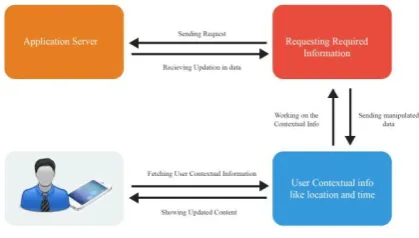
Figure 1: Flow chart explaining flow of data
Fig1 illustrates the working of the proposed concept and shows the flow of information between the user and the server of the application.
2.
RELATED WORK
The most popular and relevant work on Context aware applications such as [6] proposed a context aware web page which removed irrelevant data and only showed relevant content. Similarly, [7] introduced a context-aware media recommendation platform to support media recommendation, support and delivery. [8] Proposed a mobile tourism recommendation system. It took into account various contextual information like time, location etc to recommend places and other things to its users. All these websites only take the content in consideration while turning a blind eye to the need for better quality UX and personal web page customization.
There also have been a number of studies done towards personalized web browsing. Some projects [9] have tried to collect a lot of information on the web and then show only the relevant information to the user. This has been done by implementing a browser extension which may be used by users to find, store and view a lot of data from the internet.
3.
WORKING
3.1
System Overview
The main aim is to develop a context aware web application which is capable of rendering not only content but UI, language, image size adaptively too. Fig 2 may be referred to understand the system architecture or the working of the aforementioned topic. It consists of three main parts:
1. Context Sensing
2. Assessing and calculating requirements
3. Making changes using JavaScript conditionals
Context Sensing deals with capturing of contextual data like user location, time, location-language, required urls, device used and network availability. Then this contextual data is used to get semantic data which is used to provide the best possible User Experience and usability to the user.
Assessing and Calculating requirements mean that the semantic data is processed to understand the requirements of the users. After this the webpage is manipulated to provide friendly UX, translate text if required, scale down or scale up the quality of media elements according to the device capabilities and network quality. It also takes into consideration the current time and manipulates the UX to ease strain on eyes.
Making changes using JavaScript conditionals is the final step and it makes all the relevant changes which may have been assessed and marked as required in the previous step. It takes the following steps
Change UI according to time
Translate text according to location
Down Scale or upscale media quality according to device capabilities and network availability.
Change destination urls of link tags to more relevant urls
3.2
System Architecture
In order to understand the user preferences and needs, the user’s browsing history, location and time need to be recorded. The users browsing history will be used to provide better content [6]. Though [6] in their paper have been able to provide relevant content but they failed to manipulate the UI of the application to provide a better user experience.
1) Context Gathering And Representation
After capturing and gathering the context, conversion takes place to represent the gathered data as semantic information. This is done to improve the relevance of the gathered data to our needs.
a) Time Information
Time information includes the current local time. For this the users’ time and not the server’s time is used as there may be discrepancies between them.
The precise time is not needed but only a rough time frame as we want to divide a day between night and day.
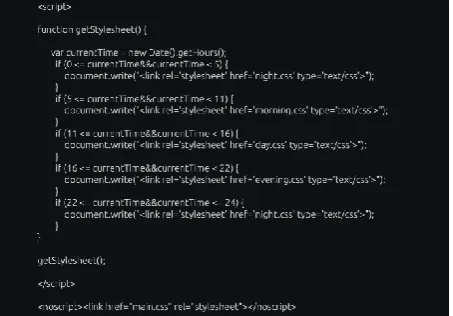
A small JavaScript snippet is made for this.
b) Location Information
Location information may be gathered using different means like Wi-Fi, Cell-ID or GPS (Global Positioning System) data. Here we get numeric data which may help us in pinpointing the location of the user.
Different methods to calculate location have been considered depending on the scenario. Wi-Fi is used when the user is indoors and Cell-ID or GPS are used to calculate location while the user is outdoors.
The location information also has many other uses. When the location of a user is found then the language of the text may be automatically translated to the native language with an option to revert back to original language.[10].
The url’s of hyperlinks must also be changed to maintain relevance to user regardless of his location. For ex if a book buying link refers to ebay in USA and if a person in another country clicks on the link, where ebay is not available, then the link must point to a local website.
c) User Activity
When a user is in an activity then the UI of the application needs to be changed. For example if a user is outdoors and running[11-13] then it would be very difficult to read small text so the font of the text may be increased and more preference may be given to media elements then the text.
Also, if user is using the application in bed during night then the colors of the application may be inverted with a dark background and lighter foreground color.
Similarly, in case a user is indoors during the day then the background of the application may move to warmer colors and to a white background with dark foreground in case the user is outdoors during the day. We understand the shortcomings in the other context-aware applications [14] and provide better UI to our users.
d) Device and Network Quality
The device capability and the quality of network play a pivotal role in the user experience of any application. We segment a web page, removing low priority content to ease usage for users accessing the application through smaller screens[15]. Also, we check the mobile network quality and provide adaptive media elements[16] for better experience and scale down or scale up their qualities according to requirement[17].
2) User Profiling
Since now a lot of data is available regarding the user, including historical data we will save all the data as semantic information.
A part of the JavaScript which allows automatic selection of different stylesheets on basis on time is shown in figure 3. This JavaScript code shows that how we have created conditions where the application would consider the current user’s time and call different css stylesheets according to the time. It has been divided into 4 parts:
Morning
Day
Evening
3.3
Location Aware Manipulation
The manipulations which occur due to the location of the user is an important factor for improving user experience. There are many changes which must be made to the application in regard with the location like language, hyperlinks, content placement and user interface.
a) Translation
For translation Google Translate is used. For it to be effective the developer of the application needs to keep some points in his mind like no text should be added to the web page in form of images, including buttons.
Also, there must always be an option to revert back to the original language or to another language of choice.
b) Hyperlinks
Almost every website has a multitude of external links. Many of these links don’t work in different countries due to the non-availability of the linked websites. These links need to be updated so that they lead to country relevant destination pages.
c) User Interface
The user interface of the application needs to be manipulated to ease usage in different locations. For example the font size may be increased and low priority text may be removed if application is accessed while user in performing an activity. [11]
3.4
Context-Aware UI Manipulation
Every application must aim to show users the most relevant topics according to their own browsing history and preferences. Context-Aware content needs a lot of work to be properly understood and shown to the users. It is important for application developers to understand that what content may be important to users at a particular time.[6].
[image:3.595.317.544.72.230.2]The UI of the application also changes according to the time. This change in UI depends on many different factors:
Location
Time
User Activity
Device Capability
Network Quality
For ex, let us consider a case in which a user is in “Spain and accessing our application in morning at 8 while jogging from his mobile phone which has 2G data connection. His user preferences show that he usually likes to play music at this time and during this time”. Therefore, the app would manipulate itself to the following form:
Spain => Language translated to Spanish
Jogging => Media elements zoomed-in
Font size increased
First page set as music player
Morning => White background with dark foreground colors
for easy visualization
2G data => reduced music quality
Cover Art and other media quality reduced
Mobile => Low priority information removed.
4.
PROTOTYPE IMPLEMENTATION
Shephertz has been used to implement native features of android like Geolocation, Storage and Accelerometer. Shephertz allows implementation on android apps using HTML 5, CSS and Javascript.
A simple application was made using this platform. Each time the user clicks on a button the location, time and accelerometer data is stored.
Final = <Location, Time, Accelerometer, Preference>
For example considering the previous example then the data collected would be:
Final = <Spain, 8 am, Rapid movement, Music>
The above data is used as semantic information to make the application learn over time.
A prototype of the aforementioned application has been implemented for the web and for the Android platform. The advantage of using Shephertz over other software or platform is that Shephertz helps in creating a platform agnostic application. Also it allows quick prototyping of the application.
Multiple screenshots have been attached to show the changes in the application in relation to different contexts. The
screenshots that have been attached are in order. That is, they show the steps which occur in the application.
The application may be run on either desktop or handheld devices. We will first give the example of the desktop application for different scenarios and then give the example of the handheld versions.
4.1 Desktop Implementation
In the desktop implementation of the application our contexts change drastically. The accelerometer data and the location data is only required in a broad form i.e. pinpointing location with data is not necessary. Furthermore, there is no need to consider the activity data of the user as doing physical activity like jogging or even walking outdoors is not a plausible scenario for a desktop user.
Only data like a rough location data is used to change hyperlinks and translate text and a rough idea about the time to invert colors.
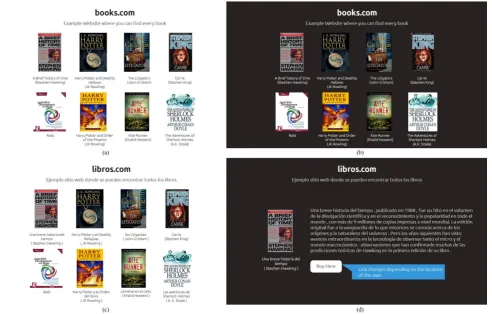
Figure 3 shows the screenshots of the applications and these screenshots may be studied to fully grasp the concept. In figure 3(a) the normal form of “books” tab of website has been shown with white background and dark foreground colors.
Figure 3(b) shows the same webpage but during the night time. At this time the background and foreground colors have been inverted to reduce strain on eyes and to improve user experience.
Figure 3(c) shows the webpage when it is opened in another country, in this example Spain, here the text is translated to Spanish and it may be observed none of the textual data on the web page has been added as an image. This is an important factor and must be kept in mind as textual images can’t be translated to another language.
Figure 3(4) shows another page of the books tap. This shows the page which opens when the user clicks on a book in the previous page. This page shows a short description of the book and it has link to buy the book. All the text has been translated to Spanish as the example of Spain is considered. Furthermore, the hyperlink has been changed to point to a local book selling website.
4.2
Mobile Implementation
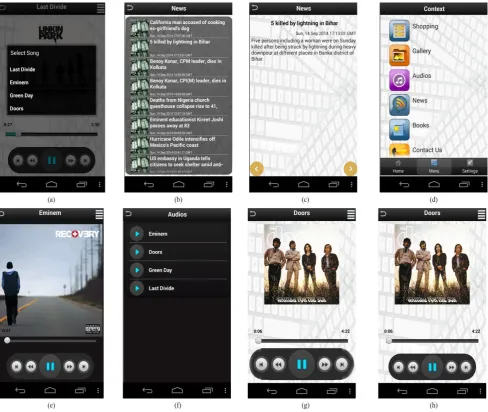
Figure 4 deals with the mobile implementation of the application. This figure shows the prototype application in different scenarios. Changes in scenarios have been considered according to:
<time, location, activity, device type, network quality>
Figure(3)(a) Shows the books section of the website in the normal form.(b) Same books section but at night(inverted color scheme) (c)When the book section is opened in Spain, language translated to Spanish (d) When book information is viewed in
Spain, language changed to Spanish and destination url of hyperlinks changed.
Figure 4 shows the mobile application. Immersive mode of android has been used so as to utilize real estate efficiently.
Figure 4(a) shows the quick selection button that has been added to show the music which the user is most likely to play in accordance with the current context. These suggestions are based on the storage and assessment of application usage by the user.
Contexts considered:
<Outdoors, Morning, Moderate, Mobile device, Poor/Moderate>
Figure 4(b) shows the news section of the application. It shows the user interface of the application when it is opened in the evening. It is noticeable that the background of the application has been darkened but it is still not completely dark as it would be during night. This is to prevent an abrupt change in user interface of the application and make it more gradual. This glare reduction concept is particularly important as it prevents many eye problems. Also, since the network quality is poor/moderate therefore low priority media content like images along with articles are replaced with placeholder
Contexts considered:
< Evening, Mobile device, Poor/Moderate>
Figure 4(c) shows a normal news page of the application and shows how the application is seen when it is opened in the afternoon with light background and a dark foreground text. If the application had been opened in the morning then it would have had more mellower color tones so as to reduce glare in the morning.
Also, in the application the location has been changed to India.
Contexts considered:
<India, Morning, Mobile device>
[image:5.595.53.546.86.400.2]Figure 4(d) shows the main menu which has large icons along with the text. This is so because in some cases it may not be possible to translate the text and therefore in that case the user may navigate with the help of the large icons shown in the application. The background is white as the context is given to be morning.
Figure 4(e) shows the music player when the time context is night. In this case the background color has been changed to black and the foreground to white. The size of the image has been increased to indicate that high quality media is being played. This is because the available network is of high quality.
Contexts considered:
< Night, Mobile device, High>
Figure 4(f) shows the music list during the night. The background of the music list is now completely dark and the foreground is white in color. This eases eye strain.
Figure 4(g) shows the music player in the morning when the quality of network is low. In this media quality is low and that is why the size of the album art is small to indicate this to the user. Also, since the accelerometer data shows that the user is performing quick movements and moving at a fast pace ex jogging or running therefore the size of the buttons have automatically increased to allow easier accessibility to user.
Contexts considered:
<Outdoors, Morning, Quick/ fast pace, Mobile device, Poor/Moderate>
Figure 4(h) shows the music player in the morning when the quality of network is low. Since, the quality of network is low therefore the media quality is also low and the image size is small to indicate this.
Contexts considered:
[image:6.595.53.542.71.483.2]Table 1: Table 1 illustrates the quality of media and how it changes depending on the following factors: Time, Network, Device and Activity. The table is not exhaustive
and includes a specific number of attributes
Time Network Device Activity Media Quality
Morning Poor Mobile Moderate Large size, poor quality
Morning Poor Mobile High Larger Size, Poor Quality
Night Good Computer Low
Small Size, High Quality
The above table illustrates Context Aware attributes which help in deciding application user interface manipulation. The table aims to make it easier to understand the calculations required by the application to make application user interface manipulation efficient.
5.
CONCLUSION AND FUTURE WORK
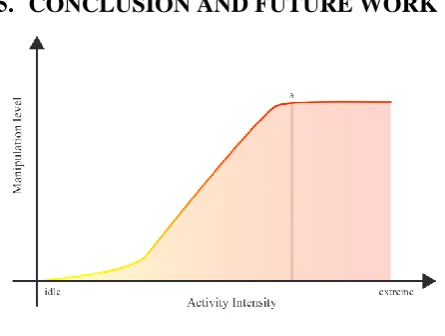
Figure 5: Graph shows stagnation at (a) as infinite manipulation of user interface would break the application. Rather the application should stop
manipulating its UI at a specified point
This paper identifies and presents a generic architecture which shows that how an application can manipulate its own content and also its own interface to provide the best possible experience to its users. This helps in removing distraction while at the same time providing a user interface which allows the user to easily use the application at any time.
In future the aim is to increase the number of contexts parsed to give even more accurate and better recommendations to the users. Also, there is a need to properly understand the users preferred language to improve accuracy.
6.
REFERENCES
[1] Abayomi Moradeyo Otebolaku, Maria Teresa Andrade “Context Aware Media Recommendations”. 2014 28th International Conference on Advanced Information
[3] John M. Carroll. “Five Reasons for Scenario-Based Design”. In Proceedings of the 32nd Hawaii International Conference on System Sciences - 1999
[4] Jeongyun Heo, Dong-Han Ham, Sanghyun Park, Chiwon Song and Wan Chul Yoond. “A framework for evaluating the usability of mobile phones based on multi-level, hierarchical model of usability factors”. Interact. Comput., 21:263-275, August 2009.
[5] Paul Van Shaik, Jonathan Ling “Modeling user experience with web sites: Usability, hedonic value, beauty and goodness” Published in Journal Interacting with Computers archive Volume 20 Issue 3,May,2008 Pages 419-432
[6] Xinxin Zhang, Zhiwen Yu, Jilei Tian, Zhitao Wang, Bin Guo “Context-Aware Mobile Web Browsing Based on HTML5”. Published in 2012 9th International Conference on Ubiquitous Intelligence & Computing and 9th International Conference on Autonomic & Trusted Computing (UIC/ATC)
[7] Z Yu, et al, “Supporting Context-Aware Media Recommendations for Smart Phones” IEEE Pervasive Computing, Vol. 5, No. 3, July-September 2006, pp. 68-75
[8] J. Zhuang, T. Mei, S. Hoi, Y-Q. Xu, and S. Li. “When Recommendation Meets Mobile: Contextual and Personalized Recommendation On The Go” in Proc. ACM Ubicomp, 2011
[9] Mira Dontcheva, Steven M. Drucker , Geraldine Wade , David Salesin , Michael F. Cohen, “Summarizing personal web browsing sessions” Proceedings of the 19th annual ACM symposium on User interface software and technology, October 15-18, 2006, Montreux, Switzerland.
[10] Elovitz H, Johnson R, McHugh, A, Shore J, “Letter-to-sound rules for automatic translation of english text to phonetics” IEEE Transactions on Acoustics, Speech and Signal Processing, (Volume:24 , Issue: 6 )
[11] Yunji Liang, Xingshe Zhou, Zhiwen Yu, Bin Guo, and Yue Yang. “Energy Efficient Activity Recognition Based on Low Resolution Accelerometer in Smart Phones” The 7th International Conference on Grid and Pervasive Computing (GPC 2012), pp. 122-136, May 11-13, 2012, Hong Kong.
[12] Jennifer R. Kwapisz, Gary M. Weiss, Samuel A. Moore, “Activity Recognition using Cell Phone Accelerometers” ACM SIGKDD Explorations Newsletter Volume 12 Issue 2, December 2010.
[13] Lara, O.D, “A Survey on Human Activity Recognition using Wearable Sensors”, Published in Communications Surveys & Tutorials, IEEE (Volume:15 , Issue: 3 ).
[image:7.595.56.279.300.468.2][16] Maria Teresa Andrade , Safak Dogan, Anna Carreras, Vitor Barbosa1, Hemantha Kodikara Arachchi, Jaime Delgado, Ahmet M. Kondoz “Advanced delivery of sensitive multimedia content for better serving user expectations in Virtual Collaboration applications”
[17] Ian S. Burnett, Fernando Pereira, Rik Van de Walle, Rob Koenen “The MPEG-21 Book” John Wiley and Sons ltd.(2006)