1
JavaServer Pages Pocket
Reference
The JavaServer Pages邃「 (JSP) specification is built on top of the Java邃「 servlet specification and is intended to provide for better separation of the presentation (e.g., HTML markup) and business logic (e.g., database operations) parts of web applications. JSP is supported by all major web and applica-tion servers. A partial listing of JSP-compliant products is available at Sun Microsystems窶?JSP web page:
http://java.sun.com/products/jsp/
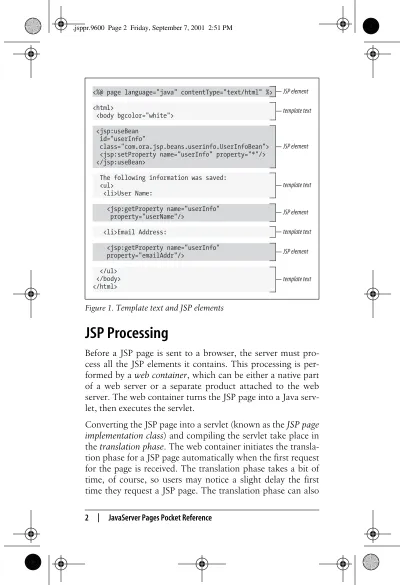
A JSP page is a web page that contains both static content, such as HTML, and JSP elements for generating the parts that differ with each request, as shown in Figure 1. The default filename extension for a JSP page is.jsp.
Everything in the page that窶冱 not a JSP element is called tem-plate text. Template text can be in any format, including HTML, WML, XML, and even plain text. Since HTML is by far the most common web page language in use today, most of the descriptions and examples in this text are HTML-based. You should be aware, though, that JSP has no depen-dency on HTML. Template text is not interpreted at all; it窶冱 passed straight through to the browser. JSP is therefore well-suited to serve any markup language.
JSP Processing
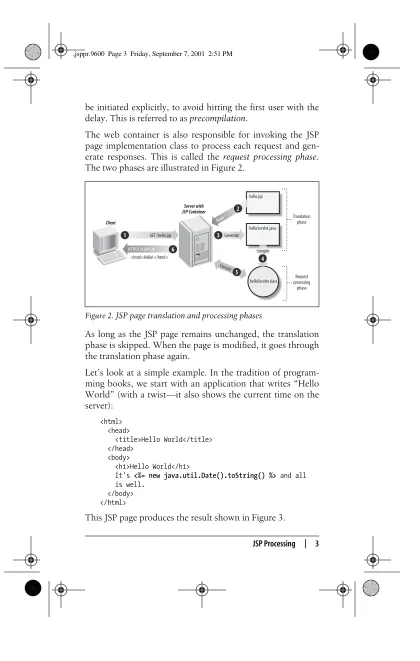
Before a JSP page is sent to a browser, the server must pro-cess all the JSP elements it contains. This propro-cessing is per-formed by aweb container, which can be either a native part of a web server or a separate product attached to the web server. The web container turns the JSP page into a Java serv-let, then executes the servlet.
[image:2.612.104.509.102.687.2]Converting the JSP page into a servlet (known as theJSP page implementation class) and compiling the servlet take place in thetranslation phase. The web container initiates the transla-tion phase for a JSP page automatically when the first request for the page is received. The translation phase takes a bit of time, of course, so users may notice a slight delay the first time they request a JSP page. The translation phase can also Figure 1.Template text and JSP elements
<%@ page language="java" contentType="text/html" %>
<html>
<body bgcolor="white">
<jsp:useBean id="userInfo"
class="com.ora.jsp.beans.userinfo.UserInfoBean"> <jsp:setProperty name="userInfo" property="*"/> </jsp:useBean>
The following information was saved: <ul>
<li>User Name:
<jsp:getProperty name="userInfo" property="userName"/>
<li>Email Address:
<jsp:getProperty name="userInfo" property="emailAddr"/>
</ul> </body> </html>
JSP element
template text
JSP element
template text
JSP element
template text
JSP element
JSP Processing | 3 be initiated explicitly, to avoid hitting the first user with the delay. This is referred to asprecompilation.
The web container is also responsible for invoking the JSP page implementation class to process each request and gen-erate responses. This is called therequest processing phase. The two phases are illustrated in Figure 2.
As long as the JSP page remains unchanged, the translation phase is skipped. When the page is modified, it goes through the translation phase again.
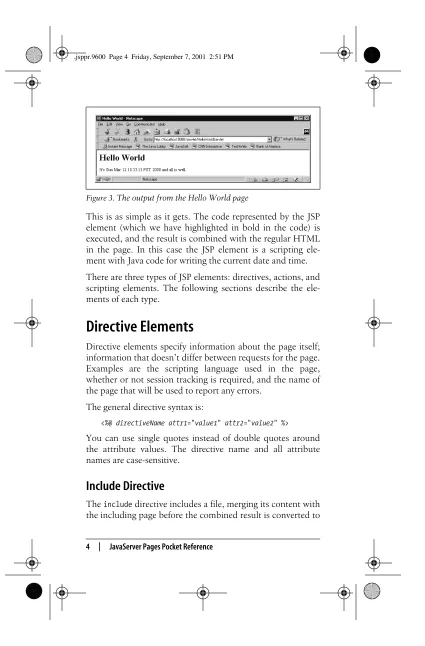
Let窶冱 lookat a simple example. In the tradition of program-ming books, we start with an application that writes 窶廩ello World窶?(with a twist窶琶t also shows the current time on the server):
<html> <head>
<title>Hello World</title> </head>
<body>
<h1>Hello World</h1>
It's <%= new java.util.Date().toString() %> and all is well.
</body> </html>
[image:3.612.104.524.76.737.2]This JSP page produces the result shown in Figure 3. Figure 2.JSP page translation and processing phases
Client
Server with JSP Container
GET /hello.jsp
HTTP/1.0 200 OK
1
6
hello.jsp
helloServlet.java
helloServlet.class Generate
3
Read
2
5
Execute
Compile
4
<html>Hello!</html>
Translation phase
Request processing
This is as simple as it gets. The code represented by the JSP element (which we have highlighted in bold in the code) is executed, and the result is combined with the regular HTML in the page. In this case the JSP element is a scripting ele-ment with Java code for writing the current date and time. There are three types of JSP elements: directives, actions, and scripting elements. The following sections describe the ele-ments of each type.
Directive Elements
Directive elements specify information about the page itself; information that doesn窶冲 differ between requests for the page. Examples are the scripting language used in the page, whether or not session tracking is required, and the name of the page that will be used to report any errors.
The general directive syntax is:
<%@ directiveName attr1="value1"attr2="value2" %> You can use single quotes instead of double quotes around the attribute values. The directive name and all attribute names are case-sensitive.
Include Directive
Theincludedirective includes a file, merging its content with
[image:4.612.103.528.73.719.2]Directive Elements | 5 a JSP page implementation class. It supports the attribute described in Table 1.
A single page can contain multiple include directives. Together, the including page and all included pages form a JSP translation unit.
Example:
<%@ include file="header.html" %>
Page Directive
Thepagedirective defines page-dependent attributes, such as scripting language, error page, and buffering requirements. It supports the attributes described in Table 2.
Table 1. Attributes for the include directive
Name Default Description
[image:5.612.109.515.79.750.2]file No default A page- or context-relative URI path for the file to include.
Table 2. Attributes for the page directive
Name Default Description
autoFlush true Set totrueif the page buffer should be flushed
automatically when it窶冱 full or tofalse if an exception should be thrown when it窶冱 full.
buffer 8kb Specifies the buffer size for the page. The value
must be expressed as the size in kilobytes followed bykb, or be the keywordnone to disable buffering.
contentType text/
html
The MIME type for the response generated by the page, and optionally the charset for the source page (e.g.,text/
html;charset=Shift_JIS).
errorPage No
default
A JSP translation unit (the source file and any files included via theinclude directive) can contain more than one page
extends No
default
The fully qualified name of a Java class that the generated JSP page implementation class extends. The class must implement the
JspPage orHttpJspPage interface in the
javax.servlet.jsp package.
Note that the recommendation is tonot use this attribute. Specifying your own superclass restricts the web container窶冱 ability to provide a specialized, high-performance superclass.
import No
default
A Java import declaration; i.e., a comma-separated list of fully qualified class names or package names followed by.* (for all public classes in the package).
info No
default
Text that a web container may use to describe the page in its administration user interface.
isErrorPage false Set totrue for a page that is used as an error page, to make the implicit exception variable available to scripting elements. Usefalse for regular JSP pages.
isThreadSafe true Set totrue if the container is allowed to run multiple threads through the page (i.e., let the page serve parallel requests). If set tofalse, the container serializes all requests for the page. It may also use a pool of JSP page
implementation class instances to serve more than one request at a time. The
recommendation is to always usetrue and to handle multithread issues by avoiding JSP declarations and ensuring that all objects used by the page are thread-safe.
language java The scripting language used in the page.
session true Set totrue if the page should participate in a
user session. If set tofalse, the implicit
[image:6.612.110.492.84.693.2]session variable is not available to scripting elements in the page.
Table 2. Attributes for the page directive (continued)
Standard Action Elements | 7 directive as long as each attribute, with the exception of the
import attribute, occurs no more than once. If multiple
importattribute values are used, they are combined into one
list ofimport definitions. Example:
<%@ page language="java"
contentType="text/html;charset=Shift_JIS"%> <%@ page import="java.util.*, java.text.*" %> <%@ page import="java.sql.Date" %>
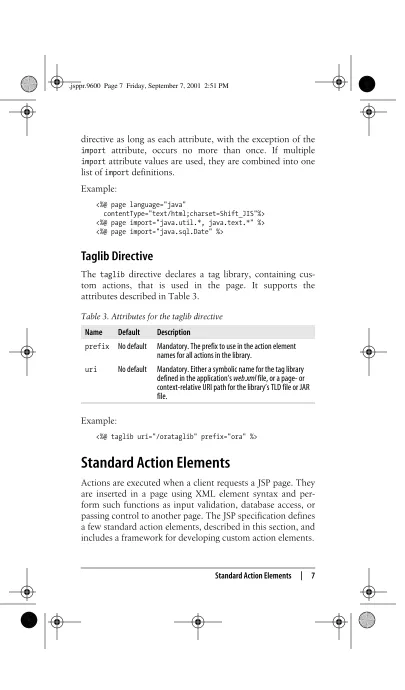
Taglib Directive
Thetaglib directive declares a tag library, containing
cus-tom actions, that is used in the page. It supports the attributes described in Table 3.
Example:
<%@ taglib uri="/orataglib" prefix="ora" %>
Standard Action Elements
[image:7.612.108.513.44.734.2]Actions are executed when a client requests a JSP page. They are inserted in a page using XML element syntax and per-form such functions as input validation, database access, or passing control to another page. The JSP specification defines a few standard action elements, described in this section, and includes a framework for developing custom action elements. Table 3. Attributes for the taglib directive
Name Default Description
prefix No default Mandatory. The prefix to use in the action element names for all actions in the library.
An action element consists of a start tag (optionally with attributes), a body, and an end tag. Other elements can be nested in the body. Here窶冱 an example:
<jsp:forward page="nextPage.jsp">
<jsp:param name="aParam" value="aValue" /> </jsp:forward>
If the action element doesn窶冲 have a body, you can use a shorthand notation in which the start tag ends with/>instead of>, as shown by the<jsp:param>action in this example. The action element name and attribute names are case-sensitive. Action elements, ortags, are grouped intotag libraries. The action name is composed of two parts, a library prefix and the name of the action within the library, separated by a colon (e.g., jsp:useBean). All actions in the JSP standard library use the prefixjsp, while custom actions can use any prefix exceptjsp,jspx,java,javax,servlet,sun, orsunw, as specified per page by thetaglib directive.
Some action attributes accept arequest-time attribute value, using the JSP expression syntax:
<% String headerPage = currentTemplateDir + "/header.jsp"; %>
<jsp:include page="<%= headerPage %>" flush="true" /> Here thepageattribute value is assigned to the value held by the scripting variableheaderPageat request time. You can use any valid Java expression that evaluates to the type of the attribute.
The attribute descriptions for each action in this section define whether a request-time attribute value is accepted or not.
<jsp:fallback>
You can use the<jsp:fallback>action only in the body of a
<jsp:plugin>action. Its body specifies the template text to
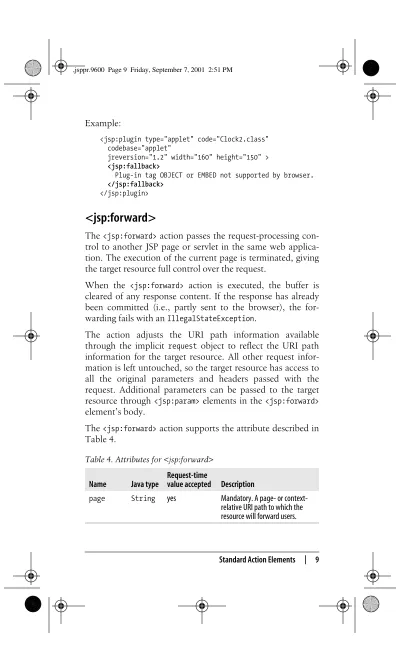
Standard Action Elements | 9 Example:
<jsp:plugin type="applet" code="Clock2.class" codebase="applet"
jreversion="1.2" width="160" height="150" > <jsp:fallback>
Plug-in tag OBJECT or EMBED not supported by browser. </jsp:fallback>
</jsp:plugin>
<jsp:forward>
The<jsp:forward>action passes the request-processing
con-trol to another JSP page or servlet in the same web applica-tion. The execution of the current page is terminated, giving the target resource full control over the request.
When the <jsp:forward> action is executed, the buffer is cleared of any response content. If the response has already been committed (i.e., partly sent to the browser), the for-warding fails with anIllegalStateException.
The action adjusts the URI path information available through the implicitrequest object to reflect the URI path information for the target resource. All other request infor-mation is left untouched, so the target resource has access to all the original parameters and headers passed with the request. Additional parameters can be passed to the target resource through<jsp:param>elements in the<jsp:forward> element窶冱 body.
[image:9.612.104.500.60.729.2]The<jsp:forward>action supports the attribute described in
Table 4.
Table 4. Attributes for <jsp:forward>
Name Java type
Request-time
value accepted Description
page String yes Mandatory. A page- or
Example:
<jsp:forward page="list.jsp" />
<jsp:getProperty>
The<jsp:getProperty>action adds the value of a bean
prop-erty, converted to aString, to the response generated by the page. It supports the attributes described in Table 5.
Example:
<jsp:getProperty name="clock" property="hours" />
<jsp:include>
The<jsp:include>action includes the response from another
JSP page, servlet, or static file in the same web application. The execution of the current page continues after including the response generated by the target resource.
When the <jsp:include> action is executed, the buffer is flushed of any response content. Although theflushattribute can control this behavior, the only valid value in JSP 1.1 is true. This limitation will likely be lifted in a future version of JSP.
[image:10.612.107.521.60.723.2]Even in the target resource, the URI path information avail-able through the implicitrequestobject reflects the URI path information for the source JSP page. All other request infor-mation is also left untouched, so the target resource has access to all the original parameters and headers passed with Table 5. Attributes for <jsp:getProperty>
Name Java type
Request-time
value accepted Description
name String no Mandatory. The name assigned to
a bean in one of the JSP scopes.
property String no Mandatory. The name of the
Standard Action Elements | 11 the request. Additional parameters can be passed to the tar-get resource through <jsp:param> elements in the <jsp: include> element窶冱 body.
The<jsp:include>action supports the attributes described
in Table 6.
Example:
<jsp:include page="navigation.jsp" />
<jsp:param>
You can use the<jsp:param> action in the body of a<jsp:
forward> or <jsp:include> action to specify additional
request parameters for the target resource, as well as in the body of a<jsp:params>action to specify applet parameters. It supports the attributes described in Table 7.
Example:
<jsp:include page="navigation.jsp">
<jsp:param name="bgColor" value="<%= currentBGColor %>" />
</jsp:include>
Table 6. Attributes for <jsp:include>
Name Java type
Request-time
value accepted Description
page String yes Mandatory. A page- or
context-relative URI path for the resource to include.
flush String no Mandatory in JSP 1.1, withtrue
[image:11.612.108.523.84.716.2]as the only accepted value.
Table 7. Attributes for <jsp:param>
Name Java type
Request-time
value accepted Description
name String no Mandatory. The parameter name.
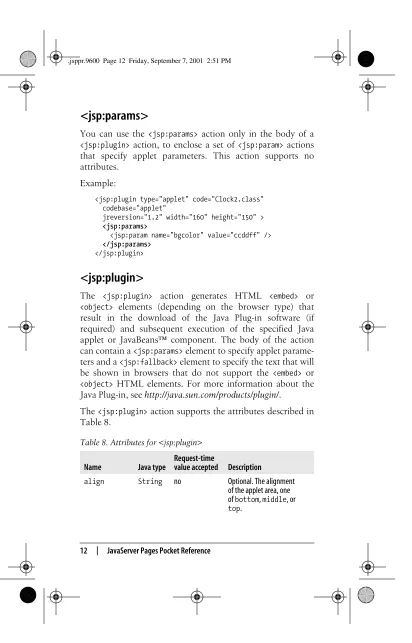
<jsp:params>
You can use the<jsp:params>action only in the body of a <jsp:plugin>action, to enclose a set of<jsp:param> actions that specify applet parameters. This action supports no attributes.
Example:
<jsp:plugin type="applet" code="Clock2.class" codebase="applet"
jreversion="1.2" width="160" height="150" > <jsp:params>
<jsp:param name="bgcolor" value="ccddff" /> </jsp:params>
</jsp:plugin>
<jsp:plugin>
The <jsp:plugin> action generates HTML <embed> or
<object> elements (depending on the browser type) that
result in the download of the Java Plug-in software (if required) and subsequent execution of the specified Java applet or JavaBeans邃「 component. The body of the action can contain a<jsp:params>element to specify applet parame-ters and a<jsp:fallback>element to specify the text that will be shown in browsers that do not support the <embed> or
<object>HTML elements. For more information about the
Java Plug-in, seehttp://java.sun.com/products/plugin/.
[image:12.612.109.521.69.712.2]The<jsp:plugin>action supports the attributes described in
Table 8.
Table 8. Attributes for <jsp:plugin>
Name Java type
Request-time
value accepted Description
align String no Optional. The alignment
of the applet area, one ofbottom,middle, or
Standard Action Elements | 13
archive String no Optional. A comma-separated
list of URIs for archives containing classes and other resources that will be 窶徘reloaded.窶?The classes are loaded using an instance of
anAppletClassLoader
with the givencodebase. Relative URIs for archives are interpreted with respect to the applet窶冱codebase.
code String no Mandatory. The fully
qualified class name for the object.
codebase String no Mandatory. The relative URL
for the directory that contains the class file. According to the HTML 4.0 specification, the directory must be a subdirectory of the directory containing the page.
height String no Optional. The height of the
applet area, in pixels or percentage.
hspace String no Optional. The amount of
whitespace to be inserted to the left and right of the applet area, in pixels.
iepluginurl String no Optional. The URL for the
location of the Internet Explorer Java Plug-in. The default is implementation-dependent.
jreversion String no Optional. The specification
[image:13.612.115.507.147.709.2]version number of the JRE the component requires in order to operate. The default is 1.1. Table 8. Attributes for <jsp:plugin> (continued)
Name Java type
Request-time
Example:
<jsp:plugin type="applet" code="Clock2.class" codebase="applet"
jreversion="1.2" width="160" height="150" > <jsp:params>
<jsp:param name="bgcolor" value="ccddff" /> </jsp:params>
<jsp:fallback>
Plug-in tag OBJECT or EMBED not supported by browser.
</jsp:fallback> </jsp:plugin>
name String no Optional. The applet name,
used by other applets on the same page that need to communicate with it.
nspluginurl String no Optional. The URL for the
location of the Netscape Java Plug-in. The default is implementation-dependent.
title String no Optional. The text to be
rendered in some way by the browser for the applet (e.g., as a 窶徼ool tip窶?.
type String no Mandatory. The type of object
to embed, one ofapplet or
bean.
vspace String no Optional. The amount of
whitespace to be inserted above and below the applet area, in pixels.
width String no Optional. The width of the
applet area, in pixels or percentage. Table 8. Attributes for <jsp:plugin> (continued)
Name Java type
Request-time
Standard Action Elements | 15
<jsp:setProperty>
The<jsp:setProperty>action sets the value of one or more
[image:15.612.103.514.39.728.2]bean properties. It supports the attributes described in Table 9.
The property type can be any valid Java type, including prim-itive types and arrays (i.e., an indexed property). If thevalue attribute specifies a runtime attribute value, the type of the expression must match the property窶冱 type.
[image:15.612.191.423.253.431.2]If the value is a string, either in the form of a request parame-ter value or explicitly specified by thevalue attribute, it is converted to the property窶冱 type as described in Table 10. Table 9. Attributes for <jsp:setProperty>
Name Java type
Request-time
value accepted Description
name String no Mandatory. The name assigned to
a bean in one of the JSP scopes.
property String no Mandatory. The name of the bean
property to set, or an asterisk (*) to set all properties with names matching the request parameters.
param String no Optional. The name of a request
parameter that holds the value to use for the specified property. If omitted, the parameter name and property name must be the same.
value See
below
yes Optional. An explicit value to assign to the property. This attribute cannot be combined with theparam attribute.
Table 10. Conversion of string value to property type
Property type Conversion method
boolean orBoolean Boolean.valueOf(String)
Example:
<jsp:setProperty name="user" property="*" /> <jsp:setProperty name="user" property="modDate" value="<%= new java.util.Date() %>" />
<jsp:useBean>
The<jsp:useBean>action associates a Java bean with a name
in one of the JSP scopes and makes it available as a scripting variable. An attempt is first made to find a bean with the specified name in the specified scope. If it窶冱 not found, a new instance of the specified class is created.
The<jsp:useBean>action supports the attributes described
in Table 11.
char orCharacter String.charAt(int)
double orDouble Double.valueOf(String)
float orFloat Float.valueOf(String)
int orInteger Integer.valueOf(String)
[image:16.612.104.534.70.710.2]long orLong Long.valueOf(String)
Table 11. Attributes for <jsp:useBean>
Name Java type
Request-time
value accepted Description
beanName String yes Optional. The name of the bean,
as expected by the
instantiate()method of the
Beansclass in thejava.beans
package.
class String no Optional. The fully qualified class
name for the bean.
id String no Mandatory. The name to assign to
the bean in the specified scope and the name of the scripting variable. Table 10. Conversion of string value to property type (continued)
[image:16.612.188.424.192.277.2]Standard Action Elements | 17 Of the optional attributes, at least one ofclassortypemust be specified. If both are specified,classmust be assignable totype. The beanNameattribute must be combined with the type attribute and is not valid with theclass attribute. The action is processed in these steps:
1.Attempt to locate an object based on theid andscope attribute values.
2.Define a scripting language variable with the givenidof the specifiedtype orclass.
3.If the object is found, initialize the variable窶冱 value with a reference to the located object, cast to the specifiedtype. This completes the processing of the action. If the action element has a nonempty body, it is ignored.
4.If the object is not found in the specified scope and neither class nor beanName is specified, an
InstantiationException is thrown. This completes the
processing of the action.
5.If the object is not found in the specified scope and the
classattribute specifies a nonabstract class with a public
no-args constructor, a new instance of the class is cre-ated and associcre-ated with the scripting variable and the specified name in the specified scope. After this, step 7 is performed.
scope String no Optional. The scope for the bean:
one ofpage,request,
session, orapplication. The default ispage.
type String no Optional. The fully qualified type
name for the bean (i.e., a superclass or an interface implemented by the bean窶冱 class).
Table 11. Attributes for <jsp:useBean> (continued)
Name Java type
Request-time
If the object is not found and the specified class doesn窶冲 fulfill the requirements, an InstantiationException is thrown. This completes the processing of the action.
6.If the object is not found in the specified scope and the
beanNameattribute is specified, theinstantiate()method
of the java.beans.Beans class is invoked with the
ClassLoaderof the JSP implementation class instance and
thebeanNameas arguments. If the method succeeds, the
new object reference is associated with the scripting vari-able and the specified name in the specified scope. After this, step 7 is performed.
7.If the action element has a nonempty body, the body is processed. The scripting variable is initialized and avail-able within the scope of the body. The text of the body is treated as elsewhere: if there is template text, it is passed through to the response; scriptlets and action tags are evaluated.
A nonempty body is commonly used to complete initial-ization of the created instance. In such a case, the body typically contains <jsp:setProperty>actions and script-lets. This completes the processing of the action.
Example:
<jsp:useBean id="clock" class="java.util.Date" />
Comments
You can use JSP comments in JSP pages to describe what a scripting element or action is doing:
<%-- This is a comment --%>
Escape Characters | 19 Besides describing what窶冱 going on in the JSP page, com-ments can be used to 窶彡omment out窶?portions of the JSP page (for instance, during testing):
<jsp:useBean id="user" class="com.mycompany.UserBean" />
<%--<jsp:setProperty name="user" property="*" /> <jsp:setProperty name="user" property="modDate" value="<%= new java.util.Date() %>" /> <% boolean isValid = user.isValid(); %> --%>
The action and scripting elements within the comment are not executed.
Escape Characters
Since certain character sequences represent start and stop tags, you sometimes need to escape a character so the con-tainer doesn窶冲 interpret it as part of a special character sequence.
In a scripting element, if you need to use the characters%> lit-erally, you must escape the greater-than character with a backslash:
<% String msg = "Literal %\> must be escaped"; %>
To avoid the character sequence <% in template text being interpreted as the start of a scripting element, you must escape the percent sign:
This is template text, and <\% is not a start of a scriptlet.
In an attribute value, you must use the following escapes: attr='a value with an escaped \' single quote' attr="a value with an escaped \" double quote" attr="a value with an escaped \\ backslash"
Scripting Elements
Scripting elements let you add small pieces of code to a JSP page, such as anif statement to generate different HTML depending on some condition. Like actions, they are exe-cuted when the page is requested. You should use scripting elements with extreme care; if you embed too much code in your JSP pages you will end up with an application that窶冱 very hard to maintain. In addition, simple code syntax errors in scripting elements often lead to error messages that are much harder to interpret than error messages for syntax errors in action elements.
Scriptlets
A scriptlet is a blockof code enclosed between a scriptlet-start identifier,<%, and an end identifier,%>:
<%@ page language="java" contentType="text/html" %> <html>
<body bgcolor="white">
<jsp:useBean id="clock" class="java.util.Date" />
<% if (clock.getHours() < 12) { %> Good morning!
<% } else if (clock.getHours() < 17) { %> Good day!
<% } else { %> Good evening! <% } %>
</body> </html>
Here, a clock bean is first created by the <jsp:useBean> action and assigned to a variable with the same name. It is then used in four scriptlets, together forming a complete Java if statement with template text in theif andelse blocks: <% if (clock.getHours() < 12) { %>
Scripting Elements | 21 <% } else if (clock.getHours() < 17) { %>
Theifblockend brace and anelse-if statement, test-ing if it窶冱 before 5 P.M., with its block start brace <% } else { %>
Theelse-ifblockend brace and a finalelseblockstart
brace, handling the case in which it窶冱 after 5 P.M. <% } %>
Theelse block end brace
The web container combines the code segment in the four scriptlets with code for writing the template text to the response body. The end result is that when the firstif state-ment is true, 窶廨ood morning!窶?is displayed, and when the secondifstatement istrue, 窶廨ood day!窶?is displayed. If nei-therifstatement istrue, the finalelseblockis used, display-ing 窶廨ood evendisplay-ing!窶?
The tricky part when using scriptlets is making sure to get all the start and end braces in place. If you miss just one of the braces, the code the web container generates is not syntacti-cally correct. And, unfortunately, the error message you get is not always easy to interpret.
Expressions
An expression starts with<%=and ends with%>. Note that the only syntax difference compared to a scriptlet is the equals sign (=) in the start identifier. An example is:
<%= userInfo.getUserName() %>
In the previous examples using JSP action elements, the attributes were set to literal string values. But in many cases, the value of an attribute is not known when you write the JSP page; the value must instead be calculated when the JSP page is requested. As we mentioned before, for situations like this you can use a JSP expression as a request-time attribute value. Here is an example of how you can use this method to set an attribute of a fictitious log entry bean:
<jsp:useBean id="logEntry" class="com.foo.LogEntryBean" /> <jsp:setProperty name="logEntry" property="entryTime" value="<%= new java.util.Date() %>" />
...
This bean has a property named entryTime that holds a timestamp for a log entry, while other properties hold the information to be logged. To set the timestamp to the time when the JSP page is requested, a<jsp:setProperty>action with a request-time attribute value is used. The attribute value here is represented by a JSP expression that creates a
newjava.util.Dateobject (representing the current date and
time). The request-time attribute is evaluated when the page is requested, and the corresponding attribute is set to the result of the expression. Any property you set this way must have a Java type matching the result of the expression. In this case, theentryTime property must be of typejava.util.Date.
Declarations
A JSP declaration element starts with<%!and ends with%>. Note the exclamation point (!) in the start identifier; that窶冱 what makes it a declaration as opposed to a scriptlet. This declaration element declares an instance variable named
globalCounter, shared by all requests for the page:
<%@ page language="java" contentType="text/html" %> <%!
Scripting Elements | 23 Note that a variable declared with a JSP declaration element is shared by all requests for the page. This can cause so-called multithreading problems if more than one request for the page is processed at the same time. For instance, one request may overwrite the value of the variable set by another request. In most cases, you should declare scripting variables using a JSP scriptlet instead:
<%
int requestLocalCounter = 0; %>
A variable declared in a scriptlet is not shared. It holds a unique value for each request.
You can also use a JSP declaration element to declare a method that can then be used in scriptlets in the same page:
<%@ page language="java" contentType="text/html" %> <html>
<body bgcolor="white"> <%!
String randomColor() {
java.util.Random random = new java.util.Random(); int red = (int) (random.nextFloat() * 255); int green = (int) (random.nextFloat() * 255); int blue = (int) (random.nextFloat() * 255); return "#" +
Integer.toString(red, 16) + Integer.toString(green, 16) + Integer.toString(blue, 16); }
%>
<h1>Random Color</h1>
<table bgcolor="<%= randomColor() %>" >
<tr><td width="100" height="100"> </td></tr> </table>
Implicit Objects
When you use scripting elements in a JSP page, you always have access to a number of objects (listed in Table 12) that the web container makes available. These objects are instances of classes defined by the servlet and JSP specifica-tions. Each class is described in detail in this section, follow-ing the table.
application
Variable name: application
Interface name: javax.servlet.ServletContext
Extends: None
Implemented by: Internal container-dependent class
JSP Page type: Available in both regular JSP pages and error pages
Description
TheServletContextprovides resources shared within a web appli-cation. It holds attribute values representing the JSP application scope. An attribute value can be an instance of any valid Java
class. TheServletContextalso defines a set of methods that a JSP
Table 12. Implicit JSP objects
Variable name Java type
application javax.servlet.ServletContext
config javax.servlet.ServletConfig
exception java.lang.Throwable
out javax.servlet.jsp.JspWriter
page java.lang.Object
pageContext javax.servlet.jsp.PageContext
request javax.servlet.http.HttpServletRequest
response javax.servlet.http.HttpServletResponse
application | 25
page or a servlet uses to communicate with its container; for example, to get the MIME type of a file, dispatch requests, or write to a log file. The web container is responsible for providing
an implementation of theServletContext interface.
EachServletContextis assigned a specific URI path prefix within a web server. For example, a context could be responsible for all
resources underhttp://www.mycorp.com/catalog. All requests that
start with the/catalogrequest path, which is known as thecontext
path, are routed to this servlet context.
Only one instance of a ServletContext may be available to the
servlets and JSP pages in a web application. If the web application indicates that it is distributable, there must be only one instance
of theServletContextobject in use per application in each Java
Virtual Machine.
Methods
public Object getAttribute(String name)
Returns the servlet context attribute with the specified name,
or null if there is no attribute by that name. Context
attributes can be set by a servlet or a JSP page, representing the JSP application scope. A container can also use attributes to provide information that is not already available through methods in this interface.
public java.util.Enumeration getAttributeNames()
Returns an Enumeration of String objects containing the
attribute names available within this servlet context.
public ServletContext getContext(String uripath)
Returns aServletContextobject that corresponds to a
speci-fied URI in the web container. This method allows servlets and JSP pages to gain access to contexts other than their own. The URI path must be absolute (beginning with 窶?窶? and is interpreted based on the containers窶?document root. In a security-conscious environment, the container may return
null for a given URI.
public String getInitParameter(String name)
Returns aStringcontaining the value of the named
context-wide initialization parameter, ornullif the parameter does
public java.util.Enumeration getInitParameterNames()
Returns the names of the context窶冱 initialization parameters as anEnumerationofStringobjects, or an emptyEnumerationif the context has no initialization parameters.
public int getMajorVersion()
Returns the major version of the Java Servlet API the web container supports. A container that complies with the Servlet 2.3 API returns 2.
public String getMimeType(String filename)
Returns the MIME type of the specified file, or nullif the
MIME type is not known. The MIME type is determined by the configuration of the web container and may be specified in a web application deployment descriptor.
public int getMinorVersion()
Returns the minor version of the Java Servlet API the web container supports. A container that complies with the Servlet 2.3 API returns 3.
public RequestDispatcher getNamedDispatcher(String name)
Returns aRequestDispatcherobject that acts as a wrapper for
the named servlet or JSP page. Names can be defined for serv-lets and JSP pages in the web application deployment descriptor.
public String getRealPath(String path)
Returns aStringcontaining the filesystem path for specified
context-relative path. This method returns null if the web
container cannot translate the path to a filesystem path for any reason (such as when the content is being made available from a WAR archive).
public RequestDispatcher getRequestDispatcher(String path)
Returns aRequestDispatcherobject that acts as a wrapper for
the resource located at the specified context-relative path. The resource can be dynamic (servlet or JSP) or static (e.g., a regular HTML file).
public java.net.URL getResource(String path) throws MalformedURLException
Returns aURLto the resource that is mapped to the specified
application | 27
to make a resource available to servlets and JSP pages from sources other than a local filesystem, such as a database or a WAR file.
TheURLprovides access to the resource content direct, so be
aware that requesting a JSP page returns a URL for the JSP
source code as opposed to the processed result. Use a
RequestDispatcher instead to include the results of an execution.
This method returns null if no resource is mapped to the
pathname.
public java.io.InputStream getResourceAsStream(String path)
Returns the resource mapped to the specified context-relative
path as anInputStreamobject. See thegetResource()method
for details.
public String getServerInfo()
Returns the name and version of the servlet container on
which the servlet or JSP page is running as aStringwith the
formatservername/versionnumber(for example,Tomcat/3.2).
A container may include other optional information, such as the Java version and operating system information, within parentheses.
public void log(String message)
Writes the specified message to a web container log file. The name and type of the log file are container-dependent.
public void log(String message, Throwable cause)
Writes the specified message and a stacktrace for the speci-fiedThrowableto the servlet log file. The name and type of the log file are container-dependent.
public void removeAttribute(String name)
Removes the attribute with the specified name from the servlet context.
public void setAttribute(String name, Object attribute)
The following methods are deprecated:
public Servlet getServlet(String name) throws ServletException
This method was originally defined to retrieve a servlet from a
ServletContext. As of the Servlet 2.1 API, this method always
returns null and remains only to preserve binary
compati-bility. This method will be permanently removed in a future version of the Java Servlet API.
public Enumeration getServlets()
This method was originally defined to return anEnumeration
of all the servlets known to this servlet context. As of the Servlet 2.1 API, this method always returns an empty
Enumeration and remains only to preserve binary compati-bility. This method will be permanently removed in a future version of the Java Servlet API.
public Enumeration getServletNames()
This method was originally defined to return anEnumerationof
all the servlet names known to this context. As of Servlet 2.1,
this method always returns an emptyEnumerationand remains
only to preserve binary compatibility. This method will be permanently removed in a future version of the Java Servlet API.
public void log(Exception exception, String message)
This method was originally defined to write an exception窶冱 stacktrace and an explanatory error message to the web container log file. As of the Servlet 2.1 API, the
recommenda-tion is to uselog(String, Throwable) instead.
config
Variable name: config
Interface name: javax.servlet.ServletConfig
Extends: None
Implemented by: Internal container-dependent class
exception | 29
Description
AServletConfiginstance is used by a web container to pass infor-mation to a servlet or JSP page during initialization. The configuration information contains initialization parameters (defined in the web application deployment descriptor) and the
ServletContextobject representing the web application to which the servlet or JSP page belongs.
Methods
public String getInitParameter(String name)
Returns aStringcontaining the value of the specified servlet
or JSP page initialization parameter, ornullif the parameter
does not exist.
public java.util.Enumeration getInitParameterNames()
Returns the names of the servlet窶冱 or JSP page窶冱 initialization
parameters as anEnumerationofStringobjects, or an empty
Enumeration if the servlet has no initialization parameters.
public ServletContext getServletContext()
Returns a reference to theServletContextto which the servlet
or JSP page belongs.
public String getServletName()
Returns the name of this servlet instance or JSP page. The name may be assigned in the web application deployment descriptor. For an unregistered (and thus unnamed) servlet instance or JSP page, the servlet窶冱 class name is returned.
exception
Variable name: exception
Class name: java.lang.Throwable
Extends: None
Implements: java.io.Serializable
Implemented by: Part of the standard Java library
JSP page type: Available only in a page marked as an error page
Description
Theexceptionvariable is assigned to the subclass of Throwable
that caused the error page to be invoked. TheThrowableclass is
the superclass of all errors and exceptions in the Java language. Only objects that are instances of this class (or of one of its subclasses) are thrown by the Java Virtual Machine or can be
thrown by the Javathrowstatement. See the Java documentation
at http://java.sun.com/docs/index.html for a description of the
Throwable class.
out
Variable name: out
Class name: javax.servlet.jsp.JspWriter
Extends: java.io.Writer
Implements: None
Implemented by: A concrete subclass of this abstract class is provided as an internal container-dependent class.
JSP page type: Available in both regular JSP pages and error pages
Description
The out variable is assigned to a concrete subclass of the
JspWriterabstract class by the web container.JspWriteremulates
some of the functionality found in thejava.io.BufferedWriter
and java.io.PrintWriter classes. It differs, however, in that it
throws a java.io.IOException from the print methods (the
PrintWriter does not).
If thepagedirective attributeautoflushis set totrue, all the I/O
operations on this class automatically flush the contents of the
buffer when it窶冱 full. Ifautoflushis set tofalse, all the I/O
opera-tions on this class throw anIOException when the buffer is full.
Constructor
protected JspWriter(int bufferSize, boolean autoFlush)
page | 31
Methods
public abstract void clear() throws java.io.IOException
Clears the contents of the buffer. If the buffer has already
been flushed, throws anIOException to signal the fact that
some data has already been irrevocably written to the client response stream.
public abstract void clearBuffer() throws java.io.IOException
Clears the current contents of the buffer. Unlikeclear(), this
method does not throw an IOException if the buffer has
already been flushed. It just clears the current content of the buffer and returns.
public abstract void close() throws java.io.IOException
Closes the JspWriter after flushing it. Calls to flush() or
write() after a call to close() cause an IOException to be
thrown. Ifclose()is called on a previously closedJspWriter,
it is ignored.
public abstract void flush() throws java.io.IOException
Flushes the current contents of the buffer to the underlying writer, then flushes the underlying writer. This means the buffered content is delivered to the client immediately.
public int getBufferSize()
Returns the size of the buffer in bytes, or0 if it is not buffered.
public abstract int getRemaining()
Returns the number of unused bytes in the buffer.
public boolean isAutoFlush()
Returnstrueif thisJspWriteris set to autoflush the buffer,
false otherwise.
page
Variable name: page
Class name: Object
Extends: None
Implements: None
Implemented by: Part of the standard Java library
Description
Thepagevariable is assigned to the instance of the JSP
implemen-tation class, declared as anObject. This variable is rarely, if ever,
used. See the Java documentation at http://java.sun.com/docs/
index.html for a description of theObject class.
pageContext
Variable name: pageContext
Class name: javax.servlet.jsp.PageContext
Extends: None
Implements: None
Implemented by: A concrete subclass of this abstract class is provided as an internal container-dependent class.
JSP page type: Available in both regular JSP pages and error pages
Description
APageContextinstance provides access to all the JSP scopes and
several page attributes, and offers a layer above the
container-implementation details to enable a container to generate portable JSP implementation classes. The JSP page scope is represented by
PageContextattributes. A unique instance of this object is created
by the web container and assigned to thepageContextvariable for
each request.
Constants
public static final int PAGE_SCOPE = 1; public static final int REQUEST_SCOPE = 2; public static final int SESSION_SCOPE = 3; public static final int APPLICATION_SCOPE = 4;
Constructor
public PageContext()
Creates an instance of thePageContext class. Typically, the
pageContext | 33
Methods
public abstract Object findAttribute(String name)
Searches for the named attribute in the page, request, session (if valid), and application scope(s) in order and returns the
associated value. If the attribute is not found, returnsnull.
public abstract void forward(String relativeUrlPath) throws ServletException, java.io.IOException
Forwards the current request to another active component in the application, such as a servlet or JSP page. If the specified URI starts with a slash, it窶冱 interpreted as a context-relative path; otherwise, it窶冱 interpreted as a page-relative path.
The response must not be modified after calling this method, since the response is committed before this method returns.
public abstract Object getAttribute(String name)
Returns the Object associated with the specified attribute
name in the page scope, ornull if the attribute is not found.
public abstract Object getAttribute(String name, int scope)
Returns the Object associated with the specified attribute
name in the specified scope, ornull if the attribute is not
found. Thescope argument must be one of the int values
specified by thePageContext static scope variables.
public abstract java.util.Enumeration getAttributeNamesInScope(int scope)
Returns anEnumeration ofStringobjects containing all the
attribute names for the specified scope. Thescopeargument
must be one of the intvalues specified by thePageContext
static scope variables.
public abstract int getAttributesScope(String name)
Returns one of the int values specified by thePageContext
static scope variables for the scope of the object associated
with the specified attribute name, or0if the attribute is not
found.
public abstract Exception getException()
Returns the Exception that caused the current page to be
invoked if its page directive isErrorPage attribute is set to
public abstract JspWriter getOut()
Returns the current JspWriter for the page. When this
method is called by a tag handler that implementsBodyTagor
is nested in the body of another action element, the returned
object may be an instance of theBodyContent subclass.
public abstract Object getPage()
Returns theObjectthat represents the JSP page
implementa-tion class instance with which thisPageContext is associated.
public abstract ServletRequest getRequest()
Returns the currentServletRequest.
public abstract ServletResponse getResponse()
Returns the currentServletResponse.
public abstract ServletConfig getServletConfig()
Returns theServletConfigfor this JSP page implementation
class instance.
public abstract ServletContext getServletContext()
Returns theServletContextfor this JSP page implementation
class instance.
public abstract HttpSession getSession()
Returns the currentHttpSession, ornullif thepagedirective
session attribute is set tofalse.
public abstract void handlePageException(Exception e) throws ServletException, java.io.IOException
This method is intended to be called by the JSP page imple-mentation class only to process unhandled exceptions, either by forwarding the request exception to the error page
speci-fied by thepagedirectiveerrorPageattribute or by performing
an implementation-dependent action (if no error page is specified).
public abstract void include(String relativeUrlPath) throws ServletException, java.io.IOException
Causes the specified resource to be processed as part of the
current request. The current JspWriter is flushed before
invoking the target resource, and the output of the target resource窶冱 processing of the request is written directly to the
pageContext | 35
starts with a slash, it窶冱 interpreted as a context-relative path; otherwise, it窶冱 interpreted as a page-relative path.
public abstract void initialize(Servlet servlet, ServletRequest request, ServletResponse response, String errorPageURL, boolean needsSession, int bufferSize, boolean autoFlush)
throws java.io.IOException, IllegalStateException, IllegalArgumentException
This method is called to initialize aPageContextobject so that
it may be used by a JSP implementation class to service an incoming request. This method is typically called from the
JspFactory.getPageContext() method.
public JspWriter popBody()
This method is intended to be called by the JSP page
imple-mentation class only to reassign the previousJspWriter, saved
by the matchingpushBody()method, as the currentJspWriter.
public BodyContent pushBody()
This method is intended to be called by the JSP page
imple-mentation class only to get a newBodyContentobject and save
the current JspWriter on the PageContext object窶冱 internal
stack.
public abstract void release()
Resets the internal state of aPageContext, releasing all internal
references and preparing thePageContextfor potential reuse by
a later invocation ofinitialize(). This method is typically
called from theJspFactory.releasePageContext() method.
public abstract void removeAttribute(String name)
Removes the object reference associated with the specified attribute name in the page scope.
public abstract void removeAttribute(String name, int scope)
Removes the object reference associated with the specified
attribute name in the specified scope. The scope argument
must be one of the intvalues specified by thePageContext
static scope variables.
public abstract void setAttribute(String name, Object attribute)
public abstract void setAttribute(String name, Object o, int scope)
Saves the specified attribute name and object in the specified
scope. The scope argument must be one of the int values
specified by thePageContext static scope variables.
request
Variable name: request
Interface name: javax.servlet.http.HttpServletRequest
Extends: javax.servlet.ServletRequest
Implemented by: Internal container-dependent class
JSP page type: Available in both regular JSP pages and error pages
Description
The request variable is assigned a reference to an internal container-dependent class that implements a protocol-dependent
interface that extends thejavax.servlet.ServletRequestinterface.
Since HTTP is the only protocol supported by JSP 1.1, the class
always implements the javax.servlet.http.HttpServletRequest
interface. The method descriptions in this section include the methods from both interfaces.
Methods
public Object getAttribute(String name)
Returns the value of the named attribute as anObject, ornull
if no attribute of the given name exists.
public java.util.Enumeration getAttributeNames()
Returns anEnumerationcontaining the names of the attributes
available to this request. The Enumeration is empty if the
request doesn窶冲 have any attributes.
public String getAuthType()
Returns the name of the authentication scheme used to
protect the servlet (for example, BASIC or SSL), ornullif the
request | 37 public String getCharacterEncoding()
Returns the name of the character encoding method used in
the body of this request, ornullif the request does not specify
a character encoding method.
public int getContentLength()
Returns the length, in bytes, of the request body (if it is made
available by the input stream), or窶? if the length is not known.
public String getContentType()
Returns the MIME type of the body of the request, ornullif
the type is not known.
public String getContextPath()
Returns the portion of the request URI that indicates the context of the request.
public Cookie[] getCookies()
Returns an array containing all theCookie objects the client
sent with this request, or null if the request contains no
cookies.
public long getDateHeader(String name)
Returns the value of the specified request header as a long
value that represents a date value, or窶? if the header is not
included in the request.
public String getHeader(String name)
Returns the value of the specified request header as aString,
ornull if the header is not included with the request.
public java.util.Enumeration getHeaderNames()
Returns all the header names this request contains as an
EnumerationofStringobjects. TheEnumerationis empty if the request doesn窶冲 have any headers.
public java.util.Enumeration getHeaders(String name)
Returns all the values of the specified request header as an
EnumerationofStringobjects. TheEnumerationis empty if the request doesn窶冲 contain the specified header.
public ServletInputStream getInputStream() throws java.io.IOException
Retrieves the body of the request as binary data using a
public int getIntHeader(String name)
Returns the value of the specified request header as anint, or
窶? if the header is not included in the request.
public java.util.Locale getLocale()
Returns the preferredLocalein which the client will accept
content, based on theAccept-Language header.
public java.util.Enumeration getLocales()
Returns an Enumeration of Locale objects indicating, in
decreasing order and starting with the preferred locale, the
locales that are acceptable to the client based on the
Accept-Language header.
public String getMethod()
Returns the name of the HTTP method with which this
request was made; for example,GET,POST, orPUT.
public String getParameter(String name)
Returns the value of a request parameter as aString, ornullif
the parameter does not exist.
public String getParameterNames()
Returns an Enumeration of String objects containing the
names of the parameters in this request.
public String[] getParameterValues()
Returns an array ofStringobjects containing all of the given
request parameter窶冱 values, ornullif the parameter does not
exist.
public String getPathInfo()
Returns any extra path information associated with the URI
the client sent when it made this request, ornullif there is no
extra path information. For a JSP page, this method always
returnsnull.
public String getPathTranslated()
Returns the result ofgetPathInfo()translated into the
corre-sponding filesystem path. Returns null if getPathInfo()
returnsnull.
public String getProtocol()
Returns the name and version of the protocol the request uses
in the formprotocol/majorVersion.minorVersion; for example,
request | 39 public String getQueryString()
Returns the query string that is contained in the request URI after the path.
public java.io.BufferedReader getReader() throws java.io.IOException
Retrieves the body of the request as character data using a
BufferedReader.
public String getRemoteAddr()
Returns the Internet Protocol (IP) address of the client that sent the request.
public String getRemoteHost()
Returns the fully qualified name of the client host that sent the request or, if the hostname cannot be determined, the IP address of the client.
public String getRemoteUser()
Returns the login ID of the user making this request if the
user has been authenticated, ornullif the user has not been
authenticated.
public RequestDispatcher getRequestDispatcher(String path)
Returns aRequestDispatcherobject that acts as a wrapper for
the resource located at the given path.
public String getRequestedSessionId()
Returns the session ID specified by the client.
public String getRequestURI()
Returns the part of this request窶冱 URI from the protocol name up to the query string in the first line of the HTTP request.
public String getScheme()
Returns the name of the scheme (protocol) used to make this
request; for example,http,https, orftp.
public String getServerName()
Returns the hostname of the server that received the request.
public int getServerPort()
Returns the port number on which the request was received.
public String getServletPath()
public HttpSession getSession()
Returns the currentHttpSessionassociated with this request.
If the request does not have a session, a new HttpSession
object is created, associated with the request, and returned.
public HttpSession getSession(boolean create)
Returns the currentHttpSessionassociated with this request.
If there is no current session and create is true, a new
HttpSessionobject is created, associated with the request, and
returned. Ifcreateisfalseand the request is not associated
with a session, this method returnsnull.
public java.security.Principal getUserPrincipal()
Returns aPrincipalobject containing the name of the current
authenticated user.
public boolean isRequestedSessionIdFromCookie()
Checks if the requested session ID came in as a cookie.
public boolean isRequestedSessionIdFromURL()
Checks if the requested session ID came in as part of the request URL.
public boolean isRequestedSessionIdValid()
Checks if the requested session ID is still valid.
public boolean isSecure()
Returns abooleanindicating whether this request was made
using a secure channel, such as HTTPS, or not.
public boolean isUserInRole(String role)
Returns abooleanindicating whether the authenticated user is
included in the specified logical role or not.
public void removeAttribute(String name)
Removes the specified attribute from the request.
public Object setAttribute(String name, Object attribute)
Stores the specified attribute in the request.
The following methods are deprecated:
public String getRealPath()
As of the Servlet 2.1 API, use ServletContext.
getRealPath(String) instead.
public boolean isRequestSessionIdFromUrl()
As of the Servlet 2.1 API, useisRequestedSessionIdFromURL()
response | 41
response
Variable name: response
Interface name: javax.servlet.http.HttpServletResponse
Extends: javax.servlet.ServletResponse
Implemented by: Internal container-dependent class
JSP page type: Available in both regular JSP pages and error pages
Description
The response variable is assigned a reference to an internal container-dependent class that implements a protocol-dependent
interface that extends the javax.servlet.ServletResponse
interface. Since HTTP is the only protocol supported by JSP 1.1,
the class always implements the javax.servlet.http.
HttpServletResponse interface. The method descriptions in this section include the methods from both interfaces.
Constants
public static final int SC_CONTINUE = 100;
public static final int SC_SWITCHING_PROTOCOLS = 101; public static final int SC_OK = 200;
public static final int SC_CREATED = 201; public static final int SC_ACCEPTED = 202;
public static final int SC_NON_AUTHORITATIVE_INFORMATION = 203;
public static final int SC_NO_CONTENT = 204; public static final int SC_RESET_CONTENT = 205; public static final int SC_PARTIAL_CONTENT = 206; public static final int SC_MULTIPLE_CHOICES = 300; public static final int SC_MOVED_PERMANENTLY = 301; public static final int SC_MOVED_TEMPORARILY = 302; public static final int SC_SEE_OTHER = 303; public static final int SC_NOT_MODIFIED = 304; public static final int SC_USE_PROXY = 305;
public static final int SC_TEMPORARY_REDIRECT = 307; public static final int SC_BAD_REQUEST = 400; public static final int SC_UNAUTHORIZED = 401; public static final int SC_PAYMENT_REQUIRED = 402; public static final int SC_FORBIDDEN = 403; public static final int SC_NOT_FOUND = 404;
public static final int SC_NOT_ACCEPTABLE = 406;
public static final int SC_PROXY_AUTHENTICATION_REQUIRED = 407;
public static final int SC_REQUEST_TIMEOUT = 408; public static final int SC_CONFLICT = 409; public static final int SC_GONE = 410;
public static final int SC_LENGTH_REQUIRED = 411; public static final int SC_PRECONDITION_FAILED = 412; public static final int SC_REQUEST_ENTITY_TOO_LARGE = 413; public static final int SC_REQUEST_URI_TOO_LONG = 414; public static final int SC_UNSUPPORTED_MEDIA_TYPE = 415; public static final int SC_REQUESTED_RANGE_NOT_SATISFIABLE = 416;
public static final int SC_EXPECTATION_FAILED = 417; public static final int SC_INTERNAL_SERVER_ERROR = 500; public static final int SC_NOT_IMPLEMENTED = 501; public static final int SC_BAD_GATEWAY = 502; public static final int SC_SERVICE_UNAVAILABLE = 503; public static final int SC_GATEWAY_TIMEOUT = 504; public static final int SC_HTTP_VERSION_NOT_SUPPORTED = 505;
Methods
public void addCookie(Cookie cookie)
Adds the specified cookie to the response.
public void addDateHeader(String headername, long date)
Adds a response header with the given name and date value. The date is specified in terms of milliseconds since the epoch (January 1, 1970, 00:00:00 GMT).
public void addHeader(String headername, String value)
Adds a response header with the specified name and value.
public void addIntHeader(String headername, int value)
Adds a response header with the given name and integer value.
public boolean containsHeader(String name)
Returns a boolean indicating whether the named response
header has already been set.
public String encodeRedirectURL(String url)
Encodes the specified URL for use in the sendRedirect()
response | 43 public String encodeURL(String url)
Encodes the specified URL for use in a reference element (e.g.,
<a>) by including the session ID in it. If encoding (URL rewriting) is not needed, it returns the URL unchanged.
public void flushBuffer() throws IOException
Forces any content in the response body buffer to be written to the client.
public int getBufferSize()
Returns the actual buffer size (in bytes) used for the response,
or0 if no buffering is used.
public String getCharacterEncoding()
Returns the name of the charset used for the MIME body sent in this response.
public Locale getLocale()
Returns the locale assigned to the response. This is either a
Localeobject for the server窶冱 default locale or theLocaleset withsetLocale().
public ServletOutputStream getOutputStream() throws IOException
Returns a ServletOutputStream suitable for writing binary
data in the response. This method should not be used in a JSP page, since JSP pages are intended for text data.
public PrintWriter getWriter throws IOException
Returns aPrintWriterobject that can send character text to
the client. This method should not be used in a JSP page, since it may interfere with the container窶冱 writer mechanism. Use thePageContext method instead to get the currentJspWriter.
public boolean isCommitted()
Returns a boolean indicating if the response has been
committed.
public void reset()
Clears any data that exists in the buffer as well as the status code and headers. If the response has been committed, this
method throws anIllegalStateException.
public void sendError(int status) throws IOException
method throws anIllegalStateException. After you use this method, you should consider the response committed and should not write to it.
public void sendError(int status, String message) throws IOException
Sends an error response to the client using the specified status code and descriptive message. If the response has
already been committed, this method throws an
IllegalStateException. After you use this method, you should consider the response committed and should not write to it.
public void sendRedirect(String location) throws IOException
Sends a temporary redirect response to the client using the specified redirect location URL. This method can accept rela-tive URLs; the servlet container will convert the relarela-tive URL to an absolute URL before sending the response to the client. If the response is already committed, this method throws an
IllegalStateException. After you use this method, you should consider the response committed and should not write to it.
public void setBufferSize(int size)
Sets the preferred buffer size (in bytes) for the body of the response. The servlet container uses a buffer at least as large as the size requested. The actual buffer size used can be found
with thegetBufferSize() method.
public void setContentLength(int length)
Sets the length (in bytes) of the content body in the response.
In HTTP servlets, this method sets the HTTPContent-Length
header. This method should not be used in a JSP page, since it may interfere with the container窶冱 writer mechanism.
public void setContentType(String type)
Sets the content type of the response being sent to the client.
public void setDateHeader(String headername, long date)
session | 45 public void setHeader(String headername, String value)
Sets a response header with the given name and value. If the header is already set, the new value overwrites the previous one.
public void setIntHeader(String headername, int value)
Sets a response header with the given name and integer value. If the header is already set, the new value overwrites the previous one.
public void setLocale(Locale locale)
Sets the locale of the response, setting the headers (including theContent-Type header窶冱 charset) as appropriate.
public void setStatus(int statuscode)
Sets the status code for this response. Unlike thesendError()
method, this method only sets the status code; it doesn窶冲 add a body and it does not commit the response.
The following methods are deprecated:
public String encodeRedirectUrl(String url)
As of the Servlet 2.1 API, useencodeRedirectURL(String url)
instead.
public String encodeUrl(String url)
As of the Servlet 2.1 API, useencodeURL(String url) instead.
public void setStatus(int statuscode, String message)
As of the Servlet 2.1 API, usesetStatus(int)to set a status
code and sendError(int, String) to send an error with a
description. This method was deprecated because of the ambiguous meaning of the message parameter.
session
Variable name: session
Interface name: javax.servlet.http.HttpSession
Extends: None
Implemented by: Internal container-dependent class
JSP p