NONRESIDENT
TRAINING
COURSE
April 1997
Information Systems
Technician Training Series
Module 1—Administration and Security
NAVEDTRA 14222
NOTICE
DISTRIBUTION STATEMENT A: Approved for public release; distribution is unlimited. Although the words “he,” “him,” and
PREFACE
By enrolling in this self-study course, you have demonstrated a desire to improve yourself and the Navy. Remember, however, this self-study course is only one part of the total Navy training program. Practical experience, schools, selected reading, and your desire to succeed are also necessary to successfully round out a fully meaningful training program.
COURSE OVERVIEW: In completing this nonresident training course, you will demonstrate a knowledge of the subject matter by correctly answering questions on the following subjects: AIS Administration, Communications Administration, Communications Security, AIS Security, and General Security.
THE COURSE: This self-study course is organized into subject matter areas, each containing learning
objectives to help you determine what you should learn along with text and illustrations to help you understand the information. The subject matter reflects day-to-day requirements and experiences of personnel in the rating or skill area. It also reflects guidance provided by Enlisted Community Managers (ECMs) and other senior personnel, technical references, instructions, etc., and either the occupational or naval standards, which are listed in the Manual of Navy Enlisted Manpower Personnel Classifications and Occupational Standards, NAVPERS 18068.
THE QUESTIONS: The questions that appear in this course are designed to help you understand the
material in the text.
VALUE: In completing this course, you will improve your military and professional knowledge. Importantly, it can also help you study for the Navy-wide advancement in rate examination. If you are studying and discover a reference in the text to another publication for further information, look it up.
1997 Edition Prepared by RMCS(SW/AW) Deborah Hearn and
DPC(SW) Walter Shugar, Jr.
Published by
NAVAL EDUCATION AND TRAINING PROFESSIONAL DEVELOPMENT
AND TECHNOLOGY CENTER
Sailor’s Creed
“I am a United States Sailor.
I will support and defend the
Constitution of the United States of
America and I will obey the orders
of those appointed over me.
I represent the fighting spirit of the
Navy and those who have gone
before me to defend freedom and
democracy around the world.
I proudly serve my country’s Navy
combat team with honor, courage
and commitment.
CONTENTS
CHAPTER
1. AIS Administration . . . .1-1
2. Communications Administration . . . 2-1
3. Communications Security . . . .3-1
4. AIS Security . . . ..4-1
5. General Security . . . ..5-1
APPENDIX
I. Glossary . . . .AI-l
II. Glossary of Acronyms and Abbreviations . . . AII-1
III. References Used to Develop the TRAMAN . . . AIII-1
SUMMARY OF THE RADIOMAN
TRAINING SERIES
MODULE 1
Administration and Security—This module covers Radioman duties relating to administering AIS and communication systems. Procedures and guidance for handling of classified information, messages, COMSEC material and equipment, and AIS requirements are discussed.
MODULE 2
Computer Systems—This module covers computer hardware startup, including peripheral operations and system modification. Other topics dis-cussed include computer center operations, media library functions, system operations, and troubleshooting techniques. Data file processes, memory requirements, and database management are also covered.
MODULE 3
Network Communications—This module covers network administration, LAN hardware, and network troubleshooting. Related areas discussed are network configuration and operations, components and connections, and communication lines and nodes.
MODULE 4
Communications Hardware—This module covers various types of com-munications equipment, including satellites and antennas. Subjects discussed include hardware setup procedures, COMSEC equipment requirements, distress communications equipment, troubleshooting equipment, satellite theory, and antenna selection and positioning.
MODULE 5
INSTRUCTIONS FOR TAKING THE COURSE
ASSIGNMENTS
The text pages that you are to study are listed at the beginning of each assignment. Study these pages carefully before attempting to answer the questions. Pay close attention to tables and illustrations and read the learning objectives. The learning objectives state what you should be able to do after studying the material. Answering the questions correctly helps you accomplish the objectives.
SELECTING YOUR ANSWERS
Read each question carefully, then select the BEST answer. You may refer freely to the text. The answers must be the result of your own work and decisions. You are prohibited from referring to or copying the answers of others and from giving answers to anyone else taking the course.
SUBMITTING YOUR ASSIGNMENTS
To have your assignments graded, you must be enrolled in the course with the Nonresident Training Course Administration Branch at the Naval Education and Training Professional Development and Technology Center (NETPDTC). Following enrollment, there are two ways of having your assignments graded: (1) use the Internet to submit your assignments as you complete them, or (2) send all the assignments at one time by mail to NETPDTC.
Grading on the Internet: Advantages to Internet grading are:
• you may submit your answers as soon as you complete an assignment, and
• you get your results faster; usually by the next working day (approximately 24 hours).
In addition to receiving grade results for each assignment, you will receive course completion confirmation once you have completed all the
assignments. To submit your assignment answers via the Internet, go to:
http://courses.cnet.navy.mil
Grading by Mail: When you submit answer
sheets by mail, send all of your assignments at one time. Do NOT submit individual answer sheets for grading. Mail all of your assignments in an envelope, which you either provide yourself or obtain from your nearest Educational Services Officer (ESO). Submit answer sheets to:
COMMANDING OFFICER NETPDTC N331
6490 SAUFLEY FIELD ROAD PENSACOLA FL 32559-5000
Answer Sheets: All courses include one “scannable” answer sheet for each assignment. These answer sheets are preprinted with your SSN, name, assignment number, and course number. Explanations for completing the answer sheets are on the answer sheet.
Do not use answer sheet reproductions: Use
only the original answer sheets that we provide—reproductions will not work with our scanning equipment and cannot be processed.
Follow the instructions for marking your answers on the answer sheet. Be sure that blocks 1, 2, and 3 are filled in correctly. This information is necessary for your course to be properly processed and for you to receive credit for your work.
COMPLETION TIME
PASS/FAIL ASSIGNMENT PROCEDURES
If your overall course score is 3.2 or higher, you will pass the course and will not be required to resubmit assignments. Once your assignments have been graded you will receive course completion confirmation.
If you receive less than a 3.2 on any assignment and your overall course score is below 3.2, you will be given the opportunity to resubmit failed assignments. You may resubmit failed assignments only once. Internet students will
receive notification when they have failed an assignment--they may then resubmit failed assignments on the web site. Internet students may view and print results for failed assignments from the web site. Students who submit by mail will receive a failing result letter and a new answer sheet for resubmission of each failed assignment.
COMPLETION CONFIRMATION
After successfully completing this course, you will receive a letter of completion.
ERRATA
Errata are used to correct minor errors or delete obsolete information in a course. Errata may also be used to provide instructions to the student. If a course has an errata, it will be included as the first page(s) after the front cover. Errata for all courses can be accessed and viewed/downloaded at:
http://www.advancement.cnet.navy.mil
STUDENT FEEDBACK QUESTIONS
We value your suggestions, questions, and criticisms on our courses. If you would like to communicate with us regarding this course, we encourage you, if possible, to use e-mail. If you write or fax, please use a copy of the Student Comment form that follows this page.
For subject matter questions:
E-mail: [email protected] Phone: Comm: (850) 452-1501
DSN: 922-1501 FAX: (850) 452-1370 (Do not fax answer sheets.) Address: COMMANDING OFFICER
NETPDTC N311
6490 SAUFLEY FIELD ROAD PENSACOLA FL 32509-5237
For enrollment, shipping, grading, or completion letter questions
E-mail: [email protected] Phone: Toll Free: 877-264-8583
Comm: (850) 452-1511/1181/1859 DSN: 922-1511/1181/1859
FAX: (850) 452-1370 (Do not fax answer sheets.) Address: COMMANDING OFFICER
NETPDTC N331
6490 SAUFLEY FIELD ROAD PENSACOLA FL 32559-5000
NAVAL RESERVE RETIREMENT CREDIT
Student Comments
Course Title:
Information Systems Technician Training Series Module 1—Administration and Security
NAVEDTRA: 14222 Date:
We need some information about you:
Rate/Rank and Name: SSN: Command/Unit
Street Address: City: State/FPO: Zip
Your comments, suggestions, etc.:
Privacy Act Statement: Under authority of Title 5, USC 301, information regarding your military status is requested in processing your comments and in preparing a reply. This information will not be divulged without written authorization to anyone other than those within DOD for official use in determining performance.
CHAPTER 1
AIS ADMINISTRATION
LEARNING OBJECTIVES
Upon completing this chapter, you should be able to do the following:
l
l
l
l
l
l
l
l
l
l
Describe the preparation and monitoring of the run schedule.
Examine console printouts, logs, and describe the analysis of console printouts and logs.
Schedule computer downtime with users, to include hardware maintenance and software upgrades.
Prepare emergency urgent change requests, to include application and system programs.
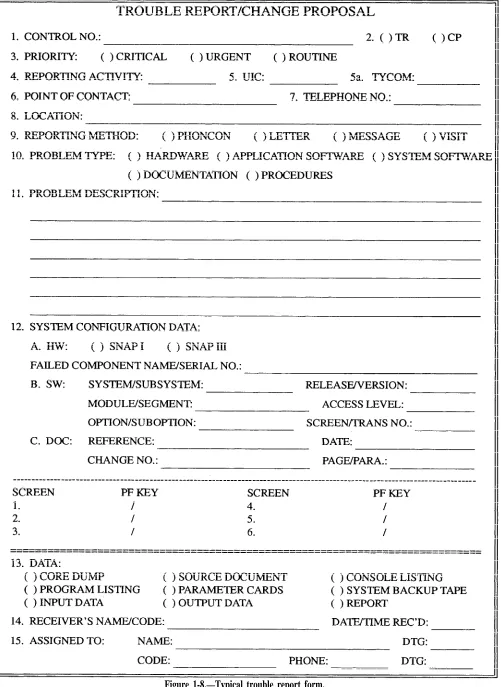
Prepare, review, and coordinate trouble reports.
Describe how to conduct and update an AIS equipment inventory.
Describe the preparation and analysis of system performance reports.
Explain the establishment and maintenance of system resource limits.
Describe how to project future application growth capabilities.
Explain how to prepare guidelines for contingency/disaster recoveries, to include adequate replacement parts and backup media and current backups.
Are scheduling systems really necessary to get the work done? No; but unless you are working at an AIS facility with unlimited resources, it would not be long before confusion and disorder set in if you did not have one. That would be followed by unhappy and dissatisfied users demanding their output products in a timely manner. Users rely on computer operations and support personnel to get their jobs done on time.
Whether your AIS facility has one or several computers, it will be your job to see that the AIS production work of your command is processed in a timely reamer. This means schedules. You will need
to develop monthly production schedules in coordination with user-assigned subsystem coordinators. You will also need to develop daily workload schedules to meet user-established deadlines. If your computer system has online capabilities, you will need to be sure users have access when they need it and that the system is responsive.
implementing performance-tuning initiatives to improve computer system performance. You will also be expected to project future application growth capabilities. All these are technical functions needed to ensure the smooth operation of an AIS facility.
In this chapter, you will learn about the many varied tasks you may perform as an input/output control clerk and then as a scheduler, reports preparation, trouble reports, technical assists, and operational guidelines. Our objective is to give you a better understanding of the importance, scope, and responsibilities that go with processing production jobs—receiving jobs, scheduling AIS production within the AIS facility, and ensuring the accuracy and timeliness of products.
I/O CONTROL
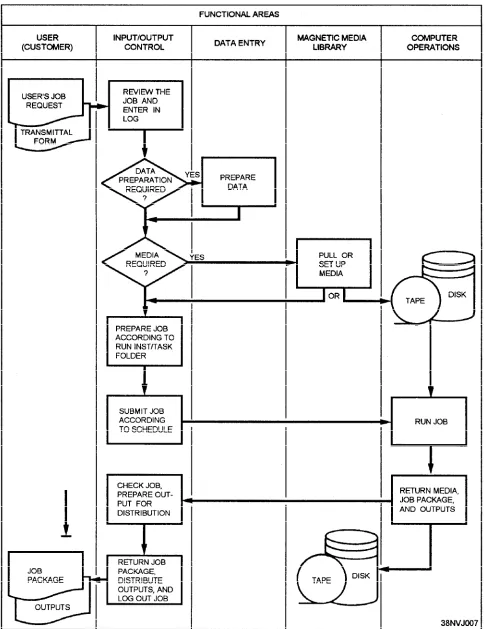
I/O control is the interface between the user and the computer system. Figure 1-1 shows an example of the role played by I/O control in the processing of computer jobs.
I/O CONTROL PROCEDURES
I/O, as you know, stands for input/output. The people who perform I/O functions are called control clerks, I/O control clerks, job-staging clerks, distribution clerks, or computer aids. In short, these are the people who are responsible for the quality and control of data processing input and output media and products. They ensure that the data to be processed meets all the requirements as outlined in the input criteria (instructions and procedures), that all data are processed, that all processing steps are performed, that the output products are distributed to the appropriate users once they are complete.
To be an efficient and effective I/O control clerk, you should be able to work on your own with a minimum of supervision; work well with other people; display tact and diplomacy; be a good communicator; use sound judgment; be logical, methodical, and persuasive; and most of all be able to respond to users’ requests. Although you may manage to stay out of the limelight in this job, you do perform an integral function in the overall ADP operation. The importance and impact you have (whether it be aboard ship or ashore) is far-reaching and invaluable. Most opinions formulated by the AIS users (customers) are based on the quality of their output products and their personal contact with you as an I/O control clerk. Your attitude toward your job and its importance is seen not only by
the customer, but also by your fellow workers, supervisor, and, in some cases, management. The quality of your work will be your signature when dealing with other AIS personnel and customers.
I/O control is a process. Your job will be to follow your installation’s procedures. Although the procedures may differ from one installation to another, they all require the same knowledge and skills.
As an I/O control clerk, you act as the middle person between the user (customer) and the computer. Normally, the users come to you with a transmittal or request form and sometimes with their input—source documents, magnetic tapes, diskettes, and so on. Before accepting and logging in their jobs, take a few moments to look over the transmittal form. Be sure that all the necessary entries are properly filled in, that they are readable, and that any special instructions are understandable. It is better to clear up any misunderstandings right then and there, rather than having to contact the user again later and possibly cause a delay in the job getting on the computer. Never be embarrassed to ask questions. You must remember that many of the users you come in contact with are non-ADP oriented; therefore, it is up to you to help them understand the process and its requirements.
Once you have logged the job in, you may work with data entry to prepare data or programs; then with the media library to pull the needed tapes or disks; and then with computer operations to have the job run. Once the job has been run on the computer, you may check the output products. When you are sure the outputs are OK, you distribute them according to instructions, log the job out, and file or return the job materials to the user.
Study figure 1-1 for a few moments. It will help you see how the work flows and how you, as an I/O control clerk, fit in the picture. The functional areas are listed across the top of the figure.
OPERATIONAL REQUIREMENTS
Your operational requirements will include some or all of the following tasks:
l l l l l l l l l l l l l
Receive user job requests.
Maintain input and output control logs.
Verify inputs to be processed to ensure they are correct and in accordance with the run folder or run instructions.
Make system control language (SCL) run stream changes as required for correct data processing of the user’s runs.
Input the user’s run package (jobs) to the computer operations personnel according to a schedule.
Monitor the jobs in progress to ensure that all data are processed and that all processing steps have been properly performed.
Balance the number of records input relative to the number output.
Verify the format and the number of copies of each printed output in accordance with instructions in the run folder.
Reconcile processing discrepancies and inconsistencies.
Ensure that printed outputs are complete, properly collated, and assembled.
Arrange for distribution of outputs to authorized users.
Operate a variety of auxiliary equipment: copying machines, decollators, tape cleaners, CRT terminals, and so on.
Become familiar with the basic operations of the AIS computer facility.
Now that you are familiar with the process and with operational responsibilities, let’s look at the parts: transmittal forms, input control logs, job preparation, scheduling, monitoring, and output products.
Processing AIS Service Requests
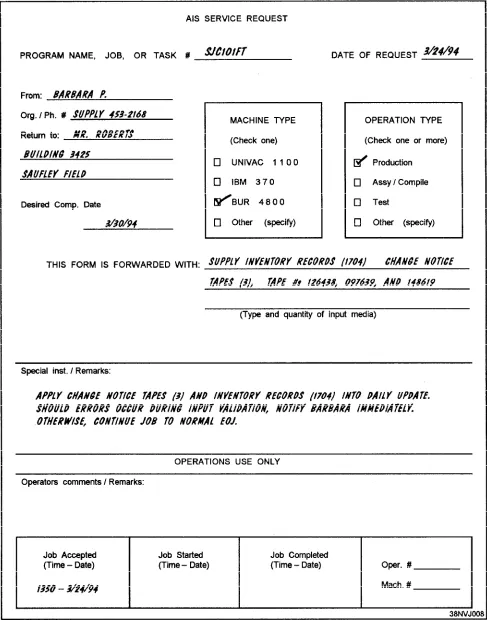
Your first task may be to receive jobs from users. Each job will have an AIS service request of some type. A typical AIS service request is illustrated in figure 1-2.
In looking over this form, you will notice that it provides you with such information as the following:
l l o l l l l l
The program name, job number, or task number that is used to reference a particular job application;
The user’s name, department and/or organization, and phone number;
Where and/or to whom the output is to be sent;
The desired completion date of the job;
The computer (machine type) to be used for the job.
The type of operation to be performed: production, test, assemble, compile, and so on;
The quantity and type of input media and/or material to be used: magnetic tape, blank checks, and so on; and
Any special instructions or remarks the user wishes to include.
You will also notice that the lower portion of the AIS service request (see figure 1-2) is reserved for operations use only. This is where you enter the time and date that the job was accepted for processing (lower left-hand corner). The remaining blocks are used by the people in operations to indicate when the job started, when it was completed, along with any significant comments about the job during the time it was run.
If, while reviewing the user’s request, you happen to come across a discrepancy or find something that is incomplete or unclear, be sure to bring it to the user’s attention. Just remember that throughout the course of your conversation, you are to be tactful and diplomatic. You must always keep in mind that you are representing your command, and the image you project, both personally and professionally, is as important to your job as the work that is being submitted. The key word is communication, NOT confrontation. Once you have accepted the user’s request, you make the necessary entries in the job control log.
Job Control Log
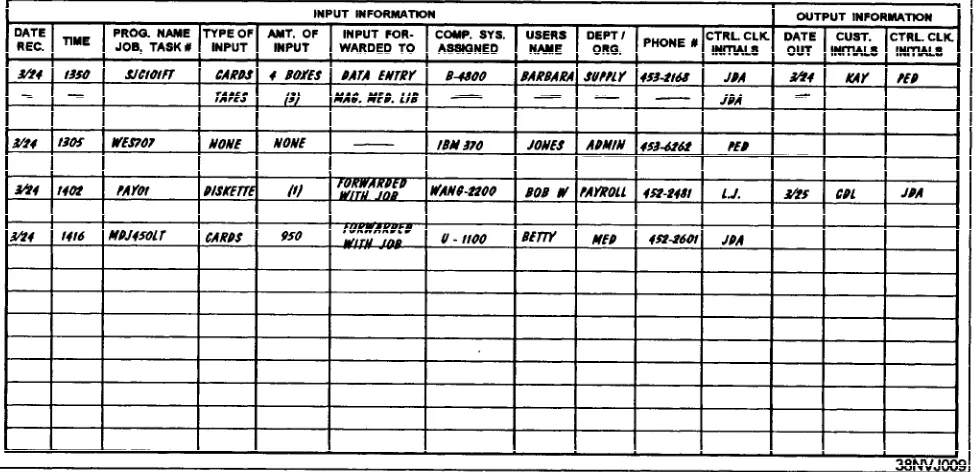
Figure 1-3.—Job control log.
reference. Figure 1-3 illustrates a typical layout of input control information.
When you receive a job, make an initial entry in the log. As the job progresses, make additional entries as appropriate. For example, if you send input to data entry to be keyed, record this in the log. In the event a job or its accompanying input becomes side-tracked, misplaced, or lost, you still have a means of tracking down the job or its input. The log can be of great help. It points out such things as when the job was submitted, the disposition of the input media, the location or the computer system to which the job was assigned, the progress (number of steps) the job has already gone through, the type and amount of input submitted, the person who accepted the job, and soon. If you are still unable to locate the missing item, you are able to notify the user. That person’s name, organization, and phone number were initial entries in the log.
Job Preparation
To properly prepare the user’s job (specifically the input) for processing, you must have a certain amount of information. This information is located in what is called a task folder, job folder, run folder, or run procedure. Do not confuse these with run book, run manual, or run instructions, which provide computer program operating instructions for the operators. The task folder provides you with such things as a run sheet, control parameters, and output requirements.
RUN SHEET.— The run sheet contains the
pro-gram name or names and the job or task number under
which the job (or system) is to be executed or run. In addition, it indicates all of the inputs: magnetic tapes, disks, and diskettes required, depending upon the type of run or possible options the user selected. There could be one or several magnetic tapes and/or disk files needed for the job. You might be required to retrieve them from the media library, or you might just lookup the tape/disk numbers and annotate them on the run sheet.
CONTROL PARAMETERS.— The task folder
will also indicate any parameters that are required. These parameters provide application programs with variable information, data elements that change from one run to the next. For example, the type of run requested: (D)aily, (W)eekly, (M)onthly, (Y)early, (E)dit input only, and so on, or the entering of a date. You maybe required to key in one or several of these parameters, depending upon the complexity of the system.
OUTPUT REQUIREMENTS.— The task folder
and/or the computer run sheet show you all of the output products: magnetic tapes/disks, and special forms that are produced during the running of the job or system. As an I/O control clerk, you maybe tasked to provide the computer operators with the correct number of blank, handwritten, or preprinted output tape/disk labels and ensure a sufficient supply of tapes, disks, paper, and special forms are on hand before the job or system is scheduled to be run.
Job Monitoring
prematurely or abnormally terminates. It does not process to normal end of job (EOJ). When this occurs, the operator is expected to take whatever corrective actions are necessary to get the job going again. More often than not, the operator is able to recover a job by recreating a tape/disk file, moving the file to another device, or possibly cleaning the read/write mechanisms of the device prior to rerun. But, there are times when the operator will notify you (the I/O control clerk) to assist in correcting the problem. Such would be the case when the input parameters are in error, the user’s input is bad, or the job aborted because of an unrecoverable program error. If this happens, you maybe responsible for collecting all the data, both input and output, along with any memory dumps, and forwarding them all to the programmer.
During the recovery phase of an operation, the oper-ator may need you to provide certain input parameters or tape/disk files before the job can be executed. Because of time constraints, a job that abnormally terminates may have to be rescheduled. If so, you may be responsible for seeing to it that the job gets rescheduled and that the user is notified of any job delay. We could go on and on, but by now you are beginning to get the picture. These examples are just a few of the many things that can get in the way of achieving a normal EOJ. We bring them to your attention to make you aware of the types of problems that can and do arise, and the manner in which you are to respond. Hopefully, you now know and are aware that monitoring a job means more than just calling up the operator to see how the job is progressing. It means you must oversee the job to its completion, doing whatever is necessary to help keep the job (or system) on track.
Output Products
Output from computer processing—The work that has been completed—may take the form of a printed document, magnetic tape, or magnetic disk or diskette. In all cases, both you and the computer operator are responsible for ensuring that all completed jobs run successfully. In addition, you are responsible for identifying and coordinating the various outputs for each job, and for initiating their correct distribution.
To determine whether a job (or system) ran successfully (to a normal EOJ) and that all processing steps were properly performed, you may have to review the computer console printout. This printout indicates such things as the number of input records read, the various input files updated, all error conditions (error messages) that the operator encountered during the run
and the resulting actions taken, the various output files created, and so on.
In the majority of cases, the computer console print-out will provide you with the answers you are looking for when it comes to reconciling processing discrepancies. For example, it will inform you of the reasons certain output products—tapes, diskettes, or report listings— were not produced. Possibly the operator selected an incorrect program option, or the input parameters were incorrect or incomplete before starting the job. In short, you are responsible and also accountable for every job you work on, from the time it is submitted by the user until its delivery back to the user.
When checking the user’s output, you should once again refer to the run sheet and/or task folder to verify that all items requested were, in fact, produced. If the output is in the form of magnetic tape, disk, or diskette, be sure it is labeled properly, given the proper classification, and it is on the appropriate media (magnetic media that has been designated for mail-out or distribution only).
When checking reports, make sure they were run on the proper forms (size and type), that no pages are missing and the correct number of copies were printed, and that all print is legible and lined up properly.
Once the output is checked, you then package each completed copy of the report, along with any other out-put products and the original inout-put, place it in the proper pickup area, and log the job out in the job control log. You may need to notify the user when the job is ready.
If, during the course of checking over the user’s output, you happen to come across something unusual or you find an error, by all means, pull (reject) the job immediately, bring it to the attention of your superior, and notify the user of the delay. Even at this late stage, it is better to reject a job to correct any problems or discrepancies rather than to release it, only to have it returned for rerun later.
USER SUPPORT
The term user support covers a broad range of duties. They include answering inquiries from users, providing logistical support, and processing trouble reports.
User Inquiries
Normal inquiries from users include system status, job status, and reporting trouble. It is the job of the technician to answer these questions promptly and accurately. A user might ask:
l
l
l
l
What is the status of a particular job?
What step is it in?
Has it printed out yet?
Do I have a problem with my terminal?
Logistical Support
The most common user support you will deal with is logistical support. This will include the need for new or different equipment to meet the command’s mission or current equipment that needs corrective maintenance, or scheduling preventive maintenance. Forward this type of user support to the division chief or the division officer, since it requires the relocation or the acquisition of equipment.
Trouble Calls
As the technician, you will be receiving and responding to trouble calls. When the user calls to submit a trouble call, remember to get all the required information:
* User’s name;
l Type of trouble encountered;
. Date and time; and
l Job being done when the trouble started.
The preceding is only an example of what might be included on the trouble report at your command. Your command will have the reporting procedures for submitting trouble reports, with an example of a trouble report. Each command has a specific trouble call format and a tracking procedure.
CUSTOMER LIAISON
When involved with or communicating with the user (customer), you must use tact and diplomacy. You must be able to understand and resolve the requests of the customer. You will also have to deal with discrepancies and explain problems to customers. You must be able to independently recognize and resolve discrepancies and be knowledgeable enough to know when you can resolve a discrepancy and when to refer complex problems to your supervisor or leading chief.
MANAGING PRODUCTION
Once you become a shift supervisor, you will be res-ponsible for managing the scheduling and operation of all production activities associated with computer process-ing within your shift. You will monitor the workflow and make adjustments to meet changing requirements.
During your work shift, one of your many jobs will be to monitor job/production status on a regular basis to determine if there is any actual or potential slippage in the schedule. It will be your job to balance operations resources and optimize workflow. There will be times when you must make adjustments in the sequence of work (within the constraints of the overall schedule) to optimize productivity. In computer operations, you must be able to examine problems that have occurred during production and initiate corrective action within operations or with the users.
THE SCHEDULING ENVIRONMENT AND REQUIREMENTS
Schedulers and production control coordinators are responsible for coordinating the work efforts of many people. They prepare, distribute, and maintain produc-tion schedules for their AIS facility or data center. They analyze job requirements (old and new) to determine the impact each job has on production resources. They also inform the LPO or division chief when scheduling requirements will exceed computer system resources. In short, schedulers act as coordinators from the time a request is received until a job is successfully completed. The scheduler is responsible for keeping the AIS facility’s assembly line running as smoothly and efflciently as possible. Schedulers ensure that jobs are scheduled and entered into the production job stream at the proper time. They also ensure that all necessary resources are available to maintain a constant workflow throughout the AIS facility.
malfunctions, problems with production programs, and TIME itself (that 24-hour period in which you are to schedule as much production work as possible).
THE SCHEDULING ENVIRONMENT
How difficult is it to prepare a schedule? you might ask. That depends on the size and complexity of your data processing installation in terms of hardware, software, and support personnel. You must consider many things when preparing a schedule. As a start, you have to ask yourself the following questions:
l
o
l
l
What types of jobs are to be processed?
In what processing environment will the jobs run—real-time? online? batch?
What special-handling requirements are there, if any?
What amount of work is to be processed (workload)?
As scheduler, you will be responsible for:
Preparing and maintaining established schedules for various time periods: daily, weekly, and monthly;
Reviewing and acting on all types of AIS service requests as they are submitted to you;
Distributing production schedules to various work areas within your AIS facility;
Organizing data processing priorities for both scheduled and nonscheduled work;
Entering jobs into the production job stream to achieve maximum use of computer resources;
Tracking work in progress to ensure everything is running according to schedule;
Analyzing problems in connection with production jobs and adjusting computer processing schedules to use whatever time is available until problems can be corrected and a rerun can be initiated;
Maintaining accurate logs and adhering to administrative reporting requirements; and
Determining the accuracy of schedules based on reviewing production results.
How you go about scheduling work on the computer system will depend on two factors. The first factor deals with how the system is configured. You
must consider the number of processors and peripheral devices available and how they interconnect. The second factor deals with the operating mode of the computer. The operating mode may be batch, online, real-time, time sharing, multiprogramming, multiprocessing, teleprocessing, networking, or any combination of these. Having knowledge of the different operating modes will help you understand the operating environment in which you will be working. This knowledge will help you understand how to go about scheduling work for the system.
THE JOB OF SCHEDULER
The job of scheduler, or production control coordinator as it is sometimes called, requires you to have specific knowledge and skills if you are to effectively schedule the computer and the other related activities that revolve around it. You must have a good working knowledge of AIS concepts and be thoroughly familiar with the operation of your facility’s computer system(s)—the actual hardware components themselves. You also need to know how the operating system in use works, what applications and production jobs you are to schedule, the time it takes to run them, how to make up job streams using system control language (SCL) statements, and so on.
One of your primary jobs will be to keep production schedules up-to-date and as accurate and complete as possible. In addition to making up production schedules for computer processing, you must be equally concerned with two other factors: precomputer
processing and postcomputer processing.
Precomputer processing includes ensuring all inputs are received on time according to prearranged schedules. Postcomputer processing includes ensuring output products are complete, accurate, and delivered to the user when promised. Too often these areas are either overlooked or forgotten, because our interest is generally focused on the computer. We can easily overload or underload precomputer and postcomputer resources. This will have the same effect as overloading or underloading the computer—either user service deteriorates or AIS services are underused. For
TOTAL AIS scheduling to be achieved, YOU must
consider all of the fictional work areas in the assembly line, especially the end users. All are affected by the scheduling process, and because of this, you must give each work area proper consideration.
together information from several sources: I/O control, data entry, and the magnetic media library.
Depending upon how your AIS facility is structured, your operational requirements will include tasks, duties, and functions as follows:
* l l l l o l o l l o l l o l 8 l
Receive user job requests.
Analyze production requirements.
Assign job/run control numbers.
Maintain accurate logs.
Carry out administrative reporting requirements.
Prepare production schedules.
Write SCL statements.
Make up job streams for production runs.
Maintain and revise production schedules.
Distribute production schedules.
Monitor production.
Know how jobs interface.
Be able to read console run sheets and logs.
Know the capabilities and capacities of the computer systems.
Know the files in use and how to reconstruct them.
Know how to readjust schedules.
Know the time it takes to run each production job.
As scheduler, you will work on your own with only minimal supervision. To be effective, you will need more than a good working knowledge of your facility’s hardware components, data processing concepts, operating systems, and system control languages. You must be able to:
Work well with other people;
Demonstrate tact and diplomacy;
Use sound judgment;
Be logical, systematic, and persuasive;
Demonstrate analytical ability;
Be a good communicator (speaking, listening, and writing); and
. Be responsive to users’ needs.
The job of a scheduler is a high-visibility position. You will be responsible not only for the flow of work throughout the AIS facility but also for the amount of work that will be accomplished within an allocated period of time.
AIS WORKFLOW ANALYSIS
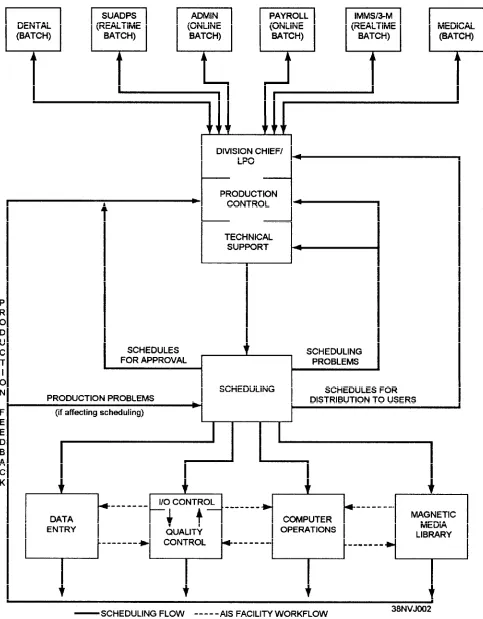
Every AIS facility is site unique regarding the types of hardware and operating system (OS) software in use. However, every site does have a formal or informal workload structure that encompasses all of the AIS fictional work areas and the users. Figure 1-4 illustrates a typical AIS facility’s workflow structure. This particular site operates in a multiprogramming environment and handles batch, online batch, and real-time processing. Study this figure for a moment. You will see how the work flows in, and about, and out of the AIS facility. You will see how you, as a scheduler, fit into the picture.
In looking at figure 1-4, you will notice this AIS facility is composed of five fictional work areas:
o
l
*
l
o
Production Control—Scheduling, I/O Control, Quality Control;
Data Entry;
Computer Operations;
Media Library; and
Technical Support.
Each functional work area is responsible for specific segments of the workflow. How they work together and with you, as the scheduler, will determine if your job is easier or more difficult. Learn what they do. The next paragraphs will give you a basic understanding of their responsibilities and their interactions with other work areas.
PRODUCTION CONTROL personnel act as
liaison between the AIS facility and the user community. The division chief and LPO normally deal with users during the initial scheduling phase. They will assist scheduling by ironing out any problems early in the scheduling phase. When necessary, they will also work with the users to adjust data flow and output schedules based on user and production requirements.
SCHEDULING personnel make production
entry, computer operations, and the magnetic media library.
I/O CONTROL personnel handle all incoming work for AIS services along with all types of input media from the user. Some of these inputs are source documents, magnetic tape, and diskettes. I/O control personnel perform the following tasks:
Count, verify, edit, and total all source documents received;
Check that the amount of input data is approximately the same amount as was indicated in the production schedule;
Verify all incoming work for accuracy and legibility;
Log all inputs received in various input/output control logs;
Coordinate the receipt of late submissions with users and scheduling;
Forward source documents to data entry and computer inputs to either computer operations or the media library depending on when the job is scheduled;
Receive output products from quality control; process, log, and package output products; and ensure proper and timely delivery to users.
QUALITY CONTROL personnel review all
completed output products from data entry and computer operations to determine their accuracy and completeness before releasing them to I/O control personnel for further processing and distribution. They forward incomplete or incorrect jobs to scheduling or technical support for further investigation.
DATA ENTRY personnel convert source
documents into machine-readable form using some type of key-driven (terminal) device if this is not done by the user. They accept source documents, key-enter and verify all inputs, and return completed data to quality control so it can be checked for completeness and accuracy before turning it back over to I/O control to be submitted with the job.
COMPUTER OPERATIONS personnel operate
the computer and associated peripheral devices in accordance with authorized schedules. They receive inputs and associated run instructions from I/O control, update schedules as the work is completed, forward output products to quality control, and transfer magnetic media to the library for further handling and processing.
MEDIA LIBRARY personnel check in/out tapes,
disks, diskettes, and documentation to computer operations personnel. They also condition, clean, retire, store, and transfer magnetic media to off-site storage and other outside activities.
TECHNICAL SUPPORT personnel provide
scheduling and production control with technical support, as needed, to resolve production problems. They examine problems that occur during production to determine if errors were caused by hardware or system/applications software. Then, they initiate corrective action with computer operations and/or scheduling.
By charting all AIS facility functions and defining their interrelationships, you, as scheduler, are able to create a workflow diagram for your particular scheduling environment. It will help you to decide which functions and fictional areas require scheduling and which do not. Now that you have some idea of how the work flows in, and about, and out of the AIS facility, let’s see how you, as a scheduler, fit into the picture.
Normally, the users get together with the division chief, LPO, and yourself (as scheduler) to make their requests for AIS services known for the upcoming month(s). This initial scheduling phase is known as the
planning phase or forecasting phase. By knowing these
workload demands early, more time is available to determine where excessive demands and inadequate demands are being made on resources. To put it another way, the forecasting phase allows everyone to see where there may be an overloading or underloading of AIS resources.
As the users go about presenting their daily, weekly, and monthly requirements, you will be busy incorporating their requirements into the production schedule. During the forecasting phase, you must remember to set aside whatever time is needed for file and computer maintenance. You should pay particular attention to those out-of-the-ordinary and one-time requests that tend to pop up. These, too, must be accommodated in the schedule. When given a new job where there are no previous production statistics, ask the user for a rough time estimate of how long the job may run. Ask if there will be input data, and if so, will it require data entry services. Know how many and what resources the job will use. Know the environment in which the job will run—online, batch, or real-time. You will want to keep a close eye on new jobs.
(plan) a rough schedule. When scheduling old jobs, you will have expience and history to follow. Knowing what resources (hardware, software, and personnel) your AIS facility has available will help you see where the peaks (overloading) and valleys (underloading) are in the schedule. It will be your job to take the resources, the time available, the estimated run times, the time jobs must be started and completed, and whatever other information is needed to establish a meaningful and workable schedule with the best job mix possible. You will prioritize and plan. Once you have ironed out all the wrinkles and prepared a smooth schedule, you will submit it up the chain of command for approval. Once approved, you will distribute the schedules to the various functional work areas.
THE BENEFITS OF SCHEDULING
What are some of the benefits of having a schedule/ scheduling system in place? One answer is PREDICT-ABILITY. A scheduling system makes everyone’s job easier by adding predictability to the AIS environment. To your superiors, it provides a means of holding down costs through better use of personnel and equipment. Other possible benefits of scheduling areas follows:
l l l l l l l l l l l l l l
Effective use of all AIS resources;
Increased throughput;
Decreased turnaround time;
User deadlines met;
Users made responsible for providing input on schedule;
Improved communications with users;
Avoidance of overloading and underuse of resources;
Job delays more readily apparent;
Documentation of scheduling deviations and their causes;
Reduced confusion within the AIS facility;
Better use of multiprogramming capabilities;
AIS facility able to review its own effectiveness;
Predictability of the effects of an increased workload; and
Predictability of future equipment and personnel needs.
All of these benefits can be achieved through an effective scheduling system.
THE SCHEDULING PROCESS
The scheduling process has three moving parts: you, the information, and the method. Let’s look at each.
THE SCHEDULER
As scheduler, you must be well organized. Scheduling jobs through the various work areas within your AIS facility is much like scheduling the events of your own personal day-to-day life, except it’s a lot more technical and involved. You set aside predetermined amounts of time to do certain things. Call it “a things-to-do list” if you will.
It would be nice if your things-to-do list consisted of nothing more than having to accept incoming requests from the users, finding holes to plug their jobs into the schedule, and waiting for the jobs to show up on the completed list. If that were the case, your things-to-do list would be relatively small and seemingly uncomplicated. If your AIS facility has such an abundance of resources that any demands made by the users can be easily met, then your facility is probably wasting resources and incurring more expenses than it should. This is probably not the case. To the contrary, your command will probably have just enough resources or too few.
As scheduler, you must decide which jobs to process first, second, third, and so on. Which jobs can be run together? You need to determine the job mix. How big are the jobs in terms of memory use? What resources do they use-disk drives, tape drives, printer, and so on? How long will each job run? In what environment must each job be run?
Under ideal conditions, you can work through your things-to-do list in a relatively short period of time and come up with a workable schedule. In reality, however, things do not necessarily go according to plan or, rather, according to schedule. Equipment, other people, and outside influences are all problem areas.
A lack of productivity and missed deadlines can be caused by unexpected problems, such as:
o
l
*
@
Late submission of input from the user;
Waiting for data entry to complete a job step;
Having to locate a missing file in the library;
You may face any number of these and other situations each day. You should have a backup or contingency plan in the event you lose a piece of hardware. For example, if the fastest printer is down, will the user be satisfied with one printed copy now and the remaining copies printed tomorrow? Or is there another AIS facility in your immediate area that will let you use its printer? It will be your job to prepare the most realistic schedule you can, and then be ready to adjust it. What tools will you have to help you prepare the schedules? What information will you need? What methods can you use? In the following section, we talk about the types of information you will need to prepare a schedule. Then we explore a few of the scheduling methods you might use.
INFORMATION NEEDS
Regardless of the scheduling method used, you will need to know specific types of information. Some information is job-related; that is, information about the resources, media, and time needed for a particular job. Some information is AIS facility-related; for example, workload, anticipated resource changes, number of operators available, the system capabilities and capacities, and so on. You will need to consider both. Let’s look at the job-related and AIS facility-related areas in a little more depth.
One of the most apparent pieces of job-related information is that every job has resource requirements. These requirements vary considerably from one job to the next. One job may require 125K of memory with no other peripheral devices except a printer for output. Another job may require four tape drives, two disk drives, a printer, and only 40K of memory. But a job’s resources cannot be looked at in these terms alone. Can you recall the terms PREcomputer and POSTcomputer processing? All AIS facility resources must be considered. You must consider data entry functions, job setup functions, and output control functions. Overloading data entry can delay jobs, causing them to be assembled for computer processing later than scheduled. Suppose I/O control is overloaded. What difference would it make if jobs were processed and completed as scheduled? They would only be delayed because work is backed up or personnel are not available. Overutilization of resources affects service. Underutilization of resources is expensive and wasteful. The balance will be up to you and the efficiency of your schedule.
Another piece of job-related information to consider is processing time. To set aside a sufficient amount of time for processing, you must know how
long a job will reside in memory. Processing time is normally estimated for a multiprogramming environment since most computers today process programs/data in this fashion, and job mix affects the overall processing time for a job.
Let’s assume you have a static workload with no jobs being added to or deleted from the schedule. Even under these conditions, you can expect job processing to deviate from the schedule. Why? you might ask. The reasons for this are the uncertainty about job processing time and disrupted processing. Take, for example, a job that normally has a processing time of 45 minutes. Today, because of a large increase in input, the job processing time is 1 hour, thus delaying all the following jobs by 15 minutes. This is unavoidable and must be expected. The same is true of disrupted processing, whether it is hardware failure or software problems. One way to avoid these delays is to include a specified amount of buffer time in your schedule. You might add a safety factor of 10 percent to the expected processing time. In our previous example where processing time increased from 45 minutes to 1 hour, a buffer time of 10 percent would only give you an additional 4.5 minutes of processing time. This would still have been inadequate. However, since all the following jobs also have buffer time built into their scheduled processing time, the job overrun should not be that critical for meeting the overall schedule of a shift.
Another piece of job-related information to consider applies to multiprogramming environments. The challenge here is to combine as many jobs as possible so that each resource is used to its maximum. In a nonmultiprogramming environment, you have no problem in scheduling jobs because you can process only one job at a time. However, resources are underutilized, and that’s a fact you must live with. This is a direct result of having all resources dedicated to one computer, even when they are not needed. On the other hand, multiprogramming allows you to execute several jobs at the same time using as many resources as possible. The difficulty of manually preparing such a schedule for a system that runs in a multiprogramming environment is in trying to obtain a job mix that makes the best use of most resources without bogging down the entire computer system.
is difficult to obtain an optimum job mix using manual scheduling techniques, but it can be done. Most often, the solution to obtaining maximum throughput in a multiprogramming environment (on a continuous 24-hour basis) is to use one of the more sophisticated automated scheduling packages. These packages have all of the considerations we have been discussing programmed into the software.
Another piece of job-related information to consider is job dependencies. Most AIS facilities process both single-program jobs and multiprogram systems. Examples of multiprogram systems are the supply and 3-M systems. These systems consist of many programs that are normally executed as separate job steps within a system. Or, the programs may be processed as separate jobs that must be processed in a specific sequence. Therefore, you must know their proper sequence. It would be foolish to execute a job that prints the output of an updated file that had yet to be updated. It should be just as obvious if a job abnormally terminates that all jobs following it must be canceled and rescheduled, allowing sufficient time for the terminated job to be rerun. Canceling and rescheduling dependent jobs may seem like an easy task to perform. However, in reality, it can become a complex and difficult operation.
And finally, we have priorities and deadlines to consider. Some scheduling methods place primary importance on priority. Each job is assigned a priority, and the jobs are processed according to the highest-priority job that can be scheduled based on available resources. Priority scheduling is often used in automated scheduling systems. Some scheduling methods place primary importance on deadlines, processing jobs according to the earliest deadline or sometimes latest deadline. When you prepare a schedule, remember to take into account job requirements that include the following:
l l l * l l l l Data entry;
Job setup and output control functions;
Computer processing time;
Resource requirements;
Operating environment;
Job dependencies;
Job priorities; and
Deadlines.
Now that we have covered job-related information, we will discuss AIS facility-related areas and how these can affect your production schedule.
You may recall that to prepare an effective sched-ule, you must know your AIS facility’s resources: how work comes into, flows through, and leaves your facil-ity; the capabilities and capacities of your system; and workload demands on the system. As a scheduler, your goal is to match resource capacities (people, places, and things) to workload demands while satisfying user deadlines and priorities. This is often difficult to do, especially when resource capacities vary because of hardware failures, specific shift requirements, personnel on leave, and unpredictable user demands. Your workload can exceed capacity, which has a direct effect on service. Or, the capacity can exceed the workload. This leaves AIS resources underutilized. So how do you reach a happy medium? you might ask. You do it by ensuring that the workload demands put upon the AIS facility’s resources are balanced as much as possible and that the total resources available are kept as close to the maximum capacity as possible.
The effective use of resources has a lot to do with how you prepare a schedule. However, other things affect scheduling effectiveness. One thing that disrupts schedules is the late receipt of input from the users. This often results in a lot of hectic activity. Data entry, possibly I/O control, and computer operations have to try to meet original deadline commitments. If they cannot, you, as the scheduler, have to reschedule jobs, while dissatisfied users complain because their jobs are not out on time.
But you say the user has no right to complain? You are right. Often, the users do not realize they are the cause of the delays. So what can you do? Educate them! Inform the users of the effects late input submis-sions have on the schedule. They sometimes do not realize how long it takes to prepare their input. All jobs scheduled should have an established input receipt time. When scheduling, include in your schedule sufficient buffer time between scheduled receipt time and actual due time. And last, but not least, report scheduling deviations and their causes to your superiors. In this way, the process can be reviewed and improved.
job can continue. An unreadable tape or disk file may have to be recreated. Errors in SCL statements in the job stream may have to be corrected. The most serious delays usually result from abnormally terminated jobs and hardware failures. Regardless of what the situation may be, you must be prepared to readjust schedules as quickly as possible with a minimum of disruption.
PRODUCTION SCHEDULING
The AIS facility is tasked with the responsibility of providing computer support to the command. This includes support to medical/dental, supply, administration, financial, and maintenance. Each of these areas will have a subsystem coordinator assigned to work with you on monthly schedule requirements and on processing problems. You will also prepare daily workload schedules.
MONTHLY PRODUCTION SCHEDULE DEVELOPMENT
As the AIS manager, you will be responsible for developing and distributing a monthly AIS operations schedule. You have used monthly schedules, but you may never have given much thought as to what it takes to develop one.
To develop the monthly schedule, you must know the requirements of all the application systems/jobs to be run during the month. Many production jobs are run on a cyclic basis—daily; Monday, Wednesday, and
Friday; weekly; monthly; quarterly; semiannually; or annually. Be sure time is included for testing, planned maintenance, file maintenance, and backup procedures. For systems with online users, be sure to provide ample capacity and time.
Schedule Review
[image:27.613.37.553.461.702.2]Once you have developed the monthly schedule, you must ensure that the schedule is adequate and meets the requirements. To do this, you will see that the proposed monthly production schedule is distributed to the appropriate subsystem coordinators for their review. Before the end of the current month, the subsystem coordinators are to return the monthly schedule with their concurrences or changes and recommendations back to you for screening. You will screen it to ensure they have not overscheduled any day, and that there will be enough time for system backups and planned maintenance. The screening process should include a review by the production control coordinator, who looks for any specific input/output requirements. For example, special forms may have to be ordered. This must be done early enough to have the forms when the job is to be run. After screening the changes and recommendations and making any adjustments needed, have a smooth copy of the schedule prepared and distributed to all subsystem coordinators and the department head before the beginning of the month to which the schedule applies. Figure 1-6 is an example of part of a monthly production schedule.
Effects on Monthly Schedules
After the monthly schedule is completed and approved, there will always be times when it has to be changed. The subsystem coordinators are responsible for adjusting their schedule and for submitting the schedule changes to the AIS facility. Some of the things that will cause the schedule to be changed are as follows:
System/program errors. Jobs may abort
because of system or program processing errors. The operator will get an error message or an indication on the system console. This may require the operator to reboot the system, recreate an input file, or rerun a job. The operator will annotate the run sheet describing the problem. The abort code will be the key to determining what caused the problem.
Software testing. You will schedule an amount
of time for software testing based on your best estimate. No matter how much time you allow for software testing, it will never seem to be enough. Problems seem to arise every time you start to test a new software system. These include the system going down, the system hanging up, the system entering a loop, or a syntax error occurring that the programmers missed.
New/changed requirements. There will be
times when jobs are added to the schedule to meet special needs. Examples are budget cuts, extra money at the end of the month, requisitions, tracking, and assist visit preparation.
Job conflicts. A job with a high priority maybe
submitted late.
Input files not available. Sometimes there will
be a delay in receiving the input files for a job.
Whatever the problem, it will be the production control coordinator’s job, with your approval, to adjust the schedule to accommodate the changes required.
WORKLOAD SCHEDULE DEVELOPMENT
When we talk about workload schedules, we are referring to how to set up the daily work schedule in an AIS facility. These are the daily adjustments to the monthly production schedule and how they affect personnel requirements and staffing. This is an internal
schedule that you will prepare for the AIS facility. The format varies among facilities; there is no wrong or right format. Normally, we break the day into three shifts—days, eves, and mids. The day shift is responsible for testing. The eve shift is responsible for production. The mid shift is responsible for finishing production and doing the nightly saves.
You will have to develop the workload schedule by reviewing the monthly schedule and combining it with any newer information. The input/output requirements will have to be reviewed, and you will need to be ready to make changes to the schedule based on unforeseen events.
System Input/Output Requirements
Before a job is started, certain input and output requirements must be met. The I/O control clerk must review the production workload schedule to see which job is to be run. Then the clerk must look at the job run folder to make sure that all the input files are available and all the necessary output media is readily available.
l
o
Input requirements. If the job requires tapes or
disk files as input, the I/O control clerk will check with the media librarian to see if these files are ready and available. And, if they are not ready, when they will be available for the job. In some cases, it maybe necessary to reschedule a job while waiting for the input.
Output requirements. The job may require
special forms or multipart paper to be printed. The I/O control clerk will check the job run folder to see if the job will require any special forms and then check to see that they are available. The production control coordinator will have looked at the requirements when the monthly schedule was developed to allow enough time to order the forms. The job may produce output tapes or diskettes, requiring the I/O control clerk to check with the media librarian to make sure enough scratch tapes and blank diskettes are available for the job.
Effects on Workload Schedules
during the day. For example, to stay on schedule during monthly, quarterly, or yearly processing, production work will have to be run during the day shift. You may also have to have additional saves run in association with monthly, quarterly, or yearly processing. Another example is as you are preparing to load a software update, you might have special saves run during another shift. This will ensure that the data is backed up and a good copy of the software is available if the update does not work properly. You may also have to reschedule some of the production work.
Anytime the normal work schedule is changed, it may affect the online users by slowing the system response time or causing the system to be unavailable to the users. Care must be taken when the schedule is to be changed. Try to cause the minimum interruption to online users, and do keep them notified of the changes.
PRODUCTION PROCESSING
During production processing, the I/O control clerk, production control coordinator, and operators will monitor the schedule and the jobs to see that the work is being accomplished as planned. When problems arise, as they will, you may need to become involved. You may be involved in determining the cause of the problem and in working with the user to solve the problem. The common causes of problems are application program processing errors and system downtime.
Users must be informed concerning any production problems pertaining to their jobs. When you talk to the users, you must know which job had the problem, what the problem was, and what, if anything, AIS can door did do to correct the problem. Besides notifying the user of production problems, you will be required to notify them of system downtime or nonavailability. Setting up procedures for the operator and the production controller to follow will help in solving problems and in communications with users.
For online users, the subsystem coordinators are the most qualified and highly trained individuals on their particular subsystem and should be assisting users with processing problems. This does not eliminate the need for the operators to become knowledgeable in the workings of each subsystem, since they normally are called first when a problem occurs. You will need to examine any production problems that occur and work with the shift supervisor and/or production control
coordinator to be sure proper corrective action was taken.
APPLICATION PROGRAM PROCESSING ERRORS
To determine the causes of application program errors, you have two areas of concern—hardware and software. Let’s look at some of the most common causes in each of these areas.
Hardware Problems
With respect to the hardware, not only each specific piece of equipment is a possible cause of a problem, but you also have external environmental concerns.
Some of the most frequent hardware problems are:
. Head crash;
. Tape drive damage to a tape; and
. Tape read/write errors.
If tape read/write errors cannot be conected by cleaning the read/write heads, a maintenance technician should be called. For head crashes and tape drive damage, a maintenance technician should always be called.
The most common external environmental problems are:
l Loss of power;
l Voltage spikes; and
l Loss of air conditioning.
What action should be taken will depend on the damage done. The operator may be able to recover the job completely by rebooting and restarting the job. If the data files have been corrupted, the operator may need assistance from the user and/or the media librarian.
Software Problems
Examples of the common software problems are:
l Wrong file specified;
l Program entered a loop; and
l File not available.
this manual because of the number of different application software programs being used.
To correct software-related problems, the operator must refer to the job run folder and the program operator manual for the corrective action to take. Your operators will have predefined steps to follow when researching the cause of the error in the specific program operator’s manual. The operator manual explains the steps to follow in connecting the problem and any restart points. The job run folder will contain the name and phone number of the person to contact if the problem cannot be easily corrected.
SYSTEM DOWNTIME
The system downtime and nonavailability can be categorized under two different topics—scheduled and unscheduled.
Scheduled Downtime
Scheduled downtime and nonavailability include the time for system saves, scheduled maintenance for the equipment, and scheduled processing preparation. You will include scheduled downtime on the monthly production schedule when the requirement is known in time. You may also add it to a workload schedule when needed.
Unscheduled Downtime
Unscheduled downtime and nonavailability include the system being down because of power failures, the loss of air conditioning, or rebooting the system. They may also include system degradation because apiece of equipment is down, even though the system can still be used for production. Since unscheduled downtime is not something you can plan for, you will have to react, replan schedules, and advise users of changes when their work and/or deadlines will be adversely affected. If you are using an automated
system, it is usually a simple task to produce a new schedule. You can usually direct the system with a command or two to produce a new schedule or a simulated schedule. In a manual scheduling system, it will require some cooperation between the subsystem coordinators and AIS operations to replan the schedule to get all the work done in a timely manner.
HELP-DESK SUPPORT
The help-desk procedures we talk about here are those relating primarily to online users. To help your operators communicate effectively with online users, you will want to have procedures established for them to follow. To develop help-desk procedures, keep several steps in mind. These steps include logging the problem, researching the problem, fixing the problem, and analyzing the problem for possible changes to training and/or documentation. Once the problem has been fixed, the operator will notify the user that processing may be continued. You will want to monitor the help-desk support for its effectiveness and to provide feedback to, and receive feedback from, the users, subsystem coordinators, and managers as well as your own staff.
Logging the Problem
The operator logs a problem to document its occurrence and to provide the information needed to solve the problem. The information includes the abort code, what step in processing the user was doing, what system the user was on, and what corrective action was taken. Figure 1-7 is an example of a log sheet that can be used for making entries. This log provides a tracking system for user problems and can be used to show if a pattern is developing. If a pattern develops, this log will provide the necessary background information needed when the programmer is notified.