© 2019, IRJET | Impact Factor value: 7.211 | ISO 9001:2008 Certified Journal
| Page 2033
Implementation of Secured ATM by Wireless Password Transfer and
Keypad Shuffling
Sameer Sheikh
1, KunalPawar
2, Pooja Bhondave
3, Sanyogita Borade
41,2,3,4
Student, Department of Computer, Sinhgad Academy of Engineering, Pune, India
---***---Abstract - In this world of technology, ATM (Automatic Teller Machine) card is the essential part of life. To commit transaction ATM pin code is compulsory and it must be secure. Use of ATM is helpful for money transaction. But this system is unsafe to use because anyone can access the system. The ATM Pin is hack by many hackers using shoulder surfing attack. It is efficiently possible to avoid shoulder surfing attacks by keypad shuffling and wireless password transfer using Arduino IDE compiler. Shuffling keypad confuses the person who is standing near you.
Keywords: - Shoulder Surfing, Wireless password Transfer, Arduino, Shuffling Keypad, Transaction.
1. INTRODUCTION
Now-a-days many people can use ATM card for the transaction and other activities like shopping, paying bills etc. Carrying cash in a pocket, ATM is the best option instead. Automated Teller Machine is the automatic systems being used since 1967 by many of us. ATM was invented by John Shepherd-Barron on June 1967 at United Kingdom on June 1967. It emerged in India in 1968.
ATM is activated by inserting the card, then entering the ATM pin number of the particular card.
In today’s world as the ATM has become a blessing to many but at the same time it has proved to be a curse due to many evolving hacking methods. One of the very well-known technique is Shoulder Surfing, the thief can guess the PIN by observing the movement of the shoulder. Sometimes a Spy Camera can be fitted above the keypad where you enter your pin, in this way your PIN will be known to the thief.
To avoid such problems, a technique is being implemented in which, as the users enters the ATM counter he/she can connect the ATM machines Bluetooth via their mobiles Bluetooth. After the authentication the user inside the ATM counter can enter the PIN through their mobile phones. In this way they can avoid the password guessing from the thief. The other well-known technique is keypad shuffling where after every user in ATM counter the keypad will be shuffled.
2. TYPES OF ATM’s FRAUD
According to the reports, in last few years there have been hacking into the electronic ATM systems which caused losses of billions of dollars in the global banking industry. Due to
the Cloning of cards and Hacking of PIN code the fraud occurred.
Some popular ATM frauds/attacks are explained below.
2.1 Skimming Attacks
The most popular attack in ATM transaction is skimming attack. Lawbreakers are taking advantage of technology to make counterfeit ATM cards by using a skimmer (a card swipe device that reads the information on ATM card). When removed from the ATM, a skimmer allows the download of personal data belonging to everybody who used it to swipe an ATM card. A single skimmer can retain information from more than 200 ATM cards before being re-used.
2.2. Card Trapping
In Card Trapping a device is placed directly over or into the ATM card reader slot. A card is physically captured by the trapping device inside the ATM in this type of attack. When the user forgot the ATM without their card, the card is taken by thieves/criminals.
2.3 ATM Malware
Malware attacks involves an insider, such as an ATM technician who has a key to the machine, to install the malware on the ATM. Once that has been done, the attackers can insert a control card into the machine’s card reader to trigger the malware and give them control of the machine through a custom interface and the ATM ‘s keypad. The malware allows criminals to take over the ATM to stole data, PINs and cash. The malware catches magnetic stripe data and PIN codes from the private memory space of transaction processing applications installed on a compromised ATM.
2.4. ATM Hacking
© 2019, IRJET | Impact Factor value: 7.211 | ISO 9001:2008 Certified Journal
| Page 2034
3. PROBLEM STATEMENT
“Analyze current ATM model implementation, and suggest improvements such as Keypad Shuffling technique and Wireless password transfer (Encrypted and decrypted format data) to secure the transaction process at ATM modules”.
4. DETAILED STUDY
Security levels of ATM system are increasing day by day at various ways. Some of the authentication techniques added in password protection are as listed below.
4.1. Fingerprints
In this technique customer will require to enter his login ID and authenticate his fingerprint and both will be sent to bank server for every transaction. Transaction will be processed further after fingerprint verification.
4.2. Face Recognition
Person can be identified by his facial image. This can be done by capturing an image of the face in the visible spectrum using an optical camera. Some of benefits of facial recognition are that it is non-intrusive, hands-free and continuously accepted by most users.
4.3. GSM
Bank server will collect the customer 4-digit OTP (One Time Password) password through the GSM (Global System for Mobile Communications) after the card insertion. After validation of OTP the user moves for further processing.
4.4. Voice or speech recognition
The capability of a machine or program is to receive and interpret dictation to recognize and carry out spoken commands. Voice is also a physiological quality because every person has a different pitch level but voice recognition is mainly based on the study of the way a person speaks, commonly classified as behavioral. The voice-based security fails many times at a person affected by fever or any vocal sound problem.
5. COMPONENT ANALYSIS
Implementation of the suggested improvements requires making modifications in the current architectural model of ATM’s. Component analysis is performed in order to evaluate the pros and cons of system to be constructed.
5.1. Arduino Mega:
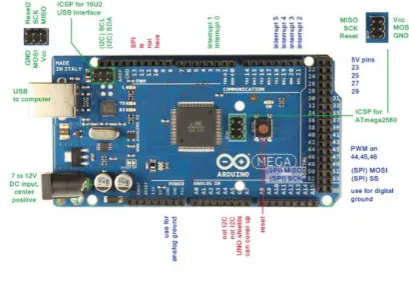
Arduino Mega which is a CPU, does all the work via Bluetooth and Wi-Fi module. Both are connected to the mega. All the code is written in the Mega. It has 54 input/output Pins. Of which 14 can be used as PWM output,
[image:2.595.328.533.177.323.2]16-analog input, 4 UARTs. The mega is compatible with most shields designed for the Arduino Diecimila. The Arduino Mega can be power-driven through USB connection or with an external power supply. Power source is selected automatically. The Arduino Mega can be programmed with Arduino Software.
Fig 5.1 Arduino Mega
5.2. HC-05 Bluetooth Module:
Bluetooth HC-05 module having 6 pins. HC-05 module is easy to use Bluetooth SPP (Serial Port Protocol) module. It is for transparent wireless serial connection setup. It has frequency 2.4 GHz ISM band. Transfer rate is 1Mbps.Power supply requirement: +3.3V DC 50mA.
5.3. ESP-8266 Wi-Fi module:
ESP 8266 Arduino compatible is a low-cost Wi-Fi chip with full TCP/IP compatibility. It has MCU (Micro Controller Unit) integrated which gives the possibility to control i/o digital pins. With Software Development Kits (SDKs), we can directly program the ESP8266’s on-chip Microcontroller, without the need for an external Microcontroller.
Power supply: +3.3V DC
ESP-8266 Wi-Fi module is necessary for connectivity purpose.
5.4. 20*4 LCD display
LCD display is used for displaying process on to the screen. 80 characters can be printed at a time. Graphic 20*4 LCD displays are based on (monochrome) LCD technology, yet they offer interesting graphical capabilities because every pixel is individually addressable. 20×4 LCD displays so they offer good readability. They offer a selection of graphic functions, special characters and text fonts which makes the use of this kind of display extra attractive.
5.5. Push Buttons
© 2019, IRJET | Impact Factor value: 7.211 | ISO 9001:2008 Certified Journal
| Page 2035
through a pull-up resistor (here 2.2 K Ohms) to the 5-volt supply. The second goes from the corresponding leg to ground. The third connects to a digital i/o pin which reads the button's state.
5.6.7-segment LED display
For Arduino applications to display numbers 7- segment display is used. It has 2 types: common anode and common cathode. They are easy to use and cost effective.
5.7. 74HC595 Shift Register
A Shift Register is mainly a Serial-to-Parallel Converter IC. It basically takes a serial input through a single pin and converts it into 8-bit parallel output thus effectively reducing the number of interface pins between a Microcontroller and its output devices.
6. Workflow:
Microcontroller is the core to all the processes. It initiates all the codes that are written for communication of Bluetooth Module, Wi-Fi module and LCD display which are directly connected to the Arduino Mega.
Shuffling Algorithm and OTP generation algorithm is also programmed on the mega chip.
Bluetooth module will be performing the Bluetooth pairing between ATM system and user application. After authentication generated OTP should be entered via push buttons.
Wi-Fi module provides Internet access to the microcontroller which enables communication with the bank database for verification of user details and writing transaction on it.
LCD display of size 20*4 is used for displaying process on the screen.
7-segment LED displays are used to display the numbers. Each LED digit is synced with its respective push button to receive input. These push buttons provide responses to the microcontroller for further processing.
7. Methodology
7.1. Shuffling Keypad
The random number is generated by using random generation technique. It is one of the techniques for generating the shuffled numbers on a display. Random number is generated by using Linear Feedback Shift Register. Its input bit is a linear function of its earlier state. The linear functions of single bits are XOR and inverse- XOR thus it is a shift register whose input bit is driven by the exclusive-or of some bits of the overall shift register.
Fig7.1: Random Number Generation
“In computing, random number generation technique, input bit is a linear function of its previous state.” A shift register is a device whose identifying function is to shift its contents into adjacent positions within the register.
7.1.1. Algorithm:
Input: Number Keys Set [0-9].
Output: Random Key Set.
Step 1: Consider the Input Set [0-9], Output Set [Null].
Step 2: Formulate a “While” loop for elements in input set.
Step 3: Perform XOR operation over input set, If While
‘TRUE'.
Step 4: Store the output of 1st iteration in Output Set [] and remove the element from input set.
Step 5: Repeat Step 2-Step 4 till the input set is exhausted.
Step 6: The Output Set generated will be used to scramble the Keys.
7.2. Wireless Password Transfer
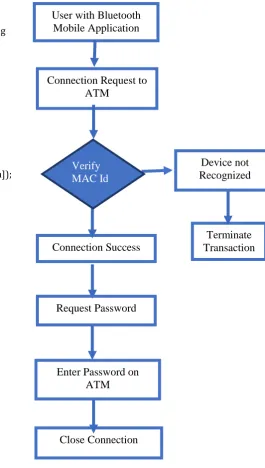
The mobile based security level is developed by creating the mobile application as Bluetooth which is used only by the ATM system. Similarly, the ATM machine has its Bluetooth which is used to exchange the data between the ATM database and user passwords. Connection establishment of Bluetooth between user and ATM system is done by the following procedure:
• User inserts the card into the given card slot.
• System requests to switch on the Bluetooth and to display the pairing random number to pairing user and system devices. This may avoid the person who stands near user to pairing the device.
• After authenticate system send 4-digit password through Bluetooth.
© 2019, IRJET | Impact Factor value: 7.211 | ISO 9001:2008 Certified Journal
| Page 2036
7.2.1. Program to generate OTP (One Time Password)
#include<bits/stdc++.h> using namespace std;
// A Function to generate a unique OTP every time string generateOTP(int len)
{ // All possible characters of my OTP
string str = "abcdefghijklmnopqrstuvwxyzABCDE" "FGHIJKLMNOPQRSTUVWXYZ0123456789";
int n = str.length();
string OTP; // String to hold OTP password
for (int i=1; i<=len; i++) OTP.push_back(str[rand() % n]);
return(OTP);
} // Driver Program to test above functions
int main()
{
// For different values each time we run the code
srand(time(NULL));
// Delare length of OTP int len = 6;
printf("Your OTP is - %s", generateOTP(len).c_str());
return(0);
}
7.2.2. Flowchart for wireless Password Transfer:
[image:4.595.274.540.124.593.2]
Fig 7.2.2: Wireless Password Transfer
8. ADVANTAGES
1 .Enhanced the security using keypad shuffling method and Bluetooth password transfer due to which our Password
remains safe from the hacker.
2. Two – Way authentication is used to enhance the security. In which an additional layer of security the user must pass before being allowed to access an account.
9. FUTURE WORK AND CONCLUSION
This paper identifies a model for the modification of existing ATM systems by virtual shuffling of keypad and wireless password communication offer an effective way of stopping
Connection Success
Close Connection
Terminate
Transaction
Enter Password on
ATM
Connection Request to
ATM
User with Bluetooth
Mobile Application
Request Password
Device not
Recognized
Verify
© 2019, IRJET | Impact Factor value: 7.211 | ISO 9001:2008 Certified Journal
| Page 2037
PIN theft. The idea will confuse the Password guessing and password thieving in future from unauthorized person. Therefore, this is a kind of additional technique preventing pin theft in future. In future due to the advancement in hardware and software will remove its problem and make it more efficient.
10. REFERENCES
[1]“Enhancing the Security Features of Automated Teller Machines (ATMs)” A Ghanaian Perspective Nana Kwame, Gyamfi Mustapha, Adamu Mohammed, February 2016.
[2] “Securing ATM system with OTP and Biometric”, Mohammed Hamid Khan, April 2015.
[3] “Implementation of Secure ATM by Wireless Password Transfer and Shuffling”, Keypad Kumaresan S, Suresh Kumar K, Dinesh Kumar G , March 2015 - August 2015.