Katzer
Crawford
Shelve in Applications/MS Office User level: Beginning–AdvancedOffice 365
Migrating and Managing Your Business in the Cloud
Written for the IT professional and business owner, this book provides the business and technical insight necessary to migrate any business to the cloud using Microsoft Office 365. This is a practical look at cloud migration with details covering the use of different technologies to support that migration.
“Office 365: Migrating and Managing Your Business in the Cloud” takes the position that cloud technology is a tremendous opportunity for an organization to reduce IT costs, and improve pro-ductivity with increased access, simpler administration and improved services. It further documents how businesses that embrace the cloud can receive huge rewards in human productivity, business process and lower total cost of ownership, compared to businesses that choose to ignore it.
The challenge for those charged with implementing any cloud-based IT solution is to leverage these advantages with the minimal disruption to their organization. This book provides practical help in moving any size enterprise to the Cloud and covers the planning, migration and follow on management of Microsoft Office 365 Cloud services.
What You’ll Learn:
• Microsoft Office 365’s operation and usage for any size enterprise • How to compare costs for on-premises and cloud IT services • Methods of planning and migration
• Office 365 and Windows Intune management best practices • Using Office 365 SharePoint to improve business processes • Troubleshooting Office 365 installations
• Using Compliance, eDiscovery and Data Loss Prevention tools
• Office 365-site management best practices for IT administrators and business owners
9 781430 265269
53999 ISBN 978-1-4302-6526-9
For your convenience Apress has placed some of the front
matter material after the index. Please use the Bookmarks
Contents at a Glance
About the Authors ��������������������������������������������������������������������������������������������������������������
xxi
About the Technical Reviewers ���������������������������������������������������������������������������������������
xxiii
Acknowledgments ������������������������������������������������������������������������������������������������������������
xxv
Introduction ��������������������������������������������������������������������������������������������������������������������
xxvii
Chapter 1: Office 365: Moving to the Cloud
■
�����������������������������������������������������������������������1
Chapter 2: Using Office 365 and Windows Intune
■
�����������������������������������������������������������25
Chapter 3: Office 365 Planning and Purchase
■
�����������������������������������������������������������������83
Chapter 4: Setup and Migration Guide
■
���������������������������������������������������������������������������121
Chapter 5: SharePoint Administration Guide
■
�����������������������������������������������������������������
179
Chapter 6: Web Site Setup and Configuration
■
����������������������������������������������������������������277
Chapter 7: Office 365 – Windows Intune Administration Guide
■
������������������������������������319
Chapter 8: Office 365 Administration Guide Enterprise
■
�������������������������������������������������365
Chapter 9: Office 365 Compliance and Data Loss Prevention
■
����������������������������������������429
Chapter 10: Office 365 Exchange Online Protection Administration Guide
■
�������������������483
Chapter 11: Office 365 DirSync, ADFS, Single Sign On and Exchange Federation
■
���������545
Glossary
■
�������������������������������������������������������������������������������������������������������������������������631
successful through our knowledge of Office 365. We help companies assess, migrate, and manage cloud-based solutions.
Office 365 is a cloud-based service; it is what you know—the Microsoft Office suite. It simply works, plus you do not have to give up your intellectual property to use the service. This is important. Not all cloud solutions are this forthright. Our customers who use Office 365 have significantly reduced their IT services costs and their concerns in the areas of data security, compliance, and discovery.
This is a living book. We approached our publisher with the idea that this book should morph over time. We suggested that a living book could be created about Microsoft cloud services, based on our experience both now and in the future. It agreed.
KAMIND, a Microsoft Tier 1 Champion and a multiyear Microsoft Partner award winner, presents a unique value proposition for our Office 365 customers. Our approach has been to partner with our clients to journey to the cloud together. That experience is reflected in this book and will continue to be.
Join us in this journey to the cloud with Office 365.
Chapter 1–What Is Office 365?
This chapter is focused on why you should move your organization to Office 365. The decision to move to Office 365 is a business, rather than a technical, decision. Like any business change, the objective is to reduce your operational costs and to improve your organization’s productivity, to gain a competitive advantage. The chapter ends with a hypothetical customer making the business tradeoffs toward moving to the cloud.
Chapter 2–Using Office 365 and Windows Intune
The best way to understand Office 365 is to experience it. We explore the Office 365 capabilities in a demonstration site, with a focus on how this helps your business productivity. We use a day in the life of a user to demonstrate the capabilities of Office 365. The chapter closes with a reference section on the most common end-user configurations.
Chapter 3–Office 365 Planning and Purchase
Chapter 4–Office 365 Setup and Migration
After you have selected your Office 365 plan and completed the planning process, the next step is the migration process. There are different ways you can migrate to Office 365 and different migration techniques. This chapter covers the most common approaches to Office 365 migration.
Chapter 5–SharePoint Administration
SharePoint administration and design can be simple or complex, depending on your business needs. This chapter provides a basic overview of the configuration necessary to be up and running using the SharePoint team site of Office 365. This chapter describes site design and construction issues and offers an overview of the SharePoint administration functions.
Chapter 6–Building Your Web Site
Office 365 includes a public-facing web site and the necessary developer’s tools to build out the site. This chapter takes you from the basic Office 365 site to a fully functioning web site. The Office 365 public-facing web site fulfills the Web needs of 90% of the businesses on Office 365. This chapter describes how to configure and build the public-facing web site for your business, using the integrated Office 365 web site tools and SharePoint Designer, a design tool that is included with your Office 365 subscription.
Chapter 7–Windows Intune Administration
The secret to an optimal Office 365 site is the management of the desktop to ensure that updates are current and that the user antivirus is functioning. Windows Intune is a desktop management tool that addresses these issues, reduces the administrator’s effort in desktop management, and improves the user’s experience.
Chapter 8–Office 365 Administration
This chapter describes the different administration centers in Office 365 and the most common tools that you would use to administer Office 365. Depending on your Office 365 plan, there are five possible administration tools. This chapter focuses on the Office 365, Exchange, and Lync administration centers. The SharePoint and Windows Intune administration centers are described in their own chapters. The chapter closes with how to use PowerShell to manage your Office 365 environment.
Chapter 9–Compliance and Data Loss Prevention
Businesses must now adapt their e-mail document-storage systems to correctly process their electronic
Chapter 11–DirSync, AD FS, Single Sign-On, and Exchange
Federation
Active Directory Federation Services and single sign-on is the integration of the Office 365 Active Directory with an on-premises Active Directory. This allows one sign-on (controlled by on-premises servers) to give access to both cloud and on-premises resources. Password Sync can be a simpler implementation that meets many requirements. Federation allows on-premises and cloud Exchange servers to work together.
Office 365: Moving to the Cloud
We plan and design for change. After it happens, we plan for the next change. What drives change? With information technology there are many factors—lower cost of equipment, better computing power, greater bandwidth, new software, and so on.
Office 365 is a cloud solution that is having a significant impact on information technology and its role in business. Office 365 represents change—change from the way we used to work to a new way of working. Its proven benefits include lowering the cost of IT services and enabling higher user productivity. Most of us would agree that Office 365 and cloud computing are helping to make our organizations more efficient and more profitable.
The profit factor is a universal driving force for business. Profit generation also drives the information technology function to become more efficient. When times are good, organizations have more resources and there is less pressure on the IT function to become more efficient. However, when a downturn in business happens, IT is frequently the first to suffer budgets cut. The only option is to become more efficient in the use of resources. IT people, whether staff or contractors, are often viewed as “the first to be cut, and the last ones around to turn off the lights.”
Small businesses are particularly sensitive to change. Most do not have the capital to handle long downturns, and many look at IT as an “optional” expense. To combat this perception, many IT partner programs (like the Microsoft Partner network made up of hundreds of independent IT service providers) encourage their partners to become trusted business advisors as well as IT experts. The clear objective is to change the business owner’s view of IT from an optional expenditure to an essential investment.
The challenge for IT professionals, whether they are staff or contractors, is to evaluate the business processes and technologies available and apply those that improve business efficiency. Cloud computing is one technology that can make a big difference quickly. Why Office 365? There are three reasons why Office 365 is the choice for businesses.
1. You do not assign your intellectual property rights to a third party to use their cloud service.
2. It is what you know—Microsoft Office.
3. Microsoft cloud services reduce operating costs and increase worker productivity.
This book addresses these issues. It also outlines a host of business efficiency opportunities that are to be realized with cloud computing and demonstrates how to make this happen. This book is a collection of our Best Known Methods (BKM) and processes. We want to provide you with the knowledge and tools necessary so you can move your business to the cloud using Microsoft Office 365.
Office 365: The New Cloud Challenge
Microsoft cloud solutions have evolved from the Microsoft on-premises offerings for the 2007–2013 class of server and application products and Hotmail cloud services offering. Microsoft’s first commercial service was Microsoft’s Online Services (2007–2010), known as the Business Productivity Online Services (BPOS) which included Exchange†,
SharePoint†, Office Communicator†, and Live Meeting†.
In February 2013, Microsoft deployed Office 365 Wave 15, the third generation of online services. This generation of Office 365 supports client desktop software for PC (Office Professional Plus) and Macs (Mac Office 2011 and later). It also allows installation of desktop software on five devices per user. This is the New Office 365† (see Figure 1-1).
Customer Segments
factors for small business—cost. It also accommodates growth trajectory, allowing small companies to start small and invest more in cloud IT services only when the return on investment justifies it. These are considerations that KAMIND customers tell us are key to their decision making. Enterprise customers, those with more than 250 users, have different requirements then the smaller clusters, but the needs are very much the same—to reduce ongoing operation costs.
Developing affordable, flexible, powerful cloud solutions has involved a number of interim approaches. Knowing the evolution of today’s IT landscape provides some insight into the current tools available from the major suppliers. For example, prior to 2013, Microsoft served the less-than-75-end-users market with Microsoft Small Business server. Enterprises with more than 75 end users tended to use Microsoft traditional server products such as Windows Server†
2008R2 and 2012. For a short period between 2008 and 2010 Microsoft offered the Essential Business Server† (EBS)
product family, which was not a good fit for the 75-350 end user market. EBS was designed to provide a graceful path between Small Business Servers (SBS) and traditional Microsoft server products. An EBS Version 2 was under development until it was canceled on March 4, 2010.
The EBS server product offering was one of the first solutions that addressed both on-premises and cloud integration of cloud computing. Its cancelation was a precursor to a change that would be introduced by Office 365. The EBS solution was a three-server solution. It was designed for virtualization and integration of all SBS product features, with remote access and the management tools of System Center essentials. When EBS was aborted, Microsoft lost their leading integrated solution for the 75-plus end user market. This left the traditional Microsoft server products and the Microsoft Online Services to do the job.
The less-than-75 user market has a large set of solutions including Microsoft Home Server†, Foundation Server†,
Windows Server and Small Business Server†. In July 2009, KAMIND made a comparison of SBS, EBS, and Microsoft
Online Services to determine the return on investment (see Figure 1-2). The crossover point was identified at about 15 users. In other words, with fewer than 15 users, it appeared to be less expensive to deploy Microsoft Online Services than it is to use on-premises services.
on-premises. The cloud-based Office 365 solution is currently the most cost-effective one for any size business. Office 365 today adapts to small one-site enterprises as well as global operations, and it has been growing in size every day. As of late 2013, a reported 69 percent of companies with 20 or fewer employees were using some type of cloud-based IT solution. At the upper end, for example, costs for an enterprise with an on-premises server supporting 1000 users are reduced by 52 percent with deployment of an Enterprise E3 license ($20 per user per month).
Unless there is a compelling reason to use an on-premises solution, currently available IT resources make it more cost-effective to use a cloud service. There are advantages and disadvantages to whichever solution you use, and you need to understand your business requirements and how well a particular IT approach integrates with your business strategy.
Microsoft defines small business as an enterprise with fewer than 250 end users. A few other definitions will be useful at this point. The following terms will aid further understanding cloud migration and how it applies to business:
• On-premises: Software and hardware devices located at a user’s physical location. As an example, you may have an on-premises Exchange server handling mail services. • Off-premises: Often used as a synonym for the cloud, this actually denotes software and
hardware devices that are located off-site for which the user of the cloud services has contracted out the physical hardware and software maintenance. As an example, with Microsoft Online Services, the user owns and is responsible for the data, but not the software or the physical server. Microsoft is responsible for backups and server maintenance.
• Office 365: The Microsoft cloud services suite solution supporting collaboration site, dynamic document synchronization, enterprise voice, compliance, Office software subscriptions (Word, Excel, PowerPoint, etc.) for PC and Mac as well as Office productivity subscriptions for Project and Visio.
• Intel Server: The next-generation high-density compute server that supports an integrated SAN and switch control modules. These servers handle virtualization of line of business applications. These servers may be the physical hardware on premises or off premises. • Hosted: Any cloud service owned by the user but maintained by a third party. As an example,
the user may host web servers on either third-party equipment or customer-owned equipment.
• Virtualization: A server or desktop operating system running on a virtual host. The server or desktop operating systems are run in a hardware-agnostic mode, since the hardware services are supplied by the virtual host.
• Virtual Host: The hosted operating environment that allow virtualization of the operating systems. Microsoft Azure services are examples of a cloud-based virtual host.
All of us who own or run a business would like to increase efficiency and reduce operational costs. It does not matter the business size. What matters is what customers want. Most customers want the businesses they use for services to be competitive in terms of services and price. In order to be competitive, owners want capability at the lowest possible price. As business owners, we make investments and want our businesses to scale, so we can grow the business and generate resources for expansion.
Table 1-1 details an example of the on-premises cost of a business that has 50–250 users. It includes a set of core functions that all businesses have: mail, document storage, web conferencing, and line of business (LOB) applications (such as a payroll application or accounting packages). In this example, the IT costs for a small business with
50 end users are about $269 per user per month. The IT cost for a business with 250 end users is about $67 per user per month. The infrastructure required to support the business is roughly the same. Cloud migration clearly enables IT infrastructure cost reduction. Table 1-2 shows the expected cost for a 50-user company with an on-premises and a cloud comparison.
Note
■
Core services costs are provided by Microsoft Online Services.
Table 1-1. On-Premises Infrastructure Costs for 50 and 250 Users (Courtesy of Microsoft)
50 Users Cost (USD)
250 Users Cost (USD)
Hardware and Maintenance $70,413 73,123
Software 107,738 128,078
Operations 207,297 298,827
Deployment 98,951 101,802
484,399 601,830
$269 67
Note
■
the 250-user company on-premises cost is $67 per user and the cost for the cloud is $30 per user.
When a business moves to Office 365, there are three driving factors.
The business retains ownership of its intellectual property. •
It is what they know (Microsoft Office). •
Business productivity increases, and operating costs decreases. •
In Table 1-2, note that the cost for a 50-user company drops from $269 per user per month to $92 per user per month. Expand this to a 250-user company and the cost per user per month drops from $67 per user/month to $30 per user per month. This is a cost savings of more than 50 percent. The reasons for this are the following:
Elimination of in-house maintenance and upgrades to new server software. •
Shortening the time and expense for rollouts of new features. •
Gaining the efficiency of IT services and software features that are usable anywhere. •
Reduction in IT operation costs for energy consumption and hardware updates. •
Once Microsoft reduced the entry prices for online services to as low as $2 per user per month, it became more expensive to deploy on-premises equipment in virtually every enterprise. The challenge for the IT professional is how to help businesses adapt to change while balancing on-premises and cloud requirements. Our approach with all businesses is to examine the business processes of the company to understand the balance. Once the business processes are known, we examine the steps required to deploy a cloud solution to meet the business needs. This is why the approach to the cloud as a solution is so different than a traditional IT solution. The cloud solution for a business is a business process change that reduces the operating costs of the business and improves productivity.
To assist you in your understanding, we have created a small company called Ready Design Custom Cupcakes (RDCC). We will look at RDCC business requirements and how these requirements compare to on-premises and cloud needs for cloud services.
Deployment 98,951 28,886
484,399 165,612
269 92
Ready Design Custom Cupcakes IT Requirements
RDCC has a unique business model as compared to other cupcake bakers. Years ago, RDCC discovered that they could simulate the cupcake design and place the simulated cupcakes of various designs into a virtual environment to gauge consumer reactions. They discovered that cupcakes that were simulated and later baked enjoyed four times the sales of “regular” cupcakes.
RDCC corporate headquarters supports 20 retail cupcake outlets. The IT organization has deployed Microsoft Exchange Server† 2007 with Live Meeting. The remote locations use Microsoft Outlook† web access, and documents
are e-mailed to all franchise owners. To meet the demands of the cupcake design team, the IT organization deploys LOB applications with a clustered SQL Server 2005 to support the cupcake simulation. The RDCC IT infrastructure consists of seven servers: three support the LOB simulation application and four support core operations. The deployment is as follows:
One server for the LOB with Access Simulation database •
One server for Microsoft Exchange Server 2007 with 18 local users and 150 remote web mail •
accounts
One server for Microsoft Systems Management Server
• † for application deployment and
management
One Microsoft SharePoint† 2003 server •
One server running Threat Management Gateway (TMG) •
Support of 150 remote mail users with iPhone† and Phone 7 •
30 WebEx† accounts and 25 GoToMeeting† accounts •
Strategic Overview
RDCC management wants an IT system focused on supporting the LOB applications rather than supporting commodity software. The IT staff at RDCC has submitted a capital expenditure (CAPEX) spending request to upgrade the aging RDCC servers. RDCC management is seeking alternatives to reduce both CAPEX and operational expenses (OPEX).
RDCC’s corporate objective is to make the organization more agile and increase productivity. Management evaluated one of the online alternatives, Microsoft Office 365, to host their core software. RDCC management summarizes their priorities as follows:
100% ownership if the companies intellectual property (IP); no IP rights assignments to use •
third party services.
Reduce capital equipment expenditures (CAPEX). •
Reduce operational expenditures with predictable IT costs. •
Work on the business with a focus on market differentiation. •
Reduce energy consumption; become more energy-efficient. •
Access latest software versions with no server upgrade. •
Achieve the ability to share cupcake recipes with the franchises from the internal document •
storage site.
Commodity services (those that are not core to the business) move to the cloud.
If a cloud migration is approached correctly, you can achieve both objectives—promoting business and reducing cost for core commodity services. This seems like a simple problem, but it is actually very complex. To help address this, we look at the business from a capability point of view, and we will use that point of view to help us in our decision process.
The following core IT considerations are common to all businesses when viewed from the perspective of an IT solution. When looking at cloud solutions, it helps to look at each distinctive business unit and business processes before deciding what is best for the whole enterprise.
Core business software •
LOB solutions •
Requirements for on-premises and cloud data •
E-mail utilization and retention •
Network infrastructure •
Desktop support and upgrade •
Information security •
Monitoring •
Budget: CAPEX versus Operational Expenditure (OPEX) •
Hosted web site •
What IT elements will help sustain competitive advantage? That is the overriding question in each of these categories. Each business is different, depending on of its needs. An obvious example is the e-mail capabilities for business. A few years ago, a business needed to place on-site servers to have ownership and control of their e-mail (intellectual property). This need drove the Microsoft Small Business Server market. Today, e-mail is a commodity, so unless there is a different business need for an on-site mail server, it no longer makes business sense (see Figure 1-3) to manage.
In all cases, it is wise to seriously look at the cloud and the impact on the business. At KAMIND we looked at our customers, from the small five-person law firm to the larger 2,000-employee business. We looked at the impact from a commodity services perspective, and in all cases, we found that the cloud cost at least 50 percent less than on-premises equipment. The only caveat was bandwidth (the ability to transfer large amounts of data at fast speeds to cloud services). If the bandwidth was not available, then it did not make sense to migrate to the cloud.
Core Business Software
For example, how many of us have e-mailed a Microsoft Word document or a PowerPoint presentation and just assumed that the other party could read the file? The simplest definition you can use for core software is to define it as “those software programs and services that facilitate information exchange.”
Information Exchange
Information exchange refers to the action of exchanging information between multiple parties. Examples include e-mail, web conferencing, document storage/retrieval, and instant messaging. Software that assists the user in handling information exchange includes Microsoft Office, Google Apps, and OpenOffice. The specific tools engaged are a word processing application (such as Microsoft Word), presentation software (such as Microsoft PowerPoint), spreadsheet software (such as Microsoft Excel), and an instant messaging application. The business segment does not matter. The core software product is the standard tool for that segment when information is exchanged. As an example, with RDCC, the simulation tool is not applicable to the marketing segments, but web conference and e-mail are. The core products are the commodity products that are used to conduct business. Core products are drivers for efficiency and cost reduction.
More Ready Design Cup Cakes (RDCC) IT Issues
As noted earlier, RDCC was running on Exchange Server 2007 using ISA Server 2004 as a security server. They were deployed on older Dell servers. In this configuration, RDCC did not have Microsoft software assurance, so all software licenses for the upgrades would need to be purchased. Figure 1-3 shows the current service level breakdown and Table 1-3 shows the deployment cost breakdown for the on-premises and cloud options. The support costs are not shown, but the IT professionals who handled on-premises equipment support know that management of that equipment would require at least half of an IT professional’s time. Both options are listed in Table 1-3.
Table 1-3. Ready Design Cup Cakes Deployment Comparison
Microsoft Online Services: Office 365
Description
Users
Service
Cost per
User (USD)
Deployment Costs
(USD)
One Time
Cost (USD)
Monthly Cost (USD)
Franchise Owner 100 E2 $16 $10 per user $1,000 $1,600
Users 50 E3 24 100 per user 5,000 1,200
$6,000 $2,800
-Onsite Server
Description
Users
Deployment Costs
(USD)
One Time
Cost (USD)
Monthly Average
Cost (USD)
Users 150 200 per user $30,000 $2,500
Server Installation 15,000 1,250
Server Hardware (Intel® Modular Server + three compute modules)
29,392 2,449
Microsoft Software (Exchange + TMG + Enterprise + CAL
49,309 4,109
Office 365 solution, saving $150,000 in a one-year period. RDCC management also committed to having all of their franchise users use Microsoft Office applications as the office standard and decided to deploy two distinct offerings for franchises. At the franchise level, they specified the E1 service with Office Web applications. This allowed the franchise owner to use either the web applications or purchase the retail version of the Office software. At RDCC corporate offices, they can either use the Office subscription service (E3) or deploy the Office 2013 software through a volume license.
RDCC’s decision to use Microsoft Online Services reduced the CAPEX and OPEX for the fiscal year. RDCC IT staff estimated that the deployment costs were between $50 and $100 per person in one-time fees, for a total of $6,000. The $6,000 migration cost for the RDCC deployment was one-fifth the estimated cost of the Exchange 2010 deployment. RDCC management realized that the selection of online services significantly reduced the cash outlay for the organization.
Line of Business Applications
LOB applications are unique to a business or a business segment. A good example of a LOB application is an insurance documentation archive system designed to handle insurance agency data. This LOB application is not relevant to, for example, a retail segment that does not handle insurance agency documents. Likewise, an LOB application of a point-of-sale (POS) system would not be a relevant application for a RDCC cupcake simulation.
RDCC’s LOB application consists of the simulation application and the Microsoft Access database that is used in the simulation. The Access database is known to consume network bandwidth. However, with Office 365, the Access database can be shared from the cloud SharePoint service, so the database that is used locally is cached, and changes are replicated to the cloud. The Access database can also be linked to Windows Azure (an extension of Office 365 cloud services) and integrated with Office 365. Thus, the user accesses the database locally, and transaction change records are replicated to the cloud. This allows multiple users to have access to the information in real time without over-using available bandwidth. This is possible because updates are driven to client desktops only as they are “cached.”
RDCC IT staff concluded that the LOB application no longer needed a server to support the application. The IT manager reviewed SharePoint online services and decided that this software only needed minor customization to make it useful. This decision allows the IT management to reduce the server “farm” by one more server, with a savings of about $20,000 on top of the budget savings of $90,000—all made possible by not deploying on-premises equipment.
Requirements for On-Premises and Cloud Data
E-Mail Utilization and Retention
RDCC management sought to avoid this type of expense in the future and to make any discovery process more automated and less labor intensive. RDCC policy is to have a 10-year compliance archive segmented into different groups: the factory workers archive is one year, middle managers are two years, and sales and management are 10 years.
Note
■
Microsoft views an archive as a duplicate mailbox where data is copied from the primary mailbox. in the e1/e2
versions of Office 365, the archive is 50 gB; in versions e3/e4, it is unlimited in size.
There are three types of archives in Office 365: personal archives (local PSt and cloud), shown in Figure 1-4, and compliance archives. Personal archives (local or PST) are files in which the content is controlled by the user. A compliance archive must have data immutability; the user cannot change the data. The Office 365 (versions E1 and E2) personal archives are limited to 50GB. Office 365 archives in E3 and E4 are unlimited in size and can be made immutable (for compliance requirements). The compliance archive is controlled by business policies governed by the organization business processes and federal regulation.
comprehensive set of features for the cupcake virtualization and would accommodate growth. The unresolved issue was how much to deploy on the Intel Server vs. the cloud.
The Intel Server is 6U in size and allows up to 14 high-speed SAS drives to be arranged in a data storage pool. RDCC IT staff is planning to use the 1TB SAS drives, which allows a storage pool size of 14,366GB, with an online hot spare. As far as RDCC IT staff is concerned, this allows them to reduce the size of the data center (Figure 1-5) to a single 82-inch rack. RDCC IT staff selects the Intel Server over other vendors’ products based on the following considerations:
Lower power consumption •
More flexibility in adding computing capacity •
Intel Xeon 6-core processors will enable support up to 12-24 virtual machines with a •
combined memory size of over 256GB
Fault-tolerant compute module support with auto failover •
Fault-tolerant storage module with external SAN support •
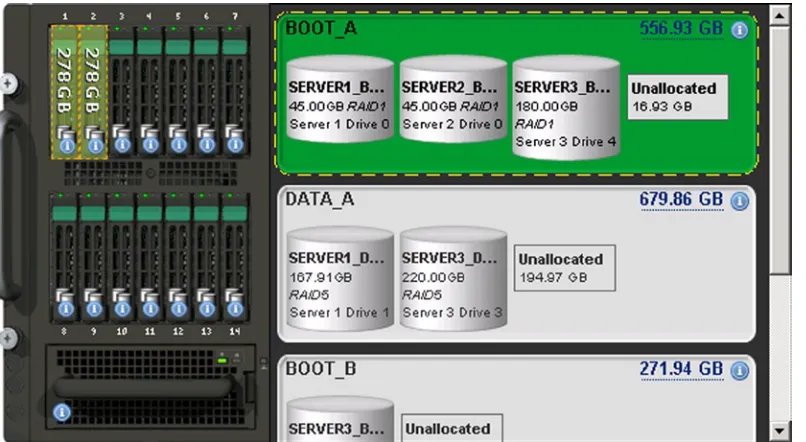
To help them in their decision process RDCC IT staff modeled storage pool consumption on the Intel Server test drive site (see www.intelmodularserver.com). This site allows them to try different configurations and out-of-band management systems to develop the best solution. Figure 1-6 shows a storage pool view of the Intel Server with a modular server with a RAID 1 and a RAID 5 subsystem.
The Intel Server allows for organizing the Storage Access Network (SAN) or the attached SAN into a set of storage pools. The storage pools are then allocated to the individual compute module. In Figure 1-6, they added two SAS drives to the storage pool. However, when they built their virtual drives, they decided to organize the data in a RAID 1 configuration. KAMIND recommends that the RDCC IT staff deploys the Intel Server storage with a global hot spare.
Desktop Support and Upgrade
The RDCC IT staff needs to complete not only a data center upgrade, but also a software upgrade. In the past, they purchased a Microsoft Open License that did not include software assurance, so they had a group of deployed desktops using Office 2003 software under Windows XP. Some of the newer software uses Windows 8, so RDCC is faced with replacing all XP systems before the end of support from Microsoft, which is less than a year away.
RDCC IT examined the different pricing options for the new software. The software deployment cost is the same in all cases except for the retail product. The retail product requires that the IT staff physically enter a different serial number for each version of Office 365 software installed.
Office 2013 prices ranged from $432 to $699 (see Table 1-4) for Office 2013 software. The software that cost the most was the retail version. The cost was higher since it required an IT professional to install the software on every desktop and deploy a unique serial number key; RDCC IT staff could not do an automated “push” install for mass deployment of the software and upgrades.
Information Security
RDCC’s information security requirements are similar to those of most companies. RDCC wants to make sure their data is kept private. They want to control access to their data and the computing resources. These are their business needs. RDCC doesn’t want to use any cloud service that required an intellectual property transfer. Some cloud services companies use IP rights assignment as a way to sell additional product and services to the companies’ employees.
All of us have heard of reports of credit card numbers being stolen from retail store point-of-sale computers. How about a government employee leaving a laptop that contains thousands of social security numbers in a car and that laptop is stolen? There are countless stories of identity theft. The stories all come down to this: How safe is your data? The safety of your data is what information security is all about, and the crux of the problem is data access and control.
Realistically, it does not matter where your data is located. It can be safe anywhere—with the right precautions. The processes and security around your data and how it is controlled is what matters. As an example, does the network administrator have access to your e-mail? What password policies are in place to ensure that your data is under control? What is the physical security like? Who picks up the trash in the evening in your data center? Who has access after-hours to the information? All that matters is how data is managed. Data loss prevention is critical for RDCC’s business to ensure confidential information stays inside the company and there is no IP rights assignment to use the Office 365 cloud service.
There are many aspects of physical data security. Figure 1-7 is a picture of a Microsoft data center. All server access is controlled and limited to a few select individuals. Microsoft also has controls on who accesses the data. This is a critical aspect of data security that is often overlooked.
payment option
Volume License (SA) 444 148 Agreement exists for License portion
Volume License Subscription 432 144 Three-year subscription, upgrades
included
Office 365 Subscription +12 per user/month 144 Microsoft Online one-year agreement,
Note
■
Microsoft’s policy is that the customer owns the data, not Microsoft.
Microsoft believes that the data is owned by the customer, and the customer has 100 percent control over the data. To put this in perspective, the customer must grant Microsoft permission to access the data. This philosophy limits data access and establishes the controls necessary for data security.
The next part of data security is built around the standards necessary for access and control of the data. The Microsoft software design philosophy is built from an idea of secure code design. Secure code design means that the software is designed using best practices from the ground up. To put this in perspective, the code in the data centers is built from a best practice software design known as code secure. Michael Howard and David LeBlanc wrote the Microsoft book Writing Secure Code. This is a must-read book if you are doing any software development.
Writing Secure Code walks a developer through the process of software development and describes the way to prevent attacks on software. This book provides examples of how software developers must padlock their code to prevent unknown attacks. The philosophy of Microsoft security begins at the core of the product design lifecycle—the developer. If you do not put the correct processes in place, then the products built on top of those products will not be secure. This philosophy of security permeates modern Microsoft products as well as the data center.
Note
■
employ a risk-based, multidimensional approach to safeguarding services and data. all products must go
through the secure development cycle to release code publicly. the secure development lifecycle ensures threat
development management.
Microsoft supplies a multi-tenant architecture based on Active Directory and built from secure code design. Microsoft has scaled the data security problem and discovered the weaknesses of various security products. Microsoft discovered that when a deployment is scaled beyond certain practical limits, security issues that no one else has thought of emerge. Microsoft deployment of the Exchange data infrastructure goes beyond the limits of whatever has been tested before. Microsoft has greater than 40M mailboxes that use Windows Azure Active Directory security. Microsoft augments the design with data access policies that prohibit the unauthorized access of data. To ensure compliance, these policies are monitored automatically within Microsoft Office 365 software, a feature that meets RDCC design goals.
Monitoring
There are two different monitoring approaches used to manage the on-site equipment and off-site equipment. These involve Microsoft Systems Center and Microsoft Windows Intune. Each has different capabilities and features depending on the needs of the client and the type of existing on-premises equipment.
Microsoft Systems Center
There are several services available for systems monitoring. There are those available from managed service providers like Level Platforms and on-premises monitoring using Microsoft Systems Center (SCC). The objective of both is the proactive monitoring of servers and clients. Why proactive monitoring? The simplest explanation is productivity. As users become more dependent on computers for daily activity, there is an expectation that it “just works.”
SCC provides a proactive view of the on-premises network and has the capabilities to distribute patches (temporary fixes), install software updates, and troubleshoot network issues. SCC also has the capability to manage an unlimited number of servers, either virtual or physical. Small businesses can now manage their on-premises desktops and remaining servers at a fraction of the cost per user available to larger enterprises.
Microsoft Windows Intune—Desktop Management
The second type of monitoring product that RDCC is looking at is Microsoft Windows Intune. This is an agent (software that is installed on the device to monitor operation) product designed for small businesses. This product allows the management of updates, limited group policy control, and antivirus monitoring. The monitoring is completed at a host level. Windows Intune is integrated into Microsoft Systems Center or as a separate cloud monitoring service for small companies. Windows Intune directly controls systems updates, addresses virus issues, and manages software licenses and deployment for the business. A RDCC test confirms that all these two environments can be used simultaneously in the management of their systems.
RDCC Cloud Solution
RDCC’s IT requirements are typical: improve access to technology, enhance access to data, lower operations cost, and raise product efficiency. The RDCC IT department prepared various options for deployment ranging from 100 percent on-premises to 100 percent cloud. RDCC management directed the IT organization to focus on areas that engage commodity IT services and find the best alternatives. The following was agreed upon as a balanced solution:
Migrate all e-mail users to Microsoft Office 365 hosted Exchange Mail Services. There are •
18 local users and 150 remote mail users.
Move the SharePoint services to SharePoint in the cloud as part of the Exchange Mail •
migration.
Move the 55 web conferencing accounts (Webex/GoToMeeting) to Microsoft Lync as part of •
the migration.
Eliminate the need for ISA server and replace this with local firewalls (fortinet or sonicwall) •
since remote users will use the cloud.
Cloud Requirements
The commodity products that are readily available externally include Microsoft Exchange, SharePoint, web conferencing, virus management, and spam/virus filters. RDCC IT estimated that 35 percent of their IT resources could immediately be saved by moving to the cloud.
Office 365 Business Savings for RDCC
Use Microsoft Windows Intune for antivirus and update management. •
Deploy a blade server with two virtual machines to support the LOB application. •
Contract with a third-party managed service provider to provide a monitoring solution and •
hosted backup.
With the savings realized by the proposed cloud solution, RDCC is able to significantly restructure the business process and focus the organization on business productivity gains. They will be able to realize two big priorities: upgrading their servers to the new Intel Server and cleaning up their data center. RDCC will be able to dispose of two of the three computer racks and reduce all servers to one 6U unit with an integrated SAN.
RDCC IT presents the comprehensive plan. RDCC management is thrilled with the direction reallocates IT resources to improve the cupcake design simulation by moving it from an Access/SQL Server Express to SQL Azure and Windows Azure.
Migration Cost and Approaches
Granted, Table 1-4 (covered earlier in the “Desktop Support and Upgrade” section) makes many assumptions about hardware and software costs and support. However, it provides a good illustration that the total cost of ownership is quite different if the costs of server upgrades and software upgrades are considered. That is, when one compares apples with apples.
If it takes at least three years to receive a payoff from an on-premise solution, it is worthwhile to look at the cost tradeoffs and other business and technical assumptions. As an example, Table 1-2 illustrates cloud deployment costs to be less than 30 percent of the deployment costs for an equivalent on-premises solution for 50 people.
It is possible to overlook the deployment costs associated with hardware, software, infrastructure, and security required for a server-based solution. The other factor for migration to the cloud depends on employees. Small business migration can be greatly aided by IT skillsets among employees—and on whether they have accepted the migration as a positive thing. It is good practice to involve end users in the planning and transition, and to thoroughly communicate its benefits at key points in the process.
The cloud migration cost for small organizations will vary depending upon the organization skills. Office 365 migrations are about business process changes. In organizations that tend to have well-known business process, migration is quick. Organizations that change the business process experience longer cloud migration.
The business process change for a 20-user business may involve creating a program to train administrative assistants in handling the day-to-day issues like password changes, spam issues, and Outlook configurations. In this specific case, there was an initial cost in setting up the training, but rapidly dropped as soon as trained administrators took over.
Contrast this 20-user migration with an international organization that was more end-user literate with computers and technology. This was a 35-person company that was migrated to online services in three days across four different countries. The users were migrated from an on-premises solution to Microsoft Online Services.
These are just some examples. There are different costs associated with all migration. You need to look at the business processes of the organization. This book is designed to address components in each of these costs areas. Looking at migrations, they fall into three categories: low, medium, and high. The migration costs are directly related to the organization’s skills.
• Low. This is a do-it-yourself (DYI) migration. The IT professional (or business owner) provides the basic configuration and setup, and acts as backup support if needed. Usually the mail is uploaded using PST (since the source environment is usually POP mail).
• Medium. The IT professional partners with the customer for the migration. The IT professional directs customer resources remotely to complete the migration. The IT professional trains the local IT staff. The organization may need password synchronization and has a local LOB server resource.
• High. The IT professional handles the migration from start to finish. The cost depends on the configuration of the on-site mail server and SharePoint usage as well as the security requirements. As an example (discussed later), there may be a need for tightly integrated security; in this case a federation security server is installed.
The migration environment differs depending on the business. Some businesses are running under the Microsoft Active Domain architecture, such as SBS or equivalent. In some cases where there is a non-Microsoft OS, the mail migration cost depends on the OS where the mail and documents reside. There are other factors in the migration costs, and the solution comes down to the business processes.
Remote Monitoring with Windows Intune and Systems Center
Remote monitoring and management allows a group of computers to be managed and controlled from a central location. The rationale for remote management and monitoring is to contain operations costs. As organizations’ computing infrastructure becomes more complex, we are always looking for ways to reduce the complexity of the environment. There are many different sets of remote management and monitoring tools. Typically, remote monitoring is looking for a way to aggregate data to allow a proactive analysis of the work environment. Figure 1-9 replicates the Windows Intune Monitoring dashboard for a typical small business.
The Big Decision: On-Premises or Cloud Solutions?
The line in the sand for IT change is whether to keep data on-site or off-site. The most frequent motivator for data migration to the cloud is cost. Whether it is savings realized through reduced labor, more efficient equipment, or general “operations” expenses, cost is king. Still, the best solution sometimes straddles the line, because there can be a case for equipment and services that are both on-premises and hosted by the cloud. The decision process is known as resource optimization. Resource optimization consists of the following:
• Server Consolidation: Reducing the number of servers to improve overall operations costs (see Figure 1-10).
• Hardware Consolidation: Optimizing the server hardware to reduce overall systems cost. • Core Services Consolidation: Removing core services that can be purchased in the cloud at a
lower rate than keeping those services on-premises.
The branch office design (Figure 1-10) demonstrates a reduction of the on-premise servers from three to one Intel Server, with six compute modules hosting the virtual machines. The Intel Server (see Figure 1-11) allows the addition of an integrated SAN with 14 SAS (1TB) drives in a RAID 10 configuration (providing a raw space of 14TB). A second integrated networked switch is also added.
The server also supports six compute modules with 32GB to 256GB memory and dual Intel
®
Xeon®
processors. Each compute module host OS is Windows 2008R2 Enterprise or Microsoft Windows Server 2012. The Microsoft Hyper-V software can support up to 15 additional virtual machines, with the appropriate licenses, or three additional licensed Windows Enterprise VMs. The redesign reduces the number of servers to one device and adds capabilities to support disaster recovery and business continuity.Optimizing Core Services with the Cloud
Core services are those basic services that all businesses require including e-mail, file and print services, and document storage/management. Internal web sites, web/video conferencing, and instant messages are core cloud services that are also used in day-to-day business. All other services used to conduct business can be best described as LOB applications or services on-premises. When we look at the core services, we are looking for ways to optimize the business for productivity and operating efficiency.
Business Efficiency
A complete cloud services migration involves moving the on-premises infrastructure to the cloud. As noted earlier, moving to the cloud can allow businesses to either reduce the IT support staff necessary to maintain the on-premises solution or reallocate the resources for different IT projects. Operational costs can be reduced for additional services such as business continuity and disaster recovery. These services are standard with all cloud services partners. Microsoft Online Services offers 30-day mailbox content and SharePoint recoverability and 14-day recoverability on a mailbox deletion. Additional Microsoft Online Services include e-mail point-to-point encryption and immutable compliance archive (such as legal hold and the Finra – Financial Industry Regulatory Authority (www.finra.org).
Typical migrations involve removing on-premises e-mail (the internal SharePoint web site) to Microsoft Online Services and centralizing conferencing from a third-party supplier to Microsoft Live Meeting. There are sometimes differences in the user interface, but the Microsoft Online Services Business Productivity Online Suite helps resolve them. Services that are left on-site are designed around existing LOB applications using CRM systems and SQL LOB applications, as well as the traditional file/print services.
Next Steps for RDCC
Before RDCC migrates their business to the cloud and Office 365, there is planning to be done. To help plan for the migration, the management team attended a demonstration event as participants in the Microsoft Experience Center (MEC). The MEC demo walks the user through the experience using different persona to fully understand the capabilities of Office 365. This is a key step in the planning cycle for Office 365 migration. As RDCC looks at their business in detail, they will go through a typical planning and evaluation process. Office 365 migration is smooth, but it is essential to plan and test. The next few chapters will detail RDCC’s experience.
Summary
This chapter focused on why businesses move to Office 365. It included a review of the business reasons and provided a cost comparison of different approaches. Like any business change, the objective is to reduce operating costs and improve productivity to build a competitive advantage. The conclusion is that Office 365 solutions can provide that competitive advantage.
Next Steps
The next chapter will cover using Office 365 and Windows Intune, starting with a day in the life of an Office 365 user and a follow-on section that helps you set up your computer to use Office 365.
Here is a list of chapters you may want to read next: • Chapter 2: Using Office 365 and Windows Intune
We explore the Office 365 capabilities in the demonstration site with a focus on how this helps your business productivity. The best way to understand is to experience Office 365. We use a day in the life of a user to demonstrate the capabilities that you have with Office 365. We close the chapter with a reference section on the most common end user configurations when you use Office 365.
• Chapter 3: Office 365 Planning and Purchase
The key to a successful migration is the planning and purchase process of Office 365. There are three different categories of plans you may purchase from, but the secret to a successful migration to Office 365 is picking the correct plan that supports your business. Once you pick the plan, it is about planning the migration to Office 365 to ensure the process is seamless for your organization. This chapter describes the basic purchase information and offers more details about the choices. We close this chapter with information about pilots and e-mail migration.
• Chapter 4: Office 365 Setup and Migration
Once you have selected your Office 365 plan and completed the planning process, the next step is the migration process. There are different ways you can migrate to Office 365 and different migration techniques, such as using cut over migration or federation. This chapter covers the most common approach to Office 365 migration in a non-federated environment.
• Chapter 8: Office 365 Administration
Using Office 365 and Windows Intune
Office 365 is a family of products organized in three product plans. Each plan is designed with features to best meet the needs of businesses based upon their size or other factors. The plans are referred to as small business, midsize business, and enterprise business. Office 365 Small Business and Midsize Business are fixed in size and configuration. Users of these plans must purchase all of the same subscription. The Enterprise plan has all of the different Office 365 options. The Office 365 Enterprise configuration allows mixing and matching features to create a customized
subscription within the enterprise plan. The midsize and small business suites are restricted only to those products in those specific Office 365 plans.
Office 365 is scalable for all business. An enterprise Office 365 subscription can be created for one user or 100,000 users. The scalability is achieved with service reliability, ease of use of the administration center, and flexible mixing of the different Office 365 plans. Our approach to an Office 365 configuration is to select the suite of products that best matches the roles of the employees and needs of the organization. The Office 365 Enterprise Suite allows the most flexibility in choosing product features.
This chapter details a day in the life of an Office 365 user and material for setting up one computer to use Office 365. This approach enables most end users to start an Office 365 trial subscription and successfully configure the service.
“A Day in the Life of an Office 365 User” explores the Office 365 capabilities in the Microsoft demonstration site and details the features of Office 365. Taking the time to test the service offering in this way tends to result in the most successful migrations. With a basic understanding of the service offerings, identifying the ones that match your business needs becomes simple.
A Day in the Life of an Office 365 User
However, Tom had questions about how Office 365 services would benefit his users at RDCC. He and his Microsoft Partner set up a demonstration. Most Microsoft Partners can set up different types of test environments, but in the RDCC case, the Microsoft Partner, KAMIND, choose to use an interactive training session using the Microsoft Customer Immersion Experience center (CIE), which provides a fully configured Office 365 experience. This exercise exposes Tom to the full range of Office 365 capabilities and features in such a way that he is able to relate his new knowledge to the Office 365 migration project for RDCC.
The Microsoft CIE is a preconfigured Office 365 organization that supports all of the Office 365 services, including Yammer, Project, Exchange, Lync, SharePoint, and CRM. RDCC is not interested in the CRM option at this time, but they are interested in using Windows Intune. Tom was looking for a way to reduce the costs of managing the Office 365 user’s devices with a cloud solution so RDCC would not need to manage an On Premises solution using Microsoft System Center. Kamind1 suggested that Tom play the role of an end user in the Microsoft demonstration company, Contoso, Inc. Tom was assigned an Office 365 user account, and he assumed the hypothetical identity of a Contoso sales associate, Karen.
Note
■
“Where to start with Office 365” is a
hands-on tutorial
, not a
configuration guide
. in the second part of this
chapter, we have all of the necessary configuration information to set up your desktop. the tutorial serves only to show
the features of Office 365, so the ones you really need can be selected and applied to your specific work environment.
Where to Start with Office365? A Hands-On Tutorial
Start by opening up a web browser and logging in into the Office 365 site at http://office.microsoft.com (see Figure 2-2). $50 $100 $150 $200 $250 $300
10 20 50 100 250 500 1000
On Site Cost versus Cloud Costs
Onsite Per user Cloud Per user
Once you have entered your email address, Microsoft online services will determine if there are multiple accounts for different Microsoft services under your email address. Microsoft offers two different services for users: consumer services and business services. These services are represented as a Microsoft account and an Organization account. The Microsoft account is for Microsoft services that require a unique ID, such as your email address. Examples of these accounts are Hotmail, Microsoft Passport, Xbox Live, and volume license services (to name a few; there are other consumer services).
The Organization account is your Office 365 company business service account. The services of these two accounts are different and isolated from each other on different servers in one or more Microsoft Data Centers. It is very common that a user will have both an Organization account and a Microsoft account. When you access Office 365 services, you always use the Organization account.
Note
■
You do not need to have a Microsoft account to use Office 365, only an Organizational account.
Logging into Office 365
After you have opened a browser to Office.microsoft.com, select the sign-in (Figure 2-2, upper right-hand corner) and enter your Office 365 company email address. If you have added consumer capabilities to your email address (found at account.live.com), then you will be presented with two choices (Figure 2-3). If you are going to access the Office 365, then select the Organizational account.
Figure 2-4. Office 365 first-time login
Tom, acting as Karen Berg, sees that he can continue to install the Office 365 software for his PC/Mac, phone, and tablet without any help desk support. He watches the “getting started” video to get a feel for the organization of Office 365. Tom explores the different services, such as Web Outlook and his personal cloud document storage, SkyDrive Pro. The self-service welcome portal (Figure 2-4) will stay visible until the Outlook services are accessed. Tom selects the Outlook tab (Figure 2-5) to see Karen’s email.
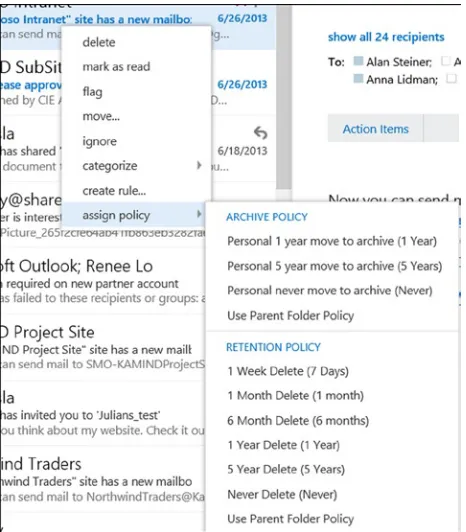
Tom notices that the Office 365 web Outlook (Outlook WebApp) looks very similar to the Outlook client. The interface is crisp and simple to understand. The Outlook email, calendar, and People (contacts) are easily navigated. Tom notices that the Outlook WebApp supports right-click actions on the interface (Figure 2-7). This is important to Tom so that the sales staff may color code their email into different categories.
Figure 2-6. Office 365 landing page for user with an email account
Office 365 Outlook mail services are designed to provide data synchronization between all devices that are are using Office 365. The simplest way to look at this is that all information is synchronized, so in using email on his smartphone, Web browser, or local Outlook, Tom only needs to “read once” and/or “delete once” and all devices connected to Office 365 email services will sync his actions.
Accessing Outlook–WebApp
Figure 2-7. Outlook WebApp with right-click support
Note
■
if this is the first time you are accessing the skydrive, setup can take a few minutes.
Once the setup is completed, Karen’s private SkyDrive Pro cloud storage is built. Karen’s initial SkyDrive Pro storage capacity can be set at levels between 25GB and 100GB. Tom thinks of RDCC sales associates who have a mobile laptop, iPad, and smartphone and considers that they are located in several different parts of the world. He realizes that SkyDrive Pro storage solves a problem for RDCC by easily maintaining control of company documents in a centralized team storage, without the associated overhead costs. His Microsoft Partner informs him that the SkyDrive is included in the subscription he plans to use for RDCC at no additional cost. The initial SkyDrive Pro size is set at 25GB.
Note
■
it polices can override individual polices on email retention. the default is to allow the user to determine the
best way to save email. We have seen corporate email retention polices provide as little as 90 days history. Many of
us expect to retain years of old emails.
SkyDrive Pro–Overview
Tom reviews the Office 365 features and notices that there is support for SkyDrive, Sites, and Yammer. The Microsoft Partner explains that Office 365 document synchronization is part of SkyDrive. SkyDrive is Microsoft’s document synchronization tool that synchronizes documents with Office 365 and all of the user’s desktop or mobile devices. This allows the user Karen to access work documents on her phone, laptop, or desktop computer. The Microsoft Partner instructs Tom to access SkyDrive and select the SkyDrive menu item (Figure 2-9) to edit documents in the Office 365 cloud.
You can also upload documents from other systems to Office 365 using a drag-and-drop interface. Tom discovered that when he used Windows 8.1, he could easily drag documents (Figure 2-11) to the SkyDrive Pro site in the web browser and place those documents in his personal area on Office 365. He also experimented with the Team Site and discovered that he had the same capability there.
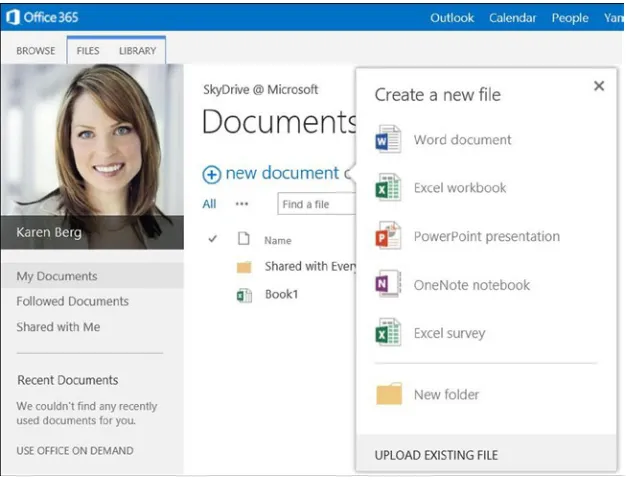
The Office 365 SkyDrive and Team Site allow you to create documents specifically for collaboration. Just select the “new document” option in the “Create Document” box (see Figure 2-10) and proceed.
Once saved in Tom’s personal area of Office 365, documents could be shared with other members of the team as needed. Once the documents are uploaded, they also can be edited with Office 365 web applications (Word, Excel, OneNote, PowerPoint) or with the desktop (or mobile) Office Professional Plus software, which supports PC, Mac and Android devices).
Tom discovered that Office 365 documents can be shared between designated team members using the personal “share everyone” folder, or externally to users outside the company. Tom experimented with sharing documents by selecting the ellipses (…) and later the “Share” option in the pop menu. Tom was surprised to see a preview of the file with an option to allow you to explicitly share the document (Figure 2-12).
Figure 2-11. Uploading documents to Office 365
Office 365 Yammer Configuration
Tom has been impressed with the capabilities that he has encountered so far. He sees that Office 365 offers the opportunity to reduce both operational costs and license costs while rolling out new capabilities to his users. However, he still has questions. One of his unresolved concerns is compliance issues. As an example, his legal department has asked him to restrict social media access for users in the company. The legal department feels that too much proprietary information (company confidential information) is being discussed on external social media sites such as Facebook and Google Plus.
The legal department advises that loss of company information could hurt business growth and give RDCC competitors advance information on the direction of RDCC products. The Microsoft Partner suggested that Tom consider the Yammer social media service that is part of Office 365 as a solution. Yammer is a service, similar to Facebook, used to handle group interactions in a free-form manner. It is explained that with Yammer, the company information exchanged on this channel is owned by the company and not licensed to a third party. Usually, a free service has an intellectual property rights assignment that overrides the confidentiality of the company information.
Tom selected the Yammer login from Office 365 page (Figure 2-14) and logs into Yammer using Karen Berg’s Office 365 account. The first thing that Tom noticed (Figure 2-15) was the interaction of the different teams and the discussion groups. There were discussion groups for events, HR, and using Yammer itself. Tom could see that Yammer addressed one of RDCC business objectives: to make the company more integrated in their internal communications to improve productivity. The productivity gain addressed this directive and Yammer received full endorsement by the legal department.