ISSN : 2581-7175 ©IJSRED: All Rights are Reserved Page 524
Design and Implementation of Microcontroller Based Computer
Interfaced Home Appliances Monitoring and Control System
Nwankwo P.N.*, Orji M. N.**
*(Department of Computer Engineering; Federal Polytechnic Oko, Anambra State, Nigeria Email: [email protected])
** (Department of Computer Science; Federal Polytechnic Oko, Anambra State, Nigeria Email:[email protected])
---
************************
---Abstract:
This paper presentation was based on “Design and Implementation of Microcontroller Based Computer Interfaced Home Appliances Monitoring and Control System”. The system utilized an interface program running on a personal computer (PC) to monitor the magnitude of the current drawn by the loads from each socket and to switch ON/OFF the two (2) electrical sockets. The system made use of Analogue to Digital Converter (ADC) and AT89c52 microcontroller to monitor and control the loads on the sockets. Every unit that made up the system were considered for proper understanding of how the entire system works. The AT89c52 microcontroller was used to store all the machine code of the system. The Top universal programmer was used to program the microcontroller. The computer and the microcontroller were interfaced using a serial port; for proper monitoring, controlling and switching of the two (2) electrical sockets. The PC acts as an input and output device, it is also used to store the visual basic program of the system. The microcontroller handles most of the monitoring and control operations. The designed system marks another breakthrough in monitoring and controlling of physical processes.
Keywords: Analogue to Digital Converter (ADC), Control System (CS), Microcontroller, Personal Computer (PC), Serial Port (SP).
---
************************
---I. INTRODUCTION
Technological advancement is leading to rapid automation of daily activities with consequent improvement of man’s standard of living at home and in industries where appliances control is a necessity. It uses the personal computer interface with microcontroller to control the appliances connected to the system. The PC based appliances control system was primarily designed to make home and industrial automation relatively easy with little human intervention.
This system can be used to control two appliances (sockets). More appliances can be connected to the extension socket, but the
limitation of this extension is that all the appliances connected will be controlled together and the summation of all the current rating of each of the appliances must not exceed the current rating of the relay (30A).
A. Background of Study
A Personal Computer (PC) is a general purpose microcomputer, and its applications are only limited by the imagination of its user. With an appropriate interface circuitry and software, just about any process can be done/control with the PC. These processes range from word processing, spread sheet applications, graphical designs etc, to
ISSN : 2581-7175 ©IJSRED: All Rights are Reserved Page 525 physical processes such as quality control, data
logging, ON/OFF control of industrial equipment and home appliances, process monitoring and security. For any computer application, be it industrial or domestic, there is numerous number of ways in which a designer can use the PC to achieve his/her aim. This is largely dependent on the designer’s ingenuity to manipulate the control variables governing both the hardware and software design of the system.
B. Motivation
The motivations of this work are the desires to; 1. Explore and expand the capability and the compatibility of the PC.
2. Gain practical experience in the use of microcontrollers in designing applications.
3. Gain in-depth knowledge on interfacing the microcontroller and the PC, for monitoring and controlling physical processes.
C. Importance of Work
1. The PC can be located remotely from the controlled equipment or process, thus; an operator can monitor and control equipment, home appliances or processes located in harsh/hazardous environments in the comfort of his/her air conditioned office/home.
2. Several equipment, home appliances or processes located far apart from each other can be monitored and controlled simultaneously just by the movement of a mouse within the small area of a monitor screen and the clicking of an appropriate button.
3. Programs can be written to automatically invoke actions in response to processes or equipment’s state or to conditions specified by the programmer. For example, shutting down a process when operating temperature exceeds a certain value, etc.
D. Aim of the Project
In this project work titled “Design and Implementation of Microcontroller Based
Computer Interfaced Home Appliances Monitoring and Control System”, we will show how to interface a PC running on Visual Basic 6.0 with a microcontroller to monitor the magnitude of the current drawn by the loads from each socket and to control (switch) ON/OFF the two electrical sockets.
E. Objectives
1. Communicate with a microcontroller via a PC serial port using VB 6.0.
2. Monitor the state of the 2 sockets from the PC via the microcontroller.
i. Monitor the ON/OFF state of the sockets. ii. Monitor the load i.e. the amount of current drawn through each socket.
3. 3. Switch the sockets ON/OFF from the PC. 4. Provide over voltage and under voltage protection for connected loads.
5. Provide over current protection for each socket without the aid of a fuse.
F. Scope of Work
The project is restricted to the control of power from the consumer end and it is limited to the control of two loads (sockets), whose individual power rating is below 100VA. Power control is restricted to ON/OFF control only.
G. Concepts of the Project
ISSN : 2581-7175 ©IJSRED: All Rights are Reserved Page 526 for further processing by the microcontroller. The
ADC is set up to sample the analogue signals at a very high rate. The microcontroller then determines the sample with the highest value and uses this as the working value. The ADC’s digital outputs represent supply voltage, currents in socket1 and socket2. As the system is loaded by the appliances, their voltage amperage and wattage are recorded and displayed on the computer.
II. CONCEPTS OF CONTROL SYSTEMS
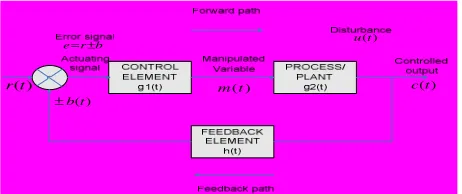
Control means directing and commanding a process. A control system can be defined as a device or a collection of physical components to regulate, direct and command the flow of energy, matter of a process fig. 1 below is a generalized block diagram of a control system.
b r e= ±
) (t b ±
) (t
m c(t)
) (t u
) (t r
Fig. 1: Generalize Block Diagram of a Control System
A. Open and Closed Loop Systems
Control systems can be classified as either open loop or closed loop. In an open loop system, there is no means by which the output is monitored by the system. The block diagram of an open loop system is shown in fig. 2(a) below.
Fig. 2(a): Block diagram of an open loop system
However, a closed loop system has a feedback path from the output of the controlled process to the input of the control system allowing the output to be monitored. The block diagram of a closed loop system is shown in fig. 2(b) below.
Fig. 2(b): Block diagram of a closed loop system
In this project the system has a closed loop control mechanism which sets a limit to the maximum amount of power that can be drawn by the appliances.
B. Manual and Automatic Control Systems
Control systems can be classified as manual or automatic, based on the type of process or plant controlled. In manual control systems every process is executed by a manual operator .In the case of the automatic control systems, the entire process is executed by machines which have been programmed appropriately.
This designed system is an automatic control system since it is programmed, and it responds to changes automatically.
C. Classification of Controllers (Control Elements)
There are a number of different types of control systems that have already been designed and studied extensively. The mission of the controlling device is to make the measured value, usually known as the process variable, equal to the desired value, usually known as the set-point. These controllers are the Proportional (P), Proportional Derivative (PD), Proportional Integral (PI) and Proportional Integral Derivative (PID) controllers [2].
1. Proportional Controllers
ISSN : 2581-7175 ©IJSRED: All Rights are Reserved Page 527 appropriate proportional changes to the control
variable to eliminate error. Fig. 3(a) below shows the block diagram of a proportional controller.
Fig. 3(a): Block diagram of a Proportional controller
2. Proportional – Derivative Controllers
Derivative Control monitors the rate of change of the process variable and consequently makes changes to the output variable to accommodate unusual changes. Derivative controllers should be used with care, because even small amount of high-frequency noise can cause very large derivatives, which appear like amplified noise [3]. Also, Derivative controllers are difficult to implement perfectly in hardware or software. Frequently, solutions involving only integral controllers or proportional controllers are preferred to the use of derivative controllers. The block diagram of the proportional – derivative controller is shown in fig. 3(b) below.
Fig. 3(b): Block Diagram of a Proportional-Derivative Controller
3. Proportional - Integral Controllers
Integral Control examines the offset of set-point and the process variable over time and corrects it when and if necessary. The block diagram of the proportional – integral controller is shown in fig. 3(c) below.
Fig. 3(c): Block diagram of Proportional - integral controller
III. DESIGN METHODOLOGY
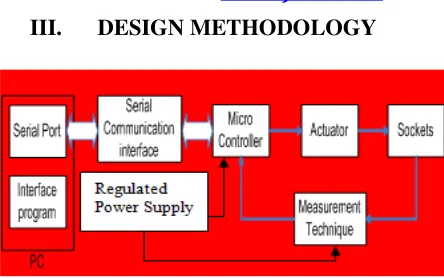
Fig. 4: Block Diagram of the Microcontroller Based Computer Interfaced Home Appliances Monitoring and Control System
The Block Diagram of the Microcontroller Based Computer Interfaced Home Appliances Monitoring and Control System is shown in fig. 4 above. The system uses a PC to switch ON/OFF sockets and also to monitor the state (voltage and current) of the sockets through the microcontroller. The PC communicates with the microcontroller via the PC’s serial port with the aid of a program written in Microsoft Visual Basic 6.0. Main units of the designed system are briefly explained below for better understanding of how the entire system works.
A. The AT89C52 Microcontroller Unit (MCU)
ISSN : 2581-7175 ©IJSRED: All Rights are Reserved Page 528 to be carried out, decodes the instruction, and
carries it out according to the steps required [5].
Fig.5: Pin-out Configuration of the AT89C52 Microcontroller
B. The Actuator and the ULN2003A Driver
The actuator used in this project is the relay which functions by connecting or disconnecting the socket terminals from supply. The choice of the relay used was based on the following ratings:
Voltage rating – 12V (switching voltage). Contact rating – 30A (max. current that can be controlled by the relay).
Coil rating – 200mA (max. coil current).
The unit that handles the switching is the ULN2003A IC. It is basically a relay driver IC and it is a Darlington array having high voltages and high currents as well. It is made up of seven open collector Darlington pairs having common emitter which shows ULN2003 has a capability of handling seven different relays at a time. A single Darlington pair consists of two bipolar transistors and it operates on the current range of 500mA to 600mA [6]. ULN2003 operates on 5V and TTL (Transistor Transistor Logic) and CMOS (Complementary Metal Oxide Semi Conductor). Some of the other applications of the ULN2003 include logic buffers, lamp drivers, line drivers,
LED display, motor driver circuits etc. The microcontroller, ULN2003, and the actuators (relays) interface are shown in fig. 6 below.
Fig. 6: Microcontroller, ULN2003, and actuators interface
C. Serial Communication Interface and the MAX232 IC
To ensure synchronism and error free communication between the PC’s serial port and the microcontroller, certain parameters must be properly set. These parameters and their chosen settings are shown below.
1. Start bit – 1 2. Stop bit – 1
3. Baud rate – 2400bps 4. Flow control - None
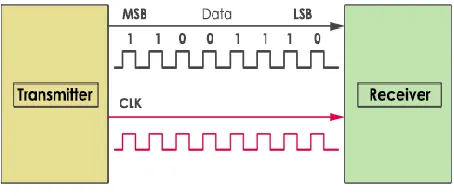
Because of the disparity in the logic levels of the microcontroller and that of the PC’s serial port, it was necessary to introduce an interface between them to carry out logic level conversions. The interface used in this project is the MAX232 logic level converter. The block diagram of the serial communication is shown in fig.7 below.
ISSN : 2581-7175 ©IJSRED: All Rights are Reserved Page 529 The MAX232 IC is used to convert the
TTL/CMOS logic levels to RS232 logic levels during serial communication of microcontrollers with PC. The controller operates at TTL logic level (0-5V) whereas the serial communication in PC works on RS232 standards (-25 V to + 25V). This makes it difficult to establish a direct link between
them to communicate with each other. The intermediate link is provided through
MAX232 [7]. It is a dual driver/receiver that includes a capacitive voltage generator to supply RS232 voltage levels from a single 5V supply. Each receiver converts RS232 inputs to 5V TTL/CMOS levels. These receivers (R1 & R2) can
accept ±30V inputs. The drivers (T1 & T2), also
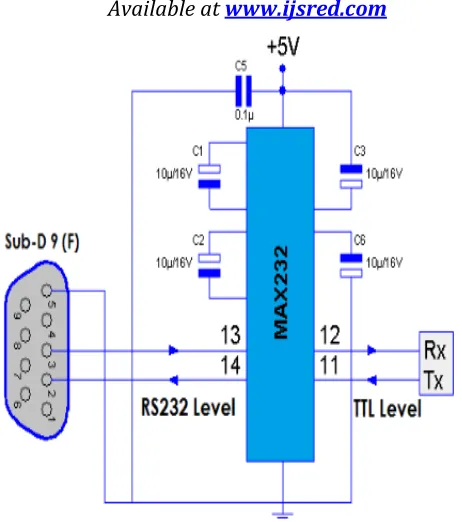
called transmitters, convert the TTL/CMOS input level into RS232 level. The transmitters take input from controller’s serial transmission pin and send the output to RS232’s receiver. The receivers, on the other hand, take input from transmission pin of RS232 serial port and give serial output to microcontroller’s receiver pin. MAX232 needs four external capacitors whose value ranges from 1µF to 22µF [8]. Fig.8 (a) and (b) below shows the block diagram and the circuit diagram of the serial port, Max232, and the microcontroller interface respectively.
Fig. 8 (a): Block diagram of serial port, Max232 and microcontroller interface
Fig. 8(b): Circuit diagram of serial port, max232, and the microcontroller interface
D. Measurement Techniques (Analogue to Digital Converter - ADC0804)
The ADC0804 is used to convert the analogue signal from the measuring circuit (for voltage and current) to its digital equivalent for further processing by the microcontroller. The ADC is set up to sample the analogue signals at a very high rate. The microcontroller then determines the sample with the highest value and uses this as the working value. The ADC’s digital outputs represent supply voltage, currents in socket1 and socket2.
ISSN : 2581-7175 ©IJSRED: All Rights are Reserved Page 530 step size is 19.53mV (5V/255). The time taken by
the ADC to convert analogue data into digital form is dependent on the frequency of clock source. ADC0804 can be given clock from external source [9]. It also has an internal clock. However the conversion time cannot be more than110us. To use the internal clock a capacitor and resistor is connected to pin 19 and 4 as shown in the circuit diagram. The frequency is given by the relation f= 1/ (1.1RC). The pin out diagram of ADC0804 and ADC0804 to microcontroller interface is shown in fig. 9 (a) and (b) respectively.
Fig. 9(a) Pin-out diagram of the ADC0804
Fig. 9 (b): ADC0804 to microcontroller interface
E. Regulated Power Supply
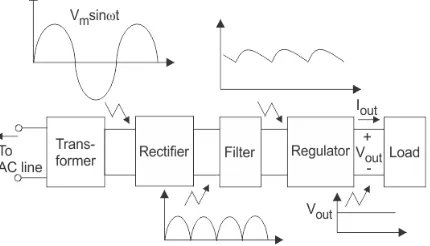
The regulated power supply is used to provide the power requirements of the system. Electronic components require a steady DC power supply, thus; a regulated power supply unit was built to this effect. A regulated power supply converts unregulated AC (Alternating Current) to a constant DC (Direct Current). A regulated power supply is used to ensure that the output remains constant even if the input changes. A regulated DC power supply is also known as a linear power supply; it is an embedded circuit and consists of various blocks. Fig. 10 below shows the components of a typical linear power supply.
Fig. 10: The block diagram of the linear power supply
The basic building blocks of a regulated DC power supply are as follows:
1. A step-down transformer 2. A rectifier
3. A DC filter 4. A regulator
1. Step down Transformer
A step down transformer steps down the voltage from the ac mains to the required voltage level (220vAC to 12Vac). The turn’s ratio of the transformer is so adjusted such as to obtain the required voltage value. The output of the transformer is given as an input to the rectifier circuit.
2. Rectification
ISSN : 2581-7175 ©IJSRED: All Rights are Reserved Page 531 Rectification is the process of converting an
alternating voltage or current into corresponding direct (DC) quantity. The input to a rectifier is AC whereas its output is unidirectional pulsating DC.
3. DC filtration
The rectified voltage from the rectifier is a pulsating DC voltage having very high ripple content. But this is not what we want; we want a pure ripple free DC waveform. Hence a filter is used. Different types of filters are used such as capacitor filter, LC filter, Choke input filter, π type filter. In this project, capacitor filter was used.
4. Regulation
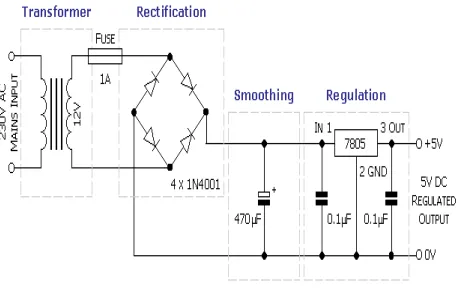
This is the last block in a regulated DC power supply. The output voltage or current will change or fluctuate when there is a change in the input from ac mains or due to change in load current at the output of the regulated power supply or due to other factors like temperature changes. This problem can be eliminated by using a regulator. A regulator will maintain the output constant even when changes at the input or any other changes occur. In this project, 7805v is used to obtain a fixed 5Vdc voltage at the output. The complete circuit diagram of the linear power supply (regulated power supply) is shown in fig. 11 below.
Fig. 11: The complete circuit diagram of the linear power supply
IV.MICROCONTROLLER AND PC
ALGORITHM DEVELOPMENT
In this section we will describe the algorithms used in developing the microcontroller and PC programs. In designing an algorithm for any program, the first step is to determine the function of the program. This function is broken down into a sequence of simple operations.
A. Microcontroller Program Algorithm
1. DECLARE VARIABLES AND CONSTANTS
2. DECLARE INPUT AND OUTPUT PORTS
3. INITIALIZE PROGRAM
4. GET VOLTAGE
5. GET CURRENT1
6. GET CURRENT2
7. LCD DISPLAY
8. PC COMMUNICATE
9. DECIDE
10. DELAY
Algorithm Description:
1. Declare your variables and constants.
2. Configure microcontroller pins as either inputs or outputs.
3. Certain microcontroller parameters are set on start-up. These parameters and their settings are as follows;
Set a logic 0 to the actuator pins Clear LCD
Set USART baud rate to 2400
Read the values of over voltage, under voltage, over current which were stored in EEPROM before power was turned OFF.
4 – 6: The Microcontroller receives the digital equivalent of the analogue signals from the measuring circuit (for voltage and current measurements) via the ADC. The ADC is set up to sample the analogue signals at a very high rate. The microcontroller then determines the sample with the highest value and uses that as the working value.
ISSN : 2581-7175 ©IJSRED: All Rights are Reserved Page 532 8. On start-up, after initialization, the
microcontroller starts sending the measured voltage and current data to the PC, also ready to receive data from it.
9. On receiving data from the PC, it determines the nature of the information, based on a given code, and then performs the required operation.
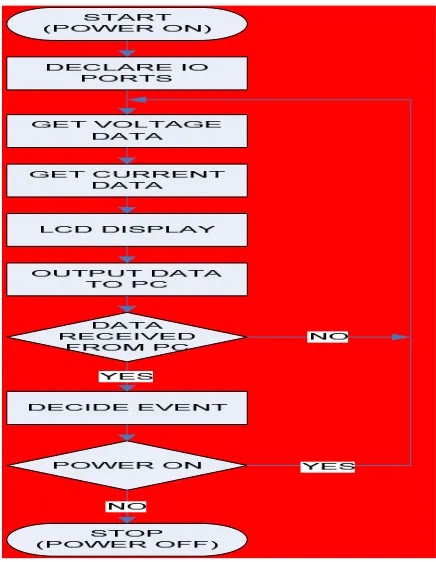
10. The delay for purposes of synchronization. Fig. 12 below shows the flow chart of the
microcontroller program algorithm.
Fig. 12: Flow chart of the microcontroller program algorithm
B. Pc Interface Program Algorithm
1. INITIALIZE PROGRAM 2. READ RECEIVE BUFFER 3. DISPLAY DATA
4. ON_CLICK EVENT SELECT CASE (#)
i. CASE (1): SWITCH ON/OFF SOCKET1 ii. CASE (2): SWITCH ON/OFF SOCKET2 iii. CASE (3): SET OVER VOLTAGE iv. CASE (4): SET OVER CURRENT1
v. CASE (5): SET OVER CURRENT2 vi. CASE (6): SET UNDER VOLTAGE
Algorithm description:
1. On program load certain parameters are set, these include;
The selection of a COM Port.
The setting of Baud Rate, Parity bits, Stop bits, Data bits etc.
Declaration and assigning of variables and constants.
The COM Port is then opened.
2. On receiving data which is stored in the receive buffer, it is processed and based on the information it contains, the program displays or ignores subsequent data received.
3. When a user clicks any of the command buttons contained in the program based on the button’s function, any of the actions labelled CASE1 to CASE6 occurs.
ISSN : 2581-7175 ©IJSRED: All Rights are Reserved Page 533
Fig. 13: The flowchart of the PC program algorithm
V. SOFTWARE DEVELOPMENT
In this section, we will show how the microcontroller program and the Interface program were developed.
A. Microcontroller Program Development
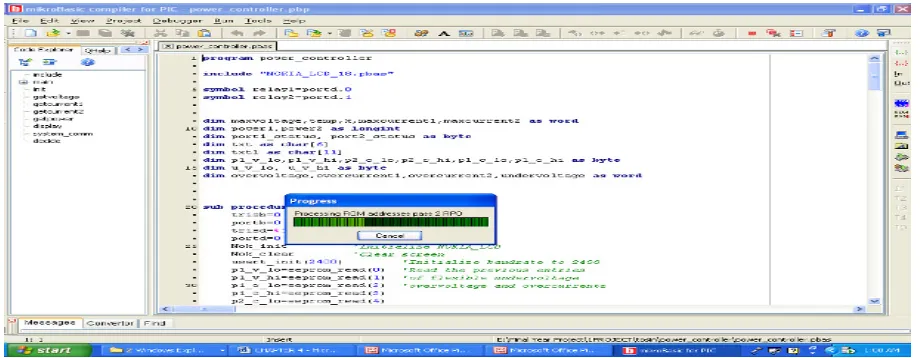
MikroBasic
The microcontroller was programmed with the mikroBasic high level language
Below are some of the features of this language: It provides a faster and easier way of writing program codes.
It allows the programmer concentrate on solving important tasks rather than waste time on assembly language codes.
It has a compilerthat translates the original BASIC code into machine codes.
It has library and built-in routines for frequently used peripherals thus; facilitating programming.
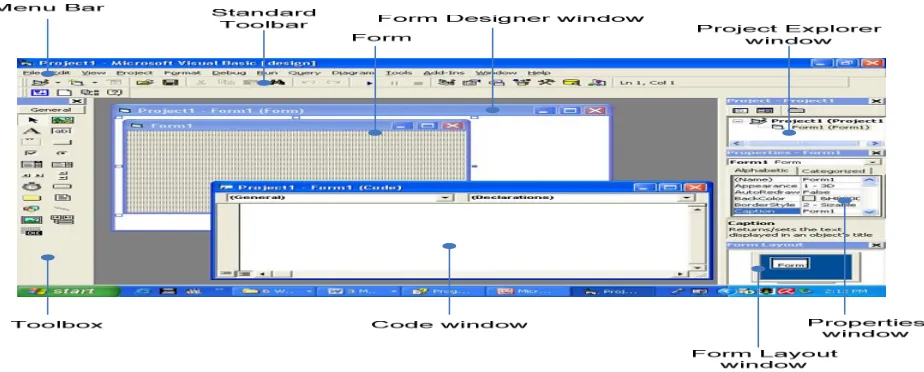
The mikroBasic program loaded on the microcontroller was designed according to the algorithm described in fig. 12 above. Fig. 14 below shows the mikroBasic programming environment during program development, while fig. 15 shows the snapshot of the IDE of VB 6.0
ISSN : 2581-7175 ©IJSRED: All Rights are Reserved Page 534
Fig. 15: A Snapshot of the IDE of VB 6.0
B. Interface Development Environment (IDE)
1. Menu bar: This bar contains Menu items which are means by which a programmer instructs the VB IDE.
2. Standard Tool bar: This contains icons which are shortcuts to basic menu items.
3. Project Explorer window: This window gives you an overview of all the modules that are contained in your application.
4. Tool box: This window includes a set of objects called controls that you can place on a form or on another designer. Visual Basic comes with a fixed set of controls called intrinsic controls but you can add other Microsoft ActiveX controls to this window.
5. Form Designer window: This window is used to design an application's user interface.
6. Form: This is the foundation of an applications interface.
7. Code window: You use the Code window to write code that determines the behaviour of your forms and other objects in your application.
8. Properties window: This window lists all the properties of the object that's currently selected and gives you the opportunity to modify them.
9. Form Layout window: This window shows how a given form will be displayed when the program runs.
C. Interface Program Development
The Interface program was designed to provide monitoring of our data and initiating real-time switching of the loads.
We designed the interface program to be run on the computer system with VB 6.0, following the step by step algorithm presented above (Pc Interface Program Algorithm). Fig. 16 below shows the Visual Basic environment during the interface program development.
ISSN : 2581-7175 ©IJSRED: All Rights are Reserved Page 535 VI. CONCLUSION & RECOMMENDATION
A. Conclusion
In conclusion, let us review the extent to which the aim and objectives have been realized:
We were able to switch ON/OFF two electrical sockets using a PC interface program. This was achieved via PC’s serial port communication with a microcontroller. The system was able to switch ON/OFF the sockets with the interface program, and monitor the current drawn by the loads through each of the sockets.
Finally, we were able to provide for over-voltage, over-current and under-voltage protective features.
B. Recommendations for Further Works
To switch and monitor parameters for more than seven load sockets, a multiplexer should be included in the design so as to enable the microcontroller acquire the data from different sockets.
The design approach can be expanded to measure power factor for non-resistive loads, so that the real power of the loads can be determined.
A wireless Interface can be used to acquire data from the hardware interface when the RS232 limit is exceeded.
To implement this idea on a building, we recommend that the hardware interface be installed close to the distribution board so that groups of loads would be controlled, thus; reducing the size and complexity of the interface required for switching individual loads in the building.
REFERENCES
[1] Zayed, T., Control Electrical Appliances Using PC (2004, 31 April-last
update), [Online] Available: www.codeproject.com [2007, August 12].
[2] Tocci, R.J. and Widmer, N.S. (2003) Digital Systems-principles and Applications, 8th
Ed., Prentice-Hall of India, India. pp. 623, 803-805.
[3] Wikibooks (2002) Control Systems Engineering, [Online] Available:
http://en.wikipedia.org/wiki.htm [2007, June 21]
[4] Nwankwo, P. N, (2017), “8051/8951 Microcontroller: Instruction formats, Assembly Language, and Hardware Interfacing”, Awka, Benzero Grapfix, pg 80-83.
[5] Isizoh .T, Nzeribe. H.N, Aniedu. A, (2018), “Assembly Language Programming: For Embedded Systems and Real – Time Applications”, Awka, SCOA Heritage Nig. Ltd, pg 27-28.
[6]
https://www.theengineeringprojects.com/2017/06/introduction-to-uln2003.html
[7] MAX 232 Data Sheet (1998-August-last update), [Online] Available:
www.maxim-ic.com [2007, October]