Creating Web-Based Academic Support Information System
with Rapid Application Development Method
(Case Study: 1 Gudo Junior High School, Jombang)
Aldena Oktavian Permatasari, Inna Sabily Karima S.Kom, M.Kom
(Computer Science Faculty, Universitas Mercu Buana, and Jakarta)---
************************
---Abstract:
The development of technology in the current era provides great opportunities in all aspects that have taken place, especially on systems that are still done manually. However, the opinion that the manual system has been very effective has made people reluctant to switch to processes that are fully carried out by technology. Some manual processes that occur in the community, especially in the field of education at Gudo 1 Junior High School include management of attendance data, student score, student grade, creating schedule course, and creatingexam schedule. The process of being absent in the class that is still manually using paper makes the class leader have to collect attendance data for the homeroom every week, as well as when storing the UH, UTS and UAS scores of students, most of which are still written on paper. Then in the process of making the lesson schedule and the exam schedule that is still manual, it requires its own additional time, so it is not efficient in terms of time. These four points can be said as points that support the ongoing academic activities in schools, especially at Gudo 1 Junior High School, Jombang. Seeing that there are still obstacles experienced in meeting the needs that support academics, this study was made using the Rapid Application Development method. By using the Rapid Application Development method in addition to a faster process, it is also able to meet the needs of users who can be said to still not fully understand what technology needs are desired.
Keywords —academic information system,scheduling, attendance, information system , rapid application development
---
************************
---I. INTRODUCTION
The development of technology in the current era provides great opportunities in all aspects that have taken place, especially in systems that are still done manually. In this research, we will discuss management of attendance data, student grades, class increases, making lesson schedules, and making test schedules. These four processes are an important part of the running of an academic system, especially in the case studies being taken, namely at Gudo 1 Junior High School, Jombang.
Seeing that there are still obstacles experienced in meeting the needs that support the academic, this study was made entitled "Making Web-Based Academic Support Information System with Rapid
Application Development Method (Case Study: 1 Gudo Junior High School, Jombang)". By using the Rapid Application Development method in addition to a faster process, it is also able to meet the needs of users who can be said to still not fully understand what technology needs are desired. So that this research is expected to be a media that is able to support the needs of teachers and students in SMPN 1 Gudo, Jombang in improving the efficiency of academic progress in school.
II.THEORITICALBASIS
A. Academic Infromation System
Academic Information System is software that is used to present information and organize
administration related to academic activities. With the use of software like this, it is expected that academic administration activities can be managed properly and the required information can be obtained easily and quickly [10].This system aims to support the implementation of education, so that universities can provide better and more effective information services to their communities, both inside and outside the university via the internet [12].
B. Rapid Application Development (RAD)
Rapid Application Development (RAD) is an object-oriented approach to system development with shorter development times [11]. There are three phases in the Rapid Application Development (RAD) development method, such as [11] :
1) Requirements Planning Phase: In this phase the user and system analyst identify what needs are needed in the application and identify what information is needed to build the application. The purpose of this phase is to solve existing problems and realize business goals.
2) Workshop Design Phase: This phase is a
design-and-fix phase. In this phase the user responds to the system design that has been made, then if there are those who do not match the system analyst and programmer to improve the system in accordance with the response given by the user.
3) Implementation Phase: If the system design
phase of the workshop has been approved, then in this phase the system will be introduced to all users who will
use this system later.
C. Research Methodology
1) Observation: Observation is carried out directly on the process that is part of the needs in the ongoing academic process. The author also observes the processes that occur in making lesson schedules at Gudo 1 Junior High School, Jombang.
2) Interview: The author conducted a survey of several teachers as well as students to ensure the needs and constraints experienced in carrying out the academic process. At this interview stage, information and definite data are also obtained which are needed as a basis for the process of making lesson schedules. So that it can fulfill and ensure all estimates are found when making observations.
3) Literature Review: Literature review conducted by the author in this study is to study theories from books andliterature that can be a reference in discussions about academic support information systems.
III. ANALYSISANDDESIGN
A. Research Sites
The research sites makes this research more focused on the specified location. All data and information in the field relating to the background of this research came from the location of the study. Where the location of the study is Gudo 1 Junior High School located on Jalan Raya No.3, Sentanan, Krembangan, Gudo, Jombang Regency, East Java.
B. Research Flow Design
The research is carried out in several stages described by the following flow diagram:
1) Observation and Interview: The process of
collecting data is a reference in determining the formulation of the problem and obtaining the data needed in the process of making academic support information systems.
2) Identification of problems:Identify problems that occur in the system running based on the results of observations and interviews that have been conducted.
3) Identification of Research Objectives:Identify the purpose of this study based on the formulation of the problem that has been identified.
4) System Analysis and Design:Make system design
starting from the new system flow design, database design to user interface design. System analysis activities are activities to look at systems that are already running, see which parts are good and not good, and then document good and bad needs, and then document needs that will be met in the new system [13].
5) System Implementation:Implement based on the
results of analysis and design of the system that has been made. Where at this stage database and application creation activities are carried out.
6) System Testing:Applications that have been
completed and through the implementation phase need to be tested to ensure that the system meets the needs that have been defined previously. In addition, at this stage it also ensures that the system is free of errors.
Fig. 1 Research Flow Diagram
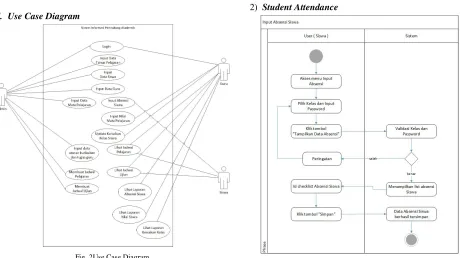
C. Use Case Diagram
Fig. 2Use Case Diagram
D. Architectural Design
Activity Diagram is a diagram that describes the process activities that will or are being made. The following is the activity diagram of the proposed system:
1) Login
Fig. 3LoginActivity Diagram
2) Student Attendance
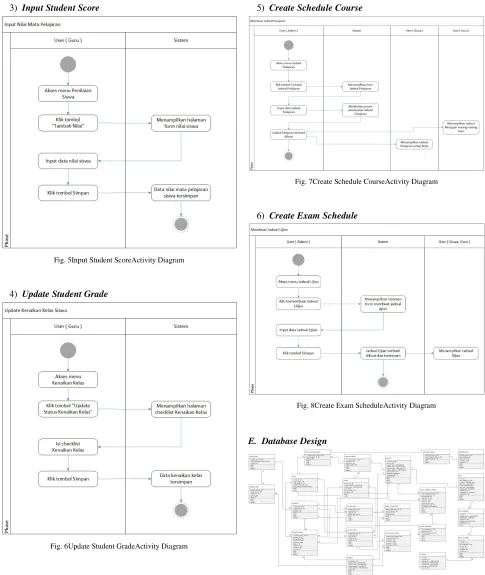
3) Input Student Score
Fig. 5Input Student ScoreActivity Diagram
4) Update Student Grade
Fig. 6Update Student GradeActivity Diagram
5) Create Schedule Course
Fig. 7Create Schedule CourseActivity Diagram
6) Create Exam Schedule
Fig. 8Create Exam ScheduleActivity Diagram
E. Database Design
F. User Interface
The following is a user interface of the system that has been running:activities that will or are being made. The following is the activity diagram of the proposed system:
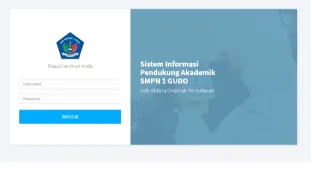
1) Login
The Login page is the first page that is displayed before the Admin user and Teacher access the next pages. Where on this page the Admin and Teacher are asked to enter a username and password.
Fig. 4Login
2) Admin – Course Hours List
The Course Hours List page is a page that is a source of time data when going to do the process of making a lesson schedule.
Fig. 11Admin – Course Hours List
3) Admin – Course Schedule List
Page Course Schedule List is a page that displays a list of schedules that have been made. Where on this page also shows which schedules are active and inactive.
Fig. 12Admin – Course Hours List
4) Admin – Student Attendance
Student Attendance Page is a page that displays attendance lists that have been entered by students. Where on this page Admin is able to edit attendance data if an error occurs during input.
Fig. 13Admin – Student Attendance
5) Admin – Exam Schedule
The Exam Schedule page is a page that displays a list of exam schedules that have been made. Where on this page the Admin can choose to add, change, or delete the test schedule.
Fig. 14Admin – Exam Schedule
6) Admin – Exam Schedule Detail
The Exam Schedule Details page is a page that displays details of the exam schedule that has been made. Where on this page displays the schedule details which include: day, time, subject, supervisor, and room number.
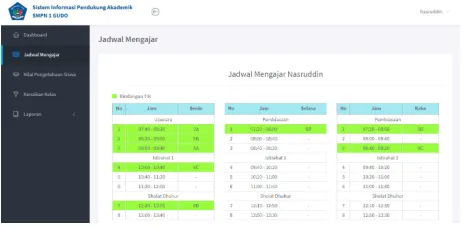
7) Teacher – Teaching Schedule
Teaching Schedule page is a page that displays the teacher's teaching schedule based on the schedule of lessons that have been made by the Admin and who are currently active.
Fig. 16Teacher – Teaching Schedule
8) Teacher – Student Score
The Student Score page is a page that displays the score of student knowledge that has been inputted. Where on this page the user is only able to input values according to the subjects and classes that have been assigned.
Fig. 17Teacher – Student Score
9) Teacher – Student Grade
Student Grade page is a page that can update student grade. This page is only displayed for Teacher users who also act as homerooms and only display classes according to the class specified.
Fig. 18Teacher – Student Grade
10) Teacher – Attendance Report
The Attendance Report page is a report page that displays student attendance reports based on the Academic and Semester Years.Where on this page the user can choose to view report details or export to excel.
Fig. 19Teacher – Attendance Report
11) Teacher – Student Score Report
The Student Score Report page is a report page that displays the value of student knowledge based on the Academic and Semester Years.Where on this page the user can choose to view report details or export to excel.
Fig. 20Teacher – Student Score Report
12) Teacher – Student Grade Report
Fig. 21Teacher – Student Grade Report
13) Student – Course Schedule Student
Course Student Schedule page is a page that shows the lesson schedule for each class.
Fig. 22Student – Course Schedule Student
14) Student – Exam Schedule Student
Exam Schedule Student page is a page that displays student exam schedules that are displayed based on the room.
Fig. 23Student – Exam Schedule Student
15) Student – Input Attendance
Input Attendance page is a page that displays class validation and class passwords before the class leader inserts class attendance details.
Fig. 24Student – Input Attendance
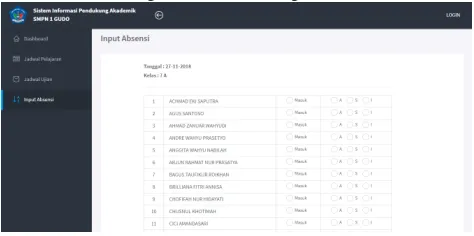
16) Student – Input Attendance Detail
Input Attendance Detail is the page that appears when validating on the Attendance Input page has been successful. On this page the user can input data of students present and not present.
Fig. 25Student – Input Attendance Detail
G. Testing
Testing will ensure that the process in this Academic Support Information System is as expected. Where at this time will be done using the black box method, which is a problem with the shopping system. The following scenarios performed on the system:
1) Login
TABLEI LOGIN TESTING
Interface Scenario Expected Results Test Result
Login
Input Login ( true )
Display the page according to the user login category
Pass
Input Login ( false )
The message "Username atau Password tidak sesuai" appears
2) Input Attendance
TABLEII INPUT ATTENDANCE TESTING
Interface Scenario Expected Results Test Result
Input Attendance
Select class and input password ( true )
The
inputattendance detail page appears in the form of an attendance form with the student list corresponding to the selected class
Pass
Select class and input password ( false )
The message "Kelas dan Password tidak sesuai " appears
Pass
3) Input Attendance Detail
TABLEIII
INPUT ATTENDANCE DETAIL TESTING
Interface Scenario Expected Results Test Result
Input Attendance
Detail
Input student attendance data ( true )
Display the page according to the user login category
Pass
Input student attendance data ( false )
The message "Username atau Password tidak sesuai" appears Pass Not choosing an attendance option ( Masuk, Sakit, Ijin Alpha )
Data stored with attendance status is 'Alpha'
Pass
4) Schedule Course
TABLEIV SCHEDULE COURSE TESTING
Interface Scenario Expected Results Test Result
Schedule Course
Input Schedule Course ( true )
The previous schedule course changed status to "Inactive" and a message "Berhasil tambah jadwal pelajaran" Pass Input Schedule Course ( false )
The message "Gagal tambah jadwal pelajaran " appears Pass Delete Schedule Course Data schedule
course deleted Pass
Search Schedule Course
Show schedule course according to search value in the "Cari" column
Pass
5) Exam Schedule
TABLEV EXAM SCHEDULE TESTING
Interface Scenario Expected Results Test Result
Exam Schedule
Input Exam Schedule ( true )
The previous exam schedule changed status to "Inactive" and a message "Berhasil tambah jadwal ujian" Pass Input Exam Schedule ( false )
The message "Gagal tambah jadwal ujian" appears Pass Delete Schedule Course Data exam
schedule deleted Pass
Search Schedule Course
Showexam scheduleaccording to search value in the "Cari" column
Pass
6) Student Score
TABLEVI STUDENT SCORE TESTING
Interface Scenario Expected Results Test Result
Student Score
Input Student Course ( true )
The message "Berhasil tambah nilai pengetahuan siswa" appears Pass Input Student Course ( false )
The message "Gagal tambah nilai pengetahuan siswa" appears Pass Delete Student Course
Data student score
deleted Pass
Search Student Course
Showstudent courseaccording to search value in the "Cari" column
Pass
7) Student Grade
TABLEVII STUDENT GRADE TESTING
Interface Scenario Expected Results Test Result
Student Grade
Update student grade ( true )
The message "Berhasil edit status kenaikan kelas" appears Pass Update student grade ( false )
The message "Gagal edit status kenaikan kelas" appears
IV. CONCLUSIONSANDSUGGESTIONS
A. Conclusions
Based on the results of the design, implementation and testing carried out, the conclusions from the Making of a Web-Based Academic Support Information System with the Rapid Application Development Method (Case Study: 1 Gudo Junior High School) are as follows:
1) With online attendance, the process of exchanging attendance data from students to teachers becomes more efficient because the teacher can monitor the progress of the Student Attendance Report at any time.
2) Creating schedule course that are carried out automatically while taking into account the latest time sharing, as well as the distribution of time allocation for each subject and the division of teacher assignments make this process more efficient in terms of time and effort. Where the user does not need to manually divide the schedule.
3) Submission of information about the schedule course for teachers and students is easier because it can be done only by accessing the lesson schedule page for students and the teaching schedule page for teachers.
4) Creating an online exam schedule can facilitate the delivery of information for students and teachers, because the test schedule information can be obtained only by accessing the exam schedule menu.
5) Input values of student knowledge conducted online make the process of recapitating value data easier and calculating the average value becomes automatic.
6) The existence of the Class Increase Status Update feature is able to facilitate the homeroom teacher in viewing value data and student attendance data from Odd semester to Even semester. Where on this feature homeroom teacher is also able to update the grade increase status of the student concerned.
7) The existence of the Student Attendance Report feature, Student Knowledge Value and Class Increase can become basic data that can be a reference for later inputting to government-owned online report cards.
B. Suggestions
Suggestions for further development of this Academic Support Information System include:
1) Increased security by following existing technological developments.
2) Add the exam room sharing feature for each student.
3) Add input values for student practice.
ACKNOWLEDGMENT
Thank you to Ms. Inna Sabily Karima, S.Kom, M.Kom as Research Supervisor, Mr. Handrie Noprisson, ST, M.Kom as a Chair of the Information Systems Study Program at Universitas Mercu Buana, Mr. Madsilah, D.Pd. as the Principal of 1 Gudo Junior High School, Jombang who has given permission to conduct research, Teachers and Students from 1 Gudo Junior High School, Jombang who have helped the reasearch in conducting the survey process.
REFERENCES
[1] Isnardi. 2016.Monitoring Bus Trans Padang
Berbasis Web. Padang: Jurnal J-Click. Vol 3, No 2, Desember 2016.
[2] Februariyanti, Herny and Zuliarso, Eri.
2012.Rancang Bangun Sistem Perpustakaan untuk Jurnal Elektronik. Universitas Stikubank:Jurnal Teknologi Informasi DINAMIK. Volume 17, No.2, Juli 2012 : 124-132.
[3] Griffiths, Adam. 2010.CodeIgniter 1.7 Professional
Development. Birmingham:Packt Publishing.
[4] Syam, Rahayu. 2017.Aplikasi Jadwal Pembelajaran
Berbasis Client Server pada SMP Negeri 1 Wotu. Palopo:Prosiding SEMANTIK.
[5] Wibowo, Tommy Herdy. 2013. Perancangan
Sistem Informasi Data Absensi Siswa dengan PHP Framework CodeIgniter di SMP BOPKRI 1 Water. Yogyakarta.
[6] Sanusi, Muhammad. 2014.Analisis dan
Perancangan Sistem Informasi Penjadwalan pada SMP Negeri 3 Prambanan Sleman Berbasis Web. Yogyakarta.
[7] Mulyani, Asri dan Revi Rexi Muhamad Fadilah.
2017. Rancang Bangun Sistem Informasi
Ekstrakurikuler di Madrasah Aliyah Negeri 1 Garut Berbasis Web. Garut:Jurnal Algoritma Sekolah Tinggi Teknologi Garut.
[8] Saputra, Novendra Yoga. 2018. Sistem Informasi
Ekstrakurikuler dan Bimbingan Konseling untuk SMP di DIY. Universitas Islam Indonesia.
[9] Satoto, Kodrat Iman, R. Rizal Isnanto, dan Ahmad
Masyukur. 2008. Analisis Keamanan Sistem Informasi Akademik Berbasis Web di Fakultas
Teknik Universitas Diponegoro. Yogyakarta:
[10]Santoso, Kartika Imam, Eko Sediyono, dan Suhartono. 2013. Studi Pengamanan Login Pada
Sistem Informasi Akademik Menggunakan
Otentifikasi One Time Password Berbasis SMS dengan Hash MD5. Ejournal UNDIP: Jurnal Sistem Informasi Bisnis.
[11]Kendall, Kenneth E. and Julie E. Kendall. 2011. System Analysis and Design Eighth Edition. New Jersey: Pearson.
[12]Sahara, Riad and Lianawati. 2016. Rancang
Bangun Sistem Informasi Akademik dan
Penerimaan Siswa Baru (Studi Kasus Pada SMK Jakarta 1). Universitas Mercu Buana: JURNAL ILMIAH FASILKOM.ISSN 1979-5254.
[13]Sahara, Riad, Hendra Prastiawan and Dulkipli Rizal.
2016. Rancang Bangun Sistem Informasi Mylibrary Telkomsel Berbasis Website (Studi Kasus: PT.
Telekomunikasi Selular). Universitas Mercu