ABSTRACT
NADKARNI, ADWAIT PRAVIN. Workflow Based Information Flow Control(IFC) in Modern Operating Systems. (Under the direction of Dr. William Enck.)
The security architecture of consumer operating systems is currently undergoing a fundamental change. In platforms such as Android, iOS, and Windows 8, each application is a separate security principal that can own data.
While this distinction is a vast improvement over traditional user-focused security architectures, sharing data between applications results in an unexpected loss of control of that data, potentially exposing security and privacy sensitive information. This paper presents the Aquifer framework to address this data intermediary problem in modern operating systems.
©Copyright 2012 by Adwait Pravin Nadkarni
Workflow Based Information Flow Control(IFC) in Modern Operating Systems
by
Adwait Pravin Nadkarni
A thesis submitted to the Graduate Faculty of North Carolina State University
in partial fulfillment of the requirements for the Degree of
Master of Science
Computer Science
Raleigh, North Carolina 2012
APPROVED BY:
Dr. Douglas Reeves Dr. Xuxian Jiang
DEDICATION
BIOGRAPHY
ACKNOWLEDGEMENTS
TABLE OF CONTENTS
List of Figures . . . vii
Chapter 1 Introduction . . . 1
1.1 Thesis Statement . . . 4
1.2 Contributions . . . 4
1.3 Organization . . . 5
Chapter 2 Background: Android . . . 6
2.1 Application, and Components . . . 6
2.2 The Activity Lifecycle . . . 7
2.3 Intent Resolution . . . 8
2.4 Android’s Binder IPC . . . 8
Chapter 3 Motivation . . . 10
3.1 Contract Document Use Case . . . 10
3.2 Policy Requirements . . . 12
3.3 Example Policies . . . 12
3.4 Threat Model and Assumptions . . . 12
Chapter 4 Overview of Approach . . . 15
4.1 Challenges . . . 16
Chapter 5 Policy Design . . . 20
5.1 Restrictions Types . . . 20
5.1.1 No Restrictions . . . 21
5.1.2 Export . . . 21
5.1.3 Filters . . . 22
5.1.4 Required . . . 23
5.2 The Aquifer Policy . . . 24
Chapter 6 Aquifer Design . . . 28
6.1 Filtering UI Workflows . . . 28
6.2 Maintaining the Workflow State . . . 30
6.3 Network Access Control . . . 31
6.3.1 Assigning the network access privilege . . . 32
6.3.2 Enforcing the network access privilege . . . 33
6.4 Policy propagation to storage . . . 33
6.4.1 Protecting Files: . . . 34
Chapter 7 Implementation . . . 39
7.1 The Aquifer Service . . . 39
7.1.1 Maintaining information on workflows . . . 40
7.1.2 Workflow Filter using Aquifer Service . . . 41
7.1.3 Adding and removing components from a workflow . . . 42
7.1.4 Setting the Network Access Policy . . . 43
7.1.5 Maintaining labels on Files . . . 43
7.1.6 Adding Application Policies . . . 44
7.2 Aquifer Device and LSM . . . 44
7.3 The Aquifer API . . . 45
Chapter 8 Evaluation. . . 46
8.1 Performance . . . 46
8.1.1 Security Evaluation . . . 47
8.1.2 Case Study: K-9 Mail . . . 51
Chapter 9 Related Work . . . 54
Chapter 10 Discussion . . . 56
Chapter 11 Conclusion . . . 58
LIST OF FIGURES
Figure 2.1 The lifecycle of an Android Activity [2] . . . 7 Figure 3.1 Document signing use case. A confidential contract received via
Email before being converted to PDF and embedded with a written signature. . . 11 Figure 4.1 A conceptual overview of the Aquifer Architecture . . . 17 Figure 6.1 Block Diagram of the Aquifer System. Shows basic interaction
be-tweenAquifer and a UI Workflow . . . 36 Figure 6.2 Workflow filter in action: Policy enforcement in visual Workflows 37 Figure 6.3 Setting the network access privilege for components using the Aquifer
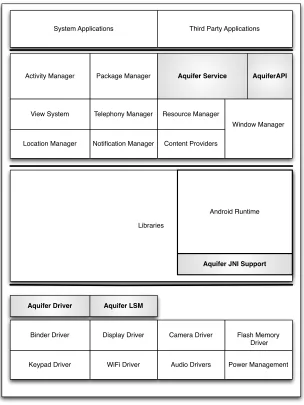
Network Access Controller. . . 38 Figure 7.1 Software Stack of the Android Operating System patched with
Chapter 1
Introduction
Operating system security architectures are currently undergoing a fundamental change. Traditional commodity OSes run all of a user’s applications with the same privilege, allowing access to all of the user’s files, and the files of all of the user’s applications. Modern operating systems [33, 40], such as Android, iOS, and Windows 8, take the suggestion of decades of security research [41, 23, 37, 16] and run each application as a unique security principal.
to share the item and best deal with friends. This modularity strikes a balance between simple UNIX tools (e.g., sed,grep) and monolithic GUI applications (e.g., MS Office).
Data sharing between user apps represents a primary security challenge for modern OSes. When one app shares data with another app, or writes data to storage accessible by other apps, it loses control of that data. This data intermediary problem has always been present in operating systems, but addressing it made little sense when all user apps ran with the same privilege. Now that apps are security principals, the data intermediary problem must be addressed. This is a significant challenge because acceptable chains of interactions are based on user selection and hence are difficult to predict. The current security mechanism, permissions, is insufficient. Permissions are boolean access control policies specified on interfaces. They do not account for multiple apps accessing data through a (potentially) user-defined workflow. This lack of transitive semantics is the root cause behind attacks on Android’s permission system [10, 17, 12, 20].
Previous attempts to add transitive security semantics to Android have focused on integrity [17, 12, 6]. Systems considering secrecy (e.g., TaintDroid [15] and AppFence [22]) have focused on user privacy. Our focus is onapplication-specific user data. Apps originate many new types of data that require protection (e.g., office documents received via email or cloud storage, voice and written notes from meetings, address book entries, social networking events, health records, inventory tracking information, etc.). Therefore, we seek to create mechanisms and policy that allow participation by both users and app developers.
great opportunity in new platforms such as Android to extend these concepts to support a decentralized notion of trust and policy specification [29, 39, 44, 27]. In Android, the user’s UI workflowtraverses multiple applications to access data, and the owners of spe-cific data types are invoked to access that data (e.g., the photo gallery app defines the chooser for attaching pictures to an Email). Apps that own data can infer user inten-tions from the UI workflow and attach security policies to data that include app-specific context unavailable to centrally defined trusted UIs.
This thesis proposes Aquifer, a novel security framework that provides data secrecy policies for application-specific user data in modern operating systems such as Android. Aquifer defines security policy with respect to the users UI workflow, thereby tracking user data as it traverses through user-directed interactions between apps. Apps con-tributing sensitive data can include security policy that restricts the further use of that data. In doing so, we begin to directly address the data intermediary problem in modern operating systems.
1.1
Thesis Statement
“Tracking information via User Interface (UI) Workflows provides developers with a practical means of maintaining control over application specific data.”
1.2
Contributions
This thesis presents Aquifer, an novel security architecture that provides transitive data secrecy policies for application-specific user data in modern OSes. Aquifer enables data secrecy policies for app-specific user data defined with respect to a UI workflow. Prior security enhancements to Android have focused on system defined resources and data and provide no protection for app-specific user data. Aquifer also allows apps to define the security policy that protects the data they own.
A direct consequence of the enforcement of such a policy is a policy violation. Most research in this area handles policy violations by presenting the user with a prompt that details the cause of the violation, and its consequences, leading to user confusion. Some approaches silently drop such policy violations, leading to application crashes due to un-handled exceptions. Both these approaches lead to a bad user experience, and decrease the usability of the security solution. Aquifer, on the other hand, presents an approach to prevent access control violations from happenning in the first place, using a technique we call ‘Workflow Filtering’.
inter-mediaries that export data, and demonstrate how the Aquifer Architecture provides the level of security expressed by applications through the security policy.
1.3
Organization
Chapter 2
Background: Android
This work has been implemented in Android, and hence most of the major aspects have been described with respect to Android. These concepts are transferable to most modern operating systems.
2.1
Application, and Components
2.2
The Activity Lifecycle
An activity transitions between 4 states, namely STARTED, PAUSED, STOPPED and DESTROYED. A paused activity can be resumed, and a stopped activity can be restarted; but the DESTROYED state is a point of no return; i.e., it is not possible to execute any code in the activity after it attains the DESTROYED state, as shown in Figure 2.1.
2.3
Intent Resolution
Android supports asynchronous inter-component communication through Intents. An intent is a message from one component, which triggers some execution in(or even the initiation of) another component. There are two kinds of intents, explicit and implicit. Explicit intents are generally used for intra application communication, and are targeted at a particular component specified by its full class name.
Implicit intents, on the other hand, specify the action or service required by the calling component, using “action strings”. The android operating system then forms a list of suitable components that have previously registered to fulfill that particular request or perform the particular action specified in the intent. Apart from the action, there are a number of other elements such as the category, type of data, etc involved in the resolution of an intent, but we do not discuss them to keep the discussion simple. Activities are started using the startActivity or startActivityForResult method calls. In case there are more activities that perform the action specified in the intent, Android presents the user with the list of activities to choose from. Upon selecting an option, the user is presented with the chosen activity. Intent resolution is performed using a class called IntentResolver by Android’s ActivityManagerService.
2.4
Android’s Binder IPC
Chapter 3
Motivation
Aquifer is motivated by the data intermediary problem in modern operating systems where users perform tasks by combining the functionality of multiple apps. We begin this section by describing an example use case requiring transitive information protection. We then describe the policy requirements of applications that take part in this use case, and some example policies. We conclude this section by defining our threat model and assumptions for the Aquifer design and implementation.
3.1
Contract Document Use Case
Modern operating systems enable a mashup of apps that implement a larger user task. The resulting UI workflow can be a simple linear progression, or a more complex arrange-ment where subtasks are performed to obtain data before returning to a previous stage to continue the primary task. For simplicity, this use case presents the former, depicted in Figure 3.1.
Email app DocuView WordToPDF DocuSign Email app co n tra ct .d o c co n tra ct .p d f si g n e d .p d f co n tra ct .d o c
Figure 3.1: Document signing use case. A confidential contract received via Email before being converted to PDF and embedded with a written signature.
return the contract. Alice is traveling and does not have access to a printer or a scanner; therefore, she uses the DocuSign app on her smartphone to digitally attach a written copy of her signature. The workflow begins by Alice accessing the message containing
contract.doc in the Email app. Alice selects to read contract.docby sharing it with the DocuView app. After reading contract.doc, Alice wishes to sign it with DocuSign; however,DocuSignonly operates on PDF files. Therefore, Alice first sharescontract.doc
with theWordToPDFapp to create contract.pdf, and then shares contract.pdfwith
DocuSign. She then uses DocuSign to embed a copy of her written signature, creating
3.2
Policy Requirements
As seen in the use case above, an application which owns data wants to share it with other applications, but also wants to prevent its misuse by the receiving application. An
Email app like Gmail would not want to prevent a confidential attachment from being exported to any website other than itself. On the other hand, a document signing app likeDocuSignmay want its signed document to only be used in its current workflow, and not be cached and exported later by another application.
3.3
Example Policies
Considering the security requirements of the applications involved in the use case, we present some security policies:
Policy (a): Allow other apps to view and edit contract.doc, but only the Email app may send contract.doc and derivative files off the device.
Policy (b): Documents signed byDocuSign can only be sent off the device if accessed in a workflow that containsDocuSign. This policy prevents a cached copy ofsigned.pdf
from being later discovered and exfiltrated, or the signature from being reused.
3.4
Threat Model and Assumptions
complete security policies for data, or to always use the data in a safe way. Therefore, application developers must participate in the definition of security policy for their data. Hence, the applications (including third-party apps) trusted for a data item is defined by its security policy.
In this paper, we specifically focus on large data objects that are stored in files. We make this simplifying assumption to reduce the complexity of the protection system so that we may concentrate on the policy semantics for leveraging UI workflows for policy specification. However, we believe that the conceptual foundations can be extended to protect finer granularity data, which will be investigated in future work. Chapter 6 discusses this assumption further.
Both the user and the application defining an Aquifer policy are stakeholders for the corresponding data. While Aquifer could be used to define digital rights management (DRM) policy, DRM is not an explicit capability of Aquifer. We do not attempt to defend against a physical user determined to extract data. Aquifer allows multiple applications to add policy restrictions to data. We ensure that each application’s policy is enforced by determining the least restrictive policy that upper bounds the policies. Note that in doing so, we prioritize secrecy over availability. We explicitly do not address malicious applications that define security policies to make data inaccessible.
Aquifer minimizes user specification of security policy by inferring user intention from the UI workflow. While this reduces the burden on the user, it does not entirely eliminate it. Sometimes the application defining Aquifer policy must distinguish between confiden-tial and public data. In these cases, we assume the existence of preliminary labeling. This ranges by application. For example, the Email app in our use case could determine secrecy requirements from an Email header set by the sender. Other applications such as note apps (e.g., Evernote) already have semantic tags on data (e.g., business, personal) that can be leveraged. However, in other cases (e.g., DocuSign), the policy specification is inherent to the functionality of the app. In this paper, we assume the app defining Aquifer policy has sufficient information to define the policy and leave the usability of labeling data in different scenarios to future work.
Chapter 4
Overview of Approach
Application components can be classified into two types based on their interaction with the user: the User Interface components(UI components) and background components. The user directly interacts with the UI components, while only interacting with the background components through the UI components.
information is being used. Aided by this context knowledge, applications can influence the UI workflow policy to control the flow of data they inject in the workflow. The rest of this section states the general challenges faced by workflow based information flow control systems like Aquifer, and describes how the Aquifer Architecture overcomes each of these challenges.
4.1
Challenges
Enforcing security policy on UI workflows has the following challenges:
• Expressing appropriate policy semantics.We need a policy design that allows com-ponents to express their constraints on the workflow with sufficient accuracy, and which is also simple to understand.
• Multiple policy owners. Security sensitive information can be introduced into the UI workflow at any point. When this happens depends on application logic. Each application participating in a UI workflow should be able to contribute to the security policy of that workflow.
• Minimizing policy violations. Policy violations confuse users by either prompting the user to make security decisions, or breaking application functionality (e.g., a Se-curityException causes an Application Not Responding(ANR) prompt and crashes an app in Android).
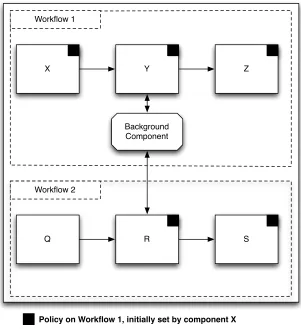
X Y
Background Component Workflow 1
Z
Workflow 2
Q R S
Policy on Workflow 1, initially set by component X
Figure 4.1: A conceptual overview of the Aquifer Architecture
• Extension to persistent parts of the system. While workflows are transient, they interact with daemons and save content to persistent storage. Policy transferred to daemons and storage may affect subsequent workflows, potentially leading to label bloat.
the workflow needs to be consistent with the state of the UI. Aquifer also associates a security policy with the workflow, and enforces it on all the participants of the workflow. Our architecture enables each participant in the workflow to add to the workflow’s policy, and to manipulate its part of the policy. This also requires maintaining distinct policies for each participating app, to isolate policy modifications based on ownership. Ac-cess control policy violations are reduced by modifying the navigation options presented to the user.
In the Figure 4.1, there are two workflows. The app X in the workflow at the top sets a policy on its data. This policy is then applied to the entire workflow it is a part of. Observe that the policy also propagates to another UI workflow component, through a background component, and then applied to the bottom workflow. Thus, we can say that Aquifer also tracks UI data flow through system daemons.
The transient nature of our UI workflow security policy is very similar to capabilities [42, 25, 5, 24, 36]. As shown in the Figure 4.1, components in the UI workflow can add policy to the workflow, and can potentially affect applications that later appear in the workflow. If there was a branch in the workflow, and if a component in the workflow received data from the branch, later components would still be affected by the data from the branch and hence its policy; which is similar to History Based Access Control(HBAC) [14, 1]. However, our policy structure is more expressive than capabilities and our policy enforcement provides transitivity, unlike traditional capability systems.
Chapter 5
Policy Design
A major component of any information flow control system[29, 44, 45, 27, 39] is its policy. An expressive policy design is essential for applications to be able to convey most of their security requirements. At the same time, the policy design should not be too complicated, such that it is unusable.
We attempt to strike a balance with our Aquifer Policy, which helps applications express their major security requirements, but is simple enough to understand and con-figure. We start this section by describing the types of restrictions applications might want to impose on the use of their data. Then, we describe the Aquifer policy design, and the policy language associated with it.
5.1
Restrictions Types
no restrictions.
5.1.1
No Restrictions
The default behavior of Aquifer is to place no restrictions on the UI workflow. While default allow policies are generally frowned upon for security frameworks, Aquifer does not seek to control all data in the OS, just specific types of high-value application-specific data. For example, applications frequently share public URLs with other applications (e.g., sharing a link from a Web browser to Facebook or Email). Such scenarios do not require security policies. Additionally, for UI workflows that have an existing policy (e.g., Figure 3.1), applications contributing to the workflow frequently have no need to contribute additional restrictions, even if they add data (e.g., if DocuView allowed Alice to modify the contract in Figure 3.1). By using a default allow policy, Aquifer is more compatible with legacy applications that do not have security requirements.
5.1.2
Export
Aquifer is explicitly motivated by export restriction policies. A data owner application on the UI workflow specifies an export restriction by listing the applications that are allowed to send the data off the host, i.e., it specifies a whitelist. Therefore, as soon as an export restriction is placed on a UI workflow, Aquifer becomes default deny (instead of default allow) for that UI workflow.
Specifying the whitelist requires the app defining the restriction to be aware of other apps that need to export the data. We expect the document signing use case in Figure 3.1 to be a common scenario. Here, the Email app specified a whitelist of only itself. However, there may also be scenarios where a suite of applications is commonly used together, and the developer will know the whitelisted apps a priori. Note that such prerequisites are common for security policies (e.g., Saint [31]).
5.1.3
Filters
scenarios from even occurring, Aquifer allows allows a data owner to specify a UI workflow filter that limits the potential targets of Android’s action strings. For example, the Email app in Figure 3.1 might specify that ACTION SEND can only resolve to itself. Note that Aquifer includes UI workflow filters entirely for usability and does not seek to prevent manipulation by malicious applications (e.g., sending as a result of ACTION VIEW).
5.1.4
Required
The current state of the workflow can provide applications with runtime context. For example, information about what applications have been a part of the workflow or are currently participating, might be utilized by apps to configure the necessary restrictions. Applications can restrict the export of data based on the context of the workflow. Such
5.2
The Aquifer Policy
The Aquifer policy logic incorporates the restriction types just described. Our logic is motivated by the logic described for the decentralized label model (DLM) [29]. We chose this logic from amongst the various DIFC logic proposals [29, 39, 44, 45, 27, 26, 38] due to its clear owner semantics in the policy label. We extend DLM by replacing the set of readers with a tuple containing our export, required, and filter restrictions. Note that Aquifer uses DIFC specifically to control data export, and does not enforce interaction between applications at runtime. Rather, UI workflow policies propagate in the style of taint tracking.
Aquifer UI workflow policy defines security principals as applications. Using UI screens as principals becomes cumbersome to specify and manage, and is often impractical since developers defining security policy do not necessarily know the UI screens in other appli-cations. The UI workflow policy is a collection of owner policies, where each owner is an application. The owner policy contains an export list, a workflow filter, and a required list.
Definition 1 (Export list). An export listE is a set of applications that may access the network while participating in the UI workflow.
Definition 2 (Workflow filter). A workflow filter F ={(s1, T1), . . . ,(sn, Tn)} is a set of
tuples, each containing an action stringsi and a set of targetsTi. If the normal resolution of an intent message sent to action stringsi is a set of applicationsN, then the resulting allowed target applications isN ∩Ti.
of all action strings in F. Similarly, for a filter F and an action string s, targets(F, s) returns the set of target applications for action strings. Note that for the following logic to be correct, we assume that there does not exist an s such that targets(F, s) = ∅. If this occurs, Aquifer simply removessfromactions(F), implying there are no restrictions for s (default allow).
Definition 3 (Required list). A required listR is a set of applications that all must have been present on the UI workflow at sometime in the past for any application on the UI workflow to access the network.
Having defined export lists, workflow filters, and require lists, we can now define a workflow label.
Definition 4 (Workflow label). A workflow label L is an expression
L = {O1 : (E1, F1, R1);. . .;On : (En, Fn, Rn)}, where Oi is an owner (application) and Ei, Fi, and Ri are an export list, workflow filter, and required list, respectively.
A label Lcontains a set of owners denoted owners(L), which is the set of all owners that have specified a restriction for the UI workflow (i.e.,O1, . . . , On in Definition 4). To
modify L (i.e., add, remove, or change), an owner Oi must contain the active UI screen
and can only modify its portion of L (i.e., O1 cannot change E2, F2, or R2).
We define functions for retrieving the parts of an owners policy from a label L. Here, we must be careful, since Aquifer assumes a default allow policy and only turns to default deny if a restriction is specified by an owner. Let the set of all applications be A, and the set of all possible action strings be S. For each owner Oi, exports(L, Oi)
returns Ei, unless Oi 6∈ owners(L) or Ei = ∅, in which case exports(L, Oi) returns A.
Semantically, this means Oi does not have any export restrictions. Similarly, for each
it returns {(s,A)|∀s ∈ S}. In contrast, for each owner Oi, requires(L, Oi) returns Ri
regardless if Oi exists or if Ri is specified.
A useful concept is theeffective policy. That is, given a labelLwith multiple owners, what policy should be enforced. We define the effective export list, workflow filter, and required list as follows.
Definition 5 (Effective export list). For a workflow label L, the effective export list
Ee =T
exports(L, O),∀O ∈owners(L).
Definition 6 (Effective workflow filter). For a workflow label L, the effective workflow filterFeis the set of tuples containing action string and corresponding target application
set created by taking the union of all action strings and the intersection of the targets for those action strings. More precisely, Fe = {(si, Ti) | si ∈
S
actions(F) and Ti = T
targets(F, si),∀F ∈f ilters(L, O),∀O∈owners(L)}.
Definition 7 (Effective required list). For a workflow label L, the effective required list
Re =S
requires(L, O),∀O∈owners(L).
There are various scenarios in which Aquifer must combine two workflow labels, e.g., propagating a workflow label from a file, or through a daemon. When this occurs, we join the two labels L1 and L2 to create a new label that is a least restrictive label that maintains all of the restrictions specified by L1 and L2 [29].
owners(L) =owners(L1)∪owners(L2)
exports(L, O) =exports(L1, O)∩exports(L2, O)
requires(L, O) =requires(L1, O)∪requires(L2, O)
f ilters(L, O) ={(si, Ti)|si ∈actions(F1)∪actions(F2),
Ti =targets(si, F1)∩targets(si, F2), where F1 =f ilters(L1, O),
F2 =f ilters(L2, O)}
Chapter 6
Aquifer Design
This chapter describes the core design concepts of our approach, and also the resolution of the design challenges presented in Chapter 4. Though the Aquifer system has been implemented for the Android OS, the core design concepts are easily transferable to other emerging operating systems which view applications as principals.
Our design can be abstracted into the four main tasks, i.e. : 1) Filtering UI Workflows, 2) Maintaining the Workflow State, 3) Network Access Control, 4) Policy propagation to storage.
6.1
Filtering UI Workflows
application(s) to the user that can perform the requested task. The user selects an ap-plication from the list presented by the OS, and the workflow includes the newly started application component. The workflow is constrained by policies set by applications whose components have participated in the workflow. These policies limit the privileges of com-ponents added to the workflow. Hence, there is a possibility that the selected component may try to perform the requested operation, but may not permitted by the policy on the workflow, Aquifer would intercept this attempt and throw a security exception. Such security exceptions result in application crashes and user confusion, and over all a very bad user experience.
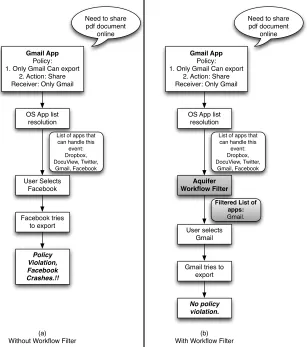
On the other hand, if the operating system filters out applications which are not permitted to perform the requested action before presenting the list to the user, the user will only select apps that will not lead to a security exception. For example, consider the scenario (a) in Figure 6.2 where the Gmailapp has denied the Facebook application the privilege of exporting its data off the device. The user tries to share(export) a pdf document attached to an email, due to which Android presents a list of applications that can service the user’s request. This list contains theFacebookapp as it has registered for providing sharing services. If the user selects Facebook, a policy violation will occur as soon as Facebook tries to access the network, resulting in an application crash. Instead, in scenario (b) of the same Figure 6.2,Aquiferfilters out applications which may conflict with the workflow label, according to the Workflow Filter(F) component of the effective policy on the label, and then presents the final list to the user. In the figure, the Gmail
communication between the components of the same application, though they are also added to the workflow.
6.2
Maintaining the Workflow State
The workflow’s state consists of the information about the components participating in the workflow. As a user moves forward along a UI workflow, new application components are started with data from the workflow, and Aquifer ensures that these components are added to the workflow’s label. We maintain a separate list of components which are currently active in the workflow. The newly started component is added to this list. Thus, we ensure that every component which potentially receives data from the workflow is also subject to the restrictions placed on the workflow.
When the user exits or closes a component she was interacting with, the OS performs reclaims some resources allocated to this component. Similarly, in order to keep the state of the workflow consistent with the state of the system, and in order to apply only the minimum required restrictions on the workflow, we have to perform a set of tasks after a workflow component exits. First, we check if the component that is exiting returns any data to the component that started it. If it does not, then it means that the exiting component is not contributing any data to the workflow’s state after it exits. In this case, we also check if any other components from the same application, i.e. the owner, exist in the workflow. If there is no other component from the same application as of this exiting component, and if this component is not contributing data to the workflow in any way, we remove its application’s policy from the workflow’s label. This ensures that a policy will affect the workflow only if data associated with the policy is present in the workflow. Along with this, we then remove the exiting component from the list of currently active components in the workflow, and add it to the list of historical components. When the last component in the workflow exits, the workflow is destroyed.
6.3
Network Access Control
As described in the policy design, the Export listof a policy lists the applications that have the privilege of exporting the Owning principal’s data. The Required List on the other hand, restricts network access to all components present in the workflow until all the applications listed are a part of the workflow.
The Network Access Controller we define performs two main functions: 1. Assigning and Revoking the network access privilege for applications, based on policy changes in the workflow; and 2. Enforcing the network access checks to ensure that only privileged applications get network access.
6.3.1
Assigning the network access privilege
Workflow components may make modification to their application’sOwner policy in the workflow’s label, and may thus declassify some data for sending by adding some principals to theExport List, or deny the sending privilege to some applications by removing some principals from the Export List. An app may also add some more applications to the
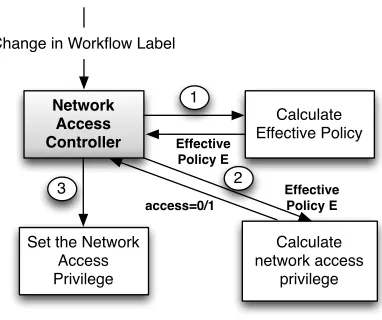
Required List to increase the constraints on exporting data. This in turn results in a change in the workflow’s label, and thus the Effective Policy of the workflow. A change in a principal’sPolicy results in a newEffective Policy for the workflow, and then results in modifications in the network access privileges of each component of the workflow, as shown in Figure 6.3. Multiple events result in the addition or removal of policy, and the network access privileges of each component of the workflow are modified accordingly. After computing the effective policy , a component is granted network access only if
2. The application, i.e. owning principal of the component in question is included in the Export List E of the effective policy on the workflow.
6.3.2
Enforcing the network access privilege
At runtime, if a workflow component tries to access the network, Aquifer intercepts this attempt in the kernel, and checks if the calling component’s process has been granted the network access privilege. Based on this check, the calling component is allowed/denied network access.
6.4
Policy propagation to storage
We need to ensure that as long as data is present in the system, restrictions set on its use by its owners are always followed. Thus, if data leaves the workflow boundaries, the restrictions set on the data should propagate along with it, so that when the data is used by another workflow, these restrictions are followed by this new workflow as well.
6.4.1
Protecting Files:
We protect files by labelling them with a label that protects all the data ever written to a file. That is, if a component from a workflow W writes data to a file F, F will be relabeled. The new label on F would be a join of the current label on the file F and the label on the workflowW. The label join operation from Chapter 5 ensures that the new label is at least as restrictive as both the labels used to compute it.
If a component from another workflow W2 reads the file, W2’s label will be replaced by a new label, which is the join over W2’s previous label, and the label on the file F. This is to ensure that the new label onW2 protects both the data present in W2 and the data that is being read from the file.
6.4.2
Propagating policy through daemons:
Many applications interact with daemons, and hence if we label daemons or try to add them to workflows, many workflows will intersect, leading to label bloat. Our requirement is to only propagate a workflow’s policy to another workflow whose component is receiving the former’s data from the daemon. That is, policy is to be propagated only if a daemon reads a file belonging to one workflow, and then sends the file descriptor to a component of another workflow.
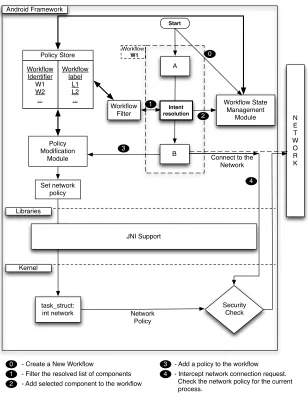
Policy Modification Module Policy Store Workflow label L1 L2 ... Workflow Identifier W1 W2 ... Set network policy task_struct: int network Security Check JNI Support Network Policy N E T W O R K A B Workflow Filter Workflow State Management Module Libraries Android Framework Kernel
Connect to the Network Intent resolution 1 4 Start 0 2 3 Workflow W1
0 - Create a New Workflow
1 - Filter the resolved list of components 2 - Add selected component to the workflow
3 - Add a policy to the workflow 4 - Intercept network connection request.
Check the network policy for the current process.
Figure 6.1: Block Diagram of the Aquifer System. Shows basic interaction between
(a) Without Workflow Filter
(b) With Workflow Filter Need to share
pdf document online
OS App list resolution
List of apps that can handle this
event: Dropbox, DocuView, Twitter, Gmail, Facebook User Selects Facebook Facebook tries to export Policy Violation, Facebook Crashes.!! Gmail App Policy: 1. Only Gmail Can export
2. Action: Share Receiver: Only Gmail
Need to share pdf document
online
OS App list resolution
List of apps that can handle this
event: Dropbox, DocuView, Twitter, Gmail, Facebook Aquifer Workflow Filter User selects Gmail No policy violation.
Filtered List of apps:
Gmail.
Gmail tries to export
Gmail App
Policy: 1. Only Gmail Can export
2. Action: Share Receiver: Only Gmail
Network Access Controller Change in Workflow Label
Calculate Effective Policy
Calculate network access
privilege Set the Network
Access Privilege
1
3 2 Effective Policy E Effective
Policy E
access=0/1
Chapter 7
Implementation
We have implemented the Aquifer System on Android 4.0.3(ICS), though it can be easily ported to the latest version(i.e. 4.1.1, JellyBean), with some minor changes. As shown in Figure 7.1, we implement a system service, the Aquifer Service, along with a linux security module(LSM) for kernel level monitoring. We also expose the Aquifer API to applications for creating policies. The following content in this chapter describes these and some other supporting components of the Aquifer Architecture in sufficient detail.
7.1
The Aquifer Service
7.1.1
Maintaining information on workflows
We implement a workflow abstraction, which contains a set of policies set by applications whose components are a part of the workflow. The Aquifer Service stores information related to workflows, and also keeps a track of the security label for each workflow. The
Aquifer Service AquiferAPI
Package Manager Activity Manager
Window Manager Resource Manager
Telephony Manager View System
Content Providers Notification Manager
Location Manager
System Applications Third Party Applications
Libraries
Android Runtime
Aquifer JNI Support
Aquifer Driver Aquifer LSM
Flash Memory Driver Camera Driver
Display Driver Binder Driver
Audio Drivers WiFi Driver
Keypad Driver Power Management
workflow −>workflow label mapping is stored in a HashMap for efficiency. The service also stores a list of current participants in the workflow, called the ParticipantList, and a list of components that have been a part of the workflow at some point of time, the
HistoryList. A component that enters the workflow is added to the ParticipantList and
HistoryList both, but a component that leaves the workflow is only removed from the
ParticipantList. These lists aid in implementing policies that require the current and past states of the workflow.
Additionally, the service exposes the getPolicy() and addPolicy(Policy policy) meth-ods, for applications to retrieve, add and modify their policies in the workflow’s security label.
7.1.2
Workflow Filter using Aquifer Service
We modify Android’s ActivityManagerService to call the Aquifer Service after the In-tent Resolver resolves the list of poIn-tential recipients for an inIn-tent. The Aquifer Service
retrieves the security label on the current workflow, lets call it Wcurrent, whose
applications which will potentially not cause any access control failures if they try to perform the particular “action” described in the intent.
7.1.3
Adding and removing components from a workflow
We represent a workflow component by its process, as enforcement in the kernel requires process-level granularity. Hence, we create a new process for a visual component, i.e. an activity, for every new instance created, which helps us prevent intersections between workflows, often leading to label bloat, in situations where multiple instances of a com-ponent are active in separate workflows.
We modify the ActivityManagerService to notify the Aquifer Service every time an activity is started in a new process. The Aquifer Service retrieves the current workflow, and adds this process as a participant to the new workflow. The process name, process id, package name, and the resultcode is stored for every participant. The resultcode is 1 if the activity was started with a call that returns a result to the caller, else it is 0. We then compute the effective policy on the workflow. Based on the Export List(E) and
Required List(R) components of the policy, the Aquifer Service sets the network access privilege for a component by making a call to the Aquifer device in the kernel.
will persist in the workflow even after it is cleaned up. In this case, we do not remove the policy set by the activity’s application from the workflow. Else, if the resultcode is 0, i.e. if it does not inject any data into the part of the workflow before it, we mark the policy set by the activity’s application for removal. If there is not other activity from the same application in the current workflow, we remove the application’s policy from the workflow’s security label. Finally, we remove the activity from the ParticipantList
and the HistoryList, hence restoring the workflow to its proper state.
7.1.4
Setting the Network Access Policy
Aquifersets the network access policy for workflow components in the kernel. This policy is enforced by our LSM in the kernel when a component’s process tries to access the network. Every time the label on a workflow changes, the effective policy on the label changes. This change can be in the form of additional restrictions placed on the workflow, barring even more applications from network access; or it may also allow network access for applications that were initially denied it in the previous state of the policy. Thus, the
Aquifer Service calls the Aquifer Driver in the kernel to set the network policy for each component, following a modification to the workflow label.
7.1.5
Maintaining labels on Files
as the label of the file instead. In case an activity has both read and write access to a file, the result of the join is stored as the new label of both the workflow and the file.
7.1.6
Adding Application Policies
Applications can add their policies to workflows through their components that partici-pate in workflows. The addPolicy(Policy policy)method allows an application to replace its current policy in the workflow’s label with the new policy “policy”. Aquifer gets the pid of the calling component using the function getCallingPid exported by the Binder
class, obtains the process name of the caller from the ActivityManagerService, and then retrieves the workflow for the component using its processName and pid. We then add the policy to this workflow’s label. In this way, we ensure that application policy modi-fications remain isolated and tamperproof.
7.2
Aquifer Device and LSM
We have implemented the Aquifer LSM(Linux Security Module) to act as the reference monitor in the kernel.
Every network or file access is mediated by the Aquifer LSM. On detecting a network access, the LSM checks the network access privilege for the process(stored in the process control block), and allows or denies the request. When a file is accessed, the LSM sends a notification to theAquifer Servicein the userspace, along with the pid of the accessing process and the file’s inode no. The Aquifer Service then performs label propagation.
to the Aquifer Service in the userspace, which then performs label propagation.
The Aquifer Device presents an interface for the Aquifer Service to interact with the LSM, and to perform various tasks in the kernel, like setting the network policies of processes.
7.3
The Aquifer API
We expose thePolicy and AquiferListclasses to applications, in order to help them form policies that can then be set on workflows. A AquiferList is a list of strings, and is used to build policies. The Policy class contains two AquiferLists, namely the ExportList and the RequiredList, as defined in the policy specification in Chapter 5.
Chapter 8
Evaluation
8.1
Performance
The Aquifer System has been implemented for Android 4.0.3(ICS) and uses Android Ker-nel 3.0.8. The performance evaluation was carried out on a Samsung Galaxy Nexus(I9250) phone, with a Dual-core 1.2 GHz processor and 1GB RAM.
We implement the Network Access Privilegecheck in the kernel, at the same location where Android checks its INTERNET permission. We observed the performance overhead of this check to be negligible.
When the LSM operation for the file permission hook is executed in the kernel, two 32 bit integer values are sent via a socket to the userspace(hence there is no context switch). Hence, even in this case, we assume the overhead to be nominal.
only over 3% performance overhead when compared to the unmodified ICS build.
8.1.1
Security Evaluation
As discussed in the threat model in Section 3.4, Aquifer specifically seeks to protect application-specific data that cannot be enforced by system security policy. The security and privacy sensitivity of application-specific data is often only known to the developer and the user. We seek to reduce the onus on the user by having developers specify security policy. In fact, by specifying which permissions an app uses, and assigning permissions to restrict app interfaces, Android application developers are already defining security policy.
Aquifer allows app developers to specify host export restrictions on data used by a UI workflow. The policy for a UI workflow is maintained in a workflow labelL(Definition 4). When information from one UI workflow is propagated to another UI workflow via files (as described in Section ??), Aquifer merges the two workflow labels using the join (t) operator (Definition 8). In Section 5.2, we claimed that the join operation ensures that the resulting label is at least as restrictive as both the original labels. We now formally prove this property (i.e., we prove the safety of the Aquifer policy language).
relation that is needed to prove the safety of Aquifer.
Definition 9 (Effective restriction relation ve). LetL1 and L2 be workflow labels with effective export lists, workflow filters, and required lists E1e,E2e, F1e, F2e, R1e, and R2e,
respectively. L2 is effectively more restrictive than L1, denoted L1 veL2, if and only if:
E1e ⊇E2e
R1e ⊆R2e
actions(F1e)⊆actions(F2e)
∀s ∈actions(F1e), targets(F1e, s)⊇targets(F2e, s)
Conceptually, Definition 9 ensures that (1) L2 has less exporters than L1, (2) L2 has more required apps on the workflow than L1, and (3) any workflow filters in L1 are enforced by L2 with targets that are more restrictive (less than) those in L1.
Definition 10 (Owner restriction relation vO). Let L1 and L2 be workflow labels, O
be the owner for with respect the relation is evaluated, F1 = f ilters(L1, O), and F2 =
f ilters(L2, O).L2 is more restrictive thanL1 for ownerO, denotedL1 vO L2, if and only if:
exports(L1, O)⊇exports(L2, O)
requires(L1, O)⊆requires(L2, O)
actions(F1)⊆actions(F2)
∀s ∈actions(F1), targets(F1, s)⊇targets(F2, s)
respect to owner O.
Definition 11 (Restriction relationv). LetL1 andL2 be workflow labels.L2 is more re-strictive thanL1, denotedL1 vL2, if and only ifL1 ve L2 and∀O ∈owners(L1), L1 vO L2.
We now prove the safety of the Aquifer policy language.
Theorem 1. The Aquifer policy language is safe.
Proof. We prove the safety of the Aquifer policy language by construction. Let L1 and
L2 be workflow labels. Workflow policy propagation that creates a new labelL1tL2. We must show that L1 vL1tL2 and L2 vL1tL2.
Based on Definition 11, L1 v L1tL2 iff (a) for all O ∈ owners(L1), L1 vO L1 tL2 and (b) L1 ve L1tL2.
Condition (a) is satisfies Definition 10 by expanding L1 tL2 using Definition 8, as follows. For all ownersO ∈owners(L1), letF1 =f ilters(L1, O) andF2 =f ilters(L2, O), then
exports(L1, O)⊇exports(L1, O)∩exports(L2, O)
requires(L1, O)⊆requires(L1, O)∪requires(L2, O)
actions(F1)⊆actions(F1)∪actions(F2)
∀s ∈actions(F1), targets(F1, s)⊇targets(F1, s)∩targets(F2, s)
Condition (b) is satisfies Definition 9 by expanding L1 tL2 using Definition 8 and applying Definitions 5-7 to determine the effective policy.
Export list: for L1, E1e = T
exports(L1, O) for all O ∈ owners(L1). For L1 tL2,
E12e = T
satisfy Definition 9, we must show E1e⊇E12e. If an export list exists for an ownerOi in L2 but not L1,exports(L1, O) will return the set of all applications (see Section 5.2) and the intermediate stage will be exports(L2, O). However, if this contains an application that was not inE1e it will be removed in the outer intersection. Therefore, E1e ⊇E12e.
Required list: for L1, R1e = S
requires(L1, O) for all O ∈ owners(L1). For L1 tL2,
R12e = S
(requires(L1, O)∪requires(L2, O)) for all O ∈ (owners(L1)∪owners(L2)). Clearly,R1e ⊆R1e2, which satisfies Definition 9.
Workflow Filters: for L1,
F1e ={(s, T) | s∈ [
actions(F) and T =\targets(F, s),
∀F ∈f ilters(L1, O),∀O ∈owners(L1)}
ForL1tL2,
F12e={(s, T)| s∈ [
(actions(F1)∪actions(F2)) and T =\(targets(F1, s)∩targets(F2, s)),
∀F1 ∈f ilters(L1, O),∀F2 ∈f ilters(L2, O),
∀O∈(owners(L1)∪owners(L2))}
Definition 9 first requires showing thatactions(F1e)⊆actions(F12e). This is true, because F12e contains all of the action strings in the filters for both L1 and L2. Second, we must show that ∀s ∈ actions(F1e), targets(F1e) ⊆ targets(F12e). This is ensured by
the intersection of targets when generatingF12e. This completes the conditions needed to
8.1.2
Case Study: K-9 Mail
To demonstrate how Aquifer works in practice, we performed a case study using K-9 Mail. K-9 Mail is an open source fork of the original Email client in the Android Open Source Project (AOSP). Our case study also used the open source PDFView application, which we modified to include malicious functionality. Our modifications of PDFView include 1) sending strings from a PDF file to a network server, and 2) saving version of a PDF file, and then on a later invocation of PDFView, opening the saved file and sending strings from it to a network server.
K-9 Mail allows the user to view attachments in other applications. For our case study, we use an Email with the file contract.pdf attached. When the user selects to view
contract.pdf, K-9 Mail creates an intent message with the implicit address ACTION -VIEW and the data type set to application/pdf. When K-9 Mail uses this intent to start an activity, Android displays a chooser allowing the user to select the viewer. In our case study, this chooser contains the default DocumentViewer app and our modified PDFView app. We verified that the PDF could be viewed by both DocumentViewer and PDFView while running in the Aquifer enhanced Android framework. Note that this required no modifications to be compatible with Aquifer. When we viewedcontract.pdf, our modified PDFView successfully exported strings from the PDF as designed.
at-1 A q u i f e r L i s t e x p o r t L i s t = new A q u i f e r L i s t () ; 2 e x p o r t L i s t . add ( t h i s . g e t P a c k a g e N a m e () ) ; 3
4 A q u i f e r F i l t e r f i l t e r = new A q u i f e r F i l t e r () ;
5 f i l t e r . a d d T a r g e t ( a n d r o i d . i n t e n t . A C T I O N _ S E N D , t h i s . g e t P a c k a g e N a m e () ) ; 6
7 A q u i f e r P o l i c y p o l i c y = new A q u i f e r P o l i c y () ; 8 p o l i c y . s e t E x p o r t L i s t ( e x p o r t L i s t ) ;
9 p o l i c y . s e t F i l t e r ( f i l t e r ) ;
10
11 I A q u i f e r S e r v i c e a q u i f e r = I A q u i f e r S e r v i c e . S t u b . a s I n t e r f a c e (
S e r v i c e M a n a g e r . g e t S e r v i c e (" A q u i f e r ") ) ;
12 a q u i f e r . a d d P o l i c y ( p o l i c y ) ;
Listing 8.1: Aquifer modifications to K-9 Mail
tachment is treated as confidential, and potentially a method to declassify an attachment in the event of false labeling. Our second modification was set the owner policy for the UI workflow before a confidential attachment is viewed. For this we used the following owner policy.
E ={K9Mail}
F ={(ACTION SEND,{K9Mail})}
R={}
This policy ensures that only K-9 Mail can export the data, and if any application in the UI workflow uses the ACTION SEND action string to start an activity, only K-9 Mail will be shown, filtering out other options (e.g., Facebook). Adding this policy to K-9 Mail required very few changes, as shown in Listing 8.1.
we later invoked PDFView as part of an unrestricted UI workflow, it readcontract.pdf
Chapter 9
Related Work
This work deals with providing information flow guarantees for application specific data in a smartphone environment. Traditional IFC(Information Flow Control) models [3, 4, 9, 35, 28, 11] information flow guarantees are effective for protecting only system data, i.e. the data and data types known to the system during its initial policy configuration. In a smartphone device, say Android, which on average has more than 50 third party applications installed, and where there are more than half a million applications in the Android Market, it is impossible for the operating system to know about the data and the security requirements of the data in each of the applications. Since the operating system cannot understand application-specific data, data types and the context of their use, traditional centralized IFC models fail to protect application-specific data in smartphone environments..
ar-chitectures ensure information flow guarantees for app-specific data, since applications themselves specify policies regulating access to their data. DIFC models propagate policy to each process/component, while Aquifer propagates policy over the entire UI workflow. Since traditional DIFC does not keep a track of a workflow, it cannot take advantage of the state of the current workflow like Aquifer does. For example, policies that are influ-enced by the current or past state of the workflow cannot be enforced in a traditional DIFC architecture, nor can “workflow filters” be utilized to reduce policy violations. Additionally, these architectures do not differentiate between user interface components and background components while propagating policies, and hence cannot use the context derived from user actions in policy design.
Chapter 10
Discussion
The Aquifer architecture provides protection to application-specific data that is a part of a UI workflow. If this data is written to a file, the constraints on the use of the data propagate to the file, to be applied to later uses of the data.
We label data at the granularity of files. Additional knowledge about the flow of data is necessary to be able to extend this labeling to the granularity of sub-file data structures, database rows for example. In order to label a database row, it is necessary to obtain identifying information about the row from the library which implements the database, and at an even higher level, the Content Provider that uses the API exposed by the database library. Both the database library and the content provider abstraction can be implemented by applications themselves, hence may not be trustworthy enough to provide correct information about a database row.
a large performance overhead, and a considerable number of false positives. Additionally, it would still imply trusting the database library used by the application. One more approach would be to trust only the database library provided by default in Android, and to treat databases operations by application specific libraries as ordinary file accesses. As the concept of “Workflow based information flow control”, deals with propagating restrictions on the data to storage, and through the storage to another workflow that reads the data, labeling files serves the purpose. In order to further reduce label bloat, we could label content provider rows by using a stripped down taint tracking mechanism, but that is beyond the scope of this work.
Chapter 11
Conclusion
this work demonstrates how information flow control can be modelled along the applica-tion workflow in order to achieve addiapplica-tional control over the flow of applicaapplica-tion specific data.
TheAquiferarchitecture provides an application with the ability to specify restrictions on the use of its data, and enforces these restriction throughout the existence of the data. We show that the Aquifer policy design has the expressibility required in order to effectively state many interesting secrecy requirements of application specific data.
Using Aquifer, we show how applications utilize the valuable context derived from the user interface, and form the policy which reflects the user’s intentions and security requirements. The policy is successfully propagated to other workflows that access the data through daemons as well as storage.
REFERENCES
[1] Martin Abadi and Cedric Fournet. Access Control based on Execution History. In
Proceedings of the Network and Distributed System Security Symposium, 2003. [2] Android Activity Lifecycle. http://developer.android.com/reference/
android/app/Activity.html.
[3] D. E. Bell and L. J. LaPadula. Secure computer system: Unified exposition and Multics interpretation. Technical Report ESD-TR-75-306, Deputy for Command and Management Systems, HQ Electronic Systems Division (AFSC), L. G. Hanscom Field, Bedford, MA, March 1976.
[4] K. J. Biba. Integrity considerations for secure computer systems. Technical Report MTR-3153, MITRE, April 1977.
[5] W. E. Boebert. On the Inability of an Unmodified Capability Machine to Enforce the *-property. In Proceedings of the DoD/NBS Computer Security Conference, pages 291–293, September 1984.
[6] Sven Bugiel, Lucas Davi, Alexandra Dmitrienko, Thomas Fischer, Ahmad-Reza Sadeghi, and Bhargava Shastry. Toward Taming Privilege-Escalation Attacks on Android. In Proceedings of the Network and Distributed System Security Sympo-sium, 2012.
[7] Deepak Chandra and Michael Franz. Fine-Grained Information Flow Analysis and Enforcement in a Java Virtual Machine. InProceedings of the 23rd Annual Computer Security Applications Conference (ACSAC), December 2007.
[8] Erika Chin, Adrienne Porter Felt, Kate Greenwood, and David Wagner. Analyzing Inter-Application Communication in Android. In Proceedings of the 9th Annual International Conference on Mobile Systems, Applications, and Services (MobiSys), 2011.
[9] D. D. Clark and D. Wilson. A comparison of military and commercial security policies. In Proceedings IEEE Symposium on Security and Privacy, May 1987. [10] Lucas Davi, Alexandra Dmitrienko, Ahmad-Reza Sadeghi, and Marcel Winandy.
Privilege Escalation Attacks on Android. In Proceedings of the 13th Information Security Conference (ISC), October 2010.
[12] Michael Dietz, Shashi Shekhar, Yuliy Pisetsky, Anhei Shu, and Dan S. Wallach. Quire: Lightweight Provenance for Smart Phone Operating Systems. In Proceedings of the 20th USENIX Security Symposium, August 2011.
[13] E and CapDesk. http://www.combex.com/tech/edesk.html.
[14] Guy Edjlali, Anurag Acharya, and Vipin Chaudhary. History-based Access Control for Mobile Code. In Proceedings of the 5th ACM Conference on Computer and Communications Security (CCS), pages 38–48, 1998.
[15] William Enck, Peter Gilbert, Byung-Gon Chun, Landon P. Cox, Jaeyeon Jung, Patrick McDaniel, and Anmol N. Sheth. TaintDroid: An Information-Flow Track-ing System for Realtime Privacy MonitorTrack-ing on Smartphones. InProceedings of the 9th USENIX Symposium on Operating Systems Design and Implementation (OSDI), October 2010.
[16] William Enck, Patrick McDaniel, and Trent Jaeger. PinUP: Pinning User Files to Known Applications. In Proceedings of the 24th Annual Computer Security Appli-cations Conference (ACSAC), December 2008.
[17] Adrienne Porter Felt, Helen J. Wang, Alexander Moshchuk, Steven Hanna, and Erika Chin. Permission Re-Delegation: Attacks and Defenses. In Proceedings of the 20th USENIX Security Symposium, August 2011.
[18] Timothy Fraser, Lee Badger, and Mark Feldman. Hardening COTS Software with Generic Software Wrappers. InProceedings of the IEEE Symposium on Security and Privacy, pages 2–16, 1999.
[19] Ian Goldberg, David Wagner, Randi Thomas, and Eric Brewer. A Secure Environ-ment for Untrusted Helper Applications: Confining the Wily Hacker. In Proceedings of the USENIX Security Symposium, 1996.
[20] Michael Grace, Yajin Zhou, Zhi Wang, and Xuxian Jiang. Systematic Detection of Capability Leaks in Stock Android Smartphones. InProceedings of the Network and Distributed System Security Symposium, February 2012.
[21] Vivek Haldar, Deepak Chandra, and Michael Franz. Dynamic Taint Propagation for Java. InProceedings of the 21st Annual Computer Security Applications Conference (ACSAC), pages 303–311, December 2005.
[23] Sotiris Ioannidis, Steven Bellovin, and Jonathan Smith. Sub-Operating Systems: A New Approach to Application Security. In Proceedings of ACM SIGOPS European workshop, pages 108–115, 2002.
[24] P. A. Karger. Improving Security and Performance for Capability Systems. PhD thesis, University of Cambridge, October 1988.
[25] P. A. Karger and A. J. Herbert. An Augmented Capability Architecture to Support Lattice Security and Traceability of Access. In Proceedings of the IEEE Symposium on Security and Privacy, May 1984.
[26] Maxwell Krohn and Eran Tromer. Noninterference for a Practical DIFC-Based Operating System. InProceedings of the IEEE Symposium on Security and Privacy, pages 61–76, May 2009.
[27] Maxwell Krohn, Alexander Yip, Micah Brodsky, Natan Cliffer, M. Frans Kaashoek, Eddie Kohler, and Robert Morris. Information Flow Control for Standard OS Ab-stractions. In Proceedings of ACM Symposium on Operating Systems Principles (SOSP), pages 321–334, October 2007.
[28] Ninghui Li, Ziqing Mao, and Hong Chen. Usable Mandatory Integrity Protection for Operating Systems. In Proceedings of the IEEE Symposium on Security and Privacy, pages 164–178, May 2007.
[29] Andrew C. Myers and Barbara Liskov. A Decentralized Model for Information Flow Control. In Proceedings of the ACM Symposium on Operating Systems Principles (SOSP), October 1997.
[30] Andrew C. Myers and Barbara Liskov. Protecting Privacy Using the Decentral-ized Label Model. ACM Transactions on Software Engineering and Methodology, 9(4):410–442, October 2000.
[31] Machigar Ongtang, Stephen McLaughlin, William Enck, and Patrick McDaniel. Se-mantically Rich Application-Centric Security in Android. In Proceedings of the 25th Annual Computer Security Applications Conference (ACSAC), pages 340–349, De-cember 2009.
[32] Vassilis Prevelakis and Diomidis Spinellis. Sandboxing Applications. In Proceedings of the FREENIX Track: 2001 USENIX Annual Technical Conference, June 2001. [33] Franziska Roesner, Tadayoshi Kohno, Alexander Moshchuk, Bryan Parno, Helen J.
[34] Indrajit Roy, Donald E. Porter, Michael D. Bond, Kathryn S. McKinley, and Em-mett Witchel. Laminar: Practical Fine-Grained Decentralized Information Flow Control. In Proceedings of the Conference on Programming Language Design and Implementation (PLDI), pages 63–74, June 2009.
[35] U. Shankar, T. Jaeger, and R. Sailer. Toward Autmoated Information-Flow Integrity Verification for Security-Critical Applications. In Proceedings of the ISOC Network and Distributed Systems Security Symposium (NDSS), 2006.
[36] J. S. Shapiro. EROS: A Capability System. PhD thesis, University of Pennsylvania, 1999.
[37] Phil Snowberger and Douglas Thain. Sub-Identities: Towards Operating System Support for Distributed System Security. Technical Report 2005-18, University of Notre Dame, Department of Computer Science and Engineering, October 2005. [38] Deian Stefan, Alejandro Russo, David Mazieres, and John C. Mitchell. Disjunctive
Category Labels. In Proceedings of NordSec, 2011.
[39] Steve Vandebogart, Petros Efstathopoulos, Eddie Kohler, Maxwell Krohn, Cliff Frey, David Ziegler, Frans Kaashoek, Robert Morris, and David Mazi`eres. Labels and Event Processes in the Asbestos Operating System. ACM Transactions on Computer Systems (TOCS), 25(4), December 2007.
[40] Helen J. Wang, Xiaofeng Fan, Jon Howell, and Collin Jackson. Protection and Communication Abstractions for Web Browsers in MashupOS. InProceedings of the ACM Symposium on Operating Systems Principles (SOSP), 2007.
[41] D.R. Wichers, D.M. Cook, R.A. Olsson, J. Crossley, P. Kerchen, K. Levitt, and R. Lo. PACL’s: An Access Control List Approach to Anti-viral Security. In Proceedings of the 13th National Computer Security Conference, pages 340–349, October 1990. [42] W. Wulf, E. Cohen, W. Corwin, A. Jones, R. Levin, C. Pierson, and F. Pollack.
HYDRA: The Kernel of a Multiprocessor Operating Systems. Communications of the ACM, 17(6), June 1974.
[43] Heng Yin, Dawn Song, Manuel Egele, Christopher Kruegel, and Engin Kirda. Panorama: Capturing System-wide Information Flow for Malware Detection and Analysis. In Proceedings of the 14th ACM conference on Computer and Communi-cations Security, pages 116–127, 2007.
![Figure 2.1The lifecycle of an Android Activity [2] . . . . . . . . . . . . . . .](https://thumb-us.123doks.com/thumbv2/123dok_us/1780050.1230180/9.612.104.541.98.332/figure-the-lifecycle-android-activity.webp)
![Figure 2.1: The lifecycle of an Android Activity [2]](https://thumb-us.123doks.com/thumbv2/123dok_us/1780050.1230180/16.612.196.435.225.548/figure-lifecycle-android-activity.webp)