Active Directory as a Directory Service
1A Structural Analysis of the Active Directory Architecture with Basics of ADSI Programming in C# and C++
Authors: S. Pinardi, E. Colombo, T.A. Aruanno, R. Bisiani
1
Active Directory as a Directory Service
2A Structural Analysis of the Active Directory Architecture with Basics of ADSI Programming in C# and C++
S. Pinardi, E. Colombo, T.A. Aruanno, R. Bisiani
Abstract
The goal of this paper is to present and analyze the architectural structure of the .NET3 and Windows 2000 Active Directory (AD) and to show how it supports the programming and administration model of an Active Directory. Active Directory is a directory service that collects objects and attributes in a tree structure and manages them through the LDAP protocol. We will show how AD is useful for the creation of a directory, for data representation and management and for supporting distributed programming. We will also include practical administration examples that were carried out with common tools and short programming examples written in C# (.NET) and in C++. These brief but useful examples are helpful for both the analysis and the modification of the Active Directory’s content and can be used as a basis for a university-level course.
Objectives
Analysis of a directory service, programming support, support for a programming-system or distributed-programming-system course, support for a programming lab.
Method
Presentation of the conceptual model, analysis carried out with readily available tools and with ADSI4 programming examples in C# and C++.
Concept Requirements
Object programming, basic knowledge of operating systems, basic knowledge of Microsoft domains, basics of network knowledge, in particular TCP/IP and DNS, basic knowledge of the COM/DCOM model (to understand examples in C++).
Operational Requirements
C# or C++ programming knowledge, basic knowledge of Microsoft operating systems (deployment) and of Microsoft domains management (administration).
Note
For an explanation of the functional and operational structure of Microsoft domains, necessary for correctly understanding parts of this paper, please see the material listed in the bibliography.
2
Some of the product or company names appearing in this paper are marks or registered trade-marks of their owners.
3
This paper refers to version RC1 (build 3663).
4
ADSI is a set of COM programming interfaces that make it easy to build applications that register with, access, and manage multiple directory services with a single set of well-defined interfaces.
1. Introduction
The architectural kernel of the Windows .NET/2000 operating system is very similar to the one in Windows NT 3.51, which was designed by D.N. Cutler at Microsoft at the beginning of the Nineties. No big changes were made to the kernel, the main ones being the introduction of some new features, like the cache manager, and some concept modifications, like job objects, which do not change the architectural model’s substance to a great extent. In addition, Windows XP/.NET significantly improved the process startup (activation) method by reducing startup times5.
On the other hand, differences between NT 4.0/3.51 and Windows .NET/2000 are quite significant as far as the distributed components, whose purpose is to define the domain and the internetworking infrastructures, are involved. Diffusion of networks, due to the spread of Internet largely changed culturally and operatively the production model of modern companies; this led Windows .NET/2000 designers to emphasize and strengthen Windows NT’s distributed characteristics even further. Along these lines, the most important change introduced by Microsoft from Windows NT to Windows 2000 was a directory service, i.e. Active Directory, the topic of this paper.
2. Active Directory as a Directory Service
A directory service delivers data following a specific request submitted according to an agreed-upon syntax. Data in a directory service are stored in a database according to a specific organizational logic, e.g. locally or geographically distributed nodes in a tree, tables or simple files. Each organization conforms to characteristic models and provides specific advantages.
A directory service could be best described as a program – an agent – whose purpose is to insert, store and retrieve information (kept inside a database), while offering the user methods to manage it. To this purpose, a directory service must provide an effective data access model that is able to keep its database consistent.
Of course a database can be stored in a central location (some web databases are like that), or it can be distributed among several locations that are connected by co-operating agents (the DNS service is a typical example of such database and distributed service). In the latter case, data will have to be distributed and copied according to a logic that will maintain their consistency and will then have to be reassembled in compliance with the user’s expectations.
X.500 (CCITT 1988) is a well known directory-service implementation with a specific data management protocol called DAP (Directory Access Protocol), which includes its own transfer protocol. DAP has been redefined in 1995 (RCF 1777) at the University of Michigan by using TCP/IP for transferring data. This new, more flexible and concise protocol has been called LDAP (Lightweight Directory Access Protocol). Another well-known directory service implementation is Active Directory, whose design was inspired by the X.500 model and was based on LDAPv2 and LDAPv3 (RFC2251, etc.). Active Directory’s data management logic and data representation
5
logic share some characteristics, but they basically follow orthogonal and separate definitions. Although Microsoft based its design on the LDAP model as far as data management is concerned, they used an object metaphor to represent them, following the newest trend for database definition.
3. Directory Services: an In-depth View
Active Directory (AD) is a directory service that is also used as a security database (password database). Thanks to Active Directory, the Domain Controller (DC) provides one single authentication point (Single Sign On, SSO) thus allowing the user’s information to be centralized and guaranteeing that users have a consistent representation in the domain, independently of where the authentication takes place. AD also allows storage of different information that can be shared among users or among the domain’s distributed applications, so that it can be retrieved and used. Active Directory is therefore an important and complex component of the domain. Active Directory defines the domain itself (what), its authentication boundary (where) and its security boundary (who can access it). This is a functional or “high-level” definition of this service.
An architectural or “low-level” definition of Active Directory would instead describe it as a partitioned, distributed, replicated, secure and object-oriented directory service. In the following chapters we will have a closer look at these characteristics by analyzing the architectural details first in order to have an insight into the single functions and then by applying the acquired concepts to programming.
3.1 A Concise Definition
In order to provide an overview of the single functions involved, we will first give a concise definition of Active Directory (AD), then go into the details of the single concepts.
3.1.1 Active Directory is a Directory Service
Active Directory is a directory service, i.e. a service that provides specific information, located in a database, upon well-formed queries. The LDAP protocol allows interaction with the AD in order to create, modify and obtain information. 3.1.2Partitioned Active Directory
An AD directory service is a collection of partitions, otherwise called Naming Contexts; each partition corresponds to a portion of the directory service. AD elements (objects) can be stored within each partition. The AD objects themselves are pieces of information or contain information as attributes.
3.1.3 Object-oriented Active Directory
Active Directory provides an “object-oriented” view of its contents; the elements that make up an AD are objects consisting of attributes. Objects and attributes are abstraction instances, in other words they are instances of predefined classes and are contained within a special partition of the directory called Schema. As it will be obvious later on, the Schema itself is an object, and the data it contains are themselves objects. The Schema uses objects to define its own abstractions.
3.1.4 Distributed Active Directory
Partitions are not bound to a specific physical location, since they can be placed on different Domain Controllers (DC), but they are connected to each other according to a reference logic called knowledge that is used to reconstruct the directory structure itself.
3.1.5 Replicated Active Directory
Some data, some objects within a forest are global (they refer to the whole forest), others are local (they refer to the domain). Global data are replicated (shadowed) on all forest DCs to provide better performance; due to fault tolerance and load balancing, local data can be placed on more than one DC. In addition, a service called Global Catalog collects and provides some of the data of the whole forest for more effective data retrieval. Several kinds of data must then be replicated in the forest when going from one DC to another and this operation must be secure, consistent and effective.
3.1.6 Active Directory is Secure
Active Directory requires authentication before allowing access to its database and supports authorization for reading and writing data. Discretionary Access Control Lists (similar to those used on the NTFS file systems) are associated with each AD object to guarantee controlled access and better management. This topic will not be discussed in depth, because it is strictly related to administrative issues that are not relevant to this paper.
3.1.7 Active Directory Represents the Domain
Despite the definition “directory service”, AD’s main objective is to store all the information associated with a domain, including the password database. This means that AD is a directory service that can serve several purposes, including domain representation.
3.1.8 Active Directory, LDAP Server and DSA
Domain Controllers are LDAP servers. The election protocol for Active Directory’s data request, modification and input is LDAP, as defined in RFC 1777 (LDAPv2), RFC 2251, 2252, 2253, 2254, 2256, etc. (LDAPv3). LDAPv2 was used by Microsoft for the Exchange 5.x directory service; LDAPv3 is used for AD and for Exchange 2000 (which is integrated with AD). Other protocols are used to interact with the directory service: the DSA (Directory System Agent), AD’s operating core, has different application interfaces.
Now we’ll proceed with a deeper analysis of each of the previously mentioned characteristics.
3.2 Active Directory is a Directory Service
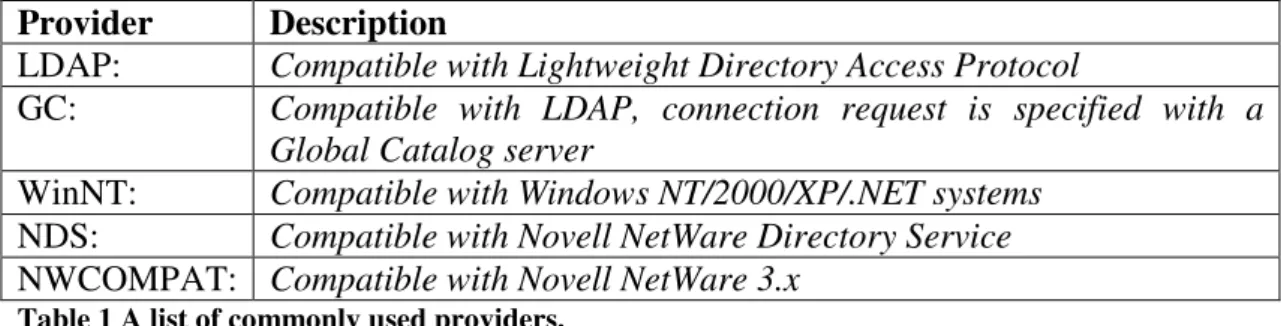
AD’s information can be retrieved through some access points (services), called providers, that use different interaction protocols or correspond to different LDAP protocol implementations.
Provider Description
LDAP: Compatible with Lightweight Directory Access Protocol
GC: Compatible with LDAP, connection request is specified with a Global Catalog server
WinNT: Compatible with Windows NT/2000/XP/.NET systems
NDS: Compatible with Novell NetWare Directory Service
NWCOMPAT: Compatible with Novell NetWare 3.x Table 1 A list of commonly used providers.
In this paper we will only focus on the LDAP protocol that represents the chosen protocol for .NET/2000 domains. We will then examine the providers that use it, i.e. GC: and LDAP: (some concepts related to the WinNT: provider will be briefly mentioned in the programming section).
3.2.1 Tree Structure and Attributes
Both AD and X.500 organize their data in a tree structure whose nodes are identified by names. Directory services like X.500 are based on the idea that data contained in the nodes are collections of attributes and that an attribute-based search is possible. In this way, the user can obtain specific, attribute-defined views upon the data, instead of obtaining a single piece of information, as it happens with name services (e.g. DNS). The difference between a name service and a directory service is comparable to the difference between the phone’s white pages and the yellow pages. Information you look up in the white pages (the customer’s name) does not belong to a category but is rather information that you want to transform into more functional low-level data (the phone number). Yellow pages serve a different purpose: subscribers are listed by category (dentists, restaurants, hardware stores, etc.) that can be grouped according to a characteristic they share; if you are looking for a specific information, you usually turn to this kind of book and start a search by category refining it until you get the specific data you are looking for (names, addresses, phone numbers, etc.).
This is similar to what happens in directory services: if you enter information along with one or more attributes describing their characteristics into the database, your search will be carried out according to categories. Consequently, different views of the same database can be generated. It is therefore important for the data in the directory to be represented correctly and for the protocol that allows interaction with Active Directory to accept an attribute-based query by the user.
Fig.1 A schematic view of how an attribute-based query will show a “tree” database.
3.2.2 LDAP Request
LDAP allows creation, deletion and move of an object, listing of a container’s content, and so on. Later, a few programming examples will show how some of the LDAP functions can be used through ADSI (see Section 4.2.3). The focus here will be on the retrieval of information related to objects contained in an AD by utilizing a specific syntax that allows searching for directory objects and selecting them on the basis of their attributes.
A well-formed LDAP query is an application message of SearchRequest (3) type made up of a set of parameters that lead to the following search criteria:
• Search base (or base object): It defines the basic location, i.e. the forest node
or leaf, where the search must start; the location is defined by using an LDAP Distinguished Name (see Section 3.3). Search base is used to indicate the directory section where the search should take place.
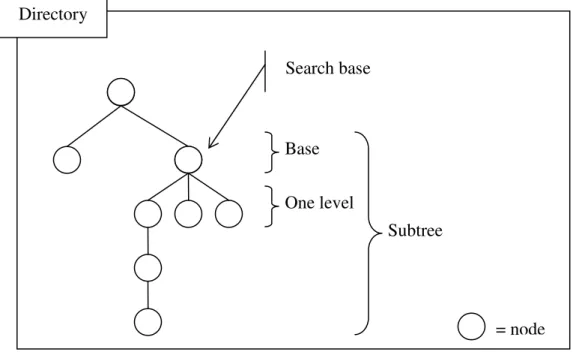
• Scope: It specifies how deep the search should go. There are three kinds of
scopes: base, one level and subtree. Base scope restrict the search to the search base; if, for instance, the search base is a container object, its attributes will be listed, but not its contents. One level scope takes the search just beyond the base object, excluding the base object itself. With subtree scope, the search will extend over the whole subdirectory (including the base object).
• Filter: It’s used to single out the required elements in the specified tree
section.
• Selection (or attribute description list): It determines which attributes of the
Fig. 2 Possible filter scopes.
For a comparison with the SQL (Structured Query Language) expression SELECT <field> FROM <table> WHERE <condition>
selection has functions that are comparable to <field>, search base and scope to <table> and filter to <condition>. In short, the former expression could be re-written as follows:
SELECT <selection> FROM <search base> WHERE <filter>
The purpose of a comparison with a simplified SQL query is to understand the role of appropriate expressions in LDAP query syntaxes6. Anyway, the directory’s operating core is not SQL, but LDAP (and at a low-level ISAM). See an example of a programmatic search in AD in Section 4.2.3.
Other important parameters can be defined by a Search Request, e.g.:
• Size limit: INTEGER (0 .. max); a user can define a maximum number of
elements to be returned from a search; 0 (zero) means no restriction.
• Time limit: INTEGER (0 .. max); a user can define the maximum time, in
seconds, for an answer to a search; 0 (zero) means no restriction.
• Types only: BOOLEAN; this establishes if the user wants the attributes’ name
(TRUE) or also the relative values (FALSE).
Syntax of a Filter
This is the syntax of a filter:([<operator>](<filter>)[(<filter>)...])
6
In the appendix see the example of a search that was carried out with SQL-like syntax. Subtree Search base Base One level = node Directory
where
<filter> = (<attribute><operator><value>)
• <attribute> is the attribute of an object
• <operator> is one of the values listed in the following table • <value> is a value compatible with the attribute type
Operator Description Type it applies to
& logic And <filter>
| logic Or <filter>
! logic Not <filter>
= Equality <attribute>
>= Greater Or Equal <attribute> <= Less Or Equal <attribute> ˜= Approximately Equal to <attribute> Table 2.
This is what a filter could look like:
(&(objectCategory=Person)(name=al*))
This filter returns all users (Person) whose name starts with “al” in the specified
search base and scope.
See RFC 2254 and www.microsoft.com/technet for a formal definition of filters or for further information.
Search Examples
LDAP queries can be carried out with the csvde.exe tool. Csvde is a command line tool that can be found in system32 folder; it sends its requests to the directory via an LDAP message and generates a CSV output (Comma Separated Value). Excel usually recognizes csv extension files as “comma separated” files and reads them correctly; they can also be explicitly imported with a wizard (open menu). The csvde tool, by using Excel, allows a high-level view of the objects and a simple examination of its fields. When launching csvde without specifying any parameters, a help function is available that briefly explains its usage. Among the various switches that are listed in the help function, some are used to define the search criteria mentioned previously, i.e.:
-d <search base> -p <scope> -r <filter> -l <selection>
An output file must be identified and this can be done as follows: -f <output file>
csvde -f UserDomain.csv -d dc=isqre,dc=net -r (objectCategory=Person) csvde extracts all Users from the isqre.net Domain partition (defined in the –d switch parameter) and saves them in csv format in the UserDomain.csv file. The scope is subtree, unless otherwise specified.
If you write (objectCategory=*) instead of (objectCategory=Person) all objects found in the isqre.net domain are listed.
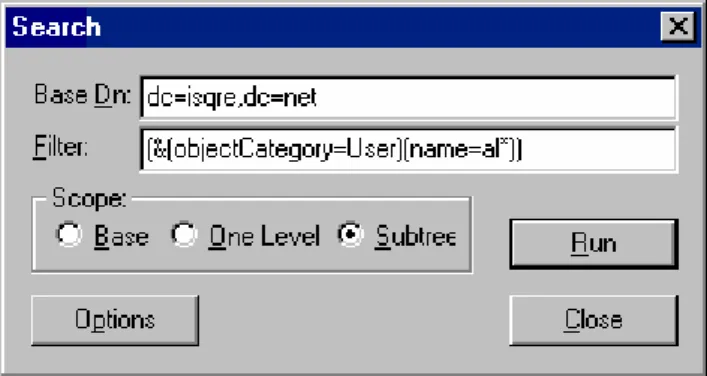
A similar operation can be carried out with the LDP.exe tool located in the Support Tools (see Appendix). Once LDP is launched, it must be connected to an AD by choosing the Connection/Connect menu. A request panel will ask for a server and an IP port; by leaving the server field blank, LDP will connect with the DC RootDSE. An authentication operation must then be performed (Connection/Bind menu); if the authentication fields (User, Password) are not filled out, credentials received from the parent process will be used (usually those of the current user). After authentication and after selecting the Browse/Search menu, a panel asking the user to select the search base (Dn Base), the scope and the filter (Fig. 3) will appear.
Fig. 3 Search base, scope and filter selection in LDP.
The LDAP Search Request shown in Figure 3 identifies all accounts of the isqre.net Domain partition whose “name” attribute begins with “al”.
The Option button gives access to a little panel where further parameters can be set, like selection (label attributes), size limit, time limit, types only, chase referrals7 and more.
Some expressions used in the examples on how to make a query will be further explained later on; in particular, we’ll discuss Distinguished Names in the next section.
3.3 Partitioned Active Directory
Partitioning, replicating and distributing are closely connected concepts and the partitions, also called Naming Contexts, are at the base of AD’s distributed architecture.
Every effective multi-user service that is available to several thousand users and can contain a lot of data must be easily accessed and its data must be managed efficiently.
One single access point could create a bottleneck in network traffic, hence it would be a liability, whereas distributing the partitions on more machines would allow for better load distribution (load balancing). An excessively centralized management in large domains could lead to an unmanageable administrative load and increase the complexity of the administrative task, which grows in a non-linear fashion with the number of data that needs to be processed, while separating data in different partitions could reduce search and update costs. Consequently, partitioning a distributed database with no growth limits is a good architectural strategy.
3.3.1 Partitions
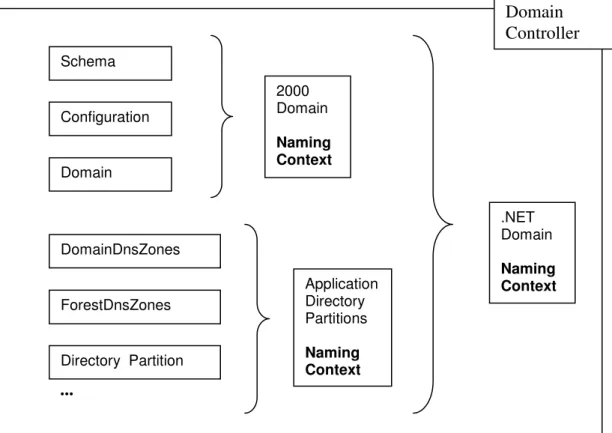
Active Directory has a tree structure, but its partitions don’t univocally correspond to single nodes. There are different types of partitions in AD (three at least) and several partitions can be grouped on the same Domain Controller (DC). In particular, there are three partitions on a Windows 2000 DC: the Schema and Configuration partitions that include global data (related to the whole forest) and the Domain partition which contains local information connected with the domain the DC belongs to.
A new type of partition, called Application Directory Partition (ADP), has been added in Windows .NET. ADP’s avoid unnecessary network traffic because they let the administrator choose which DC’s of a forest must be replicated; therefore they are useful in distributed applications (see Section 4.2.5). Two of these partitions have been used by Microsoft for the distribution of data connected with the domain and forest DNS zones (i.e. DomainDnsZones, ForestDnsZones). Therefore there will be at least five partitions in a .NET Domain Controller: Schema, Configuration, Domain, DomainDnsZones, ForestDnsZones, and other possible Application Directory Partitions.
Fig. 4 Naming Contexts in .NET and 2000 Active Directories.
Configuration Schema Domain DomainDnsZones ForestDnsZones 2000 Domain Naming Context s .NET Domain Naming Context s ... Application Directory Partitions Naming Context Directory Partition Domain Controller
Schema and Configuration
Some directory service data are related to the whole forest and are kept inside the AD in special global partitions, i.e. Schema and Configuration. The Schema partition contains a definition of the classes and attributes that can exist within the forest and is unique to the directory. For efficiency purposes, there are copies of the Schema partition on each forest DC. Even the directory architecture, its topology (see Section 3.3.4) and all other structural data must be accessible at the forest level. These data are located in the Configuration partition, they must obviously be the same throughout the directory and be easily available; for this reason there is a copy of the Configuration partition on every DC (see Fig.4).
Note: Even if there is a Schema partition on every forest DC, only one of them is writeable, the others are just read-only copies. From a functional point of view, all DCs are identical, but the one holding the writeable copy of the Schema partition plays a unique role within the forest, called Schema Master Role (one of AD’s five FSMO roles, see www.microsoft.com/technet for further information). If necessary, for instance if the machine running the DC Schema Master fails, this role must be moved to another DC of the forest. If the transfer cannot be completed, for example if the DC with the Schema Master Role is not available, then it must be seized. Transfer of the Schema Master Role is carried out with the Schema Management snap-in (Microsoft Management Console) or with the command line tool ntdsutil.exe (see Appendix).
Forests and Trees
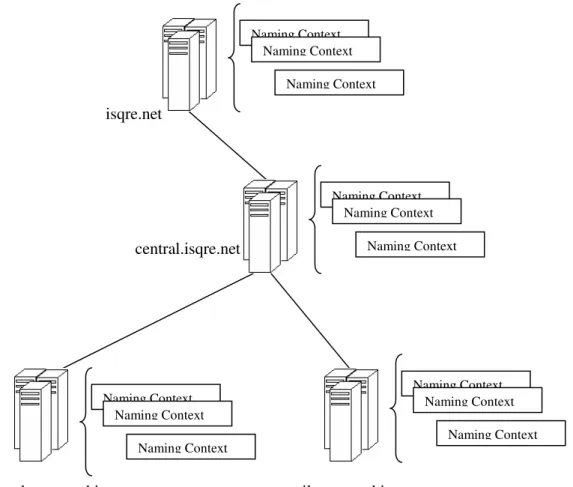
Windows .NET and 2000 domains can be grouped into trees and forests. The directory is structured like a tree of domains that collect Naming Contexts containing Active Directory data; each domain can include one or more DCs (replica DCs). From a system engineer’s point of view, a tree is a collection of domains in two-way transitive trust, consequently the attention is focused on authentication and extension of the domain’s physical boundaries8. However this topology has also a specific meaning as far as the LDAP is concerned: identification of a directory object is related to its position inside the tree and this dictates how to create a correct LDAP string for accessing and managing directory objects.
8
Relationships between domains are particularly important when (AD object) replication costs are calculated. See [3] for cost computation.
Fig. 5 Domain trees and Naming Context.
Container and Leaf Objects
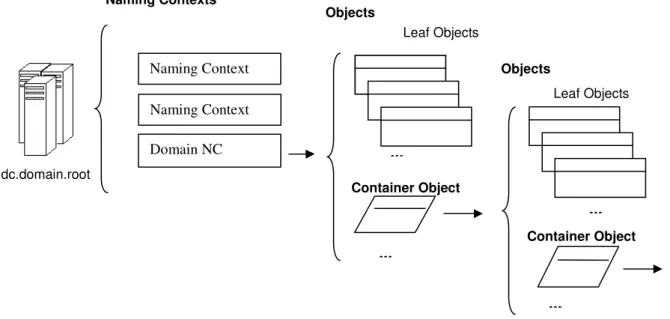
At a high level, AD data are represented by means of an object orientation. Some objects are leaf, others are container (objects that can contain other objects). Containers are logical binders that can be used to further subdivide a partition’s content. An OU is a “specialized” container, it has an administrative role and is used to identify a domain zone that needs to be manipulated coherently. For instance, policies and DACLs (Discretionary Access Control Lists) can be applied to an OU in order to manage some domain objects according to administration’s needs. Policies will not be discussed here, for further information please refer to [1] and
www.microsoft.com/technet.
Note: A leaf object can become a container by writing its class name in the
possSuperior attribute of another class (see Section 3.4.1. Containment Relationships)9.
9
Apart from OU’s , many additional objects are containers; even User objects can, surprisingly enough, be containers. isqre.net central.isqre.net london.central.isqre.net milan.central.isqre.net Naming Context Naming Context Naming Context Naming Context Naming Context Naming Context Naming Context Naming Context Naming Context Naming Context Naming Context Naming Context
Fig. 6 Domain Controllers, Naming Contexts, Containers and Objects.
Distinguished Name
Domain Controllers are therefore a network of servers, or better a set of LDAP servers that store leaf and container objects, partitioned in Naming Contexts. AD objects are clearly identifiable in the directory according to a syntax that requires a precise specification of the object’s position in the directory tree. LDAP syntax identifies a directory object by means of a vector called Distinguished Name (DN). The unambiguousness of an object’s DN is guaranteed by the fact that, in a container, its name must be unique; similarly, Naming Context and DC names within the forest. A Distinguished Name usually has this syntax
CN=<value>,CN=<value>…,DC=<value>,DC=<value>…
or
CN=<value>…,OU=<value>…,DC=<value>,DC=<value>…
or other similar ones according to its naming attributes10.
The administrator object (user class) located in the management OU (organizationalUnit class) in the Domain partition of the milan.central.isqre.net domain will have the following Distinguished Name:
10
A class’s name attribute is defined in the Schema by the meta-attribute rDNAttID.
... ... dc.domain.root ... Container Object Objects Container Object Naming Context Domain NC Leaf Objects Naming Contexts Objects ... Naming Context Leaf Objects
CN=administrator,OU=management,DC=milan,DC=central,DC=isqre,DC=net
while the Configuration and Schema partitions of the isqre.net forest will have the following Distinguished Names:
CN=configuration,DC=isqre,DC=net
CN=schema,CN=configuration,DC=isqre,DC=net
Note: Since Schema and Configuration are partitions that are identifiable at forest level (see 3.3.1 Schema and Configuration), these two partitions Distinguished Names have the following syntax:
CN=schema,CN=configuration,<Root_Domain_DN> CN=configuration,<Root_Domain_DN>
where <Root_Domain_DN> corresponds to the Distinguished Name of the first domain created in the forest. This value can be found in the
rootDomainNamingContext attribute of the RootDSE object (see Section 3.4.2). If you want to access the Schema or Configuration copy of a specific DC, you must follow this syntax:
LDAP://<ServerName>11[:<port>]12/CN=schema,CN=configuration,<Root_Domain_DN> For instance:
LDAP://dc:389/CN=schema,CN=configuration,DC=isqre,DC=net or
LDAP://dc/CN=schema,CN=configuration,DC=isqre,DC=net
Relative Distinguished Names
The first element on the left of a Distinguished Name is usually called Relative Distinguished Name (RDN). A user called “alex” created in the “students” OU of the
“isqre.net” domain will have the following DN:
“CN=alex,OU=students,DC=isqre,DC=net” and the following RDN “CN=alex”. Two identical RDNs cannot exist within the same container, but there can be objects with the same RDN, if they belong to different containers (in this case they have different DNs).
Note: Users and computers that share the same domain cannot have identical logon names, even if they were created in different containers, because they cannot have identical User Principal Names or Downlevel Names (sAMAccountName).
11
<ServerName> can be a netbios name, a DNS name or an IP address.
12
GUID
Since AD objects can be moved from one container to another and from one Domain to another or can be simply renamed, unambiguous recognition of the objects located in the AD namespace is essential. To this purpose, each AD object is assigned a 128-bit unique number called GUID (Globally Unique Identifier), defined in the objectGUID attribute, which will guarantee the object’s consistently unambiguous identity.
Summary
What we described up to this point is a network of DCs, in a tree topology, storing a set of directory partitions containing objects that can be identified through their Distinguished Names or GUIDs. Later on we will see how these elements contribute to the directory’s architectural structure and how the directory’s logical representation maps the physical one.
3.3.2 AD, DNS and AD References
What holds the directory elements together (DCs, partitions and objects) are DNS references on the outside (network location) and AD references on the inside (directory architecture). There are three kinds of AD references: cross references, continuation references and superior references. DNS, cross references and continuation references play a major role in the AD’s relational structure and will be analyzed in depth later on.
3.3.3 Relationship Between Active Directories and DNS’.
The first step for an AD user who wants to interact with the directory is to contact a service with an AD access point. First of all one must find the IP address of a DC (LDAP server) and create a communication connection. To this purpose, their symbolic names, that must conform to RFC 2136, 2052, 1996 specifications, are published on a DNS. These RFCs define new characteristics for the DNS:
• RFC 2136: dynamic updates are introduced. This allows the DNS user to
carry out a dynamic update of the DNS records without intervention by the administrator.
• RFC 2052: service location resource records (SRV RR) are introduced. This is
a new kind of DNS record that allows definition of the parameters that cannot be defined with normal host records (AA).
• RFC 1996: a new kind of transaction, called dns notify, is introduced. This
deals with sending new or modified data in a DNS zone. This way a DNS server can inform its partners that a change has occurred in its zone.
While dns notify and dynamic update are not essential (but useful) to the operations of .NET and 2000 domains, SRV RR are absolutely necessary, since DCs are published in DNSs as LDAP servers by using these kinds of records13. SRV RR records not only allow the user to define the DNS name of a machine that provides a service (AA, CN records already do that), but also to supply three additional values: service priority (<priority>), weight (<weight>) and port (<port>). Priorities specify which endpoint
13
DC’s usually exhibit also Kerberos services for authentication: also these services are shown by the DNS by means of the SRV RR records. For further information on Kerberos services please see specialized literature.
(IP address) should be chosen among those providing identical services (lower values correspond to a higher priority); weights specify which service to use with the same priority (the highest value is preferred); ports specify the IP port number the service is listening on. An SRV RR entry has the following syntax (square brackets are part of the phrase and do not refer to optional values):
<name_of_service>, <type of record>, <[priority]> <[weight]> <[port]>, <host_dns_name>
For example a DC is published on DNS zones/domains in an SRV record as follows:
_ldap, SRV, [0][100][386], dc.isqre.net
When a server is promoted to DC, i.e. when the AD is being installed on a particular server, many records of this kind are published in specific DNS zones (domains). In case a DNS conforming to RFC 2136, 2052 specifications were not available at the time of an AD installation, these zones will be saved in the netlogon.dns file (%systemroot%\system32\config) and should be inserted in the DNS later on. These DNS zones, created to help AD’s operation, are easily recognizable, because they are identified by the prefix “_” (underscore), as shown in Figure 7.
Fig. 7 The _tcp.Defaul-Dirst-Site-Name._site._dc._msdc.isqre.net DNS zone contains two SRV-RR record entries (on the right) that identify the LDAP and kerberos servers of the isqre.net domain.
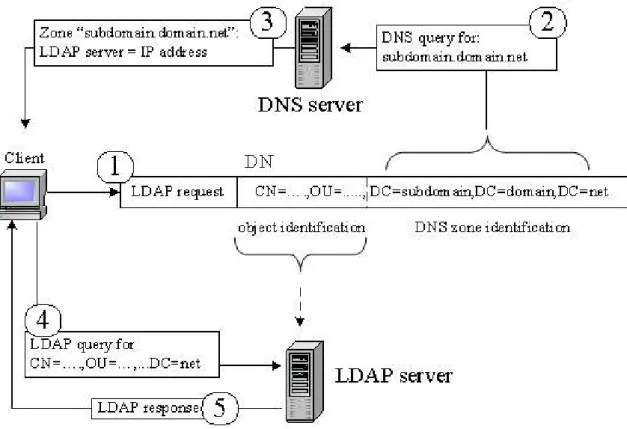
Thanks to the publication of the forest DCs on the DNS - or better, thanks to the LDAP services that show the directory’s partitions - and through the Distinguished Names, the object within the AD can be retrieved.
CN=<…>,…, OU=<…>, … DC=<subdomain>,DC=<domain>,DC=<root> Object identification DNS zone identification
Table 3.
The “DC=” elements of the Distinguished Name (DN) can identify the DNS zone where the LDAP server name that contains a directory partition, is stored; they are therefore related to connection issues and to the AD’s physical architecture. the “CN=” and the “OU=” components and, generally speaking, the naming attributes
that differ from “DC=” are used to identify (container or leaf) objects in the current partition, allowing their retrieval (see Figure 8).
Fig. 8 Connection request to an AD object by means of a Distinguished Name.
3.3.4 AD References
Considering this structure, the local Naming Contexts can be accessed once a DC has been located. In any case the user must be able to retrieve any partition from the whole directory, i.e. any Naming Context located within the domains forest (or outside, i.e. in a separate forest or in a non-Microsoft LDAP server). To this purpose there must be a reference mechanism tied to all the Naming Contexts; these references are created with cross reference objects and referral and continuation messages.
Cross Reference
In the Configuration Naming Context there is the Partitions container, where all the cross reference objects are listed (crossRef class). Cross references hold the directory together: they are used to obtain information regarding the placement of directory partitions located on other DCs. On every DC, within the Partitions container, there is a cross reference object for each of the forest’s domains and for every other referred
partition. The content of the Partitions container represents the knowledge of AD about all directory partitions. Each DC can draw this knowledge from the local copy of the Configuration.
Among the crossRef object attributes the following are of special interest:
• cn: the name (Relative Distinguished Name) of the specific cross reference
object
• nCName: the DN (Distinguished Name) of the referred partition (e.g.
DC=DomainDnsZones,DC=isqre,DC=net)
• dnsRoot: the DNS name of the zone where the server holding the referred
partition is located.
• msDS-NC-Replica-Locations (.NET): the Distinguished Name that identifies
the DC’s DSA (Directory Service Agent, see Section 3.7.1),
where the ADP partition must be copied (e.g.
CN=NTDSsettings,CN=dc1,CN=Servers,CN=Default-First-Site-Name,CN=Sites,CN=Configuration,DC=isqre,DC=net). ADP partitions are replicated only on DCs that are specifically listed in this attribute.
Note: crossRef objects can be viewed with adsvw.exe (see page 29) and by connecting to the LDAP://cn=partitions,cn=configuration,<Root_Domain_DN> object.
Using the
Knowledge
When a user carries out a query in AD, the LDAP sends a SearchRequest(3) message to the DC (see Section 3.2.2). Depending on the query, different kinds of response messages are generated:
• Response; • Referral; • Continuation.
Response is an LDAP SearchResultEntry(4)14 message containing a list of Distinguished Names and attributes that satisfy the request. On the other hand, Referral and Continuation are messages containing references useful to carry the search on. These references are built up on the knowledge that the DC has about the AD. In the following two sections the last two messages will be analyzed in depth.
Referrals
When a client asks for information, with base scope (see 3.2), that is not included in the partitions located on the current DC, an error message called referral (RFC 2251) is returned. A referral is an LdapResult structure with a ResultCode 10 in a SearchResultDone(5)15 message. The LdapResult structure scheme is as follows: LdapResult {
ResultCode ; /* integer; specifies the SearchRequest’s result type */ matchedDN; /* optional; it depends on the result code */
errorMessage; /* a description string */
14
SearchResponse(4) in Network Monitor
15
referral; /* optional; sequence of LDAPURL */ }
Only if the ResultCode value is 10 the LdapResult.referral field is present. This field contains one or more references as LDAP URL necessary to continue the search on other servers. A LDAP URL is a string:
LDAP://[Host [ ":" Port ]]/[DN]
host specifies the server’s DNS name (or the IP address) where the search can be carried on, port is the IP port number (389 by default) and DN specifies the Distinguished Name of the searched object. If the user activated the chase referrals
option (“follow the information given by the referrals”) in the search parameter list, the search continues on the servers listed in the referral field.
Continuation Reference
When a search with one level or subtree scope in the referred Naming Context is finished, if the AD service determines that there are subordinate partitions, it returns a
continuation reference signal to the client; continuation reference is a SearchResultReference (19)16 message containing one or more LDAP URLs, that could be represented as follows:
SearchResultReference {
LDAP://<hostnameT>/<DistinguishedNameA> LDAP://<hostnameS>/<DistinguishedNameB> ….
}
Again, in this case, LDAP URLs specify where the search can be continued.
Following is the example of a continuation reference message that was captured with Network Monitor. In this example, a search for “domain admins” objects were performed with “isqre.net” as search base, “subtree” as scope and with a specific set of attributes in the attribute description list. As shown in Figure 9, LDAP generates a SearchRequest(3) message. First the DC returns a SearchResponse(4) message containing the elements found in the original Naming Context that satisfy the request (Fig. 10), then a continuation reference (Fig.11) listing the LDAP URLs follows. These references indicate the subordinate Naming Contexts in which the search can be carried out; any other search can generate other continuation references until subordinate Naming Contexts exist.
16
.
Fig. 9 A SearchRequest(3) captured with Network Monitor. Please note the Base Object, Scope, Filter parameters and the Attribute description list.
Fig. 10 A SearchResponse(4). The server returns the required objects listed in the original Naming Context.
3.4 Object-oriented AD
AD describes all information it contains at a high level as objects, at a low level as table lines which columns represent objects’ attributes.
Fig. 12 AD objects represented in a table.
This metaphor is used to define both information (objects and attributes) and meta-information (classes of objects and attributes), similarly to what happens in relational databases, where tables are used to describe the formal structure of other tables. Objects that describe meta-information (class and attribute schemes) are grouped in a single partition called Schema, which elements are true objects with modifiable attributes. Since object definitions can be modified, the Schema is extensible.
3.4.1 Class definition
Schema Object
Schema is an object with meta-descriptive functions. By examining its structure17 we can see that the dMD class (the Schema partition is one of the dMD class instances) can contain two kinds of objects, in particular:
• attributeSchema objects: They define the attribute schemas that make up the
classes (meta-information). Object’s attributes are defined by instances of these classes.
• classSchema objects: They define class schemas (meta-information) of which
objects are instances.
These objects are used to define classes’ attributes and classes’ formal structure. They also define instantiation rules (if an object can be created and to what type of categories his class belongs to; seeClass Categories
) and the inheritance hierarchy, which will be shown later on. The fields defined in the Schema table will be called meta-attributes, they are used to describe some of the relationships mentioned previously.
17
Fig. 13 The Schema as a table; headings are meta-attributes.
Attributes
Active Directory’s attributes are what are usually called object attributes, their characteristics are described in the Schema in an abstract way and they are associated with objects by means of specific attributes that belong to the objects (see the next Section Creating a class). Here are some relevant characteristics:
• Mandatory or Optional: Class attributes can be mandatory or optional
(mustContain, systemMustContain and mayContain, systemMayContain, see following Section). Mandatory attribute values must be specified when the objects are instantiated.
• Multivalued or Singlevalued: Some attributes are single-valued, while others
are multi-valued. This feature is defined in the isSingleValued meta-attribute (Boolean).
• Indexing: For performance reasons, some attributes are indexed so that the
required elements can be located more quickly; this makes sense for the most widely used attributes (like distinguishedName, objectCategory, etc.). This characteristic can be set with the searchFlags attribute (a bitmask) by setting its first bit.
• Syntax: Syntaxes define the types of values that can be assigned to attributes.
Syntaxes are primitive types that are not defined in the Schema, but are coded in Active Directory. They are connected with the attributes by means of their OID numbers (see RFC 2252), therefore, while new classes and attributes can be defined, new types of AD syntaxes cannot. The meta-attribute defining an attribute’s syntax is attributeSyntax (standard X.500), while oMSyntax and OMObjectClass attributes define syntaxes according to other standards (XOM/X400).
Creating a Class
The Schema meta-attributes are used to describe: a unique class identifier, a name, pointers to containers for nesting, pointers to superclasses for derivations, derivative types and attributes a class must or may have when it is derived (or that an instantiated object must possess). Here is a schematic (concise) representation of a class:
ObjectClassDescription {
Object Identifier; // Octect String Name; // (String)
SubClassof; // Object Identifier; a de facto pointer
PossibleSuperior// Object Identifier
Derivative Type; // ( "Abstract" | "Structural" | "Auxiliary" | "88") MustContain; // attributes list
MayContain; // attributes list }
ClassSchema objects contained in the Schema describe of which attributes a class is formed by using four special meta-attributes:
• mustContain • mayContain
• systemMustContain • systemMayContain
MustContain attributes refer to mandatory attributes, MayContain attributes refer to optional ones (see Attribute Section above) and can be modified by the administrator; SystemMustContain and SystemMayContain play similar functions, but can be manipulated by the Directory System Agent only (see Section 3.7.1). All these attributes are multivalued.
Containment Relationships
As already pointed out, some objects are container objects, others are leaf objects. The following Schema meta-attributes are used to define by which classes other classes are contained:
• possSuperiors
• systemPossSuperiors • possibleInferiors
All these attributes are multivalued. For every class the two possSuperiors and systemPossSuperiors meta-attributes indicate what kind of object can contain one of its instances. In this case as well, the possSuperiors attribute can be modified by the administrator, while systemPossSuperiors can be manipulated only by the DSA (Directory System Agent). Values of possibleInferiors attribute are calculated dynamically from those of possSuperiors and systemPossSuperiors.
Class Categories
Classes belong to different categories. These categories define how classes are built and the rules that regulate their derivation. Below is a list of every category’s characteristics:
• Structural (concrete classes): An object can be an instance of a Structural
class only. A Structural class can be defined (derived) both from non-concrete classes, like Abstract and Auxiliary, and from other Structural classes.
• Abstract (non-concrete classes): Abstract classes are superclasses and they are
used to define other Abstract classes as well as Auxiliary and Structural ones. These superclasses are used to build classes from an already existing model.
• Auxiliary (non-concrete classes): These classes are simple attribute
collections and they work similarly to object programming interfaces. They can be derived from other Auxiliary classes or from other Abstract classes. In AD’s 2000 version, only classes can inherit attributes from Auxiliary classes (static linking), in .NET even objects can (dynamic linking, see Section 4.2.5).
• 88 (concrete classes):This category is present for compatibility with X.500.
The category a class belongs to is defined in the Schema’s objectClassCategory meta-attribute and is identified by number:
• 0 = 88;
• 1 = Structural; • 2 = Abstract; • 3 = Auxiliary.
Class Derivation
Classes can be derived from other classes. Some meta-attributes define these relationships, namely:
• subClassOf attribute identifies the class derivation hierarchy. This attribute is single-valued, so that a class can be derived only from another specific class, there is no multiple inheritance.
• With auxiliaryClass (a top class attribute) and systemAuxiliaryClass (a
meta-attribute) attributes, we can realize a form of “multiple inheritance” by defining from which Auxiliary classes we want the class to inherit further attributes.
Note: AuxiliaryClass and systemAuxiliaryClass attributes are multivalued and they allow listing of zero or more classes. Also in this case, the first attribute can be modified by the administrator, while the second can be modified by the Directory System Agent only.
Instantiating a Class
AD objects are instances of a Structural class, which is derivated from either Structural, Abstract or Auxiliary classes. Schema defines what classes an object is derived from and consequently which classes and superclasses the object must inherit his set of attributes from. As previously mentioned, inheritance is defined by the subClassOf attribute; systemAuxiliaryClass and AuxiliaryClass attributes define the Auxiliary classes from which further attributes are derived. SystemPossSuperiors and possSuperiors attributes indicate where a class can be instanced. Furthermore, all AD objects are class instances that come directly or indirectly from the top class, the Active Directory root class which contains the definition of attributes that objects must posses, like objectGUID, DN, objectCategory attributes and so on (for further information, see MustContain, systemMustContain, MayContain, systemMayContain attributes for this class).
Note: Instantiated objects keep track of classes they inherit from in the objectClass
multivalued attribute.
Following, a graphic representation of how the user class is defined by means of other classes18 using inheritance mechanisms; users and computers listed in AD are instances of this class.
18
For reasons of space, this is only a partial representation. For further information, please analyze the Schema with the given tools.
Fig. 15 Inheritance hierarchy and dependences of the User class.
Analyzing Objects and Partitions
When interacting with AD, even if it is in a programmatic way, it is sometimes advisable to check the properties of the objects one intends to use. Two useful tools for AD objects and partitions analysis, Schema included, are csvde.exe (located in system32 folder) and adsvw.exe (platform SDK).
Note: If you want to have an overview of the values and attributes of a partition or of a certain number of objects, we suggest using csvde by importing the output file into Excel. This is particularly useful, if you want to carry out a detailed analysis of the
Naming Context contents by executing comparisons and checks. For example, a file containing all the Schema objects can be created as follows:
csvde -f schema.csv -d cn=schema,cn=configuration,dc=isqre,dc=net -r (objectClass=*)
where dc=isqre,dc=net represents the rootDomainNamingContext (see Section 3.4.2 RootDSE) of the forest in Figure 5.
The csvde tool was already mentioned in Section 3.2, so we will not examine it any further.
Adsvw.exe is a graphic interface tool included in the SDK Platform. There are other similar instruments for analyzing AD (see Appendix), in any case, Adsvw.exe allows a more detailed view of the AD objects’ properties and the use of other available ADSI providers, that is why we recommend it.
Connection with AD is possible by means of adsvw.exe, by accessing the file\new menu and choosing the ObjectViewer option. Then will be displayed a form (Fig. 16) requesting the DN of the object you want to connect to (Section 4.1.1 provides some examples of connection strings).
Fig. 16 Binding to the domain partition of the isqre.net domain via LDAP provider.
Since AD requires authentication, a security principal must be specified if the Use OpenObject and Use Encrypt options are unchecked and the Open As and Password authentication fields are blank. In this case, the credentials inherited from the parent process are used, i.e. those belonging to the currently logged on user. This is a quick procedure if you have the necessary rights on the system.
Once the binding is completed, the object specified in the Ads path field appears. In the left hand panel, the object tree can possibly be expanded and its contents examined. The right hand panel shows a description of the selected object on the left and a menu for accessing its properties.
Fig. 17 Adsvw.exe connected with the dc=isqre,dc=net domain shows a section of the tree and some of the alex object’s properties (User class).
If you want to view the Schema partition contents, this is a possible connection string:
LDAP://cn=schema,cn=configuration,dc=isqre,dc=net
where dc=isqre,dc=net represents the rootDomainNamingContext (see Section 3.4.2 RootDSE).
3.4.2 Objects Providing Entry Point Information
Some objects are used to retrieve preliminary information related to the domain or the forest the user is in. These objects are necessary to free the programmer from a particular domain and provide a first access that will then lead to further references to domain or forest objects.
ADS
By employing “ADS” container, you can find out which ADSI providers are available within the working environment. ADS container implements the IADsNamespaces interface and provides information related to the dynamically available ADSI providers. Thanks to that it is possible to write programs that work differently depending on existing providers.
Note: Contents of the ADS container can be viewed in adsvw.exe simply by writing “ADS:” in the ADs Path.
RootDSE
The RootDSE object has been introduced in LDAPv3. It is a virtual object that is not defined within the Schema, does not contain inferiors and has no possible superiors. It collects attributes that include key information related to the domain and the specific DC being accessed. A RootDSE is not a root per se, but a uniform logical entry point, so that code can be independent of a particular Domain.
Following is a list of RootDSE’s most important properties, some of which have been already mentioned in the previous sections.
RootDSE:
- defaultNamingContext: It retains the DN of the accessed domain.
- schemaNamingContext: It retains the DN of the domain’s forest Schema; this partition is replicated on all DCs.
- configurationNamingContext: It retains the DN of the Configuration partition. This partition contains information related to the forest structure that is divided on to three containers: sites, services and partitions (which contains cross references, see Section 3.3.4).
- rootDomainNamingContext: It retains the DN of the first domain installed in the forest.
- namingContexts (multivalued): It contains the DNs of all partitions that were replicated on this DC, including the DNs of any Application Directory Partitions.
- serverName: It retains the DN of the local domain controller.
Note: One can connect with RootDSE via AdsVw.exe and list its contents by using the following AdsPath:
LDAP://RootDSE
3.4.3 Global Catalog
In order to make AD-object retrieval more time effective, a support service, Global Catalog (GC), has been introduced in the forest. Global Catalog behaves like a real AD parallel agent that integrates and simplifies its operation. GC’s purpose is to collect the forest objects key attributes. Some information can be obtained directly by asking the GC, before involving AD, thus avoiding an examination of the whole directory by following continuation references and referrals.
For efficiency’s sake, the GC only contains a partial data replication, i.e. only those AD data and attributes that have been marked in the Schema by setting to TRUE their isMemberOfPartialAttributeSet meta-attribute.
At least one forest DC is designated as GC server (by default the first DC installed in the forest), but this service may also be activated on other DCs. Even if a GC could
theoretically be put on each forest DC, this is not always advisable, since GC’s data are many and prone to replication. An excessive amount of GCs could lead to inefficient use of the network’s resources. Designating a GC server for each site, i.e. for each tightly interconnected zone (for further information see
www.microsoft.com/technet), would reduce the number of inter-site queries required to obtain forest-level attributes and the amount of network traffic towards narrow-band zones. In this case, the GC would play the role of proxy for the forest data.
Fig. 18 The Global Catalog collects attributes (and objects), coming from the whole forest, for which the value of the isMemberOfPartialAttributeSet meta-attribute is set to TRUE.
It should be added that authentication can fail if the GC is not active or cannot be reached. Some special domain groups can be viewed at the forest level and are called Universal Groups. Universal Group membership is included in the GC for scope
reasons: during authentication the operating system must query the GC to check if the user belongs to a Universal Group (and consequently build the correct token). This function can be disabled, if necessary, by creating the Hkey_Local_Machine\SystemCurrentControlSet\Control\Lsa\IgnoreGCFailures key in the register, but this rarely makes sense, because this involves missing the opportunity to obtain user memberships in the Universal Groups.
The Global Catalog’s contents can by viewed by using the “GC:” provider (by applying a syntax similar to “LDAP:”), for instance:
Global Catalog is an LDAP service available on the IP port 3268 (instead of the port 389); you can connect to the GC by explicitly indicating the IP port within an LDAP URL:
LDAP://<servername>:3268/dc=isqre,dc=net
The Global Catalog’s contents can also be obtained via csvde; indeed, a binding port can be defined with the csvde switch –t. In the following example the csvde tool connects with the “GC:” provider by using the 3268 port and writes its contents into the gc.csv file.
csvde -f gc.csv -t 3268 -d dc=isqre,dc=net -r (objectClass=*)
Note: objectClass is a top class mandatory attribute, the “(objectClass=*)” expression returns all the contained objects.
Note that the same hierarchy of the AD forest is recreated within the GC.
3.5 AD Replication
Some directory partitions are replicated on different forest DCs, in particular:
• Schema and Configuration partitions are replicated on all forest DCs.
• Domain partitions are replicated on all DCs within the same domain (for fault
tolerance a domain may have more than one DC).
• ADP partitions are replicated on the DCs that are explicitly indicated in their
cross references (see 3.3.4, Cross Reference).
Any changes to AD data must be propagated to the appropriate replica DCs.
Furthermore, as we already mentioned, the GC collects and publishes copies of data coming from the whole forest. Within the forest, a lot of data must then be replicated from one DC to another; for this reason, a secure, consistent and effective replication mechanism must be available.
Fig. 19 The Administrator object (user class) and some of its attributes used for replication.
3.5.1 Replication Granularity
Every time an object is modified, the variation must be propagated on the replica DCs in order to keep the view of the objects’ state consistent within the forest. AD’s level of replication granularity reaches the attribute. DSA (Directory Service Agent) is able to determine precisely which object fields were modified, and limits replication to the changes made (modified attributes), avoiding unnecessary transfers of big amounts of data.
3.5.2 Update Sequence Numbers (USN)
Every Domain Controller in the domain keeps a local counter called Update Sequence Number (USN). When an object’s property is somehow modified, the USN increases and its new value is copied in a specific field of the modified attribute. For every object in AD there are two USN fields: the first (Originating USN) contains the number related to the DC that last created or modified the attribute, while the second (Local USN) contains the local USN. Among the various attribute properties there is also the Originating DC field containing the GUID of the last DC that created or modified the attribute (see Fig. 19).
When replicating AD’s data, one must first determine what really has to be replicated. This operation is relatively simple and has been designed to limit network traffic to a minimum. Every DC memorizes the value of the last USNs received by the other replication DCs in a special array (called Up-to-Dateness Vector), every vector element corresponds to a specific domain DC. When carrying out a replication, these USNs (called High-Watermark) are sent back to their original DCs, which compare these values with their present USN. Based on this comparison, every DC is able to create a list of the data that need to be replicated on a specific DC.
3.5.3 Conflict Resolution: Stamps
During replication two or more DCs may try to replicate changes made to the same attribute simultaneously, thus generating a conflict. This can be resolved by comparing attribute stamps, i.e. the following three values:
• “Version”: a counter. Every time the attribute is modified the Version value is
increased by 1.
• “TimeStamp”: a time variable. It memorizes the exact time of the attribute’s
modification.
• “Originating DC”: an octect string. It contains the GUID which identifies the
last DC that modified the attribute.
In case of conflict, every field of the two attribute stamps is compared: the attribute with the biggest number of Version prevails. If two attributes were to have the same number of Version, then the value of the TimeStamp field would be compared, i.e. the time when the attribute changes were carried out. The data that was modified last, wins. If these two evaluations fail to produce a solution to the conflict, the values of the Originating DC field are compared: the highest GUID prevails; this is comparable to tossing a coin, since GUIDs that are assigned to the DCs are randomly generated.
Note: Please remember that as far as the “TimeStamp” value is concerned, the time of creation or modification of an object or attribute refers to the GMT/UTC (Greenwich Mean Time/Universal Time), a very specific time zone also known as Zulu Time. This way, the DCs that belong to different time zones have a common ground on which time comparisons can be carried out.
The Local USN, Originating DC, Originating USN, Originating Time (TimeStamp) and Version fields can be called up by using the repadmin /showmeta <DN> command. For instance:
repadmin /showmeta “cn=dc1,ou=domain controllers,dc=isqre,dc=net”
3.6 Active Directory Represents the Domain
Even if Active Directory was created as a directory service, or better, as one of its specific implementations, we need to remember that Microsoft developed this service with the specific purpose to represent domains. This is not in conflict with its directory service nature, but it is in fact appropriate and has specific advantages.
3.6.1 Domain as a Concept
In a lot of professional literature, domains are defined as a collection of machines, a collection of computers. This definition is not completely incorrect, but it is also not complete or satisfactory; for instance, it is not sufficient to distinguish between domain and workgroup (both terms are present in Microsoft terminology). The concept of domain should therefore be defined more closely, before being applied, since it has to do with AD’s operation.
In general, we can say that a domain is a coherent set of services that are shared by several users. On one hand, we are talking about a list of objects, procedures and functions that share a coherent vision; on the other hand, we are dealing with a set of
real or virtual users (other services) that have major or minor rights to access this set of resources. A domain’s objective is to define the exact application boundaries of the functions it offers, discriminating the access of real/virtual users in a controlled way as to guarantee data and function management, security (privacy) and therefore consistency and reliability of the service itself.
Domains could also be considered a way to extend the security and operational boundaries defined by an individual machine and prolong it beyond the physical limits set by its hardware components. In fact, it is this second feature, with its real practical value, that allowed the concept of domain to spread within the Microsoft environment; therefore the definition of Microsoft domains encompasses both these definitions.
Active Directory is quite suited to represent a domain, since it offers a service that is able to represent and give technical support to this abstract concept.
3.6.2 Security, Domains and Multiusers
The concept of Microsoft domain closely depends on the concept of security. In fact, it originates from the need to manage the behavior of several users, who share the same logic and operational environment. The words used to define such concept are multiuser environment. In a multiuser environment, different individuals may try to access resources simultaneously. The concept of “simultaneous” should be understood in a very broad sense: in some computer systems, for instance, the existence of static data may make the access of two individuals to the same resource virtually simultaneous, even if it is not timely coincident.
3.6.3 NT Security
NT operating systems are multiprocess, multithreaded, preemptive, round robin and managed with a priority queue (for more information see [10] and [15]). NT lets users and programmers access and manage system resources through handles (indexes of a table of system objects pointers).
Every NT proc