Abstract: This paper proposes an Artificial Intelligence (AI) based mobile health application model for E-consultation and disease diagnosis. An android application, named ‘consult-AI, predicting diseases based on symptoms and associated health issues is designed and developed in this work. The proposed system consists of the user interface and web services, symptoms-disease database, disease-drugs database, disease prediction engine, and prescription engine. The user interface is implemented using android/java programming, and the disease diagnosis part is designed with the help of symptoms-disease database, AI-assisted prediction engines, and web services. The prescription engine works with the disease-drugs database and outputs from the disease prediction engine to deliver the e-prescription recommendation to doctors according to the severity of the condition. The patients can quickly identify the disease by just inputting their issues, and the software generates awareness on the state through which he/she may be passing at that time. The system suggests some first aid activities to save their lives and facilitates a remote consultation with a specialist available in the session. The proposed system proves very helpful in urgent cases where the patient needs immediate attention before reaching the hospital or in instances where there are no doctors available in the area.
Index Terms: E-Consultation, mHealth, Artificial Intelligence, Android application, Natural Language Processing
I. INTRODUCTION
The medical consultation can be defined as an interactive decision-making process between a patient and doctor [1]. When a patient consults a doctor, the prescription or treatment opinion from the doctor will be based on the details collected from the patient, and the doctor’s experience in the medical domain. E-healthcare and telemedicine are now widely accepted as a method for remote consultation between patient and doctor or among doctors from different medical specialties. Symptom checkers and E-consultation provide real-time analysis of vitals and diagnostic results so that a patient can start his/her treatment in the very beginning stage of the disease. The current popularity of mobile apps and smartphones drastically increase the acceptance rate of mobile health(mHealth) apps among patients and practitioners. They are found to be instrumental in providing timely notifications and guidance to patients and caretakers. Artificial Intelligence (AI) [2] have revolutionized many of the sectors in the world, including finance, healthcare, advertising, stock market analysis, etc. [3]. In 2017 Accenture
Revised Manuscript Received on July 05, 2019.
Sindhumol S., DDU Kaushal Kendra, Cochin University of Science and Technology, Kochi, Kerala, India.
Athira Ardhet, DDU Kaushal Kendra, Cochin University of Science and Technology, Kochi, Kerala, India.
conducted a survey [4] of data mining and AI in 13 industries. Among them, healthcare was reported as number one, considering the overall process and data analysis. Natural Language Processing (NLP) and machine learning [5] can give a more in-depth insight into the medical problem, providing quick and accurate analysis reports and treatment suggestions. Several AI supported virtual assistants are available in the healthcare domain now; actually, they are more subject centered smart advisers to the patient or doctor. Chatbots [6] like Amazon Alexa [7] comprises different technologies like NLP, machine learning, speech identification, and translation. To help the patients and caregivers to get an awareness of the disease symptoms and treatment procedures, WebMD has provided access to its digital library to Amazon devices [8] in 2017. Mayo Clinic’s Ask Mayo First Aid [9] provides instructions to do self-care for different diseases.
Compared to expensive or subject-centered chatbots, mHealth can utilize AI assistants in the form of mobile apps also. According to statista.com [10], the number of available healthcare apps as of Q1 2019 is 37143 with a 12.61 percent increment over that of the previous quarter. A Survey on mHealth Apps [11] gives a detailed insight into the usage of smartphones as a leading platform for mobile healthcare apps or mHealth apps. In recent years, the role of AI in mHealth apps become prominent, since the introduction of AI-based symptom checker Mediktor [12] in June 2017. It was launched as a pre-diagnosis tool using AI and NLP to decide on patients’ symptoms at real time. Mediktor is still a pioneer in this regard, with increased accuracy in the disease prediction. Today, there are several apps available in Google play store and App store; but the majority lack security and the support of solid base theory in medical diagnosis and analysis. Also, they may be published with limited evaluation and usability testing. Among these AI-powered mHeath apps, certain popular apps like WebMD, Talklife, ADA, Babylon Health, Khealth, DrNow are providing excellent services to patients all over the world. In 2018, WebMD redesigned its first healthcare app using AI tools [13] providing a lot of additional features like medication time reminders, fitness trackers, home remedies and first aid suggestions, drug list, online appointment facility, etc. ADA app [14] is another AI-assisted attempt in the mHealth category. It collects answers to a set of questions and finds a suitable explanation of the conditions using the existing database. It helps to identify the related medical
issues and guide the patient to proceed with self-care or getting medical attention
Artificial Intelligence based Android
App for
Medical Consultation
from consultants. Like Mediktor and WebMD, Babylon Health app [15] is also accepted as a reliable platform for symptom check and consultation assistance. A continuous accuracy improvement through database update and prediction fine-tuning from newly collected health cases is an integral part of this app. Although these universal apps boast of its efficiency in identifying diseases and providing online treatment or medication, personalized and customized apps like Biliscreen[16], SkinVision [17] are more useful and reliable while considering its reliability and accuracy.
‘consult-AI’ is an online medical consultation application in Android which helps the user to get predicted disease details based on symptoms and their health-related issues. It is mainly designed and developed to provide an easy to use and reliable online support to the patients and doctors. It also helps the users to get a list of available doctors at the nearest location, and the patients can personally chat with them or make an appointment for the direct check-up. The system is connected to a disease database and drug database, and AI-based inference engines assist the doctors during the consultation. Patients or doctors can enter the symptoms and health-related issue as a normal chat. The software generates a list of diseases he/she may be suffering from with its probability in percentage. Also, it suggests some first aid actions or home treatments for each selected condition. The proposed app is designed as a system that can be customized and personalized to a particular closed group of users involving patients and doctors. Compared to the general healthcare apps, the proposed method provides a secure and reliable service through a strict authentication and verification process, especially in the case of medical practitioners. Access to the drugs database is permitted only to the registered doctors, thereby avoiding the misuse of the medication. The AI-supported prescription engine links the disease dataset and medicine dataset so that symptoms can predict the possible diseases, and recommend the best medicine and dosage for each condition. The final decision on treatment and drugs depends on these suggestions as well as doctor’s recommendations. The complete software is implemented using Android, Java, and Python. Main features of the proposed system can be summarized as follows:
• Doctors/patients can enter into the system after registration by entering their username and password.
• Doctors can reply to the patients’ queries.
• The doctor can update medicine details and disease list. • Patients can enter their health conditions, doubts, and symptoms which they are feeling.
• The system will show the details of the chances of diseases based on the input symptoms and health status.
• The system will suggest a list of consultants related to the selected diseases. Patients can take an appointment and consult the online doctors, or send messages to the offline doctors.
The methods and technologies used in this work are described in section II, including architectural design and web services specifications. Section III discusses the system implementation and results. Section IV concludes the paper.
II. MATERIALS AND METHODS
The proposed work, consult-AI, distinguish from all the existing apps in its unique features and design. The system responses are entirely based on reliable AI techniques, and disease predictions are shown as the chance of diseases in percentage. For example, if the patient gives the query as
“Doctor, I felt a headache yesterday. I have a pain in my throat for the last three days and running nose from the previous week. Now I feel Sneezing”
The app will reply as Common cold – 80% Sinusitis – 15%
The architectural design of the proposed system is shown in Fig.1
Fig.1 Proposed System Model
A. Proposed Methodology
STEP 1: Login as Doctor or User
Home Screen of the system gives the option to choose the user type, doctor or patient/caregivers. A button to take a new appointment is also provided which redirects the user to a registration page.
(a)Existing user or doctor can login with their username and password. For a successful login, a dashboard page will be displayed depending on the user type.
(b) For new doctor registration, there is a registration button that redirects to a registration page
STEP 2: Dashboard screen is divided into two types as follows:
(a) Doctor’s dashboard: It consists of the options to Chat with patient, Symptoms & Disease, the Medicine list, and Edit profile buttons.
(b)Patient Dashboard: Provides the options to consultAdoctor, Symptoms&Disease, and edit the account.
STEP 3: Symptoms&Disease Page
Selecting Symptoms&Diseases option opens a new page to enter the symptoms. These symptoms are fed into an AI-based disease prediction engine where predictions are made based on the available data in the Symptoms-Disease database. It returns the output as a set of diseases with its probability in percentage.
(a) If the user is a patient, selecting a disease provides two options; consult a doctor, which return a list of online or offline specialists/consultants registered in the app for consultation, and treatment,
(b) For a doctor, disease selection provides the options to open a medicine list and treatment page.
STEP 4: Medicines page
This page lists out the recommended drugs and dosage for a particular disease. An AI-based prescription engine interacts with the Disease-drugs database and collects the severity information from the prediction engine to reach an intelligent decision. Access to this page is extremely restricted to doctors.
STEP 5: ConsultADoctor Page
Selection of a consultant from this page leads the patient to a new screen, where he/she can take an appointment or continue the chatting and consultation.
B. Web Service Specifications
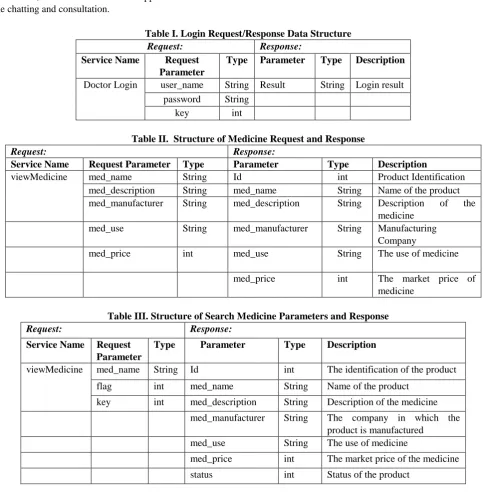
A web service [18] is a standard to provide interoperability among different applications irrespective of language and platforms. For example, in an android application, web services can be used to store and retrieve data from the server or to exchange information with java or .net application. A restful web service application can be used in android application to authenticate or save data to the external database or SQL server. Request/Response structure of the relevant information used in this app are given in Table I, Table II, and Table III.
Table I. Login Request/Response Data Structure
Request: Response:
Service Name Request Parameter
Type Parameter Type Description Doctor Login user_name String Result String Login result
password String
[image:3.595.54.538.208.702.2]key int
Table II. Structure of Medicine Request and Response
Request: Response:
Service Name Request Parameter Type Parameter Type Description
viewMedicine med_name String Id int Product Identification
med_description String med_name String Name of the product
med_manufacturer String med_description String Description of the
medicine
med_use String med_manufacturer String Manufacturing
Company
med_price int med_use String The use of medicine
med_price int The market price of
medicine
Table III. Structure of Search Medicine Parameters and Response
Request: Response:
Service Name Request Parameter
Type Parameter Type Description
viewMedicine med_name String Id int The identification of the product
flag int med_name String Name of the product
key int med_description String Description of the medicine
med_manufacturer String The company in which the product is manufactured
med_use String The use of medicine
med_price int The market price of the medicine
status int Status of the product
C. Design Principles
Design principles involve the high-level concepts about the app design, focusing on maximum usability and user experience; UI/UX (User Interface/User Experience) models [19] have a significant role in achieving this. For consult-AI app, first, we sketched the wireframe model [19] and then
designed a software prototype using JustinMind [20] tool.
D. Wireframe Model
sketches can be drawn for initial review, but it helps to explore into a detailed architecture through which we can make a precise definition and refinement of the app. They are quick, ready-to-present sketches, where we can go ahead with the correction of the flaws without spending much time and resource. For ‘consult-AI’ app, the wireframes were first drawn using pencil and paper, and then made a prototype design something similar to the original screens
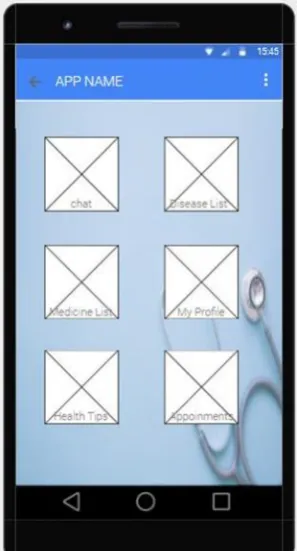
Fig. 2(a) Doctor’s Dashboard Design
Fig. 2(b) Medicine List Design
E. Prototype Design
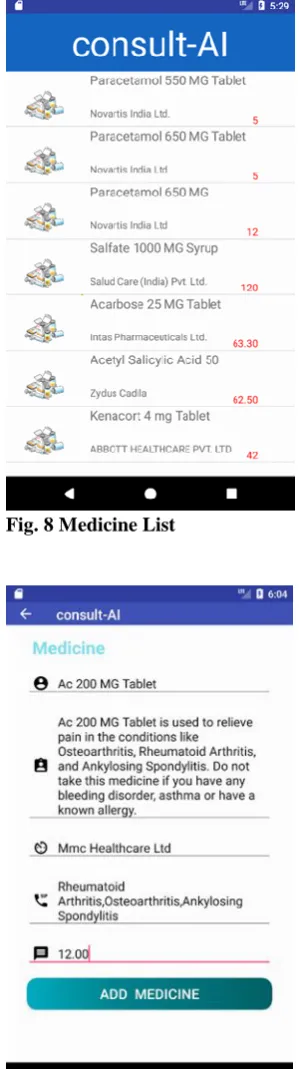
Prototype designer tools generate the app model having look and feel of the actual system, where the users will get a real-time experience of the interaction and page flow of the original screens before it is completely implemented. In this work, JustinMind was used to generate the screen prototypes in the primary stage of UI design. As a sample of the prototype results, Fig 2(a) and 2(b) shows the layout of the doctor’s dashboard and medicine list, respectively. Medicine List Screen lists all the medicines uploaded by the registered doctor.
III. IMPLEMENTATIONANDRESULTS Frameworks and components used in this app implementation are described in this section. Implementation details of the main pages are also added.
A. Android Framework Components
User Interface and server-side communications are implemented with Android and Java using Android Studio 3.0.1[21]. MySQL is used to define and manipulate user database, symptoms database, and drugs database. The PHP and XML are used in web service architecture implementation and communication. The UI and the app logic
were implemented using Android studio.
AndroidManifest.xml file in the project consists of all the related activities, intents, intent-filters, etc. stored as a part of the project in the root directory. It provides all the information regarding the linking of different modules, loading, and execution environment of the app. Almost all activities implemented in the project, such as Login activity, Menu activity, Item description activity, MedicineListActivity, MedicineDashActivity, Symptom check Activity, Drug list activity, Cart activity, etc. directly interact with the users. CardView is used to implement the Dashboard screen of the patient and doctor. The layouts were designed in XML, and the business logic was written in Android/JAVA. The web services connecting MySQL database with Android is written in PHP, and the PHP files are located on the Server. Proper hints are provided with each component to support the user while entering the correct data.
B. Home Screen
The home screen is the first screen of consult-AI application, after its launching page. Implementation results using a banner, two user selection buttons, and a doctor registration button is shown in Fig. 3. There is a user selection button to choose the type of user; the users are categorized into medical doctor and user (patient or caregiver). The user is redirected to different screens based on the type of user. There is a doctor registration button which provides the sign-up form for new users. Login of the existing user is carried out based on the selected user type.
C. Doctor’s Login Screen
The Doctors Login screen, as shown in Fig. 4, allows the registered doctor to login
[image:4.595.60.209.162.438.2]screen. The login button is used to trigger the login functionality. User name and password is accepted from the user using the editText. Also, there is an image that shows the user type. Validation of the ‘username’ and the ‘password’ is strictly followed. Successful authentication will lead to the corresponding dashboard screen, depending on the user type.
D. Doctor Registration
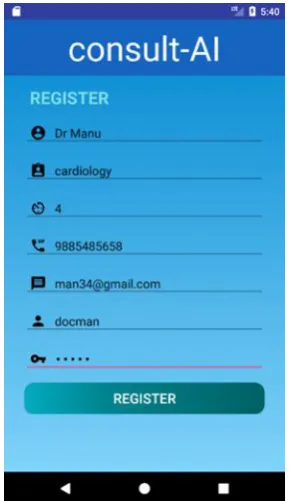
[image:5.595.313.458.61.312.2]When the new doctor clicks on the ‘Doctor registration’ button of the home screen, the doctor registration screen is displayed, as shown in Fig. 5. Here the essential details related to the specialization area, working hours, mail id, etc. are collected. Validation of Time, date, name, mail id, the phone number is strictly validated. The collected details are stored in a MySQL database using JSON parsing. After successful registration, Login screen again appears for the first login using ‘username’ and ‘password’ stored in the database.
[image:5.595.80.258.263.784.2]Fig 3. Home Screen
Fig. 4 Doctor’s Login Screen
Fig. 5 Doctor Registration Screen
E. Doctor’s Dashboard Screen
Fig. 6 shows the dashboard screen of the doctor, which contains all the primary functions that the doctor can perform. The screen displays all the features in different CardView. Doctor’s dashboard consists of options to work with all pages related to disease identification, medicine list, Patient chat, and profile editing.
F. Diseases List
The symptom checker screen and the results are combined in the Disease List page, as shown in Fig. 7. A multiline TextView, Custom List with two text views, and two buttons are used for its implementation. Patients or doctors can give suspected conditions in the symptoms text box of their dashboard. Results section shows a list of disease with its severity in percentage. On selecting each disease, the doctors have the options to see the recommended medicines and treatments, whereas patients will get the facility to consult a doctor or see the treatment and home remedies details.
G. Medicine List
[image:5.595.82.257.534.784.2]Fig.6 Doctor’s Dashboard
Fig. 7 Diseases List page
[image:6.595.313.461.51.313.2]H. Add Medicine Screen
[image:6.595.312.462.52.588.2]Fig 9 displays the screen for adding the medicine. Image, name, a small description, its price, its manufacturing company, etc. are collected from the doctor’s page while adding a medicine. The collected details are stored in the drug database using JSON parsing methodology. These drug information and doctor’s suggestion can be used by the prescription engine to recommend a particular medicine for a disease with a certain probability.
Fig. 8 Medicine List
Fig. 9 Add Medicine Page
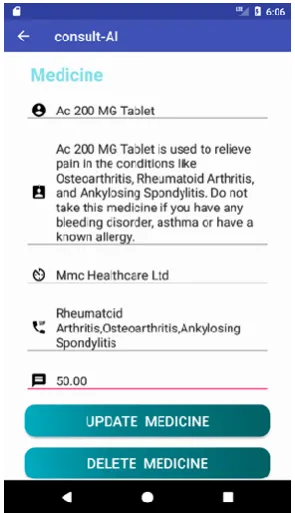
I. Update/ Delete Medicine
[image:6.595.56.200.339.597.2]Fig. 10 Update/Delete Medicine IV. CONCLUSION
The proposed work, ‘consult-AI, provides an easy to use and reliable platform for online consultation and disease identification. The benefits of natural language processing are best utilized in the diagnosis phase of this app to process the typed health conditions, and it delivers faster concluding results with the help of its prediction engine. Compared to the lengthy process of symptoms selection and question answering involved in the popular symptom checkers, this feature provides an improved user experience to its clients and users. The AI-assisted prescription engine in drug selection and dosage recommendation helps the doctors to take immediate action with the best quality treatment in urgent cases. The overall architecture of the system facilitates cost-effective and immediate medical assistance as and when needed. A complete performance analysis, testing, validation, and verification is to be carried out in future work. The system can be modified and upgraded in two dimensions; Advanced methodologies of natural language processing and artificial intelligence can be applied to improve the disease diagnosis and drug recommendation. Also, the app can be upgraded with additional features such as voice recognizer in different languages, video call, etc.
REFERENCES
1. C Tarrant, T Stokes, and A. Colman, “Models of the medical consultation: opportunities and limitations of a game theory, Perspective,” Qual. Saf. Health Care, Vol. 13(6), December 2004 December, pp. 461–466.
2. Darrell M. West, “The Future of Work: Robots, AI, and Automation,” Brookings Institution Press, 2018, Ch. 2.
3. Daniel Faggella, “Artificial Intelligence Industry – An Overview by Segment,” Emerj, April 25, 2019[Online]. Available: https://emerj.com/ai-sector-overviews/artificial-intelligence-industry-a n-overview-by-segment/
4. B. Kaveh Safavi, Brian Kalis and Robert Murphy “HEALTHCARE: WALKING THE AI TALK,” April 19, 2018 [Online]. Available:
https://www.accenture.com/_acnmedia/PDF-75/Accenture-Healthcare-Walking-the-AI-Talk.pdf#zoom=50
5. Renu Balyan, Scott A. Crossley, William Brown III, Andrew J. Karter, Danielle S. McNamara, Jennifer Y. Liu, Courtney R. Lyles, and Dean Schillinger, “Using natural language processing and machine learning to classify health literacy from secure messages: The ECLIPPSE study,” PLOS ONE, VOL. 14(2): e0212488, February 22, 2019
6. Palanica A, Flaschner P, Thommandram A, Li M, and Fossat Y, “Physicians’ Perceptions of Chatbots in Health Care: Cross-Sectional Web-Based Survey,” J Med Internet Res, vol. 21(4): e12887, 2019. 7. Rachel Jiang, “Introducing New Alexa Healthcare Skills,” Amazon
Alexa, April 04, 2019 [Online]. Available: https://developer.amazon.com/blogs/alexa/post/ff33dbc7-6cf5-4db8-b2 03-99144a251a21/introducing-new-alexa-healthcare-skills
8. Kate Samuelson, “Amazon's Alexa now answers health questions with WebMD,” Fortune, March 7, 2017 [Online]. Available: https://www.healthcaredive.com/news/amazons-alexa-now-answers-he alth-questions-with-webmd/437714/
9. ERIN DIETSCHE, “Mayo Clinic delivers first aid advice through Amazon Alexa,” MedCityNews, Sep 19, 2017 [Online]. Available: https://medcitynews.com/2017/09/mayo-clinic-amazon-alexa/9 10. Statista Research Department, Number of mHealth apps available at
Google Play from 1st quarter 2015 to 1st quarter 2019, Statista, May 6,
2019. [Online] Available:
https://www.statista.com/statistics/779919/health-apps-available-googl e-play-worldwide/
11. Shaidah Jusoh, “A Survey on Trend, Opportunities and Challenges of mHealth Apps,” iJIM, Vol. 11, No. 6, 2017.
12. Moreno Barriga E, Pueyo Ferrer I, Sanchez Sanchez Ma, Martin Baranera M, and Masip Utset J “A new artificial intelligence tool for assessing symptoms in patients seeking emergency department care: The mediktor application. Emergencias”, vol. 29, 2017, pp. 391-396. 13. Fred Pennic, “WebMD to Launch Completely Redesigned Symptom
Checker,” HIT consultant, 4th May 2018. [Online]. Available: https://hitconsultant.net/2018/04/05/webmd-to-launch-completely-rede signed-symptom-checker/#.XQ5eQ-szbIU
14. ADA app website. [Online]. Available: https://ada.com/
15. Babylon Health app website. [Online]. Available: https://www.babylonhealth.com/ai
16. Alex Mariakakis, Megan A. Banks, Lauren Phillipi, Lei Yu, James Taylor, and Shwetak N. Patel, “BiliScreen: Smartphone-Based Scleral Jaundice Monitoring for Liver and Pancreatic Disorders,” Proceedings of the ACM on Interactive, Mobile, Wearable and Ubiquitous Technologies, Volume 1 Issue 2, June 2017, Article No. 20
17. “App empowering people to monitor themselves for early signs of skin cancer,” Health Tech Digital, 20th March 2019. [Online]. Available: https://www.healthtechdigital.com/app-empowering-people-to-monitor -themselves-for-early-signs-of-skin-cancer/
18. Vincy, “PHP MySQL REST API for Android,” February 11th, 2019.
[Online]. Available:
https://phppot.com/php/php-mysql-rest-api-for-android/
19. Jessica Thornsby, “Android UI Design,” Packt Publishing, May 2016 20. JustinMind Tool website. [Online]. Available:
https://www.justinmind.com/
21. Bill Phillips, “Android Programming: The Big Nerd Ranch Guide,” Big Nerd Ranch Guides, 3rd Ed., Jan 2017
AUTHORSPROFILE
Dr. Sindhumol S., currently working as an associate professor in DDU Kaushal Kendra, Cochin University of Science and Technology (CUSAT). She is having experience of more than 12 years in IT industry and 5 years in Teaching. In 2014, she received her Ph.D. from Department Computer Applications, CUSAT. Her area of interest includes mobile phone application development, artificial intelligence, audio/video analysis and streaming, machine learning and pattern recognition.