World Library and Information Congress:
69th IFLA General Conference and Council
1-9 August 2003, Berlin
Code Number: 011-E
Meeting: 91. Education and Training
Simultaneous Interpretation: Yes
Beyond ECDL: basic and advanced ICT skills for the new library
professional
Alan Poulter and David McMenemy
Graduate School of Informatics
Department of Computer and Information Sciences University of Strathclyde
Livingstone Tower 26 Richmond Street Glasgow, G1 1XH Scotland
Abstract
This paper reports on a new multimedia-centred ICT module, called Fundamentals of Information and Communication Technology (FICT) for Postgraduate Information and Library Studies students at the Graduate School of Informatics at Strathclyde University. It had radical aims (introducing novel ICT skill content in a progressive manner, encouraging deep learning and self-directed study) and used a weekly survey and a post-module survey to investigate its operation. Skills learnt were compared to skills required during student placement in libraries. Conclusions are drawn as to its success in matching the needs of future library professionals.
Introduction
At the Graduate School of Informatics at Strathclyde University (in Glasgow,
both courses, one with a library/information service focus, the other with a business focus.
As part of the core component of each course, modules were added to address the issue of ICT skills, Fundamentals of Information and Communications Technology (FICT) was introduced for the ILS course, and Fundamentals of Business Information Technology (FBIT) was introduced for the IM course. The teaching for both modules was identical, the only variation was in the assessment, for the ILS course an
assignment related to spreadsheets and databases focusing on user numbers and issue statistics was provided, whereas for the IM course the assignment was based around hotel occupancy rates.
The rationale for this sharing of ICT content was that student and employer needs in both areas were seen to be nearly identical. ECDL (the European Computer Drivers Licence), the standard measure of basic ICT competence, was seen as an baseline for the new modules and was incorporated as an adjunct to their academic nature.
The European Computer Driving Licence (ECDL) is an internationally recognised computer skills certification programme spanning some sixty countries. It is also known as the International Computer Driving Licence (ICDL) for countries outside of Europe. It was launched in 1996. Its objective is to:
“raise the level of core knowledge about Information Technology (IT) and computer skills competency on a global basis and provide an internationally recognised
certification.” (http://www.ecdl.com/main/about.php)
ECDL/ICDL consists of seven modules: Basic Concepts of IT, Using a Computer and Managing Files, Word Processing, Spreadsheets, Databases, Presentation and
Information and Communication. When all seven modules are completed a candidate receives the European/International Computer Driving Licence. While ECDL is an accepted basic ICT qualification in libraries in the UK, the FICT module was intended to take ILS students beyond ECDL, into deeper skill sets that would be vital to their future professional careers.
Aims of the Fundamentals of Information and Communications Technology (FICT) module
The main aim of FICT was to position multimedia as the core of ICT, rather than as merely the latest component. It was hypothesised that students think of ICT and multimedia as near synonyms. The web and CDs/DVDs are intrinsically multimedia in nature, so students should have recognised this. All popular operating systems also come with software to display, and give basic editing control over, multimedia. Hardware devices to create and manipulate multimedia (scanners, digital cameras and digital audio players) are replacing analogue counterparts.
A related aim was to use web and HTML as the delivery medium for multimedia, to keep multimedia integrated with mainstream IT. Previous to web, multimedia required special software applications to create and deliver multimedia shows (e.g. Hypercard, Toolbook, Director etc). The output files from these specialised
package and would not integrate with any applications. These packages were inherently complex as they used metaphors like books (Toolbook) or timelines (Director) to organise multimedia. They inevitably involved a certain amount of programming to synchronise display and create effects. Because of this multimedia had to be taught in a separate module only to students with the necessary technical skills to cope. This always ran against the grain as all students felt they wanted to create multimedia but what seemed simple to appreciate was too difficult in practice to produce.
It was hypothesised that these problems would not affect multimedia delivered via web pages. First, delivery was usually just a matter of having a link to a file
containing audio, video etc, and the appropriate plug-in or helper installed for that file type. Second, navigation between pages was handled by simple hypertext links. Obviously, professional, ‘filmic’ type multimedia presentations are impossible but at least the web democratises multimedia.
On the theme of democratising ICT skills, of making them accessible to all, the module was intended to accommodate students beginning with different skill levels but attaining a common high skill level by module end. There is an assumption that has been around for as long as ICT skills have existed and that is that one cohort of students ‘in the future’ will arrive not needing ICT skills! This has always proved to be fallacious, for a number of reasons. ICT skills are a moving target and expertise, say in use of MS-DOS commands, is now of historical interest only. People tend to pick up skills with particular popular applications (e.g. web browsers, word
processors) but lack the need to do the same for applications that are of less immediate interest to them (e.g. web page creation tools, databases) and which
typically have much steeper learning curves. Also it is ironic that most people have no idea of the range of applications and functions that come with their computers, let along the vast range of applications available for download or purchase!
Thus student cohorts continue to arrive with a mixed range of skills, from no skills to expert. The approach taken on this module was to deal with this range by aiming learning materials and delivery at the students with basic or non-existent skills. The pragmatic reason was that this was where the greatest need for improvement lies. Students with existing skills were to be accommodated by adding ‘advanced’ material to each content ‘chunk’ on the module. Thus those who progressed quickly through the basics were given something to engage with.
A related aim was to start the module with basic content (e.g. file formats, saving and retrieving files), but to progress through to advanced levels of skill in vital topics (e.g. troubleshooting, installing/removing software) later. The FICT module at its heart consisted of nine successive two-hour computer laboratory class sessions:
Week 1: Essential ICT Skills – using a web browser, introduction to ECDL,
Week 3: Introduction to online databases – searching Lexis-Nexis, finding UK/European legal information
Week 4: Introduction to HTML and Javascript – creating HTML with a text editor, basic page formatting, images, links, tables, frames, basic scripting in Javascript Week 5: Multimedia – image formats and basic editing, sound and video formats, embedding, streaming media, file compression, downloading and installing software
Week 6: Security and troubleshooting – desktop management, shortcuts, installing/uninstalling hardware and software, backups, encryption, anti-virus software, troubleshooting
Week 7: Spreadsheets – designing worksheets, entering data, addressing, constants and formulae
Week 8: Databases – viewing/adding/editing/sorting data, data queries, producing reports, linking tables
Week 9: Introduction to Dreamweaver – basic page formatting, images, links, tables, frames
A sequence of lectures accompanied most of the above sessions, delivering an overview of theory and concepts and examples of use. Some lectures contextualised ICT in future work situations in which an information professional would need guidance. For example, the case for and against Internet filtering was explored, along with technical options available.
It is proposed that the above sequence of computer laboratory class sessions offers a logical progression from simple to complex skills. From previous student cohorts it was noted that basic file management skills in terms of being able to locate named files in particular directories on particular devices were problematic. For example, with previous cohorts, tutors had found on a later module that students could not copy all the data files for a set of web pages constructed for an assignment from a directory on a hard disk to a floppy disk. Another problem noted from past cohorts related to web searching. Web searching is a skill students think they possess but merely searching using their favourite search engine must be shown to be woefully insufficient for a would-be information professional. Equally, being able to search online databases is a core skill of an information professional and these need to contrasted to web search engines which are free, easier to use, but much less reliable in terms of quality.
saved them but also that it had disadvantages in taking away some level of ‘micro’ control, which they could regain by simply adjusting tags themselves.
The approach of starting with simple web pages, and then adding features, meant that the freedom and creativity engendered by web would be exploited to the full, by following up inclusion of images on web pages with more complex media items. This has already been stated as the most fundamental aim of the module, and would be achieved by giving students enough HTML capabilities and access to plentiful multimedia resources to allow them to draw themselves into the joy of multimedia creation.
This typically is where many ICT skills modules stop but it was decided to take this one to a new high level. It is not necessary to be able to fix or solve every computer problem but some knowledge of how to determine the nature of problem and basic steps one should take to apply ‘first aid’ are critical skills. Fundamental to good computer ‘housekeeping’ is being able to manage the desktop and add and remove hardware and software. Mastering this forms a sound platform on which to build basic trouble shooting skills. These involve using information from internal Help files and external sources on the Internet to diagnose a problem and possibly to try simple remedial measures. If a fault cannot be solved it is more professional to be able to say what it might be than simply leave everything to someone else. Many computer problems are of a sufficiently trivial level to be solvable by even basic
troubleshooting skills (e.g. cables not properly connected, etc).
Linked with this topic it was noted that most students from previous cohorts had shown very low levels of security awareness. Student excuses in the past for missing assignment deadlines had related to losing files because of a disk failure or a virus. Backup routines and the use of virus scanners were thus included. Students also had not known that ‘deleted’ files could be recovered or how to password encrypt sensitive information
Coverage of applications was left to last, so that skills relating to understanding computers as a complex system would serve to contextualise them. Spreadsheets and databases are both essential information handling applications and were each covered. Word processing and presentation software would be covered by the ECDL materials and students were to be expected to attain competent skill levels in the use of these packages by using a self-tutoring package.
Another aim was to develop teaching materials that were independent of special, dedicated computer laboratory facilities, to universalise their use. All ICT skills modules have the problem of having to be delivered in a computer laboratory. The problem with computer laboratories, ironically enough, is that they are primarily set up not solely for meeting teaching needs but for security and ease of maintenance within a technician and resources budget. The same computer laboratory might have to support a diversity of modules, which means that some of those modules might find that the platform and applications presented in the computer laboratory were
optimised for other modules.
Thus it was decided to develop teaching materials that were are universalised as possible, in that they were not tailored for a particular version of Windows and could accommodate certain problems with the underlying systems. For example, students might be warned about possible installation problems in a protected environment. Another aim, which is linked to the preceding one, is that universalised learning materials could be used at other times and locations by students. There are sound didactic reasons for expecting students to work in their own time. Students must not take the view that timetabled teaching time, even in a computer laboratory, is all they must put in to master a topic. All modules expect that students should put in extra time and just because students are not in a computer laboratory should not mean that they are unable to further their ICT skills via learning materials. It should not be forgotten that students should be using ECDL materials to pick up the basic skills they impart and that students would be encouraged to self-assess themselves on these skills using a self-teaching ECDL package, available on and off campus to students
The last aim must relate to assessment of skills learned, in that the module must assess formally student learning and skills with a comprehensive range of methods. It was hypothesised that different types of assessments would be needed on this module. A multiple choice test would test breadth of comprehension of technical terms and problems. Short answer unseen examination questions would test overall
comprehension of the range of concepts. Seen long examination questions would probe the depth of student’s knowledge in a crucial area. Finally student application skills would be revealed by an assignment involving solving a realistic case study with real data.
Evaluating the Fundamentals of Information and Communications Technology (FICT) module
In addition to this weekly feedback, a final questionnaire was conducted in early 2003, two months after teaching on the module had ceased and all assessment had been undertaken. Again, this timescale was adopted to facilitate reflection on the parts of the students and also to take into account any skills used by ILS students while on the compulsory placements associated with the course.
Weekly Feedback
While analyzing each individual lab session one week after students had participated seemed a good idea, it was found that as the weeks passed on a “questionnaire fatigue” set in. This was something that was not expected, as the questionnaire was designed to be quick and easy to complete. However, there also seemed to be a correlation between the difficulty of the content in the labs and the willingness of students to complete feedback on them. Coupled with the added pressures of assignment deadlines later in the semester, all led to the feedback in the first few weeks being relatively across the board in terms of student numbers, while late in the semester, the response was low. The following graph illustrates this point clearly:
58
34
18
0 10 20 30 40 50 60
Response Level
Response level to survey in various weeks
[image:7.595.93.458.324.545.2]Week 2 Week 5 Week 10
Figure 1 - Response rates to lab feedback
While attendance at computer laboratory classes remained relatively constant, the survey responses dwindled as the semester went on. In terms of evaluation for next year, the tutors have decided to limit the questionnaires to one or two in the first semester to try and achieve as large a response as possible.
0 5 10 15 20
Invaluable Very useful
Useful Not Very useful
Waste of Time One week after - How useful did you find the web
searching lab?
[image:8.595.93.458.77.295.2]ILS IM
Figure 2 - One week after - How useful was the web-searching lab?
In stark contrast with this was the feedback on the multimedia laboratory class, albeit on a much smaller response rate of around a third of the total class. The
overwhelming feedback from students was that they did not find this laboratory class as useful as the web-searching laboratory class, even though the multimedia
laboratory class was imparting to them vital skills in understanding the delivery and use of multimedia information:
0 1 2 3 4 5 6
Invaluable Very useful
Useful Not Very useful
Waste of Time One week after - How useful did you find the
multimedia lab?
ILS IM
Figure 3 - One week after - How useful was the multimedia lab?
The response does seem to indicate something the tutors felt during the sessions, that there is a general sense of confidence in students based around the use of web
[image:8.595.94.457.438.656.2]university computer laboratory and as such were locked down extremely tightly for security purposes, not allowing plug-ins for instance to be downloaded or used appropriately. This led the tutors to suggest that students attempt some activities either at home, or in the local public library or cyber center, and this suggestion was not warmly received by the students, and may reflect some of the frustrations they felt. Some of the general comments on the multimedia lab are below:
Most of the things in the lab didn't work due to the computer configuration although I'm sure they'd have been good to see.
Very frustrating when you could not download the plug-ins - this prevented us from seeing how the multimedia functions actually worked and wasted a lot of time.
I suppose it was quite useful, but with so many things not seeming to work properly in the lab, it just became frustrating.
I think the topics covered are important and there were too many things that could go wrong with the exercises that we were unable to do in the lab - what is the point of having a two hour session with staff on hand to help if the most complex part of the labs has to be done unsupervised, I have a computer but many of my pals on the course don't what are they supposed to do with the continual message: (NB NOT POSSIBLE IN LABS)!!!!!!!
This is a difficult problem to overcome, as the content is believed to be vital, yet how that content is taught becomes problematic since the tutors do not have control over setting and configurations in labs across campus. It is felt that the approach next year will be to more strongly encourage students from the start to attempt the laboratory classes outside of the university facilities as well as inside.
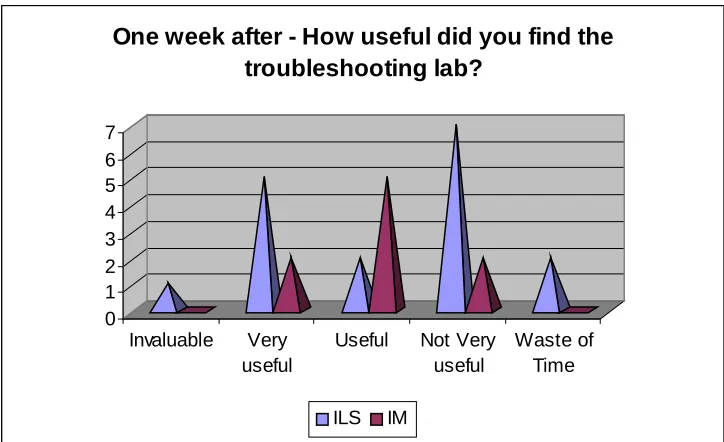
Exactly the same problem was encountered in the laboratory class dealing with ICT troubleshooting and security, as ironically the security in the laboratory prevented much of what was intended for the content to be unworkable, even though the information being communicated was absolutely vital. More than half of the ILS students who responded rated the laboratory class as either not very useful or a waste of time, and again this is believed to reflect frustration at the technology rather than frustration at the content, although given that the ethos of the particular laboratory class was to encourage students to troubleshoot on their own and not panic, the
0 1 2 3 4 5 6 7
Invaluable Very useful
Useful Not Very useful
Waste of Time One week after - How useful did you find the
troubleshooting lab?
[image:10.595.93.455.73.294.2]ILS IM
Figure 4 - One week after - How useful was the troubleshooting lab?
One of the more disappointing components of teaching modules based so much
around multimedia and troubleshooting is that it is sometimes difficult for the students to interpret the linkages tutors attempt to make because they do not have the practical experience in the front line to understand just why the skills taught are important. As mentioned earlier, while many feel comfortable surfing the web or using applications, many still fail to grasp that the role of the information professional must extend beyond this into the realms of supporting users in understanding and manipulating the technology. The tutors feel that from the beginning of the modules next year a strong message to students is needed that being an information professional is not solely about finding information, it is also about managing access, and understanding the technology used to manage access.
Final Questionnaire
The final post module questionnaire was undertaken two months after teaching and assessment on the modules had been completed, and after students on the ILS course had completed their compulsory placement in libraries and information services in Central Scotland. In terms of response to this questionnaire, 31 of the 54 ILS students responded, and 12 of the 28 IM students responded. This equated to just over half of all students on the combined courses.
0 2 4 6 8 10 12 14 16
Complete Novice
Knew a Little
Average Skills
Knew a Lot Expert
[image:11.595.95.524.72.350.2]No effect on my skills The module taught me a little Skills have improved to a great extent
Figure 5 - Have FICT/FBIT improved your ICT skills?
As can be seen, the biggest improvements seen were in those students who were already comfortable with ICT generally, those students who joined the modules with average skills or who knew a little, seemed to gain most from the modules.
Encouragingly for the tutors involved in the modules, no one who responded indicated that they felt the modules had no effect on their skills. One student’s comments on the modules did seem to contradict the findings above, however:
I think the course was more useful for those students with less ICT experience and the labs were good in terms of allowing these students extra support. I understand that it was necessary to ensure we were all at the same level but felt personally that I was covering a lot of old ground with the sessions.
0 2 4 6 8 10 12 14
Not Useful Only for FICT/FBIT
For one or two other
modules
Used across my studies
[image:12.595.94.515.71.353.2]Information and Library Studies Information Management
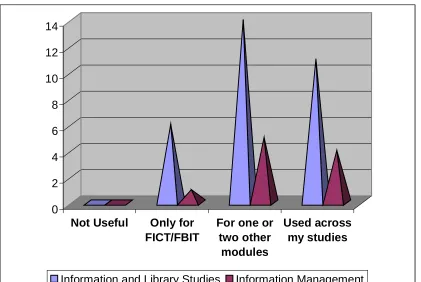
Figure 6 - How useful have FICT/FBIT been across your other studies?
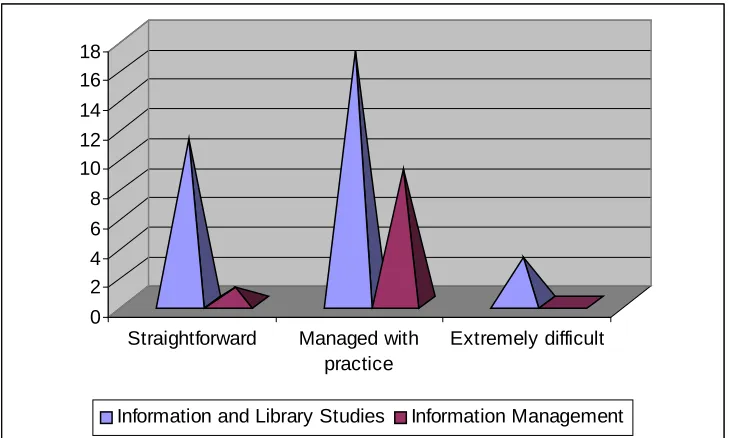
Moving on to the specific lab components of the modules, the students were asked to rate each lab in terms of difficulty. There were three options to choose for each lab:
§ Straightforward
§ Managed with Practice § Extremely Difficult
0 5 10 15 20 25 30
Straightforward Managed with practice
Extremely difficult
[image:13.595.94.458.72.292.2]Information and Library Studies Information Management
Figure 7 - Difficulty with session on essential ICT skills
The subsequent sessions on web searching and using online hosts were similarly received by students and reflect the fact that students do come to the modules with a basic grounding in web technologies and a perception that they can surf the web well.
The feedback on the sessions where students were asked to either create, or understand the creation of multimedia content proved to be more problematic. A session on basic HTML was rated in the following way:
0 2 4 6 8 10 12 14 16 18
Straightforward Managed with practice
Extremely difficult
Information and Library Studies Information Management
Figure 8 - Difficulty with session on basic HTML
[image:13.595.93.458.448.667.2]their ability to manipulate and understand the importance of these formats for future information delivery:
0 2 4 6 8 10 12 14
Straightforward Managed with practice
Extremely difficult
[image:14.595.95.457.116.329.2]Information and Library Studies Information Management
Figure 9 - Difficulty with session on multimedia
Another challenge presented by the computer laboratory session on multimedia was the technical infrastructure of the computer laboratories themselves. The security levels on the computers in the campus labs made certain activities impossible, such as installing and configuring plug-ins such as Real Player, and while these activities were written into the labs for the students to attempt, many could not undertake the tasks and subsequently became frustrated. The same result to an even more
problematic situation for the lab on ICT troubleshooting, and the results from the questionnaire reflect the difficulty with this issue. One student commented that:
The Troubleshooting module needs more one-to-one tutoring, although in a job situation an IT support system would be available, hopefully!
0 2 4 6 8 10 12 14
Straightforward Managed with practice
Extremely difficult
[image:15.595.92.458.73.287.2]Information and Library Studies Information Management
Figure 10 - Difficulty with session on ICT troubleshooting
The vast majority of students across both the ILS and IM courses found that this session needed extra work, which again reflects the need to concentrate on this must crucial of skill sets. The ability to support the user in the use of ICT extends beyond mere support of application packages and web
browsers.
Library Placements
0 1 2 3 4 5 6
Public Academic/FE Health Media Other
[image:16.595.96.546.74.410.2]Neglible 10-25% 25-50% 75%+
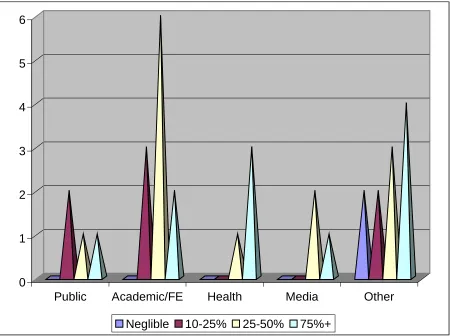
Figure 11 - Time using ICT on placement by sector
0 5 10 15 20 25
Skills Not Used Used a Little Skills Invaluable
[image:17.595.92.457.74.293.2]Essential ICT Skills - Used on Placement?
Figure 12 - Skills used on placement - Essential ICT skills
This data is certainly encouraging for the tutors, as it reinforces the need to go beyond applications and understand the technology in a more holistic fashion.
One of the more unusual aspects of the placements for this cohort of students, was that the vast majority of them did not involve the student supporting the public in using ICT, as the following graph illustrates:
0 5 10 15 20 25
Yes No
Placement - Supporting Public using ICT
Figure 13 - Did your placement involve supporting the public using ICT?
[image:17.595.95.459.436.658.2]0 5 10 15 20 25 30
Skills Not Used Used a Little Skills Invaluable
[image:18.595.95.456.89.305.2]Multimedia - Used on placement
Figure 14 - Placement - Skills from multimedia lab used?
While the response to the same question related to web searching was as follows:
0 2 4 6 8 10 12 14 16 18
Skills Not Used Used a Little Skills Invaluable
Web searching - used on placement?
Figure 15 - Skills from web searching lab used?
One important point that this may indicate is that the students have still yet to grasp that in their web searching they will be by default using multimedia skills when they load a piece of audio or streaming media, or download an image for later use, and the module tutors have taken this on board to reflect a further emphasis for next year that the linkage needs to be better made between the use of the applications and the understanding of the content. One student commented:
[image:18.595.93.457.381.601.2]That the students do tend to take multimedia for granted is not a problem initially, and certainly did not seem to be so on the placements undertaken by the students from Strathclyde. However as they go into the workplace for real, and need to manage the multitude of resources that are currently engulfing libraries and
information services, the movement away from a straightforward applications-based knowledge of ICT needs to develop into a holistic skill set that reflects how
multimedia makes up a vital strand of the information loading onto desktops across sectors.
Conclusions
The main aims of the FICT module were to put across the importance of multimedia and to give students experience of building multimedia with web tools, and these were to a large extent fulfilled. Interestingly, ILS students were perhaps not as aware of multimedia as a technology as had been assumed and the unsuitability of the
computer laboratory disappointed the exploratory and creative expectations of some students. The module did seem to accommodate students will different skills levels and students certainly recognized the progression built into its content.
The concept of learning materials for use anywhere was not well received, and neither was the onus on students to learn in their own time. For a later delivery a more radical strategy might be to set a ‘laboratory task’ but not use a laboratory, thus forcing students to find an alternative venue. Since this might be more kill than cure it will be approached with caution. The Graduate School of Informatics is currently reviewing its own computer laboratory provision and a more amenable computer laboratory environment would be very beneficial.