Frontside
6 What’s Happening 12 Digital Economy 13 The SaintChanging Times
September 2006 • Vol 6 Issue 09 ®
The Experts
Rob “CmdrTaco” Malda The Department Of Stuff page 83
Pete Loshin Open Sauce page 79 Alex “Sharky” Ross The Shark Tank page 30
Barry Brenesal The Cutting Edge page 92
Rahul Sood Wagging The Dog page 99 Alex St. John The Saint page 13
Mike Magee Shavings From The Rumour Mill page 98
Spotlight
55
Pentium’s End Intel Core Exposed
Something Old, Something New
Intel Core 2-Compatible Motherboard Roundup
CPU’s Core 2 “Extreme Machine” Making The Fastest Even Faster
Copyright 2006 by Sandhills Publishing Company. Computer Power User is a trademark of Sandhills Publishing Company. All rights reserved. Reproduction of material appearing in Computer Power Useris strictly prohibited without written permission. Printed in the U.S.A. GST # 123482788RT0001 (ISSN 1536-7568) CPU Computer Power UserUSPS 020-801 is published monthly for $29 per year by Sandhills Publishing Company, 131 West Grand Drive, P.O. Box 82667, Lincoln, NE 68501. Subscriber Services: (800) 424-7900. Periodicals postage paid at Lincoln, NE. POSTMASTER: Send address changes to Computer Power User, P.O. Box 82667, Lincoln, NE 68501.
Chris Pirillo Dialogue Box page 78
64
48
Page 24
Page 27
Hard Hat Area
PC Modder
31 Tips & Tutorials
32 GeForce 7800 GT Voltage Mod
The Making Of A Mainstream Powerhouse 36 Mad Reader Mod
Smokin’ Gets On Track
38 Advanced Q&A Corner
42 X-Ray Vision: Nanocrystal Displays
Next Big, Big Thing In Display Technology 44 White Paper: RuBee
Adding Flexibility To The RFID Market
Loading Zone
70 The Bleeding Edge Of Software
Inside The World Of Betas 71 Up To Speed
Upgrades That’ll Keep You Humming Along 70 Video Encoder Roundup
Five Programs For Your File-Conversion Needs
75 GoldSolution Software Driver Magician 2.8 Atka Software Aura
76 Paragon Software Disk Wiper 7.0
MoviX 78 Dialogue Box
Muse, Sick 79 Open Sauce
On The Internet, Someone Knows You’re A Dog
Caught In The Web
80 The Web Finally Gets Mobilized
Cell Phone Browsing Gets Real 83 The Department Of Stuff
download.txt
Digital Living
84 Road Warrior
New Samsung Digicams, Energizer Energi To Go, Mobile Gear In The Classroom & More
86 At Your Leisure
Games, Gear, Movies & Music 92 The Cutting Edge
Tell Me A Scary Story, Daddy. Tell Me About Computer Viruses.
16 Dream Hardware
17 A Cool, Dry Place
We Put Six Waterless Coolers To The Test
22 Intel Core 2 Duo E6700
23 Intel Core 2 Extreme X6800
24 Dell UltraSharp 2407WFP HP LC3760N 37-inch HD LCD TV
26 Vantec NexStar LX NST 375LX Sunbeamtech NUUO Series
550W SLI PSU
27 Asus EN7950GX2
28 Anand’s Corner Intel Is Good Again
30 The Shark Tank Got A Socket AM2?
Heavy Gear
PREY Page 87
Infinite Loops
Strange stats and other oddball items from computing's periphery82, 95, 104
Tips & Tricks
94 Software Tips & Projects
Remote Access On The Cheap 96 Warm Up To Penguins
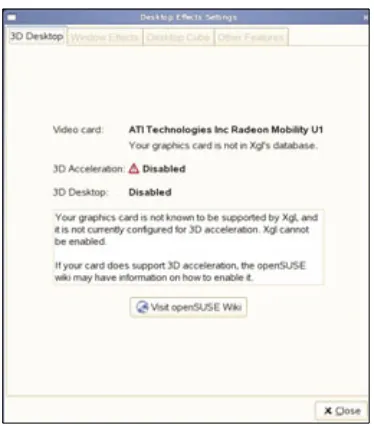
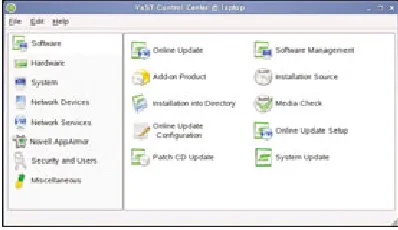
A Look At SuSE 10.1 & XGL
What’s Cooking
98 Shavings From The Rumour Mill
The Desktop Is Not Dead, Long Live The Desktop 99 Wagging The Dog
Intel Will Change The Way It Does Business
102 Technically Speaking
An Interview With Dr. Albert van Breemen, Leader Of Philips’ iCAT Robotics Project
106 Under Development
A Peek At What’s Brewing In The Laboratory
Back Door
108 Q&A With Jerry Bautista
The Future Of CPUs & GPUs
CORRECTIONS:
E D I T O R ’ S N O T E
Gotcha. Here it is.
L
ast month we took an up-close look at AMD’s new Socket AM2plat-form, which is laying the groundwork for some very big things to come. Exciting stuff to be sure, but seeing as how AMD has been the perfor-mance leader in the high-end desktop market for several years now, we’re not as blown away by great new AMD tech as we are by this month’s spotlight sub-ject: Intel’s Conroe CPUs.
Officially dubbed the Core 2 family of processors, these chips represent more than just faster new CPUs; they are a tangible reassertion of Intel as a techno-logical force to be reckoned with. People who have been following this industry for more than a couple of years remember when Intel was the de facto choice for high-performance procs; we’ve wondered for a long time just when the company would flex the muscle of its
multi-billion-dollar R&D budget and do what it seems now to have done.
Intel’s top dog, the Core 2 Extreme X6800, is a monster, but consider this line from Anand’s col-umn on page 28: “. . . the truly impressive part of Intel’s Core 2 lineup isn’t at the very high end, but rather the 2.4GHz E6600. The E6600 is faster than AMD’s flagship Athlon 64 FX-62, and at just $316 costs less than 1/3 as much.”
Wow.
Of course, we hardly expect AMD to step quietly aside and let Intel bask in the glow of this achievement; AMD will be back, and we can’t wait to see what it has in store for us. For now, though, enjoy our Core 2 coverage in this month’s Spotlight section, starting on page 48, and be sure to check out our usual lineup of columns, reviews, and interviews, as well. Have a great September; we’ll see you next month.
Chris Trumble, Publication Editor, CPU
C
Cuussttoommeerr SSeerrvviiccee
(For questions about your subscription or to place an order or change an address.) [email protected]
Toll Free: (800) 733-3809 Fax: (402) 479-2193 C
Coommppuutteerr PPoowweerr UUsseerr P.O. Box 82667 Lincoln, NE 68501-2667
H Hoouurrss
Mon. - Fri.: 7 a.m. to 8 p.m. (CST) Sat.: 8 a.m. to 4 p.m. (CST) Online Customer Service & Subscription Center
http://www.cpumag.com
W Weebb SSeerrvviicceess (For questions about our Web site.)
[email protected] (800) 733-3809
A
Auutthhoorriizzaattiioonn FFoorr RReepprriinnttss Reprint Management Services
Toll Free: (800) 290-5460 (717) 399-1900 ext. 100 Fax: (717) 399-8900 [email protected]
www.reprintbuyer.com
EEddiittoorriiaall SSttaaffff [email protected]
Fax: (402) 479-2104 131 W. Grand Drive
Lincoln, NE 68521
SSuubbssccrriippttiioonn RReenneewwaallss (800) 382-4552 Fax: (402) 479-2193 http://www.cpumag.com
A
Addvveerrttiissiinngg SSttaaffff Toll Free: (800) 848-1478
Fax: (402) 479-2193 120 W. Harvest Dr. Lincoln, NE 68521
T Thhee GGaanngg
EEddiittoorriiaall SSttaaffff:: Ronald D. Kobler / Christopher Trumble / Blaine Flamig / Trista Kunce / Corey Russman / Rod Scher / Calvin Clinchard / Katie Sommer / Kimberly Fitzke / Katie Dolan / Raejean Brooks / Sally Curran / Michael Sweet / Nate Hoppe / Sheila Allen / Joy Martin / Linne Ourada / Ashley Finter / Holly
Zach / Tara Simmons / Barbara Ball / Leah Houchin / Sarah Gabelman / Marty Sems / Chad Denton / Kylee Dickey / Josh Gulick / Andrew Leibman / Vince Cogley / Sam Evans / Jennifer Johnson / Nathan Lake WWeebb SSttaaffff:: Dorene Krausnick / Laura
Curry / Kristen Miller CCuussttoommeerr SSeerrvviiccee:: Lindsay Albers SSuubbssccrriippttiioonn RReenneewwaallss:: Connie Beatty / Matt Bolling / Patrick
Kean / Charmaine Vondra / Miden Ebert / Kathy DeCoito / Stephanie Contreras / Nicole Buckendahl AArrtt && DDeessiiggnn:: Lesa Call / Aaron D. Clark / Fred Schneider / Aaron Weston / Carrie Benes / Ginger Falldorf / Sonja Warner / Lori Garris / Jason Codr
/ Andria Schultz / Erin Rodriguez / Lindsay Anker AAddvveerrttiissiinngg SSaalleess:: Grant Ossenkop / Liz Kohout / Eric Cobb / Ryan Donohue / Bob Chester MMaarrkkeettiinngg:: Mark Peery / Marcy Gunn
Compiled by Steve Smith
W h a t ’ s H a p p e n i n g
•
H a r d
w a r e
Sony’s Ultimate Micro
Ever laugh at a spec sheet? Sony’s newly released VAIO UX180P ultra-mobile PC ($1,799) is redefin-ing miniaturized excess. The 1.2-pound, 6-inch wide XP Pro PC runs a 1.2GHz Intel Core Solo CPU (533MHz FSB) with 512MB DDR2 memory and a 4,200rpm 30GB hard drive. There’s a 4.5-inch SVGA LCD above and a pop-down 64-key QWERTY pad below. Not bad for a paperback-sized PC, huh? But that’s only the beginning; the unit packs two1.3MP digital cameras and has both 802.11a/b/g andCingular WAN connectivity. Oh, and Bluetooth, too. And like any VAIO, the 180P is fully video and MP3 playback-capable and is bundled to the teeth with multimedia software. Half the lap-tops in our office are now shrinking in shame. ▲
The Mini-Me Drive
We love miniaturized storage, but we don’t love the greater risk of losing or misplacing such tiny devices. Pexagon’s (www.pexagontech.com) answer is the myDrive LOST-N-FOUND program, which links an ID number engraved on the back of your drive to your contact info, which is stored in Pexagon’s database for $9.99. The new Store-It puts 20GB ($149) or 60GB ($229) in a pocket-sized slab that weighs just a hair over 4 ounces. Our test unit was plug-and-play simple and didn’t require drivers for the USB 2.0 connection. The Store-It’s bundled software can automatically back up selected files with a simple press of the EZ-Touch Button Backup on every drive. We feel safer already. ▲
We’ll be sorely disappointed if Sony’s ultra-packed, ultra-mobile wunderkind doesn’t show up somewhere in the next James Bond film.
Pexagon’s 1.8-inch, pocket-sized hard drive gets personal with custom laser etching available on every drive.
Wall Socket vs. Wi-Fi:
200Mbps & Counting
Before investing in that Pre-N Wi-Fi equipment, home networkers might consider just plugging their laptop network connectors into the wall socket. The new generation of powerline adapters push high-speed data via existing home electrical systems at a promised 200Mbps. Just plug one Netgear Powerline HD Ethernet Adapter ($129) into your router and wall socket to send a high-speed signal throughout your home grid. A second adapter plugs into any wall socket and sends the stream into any Ethernet device, whether a laptop, game console, or home media server. Netgear claims the latest iterations are 12 times faster than previous powerline techniques, and if they are any more reliable and consistent than some of the Pre-N Wi-Fi rigs we have been trying, then we’re willing to have a go. ▲
W h a t ’ s H a p p e n i n g • H a r d w a r e
A Mouse For Sweaty Gamers
With ultra-high resolutions and even customized weights in some mod-els, what special features are left to add to gaming mice? Logitech’s G3 Laser Mouse ($59.99) promises a DayGrip surface for improved finger-tip control and less slippage due to sweaty gaming hands. And although we don’t actually know exactly what polytetrafluoroethylene is, the G3 apparently uses the material for oversized bottom pads that make for a superior glide. We’re guessing it stands up to all of the gamer hand sweat the company expects to drip all over the desk. ▲
Super-Cooled & Super-Fast
Think your custom rig is overclocked? Try 500GHz! Georgia Institute of Technology, work-ing with IBM, cryogenically chilled a silicon-germanium chip to -451 degrees Fahrenheit in order to push it from a normal speed of 350GHz to 500GHz. Scientists said they were surprised by the good results and now need to find out if the super-cool temps altered the molecular struc-ture of the chip at all. Yeah, we modders would like to know this because we’re pretty sure our GeForce 6800 is not rated for a -451-degree F PC. ▲
H
H a
a rr d
d w
w a
a rr e
e M
M o
o ll e
e
MP3s Finally Take To The Airwaves
The MusicGremlin ($299) is hungry and wants to eat the middleman out of the current digital distribution model—namely iTunes and your PC. The first Wi-Fi-enabled MP3 player is an 8GB device with built-in 802.11b capability and embedded software that connects directly to the MusicGremlin online music store. Not only can you browse and buy songs from the player itself, but sharing features let you peruse friends’ playlists or send and receive songs from others. If you like, you can even order songs from the PC interface and have them download to the Gremlin the next time you boot it up. ▲
The first Wi-Fi-enabled MP3 player, the MusicGremlin, claims to connect directly to its own online music service for downloads.
Tough, Light, Sexy
When it comes to laptops, ruggedness often comes at a price, usually in the form of extra weight. Like most everything else in our “What’s Happening” section this month, Panasonic is shrinking ruggedness down to an astonishing 2.8 pounds with its new eLite W4 Toughbooks. Starting at $2,199—we said light, not cheap—the W4 uses magnesium alloy to protect the screen and a flexible cabinet design that disperses pressure from movement and bending. And if you want to cringe a bit, visit the Panasonic.com site for video of researchers dropping Toughbooks in lab trials to test their durability. It’s enough to make a geek faint. ▲
Logitech’s newest gaming mouse is shaped for “fingertip gripping” and smooth gliding.
W h a t ’ s H a p p e n i n g
•
C h i p
W a t c h
Compiled by DeanTakahashiWatching The Chips Fall
Here is pricing information for AMD and Intel CPUs.
*Retail price ** Manufacturer's price per 1,000 units Other current prices, if indicated, are lowest OEM prices available through Pricegrabber.com
CPU Released Original Last month’s Current price price price
AMD Athlon 64 FX-60 1/10/2006 $999** $901 $799
AMD Athlon 64 FX-62 5/23/2006 $1031** $1031** $1045*
AMD Athlon 64 X2 Dual-Core 4200+ energy efficient 5/16/2006 $417** $417** $417*
AMD Athlon 64 X2 Dual-Core 4200+ 5/31/2005 $537** $346 $355
AMD Athlon 64 X2 Dual-Core 4400+ energy efficient 5/16/2006 $514** $514** $514*
AMD Athlon 64 X2 Dual-Core 4400+ 5/31/2005 $581** $450 $442
AMD Athlon 64 X2 Dual-Core 4600+ energy efficient 5/16/2006 $601** $601** $601*
AMD Athlon 64 X2 Dual-Core 4600+ 5/31/2005 $803** $535 $539
AMD Athlon 64 X2 Dual-Core 4800+ energy efficient 5/16/2006 $671** $671** $671*
AMD Athlon 64 X2 Dual-Core 4800+ 5/31/2005 $1001** $620 $620
AMD Athlon 64 X2 Dual-Core 5000+ 5/23/2006 $696** $696** $682*
Intel Pentium Processor Extreme Edition 965 3.73GHz dual-core 3/22/2006 $999** $999** $999**
Intel Pentium 4 640 3.2GHz 2MB cache 800MHz FSB 90nm 2/21/2005 $273** $201* $176
Intel Pentium 4 641 3.2GHz 2MB cache 800MHz FSB 65nm 12/27/2005 $218** $207* $207
Intel Pentium 4 650 3.4GHz 2MB cache 800MHz FSB 90nm 2/21/2005 $401** $271* $269
Intel Pentium 4 651 3.4GHz 2MB cache 800MHz FSB 65nm 12/27/2005 $273** $269* $249
Intel Pentium 4 660 3.6GHz 2MB cache 800MHz FSB 90nm 2/21/2005 $605** $395 $329
Intel Pentium 4 661 3.6GHz 2MB cache 800MHz FSB 65nm 12/27/2005 $401** $400* $400
Intel Pentium 4 670 3.8GHz 2MB cache 800MHz FSB 90nm 5/26/2005 $849** $610* $615
Intel Pentium D 820 2.8GHz dual-core 2MB cache 800MHz FSB 90nm 5/26/2005 $241** $171* $164
Intel Pentium D 830 3GHz dual-core 2MB cache 800MHz FSB 90nm 5/26/2005 $316** $214* $189
Intel Pentium D 840 3.2GHz dual-core 2MB cache 800MHz FSB 90nm 5/26/2005 $530** $335* $373
Intel Pentium D 930 3GHz dual-core 2MB 800MHz FSB 65nm 12/27/2005 $316** $176 $164
Intel Pentium D 950 3.4GHz dual-core 2MB 800MHz FSB 65nm 12/27/2005 $637** $324 $317
Intel Pentium D 960 3.6GHz dual-core 2MB 800MHz FSB 65nm 5/1/2006 $530** $530** $541
HP Makes
Documents &
Wristbands
Trackable With A
Wireless Chip
HP’s researchers have developed a wireless data chip, dubbed Memory Spot, that sticks on any object for identification purposes. The chip bridges the physical and digital worlds, letting people tag documents or hospitals store med-ical records on a patient’s wrist-band. The chip is about the size of a grain of rice (2 to 4mm²), has a built-in antenna, and manufactur-ers can embed it within a sheet of paper. HP envisions users buying the chips in packages like buying a book of stamps; where users can peel the chips off the package and stick them anywhere. The chip transfers data at 10Mbps, or 10 times faster than Bluetooth, and has a storage capacity of 256Kb to 4Mb. These features make the new chip more functional than a typical RFID chip. The Memory Spot can access data via a read-write device that manufacturers can build into cell phones and handhelds. Among the applications that could use HP’s new chip are audio photos, where the chip can add music, commentary, or ambient sound to accompany a photo; documents (the Memory Spot would contain the history of modifications to it); and other uses include enhancing security for identity cards or cir-cumventing counterfeit tags on prescription drugs. ▲
Cswitch Unveils A Configurable Communications Chip
Silicon Valley startup Cswitch has unveiled a Configurable Switch Array chip that’s designed to bring the speed of a custom chip and the flexibility of a field-programmable gate array into one device. Founded by Doug Laird, the company has raised $44 million to create the new chip. This new chip is designed as an array of processors all interconnected together via a 2GHz bus for the purpose of processing Internet packets. The chip is also cre-ated for bandwidth up to 100Gbps and is fast enough to be coupled with network proces-sors, handling the toughest functions in products such as network routers and switches. Manufacturers can program the chip with tools from Magma Design Automation. Laird says the company can configure the chip quickly, and it can perform as fast as custom chips that take as much as two years and $20 million to create. The chip gets as much as 10 times the performance per watt of an FPGA. ▲
Solar Demand Creates Shortage Of Silicon Wafers
W h a t ’ s H a p p e n i n g
•
I n t e r
n e t
S
S ii tt e
e
S
S e
e e
e ii n
n g
g
Compiled by Trista Kunce
YouOS: Now That’s Web 2.0
Still wondering whether Web 2.0 is just hype or the real hope for a next stage in Web development? Prepare to be dazzled by YouOS (www .youos.com), a “Web operating system” that literally stuffs applications, file storage, widgets, chat, and collaboration functions—a full OS-like experience—into a browser. This must-try project by four computer sci-entists from MIT, Caltech, and Stanford is sluggish in its 0.11 version, but it lets you log out of a session with multiple open windows and log right back in where you left off from any other PC. Rudimentary? Sure. But YouOS is a genuine glimpse into what virtual computing ultimately will be like. ▲
Search Different
Sometimes we get bored searching the Web the same ol’ way: Browse to Google or Yahoo!, type in a word, and find millions of links to Web sites that everyone else visits. This month we tried out two search engines with
a little different take on searching the Web. Pre-Found.com is more of a “social” search engine that lets users see what other “humans have gathered by hand from all places on the Web.” Searching for hotels in New York City, for instance,
we got a list of user-recommended sites; not necessarily the most popular sites, or even sites relevant to our search, but helpful and interesting nonetheless. We also checked out Omnipelagos.com, which searches “for the shortest paths between any two things.” The site is excellent for finding facts and odd connections between two things. We even found links between our favorite author and modding. ▲
Famous At 15 x 15
Admit it: You wouldn’t mind being famous. We cer-tainly wouldn’t mind 15 seconds of fame, so we went to the 15x15 Web site (www.15x15.org) and uploaded a CPU-appropriate clip from our cell phone. The max file size for a video is 2MB, but you can post as many 15-second clips as you want—so maybe you can turn your 15 seconds of fame into 15 minutes. Good luck. ▲
Deep Thoughts On MMORPGs
Male, female, old, or young, many of us enjoy online role-playing games. Nick Yee, on his Web site The Daedalus Project (www.nickyee.com/daedalus), analyzes the psychology and demographics behind playing MMORPGs. The number of men and women role playing was about equal in a recent Daedalus Project survey and most of these players tended to create their characters based on a “tragic” theme. Check out this site to analyze the character you role-play. ▲
Check Out TED For Free
Instead of paying $4,400 to attend a TED (Tech-nology, Entertainment, Design) conference—that is, if TED even accepts your request for an invite— you can read all of the latest info in several areas, including technology, science, and entertainment
from the latest annual TED conference on the TEDBlog (tedblog.type pad.com). You can also watch all of the TED Talks interviews with interviewees like Al Gore and David Pogue, via podcast. ▲
YouOS virtualizes the entire OS experience into a browser.
Compiled by Steve Smith
W h a t ’ s H a p p e n i n g
•
S o f t
w a r e
Join The Browser Flock
We’ve been talking about the collaborative Web browser Flock for months, and now we finally get a stable beta. Flock 0.7 (www.flock.com) is all about sharing content and making the browser interact with online user-generated material such as images and blogs. You can share your favorites, although that feature was still a bit confusing in this iteration, and share photos via Flickr or Photobucket. A toolbar outwardly displays Flickr images and liter-ally lets you drag and drop images into the collection. You can also right-click most Web pages and publish them directly as links on your existing blog. Although still a bit sluggish when we used it, Flock is already showing signs that it may fly high among the digerati. ▲
WebEyes Battles Scroll & Squint
The usual cure for microscopic text on Web pages is holding the CTRL key and rolling your mouse wheel up, but Avanquest’s (www.avanquest .com) unique WebEyes ($19.95) software is a more elegant, versatile answer. This toolbar for Internet Explorer not only adjusts fonts to specific sizes on-screen but even “reflows” the
Web page into a book for-mat. You can turn a long page scroll into multiple columns that you page through in a pop-up window, complete with images and clickable links. We’re waiting for Avanquest to add printing options to this cool tool, but we still think this is a sight for sore eyes. ▲
Squeeze More
GeForce From
Nvidia Cards
Nvidia says it can help game developers wring even more performance from its GPUs with the new NVPerfHUD 4 performance analysis tool. The display runs via Direct3D apps under DirectX 9.0c to find rendering bugs and improve performance on average 35%. The HUD draws information from the game, resident drivers, and the API. It can analyze and graph how scenes tax the GPU and cause bottlenecks. It can even freeze the current frame and drill into minute details about how they call on the hardware. Almost sounds like a Sim game itself. ▲
W h a t ’ s H a p p e n i n g • S o f t w a r e
BIOS Upgrades Available Online
Before you send another motherboard to the landfill, consider upgrading the BIOS and giving your PC a new lease on life. Here are a few recently released upgrades. Readers can check out www.cpumag.com/cpusept06/biosto see our entire upgrade list.
Motherboard Date Available URL
Abit Aw8 5/22/2006 www.abit-usa.com/images/download_button.gif
AOpen i975Xa-YDG 6/10/2006 download.aopen.com.tw/userdownload_List.aspx?RecNo=10907&Model=i975Xa-YDG
ECS KA3 MVP 7/07/2006 www.ecs.com.tw/ECSWeb/Downloads/ProductsDetail_Download.aspx?CategoryID=1&Typeid=
35&detailid=659&DetailName=Bios&DetailDesc=KA3%20MVP&MenuID=35&LanID=9
MSI K8NGM2-IL/K8NGM2-L 6/16/2006 download.msi.com.tw/support/bos_exe/mbd_bios/7207v15.zip
Tyan Tempest i5000VF 6/12/2006 ftp://ftp.tyan.com/bios/5370_101.zip
Compiled by Steve Smith
GreenBorder’s Fearless Surfing
As the identity thieves get smarter, security countermeasures are getting even more imaginative. GreenBorder Pro’s (www.greenborder.com; $49.95 per year) novel approach copies your PC’s setup and system state into a virtual computing space. Any unknown program runs within this protected zone so it never touches a real system file or changes the PC’s state. A “privacy zone” automatically clears any record of per-sonal data you enter into a Web site, so that it never sits within a browser cookie. By letting new programs and Web interactions run in a virtual space, GreenBorder says it maintains security without the traditional signature codes or virus profiles. Is it safe? Try it out for yourself: The first 10,000 customers who download the new program before Sept. 1 will get a free, one-year license. ▲
Sail The Virtual Ocean Blue
As true Columbus Day celebrants, we’re getting into the spirit of Columbus Day (Oct. 12) early and “sailing” to 3planesoft.com for the Voyage Of Columbus 3D Screensaver. Why pay $12.95 for a screen saver in this post-1492 age? Because you’ll get to experience a full 3D rendition of a day in the voyage of Columbus’ three ships complete with accurate 3D digital models of the boats, on-deck crew, and roiling seas. You can adjust the speed of the screen saver from real to 120 times real, watch the sun rise and set on your voyage, and even run an FPS counter to gauge performance. We bet Colum-bus never thought about putting an FPS counter on the bow of the Santa Maria. ▲
VoIP TV?
The Japanese firm Novac claims its new combination of TV tuner hardware and softw are runs home TV signals to any PC anywhere using the Skype P2P VoIP network. The software exploits the Internet phone service’s videoconferencing feature to send out the A/V signal. The instant messaging channel sends back channel changing commands. But we would like to hear from Novac when it adds in TiVo control and playback. ▲
S
S o
o ff tt w
w a
a rr e
e
S
S h
h o
o rr tt s
s
GreenBorder Pro says it protects your PC by running potentially dangerous programs in a protected zone where they never have access to your OS’ permanent files and state.
Spend a day discovering new worlds with Christopher Columbus and his crew in a stunning new screen saver.
A Japanese company is hawking a gadget plus software package that runs TV signals across the Skype network.
Changing Times
II
have witnessed many major transitions inthe game industry in my career. I was atMicrosoft when 3D hardware acceleration became a consumer commodity that enabled Sony to appear out of nowhere as a dominant game platform. The 3D phenomenon also allowed Microsoft to make Windows the dominant PC gaming platform by enabling companies like ATI and Nvidia to compete for dominance in PC graphics acceleration under a common 3D API provided by DirectX. Over the years 3D went from being a neat feature in some types of games to the dominant gaming environment. The makers of 3D authoring tools like Maya and 3DStudioMax, which had originally been designed for CAD applications and
moviemaking, discovered their primary mar-ket had become game developers. Most inter-estingly, free-market competition over 3D acceleration in the PC market produced such rapid innovation that it became nearly impos-sible for traditional console companies to make proprietary 3D chips that were competi-tive with those made by North American companies such as ATI and Nvidia.
Now another major transition in gaming is taking place, one which will topple old giants and create new ones. This new transition is more disruptive and more sweeping than something as simple as an advance in game graphics from 2D to 3D. It is driven by pow-erful economic forces that accelerate rapidly as more and more gamers and game consoles are connected to a network. The two major dri-vers of this transition are of course the growth in connected gamers and the soaring cost of producing modern games.
We live in a situation in which everything about gaming has to change in order for any-body to be in the game business.
In previous columns I’ve blamed Microsoft and Intel and their persistent lack of vision for the decline in the PC gaming business, but there is one other major culprit: World of Warcraft. The game has single-handedly sucked all the oxygen out of PC gaming’s atmosphere. Any game not as grand in scope, as addictive, as efficient at generating long-term revenues from players, or as community-centric simply can’t
compete. Generating a purported billion dollars a year in revenues from an audience of 6 mil-lion players who barely have time to eat and sleep between game sessions, WoW is the mon-ster that is eating the game industry. (My fami-ly has four WoW accounts; we have canceled our cable TV.)
The new game industry will look very dif-ferent from the old. The old game industry produced monolithic titles whose principal business model was to sell a cardboard box in retail. The new game industry will feature titles with content that is principally commu-nity-generated, may be fully or partially dis-tributed online, is supported by advertising, and evolves more like an epic television series than a major motion picture. Games will still derive revenue from traditional boxed sales, but will also increasingly rely on revenue from advertising, subscription fees, and in-game item purchases. Games will be inherently community-based rather than content-based as they are today. In other words, the fun will increasingly emerge from interacting with other participants in the game rather than consuming pre-authored content.
Game developers and publishers are being forced to make a difficult choice: They must leave the comfort zones of traditional game development to either create epic games like WoW or to try their hand at making small, community-centric short-form games intend-ed for electronic distribution.
The industry’s growing pains are evident as its members struggle to invent these new genres and business models. Upstarts such as Jagex in the UK are enjoying amazing success with games like RuneScape, a Java-based, 3D MMOG that is largely free, is supported by advertising and marketed by word of mouth, has solely online distribution, and that has acquired an audience of nearly 9 million players virtually overnight. Meanwhile, mighty media companies launch services like GameTap with great fanfare and expense that crater catastrophically in short order. This generation of console wars will not be about whose console has the most ridiculous, obsolete graphics capabilities that no game can use. It will be about which console supports next-generation games the best. ▲
We live in a
situation in which
everything about
gaming has to
change in order
for anybody to
be in the game
business.
Send your feedback to [email protected]
Alex St. John was one of the founding creators of Microsoft’s DirectX technology. He is the subject of the book “Renegades Of The Empire” about the
creation of DirectX and Chromeffects, an early effort by Microsoft to create a multime-dia browser. Today Alex is President and CEO of WildTangent Inc., a technology company devoted to delivering CD-ROM quality entertain-ment content over the Web.
The Saint
These Gizmos
Don’t Sing It,
They Bring It
T
he date was going pretty well, by your standards. She understood right away why your new video camera was so geeky-cool. And she fell in love with your quick-change four-wheeler. Unfortunately, when you took a turn into the ocean for a moonlight jet ski ride, her sexy shoes nearly electrocuted you both.by Marty Sems
E
Elleeccttrriicc CCiinnddeerreellllaa SShhooeess
“She’s a femme fatale . . . see the way she walks.” Nico’s and Lou Reed’s voices pop into our heads whenever we ogle these heels. They pack a kick. Combining feminine empow-erment, fashion, and a stun gun, the Electric Cinderella shoes can put the spark to a would-be attacker. A solid kick breaks the toe of one of the shoes, delivering 100,000 volts from a single-use 9V battery stored in the heel. The wearer can enable the electrodes with a special earring. Inventor Simona Brusa Pasque says she’s still looking for a partner to build and sell the ferocious footwear, which she pitches in an intriguing way at www.gattamatta.com.
S
Siilliiccoonn IImmaaggiinngg SSII--11992200HHDDVVRR D
Diiggiittaall CCiinneemmaa CCaammeerraa
Utterly amazing. How else to describe the first fully digital, direct-to-hard drive HD camera that records in 10-bit Cineform RAW format (www.siliconimaging.com)? The SI-1920HDVR uses a dual-core processor and a Seagate PMR hard drive to capture stunning 1,080p video at 96Mbps. Silicon Imaging claims the cam’s big 16:9, 2/3-inch CMOS has a depth of field near that of 35mm. $21,000 will get you a full kit with all options, including the camera head, storage, mount, lens, and a Prospect HD and Adobe Premiere Pro 2.0 editing suite. Look for ship-ping units in Q3. At this writing the only existing models are currently on location in South Africa with a bleeding-edge production team. Their shoot is worth a look at
indiefilmlive.blogspot.com.
G
Giibbbbss QQuuaaddsskkii
W
henever Intel or AMD launcha new platform, early adopt-ers, aka power users such as yourselves, typically flock to the new hardware and immediately begin to tweak, overclock, and otherwise push it to the limit.With both Intel and AMD launching new platforms within a couple of months of each other though, we thought we would eliminate some of the guesswork for you and find out just how far we could push each company’s respective flagship processors using a broad spec-trum of readily available CPU coolers. I lined up six coolers in total, three for each platform, with prices ranging from $24 to almost $70. Which coolers did I like best? Read on and find out.
AMD-Based Coolers
AMD’s Athlon 64 family of proces-sors’ high-performance and relatively modest power requirements mean it’s easier to keep Athlon 64-based systems cool—even while overclocked—with a basic heatsink and fan combination. Many enthusiasts even stick with AMD’s stock PIB (processor-in-a-box) cooler because a higher-performing model isn’t a necessity.
Of course, though, it couldn’t hurt to keep today’s higher-clocked, DDR2-equipped dual-core Athlon 64 X2 and FX processors running cooler than the stock heatsink and fan combo can. So I pulled together a trio of AM2 compati-ble coolers and ran them through a
series of tests with an overclocked Athlon 64 FX-62 powering my rig.
Masscool 5F521B1M3CG
The Masscool 5F521B1M3CG is the most traditional cooler in this roundup, but it’s anything but stock. This cooler’s specifications claim compatibility with all Socket 940, 939, and 754 Athlon processors. Its single-clip design, howev-er, means it will fit virtually all Socket AM2 motherboards, as well. To be sure, I installed the 5F521B1M3CG on a handful of Abit, MSI, Asus, and ECS AM2 motherboards and didn’t have any issues whatsoever. The cooler’s second-ary plastic-locking mechanism wouldn’t have anything to latch on to if I installed it on an AM2 socket, but this wasn’t an issue throughout testing. If you plan to move your systems regularly, though,
make sure the locking clip doesn’t disen-gage during transport.
As I have already mentioned, the 5F521B1M3CG is a somewhat tradi-tional cooler that doesn’t have any exotic looking heatpipes or radical new designs. Its entire heatsink is made of copper with a steel shroud and an 80mm ball bearing fan. Masscool doesn’t include any form of fan control, but at its maxi-mum speed, the fan is relatively quiet at <30dBA. Out of the box Masscool machined the cooler’s flat base to a near mirror finish. Machining marks were vis-ible on the base, but the grooves were smooth to the touch and shouldn’t pose any problems. Lapping the base would likely improve the 5F521B1M3CG’s performance, however.
Installing the Masscool 5F521B1M3CG couldn’t have been any easier. The cooler
r e v i e w s
|
h a r d w a r eA Cool, Dry
Place
We Put Six Waterless Chip Coolers To The Test
5F521B1M3CG
$23 Masscool
www.masscool.com
● ● ●
Specs:Construction: copper; Air Flow: 34.46cfm; Fan Connector: 3-pin; Fan Size: 80mm; Heatpipes: none
CPU RANKING ●● 0 = ABSOLUTELY WORTHLESS | ● ● ● 2.5 = ABSOLUTELY AVERAGE | ● ● ● ● ● 5 = ABSOLUTELY PERFECT
features a single, steel retention clip. Lock one side onto the Socket AM2 bracket, push the other side down with your thumb to lock it into place, and then engage the secondary locking mechanism to secure the cooler in place. You’ll need a flathead screwdriver to disengage the steel retention clip to remove the cooler, though.
Thermaltake Mini Typhoon CL-P0268
We were impressed by Thermaltake’s Big Typhoon last year and recommend-ed it in our “Ultimate PC Hardware Holiday Gift Guide” in the November 2005 issue of CPU(page 54). This year Thermaltake’s revamped the Big Ty-phoon’s design by making it smaller and better in a number of ways.
The Thermaltake Mini Typhoon CL-P0268 is technically a universal cooler, in that it’s compatible with both AMD and Intel platforms, but I lumped it in with the AM2 crowd because the Mini Typhoon doesn’t fit on every LGA775 motherboard. The cooler shipped with a pair of steel retention clips that line up with guides on the mounting plate. When installing the Mini Typhoon on
r e v i e w s
|
h a r d w a r eAMD Socket AM2 Platform Cooling Performance:
Stock & Overclocked
I
tested the Masscool 5F521B1M3CG, Thermaltake Mini Typhoon, and Zalman CNPS9500 AM2 coolers on an Asus M2N32-SLI Deluxemoth-erboard powered by AMD’s Athlon 64 FX-62 dual-core processor.
During the tests, I used Asus’ PC Probe II application to monitor temperatures. To tax the processor during my load tests, I used a com-bination of Folding@Home and the multithreaded SiSoftware Sandra processor burn-in tests. I ran the Stock Idle and Stock Load tests with the processor clocked at its default frequency of 2.8GHz. But I ran the Overclocked Idle and Overclocked Load tests with the FX-62 clocked at 3.1GHz with a 1.55V core voltage. I recorded peak temperatures after approximately 30 minutes of idle or load time and ran each cooler’s fan at its maximum speed where applicable.
My results put the CNPS9500 AM2 cooler at the head of the pack, but the Mini Typhoon finished right behind the Zalman offering. The inexpensive 5F521B1M3CG also performed relatively well considering it doesn’t have any heatpipes and the other coolers I tested dwarfed it. (NOTE: The temperatures in this chart are indicative of how the Asus M2N32-SLI Deluxe’s BIOS interprets the data being read from my Athlon 64 FX-62’s internal thermal diode. Testing the same processor and coolers on a different motherboard could yield different results.)
*Stock Idle *Stock Load *Overclocked Idle *Overclocked Load Noise Level FX-62 at 2.8GHz FX-62 at 2.8GHz FX-62 at 3.1GHz FX-62 at 3.1GHz
Masscool 5F521B1M3CG 39 50 46 56 26.5dBA
Thermaltake Mini-Typhoon 37 47 43 52 18dB
Zalman CNPS9500 AM2 35 47 43 50 18.0 to 27.5dBA
*In degrees Celsius
Mini Typhoon CL-P0268
$49
Thermaltake
www.thermaltake.com
● ● ● ●
Specs:Construction: copper; Air Flow: 38.7cfm; Fan Connector: 3-pin; Fan Size: 92mm; Heatpipes: 6
r e v i e w s
|
h a r d w a r ean AM2 board, the heatsink’s base runs parallel to the socket’s mounting clips, and all you need to mount the cooler is a bit of force to lock the retention clip and its secondary locking mechanism into place. On the LGA775 platform, though, the heatsink lies over the socket diagonally, and the cooler’s oversized base plate can interfere with the capaci-tors surrounding the socket. I had no trouble using the Mini Typhoon on any AM2 board, and it worked fine on Intel’s DX975XBX, but it wouldn’t fit on an Asus P5B Deluxe.
The Mini Typhoon’s waved copper fins, six heatpipes, and quiet fan made it one of the quieter and better-per-forming coolers in this roundup. This unit is easily one of the better coolers for the socket AM2 platform, especially considering it’s available for almost $20 less than Zalman’s entrant. Intel users should approach the Mini Typhoon with caution, however.
Zalman CNPS9500 AM2
AMD’s new platform may be only a few months old, but one cooler in particular has already established itself as the granddaddy of all socket AM2 coolers: Zalman’s CNPS9500 AM2. The CNPS9500 AM2 has every-thing I look for in an air cooler: It is quiet, easy to install, has a unique aes-thetic, and it is a great performer. I am not the only one who the Zalman CNPS9500 AM2 pleases; Nvidia rec-ommends users use this cooler on motherboards based on its nForce 500 family of chipsets.
The CNPS9500 AM2 is constructed almost entirely of nickel-plated copper. Zalman polishes the heatsink’s base to a perfect mirror finish, and three figure eight-shaped heatpipes run from the base, through the heatsink’s fins, and back to the plate. Zalman claims that this loop-back design lets the configura-tion of the three heatpipes perform much like a cooling unit with six heat-pipes. My tests seemed to back up this claim, as the CNPS9500 AM2 outper-formed the six heatpipe Mini Typhoon by a couple of degrees in a few tests.
Similar to the other two coolers men-tioned before, installing the CNPS9500 AM2 required nothing more than fas-tening a retention clip in place. The CNPS9500 AM2 shipped with thermal paste, a case badge, and an adjustable fan controller, and the cooler’s fan glows a deep green. From a design and perfor-mance standpoint, there is a lot to like about the CNPS9500 AM2. It’s
nearly $70 price tag, however, may put off some users.
Intel-Based Coolers
Over the past few years, Intel’s Pentium 4 and Pentium D family of processors have earned a notorious reputation for running excessively hot and consuming an exorbitant amount of power. Intel improved the Pentium D’s thermal and power characteristics considerably after the transition to the company’s 65nm process node and the incorporation of C1E halt state func-tionality, but after years of contending with the heat Intel’s processors pro-duced, heatsink manufacturers had to come up with some interesting designs to keep temperatures within tolerable limits.
Luckily, any heatsink a manufacturer designs for Intel’s socket LGA775 (Socket T) platform will also work with the new Core 2 family of processors.
CPU RANKING ●● 0 = ABSOLUTELY WORTHLESS | ● ● ● 2.5 = ABSOLUTELY AVERAGE | ● ● ● ● ● 5 = ABSOLUTELY PERFECT
CNPS9500 AM2
$64 Zalman
www.zalmanusa.com
● ● ● ●
Specs:Construction: Nickel-plated copper; Fan Speed: 1,350 to 2,600rpm; Fan Connector: 3-pin; Fan Size: 92mm; Heatpipes: 3
The
Mini Typhoon’s
waved copper fins,
six heatpipes, and quiet fan made it one of the
quieter and better-performing
coolers
in this roundup.
And because Intel’s new desktop CPUs now consume much less power than their NetBurst-based cousins, high-end heatsinks for the Pentium D are a per-fect match for the Core 2 Duo. I got my hands on a trio of LGA775 compatible coolers, priced as low as $24 and as high $59, and took them to task with In-tel’s current flagship CPU, the Core 2 Extreme X6800.
Scythe Katana 775
The Scythe Katana 775 surprised me on a couple of different levels. When the unit first arrived in the lab, I opened the box only to find a couple of the push pins used to mount it were bent during shipping. I easily straightened the pins with a pair of needle-nosed pliers, but opening a box and finding a damaged product is never a good way to start things. The next thing I noticed was how lightweight the Katana was. This cooler’s mix of a copper base and dual heatpipes with thin, aluminum fins made it feel somewhat insubstantial in my hands.
After I installed the Katana 775 onto my test bed and put the cooler through the wringer, my initial trepidation was gone. The Katana 775 proved to be a decent performer and had no trouble keeping my Core 2 Duo Extreme X6800 CPU up and running at a speedy 3.55GHz. The cooling unit also features a 4-pin fan similar to Intel’s stock cool-er, so its speed was throttled based on the CPU’s core temperature. In all but the most taxing situations, the Katana 775’s fan remained quiet, and even when it did spin up, the slight whir it produced was unobtrusive.
To mount the Katana 775, users have to insert four plastic pins into the holes surrounding an LGA775 socket and push them down on said pins to lock them into place (just like a stock Intel cooler). Scythe didn’t polish the heatsink’s base to a mirror finish, but it was smooth and flat. The Katana 775 may not have put up the same kind of numbers as some of the more expensive units we looked at, but for $24 you can’t go wrong.
r e v i e w s
|
h a r d w a r eIntel LGA775 Platform Cooling Performance:
Stock & Overclocked
Katana 775
$24 Scythe
www.scythe-usa.com
● ● ● ●
Specs:Construction: aluminum and copper; Air Flow: 11.20 to 35.12cfm; Fan Connector: 4-pin; Fan Size: 92mm; Heatpipes: 2
CPU RANKING ●● 0 = ABSOLUTELY WORTHLESS | ● ● ● 2.5 = ABSOLUTELY AVERAGE | ● ● ● ● ● 5 = ABSOLUTELY PERFECT
T
o test the Scythe Katana 775, Artic Cooling Freezer 7 Pro, and SilverStone Nitrogen NT06, I installed each heatsink on an Intel DX975XBX, 975X Express chipset-based motherboard with a brand-new Core 2 Extreme X6800 processor. Although the Core 2 archi-tecture has proven to be much more powerful than the older NetBurst archiarchi-tecture, it’s also more energy efficient, so any of these coolers are more than capable of keeping a Core 2 Duo’s temperatures in check.I used Intel’s Desktop Control Center application to monitor temperatures throughout testing and a combination of Folding@Home and the SiSoftware Sandra’s burn-in tests to put a load on the processor. I ran the Stock Idle and Stock Load tests with the processor clocked at its default frequency of 2.93GHz. However, I ran the Overclocked Idle and Overclocked Load tests with the processor clocked at 3.55GHz with a 1.425V core voltage. I recorded peak temperatures after approximately 30 minutes of idle or load time and ran each cooler’s fan at its maximum speed where applicable.
As you can see from the chart, using SilverStone’s Nitrogen NT06 resulted in the lowest temperatures, regardless of the test system configuration. Artic Cooling’s Freezer 7 Pro came in a close second. (NOTE: The temperatures in this chart are indicative of how the DX975XBX motherboard’s BIOS interprets the data being read from the Core 2 Extreme X6800’s internal thermal diode. Testing the same processor and coolers with a different motherboard could yield different results.)
*Stock Idle *Stock Load *Overclocked Idle *Overclocked Load Noise Level X6800 at 2.93GHz X6800 at 2.93GHz X6800 at 3.55GHz X6800 at 3.55GHz
Scythe Katana 775 43 58 53 65 12.00 to 31.65dBA
Artic Cooling Freezer 7 Pro 42 56 53 63 0.9 Sone
SilverStone Nitrogen NT06 39 53 51 60 21.0 to 42.2dBA
Artic Cooling Freezer 7 Pro
Artic Cooling’s Freezer 7 Pro has a machined copper base with copper heat-pipes that run upward through an array of aluminum fins; much like Scythe’s Katana 775. The design makes the Freezer 7 Pro relatively lightweight in comparison to an all-copper cooler, but because the cooler is measurably larger, it’s a bit heavier. (Com-pared to the Katana, for instance, it weighs 529 grams vs. Katana’s 315 grams.) The Freezer 7 Pro’s larger size also gives this cooler an edge in surface area, which ac-counts for its better overall performance.
Thanks to the tried-and-true plastic pushpin design, the Freezer 7 Pro is as easy to install as Intel’s stock cooler: Line the plastic pushpins up with the holes sur-rounding the socket and push them down to lock into place. Removing the heatsink is just as easy: Rotate the pins counterclock-wise about 90 degrees and they pop right up. Its quietness, good performance, af-fordable price, and easy installation make the Freezer 7 Pro an excellent choice for a Core 2 Duo- or Pentium D-based system.
SilverStone Nitrogen NT06
The SilverStone Nitrogen NT06 has a number of interesting features, the most obvious is its enormous size. This is the only cooler I looked at in this roundup that has a large 120mm fan. Its heatpipes and base are somewhat unique, as well.
Although the Nitrogen NT06 doesn’t look particularly wild (SilverStone equips it with a simple, square array of aluminum
heatsink fins affixed to a trio of heatpipes), its bulk and brute force make up for it. To accommodate the large fan, the heatsink fins are very long, which gives this cooler a lot of surface area to dissipate heat. Even though the cooler has “only” three heat-pipes, they are about double the diameter of the heatpipes on the other coolers in this roundup. The NT06 also features a small aluminum heatsink on its base to help heat dissipation; something I don’t see very often.
Its performance may be very good, but the SilverStone Nitrogen NT06 is not
r e v i e w s
|
h a r d w a r eNitrogen NT06
$59
SilverStone
www.silverstonetek.com
● ● ● ●
Specs:Construction: aluminum and copper; Air Flow: 107.13cfm; Fan Connector: 4-pin; Fan Size: 120mm; Heatpipes: 3
Freezer 7 Pro
$34
Artic Cooling
www.artic-cooling.com
● ● ● ●
Specs: Construction: aluminum and copper; Air Flow: 45cfm; Fan Connector: 3-pin; Fan Size: 108mm; Heatpipes: 3
CPU RANKING ●● 0 = ABSOLUTELY WORTHLESS | ● ● ● 2.5 = ABSOLUTELY AVERAGE | ● ● ● ● ● 5 = ABSOLUTELY PERFECT
without its faults. For one, when I cranked the included fan controller to its maximum setting, the fan was quite loud. According to the specifications, at its maximum speed the fan generates a sound pressure level of 42.2dBA and moves over 107cfm of air. At about a foot away, I measured almost 48dBA, but that was in a fully built system that featured a pair of GeForce 7900 GTX cards and dual-fan PSU. The NT06 is also the only cooler I tested that requires users to re-move their motherboard to install a custom mount-ing plate. This is kind of a pain for enthu-siasts that upgrade often.
The NT06’s nearly $60 price premium will surely limit its appeal, but as the say-ing goes: You get what you pay for. This is one powerful cooler.
Whether you’re building a budget AM2 box or a decked out Core 2 Ex-treme rig, one of the coolers I’ve exam-ined in this roundup is likely to fit your needs. Which one depends on your spe-cific application, but I suspect quite a few of you are ready to throw down some hard-earned cash after seeing the kind of headroom my FX-62 and X6800 processor had left in the tank. ▲
by Marco Chiappetta
algorithm that’s more efficient at moving data from memory into the L2 cache. Finally, Intel’s Media Boost can issue 128-bit SSE instructions once per clock cycle improving the processor’s multimedia per-formance. EM64T and Execute Disable Bit are still present in the Core 2 Duo.
Performance
The real question is how does the Core 2 Duo perform? I tested an Intel Core 2 Duo E6700 (2.66GHz) with an Intel 975X motherboard. In my test system was 1GB of OCZ DDR2 memory and a BFG Tech GeForce 7950 GX2 video card. I also test-ed an Intel Pentium Extreme Edition 965 in the same test system. Like the Core 2 Duo, the Extreme Edition 965 is a dual-core processor that runs on the same quad-pumped 1,066MHz FSB. The 965 also includes 4MB of L2 cache, but it divides the cache evenly between both cores.
When it came to performance, the Core 2 Duo more than made up for what it lacked in clock speed. My Core 2 Duo E6700 posted an overall 3D-Mark06 score that was 911 points higher than the Ex-treme Edition 965. PC-Mark05 scores were a bit more interesting. The Extreme Edi-tion posted a better PCMark05 CPU score, but I managed to post higher Memory and Graphics scores with the Core 2 Duo lead-ing to a better overall PCMark05 score. I saw a big discrepancy in my application tests. The Core 2 Duo managed to crank
Intel Core 2 Duo E6700
I
n March 1993, Intel released its new 586 processor under the Pentium brand name. Since that time, the best processors in Intel’s lineup have borne some variation of the Pentium name. In 2001 Intel intro-duced NetBurst architecture along with its new Pentium 4 processor. Intel’s focus on pushing clock speeds higher made Net-Burst a good fit for the company at the time. As Intel continued pushing clock speeds higher, however, its processor became more energy hungry and produced a lot more heat. In 2004, Intel stopped development of its Tejas core, making it clear it had taken NetBurst as far as it possi-bly could. Intel shifted its focus away from clock speed and toward multicore proces-sors that ran more efficiently than past processors. The release of Intel’s new Core 2 Duo processor marks the end of Net-Burst on the desktop.The new Core 2 Duo processor uses the Conroe core and Intel’s new Core microar-chitecture in place of NetBurst. The result shows a significant performance increase over past models despite running at lower clock speeds. Core 2 Duo features two cores with 4MB of shared L2 cache. Intel’s Advanced Smart Cache dynamically assigns more of the shared L2 cache to each core as needed. The Core 2 Duo also includes sup-port for Intel’s Wide Dynamic Execution, which lets each core execute up to four instructions per clock cycle. Intel’s Smart Memory Access provides a new prediction
out 19fps more in F.E.A.R. and managed to tear through my Dr. DivX test in less than six minutes. I managed to compress my 500MB WinRAR file in just a little more than three minutes.
As you can see from the chart, the Core 2 Duo proves that clock speed isn’t every-thing. Both the Core 2 Duo and the Ex-treme Edition 965 use the same FSB and have the same amount of L2 cache (al-though the processors divide the cache dif-ferently). Despite the Extreme Edition 965’s faster clock speed, the Core 2 Duo’s new Core microarchitecture showed better performance on nearly every test.
When pair with the Core 2 Extreme X6800, Intel’s D975XBX motherboard provides options to adjust the proces-sor’s multiplier and the motherboard’s FSB. With the E6700, however, those options disappear. As a result, I was unable to overclock the E6700 on the Intel D975XBX motherboard. ▲
by Chad Denton
Benchmark Numbers
Intel Core 2 Duo 6700
FSB Multiplier Clock Memory 3DMark06 SM2.0 HDR/ CPU PCMark05 CPU Memory Graphics HDD F.E.A.R. *Dr. DivX *WinRAR
Speed SM3.0 Score (500MB
Compression)
1,066MHz 10 2.66GHz 533MHz 8031 3630 3478 2080 6446 6238 5409 7496 4307 96 5:47 3:12
Intel Pentium Extreme Edition 965
FSB Multiplier Clock Memory 3DMark06 SM2.0 HDR/ CPU PCMark05 CPU Memory Graphics HDD F.E.A.R. *Dr. DivX *WinRAR
Speed SM3.0 Score (500MB
Compression)
1,066MHz 14 3.73GHz 533MHz 7120 2921 3198 2046 6207 6422 4691 6673 4312 77 7:39 4:00
* Minutes:Seconds
Specs:2.66GHz clock speed, 1,066MHz quad-pumped FSB, 0.065-micron manufacturing process, 4MB L2 cache (dynamically allocated)
CPU RANKING ●● 0 = ABSOLUTELY WORTHLESS | ● ● ● 2.5 = ABSOLUTELY AVERAGE | ● ● ● ● ● 5 = ABSOLUTELY PERFECT
r e v i e w s
|
h a r d w a r eCore 2 Duo E6700
$530
Intel
www.intel.com
1.4000V) and increase the PCI Express frequency to 103.96MHz.
Performance
I tested the Core 2 Extreme X6800 and compared its performance with an Intel Pentium Extreme Edition 965. The Ex-treme Edition 965 runs on a 1,066MHz FSB like the Core 2 Extreme, but runs at a faster 3.73GHz. I also used a BFG Tech GeForce 7950 GX2 and 1GB of OCZ DDR2 memory.
The Core 2 Extreme’s overall 3DMark06 score was more than 300 points better than the Core 2 Duo’s score and more than 1200 points better than the Extreme Edition 965. The Core 2 Extreme’s 3DMark06 CPU score stood out above the other two processors.
Although the Core 2 Extreme posted better PCMark05 Memory and Graphics scores than the Extreme Edition 965, the Core 2 Duo E6700 did receive a slightly better Graphics score.
Increasing the multiplier to 13 actually decreased my 3DMark06 and PCMark05 CPU scores significantly, resulting in lower overall scores for both. I did notice significant increases in my PCMark05 Memory and Graphics scores, however.
Increasing the FSB to 133MHz and leaving the multiplier at 11 gave me a 3.67GHz clock speed. This combination proved more fruitful, as I saw performance
Intel Core 2 Extreme X6800
I
ntel’s new Core 2 Duo platform marks a major shift in the company’s strategy. Not only is the Pentium name gone, but so is Intel’s power-hungry NetBurst archi-tecture. At the same time Intel introduced its new Core 2 Duo platform, Intel also introduced its new Core 2 Extreme.Typically, Intel’s Extreme processors support faster FSB speeds and/or addi-tional L2 cache. This isn’t the case for the Core 2 Extreme. Like the Core 2 Duo, the Core 2 Extreme includes 4MB of L2 cache that’s dynamically allocated between the two cores. The Core 2 Extreme also runs on the same 1,066MHz FSB. The new Conroe core the Core 2 Extreme uses supports Intel’s Wide Dynamic Execution and Smart Memory Access in addition to standard features such as EM64T and Execution Disable Bit.
So what exactly does the Intel Core 2 Extreme have to offer over the Core 2 Duo? Clock speed for one. The Core 2 Extreme X6800 I looked at runs at 2.93GHz. The Core 2 Extreme also tar-gets overclockers with an unlocked multiplier. I was able to overclock the Core 2 Extreme to 3.46GHz on an Intel D975XBX motherboard by increasing the multiplier from 11 to 13. By increas-ing the FSB to 1,333MHz, I was able to get the Core 2 Extreme X6800 stable at 3.67GHz; although, I did have to increase the processor’s voltage to 1.5750V (from
increase across the board. Performance scores for 3DMark06 improved slightly over my stock scores. PCMark05 scores, however, were much improved, especially the CPU score. Memory scores did suffer a bit, but my other component scores made up for the slight decline. I saw the same frame rates in F.E.A.R. as I saw when increasing the multiplier, but I saw dramatic gains in my Dr. DivX test break-ing the 4:30 mark. My WinRAR score was slightly better than my stock score, but it was a bit worse than I saw when increasing the multiplier.
Although I loved the scores the Core 2 Extreme posted, I have to wonder whether the processor is worth $400 more than the Core 2 Duo. Overclockers will certainly be drawn to the Core 2 Extreme more than the Core 2 Duo for its unlocked multiplier, but at default clock speeds I don’t see enough of a performance gain to justify $400 more in the price. ▲
by Chad Denton r e v i e w s
|
h a r d w a r eCore 2 Extreme X6800
$999
Intel
www.intel.com
● ● ● ●
Benchmark Numbers
Intel Core 2 Extreme Edition X6800
FSB Multiplier Clock Memory 3DMark06 SM2.0 HDR/ CPU PCMark05 CPU Memory Graphics HDD F.E.A.R. *Dr. DivX *WinRAR
Speed SM3.0 Score (500MB
Compression)
1,066MHz 11 2.93GHz 533MHz 8343 3634 3481 2470 6921 7449 5800 7194 4829 97 5:29 2:59 1,066MHz 13 3.46GHz 533MHz 7934 3631 3468 1974 6517 6112 6251 7710 4314 100 5:16 2:49 1,333MHz 11 3.67GHz 533MHz 8486 3646 3489 2663 7577 8134 5620 7802 4305 100 4:27 2:55
Intel Pentium Extreme Edition 965
FSB Multiplier Clock Memory 3DMark06 SM2.0 HDR/ CPU PCMark05 CPU Memory Graphics HDD F.E.A.R. *Dr. DivX *WinRAR
Speed SM3.0 Score (500MB
Compression)
1,066MHz 14 3.73GHz 533MHz 7120 2921 3198 2046 6207 6422 4691 6673 4312 77 7:39 4:00
* Minutes:Seconds
Specs:2.93GHz clock speed, 1,066 quad-pumped FSB, 0.065-micron manufacturing process, 4MB L2 cache (dynamically allocated)
CPU RANKING ●● 0 = ABSOLUTELY WORTHLESS | ● ● ● 2.5 = ABSOLUTELY AVERAGE | ● ● ● ● ● 5 = ABSOLUTELY PERFECT
B
y now, you’ve probably drawn up a list of components for your Vista-compatible PC. Unless a 30-inch, widescreen display is a must-have, cross off the LCD that’s currently on your list and replace it with Dell’s UltraSharp 2407WFP. Not only do the 2407WFP’s sharp aesthetics match its sharp images, but also it has accessories to please periph-eral-hungry power users.In addition to a slew of video inputs (DVI-D, analog, component, S-Video, and composite), this 24-inch, widescreen LCD includes an integrated 9-in-2 media card reader and 4-port USB hub (two ports on the side and two on the back of the panel). A superb display doesn’t require extra goodies, but having these bonuses definitely earns the 2407WFP style points.
The 2407WFP confronted my collec-tion of tests, which consisted of Display-Mate’s Multimedia Edition software for
overall quality, F.E.A.R., and an HD teas-er for “Spidteas-er-Man 3.”
In DisplayMate’s MultiMedia Edi-tion, the 2407WFP seemed to struggle with color contrast, and whites were slightly warm. However, it excelled in most other tests, displaying crisp fonts and showing very dark blacks with exceptional grayscale contrast.
The LCD turned in similarly good results when I used it to run through a
few levels of F.E.A.R. The 2407WFP’s impressive black level was apparent in the game’s dimly lit areas, and there were no ghosting problems to plague my overall gameplay experience.
I’d recommend the display as an afford-able means to an HD end. I was expecting saturated reds in “Spider-Man 3” but the 2407WFP surprised me with remarkably accurate color and detail. Two DVI inputs would have been the icing on the cake, but I’ll admit this is a minor objection tacked to the end of a long list of praises.
The 2407WFP has no glaring weak-ness and remains true to Dell’s typical practice of releasing quality monitors that don’t explode your budget. It’s a great display now and should be a terrific Vista display in the near future. ▲
by Vince Cogley
Specs:1,920 x 1,200 resolution, 1000:1 contrast ratio, 450 cd/m2 brightness, 9-in-2 media card reader
Specs:16:9 aspect ratio, 1,366 x 768 pixels, 0.258 pitch, 1,200:1 contrast ratio, 6ms response time, 2 HDMI (High-Definition Multimedia Interface), 2 HD component AV, 1 S-Video, 3 composite video, 176 degree viewing angle, 53 pounds
I
f you want to pay close to two grand for a flat-screen LCD, you might want to consider the HP LC3760N 37-inch HD LCD TV. It has enough connectors to keep you busy for the better part of the day hooking up everything you own, the picture is beautiful, and it doesn’t take up much space; it’s less than 6 inches deep. It comes with a simple stand, or you can mount it on your wall.The LC37760N has a clear picture with a high contrast ratio, excellent response time, and wide viewing angle that delivers a great analog TV picture, as well as HD. Its widescreen format means you’ll be able to enjoy movies more, as well. The two built-in speakers are conveniently placed on the front of the unit, but for real 3D surround sound you’ll want to connect the set to a
receiver and at least a 5.1 speaker setup. The remote is amazingly simple to use and logically arranged for something that does so much.
Even though the LC3760N supports 480p, 720p, and 1080i modes, you don’t want to use this TV to just receive over-the-air pro-gramming and should, if you don’t already, subscribe to HD cable or satellite services. Over-the-air HD isn’t very satisfying unless you’re lucky enough to live close by the transmitting stations and don’t mind fussing with the space-age antenna (not included) that you’ll need to pull down the signal. ▲
by David Strom
UltraSharp 2407WFP
$879 Dell
www.dell.com
● ● ● ● ●
LC3760N 37-inch HD LCD TV
$1,899 HP
www.hp.com
● ● ●
CPU RANKING ●● 0 = ABSOLUTELY WORTHLESS | ● ● ● 2.5 = ABSOLUTELY AVERAGE | ● ● ● ● ● 5 = ABSOLUTELY PERFECT
HP LC3760N 37-inch HD LCD TV
r e v i e w s|
h a r d w a r eU
sers looking for an easy way to add some port-able storage to their networks will likely be intrigued by Vantec’s latest hard drive enclosure, the NexStar LX NST 375LX. The NexStar LX isn’t only an external USB 2.0 hard drive enclosure, but it’s also a NAS box.Like other enclosures in
Vantec’s storage product lineup, the NexStar LX doesn’t include a hard drive; you’ll have to purchase a drive separately or recycle one from your spare parts pile. The NexStar LX supports drives as large as 500GB.
Assembling the device requires nothing more than disengaging the plastic lid,
connecting the drive to data and power cables, securing it in place with some screws, and snapping the unit back together. I should note that unlike most other NAS devices, you have to format the hard drive in the LX using the FAT32 file system, so it will be prone to fragmen-tation. I’d recommend connecting the
unit directly to a PC for defragging every month or so.
You can connect the NexStar to a PC via USB or Ethernet cables, or connect it to a hub or switch and share it over a network. To configure the device, you must use a Web browser, which is simi-lar to the way most SOHO broadband routers are set up. This hard drive enclo-sure also incorporates FTP and SMB server functionality.
The NexStar LX features a large heat-sink and an integrated cooling fan. Also, the unit comes bundled with a detailed users manual; power, USB, and Ethernet cables; mounting screws; and a driver CD (for Windows 98/SE only). ▲
by Marco Chiappetta
Specs:Hard Drive Support: 3.5-inch IDE (PATA), up to 500GB; Interface/Ports: IDE to USB 2.0 or RJ-45; LAN Speeds: 10Mbps, 100Mbps, or 10/100Mbps; OS Support: Windows and Mac OS; Dimensions: 16.51 x 16.51 x 5.08cm (HxWxD)
Specs:AC Input: 100V ~ 120V, 10A, 60Hz; DC Output: 3.3v=28A, +5v=36A, +12v1=30A, +12v2=35A, -12v=0.8A, +5VSB=2.5A; Max Combined Wattage: 562W; Efficiency: >72% at full load, >62% at light load; Fans: 80mm, 120mm, 15 dbA minimum; Active PFC
Molex to dual-floppy power adapters. The large 24-pin power cable isn’t modular.
The bundled fan controller/tempera-ture monitor is simple but useful. You can mount it in any external 3.5-inch bay, and it features a small LCD that scrolls fan conditions and temperatures from inside the PSU and directly from the sur-face of the main PSU heatsink. At the lowest setting, the NUUO 550W’s 120mm and 80mm fans were quiet, but at the highest setting they were somewhat louder than a typical CPU cooler.
Sunbeamtech’s NUUO 550W SLI PSU worked well throughout testing, and it’s a great value. However, a PSU on Nvidia’s Dual Ge-Force 7900 GTX certified list will probably better serve power users looking for a beefy PSU for a high-end SLI rig. ▲
by Marco Chiappetta
S
unbeamtech’s NUUO Series of powersupplies recently landed on Nvidia’s Certified Power Supplies list (for configurations below a pair of 512MB 7800 or 7900 GTX cards). I tested a NUUO Series 550W PSU with a pair of GeForce 7900 GTX cards, however, and didn’t have any trouble. In fact, under heavy load with a pair of GTXs installed, the PSU’s rails rarely fluctuated more than a 0.1V or 0.2V.
The Sunbeamtech NUUO Series power supplies feature dual 12V rails (30A and 35A max), a modular cabling system, and a temperature monitor/fan controller. The 550W model I tested came with a trio of modular cables that were each equipped
with three 4-pin Molex connectors, a 4/8-pin ATX 12V cable, an EMI shielded 6-pin PCI Express graphics power cable, two modular SATA power cables (each with a pair of connectors), and an EMI shielded 4-Pin Molex power cable. Along with these items, Sunbeamtech includes dual 4-pin Molex to 6-pin PCI-E and a single 4-pin
NexStar LX NST 375LX
$73.99 Vantec
www.vantecusa.com
● ● ● ●
NUUO Series 550W SLI PSU
$79
Sunbeamtech www.sunbeamtech.us
● ● ●
CPU RANKING ●● 0 = ABSOLUTELY WORTHLESS | ● ● ● 2.5 = ABSOLUTELY AVERAGE | ● ● ● ● ● 5 = ABSOLUTELY PERFECT
Sunbeamtech NUUO Series
550W SLI PSU
r e v i e w s