6
Containers
In this chapter:• Container • Panel • Insets • Window • Frames • Dialogs • FileDialog
This chapter covers a special type ofComponentcalledContainer. AContaineris a subclass of Componentthat can contain other components, including other con-tainers.Container allows you to create groupings of objects on the screen. This chapter covers the methods in theContainerclass and its subclasses:Panel,
Win-dow,Frame,Dialog, andFileDialog. It also covers theInsetsclass, which provides
an internal border area for theContainerclasses.
Ever y container has a layout associated with it that controls how the container organizes the components in it. The layouts are described in Chapter 7,Layouts.
Java 1.1 introduces a specialContainercalledScrollPane. Because of the similari-ties between scrolling andScrollPane, the newScrollPanecontainer is covered with theScrollbarclass in Chapter 11,Scrolling.
6.1 Container
Containeris an abstract class that serves as a general purpose holder of other
Com-ponent objects. TheContainerclass holds the methods for grouping the
compo-nents together, laying out the compocompo-nents inside it, and dealing with events occurring within it. BecauseContaineris an abstract class, you never see a pure
Containerobject; you only see subclasses that add specific behaviors to a generic
6.1.1 Container Methods
Constructors
The abstractContainerclass contains a single constructor to be called by its chil-dren. Prior to Java 1.1, the constructor was package private.
protected Container()★
The constructor forContainercreates a new component without a native peer. Since you no longer have a native peer, you must rely on your container to provide a display area. This allows you to create containers that require fewer system resources. For example, if you are creating panels purely for layout management, you might consider creating aLightweightPanelclass to let you assign a layout manager to a component group. UsingLightweightPanelwill speed things up since events do not have to propagate through the panel and you do not have to get a peer from the native environment. The following code creates theLightweightPanelclass:
import java.awt.*;
public class LightweightPanel extends Container { LightweightPanel () {}
LightweightPanel (LayoutManager lm) { setLayout(lm);
} }
Grouping
AContainerholds a set of objects within itself. This set of methods describes how
to examine and add components to the set.
public int getComponentCount ()★ public int countComponents ()✩
ThegetComponentCount()method returns the number of components within
the container at this level.getComponentCount()does not count components in any childContainer(i.e., containers within the current container).
countComponents()is the Java 1.0 name for this method.
public Component getComponent (int position)
ThegetComponent()method returns the component at the specificposition
within it. If position is invalid, this method throws the run-time exception
public Component[] getComponents ()
getComponents()returns an array of all the components held within the
con-tainer. Since these are references to the actual objects on the screen, any changes made to the components returned will be reflected on the display.
public Component add (Component component, int position)
Theadd()method addscomponentto the container atposition. Ifposition
is -1,add()insertscomponentas the last object within the container. What the container does withposition depends upon the LayoutManagerof the con-tainer. Ifpositionis invalid, theadd()method throws the run-time exception
IllegalArgumentException. If you try to addcomponent’s container to itself
(anywhere in the containment tree), this method throws an
IllegalArgu-mentException. In Java 1.1, if you try to add aWindow to a container,add()
throws the run-time exceptionIllegalArgumentException. If you try to add
component to a container that already contains it, the container is removed
and re-added, probably at a different position.
Assuming that nothing goes wrong, the parent ofcomponentis set to the con-tainer, and the container is invalidated. add() returns the component just added.
Calling this method generates aContainerEventwith the idCOMPONENT_ADDED.
public Component add (Component component)
Theadd()method addscomponentto the container as the last object within
the container. This is done by calling the earlier version ofadd()with a posi-tion of -1. If you try to addcomponent’s container to itself (anywhere in the containment tree), this method throws the run-time exception
IllegalArgu-mentException. In Java 1.1, if you try to add aWindow to a container,add()
throws the run-time exceptionIllegalArgumentException.
Calling this method generates aContainerEventwith the idCOMPONENT_ADDED.
public void add (Component component, Object constraints)★ public Component add (String name, Component component)
This next version ofadd()is necessary for layouts that require additional infor-mation in order to place components. The additional inforinfor-mation is provided by the constraints parameter. This version of the add() method calls the
addLayoutComponent() method of the LayoutManager. What the container
does with constraints depends upon the actual LayoutManager. It can be used for naming containers within aCardLayout, specifying a screen area for
BorderLayout, or providing a set ofGridBagConstraintsfor aGridBagLayout.
In the event that thisadd()is called and the currentLayoutManagerdoes not take advantage ofconstraints,componentis added at the end with a position
of -1. If you try to addcomponent’s container to itself (anywhere in the contain-ment tree), this method throws the run-time exception
IllegalArgumentEx-ception. In Java 1.1, if you try to add aWindowto a container,add()throws
the run-time exceptionIllegalArgumentException.
The add(String, Component) method was changed to add(component,
object)in Java 1.1 to accommodate theLayoutManager2inter face (discussed
in Chapter 7) and to provide greater flexibility. In all cases, you can just flip the parameters to bring the code up to 1.1 specs. The string used as an identi-fier in Java 1.0 is just treated as a particular kind of constraint.
Calling this method generates aContainerEventwith the idCOMPONENT_ADDED.
public void add (Component component, Object constraints, int index)★
This final version ofadd()is necessary for layouts that require anindexand need additional information to place components. The additional information is provided by theconstraintsparameter. This version ofadd()also calls the
addLayoutComponent() method of the LayoutManager. component is added
with a position ofindex. If you try to addcomponent’s container to itself (any-where in the containment tree), this method throws the run-time exception
IllegalArgumentException. In Java 1.1, if you try to add aWindowto a
Con-tainer,add()throws the run-time exceptionIllegalArgumentException.
Some layout managers ignore any index. For example, if you call
add(aBut-ton, BorderLayout.NORTH, 3)to add aButtonto aBorderLayoutpanel, the
Buttonappears in the north region of the layout, no matter what the index.
Calling this method generates aContainerEventwith the idCOMPONENT_ADDED.
protected void addImpl(Component comp, Object constraints, int index)★
The protectedaddImpl()method is the helper method that all the others call. It deals with synchronization and enforces all the restrictions on adding com-ponents to containers.
TheaddImpl()method tracks the container’s components in an internal list.
You could overrideaddImpl()to track when components are added to a con-tainer. However, the proper way to find out when components are added is to register a ContainerListener and watch for the COMPONENT_ADDED and the
COMPONENT_REMOVEDevents.
public void remove (int index)★
Theremove()method deletes thecomponentat positionindexfrom the
con-tainer. Ifindexis invalid, theremove()method throws the run-time exception
IllegalArgumentException. This method calls theremoveLayoutComponent()
method of the container’sLayoutManager.
removeAll()generates aContainerEventwith the idCOMPONENT_REMOVED.
public void remove (Component component)
Theremove()method deletescomponentfrom the container, if the container
directly containscomponent. remove()does not look through nested contain-ers trying to findcomponent. This method calls theremoveLayoutComponent()
method of the container’sLayoutManager.
When you call this method, it generates aContainerEventwith the id
COMPO-NENT_REMOVED.
public void removeAll ()
TheremoveAll()method removes all components from the container. This is
done by looping through all the components, setting each component’s par-ent tonull, setting the container’s reference to the component tonull, and invalidating the container.
When you call this method, it generates aContainerEventwith the id
COMPO-NENT_REMOVEDfor each component removed.
public boolean isAncestorOf(Component component)★
TheisAncestorOf()method checks to see ifcomponentis a parent (or
grand-parent or great grandgrand-parent) of this container. It could be used as a helper method foraddImpl()but is not. Ifcomponentis an ancestor of the container,
isAncestorOf()returnstrue; other wise, it returnsfalse.
Layout and sizing
Ever y container has aLayoutManager. TheLayoutManageris responsible for posi-tioning the components inside the container. TheContainermethods listed here are used in sizing the objects within the container and specifying a layout.
public LayoutManager getLayout ()
ThegetLayout()method returns the container’s currentLayoutManager.
public void setLayout (LayoutManager manager)
ThesetLayout()method changes the container’sLayoutManagertomanager
and invalidates the container. This causes the components contained inside to be repositioned based uponmanager’s rules. Ifmanagerisnull, there is no lay-out manager, and you are responsible for controlling the size and position of all the components within the container yourself.
public Dimension getPreferredSize ()★ public Dimension preferredSize ()✩
ThegetPreferredSize() method returns theDimension(widthandheight)
for the preferred size of the components within the container. The container determines its preferred size by calling thepreferredLayoutSize()method of the current LayoutManager, which says how much space the layout manager needs to arrange the components. If you override this method, you are over-riding the default preferred size.
preferredSize()is the Java 1.0 name for this method.
public Dimension getMinimumSize ()★ public Dimension minimumSize ()✩
The getMinimumSize()method returns the minimumDimension(widthand
height) for the size of the components within the container. This container
determines its minimum size by calling the minimumLayoutSize()method of the current LayoutManager, which computes the minimum amount of space the layout manager needs to arrange the components. It is possible for
get-MinimumSize() and getPreferredSize() to return the same dimensions.
There is no guarantee that you will get this amount of space for the layout.
minimumSize()is the Java 1.0 name for this method.
public Dimension getMaximumSize ()★
ThegetMaximumSize() method returns the maximumDimension(widthand
height) for the size of the components within the container. This container
determines its maximum size by calling themaximumLayoutSize()method of the currentLayoutManager2, which computes the maximum amount of space the layout manager needs to arrange the components. If the layout manager is not an instance ofLayoutManager2, this method calls the getMaximumSize()
public float getAlignmentX ()★
The getAlignmentX() method returns the alignment of the components
within the container along the x axis. This container determines its alignment by calling the current LayoutManager2’s getLayoutAlignmentX() method, which computes it based upon its children. The return value is between 0.0 and 1.0. Values nearer 0 indicate that the component should be placed closer to the left edge of the area available. Values nearer 1 indicate that the compo-nent should be placed closer to the right. The value 0.5 means the compocompo-nent should be centered. If the layout manager is not an instance of
LayoutMan-ager2, this method callsComponent’sgetAlignmentX()method, which returns
the constant Component.CENTER_ALIGNMENT. None of the java.awt layout managers use the concept of alignment yet.
public float getAlignmentY ()★
The getAlignmentY() method returns the alignment of the components
within the container along the y axis. This container determines its alignment by calling the current LayoutManager2’s getLayoutAlignmentY() method, which computes it based upon its children. The return value is between 0.0 and 1.0. Values nearer 0 indicate that the component should be placed closer to the top of the area available. Values nearer 1 indicate that the component should be placed closer to the bottom. The value 0.5 means the component should be centered. If the layout manager is not an instance of
LayoutMan-ager2, this method callsComponent’sgetAlignmentY()method, which returns
the constant Component.CENTER_ALIGNMENT. None of the java.awt layout managers use the concept of alignment yet.
public void doLayout ()★ public void layout ()✩
ThedoLayout()method ofContainerinstructs theLayoutManagerto lay out
the container. This is done by calling thelayoutContainer()method of the currentLayoutManager.
layout()is the Java 1.0 name for this method.
public void validate ()
Thevalidate()method sets the container’s valid state totrueand recursively
validates all of its children. If a child is aContainer, its children are in turn val-idated. Some components are not completely initialized until they are vali-dated. For example, you cannot ask aButtonfor its display dimensions or posi-tion until it is validated.
protected void validateTree ()★
ThevalidateTree()method is a helper forvalidate()that does all the work.
public void invalidate ()★
The invalidate() method invalidates the container and recursively
invali-dates the children. If the layout manager is an instance ofLayoutManager2, its
invalidateLayout()method is called to invalidate any cached values.
Event delivery
The event model for Java is described in Chapter 4,Events. These methods help in the handling of the various system events at the container level.
public void deliverEvent (Event e)✩
ThedeliverEvent()method is called by the system when the Java 1.0Event e
happens. deliverEvent()tries to locate a component contained in the con-tainer that should receive it. If one is found, the x and y coordinates ofeare translated for the new target, and Event eis delivered to this by calling its
deliverEvent(). IfgetComponentAt() fails to find an appropriate target, the
event is just posted to the container withpostEvent().
public Component getComponentAt (int x, int y)★ public Component locate (int x, int y)✩
The container’s getComponentAt() method calls each component’s
con-tains()method to see if thexandycoordinates are within it. If they are, that
component is returned. If the coordinates are not in any child component of this container, the container is returned. It is possible forgetComponentAt()to return null if the x and y coordinates are not within the container. The method getComponentAt() can return another Container or a lightweight component.
locate()is the Java 1.0 name for this method.
public Component getComponentAt (Point p) ★
ThisgetComponentAt() method is identical to the previous method, with the
exception that the location is passed as a single point, rather than as separatex
andycoordinates.
Listeners and 1.1 event handling
With the 1.1 event model, you register listeners, which are told when events occur. Container events occur when a component is added or removed.
public synchronized void addContainerListener(ContainerListener listener)★
interested in receiving notifications when an ContainerEventpasses through
the EventQueue with this Container as its target. The
listener.componen-tAdded() or listener.componentRemoved() method is called when these
events occur. Multiple listeners can be registered. The following code demon-strates how to use aContainerListenerto register action listeners for all but-tons added to an applet. It is similar to theButtonTest11example in Section 5.3.2. The trick that makes this code work is the call to enableEvents() in
init(). This method makes sure that container events are delivered in the
absence of listeners. In this applet, we know there won’t be any container lis-teners, so we must enable container events explicitly before adding any com-ponents.
// Java 1.1 only import java.awt.*; import java.applet.*; import java.awt.event.*;
public class NewButtonTest11 extends Applet implements ActionListener { Button b;
public void init () {
enableEvents (AWTEvent.CONTAINER_EVENT_MASK); add (b = new Button ("One"));
add (b = new Button ("Two")); add (b = new Button ("Three")); add (b = new Button ("Four")); }
protected void processContainerEvent (ContainerEvent e) { if (e.getID() == ContainerEvent.COMPONENT_ADDED) {
if (e.getChild() instanceof Button) { Button b = (Button)e.getChild(); b.addActionListener (this); }
} }
public void actionPerformed (ActionEvent e) {
System.out.println ("Selected: " + e.getActionCommand()); }
}
public void removeContainerListener(ContainerListener listener)★
The removeContainerListener()method removeslisteneras an interested
listener. Iflisteneris not registered, nothing happens.
protected void processEvent(AWTEvent e)★
TheprocessEvent()method receives allAWTEvents with thisContaineras its
target.processEvent()then passes them along to any listeners for processing. When you subclassContainer, overridingprocessEvent() allows you to pro-cess all events yourself, before sending them to any listeners. There is no equivalent under the 1.0 event model.
If you overrideprocessEvent(), remember to callsuper.processEvent(e)last to ensure that regular event processing can occur. If you want to process your own events, it’s a good idea to call enableEvents() (inherited from Compo-nent) to ensure that events are delivered even in the absence of registered lis-teners.
protected void processContainerEvent(ContainerEvent e)★
TheprocessContainerEvent()method receives allContainerEvents with this
Containeras its target.processContainerEvent()then passes them along to
any listeners for processing. When you subclassContainer, overriding the
pro-cessContainerEvent()method allows you to process all container events
your-self, before sending them to any listeners. There is no equivalent under the 1.0 event model.
If you override the processContainerEvent() method, remember to call
super.processContainerEvent(e)last to ensure that regular event processing
can occur. If you want to process your own events, it’s a good idea to call
enableEvents() (inherited from Component) to ensure that events are
deliv-ered even in the absence of registdeliv-ered listeners.
Painting
The following methods are early vestiges of an approach to painting and printing. They are not responsible for anything that couldn’t be done with a call to
paintAll()orprintAll(). However, they are available if you wish to call them.
public void paintComponents (Graphics g)
The paintComponents() method of Container paints the different
compo-nents it contains. It calls each component’spaintAll()method with a clipped graphics contextg, which is eventually passed topaint().
public void printComponents (Graphics g)
The printComponents() method of Container prints the different
compo-nents it contains. It calls each component’sprintAll()method with a clipped graphics contextg, which is passed toprint(), and eventually works its way to
paint().
Since it is the container’s responsibility to deal with painting lightweight peers, the
paint()andprint()methods are overridden in Java 1.1.
public void paint(Graphics g)★
The paint() method of Container paints the different lightweight
public void print(Graphics g)★
The print() method of Container prints the different lightweight
compo-nents it contains.
NOTE If you override paint() or print() in your containers (especially applets), call super.paint(g) or super.print(g), respectively, to make sure that lightweight components are rendered. This is a good practice even if you don’t currently use any lightweight components; you don’t want your code to break mysteriously if you add a lightweight component later.
Peers
The container is responsible for creating and destroying all the peers of the com-ponents within it.
public void addNotify ()
TheaddNotify()method ofContainercreates the peer of all the components
within it. AfteraddNotify()is called, theContaineris invalid. It is useful for top-level containers to call this method explicitly before calling the method
setVisible(true) to guarantee that the container is laid out before it is
dis-played.
public void removeNotify ()
TheremoveNotify()method destroys the peer of all the top-level objects
con-tained within it. This in effect destroys the peers of all the components within the container.
Miscellaneous methods
protected String paramString ()
When you call thetoString()method of a container, the defaulttoString()
method ofComponentis called. This in turn callsparamString()which builds up the string to display. At the Containerlevel,paramString()appends the layout manager name, likelayout=java.awt.BorderLayout, to the output.
public Insets getInsets ()★ public Insets insets ()✩
The getInsets()method gets the container’s current insets. An inset is the
amount of space reserved for the container to use between its edge and the area actually available to hold components. For example, in aFrame, the inset for the top would be the space required for the title bar and menu bar. Insets exist for top, bottom, right, and left. When you override this method, you are providing an area within the container that is reserved for free space. If the container has insets, they would be the default. If not, the default values are
all zeroes.
The following code shows how to override insets()to provide values other than the default. The top and bottom have 20 pixels of inset. The left and right have 50. Section 6.3 describes theInsetsclass in more detail.
public Insets insets () { // getInsets() for Java 1.1 return new Insets (20, 50, 20, 50);
}
To find out the current value, just call the method and look at the results. For instance, for aFramethe results could be the following in the format used by
toString():
java.awt.Insets[top=42,left=4,right=4,bottom=4]
The42is the space required for the title and menu bar, while the4around the edges are for the window decorations. These results are platform specific and allow you to position items based upon the user’s run-time environment.
When drawing directly onto the graphics context of a container with a large inset such asFrame, remember to work around the insets. If you do something
likeg.drawString(“Hello World”, 5, 5)onto aFrame, the user won’t see the
text. It will be under the title bar and menu bar.
insets()is the Java 1.0 name for this method.
public void list (PrintWriter output, int indentation)★ public void list (PrintStream output, int indentation)
Thelist()method is very helpful if you need to find out what is inside a
con-tainer. It recursively calls itself for each container level of objects inside it, increasing the indentation at each level. The results are written to the
PrintStreamorPrintWriter output.
6.2 Panel
ThePanelclass provides a generic container within an existing display area. It is
the simplest of all the containers. When you load an applet into Netscape Naviga-tor or anappletviewer, you have aPanelto work with at the highest level.
A Panel has no physical appearance. It is just a rectangular display area. The
6.2.1 Panel Methods
Constructors
public Panel ()
The first constructor creates aPanelwith aLayoutManagerofFlowLayout.
public Panel (LayoutManager layout)★
This constructor allows you to set the initialLayoutManagerof the newPanel
tolayout. Iflayoutisnull, there is noLayoutManager, and you must shape
and position the components within thePanelyourself.
Miscellaneous methods
public void addNotify ()
TheaddNotify()method creates thePanelpeer. If you override this method,
first callsuper.addNotify(), then add your customizations for the new class. Then you can do everything you need with the information about the newly created peer.
6.2.2 Panel Events
In Java 1.0, aPanelpeer generates all the events that are generated by the Compo-nentclass; it does not generate events that are specific to a particular type of com-ponent. That is, it generates key events, mouse events, and focus events; it doesn’t generate action events or list events. If an event happens within a child component
of aPanel, the target of the event is the child component, not thePanel. There’s
one exception to this rule: if a component uses theLightweightPeer(new to Java 1.1), it cannot be the target of an event.
With Java 1.1, events are delivered to whatever listener is associated with a con-tained component. The fact that the component is within a Panelhas no rele-vance.
6.3 Insets
TheInsetsclass provides a way to encapsulate the layout margins of the four
dif-ferent sides of a container. The class helps in laying out containers. TheContainer
can retrieve their values through thegetInsets()method, then analyze the set-tings to position components. The different inset values are measured in pixels. The space reserved by insets can still be used for drawing directly withinpaint(). Also, if the LayoutManager associated with the container does not look at the insets, the request will be completely ignored.
6.3.1 Insets Methods
Variables
There are four variables for insets, one for each border.
public int top
This variable contains the border width in pixels for the top of a container.
public int bottom
This variable contains the border width in pixels for the bottom of a container.
public int left
This variable contains the border width in pixels for the left edge of a container.
public int right
This variable contains the border width in pixels for the right edge of a container.
Constructors
public Insets (int top, int left, int bottom, int right)
The constructor creates an Insetsobject with top, left, bottom, andright
being the size of the insets in pixels. If this object was the return object from
the getInsets()method of a container, these values represent the size of a
border inside that container.
Miscellaneous methods
public Object clone ()
Theclone()method creates a clone of theInsetsso the sameInsetsobject
can be associated with multiple containers.
public boolean equals(Object object)★
Theequals()method defines equality for insets. TwoInsetsobjects are equal
if the four settings for the different values are equal.
public String toString ()
ThetoString()method ofInsetsreturns the current settings. Using thenew
Insets (10, 20, 30, 40)constructor, the results would be:
6.3.2 Insets Example
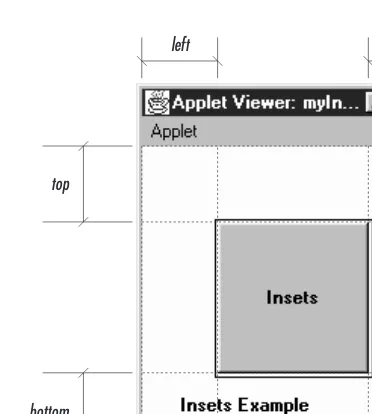
The following source code demonstrates the use of insets within an applet’sPanel. The applet displays a button that takes up the entire area of thePanel, less the insets, then draws a rectangle around that area. This is shown visually in Figure 6-1. The example demonstrates that if you add components to a container, the
Layout-Managerdeals with the insets for you in positioning them. But if you are drawing
directly to thePanel, you must look at the insets if you want to avoid the requested area within the container.
import java.awt.*; import java.applet.*;
public class myInsets extends Applet { public Insets insets () {
return new Insets (50, 50, 50, 50); }
public void init () {
setLayout (new BorderLayout ()); add ("Center", new Button ("Insets")); }
public void paint (Graphics g) { Insets i = insets();
int width = size().width - i.left - i.right; int height = size().height - i.top - i.bottom; g.drawRect (i.left-2, i.top-2, width+4, height+4); g.drawString ("Insets Example", 25, size().height - 25); }
}
To change the applet’s insets from the default, we override theinsets()method to return a newInsetsobject, with the new values.
6.4 Window
AWindowis a top-level display area that exists outside the browser or applet area
you are working in. It has no adornments, such as the borders, window title, or menu bar that a typical window manager might provide. AFrameis a subclass of
Windowthat adds these parts (borders, window title). Normally you will work with
the children ofWindowand notWindowdirectly. However, you might use aWindow
to create your own pop-up menu or some other GUI component that requires its own window and isn’t provided by AWT. This technique isn’t as necessar y in Java 1.1, which has aPopupMenucomponent.
The defaultLayoutManagerforWindowisBorderLayout, which is described in Sec-tion 7.3.
left right
top
[image:16.612.131.317.69.276.2]bottom
Figure 6–1: Insets
6.4.1 Window Methods
Constructors
public Window (Frame parent)
There is one public constructor forWindow. It has one parameter, which speci-fies theparentof theWindow. When theparentis minimized, so is theWindow. In an application, you must therefore create aFramebefore you can create a
Window; this isn’t much of an inconvenience since you usually need aFramein
which to build your user interface. In an applet, you often do not have access
to aFrameto use as the parent, so you can passnullas the argument.
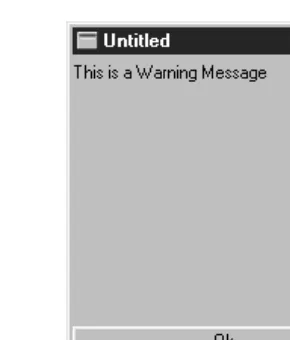
Figure 6-2 shows a simpleWindowon the left. Notice that there are no borders or window management adornments present. The Window on the right was created by an applet loaded over the network. Notice the warning message you get in the status bar at the bottom of the screen. This is to warn users that the
Windowwas created by an applet that comes from an untrusted source, and you
Appletviewer Navigator
Figure 6–2: Two windows
repeatedly callinggetParent()until there are no more parents, you can dis-cover an applet’s top-level parent, which should be the browser’s Frame. Example 6-1 contains the code you would write to do this. You should then check the return value to see if you got a Frameor null. This code is com-pletely nonportable, but you may happen to be in an environment where it works.
Example 6–1: Finding a Parent Frame
import java.awt.*;
public class ComponentUtilities {
public static Frame getTopLevelParent (Component component) { Component c = component;
while (c.getParent() != null) c = c.getParent(); if (c instanceof Frame)
return (Frame)c; else
return null; }
}
Appearance methods
A handful of methods assist with the appearance of theWindow.
public void pack ()
The pack() method resizes theWindow to the preferred size of the
compo-nents it contains and validates theWindow.
public void show ()
Theshow()method displays theWindow. When aWindowis initially created it is
hidden. If the window is already showing when this method is called, it calls
toFront() to bring the window to the foreground. To hide the window, just
call the hide() method of Component. After you show() a window, it is vali-dated for you.
The first call toshow() for anyWindowgenerates aWindowEventwith the ID
WINDOW_OPENED.
public void dispose ()
Thedispose()method releases the resources of theWindowby hiding it and
removing its peer. Calling this method generates aWindowEventwith the ID
WINDOW_CLOSED.
public void toFront ()
The toFront() method brings theWindow to the foreground of the display.
This is automatically called if you callshow()and theWindowis already shown.
public void toBack ()
ThetoBack()method puts theWindowin the background of the display.
public boolean isShowing()★
TheisShowing()method returnstrueif theWindowis visible on the screen.
Miscellaneous methods
public Toolkit getToolkit ()
The getToolkit() method returns the currentToolkit of the window. The
Toolkit provides you with information about the native platform. This will
allow you to size theWindowbased upon the current screen resolution and get images for an application. See Section 6.5.5 for a usage example.
public Locale getLocale ()★
ThegetLocale()method retrieves the currentLocaleof the window, if it has
one. Using aLocaleallows you to write programs that can adapt themselves to different languages and different regional variants. If noLocalehas been set,
getLocale() returns the default Locale. The defaultLocale has a user
lan-guage of English and no region. To change the defaultLocale, set the system properties user.language and user.region or call Locale.setDefault()
public final String getWarningString ()
ThegetWarningString()method returnsnullor a string that is displayed on
the bottom of insecureWindowinstances. If theSecurityManagersays that top-level windows do not get a warning message, this method returns null. If a message is required, the default text is “Warning: Applet Window”. However, Java allows the user to change the warning by setting the system property
awt.appletWarning. (Netscape Navigator and Internet Explorer do not allow
the warning message to be changed. Netscape Navigator’s current (V3.0) warning string is “Unsigned Java Applet Window.”) The purpose of this string is to warn users that the Window was created by an untrusted source, as opposed to a standard application, and should be used with caution.
public Component getFocusOwner ()★
ThegetFocusOwner()method allows you to ask theWindowwhich of its
com-ponents currently has the input focus. This is useful if you are cutting and pasting from the system clipboard; asking who has the input focus tells you where to put the data you get from the clipboard. The system clipboard is cov-ered in Chapter 16, Data Transfer. If no component in the Window has the focus,getFocusOwner()returnsnull.
public synchronized void addNotify ()
TheaddNotify()method creates theWindowpeer. This is automatically done
when you call theshow()method of theWindow. If you override this method, first callsuper.addNotify(), then add your customizations for the new class. Then you can do everything you need to with the information about the newly created peer.
6.4.2 Window Events
In Java 1.0, aWindowpeer generates all the events that are generated by the Compo-nentclass; it does not generate events that are specific to a particular type of com-ponent. That is, it generates key events, mouse events, and focus events; it doesn’t generate action events or list events. If an event occurs within a child component
of aWindow, the target of the event is the child component, not theWindow.
In addition to theComponentevents, five events are specific to windows, none of which are passed on by the window’s peer. These events happen at theFrameand
Dialog level. The events are WINDOW_DESTROY, WINDOW_EXPOSE, WINDOW_ICONIFY,
WINDOW_DEICONIFY, andWINDOW_MOVED. The default event handler,handleEvent(),
doesn’t call a convenience method to handle any of these events. If you want to work with them, you must overridehandleEvent(). See Section 6.5.4 for an exam-ple that catches theWINDOW_DESTROYevent.
public boolean postEvent (Event e) ✩
The postEvent() method tells the Window to deal with Event e. It calls the
handleEvent()method, which returnstrueif somebody handledeandfalse
if no one handles it. This method, which overridesComponent.postEvent(), is necessar y because a Window is, by definition, an outermost container, and therefore does not need to post the event to its parent.
Listeners and 1.1 event handling
With the 1.1 event model, you register listeners for different event types; the listen-ers are told when the event happens. These methods register listenlisten-ers and let the
Windowcomponent inspect its own events.
public void addWindowListener(WindowListener listener)★
TheaddWindowListener()method registers listeneras an object interested
in being notified when an WindowEventpasses through theEventQueue with
thisWindowas its target. When such an event occurs, one of the methods in
theWindowListenerinter face is called. Multiple listeners can be registered.
public void removeWindowListener(WindowListener listener)★
TheremoveWindowListener() method removeslisteneras an interested
lis-tener. Iflisteneris not registered, nothing happens.
protected void processEvent(AWTEvent e)★
The processEvent() method receives every AWTEvent with thisWindow as its
target.processEvent()then passes them along to any listeners for processing. When you subclassWindow, overridingprocessEvent() allows you to process all events yourself, before sending them to any listeners. In a way, overriding
processEvent()is like overridinghandleEvent()using the 1.0 event model.
If you overrideprocessEvent(), remember to callsuper.processEvent(e)last to ensure that regular event processing can occur. If you want to process your own events, it’s a good idea to call enableEvents() (inherited from Compo-nent) to ensure that events are delivered even in the absence of registered lis-teners.
protected void processWindowEvent(WindowEvent e)★
TheprocessWindowEvent()method receives everyWindowEventwith this
Win-dowas its target.processWindowEvent()then passes them along to any listen-ers for processing. When you subclass Window, overriding
processWindow-Event()allows you to process all events yourself, before sending them to any
listeners. In a way, overridingprocessWindowEvent() is like overriding
If you overrideprocessWindowEvent(), you must remember to call
super.pro-cessWindowEvent(e)last to ensure that regular event processing can occur. If
you want to process your own events, it’s a good idea to callenableEvents()
(inherited from Component) to ensure that events are delivered even in the absence of registered listeners.
6.5 Frames
TheFrameis a special type ofWindowthat looks like other high level programs in
your windowing environment. It adds aMenuBar, window title, and window gadgets (like resize, maximize, minimize, window menu) to the basicWindowobject. All the menu-related pieces are discussed in Chapter 10, Would You Like to Choose from the Menu?
The default layout manager for aFrameisBorderLayout.
6.5.1 Frame Constants
TheFrameclass includes a number of constants used to specify cursors. These
con-stants are left over from Java 1.0 and maintained for compatibility. In Java 1.1, you should use the newCursorclass, introduced in the previous chapter, and the
Com-ponent.setCursor() method to change the cursor over a frame. Avoid using the
Frameconstants for new code. To see these cursors, refer to Figure 5-6.
public final static int DEFAULT_CURSOR public final static int CROSSHAIR_CURSOR public final static int TEXT_CURSOR public final static int WAIT_CURSOR public final static int SW_RESIZE_CURSOR public final static int SE_RESIZE_CURSOR public final static int NW_RESIZE_CURSOR public final static int NE_RESIZE_CURSOR public final static int N_RESIZE_CURSOR public final static int S_RESIZE_CURSOR public final static int W_RESIZE_CURSOR public final static int E_RESIZE_CURSOR public final static int HAND_CURSOR public final static int MOVE_CURSOR
NOTE HAND_CURSORand MOVE_CURSOR are not available on Windows plat-forms with Java 1.0. If you ask to use these and they are not available, you getDEFAULT_CURSOR.
6.5.2 Frame Constructors
public Frame ()
The constructor for Frame creates a hidden window with a window title of “Untitled” ( Java1.0) or an empty string ( Java1.1). Like Window, the default
LayoutManagerof aFrameisBorderLayout. DEFAULT_CURSORis the initial
cur-sor. To position theFrameon the screen, call Component.move(). Since the
Frameis initially hidden, you need to call theshow()method before the user
sees theFrame.
public Frame (String title)
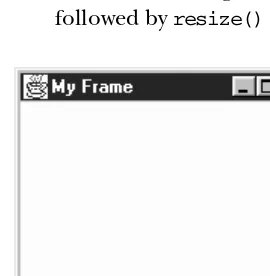
This version ofFrame’s constructor is identical to the first but sets the window title totitle. Figure 6-3 shows the results of a call tonew Frame(“My Frame”)
[image:22.612.54.189.251.389.2]followed byresize()andshow().
Figure 6–3: A typical Frame
6.5.3 Frame Methods
public String getTitle ()
ThegetTitle()method returns the current title for theFrame. If there is no
title, this method returnsnull.
public void setTitle (String title)
ThesetTitle()method changes theFrame’s title totitle.
public Image getIconImage ()
ThegetIconImage()method returns the image used as the icon. Initially, this
public void setIconImage (Image image)
ThesetIconImage()method changes the image to display when theFrameis
iconified toimage. Not all platforms utilize this resource.
public MenuBar getMenuBar ()
ThegetMenuBar()method retrieves theFrame’s current menu bar.
public synchronized void setMenuBar (MenuBar bar)
ThesetMenuBar()method changes the menu bar of theFrametobar. Ifbaris
null, it removes the menu bar so that none is available. It is possible to have multiple menu bars based upon the context of the application. However, the same menu bar cannot appear on multiple frames and only one can appear at a time. The MenuBar class, and everything to do with menus, is covered in Chapter 10.
public synchronized void remove (MenuComponent component)
The remove() method removes component from Frame if component is the
frame’s menu bar. This is equivalent to callingsetMenuBar()with a parameter ofnulland in actuality is whatremove()calls.
public synchronized void dispose ()
The dispose()method frees up the system resources used by the Frame. If
any Dialogs or Windows are associated with this Frame, their resources are
freed, too. Some people like to callComponent.hide()before calling the
dis-pose()method so users do not see the frame decomposing.
public boolean isResizable ()
TheisResizable()method will tell you if the currentFrameis resizable.
public void setResizable (boolean resizable)
ThesetResizable()method changes the resize state of theFrame. A
resiz-ablevalue oftruemeans the user can resize theFrame,falsemeans the user cannot. This must be set before theFrameis shown or the peer created.
public void setCursor (int cursorType)
The setCursor() method changes the cursor of the Frame to cursorType.
cursorTypemust be one of the cursor constants provided with theFrameclass.
You cannot create your own cursor image yet. When changing from the
DEFAULT_CURSOR to another cursor, the mouse must be moved for the cursor
icon to change to the new cursor. IfcursorTypeis not one of the predefined cursor types, setCursor() throws the IllegalArgumentException run-time exception.
This method has been replaced by theComponent.setCursor()method. Both function equivalently, but this method is being phased out.
public int getCursorType ()
ThegetCursorType()method retrieves the current cursor.
This method has been replaced by theComponent.getCursor()method. Both function equivalently, but this method is being phased out.
Miscellaneous methods
public synchronized void addNotify ()
The addNotify()method creates theFramepeer. This is automatically done
when you call theshow()method of theFrame. If you override this method, first callsuper.addNotify(), then add your customizations for the new class. Then you can do everything you need to do with the information about the newly created peer.
protected String paramString ()
When you call the toString() method of Frame, the default toString()
method ofComponentis called. This in turn callsparamString(), which builds up the string to display. At theFramelevel,paramString()appendsresizable
(iftrue) and thetitle(if present). Using the defaultFrameconstructor, the results would be:
java.awt.Frame[0,0,0x0,invalid,hidden,layout=java.awt.BorderLayout, resizable,title=]
Until theFrameis shown, viashow(), the position and size are not known and therefore appear as zeros. After showing theFrame, you might see:
java.awt.Frame[44,44,300x300,layout=java.awt.BorderLayout, resizable,title=]
6.5.4 Frame Events
In Java 1.0, aFramepeer generates all the events that are generated by the Compo-nentclass; it does not generate events that are specific to a particular type of com-ponent. That is, it generates key events, mouse events, and focus events; it doesn’t generate action events or list events. If an event happens within a child component
of aFrame, the target of the event is the child component, not theFrame.
Window
In addition to the Componentevents, Frame generates the WINDOW events. These events are WINDOW_DESTROY, WINDOW_EXPOSE, WINDOW_ICONIFY, WINDOW_DEICONIFY,
One common event,WINDOW_DESTROY, is generated when the user tries to close the
Frame by selecting Quit, Close, or Exit (depending on your windowing
environ-ment) from the window manager’s menu. By default, this event does nothing. You must provide an event handler that explicitly closes theFrame. If you do not, your
Framewill close only when the Java Virtual Machine exits—for example, when you
quit Netscape Navigator. ThehandleEvent()method in the following example, or one like it, should therefore be included in all classes that extendFrame. If a
WIN-DOW_DESTROY event occurs, it gets rid of theFrameand exits the program. Make
sure your method callssuper.handleEvent()to process the other events.
public boolean handleEvent (Event e) { if (e.id == Event.WINDOW_DESTROY) {
hide(); dispose(); System.exit(0);
return true;// boolean method, must return something } else {
// handle other events we find interesting }
// make sure normal event processing happens return super.handleEvent (e);
}
Listeners and 1.1 event handling
With the 1.1 event model, you register listeners for different event types; the listen-ers are told when the event happens. TheFrameclass inherits all its listener han-dling fromWindow.
Here’s the Java 1.1 code necessary to handleWINDOW_CLOSINGevents; it is equiva-lent to thehandleEvent()method in the previous example. First, you must add the following line to theFrame’s constructor:
enableEvents (AWTEvent.WINDOW_EVENT_MASK);
This line guarantees that we will receive window events, even if there is no listener.
TheprocessWindowEvent()method in the following code does the actual work of
closing things down:
// Java 1.1 only
protected void processWindowEvent(WindowEvent e) { if (e.getID() == WindowEvent.WINDOW_CLOSING) {
// Notify others we are closing if (windowListener != null)
windowListener.windowClosing(e); System.exit(0);
} else {
super.processEvent(e); }
}
If you forget to enable events, processWindowEvent() may never be called, and your windows will not shut down until the Java Virtual Machine exits. All subclasses
ofFrameshould include code like this to make sure they terminate gracefully.
6.5.5 Building a New Component from a Window
Now that we have discussed the FrameandWindowobjects, we can briefly investi-gate some ways to use them together. Previously I said that you can use aWindowto build your own pop-up menu. That’s no longer necessary in Java 1.1, but the same techniques apply to plenty of other objects. In the following example, we build a set of pop-up buttons; it also uses theToolkitof aFrameto load images within an application. The pop-up button set appears when the user presses the right mouse button over the image. It is positioned at the coordinates of the mouseDown()
event; to do so, we add the currentlocation()of theFrameto the mouse’sxandy
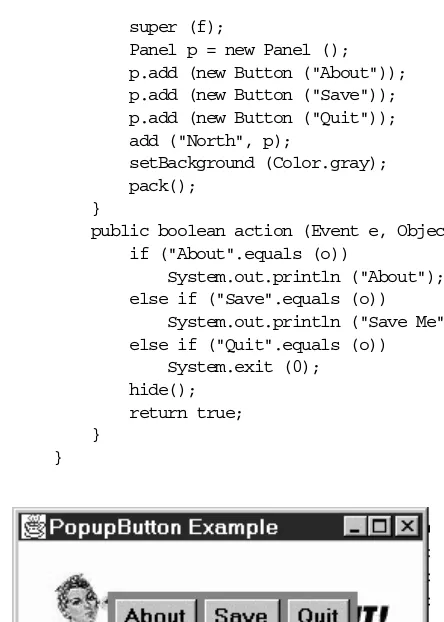
coordinates. Figure 6-4 shows what this application looks like when the pop-up but-ton set is on the screen.
import java.awt.*;
public class PopupButtonFrame extends Frame { Image im;
Window w = new PopupWindow (this); PopupButtonFrame () {
super ("PopupButton Example"); resize (250, 100);
show();
im = getToolkit().getImage ("rosey.jpg"); MediaTracker mt = new MediaTracker (this); mt.addImage (im, 0);
try {
mt.waitForAll();
} catch (Exception e) {e.printStackTrace(); } }
public static void main (String args[]) { Frame f = new PopupMenuFrame (); }
public void paint (Graphics g) { if (im != null)
g.drawImage (im, 20, 20, this); }
public boolean mouseDown (Event e, int x, int y) { if (e.modifiers == Event.META_MASK) {
w.move (location().x+x, location().y+y); w.show();
return true; }
super (f);
Panel p = new Panel (); p.add (new Button ("About")); p.add (new Button ("Save")); p.add (new Button ("Quit")); add ("North", p);
setBackground (Color.gray); pack();
}
public boolean action (Event e, Object o) { if ("About".equals (o))
System.out.println ("About"); else if ("Save".equals (o))
System.out.println ("Save Me"); else if ("Quit".equals (o))
System.exit (0); hide();
return true; }
[image:27.612.55.277.67.378.2]}
Figure 6–4: Pop-up buttons
The most interesting method in this application is mouseDown(). When the user clicks on the mouse,mouseDown()checks whether theMETA_MASKis set in the event modifiers; this indicates that the user pressed the right mouse button, or pressed the left button while pressing the Meta key. If this istrue,mouseDown()moves the window to the location of the mouse click, callsshow()to display the window, and returnstrueto indicate that the event was handled completely. IfmouseDownwere called with any other kind of mouse event, we returnfalseto let the event propa-gate to any other object that might be interested. Remember that the coordinates passed with the mouse event are the coordinates of the mouse click relative to the
Frame; to find out where to position the pop-up window, we need an absolute
loca-tion and therefore ask theFramefor its location.
PopupWindow itself is a simple class. Its constructor simply creates a display with
three buttons. The call topack()sizes the window so that it provides a nice border around the buttons but isn’t excessively large; you can change the border by
playing with the window’s insets if you want, but that usually isn’t necessar y. The classPopupWindowhas anaction()method that is called when the user clicks one of the buttons. When the user clicks on a button,action()prints a message and hides the window.
6.6 Dialogs
TheDialogclass provides a special type of display window that is normally used for
pop-up messages or input from the user. It should be associated with aFrame(a required parameter for the constructor), and whenever anything happens to this
Frame, the same thing will happen to theDialog. For instance, if the parentFrame
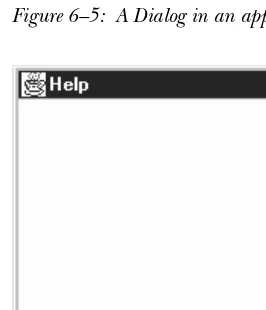
is iconified, theDialog disappears until theFrameis de-iconified. If theFrameis destroyed, so are all the associated dialogs. Figure 6-5 and Figure 6-6 show typical dialog boxes.
In addition to being associated with aFrame,Dialogis either modeless or modal. A modelessDialogmeans a user can interact with both theFrameand theDialogat the same time. A modalDialogis one that blocks input to the remainder of the application, including theFrame, until theDialogbox is acted upon. Note that the parentFrameis still executing; unlike some windowing systems, Java does not sus-pend the entire application for a modalDialog. Normally, blocking access would be done to get input from the user or to show a warning message. Example 6-2 shows how to create and use a modalDialogbox, as we will see later in the chap-ter.
SinceDialogsubclassesWindow, its defaultLayoutManagerisBorderLayout.
In applets, when you create a Dialog, you need to provide a reference to the browser’s Frame, not the applet. In order to get this, you can try to go up the container hierarchy of theAppletwithgetParent()until it returnsnull. (You can-not specify a null parent as you can with aWindow.) See Example 6-1 for a utility method to do this. Simple include a line like the following in your applet:
Frame top = ComponentUtilities.getTopLevelParent (this);
Then pass topto theDialog constructor. Another alternative is to create a new
6.6.1 Dialog Constructors and Methods
Constructors
If any constructor is passed a null parent, the constructor throws the run-time exceptionIllegalArgumentException.
public Dialog (Frame parent)★
This constructor creates an instance ofDialogwith no title and withparentas
theFrameowning it. It is not modal and is initially resizable.
public Dialog (Frame parent, boolean modal)✩
This constructor creates an instance ofDialogwith no title and withparentas
theFrameowning it. Ifmodalistrue, theDialoggrabs all the user input of the
program until it is closed. Ifmodalisfalse, there is no special behavior associ-ated with theDialog. Initially, theDialogwill be resizable. This constructor is comment-flagged as deprecated.
public Dialog (Frame parent, String title)★
This version of the constructor creates an instance of Dialogwithparentas
theFrameowning it and a window title oftitle. It is not modal and is initially
resizable.
public Dialog (Frame parent, String title, boolean modal)
This version of the constructor creates an instance of Dialogwithparentas
theFrameowning it and a window title oftitle. Ifmodeistrue, theDialog
grabs all the user input of the program until it is closed. If modal isfalse, there is no special behavior associated with theDialog. Initially, theDialog
will be resizable.
NOTE In some 1.0 versions of Java, modal dialogs were not supported prop-erly. You needed to create some multithreaded contraption that sim-ulated modality. Modal dialogs work properly in 1.1.
Appearance methods
public String getTitle ()
ThegetTitle()method returns the current title for theDialog. If there is no
title for theDialog,getTitle()returnsnull.
public void setTitle (String title)
ThesetTitle()method changes the current title of theDialogtotitle. To
turn off any title for theDialog, usenullfortitle.
Figure 6–5: A Dialog in an application or local applet
Figure 6–6: The same Dialog in an applet that came across the network
public boolean isResizable ()
TheisResizable()method tells you if the currentDialogis resizable.
public void setResizable (boolean resizable)
ThesetResizable()method changes the resize state of theDialog. A
resiz-able value oftruemeans the user can resize theDialog, whilefalsemeans the user cannot. This must be set before theDialogis shown or the peer cre-ated.
Modal methods
public boolean isModal ()
The isModal()method returns the current mode of theDialog. true
[image:30.612.55.188.238.393.2]public void setModal (boolean mode)★
ThesetModal()method changes the current mode of theDialogtomode. The
next time the dialog is displayed viashow(), it will be modal. If the dialog is currently displayed,setModal()has no immediate effect. The change will take place the next timeshow()is called.
public void show ()★
Theshow()method brings theDialogto the front and displays it. If the dialog
is modal,show()takes care of blocking events so that they don’t reach the
par-entFrame.
Miscellaneous methods
public synchronized void addNotify ()
The addNotify()method creates the Dialogpeer. The peer is created
auto-matically when you call the dialog’s show() method. If you override the methodaddNotify(), first call super.addNotify(), then add your customiza-tions for the new class. You will then be able to do everything you need with the information about the newly created peer.
protected String paramString ()
When you call the toString() method of Dialog, the default toString()
method ofComponentis called. This in turn callsparamString()which builds up the string to display. At theDialoglevel,paramString()appends the cur-rent mode (modal/modeless) and title (if present). Using the constructor
Dialog (top, "Help", true), the results would be as follows:
java.awt.Dialog[0,0,0x0,invalid,hidden,layout=java.awt.BorderLayout, modal,title=Help]
6.6.2 Dialog Events
In Java 1.0, aDialogpeer generates all the events that are generated by the Compo-nentclass; it does not generate events that are specific to a particular type of com-ponent. That is, it generates key events, mouse events, and focus events; it doesn’t generate action events or list events. If an event happens within a child component
of aDialog, the target of the event is the child component, not theDialog.
Window
In addition to the Componentevents, Dialog generates theWINDOW events. These events are WINDOW_DESTROY, WINDOW_EXPOSE, WINDOW_ICONIFY, WINDOW_DEICONIFY,
andWINDOW_MOVED.
Listeners and 1.1 event handling
With the 1.1 event model, you register listeners for different event types; the listen-ers are told when the event happens. TheDialogclass inherits all its listener han-dling fromWindow.
6.6.3 Dialog Example
Example 6-2 demonstrates how a modalDialogtries to work in Java 1.0. In some windowing systems, “modal” means that the calling application, and sometimes the entire system stops, and input to anything other than theDialogis blocked. With Java 1.0, a modalDialogacts only on the parent frame and simply prevents it from getting screen-oriented input by disabling all components within the frame. The Java program as a whole continues to execute.
Example 6-2 displays aDialogwindow with username and password fields, and an Okay button. When the user selects the Okay button, a realistic application would validate the username and password; in this case, they are just displayed on a
Frame. Since theFramemust wait for theDialogto finish before looking at the
val-ues of the two fields, theDialogmust tell theFramewhen it can look. This is done through a custom interface implemented by the parentFrameand invoked by the
[image:32.612.54.243.379.464.2]Dialogin its action method.
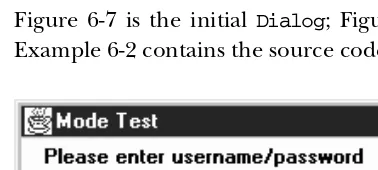
Figure 6-7 is the initial Dialog; Figure 6-8 shows the result after you click Okay. Example 6-2 contains the source code.
Figure 6–7: Username and password Dialog
Notice the use of the newly createdDialogHandlerinter face when the user selects the Okay button. Also, see how the pre– and post–event-handling methods are sep-arated. All the pre-event processing takes place before theDialogis shown. The post-event processing is called by the Dialog through the new DialogHandler
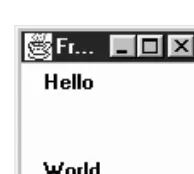
Figure 6–8: Resulting Frame
Example 6–2: Modal Dialog Usage
import java.awt.*; interface DialogHandler {
void dialogDoer (Object o); }
class modeTest extends Dialog { TextField user;
TextField pass;
modeTest (DialogHandler parent) {
super ((Frame)parent, "Mode Test", true);
add ("North", new Label ("Please enter username/password")); Panel left = new Panel ();
left.setLayout (new BorderLayout ()); left.add ("North", new Label ("Username")); left.add ("South", new Label ("Password")); add ("West", left);
Panel right = new Panel ();
right.setLayout (new BorderLayout ()); user = new TextField (15);
pass = new TextField (15); pass.setEchoCharacter (’*’); right.add ("North", user); right.add ("South", pass); add ("East", right);
add ("South", new Button ("Okay")); resize (250, 125);
}
public boolean handleEvent (Event e) { if (e.id == Event.WINDOW_DESTROY) {
dispose(); return true;
} else if ((e.target instanceof Button) && (e.id == Event.ACTION_EVENT)) {
((DialogHandler)getParent ()).dialogDoer(e.arg); }
return super.handleEvent (e); }
}
public class modeFrame extends Frame implements DialogHandler { modeTest d;
modeFrame (String s) { super (s);
Example 6–2: Modal Dialog Usage (continued)
resize (100, 100); d = new modeTest (this); d.show ();
}
public static void main (String []args) { Frame f = new modeFrame ("Frame"); }
public boolean handleEvent (Event e) { if (e.id == Event.WINDOW_DESTROY) {
hide(); dispose(); System.exit (0); }
return super.handleEvent (e); }
public void dialogDoer(Object o) { d.dispose();
add ("North", new Label (d.user.getText())); add ("South", new Label (d.pass.getText())); show ();
} }
Since the Java 1.1 modalDialogblocks the callingFrameappropriately, the over-head of theDialogHandlerinter face is not necessary and all the work can be com-bined into themain()method, as shown in the following:
// only reliable in Java 1.1 import java.awt.*;
class modeTest11 extends Dialog { TextField user;
TextField pass;
modeTest11 (Frame parent) {
super (parent, "Mode Test", true);
add ("North", new Label ("Please enter username/password")); Panel left = new Panel ();
left.setLayout (new BorderLayout ()); left.add ("North", new Label ("Username")); left.add ("South", new Label ("Password")); add ("West", left);
Panel right = new Panel ();
right.setLayout (new BorderLayout ()); user = new TextField (15);
pass = new TextField (15); pass.setEchoCharacter (’*’); right.add ("North", user); right.add ("South", pass); add ("East", right);
if (e.id == Event.WINDOW_DESTROY) { dispose();
return true;
} else if ((e.target instanceof Button) && (e.id == Event.ACTION_EVENT)) { hide();
}
return super.handleEvent (e); }
}
public class modeFrame11 extends Frame { modeFrame11 (String s) {
super (s);
resize (100, 100); }
public static void main (String []args) { Frame f = new modeFrame11 ("Frame"); modeTest11 d;
d = new modeTest11 (f); d.show ();
d.dispose();
f.add ("North", new Label (d.user.getText())); f.add ("South", new Label (d.pass.getText())); f.show ();
}
public boolean handleEvent (Event e) { if (e.id == Event.WINDOW_DESTROY) {
hide(); dispose(); System.exit (0); }
return super.handleEvent (e); }
}
The remainder of the code is virtually identical. The most significant difference is that the dialog’s handleEvent()method just hides the dialog, rather than calling
DialogHandler.dialogDoer().
6.7 FileDialog
FileDialogis a subclass ofDialogthat lets the user select files for opening or
sav-ing. You must load or save any files yourself. If used in an application or applet-viewer, the FileDialog always looks like the local system’s file dialog. The
FileDialogis always a modalDialog, meaning that the calling program is blocked
from continuing (and cannot accept input) until the user responds to the
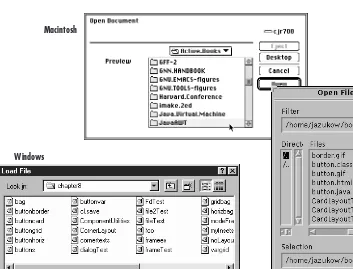
File-Dialog. Figure 6-9 shows the FileDialog component in Motif, Windows NT/95,
and the Macintosh.
Unlike the other Window subclasses, there is noLayoutManager for FileDialog, since you are creating the environment’s actual file dialog. This means you cannot subclassFileDialogto alter its behavior or appearance. However, the class is not “final.”
NOTE Netscape Navigator throws an AWTErrorwhen you try to create a FileDialog because Navigator does not permit local file system access.
6.7.1 FileDialog Methods
Constants
AFileDialog has two modes: one for loading a file (input) and one for saving
(output). The following variables provide the mode to the constructor. The
File-Dialog functions the same way in both modes. The only visible difference is
whether a button on the screen is labeled Load or Save. You must load or save the requested file yourself. On certain platforms there may be functional differences: in SAVEmode, theFileDialog may ask if you want to replace a file if it already exists; in LOAD mode, the FileDialog may not accept a filename that does not exist.
public final static int LOAD
LOADis the constant for load mode. It is the default mode.
public final static int SAVE
SAVEis the constant for save mode.
Constructors
public FileDialog (Frame parent)★
The first constructor creates aFileDialogfor loading with a parentFrameof
parent. The window title is initially empty.
public FileDialog (Frame parent, String title)
This constructor creates aFileDialogfor loading with a parentFrameof par-ent. The window title istitle.
public FileDialog (Frame parent, String title, int mode)
The final constructor creates a FileDialog with an initial mode of mode. If
Windows
[image:37.612.64.417.72.341.2]Motif Macintosh
Figure 6–9: FileDialogs for Motif, Windows NT/95, and the Macintosh
Appearance methods
public String getDirectory ()
getDirectory() returns the current directory for theFileDialog. Normally,
you check this whenFileDialogreturns after ashow()and a call togetFile()
returns something other thannull.
public void setDirectory (String directory)
The setDirectory() method changes the initial directory displayed in the
FileDialog to directory. You must callsetDirectory() prior to displaying
theFileDialog.
public String getFile ()
ThegetFile()method returns the current file selection from theFileDialog.
If the user pressed the Cancel button on theFileDialog,getFile()returns
null. This is the only way to determine if the user pressed Cancel.
NOTE On some platforms in Java 1.0getFile()returns a string that ends in.*.*(two periods and two asterisks) if the file does not exist. You need to remove the extra characters before you can create the file.
public void setFile (String file)
The setFile()method changes the default file for theFileDialog tofile.
Because theFileDialogis modal, this must be done before you callshow(). The string may contain a filename filter like*.javato show a preliminary list of files to select. This has nothing to do with the use of theFilenameFilterclass.
public FilenameFilter getFilenameFilter ()
ThegetFilenameFilter()method returns the currentFilenameFilter. The
FilenameFilter class is part of the java.iopackage. FilenameFilter is an
inter face that allows you to restrict choices to certain directory and filename combinations. For example, it can be used to limit the user to selecting.jpg, .gif, and.xbmfiles. The class implementingFilenameFilterwould not return other possibilities as choices.
public void setFilenameFilter (FilenameFilter filter)
ThesetFilenameFilter()method changes the current filename filter to
fil-ter. This needs to be done before youshow()theFileDialog.
NOTE The JDK does not support the FilenameFilter with FileDialog boxes.FilenameFilterworks but can’t be used withFileDialog.
Miscellaneous methods
public int getMode ()
The getMode() method returns the current mode of theFileDialog. If an
invalid mode was used in the constructor, this method returns an invalid mode here. No error checking is performed.
public void setMode (int mode)★
ThesetMode()method changes the current mode of theFileDialogtomode.
If modeis not one of the class constantsLOAD or SAVE,setMode()throws the run-time exceptionIllegalArgumentException.
public synchronized void addNotify ()
TheaddNotify()method creates theFileDialog peer. This is automatically
protected String paramString ()
When you call thetoString()method ofFileDialog, the defaulttoString()
method ofComponentis called. This in turn callsparamString(), which builds up the string to display. At theFileDialoglevel,paramString()appends the director y (if notnull) and current mode to the return value. Using the con-structorFileDialog(top, "Load Me"), the results would be as follows:
java.awt.FileDialog[0,0,0x0,invalid,hidden,modal,title=Load Me,load]
6.7.2 A FileDialog Example
To get a better grasp of how theFileDialogworks, the following application uses a
FileDialogto select a file for display in aTextArea. You can also useFileDialog
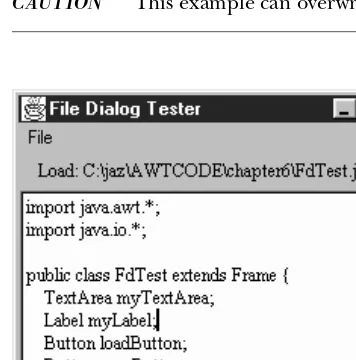
to save the file back to disk. Figure 6-10 shows the application, with a file displayed in the text area; theFileDialogitself looks like any other file dialog on the run-time system. Example 6-3 shows the code.
[image:39.612.55.233.324.504.2]CAUTION This example can overwrite an existing file.
Figure 6–10: FileDialog test program
Example 6–3: Complete FileDialog
import java.awt.*; import java.io.*;
public class FdTest extends Frame { TextArea myTextArea;
Label myLabel;