System 56
DIGITAL BUSINESS SYSTEM
INTRODUCTION, WIRING AND PROGRAMMING
Introduction... 2
FCC Requirements ...2
Related Documents...2
Incidence of Harm ...2
System Specifications ... 3
General Description ... 5
System Summary...5
Equipment Summary ...6
Numbering Scheme ...6
Equipment Description ...8
ATLAS-56 Main MCB Card...11
Hardware Options ... 14
Backup Battery ...15
External Music...15
External Paging ...15
External Relays...15
Caller I.D. ...15
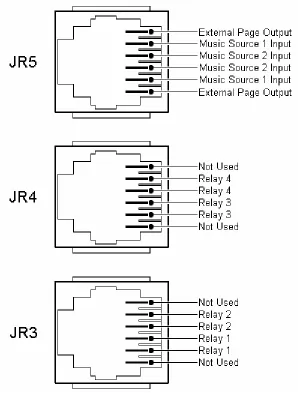
Figure 4: Optional Equipment Jack Pin Functions ...16
Serial Ports ...17
SMDR Printout...18
Installation Procedures... 18
Precautions ...19
Site Requirements...20
Cable Construction ...21
Unpacking and Inspecting ...22
Cabinet Installation...23
Trunk Connections ...25
Station Connections...25
Station Wiring ...26
Digital Phone Dip Switch Settings ...30
DSS Installation...31
Atlas System 56 Introduction and Programming - 2 -
This section describes the ATLAS-56 Digital Business System, a small telecommunications system that provides voice communications with a wide range of features. An overview of the system equipment is presented: followed by instructions for installing the system and station equipment and for connecting optional devices supported by the system. System specifications are grouped for a quick reference guide.
This equipment can be used with telephone company equipment that accepts pulse or DTMF dialing. The equipment has been assigned an FCC registration number under Part 68.
For direct connection to the telephone network, the equipment must be installed as described, and the FCC registration must be reported to the local telephone company.
FCC Requirements
The ATLAS-56 Digital Communication System is FCC-registered as a fully protected key system under Registration Number – PENDING, Ringer Equivalence 0.2a
Related Documents
For additional information regarding station feature operation, refer to the Easy reference guide included with each Digital set.
For details related to changing system database, refer to ATLAS-56 Series 500 Programming guide.
Note:
To maximize user satisfaction and to minimize service calls, it is strongly recommended that all users be instructed in station operation and that every station user be provided with a copy of the Easy Reference Guide.
Incidence of Harm
Atlas System 56 Introduction and Programming
Atlas System 56 Introduction and Programming - 3 - System Specifications
System Capacity: Cabinet
Trunk Lines (Max) 16
Stations (Max) 40
Power Requirements:
Input Voltage: 110 ± 10 Volt AC, 50/60 Hz, single phase
Environmental Conditions:
Surrounding temperature: 0-40°C 32-104°F
Surrounding humidity: 10-90 %
Cable Requirements:
Digital Phone: Station Cable, Cat 3 – 2 pair twisted wire. Station loop resistance = 40 ohms max.
Single-Line Telephone: Station cable, 1 pair (2 wires).
Station loop resistance = 800 ohms max.
Atlas System 56 Introduction and Programming - 4 -
Digital Phone: See Page 28 Fig.11
Single-Line Telephone: See Page 27 Fig.10
Communication Links:
Digital switching Electret transmitter Dynamic Receiver
Circuitry Control:
16-bit 80c188 microprocessor
Number Dialing Requirements:
1) Pulse Dial Speed: 10 or 20pps
Ratio: 60 ± 3% or 67 ± 3% Pause: 1800ms
2) DTMF
A) Frequency range: High Group 1209Hz, 1336Hz, 1477Hz Low Group 697Hz, 770Hz, 852Hz, 941Hz
B) Frequency uncertainty: 1.5% and less
C) Tone Level: Low level –10dBm ± 2dBm High level –8dBm ± 2dBm
Atlas System 56 Introduction and Programming
Atlas System 56 Introduction and Programming - 5 -
4) Digit Period: 70ms
5) Memory Dial: Last Number Redial, Save Number Redial & Speed Dial 6) System speed dial: 400 numbers (100-499)
7) Station speed dial: 9 numbers
Power Failure:
An optional backup battery can be installed for power outage prevention. Length of time usually depends on battery capacity. During most communication situations 2-12 Volt 10amph batteries in series can be used. Battery charger is built in.
General Description
This part provides an overview of the system equipment, including descriptions of cabinet, cards, and station instruments.
Note: The system’s programmed database is changed using Three Programming Sections with 99 two-digit MODE numbers per section. Each MODE number represents a changeable feature or function parameter. The Section and Mode numbers are referenced throughout the descriptions in this document (e.g. PROG.1-37 = Section 1, Mode 37) to allow quick access to programming information when required for clarity. Instructions for using Mode numbers to change the database are contained in the Series 500 Programming Guide.
System Summary
The ATLAS-56 is a Digital Communication system that operates like a Key System or as a multifunctional PABX, depending on database programming. System operation is controlled by a 16-bit 80c188 microprocessor. Digital switching uses CMOS technology to assure non-blocking operation.
The 80c188 microprocessor performs all logical operations and passes control signals to other circuits in accordance with system demands. Microprocessors located in each Digital Phone in the system communicate with the system controller for operational control.
System and station feature operations and selected system functions are controlled by a stored program database. The database in default state is stored in on-board EPROM. The default database is copied to battery-protected RAM during system initialization. It supports a fully operational system. Values in the RAM-based data can be changed as needed.
Atlas System 56 Introduction and Programming - 6 -
ringers). One Digital Display phone is required for system programming. 64 Button Digital DSS consoles can be equipped to operate as a companion to Digital keyphones. Each console occupies one digital port.
The Atlas Digital keyphones are available in LD40 (6-line by 20-character Display) and DT-36 button models. The DT-36 button is available with a 2-line by 16-character Display. All Atlas Digital keyphones are headset compatible.
Equipment Summary
The Main equipment cabinet is modular in design. It houses the power supply and the MCB Unit. The power supply occupies the bottom portion of the cabinet; the MCB card occupies the remainder of the cabinet. The MCB Unit controls system operation, 8 Trunks, 16 Digital ports and 4 single-line ports. An Expansion card can be added which supports an additional 8 Trunks, 16 Digital ports and 4 single-line ports.
The power supply is a wired–in unit. The outputs are +5 Volts at 4amps, -5 Volts at 100ma, -24 Volts at 1amp and –65 Volts 1amp. Full control is available for a customer-supplied backup battery, including trickle-charge capabilities.
Note: SLP ring voltage is 45VAC (rms) and will not support Mechanical type ringers.
Trunk interface circuits support Loop-start trunk applications. Trunk lines connect to the MCB card through card-edge-mounted modular jacks.
Digital keyphones and Single-line telephones connect to the MCB through a card-edge-mounted 50-pin female amphenol connector.
Options available and supported by the system include:
2-programmable external music source interfaces 1-external page port interface
4-programmable external relay interfaces 2-serial port interfaces
connecting terminals and control circuit for backup batteries
Atlas System 56 Introduction and Programming
Atlas System 56 Introduction and Programming - 7 -
Station and Trunk Port numbers are fixed and cannot be changed. Station extension numbers are assigned in the default database but can be changed by system programming (PROG.2-70). Default station numbers are 10 – 49. One, two, three or four digit station numbers can be programmed. The system does not allow conflicts in station number assignments (i.e. station number 20 and station number 200), but does allow the same number to be assigned to more that one port, when this occurs only the lowest numbered port can be called on intercom.
Dial access codes are used at keyphones and single-line phones to access features. At keyphones, all features can be accessed by fixed feature buttons, programmable softkeys, or by dial access codes. The feature access codes are listed in Table A.
TABLE A
DIAL ACCESS CODES
DIAL ACCESS CODES FEATURE
1-6999 1-7* 1-7#
71 + Station No. 72 + Station No. 71* + Station No. 72* + Station No.
73 + Station Hunt Group No. 739
741 + HHMM 742 + HHMM 743 + Station No. 744
745
746 + 01-09 747
748
749 + Lock Code 740 + Station No. 75 + Station No. 76 + 0-9 77 + Trunk No.
78 + Station Hunt Group No.
Station Intercom Dialing Station Group call Pickup Page keyphone group Call Forward All Calls Call Forward Busy/No Answer All Calls Follow Me
Busy/No Answer Follow Me Ring all Stations in Group Voice Mail Main Greeting Daily Alarm
Once only Alarm Message Wait activate Message Wait respond Answer Paging call Personal Speed Dial Do Not Disturb SLP Conference Phone Lock Message Wait clear Hold Pickup
Atlas System 56 Introduction and Programming - 8 -
70 00 70# 8 9,91-98 0 * 71* 72* # + 1-8 #9 #0 #* #01 #
Redial Redial
Trunk Hunt Group 8 Trunk Hunt Groups 1–8 Call Operator
System Call Pickup All Calls Follow Me Busy/No Answer Follow Me Page External Zone 1-8 Page all internal Page al external
Page all internal/external Music over page
Whisper page / Background music
Equipment Description
The system is housed in a conventional-cooled, metal enclosure with a removable front cover. (See Figure 1) The cover is held in place with #2 Philips head screws. The cabinet mounting dimensions are 12 inches wide, 29.5 inches high and 5 inches deep. A fully equipped cabinet weighs approximately 30 lbs.
Metal Brackets are used to attach the cabinet to a vertical surface. They are attached to the back of the cabinet and positioned to extend above the top of the cabinet for access to keyhole slots for mounting screws.
Atlas System 56 Introduction and Programming
Atlas System 56 Introduction and Programming - 9 -
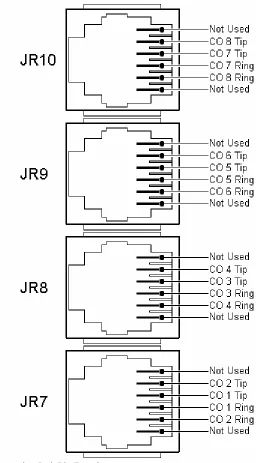
a) Trunks are connected through card-edge-mounted, 4-pin jacks. Each jack connects 2 Trunks.
b) Stations are connected through card-edge-mounted, 50-pin Amphenol connectors. Each Amphenol connects 20 stations (16-Digital and 4-SLP’s).
c) The power cord connects at the power receptacle located at the bottom of the cabinet.
d) The ground wire connects to a ground lug located at the bottom of the cabinet.
e) The Battery backup cables connect inside the KSU at the +Battery- terminals located on the power supply card.
f) The external music sources and external page output connects through a card-edge mounted, 6-pin jack.
g) The relays connect through card-edge-mounted, 6-pin jacks. Each jack connects 2 relays.
Atlas System 56 Introduction and Programming - 10 -
Atlas System 56 Introduction and Programming
Atlas System 56 Introduction and Programming - 11 -
FIGURE 2:
CABINET
SIDE
PANEL CONNECTORS AND INDICATORS
Atlas System 56 Introduction and Programming - 12 -
Trunks.
Connectors Description
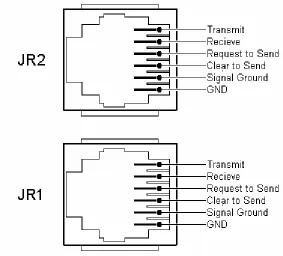
JR1 Serial Port 1 used for SMDR / PC Programming
JR2 Serial Port 2 used for Voice Mail Integration
JR3 Relay Interface 3 & 4 (Programmable)
JR4 Relay Interface 1 & 2 (Programmable)
JR5 External Page & Music Source 1 & 2 Interface
JR6 Digital Stations Ports 1 – 16 Single Line Ports 17 - 20
JR7 Trunk 1 & 2 RJ14 Interface
JR8 Trunk 3 & 4 RJ14 Interface
JR9 Trunk 5 & 6 RJ14 Interface
JR10 Trunk 7 & 8 RJ14 Interface
J1 9-Pin Connector to Power Supply
JP1 Connector for 8x16x4 Expansion Card
Fuses Description
F1 Protects External Page PortF2 Protects MOH Source 1
F3 Protects MOH Source 2
F4 Protects Digital Station Ports
F5 Protects Single Line Ports
F6 Protects Trunk Ports
Atlas System 56 Introduction and Programming
Atlas System 56 Introduction and Programming - 13 -
Switches Description
SW2 Dip 1 Not Used
SW2 Dip 2 Not Used
SW2 Dip 3 Not Used
SW2 Dip 4 Not Used
SW2 Dip 5 Not Used
SW2 Dip 6 “ON” = 3 Digit ICM numbering / “OFF” = 2 Digit ICM numbering
SW2 Dip 7 Not Used
SW2 Dip 8 Not Used
Switches Description
SW3 Memory Back up Switch
SW4 System Reset Switch
LED Description
D2 Memory Back-up Battery “ON” Indicator
D3 CPU Status (Steady Flash indicates normal operation) DA-H100 Trunk busy Status DA100=Trunk 1,DB100=Trunk 2…
Atlas System 56 Introduction and Programming - 14 -
FIGURE 3:ATLAS-56MAIN MCBUNIT
Atlas System 56 Introduction and Programming
Atlas System 56 Introduction and Programming - 15 -
Backup Battery
The system power supply supports a backup battery package rated at 24 volts, 0.7 amperes/hour. A trickle-charge maintains the battery at 95% efficiency, applies system cutover to battery when facility power is removed, and provides system shutdown when battery power falls below a specified level.
External Music
Up to two (customer supplied) monaural music sources can be connected at the optional equipment jack (JR5) located on the left side of the KSU. The connected music is available to the system only if programmed using system Programming (PROG. 1-37 and 2-75) the impedance of the music source must be 32ohms with power at approximately 100 milliwatts.
Note: An internal music source is available and is selected through system programming by default.
Note: In some circumstances there may be broadcast restrictions associated with the external music source. Check with the sources original distributor and/or the radio station for copyright and broadcast restrictions concerning background music and music–on-hold.
External Paging
The system supports a customer supplied amplifier for paging access to a single paging zone. The amplifier can be connected at the optional equipment jack (JR5) located on the left side of the KSU. Access is provided for 8 paging zones. The output for zones 1-7 must be connected through station ports and must be assigned by system programming (PROG.3-35).
External Relays
The system supports 4 external relays for multiple functions such as station, trunk, loud-bell, Paging, Music, and Door strike control. The customer supplied optional equipment can be connected at the optional equipment jacks (JR3 & 4) located on the left side of the KSU. The contacts can be programmed (PROG.3-40 and 3-41) for normally “open” or “closed” depending on customer needs.
Caller I.D.
(Future Feature)
Atlas System 56 Introduction and Programming - 16 -
Atlas System 56 Introduction and Programming
Atlas System 56 Introduction and Programming - 17 -
Serial Ports
The system supports 2 serial ports used for PC programming, SMDR (see figure.6) and WAV Voice mail integration. They are card-edge-mounted modular jacks located on the left side of the cabinet. They are labeled JR1 and JR2. The distance between the data device and the common equipment can be up to 100 feet in a quiet electrical environment. Shielded cable may be required for some runs. For longer distances, a customer supplied serial extender may be used to relay the data communications between the common equipment and the data devices.
Baud rate = 2400bps; data bits = 8; stop bits = 1; parity = none.
Atlas System 56 Introduction and Programming - 18 -
SMDR Printout
ST TK TELEPHONE NO. ACC.NO. DATE START DURATION RING C.L.I.D.
10 05 5156310 T 04/01 09:15 00:01:05 16 04 15618400636 04/01 09:18 00:04:56
26 01 ******************* 04/01 10:02 00:14:30 00:06 5615156300
****02 ******************* 04/01 10:03 00:54 5615156301
12 09 1305551212 254 04/01 10:18 00:04:18 17 <STATION ALARM> 04/01 13:00
COLUMN CONTENT EXPLANATION
1 ST SATION NUMBER
2 TK TRUNK NUMBER
3 TELEPHONE NO. TELEPHONE NUMBER CALLED. *REPRESENTS AN INCOMING CALL. STATION ALRMS ARE ALSO NOTED HERE.
4 “T” ENTRY DENOTES A TRANSFERRED CALL
5 ACC.NO. OPTIONAL CALLER DIALED ACCOUNT CODE
6 DATE DATE OF THE CALL RECORD- MM:DD
7 START TIME OF DAY CALL STARTED- HH:MM
8 DURATION LENGTH OF CALL- HH:MM:SS
9 RING RINGING TIME FOR INCOMING CALLS- MM:SS
10 C.L.I.D. CALLING PARTIES TELEPHONE NUMBER
Explanation of Example Entries:
1. On 04/01 at 09:15 AM Station 10 seized trunk 5 and made an outside call to 5156310. The call lasted for 1 minute and 5 seconds. Before being transferred.
2. On 04/01 at 09:18 AM Station 16 seized trunk 4 and made an outside call to 15618400636. The call lasted for 4 minutes and 56 seconds.
3. An incoming call rang on trunk 1 for 6 seconds from 5615156300 was answered by station 26. The call lasted 14 minutes and 30 seconds.
4. An incoming call rang on trunk 2 for 58 seconds from 5615156301 and went unanswered. 5. An outgoing call to 13055551212 on trunk 9 by station 12 lasted 4 minutes and 18 seconds during which time the station user entered an Account code 254.
6. At 1:00 PM a station alarm rang at Station 17.
FIGURE 6:SMDRCALL RECORDS AND EXPLANATIONS
Atlas System 56 Introduction and Programming
Atlas System 56 Introduction and Programming - 19 -
This part contains the procedures for installing the ATLAS-56 Digital Business System. Precautions for personnel and equipment safety and installation prerequisites are provided before detailed instructions for installing the equipment cabinet, connecting ground, installing and wiring station cross-connect blocks, connecting Trunk lines, and installing station equipment.
Precautions
The following paragraphs explain the precautions to be observed for handling, installing, and working with system equipment and components.
Handling Static-Sensitive Devices
WARNING: The system contains static-sensitive components. Personnel who are required to handle Printed Board Assemblies (PBA’s), components, or wiring must have knowledge of proper handling techniques.
The human body can easily accumulate a high voltage charge of static electricity. Precautions must be taken to prevent this charge from damaging static-sensitive components. The following are standard handling precautions for static sensitive devices:
Touch the cabinet to dissipate any stored charge immediately before removing, inserting, or otherwise handling a PBA.
Hold the PBA by its edges and avoid touching component pins or connectors.
Cover work surfaces with conductive material connected to earth ground. A ground clip connected to a static-protective shipping bag provides an adequately protective work surface.
Use flexible ground straps to continuously discharge static electricity. Store PBA’s in static-protective shipping bags.
Installing Station Wiring
DANGER: TO REDUCE RISK OF ELECTRICAL SHOCK AND PERSONAL INJURY, USE CARE WHEN INSTALLING STATION WIRING.
Observe the following precautions when installing station wiring:
Never install telephone wiring during a lightning storm.
Never install telephone jacks in wet locations unless the jack is specifically designed for wet environments.
Never touch un-insulated telephone wire or terminals unless the telephone line has been disconnected at the network interface.
Atlas System 56 Introduction and Programming - 20 -
Connecting Power Cords
WARNING: Do not attach power supply cords to building surfaces.
The basic system is furnished with a detachable power supply cord that is configured for connecting to a branch circuit receptacle equipped with a third wire ground. The cord should be dressed for appearance and safety, but never attached to the building surface.
Site Requirements
The selection of a suitable location is essential when installing the key service unit (KSU). The area should be clean, dry, static-free, temperature controlled, and accessible only to authorized personnel. When selecting a site, give careful consideration to the following:
Ample space must be allowed to mount the cabinet and MDF (Main Distribution Frame) and to allow for removal of the KSU cover to access assemblies and cards within the cabinet.
A well-ventilated and well-lighted area with a temperature range of 32-100° F (0-40° C) and 10%-90% relative non-condensing humidity. The area must not be exposed to direct sunlight, heat or dust. Optimal temperature range is 40-70° F.
A dedicated 110/220 Volt AC, 15 Amp, 50/60 Hz, single phase, 3 wire, and parallel blade with ground power outlet should be located within 6 feet of the KSU. Additional outlets for music source, paging amplifier, etc. as needed. The AC receptacles must be third-wire grounding type. The third-wire ground must be connected to an approved earth ground through the single-point grounding circuit at the power distribution panel.
Avoid areas that produce radio frequency interference (RFI) or electro-magnetic interference (EMI). (E.g. electric welding equipment, radio frequency transmitters, magnets, refrigerators, copy machines, microwave ovens, etc.)
Locate the KSU and stations so as to minimize cable length. All station cables must be 2-pair twisted-pair cable and must be home run. The Digital Keyphone may be wired differently.
Cabling lengths must not exceed the following:
Atlas System 56 Introduction and Programming
Atlas System 56 Introduction and Programming - 21 -
Single-Line Telephones: 800 ohms using 24 gauge – 5000 feet
The Trunk lines connect to the system through modular jacks located on the left side of the KSU. Central Office terminations should be within 6 feet of the cabinet/main distribution frame.
Make sure there is a good earth ground utilizing #12 AWG or larger standard, copper wire within 25 feet of the KSU. A metallic COLD water pipe usually provides a reliable ground path. Carefully check that the pipe does not contain insulated joints that could isolate the ground. (The pipe must be metallic from the point of ground to the connection to the water main outside the building).
Warning: To avoid equipment damage, do not attempt to connect or operate the equipment before proper ground has been installed.
Power Surge Protector Ground
Power surge protectors must be grounded either to the approved earth ground or an equally adequate but separate grounding system. Install ground wires of the size specified by the manufacturer between the line protector devices and the earth ground connection. Be sure to connect the ground wire at a point closer to true earth ground than the AC distribution panel single-point ground wire and the chassis ground wire connections. Secure the attaching clamp.
Telephone Line Power Surge Protection
System equipment must be protected against power surges on all externally connected telephone lines. This includes protecting lines coming into the building from the telephone company, lines going out of the building to off-premises stations located in an adjacent building, and lines going into the adjacent building that houses the off-premises stations.
Atlas System 56 Introduction and Programming - 22 -
circuits on the 50-pin connectors to the station cross connect blocks on the MDF. Construct each cable with one end terminated in an Amphenol-type, male connector. To allow proper routing of the cable during installation, pin 1 must be at the top, opposite the cable-entry end of the connector. (See Figure 7) Terminate the opposite end of the cable as dictated by the type cross-connect block used.
Note: Consider cable routing before the cable to the correct length.
FIGURE 7:PIN ARRANGEMENT –50-PIN CABLE CONNECTOR
Unpacking and Inspecting
The following paragraphs provide directions for unpacking and inspecting the system components.
WARNING: The system equipment contains static sensitive components. Personnel who are required to handle components or wiring must have knowledge of proper handling techniques and must have the necessary safeguard equipment for protecting static-sensitive devices. Refer to PRECAUTIONS.
All equipment is packaged in corrugated cardboard containers. All equipment options are packaged separately in individual cartons. Each telephone is packaged separately in an individual carton. However, an outer slip or larger container may be used to group quantities of telephones.
Atlas System 56 Introduction and Programming
Atlas System 56 Introduction and Programming - 23 -
Open the carton containing the system equipment. Remove the packaging material from the carton. Remove the cabinet and lay it face–up on a level work surface. Remove all packaging material. Check the exterior cabinet. Make a note of any damages.
Observing electronics equipment handling precautions, remove each piece of equipment from its shipping container. As each item is unpacked, place it on a level work surface. Remove packaging material and inspect the equipment for physical damage. Make a note of any damages.
Report all damages noted to your supplier.
Cabinet Installation
Mount the cabinet so that all cables and power cord are neatly arranged. Do not mount the cabinet directly on masonry, concrete, or other wall surfaces subject to moisture or condensation. When wall mounting, a ¾” thick plywood backboard should be attached to the equipment room wall for mounting the cabinet and associated equipment. The backboard should be large enough to allow sufficient space for the MDF connecting blocks and optional equipment to be mounted and serviced conveniently.
Atlas System 56 Introduction and Programming - 24 -
Atlas System 56 Introduction and Programming
Atlas System 56 Introduction and Programming - 25 -
Trunk Connections
All trunk connections are made on the left side of the cabinet. (See Figure 2) Two lines are connected through each modular jack. Refer to Figure 9 for modular jack pin functions. Install a modular line cord between each trunk terminating modular wall jack and the corresponding jack on the side of the cabinet.
Figure 9: Typical Trunk Connecting Jack Pin Functions
Atlas System 56 Introduction and Programming - 26 -
cabinet using 25-pair cables and 50-pin MDF cross-connect blocks. Tables B & C show the MDF cable wiring arrangement including standard wiring color, system signal designations, and the corresponding cross-connect block terminals.
To install and wire a station cross-connect block, proceed as follows:
a) Install the cross-connect blocks to the right side of the cabinet allowing sufficient room to access both sides of each block.
b) Locate one of the previously constructed 25-pair cables (refer to Cable Construction). c) Plug the cable connector into the correct 50-pin connector on the right side of the cabinet. d) Route the cable up the side of the cabinet, to the right, and down through the center of the
cross-connect blocks to the correct block. Dress and secure the cable at several points, and then punch down the leads using the standard color code.
Station Wiring
Twisted pair station cable is required for operation of Digital keyphones. Therefore, it is recommended that 3-pair, #24 AWG station cable be used throughout the system. This allows changes and additions to the system without re-wiring, and minimizes potential problems with telephones connected to the wrong type station cable.
Cable conductor connections at the modular telephone jacks are identical for all station equipment. (See Figure 9). Although conductor functions may differ, wiring connections must stay consistent. Use 4-terminal, modular wall jacks at all stations.
The following guidelines should be observed when running station cable:
a) AVOID cable runs parallel to light fixtures or AC lines not in conduit. If unavoidable, run the cables across them at right angles.
b) DO NOT run station cables inside electrical conduit already occupied by AC power cable. c) DO NOT run station cables near equipment with electrical motors or past strong magnetic
fields (copy machines, heavy motors, welding equipment, ECT…).
d) DO not place station cables where they can be stepped on or rolled over by office chairs.
Atlas System 56 Introduction and Programming
Atlas System 56 Introduction and Programming - 27 -
25-PAIR CONNECTING STATION LINE CABLE BLOCK CABLE CORD CIRCUIT
PIN COLOR CODE
TERM FUNCTION 2-PR. CABLE TEL B1 CHANNEL B2 CHANNEL 26 1 27 2 WHT-BLU BLU-WHT WHT-ORG ORG-WHT 1 2 3 4 TX+ TX- RX+ RX- WHT-BLU BLU-WHT WHT-ORG ORG-WHT GRN RED BLK YEL STATION 10/100 (PORT 01)
(Dip 3,4 “ON”)
STATION 11/101
(PORT 02)
(Dip 1,2 “ON”)
Atlas System 56 Introduction and Programming - 28 -
19 45 20 BRN-YEL YEL-SLT SLT-YEL 38 39 40
RING BLU-WHT RED
(PORT 18) 46 21 47 22 VLT-BLU BLU-VLT VLT-ORG ORG-VLT 41 42 43 44 TIP RING WHT-BLU BLU-WHT GRN RED SLP STATION 28/118 (PORT 19) N/A 48 23 49 24 VLT-GRN GRN-VLT VLT-BRN BRN-VLT 45 46 47 48 TIP RING WHT-BLU BLU-WHT GRN RED SLP STATION 29/119 (PORT 20) N/A
TABLE C: ATLAS-56 EXPANSION JR CONNECTIONS
25-PAIR CONNECTING STATION LINE CABLE BLOCK CABLE CORD CIRCUIT
PIN COLOR CODE
TERM FUNCTION 2-PR. CABLE TEL B1 CHANNEL B2 CHANNEL 26 1 27 2 WHT-BLU BLU-WHT WHT-ORG ORG-WHT 1 2 3 4 TX+ TX- RX+ RX- WHT-BLU BLU-WHT WHT-ORG ORG-WHT GRN RED BLK YEL STATION 30/120 (PORT 21) STATION 31/121 (PORT 22) 28 3 29 4 WHT-GRN GRN-WHT WHT-BRN BRN-WHT 5 6 7 8 TX+ TX- RX+ RX- WHT-BLU BLU-WHT WHT-ORG ORG-WHT GRN RED BLK YEL STATION 32/122 (PORT 23) STATION 33/123 (PORT 24) 30 5 31 6 WHT-SLT SLT-WHT RED-BLU BLU-RED 9 10 11 12 TX+ TX- RX+ RX- WHT-BLU BLU-WHT WHT-ORG ORG-WHT GRN RED BLK YEL STATION 34/124 (PORT 25) STATION 35/125 (PORT 26) 32 7 33 8 RED-ORG ORG-RED RED-GRN GRN-RED 13 14 15 16 TX+ TX- RX+ RX- WHT-BLU BLU-WHT WHT-ORG ORG-WHT GRN RED BLK YEL STATION 36/126 (PORT 27) STATION 37/127 (PORT 28) 34 9 35 10 RED-BRN BRN-RED RED-SLT SLT-RED 17 18 19 20 TX+ TX- RX+ RX- WHT-BLU BLU-WHT WHT-ORG ORG-WHT GRN RED BLK YEL STATION 38/128 (PORT 29) STATION 39/129 (PORT 30)
Atlas System 56 Introduction and Programming
Atlas System 56 Introduction and Programming - 29 -
11 37 12 BLU-BLK BLK-ORG ORG-BLK 22 23 24 TX- RX+ RX- BLU-WHT WHT-ORG ORG-WHT RED BLK YEL 40/130 (PORT 31) 41/131 (PORT 32) 38 13 39 14 BLK-GRN GRN-BLK BLK-BRN BRN-BLK 25 26 27 28 TX+ TX- RX+ RX- WHT-BLU BLU-WHT WHT-ORG ORG-WHT GRN RED BLK YEL STATION 42/132 (PORT 33) STATION 43/133 (PORT 34) 40 15 41 16 BLK-SLT SLT-BLK YEL-BLU BLU-YEL 29 30 31 32 TX+ TX- RX+ RX- WHT-BLU BLU-WHT WHT-ORG ORG-WHT GRN RED BLK YEL STATION 44/134 (PORT 35) STATION 45/135 (PORT 36) 42 17 43 18 YEL-ORG ORG-YEL YEL-GRN GRN-YEL 33 34 35 36 TIP RING WHT-BLU BLU-WHT GRN RED SLP STATION 46/136 (PORT 37) N/A 44 19 45 20 YEL-BRN BRN-YEL YEL-SLT SLT-YEL 37 38 39 40 TIP RING WHT-BLU BLU-WHT GRN RED SLP STATION 47/137 (PORT 38) N/A 46 21 47 22 VLT-BLU BLU-VLT VLT-ORG ORG-VLT 41 42 43 44 TIP RING WHT-BLU BLU-WHT GRN RED SLP STATION 48/138 (PORT 39) N/A 48 23 49 24 VLT-GRN GRN-VLT VLT-BRN BRN-VLT 45 46 47 48 TIP RING WHT-BLU BLU-WHT GRN RED SLP STATION 49/139 (PORT 40) N/A
Atlas System 56 Introduction and Programming - 30 -
FIGURE 10:STATION JACK WIRING
All station connections are made through the amphenol(s) located on the upper right side of the KSU. The Main amphenol (Ext.’s 10 – 29) is labeled JR6. The expansion amphenol (if equipped) is labeled
(See Fig. 14).
Each Amphenol connector provides for 16 digital ports (8 - 2B+D channels) and 4 single line ports.
Digital Phone Dip Switch Settings
Atlas System 56 Introduction and Programming
Atlas System 56 Introduction and Programming - 31 -
(B2 channel). Both B1 and B2 channels are connected to the white/blue and white/orange pair (2 pair connection). The phones are wired in parallel but there are some limitations that must be observed. (See Fig. 11)
Examples:
1) A single Digital Keyphone can be connected to a cable run up to 3000’ in length. 2) Cable runs up to 1500’ can be terminated in two parallel runs (2 pair) up to a maximum of
50’. One phone uses the B1 channel (1, 2 OFF / 3, 4 ON). The other phone uses the B2 channel (1, 2 ON / 3, 4 OFF).
3) 2 parallel cables (2 pair) can be run a maximum of 600’ from the MDF but the difference in length between the two cables cannot exceed 50’.
4) LD-40 model phones must always use the B1 channel. When using an LD40 on the B1 channel, a DT36 button phone can be used in parallel only when set for the B2 channel.
The Main and Expansion are equipped with 25 pair female type amphenol connectors. The installer should run 25 pair cables with male amphenol connectors from his own MDF (e.g.: 66 type block).
DSS Installation
The DSS unit requires a digital phone port just as the digital phone does. Observe Dipswitch settings on bottom of DSS.
The DSS is always installed in the next highest physical digital phone port from the phone that will work with it. (E.g. Digital phone port11 B1 channel / DSS must be port 12 B2 channel.
Atlas System 56 Introduction and Programming - 32 -
FIGURE 11:DIGITAL PHONE CABLE LENGTH
To Wall Mount a DT36 Digital phone
♦ Remove the base stand from the bottom of the digital phone. (See Fig. 10). Press in on the large wedge to disengage it from the housing.
♦ Position the base stand on the wall where the digital phone is to be located with the large wedge down, and mark on the wall the location of the small opening in each of the two keyhole slots.
Atlas System 56 Introduction and Programming
Atlas System 56 Introduction and Programming - 33 -
♦ Reattach the base to the digital phone with the large wedge down.
♦ Position the digital phone with the base stand over the two mounting screws with the screws inserted into the large slots in the keyholes.
♦ Slide the digital phone down until it is tight and stable.
♦ Lift and turn the handset cradle tab so the tab is up. (See Fig. 11)
♦ Place the handset on-hook and insure that the tab holds the handset stable.
FIGURE 12:WALL MOUNTING A DT-36TELEPHONE
BATU UNIT
The BATU Unit provides the capability to connect external batteries to the system to provide for complete system operation in the event of local power failure. Attach batteries
(24 VDC) to the BATU Unit at the appropriate terminals. (See Fig.) The system applies a trickle charge to the battery when it is not in use.
Atlas System 56 Introduction and Programming - 34 -
the battery, the system will automatically cut off the power supply from the battery when the voltage gets too low, so that the battery can be recharged.
CAUTION!!!! To reduce the risk of fire or injury please note the following:
Do not dispose of the battery(s) in a fire. The cell may explode. Check with local codes for special disposal instructions.
Do not open or mutilate the battery(s). Released electrolyte is corrosive and may cause damage to the eyes or skin. It may be toxic if swallowed.
Exercise care in handling the battery(s) in order not to short the battery with conducting materials such as rings, bracelets and keys. The battery may overheat and cause burns.
Observe proper polarity orientation between the battery(s) and BATU Unit.
Do not mix battery(s) of different sizes or from different manufacturers in this product.
The length of time system operation is maintained under battery power depends on battery capacity. Typical system support for the 24 Volt battery(s) is approximately one hour.
INTERFACE CARDS
Expansion Card
Atlas System 56 Introduction and Programming
Atlas System 56 Introduction and Programming - 35 -
T-1 Trunk / PRI Card
BRI Card
DID / Caller ID Card
C.O. Line (TRUNK) CONNECTIONS
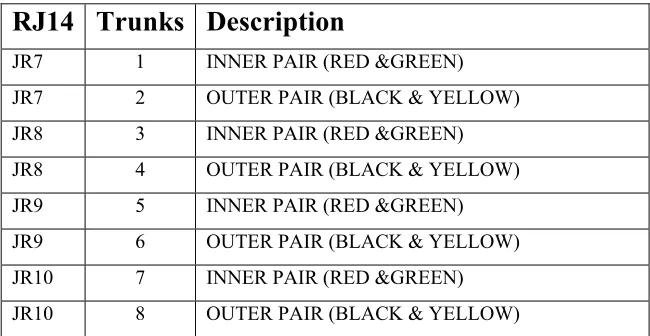
Connections (Central Office / PBX) to the ATLAS-56 are made directly at the right side of the KSU where 4 - RJ14 connectors are mounted. (See Fig. 11) Using a standard 4 conductor modular cord the trunks are connected as follows:
RJ14 Trunks Description
JR7 1 INNER PAIR (RED &GREEN) JR7 2 OUTER PAIR (BLACK & YELLOW) JR8 3 INNER PAIR (RED &GREEN) JR8 4 OUTER PAIR (BLACK & YELLOW) JR9 5 INNER PAIR (RED &GREEN) JR9 6 OUTER PAIR (BLACK & YELLOW) JR10 7 INNER PAIR (RED &GREEN) JR10 8 OUTER PAIR (BLACK & YELLOW)
The system allows for a maximum of 16 Trunks. Trunks 1-8 are on the Main MCB Unit, Trunks 9-16 are on the Expansion Card.
EXPANSION Card
The Expansion card is mounted on top of the Main MCB. First remove the cover of the Main KSU. Then place the expansion card on top of the Main card. (See Fig. 15)
Atlas System 56 Introduction and Programming - 36 -
♦ The memory backup switch (SW3) is located on the bottom left side of the Main-MCB (See Fig.)
Turning this switch ON will insure that the KSU will retain all stored programming in the event of a power outage.
♦ ONCE THE SYSTEM IS INSTALLED, SET THE MEMORY BACKUP SWITCH TO THE ON POSITION to prevent the loss of stored information.
Atlas System 56 Introduction and Programming
Atlas System 56 Introduction and Programming - 37 -
FIGURE 1: ...10
FIGURE 2:CABINET SIDE PANEL CONNECTORS AND INDICATORS...11 FIGURE 3:ATLAS-56MAIN MCBUNIT...14
FIGURE 4:SMDRCALL RECORDS AND EXPLANATIONS...18
FIGURE 5:OPTIONAL EQUIPMENT JACK PIN FUNCTIONS...ERROR! BOOKMARK NOT DEFINED
FIGURE 6:SERIAL PORT JACK PIN FUNCTIONS...ERROR!BOOKMARK NOT DEFINED
FIGURE 7:PIN ARRANGEMENT –50-PIN CABLE CONNECTOR...22
FIGURE 8: ...24
FIGURE 9:TYPICAL TRUNK CONNECTING JACK PIN FUNCTIONS...25
FIGURE 10:STATION JACK WIRING...30 FIGURE 11:DIGITAL PHONE CABLE LENGTH...32
Atlas System 56 Introduction and Programming - i -
NOTICE
The KDX-56 comes with two manuals. This manual contains a step-by-step explanation of the installation process, with diagrams. The Programming Guide introduces the programming process by which the system can be programmed through the Digital phones.
The procedures and methods provided in this manual have been prepared in a step-by-step manner to assist the installer in planning and performing the installation task, system operation and feature operation.
The information contained in this document is believed to be correct and accurate in all respects. The information contained in this document is subject to change without notice. Periodic changes may be made to the information contained in this document without any obligation to notify any such persons of such changes. No responsibility is assumed for any errors or omissions in this document.
The adjustments and settings mentioned in this manual should be carried out strictly by personnel who have been trained for the operation of this equipment and have also received instructions in regard to the safe handling of electrical equipment.
While this device is designed to be reasonably secure against intrusions from fraudulent callers, it is by no means invulnerable to fraud. Therefore, no expressed or implied warranty is made against such fraud.
WHEN PROGRAMMING EMERGENCY NUMBERS AND (OR) MAKING TEST CALLS TO EMERGENCY NUMBERS:
1. Remain on the line and briefly explain to the dispatcher the reason for the call. 2. Perform such activities in the off-peak hours; such as early morning or late evenings.
Atlas System 56 Introduction and Programming
Atlas System 56 Introduction and Programming - ii -
KEY SYSTEM U.S. LIMITED WARRANTY
Key System US warrants to its authorized members and to the original retail customer of a Key System US product, for a period of one year from the date of shipment of the product from Key System US’s warehouse, that the “product”, except consumable items, will be free from defects in material and workmanship when used in a normal and
common manner.
The sole obligation of Key System US under this warranty is at the sole option of Key System US, the repair or replacement, with new or refurbished parts, of the defective or missing parts that are causing the malfunction and which are determined to be defective by Key System US.
Dealer or user shall be responsible to pay for shipment of the defective parts to Key System US or Key System US’s authorized representative and for any and all expenses connected with the removal and re-installation. In lieu of repair or replacement, Key System US at its sole option and full satisfaction of its warranty obligations, refund the price charged by Key System US to its members for such parts as are determined by Key System US to be defective and which are returned to Key System US through an
authorized dealer within the warranty period and no later than 30 days after such malfunction, whichever occurs first.
This warranty does not cover defects as arise from accidents, neglect, misuse, failure of electric power, air conditioning, humidity control or causes beyond ordinary use. All warranty claims shall be waived unless reported, in writing to Key System US prior to the expiration of the applicable warranty period.
Key System US makes no other warranties, expressed or implied, and specifically disclaims any implied warranty of merchantability or fitness for a particular purpose. These warranties are dealer’s and user’s sole remedies and in lieu of all obligations or liabilities on the part of Key System US for damages, including, but not limited to special, incidental or consequential damages arising out of or in connection with the use of the products, or any damages whatsoever resulting from loss of use, data or profits, arising out of or in connection with the performance of the products. Whether in a contract or tort action, including negligence, even if Key System US has been advised of the possibility of such damages. The total maximum liability of Key System US for breach of warranty shall be limited to a refund of the cost of the defective product.
Atlas System 56 Introduction and Programming - 1 -
TABLE OF CONTENTS
PROGRAMMING INTRODUCTION
... 2
Notice... 2
HARDWARE PROGRAMMING
... 3
Initial Setup
... 3
Memory Protection... 3
Load Default... 3
SOFTWARE PROGRAMMING
... 4
LCD Display phone... 4
List of Terms Used... 4
Port and Station Numbering
... 5
Trunk Numbering
... 5
Night Service - Day Mode and Night Mode Operation
6
System Programming
... 6
Accessing Programming... 6
Entering Password... 7
Entering System Programming while on a Trunk Call... 8
Selecting a Program Section... 8
Exiting from System Programming... 9
Using Programming Keys... 9
Saving a Change... 9
Entering a Station Number instead of Port Number... 10
Getting a Busy Signal... 10
Atlas System 56 Introduction and Programming
Atlas System 56 Introduction and Programming - 2 -
PROGRAMMING INTRODUCTION
The Programming Guide introduces the step by step process for programming the system. Programming is divided into two parts: Hardware and Software.
Hardware Programming involves the use of the memory backup power switch to clear the memory and to load factory default data, and the setting of system DIP switches to effect proper system operation.
Software Programming involves the use of a keyphone to change the default data as defined by the customer’s needs. The changes are derived from a plan detailing what the customer wants
the System to do.
The process of programming the system is greatly simplified with a clearly detailed plan of the customers needs, laid out in a manner that is easily understood. If this information is not readily available and clearly detailed, it must be done before beginning the default data changes.
Notice
Atlas System 56 Introduction and Programming - 3 -
HARDWARE PROGRAMMING
Initial Setup
When the system is first installed, the System Default Programming Data must be loaded into memory. To ensure the default condition, the memory must be cleared before loading the data.
Memory Protection
The User Defined Programming Data is stored in memory as it is changed. A 3.9v NiCad Battery (BT1) ensures the Data will be stored in memory when power is lost. The Battery is controlled by SW3 on the Main MCB-Unit.
SW3 on the MCB is used to select factory default or user defined programming upon power up. When the SW3 is in the "ON" position user defined memory is retained during a power failure
Load Default
To clear the memory and load the System Default Programming Data:
(a) Set the system power On/Off switch to OFF. The power indicator is off.
(b) Set SW3 to the "OFF" position (ON MCB-Unit)
(c) Set the system power On/Off switch to ON. The power indicator is on and the memory is cleared.
(d) After system power is restored and phones are operating normally return SW3 to the "ON" position.
Caution
: Remember to make sure SW3 is in the "ON" position
Atlas System 56 Introduction and Programming
Atlas System 56 Introduction and Programming - 4 -
SOFTWARE PROGRAMMING
Software Programming involves changing the default data to make the system fully compatible with the needs of the user.
Note: Only one person at a time is allowed access to Software Programming.
LCD Display phone
A LCD Display phone is a required tool when programming the system.
List of Terms Used
C.O. Central Office Line (Telephone line coming into the building).
Console Attendant / Operator Station.
DTMF Dual Tone Multi-Frequency. Trunk Type.
Keyphone Key Telephone.
LCD Liquid Crystal Display.
PABX Private Automatic Branch Exchange.
Port A Port for A Telephone.
Pulse Pulse Dialing. Trunk Type.
SLP Single-Line Telephone.
Atlas System 56 Introduction and Programming - 5 -
Port and Station Numbering
Port numbering is fixed. The maximum number of Ports depends on the configuration of the system. The Port number is used when doing System Programming.
A Station Number is a flexible number assigned to each Port for intercom calling and identification. Station Numbers can be one to four digits and different length Station Numbers can be mixed (e.g. 1 - 6, 10 - 69, 100 – 699, 1000-6999).
Note: Watch for Station Numbering conflicts. For example, if Station Number 20 is used, Station Numbers 200 – 209, 2000-2099 are unavailable.
Following is the default Station Numbering (using 16 port station cards):
Card Port No.
Station No.
Main-MCB 01-20 100-115
Exp. Card 21-40 116-131
See (Section2-Mode 70) Flexible Station Number Assignment for setting Station Numbers.
Note:
No Error Message or Busy Signal will be given if duplicate Station Numbers areentered. For Station calling the first one found will be used.
Trunk Numbering
Trunk Numbers are fixed by the position of the Trunk on the MCB and Expansion Card in the system.
Card Trunk No.
Atlas System 56 Introduction and Programming
Atlas System 56 Introduction and Programming - 6 -
Night Service - Day Mode and Night Mode
Operation
For some features it is desirable to separate the operation of the system into Day Mode and Night Mode. The features include Trunk Ringing, Toll Plans, and External Call Forwarding.
Day Mode and Night Mode are used for Day and Night operation, respectively when the user's requirements are generally very different for the affected features. The Day Mode and Night Mode transfer times are set and controlled by the Console.
Refer to the Users’ Guide for more information to switch between Day and Night Service.
System Programming
Accessing Programming
Access to Programming is protected by the use of a password. Only one user can enter programming at a time.
There are three ways to enter System Programming.
1. Entering the Master Password from the Console.
2. Entering the System Password from the Console or from any Display phone, which has Programming Rights.
3. Entering the System Password as an account number while on an outside Trunk Call from the Console, or from any Display phone, which has Programming Rights.
Any time the Busy Signal is received when attempting to access Programming, it means the attempt was unsuccessful. There are four possible reasons for an unsuccessful access:
Atlas System 56 Introduction and Programming - 7 -
2. Entering an incorrect password.
3. Using a keyphone, which is not the current Console or does not have Programming Rights.
4. Another system user is already accessing Programming.
Entering Password
There are two passwords for System Programming: Master and System.
Master Password
The Master Password allows the current Console to access System Programming. To enter System Programming from the Console using the Master Password, press:
[ PROG-PROG-DATA-DATA-6-HOLD ]
System Password
The System Password allows the Console or any Display phone with (Section 2-Mode 12) Programming Rights to access System Programming. See (Section 3-Mode 01) System Password for setting the System Password. The Default password is 123.
To access System Programming from any Display phone, press:
[ PROG-PROG-1-2-3-HOLD ]
Atlas System 56 Introduction and Programming
Atlas System 56 Introduction and Programming - 8 -
Entering System Programming while on a Trunk Call
To access System Programming while on a Trunk Call, press:
[ MSG-1-2-3-PROG ]
Accessing System Programming starts the PROG lamp flashing.
Note: When the RLS key is pressed to exit from System Programming, the outside Trunk line will be released.
Selecting a Program Section
Programming is divided into 3 separate Sections, each Section contains Modes 01-99 (not all modes are used).
After accessing Programming, a Section must be selected to change a Mode. The LCD display
prompts for a Section number. 1 = Trunk Programming 2 = Station Programming
3 = System Programming
After selecting a Program Section, a 2-digit Mode number must be selected to change default data. The LCD display prompts for a Mode number.
Atlas System 56 Introduction and Programming - 9 -
After a Mode has been selected, press DATA to change to a different Mode. This returns to a LCD display prompt for entering a Mode number.
Changing to a Different Programming Section
When in a Program Section, Press DATA 2 times to select another Program Section.
Exiting from System Programming
To exit from System Programming, press RLS, the Keyphone goes idle. System Programming is now available for others to use. Make sure any changes to a Mode have been saved before exiting from System Programming. Press HOLD to save changes.
Using Programming Keys
Some keys on the Keyphone have a special function during System Programming. The keys and functions are listed below. Some keys also have a special function for a particular Mode; they are explained in the description of the applicable Mode.
KEY FUNCTION
DATA To select a new Mode or Section
MSG To set or Yes
FLASH To clear existing value or No
MIC To scroll backward
TSF To scroll forward
HOLD To save changed Data
RLS CONF
To exit System Programming To make change system wide
Saving a Change
Press HOLD to save a change after new information is entered. An “ * “ in the top left-hand corner of the LCD display confirms the saved change.
Press HOLD to save change. *:01 01 C.O.
Atlas System 56 Introduction and Programming
Atlas System 56 Introduction and Programming - 10 -
Note: In Section 1 Mode 01, press CONF instead of HOLD will save the change to all the Trunks at the same time.
Entering a Station Number instead of Port Number
Where System Programming requires a Port Number to be entered, a Station Number can be entered instead. To enter a Station Number, press the PROG key and then enter the
Station Number, System will convert to Port Number. Once a valid Station Number has been entered, proceed with the next step.
Examples:
Enter Port Number
E.g. Press PROG then enter Station Number M:02
ST:
Note: A Station Number saved as data is shown as the corresponding Port Number.
Getting a Busy Signal
Anytime a Busy Signal is returned, an invalid key or operation was attempted.
Atlas System 56 - 1 - Trunk Programming Guide
TABLE OF CONTENTS
Introduction... 3
Trunk Programming Section... 3
Trunk Numbers... 3Trunk Class-of-Service ... 3
(Mode 01) Trunk Type ... 4 (Mode 02) Trunk Signal Type ... 4 (Mode 03) Centrex Trunk Operation... 5 (Mode 04) Loop Supervision Disconnect... 6 (Mode 05) Caller ID Name... 6 (Mode 06) Ring-back Tone on Transfer... 6 (Mode 07) Disable Trunk ... 6(Mode 08) +3dB 8
(Mode 09) Echo cancellation 8
(Mode 10) Loud Bell 1 - Day ... 7 (Mode 11) Loud Bell 1 - Night... 8 (Mode 12) Loud Bell 2 - Day ... 8 (Mode 13) Loud Bell 2 - Night... 8 (Mode 14) Loud Bell 3 - Day ... 8 (Mode 15) Loud Bell 3 - Night... 8 (Mode 16) Loud Bell 4 - Day ... 8 (Mode 17) Loud Bell 4 - Night... 9 (Mode 20) SMDR Incoming... 9 (Mode 21) SMDR Transferred ... 9 (Mode 22) SMDR No Print ... 9
Trunk Specifications ... 9
(Mode 30) Trunk Names ... 10 (Mode 31) Pulse Dialing Pulses per Second... 11 (Mode 32) Pulse Dialing Break / Make Ratio ... 11 (Mode 33) Trunk Flash Time ... 12 (Mode 34) Trunk Pause Time... 13 (Mode 35) DTMF Tone Length... 14 (Mode 36) Ring Pause Time... 14 (Mode 37) Trunk Music Source ... 15Private Lines ... 16
(Mode 40) Private Line Assignment... 16(Mode 41) Private Line Access 19
Atlas System 56 Trunk Programming Guide
Atlas System 56 - 2 - Trunk Programming Guide
Atlas System 56 - 3 - Trunk Programming Guide
Introduction
System 56 Programming is divided into three separate sections for ease of access. The sections are Trunk Programming Section, Station Programming Section, and System Programming Section.
Trunk Programming Section
Trunk Programming Section has been grouped into categories.
• Trunk Class-of-Service
• Trunk Specifications
• Private Lines
• Trunk Hunt Groups
• DNIS Groups
• Trunk Ringing
• External Call Forwarding
• Trunk Dial Operation
• SMDR Operation
• Forced Account Codes
Trunk Numbers
Trunk Numbers are fixed in the system.
For ease of operation for the Station user, Trunk numbers are displayed as 1 - 16.
Systems can have up to 16 Trunks, Trunks 01 - 09, use 0 at the start when using Trunk numbers in System Programming. Dial 77,tk to access a Trunk requires a 0 only when more than 8 Trunks are installed in the System.
Trunk Class-of-Service
Atlas System 56 Trunk Programming Guide
Atlas System 56 - 4 - Trunk Programming Guide
(Mode 01) Trunk Type
The system is normally connected directly to C.O. Lines but can be set to work behind another PABX. When a Trunk is set as a PABX Line the PABX Trunk Access Code will be ignored for Toll Restriction, and will not be shown on the SMDR output.
See (System Programming Section - Mode 77) PABX Trunk Access Code for setting the PABX Trunk Access Code.
Programming Procedure:
Step 1: Enter Programming Mode by Pressing [PROG-PROG-1-2-3-HOLD] from any Display phone.
╔════════════════╗
║M:. ║
║Enter Mode No. ║
╚════════════════╝ Step 2: Enter Mode 01
╔════════════════╗
║M:01 ║
║TRUNK TYPE ║
╚════════════════╝ Step 3: Enter Trunk number 01 - 16
╔════════════════╗
e.g. Trunk 3 ║M:01 03 C.O.║
║TRUNK TYPE ║
╚════════════════╝ Step 4: Press MSG for PABX or FLASH for C.O.
╔════════════════╗
e.g. Set to PABX line ║M:01 03 PABX║
║TRUNK TYPE ║
╚════════════════╝ Step 5: Press HOLD to save change.
╔════════════════╗
║*:01 03 PABX║
║TRUNK TYPE ║
╚════════════════╝ Step 6: (Optional) Press CONF to set ALL Trunks the same.
╔════════════════╗
║*:02 04 PULSE║
║TRUNK SIGNAL ║
╚════════════════╝
Step 7: (Optional) Press TRF to scroll forward to the next Trunk or MIC to scroll backward to the previous Trunk. Repeat from Step 4.
╔════════════════╗
e.g. Move to next Trunk ║M:01 04 C.O.║
║TRUNK TYPE ║
╚════════════════╝
(Mode 02) Trunk Signal Type
Atlas System 56 - 5 - Trunk Programming Guide
Refer to the Easy Reference Guide for how to change the signal type while dialing on a Trunk.
Programming Procedure:
Step 1:Enter Programming Mode by Pressing [PROG-PROG-1-2-3-HOLD] from any Display phone.
╔════════════════╗
║M:. ║
║Enter Mode No. ║
╚════════════════╝ Step 2: Enter Mode 02
╔════════════════╗
║M:02 . ║
║TRUNK SIGNAL ║
╚════════════════╝ Step 3: Enter Trunk number 01 - 16
╔════════════════╗
e.g. Trunk 4 ║M:02 04 DTMF║
║TRUNK SIGNAL ║
╚════════════════╝ Step 4: Press MSG for DTMF or FLASH for Pulse.
╔════════════════╗
e.g. Set to Pulse Signaling ║M:02 04 PULSE║
║TRUNK SIGNAL ║
╚════════════════╝ Step 5: Press HOLD to save change.
╔════════════════╗
║*:02 04 PULSE║
║TRUNK SIGNAL ║
╚════════════════╝ Step 6: (Optional) Press CONF to set ALL Trunks the same.
╔════════════════╗
║*:02 04 PULSE║
║TRUNK SIGNAL ║
╚════════════════╝
Step 7: (Optional) Press TRF to scroll forward to the next Trunk or MIC to scroll backward to the previous Trunk. Repeat from Step 4.
╔════════════════╗
e.g. Move to next Trunk ║M:02 05 DTMF║
║TRUNK SIGNAL ║
╚════════════════╝
(Mode 03) Centrex Trunk Operation
Each Trunk can be set to support Centrex Trunk operation for Single-Line Telephones.
(MSG = Yes = Centrex)
Atlas System 56 Trunk Programming Guide
Atlas System 56 - 6 - Trunk Programming Guide
Programming Procedure:
See (Trunk Programming Section - Mode 02) Trunk Signal Type and follow the programming procedure for setting Centrex Trunk Operation.
(Mode 04) Loop Supervision Disconnect
Each Trunk can be set to support Loop Supervision Disconnect operation for automatic termination of Trunk calls by the Central Office exchange.
(MSG = Yes = Loop Supervision Disconnect)
Note: The facility used by Loop Supervision Disconnect is supplied by the Central Office exchange and is not available to every exchange (or country).
Programming Procedure:
See (Trunk Programming Section - Mode 02) Trunk Signal Type and follow the programming procedure for setting Loop Supervision Disconnect.
(Mode 05) Caller ID Name
When using Caller ID for identification on Incoming Calls, each Trunk can be set to display either the number or name for Keyphones.
(MSG = Yes = Caller ID Name, FLASH = No = Caller ID Number)
The Caller ID information is shown on the LCD display of the Keyphone and when printing Incoming SMDR Call Records.
Note: The facility used for Caller ID is supplied by the Central Office exchange and may not be able to always supply either number or name (not available in every country).
Refer to the Installation Guide for more information on using Caller ID.
Programming Procedure: See (Trunk Programming Section - Mode 02) Trunk Signal Type and follow the programming procedure for setting Caller ID Name.
(Mode 06) Ring-back Tone on Transfer
Each Trunk can be set to give Ring-back Tone in place of music on being transferred to a Station. (MSG = Yes = Ring-back on Transfer, FLASH = No = Music)
See (Trunk Programming Section - Mode 37) Trunk Music Source for how to set the music source for a Trunk on hold.
Programming Procedure:
See (Trunk Programming Section - Mode 02) Trunk Signal Type and follow the programming procedure for setting Ring-back Tone on Transfer.
Atlas System 56 - 7 - Trunk Programming Guide
Each Trunk can be disabled. Disable Trunk is used to restrict access to an unconnected Trunk. Once disabled, the Trunk can not be accessed and it will not ring for an Incoming Call. It can also be used to temporarily disable a bad Trunk. (MSG = Yes = Disable Trunk, FLASH = No = Normal)
Programming Procedure:
See (Trunk Programming Section - Mode 02) Trunk Signal Type and follow the programming procedure for setting Disable Trunk.
(Mode 08)
+
3db Gain
Each Trunk can be programmed for +3db gain for increased volume. It is recommended for use where the Central Office experiences low volume conditions. This option is also effective in noisy environments.
(MSG = Yes = +3db Gain, FLASH = No = 0db Gain)
Programming Procedure:
See (Trunk Programming Section - Mode 02) Trunk Signal Type and follow the programming procedure for setting Disable Trunk.
(Mode 09) Enable Echo Cancellation
Each Trunk can be set to utilize the Echo Cancellation feature. This is only intended for full duplex speakerphone applications. When set for Echo cancellation simplex speakerphones may experience erratic audio performance.
(MSG = Yes = Echo Cancellation, FLASH = No = Normal)
Programming Procedure:
See (Trunk Programming Section - Mode 02) Trunk Signal Type and follow the programming procedure for setting Disable Trunk.
(Mode 10) Loud Bell 1 - Day
There are four zones available for Loud Bell operation. Each Trunk can be set to ring a Loud Bell for an Incoming Call for either Day Mode or Night Mode. The Loud Bell will ring immediately using the standard Trunk Ring cadence.
Each Trunk can be set to ring Loud Bell 1 for an Incoming Call during Day Mode. (MSG = Ring, FLASH = Not Ring)
Refer to the Installation Guide for more information on connecting a Loud Bell.