Chapter 9
Why Serial Communication?
• Parallel data transfer requires many I/O pins. This
requirement prevents the microcontroller from interfacing
with as many devices as desired in the application.
• Many I/O devices do not have high data rate to justify the
use of parallel data transfer.
• Data synchronization for parallel transfer is difficult to
achieve over a long distance. This requirement is one of
the reasons that data communications are always using
serial transfer.
What is SCI?
DTE DCE DCE DTE
Computer or terminal
Computer or terminal
Modem Modem
Communication link
Figure 9.0 A data communication system
Asynchronous Serial Data Communication
• It is often used for data communication between a DTE and a DCE
with or without a modem.
• DTE stands for data terminal equipment and can be either a computer
or a terminal.
• DCE stands for data communication equipment. A modem is a DCE.
• A basic data communication link is shown.
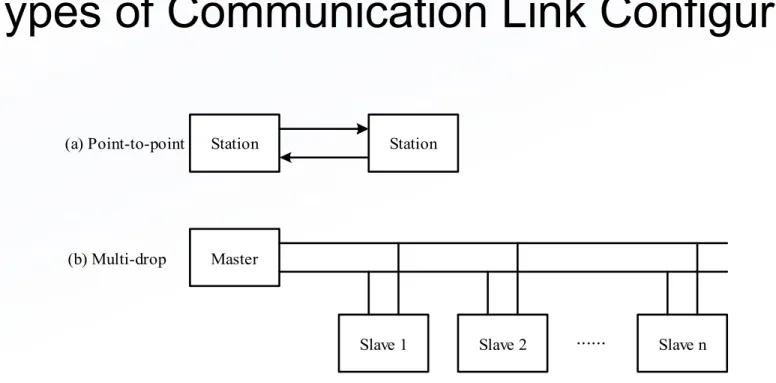
• There are three kinds of data communication links:
(a) Point-to-point Station Station
Master
Slave 1 Slave 2 ... Slave n (b) Multi-drop
Figure 9P.2 Point-to-point and multi-drop communication links
The RS232 Standard
• Was the most widely used physical level interface for data
communication
• Specifies 25 interchange circuits for DTE/DCE use
• Was established in 1960 by Electronics Industry Association (EIA)
• Was revised into RS232C in 1969
• Was revised into RS232D in 1987
The EIA-232E Electrical Specifications
(1 of 2)
•
The interface is rated at a signal rate of < 20 kbps.
•
The signal can transfer correctly within 15 meters.
•
The maximum driver output voltage (with circuit open) is -25 V to +25 V.
•
The minimum driver output voltage (loaded output) is -25 V to -5 V and +5 V
to +25 V.
•
The minimum driver output resistance when power is off is 300 W.
•
The receiver input voltage range is -25 V to +25 V.
•
The receiver output is high when input is open circuit.
•
A voltage more negative than -3 V at the receiver input is interpreted as a
logic 1.
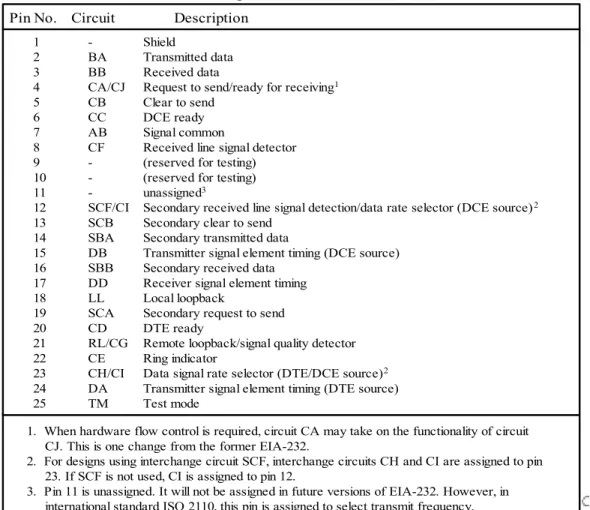
Table 9.1 Functions of EIA-232-E signals Pin No. Circuit Description
1 - Shield
2 BA Transmitted data 3 BB Received data
4 CA/CJ Request to send/ready for receiving1
5 CB Clear to send 6 CC DCE ready 7 AB Signal common
8 CF Received line signal detector 9 - (reserved for testing) 10 - (reserved for testing) 11 - unassigned3
12 SCF/CI Secondary received line signal detection/data rate selector (DCE source)2
13 SCB Secondary clear to send 14 SBA Secondary transmitted data
15 DB Transmitter signal element timing (DCE source) 16 SBB Secondary received data
17 DD Receiver signal element timing 18 LL Local loopback
19 SCA Secondary request to send 20 CD DTE ready
21 RL/CG Remote loopback/signal quality detector 22 CE Ring indicator
23 CH/CI Data signal rate selector (DTE/DCE source)2
24 DA Transmitter signal element timing (DTE source) 25 TM Test mode
1. When hardware flow control is required, circuit CA may take on the functionality of circuit CJ. This is one change from the former EIA-232.
2. For designs using interchange circuit SCF, interchange circuits CH and CI are assigned to pin
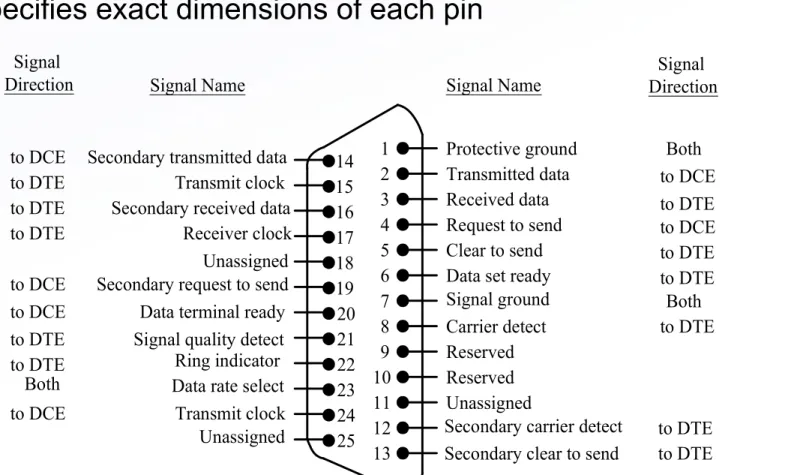
Signal Name
Protective ground Transmitted data Received data Request to send Clear to send Data set ready Signal ground Carrier detect Reserved Reserved
Secondary carrier detect Secondary clear to send Secondary transmitted data
Transmit clock Secondary received data
Receiver clock Unassigned Secondary request to send Data terminal ready Signal quality detect Ring indicator Data rate select
Transmit clock Unassigned
Signal Name SignalDirection
Both to DCE to DTE to DCE to DTE to DTE Both to DTE to DTE to DTE Both to DCE to DTE Signal Direction to DTE to DTE to DCE to DCE to DTE to DTE to DCE
Figure 9.1 EIA-232-E connector and pin assignment 1 2 3 4 5 6 7 8 9 10 11 12 13 14 15 16 17 18 19 20 21 22 23 24 25 Unassigned
EIA-232-E Mechanical Specification
(1 of 2)
• Specifies a 25-pin connector
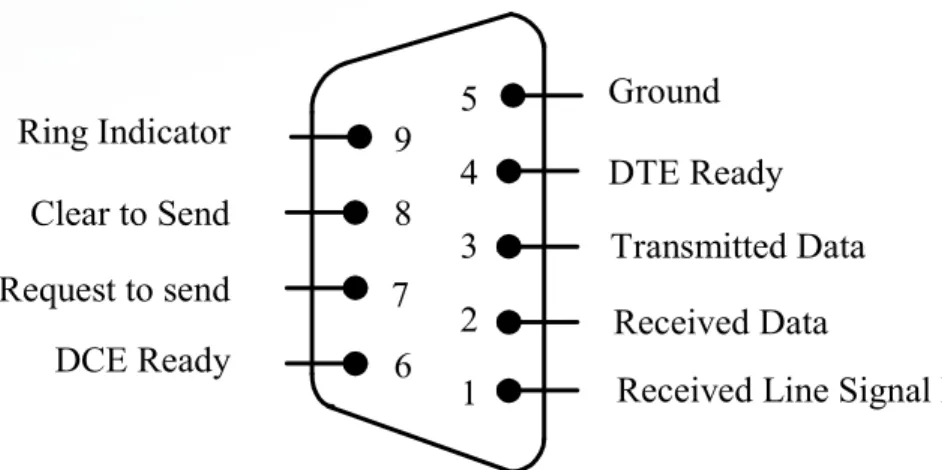
Ground 5
4 3 2 1 9 8 7 6
DTE Ready Transmitted Data Received Data
Received Line Signal Detect DCE Ready
Request to send Clear to Send Ring Indicator
Figure 9.1b EIA232E DB9 connector and signal assignment
EIA-232-E Mechanical Specification
(2 of 2)
• Only a small subset of the 25 pins are actually used in most data
communications.
EIA-232-E Procedural Specification
(1 of 2)
• Define the sequence of events that occurs during data transmission.
• The procedure is easier to understand by examples.
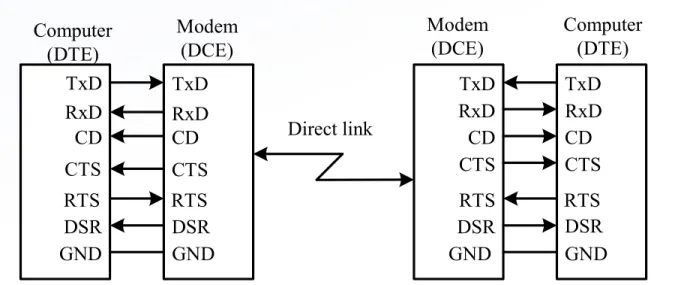
– Case 1. Two DTEs connected via a point-to-point link using a modem
– EIA-232 signals involved:
TxD RxD CD CTS DSR GND RTS TxD RxD CD CTS DSR GND RTS Computer (DTE) Modem (DCE) TxD RxD CD CTS DSR GND RTS TxD RxD CD CTS DSR GND RTS Direct link Computer (DTE) Modem (DCE)
Figure 9.2 Point-to-point asynchronous connection
Local Remote
1. DCE asserts DSR 2. DTE asserts RTS
3. DCE asserts CTS
4. DTE starts to send data (to local DCE)
5. DCE sends out a carrier and then the
modulated data 6. DCE asserts CD
7. DTE waits for arrival of data
8. DCE sends out demodulated received data
9. DTE receives demodulated data
T
im
e
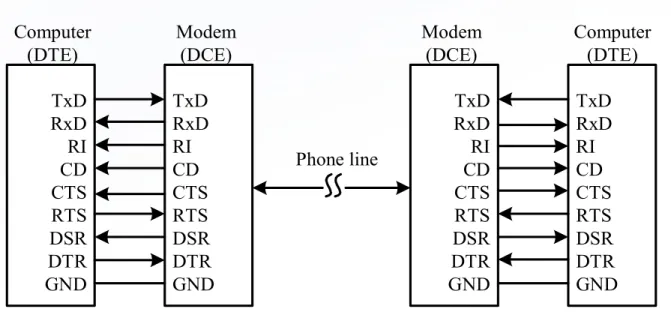
• Case 2. Two DTEs exchange data through a public phone line
• EIA-232-E signals involved:
– Signal ground (GND)
– Transmitted data (Tx)
– Received data (Rx)
– Request to send (RTS)
– Clear to send (CTS)
– Data set ready (DSR)
– Carrier detect (CD)
– Data terminal ready (DTR)
– Ring indicator (RI)
• The signal DTR is used by the DTE to indicate its intention to make
a call or accept a call.
TxD RxD RI CD CTS RTS DSR DTR GND TxD RxD RI CD CTS RTS DSR DTR GND TxD RxD RI CD CTS RTS DSR DTR GND TxD RxD RI CD CTS RTS DSR DTR GND Phone line Computer (DTE) Computer (DTE) Modem (DCE) Modem (DCE)
Local Remote (receiving side)
tim
e
Connection establishment phase
(transmission side)
1. DTE asserts DTR
2. DCE dials the
phone number 3. DCE detects the ring and asserts RI
4. DTE asserts DTR to accept the call
5. DCE sends out a carrier and asserts DSR
6. DCE asserts DSR and CD and also sends out a carrier for full duplex operation
7. DCE asserts CD (full duplex operation)
Local (transmission side) Remote (receiving side)
tim
e
Data
transmission phase
1. DTE asserts RTS
2. DCE asserts CTS 3. DTE sends out
data to DCE 4. DCE modulates data
and sends it out 5. DCE demodulates data and forwards
the data to DTE 6. DTE receives data
Disconnection phase
1. DTE drops RTS
2. DCE drops CTS
and drops the carrier 3. DCE deasserts CD & DSR
4. DTE deasserts DTR
Start
bit 0 1 2 3 4 5 6 7
Stop
bit 1 Stopbit 2
Data Format for Asynchronous
Data Communication
• Data is transmitted character by character bit-serially.
• A character consists of
– one start bit (0)
– 7 to 8 data bits
– an optional parity bit
– one, or one and a half, or two stop bits (1)
– least significant bit is transmitted first
How to Detect the Arrival of Start Bit
• Use a clock signal with frequency at least 16 times that
of the data rate to sample the RxD signal.
• When the RxD pin is idle (high) for at least three
How to Determine the
Logic Value of a Data Bit
• Use a clock signal with frequency at least 16
times that of the data rate to sample the
incoming data.
0 1 1 1 0 0 1 1 0 1
(a) output waveform on microcontroller interface
0 1 1 1 0 0 0 1 0 1
(b) output waveform on EIA-232-E interface
Figure 9.6 Data format for letter g
• Example 9.1 Sketch the output of the letter g when it is transmitted
using the format of one start bit, 8 data bit, and 1 stop bit.
• Solution:
Data Transmission Errors
• Framing error
– A character is not properly framed by a stop bit
• Receiver overrun
– One or more characters received, but not read by the
CPU
• Parity error
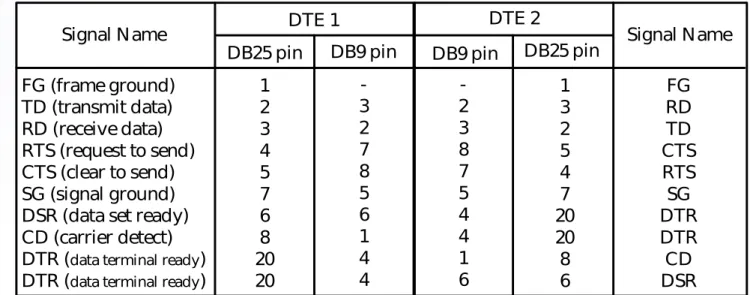
Figure 9.7 Null Modem connection Signal Name
FG (frame ground) TD (transmit data) RD (receive data) RTS (request to send) CTS (clear to send) SG (signal ground) DSR (data set ready) CD (carrier detect) DTR (data terminal ready)
DTR (data terminal ready)
DB25 pin DB9 pin
DTE 1 DTE 2
DB9 pin DB25 pin Signal Name 1 2 3 4 5 7 6 8 20 20 -3 2 7 8 5 6 1 4 4 -2 3 8 7 5 4 4 1 6 1 3 2 5 4 7 20 20 8 6 FG RD TD CTS RTS SG DTR DTR CD DSR
The HCS12 SCI Subsystem
(1 of 2)
• An HCS12 device may have one or two serial communication interface. These two
SCI interfaces are referred to as SCI0 and SCI1.
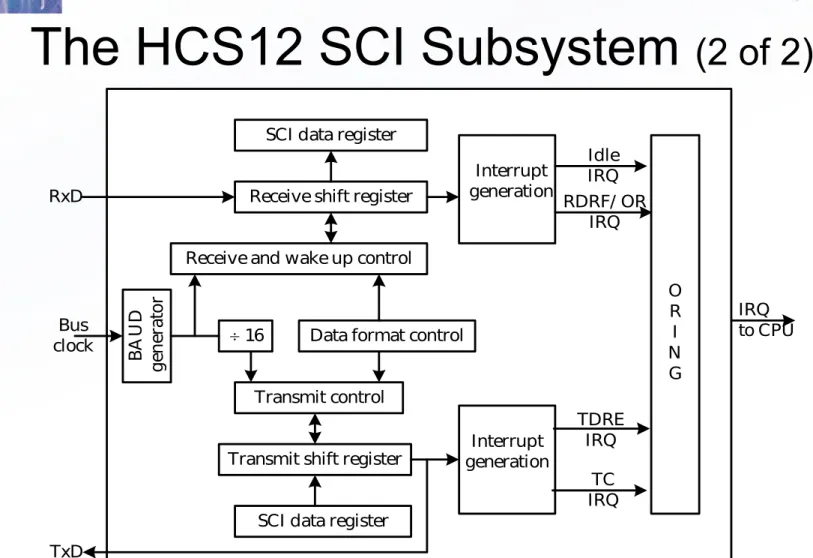
• The block diagram is shown in Figure 9.8.
• Use the data format of one start, eight or nine data bits, and one stop bit. The
collection of the start bit, eight or nine data bits, and the stop bit is called a frame.
• The SCI function supports parity checking. This option requires the use of 9-bit data
format.
• One SCI channel uses two signal pins from Port S. The SCI0 shares the use of PS0
(RxD0) and PS1 (TxD0), whereas SCI1 shares the use of PS2 (RxD1) and PS3 (TxD1).
• The SCI has the capability to send break to attract the attention of the other party of
communications.
– A break is defined as the transmission or reception of logic 0 for a frame or longer time.
• The SCI supports hardware parity for transmission and reception.
• The SCI supports idling line and address mark wakeup, which is useful in multi-drop
SCI data register
Receive shift register
Receive and wake up control
B A U D ge ne ra to r
16 Data format control
Transmit control
Transmit shift register
SCI data register Bus clock RxD Interrupt generation Interrupt generation Idle IRQ RDRF/ OR IRQ TDRE IRQ TC IRQ O R I N G IRQ to CPU TxD
Figure 9.8 HCS12 SCI block diagram
7 6 5 4 3 2 1 0
reset: 0 0 0 0 0 0 0 0
SBR12 SBR11 SBR10 SBR9
0 0 0 SBR8
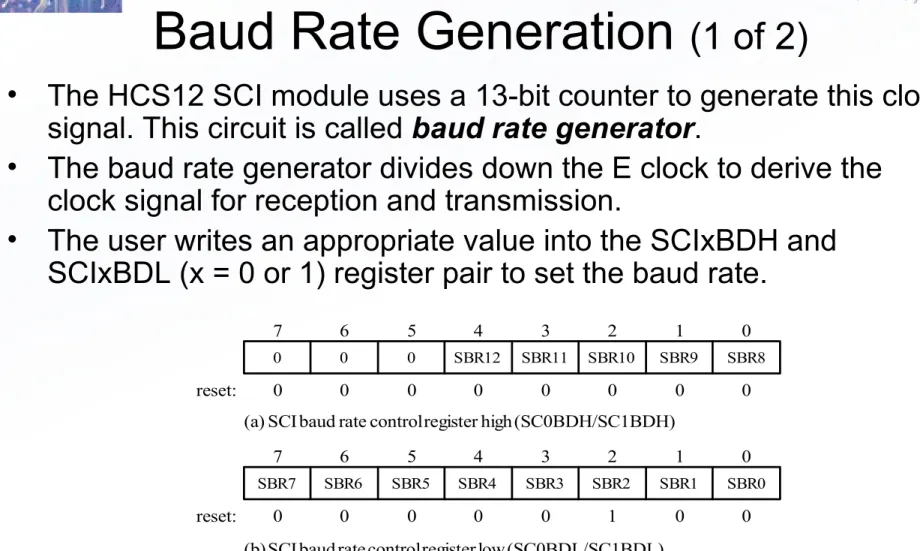
Figure 9.9 SCI baud rate control register
7 6 5 4 3 2 1 0
0 0 0 0 0 1 0 0
SBR4 SBR3 SBR2 SBR1
SBR7 SBR6 SBR5 SBR0
(a) SCI baud rate control register high (SC0BDH/SC1BDH)
(b) SCI baud rate control register low (SC0BDL/SC1BDL) reset:
Baud Rate Generation
(1 of 2)
• The HCS12 SCI module uses a 13-bit counter to generate this clock
signal. This circuit is called
baud rate generator
.
• The baud rate generator divides down the E clock to derive the
clock signal for reception and transmission.
SBR = f
E
16
baud rate
Table 9.2 Baud rate generation Desired SCI
baud rate
Baud rate divisor for fE = 24 MHz Baud rate divisor for
fE = 16 MHz 300 600 1200 2400 4800 9600 14,400 19,200 38,400 5000 2500 1250 625 313 156 104 78 39 3333 1667 833 417 208 104 69 52 26
Baud Rate Generation
(2 of 2)
7 6 5 4 3 2 1 0
reset: 0 0 0 0 0 0 0 0
M WAKE ILT PE
LOOPS SCISWAI RSRC P T
LOOPS: Loop select bit 0 = loop operation disabled 1 = loop operation enabled SCISWAI: SCI stop in wait mode 0 = SCI enabled in wait mode. 1 = SCI disabled in wait mode. RSRC: Receiver source bit
When LOOPS = 1, the RSRC bit determines the source for the receiver shift register 0 = receiver input connected to the transmitter internally (not TxD pin).
1 = receiver input connected extrenally to the transmitted (TxD pin) M: Data format mode bit
0 = one start bit, eight data bits, one stop bit 1 = one start bit, nine data bits, one stop bit WAKE: Wakeup condition bit
0 = idle line wakeup
1 = address mark wakeup (last data bit set) ILT: Idle line type bit
0 = idle character bit count begins after start bit 1 = idle character bit count begins after the stop bit PE: parity enable bit
0 = parity disabled 1 = parity enabled
PT -- parity type bit (for both transmit and receive) 0 = even parity selected
1 = odd parity selected
7 6 5 4 3 2 1 0 value
after reset 0 0 0 0 0 0 0 0
ILIE TE RE RWU
TIE TCIE RIE SBK
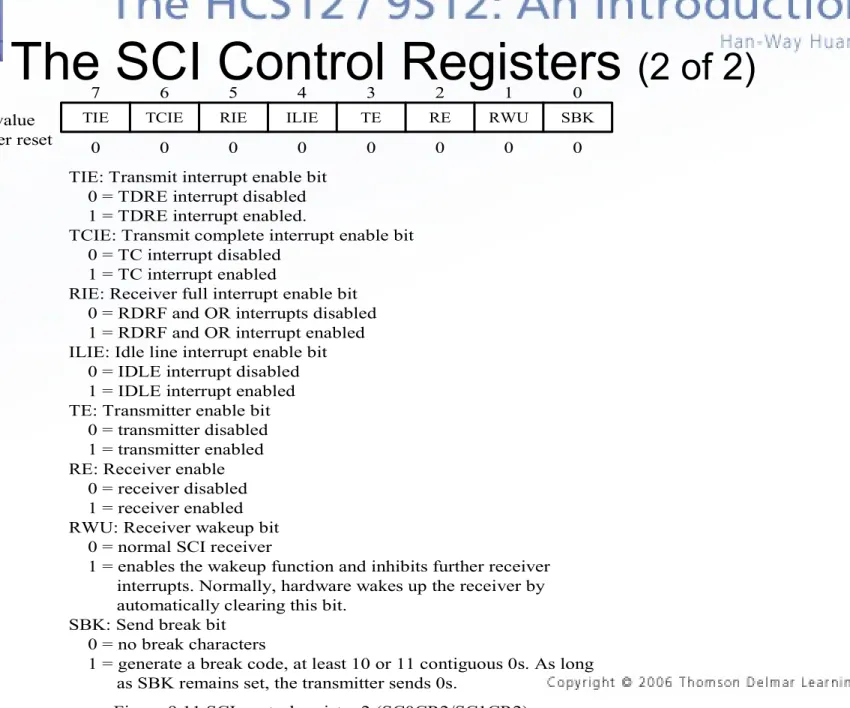
Figure 9.11 SCI control register 2 (SC0CR2/SC1CR2) TIE: Transmit interrupt enable bit
0 = TDRE interrupt disabled 1 = TDRE interrupt enabled.
TCIE: Transmit complete interrupt enable bit 0 = TC interrupt disabled
1 = TC interrupt enabled
RIE: Receiver full interrupt enable bit 0 = RDRF and OR interrupts disabled 1 = RDRF and OR interrupt enabled ILIE: Idle line interrupt enable bit 0 = IDLE interrupt disabled 1 = IDLE interrupt enabled TE: Transmitter enable bit 0 = transmitter disabled 1 = transmitter enabled RE: Receiver enable 0 = receiver disabled 1 = receiver enabled RWU: Receiver wakeup bit 0 = normal SCI receiver
1 = enables the wakeup function and inhibits further receiver interrupts. Normally, hardware wakes up the receiver by automatically clearing this bit.
SBK: Send break bit 0 = no break characters
1 = generate a break code, at least 10 or 11 contiguous 0s. As long as SBK remains set, the transmitter sends 0s.
7 6 5 4 3 2 1 0
reset: 1 1 0 0 0 0 0 0
IDLE OR NF FE
TDRE TC RDRF PF
TDRE: Transmit data register empty flag
0 = No byte was transferred to the transmit shift register. 1 = Transmit data register is empty.
TC: Transmit complete flag 0 = Transmission in progress 1 = No transmission in progress RDRF: Receiver data register full flag 0 = SCIxDR empty
1 = SCIxDR full
IDLE: Idle line detected flag 0 = RxD line active
1 = RxD line becomes idle OR: Overrun error flag 0 = no overrun 1 = overrun detected NF: noise error flag
Set during the same cycle as the RDRF bit but not set in the case of an overrun (OR)
0 = No noise 1 = Noise
FE: Framing error flag
Set when a 0 is detected where a stop bit was expected. 0 = No framing error
1 = Framing error PF: Parity error flag 0 = parity correct
1 = incorrect parity detected
7 6 5 4 3 2 1 0
reset: 0 0 0 0 0 0 0 0
0 0 BK13 TXDIR
0 0 0 RAF
Figure 9.14 SCI status register 2 (SCI0SR2/SCI1SR2) BK13: Break transmit character length
0 = Break character is 10- or 11-bit long 1 = Break character is 13- or 14-bit long
TXDIR: transmit pin data direction in single-wire mode 0 = TxD pin to be used as an input in single-wire mode 1 = TxD pin to be used as an output in single-wire mode RAF: receiver active flag
RAF is set when the receiver detects a logic 0 during the RT1 time period of the start bit search. RAF is cleared when the receiver detects an idle character.
0 = no reception in progress 1 = reception in progress
Character Transmission
•
The block diagram of the SCI transmitter is shown in Figure 9.12.
•
To transmit a character from the SCI module, the user writes the data bits
into the SCIxDRH and SCIxDRL registers.
•
The data bits in SCIxDRH and SCIxDRL registers will be transferred to the
transmit shift register and shifted out serially from the TxD pin.
•
Each time the SCI transfers data from the buffer SCIxDRH/L to the transmit
shift register, it also sets the TDRE flag in the SCIxSR1 register.
•
The setting of the TDRE flag indicates that the MCU can write new data into
the SCI data register.
•
When the transmit shift register is not transmitting data, the TxD signal goes
to idle state.
•
When both the transmit data registers and shift register are empty, the TC
flag in the SCIxSR1 register is set to 1.
BAUD divider Bus
clock
SBR12-SBR0
16 SCI Data Register
H 8 7 6 5 3 2 1 0 L
ST O P ST A R T M T8 Parity generation PE PT Transmitter control lo ad fr om S C ID R Sh if t e n ab le p re am bl e (a ll o n es ) B re ak s (a ll 0 s) TE SBK TDRE TIE TC TCIE TDRE interrupt request
TC interrupt request
Loop Control Loops RSRC To RxD TxD
Figure 9.12 SCI transmitter block diagram Internal Bus
M
SB
Send Break Characters
• A break character is represented by eight or nine logic 0
data bits depending on the character data length.
• Whenever one party in the data communications
discovers an error, it can send break characters to
discontinue the communication and start over again.
• To send break characters, the user sets the SBK bit in
the SCIxCR1 register to 1.
Idle Characters
• An idle character contains all 1s and has no
start, stop, or parity bit.
• Depending on the character data length, an idle
character can be eight or nine 1s.
Character Reception
(1 of 2)
• The block diagram of the SCI receiver is shown in Figure 9.15.
• The SCI receiver can handle either 8- or 9-bit characters.
• When receiving 9-bit data, the R8 bit of the SCIxDRH register holds
the ninth bit.
• During an SCI reception, the receive shift register shifts in a frame
from the RxD pin.
• After a complete frame is shifted into the receive shift register, the
data portion of the frame is transferred to the SCI data register. The
receive data register full flag in the SCIxSR1 register is set to 1.
BAUD divider Bus
clock
SBR12-SBR0 SCI Data Register
H 8 7 6 5 3 2 1 0 L
ST O P ST A R T PE PT IDLE ILIE RIE IDLE interrupt request
RDRF/ OR interrupt request
Figure 9.15 SCI receiver block diagram Internal Bus
11-bit receive shift register 4 FE NF PE RWU Wakeup logic Parity checking R8 RDRF OR A ll o ne s M SB WAKE ILT M RE RAF Data recovery RxD Loop control From TxD LOOPS RSRC
Transmitter
Receiver
TxD
RxD
Single-Wire Operation
• In this operation, the RxD pin is disconnected from the SCI module.
• The SCI module uses the TxD pin for both receiving and
transmitting as illustrated in Figure 9.16.
• Single-wire operation is enabled by setting the LOOPS and the
RSRC bits in the SCIxCR1 register.
• Setting the LOOPS bit disables the path from the RxD pin to the
receiver. Setting the RSRC bit connects the receiver input to the
output of the TxD pin driver.
• Both transmitter and receiver must be enabled.
• The TXDIR bit determines whether the TxD pin is going to be used
as an input (TXDIR = 0) or output (TXDIR = 1) in this mode of
Flow Control of UART in Asynchronous Mode
• The SCI module will transmit data as fast as the baud rate allows.
• In some circumstances, the software may not be able to read data as fast as the data
is received.
• There is a need for the MCU to tell the transmitting device to suspend transmission of
data temporarily.
• Similarly, the HCS12 may need to be told to suspend transmission temporarily. This
is done by flow control.
• There are two common methods of flow control: XON/XOFF and hardware.
• XON/XOFF is implemented completely in software, but requires a full-duplex
communication.
• When incoming data needs to be suspended, an XOFF byte is transmitted back to
the other device that is transmitting.
• To start the other device transmitting again, an XON character is transmitted.
• The XON and XOFF characters have the ASCII code of 0x11 and 0x13, respectively.
• Hardware flow control requires the use of extra signals. Generally, an input pin of the
transmitter is controlled by the receiver.
• Before transmitting any character, the transmitter needs to test the flow control input
movb #$00,SC0BDH ; set up baud rate
movb #156,SC0BDL ; “
movb #$4C,SC0CR1 ; select 8 data bits, address mark wakeup
movb #$0C,SC0CR2 ; enable transmitter and receiver
•
Example 9.2 Write an instruction sequence to configure the SCI0 0 to
•
operate with the following parameters:
– 9600 baud (E clock is 24 MHz)
– One start bit, 8 data bits, one stop bit – No interrupt
– Address mark wakeup – Disable wakeup initially – Long idle line mode
– Enable transmit and receive – No loop back
– Disable parity checking
Interfacing SCI with EIA-232-E
•
The SCI uses 0 V and 5 V to represent 0 and 1.
•
The EIA-232 signal Tx cannot be driven by the SCI TxD signal without
translation.
•
The EIA-232 signal Rx cannot drive the SCI RxD signal without translation.
•
Voltage level translation is required for the SCI signals to drive and be
driven by the EIA-232 signals.
•
Examples of EIA-232 driver chips include:
– LT1080/1081 from Linear technology – ST232 from SGS Thompson
– ICL232 from Intersil – MAX232 from MAXIM
– DS14C232 from National Semiconductor – These chips are pin-compatible.
+5 V
+5 V EIA-232-E
outputs EIA-232-E inputs TTL/CMOS inputs TTL/CMOS inputs TTL/CMOS outputs TTL/CMOS outputs 10 11 12 9 15 8 13 7 14 R2IN R1IN 5K 5K T1IN T2IN R1OUT R2OUT T1OUT T2OUT 1.0F
1.0F 1
3
4
5
1.0F
+5 V
16
V+
PS1/ TxD
PS0/ RxD
Note: Both CTS and RTS are
jumpered to an I/ O pin in case hardware handshake is needed
CTS* RTS* T1IN T2IN R1OUT R2OUT T1OUT T2OUT R1IN R2IN 11 10 12 9 8 13 7 14 1 6 2 7 3 8 4 9 5 DCD DSR RxD RTS TxD CTS DTR RI GND DB9 connector DS14C232
Figure 9.19 Diagram of SCI and EIA232 DB9 connector wiring in SSE256 demo board
#include "c:\miniide\hcs12.inc"
sendbrk bset SCI0CR2,SBK ; turn on send break
ldy #1
jsr delayby1ms
bclr SCI0CR2,SBK ; turn off send break
rts
#include “c:\miniide\delay.asm”
• Example 9.3 Write a subroutine to send a break to the
communication port controlled by the SCI0 interface. The
duration of the break is approximately 24,000 E clock
cycles, or 1 ms at 24 MHz.
• Solution: A break character is represented by ten or
#include “c:\egnu091\include\hcs12.h” #include “c:\egnu091\include\delay.c” void send_break (void)
{
SCI0CR2 |= SBK; /* start to send break /
delayby1ms(1);
SCI0CR2 &= ~SBK; /* stop sending break */
}
#include "c:\miniide\hcs12.inc"
putcSCI0 brclr SCI0SR1,TDRE,* ; wait for TDRE to be set
staa SCI0DRL ; output the character
rts
void putcSCI0 (char cx) {
while (!(SCI0SR1 & TDRE)); SCI0DRL = cx;
• Example 9.4 Write a subroutine to output the character
in accumulator A to the SCI0 channel using the polling
method.
• Solution: The subroutine will wait until the bit 7 of
#include "c:\miniide\hcs12.inc"
getcSCI0 brclr SCI0SR1,RDRF,* ; wait until RDRF bit is set
ldaa SCI0DRL ; read the character
rts
char getcSCI0 (void) {
while(!(SCI0SR1 & RDRF)); return (SCI0DRL);
}
• Example 9.5 Write a subroutine to read a character from
SCI0 using the polling method. Return the character in
accumulator A.
putsSCI0 ldaa 1,x+ ; get a character and move the pointer
beq done ; is this the end of the string
jsr putcSCI0
bra putsSCI0
done rts
void putsSCI0 (char *cx) {
while (!(*cx)) {
putcSCI0(*cx); cx++;
}
• Example 9.6 Write a subroutine to output a string pointed
to by index register X to the SCI0 using the polling
method.
CR equ $0D
getsSCI0 jsr getcSCI0
cmpa #CR ; is the character a carriage return?
beq exit
staa 1,x+ ; save the character in the buffer pointed to by X
bra getsSCI0 ; continue
exit clr 0,x ; terminate the string with a NULL character
rts
void getsSCI0 (char *buf) {
while ((*buf++ = getcSCI0()) != CR);
*buf = 0; /* terminate the string with a NULL character */
}
• Example 9.7 Write a subroutine to input a string from SCI0. The
string is terminated by the carriage return character and must be
stored in a buffer pointed to by index register X.