Pliable Algorithm RGB image Convert in Gray image Using
Transformation Equation
Moneeb Ahmad1, Zaheer Abbas2, Ahmad Nasir3, Muhammad Waseem4, Ameer ul Azim5 and Ansar Abbas6
1, 2, 3, 4, 5, 6 Department of Computer Science, Institute of Southern Punjab Multan, Pakistan [email protected], [email protected]2, [email protected]3, [email protected]4,
[email protected], [email protected]6
ABSTRACT
Color image conversion in gray image is the technique remodeling the peculiarity of the gray scale images. Gray Conversion emphasizes the aspect of images. In this precursory deed is the conversion color image into gray scale image integrity through new equation. The modus operandi of gray image blend channels is complicated to tow reasonable results. In earlier existing techniques to isolate (RGB) Red, Green, Blue channels from gray image but the lack of consume more than immense memory and time and lesser maintain brightness. The jurisdiction of circumscribed follow the gray conversion during of cumulative probability with improves the image brightness. Outcomes acquire by experimentation demonstrate that implemented of gray conversion improve luminance of gray image. Wherefore it is extremely endorsed to use the adequate RGB in gray conversion during of cumulative probability.
Keywords: RGB image and Grayscale image, MATLAB.
1. INTRODUCTION
In this research Pliable Algorithm works of (RGB) Red, Green, Blue image convert into gray scale image. A gray scale image conversion construct different shades of gray color and maintain brightness. There is a demand on the efficient color to gray conversion for computer vision tasks, such as channel reduction for computational load and algorithms for single channel input[1].Color to gray image conversion has been widely used real world application printing color images in black and white format in image processing. The reason for using gray scale represent instead of operate on color image directly that gray scale simplify algorithm reduce computational requirement. In publishing organization printing color image is expensive compared a gray scale image .Thus color images have converted to gray scale image to reduce the printing cost for low priced edition books. Conversion of color image to gray scale image is one of the image processing application used in different fields. In organization of printing color image is costly thus color image converting into gray scale image reduce the printing cost for low price edition books. Digital image processing used biomedical and under water enhancement technique and molecular and satellite [1]. Grayscale image is one of which single image that means one gray image.
Monochrome image is gray scale image because monochrome image is single image and one gray image. Grayscale values represent in data matrix and gray scale range is (0,255).Grayscale image for uint8 values range is (0,255) and uint16 range from (0,65535) and for in16 range is (-32768,32767). Conversion of color image to gray scale image most of color image combination of RGB RED,BLUE and GREEN[2]. True Image is also known as RGB image. The luminance of a pixel value of gray scale image range(0,255)[2]. .In this study we have been adopted comparative research and generate the new transformation equation RGB image convert in gray image and thresholding using Matlab.
2. LITERATURE REVIEW
original image with the bit original image and Shows the colors X ray image bit and gray scale X ray image.[5] In 2016 K. Padmavathi and K. Thangadurai proposed the comparative study implementation of Red,Blue and Green(RGB) and Gray scale images in plant leave disease detection Grayscale and RGB images and used median filter for image enhancement and segmentation for extraction of the diseased portion which are used to identify the disease level.[6] In 2015 ByeongJu Lee and Jongwon Choi and Kimin Yun, and Jin Young Choi proposed the method gradient preserving RGB to gray scale conversion using random forest and shows the method the state the arts of the views color contrast preserving and mean square error versus luminance.[7] In 2006 Ricardo L. Queiroz and Karen M.Braun proposed the method color to gray and back: color embedding into textured gray images perform the decoder a wavelet transform the receive gray image the chrominance channels and print to color images with white and black printers able to recover information after words.[8] In 2008 M.C Adik present the method perceptual revaluation of color to gray scale images conversion and total number of assessed the accuracy the preference gray scale image of the art conversion method.[9] In 2008 H.B Kekre and Sudeep D.Thepade present the method of color traits transfer to gray scale images and represent the highly quality of colored images cannot be expressed by the objective criteria such as color image to re color image.[10] In 2017 Akash Gandhamal, Sanjay Talbar, Suhas Gajre proposed technique preprocessing tool for effective segmentation tissue structure in medical images.In this approach mainly concentrates reproduce the new transformation equation for gray conversion using cumulative probability.
3. RESEARCH METHODOLOGY
In this study each color components of red, green and blue appears in model. Each pixel is made up to three colors red, green and blue (RGB) describe corresponding intensities. Color component are also known as color channel. In RGB color model, color image represent intensity function.
MRGB = (MR , MG, MB)
The intensity of each pixel in a color image total storage of 24 bits. The intensity of each color channel is usually stored 8 bits and which indicates the quantization level is 256. That is a pixel of color image requires storage 24 bits and 24 bit can memory express as 224=256*256*256=16777216 distinct colors[2].
3.1 Gray Scale Image
Gray scale images are represented by intensity values. Gray scale images have many shades a gray in between black and white. The intensity of a pixel value is represented given range 0 and 1 and which gray ranges is 0 and 255 and image pixel are store in binary form.
3.2 RGB Image to Gray conversion
The captured image in RGB image so it necessary to convert from RGB to gray scale image for image processing conversion. The values of three primary colors R.G.B and encodes this linear intensity values convert in gray scale images using probability.
3.3 Cumulative Probability:
Cumulative Probability refers to the probability that the value of random variable falls with in a specified range. Frequently cumulative refers to the probability is less than or equal to a specified value. If we flip a coin two times we might ask: What is the probability coin flip one or fewer head? It would be is zero head plus the one head probability would be equal. For example P(X < 1) = P(X = 0) + P(X = 1) = 0.25 + 0.50 = 0.75.
3.4 Histogram Equalization
Histogram equalization is a technique for adjust Image intensities to enhance contrast. Let image is represented mr by mc matrix of integer pixel intensities ranging from 0 to L-1 is the number of possible integer values is 256.Histogram for each possible intensity.
𝑃𝑛 =𝑛𝑜 𝑜𝑓 𝑝𝑖𝑥𝑒𝑙𝑠 𝑤𝑖𝑡ℎ 𝑖𝑛𝑡𝑒𝑛𝑠𝑖𝑡𝑦
𝑇𝑜𝑡𝑎𝑙 𝑛𝑜 𝑜𝑓 𝑝𝑖𝑥𝑒𝑙𝑠 (1)
n = 0, 1, ..., L – 1 Luminance detail required then color images should be transformed into gray scale images. The transformation equation using in existing algorithm.
∑Iy = 0.296MR + 0.514MG + 0.1243MB (2)
Fig. 2. Histogram Green Channel
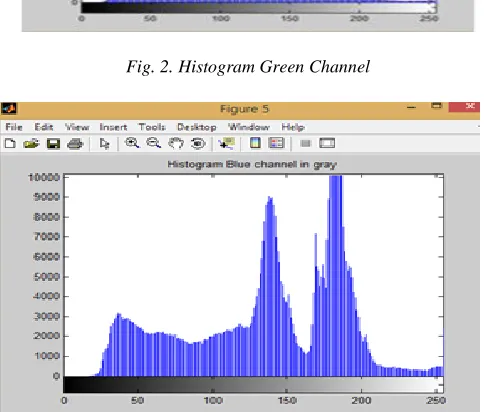
Fig. 3. Histogram Blue Channel
The RGB image is show in fig.4 and fig.5 is input image. Luminance detail required then color images should be transformed into gray scale images. The transformation equation using in existing algorithm[3].
∑Iy = 0.296MR + 0.514MG + 0.1243MB
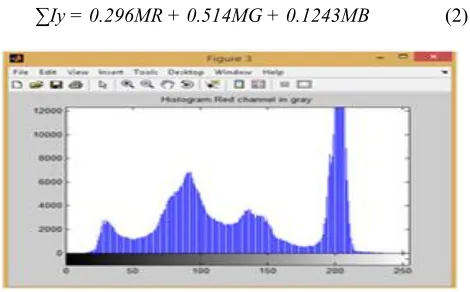
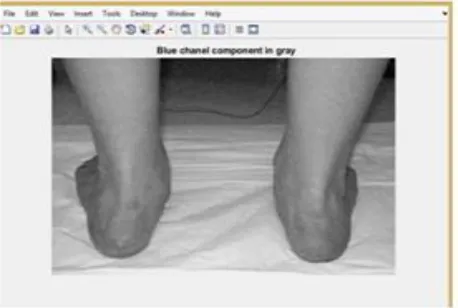
Where MR, MG and MB are the intensity of R and G and B component and Iy is the intensity of gray scale image of RGB image. The fig.1 and fig.2 show histogram red and green channel component and fig.3 histogram blue channel component values are 0to250 intensity values in gray channel. The fig.7 shows red channel component and on of the red channel component. Fig.6 green channel component show pixel region of the fig.10 green channel component. The intensity value of green component at pixel (1,1) is 177. The fig.8 shows blue cannel component and fig.11show pixel region of the blue channel component. The intensity value of blue component at pixel (1,1) is 178. The intensity of pixel one column and one row (1,1) of gray scale image is compute the pixel values of RGB image in equation.
∑𝐼𝑦 = 0.2989 ∗ 203 + 0.5870 ∗ 177 + 0.1140 ∗ 178 = 184.7677 (3)
4 .PSEUDO CODE
Step1: Generate the possible path name.jpg.
Step2: Select and convert image rgb into gray image. Step3: Calculate the pixel value and region using eq.(1). Step4: Select the and calculate the rgb values in gray. Step5: Calculate the intensity values using eq.(2)
Step6: Check the loop for each value rgb in gray for(I=0; I<=5; I++) .
Step7: Select three values Mr, Mg and Mb. Step8: values go to tmp variable.
Step9: go to step 6. Step10:Find. Step11:End.
5. SIMULATION RESULTS
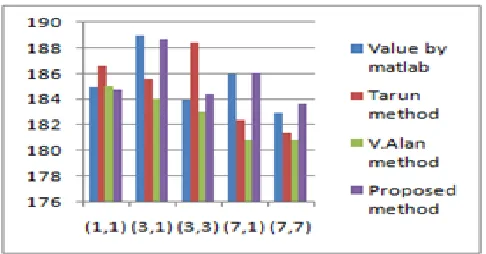
In this study in simulation results the RGB image is show in fig.4 is input image. Luminance detail required then color images should be transformed into gray scale images. The transformation equation using in existing algorithm[3]. Where MR, MG and MB are the intensity of R and G and B component and Iy is the intensity of gray scale image of RGB image. The fig.4 shows the rgb model image of human foot and convert in gray image of human foot. The fig.7 red channel component in gray image of human foot and fig.6 green channel component in gray image of human foot. The fig.7 shows red channel component and show pixel region of the red channel component. The intensity value of red component at pixel (1,1) is 203. The figure (6) show green channel component show pixel region of the green channel component. The intensity value of green component at pixel (1,1) is 177. The fig.8 shows blue cannel component and show pixel region of the blue channel component. The intensity value of blue component at pixel (1,1) is 178. The fig.13 shows the comparison value chart of proposed method to articulated the row and column of(1,1) (3,1) (3,3) (7,1) and (7,7) results values has been experimental values.
Fig. 5. Gray Image Conversion
Fig. 6. Green Components in Gray
Fig. 7. Red Components in Gray
Fig. 8. Blue Components in Gray
Fig. 9. Pixel Region in Red component
Fig. 11. Pixel Region in Blue component
Fig. 12. Proposed Value Chart
Fig. 13. comparison Value Chart
Table 1: Finding of Researcher in their Respective Research Paper
Pixel Value by Matlab
By Tarun method
By v.Alan Method
By Existing Method
Percentage
Error by
Tarrun
Percentage
Error by
V.Alan
Percentage by Existing Method
(1,1) 185 186.5874 185.084 184.767 0.8507541 0.045385 0.046625
(3,1) 189 185.5878 184.0861 188.757 0.8555519 0.046772 0.0473846
(3,3) 184 188.48 183.075 184.384 0.04076 0.471289 0.1415385
(7,1) 186 182.422 180.8329 186.025 0.7795112 0.092320 0.1328571
6. CONCLUSION
In this study a new algorithm has been generate the new transformation equation and changed the value for RGB image convert into gray scale image and compares the existing algorithm and percentage error with recent algorithms and techniques. Our existing proposed algorithm is better than recent algorithms. The existing proposed algorithm is helpful various application better quality of gray scale image high required. Gray scale image using RGB reduction and less amount of time. RGB to gray scale image conversion is preferable for gray application MRI, X-ray, Biophsy.
REFERENCES
[1] C.Saravanan," Color Image to Grayscale Image Conversion", Second International Conference on Computer Engineering and Application., 2010.
[2] V.Alan Gowri Phivin, A.C Subhajini, "A flexible Algorithm for Conversion RGB Image to Gray Image using MATLAB" , International Journal of Control Theory and Application (ISSN:0974-5572) Volume 10., Number 27.2017.
[3] Tarun Kumar, Karun Verma,"A Theory Based on Conversion of RGB image to Gray image", International Journal of Computer Application (0975-8887) Volume 7-No2, September 2010.
[4] N.RaviaShabnamParveen, M.Mohammed Sathik,"Gray Scale Conversion of X ray image Technique", International Journal of Engineering Science and Technology Vol.2(7) (2820-2824)., 2010.
[5] K.Padmavathi,K.Thangadurai,"Implemet of RGB conversion Grayscale images Plant Leave Detection", Indian Journal of Science and Technology Vol .9(6).,February 2016.
[6] Tomihisa Welsh, Michael Ashikhmin, Klaus Mueller,"Transferring Color to Grayscale Images",Center of Visual Computing Science Department,ACM 2002.
[7] Ricardo L. de Queiroz,"Color Embadding into Texture Gray Images", IEEE Transaction on Image Processing Vol.15,No.6,June 2006.
[8] M.Cadik,"Perceptual Evaluation of Color to Gray Scale Image Conversion", The Eurographics Association and Blackwell Publishing Volume 27., Number 7.2008. [9] T. S. Engg, "Color Traits Transfer to Grayscale Images
3.Color trait transfer algorithm using Kekre ’ s LUV Color Space of Source Image RGB space of Source Image, " pp. 82–85, 2008.
[10]A. Gandhamal, S. Talbar, S. Gajre, A. F. M. Hani, and D. Kumar, "Author ’ s Accepted Manuscript Local Gray Level S-Curve Transformation − A Generalized Contrast Enhancement Technique for Medical Images Local Gray Level S-Curve Transformation − A Generalized, " Computer. Biol. Med., 2017.
[11]S. Mahajan and R. Dogra, "A Review on Image Enhancement Techniques, " vol. 4, no. 11, pp. 108–113, 2017.
[12]C. Sharma and A. Kaur, "Indian vehicle license plate extraction and segmentation, " vol. 2, no. 2, pp. 593– 599, 2011.
[13]GRADIENT PRESERVING RGB-TO-GRAY CONVERSION USING RANDOM FOREST ByeongJu Lee , Jongwon Choi , Kimin Yun,and Jin Young Choi Perception Intelligence Lab Department of Electrical and Computer Engineering , ASRI Seoul National University , Seoul , Korea," IEEE pp. 3170–3174, 2015. [14]V. S. D. G. K. P. Soman, "Significance of incorporating chrominance information for effective color-to-grayscale image conversion," Signal, Image Video Process., 2016.
[15]K. Kumar, "Content Based Image Retrieval Using Gray Scale Weighted Average Method," Int. J. Adv. Computer. science Appl., vol. 7, no. 1, pp. 1–6, 2016. [16]S. Member, T. Zhao, K. Zeng, and Z. Wang, "Objective