Research Journal
Volume 8, No. 24, Dec. 2014, pages 90–95
DOI: 10.12913/22998624/574 Original Article
VIRTUALIZATION TECHNICAL THINKING WITHIN THE INFORMATION
TECHNOLOGY
Robert Lis1
1 Department of Teaching Methods and Strategies, Lublin University of Technology, Nadbystrzycka 38, 20-618 Lublin, Poland, e-mail: [email protected]
ABSTRACT
The article presents the possibilities of virtualization technical thinking within the information technology. This question expresses the need for virtualization of existing information systems to improve the conduct of business by the company. In result-ing virtualization of the technical-computer thought on against existresult-ing needs of the functioning of 16-bit systems in 64-bit systems. Enables cost-effective use of excess capacity existing computing resources.
Keywords: virtualization, thinking technical-information.
INTRODUKCTION
The technical thinking consists in competent applying in intellectual activities both practical notions and judgements describing and clarify-ing the technique. To concern it can of differ-ent fields of technology. Nowadays almost an information technology is playing an important role in every field of technology and the human activity. She is developing at full speed. Is one of manifestations of this development virtualiza-tion of servers.
She evolved within a few last years from the technology being born to the seen function IT. Companies more and more often start using from her power to meet the changing business needs. Through virtualization of one’s burdens, organi-zations can control and reduce costs, improving the scalability, the flexibility and the reach of computer systems simultaneously. Arising prog-ress more and more is making aware, that virtu-alization alone in himself doesn’t let companies build and perform business tasks. Denouement Hyper-V was first introduced as part of the sys-tem Windows Server 2008, and then extended and strengthened in the system Windows 2012. Hyper-V provides equipment investments of the server for business organizations of the tool for
the operational research through the consolida-tion of many funcconsolida-tions of the server in the form of separate virtual machines started on the single machine of the physical host. It is possible also to use Hyper-V in order effectively to act on many operating systems, in it operating systems different from Windows, so like for example al-together DOS on one physical server, and also to exploit the 64-bit power of processors.
The purpose of this article is to signal the need to find an optimal solution to streamline the running of the business in its current form. The use of proven, high-performance 16-bit ERP ap-plications running under the DOS operating sys-tem becomes more difficult due to technological advances and the lack of compatibility ,,down‘‚ current solutions. ERP software, particularly in a version for DOS systems have very specific re-quirements. It is eg. on the number of simultane-ously open files.
DOS was able to open simultaneously to 255 files under the condition of proper configuring.
Parameter ,,files’’ required for the accom-plishment it is possible to configure in the dif-ferent way only on 32-bit systems. Rates of-fered at present of the proportion of the screen are an additional obstacle. In this case a resolu-tion should be a standard in the 4:3 format. This Received: 2014.09.25
640x480 of pixels is most often, more rarely 800x600 of pixels. Such a resolution should be kept for right proportions of letters and the ar-rangement of windows. Direct reference to data saved onto the disk being a consequence of the application among others ,,only’’ 640 KB of the main memory in current systems very much was modernised by initial versions DOS. Applying SSD disks which can work with the speed will be a good example of memory towards creating the buffer called the RAM,, RAMdrive’’ in the destination of precipitating performing the op-eration you on very free at that time disks plate. Every system of the ERP class performs operations, of which many times a document printout is a result. For a few years we have an already legally normalised possibility of the transmission of the documents for contracting parties without the signature and in an electron-ic form. However for the purposes of keeping records for the accountant and the possible tax audit documents having a force of law are most often printed on paper. Also tax documentation and less and less often tax declarations find their reflection in physics printouts. ERP systems de-signed for different sized companies usually implement sending codes to print directly to the printer via the parallel port. Unfortunately, the port has been almost entirely supplanted by USB, and multiple machines is no longer pres-ent. In addition, the matter is complicated by the fact that the use of heavy duty dot matrix printers have only LPT port. Operatings cost of these devices are limited to an exchange print-ing tapes every a few months or even years in case of occasional prints. Perhaps they aren’t too fast, perhaps are too loud but the fact that they are able simultaneously to print a few cop-ies of the same printout is also their advantage. For this reason users don’t want to give these devices up.
Should also mention fiscal printouts which are a requirement of the completion of retail trades. Devices being used for it are communi-cating through a serial port. Even if a bought new
fiscal printer having a universal USB port will stay it still signals on this port will be emulating serial communication. Can see it in the system after installed drivers which are always visible as ,,high’’ COMM ports. it is necessary then to pay attention to the need for the change of the port number on one from acceptable through the ERP systems.
USE OF 16-BIT APPLICATIONS ERP
Some attempt to address the need for the use of ERP applications for DOS made Mi-crosoft releasing system windows 7 in version 64-bit with additional software. Wanted to be able to work for applications that previously worked in the systems 16-bit to 32-bit. In order to keep the compatibility he suggested a solu-tion named VirtualPC. was it is an ovule and simultaneously confession of the producer to the fact that he exists work opportunities need the behaviour with older applications. Virtual-PC was a simple concept of creating operating systems of guest ‘’in the system,, of host. The solution lived to see to become topical to ver-sion 2007, in which flat Aka a possibility was blocked virtualization of system windows 98. With next answer, revolutionary on account of the use free of charge, is HyperV. On purpose omitted dissolutions of other companies will stay for economic reasons.
Saying about virtualization as the indispens-able tool enabling the service of ERP systems under DOS one should clarify this notion. On account of a lot of accessible definitions, I will use classifying solutions in terms of the running speed. With base wirtualizacji there were
tors of operating systems which thanks enable applying interpreting the Instruction work of ap-plications written to other system than installed in the computer. I will use the name here mod-erators because main games written under Atari, Commodore and many other computers but the
PC started on the platform were their benefi -ciary. Their manner of the work caused the top-level emulation of the system of the guest what resulted up to 500 times in slower action than the system of the host. Next in virtualization Hy-pervisor is starting the special sequence of the VMXON instruction in the processor. In the na-tive version virtualization in particular
hypervi-sor – administrator virtualization, more efficient
than the traditional emulation, the system of the guest is starting the host directly on the equip-ment this way, so that they as the most instruc-tion make directly both he controls the equip-ment and is managing guest operating systems. Is maximizing in this way using the real equip-ment and providing software - machine virtual-ization only dangerous instructions. This model is a classic implementation of virtual machine architecture ; Primary hypervisors were used for testing. Modern equivalent enServer Citrix , VMware ESX / ESXi and Microsoft Hyper-V hypervisor.
The virtualization, in which hypervisors are in the traditional environment of the operating system and being on the next layer on the lower level of preference start the guest OS and hyper-visor software running on the hardware allocates resources for running virtual systems. KVM, Vir-tualBox and Virtual PC are examples of virtual-ization hypervisor. As a result, Hyper -V works almost as good as the original system. However, it emulates a USB or audio inputs. If they are then you need to connect to the virtual machine via Remote Desktop.
USING THE EXCESS OF THE POWER
IN CURRENT COMPUTERS
64-Bit architecture is being met today almost in every individual. 64-Bit processors and operat-ing systems suitoperat-ing them are a standard. Proces-sors are characterized not one and a few not to say with a dozen or so physics cores. They often have a technology which is doubling the number of cores to several dozen logical cores.
Very much a lot of the main memory is in contemporary computers on account of for her relatively minimum price for the GB. a devel-opment of the so-called technology is support-ing it double of the memory i.e. the memory put in pairs on the motherboard. Limiting to 4 GB 32-bit systems were able to address which was also changed on 64 TB in versions 64-bit.
The technological progress didn’t pass bulk storages. The parallel record on magnetic plates increased “the packing density’’ causing informa-tion constant increasing the capacity and the price cutting. The development of the concept of very fast electronic disks of SSD caused, that very much a price for the megabyte magnetic disks of-fer which had diminished.
However the technological progress in this case a bit went too far ordering the operator using pointing devices as the feather, the mouse or the touch screen. Even harnessing bars code reader which by design entering the assortment into the system was supposed to hasten, in many cases will fail an examination for instance from the ac-count of the lack of the bar code on goods.
A few ways to use the excess of accessible sources exist in contemporary computer ma-chines. It is possible to distinguish:
• so-called virtualization „PC in PC” constitut-ing emulation of equipment stores of the host
with using the software started in specific
operating systems – very useful solution in testing purposes of the new software and the
verification of saving viruses in terms of the
presence;
• virtualization of application, that is making the application server available by hipervisor
to the specific workstation and at using the
desktop installed on operating systems of the software using it on the PC, what allows for the fast collective update or her blockade;
• client virtualization, which is the separation of the physical location of the server lo-cated on the hardware resources that reside on them, and client virtual machine images, from the place where the user is located and the use of so-called. thin clients – in the
cur-rent version outdated computers with weak resources connecting to the virtual desktop infrastructure by local – LAN or wide – WAN network with TCP / IP protocol with high throughput.
The most economically viable form of virtualization for the purpose of ERP applica-tions running under DOS client virtualization, which from the server to the data repositories containing client virtual machines available on
request to users for efficient use of existing re
-sources, and often outdated information.
there-fore economically justified because the producer
is providing with the version core of hypervisor Hyper-V system completely free of charge. It is fully functional platform of virtual machines.
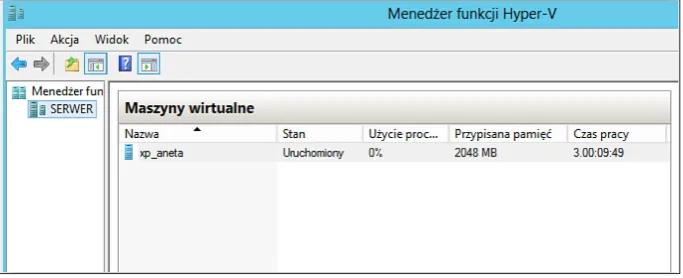
Fig. 4. System of the guest in the application Hyper-V
As a Windows PowerShell shell is enclosing with course books developed tools also free of charge enabling in the graphic way to create vir-tual machines and managing existing resources stayed. This system has both a Firewall and De-fendera which are responsible for a safety.
However of scripts of such an application can be a few. Their choice is affecting the ergonomics from the side of the user or the administrator, the speed and the stability of action. As a result of run examinations I will focus on most optimum in terms of the productivity and the stability ter-mination streamlining running a business in the current form.
The discussed solution is based on hipervisor in the version core. On account of as a rule very much big burdening the server with virtual ma-chines isn’t shown applying the graphical envi-ronment. Fully a management and a resource al-location of the host enable the operator Hypervi-sor. Existing tools are monitoring using resources by every customer. From here exceptionally ef-fectively it is possible to exploit the entire power of the server and if some of systems of guests is turned off, to redirect dismissed stores to other virtual machine. The most he is an optimal sys-tem of the guest available for a dozen or so years Windows XP in the version 32-bit. His versatility consists in the service very much of many ERP applications working under control DOS and the
possibility of configurations of parameters re -quired by ERP. available tools of integration ef-fectively are emulating action of the keyboard. Merging with such a virtual machine with the help available already from the system windows to get
98 client applications supporting the protocol of the RDP communication it is possible redirecting the customer of interrupts being responsible for parallel ports to the system and terrace. The print-out which is being carried print-out on the machine of the host is staying in their result redirected to the printer connected in terms of physics to the port of the customer. To be redirected perhaps ,,move’’ both on parallel ports, privates as well as USB. using the redirection ,,of move’’ on a serial port
to get it is possible fiscal printout at the ward with the help of the server being in a head office. Also
bar code reader connected by a serial port, USB or keyboard to the computer of the guest will actually be active in the branch distant from the
head office of the company.
On account of very long supporting by the producer the system windows XP his licence on the current computer it is possible virtualize and as operating systems of the so-called thin custom-er to use distribution free of charge of the system Linux. It will only be used to start the application communicating with hypervisor with the help of the RDP protocol. Many available tools exist free of charge as additional applications downloaded from appropriate repositories. A functionality of display layer which must provide the simultane-ous access for users for everyone to many desk-tops of virtual machines is an important difference of such a solution simultaneously, in the opposite to layer visualization used at virtualization of very servers, where only an administrator is gain-ing access to the desktop of the system, whereas the user is using only services made available on the server.
CONCLUSIONS
Presented answers virtualization in the
differ-ent form are ensuring benefits in the IT organiza
-tion. many of mentioned above technologies con-nected mainly with the emulation are known and used in systems of the ERP class, some whereas, so like full virtualization of servers and desktops, are relatively new in terms of the realization in the business. virtualization to treat belongs not as the way to minimize the number of physical devices in the infrastructure of the business organization, but as the full support system delivering services backing the ERP software up under DOS in the effective way. Planning virtualization one should
however choose stores of the IT infrastructure of the organization most appropriate in the current situation solution and to develop them in line with the earlier developed strategy virtualization. Such an approach will help to maximize swimming
benefits from this technology.
REFERENCES
1. Popek G.J., Goldberg R.P.: Formal requirements for virtualizable third generation architectures. Communications of the ACM, Vol. 17 (7), 1974. 2. Promotional Materials Microsoft Corporation,