Level 7/418A Elizabeth St Surry Hills NSW 2010 PO box 1147 Strawberry Hills NSW P. 02 8217 8700 F. 02 9211 7578 E. [email protected] www.nps.org.au
QUALITY, SAFETY AND
USEFULNESS OF
GENERAL
PRACTICE PRESCRIBING
SOFTWARE
STUDY
Evaluation of Prescribing Systems
(EPS) study
2
©2011 National Prescribing Service Limited
This work is copyright. You may download, display print and reproduce this work in unaltered form (only retaining this notice) for non-commercial use either personally or within your organisation. Apart from any such use or otherwise as permitted under the Copyright Act 1968, all rights are reserved. This work may contain other works (subworks) reproduced with permission from third party copyright owners. Please ensure that you have permission from the copyright owner or pursuant to the
Copyright Act before using such subworks.
Queries concerning reproduction and rights should be sent to [email protected].
Suggested citation
Sweidan M, Williamson M, Reeve J. Quality, safety and usefulness of general practice prescribing software study. National Prescribing Service Limited. Sydney, 2011.
Acknowledgments
We wish to thank the following people who made a valuable contribution to this study:
Members of the study guidance group: Ken Harvey, Jennifer O’Neill, Peter Schattner, Teri Snowdon, Christine Walker.
NPS staff: Adi Smith, Zabin Ali, Jean-Pierre Calabretto, Tessa Morgan, Michael Ahearn and Bryn Lewis. Jonathan Dartnell, Malcolm Gillies, Kitty Yu and Meg Stuart provided valuable comments on the manuscripts for publication.
The expert panel members rated the features in a modified Delphi process. They were: John Aloizos, Ian Cheong, Michael Dooley, Sue Healy, Peter MacIsaac, David More, Greg Peterson, Marie Pirotta, Janette Randall, Peter Sprivulis, Shiong Tan, Johanna Westbrook.
Publications
This study has been reported in two publications:
▷
Sweidan M, Williamson M, Reeve JF, Harvey K, O’Neill JA, Schattner P, Snowdon T. Identification of features of electronic prescribing systems to support quality and safety in primary care using a modified Delphi process. BMC Medical Informatics and Decision Making 2010, 10:21.http://www.biomedcentral.com/1472-6947/10/21.
▷
Sweidan M, Williamson M, Reeve JF, Harvey K, O’Neill JA, Schattner P, Snowdon T. Evaluation of features to support safety and quality in general practice clinical software. BMC Medical Informatics and Decision Making 2011, In press.CONTENTS
Glossary ... 4
1. Executive summary ... 5
2. Recommendations... 7
2.1. Ten high priority recommendations ... 7
2.2. All recommendations ... 8 3. Introduction ... 11 3.1. Objectives ... 11 3.2. Rationale ... 11 3.3. Overview of study ... 11 4. Background ... 13
4.1. Computerisation in general practice ... 13
4.2. Effects of electronic prescribing ... 13
4.3. Related work ... 14
5. Methods ... 15
5.1. Identification of features ... 15
5.2. Rating of expected impact of features ... 15
5.3. Implementation of features in general practice software ... 16
6. Results ... 18
6.1. Overview of features and testing ... 18
6.2. Identification of features ... 19
6.3. Rating of expected impact of features ... 20
6.4. Implementation of features in general practice software ... 21
7. Discussion ... 37
7.1. Software vendor response ... 37
7.2. Strengths and limitations ... 37
7.3. How these results compare with other work ... 38
7.4. Complementary work in Australia ... 39
7.5. Software standards and certification ... 39
8. Conclusion ... 40
Appendix 1. Delphi process ... 41
A1.1. Ratings system used in modified Delphi process ... 42
Appendix 2. Features list and expert panel rating of expected impact ... 43
GLOSSARY
4
GLOSSARY
ACSQHC Australian Commission for Safety & Quality in Healthcare
APCC Australian Primary Care Collaboratives
ARTG Australian Register of Therapeutic Goods
EHR Electronic health record
MSIA Medical Software Industry Association
NEHTA National e-Health Transition Authority
QUM Quality use of medicines
RACGP Royal Australian College of General Practitioners
1.
EXECUTIVE SUMMARY
There is currently no clear guidance available in Australia about the features of electronic prescribing systems that support patient safety and the delivery of quality care in the general practice setting. The aims of this study were to identify the key features* of general practice electronic prescribing systems that support patient safety and quality of care and are useful for clinicians and patients; to establish consensus on the most important features; to assess the implementation of these features in commonly used general practice prescribing software systems; and to make recommendations about the most important features.
The study consisted of three parts and was carried out from late 2006 to early 2009. In the first part we developed a prioritised list of features of prescribing software systems that would support patient safety and the delivery of high quality care. The initial list of features was based on a review of the literature and key informant interviews. The selection was validated by a multidisciplinary panel of experts who had an interest in safety and quality, and a small number of additional features were added by the panel. In the second part of the study, the panel members rated and prioritised the features via a modified Delphi process, based on the expected impact of each feature across four domains and taking a quality use of medicines (QUM) perspective: patient safety, quality of care, usefulness to the clinician, usefulness to the patient.
In the third part of the study we developed a method for testing the features in prescribing software systems, and subsequently tested seven commonly used systems to find out if the features had been implemented. The systems tested were: Best Practice, Genie, Medical Director 2 and 3, MedTech32, Practix and Profile.
The results were as follows: 114 features were identified and categorised into one of eight groups: patient data; medicine selection; decision support; patient education and information; monitoring, reports and recalls; interoperability and communication; security and administration; and transparency. The expert panel rated all 114 features as likely to have a medium or high positive impact in at least one domain. Ten features were classified as ‘aspirational’, either because of a lack of agreed technology standards or infrastructure, or lack of a nationally accepted knowledge resource being available in a suitable format. One hundred and four features were tested in prescribing software systems and 92 were able to be scored. Implementation was variable, ranging (in the seven systems tested) from 42–67% of features being fully implemented, 20–24% being partially implemented, and 12–34% not implemented at all. The decision support features were the most variable and on average, the most poorly implemented, whereas features related to recording of patient data and the medicine selection process were better implemented. There was room for improvement in all systems tested. The systems tested varied in numerous ways including their functionality, user interface design, structure of the medical record and coding systems used. Important safety features that were included in all or most systems were alerts for drug–drug interactions, drugs in pregnancy and allergies. Most systems displayed information about allergies and pregnancy and breastfeeding status throughout the consultation. All systems had reminders for new pathology results that were abnormal and for overdue pap smears, and warned the user when creating or opening a record where there was another patient with the same name in the system.
There were also some gaps and limitations, as follows: There was a lack of access to key Australian independent, evidence based resources such as the Australian Medicines Handbook and Therapeutic Guidelines. Access to patient information resources varied considerably. In some systems, similarly named medicines were not clearly differentiated in the medicine selection process, increasing the risk of errors. The definition and functioning of the “current medicines” section of the patient record (i.e. current medicines list) varied. Clinical decision support and related tools (e.g. paediatric dose
calculators) varied in terms of availability and quality, with the currency and knowledge source or rules not being evident in many cases. The user interfaces ranged from simple, clean and intuitive to
EXECUTIVE SUMMARY
6
cluttered and confusing. Query and clinical reporting functionality varied in terms of ease of use and capabilities. The level of user configurability of the systems varied widely; it is not known to what extent users alter the default settings in these systems.
In conclusion, this study defines the features of general practice electronic prescribing systems that are expected to support safety and quality, with a focus on prescribing and use of medicines in general practice. While current Australian e-prescribing systems include some beneficial decision support tools and useful resources, there are also noteworthy flaws, such as lack of or poor quality decision support in some areas, and limited and variable resources for patients. Standards and certification for clinical software would help to ensure that safety features are present and that there is a minimum level of clinical functionality that clinicians could expect to find in any system. The features from this study could form the basis for the development of standards. Specific recommendations are outlined in the next section.
2.
RECOMMENDATIONS
The following recommendations focus on those areas that we believe are important to support patient safety and quality of care in general practice, particularly in relation to prescribing and use of
medicines. They are based on a number of factors including expert panel ratings (features rated as being likely to have a high impact on quality and/or safety); level of implementation in general practice software systems at the time of testing; and features that are important to support quality use of medicines. Ten high priority recommendations (selected by NPS staff) are highlighted
(see Section 2.1 below).
Various groups have a role to play in implementing these recommendations to improve the safety and quality of clinical software systems, and in the development of relevant standards. In many cases a collaborative effort will be required between stakeholders in order to effect change; these include government, professional organisations, accreditation and standards bodies, the medical software industry and publishers of therapeutic information resources.
2.1.
Ten high priority recommendations
Standards and knowledge bases
1. National standards and guidance are required to promote the implementation of features to support safety and quality in clinical software systems. Standards and guidance would assist software vendors, produce greater consistency between systems, and facilitate improvements in clinical decision support and interoperability between systems.
2. Clinical decision support should be underpinned by high quality knowledge bases designed for decision support and with content that is independent, evidence based, accurate, up-to-date and locally relevant. Ideally these should be independently evaluated prior to their implementation in clinical software systems.
Software features to support prescribing safety and quality
3. Clinical decision support should be available for drug dosage, including warnings on potentially harmful doses, paediatric dosage, dosage adjustment in renal impairment, and recommended dosage including for off-label indications.
4. Clinical decision support should be available for drug-condition contraindications.
5. A suitably formatted medicine list for patients should be available; it should be clearly set out, be in plain English and include a section for the indication for the medicine.
6. Medicines should be displayed such that it is easy to differentiate between similarly-named products in a pick list and thus reduce the risk of selection errors.
7. When a brand name medicine is selected, the active ingredient/s of the selected product should be displayed on the screen.
8. It should be possible to send adverse drug reaction reports directly from the clinical software system to the central data collection agency electronically.
RECOMMENDATIONS
8
Areas requiring further investigation or development
To ensure ongoing efforts to support quality of care and safety in general practice in the future, the following areas need to be further investigated or developed:
9. Mechanisms to independently review, endorse and support high quality knowledge bases for decision support e.g. through practice incentive payments.
10. A mechanism for ‘safety’ alerts from the regulatory authority to be incorporated into clinical software systems in a timely way.
2.2.
All recommendations
A number of the features included in this list of recommendations were present in some general practice software systems at the time of the study, however many were not, or were not implemented optimally. Note that the full list of 114 features to support safety and quality is shown in Appendix 2. The ten high priority recommendations are marked with two asterisks.**
Standards for clinical software
1. National standards and guidance that focus on safety and quality are required to support the implementation of these recommendations in clinical software systems. Standards and guidance would be helpful to software vendors, would produce greater consistency between systems, and would facilitate improvements in clinical decision support and interoperability between systems.**
Knowledge resources and decision support
2. High quality drug and therapeutic information developed for use in clinical software should be accessible from within the prescribing system. The information should be independent, evidence based, accurate, up-to-date and locally relevant, for example the Australian Medicines Handbook and Therapeutic Guidelines.
3. Decision support should be underpinned by high quality knowledge bases designed for decision support and with content that is independent, evidence based, accurate, up-to-date and locally relevant. Ideally these should be independently evaluated prior to their implementation in clinical software systems.**
The following types of clinical decision support should be available:
3.1. Drug dosage – including warnings on potentially harmful doses, paediatric dosage, dosage adjustment in renal impairment, and recommended dosage including for
off-label indications.**
3.2. Drug-condition contraindications **
3.3. Choice of therapy (i.e. recommended therapy for a condition)
3.4. Therapeutic duplication of medicines prescribed
3.5. Drug-drug interactions
3.6. Drug use in pregnancy and lactation.
4. Where decision support is presented in the form of alerts, the following functionality is recommended:
4.1. Different categories of alerts (e.g. safety alerts, reminders) should be prioritised and distinguished by clinical importance.
4.2. Users should be able to customise the way they view low priority alerts.
Patient/consumer resources
5. A range of good quality evidence based patient information resources and tools should be available within the prescribing system, including:
5.1. A suitably formatted medicine list for patients. It should be clearly set out, be in plain English and include a section for the indication for the medicine.**
5.2. Patient information leaflets on medicines and health conditions.
5.3. Reliable tools that can be used by the patient and doctor to guide treatment decisions, e.g. cardiovascular risk calculator.
Medicine selection
6. The safe and appropriate selection of medicines should be supported in the following ways:
6.1. Display medicines in a pick list such that it is easy to differentiate between similarly-named products and thus reduce the risk of selection errors.**
6.2. Display the active ingredient/s of a selected product on the screen when a brand name product is selected.**
6.3. Allow the prescriber to easily find generic product alternatives to a selected or previously prescribed brand name product.
6.4. Enable the prescriber to link a medicine with its indication, ideally entering the indication first (to enable decision support). It should be possible to include the indication on a prescription and on a patient medicine list, however allowing for situations where a patient would prefer that this does not occur.
6.5. Display up-to-date PBS information and provide access to current approved product information and consumer medicines information leaflets as soon as the product is listed in the system and can be prescribed.
6.6. Offer clinically appropriate pre-defined dosage regimens for easy selection.
6.7. Provide reminders for regulatory and PBS requirements where applicable.
6.8. Flag recent changes in medicines e.g. dose change or cessation of a medicine.
6.9. Flag to the prescriber unexpected over or under use of medicines.
6.10. Provide reminders for due or overdue prescriptions.
Supporting quality of care
7. Enhance the reporting functions within clinical software to support quality of care and the monitoring of quality improvement in the following ways:
7.1. Allow the prescriber to view medicine information together with relevant test results or other outcome measurements over time, to make it easier to track a patient’s response
to treatment.
7.2. Alert the prescriber when a patient is eligible for a medication management review.
7.3. Allow users to preview and confirm patient information prior to electronic transmission of data to minimise the potential for error when sending orders or data electronically.
7.4. Offer a minimum set of predefined clinical reports that allow users to assess their own prescribing patterns and participate in national audits and quality improvement programs. Guidance on which reports should be included and specifications for these reports should be made available to software vendors by accredited bodies.
7.5. Allow the prescriber to produce user-defined clinical reports for both simple and complex queries and that cater for different levels of user skills. Current search tools are often inflexible or complicated.
7.6. Provide reminders for routine or recommended pathology tests, for overdue tests (e.g. screening) and for unintentional duplication of test ordering.
7.7. Send adverse drug reaction reports to the central data collection agency electronically, directly from the clinical software system.**
RECOMMENDATIONS
10
Areas requiring further investigation or development
8. To ensure ongoing efforts to support quality of care and safety in general practice in the future, the following areas need to be further investigated or developed:
8.1. Methods to reduce alert fatigue without compromising patient safety. Formats other than messages that interrupt the workflow may be appropriate, especially for low priority decision support messages.
8.2. Mechanisms to independently review, endorse and support high quality knowledge bases for decision support e.g. through practice incentive payments.**
8.3. An appropriately formatted resource on key patient counselling points in relation to medicines.
8.4. Guidance for the definition of current versus past medicines in a system; for the display of medicines in a pick list to reduce the risk of selection error; and for recording and flagging of medicine changes.
8.5. Guidance on user interface design to reduce hazards associated with electronic prescribing.
8.6. Suitable dosage calculators, especially for paediatric dosing. The recommended doses should be evidence based and reflect current use.
8.7. A mechanism for ‘safety’ alerts from the regulatory authority to be incorporated into clinical software systems.**
8.8. Guidance or specifications for recording preventative and non-pharmacological management.
8.9. Guidance on the recording of illicit drug use in the patient record. There are privacy and legal issues that may impact on both clinicians and consumers when this data is recorded
and shared.
3.
INTRODUCTION
3.1.
Objectives
The objectives of the study were to:
1. Identify the key features of general practice prescribing systems that support patient safety and quality of care, and are useful to clinicians and patients.
2. Establish consensus on the most important features.
3. Assess the current safety, quality and usefulness of seven commonly used general practice prescribing software systems.
4. Make recommendations about the most important features.
For the purposes of the study, features of electronic prescribing systems include functional capabilities and other characteristics.
3.2.
Rationale
To our knowledge there is no published list of features that should be included in prescribing software specifically to support patient safety and quality care, nor is there a comparison of the functional capabilities of the different prescribing systems used in general practice in Australia. General
practitioners (GPs) have no criteria to assist them to make decisions about selecting a system that can improve healthcare quality, and similarly vendors and funding bodies have no guidelines to assist them to progress the implementation of features supporting patient safety and quality care. This study was undertaken as a first step towards addressing these issues, focussing on developing features to support the quality use of medicines (QUM).
3.3.
Overview of study
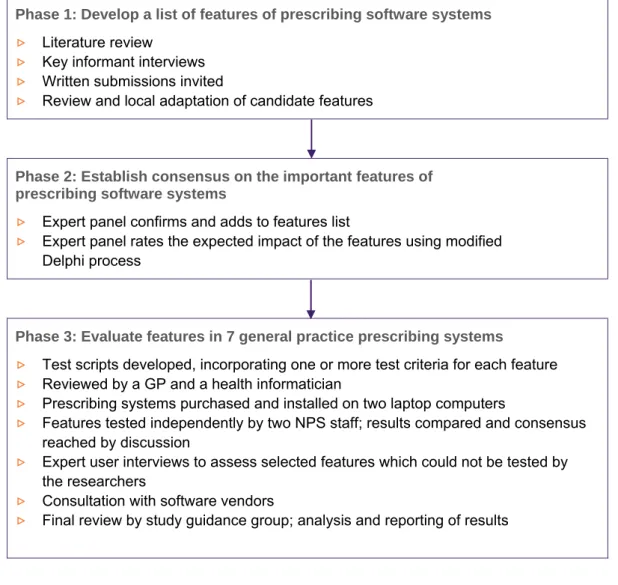
The study was carried out from November 2006 to April 2009. It consisted of three parts, as shown in Figure 1. In the first and second parts we developed and prioritised a list of important features of prescribing software systems to support patient safety, quality of care and that are useful to clinicians and patients. In the third part of the study we developed a method for testing the features in
prescribing software systems, followed by an assessment of seven commonly used systems to find out if each feature had been fully implemented, partly implemented or not implemented. The study protocol was approved by the Department of Health and Ageing Ethics Committee.
Scope
The development of the list of features was intended to cover those areas of clinical software systems that are directly (or sometime indirectly) related to prescribing and the quality use of medicines. It did not include all features that may be desired by users, for example features related to billing and practice management were not included. The software evaluation assessed whether the features had been implemented in each system. In most cases usability was not formally assessed, and the quality of information resources and decision support content was generally not evaluated in depth.
Study guidance group
The study was overseen by a guidance group consisting of NPS researchers and five external
membersrepresentatives from the RACGP and the Medical Software Industry Association (MSIA), a public health physician, a practicing-academic GP and a consumer representative.
The group provided oversight for the study and advised on the study methods, interpretation and reporting of results, general communications and dissemination of the study outcomes.
INTRODUCTION
12
FIGURE 1: OVERVIEW OF STUDY
Phase 1: Develop a list of features of prescribing software systems
▷
Literature review▷
Key informant interviews▷
Written submissions invited▷
Review and local adaptation of candidate featuresPhase 2: Establish consensus on the important features of prescribing software systems
▷
Expert panel confirms and adds to features list▷
Expert panel rates the expected impact of the features using modified Delphi processPhase 3: Evaluate features in 7 general practice prescribing systems
▷
Test scripts developed, incorporating one or more test criteria for each feature▷
Reviewed by a GP and a health informatician▷
Prescribing systems purchased and installed on two laptop computers▷
Features tested independently by two NPS staff; results compared and consensus reached by discussion▷
Expert user interviews to assess selected features which could not be tested by the researchers▷
Consultation with software vendors4.
BACKGROUND
4.1.
Computerisation in general practice
Most general practitioners (GPs) in Australia use computers in their day-to-day practice for clinical or administrative purposes or both.1 The clinical software systems that are available enable electronic health records (EHR) to be kept and include a wide range of functions including prescribing. Some GPs use these systems predominantly for prescribing and ordering pathology and other tests, but an increasing proportion also use them to record medical progress notes and to communicate with other healthcare providers.2
General practice prescribing systems have been produced and used in Australia since the early 1990s. These systems have been developed in an unregulated environment and have different user interfaces and functional capabilities. Neither standards nor a certification system were in place when the early products were in development, and none have been introduced since.
4.2.
Effects of electronic prescribing
Electronic prescribing (e-prescribing) refers to the electronic generation of prescriptions, and associated processes. e-Prescribing may be undertaken using standalone prescribing software, or may be part of a medication management or electronic health record system; these often include some form of clinical decision support.
Studies looking at the effects of e-prescribing have shown mixed results. A number of systematic reviews have identified studies that show positive effects associated with e-prescribing, including improved drug allergy detection and a reduction in incomplete or unclear orders, medicine errors (including dosage errors or excessive doses) and adverse drug events.3-6 In terms of improvement in practice, there is evidence to suggest that e-prescribing, clinical decision support and electronic patient records improve prescriber performance generally. Examples include greater adherence with clinical practice guidelines, improved therapeutic drug monitoring, greater sharing of recommendations with patients, and enhanced surveillance and monitoring.4,7-10 Chaudhry et al7 and Delpierre et al8 found that the primary domain of improvement in some studies was in preventive health.
There are also reports of negative effects or unintended consequences of e-prescribing. These include new or more work for clinicians, unfavourable effects on workflow and communications, high levels of ignored alerts, and errors in drug selection, formulation and dosage frequency from drug selection menus.9,11,12 There is currently little evidence to show clear benefits of e-prescribing on
patient outcomes.8,9,13,14
The generalisability of results from published studies to the Australian setting must be undertaken with caution. Most studies assessing the effects of health information systems have been carried out in the hospital setting in the United States, with many coming from a small number of large healthcare organisations with established ‘homegrown’ computer systems (Regenstrief Institute, Brigham and Women’s Hospital/Partners Health Care, the Department of Veterans Affairs, LDS
Hospital/Intermountain Health Care). Commercial e-prescribing systems have not been studied extensively, and may be implemented and used differently at different sites.
BACKGROUND
14
4.3.
Related work
In Australia
In Australia some previous work has been done which attempted to define the requirements of general practice clinical software systems, and compare different systems. As far as we are aware the
recommendations arising from these projects have not been used for development of national standards or for systems improvement across the sector.
Prior to widespread computerisation of general practice, the Department of Health and Ageing commissioned the IBM Consulting Group to produce a list of functional requirements for general practice computer systems. The 1997 report - Clinical and administrative general practice computer systems consultancy: Functional requirements specification report—included 478 functional
requirements covering both business and clinical aspects of general practice.15
The Chronic disease functionality project was commissioned by the General Practice Computing Group and funded by the Department of Health and Ageing in 2004.16 The aim of the project was to
identify the functionality required by clinical software systems to support general practices in providing high quality care for patients with chronic diseases.
The General practice computer group buying guide for general practice software packages lists a series of desirable functions or characteristics of these systems, covering prescribing, practice management and other general features.17 The source of this information is not stated and the use of this document is not known.
The Hunter Urban Division of General Practice compared the functionality of a range of prescribing systems, with the aim being to recommend a system/s which provided the best features for GPs in that Division.18
Overseas
In the UK and the US, two groups of researchers have carried out studies to identify important features or functions of electronic prescribing systems, and have then evaluated general practice (or ambulatory care) prescribing systems to determine if these features or functions are present. In the UK, Avery et al worked with an expert panel to identify and establish consensus on the most important safety features of GP computer systems, with a particular emphasis on medicines management.19
In the United States, Bell et al undertook similar work but with a broader scope.20,21 They developed a conceptual framework for evaluating outpatient e-prescribing systems based on their functional capabilities. The aims of the study were to identify functions that would reduce preventable adverse drug events and would increase appropriate use of medicines, with a focus on prescribing. The 60 recommendations were scored in relation to the expected (negative or positive) effects on: patient safety and health outcomes; helping patients manage costs; maintain patient privacy; and promoting clinician acceptance.
5.
METHODS
5.1.
Identification of features
The features were identified by a literature review, key informant interviews and invited written submissions.
Literature review
Key papers and reports were identified by members of the project team who were familiar with work in this area. We searched Ovid MEDLINE(R) (Jan 1995 - Feb 2007) and used Google to search the internet to identify papers that covered features of e-prescribing systems that could improve safety or quality, especially in relation to prescribing medicines and monitoring drug therapy. Scientific journals and grey literature were included. The papers and reports were reviewed for relevance, and
information about potential features was extracted.
Key informant interviews
We sought the opinions of Australian experts in general practice, public health, quality and safety, health informatics and pharmacy. A telephone interview guide was developed asking participants to identify current or potential features of electronic prescribing systems that could contribute to patient safety and quality patient care, or would be useful to the clinician or the patient. The interview guide was pilot tested with a user and non-user of e-prescribing systems, and was incorporated into a template to facilitate computer data entry during the interviews.
Written submissions
Written submissions were invited from members of the Medical Software Industry Association, the body representing general practice software vendors for most systems in use in Australia.
Development of features list
A list of candidate features was developed and was reviewed by five members of the project team (MW, MS, JR, KH, AS) in a series of round-table discussions. The inclusion of each feature was considered in terms of evidence or expectation that it would contribute to improved safety and quality or would be useful to clinicians or patients, and relevance to the general practice setting in Australia. For those features selected, some were merged, separated or the wording adapted for local relevance while maintaining the key concepts. The final wording of each feature was reviewed to ensure that it was clear, concise and accurate. The ability to implement each feature was considered—that is, whether it was possible to implement the feature given constraints such as lack of a suitable agreed national standard or knowledge base. A rationale for each feature was developed based on the literature review and the clinical experience of the researchers, and the features were classified into convenient groups.
5.2.
Rating of expected impact of features
A modified Delphi process was used with a multidisciplinary group of experts to rate and gain consensus on the expected impact of the features. The Delphi process is used to predict effects and gain consensus where the available evidence is limited.22 We used a modified process including face to face meetings because the project was complex and there were a large number of items to be scored.(Similar techniques have been used in other studies, for example to gain consensus on important features of information systems and quality of care indicators.23,24)
METHODS
16
Expert panel recruitment and role
A 12-member expert panel was assembled. Participants were selected based on their experience in general practice, public health, quality and safety, health informatics, pharmacy or consumer health issues. Prior to the first meeting, each participant received information about the study and signed consent, confidentiality and declaration of interests forms.
The panel members were asked to: (1) confirm that the proposed features were relevant, and add any other features that they considered important; (2) rate the expected impact of each feature (using a -5 to +5 scale) across four domains, via a modified Delphi process (described in Appendix 1); and (3) define the cut off levels for categorising the features as being of high positive, medium positive or low/negative impact.
Panel members were required to attend two face to face meetings and complete three rounds of ratings over a two month period. The purpose of the first meeting was to ensure that expert panel members understood the background to the project, the aims of the Delphi process and the scoring system. The purpose of the second meeting was to reach consensus on those items where agreement had not been reached in the third round of individual ratings.
5.3.
Implementation of features in general practice software
Features rated by the expert panel as being likely to have a moderate or high positive impact in at least one area were tested in clinical software systems.
Software systems
Seven commonly used general practice e-prescribing systems were evaluated: Best Practice, Genie, Medical Director 2, Medical Director 3, MedTech32, Practix and Profile. These systems were used by more than 90% of Australian GPs at the time of the study, and all include prescribing within an electronic health record system. The systems were purchased and installed on two laptop computers. Default settings in the software were not altered unless the test script specified a change. The software version tested was the most recent version of the software produced and available on 1 January 2008.
Development of test scripts
Eleven test scripts were developed using clinical scenarios based on imaginary patients visiting their GPs; the scenarios covered various aspects of clinical care including the system’s ability to support the clinician in relation to prescribing, monitoring drug therapy and supplying information resources to the patient. For each of the features to be tested, one or more test criteria were developed to measure whether the feature was present and functioning in the system.
Each test script was prepared in a separate Excel worksheet and was designed to produce a logical flow for testing and to facilitate data entry; there were 660 executable steps and 350 test criteria in total for the 104 features (the 10 'aspirational' features were excluded). Test scripts were reviewed by two external reviewers—a GP and a health informatician. They provided feedback on the content, format and clarity of the scripts.
Test process
Testing was undertaken independently by two researchers in January to April 2008; they carried out pilot testing initially to assess the usability of the test scripts and how the process flowed, and to ensure consistent use of the scripts. Full testing followed, with the process being completed for each script across all seven systems prior to starting the next script. Approximately 2000 screenshots were saved by each tester. A log was kept to record the dates of testing and knowledge base updates. At the completion of testing for each script, the results were reviewed and compared between the two researchers. Where their scores were in agreement, the test results were accepted.
Where there was disagreement, four researchers (ZA, AS, MS, MW) met to discuss the variation in results and reach a consensus decision, which in some cases required retesting. At the end of the test process, one of the researchers (MS) undertook a line-by-line review of all results to check the scores and to identify any gaps or results that were unclear, unexpected or inconsistent, and that required further checking or follow up with an expert user or the software vendor.
A number of features or criteria could not be tested adequately within the test environment, for example functionality related to messaging and import and export of patient data. A GP expert user of each system (nominated by the vendor of that system) was contacted in February 2009 to find out about implementation of those features in their system. A researcher met with each GP at their practice, stepping through the features and requesting a demonstration on the computer or further details where applicable. Expert users provided information on the processes for receipt of pathology results and incorporation of these results into patient records, use of messaging, availability of system logs and ease of software updates.
Review of preliminary results with software vendors
Software test data were collated and the preliminary results were provided to each software vendor, with a request for feedback. They were informed that the preliminary results for their system would be reviewed based on their feedback, and that the scores would be revised if there was sufficient
evidence to show that the system included the functionality in question. A face to face meeting or teleconference was held with representatives from each company in April 2009. Discussion focussed on features where the test results were unclear or where there was disagreement. The representatives provided a demonstration of the system and/or documentation of functionality to support any claims. Meeting notes were sent back to each vendor, with further comments invited by email.
There were some common themes raised by the vendors. Apart from one company which develops its own in-house drug and decision support database, the others were reliant on a particular commercial knowledge base for decision support, which had some limitations. They also commented on difficulties with interoperability (e.g. import and export of patient data) and the lack of national standards and drug and disease terminologies for clinical software. Some expressed concern that users wouldn’t like some of the features if they were implemented (e.g. mandatory recording of reason for prescribing).
Review of results by study guidance group
Scores were revised based on vendor feedback and these were provided to the study guidance group for review and approval. The group accepted most of the revised scores and scores were increased for all systems (range: 9 to 17% of scores were increased across the seven systems).
They group recommended that: (1) Software features should be readily accessible by the average GP and a system should not ‘pass’ where a feature is available but which requires extensive configuration or assistance from the vendor in order to use it; (2) Where features are dependent on an external source of information e.g. many of the decision support features, most of these should remain as scored features, but noting that the feature is dependent on an external knowledge resource; and (3) for some features the results available were either not sufficient to score the item at all, or not to score it quantitatively—these were designated ‘not scored’ or ‘description only’.
RESULTS
18
6.
RESULTS
6.1.
Overview of features and testing
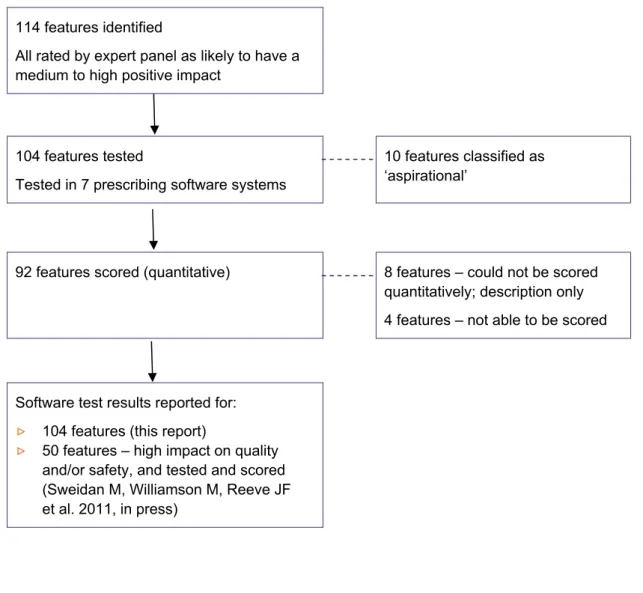
Figure 2 shows the pathway from development of the features to the software testing process, and explains why not all features were tested and/or reported on.
FIGURE 2: OVERVIEW OF THE FEATURES AND TESTING
114 features identified
All rated by expert panel as likely to have a medium to high positive impact
104 features tested
Tested in 7 prescribing software systems
10 features classified as ‘aspirational’
92 features scored (quantitative) 8 features – could not be scored
quantitatively; description only 4 features – not able to be scored
Software test results reported for:
▷
104 features (this report)▷
50 features – high impact on quality and/or safety, and tested and scored (Sweidan M, Williamson M, Reeve JF et al. 2011, in press)6.2.
Identification of features
A list of 114 features was developed, selected from an initial list of over 200 candidate features; these were based on the review of the literature, key informant interviews and expert panel member
recommendations.
Literature review
Six key literature sources17,19,21,26-28 were used to inform the development of 102/114 (89%) of the features, with most of the features supported by more than one source.
Of the six key sources, three of the studies or reports were related to prescribing in primary care or outpatient clinics, although they had different purposes. The first was a study to identify features which would reduce prescribing hazards,19 the second identified features to improve patients’ health
outcomes and their ability to manage costs21 and the third was intended to assist GPs in purchasing
prescribing software systems.17
The NHS ePrescribing Functional Specification for NHS Trusts28 outlines e-prescribing specifications that are mostly applicable to the acute care setting although some are also relevant in primary care. The other two reports were published by international organisations and describe functionality or standards for electronic health record systems including prescribing. The Health Level 7 Electronic Health Record Functional Model26 covers a ‘superset’ of functions of an electronic health record system, intended to be adapted to different settings. The International Standards Organisation
standard Health informatics - Requirements for an electronic health record architecture outlines clinical and technical requirements.27 Eleven other references were also used to identify features.2,16,29-37
Key informant interviews
Twenty-seven experts were contacted, 19 of these agreed to participate and 17 completed the interview. Their professional backgrounds were in general practice (n=6), health informatics or information technology (n=4), pharmacy (n=3), a medical specialty (n=2), nursing (n=1) or health policy (n=1), with many also having expertise in healthcare quality and safety. The key informants identified a broad range of features, with 62 of the features based on or supported by key
informant comments.
Feedback from software vendors
General comments were received, most of them about the project methods and the need for industry standards in order to improve systems, rather than specific safety and quality issues. These were not incorporated into the features list.
Preliminary features list
One hundred and seven features were selected for inclusion initially, with seven added later by the expert panel (see below). The features were classified into eight convenient groups: patient data (n=18 features), medicine selection (n=24), decision support (n=22), patient information and education (n=6), monitoring, reports and recalls (n=17), interoperability and communication (n=13), security and administration (n=9) and transparency (n=5).
RESULTS
20
6.3.
Rating of expected impact of features
Expert panel members
The 12-member expert panel was assembled from an initial pool of 23 potential participants, all based in Australia. The panel was comprised of 5 GPs, 2 health informaticians, 2 pharmacists, a hospital medical specialist, a health informatics researcher and a consumer; they included representatives from the ACSQHC and NEHTA. Those who were not selected were either not available (n=7) or declined to participate (n=4). All 12 members completed the entire ratings process. The face to face meetings were attended by at least 75% of the panel members, with input via teleconference or email for those members unable to attend in person.
Expert panel ratings and recommendations
The expert panel recommended that all 107 features on the preliminary list be retained, and
suggested the addition of seven new features, making a total of 114 features. Panel members rated the expected impact of each feature across four domains: patient safety, quality of care, usefulness to the clinician and usefulness to the patient, via the process described in Appendix 1. At the end of round 1 there was agreement among panel members (defined in Appendix 1) for 55% of the items rated. Feedback on results from round 1 (median scores, interquartile range, de-identified individual scores and comments) was provided to panel members prior to round 2 and members were asked to confirm their ratings or to re-rate their original scores in light of the feedback. In round 2 there was agreement for 78% of the items rated. In round 3, consensus was reached on the median scores for all 114 features in each of the four domains.
The panel recommended cut off points for classifying the expected level of impact of each feature as follows: high positive impact = at least 1 of the 4 median scores is 4-5; medium positive impact = at least 1 of the 4 median scores is 2-3.5 (and none are 4); low positive or negative impact = all four median scores are <2.
Final features and their expected impact
The complete features list including the expected impact in each of the four domains is shown in Appendix 2. Most of the features relate to the recording and use of patient data, the medicine selection process, prescribing decision support, monitoring drug therapy and clinical reporting. Other areas are resources for patients, interoperability, security and transparency.
Seventy eight features (68%) were classified as likely to have a high positive impact in at least one domain, 36 features (32%) as medium impact, and none as low or negative impact. Twenty seven features (24%) were rated as high impact across three or four domains including safety and quality; these are highlighted in the table and are described in the following two paragraphs. Ten features were considered ‘aspirational’, that is they could not be implemented at the time of the study, either because of a lack of agreed standards or lack of nationally accepted knowledge bases being available in a suitable format.
The 27 features of e-prescribing systems that were considered likely to have high positive impact across multiple domains (including quality and safety) include the following: The system should allow the user to record patient clinical details, medicine information, allergies and pregnancy and
breastfeeding status; this information should be recorded in a format that can be used for decision support, and should be displayed to the user. When there are changes to or discontinuation of medicines, the system should allow the date, prescriber and reason/s for change or discontinuation to be recorded. Apart from direct entry of data into the patient record, it should be possible to import clinical data from external sources and also to export it to external sources, allowing details of the record to be shared and updated. As part of the medicine selection process, the system should offer the user information on recommended therapeutic options for the condition being treated, and provide access to evidence based drug information at the time of prescribing.
The system should display medicine lists in a way that makes it easy for the user to differentiate between similarly named products and so reduce the risk of product selection errors. The system should also provide information on drug strength, form and dosage, and display the generic name when a product is selected by brand name.
All decision support should be underpinned by high quality, up-to-date knowledge bases and
guidelines, and alerts should be prioritised by clinical importance. Warnings should be provided when prescribing a drug if: that drug (or another drug in the same class) is already on the current medicines list; the patient has a recorded contraindication to the drug, including allergy, pregnancy or
breastfeeding; the drug is renally cleared and the patient has renal impairment; the dosage regimen may be harmful; or where the regulator has issued a safety warning for a product. Finally, the system should enable the user to produce a suitably formatted current medicines list for the patient, and should use standard clinical terminologies and messaging protocols.
6.4.
Implementation of features in general practice software
The results of the software evaluation are shown in Figures 3–11, Table 1 and the text that follows. A summary of the key quality and safety issues is shown at the end of the Results section.
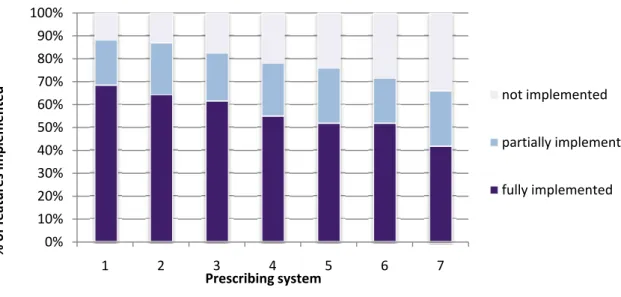
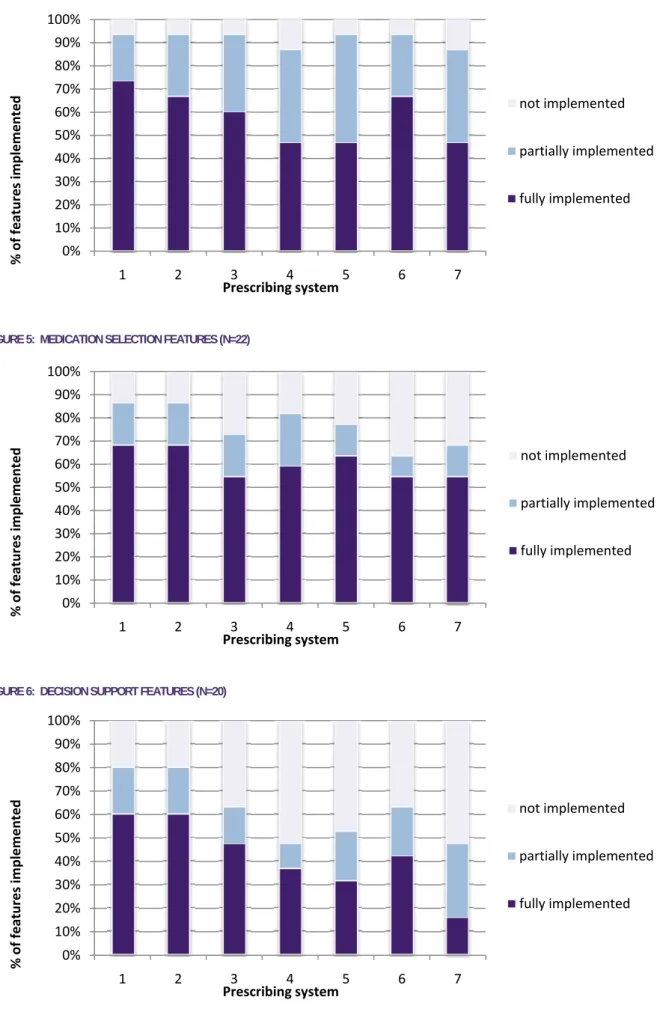
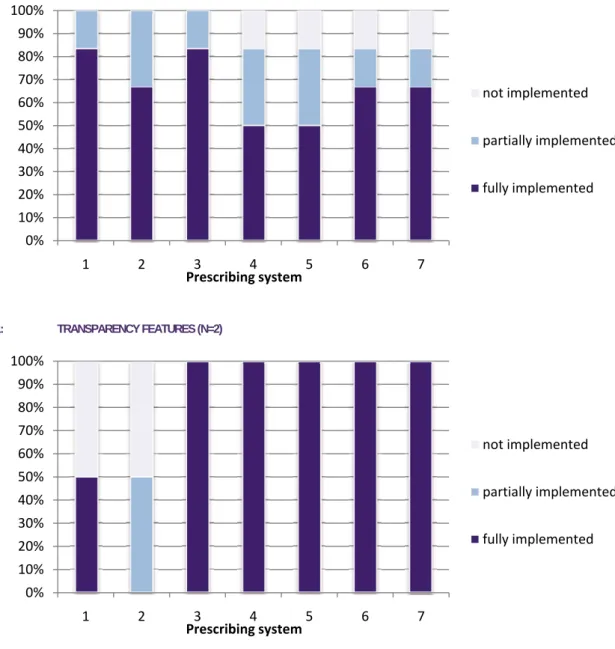
Figures 3–11 below provide an overview of the implementation of the features in seven software systems. Of the 104 features tested in prescribing software systems, 92 were able to be scored. Implementation was variable, ranging (in the seven systems tested) from 42–67% of features being fully implemented, 20–24% being partially implemented, and 12–34% not implemented at all. Table 1 lists the results for each feature individually. Prescribing systems tested have been de-identified as our intention was to look at features and identify gaps across all systems, and to make general recommendations for improvement in clinical software.
Implementation of scored features in 7 prescribing systems
(total and by category)
FIGURE 3: FEATURE IMPLEMENTATION - ALL FEATURES (N=92)
0% 10% 20% 30% 40% 50% 60% 70% 80% 90% 100% 1 2 3 4 5 6 7 % of features implemented Prescribing system not implemented partially implemented fully implemented
RESULTS
22
FIGURE 4: PATIENT DATA FEATURES (N=15)
FIGURE 5: MEDICATION SELECTION FEATURES (N=22)
FIGURE 6: DECISION SUPPORT FEATURES (N=20)
0% 10% 20% 30% 40% 50% 60% 70% 80% 90% 100% 1 2 3 4 5 6 7 % of features implemented Prescribing system not implemented partially implemented fully implemented 0% 10% 20% 30% 40% 50% 60% 70% 80% 90% 100% 1 2 3 4 5 6 7 % of features implemented Prescribing system not implemented partially implemented fully implemented 0% 10% 20% 30% 40% 50% 60% 70% 80% 90% 100% 1 2 3 4 5 6 7 % of features implemented Prescribing system not implemented partially implemented fully implemented
FIGURE 7: MONITORING, REPORTS AND RECALLS FEATURES (N=16)
FIGURE 8: PATIENT INFORMATION AND EDUCATION FEATURES (N=4)
FIGURE 9: INTEROPERABILITY AND COMMUNICATION FEATURES (N=7)
0% 10% 20% 30% 40% 50% 60% 70% 80% 90% 100% 1 2 3 4 5 6 7 % of features implemented Prescribing system not implemented partially implemented fully implemented 0% 10% 20% 30% 40% 50% 60% 70% 80% 90% 100% 1 2 3 4 5 6 7 % of features implemented Prescribing system not implemented partially implemented fully implemented 0% 10% 20% 30% 40% 50% 60% 70% 80% 90% 100% 1 2 3 4 5 6 7 % of features implemented Prescribing system not implemented partially implemented fully implemented
RESULTS
24
FIGURE 10: SECURITY AND ADMINISTRATION FEATURES (N=6)
FIGURE 11: TRANSPARENCY FEATURES (N=2)
0% 10% 20% 30% 40% 50% 60% 70% 80% 90% 100% 1 2 3 4 5 6 7 % of features implemented Prescribing system not implemented partially implemented fully implemented 0% 10% 20% 30% 40% 50% 60% 70% 80% 90% 100% 1 2 3 4 5 6 7 % of features implemented Prescribing system not implemented partially implemented fully implemented
Implementation of features in 7 prescribing systems
The full description and rationale for each feature is shown in the table in Appendix 2.
The results for features where results are marked “Description only” or “Not scored” are discussed in the text that follows in this section.
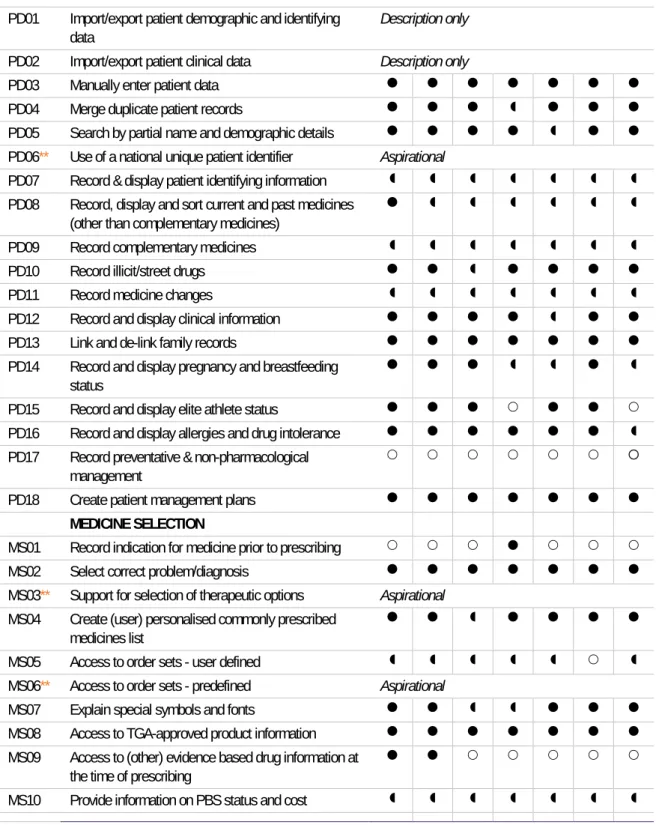
Fully implemented Partly implemented Not implemented ** Aspirational feature, not tested
TABLE 1: IMPLEMENTATION OF FEATURES IN 7 PRESCRIBING SYSTEMS
No. Short title of feature
Prescribing system
1 2 3 4 5 6 7
PATIENT DATA
PD01 Import/export patient demographic and identifying data
Description only
PD02 Import/export patient clinical data Description only
PD03 Manually enter patient data
PD04 Merge duplicate patient records
PD05 Search by partial name and demographic details
PD06** Use of a national unique patient identifier Aspirational
PD07 Record & display patient identifying information
PD08 Record, display and sort current and past medicines (other than complementary medicines)
PD09 Record complementary medicines
PD10 Record illicit/street drugs
PD11 Record medicine changes
PD12 Record and display clinical information
PD13 Link and de-link family records
PD14 Record and display pregnancy and breastfeeding status
PD15 Record and display elite athlete status
PD16 Record and display allergies and drug intolerance
PD17 Record preventative & non-pharmacological management
PD18 Create patient management plans
MEDICINE SELECTION
MS01 Record indication for medicine prior to prescribing
MS02 Select correct problem/diagnosis
MS03** Support for selection of therapeutic options Aspirational
MS04 Create (user) personalised commonly prescribed medicines list
MS05 Access to order sets - user defined
MS06** Access to order sets - predefined Aspirational
MS07 Explain special symbols and fonts
MS08 Access to TGA-approved product information
MS09 Access to (other) evidence based drug information at the time of prescribing
RESULTS
26
No. Short title of feature
Prescribing system
1 2 3 4 5 6 7
MS11 Provide drug strength and form information
MS12 Provide pre-defined dosage regimens for selection
MS13 Provide adult and child dosing information
MS14 Access to dose calculators
MS15 Differentiate between similar name medicines
MS16 Select medicine by drug class
MS17 Display active ingredient/s when brand selected
MS18 Find generic product alternatives
MS19 Record medicines not contained in system
MS20 Specify length of course on prescription
MS21 Record patient medicine preferences
MS22 Specify day/s of the week for administration
MS23 Reorder a medicine from medicine list
MS24 Produce valid PBS prescription
DECISION SUPPORT
DS01 Knowledge base - content quality Description only
DS02 Alerts for drug-drug interactions
DS03 Alerts for therapeutic duplication
DS04 Alerts for drug - condition contraindications
DS05 Alerts for drugs in patients with renal impairment
DS06 Alerts for drug allergy or intolerance
DS07.1 Alerts for drugs in pregnancy
DS07.2 Alerts for drugs in lactation
DS08 Pregnancy/ lactation update prompt
DS09 Alerts for drugs banned in elite athletes
DS10** Alerts for best practice therapy Aspirational
DS11 Alerts for safety issues related to specific products
DS12 Alerts for harmful dose, dosage regimen or quantity
DS13 Distinction between types of alerts
DS14 Access to patient data related to alert
DS15 Alerts prioritised by importance
DS16 User customisation of low priority alerts
DS17 Allow user to dismiss alerts and provide clinical justification
DS18 Display information about currency of decision support
DS19 Alert for same patient name
DS20 Preview and confirm correct patient details prior to electronic transmission of data
DS21 Reminders for regulatory and PBS requirements
PATIENT EDUCATION & INFORMATION
PE01 Provide patient medicine information
PE02 Provide patient clinical information & tools
No. Short title of feature
Prescribing system
1 2 3 4 5 6 7
PE04 Specify indication for medicine on prescription
PE05** Access to key counselling points Aspirational
PE06 Create management plan - patient version Not scored
MONITORING, REPORTS & RECALLS
MR01 Flag unexpected medicine use
MR02 Reminder - due or overdue prescriptions
MR03 Reminder - routine or recommended tests
MR04 Reminder - new test results
MR05 Reminder - unintentional duplication of test ordering
MR06 Reminder - action test results
MR07 Reminder - overdue tests
MR08 Display laboratory results usefully
MR09 Display medicine information with relevant outcomes
MR10 Produce reports - predefined
MR11 Produce reports - user defined
MR12 Produce reports - individual or practice level
MR13 Produce reports - dismissed alerts
MR14 Recalls and reminders - preventative care and public health programs
MR15 Recalls - manually flagged for individual patients
MR16 Flag recent medicine changes
MR17** Prompt for medicine management review Aspirational
INTEROPERABILITY & COMMUNICATION
IC01 Link to other software applications
IC02** Use standard clinical terminologies and coding Aspirational
IC03 Use standard messaging protocol Not scored
IC04 Use secure messaging Not scored
IC05 Import/export of a range of file formats
IC06** Transmit prescriptions electronically Aspirational
IC07 Transmit order requests electronically
IC08 Generate referral
IC09 Generate health summary
IC10 Generate standard patient medication chart
IC11** Facilitate adverse event reporting Aspirational
IC12 Create customised templates
IC13** Review and merge recommended medicines from another source, to facilitate medicine reconciliation
Aspirational
SECURITY & ADMINISTRATION
SA01 Support privacy compliance Not scored
SA02 Record and track consent for research and educational activities
Description only
SA03 Appropriate authorisation framework
RESULTS
28
No. Short title of feature
Prescribing system
1 2 3 4 5 6 7
SA06 Log system and user activities Not scored
SA07 System back-up & restore process
SA08 System & content updates
SA09 Flag (but not delete) incorrect data
TRANSPARENCY
TR01 Disclosure of process Description only
TR02 Disclosure of sources Description only
TR03 Disclosure of financial sponsorship Description only
TR04 Exclude all advertising Advertising present in 2 systems
Patient data features (includes medicine data)
Most of the 18 patient data features were either fully or partially implemented in most systems. Recording and display of demographic details [PD07] was inconsistent—not all systems required full name, date of birth, address, Medicare number and gender to be entered to set up a new patient record, and not all systems displayed these details when the record was open. There is currently no standard for a minimum dataset for either demographic or clinical details in general practice software. The expert panel members recommended that support for ensuring that the correct patient record is opened and used is crucial because the consequences of using the wrong patient record are potentially dire.
Accurate and complete clinical data is essential for safety and quality. Recording and display of clinical information [PD12] and allergies [PD16] were both rated as high impact across most domains by the expert panel, and were generally implemented well, although with considerable variation in the way they were implemented in the seven systems.
The feature ‘record, display and sort current and past medicines (other than complementary
medicines)’ [PD08] was rated by the expert panel as high impact across all domains. The way systems implemented this feature varied and the definition of ‘current medicines’ versus ‘past medicines’ was not always clear; some systems moved a medicine from current to past after a certain period if it was prescribed as a ‘limited’ or one off prescription. Most systems did not provide flexible sorting of the medicines list.
There is no nationally accepted standard comprehensive list available for complementary medicines [PD09], and in all systems some of the complementary medicines tested were not listed. Note that the Australian Register of Therapeutic Goods includes all complementary medicines but is not currently available outside of the TGA, and while some complementary medicines will be coded in the Australian Medicines Terminology, it is unlikely to ever cover every complementary medicine product available. Recording information about changes to (or cessation of) medicines [PD11] was possible in all systems however in most cases the details were recorded in the patient’s progress notes, which could make it difficult to find them at some time in future. It would be preferable to have the details of any changes linked to the medicine entry.
Use of illicit or street drugs could be recorded in all systems [PD10]. There are potential advantages for the patient in having this information in the record (in terms of safety and quality of care), but there are also significant privacy and potential legal issues for both the patient and the clinician. One notable gap was that no system provided a field for recording preventative or non-pharmacological
management in one place [PD17].
Six of the seven systems merged duplicate patient records as expected [PD04]; this is important because duplicate records can be confusing for the GP and there can be safety implications if
incomplete records are used. Patient management plans [PD18] could be created in all systems using templates. It is not known whether the existing templates are meeting the needs of GPs and patients. In most systems the import and export of demographic and clinical data [PD01, PD02] was possible but was not seamless. All vendors said that they could import a patient database from some of the other clinical systems, however there are issues around cost, complexity and risks to the data to be considered. They commented on the difficulties in this area because of the lack of nationally accepted standards for EHR systems, and lack of a minimum dataset for general practice.
RESULTS
30
Medicine selection features
The majority of these 24 features were fully or partially implemented in most of the systems tested, however there were some limitations because a number of these features are dependent on the quality and availability of external knowledge bases.
All systems allowed the prescriber to easily select a problem or diagnosis [MS02], however it
appeared that only one system had made an attempt to allow the user to easily differentiate between similarly named medicines [MS15]. Some systems provided long lists of similarly-named products and we believe it would be easy to select a product that was not intended, posing a significant safety risk. Only one of the seven systems allowed the prescriber to record the indication for the prescription prior to medicine selection [MS01]; this is important because it would allow decision support for selection of appropriate therapeutic options to be displayed at this point. All systems allowed the prescriber to select a medicine by drug class [MS16]. Four of the seven systems displayed the active ingredient of the product when a brand name product was selected [MS17]; this is important for quality use of medicines. Three of the systems allowed the user to easily find generic product alternatives to a selected product or a previously prescribed branded product [MS18]. Most systems allowed free-text entry of medicines not contained in the system’s drug database, however only one system
differentiated these entries from others on the medicine list; one reason that this is important is because free text entries are unlikely to be picked up by decision support tools [MS19].
All systems provided adult and child dosing information [MS13] that was based on the approved product information, however this does not include off-label indications and often does not include paediatric dosing. Only two systems offered a dose calculation tool [MS14], and there were some limitations in what it could do. There is currently no guidance available to vendors on what these sorts of tools should do, and which source/s to use for dosage information.
All systems allowed the user to record the length of a course of medicine [MS20], to specify days of the week [MS22] on the prescription, and to produce a valid PBS prescription [MS24]. Although all systems provided information on PBS status and cost [MS10], there were some gaps in terms of recent changes to authority status not being incorporated and no system showing the ‘price to consumer’ field. The display of PBS information was not always clear.
All systems allow the user to create a personalised ‘favourites’ list of commonly prescribed medicines [MS04]; it was thought that the purpose was most lik