Everyday Wearable Computer Use:
A Case Study of an Expert User
Kent Lyons
College of Computing and GVU Center Georgia Institute of Technology
Atlanta, GA 30332-0280 USA [email protected]
Abstract. Wearable computers are a unique point in the mobile com-puting design space. In this paper, we examine the use of a wearable in everyday situations. Specifically, we discuss findings from a case study of an expert wearable computer user in an academic research setting over an interval of five weeks. We examine the use of the computer by col-lecting periodic screen shots of the wearable’s display and utilize these screen shots in interview sessions to create a retrospective account of the machine’s use and the user’s context. This data reveals that the user employs the computer to augment his memory in various ways. We also found evidence of the wearable’s use while engaged in another primary task. Furthermore, we discuss the intricate strategies developed by the participant that enable him to utilize the wearable in these roles.
1
Introduction
A wearable computer is a computer worn on the body as clothing and is highly personal. While the technology is still novel, a few researchers and hobbyists have adopted wearable computers into their everyday lives. These users are often seen wearing their head–up displays or typing on one handed keyboards in a wide variety of situations. Anecdotally, these users report that they often take notes or retrieve information in a large variety of everyday situations. However, we do not have a firm understanding of exactly what tasks the computers are supporting or in what situations. Likewise, we know little about how these users employ the wearable to accomplish those tasks.
We are interested in researching how early adopters take advantage of wear-able computing technology. In this paper, we present a formative study designed to uncover wearable user practices. Specifically, we present data collected from a case study of an expert wearable computer user during the course of his normal daily activities over a period of five weeks. Our participant is in an academic research environment where he uses the machine routinely in a large variety of situations and has been doing so for over eight years.
Sample size is an issue when studying wearable computer use especially given our particular interest in everyday use. There are only a handful of people in the world who have adopted wearables into their lives and have continued to use
the computers daily. Obviously, with such a small user population one could not hope to span the possible space of wearable computer use. The small number of current users may not be representative; however, they are using their computers while doing typical everyday tasks working with information and managing their daily lives. As a result, instead of attempting to generalize across a very small number of users, we are seeking to understand the practices developed by a single successful wearable computer user. This is an attempt to lay the foundation for future work such as designing explicitly for wearable computers or comparing the wearable computer’s unique features and usage to those of other mobile technologies.
In this paper, we detail the findings from our case study. We describe the technology our study participant employs as well as general characteristics of the machine’s usage. We discuss our technique for capturing data on the wearable computer and our interview methods used to assist in the qualitative interpre-tation of that data. Next, we present detailed examples of interaction with the wearable computer in everyday situations from our collected data. Using these examples, we discuss trends in the data showing how the computer is used to augment the user’s memory and in situations where the wearable is not the primary focus of the user’s attention.
2
The Wearable Computer
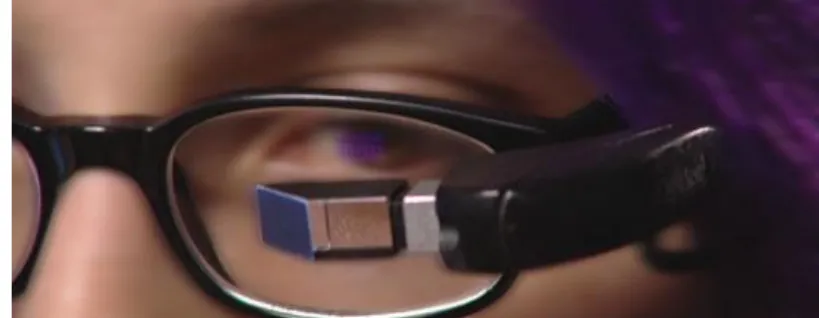
The participant in our study has been using a wearable computer daily for over eight years. The computer is a derivative of the Lizzy design [10] and is housed in a bag worn over the shoulder and rests on the user’s left side by his hip. This arrangement allows the user to continually wear the machine throughout the day. The Twiddler2, a one handed chording keyboard, is the input device (Figure 1). It serves as a combination of keyboard and mouse; however, the par-ticipant only utilized the keyboard functionality during our study. The display is a MicroOptical CO-3 VGA head–up display designed to mount on a pair of eye-glasses (Figure 2). The user modified the mount so he could quickly attach and remove the display as needed. Finally, the wearable is designed for low power consumption so that it can be powered throughout the day. The user reports he typically gets ten to twelve hours of use from a set of batteries and swaps out batteries as needed to get a longer runtime. Together, these design features allow the user to call the machine to action quickly at any time by snapping the display to the user’s glasses and grabbing the Twiddler from his side.
Our participant’s wearable computer runs Linux and the X Windowing Sys-tem. Emacs is the primary application used, and the vast majority of interaction with the machine happens within this versatile text editor. For the few occasions where the user did not directly interact through Emacs, an xterm was opened and used temporarily. This occurred when the built–in Emacs shell was not suf-ficient at displaying the needed application. It is interesting to note that the user did not run any software explicitly designed for wearable use during this study.
Fig. 1.The Twiddler2 one handed chording keyboard with mouse.
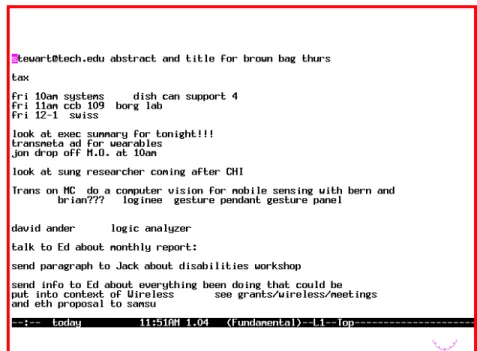
Figures 3 through 6 show typical screen shots of the user interacting with the machine.1Emacs fills most of the user’s display. Xclock runs in the bottom right corner of the screen but is partially covered by the Emacs window. As a result, only half of the clock is visible. The user indicated that when he recently changed the font for Emacs it covered up the clock, and he had not yet fixed it. Within Emacs, the line of text at the bottom of the screen in inverse video is the mode line. This line shows various status information such as attributes about the current state of the file (modified, saved or read–only), the name of the file being edited, the time, and the CPU load of the machine. In parentheses, information about the current mode is displayed. The last two items show the current line number and the percentage from the top of the file.
Fig. 2.An example of the MicroOptical head–up display mounted on eyeglasses. 1 The figures have been altered for anonymity and readability.
3
Related Work
While our focus is on general everyday use, other research has been conducted examining the use of wearable computers to support industrial tasks. These applications are designed to aid the user in accomplishing a specific job such as vehicle inspection [5] [9] or oil rig maintenance [4]. The wearables used in these situations tend to be worn only to accomplish a very specific function. Ross and Blasch developed a wearable application to support the specific everyday task of wayfinding for the visually impaired[8]. Despite these efforts, little work has been done on exploring how wearable computers can be used to support more general everyday activities beyond a single task.
The Remembrance Agent (RA) [7] is one program designed for everyday wearable use. This application enables retrieval by performing a continuous search on the user’s archive of information stored on the computer. The RA utilizes the text on the user’s screen as the key for the search and proactively shows one line summaries of the best few matches. While the participant in our study has used the RA in the past, we did not find any usage during our study. Want et al. investigated the use of the ParcTab, a mobile palm–sized com-puting device, in a work setting and characterized its usage after deployment to several users [11]. While both the users in this study and our participant uti-lizes mobile devices to support their work, there are significant differences in the computational capabilities and the interface. We found much less variety in the number and types of applications used by our participant; however, we found a rich variety of computer usage centered on the user’s information practices.
Perry et al. [6] examined mobile workers’ management practices of infor-mation through documents and mobile technology. Some aspects of this work relate to the availability of infrastructure at remote work sites and the ability of a user to access her information and devices. For instance, they found that laptops might be carried to a remote site but not from meeting to meeting in one location. They noted that “the physical form of these objects does not fa-cilitate ‘casual’ carrying and prevents them from being ubiquitously available to the mobile worker”. The wearable computer our participant uses helps compen-sate for these aspects. Even though infrastructure in a mobile setting might be questionable, we found that the user always has the support from his wearable. Unlike the laptops in this study, the user wears the machine and tends to always carry it with him.
Kidd explored characteristics of knowledge workers and revealed some of their information practices: “This study suggests that knowledge workers may be uncomfortable with these [mobile] devices as note–takers except for non primary aspects for their work such as noting a telephone number, a diary date or a short message for a colleague” [2]. As we will show, we did find the use of the wearable to store these types of facts; however, the computer was also employed to store information about primary tasks of interest to the user.
4
Method
We developed a method to accommodate the everyday nature of our partici-pant’s wearable computer use. Our data consists of screen shots captured on the wearable computer augmented with interviews of the participant. We chose this method because it is difficult to directly observe the interaction between the machine and user. Capture on the wearable enables us to gather information directly about the interaction with the computer [3]. Furthermore, the user op-erates in a wide range of environments making representative direct observation of wearable use logistically impractical.
Our participant’s existing wearable computer was augmented to capture screen shots to the hard drive approximately every five seconds. After some initial experimentation, five seconds was chosen to minimize the impact on the user’s machine while still maintaining a high rate of capture. The screen shots were later used in interview sessions to create a retrospective account of the machine’s use [1]. During these sessions, we played back the captured log to the user as a movie while often stopping and revisiting portions of an interaction. The user detailed how the machine was being used and the interviewer asked questions about general context such as who was around, his location, and the current activities. We believe the screen shots played an invaluable role during the interview sessions because everyday tasks become tacit. The screen shots serve as a cue to remind the user of what he was doing instead of needing the user to try and recall what happened. The recorded log provides an objective record of what happened and how often.
Because the wearable is a very personal device, potential access of private information in the course of daily use such as passwords, sensitive email, and medical records is an issue. Our solution to censoring this private information was to give the user the ability to control the capture software. The user could pause the logging if he was working on private information for an extended period of time. Additionally, the user could also black out screen shots already logged if he realized sensitive information was recorded.
5
Case Study Findings
During the course of our five week study, we collected 68 hours of interaction with the machine from 15 different days. This was approximately 15,000 screen shots. The wearable was used in a large variety of situations, and after exploring the data, it became clear that the situation influenced how the machine was used. In addition to being used while alone, the wearable was often used while engaged with other people. This could be in the form of one–on–one meetings, small groups, talks, demos, or impromptu gatherings.
Most of the usage of the machine occurred in the user’s academic work set-ting. The machine was used in the user’s office, the hallway, the social area near his office, the lab, and conference rooms. The user also spent some time working in another building across campus using the machine in classrooms and around
the building. During our study, the user also went on two trips to visit other research institutions, one in a foreign country. The machine was used to prepare for these trips and for support during the trip. In the interviews, the user also indicated that he used the machine while riding on a train, as a passenger in a car, and while walking. The wearable contains a wide variety of information including notes, email, to do lists, contact information, and personal records. It was also used as a scratch pad, and on a few occasions for writing and editing articles.
We next introduce the data collected through examples. Some of these are common activities for this user, while others are more rare but demonstrate the range and richness of the situations in which the wearable is used. These cate-gories of examples emerged upon analysis of the data. They reflect the patterns in his information and in turn the patterns of wearable use in different everyday situations.
5.1 “Today”
Our first example of a typical interaction with the wearable centers on the “to-day” file. This file acts as a very flexible to do list that is instantiated as a free form text file and contains short term important activities that have little mean-ing long term. This file is not intended for archivmean-ing; items are deleted as they are completed or become irrelevant.
The “today” file is one of the most commonly used files as we captured its usage on 11 of the 15 days that we obtained data. The interactions take place in a wide variety of situations and tend to be brief with intermittent usage throughout the day. In the midst of other tasks, the user will quickly switch to this file to jot down an item or check the list. Likewise, he will occasionally browse the file to review the list more thoroughly and clear out old items.
The contents of this file are terse notes to the user that serve as reminders. These are often simple and can be as short as a one word prompt such as “tax” shown on the second line in Figure 3. The user characterized this file in jest as “everything I should be doing but don’t”.
5.2 Recurring Meetings
The wearable is also used to support recurring meetings. These meetings tend to be with one to a few people where the user is familiar with the attendees and their work. The topics of discussion include new points of interest as well as revisiting old items. While listening and participating in a discussion, the user takes concise notes on general points of interest or specific details that he wants to remember. The focus of the user’s attention is on the discussion, but the user takes notes as a background task.
Terse notes are sufficient because they tend to be accessed only in the context of the meeting, whereas other styles of notes are accessed outside the context in which they were taken. The user’s organization of this type of information affords quickly reviewing notes from past meetings. This is a fast interaction because the previous notes are stored adjacent to the new ones, and as the user is often already wearing the display, the only operation needed to peruse the file is paging up or down.
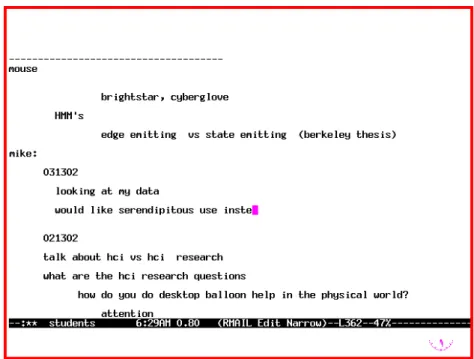
This note taking practice occurs regularly given that meetings are a common work activity for this user. A typical example is shown in Figure 4. This is a screen shot captured during a one–on–one meeting a few minutes after the start of the conversation. Here is a reconstruction of the interaction with the wearable that took place during this meeting:
The user first opened the file of all notes on student meetings called “students” (see status line on Emacs buffer). He found the proper place to record new notes about the conversation with this individual by searching for his name, “mike”. He created a new spot for this meeting by entering a few blank lines between the name and the previous meetings notes which start with the line containing “021302”. Next, he typed in a the string “031302” representing March 13th 2002, and a few lines of text that are notes on the current conversation. The user continued to take a few lines of notes for the duration of the meeting.
The area of the file for this person is marked with the line “mike:”. The user said that he uses this convention of a name followed by a colon to attribute some information to a person. Here it is being used to attribute the notes in the next part of the file to Mike and is used as the key when searching for this part of the file. Following that line are subsections for meetings from different days with that person. Each of these begins with strings representing the date and is followed by the notes from that meeting. The text before “mike:” is notes taken during a conversation with a different person.
5.3 Talks and Demonstrations
Over the course of our study, our participant attended several events relevant to his interests such as talks and demonstrations. These activities tended to be one–time meetings with a single person disseminating information. The speaker was often from another institution and usually had infrequent contact with the user outside this event. Talks are often given in a class room or meeting room with the wearable user sitting in the audience. When the user is attending a demonstration, there are usually only a few other people listening to the speaker at one time, and often there are many other demonstrations going on. The user will often walk up to one demonstration, listen and take notes for a few minutes, and then go to another demonstration.
In this setting, the user generates more descriptive and complete notes com-pared to the previous examples. He stated his goal as “want[ing] to refer back
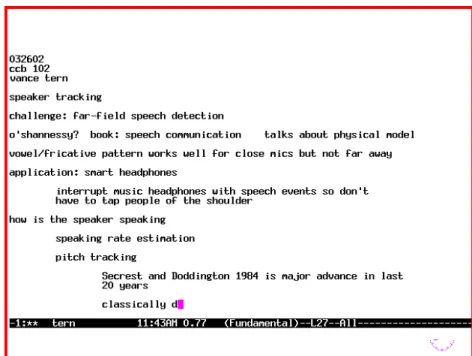
to research notes” whenever they might be relevant. For a talk that the user attends, he creates a new file in the “talks” directory and names the file after the speaker’s last name (for example “Tern” in Figure 5). For a demonstration at a remote site, a new section of an existing file about the place or trip is made, or if needed, a new file is created.
The notes start with some basic context about the situation, usually includ-ing the date, person, and location. Tabs and new lines are used to separate and organize the ideas represented in the notes (Figure 5). The user actively structures, restructures, and fills in more details as the talk progresses and his understanding of the content changes.
Fig. 5.Research notes taken during a talk.
5.4 Contact Management
The wearable user has a file named “phones” devoted to contacts. He uses this file to help manage information about the people he knows. It contains information such as names, phone numbers, email addresses, titles, and locations or addresses of people. In addition to this traditional contact information, the user includes other reminders about the person which are stored in the same file. He often has a note about when he last met the person and why they met, or a more general description of why that person is included in the file. Directions to locations are not uncommon and sometimes include travel times.
The user indicated that he would write down new information when he met someone. Usually, this new information came from a business card. Our data also showed that the user also occasionally copied email signatures from messages stored on the machine into the file.
This file is used when the user wants to remember details about a person he just met or to recall information about someone he met previously. When he encounters someone he has met before, the user quickly searches through the file during the conversation to find when they last met and other information about that person’s work.
In Figure 6, we see the variety of ways the user records information about his contacts. For example, the first line was entered because the user frequents a local sandwich shop and repeatedly sees the same employee. However, he can never remember his name, Yan. One time, the wearable user asked for the employee’s name and wrote it down at the top of this file so he could look it up the next time he was there. The information for Mara Wareall, Mark Tersey and Dakis Yahonce was all entered while the user was organizing a business dinner. He went through the “phones” file ensuring that he knew how to contact all of the people attending. He did not have any information for these people in the file so he added it.
5.5 Scratch Pad
While the previous examples occurred regularly, there are other interactions that are less typical but demonstrate the versatility of the user and his wearable computer. One instance is the computer’s use as a scratch pad:
After a pause in using the machine of about ten minutes, the user was at a command line prompt in an xterm. He cleared the screen and started entering a string of numbers at a moderate rate: “1 3 2 4.5 3 6.75 4 1...”. The input was obviously not a command to be executed. After 43 seconds, a total of 10 numbers were entered. Then there was a pause of 13 minutes after which the user continued use of the machine by first closing the xterm, erasing the numbers.
When queried about the purpose of the numbers in an interview session, the user indicated that he was doing some math in his head and was writing down the intermediate results. He happened to use the xterm that was available on screen. He did not want to worry about opening a file or saving the information and just needed to jot down some numbers.
The user’s own working memory or a scratch piece of paper could have suf-ficed, but the wearable provided adequate support for this type of task. He was able to use the wearable as a scratch pad since there was very little setup time. The machine was most likely more convenient than looking for a piece of paper since his machine is always with him and has been integrated into his way of working.
6
Discussion
These examples of “today”, recurring meetings, talks and demonstrations, con-tact management, and scratch pad show three main trends: the wearable as a device to augment the user’s memory, the wearable used as an aid for a primary task, and information organization. These items highlight the versatility of the wearable computer and the strategies adopted by the user to enable effective use in everyday situations.
6.1 Memory Augmentation
A key theme of the wearable’s use supported by our data collection and exempli-fied in the previous section is how the user has adopted the wearable computer as a tool to augment his memory. The machine is employed to aid the user’s mem-ory over a spectrum of time frames and in a large variety of situations. There is a low cost associated with machine use because the interaction is quick and the machine is almost always with the user. The user leverages these features to store information in his self–described “other brain”.
The majority of interactions with the machine augment the user’s long term memory in some way. The user relies on the machine’s perfect storage capability
to compensate for the fact that his memories can degrade with time. The “today” file is used to remember near term events. The meeting notes serve as reminders in the context of the meeting about past discussions. The “phones” file archives a variety of information about whom the user has met. Lastly, notes such as those from talks and demos comprise a large amount of archived information relevant to the user’s work.
On a few occasions, the data revealed the user applying the wearable as a tool for short term memory augmentation. These interactions are characterized by the need to remember a small number of items for no more than a few minutes. The previous scratch pad example demonstrates this technique. The user em-ployed the wearable because it was a convenient place to jot down some numbers while performing calculations in his head. Instead of remembering the tempo-rary values or finding some other support mechanism, the wearable computer interaction was fast enough and the machine flexible enough to aid the user. Like working memory, the items are temporary, and there is no need for long term storage.
While the user employs the wearable computer for augmented memory sup-port, it often does not replace the user’s memory. It serves as a repository for details, and the notes provide cues to refresh the user’s memory.
6.2 Wearable as Secondary Focus of Attention
While the machine is commonly used to augment the user’s memory, most of the interaction occurs under tight attention or time constraints because the user is actively involved in some other primary task. In these situations in which the user is often engaged with other people, the primary use of the wearable is in a support role. In a conversation, the user might take notes on points of interest or retrieve support material from the machine relevant to the discussion. However, the primary focus is still on the conversation at hand, and the user tries to adhere to the social constraints of the situation.
While engaged in another activity, the user must quickly make many decisions that govern his interaction with the machine. First, to use the machine effectively for memory augmentation, the user must be able to know where to store new notes or find old information. The user has developed several strategies that revolve around the organization of his information which enable him to quickly return to the task at hand.
While taking notes, the user also decides how much effort and time to spend on recording the information. For a subject familiar to the user, he may only record details that he might otherwise forget such as during a weekly meeting (Figure 4). For less familiar material of interest, he might spend more time taking richer notes (Figure 5). The process of recording the information with the wearable computer tends to take minimal attention as the user touch types his notes at a rapid pace (approximately 55 words per minute) and the head–up display enables him to check on the notes being written with a quick glance.
Even while primarily engaged in another activity, it is clear from the data that the user does occasionally shift his focus to the machine while recording
information. This usually takes the form of editing the content of the notes or restructuring them. On several occasions, the user would go back a few lines and change a line of text or expand on an idea by writing down more details. The user indicated that the changes in the structure of the notes were so that the information would be easier to access when needed. Furthermore, he said that if he did not spend the time to organize the information while taking it he knew he would not go back later to do so.
On some occasions, the user spends time directly interacting with the ma-chine. These interactions usually center around maintenance of his information. There might be other people around, but he is not engaged in activity with them. For example, although the user generally decides where to place information as he is storing it, sometimes he explicitly spends time consolidating and organiz-ing his data. When the user was on a trip and preparorganiz-ing to meet his hosts and attend a demo, he spent part of the morning going through a collection of email he had gathered about that trip. He went through the email copying out contact information, placing it into the “phones” file. He annotated and rearranged the information so he could refer to it later that day when he met his hosts.
6.3 Information Organization
The data show that the user has developed an intricate scheme for organizing his information space. In addition to using traditional file hierarchies, there is often structure within individual files. The notes from a meeting (Figure 4) represent a composite file consisting of several separate entries from meetings with different people on different days. Another example of this technique includes taking notes in a file containing several emails on a subject. In general, tabs, blank lines, dashed lines, or email headers are used to define the structure within a file.
Within a composite file, the user can impose additional structure to keep related information together. In the “phones” file, the user indicated that he often tries to group people from the same organization together (Figure 6). The student notes file is organized by person at the highest level. Each area devoted to an individual is further subdivided into meetings labeled with the date (Figure 4).
There were only a small number of explicit retrievals found in the data; however, the composite file structure might facilitate incidental access. Because the user co-locates related information he can quickly and easily review previous notes as he is about to enter new ones.
It is also worth reiterating that none of the applications our participant used during our study were designed specifically for wearable computers. The current machine and programs are sufficiently flexible to enable this expert user to operate in these conditions with the aid of his strategies. However, there is poor support for a novice user attempting to accomplish similar tasks.
7
Future Work
While we gained insightful data from our user, we are interested in performing a followup study to examine other everyday wearable computer users’ practices. Again due to the extremely small user population, we will not be able to char-acterize the design space fully. However, we believe other users might have their own interesting practices that could be leveraged in future wearable computer designs.
Through the data obtained in our case study we have been able to examine an expert user’s practices, and we have identified the computer’s role in augmenting his memory. Now that we have begun to characterize the situations in which this expert user employs the wearable, we can explicitly study key themes such as incidental access, augmented memory, and secondary attention. Furthermore, we can use our preliminary findings to begin designing better support for these tasks.
More generally, work needs to be done on reducing the overhead of using the computer. The user has been able to use the wearable’s current interface and applications for years, but there is room for improvement. With a large portion of the computer’s use happening in a secondary support role, it is critical that the machine minimize its needs for the user’s attention so the user’s focus can remain on his primary task. While doing so, the wearable should retain its power and the flexibility to be adopted into various everyday situations.
A key aspect of designing new wearable applications will be reducing the need for the expert’s strategies of organization. By creating explicit support in the applications for the uses identified in this work, we can begin developing interfaces better suited for novice users. Likewise explicit application support would also hopefully reduce the breakdowns currently experienced in the user’s strategies.
8
Conclusion
This case study is a first step in understanding some of the capabilities a wearable computer can provide in supporting everyday life. We found that the wearable computer was used by the expert to aid his memory in a large variety of situa-tions. The wearable was occasionally the primary focus of attention; however, it is also common for the machine to be used in a secondary role supporting an-other primary task. We found the user developed several strategies that enabled him to use the wearable computer in situations where his attention is limited. This initial understanding of an early adopter’s expert work practices will help direct our exploration into the potential of wearable computers. Our findings will also help to enable the design of applications suited to the conditions of everyday use.
9
Acknowledgements
This work is funded in part by NSF Career Grant #0093291. Thanks to Amanda Lyons, Gregory Abowd and Thad Starner for their contributions.
References
1. H. Beyer and K. Holtzblat. Contextual Design: Defining Customer-Centered Sys-tems, chapter Contextual Inquiry in Practice. Morgan Kaufmann, 1998.
2. A. Kidd. The marks are on the knowledge worker. InConference proceedings on Human factors in computing systems, pages 186–191. ACM Press, 1994.
3. K. Lyons and T. Starner. Mobile capture for wearable computer usability testing. InProceedings of IEEE International Symposium on Wearable Computing (ISWC 2001), Zurich, Switerland, 2001.
4. J. Moffett, D. Wahila, C. Graefe, J. Siegel, and J. Swart. Enriching the design pro-cess: Developing a wearable operator’s assistant. InIEEE Intl. Symp. on Wearable Computers, pages 35–42, Atlanta, GA, 2000.
5. J. Ockerman. Task Guidance and Procedure Context: Aiding Workers in Appro-priate Procedure Following. PhD thesis, Georgia Institute of Technology, Atlanta, GA, April 2000.
6. M. Perry, K. O’Hara, A. Sellen, B. Brown, and R. Harper. Dealing with mobility: understanding access anytime, anywhere.ACM Transactions on Computer-Human Interaction (TOCHI), 8(4):323–347, 2001.
7. B. J. Rhodes. Just-In-Time Information Retrieval. PhD thesis, MIT Media Lab-oratory, Cambridge, MA, May 2000.
8. D. A. Ross and B. B. Blasch. Evaluation of orientation interfaces for wearable com-puters. InProceedings of IEEE International Symposium on Wearable Computing (ISWC 2000), pages 51–58, Atlanta, GA, 2000.
9. J. Siegel and M. Bauer. A field usability evaluation of a wearable system. InIEEE Intl. Symp. on Wearable Computers, pages 18–22, Cambridge, MA, 1997.
10. T. Starner. Wearable Computing and Context Awareness. PhD thesis, MIT Media Laboratory, Cambridge, MA, May 1999.
11. R. Want, B. N. Schilit, N. I. Adams, R. Gold, K. Petersen, D. Goldberg, J. R. Ellis, and M. Weiser. An overview of the PARCTAB ubiquitous computing experiment.